WO2013171919A1 - 表示制御装置、制御プログラム、および表示装置の制御方法 - Google Patents
表示制御装置、制御プログラム、および表示装置の制御方法 Download PDFInfo
- Publication number
- WO2013171919A1 WO2013171919A1 PCT/JP2012/072394 JP2012072394W WO2013171919A1 WO 2013171919 A1 WO2013171919 A1 WO 2013171919A1 JP 2012072394 W JP2012072394 W JP 2012072394W WO 2013171919 A1 WO2013171919 A1 WO 2013171919A1
- Authority
- WO
- WIPO (PCT)
- Prior art keywords
- character
- input
- candidate
- screen
- character string
- Prior art date
- Legal status (The legal status is an assumption and is not a legal conclusion. Google has not performed a legal analysis and makes no representation as to the accuracy of the status listed.)
- Ceased
Links
Images





Classifications
-
- G—PHYSICS
- G06—COMPUTING OR CALCULATING; COUNTING
- G06V—IMAGE OR VIDEO RECOGNITION OR UNDERSTANDING
- G06V30/00—Character recognition; Recognising digital ink; Document-oriented image-based pattern recognition
- G06V30/10—Character recognition
- G06V30/32—Digital ink
-
- G—PHYSICS
- G06—COMPUTING OR CALCULATING; COUNTING
- G06F—ELECTRIC DIGITAL DATA PROCESSING
- G06F18/00—Pattern recognition
-
- G—PHYSICS
- G06—COMPUTING OR CALCULATING; COUNTING
- G06F—ELECTRIC DIGITAL DATA PROCESSING
- G06F3/00—Input arrangements for transferring data to be processed into a form capable of being handled by the computer; Output arrangements for transferring data from processing unit to output unit, e.g. interface arrangements
- G06F3/01—Input arrangements or combined input and output arrangements for interaction between user and computer
- G06F3/03—Arrangements for converting the position or the displacement of a member into a coded form
- G06F3/041—Digitisers, e.g. for touch screens or touch pads, characterised by the transducing means
-
- G—PHYSICS
- G06—COMPUTING OR CALCULATING; COUNTING
- G06F—ELECTRIC DIGITAL DATA PROCESSING
- G06F3/00—Input arrangements for transferring data to be processed into a form capable of being handled by the computer; Output arrangements for transferring data from processing unit to output unit, e.g. interface arrangements
- G06F3/01—Input arrangements or combined input and output arrangements for interaction between user and computer
- G06F3/048—Interaction techniques based on graphical user interfaces [GUI]
- G06F3/0487—Interaction techniques based on graphical user interfaces [GUI] using specific features provided by the input device, e.g. functions controlled by the rotation of a mouse with dual sensing arrangements, or of the nature of the input device, e.g. tap gestures based on pressure sensed by a digitiser
- G06F3/0488—Interaction techniques based on graphical user interfaces [GUI] using specific features provided by the input device, e.g. functions controlled by the rotation of a mouse with dual sensing arrangements, or of the nature of the input device, e.g. tap gestures based on pressure sensed by a digitiser using a touch-screen or digitiser, e.g. input of commands through traced gestures
- G06F3/04883—Interaction techniques based on graphical user interfaces [GUI] using specific features provided by the input device, e.g. functions controlled by the rotation of a mouse with dual sensing arrangements, or of the nature of the input device, e.g. tap gestures based on pressure sensed by a digitiser using a touch-screen or digitiser, e.g. input of commands through traced gestures for inputting data by handwriting, e.g. gesture or text
-
- G—PHYSICS
- G06—COMPUTING OR CALCULATING; COUNTING
- G06V—IMAGE OR VIDEO RECOGNITION OR UNDERSTANDING
- G06V10/00—Arrangements for image or video recognition or understanding
- G06V10/98—Detection or correction of errors, e.g. by rescanning the pattern or by human intervention; Evaluation of the quality of the acquired patterns
-
- G—PHYSICS
- G06—COMPUTING OR CALCULATING; COUNTING
- G06V—IMAGE OR VIDEO RECOGNITION OR UNDERSTANDING
- G06V30/00—Character recognition; Recognising digital ink; Document-oriented image-based pattern recognition
- G06V30/10—Character recognition
- G06V30/32—Digital ink
- G06V30/36—Matching; Classification
-
- G—PHYSICS
- G06—COMPUTING OR CALCULATING; COUNTING
- G06V—IMAGE OR VIDEO RECOGNITION OR UNDERSTANDING
- G06V30/00—Character recognition; Recognising digital ink; Document-oriented image-based pattern recognition
- G06V30/10—Character recognition
- G06V30/28—Character recognition specially adapted to the type of the alphabet, e.g. Latin alphabet
- G06V30/287—Character recognition specially adapted to the type of the alphabet, e.g. Latin alphabet of Kanji, Hiragana or Katakana characters
Definitions
- the present invention relates to a display control device, an electronic device, a control program, and a display device control method, and more particularly, to a display control device that controls a display device that includes a touch panel that can input characters by handwriting by contact.
- the electronic device includes a display control device for recognizing characters handwritten by a user and displaying characters obtained as a result of character recognition.
- a plurality of candidates estimated as candidates for the handwritten character may be obtained.
- a direct input type display in which the display control device itself determines a candidate to be displayed as an input character from a plurality of candidates (input character candidates) obtained as a result of character recognition.
- a control unit exists.
- Patent Document 1 when a user inputs a handwritten character in a character input frame, pattern matching is performed between the input data of the handwritten character and a character pattern stored in a recognition dictionary, and recognition with the smallest recognition distance is performed.
- a character recognition device that displays candidates is disclosed.
- Patent Documents 2 to 4 disclose a direct input type display control device that displays one candidate determined by the display control itself from among character candidates obtained as a result of character recognition.
- the input character candidate determined and displayed by the direct input type display control device may not be a correctly recognized character. Therefore, there is a possibility that the direct input type display control devices disclosed in Patent Documents 1 to 5 may display an erroneous recognition result character.
- an input selection type display control apparatus that allows the user to select a correct input character candidate from input character candidates obtained as a result of character recognition has been invented.
- Patent Document 6 recognizes a plurality of candidate characters when a recognition result is not specified as one as a result of recognition processing of characters input by handwriting in a handwriting input area, and there are a plurality of candidate characters.
- a display device for displaying in a candidate display area is disclosed. The user selects a touched candidate character by touching any of the candidate characters displayed in the recognition candidate display area.
- the display device itself determines whether or not the recognition result is specified as one, that is, whether or not the recognition result is correct. In such a case, there is a problem that the display device displays a character of an incorrect recognition result.
- Patent Document 7 As another input selection type display control device, in Patent Document 7, when the character recognition result displayed in the recognition result display area is incorrect, when the user touches the misrecognized character, the recognition candidate display frame is displayed. Discloses an input device for displaying recognition candidates. This document describes that a user can correct a misrecognized character by selecting a correct recognition candidate from the above recognition candidates.
- Patent Document 7 requires an operation in which the user touches a misrecognized character in order to confirm whether or not a correct recognition result is selected. Due to the necessity of such extra operations, the input device has a problem that the user cannot perform smooth character input.
- the document describes that the input device automatically performs kana-kanji conversion processing for the recognition result. Therefore, there is a problem that the input device may perform kana-kanji conversion which is not requested by the user for characters input by the user.
- the present invention has been made in view of the above problems, and its purpose is to display the input character candidate, the input character string candidate, and the converted character string candidate created from the recognition result of the handwritten character, so that the user can
- An object of the present invention is to provide a display control device and the like that can immediately confirm whether or not a character is converted from a column candidate.
- a display control device provides (1) an input character candidate display unit that performs processing for recognizing a character handwritten by a user touching the screen and displaying on the screen a candidate character that is assumed to be input by the user as an input character candidate; , (2) an input character string candidate display means for performing processing for displaying, on the screen, a character string candidate presumed to be input by the user using the character selected from the input character candidates as an input character string candidate; , (3)
- the present invention is characterized by comprising converted character string candidate display means for performing processing for displaying on the screen a converted character string candidate obtained by character-converting the input character string candidate.
- the control method of the display apparatus which concerns on this invention
- Input character candidate display for recognizing characters handwritten by a user touching the screen of the display device and displaying on the screen a candidate for a character that is assumed to be input by the user as an input character candidate Steps,
- the user can select a desired conversion character string from the conversion character string candidates. For example, when the user does not know how to write a kanji intended to be input, the user inputs the kana reading of the kanji by handwriting on the screen. Then, the kanji characters converted based on the handwritten characters are displayed on the screen as converted character string candidates. Therefore, the user can select a desired kanji from the displayed converted character string candidates.
- the display control apparatus displays the input character candidate, the input character string candidate, and the converted character string candidate created from the recognition result of the handwritten character, so that the user can glance at the converted character string candidate and desire it.
- the conversion character string candidate can be selected, and the input character candidate and the input character string candidate are viewed, and whether or not the conversion character string candidate is character-converted from the correct recognition result immediately Can be confirmed.
- the display control device can improve the convenience when the user inputs handwritten characters.
- each means of the display control device can be executed on a computer by a control program. Furthermore, by storing the control program in a computer-readable recording medium, the control program can be executed on an arbitrary computer.
- the display control apparatus recognizes characters handwritten by the user by touching the screen, and displays the character candidates that the user is supposed to input as the input character candidates on the screen.
- Input character candidate display means for performing the processing to be performed, and processing for displaying on the screen a character string candidate presumed to be input by the user as an input character string candidate using a character selected from the input character candidates.
- the display control device control method also recognizes a character handwritten by a user by touching the screen of the display device, and selects a character candidate that is assumed to be input by the user.
- Input character candidate display step to be displayed on the screen as described above, and using the character selected from the input character candidates, a character string candidate that is assumed to be input by the user is displayed on the screen as an input character string candidate.
- a converted character string candidate display step for displaying on the screen a converted character string candidate obtained by character-converting the input character string candidate.
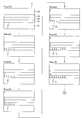
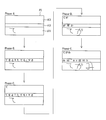
- FIG. 1 It is a block diagram which shows the structure of the electronic device which concerns on one Embodiment of this invention. It is a schematic diagram which shows the screen displayed on the display part of the electronic device shown in FIG. 2 is a flowchart showing an outline of an operation of a display control device provided in the electronic apparatus shown in FIG. 1. It is a flowchart which shows the flow of the display transition process performed by the control part of the electronic device shown in FIG. It is explanatory drawing 1 for demonstrating the transition of the screen in a display transition process. It is explanatory drawing 2 for demonstrating the transition of the screen in a display transition process. It is explanatory drawing 3 for demonstrating the transition of the screen in a display transition process.
- FIG. 14 is an explanatory diagram 4 for explaining the transition of the screen in the display transition process.
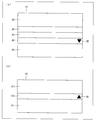
- (A) And (b) is a schematic diagram which shows the screen displayed on a display part, (a) shows the 1st character input screen, (b) has shown the 2nd character input screen. It is a schematic diagram which shows the screen displayed on a display part, when the 1st character input screen is displayed on the display part. It is a flowchart which shows the flow of the display transition process performed by a control part, when the 1st character input screen is displayed on the display part.
- the 1st character input screen is displayed on the display part, it is explanatory drawing 1 explaining the transition of the screen in a display transition process.
- FIG. 1 is a block diagram showing the configuration of the electronic device 1.
- the electronic device 1 includes a display unit 11, a display control device 12, and a storage unit 13.
- the display unit 11 includes a liquid crystal display device and a touch panel (both not shown) arranged in a state of being superimposed on the liquid crystal display device.
- the display unit 11 When the user touches the touch panel using his / her finger or a touch pen, the display unit 11 outputs detection information for notifying detection of contact and contact position information indicating the detection position of contact.
- the touch panel may be any touch panel that can detect the presence / absence of contact by the user and contact position information, and is, for example, a pressure sensitive, electrostatic sensing, or light sensitive touch panel.
- the display control device 12 receives a user's touch operation on the touch panel by receiving the output of the display unit 11. Further, the display control device 12 controls the display on the display unit 11. Specifically, the display control device 12 displays a character input screen P (see FIG. 2) on the display unit 11. Details of the display control device 12 and the character input screen P will be described later.
- the storage unit 13 includes a character pattern storage unit 131 and a Japanese input dictionary 132.
- the character pattern storage unit 131 stores information related to characteristics of various character shapes such as numbers, kana characters, kanji, and alphabets.
- the Japanese input dictionary 132 when a certain character is input, information on a character string that is frequently input following the character, or when a certain character string is converted, Information on a character string that is often selected as a character conversion character string is stored.
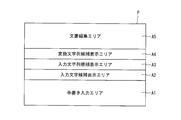
- FIG. 2 shows a schematic diagram of a character input screen P displayed on a part or the entire screen area of the display unit 11 by the display control device 12.
- the character input screen P includes the handwriting input area A1, the input character candidate display area A2, the input character string candidate display area A3, the converted character string candidate display area A4, and the document editing area A5. Divided into five areas.
- the handwriting input area A1 is an area for the user to input characters by handwriting.
- the input character candidate display area A2, the input character string candidate display area A3, the converted character string candidate display area A4, and the document editing area A5 correspond to the handwritten characters input in the handwriting input area A1 as described above. This is an area for displaying character strings.
- the document editing area A5 is also used for displaying text data and for editing the document by the user operating the text data.
- the display control device 12 includes an operation receiving unit 1211, a character input screen switching unit 1212, a document editing area display unit 1216, an input character candidate display unit 1213, an input character string candidate display unit 1214, and a converted character.
- Column candidate display means 1215 is provided.
- the operation receiving unit 1211 receives a user operation by touching the display unit 11.
- the operation accepting unit 1211 accepts handwriting input of characters by touching the handwriting input area A1 (see FIG. 2).
- the character input screen switching means 1212 switches the character input screen displayed on the display unit 11.
- the input character candidate display means 1213 recognizes the handwritten character received by the operation accepting unit 1211 and sets the character candidate that is assumed to be input by the user as the input character candidate. Display). Note that the character estimated to be input by the user has, for example, the same or similar feature as that of the handwritten character by pattern matching processing, that is, the recognition distance is small (high similarity). And the character determined by the input character candidate display means 1213. Hereinafter, such characters may be referred to as valid input character candidates.
- the input character string candidate display unit 1214 refers to the Japanese input dictionary 132 to create an input character string candidate that is a candidate for the character string that is assumed to be input by the user from the input character candidate. This is displayed in the input character string candidate display area A3 (see FIG. 2).
- the converted character string candidate display means 1215 displays the converted character string candidate obtained by character-converting the input character string candidate in the converted character string candidate display area A4.
- the character conversion referred to here includes kana-kanji conversion, thesaurus conversion (synonym conversion), and homonymous kanji conversion in addition to predictive conversion.
- the document editing area display unit 1216 displays the input character string candidate displayed in the input character string candidate display area A3 as a character string whose input is not yet confirmed in the document editing area A5 (see FIG. 2). In addition, when the user touches any one of the conversion character string candidates displayed in the conversion character string candidate display area A4, the document editing area display unit 1216 sets the conversion character string candidate as a character string whose input has been confirmed. It is displayed in the document editing area A5.
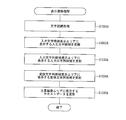
- the operation reception unit 1211 is in a standby state waiting for a touch on the character input screen P (S101).
- the operation reception unit 1211 determines which of the areas A1 to A5 of the character input screen P has been touched (S102).
- the input character string candidate display unit 1214 displays the input character string candidate display area A3.
- the character corresponding to the input character candidate displayed in the input character candidate display area A2 and constituting the character string displayed in (2) is replaced with the touched input character candidate (S103B).
- the input character string candidate “Iroha” is displayed in the input character string candidate display area A3, and the input character candidate display area A2 corresponds to the third character of the input character string candidate “Iroha”.
- the input character string candidate (“ha” “ho”)
- the converted character string candidate display unit 1215 converts the converted character string candidate displayed in the converted character string candidate display area A4 to the updated input character string.
- the candidate is updated to a converted character string candidate obtained by character conversion.
- the document editing area display unit 1216 updates the input character string candidate before update displayed in the document edit area A5 to the input character string candidate after update.
- control unit 121 does not execute anything (NOP; no operation) (S103C).
- the document editing area display unit 1216 displays the cursor in the document editing area A5.
- the character string at the position is replaced with the touched conversion character string candidate (S103D).
- the document editing area display unit 1216 clears the text data displayed in the document editing area A5 (S103E).
- the operation accepting unit 1211 After any of the above steps S103A to S103E is executed, the operation accepting unit 1211 returns to a standby state waiting for a touch on the character input screen P (S101).
- Display transition processing As described above, when the user inputs handwritten characters in the handwriting input area A1, the respective units 1213 to 1216 of the control unit 121 execute display transition processing.
- the display transition process will be described below with reference to FIGS. 5 and 6 and the flowchart shown in FIG. FIG. 4 is a flowchart showing the flow of the display transition process.
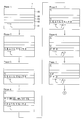
- 5 and 6 are explanatory diagrams for explaining screen transitions when Japanese (Hiragana) is input in the handwriting input area A1.
- the operation accepting unit 1211 detects an input to the handwriting input area A1
- the input character candidate display unit 1213 is assumed to be the character “te?” (“Te”) handwritten by the user in the handwriting input area A1.
- Character recognition process S1031A; see Phase 1 in FIG. 5).
- the input character candidate display means 1213 determines a character candidate that is assumed to be input by the user based on the character recognition result, and uses the determined candidate as an input character candidate. (S1032A; see Phase 2 in FIG. 5).
- the input character candidate display means 1213 determines the input character candidate, first, the character of the shape of the handwritten character (“te?”) Is extracted by character recognition. Next, the input character candidate display unit 1213 compares the extracted handwritten character features with the character features stored in the character pattern storage unit 131 (pattern matching), and selects one character in the order of the closest recognition distance. Alternatively, a plurality of characters are set as the input character candidates.
- the input character candidate display means 1213 displays the input character candidates side by side in the order of the input character candidates whose recognition distance to the handwritten character is short.
- ten input character candidates arranged in the order of “Te” ⁇ “O” ⁇ “To” ⁇ (below) are displayed in the input character candidate display area A2. These are input character candidates whose recognition distance is close in order from the left, and the input character candidate “te” is the input character candidate whose recognition distance is the closest to the handwritten character “te?” (Hereinafter referred to as the most effective input character candidate). ).
- the input character string candidate display unit 1214 uses the input character candidates displayed in the input character candidate display area A2 to input character string candidates that are character string candidates that the user is supposed to input. (S1033A; see Phase 3 in FIG. 5). Specifically, the input character string candidate display unit 1214 creates an input character string candidate using the most effective input character candidate (“te”) from the ten input character candidates. The input character string candidate display means 1214 displays the character string “te” thus created in the input character string candidate display area A3 as an input character string candidate.
- the converted character string candidate display means 1215 displays the converted character string candidate obtained by character-converting the input character string candidate (“te”) in the converted character string candidate display area A4 (S1034A; FIG. 5 Phase 4).
- the converted character string candidate display means 1215 is often statistically converted from the input character string candidate (“te”) by referring to the Japanese input dictionary 132 stored in the storage unit 13. Character strings are extracted and used as the converted character string candidates. That is, the converted character string candidate display unit 1215 performs predictive conversion of the input character string candidate (“te”). For Japanese input, conversion character string candidates obtained as a result of predictive conversion include character strings consisting of various characters such as kanji, kanji mixed kana, half-width / full-width katakana, hiragana, and half-width / full-width numbers. Etc. are included. In the Phase 4 screen, five conversion character string candidates (“de”, “hand”, “reflecting”, “shining”, “even”) predicted from the input character string candidate (“te”) are displayed in the converted character string candidate display area. A4 is displayed.
- the document editing area display unit 1216 displays the input character string candidate (“tega”) displayed in the input character string candidate display area A3 in the document editing area A5 (see S1035A; Phase 4).
- the operation accepting unit 1211 returns to a standby state waiting for a touch on the character input screen P (step S101 in FIG. 3).
- the respective units execute the processes of steps S1031A to S1035A again to thereby display the character strings displayed in the areas A2 to A5. Update.
- the display transition process when the user inputs the second character will be described below.
- the input character candidate display means 1213 displays a new handwritten character (“ga?”) As a character. Recognize (S1031A; refer to Phase 5 in FIG. 5), and display the new input character candidates (“ga”, “ga”, “ka”) obtained in this manner in the input character candidate display area A2 (S1032A; FIG. 5). (See Phase 6).
- the input character string candidate display means 1214 creates a new input character created by combining the most effective input character candidate (“GA”) with the previously displayed input character string candidate (“TE”).
- the column candidate (“tega”) is displayed in the input character string candidate display area A3 (S1033A; see Phase 7 in FIG. 5).
- the converted character string candidate display unit 1215 displays a new converted character string candidate (“letter”, “handprint”, “handy” etc) predicted and converted from the new input character string candidate (“tega”).
- the converted character string candidate display area A4 is displayed (S1034A; see Phase 8 in FIG. 6).
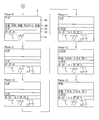
- the document editing area display means 1216 displays the input character string candidate (“tega”) displayed in the input character string candidate display area A3 in the document editing area A5 (see S1035A; Phase 8). At this time, the document editing area display unit 1216 displays the new converted character string candidate so as to replace the character string whose input is not yet confirmed in the document editing area A5, that is, the character string on which the cursor is hung. In the Phase 7 screen, the cursor is placed under the conversion character string candidate “te”, and in the Phase 8 screen, the conversion character string candidate “te” is replaced with a new conversion character string candidate “tega”.
- Phases 9 to 12 show screen transitions from when the character “mi?” Is entered in the handwriting input area A1 until the character string “tegami” is displayed in the document editing area A5. Note that the display transition process executed in Phases 9 to 12 is the same as the display transition process executed in Phases 5 to 8, and thus description thereof is omitted.
- the document editing area display unit 1216 converts the conversion character string candidate touched by the user from the conversion character string candidates displayed in the conversion character string candidate display area A4 as a character string whose input is confirmed.
- the information is displayed in the edit area A5 (step S103D in FIG. 3).
- the user touches a conversion character string candidate (“letter”) from the conversion character string candidates the character string “letter” whose input is confirmed is displayed in the document editing area A5. It shows how it was done.
- the display control device 12 displays a character string obtained by combining the plurality of characters in the document editing area A5 in a state where the input has not been confirmed, However, by selecting (touching) the converted character string candidate displayed in the converted character string candidate display area A4, the input of the character string is confirmed. Accordingly, unlike the above-described character recognition device (Patent Document 1), since the user does not request to confirm the input character every time the user inputs one character, the user can smoothly input the character.
- the input character candidate display unit 1213 recognizes the input character (“f?”) (S1031A; see Phase 1A in FIG. 7). .
- the input character candidate display means 1213 displays the input character candidates (“f”, “F”, “T”, “1-t”) obtained as a result of character recognition in the input character candidate display area A2 ( S1032A; see Phase 2A in FIG. 7).
- the input character string candidate display unit 1214 displays the input character candidate (“f”) which is the most effective input character candidate in the input character string candidate display area A3 (S1033A; see Phase 3A in FIG. 7).
- the converted character string candidate display means 1215 displays the converted character string candidate (“f”) obtained by character-converting the input character string candidate (“f”) in the converted character string candidate display area A4. (S1034A; see Phase 4A in FIG. 7).
- the document editing area display unit 1216 displays the input character string candidate (“f”) displayed in the input character string candidate display area A3 in the document editing area A5 (see S1035a; Phase 4A).
- the operation reception unit 1211 returns to a standby state waiting for a touch on the character input screen P (step S101 shown in FIG. 3).
- the input character candidate display unit 1213 recognizes a new handwritten character (“a?”). (S1031A; see Phase 5A in FIG. 7), and display the new input character candidates (“a”, “A”, “d” etc) thus obtained in the input character candidate display area A2 (S1032A; Phase 6A in FIG. 7). reference).
- the input character string candidate display unit 1214 creates a new input character created by combining the most effective input character candidate (“a”) with the previously displayed input character string candidate (“f”).
- the column candidate (“fa”) is displayed in the input character string candidate display area A3 (S1033A; see Phase 7A in FIG. 7).
- the converted character string candidate display unit 1215 predictively converts the new input character string candidate (“fa”) by referring to the English input dictionary and the thesaurus stored in the storage unit 13.
- the new converted character string candidates (“fa”, “fad”, “fam” etc) obtained by the above are displayed in the converted character string candidate display area A4 (S1034A; see Phase 8A in FIG. 8).
- the document editing area display means 1216 displays the input character string candidate (“fa”) displayed in the input character string candidate display area A3 in the document editing area A5 (S1035A; see Phase 8A). At this time, the document editing area display means 1216 replaces the character string on which the cursor is hung in the document editing area A5 (the cursor is displayed below the character string “f” on the Phase 7A screen). The converted character string candidate (“fa”) is displayed.
- Phase 8A the screen transitions of Phases 9A to 12A indicate screen transitions from when the character “t?” Is input in the handwriting input area A1 to when the character string “fat” is displayed in the document editing area A5. .
- the display transition process in Phases 9A to 12A is the same as the display transition process described in the screen transitions in Phases 5A to 8A, and thus the description thereof is omitted.
- the display control device 12 can switch the character input screen P to another character input screen for display. Details of the switching display will be described below with reference to FIGS. 9A and 9B.
- the state of the display control device 12 when the character input screen P is displayed corresponds to the second character input screen state of the present invention, and when the other character input screen is displayed.
- the state of the display control device 12 corresponds to the first character input screen state of the present invention.
- the character input screen P is referred to as a first character input screen P1
- the other character input screen is referred to as a second character input screen P2.
- FIG. 9A shows the first character input screen P1
- FIG. 9B shows the second character input screen P2.
- the first character input screen P1 shown in FIG. 9A includes a handwriting input area A1, an input character candidate display area A2, an input character string candidate display area A3, a converted character string.
- a candidate display area A4 and a document editing area A5 are displayed.
- a handwriting input area A′1 an input character candidate display area A′2, and a document editing area A′3 are displayed on the second character input screen P2.
- triangular switch button menus SB and SB ′ are displayed on the first character input screen P1 and the second character input screen P2, respectively. Yes. These switching button menus SB and SB ′ are displayed by the character input screen switching unit 1212. When the user touches the switching button menu SB and SB ′, the character input screen switching unit 1212 displays the second character. The input screen P2 and the first character input screen P1 are switched and displayed.
- the character input screen switching unit 1212 displays a guidance that the character input by handwriting can be converted by switching to the first character input screen P1. May be.
- the user can know that the first character input screen P ⁇ b> 1 may be displayed when character input is performed using character conversion.
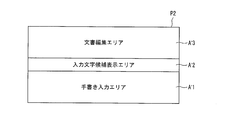
- FIG. 1 is a schematic diagram of the screen of the second character input screen P2.
- the handwriting input area A′1 corresponds to the handwriting input area A1 of the character input screen P shown in FIG. That is, the handwriting input area A′1 is used for the user to input characters by handwriting.
- the input character candidate display area A′2 corresponds to the input character candidate display area A2 of the character input screen P shown in FIG. That is, input character candidates created by the input character candidate display means 1213 are displayed in the input character candidate display area A′2.
- the character selected by the input character candidate display means 1213 from the input character candidates displayed in the input character candidate display area A′2 is displayed.
- the input character candidate display means 1213 selects the most effective input character candidate from the input character candidates and displays it in the document editing area A′3.
- the user normally inputs characters while the first character input screen P1 is displayed.
- the user performs an operation of checking the conversion character string candidate and selecting the conversion character string.
- the user can interrupt the operation of inputting characters by hand for the operation of confirming the input characters, and thus may not be able to concentrate thought on character input and may feel that smooth character input cannot be performed.
- the user switches from the first character input screen P1 to the second character input screen P2 by using the switching button menu SB ′.
- the second character input screen P2 does not require an extra operation such as an operation of confirming the input of the converted character string, the user can perform a smooth character input.
- the user may use the character input screen switching in the following cases.
- the user normally inputs handwritten characters in the handwriting input area A′1 in a state where the second character input screen P2 that allows smooth character input is displayed.
- the user knows the kana reading of a kanji and tries to input a kanji, but cannot accurately handwrite the kanji because the kanji shape is unknown.
- the user switches the second character input screen P2 to the first character input screen P1 using the switching button menu SB.
- a user inputs the kana of the kanji which he wants to input into the handwriting input area A1 in the state where the first character input screen P1 is displayed.
- the converted character string candidates are displayed in the converted character string candidate display area A4 on the first character input screen P1, so that the user selects a desired Chinese character from the converted character string candidates.
- the user may return from the first character input screen P1 to the second character input screen P2 using the switching button menu SB ′.
- the display control device 12 may prompt the user to switch the character input screen.
- the character input screen switching unit 1212 displays the first character
- the switching button menu SB may be highlighted together with a guidance area in which guidance indicating that a conversion character string candidate is automatically created is displayed. This is because it is possible that the user has input handwritten kanji that is prone to be recognized as the reason why the recognition distance between the input character candidate and the character input by handwriting exceeds a predetermined value.
- a guidance area for example, a message such as “can be switched to a screen for editing while checking candidates for character conversion” can be displayed.
- the character input screen switching unit 1212 displays the second character input screen P2.
- the switching button menu SB ′ may be highlighted together with a guidance area in which guidance indicating that an input character candidate created from an input character is a character for which input has been confirmed is displayed as it is. This is because the user may feel troublesome to perform the operation of selecting the conversion character string candidate and confirming the input even though there is no intention to perform character conversion.
- a guidance area for example, a message such as “can be switched to a screen for inputting handwritten characters without conversion” can be displayed.
- the display control device 12 includes the switching button menus SB and SB ′ for freely switching between the second character input screen P2 and the first character input screen P1, thereby enabling smooth character input. It is possible to support character conversion using a dictionary.
- FIG. 11 is a flowchart showing the operation of the display control device 12 when the second character input screen P2 is displayed.
- the operation reception unit 1211 is in a standby state waiting for contact (touch) within the second character input screen P2 (S201).
- the operation receiving unit 1211 When the operation receiving unit 1211 detects a touch in the second character input screen P2, the operation receiving unit 1211 determines a position where the touch is made (S202).
- the display transition process ⁇ is executed by each means 1213, 1216 of the control unit 121 (S203A). Details of the display transition process ⁇ will be described later.
- the operation receiving unit 1211 determines that the input character candidate displayed in the input character candidate display area A′2 is touched (Yes in S202)
- the document editing area display unit 1216 displays the document editing area A′5.
- the character string at the cursor position is replaced with the input character candidate touched (S203B).
- the document editing area display unit 1216 clears the text data displayed in the document editing area A5 (S203C).
- the operation accepting unit 1211 After any of the above steps S203A to S203C is executed, the operation accepting unit 1211 returns to a standby state waiting for a touch on the second character input screen P2 (S201).
- FIG. 12 is an explanatory diagram for explaining the transition of the screen during the display transition process ⁇ .
- the input character candidate display means 1213 recognizes the input handwritten character (“te”) (S203A; Phase A in FIG. 12). reference).
- the input character candidate display means 1213 creates input character candidates (“te” “to” “to” etc) from the result of character recognition and displays them in the input character candidate display area A′2 (S204A; (See Phase B in FIG. 12).
- the document editing area display means 1216 displays the character selected from the input character candidates displayed in the input character candidate display area A′2 in the document editing area A′3 (S205A; see Phase C in FIG. 12). ). At this time, the document editing area display means 1216 selects the most effective input character candidate having the closest recognition distance to the handwritten character (“te?”) From the input character candidates, and edits the document with the input confirmed. Display in area A'3.
- the document editing area A′3 includes characters.
- the column “Tegami” is displayed.
- FIG. 12 shows the display transition when Japanese (Hiragana) is input on the second character input screen, but the second character input screen can also accept handwritten input in a foreign language.
- FIG. 13 shows a display transition when an alphabet (English) is input. Since the display transition in this case is almost the same as the display transition when Japanese is input, the description will be simplified.
- the input character candidate display unit 1213 recognizes the input handwritten character (“f?”) (S203A; FIG. 13). (See Phase 1b).
- the input character candidate display means 1213 creates input character candidates (“f”, “F”, “1-t” etc) from the result of character recognition and displays them in the input character candidate display area A′2 ( S204A; see Phase 2b in FIG. 13).
- the document editing area display unit 1216 displays the input character candidate “f” selected from the input character candidates displayed in the input character candidate display area A′2 in the document editing area A′3 (S205A). ; See Phase 3b in FIG. 13).
- the display of each area A′1 to A′3 is displayed. Each updated state is shown.
- Each unit of the electronic device 1 and the display control device 12 according to the present invention may be configured by hardware logic, or may be realized by software using a CPU as follows.
- the display control device 12 includes a CPU that executes instructions of a control program that realizes each function, a ROM that stores the program, a RAM that expands the program, a memory that stores the program and various data, and the like.
- a storage unit 13 (recording medium) is provided.
- An object of the present invention is to provide a recording medium in which a program code (execution format program, intermediate code program, source program) of a control program, which is software for realizing the functions described above, is recorded so as to be readable by a computer. This can also be achieved by reading the program code recorded on the recording medium and executing it by the computer (or CPU or MPU).
- a program code execution format program, intermediate code program, source program
- Examples of the recording medium include tapes such as magnetic tapes and cassette tapes, magnetic disks such as floppy (registered trademark) disks / hard disks, and disks including optical disks such as CD-ROM / MO / MD / DVD / CD-R.
- Card system such as IC card, IC card (including memory card) / optical card, or semiconductor memory system such as mask ROM / EPROM / EEPROM (registered trademark) / flash ROM.
- the display control device 12 may be configured to be connectable to a communication network, and the program code may be supplied via the communication network.
- the communication network is not particularly limited.
- the Internet intranet, extranet, LAN, ISDN, VAN, CATV communication network, virtual private network, telephone line network, mobile communication network, satellite communication. A net or the like is available.
- the transmission medium constituting the communication network is not particularly limited. For example, even in the case of wired such as IEEE 1394, USB, power line carrier, cable TV line, telephone line, ADSL line, etc., infrared rays such as IrDA and remote control, Bluetooth ( (Registered trademark), 802.11 wireless, HDR, mobile phone network, satellite line, terrestrial digital network, and the like can also be used.
- the display control device is (1) Document editing area display means for displaying on the screen a document editing area for a user to edit a document using text data; (2) comprising character input screen switching means for switching between the first character input screen state and the second character input screen state;
- the first character input screen state is a state in which the input character candidate display means displays the input character candidate, and a character selected from the input character candidate is displayed in the document editing area.
- the input character candidate display means displays the input character candidate
- the input character string candidate display means displays the input character string candidate
- the converted character string candidate display may be displayed by means, and a character string selected from the conversion character string candidates may be displayed in the document editing area.
- a first character input screen state in which characters are selected from input character candidates and displayed in the document editing area, and input character string candidates and converted character string candidates are displayed in addition to the input character candidates. It is possible to switch between the second character input screen state in which the character string selected from the column candidates is displayed in the document editing area.
- the character input screen switching means is configured to display the first character input screen state when the recognition distance of the character candidate estimated to be input by the user is a predetermined value or more. And an input screen state switching area for the user to switch between the second character input screen state and the second character input screen state may be displayed on the screen.
- the input character candidate display means indicates that the user intends to input
- the estimated character recognition distance is greater than or equal to a predetermined value.
- the character input screen switching means displays an input screen state switching area for switching the display control device to the second character input screen state on the screen.
- the user switches to the second character input screen state and inputs the kana reading of the kanji to be input by handwriting. Then, input character string candidates are estimated from the reading kana and displayed, and further converted character string candidates converted from the input character string candidates are displayed on the screen.
- the character input screen switching means further includes a guide area for guiding that the second character input screen state is a state in which a character input by handwriting is automatically converted into a character.
- the second character input screen state is a state in which a character input by handwriting is automatically converted into a character.
- it may be configured to be displayed on the screen.
- the user can know that the handwritten input character is automatically converted by handwriting the character on the second character input screen by visually recognizing the guidance area. Therefore, user convenience can be further improved.
- the present invention can be used for an electronic device equipped with a touch panel capable of handwritten input of characters by contact.
Landscapes
- Engineering & Computer Science (AREA)
- Theoretical Computer Science (AREA)
- Physics & Mathematics (AREA)
- General Physics & Mathematics (AREA)
- Multimedia (AREA)
- General Engineering & Computer Science (AREA)
- Computer Vision & Pattern Recognition (AREA)
- Quality & Reliability (AREA)
- Human Computer Interaction (AREA)
- Life Sciences & Earth Sciences (AREA)
- Artificial Intelligence (AREA)
- Bioinformatics & Cheminformatics (AREA)
- Bioinformatics & Computational Biology (AREA)
- Data Mining & Analysis (AREA)
- Evolutionary Biology (AREA)
- Evolutionary Computation (AREA)
- Character Discrimination (AREA)
- User Interface Of Digital Computer (AREA)
- Document Processing Apparatus (AREA)
Abstract
Description
(1)ユーザーが画面への接触により手書き入力した文字を文字認識し、ユーザーが入力を意図したと推測される文字の候補を入力文字候補として画面に表示する処理を行う入力文字候補表示手段と、
(2)上記入力文字候補から選択される文字を用いて、ユーザーが入力を意図したと推測される文字列の候補を入力文字列候補として画面に表示する処理を行う入力文字列候補表示手段と、
(3)上記入力文字列候補を文字変換した変換文字列候補を画面に表示する処理を行う変換文字列候補表示手段と
を備えたことを特徴としている。
(1)ユーザーが上記表示装置の画面への接触により手書き入力した文字を文字認識し、ユーザーが入力を意図したと推測される文字の候補を入力文字候補として上記画面に表示する入力文字候補表示ステップと、
(2)上記入力文字候補から選択される文字を用いて、ユーザーが入力を意図したと推測される文字列の候補を入力文字列候補として上記画面に表示する入力文字候補表示ステップと、
(3)上記入力文字列候補を文字変換した変換文字列候補を上記画面に表示する変換文字列候補表示ステップと
を含むことを特徴としている。
まず、本実施形態である電子機器1の構成について、図1を用いて説明する。
図2に、表示制御装置12によって表示部11の一部または全部の画面領域に表示される文字入力画面Pの模式図を示す。
次に、表示制御装置12の構成の詳細について、図1および図2を用いて説明する。
続いて、表示制御装置12の動作の概略について、図3に示すフローチャートを用いて説明する。
上述のように、ユーザーが手書き入力エリアA1に手書き文字を入力すると、制御部121の各手段1213~1216は、表示遷移処理を実行する。以下に、図5および図6を参照しつつ、図4に示すフローチャートを用いて、上記表示遷移処理について説明する。なお、図4は、上記表示遷移処理の流れを示すフローチャートである。また、図5および図6は、日本語(平仮名)が手書き入力エリアA1に入力された場合の画面遷移を説明する説明図である。
以上の説明では、手書き入力エリアA1に日本語(平仮名)が入力された場合の画面遷移について説明したが、外国語を手書き入力することもできる。
表示制御装置12は、文字入力画面Pを、他の文字入力画面に切り替えて表示することができる。以下に、その切り替え表示の詳細について、図9の(a)および(b)を用いて説明する。なお、上記文字入力画面Pを表示しているときの表示制御装置12の状態が、本発明の第2文字入力画面状態に対応しており、上記他の文字入力画面を表示しているときの表示制御装置12の状態が、本発明の第1文字入力画面状態に対応している。
次に、第2文字入力画面P2の画面の詳細について、図10を用いて説明しておく。同図は、第2文字入力画面P2の画面の模式図である。
第1文字入力画面P1が表示されているとき、入力文字列候補から作成された変換文字列候補が表示され、ユーザーが上記変換文字列候補のいずれかを選択する。一方、第2文字入力画面P2が表示されているとき、入力文字から作成された入力文字候補が、そのまま入力が確定された状態で文書編集エリアA´3に表示されるので、ユーザーは、変換文字列の入力を確定する操作などの余計な操作を要求されることなく、スムーズな文字入力を行うことができる。
以上のように、表示制御装置12は、第2文字入力画面P2と第1文字入力画面P1とを自由に切り替えるための切替用ボタンメニューSB、SB´を備えていることにより、スムーズな文字入力が可能であるとともに、辞書による文字変換をサポートすることができる。
ここでは、第2文字入力画面P2が表示されているときの表示制御装置12の動作について、図11を用いて説明する。図11は、第2文字入力画面P2が表示されているときの表示制御装置12の動作を示すフローチャートである。
本発明に係る電子機器1および表示制御装置12の各手段は、ハードウェアロジックによって構成してもよいし、次のようにCPUを用いてソフトウェアによって実現してもよい。
(1)ユーザーがテキストデータを用いて文書を編集するための文書編集領域を画面に表示する文書編集領域表示手段と、
(2)第1文字入力画面状態と第2文字入力画面状態とを切り替える文字入力画面切替手段を備え、
上記第1文字入力画面状態は、上記入力文字候補表示手段により上記入力文字候補を表示するととともに、上記入力文字候補から選択される文字を上記文書編集領域に表示する状態であり、
上記第2文字入力画面状態は、上記入力文字候補表示手段により上記入力文字候補を表示するとともに、上記入力文字列候補表示手段により上記入力文字列候補を表示し、さらに、上記変換文字列候補表示手段により上記変換文字列候補を表示し、上記変換文字列候補から選択される文字列を上記文書編集領域に表示する状態である構成としてもよい。
12 表示制御装置
1212 文字入力画面切替手段
1213 入力文字候補表示手段
1214 入力文字列候補表示手段
1215 変換文字列候補表示手段
1216 文書編集領域表示手段
Claims (7)
- ユーザーが画面への接触により手書き入力した文字を文字認識し、ユーザーが入力を意図したと推測される文字の候補を入力文字候補として画面に表示する処理を行う入力文字候補表示手段と、
上記入力文字候補から選択される文字を用いて、ユーザーが入力を意図したと推測される文字列の候補を入力文字列候補として画面に表示する処理を行う入力文字列候補表示手段と、
上記入力文字列候補を文字変換した変換文字列候補を画面に表示する処理を行う変換文字列候補表示手段とを備えたことを特徴とする表示制御装置。 - さらに、ユーザーがテキストデータを用いて文書を編集するための文書編集領域を画面に表示する文書編集領域表示手段と、
第1文字入力画面状態と第2文字入力画面状態とを切り替える文字入力画面切替手段を備え、
上記第1文字入力画面状態は、上記入力文字候補表示手段により上記入力文字候補を表示するととともに、上記入力文字候補から選択される文字を上記文書編集領域に表示する状態であり、
上記第2文字入力画面状態は、上記入力文字候補表示手段により上記入力文字候補を表示するとともに、上記入力文字列候補表示手段により上記入力文字列候補を表示し、さらに、上記変換文字列候補表示手段により上記変換文字列候補を表示し、上記変換文字列候補から選択される文字列を上記文書編集領域に表示する状態であることを特徴とする請求項1に記載の表示制御装置。 - 上記文字入力画面切替手段は、ユーザーが入力を意図したと推測される文字の候補の認識距離が所定値以上である場合、上記第1文字入力画面状態と上記第2文字入力画面状態とをユーザーが切り替えるための入力画面状態切替領域を画面に表示することを特徴とする請求項2に記載の表示制御装置。
- 上記文字入力画面切替手段は、さらに、上記第2文字入力画面状態が手書き入力した文字が自動で文字変換される状態である旨を案内する案内領域を、画面に表示することを特徴とする請求項3に記載の表示制御装置。
- 請求項1ないし4のいずれか1項に記載の表示制御装置を備えていることを特徴とする電子機器。
- 請求項1ないし5のいずれか1項に記載の表示制御装置を動作させるための制御プログラムであって、コンピュータを上記の各手段として機能させるための制御プログラム。
- 表示装置の制御方法であって、
ユーザーが上記表示装置の画面への接触により手書き入力した文字を文字認識し、ユーザーが入力を意図したと推測される文字の候補を入力文字候補として上記画面に表示する入力文字候補表示ステップと、
上記入力文字候補から選択される文字を用いて、ユーザーが入力を意図したと推測される文字列の候補を入力文字列候補として上記画面に表示する入力文字候補表示ステップと、
上記入力文字列候補を文字変換した変換文字列候補を上記画面に表示する変換文字列候補表示ステップとを含むことを特徴とする表示装置の制御方法。
Priority Applications (5)
| Application Number | Priority Date | Filing Date | Title |
|---|---|---|---|
| EP12876681.3A EP2851843A4 (en) | 2012-05-17 | 2012-09-03 | DISPLAY CONTROL DEVICE, CONTROL PROGRAM, AND DISPLAY DEVICE CONTROL METHOD |
| US14/400,927 US9489571B2 (en) | 2012-05-17 | 2012-09-03 | Display control device, recording medium and display device control method |
| CN201280073181.XA CN104272322B (zh) | 2012-05-17 | 2012-09-03 | 显示控制装置、以及显示装置的控制方法 |
| JP2014515453A JP5947887B2 (ja) | 2012-05-17 | 2012-09-03 | 表示制御装置、制御プログラム、および表示装置の制御方法 |
| KR1020147033035A KR101665223B1 (ko) | 2012-05-17 | 2012-09-03 | 표시 제어 장치, 전자 기기, 기록 매체 및 표시 장치의 제어 방법 |
Applications Claiming Priority (2)
| Application Number | Priority Date | Filing Date | Title |
|---|---|---|---|
| JP2012-113832 | 2012-05-17 | ||
| JP2012113832 | 2012-05-17 |
Publications (1)
| Publication Number | Publication Date |
|---|---|
| WO2013171919A1 true WO2013171919A1 (ja) | 2013-11-21 |
Family
ID=49583357
Family Applications (1)
| Application Number | Title | Priority Date | Filing Date |
|---|---|---|---|
| PCT/JP2012/072394 Ceased WO2013171919A1 (ja) | 2012-05-17 | 2012-09-03 | 表示制御装置、制御プログラム、および表示装置の制御方法 |
Country Status (6)
| Country | Link |
|---|---|
| US (1) | US9489571B2 (ja) |
| EP (1) | EP2851843A4 (ja) |
| JP (1) | JP5947887B2 (ja) |
| KR (1) | KR101665223B1 (ja) |
| CN (1) | CN104272322B (ja) |
| WO (1) | WO2013171919A1 (ja) |
Cited By (1)
| Publication number | Priority date | Publication date | Assignee | Title |
|---|---|---|---|---|
| US20230266875A1 (en) * | 2020-08-31 | 2023-08-24 | Kiyoshi Kasatani | Display apparatus, input method, and program |
Families Citing this family (11)
| Publication number | Priority date | Publication date | Assignee | Title |
|---|---|---|---|---|
| US20140361983A1 (en) * | 2013-06-09 | 2014-12-11 | Apple Inc. | Real-time stroke-order and stroke-direction independent handwriting recognition |
| US9898187B2 (en) | 2013-06-09 | 2018-02-20 | Apple Inc. | Managing real-time handwriting recognition |
| KR102162836B1 (ko) * | 2013-08-30 | 2020-10-07 | 삼성전자주식회사 | 필드 속성을 이용한 컨텐트를 제공하는 전자 장치 및 방법 |
| US9529528B2 (en) * | 2013-10-22 | 2016-12-27 | International Business Machines Corporation | Accelerated data entry for constrained format input fields |
| CN105844281A (zh) * | 2016-05-19 | 2016-08-10 | 华南理工大学 | 一种自动获取窗体上设置参数系统与方法 |
| DK179374B1 (en) | 2016-06-12 | 2018-05-28 | Apple Inc | Handwriting keyboard for monitors |
| CN107621916B (zh) * | 2016-07-14 | 2020-12-08 | 中兴通讯股份有限公司 | 菜单字符串修改方法和装置 |
| JP7508766B2 (ja) * | 2018-10-15 | 2024-07-02 | 株式会社リコー | 入力装置、入力方法、プログラム、入力システム |
| US11194467B2 (en) | 2019-06-01 | 2021-12-07 | Apple Inc. | Keyboard management user interfaces |
| JP7367639B2 (ja) * | 2020-08-31 | 2023-10-24 | 株式会社リコー | 表示装置、表示方法、プログラム |
| JP7670524B2 (ja) * | 2021-03-24 | 2025-04-30 | カシオ計算機株式会社 | 文字認識装置、文字認識方法およびプログラム |
Citations (10)
| Publication number | Priority date | Publication date | Assignee | Title |
|---|---|---|---|---|
| JPH06187486A (ja) | 1992-12-21 | 1994-07-08 | Hitachi Ltd | 手書き文字入力装置 |
| JPH06236359A (ja) | 1993-02-08 | 1994-08-23 | Toshiba Corp | 文書作成装置 |
| JPH06314276A (ja) | 1993-04-28 | 1994-11-08 | Toshiba Corp | 文書作成装置及び漢字混じりかな漢字変換方法 |
| JPH0934890A (ja) | 1995-07-20 | 1997-02-07 | Toshiba Corp | 手書き文字入力装置及び仮名漢字変換方法 |
| JPH0969095A (ja) | 1995-08-31 | 1997-03-11 | Toshiba Corp | 文字入力装置 |
| JPH10105645A (ja) | 1996-10-02 | 1998-04-24 | Brother Ind Ltd | 文字認識装置 |
| JP2000003242A (ja) | 1998-06-16 | 2000-01-07 | Casio Comput Co Ltd | データ入力装置及び記憶媒体 |
| JP2000123114A (ja) * | 1998-10-15 | 2000-04-28 | Casio Comput Co Ltd | 手書き文字入力装置及び記憶媒体 |
| JP2000123115A (ja) * | 1998-10-16 | 2000-04-28 | Just Syst Corp | 手書き文字処理装置、手書き文字処理方法およびその方法をコンピュータに実行させるプログラムを記録したコンピュータ読み取り可能な記録媒体 |
| JP2003242446A (ja) * | 2002-02-18 | 2003-08-29 | Fujitsu Ltd | 文字列予測装置及び方法並びに当該方法を具現化するコンピュータ実行可能なプログラム |
Family Cites Families (7)
| Publication number | Priority date | Publication date | Assignee | Title |
|---|---|---|---|---|
| JP3986708B2 (ja) | 1999-06-28 | 2007-10-03 | シャープ株式会社 | 文字認識誤り修正装置および文字認識誤り修正プログラムを記録したコンピュータで読取可能な記録媒体 |
| JP3805951B2 (ja) * | 1999-07-01 | 2006-08-09 | 株式会社リコー | 画像形成装置管理システム及び管理方法 |
| US7886233B2 (en) * | 2005-05-23 | 2011-02-08 | Nokia Corporation | Electronic text input involving word completion functionality for predicting word candidates for partial word inputs |
| JP4582810B2 (ja) | 2006-12-25 | 2010-11-17 | カシオ計算機株式会社 | 電子辞書装置 |
| US9355090B2 (en) * | 2008-05-30 | 2016-05-31 | Apple Inc. | Identification of candidate characters for text input |
| CN102193718A (zh) * | 2010-03-15 | 2011-09-21 | 邓桂成 | 一种汉字手写输入方法和汉字手写输入系统 |
| US20120290291A1 (en) * | 2011-05-13 | 2012-11-15 | Gabriel Lee Gilbert Shelley | Input processing for character matching and predicted word matching |
-
2012
- 2012-09-03 KR KR1020147033035A patent/KR101665223B1/ko not_active Expired - Fee Related
- 2012-09-03 CN CN201280073181.XA patent/CN104272322B/zh not_active Expired - Fee Related
- 2012-09-03 JP JP2014515453A patent/JP5947887B2/ja not_active Expired - Fee Related
- 2012-09-03 US US14/400,927 patent/US9489571B2/en not_active Expired - Fee Related
- 2012-09-03 WO PCT/JP2012/072394 patent/WO2013171919A1/ja not_active Ceased
- 2012-09-03 EP EP12876681.3A patent/EP2851843A4/en not_active Withdrawn
Patent Citations (10)
| Publication number | Priority date | Publication date | Assignee | Title |
|---|---|---|---|---|
| JPH06187486A (ja) | 1992-12-21 | 1994-07-08 | Hitachi Ltd | 手書き文字入力装置 |
| JPH06236359A (ja) | 1993-02-08 | 1994-08-23 | Toshiba Corp | 文書作成装置 |
| JPH06314276A (ja) | 1993-04-28 | 1994-11-08 | Toshiba Corp | 文書作成装置及び漢字混じりかな漢字変換方法 |
| JPH0934890A (ja) | 1995-07-20 | 1997-02-07 | Toshiba Corp | 手書き文字入力装置及び仮名漢字変換方法 |
| JPH0969095A (ja) | 1995-08-31 | 1997-03-11 | Toshiba Corp | 文字入力装置 |
| JPH10105645A (ja) | 1996-10-02 | 1998-04-24 | Brother Ind Ltd | 文字認識装置 |
| JP2000003242A (ja) | 1998-06-16 | 2000-01-07 | Casio Comput Co Ltd | データ入力装置及び記憶媒体 |
| JP2000123114A (ja) * | 1998-10-15 | 2000-04-28 | Casio Comput Co Ltd | 手書き文字入力装置及び記憶媒体 |
| JP2000123115A (ja) * | 1998-10-16 | 2000-04-28 | Just Syst Corp | 手書き文字処理装置、手書き文字処理方法およびその方法をコンピュータに実行させるプログラムを記録したコンピュータ読み取り可能な記録媒体 |
| JP2003242446A (ja) * | 2002-02-18 | 2003-08-29 | Fujitsu Ltd | 文字列予測装置及び方法並びに当該方法を具現化するコンピュータ実行可能なプログラム |
Cited By (2)
| Publication number | Priority date | Publication date | Assignee | Title |
|---|---|---|---|---|
| US20230266875A1 (en) * | 2020-08-31 | 2023-08-24 | Kiyoshi Kasatani | Display apparatus, input method, and program |
| US12430023B2 (en) * | 2020-08-31 | 2025-09-30 | Ricoh Company, Ltd. | Display apparatus, input method, and program |
Also Published As
| Publication number | Publication date |
|---|---|
| JPWO2013171919A1 (ja) | 2016-01-07 |
| CN104272322A (zh) | 2015-01-07 |
| US20150139550A1 (en) | 2015-05-21 |
| US9489571B2 (en) | 2016-11-08 |
| EP2851843A1 (en) | 2015-03-25 |
| JP5947887B2 (ja) | 2016-07-06 |
| KR20150003876A (ko) | 2015-01-09 |
| CN104272322B (zh) | 2017-06-27 |
| EP2851843A4 (en) | 2016-04-27 |
| KR101665223B1 (ko) | 2016-10-11 |
Similar Documents
| Publication | Publication Date | Title |
|---|---|---|
| JP5947887B2 (ja) | 表示制御装置、制御プログラム、および表示装置の制御方法 | |
| US11379663B2 (en) | Multi-gesture text input prediction | |
| US10140284B2 (en) | Partial gesture text entry | |
| JP6902234B2 (ja) | 文字列に文字を挿入するための方法および対応するデジタルデバイス | |
| CN119576202A (zh) | 电子设备上的手写输入 | |
| EP2523070A2 (en) | Input processing for character matching and predicted word matching | |
| JP6991486B2 (ja) | 文字列に文字を挿入するための方法およびシステム | |
| WO2014062588A2 (en) | Incremental multi-word recognition | |
| JP5977764B2 (ja) | 拡張キーを利用した情報入力システム及び情報入力方法 | |
| JP2013003802A (ja) | 文字入力装置、文字入力装置の制御方法、制御プログラム、及び記録媒体 | |
| JP6376953B2 (ja) | 情報処理装置およびその制御方法、コンピュータプログラム、記憶媒体 | |
| US20150347004A1 (en) | Indic language keyboard interface | |
| KR20100067192A (ko) | 터치 스크린을 사용하는 디바이스에서 문자를 입력하기 위한 장치 및 방법 | |
| JP6940625B2 (ja) | 入力情報修正方法及び情報端末 |
Legal Events
| Date | Code | Title | Description |
|---|---|---|---|
| 121 | Ep: the epo has been informed by wipo that ep was designated in this application |
Ref document number: 12876681 Country of ref document: EP Kind code of ref document: A1 |
|
| ENP | Entry into the national phase |
Ref document number: 2014515453 Country of ref document: JP Kind code of ref document: A |
|
| WWE | Wipo information: entry into national phase |
Ref document number: 2012876681 Country of ref document: EP |
|
| WWE | Wipo information: entry into national phase |
Ref document number: 14400927 Country of ref document: US |
|
| NENP | Non-entry into the national phase |
Ref country code: DE |
|
| ENP | Entry into the national phase |
Ref document number: 20147033035 Country of ref document: KR Kind code of ref document: A |