WO2013176242A1 - Dispositif électronique ayant une fonction de détection tactile, programme, et procédé de commande pour un dispositif électronique ayant une fonction de détection tactile - Google Patents
Dispositif électronique ayant une fonction de détection tactile, programme, et procédé de commande pour un dispositif électronique ayant une fonction de détection tactile Download PDFInfo
- Publication number
- WO2013176242A1 WO2013176242A1 PCT/JP2013/064440 JP2013064440W WO2013176242A1 WO 2013176242 A1 WO2013176242 A1 WO 2013176242A1 JP 2013064440 W JP2013064440 W JP 2013064440W WO 2013176242 A1 WO2013176242 A1 WO 2013176242A1
- Authority
- WO
- WIPO (PCT)
- Prior art keywords
- position data
- touch
- unit
- electronic device
- screen
- Prior art date
- Legal status (The legal status is an assumption and is not a legal conclusion. Google has not performed a legal analysis and makes no representation as to the accuracy of the status listed.)
- Ceased
Links
Images




Classifications
-
- G—PHYSICS
- G06—COMPUTING OR CALCULATING; COUNTING
- G06F—ELECTRIC DIGITAL DATA PROCESSING
- G06F3/00—Input arrangements for transferring data to be processed into a form capable of being handled by the computer; Output arrangements for transferring data from processing unit to output unit, e.g. interface arrangements
- G06F3/01—Input arrangements or combined input and output arrangements for interaction between user and computer
- G06F3/03—Arrangements for converting the position or the displacement of a member into a coded form
- G06F3/041—Digitisers, e.g. for touch screens or touch pads, characterised by the transducing means
- G06F3/0416—Control or interface arrangements specially adapted for digitisers
-
- G—PHYSICS
- G06—COMPUTING OR CALCULATING; COUNTING
- G06F—ELECTRIC DIGITAL DATA PROCESSING
- G06F3/00—Input arrangements for transferring data to be processed into a form capable of being handled by the computer; Output arrangements for transferring data from processing unit to output unit, e.g. interface arrangements
- G06F3/01—Input arrangements or combined input and output arrangements for interaction between user and computer
- G06F3/03—Arrangements for converting the position or the displacement of a member into a coded form
- G06F3/041—Digitisers, e.g. for touch screens or touch pads, characterised by the transducing means
-
- G—PHYSICS
- G06—COMPUTING OR CALCULATING; COUNTING
- G06F—ELECTRIC DIGITAL DATA PROCESSING
- G06F3/00—Input arrangements for transferring data to be processed into a form capable of being handled by the computer; Output arrangements for transferring data from processing unit to output unit, e.g. interface arrangements
- G06F3/01—Input arrangements or combined input and output arrangements for interaction between user and computer
- G06F3/048—Interaction techniques based on graphical user interfaces [GUI]
- G06F3/0484—Interaction techniques based on graphical user interfaces [GUI] for the control of specific functions or operations, e.g. selecting or manipulating an object, an image or a displayed text element, setting a parameter value or selecting a range
- G06F3/0485—Scrolling or panning
-
- G—PHYSICS
- G06—COMPUTING OR CALCULATING; COUNTING
- G06F—ELECTRIC DIGITAL DATA PROCESSING
- G06F3/00—Input arrangements for transferring data to be processed into a form capable of being handled by the computer; Output arrangements for transferring data from processing unit to output unit, e.g. interface arrangements
- G06F3/01—Input arrangements or combined input and output arrangements for interaction between user and computer
- G06F3/048—Interaction techniques based on graphical user interfaces [GUI]
- G06F3/0487—Interaction techniques based on graphical user interfaces [GUI] using specific features provided by the input device, e.g. functions controlled by the rotation of a mouse with dual sensing arrangements, or of the nature of the input device, e.g. tap gestures based on pressure sensed by a digitiser
- G06F3/0488—Interaction techniques based on graphical user interfaces [GUI] using specific features provided by the input device, e.g. functions controlled by the rotation of a mouse with dual sensing arrangements, or of the nature of the input device, e.g. tap gestures based on pressure sensed by a digitiser using a touch-screen or digitiser, e.g. input of commands through traced gestures
-
- G—PHYSICS
- G06—COMPUTING OR CALCULATING; COUNTING
- G06F—ELECTRIC DIGITAL DATA PROCESSING
- G06F2203/00—Indexing scheme relating to G06F3/00 - G06F3/048
- G06F2203/041—Indexing scheme relating to G06F3/041 - G06F3/045
- G06F2203/04106—Multi-sensing digitiser, i.e. digitiser using at least two different sensing technologies simultaneously or alternatively, e.g. for detecting pen and finger, for saving power or for improving position detection
-
- G—PHYSICS
- G06—COMPUTING OR CALCULATING; COUNTING
- G06F—ELECTRIC DIGITAL DATA PROCESSING
- G06F3/00—Input arrangements for transferring data to be processed into a form capable of being handled by the computer; Output arrangements for transferring data from processing unit to output unit, e.g. interface arrangements
- G06F3/01—Input arrangements or combined input and output arrangements for interaction between user and computer
- G06F3/048—Interaction techniques based on graphical user interfaces [GUI]
- G06F3/0481—Interaction techniques based on graphical user interfaces [GUI] based on specific properties of the displayed interaction object or a metaphor-based environment, e.g. interaction with desktop elements like windows or icons, or assisted by a cursor's changing behaviour or appearance
- G06F3/04817—Interaction techniques based on graphical user interfaces [GUI] based on specific properties of the displayed interaction object or a metaphor-based environment, e.g. interaction with desktop elements like windows or icons, or assisted by a cursor's changing behaviour or appearance using icons
-
- G—PHYSICS
- G06—COMPUTING OR CALCULATING; COUNTING
- G06F—ELECTRIC DIGITAL DATA PROCESSING
- G06F3/00—Input arrangements for transferring data to be processed into a form capable of being handled by the computer; Output arrangements for transferring data from processing unit to output unit, e.g. interface arrangements
- G06F3/01—Input arrangements or combined input and output arrangements for interaction between user and computer
- G06F3/048—Interaction techniques based on graphical user interfaces [GUI]
- G06F3/0487—Interaction techniques based on graphical user interfaces [GUI] using specific features provided by the input device, e.g. functions controlled by the rotation of a mouse with dual sensing arrangements, or of the nature of the input device, e.g. tap gestures based on pressure sensed by a digitiser
- G06F3/0488—Interaction techniques based on graphical user interfaces [GUI] using specific features provided by the input device, e.g. functions controlled by the rotation of a mouse with dual sensing arrangements, or of the nature of the input device, e.g. tap gestures based on pressure sensed by a digitiser using a touch-screen or digitiser, e.g. input of commands through traced gestures
- G06F3/04883—Interaction techniques based on graphical user interfaces [GUI] using specific features provided by the input device, e.g. functions controlled by the rotation of a mouse with dual sensing arrangements, or of the nature of the input device, e.g. tap gestures based on pressure sensed by a digitiser using a touch-screen or digitiser, e.g. input of commands through traced gestures for inputting data by handwriting, e.g. gesture or text
Definitions
- the present invention relates to an electronic apparatus having a touch detection function, such as a touch panel type mobile phone, a PDA (Personal Digital Assistant), a tablet PC (Tablet PC), an electronic book terminal, a portable music player, and a portable TV.
- a touch detection function such as a touch panel type mobile phone, a PDA (Personal Digital Assistant), a tablet PC (Tablet PC), an electronic book terminal, a portable music player, and a portable TV.
- the present invention also relates to a program and a control method suitable for use in such an electronic device.
- a mobile phone in which a touch panel is arranged on a display surface and various application programs (hereinafter simply referred to as “applications”) are executed based on a user's touch operation on the display surface.
- applications various application programs
- the position data of the touch position at a plurality of detection timings is averaged, and processing based on the touch operation is executed using the averaged position data.
- a configuration can be adopted.
- an electronic device having a touch detection function, a program, and a control method for an electronic device having a touch detection function which can improve the reliability of the touch operation while suppressing a decrease in followability, are desired.
- the 1st aspect of this invention is related with the electronic device which has a touch detection function.
- the electronic device includes a display unit that displays a screen to be touched on a display surface, a position detection unit that detects a touch position on the display surface touched by a user, and the position detection unit.
- a position data output unit that outputs first position data and second position data based on the input position data of the touch position, and based on the first position data or the second position data input from the position data output unit
- the first position data is position data obtained by averaging position data of touch positions detected at a plurality of detection timings
- the second position data is a touch detected at each detection timing.
- the display control unit selects the first position data or the second position data as position data used for controlling the display unit based on a predetermined selection condition.
- the display control unit uses the first position data or the second position data as position data used for controlling the display unit based on an application program to be executed. It can be set as the structure which selects.
- the display control unit is configured to display the screen at an initial touch position detected by the position detection unit when a touch operation is performed and a periphery of the initial touch position. Based on the situation, the first position data or the second position data may be selected as position data used for controlling the display unit.
- the screen may include a target image that is an image constituting the screen and is a target of a touch operation.
- the display control unit based on whether or not the target image different from the target image existing at the initial touch position exists within a predetermined range from the initial touch position.
- the first position data or the second position data may be selected as position data used for controlling the display unit.
- the display control unit controls the display unit to control the first position data or the second position data based on whether or not the size of the target image existing at the initial touch position is smaller than a predetermined size. It can be set as the structure selected as position data used for.
- the display control unit determines whether the first position data or the second position is based on whether a touch operation for scrolling the screen is assigned to the target image existing at the initial touch position.
- the data may be selected as position data used for controlling the display unit.
- the second aspect of the present invention relates to a program applied to an electronic device having a touch detection function.
- the electronic device includes a display unit that displays a screen to be touched on a display surface, a position detection unit that detects a touch position on the display surface touched by a user, and a touch input from the position detection unit.
- a position data output unit that outputs first position data and second position data based on the position data of the position.
- the first position data is position data obtained by averaging position data of touch positions detected at a plurality of detection timings
- the second position data is a position of touch positions detected at individual detection timings. This is position data obtained by averaging the position data of the touch positions detected at the detection timing less than the data or the first position data.
- the program according to this aspect has a function of controlling the display unit based on the first position data or the second position data input from the position data output unit to the computer of the electronic device, and a predetermined selection condition. And a function of selecting the first position data or the second position data as position data used for control of the display unit.
- a third aspect of the present invention relates to a method for controlling an electronic device having a touch detection function.
- the electronic device includes a display unit that displays a screen to be touched on a display surface, a position detection unit that detects a touch position on the display surface touched by a user, and a touch input from the position detection unit.
- a position data output unit that outputs first position data and second position data based on the position data of the position.
- the first position data is position data obtained by averaging position data of touch positions detected at a plurality of detection timings
- the second position data is a position of touch positions detected at individual detection timings. This is position data obtained by averaging the position data of the touch positions detected at the detection timing less than the data or the first position data.
- the control method includes a first step of selecting the first position data or the second position data as position data used for control of the display unit based on a predetermined selection condition, and the first step. And a second step of controlling the display unit based on the acquired position data.
- control unit 11 corresponds to a “display control unit” described in the claims.
- the touch panel 14a corresponds to a “position detection unit” recited in the claims.
- the panel controller 14b corresponds to a “position data output unit” described in the claims.
- FIG. 1 is a diagram showing a configuration of the mobile phone 1.
- 1A and 1B are a front view and a rear view, respectively.
- the longitudinal direction of the cabinet 2 is defined as the vertical direction
- the short direction of the cabinet 2 is defined as the left-right direction.
- the mobile phone 1 includes a cabinet 2, a display surface 3, a microphone 4, a call speaker 5, a key operation unit 6, and an external speaker 7.
- the cabinet 2 has a substantially rectangular outline when viewed from the front.
- a display surface 3 of a display unit to be described later is arranged on the front surface of the cabinet 2.
- the display surface 3 has a rectangular outline.
- a microphone 4 is disposed at the lower end, and a call speaker 5 is disposed at the upper end. Audio is input to the microphone 4 through a microphone hole 4 a formed in the front of the cabinet 2. The microphone 4 generates an electrical signal corresponding to the input sound. Voice is output from the call speaker 5. The output sound is emitted to the outside through an output hole 5a formed in the front of the cabinet 2.
- a key operation unit 6 is provided in front of the cabinet 2.
- the key operation unit 6 includes a plurality of operation keys.
- the operation key is, for example, a hard key.
- Each operation key is assigned various functions according to the program being executed.
- An external speaker 7 is arranged inside the cabinet 2.
- An output hole 7 a corresponding to the external speaker 7 is formed on the back surface of the cabinet 2. Sound (sound, notification sound, etc.) output from the external speaker 7 is emitted to the outside through the output hole 7a.
- the display surface 3 displays screens to be operated such as execution screens of various applications.
- the user can perform various touch operations by touching the display surface 3 with a finger, a touch pen or the like (hereinafter simply referred to as “finger”).
- the types of touch operations include tap operations, long tap operations, flick operations, slide operations, and the like.
- the tap operation is an operation of releasing the finger from the display surface 3 in a short time after bringing the finger into contact with the display surface 3.
- the long tap operation is an operation of releasing the finger from the display surface 3 after keeping the finger in contact with the display surface 3 for a predetermined time or longer.
- the flick operation is an operation of flipping the display surface 3 with a finger in an arbitrary direction.
- the slide operation is an operation for moving the display screen 3 in an arbitrary direction while keeping a finger in contact with the display surface 3.
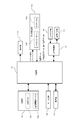
- FIG. 2 is a block diagram showing the overall configuration of the mobile phone 1.
- the mobile phone 1 includes a control unit 11, a storage unit 12, a display unit 13, a touch detection unit 14, a voice input unit 15, a voice output unit 16, a voice processing unit 17, a key input unit 18, And a communication unit 19.
- the storage unit 12 includes a ROM, a RAM, and the like.
- the storage unit 12 stores various programs.
- the program stored in the storage unit 12 includes various applications (for example, telephone, e-mail, map, game, schedule management, etc.) in addition to a control program for controlling each unit of the mobile phone 1.
- the storage unit 12 is also used as a working area for storing data that is temporarily used or generated when the program is executed.
- the control unit 11 is composed of a CPU and the like. In accordance with the program, the control unit 11 is configured according to each program (storage unit 12, display unit 13, touch detection unit 14, voice input unit 15, voice output unit 16, voice processing unit 17, key input unit 18, communication unit, communication). Part 19 etc.).
- the display unit 13 is composed of a liquid crystal display or the like.
- the display unit 13 displays an image (screen) on the display surface 3 based on the control signal and the image signal from the control unit 11.
- the display unit 13 is not limited to a liquid crystal display, and may be composed of other display devices such as an organic EL display.
- the touch detection unit 14 includes a touch panel 14a and a panel controller 14b.
- the touch panel 14 a is formed in a transparent sheet shape, and is disposed on the front surface of the cabinet 2 so as to cover the display surface 3.
- the touch panel 14a detects a finger contact with the display surface 3 at a predetermined sampling period.
- the touch panel 14a may be various types of touch panels such as a capacitance type, an ultrasonic type, a pressure sensitive type, a resistance film type, and a light detection type.
- an orthogonal coordinate system is set with the lower left corner of the display surface 3 as the origin, the left and right directions as the X axis, and the up and down directions as the Y axis. Yes.
- the touch panel 14a sequentially outputs coordinate values indicating the touch position on the display surface 3 to the panel controller 14b as touch position position data at a predetermined sampling cycle. .
- the panel controller 14b has two output modes, a single data mode and an average data mode.
- the output mode is set by a command signal from the control unit 11.
- the panel controller 14b When the panel controller 14b is set to the single data mode, the position data input from the touch panel 14a at each sampling timing (hereinafter referred to as “single position data”) is output to the control unit 11 as it is.
- the panel controller 14b When set to the average data mode, the panel controller 14b performs an averaging process for averaging the single position data input from the touch panel 14a at a plurality of sampling timings, and the averaged position data (hereinafter, “ The average position data ”is output to the control unit 11.
- the average position data corresponds to the first position data of the present invention
- the single position data corresponds to the second position data of the present invention.
- the output of the single position data is started from the touch detection unit 14 immediately after the first touch position is detected.
- output from the touch detection unit 14 is started after the time required for the averaging process has elapsed since the detection of the first touch position.
- the voice input unit 15 includes a microphone 4 and the like.
- the voice input unit 15 outputs an electrical signal from the microphone 4 to the voice processing unit 17.
- the audio output unit 16 includes a call speaker 5, an external speaker 7, and the like.
- the audio output unit 16 receives an electrical signal from the audio processing unit 17 and outputs sound (sound, notification sound, etc.) from the call speaker 5 or the external speaker 7.
- the audio processing unit 17 performs A / D conversion or the like on the electrical signal from the audio input unit 15 and outputs the converted digital audio signal to the control unit 11.
- the audio processing unit 17 performs decoding processing, D / A conversion, and the like on the digital audio signal from the control unit 11, and outputs the converted electric signal to the audio output unit 16.
- the key input unit 18 outputs a signal corresponding to the pressed operation key to the control unit 11 when each operation key of the key operation unit 6 is pressed.
- the communication unit 19 includes a circuit for converting a signal, an antenna for transmitting and receiving radio waves, and the like in order to perform a call and communication.
- the communication unit 19 converts a call or communication signal input from the control unit 11 into a radio signal, and transmits the converted radio signal to a communication destination such as a base station or another communication device via an antenna. To do. Further, the communication unit 19 converts the radio signal received via the antenna into a signal in a format that can be used by the control unit 11, and outputs the converted signal to the control unit 11.
- the control unit 11 executes position data switching processing for switching the position data output from the touch detection unit 14 between the single position data and the average position data according to the application to be executed. Further, the control unit 11 executes display control processing for the display unit 13 based on the position data (single position data, average position data) output from the touch detection unit 14.
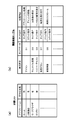
- FIG. 3A is a diagram showing a classification list 12a used for the position data switching process.
- FIG. 3B shows a screen information table 12b used for display control processing.
- the storage unit 12 stores a classification list 12a. As shown in FIG. 3A, in the classification list 12a, the applications installed in the mobile phone 1 are classified into applications that require position data averaging processing and applications that do not require position data averaging processing. ing.
- An application that requires averaging processing is an application that needs to reduce the effects of noise and finger shake and increase the reliability of touch operation (hereinafter referred to as “an application that emphasizes reliability”). Applications that do not require averaging processing are less affected by noise and finger shake, so applications that need to improve the follow-up of the operation of the mobile phone 1 to the touch operation rather than the reliability of the touch operation (hereinafter referred to as “follow-up importance”). Application ").
- examples of applications that emphasize reliability include applications such as “drawing” and “web browser”. Examples of applications that emphasize followability include applications such as “Home” and “Gallery”.
- drawing on the display surface 3 is performed by tracing the display surface 3 with a finger. Therefore, it is necessary to prevent a line drawn on the display surface 3 from being shaken by a finger shake or the like.
- a lot of information is placed on the web screen displayed on the display surface 3 by the application of the web browser. For this reason, an image that is a target of a touch operation such as a search button or hypertext (text with a hyperlink) included in the web screen has a relatively small size. Therefore, in a web browser application, it is necessary to reliably detect a touch operation on a small image on the screen.
- the home application is an application for displaying the home screen on the display surface 3.
- the screen in order to select a desired icon from various icons arranged on the home screen, the screen can be scrolled by a flick operation or a slide operation.
- the gallery application is an application for managing photographs and videos.
- the screen in the gallery application, the screen can be scrolled by a flick operation or a slide operation in order to select a desired thumbnail image on the list screen of thumbnail images of pictures and videos.
- a screen information table 12b related to the displayed screen is constructed.
- the screen information table 12b is updated when the screen is updated.
- the screen information table 12b includes area data and a configuration indicating a position range on the display surface 3 where the configuration image exists for each configuration image constituting the screen, such as an icon and a background image.
- the touch operation assigned to the image and the processing content corresponding to the touch operation are stored.
- data and processing related to the touch operation are stored in the respective fields (storage areas) of the touch operation and processing contents of the screen information table 12b. Data related to the content is not stored.
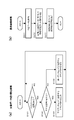
- FIG. 4A is a flowchart showing the position data switching process. Hereinafter, the position data switching process will be described.
- a home application is activated by the control unit 11 and a home screen is displayed on the display surface 3.
- a tap operation is performed on a desired icon on the home screen
- an application corresponding to the operated icon is activated by the control unit 11 and an execution screen is displayed on the display surface 3.
- control unit 11 When the home or other application is activated (S101: YES), the control unit 11 refers to the classification list 12a to determine whether the activated application is an application that requires position data averaging processing. Determine (S102).
- the control unit 11 averages as position data used for control of the display unit 13.
- the position data is selected, and a command signal for setting the output mode of the panel controller 14b to the average data mode is output to the touch detection unit 14 (S103).
- the output mode of the panel controller 14b is set to the average data mode, and the average position data is output from the panel controller 14b to the control unit 11.
- the control unit 11 uses the position data used for control of the display unit 13 as The single position data is selected, and a command signal for setting the output mode of the panel controller 14b to the single data mode is output to the touch detection unit 14 (S104).
- the output mode of the panel controller 14b is set to the single data mode, and single position data is output from the panel controller 14b to the control unit 11.
- step S103 When the process of step S103 or step S104 is executed, the process returns to step S101.
- the control unit 11 monitors whether a new application has been activated (S101).
- FIG. 4B is a flowchart showing the display control process. Hereinafter, the display control process will be described.
- the control unit 11 acquires position data from the touch detection unit 14 (S201).
- the control unit 11 acquires the average position data from the touch detection unit 14, and when the output mode is set to the single data mode, the control unit 11 receives the single position data from the touch detection unit 14. Get one-position data. While the user performs a touch operation, the average position data or the single position data is sequentially acquired by the control unit 11.
- the control unit 11 refers to the screen information table 12b based on the acquired position data, determines the component image on which the touch operation has been performed, and determines the type of touch operation (S202). For example, when the touch position is not detected within a predetermined first time after the touch position is detected, the control unit 11 determines that a tap operation has been performed. When the touch position is continuously detected for a predetermined second time or more after the touch position is detected and the touch position is not detected after that, the control unit 11 determines that a long tap operation has been performed. If the touch position moves beyond a predetermined first distance within a predetermined third time after the touch position is detected and the touch position is not detected, the control unit 11 determines that a flick operation has been performed. If the touch position moves beyond a predetermined second distance after the touch position is detected, the control unit 11 determines that a slide operation has been performed.
- the control unit 11 refers to the screen information table 12b, executes the process assigned to the configuration image and the type of touch operation performed by the touch operation, and updates the screen of the display unit 13 (S203).
- the control unit 11 updates the screen of the display unit 13 so that the screen scrolls according to the movement of the finger.
- the single position data is used to control the display unit 13. Therefore, the screen can be scrolled in response to the movement of the finger quickly.
- the control unit 11 sequentially updates the screen of the display unit 13 so that a line is drawn on the trajectory of the finger according to the movement of the finger. To do.
- the average position data is used to control the display unit 13. Therefore, even if the finger is slightly moved during the movement, the blurring of the line is suppressed and a beautiful line is drawn.
- position data suitable for an application to be executed is used for detection of a touch operation among single position data and average position data. Therefore, it is possible to improve the reliability of the touch operation while suppressing a decrease in followability.
- FIG. 5 is a diagram for explaining the position data switching process according to this modification.
- FIG. 5A is a diagram showing the classification list 12a of the present modification example.
- FIG. 5B is a flowchart showing the position data switching process of the present modification example.
- the panel controller 14b has an average data mode for outputting average position data and a single data mode for outputting single position data as output modes.
- the panel controller 14b has a high average data mode and a low average data mode as output modes.
- the high average data mode more single position data than the low average data mode are averaged by advanced averaging processing, and averaged position data (hereinafter referred to as “high average position data”) is output.
- the In the low average data mode a low number of averaging processes averages a smaller number of single position data than in the high average data mode, and outputs averaged position data (hereinafter referred to as “low average position data”). Is done.
- the delay time from the output of the first single position data to the output of the low average position data is shorter than the delay time in the high average position data.
- the high average position data corresponds to the first position data of the present invention
- the low average position data corresponds to the second position data of the present invention.
- advanced averaging processing is applied to reliability-oriented applications such as “drawing” and “web browser”, and “home”, “gallery”, and the like.
- a low-level averaging process is applied to an application that emphasizes followability.
- control unit 11 When the application is activated (S111: YES), the control unit 11 refers to the classification list 12a and determines whether or not the activated application is an application that requires advanced averaging processing (S112).
- the control unit 11 selects high average position data as position data used for control of the display unit 13, and the panel controller A command signal for setting the output mode of 14b to the high average data mode is output to the touch detection unit 14 (S113).
- the output mode of the panel controller 14b is set to the high average data mode, and the high average position data is output from the panel controller 14b to the control unit 11.
- the control unit 11 selects low average position data as position data used for control of the display unit 13. Then, a command signal for setting the output mode of the panel controller 14b to the low average data mode is output to the touch detection unit 14 (S114). The output mode of the panel controller 14b is set to the low average data mode, and the low average position data is output from the panel controller 14b to the control unit 11.
- the reliability of the touch operation can be improved while suppressing the decrease in the follow-up performance as in the first embodiment.
- the effect of suppressing the decrease in followability is slightly reduced, and the reliability of the touch operation is slightly increased.
- an application program to be executed is set as a selection condition, and average position data or single position data is selected as position data used for control of the display unit 13 based on the application program to be executed. .
- the screen conditions at the initial touch position (first touch position) detected by the touch panel 14a when the touch operation is performed and the vicinity of the initial touch position are the position data.
- the selection condition is used for selection. Specifically, whether or not there is a target image different from the target image present at the initial touch position within a predetermined range from the initial touch position, and the size of the target image present at the initial touch position is predetermined.
- the selection conditions are whether or not the threshold value is equal to or less than the threshold value and whether or not a touch operation for scrolling the screen is assigned to the target image existing at the initial touch position.
- FIG. 6 is a block diagram showing the overall configuration of the mobile phone 1.
- a configuration in which the output mode of the panel controller 14b is switched by a command signal from the control unit 11 is not adopted. From the panel controller 14b, the average position data and the single position data are output to the control unit 11 at the same time. However, output of the average position data is started later than the single position data because the averaging process is performed.
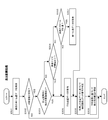
- FIG. 7 is a flowchart showing the display control process.
- the control unit 11 acquires the first single position data (S301).
- the control unit 11 refers to the screen information table 12b based on the acquired single position data, and whether there is a constituent image (hereinafter referred to as “target image”) that is a target of the touch operation in the initial touch value. It is determined whether or not (S302). If the target image exists (S302: YES), the control unit 11 determines whether a target image different from the target image existing at the initial touch position exists within a predetermined range from the initial touch position. (S303). If another target image does not exist (S303: NO), the control unit 11 determines whether the size of the target image is equal to or smaller than a predetermined threshold based on the area data of the target image existing at the initial touch position. Is determined (S304). If the size of the target image is not less than or equal to the predetermined threshold (S304: NO), the control unit 11 determines whether or not a touch operation for scrolling the screen is assigned to the target image existing at the initial touch position. (S305).
- target image constituent image
- the average position data that starts to be output later than the single position data is selected as the position data used for control of the display unit 13, While this touch operation is performed, the average position data is sequentially acquired (S306).
- the control unit 11 does not have another target image within a predetermined range from the initial touch position (S303: NO), the size of the target image is not less than a predetermined threshold (S304: NO), and If the touch operation for scrolling the screen is assigned to the target image (S305: YES), the single position data is selected as the position data used for the control of the display unit 13, and this touch operation is performed. In the meantime, the single position data is successively acquired (S307).
- the controller 11 Based on the acquired position data (average position data or single position data), the controller 11 refers to the screen information table 12b to determine the constituent image on which the touch operation has been performed, and determines the type of touch operation. (S308).
- the control unit 11 refers to the screen information table 12b, executes the process assigned to the component image and the type of touch operation that have been touched, and updates the screen of the display unit 13 (S309).
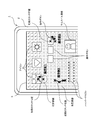
- FIG. 8 is a diagram for explaining various examples of operations performed on the display surface 3.
- a web screen is displayed on the display surface 3 as shown in FIG.
- the web screen is composed of constituent images such as a background image, icons, operation buttons, hypertext, thumbnail images, and the like.
- the operation target is a small operation button as in the operation example 2 illustrated in FIG. 8, for example, a finger shake occurs during a long tap operation on the operation button, and the touch position is slightly changed from the operation button. There is a possibility that it will come off.
- the operation button is small, according to the display control process of FIG. 7, it is determined that the size of the target image is equal to or smaller than a predetermined threshold, and the average position data is used for determination of the touch operation. For this reason, even if the touch position is removed from the operation button for a short time during the long tap operation, the touch position indicated by the average position data is maintained on the operation button. Therefore, it is difficult to cause a problem that a long tap operation with respect to the operation button becomes invalid due to a finger shake.
- the position where the touch operation is performed and the state of the screen in the vicinity thereof are determined, and the position data suitable for the state of the screen among the single position data and the average position data is the touch operation. Used for detection. Therefore, it is possible to improve the reliability of the touch operation while suppressing a decrease in followability.
- FIG. 9 is a flowchart showing the display control process according to this modification.
- high average position data and low average position data are output from the panel controller 14b at the same time.
- the high average position data and the low average position data are as described in the modification of the first embodiment.
- the control unit 11 acquires the first low average position data (S311).
- the control unit 11 refers to the screen information table 12b based on the acquired low average position data, and determines whether or not the target image exists in the initial touch value (S312). When the target image exists (S312: YES), the control unit 11 further determines that another target image exists within a predetermined range from the initial touch position (S313: YES), or the size of the target image is predetermined. If the touch operation for scrolling the screen is not assigned to the target image (S315: NO), the high average position data that starts to be output later than the low average position data. Is selected as position data used for control of the display unit 13, and high average position data is sequentially acquired while the touch operation is performed (S316).
- control unit 11 does not have another target image within a predetermined range from the initial touch position (S313: NO), and the size of the target image is not less than a predetermined threshold (S314: NO), and If the touch operation for scrolling the screen is assigned to the target image (S315: YES), the low average position data is selected as the position data used for the control of the display unit 13, and this touch operation is performed. In the meantime, the low average position data is successively acquired (S317).
- the control unit 11 Based on the acquired position data (high average position data or low average position data), the control unit 11 refers to the screen information table 12b to determine the constituent image on which the touch operation has been performed, and determines the type of touch operation. (S318).
- the control unit 11 refers to the screen information table 12b, executes the process assigned to the component image on which the touch operation has been performed and the type of the touch operation, and updates the screen of the display unit 13 (S319).
- the reliability of the touch operation can be improved while suppressing the decrease in the follow-up performance as in the second embodiment.
- the effect of suppressing the decrease in followability is slightly reduced, and the reliability of the touch operation is slightly increased.
- both the single position data and the average position data are output from the touch detection unit 14.
- the touch detection unit 14 may output single position data but may not output average position data.
- the control unit 11 is provided with a position data output unit.
- the position data detection unit averages a plurality of single position data output from the touch detection unit 14 to generate average position data, and outputs the generated average position data.
- the position data output unit outputs the single position data from the touch detection unit 14 as it is.
- a configuration in which the position data output unit provided in the control unit 11 outputs high average position data and low average position data, similarly to the panel controller 14b of the modification example of the first embodiment and the modification example of the second embodiment. It may be said.
- the control unit 11 determines whether there is a target image different from the target image existing at the initial touch position within a predetermined range from the initial touch position.
- All the processes of S305 for determining whether or not the touch operation is assigned are executed.
- the present invention is not limited to this, and in the display control process, any one of the three processes of steps S303 to S305 or any two processes may be executed.
- a configuration in which the classification list 12a is generated based on a setting operation by the user that is, a configuration in which the presence / absence of averaging processing for each application is set can be adopted.
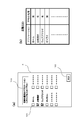
- FIG. 10A is a diagram showing a setting screen for the user to perform a setting operation.
- FIG. 10B is a diagram showing a classification list 12a generated by a user setting operation.
- a list of applications in which check boxes 101 are arranged beside each application is displayed on the setting screen.
- a window 102 is displayed for informing the user that the check box 101 of an application that places importance on reliability is checked.
- a setting button 103 is displayed on the setting screen.
- the control unit 11 When the user performs a tap operation on the check box 101 of the reliability-oriented application, the control unit 11 displays a check mark in the check box 101.
- the control unit 11 sets an application with a check mark, that is, an application emphasizing reliability as an application for averaging processing, and the check mark is not put.
- An application that is, an application that emphasizes followability is set as an application that does not perform averaging processing.
- the control unit 11 generates the classification list 12a in the storage unit 12.
- the classification list 12a in the modified example of the first embodiment may be generated by a user setting operation.
- a setting screen on which the user can set whether the new application is an application that emphasizes reliability or an application that emphasizes followability is displayed on the display unit by the control unit 11 13 may be displayed.
- the control unit 11 sets a new application as an application for performing an averaging process, and registers the application in the classification list 12a.
- the control unit 11 sets a new application as an application that does not perform the averaging process, and registers it in the classification list 12a.
- a list screen may be displayed on the display unit 13 by the control unit 11.
- the present invention is applied to a smartphone-type mobile phone.
- the present invention is not limited to this, and the present invention may be applied to other types of mobile phones such as a straight type, a folding type, and a sliding type.
- the present invention is not limited to a touch panel type mobile phone, and has various touch detection functions such as a touch panel type PDA (Personal Digital Assistant), a tablet PC (Tablet PC), an electronic book terminal, a portable music player, and a portable TV. Applicable to electronic devices.
- a touch panel type PDA Personal Digital Assistant
- Tablet PC Tablet PC
- electronic book terminal a portable music player
- portable TV Portable TV
Landscapes
- Engineering & Computer Science (AREA)
- General Engineering & Computer Science (AREA)
- Theoretical Computer Science (AREA)
- Human Computer Interaction (AREA)
- Physics & Mathematics (AREA)
- General Physics & Mathematics (AREA)
- User Interface Of Digital Computer (AREA)
- Position Input By Displaying (AREA)
- Telephone Function (AREA)
Abstract
[Problème] Fournir un dispositif électronique qui possède une fonction de détection tactile et qui permette de supprimer les réductions des capacités de suivi, tout en augmentant la fiabilité des opérations tactiles. [Solution] Un téléphone mobile (1) est équipé d'une unité de détection tactile (14) et d'une unité de commande (11). L'unité de détection tactile (14) comprend : un écran tactile (14a) ; et un contrôleur d'écran (14b) qui délivre des données de position moyennées et des données de position individuelles sur la base des données de position de l'entrée de position tactile à partir de l'écran tactile (14a). Les données de position moyennées sont des données de position dans lesquelles les données de position des positions tactiles détectées au niveau d'une pluralité de moments de détection sont moyennées, et les données de position individuelles sont des données de position de la position tactile détectée à chaque moment de détection. Sur la base du programme d'application qui doit être exécuté, l'unité de commande (11) sélectionne les données de position moyennées ou les données de position individuelles en tant que données de position à utiliser pour commander l'unité d'affichage (13).
Priority Applications (2)
| Application Number | Priority Date | Filing Date | Title |
|---|---|---|---|
| US14/553,759 US9442591B2 (en) | 2012-05-25 | 2014-11-25 | Electronic device, non-transitory storage medium, and control method for electronic device |
| US15/263,258 US9658714B2 (en) | 2012-05-25 | 2016-09-12 | Electronic device, non-transitory storage medium, and control method for electronic device |
Applications Claiming Priority (2)
| Application Number | Priority Date | Filing Date | Title |
|---|---|---|---|
| JP2012-119497 | 2012-05-25 | ||
| JP2012119497A JP5854928B2 (ja) | 2012-05-25 | 2012-05-25 | タッチ検出機能を有する電子機器、プログラムおよびタッチ検出機能を有する電子機器の制御方法 |
Related Child Applications (1)
| Application Number | Title | Priority Date | Filing Date |
|---|---|---|---|
| US14/553,759 Continuation US9442591B2 (en) | 2012-05-25 | 2014-11-25 | Electronic device, non-transitory storage medium, and control method for electronic device |
Publications (1)
| Publication Number | Publication Date |
|---|---|
| WO2013176242A1 true WO2013176242A1 (fr) | 2013-11-28 |
Family
ID=49623922
Family Applications (1)
| Application Number | Title | Priority Date | Filing Date |
|---|---|---|---|
| PCT/JP2013/064440 Ceased WO2013176242A1 (fr) | 2012-05-25 | 2013-05-24 | Dispositif électronique ayant une fonction de détection tactile, programme, et procédé de commande pour un dispositif électronique ayant une fonction de détection tactile |
Country Status (3)
| Country | Link |
|---|---|
| US (2) | US9442591B2 (fr) |
| JP (1) | JP5854928B2 (fr) |
| WO (1) | WO2013176242A1 (fr) |
Cited By (1)
| Publication number | Priority date | Publication date | Assignee | Title |
|---|---|---|---|---|
| WO2014108959A1 (fr) * | 2013-01-10 | 2014-07-17 | 株式会社デンソー | Dispositif de panneau tactile sensible à la pression |
Families Citing this family (6)
| Publication number | Priority date | Publication date | Assignee | Title |
|---|---|---|---|---|
| JP6264114B2 (ja) * | 2014-03-17 | 2018-01-24 | カシオ計算機株式会社 | 投影装置及びプログラム |
| JP2016224523A (ja) * | 2015-05-27 | 2016-12-28 | 京セラ株式会社 | 携帯端末 |
| CN107925713B (zh) | 2015-08-26 | 2020-05-08 | 富士胶片株式会社 | 摄像系统及摄像控制方法 |
| JP6335394B2 (ja) * | 2015-09-25 | 2018-05-30 | 富士フイルム株式会社 | 撮像システム及び撮像制御方法 |
| CN106211667B (zh) * | 2016-08-03 | 2022-02-22 | 安徽精卓光显技术有限责任公司 | 玻璃外壳及具有该玻璃外壳的电子产品 |
| JP6500974B2 (ja) * | 2017-12-20 | 2019-04-17 | カシオ計算機株式会社 | 検出装置、検出方法及びプログラム |
Citations (4)
| Publication number | Priority date | Publication date | Assignee | Title |
|---|---|---|---|---|
| JPS63304313A (ja) * | 1987-06-04 | 1988-12-12 | Sony Tektronix Corp | タッチ位置測定方法及びタッチパネル装置 |
| JPH06214708A (ja) * | 1993-01-19 | 1994-08-05 | Wacom Co Ltd | 座標入力装置 |
| JPH08179874A (ja) * | 1994-12-20 | 1996-07-12 | Ricoh Co Ltd | 手書き入力表示装置 |
| JPH10149252A (ja) * | 1996-11-20 | 1998-06-02 | Fuji Xerox Co Ltd | ペン入力装置及び該装置における位置座標補正方法 |
Family Cites Families (5)
| Publication number | Priority date | Publication date | Assignee | Title |
|---|---|---|---|---|
| US5053757A (en) | 1987-06-04 | 1991-10-01 | Tektronix, Inc. | Touch panel with adaptive noise reduction |
| US9019209B2 (en) * | 2005-06-08 | 2015-04-28 | 3M Innovative Properties Company | Touch location determination involving multiple touch location processes |
| JP2011097254A (ja) | 2009-10-28 | 2011-05-12 | Fujitsu Ltd | 携帯機器 |
| US20110193791A1 (en) * | 2010-02-11 | 2011-08-11 | Research In Motion Limited | Capacitive touch sensitive overlay including touch sensor and electronic device including same |
| JP6402884B2 (ja) * | 2012-12-21 | 2018-10-10 | Tianma Japan株式会社 | タッチセンサ装置、電子機器、位置算出方法及び位置算出プログラム |
-
2012
- 2012-05-25 JP JP2012119497A patent/JP5854928B2/ja not_active Expired - Fee Related
-
2013
- 2013-05-24 WO PCT/JP2013/064440 patent/WO2013176242A1/fr not_active Ceased
-
2014
- 2014-11-25 US US14/553,759 patent/US9442591B2/en not_active Expired - Fee Related
-
2016
- 2016-09-12 US US15/263,258 patent/US9658714B2/en not_active Expired - Fee Related
Patent Citations (4)
| Publication number | Priority date | Publication date | Assignee | Title |
|---|---|---|---|---|
| JPS63304313A (ja) * | 1987-06-04 | 1988-12-12 | Sony Tektronix Corp | タッチ位置測定方法及びタッチパネル装置 |
| JPH06214708A (ja) * | 1993-01-19 | 1994-08-05 | Wacom Co Ltd | 座標入力装置 |
| JPH08179874A (ja) * | 1994-12-20 | 1996-07-12 | Ricoh Co Ltd | 手書き入力表示装置 |
| JPH10149252A (ja) * | 1996-11-20 | 1998-06-02 | Fuji Xerox Co Ltd | ペン入力装置及び該装置における位置座標補正方法 |
Cited By (1)
| Publication number | Priority date | Publication date | Assignee | Title |
|---|---|---|---|---|
| WO2014108959A1 (fr) * | 2013-01-10 | 2014-07-17 | 株式会社デンソー | Dispositif de panneau tactile sensible à la pression |
Also Published As
| Publication number | Publication date |
|---|---|
| US20150077379A1 (en) | 2015-03-19 |
| US9658714B2 (en) | 2017-05-23 |
| JP2013246614A (ja) | 2013-12-09 |
| JP5854928B2 (ja) | 2016-02-09 |
| US9442591B2 (en) | 2016-09-13 |
| US20160378250A1 (en) | 2016-12-29 |
Similar Documents
| Publication | Publication Date | Title |
|---|---|---|
| JP5922480B2 (ja) | 表示機能を備える携帯機器、プログラムおよび表示機能を備える携帯機器の制御方法 | |
| KR102060155B1 (ko) | 양면 디스플레이를 사용하는 전자장치의 멀티태스킹 제어 방법 및 장치 | |
| US20200371685A1 (en) | Graphical User Interface Display Method And Electronic Device | |
| JP6120731B2 (ja) | 電子機器および電子機器の制御方法 | |
| EP3136214A1 (fr) | Procédé et appareil d'opération de toucher pour terminal | |
| KR102251834B1 (ko) | 전자 장치의 디스플레이 방법 | |
| US20150169216A1 (en) | Method of controlling screen of portable electronic device | |
| US20140149905A1 (en) | Electronic device and page navigation method thereof | |
| JP5854928B2 (ja) | タッチ検出機能を有する電子機器、プログラムおよびタッチ検出機能を有する電子機器の制御方法 | |
| US20110193805A1 (en) | Screen control method and apparatus for mobile terminal having multiple touch screens | |
| US10007375B2 (en) | Portable apparatus and method for controlling cursor position on a display of a portable apparatus | |
| US20170068418A1 (en) | Electronic apparatus, recording medium, and operation method of electronic apparatus | |
| US9310991B2 (en) | Method and apparatus for navigating content on screen using pointing device | |
| KR20110082494A (ko) | 어플리케이션 간 데이터 전달 방법 및 이를 이용하는 단말 장치 | |
| US9298364B2 (en) | Mobile electronic device, screen control method, and storage medium strong screen control program | |
| CN106681620A (zh) | 一种实现终端控制的方法及装置 | |
| US10159046B2 (en) | Mobile terminal device | |
| US10908868B2 (en) | Data processing method and mobile device | |
| US9417724B2 (en) | Electronic apparatus | |
| WO2014192878A1 (fr) | Appareil portatif, et procédé de commande d'un appareil portatif | |
| JP6047066B2 (ja) | 携帯機器、制御プログラムおよび携帯機器における制御方法 | |
| CN111158833B (zh) | 操作控制方法及电子设备 | |
| JP5993802B2 (ja) | 携帯機器、制御プログラムおよび携帯機器における制御方法 | |
| JP2015011386A (ja) | 携帯機器、携帯機器の制御方法およびプログラム | |
| JP5969320B2 (ja) | 携帯端末装置 |
Legal Events
| Date | Code | Title | Description |
|---|---|---|---|
| 121 | Ep: the epo has been informed by wipo that ep was designated in this application |
Ref document number: 13793847 Country of ref document: EP Kind code of ref document: A1 |
|
| NENP | Non-entry into the national phase |
Ref country code: DE |
|
| 122 | Ep: pct application non-entry in european phase |
Ref document number: 13793847 Country of ref document: EP Kind code of ref document: A1 |