WO2014024366A1 - Appareil électronique portable - Google Patents
Appareil électronique portable Download PDFInfo
- Publication number
- WO2014024366A1 WO2014024366A1 PCT/JP2013/003469 JP2013003469W WO2014024366A1 WO 2014024366 A1 WO2014024366 A1 WO 2014024366A1 JP 2013003469 W JP2013003469 W JP 2013003469W WO 2014024366 A1 WO2014024366 A1 WO 2014024366A1
- Authority
- WO
- WIPO (PCT)
- Prior art keywords
- brightness
- distance
- electronic device
- portable electronic
- display unit
- Prior art date
- Legal status (The legal status is an assumption and is not a legal conclusion. Google has not performed a legal analysis and makes no representation as to the accuracy of the status listed.)
- Ceased
Links
Images




Classifications
-
- G—PHYSICS
- G09—EDUCATION; CRYPTOGRAPHY; DISPLAY; ADVERTISING; SEALS
- G09G—ARRANGEMENTS OR CIRCUITS FOR CONTROL OF INDICATING DEVICES USING STATIC MEANS TO PRESENT VARIABLE INFORMATION
- G09G3/00—Control arrangements or circuits, of interest only in connection with visual indicators other than cathode-ray tubes
- G09G3/20—Control arrangements or circuits, of interest only in connection with visual indicators other than cathode-ray tubes for presentation of an assembly of a number of characters, e.g. a page, by composing the assembly by combination of individual elements arranged in a matrix no fixed position being assigned to or needed to be assigned to the individual characters or partial characters
- G09G3/34—Control arrangements or circuits, of interest only in connection with visual indicators other than cathode-ray tubes for presentation of an assembly of a number of characters, e.g. a page, by composing the assembly by combination of individual elements arranged in a matrix no fixed position being assigned to or needed to be assigned to the individual characters or partial characters by control of light from an independent source
- G09G3/3406—Control of illumination source
-
- G—PHYSICS
- G06—COMPUTING OR CALCULATING; COUNTING
- G06F—ELECTRIC DIGITAL DATA PROCESSING
- G06F1/00—Details not covered by groups G06F3/00 - G06F13/00 and G06F21/00
- G06F1/26—Power supply means, e.g. regulation thereof
- G06F1/32—Means for saving power
- G06F1/3203—Power management, i.e. event-based initiation of a power-saving mode
- G06F1/3234—Power saving characterised by the action undertaken
- G06F1/325—Power saving in peripheral device
- G06F1/3265—Power saving in display device
-
- G—PHYSICS
- G06—COMPUTING OR CALCULATING; COUNTING
- G06F—ELECTRIC DIGITAL DATA PROCESSING
- G06F3/00—Input arrangements for transferring data to be processed into a form capable of being handled by the computer; Output arrangements for transferring data from processing unit to output unit, e.g. interface arrangements
- G06F3/01—Input arrangements or combined input and output arrangements for interaction between user and computer
- G06F3/03—Arrangements for converting the position or the displacement of a member into a coded form
- G06F3/041—Digitisers, e.g. for touch screens or touch pads, characterised by the transducing means
- G06F3/0412—Digitisers structurally integrated in a display
-
- G—PHYSICS
- G06—COMPUTING OR CALCULATING; COUNTING
- G06F—ELECTRIC DIGITAL DATA PROCESSING
- G06F3/00—Input arrangements for transferring data to be processed into a form capable of being handled by the computer; Output arrangements for transferring data from processing unit to output unit, e.g. interface arrangements
- G06F3/01—Input arrangements or combined input and output arrangements for interaction between user and computer
- G06F3/048—Interaction techniques based on graphical user interfaces [GUI]
- G06F3/0487—Interaction techniques based on graphical user interfaces [GUI] using specific features provided by the input device, e.g. functions controlled by the rotation of a mouse with dual sensing arrangements, or of the nature of the input device, e.g. tap gestures based on pressure sensed by a digitiser
- G06F3/0488—Interaction techniques based on graphical user interfaces [GUI] using specific features provided by the input device, e.g. functions controlled by the rotation of a mouse with dual sensing arrangements, or of the nature of the input device, e.g. tap gestures based on pressure sensed by a digitiser using a touch-screen or digitiser, e.g. input of commands through traced gestures
-
- G—PHYSICS
- G09—EDUCATION; CRYPTOGRAPHY; DISPLAY; ADVERTISING; SEALS
- G09G—ARRANGEMENTS OR CIRCUITS FOR CONTROL OF INDICATING DEVICES USING STATIC MEANS TO PRESENT VARIABLE INFORMATION
- G09G3/00—Control arrangements or circuits, of interest only in connection with visual indicators other than cathode-ray tubes
- G09G3/20—Control arrangements or circuits, of interest only in connection with visual indicators other than cathode-ray tubes for presentation of an assembly of a number of characters, e.g. a page, by composing the assembly by combination of individual elements arranged in a matrix no fixed position being assigned to or needed to be assigned to the individual characters or partial characters
- G09G3/34—Control arrangements or circuits, of interest only in connection with visual indicators other than cathode-ray tubes for presentation of an assembly of a number of characters, e.g. a page, by composing the assembly by combination of individual elements arranged in a matrix no fixed position being assigned to or needed to be assigned to the individual characters or partial characters by control of light from an independent source
- G09G3/3406—Control of illumination source
- G09G3/342—Control of illumination source using several illumination sources separately controlled corresponding to different display panel areas, e.g. along one dimension such as lines
-
- G—PHYSICS
- G06—COMPUTING OR CALCULATING; COUNTING
- G06F—ELECTRIC DIGITAL DATA PROCESSING
- G06F2203/00—Indexing scheme relating to G06F3/00 - G06F3/048
- G06F2203/041—Indexing scheme relating to G06F3/041 - G06F3/045
- G06F2203/04101—2.5D-digitiser, i.e. digitiser detecting the X/Y position of the input means, finger or stylus, also when it does not touch, but is proximate to the digitiser's interaction surface and also measures the distance of the input means within a short range in the Z direction, possibly with a separate measurement setup
-
- G—PHYSICS
- G09—EDUCATION; CRYPTOGRAPHY; DISPLAY; ADVERTISING; SEALS
- G09G—ARRANGEMENTS OR CIRCUITS FOR CONTROL OF INDICATING DEVICES USING STATIC MEANS TO PRESENT VARIABLE INFORMATION
- G09G2310/00—Command of the display device
- G09G2310/02—Addressing, scanning or driving the display screen or processing steps related thereto
- G09G2310/0202—Addressing of scan or signal lines
- G09G2310/0213—Addressing of scan or signal lines controlling the sequence of the scanning lines with respect to the patterns to be displayed, e.g. to save power
-
- G—PHYSICS
- G09—EDUCATION; CRYPTOGRAPHY; DISPLAY; ADVERTISING; SEALS
- G09G—ARRANGEMENTS OR CIRCUITS FOR CONTROL OF INDICATING DEVICES USING STATIC MEANS TO PRESENT VARIABLE INFORMATION
- G09G2320/00—Control of display operating conditions
- G09G2320/06—Adjustment of display parameters
- G09G2320/0626—Adjustment of display parameters for control of overall brightness
-
- G—PHYSICS
- G09—EDUCATION; CRYPTOGRAPHY; DISPLAY; ADVERTISING; SEALS
- G09G—ARRANGEMENTS OR CIRCUITS FOR CONTROL OF INDICATING DEVICES USING STATIC MEANS TO PRESENT VARIABLE INFORMATION
- G09G2354/00—Aspects of interface with display user
-
- G—PHYSICS
- G09—EDUCATION; CRYPTOGRAPHY; DISPLAY; ADVERTISING; SEALS
- G09G—ARRANGEMENTS OR CIRCUITS FOR CONTROL OF INDICATING DEVICES USING STATIC MEANS TO PRESENT VARIABLE INFORMATION
- G09G2380/00—Specific applications
- G09G2380/14—Electronic books and readers
-
- G—PHYSICS
- G09—EDUCATION; CRYPTOGRAPHY; DISPLAY; ADVERTISING; SEALS
- G09G—ARRANGEMENTS OR CIRCUITS FOR CONTROL OF INDICATING DEVICES USING STATIC MEANS TO PRESENT VARIABLE INFORMATION
- G09G5/00—Control arrangements or circuits for visual indicators common to cathode-ray tube indicators and other visual indicators
- G09G5/08—Cursor circuits
-
- Y—GENERAL TAGGING OF NEW TECHNOLOGICAL DEVELOPMENTS; GENERAL TAGGING OF CROSS-SECTIONAL TECHNOLOGIES SPANNING OVER SEVERAL SECTIONS OF THE IPC; TECHNICAL SUBJECTS COVERED BY FORMER USPC CROSS-REFERENCE ART COLLECTIONS [XRACs] AND DIGESTS
- Y02—TECHNOLOGIES OR APPLICATIONS FOR MITIGATION OR ADAPTATION AGAINST CLIMATE CHANGE
- Y02D—CLIMATE CHANGE MITIGATION TECHNOLOGIES IN INFORMATION AND COMMUNICATION TECHNOLOGIES [ICT], I.E. INFORMATION AND COMMUNICATION TECHNOLOGIES AIMING AT THE REDUCTION OF THEIR OWN ENERGY USE
- Y02D10/00—Energy efficient computing, e.g. low power processors, power management or thermal management
Definitions
- the present invention relates to a portable electronic device having a display unit and a touch panel disposed on the display surface of the display unit, and more particularly to a portable electronic device having a capacitive touch panel.
- Some mobile phones and information terminal devices are equipped with a power saving function and can be used for a long time.
- There is a power saving function that turns off the light (backlight) on the display screen when there is no operation on the touch panel for a predetermined time, and then turns off the display itself if there is no further operation for a predetermined time. .
- the present invention has been made in view of such circumstances, and an object thereof is to provide a portable electronic device in which a user can arbitrarily set the brightness of a display screen even when there is no operation on a touch panel for a predetermined time.
- the portable electronic device includes a display unit and a touch panel that is arranged to overlap the display unit and can detect a distance from the indicator, and the brightness of the display unit is the first brightness.
- the brightness of the display unit is set to a second brightness that is darker than the first brightness.
- the display unit is a third brightness that is at least brighter than the second brightness.
- the display unit is at the first brightness
- the brightness is changed to the second brightness which is darker than the first brightness and the brightness of the display unit is the first brightness
- there is no operation for a predetermined time on the touch panel, and the indicator, the touch panel If the distance between the two is less than or equal to a predetermined distance, the brightness of the display unit is changed to a third brightness that is at least higher than the second brightness. If the indicator is brought close to the touch panel to a predetermined distance or less, the display screen can be kept bright. Then, when the indicator is separated from the touch panel beyond a predetermined distance, the display screen becomes dark and power saving can be achieved.
- the third brightness is brighter than the second brightness and equal to or less than the first brightness.
- the third brightness is the same as the first brightness.
- the second brightness is the brightness of extinguishing.
- the display unit is a liquid crystal display, and the brightness is supplied by a backlight of the liquid crystal display.
- the predetermined time is the first time
- the brightness of the display unit is the first brightness
- the touch panel is not operated for the first time
- the distance Is greater than a predetermined distance the brightness of the display unit is changed to the second brightness
- the brightness of the display unit is the second brightness and the touch panel
- the display unit is a self-luminous display, and the brightness is supplied when the display emits light by itself.
- the self-luminous display is an organic EL display.
- the predetermined distance is a first distance
- the predetermined distance further operates when the distance is equal to or smaller than the second distance, and the first distance is greater than the second distance. large.
- the brightness control method of the present invention is a brightness control method that can be used in a portable electronic device including a display unit and a touch panel that is arranged on the display unit and that can detect a distance between the display unit and the display unit.
- the brightness of the display unit when the brightness of the display unit is the first brightness, the touch panel has not been operated for a predetermined time, and the distance is greater than the predetermined distance.
- the brightness of the display unit is set to a third brightness that is at least brighter than the second brightness.
- a portable electronic device includes a display unit, a touch panel that is arranged to overlap the display unit, is capable of detecting a distance from the indicator, and includes a predetermined area, and the brightness of the display unit Is the first brightness, the touch panel has not been operated for a predetermined time, and the distance is greater than the predetermined distance, the brightness of the display unit is set to be higher than the first brightness.
- the brightness of the display unit is the first brightness
- the touch panel has not been operated for a predetermined time
- the indicator is within the predetermined area. If the distance is equal to or less than the predetermined distance, the brightness of the display unit is set to a third brightness that is at least brighter than the second brightness.
- the touch panel is not operated for a predetermined time while the display unit is in the first brightness, and the distance between the indicator and the touch panel at that time is greater than the predetermined distance.
- the brightness of the display unit is changed to the second brightness which is darker than the first brightness, power saving can be achieved.
- the indicator is in a predetermined area, and the indicator and the touch panel at that time When the distance between them is equal to or less than the predetermined distance, the brightness of the display unit is changed to the third brightness that is brighter than at least the second brightness. If the indicator is brought close to the touch panel within a predetermined area within a predetermined distance, the display unit can be kept bright.
- the brightness of the display unit when the brightness of the display unit is the first brightness, and when there is no operation for a predetermined time on the touch panel, and the indicator is outside the predetermined area, and When the distance is equal to or less than the predetermined distance, the brightness of the display unit is set as the second brightness.
- the touch panel when the brightness of the display unit is the first brightness, the touch panel is not operated for a predetermined time, the indicator is outside the predetermined region, and the indicator at that time
- the distance between the touch panel and the touch panel is equal to or less than a predetermined distance, the brightness of the display unit is changed to the second brightness, so that power saving can be achieved.
- an acceleration sensor is provided, the brightness of the display unit is the first brightness, the touch panel is not operated for a predetermined time, and the indicator is in the predetermined area.
- the brightness of the display unit is set to the third brightness, and the display unit
- the indicator is in the predetermined area, and the distance is equal to or less than the predetermined distance.
- the acceleration sensor detects the predetermined acceleration
- the brightness of the display unit is set as the second brightness.
- the touch panel when the brightness of the display unit is the first brightness, the touch panel is not operated for a predetermined time, the indicator is in the predetermined area, and the indicator at that time
- the brightness of the display unit is set to the third brightness, and the brightness of the display unit is the first
- the touch panel is not operated for a predetermined time in a bright state, the indicator is in a predetermined area, and the distance between the indicator and the touch panel at that time is equal to or less than the predetermined distance.
- the acceleration sensor detects a predetermined acceleration
- the brightness of the display unit is set to the second brightness. Therefore, even if the portable electronic device is held by hand, the display screen is automatically displayed if it is not in use. Power saving due to darkening Achieved.
- the third brightness is brighter than the second brightness and equal to or less than the first brightness.
- the third brightness is the same as the first brightness.
- the second brightness is the brightness of extinguishing.
- the display unit is a liquid crystal display, and the brightness is supplied by a backlight of the liquid crystal display.
- the display unit is a self-luminous display, and the brightness is supplied when the display emits light by itself.
- the self-luminous display is an organic EL display.
- the predetermined distance is a first distance
- the predetermined distance further operates when the distance is equal to or smaller than the second distance, and the first distance is greater than the second distance. large.
- the brightness control method of the present invention is used in a portable electronic device that includes a display unit and a touch panel that is arranged on the display unit and is capable of detecting a distance between the indicator and a predetermined area.
- the touch panel has not been operated for a predetermined time, and the distance is greater than the predetermined distance.
- the brightness of the display unit is changed to a second brightness that is darker than the first brightness, the brightness of the display unit is the first brightness, and the touch panel is operated for a predetermined time. If there is no indicator and the indicator is in the predetermined area and the distance is equal to or less than the predetermined distance, the brightness of the display unit is set to a brightness that is at least brighter than the second brightness.
- the brightness is 3.
- a portable electronic device includes a display unit, a touch panel that is arranged so as to overlap the display unit, can detect a distance from a human body, and can detect an area of the human body having the predetermined distance.
- the brightness of the display unit is the first brightness and at least the area of the human body is larger than the first area
- the brightness of the display unit is set to be higher than the first brightness.
- the brightness of the display unit is the second brightness and at least the area of the human body is smaller than the second area
- the brightness of the display unit is changed to the dark second brightness.
- the third brightness is higher than at least the second brightness.
- the display screen can be kept in a dark state while the portable electronic device is simply held by hand, thereby saving power.
- the area of the human body detected by the touch panel is smaller than the second area in the state where the brightness of the display unit is the second brightness, the brightness of the display unit is set to be at least higher than the second brightness. Therefore, the display screen can be kept in a bright state while waiting for or operating the touch panel.
- the first area and the second area are substantially the same.
- the first area is larger than the second area.
- the brightness of the display unit when the brightness of the display unit is the first brightness and the state where the area of the human body is at least larger than the first area continues for the first time, the brightness of the display unit The brightness is changed to a second brightness that is darker than the first brightness, and the brightness of the display unit is the second brightness, and at least the area of the human body is greater than the second area.
- the brightness of the display unit is set to the third brightness that is at least brighter than the second brightness.
- the first time and the second time are substantially the same.
- the third brightness is brighter than the second brightness and equal to or less than the first brightness.
- the third brightness is the same as the first brightness.
- the second brightness is the brightness of extinguishing.
- the display unit is a liquid crystal display, and the brightness is supplied by a backlight of the liquid crystal display.
- the display unit is a self-luminous display, and the brightness is supplied when the display emits light by itself.
- the self-luminous display is an organic EL display.
- the predetermined distance is at least a distance greater than zero.
- the predetermined distance is a first distance
- the predetermined distance further operates when the distance is equal to or smaller than the second distance, and the first distance is greater than the second distance. large.
- the brightness control method of the present invention is a touch panel that is arranged so as to overlap the display unit and the display unit, can detect the distance between the human body, and can detect the area of the human body where the distance is a predetermined distance.
- a brightness control method that can be used in a portable electronic device, wherein the brightness of the display unit is the first brightness and at least the area of the human body is greater than the first area.
- the brightness of the display unit is changed to a second brightness that is darker than the first brightness, the brightness of the display unit is the second brightness, and at least the area of the human body is When the area is smaller than the second area, the brightness of the display unit is set to a third brightness that is at least brighter than the second brightness.
- the user can arbitrarily set the brightness of the display screen.
- FIG. 1 is a block diagram showing a schematic configuration of a portable electronic device according to a first embodiment of the present invention.
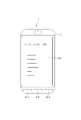
- Front view showing an overview of the portable electronic device of FIG.
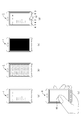
- FIGS. 4A to 4E are diagrams showing changes in brightness of a display unit due to differences in usage state of the portable electronic device of FIG.
- the flowchart which shows the brightness change process of the portable electronic device of FIG.
- the block diagram which shows schematic structure of the portable electronic device which concerns on Embodiment 2 of this invention.
- the figure which shows the positional relationship of the touch panel part and indicator in the portable electronic device of FIG. (A)-(d)
- the figure which shows the usage form of the portable electronic device of FIG. 7 is a flowchart showing brightness change processing when acceleration detection is not performed in the portable electronic device of FIG.
- FIG. 7 is a flowchart showing brightness change processing when acceleration detection is performed in the portable electronic device of FIG.
- the block diagram which shows schematic structure of the portable electronic device which concerns on Embodiment 3 of this invention.
- FIG. 1 is a block diagram showing a schematic configuration of a portable electronic device according to Embodiment 1 of the present invention.
- FIG. 2 is a front view showing an overview of the portable electronic device of FIG.
- the portable electronic device 1 which concerns on this Embodiment is applied to the portable radio device called a smart phone, for example,
- the part regarding the communication as a radio device is abbreviate
- a portable electronic device 1 includes a touch panel unit (touch panel) 2, a touch panel controller 3, a device control unit 4, a display unit 5, and function keys 6.
- the portable electronic device 1 according to the present embodiment has a vertically-long rectangular housing 7, and the front surface of the housing 7 has an area of the front surface of the housing 7.
- the touch panel unit 2 and the display unit 5 having a slightly smaller area are arranged in a stacked state.
- the touch panel unit 2 is disposed on the front side of the display unit 5.
- three function keys 6-1 to 6-3 are arranged at equal intervals as the function keys 6 at the lower end portion on the front side of the housing 7.
- the touch panel controller 3 and the device control unit 4 include a CPU (Central Processing Unit), a ROM (Read Only Memory), a RAM (Random Access Memory), and an interface circuit.
- the ROM stores a program for controlling the CPU, and the RAM is used in the operation of the CPU.
- the touch panel unit 2 operates at a height within a predetermined range without touching an indicator (such as a user's finger or pen, which is treated as a “finger” in the present embodiment) on the panel surface. This is an electrostatic capacity method that can be called “hover operation”.
- the touch panel unit 2 includes a transmission electrode and a reception electrode (not shown), which are arranged on the lower surface of the plate-like dielectric. A drive pulse based on a transmission signal output from the touch panel controller 3 is applied to the transmission electrode, and an electric field is generated from the transmission electrode by the application of the drive pulse.
- the touch panel unit 2 When a finger enters the electric field generated from the transmission electrode, the number of electric lines of force between the transmission electrode and the reception electrode decreases, and a change in the number of electric lines of force appears as a change in the charge at the reception electrode.
- the touch panel unit 2 outputs a reception signal corresponding to a change in charge in the reception electrode to the touch panel controller 3.
- the touch panel controller 3 outputs a transmission signal to the touch panel unit 2 and inputs a reception signal output from the touch panel unit 2.
- the touch panel controller 3 detects a finger as an indicator from the reception signal output from the touch panel unit 2 and outputs a coordinate signal indicating the detected finger position (X, Y, Z) to the device control unit 4.
- the display unit 5 has a quadrangular shape and is used for display for operating the portable electronic device 1 according to the present embodiment, display of images, and the like.
- a liquid crystal display (LCD: Liquid Crystal Display) is used for the display unit 5, and brightness is supplied by a backlight 51.
- the device control unit 4 includes a coordinate detection unit 41 and a backlight and display control unit 42.
- the coordinate detection unit 41 outputs a control signal to the touch panel controller 3 and outputs a coordinate signal from the touch panel controller 3 to the backlight and display control unit 42.
- the coordinate signal output from the touch panel controller 3 is a signal indicating the position (X, Y, Z) of the finger on the touch panel unit 2.
- the backlight and display control unit 42 outputs a backlight control signal for turning on the backlight 51 to the display unit 5, and outputs a display control signal corresponding to a touch operation or a hover operation on the touch panel unit 2. To do. Further, the backlight and display control unit 42 executes a predetermined function in accordance with the function key control signal output from the function key 6 (6-1 to 6-3), and from the function key control signal and the coordinate detection unit 41. Based on the output coordinate signal, lighting control of the backlight 51 of the display unit 5 is performed. That is, the backlight and display control unit 42 determines the proximity of the finger from the Z signal in the Z-axis direction among the coordinate signals output from the coordinate detection unit 41, and when the finger approaches, the backlight and the display control unit 42 Determine the distance between. When the determined distance is within the operation range in the touch panel unit 2, an operation on the touch panel unit 2 is detected.
- the backlight and display control unit 42 is in the case where the brightness of the display unit 5 is the first brightness, and there is no first time (predetermined time) operation on the touch panel unit 2 (touch operation, hover operation). And when the distance between the finger and the touch panel unit 2 is greater than a predetermined distance, the backlight that sets the brightness of the display unit 5 to a second brightness that is darker than the first brightness A control signal is output to the display unit 5. Thereafter, when the brightness of the display unit 5 is the second brightness, when there is no second time operation on the touch panel unit 2 (when neither the touch operation nor the hover operation is performed), When the distance to the touch panel unit 2 is larger than the predetermined distance, a display control signal for turning off the display on the display unit 5 is output to the display unit 5.
- the backlight and display control unit 42 is in the case where the brightness of the display unit 5 is the first brightness, and there is no first time operation on the touch panel unit 2 (both touch operation and hover operation are not performed).
- a backlight control signal for setting the brightness of the display unit 5 to a third brightness higher than the second brightness Is output to the display unit 5.
- the third brightness of the display unit 5 may be equal to or lower than the first brightness, or may be the same as the first brightness. Further, the second brightness may be the brightness of extinguishing. The first time and the second time may be different times or the same time.
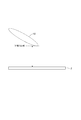
- FIG. 3 is a diagram illustrating a positional relationship between the touch panel unit 2 and the finger 10.
- the distance between the finger 10 and the touch panel unit 2 is larger than a predetermined distance
- the display unit 5 has the first brightness and the touch panel unit 2 has no first time operation
- the brightness of the display unit 5 becomes the second brightness that is darker than the first brightness. If the display unit 5 has the second brightness and the touch panel unit 2 is not operated for the second time, the display on the display unit 5 is turned off.
- the display unit A brightness of 5 is a third brightness that is brighter than the second brightness.
- the distance between the finger 10 and the touch panel unit 2 is a predetermined distance. If it is larger, the display unit 5 changes to the second brightness which is darker than the first brightness. After that, when the brightness of the display unit 5 is the second brightness, when there is no second time operation on the touch panel unit 2 and the distance between the finger 10 and the touch panel unit 2 is a predetermined value When it is larger than the distance, the display on the display unit 5 is turned off. Further, when the display unit 5 has the first brightness and the touch panel unit 2 is not operated for the first time, the distance between the finger 10 and the touch panel unit 2 is equal to or less than a predetermined distance. If there is, the display unit 5 changes to the third brightness which is brighter than the second brightness.
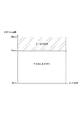
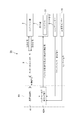
- FIG. 4 is a diagram schematically showing an example of the size of the touch area and the proximity detection distance of the finger in the portable electronic device 1 according to the present embodiment.
- the horizontal axis direction in the figure indicates the size of the touch area in the touch panel unit 2, and the vertical axis direction indicates the proximity detection distance of the finger with respect to the touch panel unit 2.
- the display unit The brightness of 5 is set to the first brightness or the third brightness that is brighter than the second brightness.
- the brightness of the display unit 5 is set to a second brightness that is darker than the first brightness.
- a predetermined function operates. That is, if the distance between the finger 10 and the touch panel unit 2 is greater than 15 mm, control related to display is performed, and if it is equal to or less than 15 mm, control related to functions other than display is performed.
- FIGS. 5A to 5E are diagrams showing changes in the brightness of the display unit 5 due to differences in the usage state of the portable electronic device 1 according to the present embodiment.
- (A) of the figure shows a state where the backlight 51 of the display unit 5 is lit when browsing the browser
- (b) of the figure shows the backlight 51 of the display unit 5 when browsing the browser. It is a figure which shows the state which is light-extinguished.
- (c) of the figure shows a state in which the backlight 51 of the display unit 5 is turned off and the display of the display unit 5 is turned off at the time of browsing the browser, and (d) of FIG.
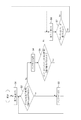
- FIG. 6 is a flowchart showing the brightness change process of the portable electronic device 1 according to the present embodiment.
- the backlight and display control unit 42 turns on the display screen in the display unit 5 (step S1). That is, as shown in FIG. 5B, only the liquid crystal display device is operated with the backlight 51 remaining off.
- the backlight and display control unit 42 determines whether or not the Z value is detected by the coordinate detection unit 41 within the predetermined time ta after the elapsed time t since the display screen was turned on (step S2).
- the Z value is a limit distance (predetermined distance) at which the finger 10 can be detected, and is determined by the capability of the touch panel unit 2. If it is determined in step S2 that the elapsed time t from the display screen is on is within the predetermined time ta and the Z value is detected by the coordinate detection unit 41 (in the case of “Yes”), the backlight and display control unit 42 Then, the backlight 51 of the display unit 5 is turned on (step S3). That is, as shown in FIG. 5A, the backlight 51 is turned on. Further, as shown in FIG. 5 (e), while the finger 10 is within the limit distance above the touch panel unit 2, steps S2 and S3 are repeatedly performed, and the backlight 51 is turned on.
- step S4 After turning on the backlight 51, the process returns to step S2 to make the same determination again.
- the elapsed time t from the display screen ON is within the predetermined time ta and the coordinate detection unit 41 does not detect the Z value (in the case of “No”), it exceeds the limit distance at which the finger 10 can be detected. Therefore, the backlight and display control unit 42 turns off the backlight 51 of the display unit 5 (step S4). That is, as shown in FIG. 5B, the backlight 51 is turned off.
- the backlight and display control unit 42 detects the Z value by the coordinate detection unit 41 when the elapsed time t1 after the backlight 51 is turned off is within the predetermined time tb. It is determined whether or not (step S5). In this determination, when the elapsed time t1 after the backlight 51 is turned off is within the predetermined time tb and the coordinate detection unit 41 detects the Z value (in the case of “Yes”), the backlight and display control unit 42 turns on the backlight 51 of the display unit 5 (step S3).
- step S6 the backlight 51 of the display unit 5 is turned off and the display of the display unit 5 is turned off.
- step S7 After turning off the display screen of the display unit 5, it is determined whether any one of the function keys 6-1 to 6-3 has been pressed (step S7). If not pressed (in the case of “No”), Returning to step S6, if pressed (in the case of “Yes”), the process returns to step S1.
- the touch panel unit 2 In addition to operating the function keys 6-1 to 6-3, the touch panel unit 2 may be touched. When the touch panel unit 2 is touched, the process returns from step S7 to step S1.
- the touch panel unit 2 has no first time operation, and the finger 10 and the touch panel are in a state where the display unit 5 is in the first brightness. If the distance to the unit 2 is larger than the predetermined distance, the brightness of the display unit 5 is changed to the second brightness that is darker than the first brightness, and then the brightness of the display unit 5 is set to the second brightness. In this case, and when there is no second time operation on the touch panel unit 2 and the distance between the finger 10 and the touch panel unit 2 is larger than a predetermined distance, the display on the display unit 5 is turned off.
- the display unit 5 in a state where the brightness of the display unit 5 is the first brightness, there is no first time operation on the touch panel unit 2, and the distance between the finger 10 and the touch panel unit 2 is a predetermined distance. If the brightness is lower than the second brightness, the display unit 5 is brighter than the second brightness. Of changing the brightness. Therefore, even if the touch panel unit 2 is not operated for the first time, if the finger 10 is brought close to the touch panel unit 2 to a predetermined distance or less, the display screen of the display unit 5 can be kept bright. it can. Then, when the finger 10 is separated from the touch panel unit 2 beyond a predetermined distance, the display screen becomes dark, and power saving can be achieved.
- liquid crystal display was used as the display part 5
- self-luminous displays such as organic EL (Electro
- organic EL Electro
- the ROM has a program describing the processing shown in the flowchart of FIG. 6, but the program is stored in a magnetic disk, an optical disk, a magneto-optical disk, a flash memory, or the like. It can be stored in a storage medium and distributed, or stored in a server (not shown) on a network such as the Internet so that it can be downloaded using a telecommunication line.
- the portable electronic device 1 which concerns on this Embodiment was applied to the portable radio device called a smart phone, not only a portable radio device but operation, such as navigation, such as household appliances, such as a microwave oven, and a car It is also applicable to panels.
- FIG. 7 is a block diagram showing a schematic configuration of the portable electronic device according to the second embodiment of the present invention. 7 that are the same as those in FIG. 1 described above are denoted by the same reference numerals. Further, the overview of the portable electronic device 1A according to the present embodiment is the same as the overview of the portable electronic device 1 according to the above-described first embodiment (see FIG. 2). Will be used. Similarly to the portable electronic device 1 according to the first embodiment, the portable electronic device 1A according to the present embodiment is applied to, for example, a portable wireless device called a smartphone, and a portion related to communication as a wireless device is omitted. is doing.
- a portable wireless device called a smartphone
- a portable electronic device 1A includes a touch panel unit (touch panel) 2, a touch panel controller 3, a device control unit 4A, a display unit 5, a function key 6, and an acceleration sensor 15.
- the touch panel unit 2 and the display unit 5 are arranged in a stacked state on the front side of the housing 7 of the portable electronic device 1 ⁇ / b> A.
- three function keys 6-1 to 6-3 are arranged at equal intervals at the lower end portion on the front side of the housing 7.
- the touch panel controller 3 and the device control unit 4A include a CPU, a ROM, a RAM, and an interface circuit.
- the ROM stores a program for controlling the CPU
- the RAM is used in the operation of the CPU.
- the touch panel unit 2 outputs a reception signal corresponding to a change in charge at the reception electrode to the touch panel controller 3.
- the touch panel controller 3 outputs a transmission signal to the touch panel unit 2 and inputs a reception signal output from the touch panel unit 2.
- the touch panel controller 3 detects the indicator from the input reception signal, and controls the coordinate signal indicating the position (X, Y, Z) of the detected indicator. Output to unit 4A.
- the indicator also includes “metal such as a key” to which the touch panel unit 2 reacts.
- a liquid crystal display (LCD) is used for the display unit 5, and brightness is supplied by a backlight 51.
- the function keys 6-1 to 6-3 are for executing three functions provided in the portable electronic device 1B, and function key control signals are output from each of them.
- the acceleration sensor 15 detects the swing and the vertical direction of the portable electronic device 1A according to the present embodiment, and outputs a sensor signal corresponding to the swing and the vertical direction.
- the device control unit 4A includes a coordinate detection unit 41 and a backlight and display control unit 42B.
- the coordinate detection unit 41 outputs a control signal to the touch panel controller 3 and outputs a coordinate signal from the touch panel controller 3 to the backlight and display control unit 42A.
- the coordinate signal output from the touch panel controller 3 is a signal indicating the position (X, Y, Z) of the indicator on the touch panel unit 2.
- the backlight and display control unit 42A outputs a backlight control signal for turning on the backlight 51 to the display unit 5 and outputs a display control signal corresponding to a touch operation or a hover operation on the touch panel unit 2. To do. Further, the backlight and display control unit 42A executes a predetermined function in accordance with the function key control signal output from each of the function keys 6-1 to 6-3. Further, the backlight and display control unit 42 ⁇ / b> A detects an operation (touch operation, hover operation) on the touch panel unit 2 based on the coordinate signal output from the coordinate detection unit 41.
- the proximity of the indicator is determined from the Z signal in the Z-axis direction among the coordinate signals output from the coordinate detection unit 41, and the distance between the indicator and the touch panel unit 2 is a predetermined distance (described below “ In the case of the second distance “) or less, an operation on the touch panel unit 2 is detected from the X signal in the X axis direction and the Y signal in the Y axis direction output from the coordinate detection unit 41.
- the backlight and display control unit 42 ⁇ / b> A gives an instruction from the touch panel unit 2, a time during which no operation is performed on the touch panel unit 2 (no operation time), the presence or absence of an indicator in a predetermined area set in the touch panel unit 2 Lighting control of the backlight 51 of the display unit 5 is performed based on the distance to the body (the reference distance is the “first distance”) and the presence or absence of acceleration detection by the acceleration sensor 15. Note that the backlight and display control unit 42A has a timekeeping function, and measures the no-operation time.
- FIG. 8 is a diagram showing the positional relationship between the touch panel unit 2 and the indicator 10.
- “metal” such as a key is assumed in addition to “finger” as an indicator, and therefore “10” is assigned to “finger”.
- “10A” is assigned to “metal such as a key”.
- the first distance from the touch panel unit 2 to the indicator 10 (10A) is a distance used for the lighting determination of the display unit 5.
- the second distance above the touch panel unit 2 is a distance used for operation detection on the touch panel unit 2.
- a predetermined area (Xa, Ya) 20 is set in the touch panel unit 2.
- the relationship between the size of the touch area and the proximity detection distance of the indicator is the same as the example shown in FIG. That is, when the distance between the indicator 10 (10A) and the touch panel unit 2 is greater than 15 mm and equal to or less than 20 mm, the brightness of the display unit 5 is set to be brighter than the first brightness or the second brightness. Set the brightness to 3. Further, when the distance between the indicator 10 (10A) and the touch panel unit 2 exceeds 20 mm, the brightness of the display unit 5 is set to the second brightness that is darker than the first brightness.
- a predetermined function operates when the distance between the indicator 10 (10A) and the touch panel unit 2 is 15 mm or less. That is, if the distance between the indicator 10 (10A) and the touch panel unit 2 is greater than 15 mm, control related to display is performed, and if the distance is 15 mm or less, control related to functions other than display is performed.
- the display unit 5 when the display screen is displayed, it is called “display screen on”, and when the display screen is not displayed, it is called “display screen off”.
- the backlight 51 of the display unit 5 when the backlight 51 is turned on, it is called “backlight on”, and when the backlight 51 is turned off, it is called “backlight off”.
- the first brightness is the brightness when the display screen is on and the backlight is on
- the second brightness is the brightness when the display screen is off and the backlight is off (off)
- the third brightness Is the brightness when the display screen is on. Note that the brightness when the display screen is on (third brightness) is darker than the first brightness at which the backlight 51 is also turned on, but may be the same as the first brightness.
- the lighting control of the display unit 5 by the backlight and display control unit 42A is performed as follows. (1) When the display screen is on and the backlight is on (in the case of the first brightness), and when there is no operation for a predetermined time on the touch panel unit 2 (when there is neither touch operation nor hover operation), and When the distance between the indicator 10 (10A) and the touch panel unit 2 is larger than the first distance (predetermined distance), the display screen is turned off and the backlight is turned off (second brightness darker than the first brightness).
- the backlight control signal and the display control signal are output to the display unit 5. That is, when the operation is not performed for a predetermined time and the indicator 10 (10A) is moved away from the touch panel unit 2 beyond the first distance, the brightness of the display unit 5 is lower than the first brightness. To the brightness.
- the indicator 10 (10A) is above the predetermined area (Xa, Ya) 20 set in the touch panel unit 2 and is equal to or less than the first distance with respect to the touch panel unit 2. Then, the brightness of the display unit 5 is set to a third brightness that is brighter than the second brightness.
- the indicator 10 (10A) is located above the predetermined area (Xa, Ya) 20 set in the touch panel unit 2 and the touch panel unit 2 If the distance is 1 or less, the brightness of the display unit 5 is set to the second brightness that is darker than the first brightness.
- Such lighting control is performed, for example, when there is a metal such as a key within a distance that the touch panel unit 2 reacts. That is, when a metal such as a key is present within a first distance in a predetermined area (Xa, Ya) 20 of the touch panel unit 2 when the portable electronic device 1A is put in a bag, the touch panel unit 2 reacts. Then, although the display screen is on and the backlight is on, the display screen is turned off after a predetermined time has elapsed.
- the indicator 10 (10A) is above the predetermined area (Xa, Ya) 20 set in the touch panel unit 2 and is equal to or less than the first distance with respect to the touch panel unit 2. If the predetermined acceleration is not detected at this time, the brightness of the display unit 5 is set to the third brightness. Such lighting control is performed, for example, when the user stops with the portable electronic device 1A and is not operating.
- the indicator 10 (10A) is above the predetermined area (Xa, Ya) 20 set in the touch panel unit 2 and is equal to or less than the first distance with respect to the touch panel unit 2. If the predetermined acceleration is detected at this time, the brightness of the display unit 5 is set to the second brightness. Such lighting control is performed, for example, when the user is walking with the portable electronic device 1A. Of course, no operation is performed.
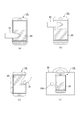
- FIGS 9 (a) to 9 (d) are diagrams showing usage modes of the portable electronic device 1A according to the present embodiment.
- (A) of the figure shows a case where the indicator 10 is above the predetermined area (Xa, Ya) 20, and the indicator 10 is above the predetermined area (Xa, Ya) 20, and the touch panel If the distance from the unit 2 is equal to or less than the first distance, the display screen on and the backlight on are continued while the indicator 10 maintains this state.
- FIG. 4B is a diagram showing a case where the indicator 10 is above the region other than the predetermined region (Xa, Ya) 20, and the indicator 10 is located outside the predetermined region (Xa, Ya) 20. If the state continues for a predetermined time over the area, the display screen is turned off and the backlight is turned off.
- FIG. 5C The state shown in FIG. 5C is a state in which the portable electronic device 1A is directed downward while the user is moving with the portable electronic device 1A.
- the acceleration sensor 15 detects the orientation (up and down) of the portable electronic device 1A and the presence or absence of vibration. Even when the indicator 10 is in the predetermined area (Xa, Ya) 20, the display screen is turned off and the backlight is turned off.
- FIG. (D) of the figure shows a state in which the user carries the portable electronic device 1A in the bag 30. Vibration generated when the portable electronic device 1 ⁇ / b> A is carried is detected by the acceleration sensor 15. As described above, even if the touch panel unit 2 reacts to the indicator 10A that is a metal key, the display screen is turned off and the backlight is turned off.
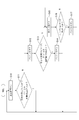
- FIG. 10 is a flowchart showing brightness change processing when acceleration detection is not performed in portable electronic device 1A according to the present embodiment.
- the backlight and display control unit 42A first turns on the display screen (step S10). In this case, backlight on is also included.
- the indicator 10 (10A) is in the predetermined area (Xa, Ya) 20, and the coordinate detection is performed within the predetermined time ta after the elapsed time t from the display screen ON. It is determined (whether or not it is detected that the distance between the indicator 10 (10A) and the touch panel unit 2 is equal to or less than the first distance) (step S11). If the indicator 10 (10A) is in the predetermined region (Xa, Ya) 20 and the elapsed time t from the display screen ON is within the predetermined time ta in the determination in step S11, coordinates are detected ("Yes") The backlight and display control unit 42A continues the display screen on and the backlight on. While the condition of step S11 is satisfied, the display screen is on and the backlight is on.
- step S11 When the condition of step S11 is not satisfied (when it is determined as “No”), that is, when the indicator 10 (10A) goes out of the predetermined area (Xa, Ya) 20, the elapsed time since the display screen is turned on When t has passed the predetermined time ta, or when the distance between the indicator 10 (10A) and the touch panel unit 2 is greater than the first distance, the backlight and display control unit 42A turns off the backlight. (Step S12). After the backlight is turned off, it is determined whether or not the indicator 10 (10A) is in the predetermined area (Xa, Ya) 20 and the coordinates are detected within the predetermined time tb after the elapsed time t1 from the backlight off (step S13). ).
- step S13 When the condition of step S13 is satisfied (when it is determined “Yes”), the backlight and display control unit 42A turns on the backlight (step S14). While both the conditions of step S11 and step S13 are satisfied, the display screen on and the backlight on are continued.
- step S13 When the condition of step S13 is not satisfied (when it is determined “No”), that is, when the indicator 10 (10A) goes out of the predetermined area (Xa, Ya) 20, the elapsed time from the backlight off When t1 has passed the predetermined time tb, or when the distance between the indicator 10 (10A) and the touch panel unit 2 is greater than the first distance, the backlight and display control unit 42A turns off the display screen. (Step S15). After the display screen is turned off, the backlight and display control unit 42A determines whether any one of the function keys 6-1 to 6-3 has been pressed (step S16). ), The process returns to step S15 to continue the display screen off. This state continues until any one of the function keys 6-1 to 6-3 is pressed. On the other hand, when any one of the function keys 6-1 to 6-3 is pressed (“Yes”), the backlight is turned on (step S17), and the process returns to step S10.
- the indicator 10 (10A) is in the predetermined area (Xa, Ya) 20 with the display screen on and the backlight on, and the elapsed time t from the display screen on is within the predetermined time ta.
- the display screen and the backlight are kept on while this condition is satisfied.
- the indicator 10 (10A) goes out of the predetermined area (Xa, Ya) 20, when the elapsed time t from the display screen on exceeds the predetermined time ta, or the indicator 10 (10A)
- the backlight is turned off.
- the backlight is turned on. While this condition and the previous condition are satisfied, the display screen is on and the backlight is on. When this condition is not satisfied, the display screen is turned off. This state continues until any one of the function keys 6-1 to 6-3 is pressed, and the backlight is turned on when any one of the function keys 6-1 to 6-3 is pressed.
- FIG. 11 is a flowchart showing brightness change processing when acceleration is detected in the portable electronic device 1A according to the present embodiment.
- the backlight and display control unit 42A first turns on the display screen (step S20). In this case, backlight on is also included.
- the indicator 10 (10A) is in the predetermined area (Xa, Ya) 20, and the coordinate detection is performed within the predetermined time ta after the elapsed time t from the display screen ON. It is determined whether or not (step S21). If it is determined in step S21 that the indicator 10 (10A) is in the predetermined area (Xa, Ya) 20, and the elapsed time t since the display screen is turned on is within the predetermined time ta ("Yes") The backlight and display control unit 42A determines whether or not the portable electronic device 1A is facing downward and there is vibration based on the sensor signal output from the acceleration sensor 15 (step S22).
- step S23 if the portable electronic device 1A is downward and vibrates (in the case of “Yes”), the backlight is turned off (step S23), and then the display screen is turned off (step S24). Then, it is determined whether any one of the function keys 6-1 to 6-3 has been pressed (step S25). If it has not been pressed (in the case of “No”), the process returns to step S24 to turn off the display screen. continue. This state continues until any one of the function keys 6-1 to 6-3 is pressed. On the other hand, when any one of the function keys 6-1 to 6-3 is pressed (in the case of “Yes”), the process returns to step S20 to turn on the display screen. If it is determined in step S22 that the portable electronic device 1A is other than downward and there is no vibration (in the case of “No”), the process directly returns to step S20.
- step S21 when the condition of step S21 is not satisfied (when it is determined “No”), that is, when the indicator 10 (10A) goes out of the predetermined area (Xa, Ya) 20, the display screen is turned on.
- the backlight and display control unit 42A The light is turned off (step S26). After the backlight is turned off, it is determined whether or not the indicator 10 (10A) is in the predetermined area (Xa, Ya) 20 and the coordinates are detected within the predetermined time tb after the elapsed time t1 from the backlight off (step S27). ).
- step S27 When the condition of step S27 is satisfied (when it is determined “Yes”), the backlight and display control unit 42A turns on the backlight (step S28).
- step S27 When the condition of step S27 is not satisfied (when it is determined “No”), that is, when the indicator 10 (10A) goes out of the predetermined area (Xa, Ya) 20, the elapsed time from the backlight off.
- t1 has passed the predetermined time tb, or when the distance between the indicator 10 (10A) and the touch panel unit 2 is greater than the first distance, the backlight and display control unit 42A turns off the display screen.
- Step S29 After the display screen is turned off, the backlight and display control unit 42A determines whether any one of the function keys 6-1 to 6-3 has been pressed (step S30). ), The process returns to step S29 to continue the display screen off. This state continues until any one of the function keys 6-1 to 6-3 is pressed. On the other hand, when any one of the function keys 6-1 to 6-3 is pressed (“Yes”), the backlight is turned on (step S31), and the process returns to step S20.
- the indicator 10 (10A) is in the predetermined area (Xa, Ya) 20 with the display screen on and the backlight on, and the elapsed time t from the display screen on is within the predetermined time ta.
- the backlight is turned off and the display screen is turned off.
- the display screen is kept off. If any one of the function keys 6-1 to 6-3 is pressed, the display screen is continued. Turn on and turn on the backlight.
- the indicator 10 (10A) goes out of the predetermined area (Xa, Ya) 20, the elapsed time t from the display screen ON exceeds the predetermined time ta, or the indicator 10 (10A) ) And the touch panel unit 2 is turned off when the distance is greater than the first distance. Thereafter, when the indicator 10 (10A) is in the predetermined area (Xa, Ya) 20, the elapsed time t1 from the display screen on is within the predetermined time tb, and the coordinates are detected, the backlight is turned on. When this condition is not satisfied, the display screen is turned off. This state continues until any one of the function keys 6-1 to 6-3 is pressed, and the backlight is turned on when any one of the function keys 6-1 to 6-3 is pressed.
- display screen is on and backlight is on, touch panel unit 2 is not operated for a predetermined time, and indicator 10 (10A). Since the backlight is turned off when the distance between the touch panel unit 2 and the touch panel unit 2 is larger than the first distance, power saving can be achieved.
- the touch panel unit 2 has not been operated for a predetermined time, and the indicator 10 (10A) is in the predetermined area (Xa, Ya) 20, and When the distance between the indicator 10 (10A) and the touch panel unit 2 is equal to or less than the first distance, the backlight on is maintained.
- the indicator 10 (10A) is set to the predetermined region (Xa, Ya set in the touch panel unit 2) ) 20 and when the distance between the indicator 10 (10A) and the touch panel unit 2 is equal to or less than the first distance and the acceleration sensor 15 does not detect a predetermined acceleration, the backlight Keep on.
- the display screen when the display screen is on and the backlight is on, and when there is no operation on the touch panel unit 2 for a predetermined time, and the indicator 10 (10A) is set to the predetermined region (Xa, Ya set in the touch panel unit 2) ) 20 and when the distance between the indicator 10 (10A) and the touch panel unit 2 is equal to or smaller than the first distance and the acceleration sensor 15 detects a predetermined acceleration, the display screen Since the display is turned off and the backlight is turned off, even if the portable electronic device 1A is held by hand, the display screen is automatically darkened unless it is in use, so that power saving can be achieved.
- a liquid crystal display is used as the display unit 5, but a self-luminous display such as an organic EL may be used.
- a self-luminous display such as an organic EL
- the backlight 51 is naturally unnecessary.
- the ROM has a program describing the processing shown in the flowchart of FIG. 10 or FIG. 11, but the program is stored in a magnetic disk, an optical disk, a magneto-optical disk, and a flash. It can be stored in a storage medium such as a memory and distributed, or stored in a server (not shown) on a network such as the Internet so that it can be downloaded using a telecommunication line.
- 1 A of portable electronic devices which concern on this Embodiment were applied to the portable radio device called a smart phone, not only a portable wireless device but operation, such as navigation, such as household appliances, such as a microwave oven, a car, etc. It is also applicable to panels.
- FIG. 12 is a block diagram showing a schematic configuration of the portable electronic device according to the third embodiment of the present invention. 12 that are the same as those in FIG. 1 described above are denoted by the same reference numerals.
- the overview of the portable electronic device 1B according to the present embodiment is the same as the overview of the portable electronic device 1 according to the first embodiment (see FIG. 2). Will be used.
- the portable electronic device 1B according to the present embodiment is applied to, for example, a portable wireless device called a smartphone, and a portion related to communication as a wireless device is omitted. is doing.
- the portable electronic device 1B includes a touch panel unit (touch panel) 2, a touch panel controller 3, a device control unit 4B, a display unit 5, and function keys 6.
- touch panel unit 2 and the display unit 5 are arranged in a stacked state on the front side of the housing 7 of the portable electronic device 1B.
- three function keys 6-1 to 6-3 are arranged at equal intervals at the lower end portion on the front side of the housing 7.
- the touch panel controller 3 and the device control unit 4B include a CPU, a ROM, a RAM, and an interface circuit.
- the ROM stores a program for controlling the CPU
- the RAM is used in the operation of the CPU.
- the touch panel unit 2 outputs a reception signal corresponding to a change in charge at the reception electrode to the touch panel controller 3.
- the touch panel controller 3 outputs a transmission signal to the touch panel unit 2 and inputs a reception signal output from the touch panel unit 2. Further, when the reception signal from the touch panel unit 2 is input, the touch panel controller 3 detects the indicator from the input reception signal, and receives a coordinate signal indicating the position (X, Y, Z) of the detected indicator as the device control unit. Output to 4B.
- a liquid crystal display (LCD) is used for the display unit 5, and brightness is supplied by a backlight 51.
- the function keys 6-1 to 6-3 are for executing three functions provided in the portable electronic device 1B, and function key control signals are output from each of them.
- the device control unit 4B includes a coordinate detection unit 41 and a backlight and display control unit 42B.
- the coordinate detection unit 41 outputs a control signal to the touch panel controller 3 and outputs a coordinate signal from the touch panel controller 3 to the backlight and display control unit 42B.
- the coordinate signal output from the touch panel controller 3 is a signal indicating the position (X, Y, Z) of the indicator on the touch panel unit 2.
- the backlight and display control unit 42B outputs a backlight control signal for turning on the backlight 51 to the display unit 5 and outputs a display control signal corresponding to a touch operation or a hover operation on the touch panel unit 2. To do. Further, the backlight and display control unit 42B executes a predetermined function in accordance with a function key control signal output from each of the function keys 6-1 to 6-3.
- the backlight and display control unit 42 ⁇ / b> B detects an operation (touch operation, hover operation) on the touch panel unit 2 based on the coordinate signal output from the coordinate detection unit 41.
- the proximity of the indicator is determined from the Z signal in the Z-axis direction among the coordinate signals output from the coordinate detector 41, and the distance between the indicator and the touch panel unit 2 is a predetermined distance (at least 0 (zero)).
- the operation on the touch panel unit 2 is detected from the X signal in the X axis direction and the Y signal in the Y axis direction output from the coordinate detection unit 41.
- the backlight and display control unit 42 ⁇ / b> B outputs the X signal in the X axis direction and the Y signal in the Y axis direction output from the coordinate detection unit 41.
- the area of the indicator is calculated from the signal, and lighting control of the backlight 51 of the display unit 5 is performed based on the calculated area of the indicator. In this case, if the distance between the indicator and the touch panel unit 2 is 0, since the indicator is in contact with the touch panel unit 2, the area of the contacted part is calculated. If the distance between the indicator and the touch panel unit 2 is greater than 0 and equal to or less than a predetermined distance, the area of the indicator over the touch panel unit 2 is calculated because the hover state.
- the backlight and display control unit 42B continuously captures the coordinate signal output from the coordinate detection unit 41 when the distance between the indicator and the touch panel unit 2 is equal to or less than a predetermined distance. Repeat the calculation of the body area.
- the state where the brightness of the backlight 51 of the display unit 5 is the first brightness and at least the area of the indicator is larger than the first area (corresponding to the threshold value) continues for the first time.
- the brightness of the backlight 51 of the display unit 5 is changed to a second brightness that is darker than the first brightness.
- the state in which the brightness of the backlight 51 of the display unit 5 is the second brightness and at least the area of the indicator is smaller than the second area (corresponding to the threshold value) continues for the second time.
- the brightness of the backlight 51 of the display unit 5 is changed to a third brightness that is at least brighter than the second brightness.
- the backlight and display control unit 42B has a timekeeping function, and the time during which the state of the indicator is larger than the first area or the state where the area of the indicator is smaller than the second area is present. Measure the continuous time.
- FIGS. 13A and 13B are perspective views showing an example of a hand-held state of the portable electronic device 1B according to the present embodiment, and the state shown in FIG.
- an operation holding state where a touch operation or a hover operation is to be performed with a fingertip is shown, and a state shown in (b) shows a carrying state holding the portable electronic device 1B.
- the operation waiting state shown in (a) the area of the indicator with respect to the touch panel unit 2 is smaller than that in the carrying state shown in (b).
- the state shown in FIG. 13 is a hover state floating from the touch panel unit 2 in both (a) and (b).
- a part of a human body can be detected by setting the indicator as a part of the human body and using an area where the size of the part can be determined as a threshold value.
- the parts of the human body include the palm, head, cheeks, ears, etc. in addition to the above-described fingers.
- the threshold By setting the threshold as the first area where the palm can be determined, the carrying state shown in FIG. 13B can be detected. Further, by setting the threshold as the second area where the fingertip can be determined, the operation waiting state shown in FIG. 13A can be detected.
- the magnitude relationship between the first area and the second area is such that the first area> the second area. Chattering can be prevented by making the first area different from the second area.
- the threshold value for detecting the fingertip and palm it becomes possible to detect the operation waiting state and the carrying state for the portable electronic device 1B.
- the brightness of the backlight 51 of the display unit 5 is changed to a second brightness that is darker than the first brightness, assuming that the portable electronic device 1B is in a portable state.
- the backlight and display control unit 42B detects the fingertip, the backlight 51 of the display unit 5 is brighter than the second brightness, assuming that the portable electronic device 1B is in an operation waiting state. Change to brightness.
- the first area and the second area corresponding to the threshold value may be substantially the same, or the first area may be larger than the second area.
- the first time and the second time may be substantially the same or different.
- the third brightness of the backlight 51 of the display unit 5 may be brighter than the second brightness and less than or equal to the first brightness, or may be the same as the first brightness. Further, the second brightness may be the brightness when the light is turned off.
- FIG. 14 is a flowchart showing brightness change processing of the portable electronic device 1B according to the present embodiment.
- the first area and the second area are set as one area (predetermined area), and the first duration and the second duration are set as one time (predetermined time).
- the backlight and display control unit 42B first turns on the backlight 51 of the display unit 5 (step S40).
- the backlight and display control unit 42 ⁇ / b> B determines whether a touch or hover less than a predetermined area of the human body part with respect to the touch panel unit 2 has been detected (step S ⁇ b> 41).
- step S41 it is determined whether the touch on the touch panel unit 2 is less than a predetermined area or the hover on the touch panel unit 2 is a hover less than the predetermined area. In this determination, when a contact or hover less than a predetermined area of a human body part with respect to the touch panel unit 2 is detected (that is, when “Yes” is determined in step S41), the backlight 51 of the display unit 5 is kept on.
- the backlight and display control unit 42B does not detect contact or hover less than a predetermined area of the human body part with respect to the touch panel unit 2 (that is, if “No” is determined in step S41), the touch panel unit 2 It is determined whether or not a contact or hover over a predetermined area of a human body part is detected for a predetermined time (step S42).
- the backlight and display control unit 42B continues the on state of the backlight 51 of the display unit 5 when contact or hover for a predetermined time or longer is not detected for a predetermined time (ie, when “No” is determined in step S42). .
- the backlight and display control unit 42B turns off the backlight 51 of the display unit 5 when contact or hover for a predetermined time or longer is detected for a predetermined time (that is, when “Yes” is determined in step S42). (Step S43). After turning off the backlight 51, it is determined whether a contact or hover over a predetermined area has been detected (step S44). If a contact or hover over a predetermined area is detected (ie, “Yes” is determined in step S44).
- the backlight 51 of the display unit 5 is kept off.
- the backlight and display control unit 42B does not detect a contact or hover exceeding a predetermined area (that is, when “No” is determined in step S44)
- the backlight and display control unit 42B detects a contact or hover less than the predetermined area for a predetermined time. (Step S45), and if no contact or hover less than a predetermined area is detected for a predetermined time (ie, if “No” is determined in Step S45), the backlight 51 of the display unit 5 is kept off.
- the backlight and display control unit 42B turns off the backlight 51 of the display unit 5 when a contact or hover less than the predetermined area is detected for a predetermined time (that is, when “Yes” is determined in step S45). From state to on. The above steps S40 to S45 are repeated.
- the portable electronic device 1B As described above, according to the portable electronic device 1B according to the present embodiment, at least the area of the part of the human body is the first in a state where the brightness of the backlight 51 of the display unit 5 is the first brightness.
- the brightness of the backlight 51 of the display unit 5 is changed to the second brightness which is darker than the first brightness.
- the portable electronic device 1B is simply held by hand, the display screen can be kept in a dark state, and power saving can be achieved. Further, even if the area of the part of the human body becomes larger than the first area, if it is temporary, it is not changed to the second brightness, so that malfunction can be prevented.
- the display unit 5 In the state where the brightness of the backlight 51 of the display unit 5 is the second brightness, when the state where at least the area of the human body part is smaller than the second area continues for the second time, the display unit 5 is changed to a third brightness that is at least higher than the second brightness, so that the display screen is brightened while waiting for or operating the touch panel unit 2. Can be held. Further, even if the area of the human body portion is smaller than the second area, if it is temporary, it is not changed to the third brightness, so that malfunction can be prevented.
- a liquid crystal display (LCD) is used as the display unit 5.
- a self-luminous display such as an organic EL may be used.
- the backlight 51 is naturally unnecessary.
- the ROM has a program describing the processing shown in the flowchart of FIG. 14, but the program is stored in a magnetic disk, an optical disk, a magneto-optical disk, a flash memory, or the like. It can be stored in a storage medium and distributed, or stored in a server (not shown) on a network such as the Internet so that it can be downloaded using a telecommunication line.
- a predetermined distance is set as the first distance, and a second distance that is smaller than the first distance is set, so that the portion between the human body part and touch panel unit 2 is set.
- a predetermined function that operates when the distance is less than or equal to the second distance may be provided.
- the predetermined function is, for example, a function corresponding to an icon displayed on the display unit 5. Accordingly, by bringing the fingertip closer to the touch panel unit 2 to the second distance or less, an icon immediately below the fingertip is selected, and a function corresponding to the icon operates.
- the portable electronic device 1B according to the present embodiment is applied to a portable wireless device called a smartphone.
- the portable electronic device 1B is not limited to the portable wireless device. It is also applicable to panels.
- the present invention has an effect that a user can arbitrarily set the brightness of a display screen even when there is no operation on the touch panel for a predetermined time, and the capacitive touch panel and the touch panel are laminated.
- Application to a portable electronic device having a display is possible.
Landscapes
- Engineering & Computer Science (AREA)
- Theoretical Computer Science (AREA)
- Physics & Mathematics (AREA)
- General Physics & Mathematics (AREA)
- General Engineering & Computer Science (AREA)
- Computer Hardware Design (AREA)
- Human Computer Interaction (AREA)
- Telephone Function (AREA)
- Power Sources (AREA)
- Controls And Circuits For Display Device (AREA)
- User Interface Of Digital Computer (AREA)
- Control Of El Displays (AREA)
- Liquid Crystal (AREA)
- Liquid Crystal Display Device Control (AREA)
- Control Of Indicators Other Than Cathode Ray Tubes (AREA)
Abstract
Priority Applications (2)
| Application Number | Priority Date | Filing Date | Title |
|---|---|---|---|
| US14/235,878 US9711090B2 (en) | 2012-08-09 | 2013-05-31 | Portable electronic device changing display brightness based on acceleration and distance |
| JP2013537977A JP5519871B1 (ja) | 2012-08-09 | 2013-05-31 | 携帯電子機器 |
Applications Claiming Priority (6)
| Application Number | Priority Date | Filing Date | Title |
|---|---|---|---|
| JP2012177369 | 2012-08-09 | ||
| JP2012-177369 | 2012-08-09 | ||
| JP2012194321 | 2012-09-04 | ||
| JP2012-194321 | 2012-09-04 | ||
| JP2012276225 | 2012-12-18 | ||
| JP2012-276225 | 2012-12-18 |
Publications (1)
| Publication Number | Publication Date |
|---|---|
| WO2014024366A1 true WO2014024366A1 (fr) | 2014-02-13 |
Family
ID=50067638
Family Applications (1)
| Application Number | Title | Priority Date | Filing Date |
|---|---|---|---|
| PCT/JP2013/003469 Ceased WO2014024366A1 (fr) | 2012-08-09 | 2013-05-31 | Appareil électronique portable |
Country Status (3)
| Country | Link |
|---|---|
| US (1) | US9711090B2 (fr) |
| JP (2) | JP5519871B1 (fr) |
| WO (1) | WO2014024366A1 (fr) |
Cited By (11)
| Publication number | Priority date | Publication date | Assignee | Title |
|---|---|---|---|---|
| WO2015188503A1 (fr) * | 2014-06-10 | 2015-12-17 | 中兴通讯股份有限公司 | Procédé et dispositif de commande de terminal |
| JP2016092476A (ja) * | 2014-10-30 | 2016-05-23 | 京セラ株式会社 | 電子機器、制御方法、及び制御プログラム |
| JP2017181651A (ja) * | 2016-03-29 | 2017-10-05 | 株式会社河合楽器製作所 | 電子鍵盤楽器 |
| JP2019015752A (ja) * | 2017-07-03 | 2019-01-31 | キヤノン株式会社 | 表示制御装置、制御方法およびプログラム |
| US10311830B2 (en) * | 2015-12-31 | 2019-06-04 | Boe Technology Group Co., Ltd. | Operating method, related touch display device and related semiconductor device |
| CN109887475A (zh) * | 2019-03-12 | 2019-06-14 | 维沃移动通信有限公司 | 一种屏幕亮度补偿方法及移动终端 |
| JP2019534469A (ja) * | 2016-09-23 | 2019-11-28 | アップル インコーポレイテッドApple Inc. | ウォッチシアターモード |
| CN110956939A (zh) * | 2019-11-27 | 2020-04-03 | 华为技术有限公司 | 调节屏幕亮度的方法及电子设备 |
| US10852905B1 (en) | 2019-09-09 | 2020-12-01 | Apple Inc. | Techniques for managing display usage |
| US11257464B2 (en) | 2017-05-16 | 2022-02-22 | Apple Inc. | User interface for a flashlight mode on an electronic device |
| US12182373B2 (en) | 2021-04-27 | 2024-12-31 | Apple Inc. | Techniques for managing display usage |
Families Citing this family (21)
| Publication number | Priority date | Publication date | Assignee | Title |
|---|---|---|---|---|
| US9094603B2 (en) | 2011-10-07 | 2015-07-28 | Panasonic Intellectual Property Corporation Of America | Image pickup device and image pickup method |
| US9612736B2 (en) * | 2013-07-17 | 2017-04-04 | Korea Advanced Institute Of Science And Technology | User interface method and apparatus using successive touches |
| JP6094527B2 (ja) * | 2013-10-02 | 2017-03-15 | 株式会社デンソー | スイッチ装置 |
| JP5656307B1 (ja) | 2014-06-20 | 2015-01-21 | パナソニック株式会社 | 電子機器 |
| JP5866526B2 (ja) | 2014-06-20 | 2016-02-17 | パナソニックIpマネジメント株式会社 | 電子機器、制御方法、及びプログラム |
| JP5736551B1 (ja) | 2014-06-20 | 2015-06-17 | パナソニックIpマネジメント株式会社 | 電子機器及び制御方法 |
| JP6532306B2 (ja) * | 2015-06-04 | 2019-06-19 | キヤノン株式会社 | 撮像装置及びその制御方法 |
| KR102396711B1 (ko) | 2015-09-15 | 2022-05-11 | 엘지전자 주식회사 | 이동 단말기 및 그것의 제어방법 |
| KR102084637B1 (ko) * | 2015-09-18 | 2020-03-05 | 삼성디스플레이 주식회사 | 터치 스크린 패널 및 그의 제어방법 |
| JP2017079001A (ja) * | 2015-10-21 | 2017-04-27 | レノボ・シンガポール・プライベート・リミテッド | 情報処理装置、表示装置の輝度制御方法、及びコンピュータが実行可能なプログラム |
| US20170153695A1 (en) * | 2015-11-30 | 2017-06-01 | Semiconductor Energy Laboratory Co., Ltd. | Display device, input/output device, data processing device, and driving method of data processing device |
| CN105528151A (zh) * | 2015-12-01 | 2016-04-27 | 小米科技有限责任公司 | 亮度调整方法及装置 |
| CN106055144B (zh) * | 2016-05-24 | 2018-12-18 | 北京小米移动软件有限公司 | 控制触控屏状态的方法及装置、电子设备 |
| KR101898053B1 (ko) * | 2017-03-23 | 2018-09-12 | 주식회사 하이딥 | 터치 입력 장치 및 이의 제어 방법 |
| US10466834B2 (en) * | 2017-05-15 | 2019-11-05 | Leading Ui Co., Ltd. | Touch system for finger and stylus pen touch recognition |
| CN107256084A (zh) * | 2017-05-24 | 2017-10-17 | 段杰 | 预防近视的处理方法及其终端 |
| CN109788530B (zh) * | 2017-11-09 | 2021-12-28 | 北京小米移动软件有限公司 | 调整辐射功率的装置及方法、电子设备 |
| WO2020139518A1 (fr) | 2018-12-27 | 2020-07-02 | Snap Inc. | Affichage d'interface utilisateur en dégradé sur la base d'une distance de doigt ou d'une proximité de la main |
| JP6861769B2 (ja) * | 2019-08-09 | 2021-04-21 | 本田技研工業株式会社 | 表示制御装置、表示制御方法、およびプログラム |
| CN111880886B (zh) * | 2020-07-31 | 2024-04-30 | 北京小米移动软件有限公司 | 屏保图片的选取方法及装置、存储介质 |
| JP2022186445A (ja) * | 2021-06-04 | 2022-12-15 | 京セラドキュメントソリューションズ株式会社 | 表示入力装置 |
Citations (5)
| Publication number | Priority date | Publication date | Assignee | Title |
|---|---|---|---|---|
| JP2002323885A (ja) * | 2001-04-26 | 2002-11-08 | Matsushita Electric Ind Co Ltd | ワイヤレスディスプレイシステム |
| JP2002323942A (ja) * | 2001-04-26 | 2002-11-08 | Matsushita Electric Ind Co Ltd | ワイヤレスディスプレイシステム及びその制御方法 |
| JP2011101296A (ja) * | 2009-11-09 | 2011-05-19 | Fujitsu Toshiba Mobile Communications Ltd | 携帯端末装置 |
| JP2012059171A (ja) * | 2010-09-13 | 2012-03-22 | Seiko Epson Corp | 光学式検出システム、電子機器及びプログラム |
| WO2012090405A1 (fr) * | 2010-12-28 | 2012-07-05 | Necカシオモバイルコミュニケーションズ株式会社 | Dispositif d'entrée, procédé de commande d'entrée, programme et appareil électronique |
Family Cites Families (20)
| Publication number | Priority date | Publication date | Assignee | Title |
|---|---|---|---|---|
| US6201554B1 (en) * | 1999-01-12 | 2001-03-13 | Ericsson Inc. | Device control apparatus for hand-held data processing device |
| US20020086719A1 (en) * | 2000-12-29 | 2002-07-04 | Pankaj Kedia | Low power subsystem for portable computers |
| US7702420B2 (en) * | 2004-07-07 | 2010-04-20 | Panasonic Corporation | Method for making mobile unit accompany objective person |
| JP4736384B2 (ja) | 2004-09-22 | 2011-07-27 | 日本電気株式会社 | 携帯端末装置および表示装置制御方法 |
| JP2007163891A (ja) | 2005-12-14 | 2007-06-28 | Sony Corp | 表示装置 |
| US20070075127A1 (en) * | 2005-12-21 | 2007-04-05 | Outland Research, Llc | Orientation-based power conservation for portable media devices |
| KR100703292B1 (ko) * | 2006-02-15 | 2007-04-03 | 삼성전자주식회사 | 적응형 보폭 추정 장치 및 방법 |
| JP4930154B2 (ja) * | 2007-03-30 | 2012-05-16 | カシオ計算機株式会社 | 撮像装置及びそのコンピュータプログラム |
| JP2009140368A (ja) * | 2007-12-07 | 2009-06-25 | Sony Corp | 入力装置、表示装置、入力方法、表示方法及びプログラム |
| KR20100060457A (ko) * | 2008-11-27 | 2010-06-07 | 삼성전자주식회사 | 이동통신 단말기의 동작모드 제어장치 및 방법 |
| JP5141984B2 (ja) * | 2009-05-11 | 2013-02-13 | ソニー株式会社 | 情報処理装置および方法 |
| KR101257303B1 (ko) * | 2010-09-08 | 2013-05-02 | 인테니움 인코퍼레이션 | 언터치 방식의 제스쳐 인식 방법 및 장치 |
| JP2012128804A (ja) | 2010-12-17 | 2012-07-05 | Aisin Aw Co Ltd | 操作受付装置、操作受付方法および操作受付プログラム |
| JP5648844B2 (ja) | 2010-12-21 | 2015-01-07 | ソニー株式会社 | 画像表示制御装置および画像表示制御方法 |
| JP2012150761A (ja) * | 2011-01-21 | 2012-08-09 | Fujitsu Ltd | 情報処理装置および情報処理プログラム |
| US8320970B2 (en) * | 2011-02-16 | 2012-11-27 | Google Inc. | Mobile device display management |
| WO2012119548A1 (fr) * | 2011-03-07 | 2012-09-13 | 联想(北京)有限公司 | Procédé de commande, dispositif de commande, dispositif de visualisation et dispositif électronique |
| US20130033418A1 (en) * | 2011-08-05 | 2013-02-07 | Qualcomm Incorporated | Gesture detection using proximity or light sensors |
| KR102179811B1 (ko) * | 2012-12-03 | 2020-11-17 | 엘지전자 주식회사 | 포터블 디바이스 및 음성 인식 서비스 제공 방법 |
| US20140370909A1 (en) * | 2013-06-14 | 2014-12-18 | Microsoft Corporation | Reduced power location determinations for detecting geo-fences |
-
2013
- 2013-05-31 WO PCT/JP2013/003469 patent/WO2014024366A1/fr not_active Ceased
- 2013-05-31 JP JP2013537977A patent/JP5519871B1/ja active Active
- 2013-05-31 US US14/235,878 patent/US9711090B2/en active Active
-
2014
- 2014-04-01 JP JP2014075482A patent/JP5660745B2/ja active Active
Patent Citations (5)
| Publication number | Priority date | Publication date | Assignee | Title |
|---|---|---|---|---|
| JP2002323885A (ja) * | 2001-04-26 | 2002-11-08 | Matsushita Electric Ind Co Ltd | ワイヤレスディスプレイシステム |
| JP2002323942A (ja) * | 2001-04-26 | 2002-11-08 | Matsushita Electric Ind Co Ltd | ワイヤレスディスプレイシステム及びその制御方法 |
| JP2011101296A (ja) * | 2009-11-09 | 2011-05-19 | Fujitsu Toshiba Mobile Communications Ltd | 携帯端末装置 |
| JP2012059171A (ja) * | 2010-09-13 | 2012-03-22 | Seiko Epson Corp | 光学式検出システム、電子機器及びプログラム |
| WO2012090405A1 (fr) * | 2010-12-28 | 2012-07-05 | Necカシオモバイルコミュニケーションズ株式会社 | Dispositif d'entrée, procédé de commande d'entrée, programme et appareil électronique |
Cited By (21)
| Publication number | Priority date | Publication date | Assignee | Title |
|---|---|---|---|---|
| CN105260167A (zh) * | 2014-06-10 | 2016-01-20 | 中兴通讯股份有限公司 | 一种控制终端的方法和装置 |
| WO2015188503A1 (fr) * | 2014-06-10 | 2015-12-17 | 中兴通讯股份有限公司 | Procédé et dispositif de commande de terminal |
| JP2016092476A (ja) * | 2014-10-30 | 2016-05-23 | 京セラ株式会社 | 電子機器、制御方法、及び制御プログラム |
| US10311830B2 (en) * | 2015-12-31 | 2019-06-04 | Boe Technology Group Co., Ltd. | Operating method, related touch display device and related semiconductor device |
| JP2017181651A (ja) * | 2016-03-29 | 2017-10-05 | 株式会社河合楽器製作所 | 電子鍵盤楽器 |
| US11307757B2 (en) | 2016-09-23 | 2022-04-19 | Apple Inc. | Watch theater mode |
| JP2019534469A (ja) * | 2016-09-23 | 2019-11-28 | アップル インコーポレイテッドApple Inc. | ウォッチシアターモード |
| US12050771B2 (en) | 2016-09-23 | 2024-07-30 | Apple Inc. | Watch theater mode |
| US11257464B2 (en) | 2017-05-16 | 2022-02-22 | Apple Inc. | User interface for a flashlight mode on an electronic device |
| US12293741B2 (en) | 2017-05-16 | 2025-05-06 | Apple Inc. | User interface for a flashlight mode on an electronic device |
| US11955100B2 (en) | 2017-05-16 | 2024-04-09 | Apple Inc. | User interface for a flashlight mode on an electronic device |
| JP2019015752A (ja) * | 2017-07-03 | 2019-01-31 | キヤノン株式会社 | 表示制御装置、制御方法およびプログラム |
| CN109887475B (zh) * | 2019-03-12 | 2020-06-09 | 维沃移动通信有限公司 | 一种屏幕亮度补偿方法及移动终端 |
| CN109887475A (zh) * | 2019-03-12 | 2019-06-14 | 维沃移动通信有限公司 | 一种屏幕亮度补偿方法及移动终端 |
| US10936345B1 (en) | 2019-09-09 | 2021-03-02 | Apple Inc. | Techniques for managing display usage |
| US10908559B1 (en) | 2019-09-09 | 2021-02-02 | Apple Inc. | Techniques for managing display usage |
| US10878782B1 (en) | 2019-09-09 | 2020-12-29 | Apple Inc. | Techniques for managing display usage |
| US10852905B1 (en) | 2019-09-09 | 2020-12-01 | Apple Inc. | Techniques for managing display usage |
| US12373079B2 (en) | 2019-09-09 | 2025-07-29 | Apple Inc. | Techniques for managing display usage |
| CN110956939A (zh) * | 2019-11-27 | 2020-04-03 | 华为技术有限公司 | 调节屏幕亮度的方法及电子设备 |
| US12182373B2 (en) | 2021-04-27 | 2024-12-31 | Apple Inc. | Techniques for managing display usage |
Also Published As
| Publication number | Publication date |
|---|---|
| JP5660745B2 (ja) | 2015-01-28 |
| JP2014167801A (ja) | 2014-09-11 |
| US20150109218A1 (en) | 2015-04-23 |
| JPWO2014024366A1 (ja) | 2016-07-25 |
| US9711090B2 (en) | 2017-07-18 |
| JP5519871B1 (ja) | 2014-06-11 |
Similar Documents
| Publication | Publication Date | Title |
|---|---|---|
| JP5519871B1 (ja) | 携帯電子機器 | |
| EP2455850B1 (fr) | Procédé pour faire défiler un écran dans un terminal d'écran tactile et dispositif correspondant | |
| US20120297339A1 (en) | Electronic device, control method, and storage medium storing control program | |
| US9229529B2 (en) | Apparatus and control method based on motion | |
| EP2752737A2 (fr) | Procédé de commande de dispositif portable utilisant un stylo électrique et dispositif portable correspondant | |
| JP2014203183A (ja) | 情報処理装置及びプログラム | |
| JP5780438B2 (ja) | 電子機器、位置指定方法及びプログラム | |
| JP6940353B2 (ja) | 電子機器 | |
| JP2012155675A (ja) | タッチパネル装置 | |
| JP2013145556A (ja) | 電子機器およびその制御方法 | |
| JP5854928B2 (ja) | タッチ検出機能を有する電子機器、プログラムおよびタッチ検出機能を有する電子機器の制御方法 | |
| JPWO2014041732A1 (ja) | 携帯電子機器 | |
| KR20140010593A (ko) | 전자펜 장탈착 인식 구조를 이용한 소모전류 감소 장치 및 방법 | |
| JP6122355B2 (ja) | 携帯端末装置 | |
| CN109074124B (zh) | 数据处理的方法及移动设备 | |
| CN102768597A (zh) | 一种操作电子设备的方法及装置 | |
| JP5727310B2 (ja) | 携帯端末、輝度制御方法及びプログラム | |
| US20190286322A1 (en) | Information processing apparatus, program, and information processing system | |
| JP2014081733A (ja) | 携帯電子機器 | |
| JP2014153916A (ja) | 電子機器、制御方法、及びプログラム | |
| JP6871846B2 (ja) | 電子機器および制御方法 | |
| JP2014075759A (ja) | 情報処理装置、およびプログラム | |
| JP6616379B2 (ja) | 電子機器 | |
| WO2016154859A1 (fr) | Procédé et terminal d'identification de main gauche/main droite | |
| WO2013118227A1 (fr) | Dispositif de traitement d'informations |
Legal Events
| Date | Code | Title | Description |
|---|---|---|---|
| ENP | Entry into the national phase |
Ref document number: 2013537977 Country of ref document: JP Kind code of ref document: A |
|
| WWE | Wipo information: entry into national phase |
Ref document number: 14235878 Country of ref document: US |
|
| 121 | Ep: the epo has been informed by wipo that ep was designated in this application |
Ref document number: 13827830 Country of ref document: EP Kind code of ref document: A1 |
|
| NENP | Non-entry into the national phase |
Ref country code: DE |
|
| 122 | Ep: pct application non-entry in european phase |
Ref document number: 13827830 Country of ref document: EP Kind code of ref document: A1 |