WO2014129655A1 - Dispositif de terminal mobile et procédé de commande de dispositif de terminal mobile - Google Patents
Dispositif de terminal mobile et procédé de commande de dispositif de terminal mobile Download PDFInfo
- Publication number
- WO2014129655A1 WO2014129655A1 PCT/JP2014/054545 JP2014054545W WO2014129655A1 WO 2014129655 A1 WO2014129655 A1 WO 2014129655A1 JP 2014054545 W JP2014054545 W JP 2014054545W WO 2014129655 A1 WO2014129655 A1 WO 2014129655A1
- Authority
- WO
- WIPO (PCT)
- Prior art keywords
- application
- notification
- information
- notification information
- message
- Prior art date
- Legal status (The legal status is an assumption and is not a legal conclusion. Google has not performed a legal analysis and makes no representation as to the accuracy of the status listed.)
- Ceased
Links
Images





Classifications
-
- G—PHYSICS
- G06—COMPUTING OR CALCULATING; COUNTING
- G06F—ELECTRIC DIGITAL DATA PROCESSING
- G06F3/00—Input arrangements for transferring data to be processed into a form capable of being handled by the computer; Output arrangements for transferring data from processing unit to output unit, e.g. interface arrangements
- G06F3/01—Input arrangements or combined input and output arrangements for interaction between user and computer
- G06F3/048—Interaction techniques based on graphical user interfaces [GUI]
- G06F3/0481—Interaction techniques based on graphical user interfaces [GUI] based on specific properties of the displayed interaction object or a metaphor-based environment, e.g. interaction with desktop elements like windows or icons, or assisted by a cursor's changing behaviour or appearance
- G06F3/0482—Interaction with lists of selectable items, e.g. menus
-
- G—PHYSICS
- G06—COMPUTING OR CALCULATING; COUNTING
- G06F—ELECTRIC DIGITAL DATA PROCESSING
- G06F3/00—Input arrangements for transferring data to be processed into a form capable of being handled by the computer; Output arrangements for transferring data from processing unit to output unit, e.g. interface arrangements
- G06F3/01—Input arrangements or combined input and output arrangements for interaction between user and computer
- G06F3/048—Interaction techniques based on graphical user interfaces [GUI]
- G06F3/0481—Interaction techniques based on graphical user interfaces [GUI] based on specific properties of the displayed interaction object or a metaphor-based environment, e.g. interaction with desktop elements like windows or icons, or assisted by a cursor's changing behaviour or appearance
-
- G—PHYSICS
- G06—COMPUTING OR CALCULATING; COUNTING
- G06F—ELECTRIC DIGITAL DATA PROCESSING
- G06F3/00—Input arrangements for transferring data to be processed into a form capable of being handled by the computer; Output arrangements for transferring data from processing unit to output unit, e.g. interface arrangements
- G06F3/01—Input arrangements or combined input and output arrangements for interaction between user and computer
- G06F3/048—Interaction techniques based on graphical user interfaces [GUI]
- G06F3/0481—Interaction techniques based on graphical user interfaces [GUI] based on specific properties of the displayed interaction object or a metaphor-based environment, e.g. interaction with desktop elements like windows or icons, or assisted by a cursor's changing behaviour or appearance
- G06F3/04817—Interaction techniques based on graphical user interfaces [GUI] based on specific properties of the displayed interaction object or a metaphor-based environment, e.g. interaction with desktop elements like windows or icons, or assisted by a cursor's changing behaviour or appearance using icons
-
- G—PHYSICS
- G06—COMPUTING OR CALCULATING; COUNTING
- G06F—ELECTRIC DIGITAL DATA PROCESSING
- G06F3/00—Input arrangements for transferring data to be processed into a form capable of being handled by the computer; Output arrangements for transferring data from processing unit to output unit, e.g. interface arrangements
- G06F3/01—Input arrangements or combined input and output arrangements for interaction between user and computer
- G06F3/048—Interaction techniques based on graphical user interfaces [GUI]
- G06F3/0484—Interaction techniques based on graphical user interfaces [GUI] for the control of specific functions or operations, e.g. selecting or manipulating an object, an image or a displayed text element, setting a parameter value or selecting a range
- G06F3/04842—Selection of displayed objects or displayed text elements
-
- G—PHYSICS
- G06—COMPUTING OR CALCULATING; COUNTING
- G06F—ELECTRIC DIGITAL DATA PROCESSING
- G06F3/00—Input arrangements for transferring data to be processed into a form capable of being handled by the computer; Output arrangements for transferring data from processing unit to output unit, e.g. interface arrangements
- G06F3/01—Input arrangements or combined input and output arrangements for interaction between user and computer
- G06F3/048—Interaction techniques based on graphical user interfaces [GUI]
- G06F3/0487—Interaction techniques based on graphical user interfaces [GUI] using specific features provided by the input device, e.g. functions controlled by the rotation of a mouse with dual sensing arrangements, or of the nature of the input device, e.g. tap gestures based on pressure sensed by a digitiser
- G06F3/0488—Interaction techniques based on graphical user interfaces [GUI] using specific features provided by the input device, e.g. functions controlled by the rotation of a mouse with dual sensing arrangements, or of the nature of the input device, e.g. tap gestures based on pressure sensed by a digitiser using a touch-screen or digitiser, e.g. input of commands through traced gestures
-
- G—PHYSICS
- G06—COMPUTING OR CALCULATING; COUNTING
- G06F—ELECTRIC DIGITAL DATA PROCESSING
- G06F3/00—Input arrangements for transferring data to be processed into a form capable of being handled by the computer; Output arrangements for transferring data from processing unit to output unit, e.g. interface arrangements
- G06F3/01—Input arrangements or combined input and output arrangements for interaction between user and computer
- G06F3/048—Interaction techniques based on graphical user interfaces [GUI]
- G06F3/0487—Interaction techniques based on graphical user interfaces [GUI] using specific features provided by the input device, e.g. functions controlled by the rotation of a mouse with dual sensing arrangements, or of the nature of the input device, e.g. tap gestures based on pressure sensed by a digitiser
- G06F3/0488—Interaction techniques based on graphical user interfaces [GUI] using specific features provided by the input device, e.g. functions controlled by the rotation of a mouse with dual sensing arrangements, or of the nature of the input device, e.g. tap gestures based on pressure sensed by a digitiser using a touch-screen or digitiser, e.g. input of commands through traced gestures
- G06F3/04883—Interaction techniques based on graphical user interfaces [GUI] using specific features provided by the input device, e.g. functions controlled by the rotation of a mouse with dual sensing arrangements, or of the nature of the input device, e.g. tap gestures based on pressure sensed by a digitiser using a touch-screen or digitiser, e.g. input of commands through traced gestures for inputting data by handwriting, e.g. gesture or text
-
- G—PHYSICS
- G06—COMPUTING OR CALCULATING; COUNTING
- G06F—ELECTRIC DIGITAL DATA PROCESSING
- G06F3/00—Input arrangements for transferring data to be processed into a form capable of being handled by the computer; Output arrangements for transferring data from processing unit to output unit, e.g. interface arrangements
- G06F3/01—Input arrangements or combined input and output arrangements for interaction between user and computer
- G06F3/048—Interaction techniques based on graphical user interfaces [GUI]
- G06F3/0487—Interaction techniques based on graphical user interfaces [GUI] using specific features provided by the input device, e.g. functions controlled by the rotation of a mouse with dual sensing arrangements, or of the nature of the input device, e.g. tap gestures based on pressure sensed by a digitiser
- G06F3/0488—Interaction techniques based on graphical user interfaces [GUI] using specific features provided by the input device, e.g. functions controlled by the rotation of a mouse with dual sensing arrangements, or of the nature of the input device, e.g. tap gestures based on pressure sensed by a digitiser using a touch-screen or digitiser, e.g. input of commands through traced gestures
- G06F3/04886—Interaction techniques based on graphical user interfaces [GUI] using specific features provided by the input device, e.g. functions controlled by the rotation of a mouse with dual sensing arrangements, or of the nature of the input device, e.g. tap gestures based on pressure sensed by a digitiser using a touch-screen or digitiser, e.g. input of commands through traced gestures by partitioning the display area of the touch-screen or the surface of the digitising tablet into independently controllable areas, e.g. virtual keyboards or menus
-
- G—PHYSICS
- G06—COMPUTING OR CALCULATING; COUNTING
- G06F—ELECTRIC DIGITAL DATA PROCESSING
- G06F9/00—Arrangements for program control, e.g. control units
- G06F9/06—Arrangements for program control, e.g. control units using stored programs, i.e. using an internal store of processing equipment to receive or retain programs
- G06F9/44—Arrangements for executing specific programs
- G06F9/445—Program loading or initiating
-
- G—PHYSICS
- G06—COMPUTING OR CALCULATING; COUNTING
- G06F—ELECTRIC DIGITAL DATA PROCESSING
- G06F9/00—Arrangements for program control, e.g. control units
- G06F9/06—Arrangements for program control, e.g. control units using stored programs, i.e. using an internal store of processing equipment to receive or retain programs
- G06F9/44—Arrangements for executing specific programs
- G06F9/451—Execution arrangements for user interfaces
-
- H—ELECTRICITY
- H04—ELECTRIC COMMUNICATION TECHNIQUE
- H04L—TRANSMISSION OF DIGITAL INFORMATION, e.g. TELEGRAPHIC COMMUNICATION
- H04L12/00—Data switching networks
- H04L12/02—Details
- H04L12/16—Arrangements for providing special services to substations
- H04L12/18—Arrangements for providing special services to substations for broadcast or conference, e.g. multicast
- H04L12/1895—Arrangements for providing special services to substations for broadcast or conference, e.g. multicast for short real-time information, e.g. alarms, notifications, alerts, updates
-
- H—ELECTRICITY
- H04—ELECTRIC COMMUNICATION TECHNIQUE
- H04L—TRANSMISSION OF DIGITAL INFORMATION, e.g. TELEGRAPHIC COMMUNICATION
- H04L51/00—User-to-user messaging in packet-switching networks, transmitted according to store-and-forward or real-time protocols, e.g. e-mail
- H04L51/58—Message adaptation for wireless communication
-
- H—ELECTRICITY
- H04—ELECTRIC COMMUNICATION TECHNIQUE
- H04M—TELEPHONIC COMMUNICATION
- H04M1/00—Substation equipment, e.g. for use by subscribers
- H04M1/26—Devices for calling a subscriber
- H04M1/27—Devices whereby a plurality of signals may be stored simultaneously
- H04M1/274—Devices whereby a plurality of signals may be stored simultaneously with provision for storing more than one subscriber number at a time, e.g. using toothed disc
- H04M1/2745—Devices whereby a plurality of signals may be stored simultaneously with provision for storing more than one subscriber number at a time, e.g. using toothed disc using static electronic memories, e.g. chips
- H04M1/27453—Directories allowing storage of additional subscriber data, e.g. metadata
- H04M1/2746—Sorting, e.g. according to history or frequency of use
-
- H—ELECTRICITY
- H04—ELECTRIC COMMUNICATION TECHNIQUE
- H04M—TELEPHONIC COMMUNICATION
- H04M1/00—Substation equipment, e.g. for use by subscribers
- H04M1/72—Mobile telephones; Cordless telephones, i.e. devices for establishing wireless links to base stations without route selection
- H04M1/724—User interfaces specially adapted for cordless or mobile telephones
-
- H—ELECTRICITY
- H04—ELECTRIC COMMUNICATION TECHNIQUE
- H04M—TELEPHONIC COMMUNICATION
- H04M1/00—Substation equipment, e.g. for use by subscribers
- H04M1/72—Mobile telephones; Cordless telephones, i.e. devices for establishing wireless links to base stations without route selection
- H04M1/724—User interfaces specially adapted for cordless or mobile telephones
- H04M1/72403—User interfaces specially adapted for cordless or mobile telephones with means for local support of applications that increase the functionality
-
- H—ELECTRICITY
- H04—ELECTRIC COMMUNICATION TECHNIQUE
- H04W—WIRELESS COMMUNICATION NETWORKS
- H04W68/00—User notification, e.g. alerting and paging, for incoming communication, change of service or the like
- H04W68/005—Transmission of information for alerting of incoming communication
-
- G—PHYSICS
- G06—COMPUTING OR CALCULATING; COUNTING
- G06F—ELECTRIC DIGITAL DATA PROCESSING
- G06F9/00—Arrangements for program control, e.g. control units
- G06F9/06—Arrangements for program control, e.g. control units using stored programs, i.e. using an internal store of processing equipment to receive or retain programs
- G06F9/44—Arrangements for executing specific programs
- G06F9/455—Emulation; Interpretation; Software simulation, e.g. virtualisation or emulation of application or operating system execution engines
- G06F9/45533—Hypervisors; Virtual machine monitors
- G06F9/45558—Hypervisor-specific management and integration aspects
- G06F2009/45591—Monitoring or debugging support
-
- H—ELECTRICITY
- H04—ELECTRIC COMMUNICATION TECHNIQUE
- H04W—WIRELESS COMMUNICATION NETWORKS
- H04W88/00—Devices specially adapted for wireless communication networks, e.g. terminals, base stations or access point devices
- H04W88/02—Terminal devices
Definitions
- the present invention relates to a mobile terminal device such as a mobile phone, a PDA (Personal Digital Assistant), a tablet PC (Tablet PC), and an electronic book terminal, and a control method for the mobile terminal device.
- a mobile terminal device such as a mobile phone, a PDA (Personal Digital Assistant), a tablet PC (Tablet PC), and an electronic book terminal, and a control method for the mobile terminal device.
- a display on the display unit notifies the user that a new e-mail has arrived (for example, JP 2011-244396 A (Patent Document 1). )reference).
- JP 2011-244396 A Patent Document 1
- various notification information such as missed call and elapse of alarm time can be displayed on the display unit.
- a configuration is adopted in which an application corresponding to the specified notification information is activated when the notification information is specified by the user so that the user can immediately respond to the notification information. be able to.
- an e-mail application is started, and a new e-mail list or detailed contents of the new e-mail are displayed. Is displayed on the display.
- the user may desire a different response to the same type of notification information depending on the situation at that time. For example, when the user confirms the notification information related to the missed call of the telephone, if the confirmed time zone is daytime, it is considered that the user normally makes a call to the caller, but if the confirmed time zone is midnight It is conceivable to send an e-mail to the caller.
- an object of the present invention is to provide a mobile terminal device that allows a user to make various responses to notification information, and a method for controlling the mobile terminal device.
- the portable terminal device includes a display unit having a display surface, an operation receiving unit that receives an operation by a user, notification information, and a plurality of applications for responding to the notification information A plurality of applications associated with the notification information based on the fact that the operation receiving unit accepts an operation for displaying the notification information on the display surface and designating the notification information.
- a notification control unit that displays a selection image for selecting an application to be activated on the display surface, and activates the selected application based on an operation accepting operation being selected by the operation accepting unit With.
- the notification control unit changes the arrangement of the plurality of applications associated with the notification information in the selected image based on the priority order.
- the 2nd mode of the present invention is related with the control method of a portable terminal device provided with the display part which has a display surface, and the operation reception part which receives operation by a user.
- the control method according to this aspect includes a plurality of applications associated with the notification information based on the first step of displaying the notification information on the display surface and the operation receiving unit receiving an operation for specifying the notification information.
- the selected application for selecting the application to be activated is displayed on the display surface, and the selected application is activated based on the fact that the operation accepting unit has accepted the operation for selecting the application.
- a third step is used as the second step, the arrangement of a plurality of applications associated with the notification information in the selected image is changed based on the priority order.
- the present invention it is possible to provide a mobile terminal device that allows a user to make various responses to notification information, and a method for controlling the mobile terminal device.
- the priority order of applications is changed according to the frequency of use of e-mail, SMS, and voice mail before an operation for responding to new message information according to the modification example 1, and the menu arrangement of the menu dialog is changed.
- 12 is a flowchart illustrating notification lock control processing according to a second modification. It is a figure which shows the list screen by which the lock setting was made to notification information based on the example 2 of a change.
- 12 is a flowchart illustrating a second notification control process according to Modification Example 2.
- 14 is a flowchart illustrating a copy control process according to a third modification.
- 10 is a flowchart showing copy information display control processing according to a modification example 3. It is a figure which shows an example of a screen transition when the copy information display control process based on the example 3 of a change is performed.
- FIG. 1 is a diagram showing a configuration of the mobile phone 1.
- FIGS. 1A and 1B are a front view and a rear view of the mobile phone 1, respectively.
- the longitudinal direction of the cabinet 2 is defined as the vertical direction
- the short direction of the cabinet 2 is defined as the left-right direction.
- the mobile phone 1 includes a cabinet 2, a display surface 3, a microphone 4, a call speaker 5, and an external speaker 6.
- the cabinet 2 has a substantially rectangular outline when viewed from the front.
- a display surface 3 of a display unit 13 to be described later is arranged on the front surface of the cabinet 2.
- Various images (screens) are displayed on the display surface 3.
- a microphone 4 is disposed at the lower end, and a call speaker 5 is disposed at the upper end. Audio is input to the microphone 4 through a microphone hole 4 a formed in the front of the cabinet 2. The microphone 4 generates an electrical signal corresponding to the input sound. Voice is output from the call speaker 5. The output sound is emitted to the outside through an output hole 5a formed in the front of the cabinet 2.
- the received voice received from the communication destination device (such as a mobile phone) is output from the call speaker 5, and the uttered voice uttered by the user is input to the microphone 4.
- an external speaker 6 is arranged inside the cabinet 2.
- An output hole 6 a corresponding to the external speaker 6 is formed on the back surface of the cabinet 2. Sound (sound, notification sound, etc.) output from the external speaker 6 is emitted to the outside through the output hole 6a.
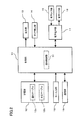
- FIG. 2 is a block diagram showing the overall configuration of the mobile phone 1.
- the mobile phone 1 includes a control unit 11, a storage unit 12, a display unit 13, a touch detection unit 14, a voice input unit 15, a voice output unit 16, a voice processing unit 17, a key input unit 18, A communication unit 19 is provided.
- the storage unit 12 includes a ROM, a RAM, an external memory, and the like.
- the storage unit 12 stores various programs.
- the program stored in the storage unit 12 includes various applications (for example, telephone, e-mail, map, game, schedule management, etc.) in addition to a control program for controlling each unit of the mobile phone 1.
- the program is stored in the storage unit 12 by the manufacturer when the mobile phone 1 is manufactured, and is also stored in the storage unit 12 by a user via a storage medium such as a communication network or a memory card.
- the storage unit 12 also includes a working area for storing data that is temporarily used or generated when the program is executed.
- the storage unit 12 stores a notification table 12a and a correspondence table 12b.
- Various types of notification information are stored in the notification table 12a.
- the notification information includes missed call information related to a missed call of a telephone and new message information related to a new call of a message. Missed call information is, for example, the telephone number of the caller.
- the new message information is, for example, the sender's email address if the message is an e-mail, and the sender's telephone number if the message is SMS (Short Message Service) or voice mail.
- notification information information that the alarm notification time has passed, information that the scheduled time of the schedule has passed, information about the update of the mobile phone 1, information that the external memory is connected to the mobile phone 1, etc. Is mentioned.
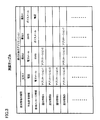
- FIG. 3 is a diagram showing the correspondence table 12b.
- the notification information is associated with an application for responding to the notification information.
- one or a plurality of applications are associated according to the type of notification information.
- a priority is assigned to each application. The priority order is determined such that an application that is highly likely to be executed by the user with respect to the notification information is ranked higher.
- the missed call information is associated with a telephone application, an e-mail application, an SMS application, and a voice mail application. If there is a missed call, the user is likely to call the caller. Therefore, the priority order is the order of each application of “telephone”, “e-mail”, “SMS”, and “voice mail”.
- the new message information is associated with an e-mail application, an SMS application, a voice mail application, and a telephone application.
- a new message e-mail, SMS, voice mail
- the priority order is the order of each application of “electronic mail”, “SMS”, “voice mail”, and [telephone].
- one of the e-mail application, the SMS application, and the voice mail application corresponds to the first message application of the present invention, and one of the remaining two applications is the first application of the present invention. This corresponds to the message application 2.
- the control unit 11 is composed of a CPU and the like. In accordance with the program, the control unit 11 is configured according to each program (storage unit 12, display unit 13, touch detection unit 14, voice input unit 15, voice output unit 16, voice processing unit 17, key input unit 18, communication unit, communication). Part 19 etc.).
- the display unit 13 is composed of a liquid crystal display or the like.
- the display unit 13 displays an image (screen) on the display surface 3 based on the control signal and the image signal from the control unit 11.
- the display unit 13 is not limited to a liquid crystal display, and may be composed of other display devices such as an organic EL display.
- the touch detection unit 14 includes a touch panel that detects contact of the finger with the display surface 3.
- the touch panel is formed in a transparent sheet shape and is disposed on the front surface of the cabinet 2 so as to overlap the display surface 3.
- the touch panel may be a touch panel of various types such as a capacitance type, an ultrasonic type, a pressure sensitive type, a resistance film type, and a light detection type.
- the touch detection unit 14 receives a touch operation by the user on the display surface 3. That is, the touch detection unit 14 detects the position on the display surface 3 touched by the finger, that is, the touch position, and outputs a position signal corresponding to the detected touch position to the control unit 11.
- the user can perform various touch operations by touching the display surface 3 with a finger.
- Examples of the touch operation include a tap operation, a flick operation, and a slide operation.
- the tap operation is an operation in which the user releases the finger within a short time after bringing the finger into contact with the display surface 3.
- the flick operation is an operation in which the user flips the display surface 3 with a finger in an arbitrary direction.
- the slide operation is an operation in which the user moves the finger in an arbitrary direction while keeping the finger in contact with the display surface 3.
- An operation for performing the tap operation once is a single tap operation, and an operation for repeating the single tap operation twice in a short time is a double tap operation.
- a tap operation (single tap operation) is performed by the control unit 11. Determined.
- the control unit 11 It is determined that a flick operation has been performed.
- the control unit 11 determines that the slide operation has been performed by the control unit 11. If one or more touch operations are detected within a predetermined third time after the first tap operation, the control unit 11 determines that a double tap operation has been performed.
- the voice input unit 15 includes a microphone 4 and the like.
- the voice input unit 15 outputs an electrical signal from the microphone 4 to the voice processing unit 17.
- the audio output unit 16 includes a call speaker 5 and an external speaker 6.
- the audio output unit 16 receives an electrical signal from the audio processing unit 17 and outputs sound (sound, notification sound, etc.) from the call speaker 5 or the external speaker 6.
- the audio processing unit 17 performs A / D conversion or the like on the electrical signal from the audio input unit 15 and outputs the converted digital audio signal to the control unit 11.
- the audio processing unit 17 performs decoding processing, D / A conversion, and the like on the digital audio signal from the control unit 11, and outputs the converted electric signal to the audio output unit 16.
- the key input unit 18 responds to the pressed hard key when various hard keys (not shown) such as a power key for turning on the mobile phone 1 are pressed.
- the signal is output to the control unit 11.
- the communication unit 19 includes a circuit for converting a signal, an antenna for transmitting and receiving radio waves, and the like to perform a call and communication.
- the communication unit 19 converts a call or communication signal input from the control unit 11 into a radio signal, and transmits the converted radio signal to a communication destination such as a base station or another communication device via an antenna. To do. Further, the communication unit 19 converts the radio signal received via the antenna into a signal in a format that can be used by the control unit 11, and outputs the converted signal to the control unit 11.
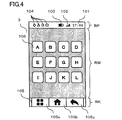
- FIG. 4 is a diagram for explaining a screen displayed on the display surface 3 by executing the application.
- the control unit 11 executes various applications and displays a screen including an application execution screen on the display surface 3.
- the screen displayed on the display surface 3 includes a pictogram area RP, a window area RW, and a key area RK.
- a current time 101 a remaining amount meter 102 indicating the remaining battery level
- an intensity meter 103 indicating the intensity of the radio wave are displayed.
- notification icons 104 corresponding to various types of notification information such as the missed call information and new message information described above are displayed. The user can confirm the type of the notification information by confirming the notification icon 104. Further, when a predetermined operation is performed by the user, a notification information list screen described later is displayed on the display surface 3.
- the operation key group 105 is displayed in the key area RK.
- the operation key group 105 includes a setting key 105a, a home key 105b, and a back key 105c.
- the setting key 105a is a key for mainly displaying a setting screen for performing various settings on the display surface 3.
- the home key 105b is a key mainly for shifting the display on the display surface 3 from another screen to the home screen.
- the back key 105c is a key for mainly returning the executed process to the process one step before.
- the application execution screen is displayed in the window area RW.
- a home application is executed, a home screen is displayed in the window area RW.
- activation icons 106 corresponding to various applications such as a telephone and an e-mail are arranged.
- At least one of the pictogram area RP and the key area RK may not be displayed, and the window area RW may extend to an area that is not displayed.
- the mobile phone 1 includes a notification function application for displaying notification information on the display surface 3.
- the control unit 11 executes a control process related to the notification function application (hereinafter referred to as “notification control process”).
- the control unit 11 includes a notification control unit 31 in order to execute notification control processing.
- the notification control unit 31 is realized as a function of a program executed by the control unit 11.
- the notification control unit 31 displays the notification information on the display surface 3 in the notification control process, and based on the fact that the operation for designating the notification information has been received by the touch detection unit 14, A menu dialog 108 for selecting an application to be activated from the applications is displayed on the display surface 3.
- the notification control unit 31 changes the arrangement of the plurality of applications associated with the notification information for each notification information by following the priority order determined for each notification information in the menu dialog 108.
- the notification control unit 31 activates the selected application based on the fact that the operation for selecting the application from the menu dialog 108 is received by the touch detection unit 14.
- the notification control process includes a first notification control process and a second notification control process.
- the notification control unit 31 executes a first notification control process and a second notification control process.
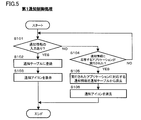
- FIG. 5 is a flowchart showing the first notification control process.
- the first notification control process will be described with reference to FIG.
- notification information is input to the notification control unit 31 from an application that handles the notification information.
- the notification control unit 31 acquires the notification information (S101: YES)
- the notification control unit 31 registers the acquired notification information in the notification table 12a (S102).
- the notification control unit 31 displays a notification icon 104 corresponding to the registered notification information on the pictogram area RP (S103).
- the notification control unit 31 determines whether or not an application responding to the notification information has been executed in a second notification control process described later (S104).
- the notification control unit 31 determines that the application has been executed (S104: YES)
- the notification control unit 31 deletes the notification information corresponding to the executed application from the notification table 12a (S105. Further, the notification control unit 31 deletes the deleted notification.
- the notification icon 104 corresponding to the information is deleted from the pictogram area RP (S106).
- the first notification control process is repeatedly executed by the notification control unit 31 while the mobile phone 1 is operating.
- FIG. 6 is a flowchart showing the second notification control process.
- FIG. 7 is a flowchart of a menu dialog display process included in the second notification control process.
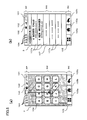
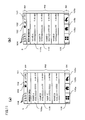
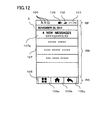
- 8 to 12 are diagrams illustrating an example of screen transition when the second notification control process is executed.
- the second notification control process is started.
- the second notification control process is executed in parallel with the first notification control process.
- the second notification control process will be described with reference to FIGS. 6 to 12.
- the notification control unit 31 determines whether or not an operation for displaying a list of notification information on the display surface 3 has been performed (S201).
- the operation for displaying the list is, for example, an operation of sliding the finger touched on the pictogram region RP downward by a predetermined distance or more as shown in FIG.
- the notification control unit 31 determines that an operation for displaying a list has been performed (S201: YES)
- the notification control unit 31 reads the notification information from the notification table 12a, and displays the read notification information list screen 107 on the display surface 3 (window area RW). (S202).
- notification information is displayed in each display column 107a constituting the list screen 107.
- a plurality of missed call information is displayed together in one display field 107a. For example, the number of missed calls and the latest missed call information (telephone number etc.) are displayed in the display field 107a.
- the notification information is new message information
- a plurality of new message information is displayed together in one display field 107a.
- the number of new messages and the latest new message information are displayed in the display column 107a.
- FIG. 8B shows an example in which there are four missed call information and new message information.
- the notification control unit 31 determines whether or not an operation for responding to the notification information has been performed in any of the notification information display fields 107a (S203).
- the operation for response is, for example, a single tap operation.
- the notification control unit 31 determines that an operation for response has been performed (S203: YES)
- the notification control unit 31 executes a menu dialog display process shown in FIG. 7 (S204).
- the notification control unit 31 first extracts an application associated with the notification information on which the operation has been performed from the correspondence table 12b (S301). Next, the notification control unit 31 generates a menu dialog 108 in which menus 108a indicating applications are arranged according to the priority order determined in the correspondence table 12b (S302), and displays the generated menu dialog 108 on the display surface 3. (S303). In the menu dialog 108, menus 108a indicating the applications are arranged from top to bottom in order from the application with the highest priority.
- the user When the menus 108a are arranged in the vertical direction on the display surface 3, the user usually checks the menus 108a in order from the top. The priority is determined so that an application that is likely to be executed by the user for a response to the notification information is ranked higher. Therefore, the menu 108a of the application that is likely to be executed by the user is arranged above the menu dialog 108.
- the notification control unit 31 displays a menu dialog 108 including a menu 108a indicating one application on the display surface 3.
- FIG. 9A when the user performs an operation for response to the display column 107a for missed call information, as shown in FIG. A menu dialog 108 corresponding to the missed call information is displayed on the display surface 3 so as to overlap the list screen 107.
- a menu 108 a indicating each application is arranged in the order of “telephone”, “e-mail”, “SMS”, and “voice mail” from the top.
- FIG. 10 (a) when the user performs an operation for response to the display field 107a for new message information, the notification control unit 31 is as shown in FIG. 10 (b).
- a menu dialog 108 corresponding to the new message information is displayed on the display surface 3 so as to overlap the list screen 107.
- a menu 108 a indicating each application is arranged in the order of “electronic mail”, “SMS”, “voice mail”, and “phone” from the top.
- the notification control unit 31 determines that a cancel operation, for example, a single tap operation on the back key 105c, has been performed without performing a response operation (S205: YES)
- the list screen 107 is deleted. (S206).
- a screen before the list screen 107 is displayed is displayed.
- the notification control unit 31 When the menu dialog 108 is displayed by the process of step S204, the notification control unit 31 next selects any menu 108a, for example, by a single tap operation on the menu 108a, from the menu dialog 108. It is determined whether or not that application has been selected (S207). When the notification control unit 31 determines that an application has been selected (S207: YES), the notification control unit 31 activates the selected application (S208).
- the notification control unit 31 launches the phone application.
- the notification control unit 31 supplies all missed call information (telephone number, outgoing name, outgoing time, etc.) to the telephone application.
- FIG. 11A when the telephone application is activated, a list screen 109 in which missed call information is displayed in each display column 109a is displayed on the display surface 3.
- the control unit 11 sends the call to the calling terminal corresponding to the selected missed call information.
- the notification control unit 31 activates an e-mail application.
- the notification control unit 31 supplies new message information (e-mail address, sender name, transmission time, etc.) to the e-mail application.
- a list screen 110 in which new message information is displayed in each display column 110 a is displayed on the display surface 3.
- the control unit 11 displays a screen for creating an e-mail addressed to the sender corresponding to the new message information.
- the notification control unit 31 activates an e-mail application.
- the storage unit 12 stores a phone book table (not shown) in which contact information such as a telephone number and a mail address is registered.
- the notification control unit 31 stores the mail address, name, etc. of the caller in the phone book table when all the missed call information senders are registered in the phone book table. Read from and supply to email application.
- a list screen 110 similar to the example of FIG. 11B is displayed on the display surface 3 in which the mail address, name, and the like are displayed in each display column 110a.
- the notification control unit 31 activates the telephone application.
- the notification control unit 31 indicates the sender's telephone number, name, and the like when the sender of all new message information is registered in the telephone book table. Read from and supply to phone applications.
- a list screen 109 similar to the example of FIG. 11A is displayed on the display surface 3 in which telephone numbers, names, and the like are displayed in the respective display fields 109a.
- the notification control unit 31 deletes the operated notification information from the notification table 12a (S209).
- the second notification control process ends.
- the list screen 107 is displayed again when the user performs a list display operation again. Incoming call information is not displayed.
- a plurality of applications are associated with the notification information displayed on the list screen 107 in order to respond to the notification information, and the application to be activated is selected when the notification information is specified.
- a menu dialog 108 is displayed on the display surface 3. Therefore, since the user can start a suitable application according to the situation when the notification information is confirmed, convenience for the user is improved.
- the priority order is determined for the application, and the menu 108a indicating the application with the higher priority order is arranged above the menu dialog 108. Therefore, for each notification information, the priority is determined so that the application having a higher possibility of being executed by the user is ranked higher, so that the user can easily select the application having a high possibility of being executed from the menu dialog 108.
- the menu dialog 108 the menus 108a indicating the applications are arranged in order from the application with the highest priority, but the application priority is not changed.
- FIG. 13 is a flowchart showing menu dialog display processing according to this modification.
- steps S311 and S312 are added to the menu dialog display process shown in FIG.
- the notification control unit 31 determines whether a change condition is set for the operated notification information (S311). .
- the change condition is set (S311: YES)
- the notification control unit 31 changes the priority of each extracted application according to the change condition (S312).
- change conditions are set for missed call information and new message information.
- the change condition set in the missed call information is whether or not the designated time is included in a predetermined time zone when the missed call information is designated on the list screen 107 (the operation for response is performed). It is.
- the predetermined time zone is a time zone (for example, a time zone from 10 pm to 7 am) that is considered to be annoying to the other party when making a call.
- the change condition set in the new message information is the usage frequency of e-mail, SMS, and voice mail in the mobile phone 1 before the new message information is specified on the list screen 107.
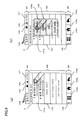
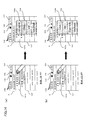
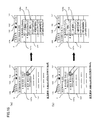
- FIG. 14 is a diagram illustrating an example in which the priority order of applications is changed according to the time when an operation for responding to missed call information is performed, and the arrangement of the menu 108a of the menu dialog 108 is changed.
- the notification control unit 31 determines in step S312 whether or not the time at which the operation for response is performed is in a predetermined time zone. . If it is not a predetermined time period, the user is likely to make a call to answer a missed call. On the other hand, it is considered that the user is highly likely to send a message during a predetermined time period because the user is annoying the other party when making a call.
- the “call” is sequentially performed from the top according to the priority order in the correspondence table 12b.
- the menu dialog 108 is created so that the menus 108 a of “electronic mail”, “SMS”, and “voice mail” are arranged, and displayed on the display surface 3.
- an application for a message e-mail, SMS, voice mail
- the menu dialog 108 is created so that the menus 108a of “e-mail”, “SMS”, “voice mail”, and “phone” are arranged in order from the top. indicate.
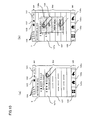
- the priority order of applications is changed according to the frequency of use of e-mail, SMS and voice mail before an operation for responding to new message information is performed, and the arrangement of the menu 108a of the menu dialog 108 is changed. It is a figure which shows the example changed.
- the notification control unit 31 uses the email, SMS, and voice mail messages before the response operation is performed in step S312. Determine the frequency. For example, the notification control unit 31 examines the history of each message stored in the storage unit 12 and determines that the use frequency is higher as the number of transmissions within a certain period is larger. It is considered that the more frequently used messages are more likely to be executed by the user to answer new messages.
- the notification control unit 31 selects “electronic” sequentially from the top according to the priority order in the correspondence table 12b as shown in FIG.
- a menu dialog 108 is created so that menus 108 a of “Mail”, “SMS”, “Voice Mail”, and “Telephone” are arranged and displayed on the display surface 3.
- the notification control unit 31 sets the priority order of each application of “e-mail”, “SMS”, and “voice mail” according to the usage frequency. Change so that the higher the higher.
- the notification control unit 31 selects “SMS”, “SMS”, in order from the top, as shown in FIG.
- a menu dialog 108 is created so that the menus 108 a of “electronic mail”, “voice mail”, and “telephone” are arranged and displayed on the display surface 3.
- the priority order of applications is changed so that an application that is likely to be selected by the user is arranged above the menu dialog 108 according to the situation when the user confirms the notification information. Is done. Therefore, it becomes easier for the user to select an application to be activated from the menu dialog 108.
- the notification information on which the application is executed is deleted from the list screen 107 as shown in FIG. For example, when a telephone application is executed to respond to missed call information, the missed call information is deleted. If the user puts a call on hold or makes a call but the other party does not answer, the user confirms the missed call information again, or uses the missed call information to Cannot be started.
- a notification lock function for locking the notification information so that the notification information displayed on the list screen 107 is not deleted from the list screen 107 is added to the notification function.
- the notification control unit 31 executes a notification lock control process for realizing a notification lock function.
- FIG. 16 is a flowchart showing a notification lock control process according to the present modification example.
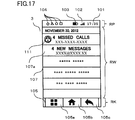
- FIG. 17 is a diagram showing the list screen 107 in which the lock is set for the notification information.
- the notification lock control process is started.
- the notification lock control process is executed in parallel with the first notification control process and the second notification control process.
- the notification control unit 31 determines whether or not a setting operation for performing a lock setting, for example, a double tap operation has been performed on the display column 107a for the notification information for which the lock setting is not performed on the list screen 107 ( S401).
- the user performs a setting operation on the display column 107a for notification information that is not desired to be automatically deleted.
- the notification control unit 31 determines that the setting operation has been performed (S401: YES)
- the notification control unit 31 performs lock setting (S402).
- the notification control unit 31 sets a lock setting flag (not shown) provided in the storage unit 12 to “1”.
- the notification control unit 31 displays a lock notification icon 111 indicating that the notification information is locked in the notification information display field 107 a on which the setting operation has been performed (S ⁇ b> 403). ).
- the notification control unit 31 determines that the setting operation has not been performed (S401: NO)
- the notification control unit 31 performs a release operation for releasing the lock setting, for example, a double operation on the notification information display field 107a for which the lock setting has been performed. It is determined whether or not a tap operation has been performed (S404). The user performs a release operation on the display column 107a of the notification information that may be automatically deleted.
- the notification control unit 31 determines that the release operation has been performed (S404: YES)
- the notification control unit 31 performs the lock release (S405). For example, the notification control unit 31 sets the lock setting flag to “0”. Further, the notification control unit 31 deletes the lock notification icon 111 displayed in the notification information display field 107a for which the release operation has been performed (S406).
- the notification control unit 31 ends the notification lock control process.
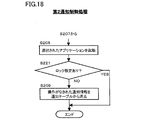
- FIG. 18 is a flowchart showing the second notification control process according to this modification.
- the process of step S221 is added to the second notification control process shown in FIG. In FIG. 12, only a part of processing including the added step S221 is shown for convenience.
- the notification control unit 31 When the notification control unit 31 activates the application selected by the user from the menu dialog 108 (S208), the notification control unit 31 determines whether or not the lock is set for the notification information to be operated (S221). When the notification control unit 31 determines that the lock setting has not been made (S221: NO), the notification control unit 31 deletes the notification information as the operation target from the notification table 12a (S209). On the other hand, when the notification control unit 31 determines that the lock setting has been made (S221: YES), the notification control unit 31 ends the second notification control process without deleting the notification information as the operation target from the notification table 12a.
- the notification information is not deleted from the list table 107 because the notification information is not deleted from the notification table 12a even when the application is started.
- the user can leave notification information that the user does not want to delete on the list screen 107.
- the mobile phone 1 When the number of pieces of notification information displayed on the list screen 107 reaches the upper limit, the mobile phone 1 is automatically deleted in order from the old notification information when new notification information is subsequently generated. In the case of the configuration, if the notification information is locked, the notification information may not be deleted from the list screen 107 even if the notification information becomes old. ⁇ Modification 3> In the second modification, the notification information is not deleted from the list screen 107 when the notification information is locked.
- the user can copy the notification information displayed on the list screen 107 and display the copied notification information on the display surface 3 using a list screen different from the list screen 107.
- a notification information copy function is added to the notification function.
- the notification control unit 31 executes a copy control process for copying the notification information and a copy information display control process for displaying the copied notification information on the display surface 3 in order to realize the notification information copy function.
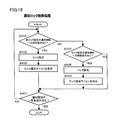
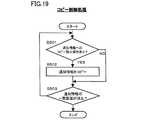
- FIG. 19 is a flowchart showing copy control processing according to the present modification. As shown in FIG. 8B, when the list screen 107 is displayed on the display surface 3, the copy control process is started. The copy control process is executed in parallel with the first notification control process and the second notification control process. *
- the notification control unit 31 determines whether or not an instruction operation for instructing copying, for example, a double tap operation, has been performed on any of the notification information display fields 107a on the list screen 107 (S501).
- the user performs an instruction operation on the display column 107a for the notification information to be copied. If the notification control unit 31 determines that an instruction operation has been performed (S501: YES), the notification control unit 31 copies the notification information in which the instruction operation has been performed, and stores the copied notification information in the storage unit 12 (S502). When the notification information list screen 107 is deleted from the display surface 3 (S503: YES), the notification control unit 31 ends the copy control process.
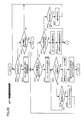
- FIG. 20 is a flowchart showing a copy information display control process according to this modification example.
- FIG. 21 is a diagram illustrating an example of screen transition when the copy information display control process is executed.
- the copy information display control process is started.
- the copy information display control process is executed in parallel with the copy control process.
- the notification control unit 31 determines whether or not an operation for displaying a list of the copied notification information on the display surface 3 is performed in a state where the list screen 107 is displayed on the display surface 3 (S601).
- the operation for displaying the list is, for example, a flick operation to the left with respect to the list screen 107 as shown in FIG.
- the notification control unit 31 determines that an operation for displaying a list has been performed (S601: YES)
- the notification control unit 31 reads the copied notification information from the storage unit 12, and displays the read notification information list screen 112 on the display surface 3 (window In the area RW). As shown in FIG. 21B, the copied notification information is displayed in each display column 112 a configuring the list screen 112.
- the notification control unit 31 determines whether an operation for responding to the notification information, for example, a single tap operation has been performed in any of the notification information display fields 112a (S603).
- the notification control unit 31 determines that an operation for a response has been performed (S603: YES)
- the menu dialog 108 is displayed on the display surface 3 in the same manner as the processing of steps S204 and S207 to S211 of the second notification control process shown in FIG.
- a series of processes (steps S604 to S609) for starting the application selected from the menu dialog 108 is executed.
- notification control unit 31 determines that an operation for response has not been performed (S603: NO), whether or not an erase operation, for example, a double tap operation has been performed on any of the notification information display fields 112a. Is determined (S610).
- the notification control unit 31 determines that the erasing operation has been performed (S610: YES)
- the notification control unit 31 deletes the notification information on which the erasing operation has been performed, that is, the copied notification information from the storage unit 12. Further, as shown in FIG. 21C, the notification control unit 31 deletes the notification information for which the deletion operation has been performed from the list screen 112 (S612).
- the notification control unit 31 deletes the list screen 112 when a return operation, for example, a single tap operation on the back key 105c is performed in a state where the list screen 112 is displayed (S613: YES).
- the list screen 107 is displayed again on the display surface 3.
- the notification control unit 31 ends the copy information display control process.
- the user can copy the notification information, and even if the notification information is deleted from the list screen 107 after the application is started, the copied notification information is updated. It can be displayed on the list screen 112 for confirmation. Further, the user can activate an application associated with the copied notification information by an operation on the list screen 112.
- the menu dialog 108 in which the menus 108a are arranged in the vertical direction is displayed on the display surface 3 as a selection image for selecting an application to be activated from among a plurality of applications associated with the notification information. Is done.
- the selected image may take any display form as long as an application to be activated can be selected.
- a window in which icons corresponding to each application to be selected are arranged in a matrix may be displayed on the display surface 3.
- the notification information is displayed on the list screen 107 in which the display columns 107a are arranged in the vertical direction of the display surface 3.
- the list of notification information is displayed, any form is possible.
- Notification information may be displayed on the display surface 3.
- one or more applications are associated with the type of notification information displayed on the list screen 107. However, even if a plurality of applications are associated with all notification information. Good.
- the notification information when the notification information is missed call information, it is determined as a change condition whether or not the time of the time zone in which the mobile phone 1 exists is in a predetermined time zone. However, when the number of missed call information is one, it may be determined whether or not the time of the caller is in a predetermined time zone.
- the notification information is new message information
- the usage frequency of each message (e-mail, SMS, voice mail) in the mobile phone 1 is determined as a change condition.
- the number of new message information when the number of new message information is one, the frequency of each message transmitted from the sender side may be determined.
- missed call information and / or new message information may be associated with a plurality of telephone applications (telephone applications using the telephone network, telephone applications using the data communication network, etc.).
- the usage frequency of each telephone application before an operation for response may be set as a change condition, and the priority order of the telephone application may be changed according to the usage frequency. For example, a telephone application that is used more frequently has a higher priority.
- the cumulative call time by each telephone application before an operation for response may be set as a change condition, and the priority order of the telephone application may be changed according to the cumulative call time. For example, a telephone application with a longer cumulative call time has a higher priority.
- the present invention is not limited to a mobile phone, but can be applied to various mobile terminal devices such as a PDA (Personal Digital Assistant), a tablet PC (Tablet PC), and an electronic book terminal.
- PDA Personal Digital Assistant
- Tablet PC Tablet PC
- electronic book terminal an electronic book terminal
Landscapes
- Engineering & Computer Science (AREA)
- Theoretical Computer Science (AREA)
- General Engineering & Computer Science (AREA)
- Human Computer Interaction (AREA)
- Physics & Mathematics (AREA)
- General Physics & Mathematics (AREA)
- Software Systems (AREA)
- Signal Processing (AREA)
- Computer Networks & Wireless Communication (AREA)
- Library & Information Science (AREA)
- Telephone Function (AREA)
- User Interface Of Digital Computer (AREA)
Abstract
L'invention concerne un dispositif de terminal mobile (1) qui comporte : une unité de stockage (12) qui stocke une table d'association (12b) contenant des associations entre des informations de notification, et une pluralité d'applications à utiliser de façon à répondre aux informations de notification en question ; et une unité de commande de notification (31) qui affiche des informations de notification sur un écran d'affichage (3), et sur la base du fait d'avoir reçu, à partir d'une unité de détection de toucher (14), une opération qui ordonne des informations de notification, affiche sur l'écran d'affichage (3) un dialogue de menu (108) pour sélectionner une application à exécuter, parmi une pluralité d'applications associées aux informations de notification, et sur la base du fait d'avoir reçu, à partir de l'unité de détection de toucher (14), une opération pour sélectionner une application, exécute l'application sélectionnée. L'unité de commande de notification (31) modifie l'agencement de la pluralité d'applications dans le dialogue de menu (108), ce faisant sur la base d'un classement de priorité.
Priority Applications (1)
| Application Number | Priority Date | Filing Date | Title |
|---|---|---|---|
| US14/834,250 US20150363059A1 (en) | 2013-02-25 | 2015-08-24 | Mobile terminal apparatus and control method for mobile terminal apparatus |
Applications Claiming Priority (2)
| Application Number | Priority Date | Filing Date | Title |
|---|---|---|---|
| JP2013034958A JP2014165663A (ja) | 2013-02-25 | 2013-02-25 | 携帯端末装置、プログラムおよび携帯端末装置の制御方法 |
| JP2013-034958 | 2013-02-25 |
Related Child Applications (1)
| Application Number | Title | Priority Date | Filing Date |
|---|---|---|---|
| US14/834,250 Continuation US20150363059A1 (en) | 2013-02-25 | 2015-08-24 | Mobile terminal apparatus and control method for mobile terminal apparatus |
Publications (1)
| Publication Number | Publication Date |
|---|---|
| WO2014129655A1 true WO2014129655A1 (fr) | 2014-08-28 |
Family
ID=51391431
Family Applications (1)
| Application Number | Title | Priority Date | Filing Date |
|---|---|---|---|
| PCT/JP2014/054545 Ceased WO2014129655A1 (fr) | 2013-02-25 | 2014-02-25 | Dispositif de terminal mobile et procédé de commande de dispositif de terminal mobile |
Country Status (3)
| Country | Link |
|---|---|
| US (1) | US20150363059A1 (fr) |
| JP (1) | JP2014165663A (fr) |
| WO (1) | WO2014129655A1 (fr) |
Cited By (52)
| Publication number | Priority date | Publication date | Assignee | Title |
|---|---|---|---|---|
| DK201670593A1 (en) * | 2015-08-10 | 2017-03-06 | Apple Inc | Devices, methods, and graphical user interfaces for manipulating user interface objects with visual and/or haptic feedback |
| US9602729B2 (en) | 2015-06-07 | 2017-03-21 | Apple Inc. | Devices and methods for capturing and interacting with enhanced digital images |
| US9612741B2 (en) | 2012-05-09 | 2017-04-04 | Apple Inc. | Device, method, and graphical user interface for displaying additional information in response to a user contact |
| US9619076B2 (en) | 2012-05-09 | 2017-04-11 | Apple Inc. | Device, method, and graphical user interface for transitioning between display states in response to a gesture |
| US9632664B2 (en) | 2015-03-08 | 2017-04-25 | Apple Inc. | Devices, methods, and graphical user interfaces for manipulating user interface objects with visual and/or haptic feedback |
| CN106603872A (zh) * | 2017-01-23 | 2017-04-26 | 努比亚技术有限公司 | 一种根据关联策略启动应用的方法、装置和移动终端 |
| CN106599663A (zh) * | 2016-12-14 | 2017-04-26 | 广东欧珀移动通信有限公司 | 信息安全保护方法及移动终端 |
| US9639184B2 (en) | 2015-03-19 | 2017-05-02 | Apple Inc. | Touch input cursor manipulation |
| US9645732B2 (en) | 2015-03-08 | 2017-05-09 | Apple Inc. | Devices, methods, and graphical user interfaces for displaying and using menus |
| US9674426B2 (en) | 2015-06-07 | 2017-06-06 | Apple Inc. | Devices and methods for capturing and interacting with enhanced digital images |
| US9753639B2 (en) | 2012-05-09 | 2017-09-05 | Apple Inc. | Device, method, and graphical user interface for displaying content associated with a corresponding affordance |
| CN107193722A (zh) * | 2017-05-16 | 2017-09-22 | 广东欧珀移动通信有限公司 | 对应用排序的方法、装置、终端及存储介质 |
| US9778771B2 (en) | 2012-12-29 | 2017-10-03 | Apple Inc. | Device, method, and graphical user interface for transitioning between touch input to display output relationships |
| US9785305B2 (en) | 2015-03-19 | 2017-10-10 | Apple Inc. | Touch input cursor manipulation |
| US9830048B2 (en) | 2015-06-07 | 2017-11-28 | Apple Inc. | Devices and methods for processing touch inputs with instructions in a web page |
| US9880735B2 (en) | 2015-08-10 | 2018-01-30 | Apple Inc. | Devices, methods, and graphical user interfaces for manipulating user interface objects with visual and/or haptic feedback |
| US9886184B2 (en) | 2012-05-09 | 2018-02-06 | Apple Inc. | Device, method, and graphical user interface for providing feedback for changing activation states of a user interface object |
| US9891811B2 (en) | 2015-06-07 | 2018-02-13 | Apple Inc. | Devices and methods for navigating between user interfaces |
| US9959025B2 (en) | 2012-12-29 | 2018-05-01 | Apple Inc. | Device, method, and graphical user interface for navigating user interface hierarchies |
| US9990121B2 (en) | 2012-05-09 | 2018-06-05 | Apple Inc. | Device, method, and graphical user interface for moving a user interface object based on an intensity of a press input |
| US9990107B2 (en) | 2015-03-08 | 2018-06-05 | Apple Inc. | Devices, methods, and graphical user interfaces for displaying and using menus |
| US9996231B2 (en) | 2012-05-09 | 2018-06-12 | Apple Inc. | Device, method, and graphical user interface for manipulating framed graphical objects |
| US10037138B2 (en) | 2012-12-29 | 2018-07-31 | Apple Inc. | Device, method, and graphical user interface for switching between user interfaces |
| US10042542B2 (en) | 2012-05-09 | 2018-08-07 | Apple Inc. | Device, method, and graphical user interface for moving and dropping a user interface object |
| US10048757B2 (en) | 2015-03-08 | 2018-08-14 | Apple Inc. | Devices and methods for controlling media presentation |
| US10067653B2 (en) | 2015-04-01 | 2018-09-04 | Apple Inc. | Devices and methods for processing touch inputs based on their intensities |
| US10073615B2 (en) | 2012-05-09 | 2018-09-11 | Apple Inc. | Device, method, and graphical user interface for displaying user interface objects corresponding to an application |
| US10078442B2 (en) | 2012-12-29 | 2018-09-18 | Apple Inc. | Device, method, and graphical user interface for determining whether to scroll or select content based on an intensity theshold |
| US10095396B2 (en) | 2015-03-08 | 2018-10-09 | Apple Inc. | Devices, methods, and graphical user interfaces for interacting with a control object while dragging another object |
| US10095391B2 (en) | 2012-05-09 | 2018-10-09 | Apple Inc. | Device, method, and graphical user interface for selecting user interface objects |
| US10126930B2 (en) | 2012-05-09 | 2018-11-13 | Apple Inc. | Device, method, and graphical user interface for scrolling nested regions |
| US10162452B2 (en) | 2015-08-10 | 2018-12-25 | Apple Inc. | Devices and methods for processing touch inputs based on their intensities |
| US10175757B2 (en) | 2012-05-09 | 2019-01-08 | Apple Inc. | Device, method, and graphical user interface for providing tactile feedback for touch-based operations performed and reversed in a user interface |
| US10175864B2 (en) | 2012-05-09 | 2019-01-08 | Apple Inc. | Device, method, and graphical user interface for selecting object within a group of objects in accordance with contact intensity |
| US10200598B2 (en) | 2015-06-07 | 2019-02-05 | Apple Inc. | Devices and methods for capturing and interacting with enhanced digital images |
| US10235035B2 (en) | 2015-08-10 | 2019-03-19 | Apple Inc. | Devices, methods, and graphical user interfaces for content navigation and manipulation |
| US10248308B2 (en) | 2015-08-10 | 2019-04-02 | Apple Inc. | Devices, methods, and graphical user interfaces for manipulating user interfaces with physical gestures |
| US10275087B1 (en) | 2011-08-05 | 2019-04-30 | P4tents1, LLC | Devices, methods, and graphical user interfaces for manipulating user interface objects with visual and/or haptic feedback |
| US10346030B2 (en) | 2015-06-07 | 2019-07-09 | Apple Inc. | Devices and methods for navigating between user interfaces |
| US10416800B2 (en) | 2015-08-10 | 2019-09-17 | Apple Inc. | Devices, methods, and graphical user interfaces for adjusting user interface objects |
| US10437333B2 (en) | 2012-12-29 | 2019-10-08 | Apple Inc. | Device, method, and graphical user interface for forgoing generation of tactile output for a multi-contact gesture |
| US10496260B2 (en) | 2012-05-09 | 2019-12-03 | Apple Inc. | Device, method, and graphical user interface for pressure-based alteration of controls in a user interface |
| US10620781B2 (en) | 2012-12-29 | 2020-04-14 | Apple Inc. | Device, method, and graphical user interface for moving a cursor according to a change in an appearance of a control icon with simulated three-dimensional characteristics |
| JP2021108132A (ja) * | 2014-09-02 | 2021-07-29 | アップル インコーポレイテッドApple Inc. | アラートを管理するための小型インターフェース |
| US11477609B2 (en) | 2019-06-01 | 2022-10-18 | Apple Inc. | User interfaces for location-related communications |
| US11513661B2 (en) | 2014-05-31 | 2022-11-29 | Apple Inc. | Message user interfaces for capture and transmittal of media and location content |
| US11527316B2 (en) | 2019-06-01 | 2022-12-13 | Apple Inc. | Health application user interfaces |
| US11561596B2 (en) | 2014-08-06 | 2023-01-24 | Apple Inc. | Reduced-size user interfaces for battery management |
| CN116095224A (zh) * | 2022-08-31 | 2023-05-09 | 荣耀终端有限公司 | 通知显示方法和终端设备 |
| US11700326B2 (en) | 2014-09-02 | 2023-07-11 | Apple Inc. | Phone user interface |
| US12299263B2 (en) | 2019-06-01 | 2025-05-13 | Apple Inc. | User interfaces for location-related communications |
| US12586054B2 (en) | 2015-02-01 | 2026-03-24 | Apple Inc. | User interface for payments |
Families Citing this family (13)
| Publication number | Priority date | Publication date | Assignee | Title |
|---|---|---|---|---|
| US9542091B2 (en) | 2010-06-04 | 2017-01-10 | Apple Inc. | Device, method, and graphical user interface for navigating through a user interface using a dynamic object selection indicator |
| KR101472397B1 (ko) * | 2013-04-04 | 2014-12-12 | 주식회사 팬택 | 휴대용 단말 및 노티피케이션 정보 처리 방법 |
| US9898162B2 (en) | 2014-05-30 | 2018-02-20 | Apple Inc. | Swiping functions for messaging applications |
| US9971500B2 (en) * | 2014-06-01 | 2018-05-15 | Apple Inc. | Displaying options, assigning notification, ignoring messages, and simultaneous user interface displays in a messaging application |
| JP6440504B2 (ja) * | 2015-01-23 | 2018-12-19 | Kddi株式会社 | メニュー生成サーバ、メニュー表示システム及びメニュー生成方法 |
| JP6440505B2 (ja) * | 2015-01-23 | 2018-12-19 | Kddi株式会社 | メニュー生成サーバ、メニュー表示システム及びメニュー生成方法 |
| US20170185275A1 (en) * | 2015-12-28 | 2017-06-29 | Sap Se | Method and system for integrated application notifications |
| WO2018045560A1 (fr) * | 2016-09-09 | 2018-03-15 | 华为技术有限公司 | Procédé de rappel d'informations et dispositif mobile |
| JP6882898B2 (ja) * | 2017-01-10 | 2021-06-02 | 京セラ株式会社 | 通信機器、サーバ、システム及びその制御方法、並びにプログラム |
| KR102392015B1 (ko) * | 2017-03-24 | 2022-04-29 | 삼성전자주식회사 | 통화 관련 정보를 표시하기 위한 전자 장치 및 그의 동작 방법 |
| KR102527896B1 (ko) | 2017-10-24 | 2023-05-02 | 삼성전자주식회사 | 알림을 제어하기 위한 방법 및 그 전자 장치 |
| JP7180160B2 (ja) | 2018-07-17 | 2022-11-30 | 富士フイルムビジネスイノベーション株式会社 | 表示装置及びプログラム |
| JP7004621B2 (ja) * | 2018-07-30 | 2022-01-21 | 京セラ株式会社 | 電子機器、制御方法、及び制御プログラム |
Citations (6)
| Publication number | Priority date | Publication date | Assignee | Title |
|---|---|---|---|---|
| JP2004336756A (ja) * | 2003-04-30 | 2004-11-25 | Microsoft Corp | コンピュータ・テレフォニー・インテグレーションアダプタ |
| JP2006039615A (ja) * | 2004-07-22 | 2006-02-09 | Kyocera Corp | 端末装置およびメニュー表示方法 |
| JP2006526815A (ja) * | 2003-03-24 | 2006-11-24 | ヴォーダフォン ホールディング ゲゼルシャフトミット ベシュレンクテル ハフツング | 移動無線端末機器のメニュー案内の適応方法 |
| JP2007219940A (ja) * | 2006-02-17 | 2007-08-30 | Mitsubishi Electric Corp | メニュー制御装置、携帯電話、およびメニュー制御装置用プログラム |
| JP2008544618A (ja) * | 2005-06-14 | 2008-12-04 | ノキア コーポレイション | 強化された着信履歴メニュー |
| JP2013012802A (ja) * | 2011-06-28 | 2013-01-17 | Kyocera Corp | 携帯端末装置 |
Family Cites Families (6)
| Publication number | Priority date | Publication date | Assignee | Title |
|---|---|---|---|---|
| US20080307350A1 (en) * | 2007-06-09 | 2008-12-11 | Alessandro Francesco Sabatelli | Method and Apparatus for Improved Desktop Arrangement |
| KR101651131B1 (ko) * | 2010-02-17 | 2016-08-25 | 엘지전자 주식회사 | 이동 단말기 및 이것의 통신 서비스 제어 방법 |
| US9871907B2 (en) * | 2010-11-02 | 2018-01-16 | Facebook, Inc. | Avatar-based communications launching system |
| US8464180B1 (en) * | 2012-06-15 | 2013-06-11 | Google Inc. | Organizing graphical representations on computing devices |
| US8707201B1 (en) * | 2012-06-27 | 2014-04-22 | Google Inc. | Systems and methods for prioritizing notifications on mobile devices |
| JP5397510B2 (ja) * | 2012-07-11 | 2014-01-22 | カシオ計算機株式会社 | 端末装置、及び、プログラム |
-
2013
- 2013-02-25 JP JP2013034958A patent/JP2014165663A/ja active Pending
-
2014
- 2014-02-25 WO PCT/JP2014/054545 patent/WO2014129655A1/fr not_active Ceased
-
2015
- 2015-08-24 US US14/834,250 patent/US20150363059A1/en not_active Abandoned
Patent Citations (6)
| Publication number | Priority date | Publication date | Assignee | Title |
|---|---|---|---|---|
| JP2006526815A (ja) * | 2003-03-24 | 2006-11-24 | ヴォーダフォン ホールディング ゲゼルシャフトミット ベシュレンクテル ハフツング | 移動無線端末機器のメニュー案内の適応方法 |
| JP2004336756A (ja) * | 2003-04-30 | 2004-11-25 | Microsoft Corp | コンピュータ・テレフォニー・インテグレーションアダプタ |
| JP2006039615A (ja) * | 2004-07-22 | 2006-02-09 | Kyocera Corp | 端末装置およびメニュー表示方法 |
| JP2008544618A (ja) * | 2005-06-14 | 2008-12-04 | ノキア コーポレイション | 強化された着信履歴メニュー |
| JP2007219940A (ja) * | 2006-02-17 | 2007-08-30 | Mitsubishi Electric Corp | メニュー制御装置、携帯電話、およびメニュー制御装置用プログラム |
| JP2013012802A (ja) * | 2011-06-28 | 2013-01-17 | Kyocera Corp | 携帯端末装置 |
Cited By (144)
| Publication number | Priority date | Publication date | Assignee | Title |
|---|---|---|---|---|
| US10664097B1 (en) | 2011-08-05 | 2020-05-26 | P4tents1, LLC | Devices, methods, and graphical user interfaces for manipulating user interface objects with visual and/or haptic feedback |
| US10275087B1 (en) | 2011-08-05 | 2019-04-30 | P4tents1, LLC | Devices, methods, and graphical user interfaces for manipulating user interface objects with visual and/or haptic feedback |
| US10338736B1 (en) | 2011-08-05 | 2019-07-02 | P4tents1, LLC | Devices, methods, and graphical user interfaces for manipulating user interface objects with visual and/or haptic feedback |
| US10345961B1 (en) | 2011-08-05 | 2019-07-09 | P4tents1, LLC | Devices and methods for navigating between user interfaces |
| US10365758B1 (en) | 2011-08-05 | 2019-07-30 | P4tents1, LLC | Devices, methods, and graphical user interfaces for manipulating user interface objects with visual and/or haptic feedback |
| US10386960B1 (en) | 2011-08-05 | 2019-08-20 | P4tents1, LLC | Devices, methods, and graphical user interfaces for manipulating user interface objects with visual and/or haptic feedback |
| US10540039B1 (en) | 2011-08-05 | 2020-01-21 | P4tents1, LLC | Devices and methods for navigating between user interface |
| US10649571B1 (en) | 2011-08-05 | 2020-05-12 | P4tents1, LLC | Devices, methods, and graphical user interfaces for manipulating user interface objects with visual and/or haptic feedback |
| US10656752B1 (en) | 2011-08-05 | 2020-05-19 | P4tents1, LLC | Gesture-equipped touch screen system, method, and computer program product |
| US9886184B2 (en) | 2012-05-09 | 2018-02-06 | Apple Inc. | Device, method, and graphical user interface for providing feedback for changing activation states of a user interface object |
| US9990121B2 (en) | 2012-05-09 | 2018-06-05 | Apple Inc. | Device, method, and graphical user interface for moving a user interface object based on an intensity of a press input |
| US10775999B2 (en) | 2012-05-09 | 2020-09-15 | Apple Inc. | Device, method, and graphical user interface for displaying user interface objects corresponding to an application |
| US9753639B2 (en) | 2012-05-09 | 2017-09-05 | Apple Inc. | Device, method, and graphical user interface for displaying content associated with a corresponding affordance |
| US10775994B2 (en) | 2012-05-09 | 2020-09-15 | Apple Inc. | Device, method, and graphical user interface for moving and dropping a user interface object |
| US11068153B2 (en) | 2012-05-09 | 2021-07-20 | Apple Inc. | Device, method, and graphical user interface for displaying user interface objects corresponding to an application |
| US10782871B2 (en) | 2012-05-09 | 2020-09-22 | Apple Inc. | Device, method, and graphical user interface for providing feedback for changing activation states of a user interface object |
| US12067229B2 (en) | 2012-05-09 | 2024-08-20 | Apple Inc. | Device, method, and graphical user interface for providing feedback for changing activation states of a user interface object |
| US9823839B2 (en) | 2012-05-09 | 2017-11-21 | Apple Inc. | Device, method, and graphical user interface for displaying additional information in response to a user contact |
| US11023116B2 (en) | 2012-05-09 | 2021-06-01 | Apple Inc. | Device, method, and graphical user interface for moving a user interface object based on an intensity of a press input |
| US12045451B2 (en) | 2012-05-09 | 2024-07-23 | Apple Inc. | Device, method, and graphical user interface for moving a user interface object based on an intensity of a press input |
| US11010027B2 (en) | 2012-05-09 | 2021-05-18 | Apple Inc. | Device, method, and graphical user interface for manipulating framed graphical objects |
| US10592041B2 (en) | 2012-05-09 | 2020-03-17 | Apple Inc. | Device, method, and graphical user interface for transitioning between display states in response to a gesture |
| US10175757B2 (en) | 2012-05-09 | 2019-01-08 | Apple Inc. | Device, method, and graphical user interface for providing tactile feedback for touch-based operations performed and reversed in a user interface |
| US10884591B2 (en) | 2012-05-09 | 2021-01-05 | Apple Inc. | Device, method, and graphical user interface for selecting object within a group of objects |
| US11947724B2 (en) | 2012-05-09 | 2024-04-02 | Apple Inc. | Device, method, and graphical user interface for providing tactile feedback for operations performed in a user interface |
| US10969945B2 (en) | 2012-05-09 | 2021-04-06 | Apple Inc. | Device, method, and graphical user interface for selecting user interface objects |
| US10496260B2 (en) | 2012-05-09 | 2019-12-03 | Apple Inc. | Device, method, and graphical user interface for pressure-based alteration of controls in a user interface |
| US9971499B2 (en) | 2012-05-09 | 2018-05-15 | Apple Inc. | Device, method, and graphical user interface for displaying content associated with a corresponding affordance |
| US12340075B2 (en) | 2012-05-09 | 2025-06-24 | Apple Inc. | Device, method, and graphical user interface for selecting user interface objects |
| US10481690B2 (en) | 2012-05-09 | 2019-11-19 | Apple Inc. | Device, method, and graphical user interface for providing tactile feedback for media adjustment operations performed in a user interface |
| US9996231B2 (en) | 2012-05-09 | 2018-06-12 | Apple Inc. | Device, method, and graphical user interface for manipulating framed graphical objects |
| US11221675B2 (en) | 2012-05-09 | 2022-01-11 | Apple Inc. | Device, method, and graphical user interface for providing tactile feedback for operations performed in a user interface |
| US10908808B2 (en) | 2012-05-09 | 2021-02-02 | Apple Inc. | Device, method, and graphical user interface for displaying additional information in response to a user contact |
| US10042542B2 (en) | 2012-05-09 | 2018-08-07 | Apple Inc. | Device, method, and graphical user interface for moving and dropping a user interface object |
| US10942570B2 (en) | 2012-05-09 | 2021-03-09 | Apple Inc. | Device, method, and graphical user interface for providing tactile feedback for operations performed in a user interface |
| US11314407B2 (en) | 2012-05-09 | 2022-04-26 | Apple Inc. | Device, method, and graphical user interface for providing feedback for changing activation states of a user interface object |
| US9619076B2 (en) | 2012-05-09 | 2017-04-11 | Apple Inc. | Device, method, and graphical user interface for transitioning between display states in response to a gesture |
| US10073615B2 (en) | 2012-05-09 | 2018-09-11 | Apple Inc. | Device, method, and graphical user interface for displaying user interface objects corresponding to an application |
| US9612741B2 (en) | 2012-05-09 | 2017-04-04 | Apple Inc. | Device, method, and graphical user interface for displaying additional information in response to a user contact |
| US11354033B2 (en) | 2012-05-09 | 2022-06-07 | Apple Inc. | Device, method, and graphical user interface for managing icons in a user interface region |
| US10095391B2 (en) | 2012-05-09 | 2018-10-09 | Apple Inc. | Device, method, and graphical user interface for selecting user interface objects |
| US10996788B2 (en) | 2012-05-09 | 2021-05-04 | Apple Inc. | Device, method, and graphical user interface for transitioning between display states in response to a gesture |
| US10114546B2 (en) | 2012-05-09 | 2018-10-30 | Apple Inc. | Device, method, and graphical user interface for displaying user interface objects corresponding to an application |
| US10126930B2 (en) | 2012-05-09 | 2018-11-13 | Apple Inc. | Device, method, and graphical user interface for scrolling nested regions |
| US10191627B2 (en) | 2012-05-09 | 2019-01-29 | Apple Inc. | Device, method, and graphical user interface for manipulating framed graphical objects |
| US10175864B2 (en) | 2012-05-09 | 2019-01-08 | Apple Inc. | Device, method, and graphical user interface for selecting object within a group of objects in accordance with contact intensity |
| US10168826B2 (en) | 2012-05-09 | 2019-01-01 | Apple Inc. | Device, method, and graphical user interface for transitioning between display states in response to a gesture |
| US9959025B2 (en) | 2012-12-29 | 2018-05-01 | Apple Inc. | Device, method, and graphical user interface for navigating user interface hierarchies |
| US12050761B2 (en) | 2012-12-29 | 2024-07-30 | Apple Inc. | Device, method, and graphical user interface for transitioning from low power mode |
| US9996233B2 (en) | 2012-12-29 | 2018-06-12 | Apple Inc. | Device, method, and graphical user interface for navigating user interface hierarchies |
| US10915243B2 (en) | 2012-12-29 | 2021-02-09 | Apple Inc. | Device, method, and graphical user interface for adjusting content selection |
| US10185491B2 (en) | 2012-12-29 | 2019-01-22 | Apple Inc. | Device, method, and graphical user interface for determining whether to scroll or enlarge content |
| US12135871B2 (en) | 2012-12-29 | 2024-11-05 | Apple Inc. | Device, method, and graphical user interface for switching between user interfaces |
| US9778771B2 (en) | 2012-12-29 | 2017-10-03 | Apple Inc. | Device, method, and graphical user interface for transitioning between touch input to display output relationships |
| US10078442B2 (en) | 2012-12-29 | 2018-09-18 | Apple Inc. | Device, method, and graphical user interface for determining whether to scroll or select content based on an intensity theshold |
| US10175879B2 (en) | 2012-12-29 | 2019-01-08 | Apple Inc. | Device, method, and graphical user interface for zooming a user interface while performing a drag operation |
| US10037138B2 (en) | 2012-12-29 | 2018-07-31 | Apple Inc. | Device, method, and graphical user interface for switching between user interfaces |
| US9857897B2 (en) | 2012-12-29 | 2018-01-02 | Apple Inc. | Device and method for assigning respective portions of an aggregate intensity to a plurality of contacts |
| US10437333B2 (en) | 2012-12-29 | 2019-10-08 | Apple Inc. | Device, method, and graphical user interface for forgoing generation of tactile output for a multi-contact gesture |
| US10620781B2 (en) | 2012-12-29 | 2020-04-14 | Apple Inc. | Device, method, and graphical user interface for moving a cursor according to a change in an appearance of a control icon with simulated three-dimensional characteristics |
| US9965074B2 (en) | 2012-12-29 | 2018-05-08 | Apple Inc. | Device, method, and graphical user interface for transitioning between touch input to display output relationships |
| US10101887B2 (en) | 2012-12-29 | 2018-10-16 | Apple Inc. | Device, method, and graphical user interface for navigating user interface hierarchies |
| US11513661B2 (en) | 2014-05-31 | 2022-11-29 | Apple Inc. | Message user interfaces for capture and transmittal of media and location content |
| US11775145B2 (en) | 2014-05-31 | 2023-10-03 | Apple Inc. | Message user interfaces for capture and transmittal of media and location content |
| US11561596B2 (en) | 2014-08-06 | 2023-01-24 | Apple Inc. | Reduced-size user interfaces for battery management |
| JP2021108132A (ja) * | 2014-09-02 | 2021-07-29 | アップル インコーポレイテッドApple Inc. | アラートを管理するための小型インターフェース |
| US11989364B2 (en) | 2014-09-02 | 2024-05-21 | Apple Inc. | Reduced-size interfaces for managing alerts |
| US12591329B2 (en) | 2014-09-02 | 2026-03-31 | Apple Inc. | Reduced-size interfaces for managing alerts |
| JP2025061657A (ja) * | 2014-09-02 | 2025-04-11 | アップル インコーポレイテッド | アラートを管理するための小型インターフェース |
| US11700326B2 (en) | 2014-09-02 | 2023-07-11 | Apple Inc. | Phone user interface |
| JP7198849B2 (ja) | 2014-09-02 | 2023-01-04 | アップル インコーポレイテッド | アラートを管理するための小型インターフェース |
| US12586054B2 (en) | 2015-02-01 | 2026-03-24 | Apple Inc. | User interface for payments |
| US9645732B2 (en) | 2015-03-08 | 2017-05-09 | Apple Inc. | Devices, methods, and graphical user interfaces for displaying and using menus |
| US10402073B2 (en) | 2015-03-08 | 2019-09-03 | Apple Inc. | Devices, methods, and graphical user interfaces for interacting with a control object while dragging another object |
| US9990107B2 (en) | 2015-03-08 | 2018-06-05 | Apple Inc. | Devices, methods, and graphical user interfaces for displaying and using menus |
| US10268341B2 (en) | 2015-03-08 | 2019-04-23 | Apple Inc. | Devices, methods, and graphical user interfaces for manipulating user interface objects with visual and/or haptic feedback |
| US11977726B2 (en) | 2015-03-08 | 2024-05-07 | Apple Inc. | Devices, methods, and graphical user interfaces for interacting with a control object while dragging another object |
| US10095396B2 (en) | 2015-03-08 | 2018-10-09 | Apple Inc. | Devices, methods, and graphical user interfaces for interacting with a control object while dragging another object |
| US10048757B2 (en) | 2015-03-08 | 2018-08-14 | Apple Inc. | Devices and methods for controlling media presentation |
| US10613634B2 (en) | 2015-03-08 | 2020-04-07 | Apple Inc. | Devices and methods for controlling media presentation |
| US10268342B2 (en) | 2015-03-08 | 2019-04-23 | Apple Inc. | Devices, methods, and graphical user interfaces for manipulating user interface objects with visual and/or haptic feedback |
| US10338772B2 (en) | 2015-03-08 | 2019-07-02 | Apple Inc. | Devices, methods, and graphical user interfaces for manipulating user interface objects with visual and/or haptic feedback |
| US9632664B2 (en) | 2015-03-08 | 2017-04-25 | Apple Inc. | Devices, methods, and graphical user interfaces for manipulating user interface objects with visual and/or haptic feedback |
| US10180772B2 (en) | 2015-03-08 | 2019-01-15 | Apple Inc. | Devices, methods, and graphical user interfaces for manipulating user interface objects with visual and/or haptic feedback |
| US10387029B2 (en) | 2015-03-08 | 2019-08-20 | Apple Inc. | Devices, methods, and graphical user interfaces for displaying and using menus |
| US11112957B2 (en) | 2015-03-08 | 2021-09-07 | Apple Inc. | Devices, methods, and graphical user interfaces for interacting with a control object while dragging another object |
| US12436662B2 (en) | 2015-03-08 | 2025-10-07 | Apple Inc. | Devices, methods, and graphical user interfaces for manipulating user interface objects with visual and/or haptic feedback |
| US10860177B2 (en) | 2015-03-08 | 2020-12-08 | Apple Inc. | Devices, methods, and graphical user interfaces for manipulating user interface objects with visual and/or haptic feedback |
| US10067645B2 (en) | 2015-03-08 | 2018-09-04 | Apple Inc. | Devices, methods, and graphical user interfaces for manipulating user interface objects with visual and/or haptic feedback |
| US9645709B2 (en) | 2015-03-08 | 2017-05-09 | Apple Inc. | Devices, methods, and graphical user interfaces for manipulating user interface objects with visual and/or haptic feedback |
| US9639184B2 (en) | 2015-03-19 | 2017-05-02 | Apple Inc. | Touch input cursor manipulation |
| US11054990B2 (en) | 2015-03-19 | 2021-07-06 | Apple Inc. | Touch input cursor manipulation |
| US11550471B2 (en) | 2015-03-19 | 2023-01-10 | Apple Inc. | Touch input cursor manipulation |
| US9785305B2 (en) | 2015-03-19 | 2017-10-10 | Apple Inc. | Touch input cursor manipulation |
| US10222980B2 (en) | 2015-03-19 | 2019-03-05 | Apple Inc. | Touch input cursor manipulation |
| US10599331B2 (en) | 2015-03-19 | 2020-03-24 | Apple Inc. | Touch input cursor manipulation |
| US10067653B2 (en) | 2015-04-01 | 2018-09-04 | Apple Inc. | Devices and methods for processing touch inputs based on their intensities |
| US10152208B2 (en) | 2015-04-01 | 2018-12-11 | Apple Inc. | Devices and methods for processing touch inputs based on their intensities |
| US10455146B2 (en) | 2015-06-07 | 2019-10-22 | Apple Inc. | Devices and methods for capturing and interacting with enhanced digital images |
| US10200598B2 (en) | 2015-06-07 | 2019-02-05 | Apple Inc. | Devices and methods for capturing and interacting with enhanced digital images |
| US9602729B2 (en) | 2015-06-07 | 2017-03-21 | Apple Inc. | Devices and methods for capturing and interacting with enhanced digital images |
| US10841484B2 (en) | 2015-06-07 | 2020-11-17 | Apple Inc. | Devices and methods for capturing and interacting with enhanced digital images |
| US12346550B2 (en) | 2015-06-07 | 2025-07-01 | Apple Inc. | Devices and methods for capturing and interacting with enhanced digital images |
| US10705718B2 (en) | 2015-06-07 | 2020-07-07 | Apple Inc. | Devices and methods for navigating between user interfaces |
| US9674426B2 (en) | 2015-06-07 | 2017-06-06 | Apple Inc. | Devices and methods for capturing and interacting with enhanced digital images |
| US9706127B2 (en) | 2015-06-07 | 2017-07-11 | Apple Inc. | Devices and methods for capturing and interacting with enhanced digital images |
| US9830048B2 (en) | 2015-06-07 | 2017-11-28 | Apple Inc. | Devices and methods for processing touch inputs with instructions in a web page |
| US9860451B2 (en) | 2015-06-07 | 2018-01-02 | Apple Inc. | Devices and methods for capturing and interacting with enhanced digital images |
| US11231831B2 (en) | 2015-06-07 | 2022-01-25 | Apple Inc. | Devices and methods for content preview based on touch input intensity |
| US11240424B2 (en) | 2015-06-07 | 2022-02-01 | Apple Inc. | Devices and methods for capturing and interacting with enhanced digital images |
| US10346030B2 (en) | 2015-06-07 | 2019-07-09 | Apple Inc. | Devices and methods for navigating between user interfaces |
| US9891811B2 (en) | 2015-06-07 | 2018-02-13 | Apple Inc. | Devices and methods for navigating between user interfaces |
| US10303354B2 (en) | 2015-06-07 | 2019-05-28 | Apple Inc. | Devices and methods for navigating between user interfaces |
| US9916080B2 (en) | 2015-06-07 | 2018-03-13 | Apple Inc. | Devices and methods for navigating between user interfaces |
| US11835985B2 (en) | 2015-06-07 | 2023-12-05 | Apple Inc. | Devices and methods for capturing and interacting with enhanced digital images |
| US11681429B2 (en) | 2015-06-07 | 2023-06-20 | Apple Inc. | Devices and methods for capturing and interacting with enhanced digital images |
| US10416800B2 (en) | 2015-08-10 | 2019-09-17 | Apple Inc. | Devices, methods, and graphical user interfaces for adjusting user interface objects |
| US10248308B2 (en) | 2015-08-10 | 2019-04-02 | Apple Inc. | Devices, methods, and graphical user interfaces for manipulating user interfaces with physical gestures |
| US10203868B2 (en) | 2015-08-10 | 2019-02-12 | Apple Inc. | Devices, methods, and graphical user interfaces for manipulating user interface objects with visual and/or haptic feedback |
| US10884608B2 (en) | 2015-08-10 | 2021-01-05 | Apple Inc. | Devices, methods, and graphical user interfaces for content navigation and manipulation |
| US10235035B2 (en) | 2015-08-10 | 2019-03-19 | Apple Inc. | Devices, methods, and graphical user interfaces for content navigation and manipulation |
| US10963158B2 (en) | 2015-08-10 | 2021-03-30 | Apple Inc. | Devices, methods, and graphical user interfaces for manipulating user interface objects with visual and/or haptic feedback |
| US11740785B2 (en) | 2015-08-10 | 2023-08-29 | Apple Inc. | Devices, methods, and graphical user interfaces for manipulating user interface objects with visual and/or haptic feedback |
| US10162452B2 (en) | 2015-08-10 | 2018-12-25 | Apple Inc. | Devices and methods for processing touch inputs based on their intensities |
| US10754542B2 (en) | 2015-08-10 | 2020-08-25 | Apple Inc. | Devices, methods, and graphical user interfaces for manipulating user interface objects with visual and/or haptic feedback |
| US10698598B2 (en) | 2015-08-10 | 2020-06-30 | Apple Inc. | Devices, methods, and graphical user interfaces for manipulating user interface objects with visual and/or haptic feedback |
| DK201670593A1 (en) * | 2015-08-10 | 2017-03-06 | Apple Inc | Devices, methods, and graphical user interfaces for manipulating user interface objects with visual and/or haptic feedback |
| US12386501B2 (en) | 2015-08-10 | 2025-08-12 | Apple Inc. | Devices, methods, and graphical user interfaces for manipulating user interface objects with visual and/or haptic feedback |
| US10209884B2 (en) | 2015-08-10 | 2019-02-19 | Apple Inc. | Devices, Methods, and Graphical User Interfaces for Manipulating User Interface Objects with Visual and/or Haptic Feedback |
| US11327648B2 (en) | 2015-08-10 | 2022-05-10 | Apple Inc. | Devices, methods, and graphical user interfaces for manipulating user interface objects with visual and/or haptic feedback |
| US9880735B2 (en) | 2015-08-10 | 2018-01-30 | Apple Inc. | Devices, methods, and graphical user interfaces for manipulating user interface objects with visual and/or haptic feedback |
| US11182017B2 (en) | 2015-08-10 | 2021-11-23 | Apple Inc. | Devices and methods for processing touch inputs based on their intensities |
| DK179096B1 (en) * | 2015-08-10 | 2017-10-30 | Apple Inc | Devices, methods, and graphical user interfaces for manipulating user interface objects with visual and/or haptic feedback |
| CN106599663A (zh) * | 2016-12-14 | 2017-04-26 | 广东欧珀移动通信有限公司 | 信息安全保护方法及移动终端 |
| CN106603872A (zh) * | 2017-01-23 | 2017-04-26 | 努比亚技术有限公司 | 一种根据关联策略启动应用的方法、装置和移动终端 |
| CN107193722A (zh) * | 2017-05-16 | 2017-09-22 | 广东欧珀移动通信有限公司 | 对应用排序的方法、装置、终端及存储介质 |
| US12363505B2 (en) | 2019-06-01 | 2025-07-15 | Apple Inc. | User interfaces for location-related communications |
| US12299263B2 (en) | 2019-06-01 | 2025-05-13 | Apple Inc. | User interfaces for location-related communications |
| US12362056B2 (en) | 2019-06-01 | 2025-07-15 | Apple Inc. | Health application user interfaces |
| US11527316B2 (en) | 2019-06-01 | 2022-12-13 | Apple Inc. | Health application user interfaces |
| US11477609B2 (en) | 2019-06-01 | 2022-10-18 | Apple Inc. | User interfaces for location-related communications |
| US11842806B2 (en) | 2019-06-01 | 2023-12-12 | Apple Inc. | Health application user interfaces |
| CN116095224B (zh) * | 2022-08-31 | 2023-10-31 | 荣耀终端有限公司 | 通知显示方法和终端设备 |
| CN116095224A (zh) * | 2022-08-31 | 2023-05-09 | 荣耀终端有限公司 | 通知显示方法和终端设备 |
Also Published As
| Publication number | Publication date |
|---|---|
| JP2014165663A (ja) | 2014-09-08 |
| US20150363059A1 (en) | 2015-12-17 |
Similar Documents
| Publication | Publication Date | Title |
|---|---|---|
| WO2014129655A1 (fr) | Dispositif de terminal mobile et procédé de commande de dispositif de terminal mobile | |
| JP6092702B2 (ja) | 通信端末、および情報送信方法 | |
| JP4764496B2 (ja) | 通話履歴を用いた短縮ダイヤル機能を有する移動通信端末及びその方法 | |
| JP6082554B2 (ja) | 携帯端末装置、プログラムおよび携帯端末装置の制御方法 | |
| KR20060041836A (ko) | 최근 콘택 및 항목 | |
| WO2012111058A1 (fr) | Dispositif formant un terminal portatif et son procédé d'affichage sur écran | |
| KR20120051860A (ko) | 통화 중계 기능 지원 시스템 및 지원 방법 | |
| KR101590340B1 (ko) | 터치 스크린을 구비한 이동통신 단말기의 메시지 송수신 장치 및 방법 | |
| WO2015107885A1 (fr) | Dispositif électronique et procédé d'affichage d'informations à l'aide de dispositif électronique | |
| JP5911781B2 (ja) | 携帯端末装置、プログラムおよび情報通知方法 | |
| JP6239366B2 (ja) | 通信装置、履歴表示制御方法およびプログラム | |
| JP6348820B2 (ja) | 携帯端末およびその制御方法 | |
| JP5955684B2 (ja) | 携帯端末装置、プログラムおよび報知制御方法 | |
| JP6057678B2 (ja) | 携帯端末装置、プログラムおよび携帯端末装置の制御方法 | |
| JP2017135667A (ja) | 携帯電話、表示制御方法、およびプログラム | |
| JP2013201717A (ja) | 携帯通信装置、その制御方法、その制御プログラム及びコンピュータ読取可能な記録媒体 | |
| JP2015011387A (ja) | 携帯機器、携帯機器の制御方法およびプログラム | |
| JP5951390B2 (ja) | 携帯端末装置、プログラムおよび携帯端末装置の制御方法 | |
| JP2011172068A (ja) | 携帯端末の遠隔操作システム及びその遠隔操作方法 | |
| JP5523158B2 (ja) | 携帯端末装置 | |
| JP5562142B2 (ja) | 携帯端末装置 | |
| KR100640425B1 (ko) | 단문메시지 송수신을 태스크 단위로 관리하는 방법 | |
| KR101695706B1 (ko) | 터치 스크린을 구비한 이동통신 단말기의 메시지 송수신 장치 및 방법 | |
| KR100531945B1 (ko) | 회신 또는 전달된 문자 메시지의 아이콘에 의한 표시 방법 | |
| JP6174956B2 (ja) | 通話機能を有する機器、通話機能を有する機器の制御方法およびプログラム |
Legal Events
| Date | Code | Title | Description |
|---|---|---|---|
| 121 | Ep: the epo has been informed by wipo that ep was designated in this application |
Ref document number: 14754566 Country of ref document: EP Kind code of ref document: A1 |
|
| NENP | Non-entry into the national phase |
Ref country code: DE |
|
| 122 | Ep: pct application non-entry in european phase |
Ref document number: 14754566 Country of ref document: EP Kind code of ref document: A1 |