WO2014141414A1 - Système de visualisation de processus d'apprentissage et dispositif de traitement de visualisation, et procédé de visualisation - Google Patents
Système de visualisation de processus d'apprentissage et dispositif de traitement de visualisation, et procédé de visualisation Download PDFInfo
- Publication number
- WO2014141414A1 WO2014141414A1 PCT/JP2013/057097 JP2013057097W WO2014141414A1 WO 2014141414 A1 WO2014141414 A1 WO 2014141414A1 JP 2013057097 W JP2013057097 W JP 2013057097W WO 2014141414 A1 WO2014141414 A1 WO 2014141414A1
- Authority
- WO
- WIPO (PCT)
- Prior art keywords
- writing
- time
- learner
- learning process
- data
- Prior art date
- Legal status (The legal status is an assumption and is not a legal conclusion. Google has not performed a legal analysis and makes no representation as to the accuracy of the status listed.)
- Ceased
Links
Images









Classifications
-
- G—PHYSICS
- G06—COMPUTING OR CALCULATING; COUNTING
- G06Q—INFORMATION AND COMMUNICATION TECHNOLOGY [ICT] SPECIALLY ADAPTED FOR ADMINISTRATIVE, COMMERCIAL, FINANCIAL, MANAGERIAL OR SUPERVISORY PURPOSES; SYSTEMS OR METHODS SPECIALLY ADAPTED FOR ADMINISTRATIVE, COMMERCIAL, FINANCIAL, MANAGERIAL OR SUPERVISORY PURPOSES, NOT OTHERWISE PROVIDED FOR
- G06Q50/00—Information and communication technology [ICT] specially adapted for implementation of business processes of specific business sectors, e.g. utilities or tourism
- G06Q50/10—Services
- G06Q50/20—Education
-
- G—PHYSICS
- G09—EDUCATION; CRYPTOGRAPHY; DISPLAY; ADVERTISING; SEALS
- G09B—EDUCATIONAL OR DEMONSTRATION APPLIANCES; APPLIANCES FOR TEACHING, OR COMMUNICATING WITH, THE BLIND, DEAF OR MUTE; MODELS; PLANETARIA; GLOBES; MAPS; DIAGRAMS
- G09B19/00—Teaching not covered by other main groups of this subclass
- G09B19/06—Foreign languages
-
- G—PHYSICS
- G09—EDUCATION; CRYPTOGRAPHY; DISPLAY; ADVERTISING; SEALS
- G09B—EDUCATIONAL OR DEMONSTRATION APPLIANCES; APPLIANCES FOR TEACHING, OR COMMUNICATING WITH, THE BLIND, DEAF OR MUTE; MODELS; PLANETARIA; GLOBES; MAPS; DIAGRAMS
- G09B5/00—Electrically-operated educational appliances
- G09B5/02—Electrically-operated educational appliances with visual presentation of the material to be studied, e.g. using film strip
-
- G—PHYSICS
- G09—EDUCATION; CRYPTOGRAPHY; DISPLAY; ADVERTISING; SEALS
- G09B—EDUCATIONAL OR DEMONSTRATION APPLIANCES; APPLIANCES FOR TEACHING, OR COMMUNICATING WITH, THE BLIND, DEAF OR MUTE; MODELS; PLANETARIA; GLOBES; MAPS; DIAGRAMS
- G09B7/00—Electrically-operated teaching apparatus or devices working with questions and answers
- G09B7/02—Electrically-operated teaching apparatus or devices working with questions and answers of the type wherein the student is expected to construct an answer to the question which is presented or wherein the machine gives an answer to the question presented by a student
Definitions
- the present invention relates to a learning process visualization system, visualization apparatus, and visualization method, and in particular, learns the learning status from learner input information input from an information input apparatus such as a digital pen in a school classroom or the like.
- the present invention relates to an information processing apparatus and method.
- ICT information and communication technology
- Patent Document 1 discloses a conference record creation system that can manage written data during a conference in time series.
- Patent Document 2 discloses a technique for performing various processes such as management of a commuting situation of a user (student) using an electronic pen and an electronic pen entry card.
- Patent Document 3 discloses a system that enables handwritten information from a digital pen to be used as web data.
- Patent Documents 1 to 3 By adopting the techniques described in Patent Documents 1 to 3, it becomes possible to store written information as electronic data without having to retype it with a PC or the like. However, these technologies can only display the written information on the terminal screen synchronously and visually check the written time.
- a teacher obtains information on the learning process of each learner and links this information to specific instruction for the learner. Can not.
- the object of the present invention is not only to accumulate the “written” data of the learner (hereinafter referred to as written data), but to improve the quality and efficiency of the education by extracting the learning progress of the learner and the cause of the whispering.
- An object is to provide an apparatus and method that can be improved.
- a learning process visualization system includes an information processing device, a teacher terminal, and an information input device
- the information processing device includes teaching material content to be presented to a learner and Teaching material / assignment setting means for setting the assignment
- writing data acquisition means for acquiring time-series writing data of the learner responding to the set assignment from the information input device
- the time-series writing Learning process visualization means for acquiring information on the timing of writing of the learner from the data, visualizing the learning process of the learner for the task, and outputting the visualized information to the teacher terminal.
- the learner's understanding and concentration can be automatically evaluated at high speed. And the efficiency can be improved.
- FIG. 2A shows a characteristic function of the present invention realized by executing each program in FIG. 2A on a server. It is a figure which shows an example of the writing result time series information in Example 1.
- FIG. 5 is a diagram illustrating an example of “written text” used for a preview activity in the first embodiment.
- 3 is an example of a flowchart of a writing data analysis process in the first embodiment.
- 6 is a diagram illustrating an example of a display screen when content registration or the like is performed using a teacher GUI in Embodiment 1.
- FIG. 6 is an example of a flowchart of content setting / registration processing by a teacher in the first embodiment. It is a figure which shows an example of the recognition method of a character / word / sentence. It is a figure which shows the example of a writing type classification
- FIG. 6 is an example of a screen displaying a result of language comprehension determination for each learner by a teacher GUI in the first embodiment.
- FIG. It is an example of the flowchart of the writing data analysis process in Example 2 of this invention. In Example 2, it is a figure which shows the example which performs content registration etc. by GUI for teachers. It is a figure which shows the example of the writing result time series information in Example 2.
- Example 10 is a diagram illustrating an example of answer sheets (digital pen sheets) in the second embodiment. It is a figure explaining in detail the time series information of the writing data of each learner in the writing result time series information of FIG. It is a figure which shows the relationship between the start possible time and the start and end time of a learner's writing in one Area of an answer sheet.
- Example 2 it is an example of the screen which displayed the determination result of the difficulty level / concentration level of teaching material content by the teacher GUI.
- Example 2 it is an example of the screen which displayed the determination result of the difficulty level / concentration level of teaching material content by the teacher GUI.
- the learning process visualization system includes an apparatus including an information input unit including a digital pen that can collect writing data as time-series data, an apparatus that collects and stores data input by the information input unit, and collection and analysis.
- an information processing apparatus including an apparatus for displaying stored data
- the information processing apparatus manages the collected writing data, further analyzes the writing data, and learns the learner based on the analysis result. Judgment is made and appropriate guidance is provided or content is provided to each learner or a class community that is a group of learners.
- the learning process visualization system can automatically evaluate the learner's level of understanding by analyzing the writing activity, thereby improving the efficiency of the education by the teacher. In addition, it is possible to estimate the degree of understanding / concentration of the content and instructions given by the teacher, and the suitability of each content / command in each class can be measured. Furthermore, since it becomes possible to evaluate language understanding activities regardless of language in writing activities, it can be used for evaluation of various language education.
- the learning process visualization system of the present invention can be applied to a type that learns in a group lesson. Moreover, the learning process visualization system in which a necessary amount of data is obtained from the result of the group lesson and the validity of various settings is confirmed can be applied to a type in which learning is performed individually.
- teacher is a general term for persons who educate learners (students, students, students, etc.) such as teachers, teachers, professors, lecturers, and the like.
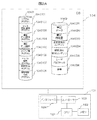
- FIG. 1 is a block diagram showing the configuration of the learning process visualization system according to the first embodiment of the present invention.
- the system of this embodiment includes a digital pen 101, a digital pen paper 102, a server (information processing device) 103, a database 104, a teacher terminal (for example, a personal computer, hereinafter simply referred to as PC) 105, a display device 108, and these.
- a communication network 106 such as the Internet for connection is provided.
- the digital pen 101 has a wireless communication device compatible with Bluetooth (registered trademark) 107 for transmitting data to the server 103.
- Reference numeral 109 denotes a classroom such as a school or a cram school. In this classroom, each learner 100 (100a to 100n) learns using the digital pen 101 and the digital pen paper 102.
- Reference numeral 110 denotes a problem paper relating to a learning task relating to language education given to each learner, for example, “viewing”.
- the display device 108 has an audio / video output display function, and receives instructions and data from a server or a teacher's PC to provide information on learning and assignments to learners in the classroom. It has a function of notifying the start / end time of writing.
- the teacher PC 105 is individually owned by each teacher and can be used at any place in the school such as each classroom.
- the information input device is not limited to the combination of the digital pen 101 and the digital pen paper 102.
- another portable terminal having an equivalent function such as a tablet terminal having a handwriting input function and a wireless communication function.
- a PC may be used.
- the teacher's PC may be replaced with a tablet terminal or the like.
- the wireless communication device may be another wireless communication method as long as short-distance communication is possible.
- the server (information processing apparatus) 103 is a computer that analyzes and manages data written by the digital pen 101 and data input from the teacher's PC 105, and includes a processor (CPU) 1031, a memory 1032, a controller 1033, and an interface. 1034 and the like, and the processor 1031 executes the learning process visualization program stored in the memory 1032, whereby each process described later is executed.
- a program storage area 10401 in the database 104 includes a system program 1040101, a data reception / management program 1040102, a writing data acquisition program 1040103, a writing data analysis program 1040104, a type classification program 1040105, and a text analysis that constitute a learning process visualization program.
- a program 1040106, a teacher GUI program 1040107, and an answer sheet creation program 1040108 are stored.
- the data storage area 10402 stores handwritten data 104021, handwritten feature amount 1040202, unanalyzed teaching material content 1040203, analyzed teaching material content 1040204, user profile 1040205, and dictionary 104026.
- the user profile 1040205 includes data for collating the user 100 using the digital pen 101 with the digital pen. In this data, for example, a learner's name, a digital pen ID, and a personal identification number when storing individual data, for example, a student ID number, are stored.
- FIG. 2B shows the characteristic functions (modules) realized by executing each program of FIG. 2A in the server 103 and the mutual relationship between these functions.
- the data collection / storage module 10301 is mainly realized by the data reception / management program 1040102, and inputs handwritten data from the information input device (101, 102) and stores / holds it in a database or memory.
- the teaching material / task setting module 10302 is realized mainly by the teacher GUI program 1040107 and the answer sheet creation program 1040108, and is selected by the teacher in response to selection of teaching material content from the teacher PC 105 and input of task settings. Supporting the selection of teaching material contents and setting of assignments to learners, etc. Based on the results, presentation of teaching material contents to the learners and setting of assignments are performed.
- the learning process visualization means 10310 is mainly realized by a writing data acquisition program 1040103, a writing data analysis program 1040104, a type classification program 1040105, and a text analysis program 1040106, and uses each writing timing information. It has the function of visualizing the learning process and providing information on the progress of language learning and the validity of the task.
- the writing time / time measuring module 10303 constituting the learning process visualizing means 10310 is a time series of each learner written with the digital pen 101 in accordance with the setting of an assignment (for example, “viewing”) to the learner. For typical data, measure writing time and writing time length.
- the writing pattern estimation module 10304 receives the output of the writing time / time measurement module 10303, estimates the writing pattern of each learner, and the writing type determination module 10305 determines the writing type. From this writing type information, the language understanding level determination module 10306 determines the language understanding level of each learner, in other words, the progress level of language learning.
- the writing synchronization degree calculation module 10307 receives the output of the writing time / time measurement module 10303, calculates the writing synchronization degree with respect to each learner's task presentation, and receives the result to determine the difficulty level determination module 10308. Then, the difficulty level of the set task itself is determined. In addition, the concentration level determination module 10309 receives the output of the writing synchronization level calculation module, and determines the concentration level of the learner with respect to the set task. Thus, the learning time content of each learner is analyzed from the writing time / time measurement module 10303 to the concentration determination module 10309 by analyzing each learner's writing time and writing time length data for the given learning material content problem. Functions as learning process visualization means 10310 for determining the degree of understanding of the content and the difficulty / concentration level of the teaching material content itself.
- the teacher's PC 105 includes a teaching material / task setting function 1051, an answer sheet creation function 1052, and an individual guidance information creation function 1035.
- the teacher uses the individual instruction information creation function 1035 to confirm each learner's language comprehension from the output result of the language comprehension determination module 10306, create a learning plan such as individual instruction, and obtain necessary data. Save it on the teacher's PC.
- the individual guidance information creation function 1035 performs a teaching material content selection method, a task setting condition review, and the like based on the output results of the difficulty level determination module 10308 and the concentration level determination module 10309, and the necessary data is transferred to a teacher's PC, Save to the server.
- each learner 100 enters a text or the like on a designated paper 102 or the like using a digital pen 101 with respect to the learning task given by the question paper 110.
- a digital pen 101 an example using a digital pen called Anoto is shown.
- a camera is installed at the tip of the Anoto digital pen.
- a dot pattern that is nearly transparent is printed on the dedicated paper 102, and the position of the dot pattern is recognized by the camera, and the position written by the pen is determined.
- FIG. 3 is an example of time-series information of writing data by the digital pen 101.
- FIG. 5 is a diagram showing the written results in a time series when the learner is given a task of performing writing within a certain writable time t.
- the above-described “viewing activity” is in such a format, and the learner literally copies the written example sentence shown in FIG. .
- the paper to be used when printing paper with squares on dot paper, using ruled lines etc. on paper with dots, and what on the paper with dots May not be printed.
- an example in the case of using paper with squares is shown.
- the view of one learner indicates that the pen is in a continuous writing state
- the view of another learner indicates that the pen is in a discrete writing state. ing.
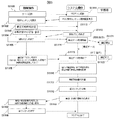
- FIG. 5 is a flowchart showing the overall operation of the learning process visualization system.
- the teacher performs an operation for starting the learning process visualization program of the server 103 from the teacher PC 105 (S1101), starts the data reception / management program 1040102 of the server 103, and further, the teacher GUI program 1040107, text
- the analysis program 1040106 is activated (S1111).
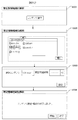
- the teacher selects “learning material content selection” on the initial screen 701 shown in FIG. 6 displayed on the teacher's PC 105 when the teacher GUI program is started, the selection can be made on the next selection screen 702 (S1112). Material is displayed.
- the teacher selects content (S1102), and further sets the selection of teaching material content and the writable time for the selected teaching material content as assignments on the next setting screen 703 (S1103). If the selected teaching material content is an unanalyzed teaching material, the teacher performs necessary settings for the unanalyzed teaching material content on the next screen 704 and registers (S1104). The processing related to the setting of the unanalyzed teaching material content will be described with reference to FIG.
- a content reading window is displayed on the teacher PC 105 (S11041).
- the teacher selects the target unanalyzed content from this window (S11042).
- the text analysis program 1040106 of the server 103 is activated, and analysis of the unanalyzed teaching material content selected by the teacher starts.
- the target content determination screen 704 is displayed, and determination is made as to whether the target content corresponds to text, audio, video, or writing type (S11043). When the teacher selects one of these, the following processing corresponding to the selection is continued.
- the teacher When it is determined in S11043 that the target content is “text”, the teacher reads text data from the database of the server and performs morphological analysis (S11044). Further, a break between characters, words, clauses and sentences is detected (S11045), information on the break position of each unit is stored in the database (S11046), and the process ends.
- FIG. 8 shows an example of a method for recognizing characters / words / phrases.
- the text analysis program 1040106 calculates the number of writing strokes, the number of characters, the number of morphemes, the number of phrases, the number of characters in morphemes, and the number of characters in phrases, and stores them in the database as data of analyzed teaching material contents.
- the character code of each character is also stored.
- Reference numeral 801 denotes “writing stroke unit”, and the number of strokes of the character is displayed in the lower part of each character. Below that, “written stroke unit” is expanded to “character unit” 802.
- a “morpheme analysis result (example)” 803 obtained by morphological analysis and a “syntax analysis result: clause (example)” 804 obtained by syntactic analysis are shown.
- the voice data is reproduced (S11050), and the teacher tags the writing start time acquisition point (S11051). Further, the writing data acquisition point time in the voice is stored (S11052), and the process ends.
- the teacher reproduces the video data (S11060), and the teacher tags the writing start time acquisition point (S11061). Further, the writing data acquisition point time in the video is stored in the database (S11062), and the process ends.
- the writing type data is read, and the teacher surrounds the writing area with a digital pen (S11070). Furthermore, the correct answer writing position is enclosed with a digital pen (S11071), the answer writing area and the correct answer writing position are stored in the database (S11072), and the process ends.
- the analyzed teaching material content is selected in S1102, the data stored in the analyzed teaching material content area which is the analysis result data is called.
- a process for displaying a “start” button on the teacher's PC screen is performed (S11113), and when the teacher presses the “start” button on the PC screen (S1105).
- the server's writing data acquisition program 1040103 is activated (S1114), and the learner enters the “writing start” state in which the “reading” can be performed using the dedicated paper and pen prepared at the start (S1121). ).
- the writing data written with the pen is transmitted to the server in units of strokes, and stored in the user (individual) profile of the database 104 as writing data.
- Information to be stored includes a pen ID for identifying a digital pen, a writing coordinate value, and a writing time.
- the writing data transmitted from each pen is stored in an area provided with the personal identification number of the personal profile in which the same ID as the pen ID of the sender is stored.
- the writing data analysis program 104000104 is started.
- acquisition of individual writing start / end times and acquisition of writing time and non-writing time are performed (S1116).
- the calculation of the writing feature amount (S1117), the correctness determination of the writing data, the classification of the writing pattern (S1118), and the display of the word / sentence comprehension (S1119) are performed.
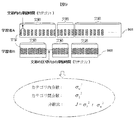
- FIG. 9 shows an example of a writing type classification method using the writing data analysis program 104000104.
- 901 indicates the writing stroke data of the learner A
- 902 indicates the writing stroke data of the learner B.
- each learner is identified by the pen ID with reference to the user profile 1040205.
- each hatched rectangle represents one character.
- the time zone (dwelling time) during which characters are not written is calculated using the writing start time and end time of each collected writing stroke data.
- the dispersion of the residence time in each clause is set as category 1, and the dispersion of the residence time at the break between clauses is set as category 2.
- each of these intervals is set as the residence time of the break of the clause.
- the dispersion of the residence time between each character between Sq [0] and Sq [1] to Sq [p-2] and Sq [p-1].
- the variance ratio is 2.487, it is determined that the text is copied for each phrase.
- the variance ratio is 0.02, it is determined that the text is copied for each character, and is stored as a writing feature value.
- the above method can be used to determine whether it is copied in character units or in morpheme units. A unit to be copied can be determined in the same manner. It should be noted that the character position at which the line changes is calculated by removing it from the staying time because it is clear that it takes time to move the pen.
- the pen moving distance is a line change
- Written feature values are extracted from the average, variance, and peak values.
- the number of residence times having a large variance with respect to the average residence time per stroke approximates any of the number of characters, the number of words, the number of morphemes, and the number of phrases, and the residence time has a large variance.
- the character is copied in units of characters, words, morphemes, or phrases, and stored as a writing feature value.
- the character recognition function to recognize the character of the written data and specify the character position, the same analysis as in the case of the square can be performed.
- the “difficulty level of a word” can also be determined from the number of strokes in the word and the writing time. That is, the difficulty level of the word can be determined based on the writing time / number of strokes.
- teacher data is stored for each teaching material content and a writing feature is extracted by referring to the data.
- Teacher data such as writing for each character, writing for each word, writing for each morpheme, writing for each phrase, and the like are extracted, and a writing feature amount is extracted by comparing with each writing dwell time.
- FIG. 10 is a diagram showing the result of the end of content analysis on the display screen 910 and the result of language understanding determination for each learner on the display screen 912 by the teacher GUI.
- the display screen 910 for example, “writing data acquisition is in progress”, “writing data acquisition is completed”, “writing data analysis is in progress” is displayed on the display screen by the teacher GUI.
- the result of language comprehension determination is displayed.
- learner B has a high language understanding level and learner A has a low language understanding level.
- the analysis process after the teacher inputs the end of content analysis on the display screen 910 and the handwritten data is acquired by the learning activity of the learner that follows is automatically executed in the server. Therefore, this process is completed in a very short time. Therefore, the teacher can obtain information on the learning process of each learner on the display screen 912 immediately after the learner's learning activities are performed.
- the teacher Based on the results of this analysis / determination, the teacher provides appropriate instruction to learner A and learner B, or provides appropriate teaching material contents, etc. And specific feedback can be made quickly.
- the understanding level of each learner can be automatically evaluated at high speed, so that the education itself becomes more efficient. Furthermore, since it becomes possible to evaluate language understanding activities regardless of language in writing activities, it can be used for evaluation of various language education.
- This example is a method for extracting a writing feature when a writing start possible time is set.
- the difficulty / concentration level of the teaching material content is determined based on the writing start possible time for a predetermined answer entry area.
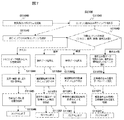
- FIG. 11 is an example of a flowchart of handwritten data analysis processing in the second embodiment.
- FIG. 12 is a diagram showing a display screen of the teacher GUI.
- the general processing flow of the server 103 is the same as that of the first embodiment.
- the server 103 is activated, the data reception / management program 1040102 is activated, and the teacher GUI program 1040107 is activated.
- teaching material contents including a multiple-choice answer method using a mark sheet are selected for a question presented by voice on the display screen of FIG.
- the teacher selects content to be used on the display screen 1201-1204 activated by the teacher GUI.
- the teacher selects / sets bbb.wav from the menu
- the content setting is completed, and when the “start” button is pressed, the writing data acquisition program and the bbb.wav data are started in synchronization.
- the selected teaching material content is an unanalyzed teaching material
- a writing possible time and a writing start possible time for a predetermined answer entry area are set. Since voice is used in the present embodiment, the “voice” of the target content is selected in S11043 of FIG. 7, and further specific settings are made in S11050 to S11052.
- S1111-S1116 of FIG. 5 relating to the processing of the server 103 is equivalent to the example of the first embodiment.
- FIG. 11 differences from the learning process visualization system of the first embodiment are mainly described, and description of the same configuration is omitted.
- the server 103 acquires the writing start / end times for each individual person and acquires the writing time and the non-writing time for the answer entry area (S1116).
- the server 103 further calculates the difference between the point time in the teaching material content and the writing start time (S1132). Further, the correctness / incorrectness of the written data is determined (S1133). Further, the difficulty level and the concentration level for each point in the teaching material content are determined based on the difference data or the difference data and the correctness determination result data (S1134). Finally, the determination result is displayed (S1135).
- the teacher confirms the determination result on the screen of the teacher's PC 105, creates individual instruction information using the analysis / determination result and holds data (S1136), and ends (S1137).
- FIG. 13 is a diagram illustrating an example of the writing result time-series information 1300 in the second embodiment.
- problem presentation times S1, S2,-, Sm in other words, writing start possible times t10, t20, t30,-are set in advance by the teacher, and within that time (t10 + S1, t20 + S2, -)
- the student answers by writing in the answer entry area.
- a situation will be described in which a learner answers a question presented by voice by writing. For example, it is assumed that “S1: How many prefectures the ABE river flows?” Is presented by voice, and the answer is printed as an option on paper (1400 in FIG. 14A).
- the answer sheet 1400 has a plurality of rectangular answer entry areas Area [i]. This answer sheet corresponds to the digital pen sheet 102 of the first embodiment.
- the time t10 when the sound of “S1” starts to flow is set as the beginning of the writable time.
- Each of the learners (User001, User002, Usern) inputs, for example, “ ⁇ ” in a predetermined answer field in the same sheet with the pen of the learner ID registered in each profile.
- learner n (User n) starts writing at time t11 in response to “S1” at time t10 and ends writing at time t12.
- FIG. 14B is a diagram for explaining the details 1401 of the time series information of the written data of each learner at the two problem presentation times in the written result time series information 1300 of FIG.
- the teacher uses the answer sheet creation program to set the answer input area of the answer sheet 1400 to Area [i] as shown in FIG. And stored as data of analyzed teaching material contents.
- the input (writing) start possible time to each Area [i] is set as T_sarea [i]
- the input (writing) possible time end time is set as T_earea [i].
- a blank time between questions is calculated, each startable time T_sarea [i] is set using the blank time, and stored as data of analyzed teaching material content.
- the learner inputs the corresponding Area [i] of the answer sheet 1400 with a digital pen according to the question that is output by voice.
- the input writing data (details 1401 of time series information) is transmitted to the server by the writing data acquisition program.
- FIG. 14C shows the relationship between the startable time T_sarea [i], the learner's writing start and end times, and AS [i] [p] [q] in one Area [i] of the answer sheet 1400.
- TS_area [0] [0] AS [0] [0] [0]-T_sarea [0]: Difference between writing start possible time in each answer entry area and writing start time of each user Average time length / variance value / standard deviation value of TS_area [0] [0] [0] for all learners And determine the degree of concentration at the time of questions.
- the server finishes obtaining the written data (S1115), and then the written data analysis program 1040104 automatically The analysis process is started (S1116).
- the writing data acquired by the writing data analysis program is stored in the database 104 as writing data for each profile with reference to the profile corresponding to each pen ID.
- correctness / incorrectness of written data is also determined (S1133). Then, based on the written data, the difficulty level and the concentration level at the time of the question are determined based on the variance / standard deviation value of the average time length of the difference values (S1134).
- the difficulty determination method is that questions with smaller standard deviation values and higher accuracy rates are easier.
- the determination method of the concentration degree determines that the concentration degree is high when the standard deviation value is small. For example, it is assumed that, among all questions, a question with a small standard deviation value has a high degree of concentration.
- the answer is a correct answer
- the position where the answer can be judged in the voice can be determined by looking at the position in the voice where the answer is made.
- the results of these determinations are output, and are ready to be displayed on the teacher's PC screen (S1135).
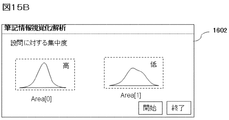
- FIG. 15A and 15B are examples of GUI displayed on the teacher PC.
- FIG. 15A is an example of a screen 1601 that displays the determination result of the difficulty level of the teaching material content question.
- the standard deviation value is small, and the correct answer rate at the initial stage in the voice is also high. That is, it is determined that the assigned Area [0] assignment was “easy” for each learner.
- the degree of concentration is low, and the correct answer rate is high in the second half of the writing time. That is, it is determined that the assigned Area [1] task was “difficult” for each learner.
- the teacher shortens the writable time for the Area [0] task and increases the writable time for the Area [1] task.
- the assignment of Area [1] it may be determined that the learning progress of the learner is low, and a review of his / her teaching method may be considered.
- FIG. 15B is an example of a screen 1602 displaying the determination result of the degree of concentration with respect to the question of the teaching material content.
- the question regarding Area [0] on the answer sheet is determined to have a high degree of concentration because the standard deviation value is small, in other words, an appropriate task for each learner.
- the questions related to Area [1] it is determined that the answers are distributed over a wide range in the voice and the degree of concentration is low, in other words, it is not an appropriate task for each learner.
- the visualization of the learning process based on time-series written data input by the learner in this embodiment can be developed into various contents. For example, a test of hearing that selects “text” and “speech” and asks which of the “pictures” distributed in advance to the learner corresponds to the “English conversation” given by speech Or, select “Text” and select a description corresponding to the blank in the sentence given to the learner in advance from among multiple choices, and then select “Text” and “Video”.
- the present invention can be applied according to various learning modes, such as asking which of a plurality of options given in advance an event in a video corresponds.
- the learner's understanding level difficulty level of the task
- the degree of concentration with respect to the teaching material content and instructions indicated by the teacher, and in each class of the content command It is possible to measure the suitability, in other words, whether the assignment is appropriate.
- the present invention can be implemented in a form in which the first and second embodiments are combined depending on the content of the problem to be set. That is, as described with reference to FIG. 2B, the processing result of the writing time / time measurement module 10303 can be used for the language comprehension determination described in the first embodiment, and the difficulty level of the setting task described in the second embodiment. It can also be used to determine the concentration of the learner with respect to the determination and the set task.
Landscapes
- Engineering & Computer Science (AREA)
- Business, Economics & Management (AREA)
- Theoretical Computer Science (AREA)
- Physics & Mathematics (AREA)
- Educational Administration (AREA)
- Educational Technology (AREA)
- General Physics & Mathematics (AREA)
- Tourism & Hospitality (AREA)
- Entrepreneurship & Innovation (AREA)
- Health & Medical Sciences (AREA)
- Economics (AREA)
- General Health & Medical Sciences (AREA)
- Human Resources & Organizations (AREA)
- Marketing (AREA)
- Primary Health Care (AREA)
- Strategic Management (AREA)
- General Business, Economics & Management (AREA)
- Electrically Operated Instructional Devices (AREA)
- Management, Administration, Business Operations System, And Electronic Commerce (AREA)
Abstract
L'invention concerne une fonction pour évaluer la progression d'apprentissage d'un élève et évaluer le contenu de matériel d'enseignement à l'aide de données d'écriture. La présente invention comprend une unité d'entrée d'informations ayant un stylo et papier numériques, un dispositif de traitement d'informations pour collecter/stocker des données d'écriture de série chronologique entrées par l'unité d'entrée d'informations, et un terminal de professeur pour afficher les données d'écriture de série chronologique collectées/stockées et, en indiquant des informations du temps d'écriture dans une région d'entrée de données d'écriture prédéterminée du papier dans l'unité d'entrée d'informations, une valeur de caractéristique d'écriture d'un élève entrée par le stylo numérique est extraite, le degré de progression d'apprentissage de l'élève ou le niveau de difficulté de contenu de matériel d'enseignement est évalué et affiché dans le terminal de professeur.
Priority Applications (1)
| Application Number | Priority Date | Filing Date | Title |
|---|---|---|---|
| PCT/JP2013/057097 WO2014141414A1 (fr) | 2013-03-13 | 2013-03-13 | Système de visualisation de processus d'apprentissage et dispositif de traitement de visualisation, et procédé de visualisation |
Applications Claiming Priority (1)
| Application Number | Priority Date | Filing Date | Title |
|---|---|---|---|
| PCT/JP2013/057097 WO2014141414A1 (fr) | 2013-03-13 | 2013-03-13 | Système de visualisation de processus d'apprentissage et dispositif de traitement de visualisation, et procédé de visualisation |
Publications (1)
| Publication Number | Publication Date |
|---|---|
| WO2014141414A1 true WO2014141414A1 (fr) | 2014-09-18 |
Family
ID=51536110
Family Applications (1)
| Application Number | Title | Priority Date | Filing Date |
|---|---|---|---|
| PCT/JP2013/057097 Ceased WO2014141414A1 (fr) | 2013-03-13 | 2013-03-13 | Système de visualisation de processus d'apprentissage et dispositif de traitement de visualisation, et procédé de visualisation |
Country Status (1)
| Country | Link |
|---|---|
| WO (1) | WO2014141414A1 (fr) |
Cited By (8)
| Publication number | Priority date | Publication date | Assignee | Title |
|---|---|---|---|---|
| JP2016090747A (ja) * | 2014-10-31 | 2016-05-23 | 大日本印刷株式会社 | 情報処理装置、情報処理システム及びプログラム |
| CN109993999A (zh) * | 2019-03-28 | 2019-07-09 | 广东小天才科技有限公司 | 一种基于书写进度的智能报读方法及电子设备 |
| JP2019139686A (ja) * | 2018-02-15 | 2019-08-22 | Kddi株式会社 | 学習管理装置、学習管理方法及び学習管理プログラム |
| JP2020012949A (ja) * | 2018-07-17 | 2020-01-23 | 大日本印刷株式会社 | 情報処理装置及びプログラム |
| JP2020012895A (ja) * | 2018-07-13 | 2020-01-23 | 大日本印刷株式会社 | 記入支援装置、及び、プログラム |
| CN112085972A (zh) * | 2019-06-12 | 2020-12-15 | 广东小天才科技有限公司 | 一种学习习惯的监控提醒方法和系统 |
| CN112150331A (zh) * | 2020-09-28 | 2020-12-29 | 河南财政金融学院 | 面向教育目标进行层级分配的教育资源远程共享系统 |
| US11763174B2 (en) | 2017-03-14 | 2023-09-19 | Nec Corporation | Learning material recommendation method, learning material recommendation device, and learning material recommendation program |
Citations (7)
| Publication number | Priority date | Publication date | Assignee | Title |
|---|---|---|---|---|
| JP2003107979A (ja) * | 2001-09-29 | 2003-04-11 | Kokuyo Co Ltd | 学習支援システム及び方法 |
| JP2004045844A (ja) * | 2002-07-12 | 2004-02-12 | Dainippon Printing Co Ltd | 漢字書き順学習システム、漢字書き順判定プログラム、および漢字練習用紙 |
| JP2004206295A (ja) * | 2002-12-24 | 2004-07-22 | Dainippon Printing Co Ltd | 電子ペンを利用した採点システム及び入力記号認識システム、採点処理プログラム、並びに入力記号認識プログラム |
| JP2005055550A (ja) * | 2003-08-08 | 2005-03-03 | Hitachi Ltd | オンライン学習支援装置及び方法 |
| JP2005215540A (ja) * | 2004-01-30 | 2005-08-11 | Fujitsu Ltd | 筆算学習支援装置および筆算学習支援方法のプログラム |
| JP2008268604A (ja) * | 2007-04-20 | 2008-11-06 | Wao Corporation | 情報処理装置、およびプログラム |
| JP2009020373A (ja) * | 2007-07-13 | 2009-01-29 | Dainippon Printing Co Ltd | 端末装置及びそれを用いた学習システムとそのプログラム |
-
2013
- 2013-03-13 WO PCT/JP2013/057097 patent/WO2014141414A1/fr not_active Ceased
Patent Citations (7)
| Publication number | Priority date | Publication date | Assignee | Title |
|---|---|---|---|---|
| JP2003107979A (ja) * | 2001-09-29 | 2003-04-11 | Kokuyo Co Ltd | 学習支援システム及び方法 |
| JP2004045844A (ja) * | 2002-07-12 | 2004-02-12 | Dainippon Printing Co Ltd | 漢字書き順学習システム、漢字書き順判定プログラム、および漢字練習用紙 |
| JP2004206295A (ja) * | 2002-12-24 | 2004-07-22 | Dainippon Printing Co Ltd | 電子ペンを利用した採点システム及び入力記号認識システム、採点処理プログラム、並びに入力記号認識プログラム |
| JP2005055550A (ja) * | 2003-08-08 | 2005-03-03 | Hitachi Ltd | オンライン学習支援装置及び方法 |
| JP2005215540A (ja) * | 2004-01-30 | 2005-08-11 | Fujitsu Ltd | 筆算学習支援装置および筆算学習支援方法のプログラム |
| JP2008268604A (ja) * | 2007-04-20 | 2008-11-06 | Wao Corporation | 情報処理装置、およびプログラム |
| JP2009020373A (ja) * | 2007-07-13 | 2009-01-29 | Dainippon Printing Co Ltd | 端末装置及びそれを用いた学習システムとそのプログラム |
Cited By (11)
| Publication number | Priority date | Publication date | Assignee | Title |
|---|---|---|---|---|
| JP2016090747A (ja) * | 2014-10-31 | 2016-05-23 | 大日本印刷株式会社 | 情報処理装置、情報処理システム及びプログラム |
| US11763174B2 (en) | 2017-03-14 | 2023-09-19 | Nec Corporation | Learning material recommendation method, learning material recommendation device, and learning material recommendation program |
| JP2019139686A (ja) * | 2018-02-15 | 2019-08-22 | Kddi株式会社 | 学習管理装置、学習管理方法及び学習管理プログラム |
| JP2020012895A (ja) * | 2018-07-13 | 2020-01-23 | 大日本印刷株式会社 | 記入支援装置、及び、プログラム |
| JP7238285B2 (ja) | 2018-07-13 | 2023-03-14 | 大日本印刷株式会社 | 記入支援装置、及び、プログラム |
| JP2020012949A (ja) * | 2018-07-17 | 2020-01-23 | 大日本印刷株式会社 | 情報処理装置及びプログラム |
| JP7172219B2 (ja) | 2018-07-17 | 2022-11-16 | 大日本印刷株式会社 | 情報処理装置及びプログラム |
| CN109993999A (zh) * | 2019-03-28 | 2019-07-09 | 广东小天才科技有限公司 | 一种基于书写进度的智能报读方法及电子设备 |
| CN109993999B (zh) * | 2019-03-28 | 2022-01-28 | 广东小天才科技有限公司 | 一种基于书写进度的智能报读方法及电子设备 |
| CN112085972A (zh) * | 2019-06-12 | 2020-12-15 | 广东小天才科技有限公司 | 一种学习习惯的监控提醒方法和系统 |
| CN112150331A (zh) * | 2020-09-28 | 2020-12-29 | 河南财政金融学院 | 面向教育目标进行层级分配的教育资源远程共享系统 |
Similar Documents
| Publication | Publication Date | Title |
|---|---|---|
| WO2014141414A1 (fr) | Système de visualisation de processus d'apprentissage et dispositif de traitement de visualisation, et procédé de visualisation | |
| Li et al. | Online peer review using Turnitin in first-year writing classes | |
| US10546508B2 (en) | System and method for automated literacy assessment | |
| JP6668821B2 (ja) | 教育支援装置、プログラム、及び、教育支援システム | |
| Li et al. | The development of accuracy and fluency in second language (L2) speaking related to self-efficacy through online scaffolding: A latent growth curve modeling analysis | |
| US20050125228A1 (en) | Digital electronic correction pen with audio pronunciation and spell check capabilities, with built-in memory. Also calculation processing... thereof... | |
| CN104123858A (zh) | 一种读背课文时检错纠错的方法及装置 | |
| JPH0968919A (ja) | 答案採点処理装置 | |
| Shadiev et al. | Review of studies on recognition technologies and their applications used to assist learning and instruction | |
| JP2019113803A (ja) | 漢字学習装置 | |
| Kuerban et al. | ReadSmart: Generative AI and augmented reality solution for supporting students with dyslexia learning disabilities | |
| Harum et al. | A Development of Multi-Language Interactive Device using Artificial Intelligence Technology for Visual Impairment Person. | |
| Thangthong et al. | Navigating AI writing assistance tools: Unveiling the insights of Thai EFL learners | |
| Mathwin et al. | Handwriting Accuracy of Beginning Writers and Its Impact on the Readability of Their Sentences | |
| Coffin et al. | Supporting the writing skills of individuals with autism spectrum disorder through assistive technologies | |
| Pramesti | Investigating Students’ Strategies and Difficulties in Facing TOEFL Reading Section | |
| Chen et al. | Braille reading accuracy in Chinese students with visual impairments: The Effects of visual status and braille reading patterns | |
| Fitriani et al. | “I Think Our Writing Become Tidy, Clear and Also Perfect” Students' Feedback on Writing Class with TECHNOLOGY Performance | |
| Pavey et al. | The dyslexia-friendly teacher's toolkit: strategies for teaching students 3-18 | |
| Nacheva | Analysis of AI mobile applications for ensuring digital accessibility in higher education for people with disabilities | |
| Firza et al. | Error of proposal writing by students | |
| KR102112954B1 (ko) | 영어 학습 제공 방법 | |
| El-Glaly | Spatial reading system for individuals with blindness | |
| San Martín et al. | Teaching vocabulary using comic strips to EFL learners | |
| Goldfrad et al. | The Motivation Conundrum: What motivates university students in an EAP program? |
Legal Events
| Date | Code | Title | Description |
|---|---|---|---|
| 121 | Ep: the epo has been informed by wipo that ep was designated in this application |
Ref document number: 13877711 Country of ref document: EP Kind code of ref document: A1 |
|
| NENP | Non-entry into the national phase |
Ref country code: DE |
|
| 122 | Ep: pct application non-entry in european phase |
Ref document number: 13877711 Country of ref document: EP Kind code of ref document: A1 |
|
| NENP | Non-entry into the national phase |
Ref country code: JP |