WO2014162659A1 - 表示制御装置、表示制御方法および表示制御プログラム - Google Patents
表示制御装置、表示制御方法および表示制御プログラム Download PDFInfo
- Publication number
- WO2014162659A1 WO2014162659A1 PCT/JP2014/001229 JP2014001229W WO2014162659A1 WO 2014162659 A1 WO2014162659 A1 WO 2014162659A1 JP 2014001229 W JP2014001229 W JP 2014001229W WO 2014162659 A1 WO2014162659 A1 WO 2014162659A1
- Authority
- WO
- WIPO (PCT)
- Prior art keywords
- display
- image
- display control
- displayed
- images
- Prior art date
- Legal status (The legal status is an assumption and is not a legal conclusion. Google has not performed a legal analysis and makes no representation as to the accuracy of the status listed.)
- Ceased
Links
Images










Classifications
-
- G—PHYSICS
- G06—COMPUTING OR CALCULATING; COUNTING
- G06F—ELECTRIC DIGITAL DATA PROCESSING
- G06F3/00—Input arrangements for transferring data to be processed into a form capable of being handled by the computer; Output arrangements for transferring data from processing unit to output unit, e.g. interface arrangements
- G06F3/01—Input arrangements or combined input and output arrangements for interaction between user and computer
- G06F3/048—Interaction techniques based on graphical user interfaces [GUI]
- G06F3/0481—Interaction techniques based on graphical user interfaces [GUI] based on specific properties of the displayed interaction object or a metaphor-based environment, e.g. interaction with desktop elements like windows or icons, or assisted by a cursor's changing behaviour or appearance
- G06F3/0482—Interaction with lists of selectable items, e.g. menus
-
- G—PHYSICS
- G06—COMPUTING OR CALCULATING; COUNTING
- G06F—ELECTRIC DIGITAL DATA PROCESSING
- G06F3/00—Input arrangements for transferring data to be processed into a form capable of being handled by the computer; Output arrangements for transferring data from processing unit to output unit, e.g. interface arrangements
- G06F3/01—Input arrangements or combined input and output arrangements for interaction between user and computer
- G06F3/03—Arrangements for converting the position or the displacement of a member into a coded form
- G06F3/041—Digitisers, e.g. for touch screens or touch pads, characterised by the transducing means
- G06F3/0412—Digitisers structurally integrated in a display
-
- G—PHYSICS
- G06—COMPUTING OR CALCULATING; COUNTING
- G06F—ELECTRIC DIGITAL DATA PROCESSING
- G06F3/00—Input arrangements for transferring data to be processed into a form capable of being handled by the computer; Output arrangements for transferring data from processing unit to output unit, e.g. interface arrangements
- G06F3/01—Input arrangements or combined input and output arrangements for interaction between user and computer
- G06F3/048—Interaction techniques based on graphical user interfaces [GUI]
- G06F3/0481—Interaction techniques based on graphical user interfaces [GUI] based on specific properties of the displayed interaction object or a metaphor-based environment, e.g. interaction with desktop elements like windows or icons, or assisted by a cursor's changing behaviour or appearance
- G06F3/04817—Interaction techniques based on graphical user interfaces [GUI] based on specific properties of the displayed interaction object or a metaphor-based environment, e.g. interaction with desktop elements like windows or icons, or assisted by a cursor's changing behaviour or appearance using icons
-
- G—PHYSICS
- G06—COMPUTING OR CALCULATING; COUNTING
- G06F—ELECTRIC DIGITAL DATA PROCESSING
- G06F3/00—Input arrangements for transferring data to be processed into a form capable of being handled by the computer; Output arrangements for transferring data from processing unit to output unit, e.g. interface arrangements
- G06F3/01—Input arrangements or combined input and output arrangements for interaction between user and computer
- G06F3/048—Interaction techniques based on graphical user interfaces [GUI]
- G06F3/0484—Interaction techniques based on graphical user interfaces [GUI] for the control of specific functions or operations, e.g. selecting or manipulating an object, an image or a displayed text element, setting a parameter value or selecting a range
- G06F3/04842—Selection of displayed objects or displayed text elements
-
- G—PHYSICS
- G06—COMPUTING OR CALCULATING; COUNTING
- G06F—ELECTRIC DIGITAL DATA PROCESSING
- G06F3/00—Input arrangements for transferring data to be processed into a form capable of being handled by the computer; Output arrangements for transferring data from processing unit to output unit, e.g. interface arrangements
- G06F3/01—Input arrangements or combined input and output arrangements for interaction between user and computer
- G06F3/048—Interaction techniques based on graphical user interfaces [GUI]
- G06F3/0484—Interaction techniques based on graphical user interfaces [GUI] for the control of specific functions or operations, e.g. selecting or manipulating an object, an image or a displayed text element, setting a parameter value or selecting a range
- G06F3/04845—Interaction techniques based on graphical user interfaces [GUI] for the control of specific functions or operations, e.g. selecting or manipulating an object, an image or a displayed text element, setting a parameter value or selecting a range for image manipulation, e.g. dragging, rotation, expansion or change of colour
-
- G—PHYSICS
- G06—COMPUTING OR CALCULATING; COUNTING
- G06F—ELECTRIC DIGITAL DATA PROCESSING
- G06F3/00—Input arrangements for transferring data to be processed into a form capable of being handled by the computer; Output arrangements for transferring data from processing unit to output unit, e.g. interface arrangements
- G06F3/01—Input arrangements or combined input and output arrangements for interaction between user and computer
- G06F3/048—Interaction techniques based on graphical user interfaces [GUI]
- G06F3/0484—Interaction techniques based on graphical user interfaces [GUI] for the control of specific functions or operations, e.g. selecting or manipulating an object, an image or a displayed text element, setting a parameter value or selecting a range
- G06F3/0485—Scrolling or panning
-
- G—PHYSICS
- G06—COMPUTING OR CALCULATING; COUNTING
- G06F—ELECTRIC DIGITAL DATA PROCESSING
- G06F3/00—Input arrangements for transferring data to be processed into a form capable of being handled by the computer; Output arrangements for transferring data from processing unit to output unit, e.g. interface arrangements
- G06F3/01—Input arrangements or combined input and output arrangements for interaction between user and computer
- G06F3/048—Interaction techniques based on graphical user interfaces [GUI]
- G06F3/0484—Interaction techniques based on graphical user interfaces [GUI] for the control of specific functions or operations, e.g. selecting or manipulating an object, an image or a displayed text element, setting a parameter value or selecting a range
- G06F3/0486—Drag-and-drop
-
- G—PHYSICS
- G06—COMPUTING OR CALCULATING; COUNTING
- G06F—ELECTRIC DIGITAL DATA PROCESSING
- G06F3/00—Input arrangements for transferring data to be processed into a form capable of being handled by the computer; Output arrangements for transferring data from processing unit to output unit, e.g. interface arrangements
- G06F3/01—Input arrangements or combined input and output arrangements for interaction between user and computer
- G06F3/048—Interaction techniques based on graphical user interfaces [GUI]
- G06F3/0487—Interaction techniques based on graphical user interfaces [GUI] using specific features provided by the input device, e.g. functions controlled by the rotation of a mouse with dual sensing arrangements, or of the nature of the input device, e.g. tap gestures based on pressure sensed by a digitiser
- G06F3/0488—Interaction techniques based on graphical user interfaces [GUI] using specific features provided by the input device, e.g. functions controlled by the rotation of a mouse with dual sensing arrangements, or of the nature of the input device, e.g. tap gestures based on pressure sensed by a digitiser using a touch-screen or digitiser, e.g. input of commands through traced gestures
-
- G—PHYSICS
- G06—COMPUTING OR CALCULATING; COUNTING
- G06F—ELECTRIC DIGITAL DATA PROCESSING
- G06F2203/00—Indexing scheme relating to G06F3/00 - G06F3/048
- G06F2203/048—Indexing scheme relating to G06F3/048
- G06F2203/04808—Several contacts: gestures triggering a specific function, e.g. scrolling, zooming, right-click, when the user establishes several contacts with the surface simultaneously; e.g. using several fingers or a combination of fingers and pen
Definitions
- This technology relates to a display control device, a display control method, and a display control program.
- the present technology has been made in view of such problems, and an object thereof is to provide a display control device, a display control method, and a display control program that enable a user to easily search and browse images.
- the first technique includes a display control unit that controls a display unit that displays an image, and the display control unit includes a plurality of image groups that are classified according to image related information.
- a plurality of representative images that are respectively representative are displayed on the display unit in the first display mode, and are associated with the representative images between the plurality of representative images displayed in the first display mode in response to an input from the user.
- the display control device is configured to display a related image on a display unit in a second display mode.
- a display unit that displays images displays a plurality of representative images that respectively represent a plurality of image groups that are classified according to image related information in a first display mode.
- a display control method in which a related image associated with a representative image is displayed in a second display manner among a plurality of representative images displayed in a first display manner in response to the input of.
- the display unit that displays an image
- a plurality of representative images that respectively represent a plurality of image groups classified according to the related information of the image are displayed in the first display mode
- Display control program for causing a computer to execute a display control method for displaying, in a second display mode, a related image associated with a representative image among a plurality of representative images displayed in a first display mode in response to an input of It is.
- the user can easily search and browse images.
- FIG. 1A is a block diagram illustrating a configuration of the display control device
- FIG. 1B is a block diagram illustrating another example of the configuration of the display control device.
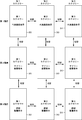
- FIG. 2 is a diagram illustrating an outline of a display mode in the present technology.
- FIG. 3A is a diagram illustrating a display mode of representative image display
- FIG. 3B is a diagram illustrating a display mode of representative image display when the screen is scrolled.
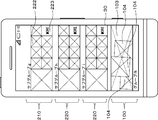
- FIG. 4A is a diagram showing a display mode of the summary hierarchy display
- FIG. 4B is a diagram showing a display mode of the summary hierarchy display when the screen is scrolled.
- FIG. 5 is a diagram showing a form of group header display that is displayed when the summary hierarchy display is scrolled.
- FIG. 6A is a diagram showing a display mode of the detailed hierarchy display
- FIG. 6B is a diagram showing a display mode of the detailed hierarchy display when the screen is scrolled.
- FIG. 7A is a diagram illustrating a first mode of single image display
- FIG. 7B is a diagram illustrating a second mode of single image display.
- FIG. 8A is a diagram illustrating a display example of representative image display using a specific image classified into the category “capture time”
- FIG. 8B illustrates a specific image classified into the category “capture time”. It is a figure which shows the example of a display of the used summary hierarchy display.
- FIG. 8A is a diagram showing a display mode of the detailed hierarchy display
- FIG. 6B is a diagram showing a display mode of the detailed hierarchy display when the screen is scrolled.
- FIG. 7A is a diagram illustrating a first mode of single image display
- FIG. 7B is a diagram illustrating a second mode of single image display.
- FIG. 9A is a diagram illustrating a display example of a detailed hierarchical display using a specific image classified into the category “capture time”, and FIG. 9B illustrates a specific image classified into the category “capture time”. It is a figure which shows the example of a display of the used image single display.
- FIG. 10A is a diagram illustrating a display example of representative image display using a specific image classified into the category “shooting subject”, and FIG. 10B illustrates a specific image classified into the category “shooting subject”. It is a figure which shows the example of a display of the used summary hierarchy display.
- FIG. 11A is a diagram illustrating a display example of a detailed hierarchy display using a specific image classified into the category “shooting subject”, and FIG.
- 11B illustrates a specific image classified into the category “shooting subject”. It is a figure which shows the example of a display of the used image single display.
- 12A and 12B are diagrams for explaining switching of category display.
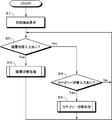
- FIG. 13 is a flowchart showing the overall flow of processing in the display control apparatus.
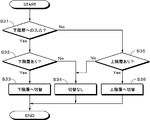
- FIG. 14 is a flowchart showing the flow of the hierarchy switching process.
- FIG. 15A is a flowchart showing the flow of the category switching process, and FIG. 15B is a modified example of the flowchart showing the flow of the category switching process.
- 16A to 16C are diagrams illustrating a first modification of display according to the present technology.
- 17A to 17C are diagrams illustrating a second modification of display according to the present technology.
- FIG. 18A to 18C are diagrams illustrating a third modification of display in the present technology.
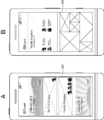
- 19A and 19B are diagrams illustrating a fourth modification of display in the present technology.
- 20A and 20B are diagrams illustrating a fifth modification of display in the present technology.
- FIG. 21 is a diagram illustrating a modified example of the present technology
- FIG. 21A is a diagram illustrating a display example of representative image display when the present technology is applied to a smartphone
- FIG. 21B is a diagram illustrating the present technology on a tablet terminal.
- FIG. 21C is a diagram illustrating a display example of representative image display when the present technology is applied
- FIG. 21C is a diagram illustrating a display example of representative image display when the present technology is applied to a personal computer
- FIG. 22A is a diagram illustrating a modification of the present technology, and is a diagram illustrating a display example of summary hierarchy display when the present technology is applied to a smartphone.
- FIG. 22B is a diagram in the case where the present technology is applied to a tablet terminal.
- 22C is a diagram showing a display example of summary hierarchy display
- FIG. 22C is a diagram showing a display example of summary hierarchy display when the present technology is applied to a personal computer
- FIG. 22D is a diagram showing the present technology in a television receiver. It is a figure which shows the example of a display of the summary hierarchy display at the time of applying.
- FIG. 22A is a diagram illustrating a modification of the present technology, and is a diagram illustrating a display example of summary hierarchy display when the present technology is applied to a smartphone.
- FIG. 22B is a diagram in the case where the present technology is applied to a tablet terminal.
- 22C is a diagram showing a display example of summary hierarchy display
- FIG. 22C
- FIG. 23A is a diagram illustrating a modification example of the present technology, and is a diagram illustrating a display example of a single image display when the present technology is applied to a smartphone.
- FIG. 23B is an image obtained by applying the present technology to a tablet terminal.
- FIG. 23C is a diagram illustrating an example in which an application icon is displayed together with the display.
- FIG. 23C is a diagram illustrating an example in which the present technology is applied to a personal computer and the UI of the application is displayed together with image display. It is a figure which shows the example which applies map to a television receiver and displays a map with an image display.
- Embodiment> [1-1. Configuration of display control apparatus] [1-2. Processing in display control apparatus] ⁇ 2. Modification>
- FIG. 1A is a block diagram illustrating a configuration of the display control device 10.
- the display control device 10 includes an image classification unit 11 and a display control unit 12.
- the image classification unit 11 and the display control unit 12 of the display control device 10 are realized, for example, by executing a predetermined program by a CPU (Central Processing Unit) or the like.
- the display control device 10 operates in devices such as a smartphone, a tablet terminal, a personal computer, a television receiver, a mobile phone, and a server. However, the display control device may be configured as a single device.
- the display control device 10 is connected to the input unit 20 and the display unit 30 included in the other devices described above.
- the display control apparatus 10 itself may be configured to include the input unit 20 and the display unit 30.
- the display control apparatus 10 is supplied with image data held by the other devices described above. Further, the image data may be supplied by importing an image that has already been uploaded on an SNS (social networking service) on the Internet, a photo sharing site, or the like.
- SNS social networking service
- the input unit 20 is an input unit that receives an operation input from a user.
- the input unit 20 is, for example, a touch panel configured integrally with the display unit 30.
- the touch panel is, for example, a capacitive touch panel or a pressure sensitive touch panel.
- the input unit 20 may be a pointing device such as a mouse, a keyboard, or the like.
- the display control device 10 is supplied with input information indicating input content by the user from the input unit 20. In the following description, the case where the input unit 20 is a touch panel configured integrally with the display unit 30 will be described as an example.
- the touch panel can detect each of the operations simultaneously performed at a plurality of locations on the screen as the operation surface, and can output information indicating the contact position.
- the touch panel can also detect each operation that has been repeated on the operation surface, and can output information indicating the respective contact positions.
- the tap operation is an input operation in which a user's finger or the like is brought into contact with the operation surface only once for a short time.
- the double tap operation is an input operation in which a finger or the like is continuously touched twice on the operation surface at short intervals.
- the drag operation is an input operation in which the user's finger or the like is moved while in contact with the operation surface.
- the flick operation is an input operation in which one point on the operation surface such as a user's finger is designated and then quickly repelled in an arbitrary direction. Thereby, for example, when a plurality of images are displayed on the display unit 30 and viewed, the images can be switched so as to be turned.
- the pinch operation is an input operation in which the user's two fingers are first brought into contact with the operation surface and then the two fingers are opened or closed.
- an input such as enlargement or reduction of a frame indicating an area displayed on the display unit 30 can be performed.
- an operation of opening two fingers brought into contact is referred to as a pinch-out operation
- an operation of closing two fingers is referred to as a pinch-in operation.
- the display unit 30 is an image display unit configured by, for example, an LCD (Liquid Crystal Display), a PDP (Plasma Display Panel), an organic EL (Electro Luminescence) panel, or the like.
- the display unit 30 displays an image displayed under the processing of the display control apparatus 10, a user interface according to the present technology, and the like.
- the image classification unit 11 classifies the supplied image data into a plurality of categories, groups, and subgroups based on information related to images.
- the category is the largest classification unit for image classification in the present technology.
- a group is a classification unit of images included in a category.
- a subgroup is a classification unit of images included in a group.
- the classification information indicating the classification result by the image classification unit 11 is supplied to the display control unit 12.
- Examples of categories include “capture time”, “shooting subject”, “event”, “favorite”, “shooting location”, and “external image”.
- the “capture time” category is a category based on the time when the image is captured in the display control apparatus 10 in order to display the image.
- the classification into the “capture time” category can be performed by grasping the time when the image is captured into the display control device 10 by a clock function or the like.
- the “capture time” category for example, when the group is “month”, the subgroup is “day”, for example. For example, when the group is “year”, the subgroup is “month”.
- the “shooting subject” category is a category based on main subjects in the image.
- the classification into the “photographing subject” category can be performed by recognizing a subject such as an object or a person in the image using a known image recognition technique.
- Image recognition technology includes face / person recognition technology based on template matching, a matching method based on luminance distribution information of a subject, a method based on a skin color part included in an image, a feature amount of a human face, and the like, based on a feature amount of a face There are methods. Moreover, you may make it raise recognition accuracy combining these methods.
- a group is, for example, a “person” that is a subject.
- the subgroup is “person's age”, for example.
- the “event” category is a category based on the event where the image was taken. Classification into the “event” category can be performed based on known subject recognition technology, image capture time obtained by referring to EXIF (Exchangeable image file format) data, GPS (Global Positioning System) data, and the like. .
- EXIF Exchangeable image file format
- GPS Global Positioning System
- the images are captured at the same event. Can be judged. Furthermore, with reference to the GPS data, when it is determined that the images are captured at the same position based on the GPS data, it can be determined that the plurality of images are captured at the same event. It is also possible to determine that an image showing a subject such as a building is taken at the same event.
- the “event” category for example, “travel” and “party” are classified as a group. Further, for example, “travel date”, “party date, time” and the like are classified as subgroups.
- the “favorite” category is a category based on the degree of favorite of the user image.
- the classification based on the degree of favorite of the image can be performed based on, for example, the number of times the user has displayed the image, the evaluation point set by the user for each image, or the like.
- images may be divided into groups and subgroups according to the degree of favorite.
- the “photo location” category is a category based on the position where the image was taken. Classification into the “photographing place” category can be performed based on GPS data associated with an image. In the “photographing location” category, for example, when the group is “country”, the subgroups are “city”, “town”, “city”, and the like.
- the “external image” category is a category based on the type of service or application when an image uploaded to an Internet service such as an SNS or a photo sharing site or an image imported to another application is imported to the display control apparatus 10. It is.
- an Internet service such as an SNS or a photo sharing site or an image imported to another application is imported to the display control apparatus 10. It is.
- a specific service such as Facebook can be classified as a group, and an album already set in the external service can be classified as a subgroup.
- a specific Internet service such as Facebook may be a category, and a group or album in the Internet service may be a group or subgroup in this technology.
- grouping and subgrouping may be performed based on related information such as image classification in the application and tags in the application.
- an SNS, a photo sharing site, and an application that can apply an effect such as sepia or monochrome to an image are set as a category or a group
- the type of the image effect can be set as a group or a subgroup.
- category is not limited to the above-mentioned contents. Any category, group, or subgroup may be used as long as the image can be classified using information related to some image.
- the image classification unit 40 may be provided in an external server or the like without being included in the display control device 10.
- image data may be supplied to the external image classification unit 40, and the image data and classification information may be supplied from the image classification unit 40 to the display control device 10.
- the display control apparatus 10 holds image data
- the image classification unit 40 also holds image data and performs classification processing, and only the classification information is supplied from the image classification unit 11 to the display control apparatus 10. Good.
- the display control unit 12 controls display of a user interface according to the present technology on the display unit 30, display of an image based on the classification result by the image classification unit 11, and the like.
- the display mode of the image performed under the process by the display control part 11 is demonstrated. 2 to 12 will be described with reference to an example in which the device on which the display control apparatus 10 operates is a smartphone, the input unit 20 is a touch panel in the smartphone, and the display unit 30 is a screen in the smartphone.
- the present technology can also be applied to devices other than smartphones.
- FIG. 2 is a diagram illustrating an outline of display and display switching performed in the display unit 30 under the control of the display control device 10.
- multiple images are classified and displayed in multiple categories. Furthermore, images are classified and displayed in groups and subgroups within each category. In FIG. 2, three categories of the first category, the second category, and the third category are shown, but the number of categories is not limited to three.
- images of each category are displayed in three display modes.
- the three display modes are three hierarchical displays, ie, representative image display, summary hierarchical display, and detailed hierarchical display. Furthermore, in addition to the hierarchical display, a single image is also displayed.
- the representative image display is the first hierarchy display
- the summary hierarchy display is the second hierarchy display below
- the detailed hierarchy display is the third hierarchy display below.
- display switching between categories and display switching between hierarchies are mutually possible according to input from the user.
- FIG. 3A shows a mode of representative image display which is the first layer display.
- the representative image display which is the first hierarchy is composed of a plurality of representative image display areas 100, 100, 100,.
- images (hereinafter referred to as representative images) 101 representing the respective groups are displayed.
- a square having a diagonal line represents a simplified image.
- group names (“Group A, Group B, Group C” in FIG. 3A) are displayed at positions corresponding to the respective groups.
- an image selected from a plurality of images included in the group is displayed as an image representing the group.
- one representative image 101 is a group background image, and a plurality of images related to the representative image (hereinafter referred to as related images) on the background image. 102, 102,... Are superimposed.
- group B and group C in FIG. 3A representative images and related images are selected from the images belonging to each group and displayed.
- the images included in the group may be scored under various conditions, and the image with the highest score may be used as the representative image.
- scoring conditions the score is high when the ratio of the face to the image size is above a certain level, the score is high for a smile, the score is higher in the front direction than in the landscape direction, and the number of subjects is a predetermined number. If it is more than a number, the score is high.
- the image with the highest score among the images in the group is displayed large as the representative image 101.
- a plurality of images having higher scores are displayed as superimposed images 102 in order. This display is made in all groups displayed on the display unit 30.
- the scroll at this time may be, for example, a so-called inertia scroll.
- the summary hierarchy display classifies images included in a group into subgroups and displays the summary.
- any group is selected by the user in the representative image display state, an image included in the selected group is displayed between the selected group and a group below the selected group. .
- group A is selected by the user, and a plurality of images included in subgroup a, subgroup b, and subgroup c, which are subgroups included in group A, are displayed in an area between group A and group B. It is displayed.
- subgroup names (“subgroup a”, “subgroup b”, “subgroup c” in FIG. 4A) are displayed at positions corresponding to the respective subgroups.
- the summary hierarchy display is a display mode including a header display area 210 and subgroup display areas 220, 220,.
- the header display area 210 is an area for displaying the group selected by the user in the representative image display on the uppermost stage of the display unit 30.
- the representative image 101 and the related image 102 of the group A selected by the user are displayed as headers. By this display, the user can easily grasp in which group the currently displayed image is included.
- the subgroup display area 220 is an area for displaying images included in subgroups existing in the group displayed in the representative image display.
- the sub group display area 220 includes a large size image display area 221 and a small size image display area 222.
- the large-size image display area 221 displays one of the images included in the subgroup in a large size.
- the small size image display area 222 displays a plurality of images included in the subgroup side by side with a smaller size than the large size image display area 221.
- the sub group display area 220 corresponds to the related image display area in the claims.
- one image is displayed in the large-size image display area 221 and seven images are displayed in the small-size image display area 222.
- the number of displayed images in the small-size image region is merely an example, and the number of displayed images is not limited to seven.
- the display size may be further reduced to display more images, or the display size may be increased to reduce the number of displayed images.
- a group includes a large number of subgroups, not all subgroups may be displayed on one screen of the display unit 30.
- the screen is scrolled and another subgroup is displayed as shown in FIG. 4B. It should be displayed.
- the scroll at this time is preferably a so-called inertia scroll.
- the sub-group display area 220 is displayed between the group selected by the user in the representative image display state and the group located below the group. Therefore, for example, when the selected group is group A, when the sub group display area 220 of group A is scrolled down, the representative image of group B, which is another group, is displayed in the header area as shown in FIG.
- the display format is 100.
- the representative image 103 of group B is displayed as a background image, and the related images 104, 104, and 104 are displayed superimposed on the background image. With such a display, it is possible to easily grasp all the groups and subgroups with a seamless display without switching the screen to another screen.
- both the header display area 210 and the subgroup display area 220 may be scrolled, or the subgroup display area 220 may be scrolled while the header display area 210 is fixed. May be.
- the example of FIG. 5 is an example in which both the header display area 210 and the subgroup display area 220 are scrolled.
- a detailed display instruction button 223 for instructing switching to the detailed hierarchy display for displaying an image included in the subgroup but not displayed in the summary hierarchy display is displayed.
- the detail display instruction button 223 exists for each subgroup displayed in the summary hierarchy display.
- the detail display instruction button 223 is represented as “MORE” in FIG.
- an input for example, a tap operation
- the display is switched to the detailed hierarchical display as shown in FIG.
- the notation “MORE” of the detail display instruction button 223 in FIG. 4 is merely an example, and the display mode of the detail display instruction button 223 is not limited thereto.
- the detailed hierarchy display as the third hierarchy display will be described.
- the image display is switched to the detailed hierarchy display shown in FIG. 6A.
- the detailed hierarchy display is to display images included in the subgroup to which the input detail display instruction button 223 corresponds.
- the detailed hierarchy display is a display mode including a header display area 310 and a detailed display area 320.
- the header display area 310 displays a group including a subgroup corresponding to the detail display instruction button 223 input by the user in the summary hierarchy display at the top of the display unit 30.
- the representative image 101 and the related image 102 of the group A including the sub group a are displayed as headers. By this display, the user can easily grasp in which group the currently displayed image is included.
- the detailed image display area 320 displays images included in the subgroup selected by an input to the detailed display instruction button 223 from the user.
- a total of nine images of 3 ⁇ 3 (images 1 to 9) are displayed.
- the display number is not limited to this.
- a subgroup includes a large number of images
- not all images included in the subgroup can be displayed on one screen of the display unit 30.
- the screen is scrolled, and the others included in the subgroup as shown in FIG. 6B. It is good to display the image.
- the user can confirm all the images included in the subgroup.
- the scroll at this time may be, for example, a so-called inertia scroll.
- the display control unit 12 displays the image alone as shown in FIG.
- the single display includes a header display area 410 and a single display area 420, for example.
- the user can view the desired image in a large display state.
- the representative image of the group to which the image belongs may be displayed in the header display area 410 as shown in FIG. 7A, or only the single display area 420 is displayed as shown in FIG. 7B. You may make it display.
- FIGS. 8 and 9 show the display modes of the above-described representative image display, summary hierarchy display, detailed hierarchy display, enlarged image display, and single image display using specific images.
- the examples of FIGS. 8 and 9 are examples when the category is “capture time”.
- the group is “month”, and groups of February, January, and December are displayed.
- a representative image 101 is displayed in the uppermost representative image display area 100, and a plurality of related images 102 are displayed on the representative image 101.
- the summary hierarchy display shown in FIG. 8B is switched.
- FIG. 8B shows a summary hierarchy display when the group February is selected.
- images included in subgroups included in the group February are displayed in the subgroup display area 220.
- the subgroup is “date”, for example.
- three subgroups “26 days”, “25 days”, and “22 days” are displayed.
- One image is displayed in the large size image display area 221 of the sub group display area 220, and seven images are displayed in the small size image display area 222. Further, a detail display instruction button 223 labeled “MORE” is displayed.
- FIG. 9A is a detailed hierarchy display when the subgroup “26 days” is selected.
- a representative image indicating the selected group is displayed in the header display area 310.
- images included in the subgroup “26 days” are displayed side by side.
- FIGS. 10 and 11 are diagrams showing examples of display modes when the category is “photographing subject”.
- the representative image display in the “photographing subject” category images are grouped for each person who is a subject, and the representative images of each group are displayed together with the names of the persons.
- the representative image of the group may be obtained by scoring an image included in the group and selecting and displaying an image having a high score.
- image grouping may be performed such that the image display device recognizes a person in the image stored in the storage unit of the smartphone by a known subject recognition technique and automatically sets a group for each person.
- the representative image display which is the first layer of the “photographing subject” category
- the group of persons is displayed using the representative image, so that it is possible to grasp at a glance which subject is the group. Can do.
- FIG. 10A when an input for selecting a specific group is performed, the display is switched to the summary hierarchy display shown in FIG. 10B.
- FIG. 10B is a summary hierarchy display when the group Emiry shown in FIG. 10A is selected.
- the subgroup is, for example, the age of the subject.
- the group Emiry is selected, and images by age of the girl Emiry are displayed as subgroups.
- a subgroup “New items” may be provided as a subgroup in which new images added within a period retroactive from the present are collected.
- the classification of images into subgroups may be performed by grasping the time of image capture obtained by referring to image capture time, EXIF data, and the like.
- FIG. 11A is a detailed hierarchy display when the subgroup “New items” is selected.
- images included in the subgroup “New items” are displayed side by side in the detailed display area 320.
- the three display modes, representative image display, summary hierarchy display, and detailed hierarchy display are switched.
- a button for instructing switching to a higher hierarchy is provided, and when an input is made to the button, the detailed hierarchy display is changed to the summary hierarchy display, or the summary hierarchy display is changed to the representative image display. It is better to switch the display to a higher hierarchy.
- summary hierarchy display large-size image display and small-size image display are performed in subgroup display.
- the category is switched to the category tagged with the specific image. For example, in the summary hierarchy display of the category “capture time”, when an input for instructing category switching is performed on a girl image, the display is switched to the category “photographing subject” of the girl.
- the display control device 10 is configured as described above.
- the processing function of the display control device 10 can be realized by various devices such as a computer. In that case, a program describing the processing contents of the functions that the display control apparatus 10 should have is provided. And the above-mentioned processing function is implement
- the program describing the processing contents can be recorded on a computer-readable recording medium such as an optical disk or a semiconductor memory.
- a computer-readable recording medium such as an optical disk or a semiconductor memory.
- Such a recording medium can be sold / provided as package software.
- the program can be stored in a server and sold / provided as an application via a network.
- Various devices that execute the program store, for example, the program recorded on the recording medium or the program transferred from the server in its own storage device. Then, the device reads the program from its own storage device and executes processing according to the program.
- the program can also be installed in the memory of the control unit of the device and executed.
- the device can read the program directly from the recording medium and execute processing according to the program. Further, each time the program is transferred from the server, the device can sequentially execute processing according to the received program.
- the display control device 10 is not only realized by a program, but may be realized by combining dedicated devices with hardware having respective functions.
- a cloud service is a service provided by a server that exists on a network, and is one of the usage forms of a computer based on the Internet. All necessary processing is basically performed on the server side.
- the user saves the data on a server on the Internet, not on his personal computer, smartphone, mobile phone or the like. Therefore, it is possible to use services, view, edit, and upload data in various environments such as home, office, Internet cafe, school, and on the go.
- the image is stored in the cloud, the display processing by the image processing apparatus 10 is also performed on the cloud side, and the data indicating the display mode and the image data are transmitted to the user's device or the like, so that the image can be viewed in various environments.
- the image may be stored in the cloud, and the display process by the image processing apparatus 10 may be performed by a user device.
- FIG. 13 is a flowchart showing the overall flow of processing in the display control apparatus 10. This process is performed by the display control unit 12 of the display control device 10. It is assumed that the image classification process by the image classification unit 11 has already been performed.
- an initial screen is displayed on the display unit 30 in step S1.
- the initial screen is a predetermined screen (for example, representative image display of the category “capture time”) is displayed. Further, when there is a history of display by the display control device 10 in the past, it is preferable to use the last memory function to display the last displayed state at the time of the previous display as an initial screen.
- step S2 it is determined whether or not an input for instructing the hierarchy switching is made from the user.
- the input for instructing the hierarchy switching is an input for selecting any group (for example, a tap operation) in the representative image display state.
- the detail display instruction button 223 for example, a tap operation
- an input for selecting a specific image for example, a tap operation.
- step S3 If the user inputs an instruction to switch the hierarchy, the process proceeds to step S3 (Yes in step S2). In step S3, a hierarchy switching process is performed. The flow of the hierarchy switching process will be described later with reference to FIG.
- step S2 when it is determined in step S2 that the input for instructing the hierarchy switching has not been made, the process proceeds to step S4 (No in step S3).
- step S4 it is determined whether or not an input for instructing category switching has been performed.
- the process proceeds to step S5 (Yes in step S4).
- step S5 category switching processing is performed. The flow of the category switching process will be described later with reference to FIG.
- step S2 it is determined again whether or not there has been an input from the user.
- the order of the presence / absence of input for instructing hierarchical switching and the order of presence / absence of the determination of input for instructing category switching are not limited to the order described in the flowchart in FIG. 13 and may be reversed.
- step S31 it is determined whether or not the input for instructing the layer switching from the user is for instructing the switching to the lower layer. If the currently displayed image is a representative image display, the lower layer is a summary layer display. In addition, when the currently displayed summary hierarchy display, the lower hierarchy is a detailed hierarchy display.
- step S32 it is determined whether there is a lower hierarchy. If the representative image display is currently displayed, it is determined that there is a lower hierarchy because there is a summary hierarchy display in the lower hierarchy. Further, when the currently displayed summary hierarchy display, the lower hierarchy includes the detailed hierarchy display, and therefore it is determined that there is a lower hierarchy. On the other hand, when the current display is the detailed hierarchy display, it is determined that there is no lower hierarchy.
- step S33 a process of switching to a lower hierarchy is performed.
- the display is switched to the summary hierarchy display. Further, when the summary hierarchy display is currently displayed, the display is switched to the detailed hierarchy display.
- step S32 determines whether there is no lower hierarchy. If it is determined in step S32 that there is no lower hierarchy, the process proceeds to step S34 (No in step S32). In this case, an input for instructing switching to a lower hierarchy is made, but no switching process is performed because there is no lower hierarchy.
- step S35 it is determined whether there is an upper hierarchy.
- the detailed display is currently displayed, it is determined that there is an upper hierarchy because there is a summary hierarchy display in the upper hierarchy. Further, when the currently displayed summary hierarchy display, since there is a representative image display in the upper hierarchy, it is determined that there is an upper hierarchy. On the other hand, when the currently displayed image is a representative image display, it is determined that there is no upper hierarchy.
- step S35 switching to the upper hierarchy is performed.
- the display is switched to the summary hierarchy display.
- the display is switched to the representative image display.
- step S35 determines whether there is no upper hierarchy. If it is determined in step S35 that there is no upper hierarchy, the process proceeds to step S34 (No in step S35). In this case, an input for instructing switching to an upper hierarchy is made, but the switching process is not performed because there is no upper hierarchy.
- the layer switching process by the display control unit 12 is performed.
- FIG. 15A is a flowchart showing the flow of the category switching process.
- the category can be considered to be a horizontal relationship with respect to the vertical relationship of the hierarchical display.
- an input instructing switching of a category by the user is performed by, for example, a flick operation in the horizontal direction. Therefore, it is assumed that the relationship between the categories is captured in the horizontal direction, and that the input of the category switching instruction from the user is switched to the left category and switched to the right category.
- step S51 it is determined whether or not the input for instructing category switching from the user is for instructing switching to the right category.
- the right category is the “photographing subject” category.
- the right category is the “event” category.
- step S52 If the user inputs an instruction to switch to the right category, the process proceeds to step S52 (Yes in step S51).
- step S52 it is determined whether or not there is a right category. If the “capture time” category is currently displayed, it is determined that there is a right category because there is a “photographing subject” category on the right. If the “photographing subject” category is currently displayed, it is determined that there is a right category because there is an “event” category on the right. On the other hand, if the currently displayed event is the “event” category, it is determined that there is no right category.
- step S53 a process for switching to the right category is performed. If currently displayed is the “capturing time” category, it can be switched to the “photographing subject” category. If the currently displayed category is the “photographing subject” category, the display can be switched to the “event” category.
- step S52 determines whether there is no right category. If it is determined in step S52 that there is no right category, the process proceeds to step S54 (No in step S52). In this case, an input for instructing switching to the right category is made, but the category switching process is not performed because there is no right category.
- step S51 Description returns to step S51. If the input from the user does not instruct switching to the right category, the process proceeds to step S55 (No in step S51).
- the fact that the input from the user is not an input for instructing switching to the right category means that the instruction from the user is an input for instructing switching to the left category.
- step S55 it is determined whether or not there is a left category. If the “event” category is currently displayed, it is determined that there is a left category since there is a “photographing subject” category on the left. Further, when the “photographing subject” category is currently displayed, it is determined that there is a left category because there is a “capture time” category on the left. On the other hand, if the currently displayed category is the “capture time” category, it is determined that there is no left category.
- step S55 a process for switching to the left category is performed. If the currently displayed event is the “event” category, it is switched to the “photographing subject” category. In addition, when the “photographing subject” category is currently displayed, the “capture time” category can be switched.
- step S55 determines whether there is no left category. If it is determined in step S55 that there is no left category, the process proceeds to step S54 (No in step S55). In this case, an input for instructing switching to the left category is made, but since there is no left category, the switching process is not performed.
- the categories may be arranged in a loop in the horizontal direction. In this case, for example, if the category is “capture time”, “shooting subject”, and “event” in order from the left, the “right” next to “event” is “capture time”. Also, the “event” is on the left side of “take-in time”. In this case, there are no categories on both the right and left sides. Therefore, as in the flowchart shown in FIG.
- step S51 of FIG. 15B is good also as determination whether it is the input which instruct
- the category switching process by the display control unit 12 is performed.
- images are classified into categories based on related information, and further classified into groups and subgroups.
- the groups and subgroups are classified into three layers: representative image display, summary hierarchy display, and detailed hierarchy display. indicate.
- representative image display e.g., representative image display
- summary hierarchy display e.g., summary hierarchy
- detailed hierarchy display e.g., detailed hierarchy display
- the searchability and visibility of the image are improved, and the user can easily search for the image and grasp the relationship between the images.
- the hierarchical display since the header functioning as an index is displayed in each hierarchy, it is possible to easily grasp which group and which subgroup the user is currently displaying. Furthermore, in hierarchical display, the user can easily find the image he is looking for by splitting the image so that the granularity gradually decreases.
- the user can switch display between categories in parallel by flicking or the like, so that switching of categories can be easily performed without performing operations in menu display.
- FIG. 16 shows a first modification of the image display mode in the present technology.
- FIG. 16A is a representative image display of the “photographing subject” category.
- FIG. 16A four groups of Mike, Johan, Rika, and Tom are displayed.
- the display is switched to the state shown in FIG. 16B.
- images included in the selected group “2013” are displayed in a summary hierarchy display mode. All the images displayed here are images taken in 2013 with Johan as the subject. As described above, an image may be displayed in a display mode different from the hierarchical display such as representative image display, summary hierarchical display, and detailed hierarchical display in the embodiment.
- FIG. 17 shows a second modification of the image display mode in the present technology.
- FIG. 17A is a representative image display of the “photographing place” category.
- FIG. 17A four groups of country names Sverige, United States, Japan, and Australia are displayed.
- Sverige United States
- Japan Japan
- Australia Australia
- the regions Malmo, Lund, and Sweden are displayed as subgroups in the group “Sverige”.
- the display mode is the same as the representative image display. For example, when Malmo is selected from the group by the user, the display is switched to the state shown in FIG. 17C.
- images included in the selected group “Malmo” are displayed in a summary hierarchy display mode. All the images displayed here are images taken at positions included in the region Malmo. As described above, an image may be displayed in a display mode different from the hierarchical display such as representative image display, summary hierarchical display, and detailed hierarchical display in the embodiment.
- FIG. 18 shows a third modification of the image display mode in the present technology.
- FIG. 18A shows a representative image display in which groups of People, Object, and Scenery are displayed. People is a group of images whose subjects are people, Object is a group of images whose subjects are things, and Scenery is a group of images whose subjects are landscapes.
- the display When the user selects, for example, the group “Object” from those groups, the display is switched to the mode shown in FIG. 18B.
- the display state of FIG. 18B Foods, Building, and Figure are displayed as subgroups in the group “Object”.
- the display mode is the same as the representative image display. For example, when Foods is selected from the group by the user, the display is switched to the state shown in FIG. 18C.
- images included in the selected subgroup “Object” are displayed in a summary hierarchy display mode. All the images displayed here are images included in Object. As described above, an image may be displayed in a display mode different from the hierarchical display such as representative image display, summary hierarchical display, and detailed hierarchical display in the embodiment.
- FIG. 19 shows a fourth modification of the image display mode in the present technology.
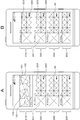
- FIG. 19A is a representative image display of the category “event”. When the category is “event”, a map indicating a position where the image is taken may be displayed together with the image.
- the display is switched to the state shown in FIG. 19B.
- the fourth modification can also be applied to the category “shooting place”.
- the images included in the “event” and “shooting location” groups may include landscape or portrait images taken by panoramic photography or the like. If there is such a panoramic image, it may be displayed with its size changed for each image as shown in FIG. 19B.
- FIG. 20 shows a fifth modification of the image display mode in the present technology.
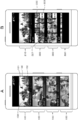
- FIG. 20A is a representative image display of the “event” category.
- information of a person shown as a subject in an image included in the group is displayed as an icon on the representative image.
- the state is switched to the state shown in FIG. 20B. Also in this display mode, the person shown as a subject in the image included in the group is indicated by an icon. Thereby, it is possible to easily grasp which person is shown in a plurality of images included in the group. This display can be performed based on the recognition result by recognizing a person in the image by subject recognition technology.
- the device on which the display control apparatus 10 operates is a smartphone
- the device on which the display control apparatus 10 operates is not limited to a smartphone.
- Other devices to which the display control device 10 can be applied include a tablet terminal, a personal computer, a television receiver, and the like.
- FIG. 21 shows an example of a representative image display mode when the display control apparatus 10 is applied to a smartphone 1001, a tablet terminal 1002, a personal computer 1003, and a television receiver 1004.
- the smartphone 1001 in FIG. 21A is the same as the display mode in the embodiment.
- the size of the display unit is larger than that of the smartphone 1001. Therefore, in addition to the display of the representative image of each group in the representative image display, the image selected by the user can be enlarged and displayed. As a result, the selected image is always displayed in a large size while performing layer switching and category switching, so that the user can search for an image while enjoying the image.
- FIG. 22 shows an example of a summary hierarchy display when the display control apparatus 10 is applied to a smartphone 2001, a tablet terminal 2002, a personal computer 2003, and a television receiver 2004.
- the smartphone 2001 in FIG. 22A is the same as the display mode in the embodiment.
- the display unit has a larger size than the smartphone 2001.
- the number of sheets can be increased. Thereby, the convenience of an image search can be improved.
- the image selected by the user is displayed on the full screen so that the image is more powerful. Can be presented.
- FIG. 23 shows an example in which when the display control apparatus 10 is applied to a device having a large display unit, it is possible to display a combination of image display and other than image display.
- the tablet terminal 3002 in FIG. 23B an image is displayed in summary hierarchy display on one of the display units, and an icon group indicating an application installed in the tablet terminal 3003 is displayed on the other display unit. According to this display mode, it is possible to start another application without switching the screen while displaying by the display control device 10.
- an image is displayed in a summary hierarchy display on one side of the display unit, and a screen of an image editing application is displayed on the other side of the display unit. According to this display mode, it is possible to perform an operation by the image editing application while confirming the image by the display by the display control device 10.
- the application is not limited to an image editing application, and may be an application not related to images, such as a movie creation application or a music application.
- a map is displayed.
- the above-described combination of devices and displays is merely an example.
- the display by the display control device 10 and the image editing application may be displayed.
- the display by the display control device 10 and a map may be displayed.
- image data has been described as an example, but the present technology can also be applied to moving image data and music content data.
- moving image data the searchability of moving images is improved by displaying a captured image of the moving image like the image described in the embodiment.
- Music categories, groups, and subgroups may include capture time, genre, musicians, albums, favorites, playlists, and the like.
- the present technology can take the following configurations.
- a display control unit that controls a display unit that displays an image.
- the display control unit causes the display unit to display a plurality of representative images that respectively represent a plurality of image groups classified according to the related information of the image in the first display mode,
- a related image associated with the representative image is displayed on the display unit in the second display mode between the plurality of representative images displayed in the first display mode.
- Configured display control device Configured display control device.
- the input from the user is an input for selecting one of the plurality of representative images;
- a related image display area is provided between the representative image selected by the user and another representative image, and the related image related to the selected representative image is displayed as the related image.
- the display control device according to (1) or (2), which is displayed in an area.
- the display control device according to any one of (1) to (8), further including an image classification unit that classifies the image according to the related information.
- the display control unit displays the images together in categories, The display control apparatus according to any one of (1) to (11), wherein display of the image is switched from one category to another category in response to an input from the user.
- the display control unit displays the images together in categories, In a state where a plurality of the related images are displayed in the second display mode, the selected one of the plurality of related images is selected in response to an input instructing category switching performed in a state where any of the plurality of related images is selected.
- the display control apparatus according to any one of (1) to (12), wherein an image related to a related image is displayed in the second display mode.
- the image is an image that has been uploaded to an Internet service.
- the display control device according to any one of (1) to (16), wherein the display control unit displays images uploaded to the Internet service in a category.
- the image is an image that has been imported into the application,
- the display control device according to any one of (1) to (17), wherein the display control unit displays images that have been imported into the application in a category.
- a display unit for displaying an image a plurality of representative images each representing a plurality of image groups classified according to the related information of the image are displayed in a first display mode
Landscapes
- Engineering & Computer Science (AREA)
- General Engineering & Computer Science (AREA)
- Theoretical Computer Science (AREA)
- Human Computer Interaction (AREA)
- Physics & Mathematics (AREA)
- General Physics & Mathematics (AREA)
- User Interface Of Digital Computer (AREA)
Abstract
Description
<1.実施の形態>
[1-1.表示制御装置の構成]
[1-2.表示制御装置における処理]
<2.変形例>
[1-1.表示制御装置の構成]
まず、図1を参照して、表示制御装置10の構成について説明する。図1Aは、表示制御装置10の構成を示すブロック図である。表示制御装置10は、画像分類部11、表示制御部12を備えている。表示制御装置10の画像分類部11、表示制御部12は、例えば、CPU(Central Processing Unit)などにより所定のプログラムが実行されることにより実現される。表示制御装置10は、例えば、スマートフォン、タブレット端末、パーソナルコンピュータ、テレビジョン受像機、携帯電話機、サーバなどの機器において動作するものである。ただし、表示制御装置単体の装置として構成されてもよい。
次に、表示制御装置10における処理について説明する。図13は、表示制御装置10における処理の全体の流れを示すフローチャートである。この処理は、表示制御装置10の表示制御部12により行われる。なお、画像分類部11による画像分類処理は既になされているものとする。
以上、本技術の実施の形態について具体的に説明したが、本技術は上述の実施の形態に限定されるものではなく、本技術の技術的思想に基づく各種の変形が可能である。
該表示制御部は、前記画像の関連情報に応じて分類された複数の画像グループをそれぞれ代表する複数の代表画像を第1の表示態様で前記表示部に表示させ、
ユーザからの入力に応じて、前記第1の表示態様で表示された前記複数の代表画像の間に前記代表画像と関連付けられた関連画像を第2の表示態様で前記表示部に表示させる
ように構成された
表示制御装置。
前記(1)に記載の表示制御装置。
前記第2の表示態様は、ユーザにより選択された前記代表画像と、他の代表画像との間に関連画像表示領域を設け、選択された前記代表画像と関連する前記関連画像を前記関連画像表示領域に表示させるものである
前記(1)または(2)に記載の表示制御装置。
前記(3)に記載の表示制御装置。
前記(4)に記載の表示制御装置。
前記(1)から(5)のいずれに記載の表示制御装置。
前記(1)から(6)のいずれに記載の表示制御装置。
前記(4)または(5)に記載の表示制御装置。
前記(1)から(8)のいずれに記載の表示制御装置。
前記(3)または(4)に記載の表示制御装置。
前記(1)から(10)のいずれに記載の表示制御装置。
前記ユーザからの入力に応じて、前記画像の表示を一のカテゴリーから他のカテゴリーに切り替える
前記(1)から(11)のいずれに記載の表示制御装置。
前記第2の表示態様で複数の前記関連画像が表示されている状態において、複数の前記関連画像のいずれかが選択された状態でなされたカテゴリー切り替えを指示する入力に応じて、選択された前記関連画像に関連する画像を前記第2の表示態様で表示する
前記(1)から(12)のいずれに記載の表示制御装置。
前記(1)から(13)のいずれに記載の表示制御装置。
前記(14)に記載の表示制御装置。
前記(14)に記載の表示制御装置。
前記表示制御部は、前記インターネットサービスにアップロード済みの画像をカテゴリーにまとめて表示する
前記(1)から(16)のいずれに記載の表示制御装置。
前記表示制御部は、前記アプリケーションに取り込み済みの画像をカテゴリーにまとめて表示する
前記(1)から(17)のいずれに記載の表示制御装置。
ユーザからの入力に応じて、前記第1の表示態様で表示された前記複数の代表画像の間に前記代表画像と関連付けられた関連画像を第2の表示態様で表示させる
表示制御方法。
ユーザからの入力に応じて、前記第1の表示態様で表示された前記複数の代表画像の間に前記代表画像と関連付けられた関連画像を第2の表示態様で表示させる
表示制御方法をコンピュータに実行させる表示制御プログラム。
11・・・・・・表示制御部
20・・・・・・表示部
12、40・・・画像分類部
Claims (20)
- 画像を表示する表示部を制御する表示制御部を備え、
該表示制御部は、前記画像の関連情報に応じて分類された複数の画像グループをそれぞれ代表する複数の代表画像を第1の表示態様で前記表示部に表示させ、
ユーザからの入力に応じて、前記第1の表示態様で表示された前記複数の代表画像の間に前記代表画像と関連付けられた関連画像を第2の表示態様で前記表示部に表示させる
ように構成された
表示制御装置。 - 前記第1の表示態様は、前記複数の画像グループをそれぞれ代表する前記複数の代表画像を並べて表示するものである
請求項1に記載の表示制御装置。 - 前記ユーザからの入力は、前記複数の代表画像のいずれかを選択する入力であり、
前記第2の表示態様は、ユーザにより選択された前記代表画像と、他の代表画像との間に関連画像表示領域を設け、選択された前記代表画像と関連する前記関連画像を前記関連画像表示領域に表示させるものである
請求項2に記載の表示制御装置。 - 前記第2の表示態様で前記関連画像が表示されている状態において、前記ユーザからの入力に応じて、前記関連画像を第3の表示態様で表示させる
請求項3に記載の表示制御装置。 - 前記第3の表示態様は、前記選択された代表画像に関連する全ての前記関連画像を表示させるものである
請求項4に記載の表示制御装置。 - 前記第1の表示態様は、前記代表画像の表示上に該代表画像に関連する前記関連画像を重畳して表示させる
請求項2に記載の表示制御装置。 - 前記第2の表示態様で表示されている前記関連画像のいずれかが前記ユーザにより選択された場合に、選択された前記関連画像を単体表示する
請求項1に記載の表示制御装置。 - 前記第3の表示態様で表示されている前記関連画像のいずれかが前記ユーザにより選択された場合に、選択された前記関連画像を単体表示する
請求項4に記載の表示制御装置。 - 前記画像を前記関連情報に応じて分類する画像分類部をさらに備える
請求項1に記載の表示制御装置。 - 前記第2の表示態様において、前記関連画像表示領域に表示される前記画像は、所定枚数である
請求項3に記載の表示制御装置。 - 前記関連画像は、所定の評価値に基づいて決定される
請求項1に記載の表示制御装置。 - 前記表示制御部は、前記画像をカテゴリーにまとめて表示し、
前記ユーザからの入力に応じて、前記画像の表示を一のカテゴリーから他のカテゴリーに切り替える
請求項1に記載の表示制御装置。 - 前記表示制御部は、前記画像をカテゴリーにまとめて表示し、
前記第2の表示態様で複数の前記関連画像が表示されている状態において、複数の前記関連画像のいずれかが選択された状態でなされたカテゴリー切替を指示する入力に応じて、選択された前記関連画像に関連する画像を前記第2の表示態様で表示する
請求項1に記載の表示制御装置。 - 前記ユーザによる入力はタッチパネルに対して行われる
請求項1に記載の表示制御装置。 - 前記画像の表示を一のカテゴリーから他のカテゴリーへの切替を指示する入力はタッチパネルへのフリック操作により行われる
請求項14に記載の表示制御装置。 - 前記複数の代表画像のいずれかを選択する入力は、タッチパネルへのタップ操作により行われる
請求項14に記載の表示制御装置。 - 前記画像は、インターネットサービスにアップロード済みの画像であり、
前記表示制御部は、前記インターネットサービスにアップロード済みの画像をカテゴリーにまとめて表示する
請求項1に記載の表示制御装置。 - 前記画像は、アプリケーションに取り込み済みの画像であり、
前記表示制御部は、前記アプリケーションに取り込み済みの画像をカテゴリーにまとめて表示する
請求項1に記載の表示制御装置。 - 画像を表示する表示部において、前記画像の関連情報に応じて分類された複数の画像グループをそれぞれ代表する複数の代表画像を第1の表示態様で表示させ、
ユーザからの入力に応じて、前記第1の表示態様で表示された前記複数の代表画像の間に前記代表画像と関連付けられた関連画像を第2の表示態様で表示させる
表示制御方法。 - 画像を表示する表示部において、前記画像の関連情報に応じて分類された複数の画像グループをそれぞれ代表する複数の代表画像を第1の表示態様で表示させ、
ユーザからの入力に応じて、前記第1の表示態様で表示された前記複数の代表画像の間に前記代表画像と関連付けられた関連画像を第2の表示態様で表示させる
表示制御方法をコンピュータに実行させる表示制御プログラム。
Priority Applications (5)
| Application Number | Priority Date | Filing Date | Title |
|---|---|---|---|
| EP14778105.8A EP2983077B1 (en) | 2013-04-01 | 2014-03-06 | Display control device, display control method, and display control program |
| JP2015509878A JP6314975B2 (ja) | 2013-04-01 | 2014-03-06 | 表示制御装置、表示制御方法および表示制御プログラム |
| CN201480017786.6A CN105074641A (zh) | 2013-04-01 | 2014-03-06 | 显示控制装置、显示控制方法和显示控制程序 |
| US14/779,808 US10168822B2 (en) | 2013-04-01 | 2014-03-06 | Display control apparatus, display control method and display control program |
| US16/169,860 US10579187B2 (en) | 2013-04-01 | 2018-10-24 | Display control apparatus, display control method and display control program |
Applications Claiming Priority (2)
| Application Number | Priority Date | Filing Date | Title |
|---|---|---|---|
| JP2013-076174 | 2013-04-01 | ||
| JP2013076174 | 2013-04-01 |
Related Child Applications (2)
| Application Number | Title | Priority Date | Filing Date |
|---|---|---|---|
| US14/779,808 A-371-Of-International US10168822B2 (en) | 2013-04-01 | 2014-03-06 | Display control apparatus, display control method and display control program |
| US16/169,860 Continuation US10579187B2 (en) | 2013-04-01 | 2018-10-24 | Display control apparatus, display control method and display control program |
Publications (1)
| Publication Number | Publication Date |
|---|---|
| WO2014162659A1 true WO2014162659A1 (ja) | 2014-10-09 |
Family
ID=51657974
Family Applications (1)
| Application Number | Title | Priority Date | Filing Date |
|---|---|---|---|
| PCT/JP2014/001229 Ceased WO2014162659A1 (ja) | 2013-04-01 | 2014-03-06 | 表示制御装置、表示制御方法および表示制御プログラム |
Country Status (5)
| Country | Link |
|---|---|
| US (2) | US10168822B2 (ja) |
| EP (1) | EP2983077B1 (ja) |
| JP (1) | JP6314975B2 (ja) |
| CN (1) | CN105074641A (ja) |
| WO (1) | WO2014162659A1 (ja) |
Cited By (14)
| Publication number | Priority date | Publication date | Assignee | Title |
|---|---|---|---|---|
| JP2017102618A (ja) * | 2015-11-30 | 2017-06-08 | 株式会社ニコン | 表示装置および表示プログラム |
| JP2019204525A (ja) * | 2018-09-07 | 2019-11-28 | バイドゥ オンライン ネットワーク テクノロジー (ベイジン) カンパニー リミテッド | 画面制御方法、装置デバイス及びコンピュータ読み取り可能な記憶媒体 |
| JP2019215874A (ja) * | 2016-06-12 | 2019-12-19 | アップル インコーポレイテッドApple Inc. | 文脈的関連メディアコンテンツを検索するためのユーザインタフェース |
| US11042266B2 (en) | 2019-05-06 | 2021-06-22 | Apple Inc. | Media browsing user interface with intelligently selected representative media items |
| US11099712B2 (en) | 2010-01-06 | 2021-08-24 | Apple Inc. | Device, method, and graphical user interface for navigating and displaying content in context |
| US11334209B2 (en) | 2016-06-12 | 2022-05-17 | Apple Inc. | User interfaces for retrieving contextually relevant media content |
| US11601584B2 (en) | 2006-09-06 | 2023-03-07 | Apple Inc. | Portable electronic device for photo management |
| WO2023032384A1 (ja) * | 2021-08-31 | 2023-03-09 | 富士フイルム株式会社 | 表示制御装置、表示制御方法、及び表示制御プログラム |
| JP2023135049A (ja) * | 2022-03-15 | 2023-09-28 | 株式会社Passage | 物件検索システム、ユーザ端末、物件検索装置、物件検索プログラム及び物件検索方法 |
| US11782575B2 (en) | 2018-05-07 | 2023-10-10 | Apple Inc. | User interfaces for sharing contextually relevant media content |
| US11854539B2 (en) | 2018-05-07 | 2023-12-26 | Apple Inc. | Intelligent automated assistant for delivering content from user experiences |
| US12029987B2 (en) | 2018-06-15 | 2024-07-09 | Fujifilm Corporation | Image processing apparatus, image processing method, image processing program, and recording medium storing image processing program |
| US12184969B2 (en) | 2016-09-23 | 2024-12-31 | Apple Inc. | Avatar creation and editing |
| US12602142B2 (en) | 2018-05-07 | 2026-04-14 | Apple Inc. | User interfaces for sharing contextually relevant media content |
Families Citing this family (20)
| Publication number | Priority date | Publication date | Assignee | Title |
|---|---|---|---|---|
| EP2480957B1 (en) | 2009-09-22 | 2017-08-09 | Apple Inc. | Device, method, and graphical user interface for manipulating user interface objects |
| US8780069B2 (en) | 2009-09-25 | 2014-07-15 | Apple Inc. | Device, method, and graphical user interface for manipulating user interface objects |
| WO2014162659A1 (ja) * | 2013-04-01 | 2014-10-09 | ソニー株式会社 | 表示制御装置、表示制御方法および表示制御プログラム |
| US10467279B2 (en) | 2013-12-02 | 2019-11-05 | Gopro, Inc. | Selecting digital content for inclusion in media presentations |
| JP6590476B2 (ja) * | 2014-10-28 | 2019-10-16 | キヤノン株式会社 | 画像表示装置 |
| USD763893S1 (en) * | 2015-07-28 | 2016-08-16 | Microsoft Corporation | Display screen with graphical user interface |
| USD763892S1 (en) * | 2015-07-28 | 2016-08-16 | Microsoft Corporation | Display screen with animated graphical user interface |
| KR102397054B1 (ko) * | 2016-02-05 | 2022-05-16 | 삼성전자주식회사 | 프로필 통화를 지원하는 전자 장치 및 프로필 통화 방법 |
| US10140675B2 (en) * | 2016-11-28 | 2018-11-27 | Google Llc | Image grid with selectively prominent images |
| USD846568S1 (en) | 2017-11-27 | 2019-04-23 | Microsoft Corporation | Display screen with graphical user interface |
| USD845989S1 (en) | 2017-11-27 | 2019-04-16 | Microsoft Corporation | Display screen with transitional graphical user interface |
| USD845982S1 (en) | 2017-11-27 | 2019-04-16 | Microsoft Corporation | Display screen with graphical user interface |
| USD844657S1 (en) | 2017-11-27 | 2019-04-02 | Microsoft Corporation | Display screen with animated graphical user interface |
| US11567986B1 (en) * | 2019-03-19 | 2023-01-31 | Meta Platforms, Inc. | Multi-level navigation for media content |
| DK181076B1 (en) | 2020-02-14 | 2022-11-25 | Apple Inc | USER INTERFACES FOR TRAINING CONTENT |
| US11200740B1 (en) * | 2020-09-04 | 2021-12-14 | Amazon Technolgoies, Inc. | Systems for generating image-based user interfaces |
| US12304648B2 (en) | 2021-11-12 | 2025-05-20 | Rockwell Collins, Inc. | System and method for separating avionics charts into a plurality of display panels |
| US12306007B2 (en) * | 2021-11-12 | 2025-05-20 | Rockwell Collins, Inc. | System and method for chart thumbnail image generation |
| US12254282B2 (en) | 2021-11-12 | 2025-03-18 | Rockwell Collins, Inc. | Method for automatically matching chart names |
| JP2025006432A (ja) * | 2023-06-29 | 2025-01-17 | キヤノン株式会社 | 画像処理装置および画像処理方法 |
Citations (5)
| Publication number | Priority date | Publication date | Assignee | Title |
|---|---|---|---|---|
| JP2007179351A (ja) | 2005-12-28 | 2007-07-12 | Sony Corp | ファイル管理装置および画像表示装置 |
| JP2008175994A (ja) * | 2007-01-17 | 2008-07-31 | Sony Corp | 画像表示制御装置、画像表示制御方法およびプログラム |
| JP2008312060A (ja) * | 2007-06-15 | 2008-12-25 | Sony Corp | 画像処理システム、画像管理装置、画像処理装置、これらにおける処理方法およびプログラム |
| JP2010026565A (ja) * | 2008-07-15 | 2010-02-04 | Seiko Epson Corp | 表示装置及びプログラム |
| JP2012138679A (ja) * | 2010-12-24 | 2012-07-19 | Nikon Corp | 画像処理装置、画像分類プログラム、及び、画像表示プログラム |
Family Cites Families (41)
| Publication number | Priority date | Publication date | Assignee | Title |
|---|---|---|---|---|
| JPH1175150A (ja) * | 1997-08-29 | 1999-03-16 | Hitachi Denshi Ltd | 動画像編集方法及び動画像編集装置並びに動画像編集動作を実行するためのプログラムを記録した記録媒体 |
| JP2000105772A (ja) * | 1998-07-28 | 2000-04-11 | Sharp Corp | 情報管理装置 |
| US6396963B2 (en) * | 1998-12-29 | 2002-05-28 | Eastman Kodak Company | Photocollage generation and modification |
| EP1128284A2 (en) * | 2000-02-21 | 2001-08-29 | Hewlett-Packard Company, A Delaware Corporation | Associating image and location data |
| JP2002077526A (ja) * | 2000-08-23 | 2002-03-15 | Fuji Photo Film Co Ltd | 画像形成装置 |
| US6883146B2 (en) * | 2000-12-20 | 2005-04-19 | Eastman Kodak Company | Picture database graphical user interface utilizing map-based metaphors for efficient browsing and retrieving of pictures |
| US7020848B2 (en) * | 2000-12-20 | 2006-03-28 | Eastman Kodak Company | Comprehensive, multi-dimensional graphical user interface using picture metadata for navigating and retrieving pictures in a picture database |
| JP3903783B2 (ja) * | 2001-12-14 | 2007-04-11 | 日本電気株式会社 | 顔メタデータ生成方法および装置、並びに顔類似度算出方法および装置 |
| US7970240B1 (en) * | 2001-12-17 | 2011-06-28 | Google Inc. | Method and apparatus for archiving and visualizing digital images |
| US7747625B2 (en) * | 2003-07-31 | 2010-06-29 | Hewlett-Packard Development Company, L.P. | Organizing a collection of objects |
| US7437005B2 (en) * | 2004-02-17 | 2008-10-14 | Microsoft Corporation | Rapid visual sorting of digital files and data |
| JP4533791B2 (ja) * | 2005-04-19 | 2010-09-01 | 株式会社日立製作所 | 情報閲覧装置 |
| US7162488B2 (en) * | 2005-04-22 | 2007-01-09 | Microsoft Corporation | Systems, methods, and user interfaces for storing, searching, navigating, and retrieving electronic information |
| JP2006318033A (ja) * | 2005-05-10 | 2006-11-24 | Olympus Imaging Corp | 画像管理装置、画像管理プログラム、画像管理方法及び記録媒体 |
| US7930629B2 (en) * | 2005-07-14 | 2011-04-19 | Microsoft Corporation | Consolidating local and remote taxonomies |
| US7689933B1 (en) * | 2005-11-14 | 2010-03-30 | Adobe Systems Inc. | Methods and apparatus to preview content |
| US7644373B2 (en) * | 2006-01-23 | 2010-01-05 | Microsoft Corporation | User interface for viewing clusters of images |
| JP4360381B2 (ja) * | 2006-06-05 | 2009-11-11 | ソニー株式会社 | 情報処理装置、および情報処理方法、並びにコンピュータ・プログラム |
| US20080086703A1 (en) * | 2006-10-06 | 2008-04-10 | Microsoft Corporation | Preview expansion of list items |
| US8756510B2 (en) * | 2006-10-17 | 2014-06-17 | Cooliris, Inc. | Method and system for displaying photos, videos, RSS and other media content in full-screen immersive view and grid-view using a browser feature |
| US8276098B2 (en) * | 2006-12-22 | 2012-09-25 | Apple Inc. | Interactive image thumbnails |
| US7805681B2 (en) * | 2007-07-12 | 2010-09-28 | Sony Ericsson Mobile Communications Ab | System and method for generating a thumbnail image for an audiovisual file |
| US8200669B1 (en) * | 2008-08-21 | 2012-06-12 | Adobe Systems Incorporated | Management of smart tags via hierarchy |
| KR101569427B1 (ko) | 2008-10-02 | 2015-11-16 | 삼성전자주식회사 | 휴대 단말기의 터치 입력 장치 및 그의 운영 방법 |
| JP2010086641A (ja) | 2008-10-03 | 2010-04-15 | Fujitsu Ten Ltd | コンテンツ制御プログラムおよび可搬型記録媒体 |
| KR101586627B1 (ko) * | 2008-10-06 | 2016-01-19 | 삼성전자주식회사 | 멀티 터치를 이용한 리스트 관리 방법 및 장치 |
| CN101889282A (zh) * | 2008-10-06 | 2010-11-17 | 松下电器产业株式会社 | 代表图像显示装置及代表图像选择方法 |
| US20100171763A1 (en) * | 2009-01-05 | 2010-07-08 | Apple Inc. | Organizing Digital Images Based on Locations of Capture |
| US8893050B2 (en) * | 2009-01-12 | 2014-11-18 | International Business Machines Corporation | Assembly and output of user-defined groupings |
| CN101840409A (zh) * | 2009-03-17 | 2010-09-22 | 深圳富泰宏精密工业有限公司 | 显示多媒体文件的电子装置及其显示方法 |
| JP5387366B2 (ja) * | 2009-11-26 | 2014-01-15 | ソニー株式会社 | 情報処理装置、情報処理方法およびプログラム |
| KR101595263B1 (ko) * | 2009-12-03 | 2016-02-18 | 삼성전자주식회사 | 앨범 관리 방법 및 장치 |
| JP5434569B2 (ja) * | 2009-12-22 | 2014-03-05 | ソニー株式会社 | 情報処理装置および方法、並びにプログラム |
| JP5348008B2 (ja) * | 2010-02-17 | 2013-11-20 | ソニー株式会社 | 情報処理装置、情報処理方法およびプログラム |
| JP2011215963A (ja) * | 2010-03-31 | 2011-10-27 | Sony Corp | 電子機器、画像処理方法及びプログラム |
| US20120311446A1 (en) * | 2010-04-13 | 2012-12-06 | Toshihisa Nakano | Content recording device, content recording method, content recording program, recording medium, integrated circuit and content recording and reproduction system |
| US20120066573A1 (en) * | 2010-09-15 | 2012-03-15 | Kelly Berger | System and method for creating photo story books |
| JP2012069009A (ja) * | 2010-09-24 | 2012-04-05 | Sharp Corp | コンテンツ表示装置、表示方法、プログラム、及び記録媒体 |
| US8891883B2 (en) * | 2012-05-15 | 2014-11-18 | Google Inc. | Summarizing a photo album in a social network system |
| US9268469B2 (en) * | 2012-11-27 | 2016-02-23 | Google Inc. | Image display environment |
| WO2014162659A1 (ja) * | 2013-04-01 | 2014-10-09 | ソニー株式会社 | 表示制御装置、表示制御方法および表示制御プログラム |
-
2014
- 2014-03-06 WO PCT/JP2014/001229 patent/WO2014162659A1/ja not_active Ceased
- 2014-03-06 EP EP14778105.8A patent/EP2983077B1/en active Active
- 2014-03-06 JP JP2015509878A patent/JP6314975B2/ja active Active
- 2014-03-06 CN CN201480017786.6A patent/CN105074641A/zh active Pending
- 2014-03-06 US US14/779,808 patent/US10168822B2/en active Active
-
2018
- 2018-10-24 US US16/169,860 patent/US10579187B2/en active Active
Patent Citations (5)
| Publication number | Priority date | Publication date | Assignee | Title |
|---|---|---|---|---|
| JP2007179351A (ja) | 2005-12-28 | 2007-07-12 | Sony Corp | ファイル管理装置および画像表示装置 |
| JP2008175994A (ja) * | 2007-01-17 | 2008-07-31 | Sony Corp | 画像表示制御装置、画像表示制御方法およびプログラム |
| JP2008312060A (ja) * | 2007-06-15 | 2008-12-25 | Sony Corp | 画像処理システム、画像管理装置、画像処理装置、これらにおける処理方法およびプログラム |
| JP2010026565A (ja) * | 2008-07-15 | 2010-02-04 | Seiko Epson Corp | 表示装置及びプログラム |
| JP2012138679A (ja) * | 2010-12-24 | 2012-07-19 | Nikon Corp | 画像処理装置、画像分類プログラム、及び、画像表示プログラム |
Non-Patent Citations (1)
| Title |
|---|
| See also references of EP2983077A4 * |
Cited By (27)
| Publication number | Priority date | Publication date | Assignee | Title |
|---|---|---|---|---|
| US11601584B2 (en) | 2006-09-06 | 2023-03-07 | Apple Inc. | Portable electronic device for photo management |
| US12197695B2 (en) | 2010-01-06 | 2025-01-14 | Apple Inc. | Device, method, and graphical user interface for navigating and displaying content in context |
| US11099712B2 (en) | 2010-01-06 | 2021-08-24 | Apple Inc. | Device, method, and graphical user interface for navigating and displaying content in context |
| US11592959B2 (en) | 2010-01-06 | 2023-02-28 | Apple Inc. | Device, method, and graphical user interface for navigating and displaying content in context |
| JP2017102618A (ja) * | 2015-11-30 | 2017-06-08 | 株式会社ニコン | 表示装置および表示プログラム |
| US11681408B2 (en) | 2016-06-12 | 2023-06-20 | Apple Inc. | User interfaces for retrieving contextually relevant media content |
| JP2019215874A (ja) * | 2016-06-12 | 2019-12-19 | アップル インコーポレイテッドApple Inc. | 文脈的関連メディアコンテンツを検索するためのユーザインタフェース |
| US10891013B2 (en) | 2016-06-12 | 2021-01-12 | Apple Inc. | User interfaces for retrieving contextually relevant media content |
| JP2021073559A (ja) * | 2016-06-12 | 2021-05-13 | アップル インコーポレイテッドApple Inc. | 文脈的関連メディアコンテンツを検索するためのユーザインタフェース |
| US11941223B2 (en) | 2016-06-12 | 2024-03-26 | Apple Inc. | User interfaces for retrieving contextually relevant media content |
| US11334209B2 (en) | 2016-06-12 | 2022-05-17 | Apple Inc. | User interfaces for retrieving contextually relevant media content |
| US12184969B2 (en) | 2016-09-23 | 2024-12-31 | Apple Inc. | Avatar creation and editing |
| US11854539B2 (en) | 2018-05-07 | 2023-12-26 | Apple Inc. | Intelligent automated assistant for delivering content from user experiences |
| US11782575B2 (en) | 2018-05-07 | 2023-10-10 | Apple Inc. | User interfaces for sharing contextually relevant media content |
| US12602142B2 (en) | 2018-05-07 | 2026-04-14 | Apple Inc. | User interfaces for sharing contextually relevant media content |
| US11900923B2 (en) | 2018-05-07 | 2024-02-13 | Apple Inc. | Intelligent automated assistant for delivering content from user experiences |
| US12029987B2 (en) | 2018-06-15 | 2024-07-09 | Fujifilm Corporation | Image processing apparatus, image processing method, image processing program, and recording medium storing image processing program |
| US11175813B2 (en) | 2018-09-07 | 2021-11-16 | Baidu Online Network Technology (Beijing) Co., Ltd. | Smart sound box screen control method, apparatus, device and computer readable storage medium |
| JP2019204525A (ja) * | 2018-09-07 | 2019-11-28 | バイドゥ オンライン ネットワーク テクノロジー (ベイジン) カンパニー リミテッド | 画面制御方法、装置デバイス及びコンピュータ読み取り可能な記憶媒体 |
| US11307737B2 (en) | 2019-05-06 | 2022-04-19 | Apple Inc. | Media browsing user interface with intelligently selected representative media items |
| US11947778B2 (en) | 2019-05-06 | 2024-04-02 | Apple Inc. | Media browsing user interface with intelligently selected representative media items |
| US11042266B2 (en) | 2019-05-06 | 2021-06-22 | Apple Inc. | Media browsing user interface with intelligently selected representative media items |
| US11625153B2 (en) | 2019-05-06 | 2023-04-11 | Apple Inc. | Media browsing user interface with intelligently selected representative media items |
| WO2023032384A1 (ja) * | 2021-08-31 | 2023-03-09 | 富士フイルム株式会社 | 表示制御装置、表示制御方法、及び表示制御プログラム |
| JPWO2023032384A1 (ja) * | 2021-08-31 | 2023-03-09 | ||
| JP2023135049A (ja) * | 2022-03-15 | 2023-09-28 | 株式会社Passage | 物件検索システム、ユーザ端末、物件検索装置、物件検索プログラム及び物件検索方法 |
| JP7803526B2 (ja) | 2022-03-15 | 2026-01-21 | 株式会社Passage | 物件検索システム、ユーザ端末、物件検索装置、物件検索プログラム及び物件検索方法 |
Also Published As
| Publication number | Publication date |
|---|---|
| EP2983077A4 (en) | 2016-11-09 |
| US10579187B2 (en) | 2020-03-03 |
| EP2983077B1 (en) | 2021-04-28 |
| US10168822B2 (en) | 2019-01-01 |
| CN105074641A (zh) | 2015-11-18 |
| US20190073081A1 (en) | 2019-03-07 |
| EP2983077A1 (en) | 2016-02-10 |
| US20160054845A1 (en) | 2016-02-25 |
| JP6314975B2 (ja) | 2018-04-25 |
| JPWO2014162659A1 (ja) | 2017-02-16 |
Similar Documents
| Publication | Publication Date | Title |
|---|---|---|
| JP6314975B2 (ja) | 表示制御装置、表示制御方法および表示制御プログラム | |
| US12287811B2 (en) | Information processing device, information processing method, and program | |
| US9606717B2 (en) | Content composer | |
| CN104239315B (zh) | 一种图片关联的方法 | |
| CN107426403B (zh) | 移动终端 | |
| CN103809904B (zh) | 显示方法和使用显示方法的电子装置 | |
| TWI669652B (zh) | 資訊處理裝置、資訊處理方法及電腦程式 | |
| US20190205004A1 (en) | Mobile terminal and method of operating the same | |
| US10061493B2 (en) | Method and device for creating and editing object-inserted images | |
| US20130152024A1 (en) | Electronic device and page zooming method thereof | |
| JP6628115B2 (ja) | マルチメディアファイル管理方法、電子デバイス、およびコンピュータプログラム。 | |
| US20150040035A1 (en) | Social Network Interaction | |
| US20130152018A1 (en) | Electronic device with touch screen and page processing method thereof | |
| US20180121084A1 (en) | Information display device | |
| JP2014052915A (ja) | 電子機器、表示制御方法及びプログラム | |
| CN102737094A (zh) | 信息处理装置、播放列表创建方法和播放列表创建程序 | |
| JP2020507174A (ja) | 表示コンテンツのパネルをナビゲートする方法 | |
| KR102255087B1 (ko) | 객체를 디스플레이하는 전자 장치 및 방법 | |
| CN108319671A (zh) | 一种文件管理方法及移动终端 | |
| WO2021120756A1 (zh) | 显示方法、装置和计算机可读存储介质 | |
| KR101713287B1 (ko) | 터치스크린을 이용한 컨텐츠 편집방법 | |
| CN120872471A (zh) | 页面显示方法及装置 |
Legal Events
| Date | Code | Title | Description |
|---|---|---|---|
| WWE | Wipo information: entry into national phase |
Ref document number: 201480017786.6 Country of ref document: CN |
|
| 121 | Ep: the epo has been informed by wipo that ep was designated in this application |
Ref document number: 14778105 Country of ref document: EP Kind code of ref document: A1 |
|
| ENP | Entry into the national phase |
Ref document number: 2015509878 Country of ref document: JP Kind code of ref document: A |
|
| WWE | Wipo information: entry into national phase |
Ref document number: 2014778105 Country of ref document: EP |
|
| WWE | Wipo information: entry into national phase |
Ref document number: 14779808 Country of ref document: US |
|
| NENP | Non-entry into the national phase |
Ref country code: DE |