WO2015040944A1 - 情報処理装置 - Google Patents
情報処理装置 Download PDFInfo
- Publication number
- WO2015040944A1 WO2015040944A1 PCT/JP2014/068837 JP2014068837W WO2015040944A1 WO 2015040944 A1 WO2015040944 A1 WO 2015040944A1 JP 2014068837 W JP2014068837 W JP 2014068837W WO 2015040944 A1 WO2015040944 A1 WO 2015040944A1
- Authority
- WO
- WIPO (PCT)
- Prior art keywords
- screen
- read
- information
- search
- users
- Prior art date
- Legal status (The legal status is an assumption and is not a legal conclusion. Google has not performed a legal analysis and makes no representation as to the accuracy of the status listed.)
- Ceased
Links
Images







Classifications
-
- G—PHYSICS
- G06—COMPUTING OR CALCULATING; COUNTING
- G06Q—INFORMATION AND COMMUNICATION TECHNOLOGY [ICT] SPECIALLY ADAPTED FOR ADMINISTRATIVE, COMMERCIAL, FINANCIAL, MANAGERIAL OR SUPERVISORY PURPOSES; SYSTEMS OR METHODS SPECIALLY ADAPTED FOR ADMINISTRATIVE, COMMERCIAL, FINANCIAL, MANAGERIAL OR SUPERVISORY PURPOSES, NOT OTHERWISE PROVIDED FOR
- G06Q30/00—Commerce
- G06Q30/02—Marketing; Price estimation or determination; Fundraising
- G06Q30/0201—Market modelling; Market analysis; Collecting market data
- G06Q30/0203—Market surveys; Market polls
-
- G—PHYSICS
- G06—COMPUTING OR CALCULATING; COUNTING
- G06Q—INFORMATION AND COMMUNICATION TECHNOLOGY [ICT] SPECIALLY ADAPTED FOR ADMINISTRATIVE, COMMERCIAL, FINANCIAL, MANAGERIAL OR SUPERVISORY PURPOSES; SYSTEMS OR METHODS SPECIALLY ADAPTED FOR ADMINISTRATIVE, COMMERCIAL, FINANCIAL, MANAGERIAL OR SUPERVISORY PURPOSES, NOT OTHERWISE PROVIDED FOR
- G06Q30/00—Commerce
- G06Q30/02—Marketing; Price estimation or determination; Fundraising
Definitions
- This disclosure relates to an information processing apparatus.
- a user can connect to the Internet via a PC (personal computer), a tablet terminal, a smartphone, a mobile phone, or the like, and perform a purchase procedure for a product.
- PC personal computer
- tablet terminal a smartphone
- mobile phone or the like
- the user purchase history, credit card information, display history (history of the viewed electronic book), keep list, as account information of the registered user, together with product information (An electronic book that is desired to be purchased and has a flag set) is presented.
- the user can check his / her purchase history, display history, keep list, and the like on the transaction screen of the Web store.
- the present disclosure proposes an information processing apparatus capable of presenting the number of users who are interested in a product on an electronic commerce screen.
- a totaling unit that counts the number of users who are interested in products handled in electronic commerce performed via a network, and on the screen of the electronic commerce, the totaling result by the totaling unit
- An information processing apparatus comprising: a control unit that performs control so as to present the product information together with the product information.
- the information processing system according to the present embodiment includes a plurality of user terminals 1 and a server 2, and the plurality of user terminals 1 and the server 2 are connected via a network 3.
- the user terminal 1 is realized by, for example, a tablet terminal provided with the display unit 16 on one side.
- the user terminal 1 according to the present embodiment is not limited to the tablet terminal shown in FIG. 1, and is, for example, a mobile phone terminal, a smartphone, a PC (personal computer), a head-mounted type or a glasses-type HMD (head mounted display). It may be realized.
- the display unit 16 is provided with a touch sensor which is an example of the operation input unit 14, and the user can input an operation by directly touching the display screen.
- the transaction screen of the Web store is displayed based on the information acquired from the server 2, and the user performs an operation input by directly touching the transaction screen and performs a purchase procedure for the product. Can do.
- the server 2 is a Web server that executes an electronic commerce service via the Internet.
- the server 2 outputs an electronic commerce screen of the Web store in response to a request from the user terminal 1, and executes electronic commerce based on information input by the user on the transaction screen.
- This disclosure relates to the content presented on the screen of electronic commerce displayed on each user terminal 1 in the information processing system having the above-described configuration.
- the information processing system according to the present disclosure presents communication information shared with other users along with product information on the electronic commerce screen.
- Examples of the communication information include information such as the number of users who are interested in the product (the number of people who want to purchase the product, the number of people who have experienced the product).
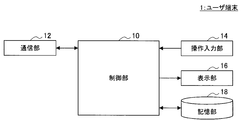
- FIG. 2 is a block diagram illustrating an example of a main configuration of the user terminal 1 according to the present embodiment.
- the user terminal 1 includes a control unit 10, a communication unit 12, an operation input unit 14, a display unit 16, and a storage unit 18.
- the control unit 10 includes, for example, a microcomputer including a CPU (Central Processing Unit), a ROM (Read Only Memory), a RAM (Random Access Memory), a nonvolatile memory, and an interface unit, and controls each configuration of the user terminal 1. To do.
- a microcomputer including a CPU (Central Processing Unit), a ROM (Read Only Memory), a RAM (Random Access Memory), a nonvolatile memory, and an interface unit, and controls each configuration of the user terminal 1. To do.
- control unit 10 controls the display unit 16 to display an electronic commerce screen based on information received from the server 2 by the communication unit 12. Further, the control unit 10 controls the communication unit 12 to transmit information input by the user to the electronic commerce screen displayed on the display unit 16 from the communication unit 12.
- the communication unit 12 has a function of connecting to an external device by wireless / wired and transmitting / receiving data.
- the communication unit 12 according to the present embodiment connects to the network 3 and transmits / receives data to / from the server 2 that provides an electronic commerce service on the network.
- the operation input unit 14 receives input from the user and outputs the received input information to the control unit 10.
- the operation input unit 14 is realized by a touch sensor that accepts an operation input to the display screen in addition to buttons, switches, and the like.
- the display unit 16 displays a predetermined display screen according to the control of the control unit 10.
- the display unit 16 according to the present embodiment displays an electronic commerce screen, for example.
- the display unit 16 is realized by, for example, an LCD (Liquid Crystal Display) or an OLED (Organic Light-Emitting Diode).
- the storage unit 18 stores a program for the control unit 10 to execute various processes.
- the configuration of the user terminal 1 according to the present embodiment has been described in detail above.
- the configuration shown in FIG. 2 is an example of the main configuration of the user terminal 1, and the configuration of the user terminal 1 according to the present embodiment is not limited to this.
- the user terminal 1 can further include a microphone (sound collecting unit), and can realize an operation input by a user's voice. It is also possible to have a camera (imaging unit) and realize an operation input by a user's gesture.
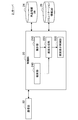
- FIG. 3 is a block diagram illustrating an example of a main configuration of the server 2 according to the present embodiment.
- the server 2 includes a control unit 20, a communication unit 22, a product information DB 24, and a communication information DB 26.
- the control unit 20 is composed of, for example, a microcomputer including a CPU, ROM, RAM, nonvolatile memory, and interface unit, and controls each component of the server 2.
- control unit 20 transmits information for displaying an electronic commerce screen from the communication unit 22 to the user terminal 1 via the network 3. Moreover, the control part 20 receives the information which the user input with respect to the electronic commerce screen in the user terminal 1 from the user terminal 1, and performs electronic commerce based on the received input information.
- control unit 20 can provide user evaluations and the like for each product for electronic commerce as communication information shared among a plurality of users. Specifically, the control unit 20 counts the number of users who are interested in each product (for example, the number of people who want to purchase the product or the number of people who have experienced the product), and uses the count result as communication information. Present it together with product information on the e-commerce screen.
- control unit 20 functioning as the totaling unit 210, the screen generation unit 220, and the screen display control unit 230. Furthermore, as shown in FIG. 3, the control unit 20 according to the present embodiment also functions as a search unit 240 that searches for product desired by the user from the product information DB 24. Hereinafter, each function of the control unit 20 will be described.
- the totaling unit 210 totals the number of users who have shown interest in the electronic commerce target product. Specifically, for example, at least one of the number of users who desire products and the number of users who have experienced the products is tabulated. As a counting method, for example, when the user presses a desired button / experience button displayed together with product information on the electronic commerce screen, the counting unit 210 counts as a purchaser of the product or an experienced user of the product. The tabulation results are stored in association with each product in the communication information DB 26.
- a display example of the desired button / experience button will be described later with reference to FIG. In the example shown in FIG. 7, since an electronic commerce screen that handles electronic books is used as a product, the desired button / experience button is referred to as “button to read / button to read”.
- the screen generation unit 220 generates an electronic commerce screen to be displayed on the display unit 16 of the user terminal 1.
- the screen generation unit 220 can generate an electronic commerce screen including a totaling result obtained by the totaling unit 210. Display examples of the electronic commerce screen including the counting results will be described later with reference to FIGS.
- the screen generation unit 220 can also generate an electronic commerce screen based on the search result by the search unit 240.
- the screen display control unit 230 generates information for causing the display unit 16 of the user terminal 1 to display the electronic commerce screen generated by the screen generation unit 220, and transmits the generated information from the communication unit 22 to the user terminal 1.
- the electronic commerce screen is displayed on the display unit 16 of the user terminal 1.
- the search unit 240 searches for products from the product information DB 24 according to the search conditions (keywords, genres, etc.) designated by the user, and outputs the search results to the screen generation unit 220.
- search conditions keywords, genres, etc.
- a specific search method by the search unit 240 will be described later with reference to FIGS.
- the search unit 240 according to the present embodiment can perform a predictive search based on a keyword input by a user.
- the communication unit 22 is connected to the network 3 and connected to each user terminal 1 to transmit and receive data.
- the product information DB 24 stores information related to products for electronic commerce.
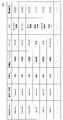
- FIG. 4 is a diagram illustrating an example of product information 241 stored in the product information DB 24.
- the product information 241 includes items such as a work title, an author / author, a publisher, a magazine / label, a genre, a tag, and a book description.
- the communication information DB 26 stores communication information such as evaluations for commodities shared among a plurality of users. Specifically, for example, the communication information DB 26 stores the number of users who are interested in the products, which are aggregated by the aggregation unit 210.
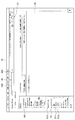
- FIG. 5 is a flowchart showing the counting process in the information processing system according to the present embodiment.
- an electronic commerce of an electronic book is used as an example of an electronic commerce, and a specific description will be given of the process of counting the number of users who are interested in “read / read” with respect to an electronic book that is a commercial product. To do.
- step S ⁇ b> 103 the server 2 displays an “I want to read” button and “Read” on the electronic commerce screen displayed on the display unit 16 of the user terminal 1 to indicate interest in the electronic book. ”Button.
- step S106 the server 2 determines whether the “read” button or the “read” button is selected (click / tap operation) by the user.
- step S109 the counting unit 210 of the server 2 increments and counts the number of each user. . Specifically, the counting unit 210 increments the “number of users who want to read” (the number of people who want to purchase the product) when the “read” button is selected, and when the “read” button is selected. “Number of users read” (number of product users) is incremented.
- step S112 the server 2 causes the total result to be presented together with product information on the electronic commerce screen displayed on the display unit 16 of the user terminal 1. Thereby, the user can grasp the number of users who want to read the target electronic book in the electronic book Web store and the number of actually read users in real time. Can be shared with users.
- Display screen example In the electronic commerce screen according to the present embodiment, communication information (the number of users who want to read, the number of users read, etc.) shared with the other users described above is presented together with the information on the electronic book. Hereinafter, a specific example of a screen display related to communication information will be described.
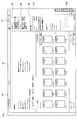
- FIG. 6 is a diagram illustrating an example of a display screen that displays user account information and a communication function in an electronic book Web store. As shown in FIG. 6, an account information display area 50 and a communication information display area 51 are arranged on the left side of the Web store screen displayed on the display unit 16. In the account information display area 50, menu items such as “Notification”, “Display History”, “Keep List”, “Purchase History”, “Credit Card Information”, etc., which are also handled in a normal electronic book Web store. Is displayed.
- menu items of various communication information shared with other users such as “history”, “want to read”, “read”, “review”, “follow”, “follower”, etc. Is displayed.
- the numerical value shown in association with each menu item is the number input by the user / the number of flags set.
- the “history” is a function for browsing a history of comments input by the user with respect to the electronic book. Comments input by the user can be shared with other users.
- “I want to read” and “Read” are functions for browsing a list of electronic books in which the user has flagged “I want to read” / “Read” for the electronic book. For example, when the “I want to read” item 511 is selected, a list of three electronic books for which the user has flagged “I want to read” is displayed in the display area 32. When the “read” item 512 is selected, a list of six electronic books for which the user has flagged “read” is displayed in the display area 32. Note that the “read” / “read” flags set by the user are tabulated by the server 2 as “the number of users who want to read” / the number of “read” users, and each count result together with information on each electronic book. Presented and shared with other users.
- “Follow” is a function for registering other users who are interested in the user.
- the “follower” is a function in which the user is followed by another user. The user can also check the information of other users who have a “follow” / “follower” relationship.
- an icon group 31 of various menus (notification function, comment history function, confirmation function of products in the cart, etc.) is arranged.
- a search bar 30 for searching for electronic books is arranged at the upper left of the screen shown in FIG.
- the search bar 30 includes a keyword input field 330 and a search button 300.
- the user can instruct the search start by inputting a keyword related to the electronic book to be searched in the keyword input field 330 and selecting the search button 300.
- Search results (a list of searched electronic books) are displayed in the display area 32.
- FIG. 7 is a diagram illustrating a display example of buttons to be read / read according to the present embodiment.
- search results searched according to the search keyword “AA” and the work genre “comic / game guide” are displayed in the display area 32.
- a work title, an author / author name, a publisher, etc., a price, and a button 33 (33a, 33b) / read button to be read 34 (34a, 34b) is arranged.
- the button 33 to be read is a button to be pressed when the user shows interest in the electronic book and sets a flag as the electronic book to be read.
- the read button 34 is a button to be pressed when setting a flag as an actually read electronic book.
- the user can set a flag of “I want to read / read” for the target electronic book by pressing the button 33 to read or the button 34 to read, and accumulate the flag.
- the control unit 10 of the user terminal 1 detects that the button 33 to be read or the button 34 to be read is pressed from the operation input unit 14, the control unit 10 transmits the input information to the server 2.
- the server 2 Based on the input information transmitted from the user terminal 1, the server 2 sets a flag “I want to read / read” for the target electronic book and stores it in the communication information DB 26.
- the pressed button and the unpressed button may be distinguished by color.
- the button 33b / read button 34b that has not been pressed is displayed in gray
- the button 33a that has been pressed / read button 34a is displayed in color.
- a button for indicating that the user is interested in the electronic book (button 33 to be read / button to be read) 34) can be displayed, and flag information of “I want to read / read” for each user can be collected.
- FIG. 8 is a diagram showing an example of a total result display screen according to the present embodiment.
- the aggregation of the number of users who pressed the button 33 to be read / the button 34 to be read is performed by the aggregation unit 210 of the server 2, and a screen reflecting the aggregation result is generated by the screen generation unit 220.
- Information for displaying the screen generated by the screen generation unit 220 is transmitted from the communication unit 22 to the user terminal 1 by the screen display control unit 230. Based on the received information, the control unit 10 of the user terminal 1 controls the display unit 16 to display a screen reflecting the counting result.
- the screen shown in FIG. 8 is a screen that is transitioned when, for example, one of the electronic book search results shown in FIG. 7 is selected, and shows detailed information of the selected electronic book.
- the detailed information includes the title of the electronic book, the number of people who have reviewed the electronic book, a link 41 to the review page, a link 42 for linking to another Social Service, and a tag set in the electronic book
- a display 43, book description, book information, and the like are included.
- the review is information that is arbitrarily input by each user and is shared with other users.
- linkage to other social services is a function of posting the URL of the page to other social services, for example.
- the tag set in the electronic book is information that is arbitrarily set by each user and is shared with other users.
- tags of “hero” and “adventure” are set in the electronic book, but the user can add a new tag or delete the set tag. .
- user information 36 (total result) for pressing the button to be read and user information 38 (total result) for pressing the read button are displayed.
- the number of users “19” who have pressed the button 33 to be read (see FIG. 7) and the icon of the pressed user are displayed.
- the number of users “16” who pressed the read button 34 (see FIG. 7) and the icon of the pressed user are displayed.
- Such information is information shared with other users, and each user can intuitively know the number of users who want to read the target electronic book or have read it, and the number of users.
- FIG. 9 is a diagram showing an example of a screen displayed by scrolling the screen shown in FIG. Specifically, the knob 162, which is a knob-like operation unit on the scroll bar 161 shown in FIG. 8, is selected and moved downward, so that the screen transitions to a lower part of the screen that is not displayed on the display unit 16 of FIG. Let
- the search bar 30 located at the upper part of the screen is hidden as the display screen transitions downward.
- a fixed header 164 including the search bar 30 is displayed, and the fixed header 164 is displayed so as to follow even if the screen is scrolled. It is possible to control. As a result, it is possible to realize a UI that the fixed header 164 including the search bar 30 follows when the search bar 30 is removed from the display screen, regardless of which direction the display screen is scrolled. Thereby, the user can input a new keyword into the search bar 30 of the fixed header 164 at any time and perform a search again.
- the fixed header 164 may further include an icon group 31 of various menus (notification function, comment history function, confirmation function of a product in the cart, etc.) as shown in FIG.
- a new publication notification setting field 39 is displayed on the right side of the screen shown in FIG.
- the notification setting when the latest publication of the series is distributed can be turned ON / OFF.
- FIG. 10 is a diagram showing an example of a screen showing the result of counting the user who pressed the button to be read.
- the screen shown in FIG. 10 is a screen that transitions when the “communication” item 513 included in the communication display area 51 shown in FIG. 6 is pressed, for example.
- the cover images of the respective electronic books are displayed in descending order of the number of users who pressed the button 33 to be read.
- the button 33 to be read and the button 34 to be read are displayed in association with each electronic book.
- the button 33x that the user wants to read and the read button 34x are displayed in color
- the button 33y that the user wants to read and the button 34y that is read are displayed in gray, and so on. Pressed / not pressed can be distinguished.
- the button to be read / the total result of pressing the read button is displayed in a ranking, and the user can meet a new electronic book that he / she does not know.
- the number of users who actually pressed the button that they want to read / the button that they read is displayed together. You can see if the number of people is actually interested.
- screen display example related to communication information communication information shared with other users, for example, a display screen example of a tabulation result of the number of users who have pressed / readed a button, a set tag, etc. has been described.
- screen display examples relating to electronic book search according to the present embodiment will be described with reference to FIGS.
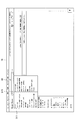
- FIG. 11 is a diagram for explaining genre setting of electronic books to be searched. As shown in FIG. 11, when a genre setting field 310 included in the search bar 30 is pressed, a genre menu display 311 is pulled down and displayed. The user selects an arbitrary genre from the genre menu display 311. When “all” is selected from the genre menu, all genres are set as search targets.
- the search bar 30 includes the genre setting field 310, so that the user can easily change the genre setting without taking time and effort.
- a search title can be selected by arbitrarily selecting a work title, an author / author, a publisher, a magazine / label, a tag, and the like.
- a description will be given with reference to FIG.
- FIG. 12 is a diagram for explaining the condition setting for the refinement search according to the present embodiment.
- a refined search condition menu display 321 is pulled down and displayed.
- “tag” is set as a narrowing search condition, an electronic book including a keyword is searched for a tag (see FIG. 8) arbitrarily set by each user in the electronic book.
- a plurality of narrowing conditions can be set.
- the “safe search” included in the narrowing-down condition menu display 321 it is possible to set exclusion of inappropriate content such as adult content from the search result.
- FIG. 13 is a diagram showing an example of a search result screen according to the present embodiment.
- the search genre is set to “comic / game guide”
- “AA” is input as a keyword
- “work title” is set as a narrowing search condition.
- the search result screen is shown.
- the search unit 240 of the server 2 according to the present embodiment searches for an electronic book that includes “AA” in the work title among the genres of “comic / game guide”.
- the search result is displayed in the display area 32 as shown in FIG. In the display area 32, together with the number of search results (in FIG. 13, "50" is displayed as an example), the cover image of the searched electronic book, information of the electronic book (work title, author, publisher, etc.) and reading Want / Read button is displayed.
- the detailed information of the search results includes the number of hits by detailed genre, the number of hits by author, the number of hits by publisher, and the like.
- the number of hits of “boy comic”, which is the detailed genre of “comic / game guide”, is 49 out of 50 search results.
- the number of hits of “Youth comics” is one.
- the number of hits for each publication magazine, which is a more detailed genre, among 49 hits of “Shonen Comic” is also shown.
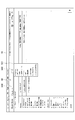
- FIG. 14 is a diagram for explaining a predicted search result according to the present embodiment. As shown in FIG. 14, when the keyword “BB” is entered in the keyword input field 330 of the search bar 30, a predicted search result 331 is displayed. The predictive search is performed by the search unit 240 of the server 2.
- keywords predicted based on the input keyword are displayed in ranking based on the search frequency score.
- a score of the number of searches and a database (DB) item are displayed together with the predicted keyword. More specifically, for example, when a predicted keyword “BB quest” including the keyword “BB” is displayed as a predicted search result, as shown in FIG.
- the DB item “comics / game guide” of “BB Quest” is displayed.
- BB Quest is the work title
- an item of a genre into which the electronic book is classified is displayed as the DB item.
- Author is displayed as the DB item when the predicted keyword is the author name
- Publisher is displayed as the DB item when it is the publisher name.
- the user can select a desired prediction keyword as a search keyword with little effort of inputting some keywords.
- the DB item of the prediction keyword is displayed, and the user can easily narrow down the search condition by selecting the prediction keyword in consideration of the DB item.
- tag search Next, tag search according to the present embodiment will be described with reference to FIGS. As described above with reference to FIG. 8, in this embodiment, each user can arbitrarily set a tag for an electronic book.
- the set tag is stored in association with each electronic book in the product information DB 24 of the server 2 (see FIG. 4).
- FIG. 15 is a diagram for explaining a case where a tag search is performed from a predicted search result according to the present embodiment.
- “hero” is entered in the keyword input field 330 of the search bar 30
- predicted keywords such as “heroes”, “hero”, and “hero company” are displayed in the predicted search result 332.
- each prediction keyword is displayed together with the search frequency score and the DB item.
- the prediction keyword “Heroes” is the publisher name
- “Publisher” is displayed as the DB item.
- the prediction keyword “heroes” is the work title
- the work genre “comic / game guide” is displayed as the DB item.
- FIG. 16 is a diagram showing an example of a tag search screen according to the present embodiment.
- the screen illustrated in FIG. 16 is an example of a screen that transitions when “hero (tag) 3” is selected in the screen illustrated in FIG. 15.
- “hero (tag) 3” is selected, the search is narrowed down to the electronic book tagged “hero”, and the electronic book tagged “hero” is displayed as a search result.
- each user can arbitrarily set and communicate with other users. It is possible to perform a search using a tag which is an example of information.
- the information processing system can present the number of users who are interested in a product (an example of communication information) on an electronic commerce screen.
- a product an example of communication information
- the number of users who want to read the target electronic book and the number of users who read the target electronic book can be grasped in real time.
- the number of users who are interested can be shared with other users.
- the information processing system includes the user terminal 1 and the server 2, and main processing such as aggregation processing and search processing is performed on the server 2 side, thereby reducing the processing burden on the user terminal 1.
- main processing such as aggregation processing and search processing is performed on the server 2 side, thereby reducing the processing burden on the user terminal 1.
- the present embodiment is not limited to this. For example, you may perform at least any one of the said total process and a search process by the user terminal 1 side.
- this technique can also take the following structures.
- An information processing apparatus comprising: (2) The information processing apparatus according to (1), wherein the number of users who are interested in the product is at least one of the number of users who desire the product and the number of users who have experienced the product. (3) The control unit controls the electronic commerce screen to display at least one of a button indicating that the user wants to read and a button indicating that the user has read together with information on the electronic book.
- the information processing apparatus according to 2).
Landscapes
- Business, Economics & Management (AREA)
- Strategic Management (AREA)
- Engineering & Computer Science (AREA)
- Accounting & Taxation (AREA)
- Development Economics (AREA)
- Finance (AREA)
- Entrepreneurship & Innovation (AREA)
- Game Theory and Decision Science (AREA)
- Economics (AREA)
- Marketing (AREA)
- Physics & Mathematics (AREA)
- General Business, Economics & Management (AREA)
- General Physics & Mathematics (AREA)
- Theoretical Computer Science (AREA)
- Data Mining & Analysis (AREA)
- Management, Administration, Business Operations System, And Electronic Commerce (AREA)
- User Interface Of Digital Computer (AREA)
- Information Transfer Between Computers (AREA)
Abstract
Description
1.本開示の一実施形態による情報処理システムの概要
2.基本構成および動作処理
2-1.構成
2-2.動作処理
3.表示画面例
3-1.コミュニケーション情報に関する画面表示例
3-2.検索に関する画面表示例
4.まとめ
まず、本開示の一実施形態による情報処理システムの概要について図1を参照して説明する。図1に示すように、本実施形態による情報処理システムは、複数のユーザ端末1とサーバ2により構成され、複数のユーザ端末1とサーバ2は、ネットワーク3を介して接続されている。
<2-1.ユーザ端末1の構成>
図2は、本実施形態によるユーザ端末1の主要構成の一例を示すブロック図である。図2に示すように、ユーザ端末1は、制御部10、通信部12、操作入力部14、表示部16、および記憶部18を有する。
続いて、本実施形態による情報システムに含まれるサーバ2の構成について図3を参照して説明する。図3は、本実施形態によるサーバ2の主要構成の一例を示すブロック図である。図3に示すように、サーバ2は、制御部20、通信部22、商品情報DB24、およびコミュニケーション情報DB26を有する。
続いて、本実施形態による情報処理システムの動作処理について図5を参照して説明する。図5は、本実施形態による情報処理システムにおける集計処理を示すフローチャートである。ここでは、電子商取引の一例として電子書籍の電子商取引を用い、商取引対象の商品である電子書籍に対して「読みたい/読んだ」といった関心を示すユーザの数の集計処理について、具体的に説明する。
本実施形態による電子商取引画面では、電子書籍の情報と共に、上述した他ユーザと共有されるコミュニケーション情報(読みたいユーザ数、読んだユーザ数等)が提示される。以下、コミュニケーション情報に関する画面表示例として具体的に説明する。
(3-1-1.一覧表示画面)
図6は、電子書籍のWebストアにおいて、ユーザのアカウント情報とコミュニケーション機能を表示する表示画面例を示す図である。図6に示すように、表示部16に表示されるWebストア画面の左側には、アカウント情報の表示領域50と、コミュニケーション情報の表示領域51が配置されている。アカウント情報の表示領域50には、「お知らせ」、「表示履歴」、「キープリスト」、「購入履歴」、「クレジットカード情報」等、通常の電子書籍のWebストアでも取り扱われていたメニュー項目が表示される。
次に、電子書籍に対する関心を示すための「読んだ/読みたいボタン」の表示例について、図7を参照して説明する。図7は、本実施形態による読んだ/読みたいボタンの表示例を示す図である。
続いて、上記読みたいボタン33/読んだボタン34を押下したユーザ数の集計結果の表示例について図8を参照して説明する。図8は、本実施形態による集計結果表示画面の一例を示す図である。
図9は、図8に示す画面をスクロールして表示される画面例を示す図である。具体的には、図8に示すスクロールバー161上のつまみ状の操作部であるノブ162を選択して下方向に移動させることで、図8の表示部16では表示されていない画面下方に遷移させる。
上述した図8に示す例では、選択した電子書籍に対して読みたい/読んだボタンを押下したユーザ数およびユーザのアイコンが画面右側に表示される例を示したが、本実施形態では、読みたい/読んだボタン押下の集計結果一覧を表示することも可能である。以下、図10を参照して具体的に説明する。
(3-2-1.ジャンル設定)
図11は、検索する電子書籍のジャンル設定について説明するための図である。図11に示すように、検索バー30に含まれるジャンル設定欄310を押下すると、ジャンルメニュー表示311がプルダウンして表示される。ユーザは、ジャンルメニュー表示311から任意のジャンルを選択する。また、ジャンルメニューのうち「すべて」を選択すると、全てのジャンルが検索対象に設定される。
本実施形態による電子書籍の検索では、ジャンルの他、作品タイトルや著者/作者、出版社、掲載誌/レーベル、タグ等を任意に選択して絞り込み検索を行うことができる。以下、図12を参照して説明する。
図13は、本実施形態による検索結果画面の一例を示す図である。図13に示す例では、検索バー30において、検索ジャンルが「コミック・ゲーム攻略本」に設定され、キーワードとして「AA」が入力され、また、絞り込み検索の条件として「作品タイトル」が設定された場合の検索結果画面を示す。この場合、本実施形態によるサーバ2の検索部240は、「コミック・ゲーム攻略本」のジャンルのうち、作品タイトルに「AA」を含む電子書籍を検索する。
図14は、本実施形態による予測検索結果について説明するための図である。図14に示すように、検索バー30のキーワード入力欄330にキーワード「BB」を入力すると、予測検索結果331が表示される。予測検索は、サーバ2の検索部240により行われる。
続いて、本実施形態によるタグ検索について図15~図16を参照して説明する。図8を参照して上述したように、本実施形態では、各ユーザが任意に電子書籍に対してタグを設定することが可能である。設定されたタグは、サーバ2の商品情報DB24において各電子書籍に対応付けて記憶される(図4参照)。
上述したように、本開示の実施形態による情報処理システムは、電子商取引の画面において商品に対して関心を示すユーザ数(コミュニケーション情報の一例)を提示することができる。具体的には、例えば電子書籍のWebストアにおいて、対象の電子書籍を読みたいと思っているユーザ数や、対象の電子書籍を読んだユーザ数をリアルタイムで把握することができ、電子書籍に対して関心を有するユーザ数を他ユーザと共有することができる。
(1)
ネットワークを介して行われる電子商取引で扱われる商品に対して関心を示したユーザ数を集計する集計部と、
前記電子商取引の画面上で、前記集計部による集計結果を、前記商品の情報と共に提示するよう制御する制御部と、
を備える、情報処理装置。
(2)
前記商品に対して関心を示したユーザ数は、前記商品を所望するユーザ数、または前記商品を体験したユーザ数の少なくともいずれかである、前記(1)に記載の情報処理装置。
(3)
前記制御部は、前記電子商取引の画面上で、電子書籍の情報と共に、読みたいことを示すボタン、および読んだことを示すボタンの少なくともいずれかを表示するよう制御する、前記(1)または(2)に記載の情報処理装置。
10 制御部
12 通信部
14 操作入力部
16 表示部
18 記憶部
2 サーバ
20 制御部
210 集計部
220 画面生成部
230 画面表示制御部
240 検索部
22 通信部
24 商品情報DB
26 コミュニケーション情報DB
Claims (3)
- ネットワークを介して行われる電子商取引で扱われる商品に対して関心を示したユーザ数を集計する集計部と、
前記電子商取引の画面上で、前記集計部による集計結果を、前記商品の情報と共に提示するよう制御する制御部と、
を備える、情報処理装置。 - 前記商品に対して関心を示したユーザ数は、前記商品を所望するユーザ数、または前記商品を体験したユーザ数の少なくともいずれかである、請求項1に記載の情報処理装置。
- 前記制御部は、前記電子商取引の画面上で、電子書籍の情報と共に、読みたいことを示すボタン、および読んだことを示すボタンの少なくともいずれかを表示するよう制御する、請求項1に記載の情報処理装置。
Priority Applications (3)
| Application Number | Priority Date | Filing Date | Title |
|---|---|---|---|
| CN201480050283.9A CN105556559A (zh) | 2013-09-20 | 2014-07-15 | 信息处理设备 |
| US14/917,814 US20160225001A1 (en) | 2013-09-20 | 2014-07-15 | Information processing apparatus |
| EP14846102.3A EP3048576A4 (en) | 2013-09-20 | 2014-07-15 | Information processing device |
Applications Claiming Priority (2)
| Application Number | Priority Date | Filing Date | Title |
|---|---|---|---|
| JP2013195191A JP2015060500A (ja) | 2013-09-20 | 2013-09-20 | 情報処理装置 |
| JP2013-195191 | 2013-09-20 |
Publications (1)
| Publication Number | Publication Date |
|---|---|
| WO2015040944A1 true WO2015040944A1 (ja) | 2015-03-26 |
Family
ID=52688604
Family Applications (1)
| Application Number | Title | Priority Date | Filing Date |
|---|---|---|---|
| PCT/JP2014/068837 Ceased WO2015040944A1 (ja) | 2013-09-20 | 2014-07-15 | 情報処理装置 |
Country Status (5)
| Country | Link |
|---|---|
| US (1) | US20160225001A1 (ja) |
| EP (1) | EP3048576A4 (ja) |
| JP (1) | JP2015060500A (ja) |
| CN (1) | CN105556559A (ja) |
| WO (1) | WO2015040944A1 (ja) |
Families Citing this family (4)
| Publication number | Priority date | Publication date | Assignee | Title |
|---|---|---|---|---|
| CN106095993A (zh) * | 2016-06-21 | 2016-11-09 | 北京小米移动软件有限公司 | 推送方法及装置 |
| JP6756187B2 (ja) * | 2016-08-05 | 2020-09-16 | カシオ計算機株式会社 | 情報表示システムおよび情報表示プログラム |
| JP2018073070A (ja) * | 2016-10-27 | 2018-05-10 | Line株式会社 | 表示プログラム、表示方法および情報処理端末 |
| JP7047159B1 (ja) * | 2021-03-26 | 2022-04-04 | エヌエイチエヌ コーポレーション | プログラム及びサーバ |
Citations (4)
| Publication number | Priority date | Publication date | Assignee | Title |
|---|---|---|---|---|
| JP2002007835A (ja) * | 2000-06-21 | 2002-01-11 | Yoshiaki Bando | 電子販売方法及びその装置 |
| JP2002215875A (ja) * | 2001-01-22 | 2002-08-02 | Elephant Design Kk | 製造可能指数表示方法 |
| JP2002318966A (ja) * | 2001-04-18 | 2002-10-31 | Fujitsu Ltd | 商品管理方法、商品推薦方法及びその方法をコンピュータに実行させるプログラム |
| JP2003122968A (ja) * | 2001-10-15 | 2003-04-25 | Dainippon Printing Co Ltd | ネットワークを利用した書籍販売システムおよびその支援システム |
Family Cites Families (14)
| Publication number | Priority date | Publication date | Assignee | Title |
|---|---|---|---|---|
| WO2000079418A2 (en) * | 1999-06-21 | 2000-12-28 | Releasenow.Com, Inc. | An integrated shopping interface method and apparatus for use in electronic commerce |
| JP2001195412A (ja) * | 2000-01-12 | 2001-07-19 | Hitachi Ltd | 電子書籍システム及びそのコンテンツ表示方法 |
| US20020184102A1 (en) * | 2001-03-21 | 2002-12-05 | Panagiotis Markopoulos | Selling price information in e-commerce |
| US7831548B1 (en) * | 2001-10-24 | 2010-11-09 | Amazon Technologies, Inc. | Systems and methods that use search queries to identify related lists |
| US20050004837A1 (en) * | 2003-01-22 | 2005-01-06 | Duane Sweeney | System and method for compounded marketing |
| US7364086B2 (en) * | 2003-06-16 | 2008-04-29 | Ewinwin, Inc. | Dynamic discount card tied to price curves and group discounts |
| GB0406076D0 (en) * | 2004-03-17 | 2004-04-21 | Guaranteed Markets Ltd | A transaction management system and method |
| US8214264B2 (en) * | 2005-05-02 | 2012-07-03 | Cbs Interactive, Inc. | System and method for an electronic product advisor |
| CN101661594A (zh) * | 2008-08-28 | 2010-03-03 | 阿里巴巴集团控股有限公司 | 一种在互联网上提供对象信息的方法及系统 |
| CN102790949A (zh) * | 2011-05-17 | 2012-11-21 | 中兴通讯股份有限公司 | 一种移动广告业务实现方法及系统 |
| AU2012300387A1 (en) * | 2011-08-26 | 2014-02-27 | Scholastic Inc. | Interactive electronic reader with parental control |
| US20130060661A1 (en) * | 2011-09-06 | 2013-03-07 | Apple Inc. | Managing access to digital content items |
| JP5597613B2 (ja) * | 2011-09-30 | 2014-10-01 | 楽天株式会社 | 情報処理装置、情報処理方法、情報処理プログラム、及び記録媒体 |
| AU2013210813A1 (en) * | 2012-01-18 | 2014-09-11 | Yoav Lorch | Incremental content purchase and management systems and methods |
-
2013
- 2013-09-20 JP JP2013195191A patent/JP2015060500A/ja active Pending
-
2014
- 2014-07-15 CN CN201480050283.9A patent/CN105556559A/zh active Pending
- 2014-07-15 WO PCT/JP2014/068837 patent/WO2015040944A1/ja not_active Ceased
- 2014-07-15 US US14/917,814 patent/US20160225001A1/en not_active Abandoned
- 2014-07-15 EP EP14846102.3A patent/EP3048576A4/en not_active Ceased
Patent Citations (4)
| Publication number | Priority date | Publication date | Assignee | Title |
|---|---|---|---|---|
| JP2002007835A (ja) * | 2000-06-21 | 2002-01-11 | Yoshiaki Bando | 電子販売方法及びその装置 |
| JP2002215875A (ja) * | 2001-01-22 | 2002-08-02 | Elephant Design Kk | 製造可能指数表示方法 |
| JP2002318966A (ja) * | 2001-04-18 | 2002-10-31 | Fujitsu Ltd | 商品管理方法、商品推薦方法及びその方法をコンピュータに実行させるプログラム |
| JP2003122968A (ja) * | 2001-10-15 | 2003-04-25 | Dainippon Printing Co Ltd | ネットワークを利用した書籍販売システムおよびその支援システム |
Non-Patent Citations (1)
| Title |
|---|
| See also references of EP3048576A4 * |
Also Published As
| Publication number | Publication date |
|---|---|
| US20160225001A1 (en) | 2016-08-04 |
| JP2015060500A (ja) | 2015-03-30 |
| EP3048576A1 (en) | 2016-07-27 |
| EP3048576A4 (en) | 2017-01-25 |
| CN105556559A (zh) | 2016-05-04 |
Similar Documents
| Publication | Publication Date | Title |
|---|---|---|
| US9852227B2 (en) | Control for persistent search results and iterative searching | |
| JP6619024B2 (ja) | 情報処理装置、情報処理方法、プログラム、記憶媒体 | |
| CN107408256B (zh) | 优化的物品属性比较 | |
| US9619829B2 (en) | Evolutionary content determination and management | |
| US9230223B2 (en) | Consistent presentation of content and passive relevance determination of content relationship in an on-line commerce system | |
| CN103339646B (zh) | 信息提供装置 | |
| CN102428462A (zh) | 服务器设备、电子设备、电子书提供系统、电子书提供方法、电子书显示方法和程序 | |
| JP2007220084A (ja) | 評価情報管理システム、評価情報管理プログラム、および、評価情報管理方法 | |
| CN101689268A (zh) | 广告服务器装置、广告显示方法及广告服务器程序 | |
| JP2013152681A (ja) | 食材検索システム及び食材検索方法 | |
| US20130151509A1 (en) | System and method for graphical display of search results | |
| CN111815404B (zh) | 虚拟物品分享方法及装置 | |
| JP5752070B2 (ja) | 関連情報表示システム、関連情報表示制御装置、端末装置、プログラム、及び関連情報表示方法 | |
| JP2015060500A (ja) | 情報処理装置 | |
| JP5568195B1 (ja) | 検索システム、検索条件設定装置、検索条件設定装置の制御方法、プログラム、及び情報記憶媒体 | |
| JP2015158853A (ja) | サーバ装置、端末装置、情報処理プログラム、情報処理システム、情報処理方法、およびデータ構造 | |
| JP2020177609A (ja) | オンライン販売システム、オンライン販売方法、コンピュータプログラム | |
| JP7013506B2 (ja) | 情報処理装置、情報処理方法及びプログラム | |
| US20210019802A1 (en) | Presenting Search And Comparison Results | |
| US9978092B2 (en) | Information processing device, information processing method, program for information processing device, and recording medium | |
| JP5441195B2 (ja) | 電子コンテンツ表示システム | |
| US20180165741A1 (en) | Information providing device, information providing method, information providing program, and computer-readable storage medium storing the program | |
| US20180232448A1 (en) | Presenting Search Results Online | |
| JP2012014449A (ja) | 情報提供プログラム、記録媒体、情報処理装置、及び情報提供方法 | |
| JP2016057899A (ja) | 情報処理装置、情報処理方法、及び情報処理プログラム |
Legal Events
| Date | Code | Title | Description |
|---|---|---|---|
| WWE | Wipo information: entry into national phase |
Ref document number: 201480050283.9 Country of ref document: CN |
|
| 121 | Ep: the epo has been informed by wipo that ep was designated in this application |
Ref document number: 14846102 Country of ref document: EP Kind code of ref document: A1 |
|
| WWE | Wipo information: entry into national phase |
Ref document number: 14917814 Country of ref document: US |
|
| REEP | Request for entry into the european phase |
Ref document number: 2014846102 Country of ref document: EP |
|
| WWE | Wipo information: entry into national phase |
Ref document number: 2014846102 Country of ref document: EP |
|
| NENP | Non-entry into the national phase |
Ref country code: DE |