WO2015072425A1 - 空席管理システムおよび空席管理方法 - Google Patents
空席管理システムおよび空席管理方法 Download PDFInfo
- Publication number
- WO2015072425A1 WO2015072425A1 PCT/JP2014/079722 JP2014079722W WO2015072425A1 WO 2015072425 A1 WO2015072425 A1 WO 2015072425A1 JP 2014079722 W JP2014079722 W JP 2014079722W WO 2015072425 A1 WO2015072425 A1 WO 2015072425A1
- Authority
- WO
- WIPO (PCT)
- Prior art keywords
- frame
- vacant seat
- information
- vacant
- frames
- Prior art date
- Legal status (The legal status is an assumption and is not a legal conclusion. Google has not performed a legal analysis and makes no representation as to the accuracy of the status listed.)
- Ceased
Links
Images


Classifications
-
- G—PHYSICS
- G06—COMPUTING OR CALCULATING; COUNTING
- G06Q—INFORMATION AND COMMUNICATION TECHNOLOGY [ICT] SPECIALLY ADAPTED FOR ADMINISTRATIVE, COMMERCIAL, FINANCIAL, MANAGERIAL OR SUPERVISORY PURPOSES; SYSTEMS OR METHODS SPECIALLY ADAPTED FOR ADMINISTRATIVE, COMMERCIAL, FINANCIAL, MANAGERIAL OR SUPERVISORY PURPOSES, NOT OTHERWISE PROVIDED FOR
- G06Q10/00—Administration; Management
- G06Q10/02—Reservations, e.g. for tickets, services or events
-
- G—PHYSICS
- G06—COMPUTING OR CALCULATING; COUNTING
- G06Q—INFORMATION AND COMMUNICATION TECHNOLOGY [ICT] SPECIALLY ADAPTED FOR ADMINISTRATIVE, COMMERCIAL, FINANCIAL, MANAGERIAL OR SUPERVISORY PURPOSES; SYSTEMS OR METHODS SPECIALLY ADAPTED FOR ADMINISTRATIVE, COMMERCIAL, FINANCIAL, MANAGERIAL OR SUPERVISORY PURPOSES, NOT OTHERWISE PROVIDED FOR
- G06Q10/00—Administration; Management
- G06Q10/10—Office automation; Time management
- G06Q10/109—Time management, e.g. calendars, reminders, meetings or time accounting
- G06Q10/1093—Calendar-based scheduling for persons or groups
Definitions
- the present invention relates to a vacant seat management system and a vacant seat management method.
- Patent Document 1 discloses a method for managing a reservation schedule in a beauty salon where a plurality of beauticians are deployed.
- the hairdresser's reservation plate is inserted into the timeline frame of the schedule table to manage each hairdresser's schedule, and the reservation is entered in the schedule table frame.
- the unused frame is regarded as a free time for the hairdresser.
- the above schedule table is managed by a hairdresser for viewing, but is not provided to the customer.
- the hairdresser's free time can be provided to the customer, it is possible to attract the customer effectively. And such an effect should be acquired similarly also in the case of providing a customer with the vacancy situation of a table in the store which performs customer service, such as a restaurant.
- the present invention has been made to solve the above-described problems, and an object thereof is to provide a vacant seat management system and a vacant seat management method capable of attracting customers effectively.
- a vacant seat management system includes a frame display unit that displays frames corresponding to a plurality of tables arranged in a store on a screen, and one frame from the frame displayed by the frame display unit.
- the vacant seat presence / absence information that changes whether or not the table stored in association with the selected frame is vacant is changed to content indicating that the table is not vacant
- a vacant seat status update unit that updates the vacant seat status information indicating how many vacant seats are present in the store, and a vacant seat status providing unit that provides the vacant seat status information; .
- the frame may further include a frame information display unit that displays frame information including an elapsed time since sitting at the table, the number of people using the table, and the total amount of products ordered at the table. .
- the frame display unit is selected when a plurality of the frames are selected at once from the frames displayed on the screen, and a part of the selected plurality of the frames is touched or overlapped.
- a plurality of the frames are changed to one frame and displayed on the screen, and the frame information display unit includes the plurality of frames in the one frame changed from the plurality of frames by the frame display unit.
- the longest time of the elapsed time corresponding to the frame, the total value of the number of persons, and the total value of the total amount may be displayed as the elapsed time, the number of persons, and the total amount, respectively.
- a reservation information storage unit that stores reservation information including at least a reservation time and the number of reservations; and the frame information display unit selects one of the reservation information from the reservation information stored by the reservation information storage unit, When one frame is selected from the frames displayed by the frame display unit, the frame information is displayed in the selected one frame based on the selected one reservation information. Then, the vacant seat presence / absence changing unit may change the vacant seat presence / absence information stored in association with the selected one frame together with the reservation information to contents indicating that the seat is not vacant. .
- the vacant seat management method is a vacant seat management method for managing vacant seats, a frame displaying step for displaying frames corresponding to a plurality of tables arranged in a store on the screen, and the frame When one frame is selected from the frames displayed in the display step, vacant seat presence / absence information indicating whether or not the table stored in association with the selected frame is vacant A vacant seat status changing step for updating the vacant seat status information indicating how many vacant seats are present in the store based on the vacant seat presence / absence information, A vacant seat management method comprising: a vacant seat status providing step of providing vacant seat status information.
- the frame may further include a frame information display step for displaying frame information including an elapsed time since sitting at the table, the number of people using the table, and the total amount of products ordered at the table. .
- the frame display step is performed when a plurality of the frames among the frames displayed on the screen are selected at a time and a part of the selected plurality of the frames is touched or overlapped.
- the plurality of frames are changed to one frame and displayed on the screen, and the frame information display step includes the plurality of frames in the one frame changed from the plurality of frames in the frame display step.
- the longest time of the elapsed time corresponding to the frame, the total value of the number of persons, and the total value of the total amount may be displayed as the elapsed time, the number of persons, and the total amount, respectively.
- a reservation information storage step for storing reservation information including at least a reservation time and the number of reservations, wherein the frame information display step selects one of the reservation information from the reservation information stored in the reservation information storage step; When one frame is selected from the frames displayed in the frame display step, the frame information is displayed in the selected one frame based on the selected one reservation information.
- the vacant seat presence / absence changing step may change the vacant seat presence / absence information stored in association with the selected one frame together with the reservation information to a content indicating that the seat is not vacant. .
- FIG. 1 It is a figure which illustrates the structure of the vacant seat management system in embodiment. It is a figure which illustrates the function structure of the shop terminal shown in FIG. It is a figure which illustrates the table frame displayed on the screen of a store terminal. It is a figure which shows the example of a display at the time of putting together two table frames into one. It is a figure which shows the example of a display at the time of reflecting reservation information on a table frame. It is a figure which illustrates the function structure of the vacant seat management server shown in FIG. It is a sequence chart for demonstrating operation
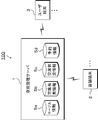
- the vacant seat management system 100 includes, for example, a vacant seat management server 1 and a store terminal 2.
- the vacant seat management system 100 is a system that manages the vacant seat status of a table arranged in a store that serves customers and provides it to the user terminal 3.
- An example of a store that serves customers is a restaurant.
- the apparatus etc. which comprise the vacant seat management system 100 are demonstrated in detail.
- the store terminal 2 is a terminal owned by a store that serves customers.
- a computer device such as a tablet-type terminal can be used.
- the user terminal 3 is a terminal operated by a user who is a customer of the store.
- the user terminal 3 may be a mobile terminal such as a smartphone, a mobile phone, or a portable information terminal, or may be a computer device such as a PC (personal computer terminal).
- the vacancy management server 1 is a server device that manages the vacancy status and reservation status of each store and provides the user terminal 3 with the vacancy status of each store.
- the vacant seat management server 1 illustratively includes a table information (frame information) DB (data (base) 5a, a vacant seat presence / absence information DB 5b, a vacant seat status information DB 5c, and a reservation information DB 5d.
- the table information DB 5a stores information for each table arranged in the store as table information.
- the table information includes, as data items, for example, a store ID item, a table ID item, an elapsed time item, a number of people item, and an order item total amount item.
- the store ID item stores identification information for specifying a store.
- the table ID item stores identification information for specifying a table.
- the elapsed time item stores the elapsed time since sitting on the table. This elapsed time can be calculated using the time when the customer is seated at the table and the current time, and is determined at the time of accounting.
- the number of people field stores the number of people who use the table.
- the total amount item of the ordered product stores a value obtained by summing up charges, taxes, etc. of each product ordered in the table.
- the vacant seat presence / absence information DB 5b stores the presence / absence of vacant seats in each table as vacant seat presence / absence information.
- the vacant seat presence / absence information includes, for example, a store ID item, a table ID item, and a vacant seat presence / absence item as data items.
- the store ID item stores identification information for specifying a store.
- the table ID item stores identification information for specifying a table.
- the vacant seat presence / absence item stores information indicating whether the table is vacant. As information indicating whether or not the seat is vacant, for example, “vacant” indicating that the seat is vacant or “empty” indicating that the seat is not vacant can be used.
- the vacant seat status information DB 5c stores the vacant seat status in the store as vacant seat status information.
- the vacant seat status information includes, for example, a store ID item, a table ID item, and a vacant seat status item as data items.
- the store ID item stores identification information for specifying a store.
- the table ID item stores identification information for specifying a table.
- the vacant seat status item stores vacant seat status information indicating how much vacancy exists in the table in the store.
- the vacant seat status information corresponds to, for example, information indicating “vacant seats present”, “crowded”, “no seats available”, and the like.
- the reservation information DB 5d stores information related to reservation as reservation information.
- the reservation information includes, for example, a store ID item, a reservation person name item, a reservation time item, and a reservation number item as data items.
- the store ID item stores identification information for specifying a store.
- the reservation name field stores the name of the reserved customer.
- the reserved time item stores the reserved start time.
- the reserved number field stores the number of reserved persons.
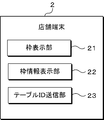
- the store terminal 2 includes, for example, a frame display unit 21, a frame information display unit 22, and a table ID transmission unit 23.
- the frame display unit 21 displays a frame (hereinafter referred to as “table frame”) corresponding to each of a plurality of tables arranged in the store on the screen.
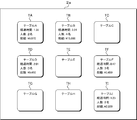
- FIG. 3 illustrates a table frame displayed on the screen of the store terminal 2.
- nine table frames TA to TI corresponding to the nine tables arranged in the store are displayed.
- a reference display coordinate can be set in each table frame TA to TI.
- each table frame TA to TI can be placed in the same layout as the table layout in the store. Thus, it can be displayed on the touch panel screen 2a.
- the display positions of the table frames TA to TI can be arbitrarily changed.
- changing the display position of the table frames TA to TI for example, select the table frame to be changed with a finger or a touch pen, move it to the position you want to move while selecting it, and release the finger or touch pen to select it. To release.
- the display position of the selected table frame is changed to the display position after movement.
- the frame display unit 21 shown in FIG. 2 sets the display position of the selected frame to the position when the selection is canceled when the table frame displayed on the screen is moved on the screen while being selected. change.
- the tables in the store may be gathered or the gathered tables may be separated according to the number of customers, etc., so that the table frames TA to TI can be gathered or separated.
- grouping the table frames TA to TI for example, a plurality of table frames to be grouped are selected with a finger or a touch pen, and a part is touched or overlapped while being selected, and then the finger or the touch pen is released to cancel the selection. As a result, the selected plurality of table frames are changed to one table frame.
- the frame display unit 21 shown in FIG. 2 is selected when a plurality of table frames are selected at a time from among the table frames displayed on the screen, and a part of the selected plurality of table frames is touched or overlapped. A plurality of table frames are changed to a single frame and displayed on the screen.
- the frame display unit 21 shown in FIG. 2 is selected when one table frame is selected from the table frames displayed on the screen, and a movement instruction in a different direction is input to the selected table frame.
- the selected table frame is changed to two table frames and displayed on the screen.
- the frame information display unit 22 shown in FIG. 2 displays the table information of the table corresponding to the table frame in the table frame displayed on the screen.
- the table information displayed in the table frame includes, for example, the table name, the elapsed time since sitting on the table, the number of people using the table, and the total amount of products ordered at the table.
- “Table A” is displayed as the table name
- “1:35” is displayed as the elapsed time
- “2 people” is displayed as the number of people
- the order item is displayed.
- “ ⁇ 8,970” is displayed as the total amount. Only the table name is displayed in each of the four table frames TC, TE, TG and TH shown in FIG. 3, but such a display state indicates that the table is empty.
- the table name is managed in association with the table ID.
- the frame information display unit 22 shown in FIG. 2 displays the table information based on the input slip information in the table frame corresponding to the table.
- the slip information is transmitted to the vacant seat management server 1.
- the slip information includes, for example, a store ID item, a table ID item, a seating time item, a number of people item, an order product item, and a charge item as data items.
- the store ID item stores identification information for specifying a store.
- the table ID item stores identification information for specifying a table.
- the seating time item stores the time when the user is seated at the table.
- the number of people field stores the number of people who use the table.
- the order product item stores identification information for specifying the ordered product.
- the price item stores the price of the ordered product.
- the slip information is input from the store terminal 2 screen.
- An example of a procedure when inputting slip information will be described below. First, when an instruction to start slip input is input and one table frame is selected from the table frames displayed on the screen, a pop-up screen is displayed on the screen. Next, enter the number of people using the table from the pop-up screen. Subsequently, the ordered product and quantity are input from the pop-up screen. Finally, an instruction to end the slip input is input.
- the frame information display unit 22 shown in FIG. 2 is an elapsed time corresponding to a plurality of table frames in one table frame after the change when the plurality of table frames are combined into one by the frame display unit 21. Are displayed as the elapsed time, the number of people, and the total amount, respectively. A specific description will be given with reference to FIG.
- the elapsed time in the table frame TAB is “1:35” which is the elapsed time of the table frame TA.
- one reservation information is selected from the reservation information stored in the reservation information DB 5d, and one table frame is selected from the empty table frames displayed by the frame display unit 21.
- table information is displayed in one selected table frame based on one selected reservation information.
- the table ID transmission unit 23 shown in FIG. 2 selects a table ID corresponding to the selected table frame when one table frame is selected from the empty table frames displayed by the frame display unit 21. It transmits to the vacant seat management server 1.
- the table ID transmission unit 23 transmits the table ID corresponding to the table frame to be processed to the vacant seat management server 1 when the accounting process is started and a receipt issuance request is transmitted to a cashier terminal (not shown).
- the accounting process and the receipt issuance request can be started, for example, by selecting a process start button displayed on the screen of the store terminal 2.
- the timing for transmitting the table ID to the vacant seat management server 1 is not limited to the time when the receipt issuance request is transmitted, and may be the time when the accounting process is completed, for example.
- the functional configuration of the vacant seat management server 1 in the embodiment will be described with reference to FIG.
- the vacant seat management server 1 includes, for example, a vacant seat presence / absence changing unit 11, a vacant seat status updating unit 12, and a vacant seat status providing unit 13.
- the vacant seat presence / absence changing unit 11 When the vacant seat presence / absence changing unit 11 receives a table ID corresponding to the table frame in the vacant seat state from the store terminal 2, the vacant seat presence / absence information stored in the vacant seat presence / absence information DB 5b in association with the received table ID is displayed. Change to “empty” to indicate that it is not.
- the vacant seat presence / absence changing unit 11 displays the vacant seat presence / absence information stored in the vacant seat presence / absence information DB 5b in association with the received table ID. Change to “empty” to indicate
- the vacant seat status update unit 12 updates the vacant seat status information in the vacant seat status information DB 5c based on the vacant seat status information DB5b updated from time to time by the store terminal 2. This will be specifically described below.
- the vacant seat status updating unit 12 calculates the number of vacant tables among the tables in the store based on the vacant seat presence / absence information.
- the vacant seat status update unit 12 determines the vacant seat status according to the calculated number of vacant tables. For example, if the number of vacant tables is 3 or more, the vacant seat status is set to “vacant”. When the number of vacant tables is two or less, the vacant seat status is “congested”. When the number of vacant tables is 0, the vacant seat status is “no vacant seat”.
- the vacant seat status providing unit 13 provides vacant seat status information indicating the vacant seat status to the user terminal 3.
- a providing method for example, displaying in a specific access destination designated by an application installed in the user terminal 3 or displaying in a built-in e-mail transmitted to the user terminal 3 is applicable.
- the store clerk guides the customer to a vacant table in the store, and selects a table frame corresponding to the table guiding the customer from the table frames displayed on the screen of the store terminal 2 (Ste S101).
- the table ID transmission part 23 of the shop terminal 2 transmits table ID corresponding to the selected table frame to the vacant seat management server 1 (step S102).
- the vacant seat presence / absence changing unit 11 of the vacant seat management server 1 changes the vacant seat presence / absence information stored in the vacant seat presence / absence information DB 5b in association with the received table ID to “vacant” (step S103).
- the store clerk inputs slip information from the store terminal 2 (step S104).
- the shop terminal 2 transmits the input slip information to the vacant seat management server 1 (step S105).
- the vacant seat management server 1 updates the table information stored in the table information DB 5a based on the received slip information (step S106).
- the frame information display unit 22 of the store terminal 2 displays the table information in the table frame corresponding to the slip information based on the slip information input in step S104 (step S107).
- the table ID transmission unit 23 of the store terminal sets the table ID corresponding to the table frame to be processed. It transmits to the vacant seat management server 1 (step S109).
- the vacant seat presence / absence changing unit 11 of the vacant seat management server 1 changes the vacant seat presence / absence information stored in the vacant seat presence / absence information DB 5b in association with the received table ID to “vacant” (step S110).
- the frame information display unit 22 of the store terminal 2 resets the display in the table frame to be processed in step S108 (step S111).
- the vacant seat status update unit 12 of the vacant seat management server 1 determines the vacant seat status based on the vacant seat status information stored in the vacant seat status information DB 5b, and uses the vacant seat status information stored in the vacant seat status information DB 5c. Update (step S201).
- the vacant seat status providing unit 13 of the vacant seat management server 1 provides the vacant seat status information stored in the vacant seat status information DB 5c to the user terminal 3 (step S201).
- the store terminal 2 has the frame display unit 21 so that the table frames respectively corresponding to the plurality of tables arranged in the store are displayed on the screen.
- the vacant seat management server 1 has the vacant seat presence / absence changing unit 11
- this selection is performed when one table frame is selected from the vacant table frames displayed on the screen of the store terminal 2.
- the seat availability information stored in the vacancy availability information DB 5b in association with the table frame thus set can be changed to “vacancy”, and the vacancy management server 1 has the vacancy status update unit 12, thereby enabling vacancy availability information.
- the vacant seat status information stored in the vacant seat status information DB 5c can be updated based on the vacant seat presence / absence information stored in the DB 5b.
- By having a status providing unit 13 can provide a seat availability information stored in the seat availability information DB5c the user terminal 3.
- the store terminal 2 further includes the frame information display unit 22, so that one table frame is selected from the vacant table frames displayed on the screen, When the slip information corresponding to the selected table frame is input, the elapsed time since sitting on the table, the number of people using the table, and the table frame selected based on the input slip information and Table information including the total amount of products ordered at the table can be displayed.
- buttons can be appropriately provided on the screen of the store terminal 2.
- a vacant seat notification button BT may be provided on the touch panel screen 2a of the store terminal 2.
- the vacant seat notification button BT is a button for setting whether to permit the provision of vacant seat status information.
- the store terminal 2 notifies the vacant seat management server 1 of a message indicating the “ON / OFF” state after the operation.
- the vacant seat status providing unit 13 of the vacant seat management server 1 provides vacant seat status information to the user terminal 3 while the vacant seat notification button BT updated by the message notified from the store terminal 2 is in the “ON” state. However, vacant seat status information is not provided to the user terminal 3 while in the “OFF” state.
- a full seat notification button may be provided on the touch panel screen of the store terminal.
- the full seat notification button is a button for forcibly setting the content of the vacant seat status information to be provided to the full seat state.
- the store terminal 2 notifies the vacant seat management server 1 of a message indicating the “ON / OFF” state after the operation.
- the vacant seat status providing unit 13 of the vacant seat management server 1 stores the content of the vacant seat status information in the vacant seat status information DB 5c while the full seat notification button updated by the message notified from the store terminal 2 is in the “ON” state. Regardless of the situation, the vacant seat status information indicating the full seat status is provided to the user terminal 3, and the vacant seat status information in the vacant seat status information DB 5c at that time is provided to the user terminal 3 while in the "OFF" state.
- the vacant seat management server 1 includes the vacant seat status information DB 5c. However, the vacant seat management server 1 does not necessarily include the vacant seat status information DB. If the vacant seat status information DB is not provided, when the vacant seat status providing unit 13 provides the vacant seat status information, the vacant seat status updating unit 12 determines whether there is a vacant seat based on the vacant seat status information DB 5b at that time. It is only necessary to calculate the number of tables and determine the vacancy status according to the number of vacant tables.
- the vacant seat management server 1 in the above-described embodiment does not include the slip information DB, but the vacant seat management server 1 may include the slip information DB.
- the vacant seat management server 1 may update the slip information DB and the table information DB 5a based on the slip information received from the store terminal 2.
- the vacant seat status information is provided to the user terminal 3, but the provision destination of the vacant seat status information is not limited to the user terminal. For example, it is good also as providing to store terminals other than the store corresponding to vacant seat status information.
- the vacant seat management system and the vacant seat management method according to the present invention are suitable for attracting customers effectively.
Landscapes
- Business, Economics & Management (AREA)
- Human Resources & Organizations (AREA)
- Engineering & Computer Science (AREA)
- Tourism & Hospitality (AREA)
- Strategic Management (AREA)
- Entrepreneurship & Innovation (AREA)
- Operations Research (AREA)
- Marketing (AREA)
- Economics (AREA)
- Quality & Reliability (AREA)
- Physics & Mathematics (AREA)
- General Business, Economics & Management (AREA)
- General Physics & Mathematics (AREA)
- Theoretical Computer Science (AREA)
- Development Economics (AREA)
- Data Mining & Analysis (AREA)
- Management, Administration, Business Operations System, And Electronic Commerce (AREA)
- Cash Registers Or Receiving Machines (AREA)
Abstract
顧客を有効に呼び込む。店舗内に配置される複数のテーブルにそれぞれ対応する枠を店舗端末2の画面上に表示する枠表示部と、画面上に表示された枠から一つの枠が選択された場合に、選択された枠に対応付けて空席有無情報DB5bに記憶されている空席有無情報を、空席ではないことを示す内容に変更する空席有無変更部と、空席有無情報に基づいて、空席状況情報DB5cに記憶されている店舗内のテーブルにどの程度の空きが存在するのかを示す空席状況情報を更新する空席状況更新部と、空席状況情報をユーザ端末3に提供する空席状況提供部と、を備える。
Description
本発明は、空席管理システムおよび空席管理方法に関する。
下記特許文献1には、複数の美容師を配備する美容室で予約スケジュールを管理する方法が開示されている。この方法では、予約を受け付けるたびに、美容師の予約プレートをスケジュール表の時系列の枠内に挿入していくことで、各美容師のスケジュールを管理し、スケジュール表の枠のうち予約が入っていない枠を、美容師の空き時間とみなしている。
特許文献1に記載の方法では、上記スケジュール表を、美容師が閲覧するために管理しているものの、顧客には提供していない。しかしながら、美容師の空き時間を顧客に提供することができれば、顧客を有効に呼び込むことが可能となる。そして、このような効果は、飲食店等の接客を行う店舗において、テーブルの空き状況を顧客に提供する場合にも同様に得られるはずである。
本発明は、上述した課題を解決するためになされたものであり、顧客を有効に呼び込むことができる空席管理システムおよび空席管理方法を提供することを目的の一つとする。
本発明の一態様である空席管理システムは、店舗内に配置される複数のテーブルにそれぞれ対応する枠を画面上に表示する枠表示部と、前記枠表示部により表示された前記枠から一つの前記枠が選択された場合に、当該選択された前記枠に対応付けて記憶されている前記テーブルが空席であるかどうかを示す空席有無情報を、空席ではないことを示す内容に変更する空席有無変更部と、前記空席有無情報に基づいて、前記店舗内にどの程度の空席が存在するのかを示す空席状況情報を更新する空席状況更新部と、前記空席状況情報を提供する空席状況提供部と、を備える。
前記枠表示部により表示された前記枠から一つの前記枠が選択され、当該選択された前記枠に対応する伝票情報が入力された場合に、当該入力された前記伝票情報に基づいて前記選択された前記枠内に、前記テーブルに着席してからの経過時間、前記テーブルを使用する人数および前記テーブルで注文した商品の総額を含む枠情報を表示する枠情報表示部をさらに備えることとしてもよい。
前記枠表示部は、前記画面上に表示した前記枠のうち複数の前記枠がまとめて選択され、当該選択された複数の前記枠の一部が接触または重ね合わされた場合に、当該選択された複数の前記枠を一つの前記枠に変更して前記画面上に表示し、前記枠情報表示部は、前記枠表示部により複数の前記枠から変更された一つの前記枠内に、当該複数の前記枠に対応する、前記経過時間のうちの最長の時間、前記人数の合算値および前記総額の合算値を、それぞれ前記経過時間、前記人数および前記総額として表示する、こととしてもよい。
少なくとも予約時間および予約人数を含む予約情報を記憶する予約情報記憶部をさらに備え、前記枠情報表示部は、前記予約情報記憶部により記憶された前記予約情報から一つの前記予約情報が選択され、前記枠表示部により表示された前記枠から一つの前記枠が選択された場合に、前記選択された一つの前記予約情報に基づいて、前記選択された一つの前記枠内に前記枠情報を表示し、前記空席有無変更部は、前記予約情報とともに前記選択された一つの前記枠に対応付けて記憶されている前記空席有無情報を、空席ではないことを示す内容に変更する、こととしてもよい。
本発明の一態様である空席管理方法は、空席を管理する空席管理方法であって、店舗内に配置される複数のテーブルにそれぞれ対応する枠を画面上に表示する枠表示ステップと、前記枠表示ステップにおいて表示された前記枠から一つの前記枠が選択された場合に、当該選択された前記枠に対応付けて記憶されている前記テーブルが空席であるかどうかを示す空席有無情報を、空席ではないことを示す内容に変更する空席有無変更ステップと、前記空席有無情報に基づいて、前記店舗内にどの程度の空席が存在するのかを示す空席状況情報を更新する空席状況更新ステップと、前記空席状況情報を提供する空席状況提供ステップと、を含むことを特徴とする空席管理方法。
前記枠表示ステップにおいて表示された前記枠から一つの前記枠が選択され、当該選択された前記枠に対応する伝票情報が入力された場合に、当該入力された前記伝票情報に基づいて前記選択された前記枠内に、前記テーブルに着席してからの経過時間、前記テーブルを使用する人数および前記テーブルで注文した商品の総額を含む枠情報を表示する枠情報表示ステップをさらに含むこととしてもよい。
前記枠表示ステップは、前記画面上に表示した前記枠のうち複数の前記枠がまとめて選択され、当該選択された複数の前記枠の一部が接触または重ね合わされた場合に、当該選択された複数の前記枠を一つの前記枠に変更して前記画面上に表示し、前記枠情報表示ステップは、前記枠表示ステップにおいて複数の前記枠から変更された一つの前記枠内に、当該複数の前記枠に対応する、前記経過時間のうちの最長の時間、前記人数の合算値および前記総額の合算値を、それぞれ前記経過時間、前記人数および前記総額として表示する、こととしてもよい。
少なくとも予約時間および予約人数を含む予約情報を記憶する予約情報記憶ステップをさらに含み、前記枠情報表示ステップは、前記予約情報記憶ステップにおいて記憶された前記予約情報から一つの前記予約情報が選択され、前記枠表示ステップにおいて表示された前記枠から一つの前記枠が選択された場合に、前記選択された一つの前記予約情報に基づいて、前記選択された一つの前記枠内に前記枠情報を表示し、前記空席有無変更ステップは、前記予約情報とともに前記選択された一つの前記枠に対応付けて記憶されている前記空席有無情報を、空席ではないことを示す内容に変更する、こととしてもよい。
本発明によれば、顧客を有効に呼び込むことができる。
以下、添付図面を参照して、本発明に係る空席管理システムおよび空席管理方法の好適な実施形態について説明する。なお、以下に説明する実施形態は、あくまでも例示であり、実施形態に明示しない種々の変形や技術の適用を排除するものではない。すなわち、本発明は、その趣旨を逸脱しない範囲で種々変形して実施することができる。
まず、図1を参照して、実施形態における空席管理システムの構成について説明する。空席管理システム100は、例えば、空席管理サーバ1と店舗端末2とを備える。
空席管理システム100は、接客を行う店舗内に配置されるテーブルの空席状況を管理してユーザ端末3に提供するシステムである。接客を行う店舗としては、例えば、飲食店が該当する。以下に、空席管理システム100を構成する装置等について詳細に説明する。
店舗端末2は、接客を行う店舗が保有する端末であり、例えば、タブレット型端末等のコンピュータ装置を用いることができる。
ユーザ端末3は、店舗の顧客となるユーザが操作する端末である。ユーザ端末3は、例えば、スマートフォンや携帯電話機、携帯情報端末等のモバイル端末であってもよいし、PC(personal computer)端末等のコンピュータ装置であってもよい。
空席管理サーバ1は、各店舗の空席状況や予約状況等を管理し、各店舗の空席状況をユーザ端末3に提供するサーバ装置である。空席管理サーバ1は、例示的に、テーブル情報(枠情報)DB(data base)5aと、空席有無情報DB5bと、空席状況情報DB5cと、予約情報DB5dとを備える。
テーブル情報DB5aは、店舗内に配置されるテーブルごとの情報をテーブル情報として記憶する。テーブル情報は、データ項目として、例えば、店舗ID項目、テーブルID項目、経過時間項目、人数項目および注文商品の総額項目を含む。店舗ID項目は、店舗を特定する識別情報を格納する。テーブルID項目は、テーブルを特定する識別情報を格納する。経過時間項目は、テーブルに着席してからの経過時間を格納する。この経過時間は、顧客がテーブルに着席したときの時間と現在時刻とを用いて算出することができ、会計時に確定する。人数項目は、テーブルを使用する人数を格納する。注文商品の総額項目は、テーブルで注文した各商品の料金や税金等を合計した値を格納する。
空席有無情報DB5bは、各テーブルの空席の有無を空席有無情報として記憶する。空席有無情報は、データ項目として、例えば、店舗ID項目、テーブルID項目および空席有無項目を含む。店舗ID項目は、店舗を特定する識別情報を格納する。テーブルID項目は、テーブルを特定する識別情報を格納する。空席有無項目は、テーブルが空席であるかどうかを示す情報を格納する。空席であるかどうかを示す情報として、例えば、空席であることを示す“空有”や、空席ではないことを示す“空無”を用いることができる。
空席状況情報DB5cは、店舗内の空席状況を空席状況情報として記憶する。空席状況情報は、データ項目として、例えば、店舗ID項目、テーブルID項目および空席状況項目を含む。店舗ID項目は、店舗を特定する識別情報を格納する。テーブルID項目は、テーブルを特定する識別情報を格納する。空席状況項目は、店舗内のテーブルにどの程度の空きが存在するのかを示す空席状況情報を格納する。空席状況情報としては、例えば、“空席有”、“混雑”、“空席無”等を示す情報が該当する。
予約情報DB5dは、予約に関する情報を予約情報として記憶する。予約情報は、データ項目として、例えば、店舗ID項目、予約者名項目、予約時間項目および予約人数項目を含む。店舗ID項目は、店舗を特定する識別情報を格納する。予約者名項目は、予約した顧客の名前を格納する。予約時間項目は、予約した開始時間を格納する。予約人数項目は、予約した人数を格納する。
図2を参照して、実施形態における店舗端末2の機能構成について説明する。店舗端末2は、例えば、枠表示部21と、枠情報表示部22と、テーブルID送信部23と、を有する。
枠表示部21は、店舗内に配置される複数のテーブルにそれぞれ対応させた枠(以下、「テーブル枠」という。)を画面上に表示する。
図3に、店舗端末2の画面上に表示されるテーブル枠を例示する。図3に示すタッチパネル式画面2a上には、店舗内に配置されている9つのテーブルに対応する9つのテーブル枠TA~TIが表示されている。各テーブル枠TA~TIには、基準となる表示座標を設定することができる。各テーブル枠TA~TIの基準となる表示座標を、店舗内のテーブルの配置状態を基準にして設定することで、各テーブル枠TA~TIを、店舗内のテーブルの配置状態と同様の配置状態にしてタッチパネル式画面2a上に表示することが可能となる。
店舗内のテーブルは、配置状態を基準位置から随時自由に変更できるため、テーブル枠TA~TIの表示位置も任意に変更可能とする。テーブル枠TA~TIの表示位置を変更する際には、例えば、変更対象となるテーブル枠を指またはタッチペンで選択し、選択したまま移動させたい位置まで移動させ、指またはタッチペンを離して選択を解除する。これにより、選択したテーブル枠の表示位置が、移動後の表示位置に変わる。
図2に示す枠表示部21は、画面上に表示したテーブル枠が選択されたまま画面上で移動させられた場合に、選択された枠の表示位置を、選択が解除されたときの位置に変更する。
また、店舗内のテーブルは、顧客の人数等に応じて、まとめることや、まとめたテーブルをばらすことがあるため、テーブル枠TA~TIもまとめることや、ばらすことを可能とする。テーブル枠TA~TIをまとめる際には、例えば、まとめたい複数のテーブル枠を指またはタッチペンで選択し、選択したまま一部を接触または重ね合わせてから指またはタッチペンを離して選択を解除する。これにより、選択した複数のテーブル枠が一つのテーブル枠に変更される。
図2に示す枠表示部21は、画面上に表示したテーブル枠のうち複数のテーブル枠がまとめて選択され、選択された複数のテーブル枠の一部が接触または重ね合わされた場合に、選択された複数のテーブル枠を一つの枠に変更して画面上に表示する。
まとめたテーブル枠TA~TIをばらす際には、例えば、ばらしたいテーブル枠を二本の指またはタッチペンで選択し、選択したまま異なる方向に二本の指またはタッチペンをそれぞれ移動させて選択を解除する。これにより、選択したテーブル枠が二つのテーブル枠に変わる。
図2に示す枠表示部21は、画面上に表示したテーブル枠から一つのテーブル枠が選択され、かつ、この選択されたテーブル枠に対して異なる方向への移動指示が入力された場合に、選択された一つのテーブル枠を二つのテーブル枠に変更して画面上に表示する。
図2に示す枠情報表示部22は、画面上に表示されたテーブル枠の中に、そのテーブル枠に対応するテーブルのテーブル情報を表示する。テーブル枠内に表示するテーブル情報としては、例えば、テーブル名、テーブルに着席してからの経過時間、テーブルを使用する人数およびテーブルで注文した商品の総額が該当する。図3に示すテーブル枠TAには、テーブル名として、“テーブルA”が表示され、経過時間として、“1:35”が表示され、人数として、“2名”が表示され、注文した商品の総額として、“¥8,970”が表示されている。図3に示す4つのテーブル枠TC,TE,TGおよびTHには、それぞれテーブル名のみが表示されているが、このような表示状態は、そのテーブルが空席であることを示す。なお、テーブル名はテーブルIDと対応付けて管理されている。
図2に示す枠情報表示部22は、あるテーブルの伝票情報が入力された場合に、そのテーブルに対応するテーブル枠内に、入力された伝票情報に基づいて上記テーブル情報を表示し、入力された伝票情報を空席管理サーバ1に送信する。
伝票情報は、データ項目として、例えば、店舗ID項目、テーブルID項目、着席時間項目、人数項目、注文商品項目および料金項目を含む。店舗ID項目は、店舗を特定する識別情報を格納する。テーブルID項目は、テーブルを特定する識別情報を格納する。着席時間項目は、テーブルに着席したときの時間を格納する。人数項目は、テーブルを使用する人数を格納する。注文商品項目は、注文した商品を特定する識別情報を格納する。料金項目は、注文した商品の料金を格納する。
伝票情報は、店舗端末2の画面上から入力する。伝票情報を入力する際の手順の一例を、以下に説明する。最初に、伝票入力を開始する旨の指示を入力し、画面上に表示されたテーブル枠から一つのテーブル枠を選択すると、画面上にポップアップ画面が表示される。続いて、ポップアップ画面から、テーブルを利用する人数を入力する。続いて、ポップアップ画面から、注文された商品および数量を入力する。最後に、伝票入力を終了する旨の指示を入力する。
図2に示す枠情報表示部22は、枠表示部21により複数のテーブル枠が一つにまとめられた場合に、変更後の一つのテーブル枠内に、複数のテーブル枠に対応する、経過時間のうちの最長の時間、人数の合算値および総額の合算値を、それぞれ経過時間、人数および総額として表示する。図4を参照して、具体的に説明する。
図4に示すように、2つのテーブル枠TAおよびTBが、一つのテーブル枠TABにまとめられた場合、テーブル枠TAB内の経過時間には、テーブル枠TAの経過時間である“1:35”とテーブル枠TBの経過時間である“3:24”のうち、長い方の“3:24”が表示される。テーブル枠TAB内の人数には、テーブル枠TAの人数である“2名”とテーブル枠TBの人数である“4名”との合算値である“6名”が表示される。テーブル枠TAB内の総額には、テーブル枠TAの総額である“¥8,970”とテーブル枠TBの総額である“¥15,880”との合算値である“¥24,850”が表示される。
図2に示す枠情報表示部22は、予約情報DB5dに記憶された予約情報から一つの予約情報が選択され、枠表示部21により表示された空席状態のテーブル枠の中から、一つのテーブル枠が選択された場合に、選択された一つの予約情報に基づいて、選択された一つのテーブル枠内にテーブル情報を表示する。図5を参照して、具体的に説明する。
図5に示すように、最上段にある予約情報が選択され、空席状態のテーブル枠TCが選択された場合に、選択された予約情報に含まれる予約時間である“18:00”を、テーブル枠TCに表示する経過時間を算出する際の開始時間に設定し、テーブル枠TCの経過時間欄に、“18:00”からの経過時間を表示する。また、選択された予約情報に含まれる人数である“4名”を、テーブル枠TCの人数欄に表示する。
図2に示すテーブルID送信部23は、枠表示部21により表示された空席状態のテーブル枠の中から、一つのテーブル枠が選択された場合に、選択されたテーブル枠に対応するテーブルIDを空席管理サーバ1に送信する。
テーブルID送信部23は、会計処理が開始され、レジ端末(不図示)にレシート発行依頼が送信された場合に、処理対象のテーブル枠に対応するテーブルIDを空席管理サーバ1に送信する。会計処理やレシートの発行依頼は、例えば、店舗端末2の画面上に表示された処理開始ボタンを選択することで開始させることができる。なお、テーブルIDを空席管理サーバ1に送信するタイミングは、レシート発行依頼が送信された時点には限定されず、例えば、会計処理が終了した時点であってもよい。
図6を参照して、実施形態における空席管理サーバ1の機能構成について説明する。空席管理サーバ1は、例えば、空席有無変更部11と、空席状況更新部12と、空席状況提供部13と、を有する。
空席有無変更部11は、空席状態のテーブル枠に対応するテーブルIDを店舗端末2から受信した場合に、受信したテーブルIDに対応付けて空席有無情報DB5bに記憶されている空席有無情報を、空席ではないことを示す“空無”に変更する。
空席有無変更部11は、着席状態のテーブル枠に対応するテーブルIDを店舗端末2から受信した場合に、受信したテーブルIDに対応付けて空席有無情報DB5bに記憶されている空席有無情報を、空席であることを示す“空有”に変更する。
空席状況更新部12は、店舗端末2により随時更新される空席有無情報DB5bの空席有無情報に基づいて、空席状況情報DB5cの空席状況情報を更新する。以下に、具体的に説明する。
空席状況更新部12は、空席有無情報に基づいて、店舗内にあるテーブルのうち、空席となっているテーブルの数を算出する。空席状況更新部12は、算出した空席のテーブル数に応じて、空席状況を決定する。例えば、空席のテーブル数が3テーブル以上である場合には、空席状況を“空席有”とする。空席のテーブル数が2テーブル以下である場合には、空席状況を“混雑”とする。空席のテーブル数が0である場合には、空席状況を“空席無”とする。
空席状況提供部13は、空席状況を示す空席状況情報をユーザ端末3に提供する。提供方法としては、例えば、ユーザ端末3にインストールされているアプリケーションで指定されている特定のアクセス先に表示することや、ユーザ端末3に送信する電子メールに組み込み表示することが該当する。
次に、図7を参照して、顧客が店舗内のテーブルに着席してから店舗を退出するまでの間における空席管理システムの動作について説明する。
最初に、店員が、店舗内の空いているテーブルに顧客を案内し、店舗端末2の画面上に表示されているテーブル枠の中から、顧客を案内したテーブルに対応するテーブル枠を選択する(ステップS101)。これにより、店舗端末2のテーブルID送信部23は、選択されたテーブル枠に対応するテーブルIDを空席管理サーバ1に送信する(ステップS102)。
続いて、空席管理サーバ1の空席有無変更部11は、受信したテーブルIDに対応付けて空席有無情報DB5bに記憶されている空席有無情報を、“空無”に変更する(ステップS103)。
続いて、店員が店舗端末2から伝票情報を入力する(ステップS104)。これにより、店舗端末2は、入力された伝票情報を空席管理サーバ1に送信する(ステップS105)。
続いて、空席管理サーバ1は、受信した伝票情報に基づいてテーブル情報DB5aに記憶されているテーブル情報を更新する(ステップS106)。
一方、店舗端末2の枠情報表示部22は、上記ステップS104で入力された伝票情報に基づいて、その伝票情報に対応するテーブル枠内に、テーブル情報を表示する(ステップS107)。
続いて、店舗端末2において会計処理が開始され、レジ端末にレシート発行依頼が送信される(ステップS108)と、店舗端末のテーブルID送信部23は、処理対象のテーブル枠に対応するテーブルIDを空席管理サーバ1に送信する(ステップS109)。
続いて、空席管理サーバ1の空席有無変更部11は、受信したテーブルIDに対応付けて空席有無情報DB5bに記憶されている空席有無情報を、“空有”に変更する(ステップS110)。
一方、店舗端末2の枠情報表示部22は、上記ステップS108で処理対象となったテーブル枠内の表示をリセットする(ステップS111)。
次に、図8を参照して、空席管理サーバが空席状況情報をユーザ端末3に提供する際の動作について説明する。この動作は、空席管理システム100が稼動している間、繰り返し行われる。
最初に、空席管理サーバ1の空席状況更新部12は、空席有無情報DB5bに記憶されている空席有無情報に基づいて、空席状況を決定し、空席状況情報DB5cに記憶されている空席状況情報を更新する(ステップS201)。
続いて、空席管理サーバ1の空席状況提供部13は、空席状況情報DB5cに記憶されている空席状況情報をユーザ端末3に提供する(ステップS201)。
上述したように、実施形態における空席管理システム100によれば、店舗端末2が枠表示部21を有することで、店舗内に配置される複数のテーブルにそれぞれ対応するテーブル枠を画面上に表示することができ、空席管理サーバ1が空席有無変更部11を有することで、店舗端末2の画面上に表示された空席状態のテーブル枠の中から一つのテーブル枠が選択された場合に、この選択されたテーブル枠に対応付けて空席有無情報DB5bに記憶されている空席有無情報を“空無”に変更することができ、空席管理サーバ1が空席状況更新部12を有することにより、空席有無情報DB5bに記憶されている空席有無情報に基づいて、空席状況情報DB5cに記憶されている空席状況情報を更新することができ、空席管理サーバ1が空席状況提供部13を有することにより、空席状況情報DB5cに記憶されている空席状況情報をユーザ端末3に提供することができる。
これにより、店舗内のテーブルがどの程度空いているのかを示す空席状況情報をリアルタイムでユーザ端末3に提供することが可能となるため、顧客を有効に店舗に呼び込むことが可能となる。
また、実施形態における空席管理システム100によれば、店舗端末2が枠情報表示部22をさらに有することで、画面上に表示された空席状態のテーブル枠の中から一つのテーブル枠が選択され、この選択されたテーブル枠に対応する伝票情報が入力された場合に、入力された伝票情報に基づいて選択されたテーブル枠内に、テーブルに着席してからの経過時間、テーブルを使用する人数およびテーブルで注文した商品の総額を含むテーブル情報を表示することができる。
[変形例]
なお、上述した実施形態において、店舗端末2の画面上に各種のボタンを適宜設けることができる。例えば、図9に示すように、店舗端末2のタッチパネル式画面2a上に、空席通知ボタンBTを設けることとしてもよい。空席通知ボタンBTは、空席状況情報の提供を許可するかどうかを設定するためのボタンである。店舗端末2において空席通知ボタンBTの”ON/OFF”が操作されると、店舗端末2は、その操作後の”ON/OFF”状態を示すメッセージを、空席管理サーバ1に通知する。
なお、上述した実施形態において、店舗端末2の画面上に各種のボタンを適宜設けることができる。例えば、図9に示すように、店舗端末2のタッチパネル式画面2a上に、空席通知ボタンBTを設けることとしてもよい。空席通知ボタンBTは、空席状況情報の提供を許可するかどうかを設定するためのボタンである。店舗端末2において空席通知ボタンBTの”ON/OFF”が操作されると、店舗端末2は、その操作後の”ON/OFF”状態を示すメッセージを、空席管理サーバ1に通知する。
空席管理サーバ1の空席状況提供部13は、店舗端末2から通知されたメッセージにより更新される空席通知ボタンBTの状態が、”ON”状態である間は、空席状況情報をユーザ端末3に提供し、”OFF”状態である間は、空席状況情報をユーザ端末3に提供しない。
また、例えば、店舗端末のタッチパネル式画面上に、満席通知ボタンを設けることとしてもよい。満席通知ボタンは、提供する空席状況情報の内容を強制的に満席状態に設定するためのボタンである。店舗端末2において満席通知ボタンの”ON/OFF”が操作されると、店舗端末2は、その操作後の”ON/OFF”状態を示すメッセージを、空席管理サーバ1に通知する。
空席管理サーバ1の空席状況提供部13は、店舗端末2から通知されたメッセージにより更新される満席通知ボタンの状態が、”ON”状態である間は、空席状況情報DB5cの空席状況情報の内容にかかわらず、満席状態を示す空席状況情報をユーザ端末3に提供し、”OFF”状態である間は、その時点における空席状況情報DB5cの空席状況情報をユーザ端末3に提供する。
上記空席状況情報の提供を停止することや、空席状況情報を強制的に満席状態に設定することは、店舗内に空席が存在していても、店舗側の判断で空席が有ることを知らせたくない場合等に、有効利用できる。このような状況として、例えば、店舗内に存在する空席が既に予約で埋まっている場合がある。このような場合に、空席が有ることを顧客に提供してしまうと、待ち時間がないことを期待して顧客が来店してしまうことになりかねない。したがって、空席通知ボタンや満席通知ボタンを設けることで、顧客の利便性を向上させることが可能となる。
また、上述した実施形態では、空席管理サーバ1が空席状況情報DB5cを備えているが、空席管理サーバ1は、必ずしも空席状況情報DBを備える必要はない。空席状況情報DBを備えない場合には、空席状況提供部13が空席状況情報を提供する際に、空席状況更新部12が、その時点の空席有無情報DB5bの空席有無情報に基づいて、空席となっているテーブルの数を算出し、空席テーブル数に応じて、空席状況を決定すればよい。
また、上述した実施形態における空席管理サーバ1は、伝票情報DBを備えていないが、空席管理サーバ1が伝票情報DBを備えることとしてもよい。この場合、空席管理サーバ1は、店舗端末2から受信する伝票情報に基づいて伝票情報DBおよびテーブル情報DB5aを更新すればよい。
また、上述した実施形態では、空席状況情報をユーザ端末3に提供しているが、空席状況情報の提供先はユーザ端末には限定されない。例えば、空席状況情報に対応する店舗以外の店舗端末に提供することとしてもよい。
本発明に係る空席管理システムおよび空席管理方法は、顧客を有効に呼び込むことに適している。
1…空席管理サーバ
2…店舗端末
2a…タッチパネル式画面
3…ユーザ端末
5a…テーブル情報DB
5b…空席有無情報DB
5c…空席状況情報DB
5d…予約情報DB
11…空席有無変更部
12…空席状況更新部
13…空席状況提供部
21…枠表示部
22…枠情報表示部
23…テーブルID送信部
100…空席管理システム
2…店舗端末
2a…タッチパネル式画面
3…ユーザ端末
5a…テーブル情報DB
5b…空席有無情報DB
5c…空席状況情報DB
5d…予約情報DB
11…空席有無変更部
12…空席状況更新部
13…空席状況提供部
21…枠表示部
22…枠情報表示部
23…テーブルID送信部
100…空席管理システム
Claims (14)
- 店舗内に配置される複数のテーブルにそれぞれ対応する枠を画面上に表示する枠表示部と、
前記枠表示部により表示された前記枠から一つの前記枠が選択された場合に、当該選択された前記枠に対応付けて記憶されている前記テーブルが空席であるかどうかを示す空席有無情報を、空席ではないことを示す内容に変更する空席有無変更部と、
前記空席有無情報に基づいて、前記店舗内にどの程度の空席が存在するのかを示す空席状況情報を更新する空席状況更新部と、
前記空席状況情報を提供する空席状況提供部と、
を備えることを特徴とする空席管理システム。 - 前記枠表示部により表示された前記枠から一つの前記枠が選択され、当該選択された前記枠に対応する伝票情報が入力された場合に、当該入力された前記伝票情報に基づいて前記選択された前記枠内に、前記テーブルに着席してからの経過時間、前記テーブルを使用する人数および前記テーブルで注文した商品の総額を含む枠情報を表示する枠情報表示部をさらに備えることを特徴とする請求項1記載の空席管理システム。
- 前記枠表示部は、前記画面上に表示した前記枠のうち複数の前記枠がまとめて選択され、当該選択された複数の前記枠の一部が接触または重ね合わされた場合に、当該選択された複数の前記枠を一つの前記枠に変更して前記画面上に表示し、
前記枠情報表示部は、前記枠表示部により複数の前記枠から変更された一つの前記枠内に、当該複数の前記枠に対応する、前記経過時間のうちの最長の時間、前記人数の合算値および前記総額の合算値を、それぞれ前記経過時間、前記人数および前記総額として表示する、
ことを特徴とする請求項2記載の空席管理システム。 - 少なくとも予約時間および予約人数を含む予約情報を記憶する予約情報記憶部をさらに備え、
前記枠情報表示部は、前記予約情報記憶部により記憶された前記予約情報から一つの前記予約情報が選択され、前記枠表示部により表示された前記枠から一つの前記枠が選択された場合に、前記選択された一つの前記予約情報に基づいて、前記選択された一つの前記枠内に前記枠情報を表示し、
前記空席有無変更部は、前記予約情報とともに前記選択された一つの前記枠に対応付けて記憶されている前記空席有無情報を、空席ではないことを示す内容に変更する、
ことを特徴とする請求項2または3記載の空席管理システム。 - 前記枠表示部は、前記画面上に表示した前記枠から一つの前記枠が選択され、異なる方向への移動指示が入力された場合に、当該選択された一つの前記枠を二つの前記枠に変更して前記画面上に表示する、ことを特徴とする請求項1~4のいずれか1項に記載の空席管理システム。
- 前記枠表示部は、前記画面上に表示した前記枠が選択されたまま前記画面上で移動させられた場合に、当該選択された前記枠の表示位置を、当該選択が解除されたときの位置に変更する、ことを特徴とする請求項1~5のいずれか1項に記載の空席管理システム。
- 前記空席状況提供部は、前記画面上に設けられた空席通知ボタンの操作状態に応じて、前記空席状況情報を提供するか否かを決定する、ことを特徴とする請求項1~6のいずれか1項に記載の空席管理システム。
- 空席を管理する空席管理方法であって、
店舗内に配置される複数のテーブルにそれぞれ対応する枠を画面上に表示する枠表示ステップと、
前記枠表示ステップにおいて表示された前記枠から一つの前記枠が選択された場合に、当該選択された前記枠に対応付けて記憶されている前記テーブルが空席であるかどうかを示す空席有無情報を、空席ではないことを示す内容に変更する空席有無変更ステップと、
前記空席有無情報に基づいて、前記店舗内にどの程度の空席が存在するのかを示す空席状況情報を更新する空席状況更新ステップと、
前記空席状況情報を提供する空席状況提供ステップと、
を含むことを特徴とする空席管理方法。 - 前記枠表示ステップにおいて表示された前記枠から一つの前記枠が選択され、当該選択された前記枠に対応する伝票情報が入力された場合に、当該入力された前記伝票情報に基づいて前記選択された前記枠内に、前記テーブルに着席してからの経過時間、前記テーブルを使用する人数および前記テーブルで注文した商品の総額を含む枠情報を表示する枠情報表示ステップをさらに含むことを特徴とする請求項8記載の空席管理方法。
- 前記枠表示ステップは、前記画面上に表示した前記枠のうち複数の前記枠がまとめて選択され、当該選択された複数の前記枠の一部が接触または重ね合わされた場合に、当該選択された複数の前記枠を一つの前記枠に変更して前記画面上に表示し、
前記枠情報表示ステップは、前記枠表示ステップにおいて複数の前記枠から変更された一つの前記枠内に、当該複数の前記枠に対応する、前記経過時間のうちの最長の時間、前記人数の合算値および前記総額の合算値を、それぞれ前記経過時間、前記人数および前記総額として表示する、
ことを特徴とする請求項9記載の空席管理方法。 - 少なくとも予約時間および予約人数を含む予約情報を記憶する予約情報記憶ステップをさらに含み、
前記枠情報表示ステップは、前記予約情報記憶ステップにおいて記憶された前記予約情報から一つの前記予約情報が選択され、前記枠表示ステップにおいて表示された前記枠から一つの前記枠が選択された場合に、前記選択された一つの前記予約情報に基づいて、前記選択された一つの前記枠内に前記枠情報を表示し、
前記空席有無変更ステップは、前記予約情報とともに前記選択された一つの前記枠に対応付けて記憶されている前記空席有無情報を、空席ではないことを示す内容に変更する、
ことを特徴とする請求項9または10記載の空席管理方法。 - 前記枠表示ステップは、前記画面上に表示した前記枠から一つの前記枠が選択され、異なる方向への移動指示が入力された場合に、当該選択された一つの前記枠を二つの前記枠に変更して前記画面上に表示する、ことを特徴とする請求項8~11のいずれか1項に記載の空席管理方法。
- 前記枠表示ステップは、前記画面上に表示した前記枠が選択されたまま前記画面上で移動させられた場合に、当該選択された前記枠の表示位置を、当該選択が解除されたときの位置に変更する、ことを特徴とする請求項8~12のいずれか1項に記載の空席管理方法。
- 前記空席状況提供ステップは、前記画面上に設けられた空席通知ボタンの操作状態に応じて、前記空席状況情報を提供するか否かを決定する、ことを特徴とする請求項8~13のいずれか1項に記載の空席管理方法。
Priority Applications (3)
| Application Number | Priority Date | Filing Date | Title |
|---|---|---|---|
| CN201480062042.6A CN106663299A (zh) | 2013-11-13 | 2014-11-10 | 空位管理系统及空位管理方法 |
| US15/036,654 US20160283867A1 (en) | 2013-11-13 | 2014-11-10 | Vacant seat management system and vacant seat management method |
| EP14861611.3A EP3070666A4 (en) | 2013-11-13 | 2014-11-10 | Seat availability management system and seat availability management method |
Applications Claiming Priority (2)
| Application Number | Priority Date | Filing Date | Title |
|---|---|---|---|
| JP2013235361A JP6353215B2 (ja) | 2013-11-13 | 2013-11-13 | 空席管理システムおよび空席管理方法 |
| JP2013-235361 | 2013-11-13 |
Publications (1)
| Publication Number | Publication Date |
|---|---|
| WO2015072425A1 true WO2015072425A1 (ja) | 2015-05-21 |
Family
ID=53057359
Family Applications (1)
| Application Number | Title | Priority Date | Filing Date |
|---|---|---|---|
| PCT/JP2014/079722 Ceased WO2015072425A1 (ja) | 2013-11-13 | 2014-11-10 | 空席管理システムおよび空席管理方法 |
Country Status (5)
| Country | Link |
|---|---|
| US (1) | US20160283867A1 (ja) |
| EP (1) | EP3070666A4 (ja) |
| JP (1) | JP6353215B2 (ja) |
| CN (1) | CN106663299A (ja) |
| WO (1) | WO2015072425A1 (ja) |
Families Citing this family (9)
| Publication number | Priority date | Publication date | Assignee | Title |
|---|---|---|---|---|
| JP2017102880A (ja) * | 2015-12-02 | 2017-06-08 | 株式会社 ビジネスソリューションズ | モバイル端末による座席予約サービス方法 |
| US10740727B2 (en) | 2015-12-28 | 2020-08-11 | Seiko Epson Corporation | Techniques for determining whether employee attendance is being appropriately managed |
| JP2017142646A (ja) * | 2016-02-10 | 2017-08-17 | セイコーエプソン株式会社 | ネットワークシステム、及び、ネットワークシステムの制御方法 |
| JP6335378B1 (ja) * | 2017-08-31 | 2018-05-30 | 株式会社Epark | 情報管理装置、情報管理方法及びプログラム |
| JP6442587B1 (ja) * | 2017-10-31 | 2018-12-19 | 株式会社Epark | 情報管理システム、情報管理方法及びプログラム |
| JP7046564B2 (ja) * | 2017-11-07 | 2022-04-04 | セイコーソリューションズ株式会社 | 予約管理装置、予約管理システム、及びプログラム |
| JP7171195B2 (ja) * | 2018-01-19 | 2022-11-15 | 東芝テック株式会社 | 注文管理システム、注文管理装置及びそのプログラム |
| JP7185337B2 (ja) * | 2021-03-17 | 2022-12-07 | 株式会社バカン | 情報処理装置、プログラム及び情報処理方法 |
| US20230297565A1 (en) * | 2022-03-16 | 2023-09-21 | American Express Travel Related Services Company, Inc. | System and method for distribution, searching, and retrieval of data assets |
Citations (7)
| Publication number | Priority date | Publication date | Assignee | Title |
|---|---|---|---|---|
| JPH09282394A (ja) * | 1996-04-15 | 1997-10-31 | Mitsubishi Electric Corp | 客席管理システム |
| JP2000194781A (ja) * | 1998-12-25 | 2000-07-14 | Toshiba Tec Corp | 空席管理装置 |
| JP2003151036A (ja) * | 2001-11-12 | 2003-05-23 | Y Arriba:Kk | 飲食店売上状態管理システム |
| JP2007156831A (ja) | 2005-12-05 | 2007-06-21 | Sos Japan:Kk | 予約スケジュール最適化装置及び予約スケジュール最適化方法 |
| JP2011164692A (ja) * | 2010-02-04 | 2011-08-25 | Toshiba Tec Corp | 状況管理装置及び状況管理プログラム |
| JP2012146107A (ja) * | 2011-01-12 | 2012-08-02 | Hitoshi Asari | テーブル及び配膳処理システム |
| JP2013196635A (ja) * | 2012-03-22 | 2013-09-30 | T & T Kk | 空席率算出装置、空席率算出システム、空席率算出方法及びコンピュータプログラム |
Family Cites Families (10)
| Publication number | Priority date | Publication date | Assignee | Title |
|---|---|---|---|---|
| US5602730A (en) * | 1994-12-07 | 1997-02-11 | Altoc Corporation | Restaurant management system |
| JP2002203017A (ja) * | 2000-10-30 | 2002-07-19 | Mitsubishi Electric Corp | 飲食物提供管理システム、そのシステムに用いられるサーバおよび端末 |
| JP2002259577A (ja) * | 2001-02-27 | 2002-09-13 | Fujitsu Ltd | ホテル施設のサービス管理プログラム及び方法 |
| US20040138929A1 (en) * | 2003-01-10 | 2004-07-15 | Awiszus Steven T. | Restaurant table management system |
| JP2006338075A (ja) * | 2005-05-31 | 2006-12-14 | Gourmet Navigator Inc | 飲食店プラン提供システム |
| US20100045705A1 (en) * | 2006-03-30 | 2010-02-25 | Roel Vertegaal | Interaction techniques for flexible displays |
| US20090292566A1 (en) * | 2008-05-20 | 2009-11-26 | John Meyer Bossert | Yield Management of Configurable Restaurants |
| US20110246247A1 (en) * | 2010-03-31 | 2011-10-06 | Opentable, Inc. | Restaurant inventory management |
| US20130041697A1 (en) * | 2011-08-10 | 2013-02-14 | Kevin Bergot | Reservation display system |
| US20130090959A1 (en) * | 2011-10-06 | 2013-04-11 | Seatme, Inc. | Restaurant management and reservation systems and methods |
-
2013
- 2013-11-13 JP JP2013235361A patent/JP6353215B2/ja active Active
-
2014
- 2014-11-10 US US15/036,654 patent/US20160283867A1/en not_active Abandoned
- 2014-11-10 EP EP14861611.3A patent/EP3070666A4/en not_active Withdrawn
- 2014-11-10 CN CN201480062042.6A patent/CN106663299A/zh active Pending
- 2014-11-10 WO PCT/JP2014/079722 patent/WO2015072425A1/ja not_active Ceased
Patent Citations (7)
| Publication number | Priority date | Publication date | Assignee | Title |
|---|---|---|---|---|
| JPH09282394A (ja) * | 1996-04-15 | 1997-10-31 | Mitsubishi Electric Corp | 客席管理システム |
| JP2000194781A (ja) * | 1998-12-25 | 2000-07-14 | Toshiba Tec Corp | 空席管理装置 |
| JP2003151036A (ja) * | 2001-11-12 | 2003-05-23 | Y Arriba:Kk | 飲食店売上状態管理システム |
| JP2007156831A (ja) | 2005-12-05 | 2007-06-21 | Sos Japan:Kk | 予約スケジュール最適化装置及び予約スケジュール最適化方法 |
| JP2011164692A (ja) * | 2010-02-04 | 2011-08-25 | Toshiba Tec Corp | 状況管理装置及び状況管理プログラム |
| JP2012146107A (ja) * | 2011-01-12 | 2012-08-02 | Hitoshi Asari | テーブル及び配膳処理システム |
| JP2013196635A (ja) * | 2012-03-22 | 2013-09-30 | T & T Kk | 空席率算出装置、空席率算出システム、空席率算出方法及びコンピュータプログラム |
Non-Patent Citations (1)
| Title |
|---|
| See also references of EP3070666A4 |
Also Published As
| Publication number | Publication date |
|---|---|
| EP3070666A4 (en) | 2017-05-31 |
| JP2015095178A (ja) | 2015-05-18 |
| US20160283867A1 (en) | 2016-09-29 |
| CN106663299A (zh) | 2017-05-10 |
| JP6353215B2 (ja) | 2018-07-04 |
| EP3070666A1 (en) | 2016-09-21 |
Similar Documents
| Publication | Publication Date | Title |
|---|---|---|
| JP6353215B2 (ja) | 空席管理システムおよび空席管理方法 | |
| JP5996752B1 (ja) | クーポン発行システムおよびプログラム | |
| JP6230578B2 (ja) | 注文管理サーバ、注文システム、及びプログラム | |
| US20160048776A1 (en) | Reservation system | |
| US20110218867A1 (en) | System, method, and computer program product for further computer integration in the food service industry | |
| JP2017182590A (ja) | 順番管理システム、管理サーバおよびプログラム | |
| JP6589076B1 (ja) | 情報管理装置、情報管理方法及びプログラム | |
| JP6078115B2 (ja) | 順番管理システム、順番管理装置、およびプログラム | |
| JP6392579B2 (ja) | 注文登録処理装置及び注文登録処理プログラム | |
| KR20120134713A (ko) | 주문 정보 수신 방법 및 그 시스템 | |
| JP6210955B2 (ja) | オーダー端末及び注文登録処理プログラム | |
| JP2017167692A (ja) | 広告提供システムおよびプログラム | |
| JP2019117439A (ja) | 情報管理装置、情報管理方法及びプログラム | |
| JP6488329B2 (ja) | 順番管理システム、順番管理装置、およびプログラム | |
| JP5711482B2 (ja) | オーダリングシステム | |
| JP2020135846A (ja) | セルフオーダー処理システム | |
| JP7042249B2 (ja) | 順番管理システム、順番管理装置、およびプログラム | |
| JP2014139834A (ja) | オーダリングシステム | |
| JP6336666B1 (ja) | 順番管理システム | |
| JP2016045728A (ja) | 注文登録処理装置及び注文登録処理プログラム | |
| JP5619096B2 (ja) | 注文受付処理装置 | |
| JP2019057224A (ja) | 順番管理システム、順番管理装置、およびプログラム | |
| JP2019036099A (ja) | 順番管理システム、順番管理装置、およびプログラム | |
| JP2023025434A (ja) | サーバ装置、混雑情報通知システム、およびプログラム | |
| JP2021060655A (ja) | 順番管理システム、順番管理端末、およびプログラム |
Legal Events
| Date | Code | Title | Description |
|---|---|---|---|
| 121 | Ep: the epo has been informed by wipo that ep was designated in this application |
Ref document number: 14861611 Country of ref document: EP Kind code of ref document: A1 |
|
| NENP | Non-entry into the national phase |
Ref country code: DE |
|
| WWE | Wipo information: entry into national phase |
Ref document number: 15036654 Country of ref document: US |
|
| REEP | Request for entry into the european phase |
Ref document number: 2014861611 Country of ref document: EP |
|
| WWE | Wipo information: entry into national phase |
Ref document number: 2014861611 Country of ref document: EP |