WO2015194021A1 - Procédé et système de gestion de procédures de travail - Google Patents
Procédé et système de gestion de procédures de travail Download PDFInfo
- Publication number
- WO2015194021A1 WO2015194021A1 PCT/JP2014/066360 JP2014066360W WO2015194021A1 WO 2015194021 A1 WO2015194021 A1 WO 2015194021A1 JP 2014066360 W JP2014066360 W JP 2014066360W WO 2015194021 A1 WO2015194021 A1 WO 2015194021A1
- Authority
- WO
- WIPO (PCT)
- Prior art keywords
- work procedure
- task
- change
- information
- worker
- Prior art date
- Legal status (The legal status is an assumption and is not a legal conclusion. Google has not performed a legal analysis and makes no representation as to the accuracy of the status listed.)
- Ceased
Links
Images












Classifications
-
- G—PHYSICS
- G05—CONTROLLING; REGULATING
- G05B—CONTROL OR REGULATING SYSTEMS IN GENERAL; FUNCTIONAL ELEMENTS OF SUCH SYSTEMS; MONITORING OR TESTING ARRANGEMENTS FOR SUCH SYSTEMS OR ELEMENTS
- G05B19/00—Program-control systems
- G05B19/02—Program-control systems electric
- G05B19/04—Program control other than numerical control, i.e. in sequence controllers or logic controllers
- G05B19/042—Program control other than numerical control, i.e. in sequence controllers or logic controllers using digital processors
- G05B19/0426—Programming the control sequence
-
- G—PHYSICS
- G06—COMPUTING OR CALCULATING; COUNTING
- G06Q—INFORMATION AND COMMUNICATION TECHNOLOGY [ICT] SPECIALLY ADAPTED FOR ADMINISTRATIVE, COMMERCIAL, FINANCIAL, MANAGERIAL OR SUPERVISORY PURPOSES; SYSTEMS OR METHODS SPECIALLY ADAPTED FOR ADMINISTRATIVE, COMMERCIAL, FINANCIAL, MANAGERIAL OR SUPERVISORY PURPOSES, NOT OTHERWISE PROVIDED FOR
- G06Q10/00—Administration; Management
- G06Q10/06—Resources, workflows, human or project management; Enterprise or organisation planning; Enterprise or organisation modelling
- G06Q10/063—Operations research, analysis or management
- G06Q10/0631—Resource planning, allocation, distributing or scheduling for enterprises or organisations
-
- G—PHYSICS
- G05—CONTROLLING; REGULATING
- G05B—CONTROL OR REGULATING SYSTEMS IN GENERAL; FUNCTIONAL ELEMENTS OF SUCH SYSTEMS; MONITORING OR TESTING ARRANGEMENTS FOR SUCH SYSTEMS OR ELEMENTS
- G05B2219/00—Program-control systems
- G05B2219/30—Nc systems
- G05B2219/36—Nc in input of data, input key till input tape
- G05B2219/36056—Modify program, machining order in real time, during operation, dynamically
Definitions
- the present invention relates to a work procedure management method and system, and is suitable for application to, for example, a work procedure management system that manages a plurality of work procedures executed at different sites.
- Patent Document 1 the diversion relationship is managed in units of parts, and when a change is made to a part, the horizontal development support unit searches for the related part to be diverted to the person in charge of the related part.
- a mechanism for sending changes via email is disclosed.
- Patent Document 1 does not give any consideration to such a change notification timing.
- the present invention has been made in consideration of the above points, and provides a work procedure management method and system capable of preventing the deterioration of work quality and the occurrence of accidents, which can prevent the occurrence of work quality deterioration and accidents. It is what we are going to propose.
- a work procedure management system having a plurality of client terminals distributed to each worker and a server device that provides information related to the work procedure to each of the client terminals.
- the server device performs processing with reference to the first storage device storing information necessary for various processes and the information stored in the first storage device.
- Each of the client terminals refers to the second storage device storing information necessary for various processes and the information stored in the second storage device.
- a diversion-related information that is information relating to the diversion relationship of the work procedure, wherein the first processing unit of the server device includes a second processing unit that executes processing and an output device that displays information.
- the server device in a work procedure management system having a plurality of client terminals distributed to each worker, and a server device that provides information on the work procedure to each of the client terminals, the server device includes:
- Each of the client terminals includes a first storage device that stores information necessary for various types of processing, and a first processing unit that executes processing with reference to the information stored in the first storage device.
- An output device, and the first processing unit stores and manages diversion relationship information, which is information related to the diversion relationship of the work procedure, in a case where one work procedure is changed, The other work procedures having a diversion relationship with the work procedure are searched based on the diversion relationship information, and the change contents are changed for the client terminal held by the worker who executes the work procedure detected by the search.
- the second processing unit causes the output device to display a message corresponding to the change contents of the work procedure at an appropriate timing.
- reference numeral 1 denotes a work procedure management system according to this embodiment as a whole.
- the work procedure management system 1 includes a plurality of client terminals 2 distributed to workers on the site, and a work procedure support server 3 that provides each client terminal 2 with various information regarding the work procedure. These are connected via a wireless network 4 such as a wireless local area network (LAN).
- LAN wireless local area network
- the client terminal 2 displays information on a preset work procedure notified from the work procedure support server 3, thereby teaching the worker the work contents to be executed by the worker holding the client terminal 2. It is a communication terminal having a function.
- the “information regarding the work procedure” displayed by the client terminal 2 includes each task constituting the work procedure to be executed by the worker, the execution order thereof, and specific contents of these tasks.
- the client terminal 2 includes, for example, a smartphone, a mobile phone, or a dedicated mobile communication device, and includes a CPU (Central Processing Unit) 10, a main storage device 11, an auxiliary storage device 12, an input device 13, and an output device 14.
- a CPU Central Processing Unit
- the CPU 10 is a processor that controls the operation of the entire client terminal 2.
- the main storage device 11 is composed of, for example, a semiconductor memory, and is used for storing various programs. When the CPU 10 executes the program stored in the main storage device 11, various processes as the entire client terminal 2 are performed.
- the auxiliary storage device 12 is composed of, for example, a non-volatile semiconductor memory or a small hard disk device, and is used to hold programs and data for a long period of time.
- the input device 13 includes a position input device such as a touch pad, buttons provided on the surface of the client terminal 2, and the output device 14 includes a liquid crystal panel.
- a part of the input device 13 and a part of the output device 14 constitute a touch panel.
- the work procedure support server 3 is a server device that has a function of managing a plurality of work procedures executed at different bases and supporting the execution of these work procedures, and includes a CPU 20, a main storage device 21, and an auxiliary storage device 22. It is prepared for.
- the CPU 20 is a processor that controls the operation of the entire work procedure support server 3.
- the main storage device 21 is composed of, for example, a semiconductor memory, and is used for storing various programs. When the CPU 20 executes the program stored in the main storage device 21, various processes as the work procedure support server 3 as a whole are performed.
- the auxiliary storage device 22 is composed of a large-capacity storage device such as a hard disk device or an SSD (Solid State Drive), and is used to hold programs and data for a long period of time.
- (1-2) Work Procedure Change Notification Function installed in the work procedure management system 1
- the work procedure is composed of a series of tasks
- the task is composed of one or a plurality of documents
- the document is composed of a plurality of versions.
- the document includes a document in which work contents and inspection items are recorded and an instruction manual for the work object, as well as a photograph of the work object and an inspection report.
- the “specific contents of the task” displayed by the client terminal 2 refers to the contents of the document constituting the task.
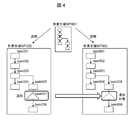
- the term “diversion relationship of work procedures” is used, which means a relationship of whether or not the diversion sources of work procedures are the same. For example, as shown in FIG. 3, when two work procedures “WF002” and “WF003” are created by diverting the work procedure “WF001”, the work procedure “WF002” and “WF003” are created. It is assumed that the work procedure is “relevant”.
- work procedure 2 and work procedure 3 are created by diverting work procedure 1 composed of 100 tasks “task1” to “task100”, and worker A is at site 1
- work procedure 2 is executed and the worker B executes the work procedure 3 at the base 2.
- worker A has made a change for work procedure 2 to update the content of the task “task99”.
- this work procedure management system In practice, in this work procedure management system 1, when a worker changes the work procedure by operating the client terminal 2, the worker notifies the worker who executes the relevant work procedure of the condition to notify the change. (Hereinafter, this is referred to as a notification condition). Specifically, the worker designates, as such a notification condition, a timing for notifying a worker who executes the related work procedure of the change of the work procedure performed by the worker.
- the change content and the notification condition are transmitted from the client terminal 2 to the work procedure support server 3 as change notification information.
- the work procedure support server 3 manages the diversion relationship of the work procedure, and when the above change notification information is transmitted from the client terminal 2, among the related work procedures having the diversion relationship with the changed work procedure, A related work procedure having the same task structure as the changed work procedure is detected. Then, the work procedure support server 3 transmits an update notification having the same content as the change notification information transmitted from the client terminal 2 to the client terminal 2 of each worker who executes each detected related work procedure.
- the client terminal 2 that has received this change notification checks the progress of the current work procedure (related work procedure), and if the timing that matches the notification condition specified in the change notification has not yet passed, A message indicating that the work procedure should be updated (hereinafter referred to as a change message) is displayed at a timing that matches the notification conditions, and then the work procedure (related work procedure) in which the self displays the information on the update of the work procedure. ).
- a change message A message indicating that the work procedure should be updated
- the client terminal 2 applies the message indicating that the work procedure should be updated and whether or not the change of the work procedure is actually applied.
- a change message including a message asking the worker to determine whether or not the work procedure is changed so that when the worker operates to change the work procedure, the work procedure (related work procedure) in which the self displays the change of the work procedure. ).
- the main storage device 21 of the work procedure support server 3 includes a notification condition receiving unit 30, a notification condition storage unit 31, and diversion.
- a management unit 32, an affected work procedure identification unit 33, and a notification condition transmission unit 34 are stored.
- the auxiliary storage device 22 of the work procedure support server 3 is provided with a data storage area 35 for storing each document constituting the task, as well as a work procedure information table 36, a task information table 37, a document information table 38, and a diversion.
- a management table 39 and a change notification information table 40 are stored.
- the notification condition receiving unit 30 is a program having a function of receiving the above-described change notification information transmitted from the client terminal 2, and the notification condition storage unit 31 registers the received change notification information in the change notification information table 40. It is a program having a function.
- the diversion management unit 32 is a program having a function of managing the diversion relationship of work procedures
- the affected work procedure specifying unit 33 refers to the diversion relationship of work procedures managed by the diversion management unit 32 and changes It is a program having a function of specifying a related work procedure having the same task configuration as that of the changed work procedure among the related work procedures of the performed work procedure.
- the notification condition transmission unit 34 is a program having a function of transmitting the above change notification to the client terminal 2 of the worker who executes the related work procedure specified by the affected work procedure specifying unit 33.
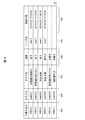
- the work procedure information table 36 is a table used for managing each work procedure. As shown in FIG. 8, the work procedure information column 36A, task ID column 36B, task name column 36C, progress column 36D, user A name column 36E and a registration date / time column 36F are provided.
- the work procedure ID column 36A stores an identifier (work procedure ID) specific to each work procedure assigned to each work procedure, and the task ID column 36B constitutes a corresponding work procedure.
- a unique identifier (task ID) assigned to each task is stored.
- the task name column 36C stores a label (task name) given by the user to the corresponding task
- the progress column 36D indicates that a worker who executes the corresponding work procedure operates the client terminal 2.
- Stores the progress information (not started, started or completed) indicating the progress status of the corresponding task notified from the client terminal 2.
- the user name column 36E stores the identifier (user name) of the worker who executed or is executing the corresponding task
- the registration date / time column 36F stores the date / time when the corresponding task was started.
- the work procedure “WF001” is “switching the switchboard”, “removing the switchboard”, “part inspection”, “part replacement”, “attaching the switchboard”, and “creating a report”, respectively. It is shown that it is composed of six tasks ("task001" to "task006") assigned task names.
- the task information table 37 is a table used for managing the tasks constituting the work procedure, and includes a task ID column 37A, a document ID column 37B, and a document name column 37C as shown in FIG.
- the task ID column 37A stores a task ID assigned to each task
- the document ID column 37B stores an identifier (document ID) assigned to a document constituting the corresponding task.
- the document name column 37C stores a label (document name) given to the corresponding document.
- the task “task001” has a document ID “doc001” with a document name “preparation.doc” and a document ID “doc002” with a document name “record.doc”.
- the task “task002” consists of a document with a document ID of "doc003” with a document name of "switchboard instruction manual.doc” and a document with a document name of "equipment photo.jpg” and "doc004" It is shown that the document is composed of an ID document (photograph) and a document with a document ID “doc005” having a document name “inspection item.xls”.
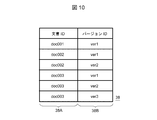
- the document information table 38 is a table used for managing each document, and includes a document ID column 38A and a version ID column 38B as shown in FIG.
- the document ID column 38A stores all document IDs assigned to individual documents
- the version ID column 38B stores version identifiers (version IDs) that exist for the corresponding documents.
- the diversion management table 39 is a table used for holding and managing diversion relationship information, which is information representing the diversion relationship of work procedures, and as shown in FIG. 11, a link ID column 39A and a diversion source ID column 39B. And a diversion destination ID column 39C.
- the link ID column 39A stores an identifier (link ID) assigned to each diversion relationship
- the diversion source ID column 39B stores the work procedure ID of the diversion source work procedure.
- the work procedure ID of the work procedure of the diversion destination is stored.
- the work procedures “WF002” and “WF003” are created by diverting the work procedure “WF001”, respectively, and the two operations “WF001” and “WF002” are performed.
- the link ID “link001” is assigned to the diversion relationship of the procedure, and the link ID “link002” is assigned to the diversion relationship of the two work procedures “WF001” and “WF003”. ing.
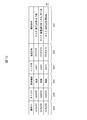
- the change notification information table 40 is a table used to hold change notification information transmitted from the client terminal 2 and is created for each work procedure registered in the work procedure support server 3. As shown in FIG. 12, the change notification information table 40 includes a notification ID column 40A, a task ID column 40B, a change type column 40C, a user name column 40D, a registration date / time column 40E, and a notification condition column 40F.
- the notification ID column 40A stores an identifier (notification ID) unique to the change notification information given to the received change notification information by the work procedure support server 3, and the task ID column 40B stores the change target.
- the task ID of the task is stored.
- the change type column 40C stores the change type (addition, update, or deletion) of the corresponding task
- the user name column 40D stores the user name of the worker who changed the task (changes the work procedure). Is stored.
- the registration date / time column 40E stores the date / time when the work procedure support server 3 received the corresponding change notification information
- the notification condition column 40F stores the notification condition included in the change notification information.
- the change notification information with the notification ID “notify001” received by the work procedure support server 3 on “2014/3/5” This is a change in the work procedure for “adding” the task “task006” performed, and the notification condition is “when task (part inspection) is completed”.
- the change notification information transmitted from the client terminal 2 to the work procedure support server 3 includes at least these pieces of information.
- the main storage device 11 of the client terminal 2 stores a notification condition reception unit 50, a notification condition registration unit 51, a notification determination unit 52, and a display unit 53.
- a notification condition table 54 is stored in the auxiliary storage device 12.
- the notification condition reception unit 50 is a program having a function of receiving a change notification transmitted from the work procedure support server 3, and the notification condition registration unit 51 receives the change notification received by the notification condition reception unit 50. Is a program having a function of registering in
- the notification determination unit 52 is a program having a function of determining whether or not to display a change message on the output device 14 based on the change notification registered in the notification condition table 54.
- the display unit 53 is a program having a function of causing the output device 14 to display various screens and the above-described change message.
- the notification condition table 54 is a table used for holding a change notification from the work procedure support server 3 received by the client terminal 2.
- the notification condition table 54 has substantially the same configuration as the change notification information table 40 described above with reference to FIG.
- FIG. 13 shows a screen configuration of the work procedure execution screen 60 displayed on the client terminal when the worker executes the work procedure.
- the work procedure execution screen 60 displays to the worker the execution order of each task constituting the work procedure to be executed by the worker at that time and the specific contents of each task, and the progress of these tasks. It is a screen for an operator to input a situation.
- the work procedure execution screen 60 displays a check box 62 and an execution button 63 corresponding to these task names 61, respectively.
- the worker executes the work procedure
- the worker executes the task whose task name 61 is listed on the work procedure execution screen 60 in the order listed in the work procedure execution screen 60.
- the execution button 63 is tapped before starting.
- the character string displayed on the execution button 63 is updated from “execute” to “complete”.
- the client terminal 2 notifies the work procedure support server 3 to that effect, and based on this, the progress column 36D (FIG. 8) of the work procedure information table 36 (FIG. 8).
- the progress information stored in 8) is updated from “not started” to “being started”.
- the worker can display the document constituting the task on the client terminal 2 by tapping the line corresponding to the task. Thereby, the worker can perform the task as prescribed while referring to the document displayed on the client terminal 2.
- the worker When the worker completes the task, the worker taps the execution button 63 (execution button 63 whose displayed character string has changed to “complete”) corresponding to the task. As a result, a check mark 64 is displayed in the check box 62 associated with the task.
- the client terminal 2 notifies the work procedure support server 3 that the task has been completed, and based on this, the progress information stored in the progress column 36D of the work procedure information table 36 is changed from “being started” to “ Updated to “Complete”.
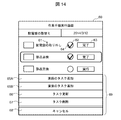
- the line corresponding to the desired task on the work procedure execution screen 60 is long pressed. Select the task.
- a task operation menu 69 including a task add button 65A immediately before, a task add button 65B immediately after, a task update button 66, a task delete button 67, and a cancel button 68.
- a row corresponding to the task selected at this time (hereinafter referred to as a selected task) is surrounded by a frame or highlighted.
- the worker can switch the display screen of the client terminal 2 to the task addition screen 70 shown in FIG. 15 by tapping the task addition button 65A immediately before the task operation menu 69 or the task addition button 65B immediately after. .
- the task addition screen 70 is displayed immediately before (immediately after the task addition button 65A is tapped) or just after (right after) the task selected on the work procedure execution screen 60 as described above (hereinafter referred to as a selected task).
- This is a screen for setting a change in the work procedure of adding a new task (when the task addition button 65A is tapped), an additional task name field 71, a plurality of notification condition fields 72, and a condition addition button 73.
- the additional task name field 71 is a text box for setting a task name of a task to be added immediately before or immediately after the task selected on the work procedure execution screen 60, and the worker inputs a desired task name. Can do.
- the notification condition field 72 is a text box for setting a condition (notification condition) for displaying the above change message on the client terminal 2 of the worker who executes the related work procedure.
- a condition notification condition
- the timing at which the task can be notified is a default value. May be displayed.
- Not only one notification condition but also a plurality of notification conditions can be set by setting each notification condition in each notification condition field 72 of the task addition screen 70. In this case, when all the set notification conditions are satisfied, a change message as described below is displayed on the client terminal 2. Further, on the task addition screen 70, a notification condition field 72 can be additionally displayed by tapping a condition addition button 73, whereby an arbitrary number of notification conditions can be set.
- the registered document field 74 is a field for setting a document constituting the task to be added at that time.
- the worker can set the document as a document constituting the task by inputting a document name of a desired document from documents registered in the work procedure support server 3 in advance.
- the task is constituted by the plurality of documents.
- a pull-down menu in which the document names of all the documents already registered in the work procedure support server 3 are displayed, and the worker can select from the pull-down menu. You may do it.
- the registration button 75 is tapped. Changes can be made to add the task to the currently executing work procedure.
- the content set on the task addition screen 70 is transmitted from the client terminal 2 to the work procedure support server 3 as change notification information as described above.
- tapping the cancel button 76 closes the task addition screen 70 without causing the work procedure support server 3 to transmit the contents set on the task addition screen 70 as change notification information.
- the work procedure execution screen 60 (FIG. 13) can be returned to.
- the worker can switch the display screen of the client terminal 2 to the task update screen 80 shown in FIG. 16 by tapping the task update button 66 of the task operation menu 69 described above with reference to FIG.
- the task update screen 80 is a screen for performing a setting for updating the setting content of the task (selected task) selected on the work procedure execution screen 60, and includes an additional task name field 81, a plurality of notification condition fields 82, and the like. , A condition addition button 83, a registered document field 84, a registration button 85, and a cancel button 86.
- additional task name field 81 The functions and configurations of these additional task name field 81, notification condition field 82, condition addition button 83, and registered document field 84 are the same as the corresponding parts of the task addition screen 70 described above with reference to FIG. However, on the task update screen 80, the task name, notification condition, and registered document set at that time for the selected task are stored in the additional task name field 81, the notification condition field 82, and the registered document field 84, respectively, by default.
- the task name of the selected task stored in the additional task name field 81 of the task update screen 80, the notification condition set in the notification condition field 82, and the registered document field 84 are set.
- the registered document can be freely updated by the worker.
- the worker sets the change by tapping the registration button 85 after updating the desired item from the task name of the selected task, the notification condition, and the registered document on the task update screen 80. be able to.
- the content set on the task update screen 80 is transmitted from the client terminal 2 to the work procedure support server 3 as change notification information.
- the worker taps the cancel button 86 to close the task update screen 80 without transmitting the contents set on the task update screen 80 as change notification information to the work procedure support server 3.
- the display screen of the terminal 2 can be returned to the work procedure execution screen 60 (FIG. 13).
- the worker can switch the display screen of the client terminal 2 to the task deletion screen 90 shown in FIG. 17 by tapping the task deletion button 67 of the task operation menu 69 described above with reference to FIG.
- the task deletion screen 90 is a screen for performing settings for deleting the task (selected task) selected on the work procedure execution screen 60 from the work procedure currently being executed.
- the task name 91 of the selected task to be deleted is displayed in a state where it cannot be changed.
- a plurality of notification condition fields 92, an add condition button 93, a registration button 94, and a cancel button 95 are displayed on the task deletion screen 90.
- the functions and configurations of the notification condition field 92 and the condition addition button 93 are the same as the corresponding parts of the task addition screen 70 described above with reference to FIG.
- the worker can set such a change by tapping the registration button 94 after setting a desired notification condition in the notification condition field 92 on the task deletion screen 90.
- the content set on the task deletion screen 90 is transmitted from the client terminal 2 to the work procedure support server 3 as change notification information.
- the worker taps the cancel button 95 to close the task deletion screen 90 without transmitting the contents set on the task deletion screen 90 as change notification information to the work procedure support server 3 at that time.
- the display screen of the client terminal 2 can be returned to the above-described work procedure execution screen 60 (FIG. 13).
- the worker can close the task operation menu 69 without setting the task addition, change or deletion by tapping the cancel button 68 of the task operation menu 69 described above with reference to FIG.
- FIG. 18 is a table of the work procedure execution screen 60 that is displayed when the client terminal 2 that has received the change notification from the work procedure support server 3 has reached a timing that matches the notification conditions included in the change notification. An example is shown.
- the task name of the target task is surrounded by a frame or highlighted, and a change message display area 100 is displayed at the bottom of the screen.
- a change message display area 100 there is a change message composed of a character string “change notification!”
- a character string indicating the task to be changed To call attention to the worker, a character string indicating the task to be changed, and a character string with a content prompting application of the change.
- an apply button 101 is displayed.
- the worker can cause the client terminal 2 to change the work procedure according to the change message by tapping the apply button 101 displayed in the change message display area 100. Specifically, the display content of the work procedure execution screen 60 is changed according to the change notification.
- FIG. 19 shows a work procedure execution screen 60 displayed when the target task has already been completed at the stage of receiving the change notification in the client terminal 2 that has received the change notification from the work procedure support server 3.
- a display example is shown.
- the task name of the target task is surrounded by a frame, and a change message display area 110 is displayed at the bottom of the screen.
- a character string “change notification!” That alerts the worker a character string that represents the task to be changed, and a content that prompts the worker to determine whether to apply the change.
- a change message consisting of the character string is displayed, and an OK button 111 is further displayed.
- the worker can delete the change message display area 110 from the work procedure execution screen 60 by tapping the OK button 111 displayed in the change message display area 110.
- the worker determines whether or not the work procedure needs to be changed by, for example, consulting with a superior, and if the worker determines that the change is necessary, the worker determines that the change is necessary.
- the corresponding task is changed manually by operating.
- FIG. 20 shows a work procedure change acceptance processing procedure executed by the notification condition registration unit 51 of the client terminal 2.
- the notification condition registration unit 51 starts this processing when one task is selected by a long press operation on the work procedure execution screen 60 (FIG. 13).
- the task operation menu 69 is displayed on the work procedure execution screen 60.
- An instruction is given to the display unit 53 (FIG. 1) to display (FIG. 14) (SP).
- the notification condition registration unit 51 waits for any one of the task addition button 65, the task update button 66, the task deletion button 67, and the cancel button 68 of the task operation menu 69 to be tapped (SP1 to SP1). SP5).
- the notification condition registration unit 51 ends this work procedure change acceptance process.
- the notification condition registration unit 51 instructs the display unit 53 to display the task addition screen 70 described above with reference to FIG. 15 (SP6).
- the notification condition registration unit 51 then taps the registration button 75 (FIG. 15) after the task name, notification conditions, and registered document of the task to be added at that time are set on the task addition screen 70.
- the registration button 75 is tapped (SP7: YES)
- the process proceeds to step SP12.
- the notification condition registration unit 51 instructs the display unit 53 to display the task update screen 80 described above with reference to FIG. 16 (SP8). After that, the notification condition registration unit 51 updates the task name, notification conditions, and part or all of the registered document of the task to be updated at this time on the task update screen 80, and then the registration button 85 (FIG. 16). ) Is tapped (SP9), and when the registration button 85 is tapped (SP9: YES), the process proceeds to step SP12.
- the notification condition registration unit 51 instructs the display unit 53 to display the task deletion screen 90 described above with reference to FIG. 17 (SP10). Then, the notification condition registration unit 51 waits for the registration button 94 to be tapped after the notification condition is set on the task deletion screen 90 (SP11), and when the registration button 94 is tapped (SP11) : YES), the process proceeds to step SP12.
- the notification condition registration unit 51 generates change notification information according to the contents set on the task addition screen 70, the task update screen 80, or the task deletion screen 90 (SP12), and operates the generated change notification information. After transmitting to the procedure support server 3 (SP13), this work procedure change acceptance process is terminated.
- FIG. 21 shows the processing procedure of the change notification information receiving process executed in the work procedure support server 3 that has received the change notification information from the client terminal 2.
- the change notification information receiving process is started.
- the change notification information received by the notification condition receiving unit 30 (FIG. 1) is the notification condition. It is registered in the change notification information table 40 (FIG. 12) by the storage unit 31 (SP20).
- the affected work procedure specifying unit 33 specifies the work procedure (related work procedure of the changed work procedure) affected by the change of the work procedure recognized based on the change notification information, An affected work procedure list in which only the identified related work procedures are posted is created (SP21).
- the notification condition transmission unit 34 (FIG. 1) transmits a change notification to the client terminal 2 held by the worker who executes each related work procedure listed in the affected work procedure list (see FIG. 1). SP22).
- the change notification information receiving process in the work procedure support server 3 is completed.
- FIG. 22 shows the affected work procedure specifying process executed by the affected work procedure specifying unit 33 in step SP21 of the change notification information receiving process.
- the affected work procedure specifying unit 333 specifies the related work procedure of the changed work procedure according to the processing procedure shown in FIG.
- the affected work procedure specifying unit 33 starts the affected work procedure specifying process shown in FIG. 22 in step SP21 of the change notification information receiving process, and is first registered in the diversion management table 39 (FIG. 11). All information (hereinafter referred to as diversion-related information) is acquired (SP30).
- the affected work procedure specifying unit 33 based on the diversion relationship information acquired in step SP30, has a work procedure (relevant) that has a diversion relationship with the changed work procedure (hereinafter referred to as a change source work procedure).
- a list in which only (work procedure) is posted hereinafter referred to as a diversion-related work procedure list
- an empty above-described affected work procedure list is created together with this (SP31).
- the affected work procedure specifying unit 33 selects one unprocessed related work procedure from the related work procedures registered in the diverted related work procedure list (SP32), and selects the selected related work procedure and the change source.
- the task configuration is compared with the work procedure (SP33).
- the affected work procedure specifying unit 33 determines whether or not the related work procedure selected in step SP32 matches the task procedure of the change source based on the comparison result in step SP33 (SP34). If the affected work procedure specifying unit 33 obtains a negative result in this determination, the process proceeds to step SP36.
- the affected work procedure specifying unit 33 obtains a positive result in the determination at step SP34, it registers the related work procedure selected at step SP32 in the affected work procedure list created at step SP31 (SP35). .
- the affected work procedure specifying unit 33 determines whether or not the processing of step SP32 to step SP35 has been executed for all related work procedures registered in the diversion related work procedure list (SP36). If the affected work procedure specifying unit 33 obtains a negative result in this determination, the affected work procedure specifying unit 33 returns to step SP, and thereafter switches the related work procedure selected in step SP32 to another related work procedure that has not yet been processed. The process of step SP36 is repeated.
- step SP36 Eventually, when the affected work procedure specifying unit 33 obtains a positive result in step SP36 by completing the processing of steps SP32 to SP35 for all the related work procedures registered in the diversion related work procedure list, The work procedure specifying process is terminated.
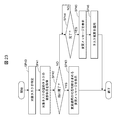
- FIG. 23 shows change message display processing executed by the notification determination unit 52 (FIG. 1) in the client terminal 2 that has received the change notification from the work procedure support server 3. A processing procedure is shown.
- FIG. 23 shows an example in which “immediately after the task immediately before the target task is completed” is set as the notification condition.
- the notification determination unit 52 receives the change notification from the work procedure support server 3 by the notification condition receiving unit 50 (FIG. 1), and the notification condition registration unit 51 (FIG. 1) receives the received change notification from the notification condition table 54 (FIG. 1). 1), the change message display process is started. First, the notification condition is extracted from the change notification information received by the notification condition receiving unit 50, and the target task (hereinafter referred to as this) is based on the change notification. Is called a target task) (SP40).
- the notification determination unit 52 acquires the progress status of a task (hereinafter referred to as “previous task”) to be executed immediately before the identified target task according to the notification conditions from the internal information (SP41), and the progress status Based on the above, it is determined whether or not the immediately preceding task has already been completed (SP42).
- the determination part 52 obtains an affirmative result in this determination, it instructs the display part 53 to display the change message described above with reference to FIG. 19 for determining whether to apply the task change based on the change notification. (SP43). After that, when the operator taps the OK button 111 displayed together with the change message, the notification determination unit 52 ends the change message display process after deleting the change message.
- the notification determination unit 52 obtains a negative result in the determination at step SP42, it waits for the task immediately before the target task specified at step SP40 to be completed (SP44). Then, when the notification determination unit 52 detects that the worker has completed the task immediately before the target task, based on the operation input of the worker, the change described above with reference to FIG. 18 corresponding to the content of the change notification received at that time The display unit 53 is instructed to display a message (SP45).
- the notification determination unit 52 applies the task change (work procedure change) based on the change notification related to the current work procedure when the worker taps the apply button 101 displayed together with the change message. SP46) Thereafter, the change message display process is terminated.
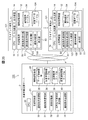
- a worker who executes the work procedure “WF002” executes two tasks “task1” and “task2” in order (SP50, SP51). Then, when the worker finds that the task needs to be corrected when the subsequent task “task3” is executed (SP52), the worker operates the client terminal 2 to correct “task3” (SP53).
- the client terminal 2 generates change notification information related to the modification of the task “task3”, registers the generated change notification information in the notification condition table 54 (FIG. 1) (SP54), and then the change The notification information is transmitted to the work procedure support server 3 (S55P).
- the work procedure support server 3 executes the processing described above with reference to FIGS.
- the work procedure “WF003” that is diverted to the recognized work procedure “WF002” is specified (SP60).
- the work procedure support server 3 transmits a change notification corresponding to the change notification information to the client terminal 2 held by the worker who executes the specified work procedure “WF003” (SP61).
- the client terminal 2 held by the worker who is executing the work procedure “WF003” receives the change notification transmitted by the work procedure support server 3 in step SP61 during the execution of the task “task1”, for example (SP63). ), Monitoring of the progress of the task is started (SP64).
- the client terminal 2 when the worker executes the tasks “task1” and “task2” (SP62, SP65), and the worker inputs an operation to that effect after the task "task2" is completed, Based on the change notification received in step SP63, the change message described above with reference to FIG. 18 is displayed on the work procedure execution screen 60 (SP66), and then when the worker taps the apply button 101 (FIG. 18), The change is applied to the work procedure currently being executed (SP67). Thus, the worker executes the task “task3” according to the work procedure to which the change is applied (SP68), and then sequentially executes the subsequent tasks “task4” to “task6”.
- the client terminal 2 can display the change message at an appropriate timing and notify the worker of the change of the work procedure at an appropriate timing. Accidents can be prevented effectively.
- the change message can be displayed at an appropriate timing, the change message can be avoided from being displayed wastefully and the execution of the work procedure can be efficiently supported.
- FIG. 25 shows the second embodiment. 1 shows a work procedure management system 120.
- the work procedure management system 120 uses, for example, display information such as a barcode or a two-dimensional code (hereinafter, referred to as a two-dimensional code), etc.
- the identifier of the part, information such as the year of manufacture and / or manufacturer, which is hereinafter referred to as task information) is collected by the client terminal 121 of the worker, and the client terminal 121 is based on the collected task information. It is characterized by determining whether or not to display a change message.
- the task information of each task constituting the work procedure executed by the worker is stored for each task in the device or part that is the target of the task. It is displayed as a dimension code.
- the client terminal 121 has a two-dimensional code reader function for reading information from the two-dimensional code.
- the worker obtains task information of the task recorded as the two-dimensional code in the client terminal 121 by placing the client terminal 121 on the two-dimensional code written on the device or the part before starting the task.
- the client terminal 121 transmits the notification conditions included in the change notification and each of the operations executed by the worker so far acquired as described above.
- the task information of the task is compared, and the change message described above with reference to FIG. 18 or FIG. 19 is displayed at a predetermined timing based on the comparison result.
- the data collection unit 123 is stored, and the auxiliary storage device 12 of the client terminal 121 includes a notification condition.
- a collected data table 124 is stored.
- the data collecting unit 123 When executing the task of the work procedure, the data collecting unit 123 has a function of reading (collecting) task information of a task to be executed next by the worker from a two-dimensional code or the like according to the operation of the worker. It is a program that has. The data collection unit 123 registers the collected task information in the collection data table 124.
- the collection data table 124 is a table used for managing task information of each task collected by the data collection unit 123. As shown in FIG. 26, the collected data table 124 includes a data ID column 124A, a task ID column 124B, a data item column 124C, a data value column 124D, a collection date / time column 124E, and a user name column 124F.
- the data ID column 124A stores an identifier (data ID) unique to the task information given to the task information collected by the data collection unit 123, and the task ID column 124B corresponds to the task information.
- the task ID of the task to be stored is stored.
- the data item column 124C stores the item name of the data item included in the corresponding task information
- the data value column 124D stores the data value of the data item.
- the collection date / time column 124E stores the date / time when the task information was collected
- the user name column 124F stores the identifier (user name) of the worker who executed the task.
- the task information “data001” collected by the worker “user1” at “2014/3/5 10:00:00” corresponds to the task “task005”.
- “Production year” of “Part x” is “1992”.
- FIG. 27 shows the client terminal 121 of this work procedure management system 120 in place of the task addition screen 70 of the first embodiment described above with reference to FIG.
- the task addition screen 130 of the embodiment displayed when necessary is shown.
- This task addition screen 130 is a screen for setting a work procedure change in which a new task is added immediately before the task (selected task) selected on the work procedure execution screen 60 (FIG. 13).
- a task name field 131, a notification condition field 132, a registered document field 133, a registration button 134, and a cancel button 135 are provided.
- FIG. 27 shows a change message displayed on the client terminal 121 of the worker who executes the relevant work procedure when the “manufacturing year” of the “part x” targeted in the task is older than “1992”. An example of what should be set as a notification condition is shown.
- This notification condition can be freely set by the worker, and a plurality of notification conditions can also be set.
- the change message as described above is displayed on the client terminal 2 when all the set notification conditions are satisfied.
- the notification condition worker may input the notification condition in the notification condition field 132 as a character string, or may display the notification condition that can be set using the task information of the task as a default value. .
- FIG. 28 shows the processing procedure of the change message display processing according to this embodiment executed in the client terminal 121 that has received the change notification from the work procedure support server 3. Show.
- the notification condition receiving unit 50 receives the change notification
- the change message display process shown in FIG. 28 is started.
- the change notification received by the notification condition receiving unit 50 is sent to the notification condition registration unit 51 ( 25) registers in the notification condition table 54 (FIG. 25) (SP70).
- the notification determination unit 122 extracts the notification condition from the change notification, and based on the extracted notification condition and the task information registered in the collection data table 124 (FIG. 26), FIG. 18 and FIG. A message display availability determination process for determining whether or not to display the above-described change message is executed (SP71). Then, the notification determination unit 122 determines whether or not to display a change message based on the determination result of the message display permission / inhibition determination process (SP72). finish.
- step SP72 the notification determination unit 122 gives an instruction to the display unit 53 (FIG. 25) to display the change message described above with reference to FIGS. 18 and 19 (SP73). ). Further, when an operation input for approving the change of the work procedure is given from the worker (when the apply button 101 in FIG. 18 or the OK button 111 in FIG. 19 is tapped), the notification determination unit 122 takes the current work procedure. The task change (work procedure change) based on the change notification is applied (SP74), and then the change message display process is terminated.
- FIG. 29 shows a specific processing procedure of the above-described message display availability determination process executed by the notification determination unit 122 in step SP71 of the change message display process.
- the notification determination unit 122 proceeds to step SP71 of the change message display process, the notification determination unit 122 starts the message display availability determination process shown in FIG. 29.
- the notification condition registration unit 51 sets the notification condition.
- the change condition included in the change notification registered in the table 54 is acquired from the notification condition table 54 (SP80).
- the notification determination unit 122 searches the collected data table 124 for the data value of the data item specified in the notification condition acquired in step SP80 (SP81), and whether or not the data value has been acquired (SP81). It is determined whether or not such a data value has been detected (SP82).
- the notification determination unit 122 waits for the data value of the data item specified in the notification condition acquired in step SP80 to be registered in the collected data table 124 (SP82).
- the notification determination unit 122 acquires the data value (SP83), and whether the acquired data value satisfies the notification condition acquired in step SP80. It is determined whether or not the condition is satisfied (SP84).
- the determination part 122 determines to display the change message (SP85), and then ends this message display permission determination process and proceeds to the change message display process (FIG. 27). Return.
- the determination part 122 when it obtains a negative result in the determination at step SP84, it decides not to display the change message (SP86), and thereafter ends this message display availability determination process and displays the change message. Return to processing.
- the work procedure management system 120 not only the timing of displaying the change message but also items that can be registered as task information can be set as notification conditions, and thus compared with the first embodiment. More detailed notification conditions can be set.
- the notification condition receiving unit 30 the notification condition storage unit 31, the diversion management unit 32, and the affected party in the work procedure management systems 1 and 120.
- the case where the work procedure specifying unit 33, the notification condition transmitting unit 34, the notification condition receiving unit 50, the notification condition registering unit 51, the notification determining unit 52, the display unit 53, and the data collecting unit 123 are configured as a program has been described.
- the present invention is not limited to this, and some of these may be configured as hardware.
- the present invention is not limited to this.
- an operator may inform the operator of the contents to be changed in the work procedure by telephone or the like during the work or directly after the work, and the operator may change the work procedure by using a computer device other than the client terminals 2 and 121. good.
- the task information of each task has been described as being displayed as a two-dimensional code on a device or a part that is the target of the task.
- a code list in which task information of each task is respectively expressed as a two-dimensional code is lent to the worker together with the client terminal 121, and when the worker starts the task, the worker corresponds to the corresponding two-dimensional code in the code list.
- the code may be read by the client terminal 121.
- the present invention is not limited to this, and other task display methods can be used for each task.
- the task information may be displayed so that the client terminal 121 can read the task information.
- the present invention is not limited to this, and the two-dimensional code reader is connected to the client terminal 121.
- the task information read from the two-dimensional code by the two-dimensional code reader may be transmitted to the client terminal 121.
- the present invention can be widely applied to work procedure management systems having various configurations for managing a plurality of work procedures executed at different sites.
- Notification condition accepting unit 51 ?? Notification condition registering unit, 52, 122 ?? Notification determining unit, 53 ?? Display unit, 54 ; Notification condition table, 60 ?? Work procedure execution screen, 69 ?? Task operation menu 70, 130 ... Task addition screen, 80 ... Task update screen, 90 ... Task deletion screen, 100, 110 ... Change message display area, 101 ... Apply button, 111 ... OK button, 123 ... Data collection Part, 124... Collection data table.
Landscapes
- Business, Economics & Management (AREA)
- Engineering & Computer Science (AREA)
- Human Resources & Organizations (AREA)
- Physics & Mathematics (AREA)
- General Physics & Mathematics (AREA)
- Economics (AREA)
- Entrepreneurship & Innovation (AREA)
- Strategic Management (AREA)
- Automation & Control Theory (AREA)
- Educational Administration (AREA)
- Operations Research (AREA)
- Quality & Reliability (AREA)
- Tourism & Hospitality (AREA)
- Marketing (AREA)
- General Business, Economics & Management (AREA)
- Game Theory and Decision Science (AREA)
- Theoretical Computer Science (AREA)
- Development Economics (AREA)
- Management, Administration, Business Operations System, And Electronic Commerce (AREA)
- General Factory Administration (AREA)
Abstract
Cette invention concerne un procédé et un système de gestion d'organisation des tâches apte à empêcher de manière préventive et efficace un déclin de la qualité du travail et la génération d'accidents, et à empêcher un déclin de la qualité du travail et la génération d'accidents. Ledit système de gestion de procédures de travail comprend une pluralité de terminaux clients qui sont distribués respectivement aux employés et un dispositif serveur qui fournit des informations relatives à des procédures de travail à chacun des terminaux client, dans lequel : une première unité de traitement du dispositif serveur stocke, dans un dispositif de mémoire, des informations de relation d'appropriation relatives à une relation d'appropriation de procédures de travail, gère lesdites informations, et si une procédure de travail est modifiée, elle recherche ladite procédure de travail et une autre procédure de travail accompagnée d'une relation d'appropriation et transmet un contenu modifié, en tant que notification de modification, au terminal client de l'employé qui effectue la procédure de travail détectée par la recherche ; et une seconde unité de traitement du terminal client qui a reçu la notification de modification commande un dispositif de sortie de sorte qu'il affiche, au moment approprié, un message qui correspond au contenu modifié de la procédure de travail.
Priority Applications (2)
| Application Number | Priority Date | Filing Date | Title |
|---|---|---|---|
| PCT/JP2014/066360 WO2015194021A1 (fr) | 2014-06-19 | 2014-06-19 | Procédé et système de gestion de procédures de travail |
| US15/126,750 US20170097625A1 (en) | 2014-06-19 | 2014-06-19 | Operation procedure management method and system |
Applications Claiming Priority (1)
| Application Number | Priority Date | Filing Date | Title |
|---|---|---|---|
| PCT/JP2014/066360 WO2015194021A1 (fr) | 2014-06-19 | 2014-06-19 | Procédé et système de gestion de procédures de travail |
Publications (1)
| Publication Number | Publication Date |
|---|---|
| WO2015194021A1 true WO2015194021A1 (fr) | 2015-12-23 |
Family
ID=54935050
Family Applications (1)
| Application Number | Title | Priority Date | Filing Date |
|---|---|---|---|
| PCT/JP2014/066360 Ceased WO2015194021A1 (fr) | 2014-06-19 | 2014-06-19 | Procédé et système de gestion de procédures de travail |
Country Status (2)
| Country | Link |
|---|---|
| US (1) | US20170097625A1 (fr) |
| WO (1) | WO2015194021A1 (fr) |
Cited By (1)
| Publication number | Priority date | Publication date | Assignee | Title |
|---|---|---|---|---|
| EP3244277A1 (fr) * | 2016-05-09 | 2017-11-15 | Yokogawa Electric Corporation | Procédé et appareil d'optimisation de systèmes de contrôle de processus |
Families Citing this family (2)
| Publication number | Priority date | Publication date | Assignee | Title |
|---|---|---|---|---|
| US11157293B2 (en) | 2018-04-18 | 2021-10-26 | Microsoft Technology Licensing, Llc | Dynamic incident console interfaces |
| US11740932B2 (en) * | 2018-05-04 | 2023-08-29 | Apple Inc. | Systems and methods for task switching in neural network processor |
Citations (8)
| Publication number | Priority date | Publication date | Assignee | Title |
|---|---|---|---|---|
| JP2000090163A (ja) * | 1998-09-10 | 2000-03-31 | Omron Corp | 作業指示・支援装置 |
| JP2006107204A (ja) * | 2004-10-06 | 2006-04-20 | Nec Corp | マニュアル提供方法、マニュアル提供システム及びサーバ |
| JP2006323703A (ja) * | 2005-05-19 | 2006-11-30 | Olympus Corp | 組立作業支援システム、そのサーバ、作業者端末、プログラム |
| JP2007011657A (ja) * | 2005-06-30 | 2007-01-18 | Foster Electric Co Ltd | 作業指示配信表示方法及びシステム並びに作業指示配信表示プログラム |
| JP2007048009A (ja) * | 2005-08-09 | 2007-02-22 | Olympus Corp | 作業支援システム、そのデータベースサーバ、作成管理装置、プログラム |
| JP2011076229A (ja) * | 2009-09-29 | 2011-04-14 | Hitachi Ltd | 作業支援システムおよび作業支援方法 |
| JP2012174158A (ja) * | 2011-02-24 | 2012-09-10 | Hitachi Ltd | 作業指図管理方法および作業指図管理システム |
| JP2012185685A (ja) * | 2011-03-07 | 2012-09-27 | Fujitsu Ltd | 作業手順表示装置及び作業管理装置 |
-
2014
- 2014-06-19 WO PCT/JP2014/066360 patent/WO2015194021A1/fr not_active Ceased
- 2014-06-19 US US15/126,750 patent/US20170097625A1/en not_active Abandoned
Patent Citations (8)
| Publication number | Priority date | Publication date | Assignee | Title |
|---|---|---|---|---|
| JP2000090163A (ja) * | 1998-09-10 | 2000-03-31 | Omron Corp | 作業指示・支援装置 |
| JP2006107204A (ja) * | 2004-10-06 | 2006-04-20 | Nec Corp | マニュアル提供方法、マニュアル提供システム及びサーバ |
| JP2006323703A (ja) * | 2005-05-19 | 2006-11-30 | Olympus Corp | 組立作業支援システム、そのサーバ、作業者端末、プログラム |
| JP2007011657A (ja) * | 2005-06-30 | 2007-01-18 | Foster Electric Co Ltd | 作業指示配信表示方法及びシステム並びに作業指示配信表示プログラム |
| JP2007048009A (ja) * | 2005-08-09 | 2007-02-22 | Olympus Corp | 作業支援システム、そのデータベースサーバ、作成管理装置、プログラム |
| JP2011076229A (ja) * | 2009-09-29 | 2011-04-14 | Hitachi Ltd | 作業支援システムおよび作業支援方法 |
| JP2012174158A (ja) * | 2011-02-24 | 2012-09-10 | Hitachi Ltd | 作業指図管理方法および作業指図管理システム |
| JP2012185685A (ja) * | 2011-03-07 | 2012-09-27 | Fujitsu Ltd | 作業手順表示装置及び作業管理装置 |
Cited By (3)
| Publication number | Priority date | Publication date | Assignee | Title |
|---|---|---|---|---|
| EP3244277A1 (fr) * | 2016-05-09 | 2017-11-15 | Yokogawa Electric Corporation | Procédé et appareil d'optimisation de systèmes de contrôle de processus |
| CN107357264A (zh) * | 2016-05-09 | 2017-11-17 | 横河电机株式会社 | 用于优化过程控制系统的方法和设备 |
| CN107357264B (zh) * | 2016-05-09 | 2021-07-09 | 横河电机株式会社 | 用于优化过程控制系统的方法和设备 |
Also Published As
| Publication number | Publication date |
|---|---|
| US20170097625A1 (en) | 2017-04-06 |
Similar Documents
| Publication | Publication Date | Title |
|---|---|---|
| US20130325809A1 (en) | Method for contents backup and an electronic device thereof | |
| US11086692B2 (en) | Multiplatform management system and method for mobile devices | |
| CN112817493B (zh) | 内容共享方法、装置、计算机设备及存储介质 | |
| WO2015194021A1 (fr) | Procédé et système de gestion de procédures de travail | |
| JP6039642B2 (ja) | 記録確立システム及び記録確立方法 | |
| EP2830263B1 (fr) | Dispositif électronique et procédé de gestion de courrier électronique de groupe | |
| JP6280894B2 (ja) | 業務管理支援装置とその方法およびプログラム | |
| US20070225830A1 (en) | Application activating method | |
| JP5809370B1 (ja) | 管理装置及び管理方法 | |
| CN105183440B (zh) | 管理移动装置上的临时内容的方法及装置 | |
| JP5403447B2 (ja) | 仮想マシン管理装置、仮想マシン管理システム、仮想マシン管理方法、及びプログラム | |
| JP2022098500A (ja) | 作業情報を管理する電子装置およびその方法 | |
| JP6001191B2 (ja) | コンテンツ管理システム、コンテンツ管理方法及びコンテンツ管理装置 | |
| US20170277371A1 (en) | Task management device, task management method and computer readable recording medium | |
| JP5967791B2 (ja) | 情報処理方法及び情報処理システム | |
| JP2006323703A (ja) | 組立作業支援システム、そのサーバ、作業者端末、プログラム | |
| JP2018005824A (ja) | 情報処理装置及びプログラム | |
| JP2009026055A (ja) | 表示システム、表示プログラム、および表示方法 | |
| JP5936496B2 (ja) | ジョブ運用管理システム | |
| JP6409541B2 (ja) | 情報管理装置及びプログラム | |
| JP7451992B2 (ja) | クライアント端末、情報処理システム、プログラム及び情報処理方法 | |
| JP6631430B2 (ja) | 情報処理装置及びプログラム | |
| CN118626120B (zh) | 应用市场的管理方法、终端设备及可读存储介质 | |
| JPWO2011117954A1 (ja) | 仮想マシン管理装置、仮想マシン管理方法、及びプログラム | |
| JP2006040153A (ja) | 進捗管理装置及び方法ならびにコンピュータプログラム |
Legal Events
| Date | Code | Title | Description |
|---|---|---|---|
| 121 | Ep: the epo has been informed by wipo that ep was designated in this application |
Ref document number: 14895222 Country of ref document: EP Kind code of ref document: A1 |
|
| WWE | Wipo information: entry into national phase |
Ref document number: 15126750 Country of ref document: US |
|
| NENP | Non-entry into the national phase |
Ref country code: DE |
|
| 122 | Ep: pct application non-entry in european phase |
Ref document number: 14895222 Country of ref document: EP Kind code of ref document: A1 |
|
| NENP | Non-entry into the national phase |
Ref country code: JP |