WO2016027536A1 - 情報処理装置および制御方法 - Google Patents
情報処理装置および制御方法 Download PDFInfo
- Publication number
- WO2016027536A1 WO2016027536A1 PCT/JP2015/064769 JP2015064769W WO2016027536A1 WO 2016027536 A1 WO2016027536 A1 WO 2016027536A1 JP 2015064769 W JP2015064769 W JP 2015064769W WO 2016027536 A1 WO2016027536 A1 WO 2016027536A1
- Authority
- WO
- WIPO (PCT)
- Prior art keywords
- area
- information
- user
- information processing
- processing apparatus
- Prior art date
- Legal status (The legal status is an assumption and is not a legal conclusion. Google has not performed a legal analysis and makes no representation as to the accuracy of the status listed.)
- Ceased
Links
Images







Classifications
-
- G—PHYSICS
- G09—EDUCATION; CRYPTOGRAPHY; DISPLAY; ADVERTISING; SEALS
- G09G—ARRANGEMENTS OR CIRCUITS FOR CONTROL OF INDICATING DEVICES USING STATIC MEANS TO PRESENT VARIABLE INFORMATION
- G09G5/00—Control arrangements or circuits for visual indicators common to cathode-ray tube indicators and other visual indicators
- G09G5/14—Display of multiple viewports
-
- G—PHYSICS
- G06—COMPUTING OR CALCULATING; COUNTING
- G06F—ELECTRIC DIGITAL DATA PROCESSING
- G06F3/00—Input arrangements for transferring data to be processed into a form capable of being handled by the computer; Output arrangements for transferring data from processing unit to output unit, e.g. interface arrangements
- G06F3/01—Input arrangements or combined input and output arrangements for interaction between user and computer
- G06F3/011—Arrangements for interaction with the human body, e.g. for user immersion in virtual reality
- G06F3/012—Head tracking input arrangements
-
- G—PHYSICS
- G06—COMPUTING OR CALCULATING; COUNTING
- G06F—ELECTRIC DIGITAL DATA PROCESSING
- G06F3/00—Input arrangements for transferring data to be processed into a form capable of being handled by the computer; Output arrangements for transferring data from processing unit to output unit, e.g. interface arrangements
- G06F3/01—Input arrangements or combined input and output arrangements for interaction between user and computer
- G06F3/011—Arrangements for interaction with the human body, e.g. for user immersion in virtual reality
- G06F3/013—Eye tracking input arrangements
-
- G—PHYSICS
- G06—COMPUTING OR CALCULATING; COUNTING
- G06F—ELECTRIC DIGITAL DATA PROCESSING
- G06F3/00—Input arrangements for transferring data to be processed into a form capable of being handled by the computer; Output arrangements for transferring data from processing unit to output unit, e.g. interface arrangements
- G06F3/01—Input arrangements or combined input and output arrangements for interaction between user and computer
- G06F3/048—Interaction techniques based on graphical user interfaces [GUI]
-
- G—PHYSICS
- G09—EDUCATION; CRYPTOGRAPHY; DISPLAY; ADVERTISING; SEALS
- G09G—ARRANGEMENTS OR CIRCUITS FOR CONTROL OF INDICATING DEVICES USING STATIC MEANS TO PRESENT VARIABLE INFORMATION
- G09G5/00—Control arrangements or circuits for visual indicators common to cathode-ray tube indicators and other visual indicators
- G09G5/36—Control arrangements or circuits for visual indicators common to cathode-ray tube indicators and other visual indicators characterised by the display of a graphic pattern, e.g. using an all-points-addressable [APA] memory
- G09G5/39—Control of the bit-mapped memory
- G09G5/391—Resolution modifying circuits, e.g. variable screen formats
-
- G—PHYSICS
- G06—COMPUTING OR CALCULATING; COUNTING
- G06F—ELECTRIC DIGITAL DATA PROCESSING
- G06F2203/00—Indexing scheme relating to G06F3/00 - G06F3/048
- G06F2203/048—Indexing scheme relating to G06F3/048
- G06F2203/04803—Split screen, i.e. subdividing the display area or the window area into separate subareas
-
- G—PHYSICS
- G06—COMPUTING OR CALCULATING; COUNTING
- G06F—ELECTRIC DIGITAL DATA PROCESSING
- G06F3/00—Input arrangements for transferring data to be processed into a form capable of being handled by the computer; Output arrangements for transferring data from processing unit to output unit, e.g. interface arrangements
- G06F3/01—Input arrangements or combined input and output arrangements for interaction between user and computer
- G06F3/048—Interaction techniques based on graphical user interfaces [GUI]
- G06F3/0484—Interaction techniques based on graphical user interfaces [GUI] for the control of specific functions or operations, e.g. selecting or manipulating an object, an image or a displayed text element, setting a parameter value or selecting a range
- G06F3/04845—Interaction techniques based on graphical user interfaces [GUI] for the control of specific functions or operations, e.g. selecting or manipulating an object, an image or a displayed text element, setting a parameter value or selecting a range for image manipulation, e.g. dragging, rotation, expansion or change of colour
-
- G—PHYSICS
- G09—EDUCATION; CRYPTOGRAPHY; DISPLAY; ADVERTISING; SEALS
- G09G—ARRANGEMENTS OR CIRCUITS FOR CONTROL OF INDICATING DEVICES USING STATIC MEANS TO PRESENT VARIABLE INFORMATION
- G09G2340/00—Aspects of display data processing
- G09G2340/04—Changes in size, position or resolution of an image
- G09G2340/0407—Resolution change, inclusive of the use of different resolutions for different screen areas
-
- G—PHYSICS
- G09—EDUCATION; CRYPTOGRAPHY; DISPLAY; ADVERTISING; SEALS
- G09G—ARRANGEMENTS OR CIRCUITS FOR CONTROL OF INDICATING DEVICES USING STATIC MEANS TO PRESENT VARIABLE INFORMATION
- G09G2354/00—Aspects of interface with display user
-
- G—PHYSICS
- G09—EDUCATION; CRYPTOGRAPHY; DISPLAY; ADVERTISING; SEALS
- G09G—ARRANGEMENTS OR CIRCUITS FOR CONTROL OF INDICATING DEVICES USING STATIC MEANS TO PRESENT VARIABLE INFORMATION
- G09G2358/00—Arrangements for display data security
Definitions
- the present disclosure relates to an information processing apparatus and a control method.
- Patent Documents 1 and 2 have been proposed for such an image display apparatus that can be viewed by a plurality of people.
- a table-type image display device when an object, such as a meeting material, is displayed on a display and the meeting participants are discussing based on the same object, the participants who are discussing For example, a technique for enlarging (Patent Document 1) or separating (Patent Document 2) and displaying an object has been proposed.
- the present disclosure proposes an information processing apparatus and a control method capable of discriminating between an area that can be viewed by only a specific user and an area that can be viewed by all users on an image presentation surface that a plurality of people view simultaneously. To do.
- a gaze detection unit that detects gazes of a plurality of users with respect to presentation information, and a shared area in which the plurality of users visually recognize and share information based on the detected gazes of the plurality of users.
- an area determination unit that determines a secret area that is not visually recognized by other users and conceals the information of each user.
- detecting a plurality of users 'line of sight with respect to the presentation information, a shared area where the plurality of users visually recognize and share information based on the detected plurality of users' line of sight, and others Proposed is a control method including determining a secret area that is not visually recognized by a user and conceals information of each user.
- FIG. 1 Overview of a control system according to an embodiment of the present disclosure
- a plurality of people (user A, user B) are discussing while browsing the information (still images, moving images, texts, etc.) presented on the table top 6 surrounding the table top 6.
- an image is projected onto the table top 6 by a projector (hereinafter referred to as the information processing apparatus 1) provided in the ceiling hanging unit 5.
- the information processing apparatus 1 a projector provided in the ceiling hanging unit 5.
- User A and user B can discuss while viewing the image projected on the table top 6.
- Information projected by the information processing apparatus 1 may be stored in a storage unit 13 (see FIG. 3, so-called local storage) in the information processing apparatus 1, or a content DB 8 (so-called so-called local network) via the network 7. Web (Storage or server).
- the information processing apparatus 1 may be connected to an external device (such as a mobile terminal) by wireless or wired such as Wi-Fi (registered trademark), Bluetooth (registered trademark), or proximity wireless communication, and acquired from the external device.
- the ceiling hanging unit 5 includes an imaging device 2a.
- the imaging device 2 a continuously images the table top 6 and images a user operation on an image projected on the table top 6. Further, the imaging device 2 a captures an image of a user surrounding the table top 6. An image captured by the imaging device 2a is transmitted to the information processing device 1.
- the ceiling hanging unit 5 is provided with a speaker 3a and a microphone 4a.
- the speaker 3a outputs a sound accompanying the projected image. For example, a moving image is projected by the information processing apparatus 1 and the sound of the moving image is output from the speaker 3a.
- the audio data to be output is transmitted from the information processing apparatus 1.
- the microphone 4 a collects the user's voice surrounding the table top 6 and transmits it to the information processing apparatus 1.
- the table top 6 is provided with an imaging device 2b, a speaker 3b, and a microphone 4b.
- the imaging device 2 b images the user surrounding the table top 6 and transmits the captured image to the information processing device 1.
- the operation of the speaker 3b and the microphone 4b is the same as that of the speaker 3a and the microphone 4a.
- the arrangement of the imaging device 2b, the speaker 3b, and the microphone 4b provided on the table top 6 is such that the plurality of imaging devices 2b are installed in different directions as shown in the top view of FIG.
- the microphones 4b are installed in a distributed manner.
- an area that is visible only to a specific user referred to as a secret area
- an area that is visible to all users referred to as a shared area
- the shared area M where both fields of view overlap and the secret area S1 that only the user A can see And the secret area S2 that only the user B can visually recognize.
- the line-of-sight directions of the users A and B are estimated based on, for example, a captured image by the imaging device 2b and audio data by the microphone 4b.
- the information processing apparatus 1 performs projection control so as to present information (content) 140 that only the user A sees in the secret area S1 according to the determination result of the area, and information that only the user B sees in the secret area S2.
- the projection control is performed so as to present 141, and the projection control is performed so that information 142 viewed by all users is presented in the shared area M.
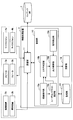
- FIG. 3 is a block diagram illustrating an example of the configuration of the information processing apparatus 1 according to the present embodiment.
- the information processing apparatus 1 includes a control unit 10, a communication unit 11, a storage unit 13, and a projection unit 14.
- the control unit 10 includes, for example, a microcomputer including a CPU (Central Processing Unit), a ROM (Read Only Memory), a RAM (Random Access Memory), a non-volatile memory, and an interface unit. Control. Specifically, as shown in FIG. 3, the control unit 10 according to the present embodiment functions as a line-of-sight detection unit 10a, an area determination unit 10b, a user context estimation unit 10c, an output control unit 10d, and an operation detection unit 10e. .
- a line-of-sight detection unit 10a an area determination unit 10b
- a user context estimation unit 10c an output control unit 10d
- an operation detection unit 10e an operation detection unit 10e.
- the line-of-sight detection unit 10a detects the line-of-sight direction of the user surrounding the table top 6, and outputs the detection result to the area determination unit 10b. Specifically, the line-of-sight detection unit 10a detects the line-of-sight direction of each user based on the captured images transmitted from the imaging devices 2a and 2b. The user's line-of-sight direction can be detected from eye (pupil) movement, head direction, or posture (body orientation).
- the line-of-sight detection unit 10a analyzes the sound source direction from the audio data (user's voice) transmitted from the microphones 4a and 4b, and estimates the user's head direction or posture (body direction) to determine the user's line-of-sight direction. Can also be detected.
- the line-of-sight detection unit 10a may output the detection result to the user context estimation unit 10c.
- the area determination unit 10b is based on the line-of-sight directions of the plurality of users detected by the line-of-sight detection unit 10a, and is not visually recognized by the shared area that can be viewed by the plurality of users and other users on the table top 6 (presentation surface).
- the secret area for concealing the information of each user is determined. Specifically, the area determination unit 10b determines that an area where each user's readable area (viewing range) based on the line-of-sight direction overlaps is a shared area, and an area where each user's readable area does not overlap is defined as each user's confidential area. judge.
- the secret area may be determined as an area within a certain distance from the target user and an area away from the shared area by a certain distance. The area determination processing by the area determination unit 10b will be described later with reference to FIGS.
- the area determination unit 10b may adjust the size of the readable area in consideration of the user context.
- the user context estimation unit 10c estimates what the user is looking at (that is, the user context) based on the movement of the line of sight detected by the line of sight detection unit 10a. For example, the user context estimation unit 10c estimates whether the user is reading a sentence or watching a video based on the movement of the user's line of sight. Usually, the human visual field is narrowed when recognizing characters such as during reading a sentence. Therefore, the user context estimation unit 10c estimates what the user is looking at and outputs the estimation result (user context) to the area determination unit 10b, so that the area determination unit 10b adjusts the readable area ( For example, when the user is reading a sentence, the readable area can be narrowed).
- Output control unit 10d The output control unit 10d performs output control of the presentation information according to the determination result by the area determination unit 10b. Specifically, the output control unit 10d controls the projection unit 14 to project information (contents) that only each user sees in the confidential area of each user on the table top 6, and all users in the shared area. The projection unit 14 is controlled to project the information to be viewed.
- the output control unit 10d may perform audio output control from the speakers 3a and 3b according to the determination result by the area determination unit 10b.
- the output control unit 10d controls information that only each user listens to (for example, video audio) to output sound from the speakers 3a and 3b with directivity to the position of each user, and listens to all users.
- the speakers 3a and 3b are controlled so that the information is output with no directivity (non-directional).
- Operation detection unit 10e detects a user operation (tap operation, drag operation, etc.) on information presented on the table top 6.
- the operation detection unit 10e may detect a user operation based on captured images continuously captured by the imaging device 2, or a touch / approach detection device (such as a touch panel installed on the entire top surface of the table top 6).
- a user operation may be detected based on a detection result (not shown).
- the operation detection unit 10e may detect a user operation by voice input based on the user's voice collected by the microphone 4.
- the communication unit 11 has a function of connecting to an external device by wireless / wired and transmitting / receiving data.
- the communication unit 11 according to the present embodiment is connected to, for example, the imaging device 2, the speaker 3, the microphone 4, or the external content DB 7 on the network, and receives a captured image, audio data, content, or controls to instruct audio output Or send a signal.
- the storage unit 13 stores a program for executing each process of the control unit 10.
- the storage unit 13 may store various contents such as photos, videos, documents, and the like.
- the projection unit 14 includes a light source, a movable mirror, an illumination optical system, a projection optical system, and the like.
- the projection unit 14 is a display device that projects an image, and projects light emitted from a high-intensity light source onto a table top 6 (presentation surface) or the like through a liquid crystal panel, for example. Specifically, light emitted from the light source is output to the illumination optical system, and image light is generated through the liquid crystal panel in the illumination optical system. The generated image light is output to the projection optical system, and the image light is projected onto the table top 6 (presentation surface) or the like from a projection lens or the like included in the projection optical system.
- the projection optical system has an optical axis substantially perpendicular to the projection direction of the light source.
- the configuration of the information processing apparatus 1 according to the present embodiment has been specifically described above.
- a method of projecting information to be presented on the table top 6 from the projection unit 14 of the information processing apparatus 1 is used, but the present disclosure is not limited to this.
- the output control unit 10 d of the information processing device 1 performs content presentation control according to the determination result of the area determination unit 10 b via the communication unit 11.
- the display device is realized by, for example, an LCD (Liquid Crystal Display) or an OLED (Organic Light-Emitting Diode), and spreads horizontally on the table top 6.
- the configuration of the information processing apparatus 1 illustrated in FIG. 3 is an example, and the present disclosure is not limited thereto.
- the projection unit 14 may be an external apparatus, and an imaging apparatus, a speaker, and a microphone are incorporated. May be.
- step S ⁇ b> 103 the information processing apparatus 1 acquires a captured image from the imaging apparatus 2. Acquisition of captured images is continuously performed. When a plurality of imaging devices 2a and 2b are installed, captured images are continuously acquired from the imaging devices 2a and 2b.
- the line-of-sight detection unit 10a of the information processing apparatus 1 detects the line of sight of each user based on the captured image. Specifically, the line-of-sight detection unit 10a analyzes the user's eyes in the captured image and detects the line-of-sight direction according to the position and movement of the pupil and iris. The line-of-sight detection unit 10a can also detect the direction of the line of sight by detecting reflected light on the cornea formed by illuminating the infrared LED.
- the line of sight detection unit 10a estimates the head direction of each user based on the captured image. For example, when the user's eyes are not captured, or when the eyes are captured but not at a level where the line of sight can be detected, it is determined that the line of sight cannot be detected. In addition, when the imaging device 2 captures a wide range of surroundings with a wide-angle lens, the line-of-sight detection unit 10a enlarges and analyzes the captured image. Therefore, in such a case, the line-of-sight detection unit 10a estimates the user's head direction from the captured image.
- step S112 the gaze detection unit 10a assumes that the head direction is the gaze direction. Thereby, even if it is a case where a user's exact eyes
- step S115 the line-of-sight detection unit 10a estimates the posture of each user based on the captured image. Specifically, the line-of-sight detection unit 10a estimates the orientation of each user's body.
- step S118 the gaze detection unit 10a assumes that the front direction of the body is the gaze direction.
- the readable area determination described later is performed by assuming the front direction of the body as the gaze direction. be able to.
- the user context estimation unit 10c estimates the user context based on the line-of-sight detection result by the line-of-sight detection unit 10a. For example, the user context estimation unit 10c estimates, as a user context, whether the user is reading a sentence or watching a moving image according to the movement in the line-of-sight direction.
- step S124 the area determination part 10b determines each user's readable area according to the detection result of the gaze detection part 10a. Moreover, the user context estimated by the user context estimation part 10c is referred as needed.
- the readable area R1 of the user A is determined.
- the entire range of the table top 6 is the presentation surface
- the intersection of the user A's line-of-sight direction and the presentation surface is determined as the gazing point P1
- the periphery of the gazing point P1 is determined as the readable area R1.
- the readable area R1 is an effective visual field that is excellent in information acceptability capable of recognizing at least a thing among the visual fields of the user A.
- the readable area R1 is 15 degrees horizontally from the gazing point P1, as shown in FIG.
- the range may be 10 degrees in the vertical direction from the gazing point P1.
- the area of the readable area determined in this way is shown as follows, for example.
- user_id 12345
- readable_area [x, y (gaze point P), H (minor axis), W (major axis)]
- the gaze point P is based on the origin O shown in FIG. 5
- the short diameter H is the length in the vertical (longitudinal) direction in the user's visual field with the gaze point P as the base point
- the long diameter W is the gaze point P.
- the horizontal (horizontal) direction length in the user's visual field as a base point is shown.
- the determination process of the readable area as described above is similarly performed for the user B, and the readable areas of the user A and the user B are output.
- the size of the readable area R is a unique size such as 15 degrees in the horizontal direction and 10 degrees in the vertical direction.
- the size of the area may be set in multiple steps.
- the area determination part 10b may adjust the magnitude
- the area determination unit 10b calculates a readable area using an area expansion coefficient (Z) set in advance according to the user context.
- the readable area determination process has been specifically described above. Subsequently, the area determination unit 10b determines the shared area and the secret area based on the determined readable area of each user.
- the area determination unit 10b determines the shared area and the secret area based on the determined readable area of each user.
- FIG. 7 is a flowchart showing a shared / secret area determination process according to the present embodiment.
- the area determination unit 10b of the information processing device 1 determines whether there is an overlap of readable areas for a plurality of users. For example, in the example shown in FIG. 8, the readable area R1 of the user A and the readable area R2 of the user B overlap in the vicinity of the center of the table top 6.
- step S136 the area determination unit 10b calculates the center of gravity C of the overlap portion.
- the area determination unit 10b determines the shared area M with reference to the center of gravity C.
- the shared area M may have a maximum size in an overlapping region where the readable area R1 of the user A and the readable area R2 of the user B overlap, or a predetermined minimum size or more based on the center of gravity C. It is good.
- the area determination unit 10b determines whether there is an area that does not overlap with the readable area of another user within a certain distance from the target user. For example, when the area determination unit 10b determines the confidential area of the user A, the area determination unit 10b does not overlap with the readable area R2 of the user B within a range in which an arc is drawn with an average arm length around the position of the user A. Determine whether there is an area.
- step S145 the area determination unit 10b determines whether there is an area that can be maintained (separated) from the readable area R of the other user. Determine whether or not.
- the corresponding area is determined as the confidential area S of the target user in step S148.
- the secret area S1 is determined as the secret area S1. The determination of the secret area is performed for all users, and the secret areas S1 and S2 of each user are determined.
- the output control unit 10d of the information processing apparatus 1 performs control so that information that requires security (confidential information) is presented in the confidential area S. What kind of information is presented in the secret area S is determined according to predetermined definition information. This definition information may be set by the user, automatically set based on the user's operation history, or updated by software update or the like.
- the output control unit 10d may perform control so that an image gallery, a mail screen (transmission / reception box), or the like is displayed in the secret area S.
- the user can prevent leakage of unnecessary information by moving only the necessary content to the shared area M and sharing it.
- the output control unit 10d outputs a sound so that the sound is transmitted only to the user who owns the content if a directional speaker is connected when the content requiring security is content accompanied by sound such as a moving image. Take control.
- the output control unit 10d When there is no highly confidential area, the output control unit 10d performs control so that, for example, a dialog is presented to the user and is approved before being presented to the shared area M before presenting content that requires security. May be.
- the output control unit 10d may control the secret area S so as to present the content with a low image level. As a result, information leakage can be prevented as much as possible even when it is looked into by other users.
- FIG. 10 is a diagram for explaining automatic copying when moving content from the shared area M to the secret area S.
- the output control unit 10 d displays the content 145 c obtained by copying the selected content 145. Present and move according to the drag operation by the user.
- the output control unit 10d controls to present the content 145c to the secret area S.
- the content 145 is automatically copied when the user selects the content 145.
- the present disclosure is not limited to this, and the content 145 reaches the outer edge of the shared area M, for example. Automatic copying may be performed at that time.
- the information processing apparatus 1 optimizes the volume for each user after content copying, and controls each user to output sound to each user. It is also possible not to disturb.
- FIG. 11 is a diagram for explaining optimization control when moving content from the secret area S to the shared area M.
- the user selects content 147 to be shared with other users from the list and moves it to the shared area M.
- the output control unit 10d controls to copy the content 147 to generate the content 147c, and to change the size and resolution to be suitable for viewing by a plurality of people.
- the optimization of content presentation according to browsing by a plurality of people is not limited to the above-described automatic enlargement and high resolution, and for example, the content presentation position, presentation direction, presentation angle, etc. in the shared area M can be changed by a plurality of people.
- the output control unit 10d presents the optimal viewing position for multiple users when multiple users are viewing according to the line-of-sight detection results of each user. Control may be performed so as to present the user at the optimal position (adjusting the speaker direction if there is a directional speaker).
- the output control unit 10d controls to output audio only to the content owning user in the secret area S if the directional speaker is connected. After the is moved, the directivity direction and volume are controlled so as to optimize viewing for all users.
- the output control unit 10d automatically hides or deletes confidential information (for example, mail destination information, image exif information, etc.) included in the mail, thereby unintended information. Leakage can be prevented.
- confidential information to be deleted / shielded may be set as system information in advance, may be set by a user, may be automatically set based on a user's operation history, or software update Etc. may be updated.
- FIG. 12 shows content 149 presented in the secret area S (here, a list screen of outgoing mail is used as an example).
- the output control unit 10d copies the content 149, changes the copied content 149c to a size and resolution optimal for viewing by multiple users, Further, the confidential information is shielded / deleted.
- the output control unit 10d shields the mail destination information in the content 149c and displays the display switching button N near the shielded portion.
- the display switching button N switches the shield display of the mail destination information.
- the display switching button N may be operated only by the content providing user (owner).
- the presentation control according to this embodiment has been described above. Note that the line of sight of the target user is temporarily directed to the concealment area S during content movement, but the readable area, the common area, and the concealment area may be maintained within a certain period of time. Further, the area determination unit 10b according to the present embodiment may update the determination of each area of the readable area, the shared area, and the secret area every predetermined time.
- FIG. 13 is a diagram illustrating an outline of area determination in consideration of object recognition according to a modification of the present embodiment.
- the readable area for each user is different from the readable areas R1 and R2 shown in FIG. 8, and becomes the readable areas R1 ′ and R2 ′ from which the regions on the opposite side of the object 9 are removed, as shown in FIG.
- FIG. 14 is a flowchart showing area determination processing in consideration of an object according to a modification of the present embodiment.
- the area determination unit 10b of the information processing apparatus 1 performs a normal readable area determination process.
- the normal readable area determination process is specifically the determination process described with reference to FIG.
- step S203 the area determination unit 10b determines whether an object is present on the table top 6. Object recognition is performed based on the captured image acquired by the imaging device 2, for example. At this time, the area determination unit 10b recognizes the position, size, height, and the like of the object.
- step S206 the area determination unit 10b determines whether there is an overlap between the object area and the readable area.
- the object area is an area where the object 9 and the table top 6 are in contact with each other.
- step S209 the area determination unit 10b views the object area from the readable area and, if necessary, the target user. The area on the opposite side of the object 9 is excluded and the readable area is determined again.
- the area determination unit 10b adjusts the readable area of the target user in consideration of the position and height of the object 9, the positional relationship between the object 9 and the target user, and the like.
- step S212 the area determining unit 10b performs the shared / confidential area determination process described above with reference to FIG.
- each area can be determined in consideration of an object placed on the table top.
- the output control unit 10d may control to present a copy of the content in the secret area of each user.
- the information presentation surface is not limited to the table top 6, and may be a wall surface, for example.
- the line-of-sight detection unit 10a may dynamically switch sensing information (captured image, audio data, etc.) used for user's line-of-sight detection, thereby reducing the change in the line-of-sight detection accuracy due to the sensing situation. .
- this technique can also take the following structures.
- a line-of-sight detection unit that detects the lines of sight of a plurality of users with respect to the presentation information; Based on the detected line of sight of a plurality of users, an area for determining a shared area where the plurality of users visually recognize and share information and a secret area where each user's information is concealed without being viewed by other users A determination unit;
- An information processing apparatus comprising: (2) The area determining unit determines, in the presentation surface of the presentation information, a region where the visual field ranges according to the detected line of sight of the plurality of users overlap as a shared area, and a region where the visual field ranges of the plurality of users do not overlap each other The information processing apparatus according to (1), wherein the information processing device is determined as a secret area.
- the information processing apparatus includes: The information processing apparatus according to any one of (1) to (6), further including an output control unit that performs output control of presentation information to be presented on a presentation surface according to a result of the determination by the area determination unit. . (8) The information processing apparatus according to (7), wherein when the information that requires security is developed, the output control unit controls the information to be presented in the secret area. (9) The information processing apparatus according to (7) or (8), wherein the output control unit controls to present information at a low resolution in the secret area. (10) The output control unit controls to copy the information presented in the shared area and present it in the confidential area when the information is moved to the confidential area of the user by a user operation. The information processing apparatus according to any one of (9).
- the output control unit copies the information, and further changes the size and resolution to be suitable for shared browsing.
- the information processing apparatus according to any one of (7) to (10), wherein the information processing apparatus is controlled to be presented in a secret area.
- the output control unit copies the information, and further shields or deletes the secret information included in the copied information.
- the information processing apparatus according to any one of (7) to (11), wherein the information processing apparatus controls the presentation to the secret area.
- the information processing apparatus according to any one of (1) to (12), wherein the gaze detection unit detects a gaze based on a gaze direction, a head direction, or a posture of the user. (14) The user's line-of-sight direction, head direction, or posture is estimated based on at least one of a user-captured image captured by an imaging device or a user's voice data collected by a sound collection device, The information processing apparatus according to (13). (15) The information processing apparatus according to (7), wherein the output control unit performs information display control on a display screen or information projection control on a projection plane. (16) The information processing apparatus according to (15), wherein the display screen or the projection surface is a table top.
Landscapes
- Engineering & Computer Science (AREA)
- Theoretical Computer Science (AREA)
- General Engineering & Computer Science (AREA)
- Physics & Mathematics (AREA)
- General Physics & Mathematics (AREA)
- Human Computer Interaction (AREA)
- Computer Hardware Design (AREA)
- User Interface Of Digital Computer (AREA)
- Controls And Circuits For Display Device (AREA)
Abstract
【課題】複数人が同時に閲覧する情報提示面において、特定のユーザだけが視認可能なエリアと全ユーザが視認可能なエリアとを判別することが可能な情報処理装置および制御方法を提供する。 【解決手段】提示情報に対する複数のユーザの視線を検出する視線検出部と、前記検出された複数のユーザの視線に基づいて、前記複数のユーザが視認して情報を共有する共有エリア、および他ユーザからは視認されず各ユーザの情報を秘匿する秘匿エリアの判定を行うエリア判定部と、を備える、情報処理装置。
Description
本開示は、情報処理装置および制御方法に関する。
近年、複数人で同時操作を行ったり資料を見たりといったユースケースが増加している。例えば大画面(壁面表示部、電子ボード等)やテーブルトップ(テーブル型画像表示装置)を複数人で取り囲み、画像表示装置に表示される資料を見ながら会議を行う。
このような複数人で閲覧できる画像表示装置に関して、例えば下記特許文献1、2が提案されている。具体的には、テーブル型の画像表示装置において、ディスプレイ上に打合せの資料等であるオブジェクトを表示し、打合せの参加者が同じオブジェクトに基づいて討議している場合、討議をしている参加者に見やすいようにオブジェクトを拡大(特許文献1)または分離(特許文献2)して表示する技術が提案されている。
ここで、複数人が同時に操作する環境では、オブジェクトの共同視聴等、複数人をベースにしたインタラクションが重要である一方、セキュリティ情報を他の閲覧者から隠すことも重要となってくる。例えば、PIN(Personal Identification Number)コードの入力画面やメールの内容等の秘匿情報に関しては、複数人で画面を見ている場合でも閲覧され難くする必要がある。
しかしながら、上記いずれの従来技術においても、セキュリティ情報の秘匿については言及されていなかった。
そこで、本開示では、複数人が同時に閲覧する画像提示面において、特定のユーザだけが視認可能なエリアと全ユーザが視認可能なエリアとを判別することが可能な情報処理装置および制御方法を提案する。
本開示によれば、提示情報に対する複数のユーザの視線を検出する視線検出部と、前記検出された複数のユーザの視線に基づいて、前記複数のユーザが視認して情報を共有する共有エリア、および他ユーザからは視認されず各ユーザの情報を秘匿する秘匿エリアの判定を行うエリア判定部と、を備える情報処理装置を提案する。
本開示によれば、提示情報に対する複数のユーザの視線を検出することと、前記検出された複数のユーザの視線に基づいて、前記複数のユーザが視認して情報を共有する共有エリア、および他ユーザからは視認されず各ユーザの情報を秘匿する秘匿エリアの判定を行うことと、を含む制御方法を提案する。
以上説明したように本開示によれば、複数人が同時に閲覧する情報提示面において、特定のユーザだけが視認可能なエリアと全ユーザが視認可能なエリアとを判別することが可能となる。
なお、上記の効果は必ずしも限定的なものではなく、上記の効果とともに、または上記の効果に代えて、本明細書に示されたいずれかの効果、または本明細書から把握され得る他の効果が奏されてもよい。
以下に添付図面を参照しながら、本開示の好適な実施の形態について詳細に説明する。なお、本明細書及び図面において、実質的に同一の機能構成を有する構成要素については、同一の符号を付することにより重複説明を省略する。
また、説明は以下の順序で行うものとする。
1.本開示の一実施形態による制御システムの概要
2.基本構成
3.動作処理
3-1.可読エリア判定処理
3-2.共有・秘匿エリア判定処理
4.提示制御例
4-1.秘匿情報の提示制御
4-2.エリア間のコンテンツ移動
4-3.コンテンツ移動時における秘匿情報の遮蔽/削除
5.変形例
6.まとめ
1.本開示の一実施形態による制御システムの概要
2.基本構成
3.動作処理
3-1.可読エリア判定処理
3-2.共有・秘匿エリア判定処理
4.提示制御例
4-1.秘匿情報の提示制御
4-2.エリア間のコンテンツ移動
4-3.コンテンツ移動時における秘匿情報の遮蔽/削除
5.変形例
6.まとめ
<<1.本開示の一実施形態による制御システムの概要>>
まず、本開示の一実施形態による制御システムの概要を図1、図2に示して説明する。図1に示す例では、複数人(ユーザA、ユーザB)がテーブルトップ6を囲んでテーブルトップ6上に提示される情報(静止画、動画、テキスト等々)を閲覧しながら討議を行っている。具体的には、テーブルトップ6には、天井つるし型ユニット5に設けられたプロジェクタ(以下、情報処理装置1と称す)により画像が投影される。ユーザA、ユーザBは、テーブルトップ6に投影される画像を見ながら討議を行うことができる。
まず、本開示の一実施形態による制御システムの概要を図1、図2に示して説明する。図1に示す例では、複数人(ユーザA、ユーザB)がテーブルトップ6を囲んでテーブルトップ6上に提示される情報(静止画、動画、テキスト等々)を閲覧しながら討議を行っている。具体的には、テーブルトップ6には、天井つるし型ユニット5に設けられたプロジェクタ(以下、情報処理装置1と称す)により画像が投影される。ユーザA、ユーザBは、テーブルトップ6に投影される画像を見ながら討議を行うことができる。
情報処理装置1により投影される情報は、情報処理装置1内の記憶部13(図3参照。所謂ローカルストレージ)に格納されていてもよいし、ネットワーク7を介してネットワーク上のコンテンツDB8(所謂Web
Storageまたはサーバ)から取得されてもよい。または、情報処理装置1が外部機器(モバイル端末等)とWi-Fi(登録商標)、Bluetooth(登録商標)、近接無線通信等の無線または有線により接続し、外部機器から取得してもよい。
Storageまたはサーバ)から取得されてもよい。または、情報処理装置1が外部機器(モバイル端末等)とWi-Fi(登録商標)、Bluetooth(登録商標)、近接無線通信等の無線または有線により接続し、外部機器から取得してもよい。
また、天井つるし型ユニット5には、撮像装置2aが内蔵されている。撮像装置2aは、テーブルトップ6を継続的に撮像し、テーブルトップ6に投影された画像に対するユーザの操作を撮像する。また、撮像装置2aは、テーブルトップ6を取り囲むユーザを撮像する。撮像装置2aにより撮像された画像は、情報処理装置1に送信される。
また、天井つるし型ユニット5には、スピーカ3aおよびマイクロフォン4aが設けられている。スピーカ3aは、投影される画像に付随した音を出力する。例えば動画の映像が情報処理装置1により投影されると共に、当該動画の音声がスピーカ3aから出力される。出力する音声データは、情報処理装置1から送信される。マイクロフォン4aは、テーブルトップ6を取り囲むユーザの音声を収音し、情報処理装置1に送信する。
また、テーブルトップ6には、図1に示すように、撮像装置2b、スピーカ3b、およびマイクロフォン4bが設けられている。撮像装置2bは、テーブルトップ6を取り囲むユーザを撮像し、撮像画像を情報処理装置1に送信する。また、スピーカ3bおよびマイクロフォン4bの作用は、スピーカ3aおよびマイクロフォン4aと同様である。
なお、テーブルトップ6に設けられている撮像装置2b、スピーカ3b、およびマイクロフォン4bの配置は、図2の上面図に示すように、複数の撮像装置2bは異なる方向を向くよう設置され、スピーカ3bおよびマイクロフォン4bは一組ずつ分散されて設置されている。
(背景)
ここで、従来、複数人で閲覧できるよう、電子ボードやテーブルトップ型表示装置において、ディスプレイ上に打合せの資料等であるオブジェクトが表示される技術が提案されていた。このような従来技術では、複数人での共同視聴の利便性が重視され、セキュリティ情報を他の閲覧者から隠すことは考慮されていなかった。
ここで、従来、複数人で閲覧できるよう、電子ボードやテーブルトップ型表示装置において、ディスプレイ上に打合せの資料等であるオブジェクトが表示される技術が提案されていた。このような従来技術では、複数人での共同視聴の利便性が重視され、セキュリティ情報を他の閲覧者から隠すことは考慮されていなかった。
そこで、本実施形態では、複数人が同時に閲覧する情報提示面において、特定のユーザだけが視認可能なエリア(秘匿エリアと称す)と全ユーザが視認可能なエリア(共有エリアと称す)とを判別し、各エリアへの情報提示制御を行うことで、複数人での共同視聴の利便性を重視しつつ、セキュリティを確保することができる。
具体的には、例えば図2に示すように、テーブルトップ6を取り囲むユーザA、ユーザBの視線に応じて、両者の視界が重複する共有エリアMと、ユーザAのみが視認可能な秘匿エリアS1と、ユーザBのみが視認可能な秘匿エリアS2とを判定する。ユーザA、Bの視線方向は、例えば撮像装置2bによる撮像画像や、マイクロフォン4bによる音声データに基づいて推定される。
そして、情報処理装置1は、エリアの判定結果に応じて、秘匿エリアS1にはユーザAのみが見る情報(コンテンツ)140を提示するよう投影制御し、秘匿エリアS2にはユーザBのみが見る情報141を提示するよう投影制御し、共有エリアMには全ユーザで見る情報142を提示するよう投影制御する。
以上、本開示の一実施形態による制御システムの概要について説明した。なお、撮像装置2a、2b、スピーカ3a、3b、マイクロフォン4a、4bの数および設置位置は図1、図2に示す例に限定しない。また、スピーカ3およびマイクロフォン4が無くてもよい。続いて、本実施形態の制御システムに含まれる情報処理装置1の基本構成について説明する。
<<2.基本構成>>
図3は、本実施形態による情報処理装置1の構成の一例を示すブロック図である。図3に示すように、情報処理装置1は、制御部10、通信部11、記憶部13、および投影部14を有する。
図3は、本実施形態による情報処理装置1の構成の一例を示すブロック図である。図3に示すように、情報処理装置1は、制御部10、通信部11、記憶部13、および投影部14を有する。
(制御部10)
制御部10は、例えばCPU(Central Processing Unit)、ROM(Read Only Memory)、RAM(Random Access Memory)、不揮発性メモリ、インターフェース部を備えたマイクロコンピュータにより構成され、情報処理装置1の各構成を制御する。具体的には、本実施形態による制御部10は、図3に示すように、視線検出部10a、エリア判定部10b、ユーザコンテキスト推定部10c、出力制御部10d、および操作検出部10eとして機能する。
制御部10は、例えばCPU(Central Processing Unit)、ROM(Read Only Memory)、RAM(Random Access Memory)、不揮発性メモリ、インターフェース部を備えたマイクロコンピュータにより構成され、情報処理装置1の各構成を制御する。具体的には、本実施形態による制御部10は、図3に示すように、視線検出部10a、エリア判定部10b、ユーザコンテキスト推定部10c、出力制御部10d、および操作検出部10eとして機能する。
・視線検出部10a
視線検出部10aは、テーブルトップ6を取り囲むユーザの視線方向を検出し、検出結果をエリア判定部10bに出力する。具体的には、視線検出部10aは、撮像装置2a、2bから送信された撮像画像に基づいて各ユーザの視線方向を検出する。ユーザの視線方向は、眼(瞳孔)の動きや、頭部方向、または姿勢(身体の向き)から検出され得る。また、視線検出部10aは、マイクロフォン4a、4bから送信された音声データ(ユーザの音声)から音源方向を解析し、ユーザの頭部方向または姿勢(身体の向き)を推定してユーザの視線方向を検出することも可能である。また、視線検出部10aは、検出結果をユーザコンテキスト推定部10cに出力してもよい。
視線検出部10aは、テーブルトップ6を取り囲むユーザの視線方向を検出し、検出結果をエリア判定部10bに出力する。具体的には、視線検出部10aは、撮像装置2a、2bから送信された撮像画像に基づいて各ユーザの視線方向を検出する。ユーザの視線方向は、眼(瞳孔)の動きや、頭部方向、または姿勢(身体の向き)から検出され得る。また、視線検出部10aは、マイクロフォン4a、4bから送信された音声データ(ユーザの音声)から音源方向を解析し、ユーザの頭部方向または姿勢(身体の向き)を推定してユーザの視線方向を検出することも可能である。また、視線検出部10aは、検出結果をユーザコンテキスト推定部10cに出力してもよい。
・エリア判定部10b
エリア判定部10bは、視線検出部10aにより検出された複数のユーザの視線方向に基づき、テーブルトップ6(提示面)において、複数のユーザが視認可能な共有エリア、および他ユーザからは視認されず各ユーザの情報を秘匿する秘匿エリアの判定を行う。具体的には、エリア判定部10bは、視線方向に基づく各ユーザの可読エリア(視界範囲)が重なる領域を共有エリアと判定し、各ユーザの可読エリアが重ならない領域を各ユーザの秘匿エリアと判定する。秘匿エリアは、さらに対象ユーザから一定距離内の領域であって、かつ共有エリアから一定距離離れた領域で判定されてもよい。かかるエリア判定部10bによるエリア判定処理については、図4~図8を参照して後述する。
エリア判定部10bは、視線検出部10aにより検出された複数のユーザの視線方向に基づき、テーブルトップ6(提示面)において、複数のユーザが視認可能な共有エリア、および他ユーザからは視認されず各ユーザの情報を秘匿する秘匿エリアの判定を行う。具体的には、エリア判定部10bは、視線方向に基づく各ユーザの可読エリア(視界範囲)が重なる領域を共有エリアと判定し、各ユーザの可読エリアが重ならない領域を各ユーザの秘匿エリアと判定する。秘匿エリアは、さらに対象ユーザから一定距離内の領域であって、かつ共有エリアから一定距離離れた領域で判定されてもよい。かかるエリア判定部10bによるエリア判定処理については、図4~図8を参照して後述する。
また、エリア判定部10bは、後述するユーザコンテキスト推定部10cからユーザコンテキストが出力された場合、当該ユーザコンテキストを考慮して上記可読エリアの大きさを調整してもよい。
・ユーザコンテキスト推定部10c
ユーザコンテキスト推定部10cは、視線検出部10aにより検出された視線の動きに基づいて、ユーザが何を見ている状態か(すなわちユーザコンテキスト)を推定する。例えば、ユーザコンテキスト推定部10cは、ユーザの視線の動きに基づいて、ユーザが文章読解中か、動画視聴中か等を推定する。通常、人間の視野は、文章読解中等の文字を認識する際は視野が狭められる。したがって、ユーザコンテキスト推定部10cによりユーザが何を見ている状態かを推定し、推定結果(ユーザコンテキスト)をエリア判定部10bに出力することで、エリア判定部10bでは、可読エリアを調整する(例えばユーザが文章読解中の場合は可読エリアを狭める)ことができる。
ユーザコンテキスト推定部10cは、視線検出部10aにより検出された視線の動きに基づいて、ユーザが何を見ている状態か(すなわちユーザコンテキスト)を推定する。例えば、ユーザコンテキスト推定部10cは、ユーザの視線の動きに基づいて、ユーザが文章読解中か、動画視聴中か等を推定する。通常、人間の視野は、文章読解中等の文字を認識する際は視野が狭められる。したがって、ユーザコンテキスト推定部10cによりユーザが何を見ている状態かを推定し、推定結果(ユーザコンテキスト)をエリア判定部10bに出力することで、エリア判定部10bでは、可読エリアを調整する(例えばユーザが文章読解中の場合は可読エリアを狭める)ことができる。
・出力制御部10d
出力制御部10dは、エリア判定部10bによる判定結果に応じて、提示情報の出力制御を行う。具体的には、出力制御部10dは、テーブルトップ6上の各ユーザの秘匿エリアには各ユーザのみが見る情報(コンテンツ)を投影するよう投影部14を制御し、共有エリアには全ユーザで見る情報を投影するよう投影部14を制御する。
出力制御部10dは、エリア判定部10bによる判定結果に応じて、提示情報の出力制御を行う。具体的には、出力制御部10dは、テーブルトップ6上の各ユーザの秘匿エリアには各ユーザのみが見る情報(コンテンツ)を投影するよう投影部14を制御し、共有エリアには全ユーザで見る情報を投影するよう投影部14を制御する。
また、出力制御部10dは、エリア判定部10bによる判定結果に応じて、スピーカ3a、3bからの音声出力制御を行ってもよい。すなわち、出力制御部10dは、各ユーザのみが聞く情報(例えばビデオ音声等)を各ユーザの位置に対して指向性を持たせてスピーカ3a、3bから音声出力するよう制御し、全ユーザで聞く情報は指向性を持たせず(無指向性)で音声出力するようスピーカ3a、3bを制御する。
・操作検出部10e
操作検出部10eは、テーブルトップ6に提示された情報に対するユーザ操作(タップ操作、ドラッグ操作等)を検出する。操作検出部10eは、撮像装置2により継続的に撮像される撮像画像に基づいてユーザ操作を検出してもよいし、テーブルトップ6の上面全体に設置されたタッチパネル等の接触/接近検出デバイス(不図示)による検出結果に基づいてユーザ操作を検出してもよい。または、操作検出部10eは、マイクロフォン4により収音されたユーザの音声に基づいて、音声入力によるユーザ操作を検出してもよい。
操作検出部10eは、テーブルトップ6に提示された情報に対するユーザ操作(タップ操作、ドラッグ操作等)を検出する。操作検出部10eは、撮像装置2により継続的に撮像される撮像画像に基づいてユーザ操作を検出してもよいし、テーブルトップ6の上面全体に設置されたタッチパネル等の接触/接近検出デバイス(不図示)による検出結果に基づいてユーザ操作を検出してもよい。または、操作検出部10eは、マイクロフォン4により収音されたユーザの音声に基づいて、音声入力によるユーザ操作を検出してもよい。
(通信部11)
通信部11は、無線/有線により外部装置と接続し、データの送受信を行う機能を有する。本実施形態による通信部11は、例えば撮像装置2、スピーカ3、マイクロフォン4、またはネットワーク上の外部のコンテンツDB7と接続し、撮像画像、音声データ、コンテンツを受信したり、音声出力を指示する制御信号を送信したりする。
通信部11は、無線/有線により外部装置と接続し、データの送受信を行う機能を有する。本実施形態による通信部11は、例えば撮像装置2、スピーカ3、マイクロフォン4、またはネットワーク上の外部のコンテンツDB7と接続し、撮像画像、音声データ、コンテンツを受信したり、音声出力を指示する制御信号を送信したりする。
(記憶部13)
記憶部13には、制御部10の各処理を実行するためのプログラムが格納される。また、記憶部13には、写真、映像、文書等の各種コンテンツが格納されていてもよい。
記憶部13には、制御部10の各処理を実行するためのプログラムが格納される。また、記憶部13には、写真、映像、文書等の各種コンテンツが格納されていてもよい。
(投影部14)
投影部14は、光源、可動ミラー、照明光学系、および投射光学系等を備える。投影部14は、映像を投影する表示装置であって、高輝度の光源から照射された光を、例えば液晶パネルを透過させてテーブルトップ6(提示面)等に投射する。具体的には、光源から照射された光は、照明光学系に出力され、照明光学系において液晶パネルを透過させて映像光が生成される。生成された映像光は投射光学系に出力され、投射光学系に含まれる投射レンズ等から映像光がテーブルトップ6(提示面)等に投射される。投射光学系は、光源の投射方向に対してほぼ垂直方向の光軸を有する。
投影部14は、光源、可動ミラー、照明光学系、および投射光学系等を備える。投影部14は、映像を投影する表示装置であって、高輝度の光源から照射された光を、例えば液晶パネルを透過させてテーブルトップ6(提示面)等に投射する。具体的には、光源から照射された光は、照明光学系に出力され、照明光学系において液晶パネルを透過させて映像光が生成される。生成された映像光は投射光学系に出力され、投射光学系に含まれる投射レンズ等から映像光がテーブルトップ6(提示面)等に投射される。投射光学系は、光源の投射方向に対してほぼ垂直方向の光軸を有する。
以上、本実施形態による情報処理装置1の構成について具体的に説明した。なお本実施形態では、テーブルトップ6に提示する情報を、情報処理装置1の投影部14から投影する手法を用いているが、本開示はこれに限定されない。例えば、テーブルトップ6に表示装置が設けられている場合、情報処理装置1の出力制御部10dは、エリア判定部10bの判定結果に従ったコンテンツの提示制御を、通信部11を介して表示装置に指示する。表示装置は、例えばLCD(Liquid Crystal Display)またはOLED(Organic Light-Emitting Diode)等により実現され、テーブルトップ6上において水平方向に広がっている。
また、図3に示す情報処理装置1の構成は一例であって、本開示はこれに限定されず、例えば投影部14が外部装置であってもよいし、撮像装置、スピーカ、およびマイクロフォンを内蔵してもよい。
<<3.動作処理>>
続いて、本実施形態による制御システムのエリア判定処理について、図4~図8を参照して説明する。
続いて、本実施形態による制御システムのエリア判定処理について、図4~図8を参照して説明する。
<3-1.可読エリア判定処理>
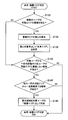
まず、図4を参照して本実施形態による可読エリアの判定処理について説明する。図4に示すように、ステップS103において、情報処理装置1は、撮像装置2から撮像画像を取得する。撮像画像の取得は継続的に行われ、複数の撮像装置2a、2bが設置されている場合は各撮像装置2a、2bから継続的に撮像画像を取得する。
まず、図4を参照して本実施形態による可読エリアの判定処理について説明する。図4に示すように、ステップS103において、情報処理装置1は、撮像装置2から撮像画像を取得する。撮像画像の取得は継続的に行われ、複数の撮像装置2a、2bが設置されている場合は各撮像装置2a、2bから継続的に撮像画像を取得する。
次に、ステップS106において、情報処理装置1の視線検出部10aは、撮像画像に基づいて各ユーザの視線検出を行う。具体的には、視線検出部10aは、撮像画像に写るユーザの眼を解析し、瞳孔や虹彩の位置、動きに応じて視線方向を検出する。また、視線検出部10aは、赤外線LEDを照らしてできた角膜上の反射光を検出して視線方向を検出することも可能である。
次いで、視線検出が出来ない場合(S106/No)、ステップS109において、視線検出部10aは、撮像画像に基づいて各ユーザの頭部方向を推定する。例えばユーザの眼が写っていない場合や、眼が写っていても視線検出可能なレベルで写っていない場合は、視線検出が出来ないと判断される。また、撮像装置2が広角レンズで周囲を広範囲撮影している場合、視線検出部10aは撮像画像を拡大して解析するため、解像度が低い場合は視線検出が困難となる。したがって、このような場合、視線検出部10aは、ユーザの頭部方向を撮像画像から推定する。
次に、ステップS112において、視線検出部10aは、頭部方向を視線方向と仮定する。これにより、ユーザの正確な視線方向が撮像画像から検出できない場合であっても、頭部方向を視線方向と仮定することで、後述の可読エリア判定を行うことができる。
一方、頭部方向の推定が出来ない場合(S109/No)、ステップS115において、視線検出部10aは、撮像画像に基づいて各ユーザの姿勢を推定する。具体的には、視線検出部10aは、各ユーザの身体の向きを推定する。
次に、ステップS118において、視線検出部10aは、身体の前面方向を視線方向と仮定する。これにより、ユーザの正確な視線方向が撮像画像から検出できない場合や、頭部方向が推定できない場合であっても、身体の前面方向を視線方向と仮定することで、後述の可読エリア判定を行うことができる。
続いて、ステップS121において、ユーザコンテキスト推定部10cは、視線検出部10aによる視線検出結果に基づいて、ユーザコンテキストを推定する。例えばユーザコンテキスト推定部10cは、視線方向の動きに応じて、ユーザが文章読解中であるか、動画視聴中であるか等をユーザコンテキストとして推定する。
そして、ステップS124において、エリア判定部10bは、視線検出部10aの検出結果に応じて、各ユーザの可読エリアを判定する。また、必要に応じてユーザコンテキスト推定部10cにより推定されたユーザコンテキストを参照する。
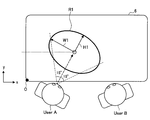
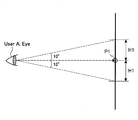
ここで、エリア判定部10bによる可読エリア判定の具体例について図5、図6を参照して説明する。図5に示す例では、ユーザAの可読エリアR1を判定している。テーブルトップ6の全範囲が提示面である場合、ユーザAの視線方向と提示面との交点を注視点P1として、注視点P1の周囲を可読エリアR1と判定する。可読エリアR1は、ユーザAの視野のうち、少なくとも事物を認識できる情報受容能力に優れる有効視野であって、例えば図5に示すように注視点P1から水平方向に15度、図6に示すように注視点P1から垂直方向に10度の範囲としてもよい。このように判定された可読エリアの領域は、例えば以下のように示される。
user_id:12345,
readable_area:[x,y(注視点P),H(短径),W(長径)]
ここで、注視点Pは図5に示す原点Oを基点とし、また、短径Hは注視点Pを基点としたユーザの視野における垂直(縦)方向の長さ、長径Wは注視点Pを基点としたユーザの視野における水平(横)方向の長さを示す。
user_id:12345,
readable_area:[x,y(注視点P),H(短径),W(長径)]
ここで、注視点Pは図5に示す原点Oを基点とし、また、短径Hは注視点Pを基点としたユーザの視野における垂直(縦)方向の長さ、長径Wは注視点Pを基点としたユーザの視野における水平(横)方向の長さを示す。
以上説明したような可読エリアの判定処理がユーザBに対しても同様に行われ、ユーザA、ユーザBの可読エリアが出力される。なお図5、図6に示す例では、可読エリアRの大きさは、水平方向に15度および垂直方向に10度といったように一意の大きさとしたが、本開示はこれに限定されず、可読エリアの大きさを複数段階でレベル設定してもよい。また、エリア判定部10bは、上述したユーザコンテキストに応じて、可読エリアの大きさを調整してもよい。具体的には、エリア判定部10bは、ユーザコンテキストに応じて予め設定されたエリア拡大係数(Z)を用いて可読エリアを算出する。エリア拡大係数(Z)は、注意力が必要なタスクほど係数が小さく設定される。例えば、読解中は「Z=0.5」、動画視聴中は「Z=0.8」と設定される。
このような複数段階のレベル設定およびユーザコンテキストを考慮した可読エリアの判定データの一例を以下に示す。
user_id:12345,
100%_readable_area:[75,50,20*Z,40*Z],
50%_readable_area:[75,50,40*Z,80*Z],
…
context:gazing_image
user_id:12345,
100%_readable_area:[75,50,20*Z,40*Z],
50%_readable_area:[75,50,40*Z,80*Z],
…
context:gazing_image
以上、本実施形態による可読エリアの判定処理について具体的に説明した。続いて、エリア判定部10bは、判定した各ユーザの可読エリアに基づき、共有エリアおよび秘匿エリアの判定を行う。以下、図7~図8を参照して具体的に説明する。
<3-2.共有・秘匿エリア判定処理>
図7は、本実施形態による共有・秘匿エリアの判定処理を示すフローチャートである。図7に示すように、ステップS133において、情報処理装置1のエリア判定部10bは、複数のユーザの可読エリアの重複があるか否かを判断する。例えば、図8に示す例では、テーブルトップ6の中央付近において、ユーザAの可読エリアR1と、ユーザBの可読エリアR2が重複している。
図7は、本実施形態による共有・秘匿エリアの判定処理を示すフローチャートである。図7に示すように、ステップS133において、情報処理装置1のエリア判定部10bは、複数のユーザの可読エリアの重複があるか否かを判断する。例えば、図8に示す例では、テーブルトップ6の中央付近において、ユーザAの可読エリアR1と、ユーザBの可読エリアR2が重複している。
次に、重複があると判断された場合(S133/Yes)、ステップS136において、エリア判定部10bは、重複部分の重心Cを算出する。
次いで、ステップS139において、エリア判定部10bは、重心Cを基準として共有エリアMを判定する。共有エリアMは、図8に示すように、ユーザAの可読エリアR1とユーザBの可読エリアR2が重複する重複する領域内において最大サイズとしてもよいし、重心Cを基準として所定の最小サイズ以上としてもよい。
一方、重複がない場合(S133/No)、共有エリアの判定は行われず、秘匿エリアの判定処理(次に説明するS142)が行われる。
続いて、ステップS142において、エリア判定部10bは、対象ユーザから一定の距離内に、他のユーザの可読エリアと重複しない領域があるか否かを判断する。例えば、エリア判定部10bは、ユーザAの秘匿エリアを判定する場合、ユーザAの位置を中心として平均的な腕の長さで円弧を描いた範囲内に、ユーザBの可読エリアR2と重複しない領域があるか否かを判断する。
次に、他ユーザの可読エリアRと重複しない領域がある場合(S142/Yes)、ステップS145において、エリア判定部10bは、他ユーザの可読エリアRから一定距離保てる(離れた)領域があるか否かを判定する。
対象ユーザから一定の距離内に他のユーザの可読エリアと重複しない領域がない場合(S142/No)、または、他ユーザの可読エリアRから一定距離保てる領域がない場合(S145/No)、秘匿エリアの判定は行われず、判定処理は終了する。
次いで、他ユーザの可読エリアRから一定距離保てる領域がある場合(S145/Yes)、ステップS148において、該当領域を対象ユーザの秘匿エリアSとして判定する。例えば、図8に示すように、ユーザAから一定の距離内であって、ユーザBの可読エリアR2と重複せず、また、可読エリアR2から一定距離保てる領域を、秘匿エリアS1として判定する。かかる秘匿エリアの判定は、全ユーザに対して行われ、各ユーザの秘匿エリアS1、S2が判定される。
<<4.提示制御例>>
以上、本実施形態による制御システムの構成およびエリア判定処理について具体的に説明した。次に、エリア判定結果に応じた情報処理装置1による提示制御等について、図9~図12を参照して説明する。
以上、本実施形態による制御システムの構成およびエリア判定処理について具体的に説明した。次に、エリア判定結果に応じた情報処理装置1による提示制御等について、図9~図12を参照して説明する。
<4-1.秘匿情報の提示制御>
本実施形態において、情報処理装置1の出力制御部10dは、セキュリティ確保が必要な情報(秘匿情報)は秘匿エリアSに提示するよう制御する。どういった種類の情報を秘匿エリアSに提示するかは、所定の定義情報に従って判断される。この定義情報は、ユーザにより設定されてもよいし、ユーザの操作履歴に基づいて自動的に設定されてもよいし、ソフトウェア更新等によりアップデートされてもよい。
本実施形態において、情報処理装置1の出力制御部10dは、セキュリティ確保が必要な情報(秘匿情報)は秘匿エリアSに提示するよう制御する。どういった種類の情報を秘匿エリアSに提示するかは、所定の定義情報に従って判断される。この定義情報は、ユーザにより設定されてもよいし、ユーザの操作履歴に基づいて自動的に設定されてもよいし、ソフトウェア更新等によりアップデートされてもよい。
例えば、図9に示すように、共有エリアMでコンテンツ145を操作している場合に、セキュリティ確保が必要なコンテンツ(例えばPINコードの入力画面、入力履歴表示画面、閲覧履歴表示画面等)が開かれると、出力制御部10dは、かかるセキュリティ確保が必要なコンテンツ146を秘匿エリアSに提示するよう制御する。これにより、複数人で同時操作・閲覧をしている際に、意図しない情報漏えいを防ぐことができる。
また、出力制御部10dは、画像ギャラリー、またはメール画面(送信/受信Box)等が開かれた場合に秘匿エリアSに表示するよう制御してもよい。ユーザは必要なコンテンツのみ共有エリアMに移動してシェアすることで、不要な情報の漏えいを防ぐことができる。
また、出力制御部10dは、上記セキュリティ確保が必要なコンテンツが動画等の音声を伴うコンテンツである場合、指向性スピーカが接続されていれば、コンテンツの所有ユーザへのみ音声を発信するよう音声出力制御を行う。
なお、高秘匿エリアがない場合、出力制御部10dは、セキュリティ確保が必要なコンテンツを提示する前に、例えばユーザにダイアログ等を提示して承認を受けてから共有エリアMに提示するよう制御してもよい。
さらに、出力制御部10dは、秘匿エリアSでは低画像度化してコンテンツを提示するよう制御してもよい。これにより、他ユーザに覗かれてしまった場合でも可能な限り情報漏えいを防ぐことができる。
<4-2.エリア間のコンテンツ移動>
続いて、ユーザが共有エリアMから自身の秘匿エリアSにコンテンツを移動した場合、または自身の秘匿エリアSから共有エリアMにコンテンツを移動した場合における提示制御について図10、図11を参照して説明する。
続いて、ユーザが共有エリアMから自身の秘匿エリアSにコンテンツを移動した場合、または自身の秘匿エリアSから共有エリアMにコンテンツを移動した場合における提示制御について図10、図11を参照して説明する。
(共有エリアMからのコンテンツ移動)
図10は、共有エリアMから秘匿エリアSへのコンテンツ移動時における自動コピーについて説明する図である。図10に示すように、共有エリアMに提示されているコンテンツ145が選択され、秘匿エリアSへのドラッグが検出されると、出力制御部10dは、選択されたコンテンツ145をコピーしたコンテンツ145cを提示し、ユーザによるドラッグ操作に合せて移動させる。そして、秘匿エリアSでコンテンツ145cがドロップされると、出力制御部10dは、コンテンツ145cを秘匿エリアSに提示するよう制御する。
図10は、共有エリアMから秘匿エリアSへのコンテンツ移動時における自動コピーについて説明する図である。図10に示すように、共有エリアMに提示されているコンテンツ145が選択され、秘匿エリアSへのドラッグが検出されると、出力制御部10dは、選択されたコンテンツ145をコピーしたコンテンツ145cを提示し、ユーザによるドラッグ操作に合せて移動させる。そして、秘匿エリアSでコンテンツ145cがドロップされると、出力制御部10dは、コンテンツ145cを秘匿エリアSに提示するよう制御する。
これにより、一のユーザのコンテンツ操作によって他のユーザのコンテンツ視聴を妨げないようにすることができる。なお、図10に示す例では、ユーザがコンテンツ145を選択した時点でコンテンツ145の自動コピーが行われているが、本開示はこれに限定されず、例えばコンテンツ145が共有エリアMの外縁に達した時点で自動コピーが行われてもよい。
また、情報処理装置1は、指向性スピーカが接続されている場合、コンテンツコピー後は各ユーザに対する音量の最適化を行い、各ユーザに向けて音声を出力するよう制御することで、お互いの視聴を妨げないようにすることも可能である。
(秘匿エリアSからのコンテンツ移動)
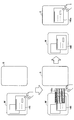
図11は、秘匿エリアSから共有エリアMへのコンテンツ移動時における最適化制御について説明する図である。図11に示すように、秘匿エリアSに画像ギャラリーが一覧表示されている場合に、ユーザは一覧の中から他ユーザとシェアしたいコンテンツ147を選択し、共有エリアMに移動させる。この際、出力制御部10dは、コンテンツ147をコピーしてコンテンツ147cを生成し、さらに複数人での閲覧に適した大きさ、解像度に変化させて提示するよう制御する。
図11は、秘匿エリアSから共有エリアMへのコンテンツ移動時における最適化制御について説明する図である。図11に示すように、秘匿エリアSに画像ギャラリーが一覧表示されている場合に、ユーザは一覧の中から他ユーザとシェアしたいコンテンツ147を選択し、共有エリアMに移動させる。この際、出力制御部10dは、コンテンツ147をコピーしてコンテンツ147cを生成し、さらに複数人での閲覧に適した大きさ、解像度に変化させて提示するよう制御する。
このように、共有エリアMにコンテンツを提示する際、複数人での閲覧に適した状態でコンテンツを提示するよう制御することで、ユーザビリティを向上させることができる。なお複数人での閲覧に応じたコンテンツ提示の最適化は、上述した自動拡大や、高解像度化に限定されず、例えば共有エリアMにおけるコンテンツの提示位置、提示方向、提示角度等を複数人での閲覧に最適化してもよい。
また、出力制御部10dは、各ユーザの視線検出結果に応じて、複数人のユーザが見ている場合は複数人視聴の最適な位置等で提示し、他ユーザの視線が外れたら残りの視聴ユーザの最適な位置等で提示するよう制御(指向性スピーカがあればスピーカ方向を調整)してもよい。
また、出力制御部10dは、各ユーザの視線検出結果に応じて、複数人のユーザが見ている場合は複数人視聴の最適な位置等で提示し、他ユーザの視線が外れたら残りの視聴ユーザの最適な位置等で提示するよう制御(指向性スピーカがあればスピーカ方向を調整)してもよい。
また、出力制御部10dは、動画等の音声を含むコンテンツの場合、指向性スピーカが接続されていれば、秘匿エリアSではコンテンツ所有ユーザへのみ音声を出力するよう制御し、共有エリアMにコンテンツが移動された後は全ユーザに対して最適な視聴となるよう指向性方向および音量を最適化するよう制御する。
<4-3.コンテンツ移動時における秘匿情報の遮蔽/削除>
次に、共有エリアMにコンテンツを移動した際に、当該コンテンツに含まれる秘匿情報を自動的に遮蔽/削除する提示制御について説明する。
次に、共有エリアMにコンテンツを移動した際に、当該コンテンツに含まれる秘匿情報を自動的に遮蔽/削除する提示制御について説明する。
例えば、秘匿エリアSにメールBoxが表示されている場合に、ユーザが必要なメールを選択し、秘匿エリアSから共有エリアMにドラッグして移動させた場合(共有エリアMへのコンテンツ移動については、図11に示す場合と同様)、出力制御部10dは、当該メールに含まれる秘匿情報(例えばメールの宛先情報、画像のexif情報等)を自動的に遮蔽または削除することで、意図しない情報漏洩を防ぐことができる。削除・遮蔽する秘匿情報の定義は事前にシステム情報として設定されていてもよいし、ユーザにより設定されてもよいし、ユーザの操作履歴に基づいて自動的に設定されてもよいし、ソフトウェア更新等によりアップデートされてもよい。
ここで、秘匿情報の遮蔽/削除の具体例について図12を参照して説明する。図12左には、秘匿エリアS内で提示されているコンテンツ149(ここでは一例として送信メールの一覧画面を用いる)を示す。出力制御部10dは、コンテンツ149が秘匿エリアSから共有エリアMに移動された場合、コンテンツ149をコピーし、コピーしたコンテンツ149cを複数人視聴に最適な大きさ、解像度に変化させた上で、さらに秘匿情報の遮蔽/削除を行う。
具体的には、出力制御部10dは、図12右に示すように、コンテンツ149cにおいてメールの宛先情報を遮蔽し、遮蔽部分付近に表示切換ボタンNを表示する。表示切換ボタンNはメールの宛先情報の遮蔽表示を切り替えるものであって、選択されると遮蔽が外され、メールの宛先情報が見える状態となる。また、表示切換ボタンNの操作は、コンテンツの提供ユーザ(所有者)のみが可能なものとしてもよい。
以上、本実施形態による提示制御について説明した。なおコンテンツ移動時等に対象ユーザの視線が一時的に秘匿エリアSに向けられるが、一定時間内であれば、可読エリア、共有エリア、秘匿エリアの各エリアは維持したままとしてもよい。また、本実施形態によるエリア判定部10bは、所定時間毎に可読エリア、共有エリア、秘匿エリアの各エリアの判定を更新してもよい。
<<5.変形例>>
以上、本実施形態による制御システムについて具体的に説明した。本実施形態では、情報の提示面の一例としてテーブルトップ6を用いたが、テーブルトップ6には物体(PC、本等)が置かれている場合も想定される。この場合、物体の位置や大きさによってはユーザの視野に影響を及ぼすことがある。そこで、本実施形態の変形例では、エリア判定の際に、テーブルトップ6に置かれた物体を考慮することについて説明する。
以上、本実施形態による制御システムについて具体的に説明した。本実施形態では、情報の提示面の一例としてテーブルトップ6を用いたが、テーブルトップ6には物体(PC、本等)が置かれている場合も想定される。この場合、物体の位置や大きさによってはユーザの視野に影響を及ぼすことがある。そこで、本実施形態の変形例では、エリア判定の際に、テーブルトップ6に置かれた物体を考慮することについて説明する。
<5-1.概要>
図13は、本実施形態の変形例による物体認識を考慮したエリア判定の概要について説明する図である。図13に示すように、テーブルトップ6に物体9が存在する場合、物体9の高さにもよるが、各ユーザの視野は物体9により遮られる。例えばユーザAは、物体9の向こう側(ユーザB側)が見えなくなり、ユーザBも物体9の向こう側(ユーザA側)が見えなくなる。したがって、各ユーザの可読エリアは、図8に示す可読エリアR1、R2と異なり、図13に示すように物体9の反対側の領域がそれぞれ除かれた可読エリアR1’、R2’となる。
図13は、本実施形態の変形例による物体認識を考慮したエリア判定の概要について説明する図である。図13に示すように、テーブルトップ6に物体9が存在する場合、物体9の高さにもよるが、各ユーザの視野は物体9により遮られる。例えばユーザAは、物体9の向こう側(ユーザB側)が見えなくなり、ユーザBも物体9の向こう側(ユーザA側)が見えなくなる。したがって、各ユーザの可読エリアは、図8に示す可読エリアR1、R2と異なり、図13に示すように物体9の反対側の領域がそれぞれ除かれた可読エリアR1’、R2’となる。
このように、可読エリアR1’、R2’が変化することで、各可読エリアが重複する領域も異なるため、共有エリアM’も変化する。また、可読エリアR1’、R2’の変化に伴い、各ユーザの秘匿エリアS1’、S2’も変化する。このようなテーブルトップ6上の物体認識を考慮した場合のエリアの判定処理について図14を参照して説明する。
<5-2.動作処理>
図14は、本実施形態の変形例による物体を考慮したエリア判定処理を示すフローチャートである。図14に示すように、まず、ステップS200において、情報処理装置1のエリア判定部10bは、通常の可読エリア判定処理を行う。通常の可読エリア判定処理とは、具体的には図4を参照して説明した判定処理である。
図14は、本実施形態の変形例による物体を考慮したエリア判定処理を示すフローチャートである。図14に示すように、まず、ステップS200において、情報処理装置1のエリア判定部10bは、通常の可読エリア判定処理を行う。通常の可読エリア判定処理とは、具体的には図4を参照して説明した判定処理である。
次に、ステップS203において、エリア判定部10bは、テーブルトップ6に物体が存在するか否かを判断する。物体認識は、例えば撮像装置2により取得された撮像画像に基づいて行われる。この際、エリア判定部10bは、物体の位置や大きさ、高さ等を認識する。
次いで、物体が存在すると判断された場合(S203/Yes)、ステップS206において、エリア判定部10bは、物体エリアと可読エリアに重複があるか否かを判断する。物体エリアとは、物体9とテーブルトップ6が接触している領域である。
続いて、物体エリアと可読エリアに重複があると判断された場合(S206/Yes)、ステップS209において、エリア判定部10bは、可読エリアのうち、物体エリアと、必要に応じて対象ユーザから見て物体9の反対側の領域を除外して、可読エリアを再判定する。物体9が高さのあるものである場合、ユーザの視線が遮られるため、物体エリア(物体9により隠れる領域)に加えて、物体9の向こう側が見えなくなる。したがって、エリア判定部10bは、物体9の位置、高さ、物体9と対象ユーザとの位置関係等を考慮して、対象ユーザの可読エリアを調整する。
そして、ステップS212において、エリア判定部10bは、図7を参照して上述した共有・秘匿エリアの判定処理を行う。
以上説明したように、本実施形態の変形例では、テーブルトップ上に置かれた物体も考慮した上で各エリアを判定することができる。
<<6.まとめ>>
上述したように、本開示の実施形態による制御システムでは、複数人が同時に閲覧する情報提示面(例えばテーブルトップ6)において、特定のユーザだけが視認可能なエリア(秘匿エリア)と全ユーザが視認可能なエリア(共有エリア)とを判別することを可能とする。そして、各エリアの特性に応じた情報提示制御を行うことで、複数人での共同視聴の利便性を重視しつつ、セキュリティを確保することができる。
上述したように、本開示の実施形態による制御システムでは、複数人が同時に閲覧する情報提示面(例えばテーブルトップ6)において、特定のユーザだけが視認可能なエリア(秘匿エリア)と全ユーザが視認可能なエリア(共有エリア)とを判別することを可能とする。そして、各エリアの特性に応じた情報提示制御を行うことで、複数人での共同視聴の利便性を重視しつつ、セキュリティを確保することができる。
以上、添付図面を参照しながら本開示の好適な実施形態について詳細に説明したが、本技術はかかる例に限定されない。本開示の技術分野における通常の知識を有する者であれば、特許請求の範囲に記載された技術的思想の範疇内において、各種の変更例または修正例に想到し得ることは明らかであり、これらについても、当然に本開示の技術的範囲に属するものと了解される。
例えば、上述した情報処理装置1に内蔵されるCPU、ROM、およびRAM等のハードウェアに、情報処理装置1の機能を発揮させるためのコンピュータプログラムも作成可能である。また、当該コンピュータプログラムを記憶させたコンピュータ読み取り可能な記憶媒体も提供される。
また、共有エリアが小さいためにコンテンツを最適化表示できない場合、出力制御部10dは、同コンテンツのコピーを各ユーザの秘匿エリアに提示するよう制御してもよい。
また、情報提示面はテーブルトップ6に限定されず、例えば壁面であってもよい。
また、視線検出部10aは、ユーザの視線検出に利用するセンシング情報(撮像画像、音声データ等)を動的に切り替えてもよく、これによりセンシング状況による視線検出精度の変化を小さくすることができる。
また、本明細書に記載された効果は、あくまで説明的または例示的なものであって限定的ではない。つまり、本開示に係る技術は、上記の効果とともに、または上記の効果に代えて、本明細書の記載から当業者には明らかな他の効果を奏しうる。
なお、本技術は以下のような構成も取ることができる。
(1)
提示情報に対する複数のユーザの視線を検出する視線検出部と、
前記検出された複数のユーザの視線に基づいて、前記複数のユーザが視認して情報を共有する共有エリア、および他ユーザからは視認されず各ユーザの情報を秘匿する秘匿エリアの判定を行うエリア判定部と、
を備える、情報処理装置。
(2)
前記エリア判定部は、前記提示情報の提示面において、前記検出された複数のユーザの視線に応じた視界範囲が重なる領域を共有エリアと判定し、前記複数のユーザの視界範囲が互いに重ならない領域を秘匿エリアと判定する、前記(1)に記載の情報処理装置。
(3)
前記秘匿エリアは、さらに対象ユーザから一定距離内の領域で判定される、前記(2)に記載の情報処理装置。
(4)
前記秘匿エリアは、さらに前記共有エリアから一定距離離れた領域で判定される、前記(2)または(3)に記載の情報処理装置。
(5)
前記エリア判定部は、各ユーザのユーザコンテキストに応じて各ユーザの視界範囲の大きさを調整する、前記(2)~(4)のいずれか1項に記載の情報処理装置。
(6)
前記ユーザコンテキストは、ユーザが何を見ている状態かを示し、当該ユーザの視線の動きから推定される、前記(5)に記載の情報処理装置。
(7)
前記情報処理装置は、
前記エリア判定部による判定の結果に応じて、提示面に提示する提示情報の出力制御を行う出力制御部をさらに備える、前記(1)~(6)のいずれか1項に記載の情報処理装置。
(8)
前記出力制御部は、セキュリティ確保が必要な情報が展開された場合、当該情報を前記秘匿エリアに提示するよう制御する、前記(7)に記載の情報処理装置。
(9)
前記出力制御部は、前記秘匿エリアにおいて低解像度で情報を提示するよう制御する、前記(7)または(8)に記載の情報処理装置。
(10)
前記出力制御部は、前記共有エリアに提示された情報がユーザ操作により当該ユーザの秘匿エリアに移動された場合、当該情報をコピーし、前記秘匿エリアに提示するよう制御する、前記(7)~(9)のいずれか1項に記載の情報処理装置。
(11)
前記出力制御部は、前記秘匿エリアに提示された情報がユーザ操作により前記共有エリアに移動された場合、当該情報をコピーし、さらに共有閲覧に適した大きさ、解像度に変更した上で、前記秘匿エリアに提示するよう制御する、前記(7)~(10)のいずれか1項に記載の情報処理装置。
(12)
前記出力制御部は、前記秘匿エリアに提示された情報がユーザ操作により前記共有エリアに移動された場合、当該情報をコピーし、さらに当該コピーした情報に含まれる秘匿情報を遮蔽または削除した上で、前記秘匿エリアに提示するよう制御する、前記(7)~(11)のいずれか1項に記載の情報処理装置。
(13)
前記視線検出部は、前記ユーザの視線方向、頭部方向、または姿勢に基づいて視線を検出する、前記(1)~(12)のいずれか1項に記載の情報処理装置。
(14)
前記ユーザの視線方向、頭部方向、または姿勢は、撮像装置により撮像されたユーザの撮像画像、または収音装置により収音されたユーザの音声データの少なくともいずれかに基づいて推定される、前記(13)に記載の情報処理装置。
(15)
前記出力制御部は、表示画面への情報表示制御、または投影面への情報投影制御を行う、前記(7)に記載の情報処理装置。
(16)
前記表示画面または投影面は、テーブルトップである、前記(15)に記載の情報処理装置。
(17)
前記出力制御部は、スピーカからの指向性を有する音声出力制御を行う、前記(7)に記載の情報処理装置。
(18)
前記エリア判定部は、提示面に存在する物体の認識結果に応じて各ユーザの視界範囲の大きさを調整する、前記(2)に記載の情報処理装置。
(19)
提示情報に対する複数のユーザの視線を検出することと、
前記検出された複数のユーザの視線に基づいて、前記複数のユーザが視認して情報を共有する共有エリア、および他ユーザからは視認されず各ユーザの情報を秘匿する秘匿エリアの判定を行うことと、
を含む、制御方法。
(1)
提示情報に対する複数のユーザの視線を検出する視線検出部と、
前記検出された複数のユーザの視線に基づいて、前記複数のユーザが視認して情報を共有する共有エリア、および他ユーザからは視認されず各ユーザの情報を秘匿する秘匿エリアの判定を行うエリア判定部と、
を備える、情報処理装置。
(2)
前記エリア判定部は、前記提示情報の提示面において、前記検出された複数のユーザの視線に応じた視界範囲が重なる領域を共有エリアと判定し、前記複数のユーザの視界範囲が互いに重ならない領域を秘匿エリアと判定する、前記(1)に記載の情報処理装置。
(3)
前記秘匿エリアは、さらに対象ユーザから一定距離内の領域で判定される、前記(2)に記載の情報処理装置。
(4)
前記秘匿エリアは、さらに前記共有エリアから一定距離離れた領域で判定される、前記(2)または(3)に記載の情報処理装置。
(5)
前記エリア判定部は、各ユーザのユーザコンテキストに応じて各ユーザの視界範囲の大きさを調整する、前記(2)~(4)のいずれか1項に記載の情報処理装置。
(6)
前記ユーザコンテキストは、ユーザが何を見ている状態かを示し、当該ユーザの視線の動きから推定される、前記(5)に記載の情報処理装置。
(7)
前記情報処理装置は、
前記エリア判定部による判定の結果に応じて、提示面に提示する提示情報の出力制御を行う出力制御部をさらに備える、前記(1)~(6)のいずれか1項に記載の情報処理装置。
(8)
前記出力制御部は、セキュリティ確保が必要な情報が展開された場合、当該情報を前記秘匿エリアに提示するよう制御する、前記(7)に記載の情報処理装置。
(9)
前記出力制御部は、前記秘匿エリアにおいて低解像度で情報を提示するよう制御する、前記(7)または(8)に記載の情報処理装置。
(10)
前記出力制御部は、前記共有エリアに提示された情報がユーザ操作により当該ユーザの秘匿エリアに移動された場合、当該情報をコピーし、前記秘匿エリアに提示するよう制御する、前記(7)~(9)のいずれか1項に記載の情報処理装置。
(11)
前記出力制御部は、前記秘匿エリアに提示された情報がユーザ操作により前記共有エリアに移動された場合、当該情報をコピーし、さらに共有閲覧に適した大きさ、解像度に変更した上で、前記秘匿エリアに提示するよう制御する、前記(7)~(10)のいずれか1項に記載の情報処理装置。
(12)
前記出力制御部は、前記秘匿エリアに提示された情報がユーザ操作により前記共有エリアに移動された場合、当該情報をコピーし、さらに当該コピーした情報に含まれる秘匿情報を遮蔽または削除した上で、前記秘匿エリアに提示するよう制御する、前記(7)~(11)のいずれか1項に記載の情報処理装置。
(13)
前記視線検出部は、前記ユーザの視線方向、頭部方向、または姿勢に基づいて視線を検出する、前記(1)~(12)のいずれか1項に記載の情報処理装置。
(14)
前記ユーザの視線方向、頭部方向、または姿勢は、撮像装置により撮像されたユーザの撮像画像、または収音装置により収音されたユーザの音声データの少なくともいずれかに基づいて推定される、前記(13)に記載の情報処理装置。
(15)
前記出力制御部は、表示画面への情報表示制御、または投影面への情報投影制御を行う、前記(7)に記載の情報処理装置。
(16)
前記表示画面または投影面は、テーブルトップである、前記(15)に記載の情報処理装置。
(17)
前記出力制御部は、スピーカからの指向性を有する音声出力制御を行う、前記(7)に記載の情報処理装置。
(18)
前記エリア判定部は、提示面に存在する物体の認識結果に応じて各ユーザの視界範囲の大きさを調整する、前記(2)に記載の情報処理装置。
(19)
提示情報に対する複数のユーザの視線を検出することと、
前記検出された複数のユーザの視線に基づいて、前記複数のユーザが視認して情報を共有する共有エリア、および他ユーザからは視認されず各ユーザの情報を秘匿する秘匿エリアの判定を行うことと、
を含む、制御方法。
1 情報処理装置
10 制御部
10a 視線検出部
10b エリア判定部
10c ユーザコンテキスト推定部
10d 出力制御部
11 通信部
13 記憶部
14 投影部
2、2a~2b 撮像装置
3、3a~3b スピーカ
4、4a~4b マイクロフォン
5 天井つるし型ユニット
6 テーブルトップ
7 ネットワーク
8 コンテンツDB
9 物体
M 共有エリア
S 秘匿エリア
R 可読エリア
10 制御部
10a 視線検出部
10b エリア判定部
10c ユーザコンテキスト推定部
10d 出力制御部
11 通信部
13 記憶部
14 投影部
2、2a~2b 撮像装置
3、3a~3b スピーカ
4、4a~4b マイクロフォン
5 天井つるし型ユニット
6 テーブルトップ
7 ネットワーク
8 コンテンツDB
9 物体
M 共有エリア
S 秘匿エリア
R 可読エリア
Claims (19)
- 提示情報に対する複数のユーザの視線を検出する視線検出部と、
前記検出された複数のユーザの視線に基づいて、前記複数のユーザが視認して情報を共有する共有エリア、および他ユーザからは視認されず各ユーザの情報を秘匿する秘匿エリアの判定を行うエリア判定部と、
を備える、情報処理装置。 - 前記エリア判定部は、前記提示情報の提示面において、前記検出された複数のユーザの視線に応じた視界範囲が重なる領域を共有エリアと判定し、前記複数のユーザの視界範囲が互いに重ならない領域を秘匿エリアと判定する、請求項1に記載の情報処理装置。
- 前記秘匿エリアは、さらに対象ユーザから一定距離内の領域で判定される、請求項2に記載の情報処理装置。
- 前記秘匿エリアは、さらに前記共有エリアから一定距離離れた領域で判定される、請求項2に記載の情報処理装置。
- 前記エリア判定部は、各ユーザのユーザコンテキストに応じて各ユーザの視界範囲の大きさを調整する、請求項2に記載の情報処理装置。
- 前記ユーザコンテキストは、ユーザが何を見ている状態かを示し、当該ユーザの視線の動きから推定される、請求項5に記載の情報処理装置。
- 前記情報処理装置は、
前記エリア判定部による判定の結果に応じて、提示面に提示する提示情報の出力制御を行う出力制御部をさらに備える、請求項1に記載の情報処理装置。 - 前記出力制御部は、セキュリティ確保が必要な情報が展開された場合、当該情報を前記秘匿エリアに提示するよう制御する、請求項7に記載の情報処理装置。
- 前記出力制御部は、前記秘匿エリアにおいて低解像度で情報を提示するよう制御する、請求項7に記載の情報処理装置。
- 前記出力制御部は、前記共有エリアに提示された情報がユーザ操作により当該ユーザの秘匿エリアに移動された場合、当該情報をコピーし、前記秘匿エリアに提示するよう制御する、請求項7に記載の情報処理装置。
- 前記出力制御部は、前記秘匿エリアに提示された情報がユーザ操作により前記共有エリアに移動された場合、当該情報をコピーし、さらに共有閲覧に適した大きさ、解像度に変更した上で、前記秘匿エリアに提示するよう制御する、請求項7に記載の情報処理装置。
- 前記出力制御部は、前記秘匿エリアに提示された情報がユーザ操作により前記共有エリアに移動された場合、当該情報をコピーし、さらに当該コピーした情報に含まれる秘匿情報を遮蔽または削除した上で、前記秘匿エリアに提示するよう制御する、請求項7に記載の情報処理装置。
- 前記視線検出部は、前記ユーザの視線方向、頭部方向、または姿勢に基づいて視線を検出する、請求項1に記載の情報処理装置。
- 前記ユーザの視線方向、頭部方向、または姿勢は、撮像装置により撮像されたユーザの撮像画像、または収音装置により収音されたユーザの音声データの少なくともいずれかに基づいて推定される、請求項13に記載の情報処理装置。
- 前記出力制御部は、表示画面への情報表示制御、または投影面への情報投影制御を行う、請求項7に記載の情報処理装置。
- 前記表示画面または投影面は、テーブルトップである、請求項15に記載の情報処理装置。
- 前記出力制御部は、スピーカからの指向性を有する音声出力制御を行う、請求項7に記載の情報処理装置。
- 前記エリア判定部は、提示面に存在する物体の認識結果に応じて各ユーザの視界範囲の大きさを調整する、請求項2に記載の情報処理装置。
- 提示情報に対する複数のユーザの視線を検出することと、
前記検出された複数のユーザの視線に基づいて、前記複数のユーザが視認して情報を共有する共有エリア、および他ユーザからは視認されず各ユーザの情報を秘匿する秘匿エリアの判定を行うことと、
を含む、制御方法。
Priority Applications (5)
| Application Number | Priority Date | Filing Date | Title |
|---|---|---|---|
| EP15834175.0A EP3185111B1 (en) | 2014-08-21 | 2015-05-22 | Information processing device and control method |
| CN201580043525.6A CN106575194B (zh) | 2014-08-21 | 2015-05-22 | 信息处理设备和控制方法 |
| US15/503,446 US10032437B2 (en) | 2014-08-21 | 2015-05-22 | Information processing apparatus and control method |
| US16/018,352 US10262630B2 (en) | 2014-08-21 | 2018-06-26 | Information processing apparatus and control method |
| US16/291,148 US10762876B2 (en) | 2014-08-21 | 2019-03-04 | Information processing apparatus and control method |
Applications Claiming Priority (2)
| Application Number | Priority Date | Filing Date | Title |
|---|---|---|---|
| JP2014-168342 | 2014-08-21 | ||
| JP2014168342A JP2016045623A (ja) | 2014-08-21 | 2014-08-21 | 情報処理装置および制御方法 |
Related Child Applications (2)
| Application Number | Title | Priority Date | Filing Date |
|---|---|---|---|
| US15/503,446 A-371-Of-International US10032437B2 (en) | 2014-08-21 | 2015-05-22 | Information processing apparatus and control method |
| US16/018,352 Continuation US10262630B2 (en) | 2014-08-21 | 2018-06-26 | Information processing apparatus and control method |
Publications (1)
| Publication Number | Publication Date |
|---|---|
| WO2016027536A1 true WO2016027536A1 (ja) | 2016-02-25 |
Family
ID=55350490
Family Applications (1)
| Application Number | Title | Priority Date | Filing Date |
|---|---|---|---|
| PCT/JP2015/064769 Ceased WO2016027536A1 (ja) | 2014-08-21 | 2015-05-22 | 情報処理装置および制御方法 |
Country Status (5)
| Country | Link |
|---|---|
| US (3) | US10032437B2 (ja) |
| EP (1) | EP3185111B1 (ja) |
| JP (1) | JP2016045623A (ja) |
| CN (1) | CN106575194B (ja) |
| WO (1) | WO2016027536A1 (ja) |
Cited By (4)
| Publication number | Priority date | Publication date | Assignee | Title |
|---|---|---|---|---|
| EP3506058A4 (en) * | 2016-08-29 | 2019-08-14 | Sony Corporation | INFORMATION PROCESSING DEVICE, INFORMATION PROCESSING PROCESS AND PROGRAM |
| CN112867626A (zh) * | 2018-11-15 | 2021-05-28 | 宝马股份公司 | 用于显示装置的动态信息保护 |
| CN114556914A (zh) * | 2019-11-29 | 2022-05-27 | 索尼集团公司 | 图像处理设备、图像处理方法和图像显示系统 |
| TWI783469B (zh) * | 2020-05-01 | 2022-11-11 | 美商西屋電器公司 | 用於可運輸微型反應器應用之小型被動式衰變熱移除系統 |
Families Citing this family (18)
| Publication number | Priority date | Publication date | Assignee | Title |
|---|---|---|---|---|
| WO2015198747A1 (ja) * | 2014-06-24 | 2015-12-30 | ソニー株式会社 | 情報処理装置、情報処理方法、及びプログラム |
| US10503349B2 (en) | 2016-10-04 | 2019-12-10 | Facebook, Inc. | Shared three-dimensional user interface with personal space |
| JP6870363B2 (ja) * | 2017-02-14 | 2021-05-12 | 沖電気工業株式会社 | 通信装置、方法およびプログラム |
| WO2018225149A1 (ja) * | 2017-06-06 | 2018-12-13 | マクセル株式会社 | 複合現実表示システム及び複合現実表示端末 |
| US11029909B2 (en) * | 2017-06-12 | 2021-06-08 | Sony Corporation | Information processor, information processing method, and program |
| CN110869900B (zh) | 2017-07-13 | 2024-01-19 | 索尼公司 | 信息处理装置、信息处理方法及程序 |
| WO2019045144A1 (ko) * | 2017-08-31 | 2019-03-07 | (주)레벨소프트 | 의료용 항법 장치를 위한 의료 영상 처리 장치 및 의료 영상 처리 방법 |
| US10777087B2 (en) * | 2018-12-07 | 2020-09-15 | International Business Machines Corporation | Augmented reality for removing external stimuli |
| US11042222B1 (en) | 2019-12-16 | 2021-06-22 | Microsoft Technology Licensing, Llc | Sub-display designation and sharing |
| US11093046B2 (en) | 2019-12-16 | 2021-08-17 | Microsoft Technology Licensing, Llc | Sub-display designation for remote content source device |
| US11487423B2 (en) * | 2019-12-16 | 2022-11-01 | Microsoft Technology Licensing, Llc | Sub-display input areas and hidden inputs |
| US11404028B2 (en) | 2019-12-16 | 2022-08-02 | Microsoft Technology Licensing, Llc | Sub-display notification handling |
| JP7424121B2 (ja) * | 2020-03-10 | 2024-01-30 | 富士フイルムビジネスイノベーション株式会社 | 情報処理装置及びプログラム |
| JP7367639B2 (ja) | 2020-08-31 | 2023-10-24 | 株式会社リコー | 表示装置、表示方法、プログラム |
| JP7596172B2 (ja) * | 2021-02-24 | 2024-12-09 | 富士フイルム株式会社 | 情報処理装置およびプログラム |
| US11726578B1 (en) | 2022-02-11 | 2023-08-15 | Meta Platforms Technologies, Llc | Scrolling and navigation in virtual reality |
| WO2023249235A1 (ko) * | 2022-06-23 | 2023-12-28 | 삼성전자주식회사 | 전자 장치 및 그 제어 방법 |
| EP4560455A4 (en) * | 2022-08-12 | 2026-01-07 | Shenzhen Yinwang Intelligent Technology Co Ltd | DISPLAY METHOD AND DEVICE |
Citations (3)
| Publication number | Priority date | Publication date | Assignee | Title |
|---|---|---|---|---|
| JP2000235352A (ja) * | 1999-02-16 | 2000-08-29 | Canon Inc | 表示装置及び遊戯装置 |
| WO2010021240A1 (ja) * | 2008-08-21 | 2010-02-25 | コニカミノルタホールディングス株式会社 | 画像表示装置 |
| JP2011197537A (ja) * | 2010-03-23 | 2011-10-06 | Nec Casio Mobile Communications Ltd | 端末装置及びプログラム |
Family Cites Families (11)
| Publication number | Priority date | Publication date | Assignee | Title |
|---|---|---|---|---|
| US5107443A (en) | 1988-09-07 | 1992-04-21 | Xerox Corporation | Private regions within a shared workspace |
| JP4095040B2 (ja) * | 2004-02-12 | 2008-06-04 | 株式会社日立製作所 | テーブル型情報端末の表示方法 |
| WO2009073584A1 (en) | 2007-11-29 | 2009-06-11 | Oculis Labs, Inc. | Method and apparatus for display of secure visual content |
| JP5290685B2 (ja) | 2008-06-12 | 2013-09-18 | ユニチカ株式会社 | ポリアリレート樹脂水性分散体、およびその製造方法、ならびにそれから得られる樹脂被膜 |
| JP2010021240A (ja) | 2008-07-09 | 2010-01-28 | Renesas Technology Corp | 半導体装置の製造方法 |
| WO2010018770A1 (ja) | 2008-08-11 | 2010-02-18 | コニカミノルタホールディングス株式会社 | 画像表示装置 |
| US20100124363A1 (en) * | 2008-11-20 | 2010-05-20 | Sony Ericsson Mobile Communications Ab | Display privacy system |
| US10282563B2 (en) * | 2009-02-06 | 2019-05-07 | Tobii Ab | Video-based privacy supporting system |
| US8880341B2 (en) * | 2010-08-30 | 2014-11-04 | Alpine Electronics, Inc. | Method and apparatus for displaying three-dimensional terrain and route guidance |
| US9179021B2 (en) * | 2012-04-25 | 2015-11-03 | Microsoft Technology Licensing, Llc | Proximity and connection based photo sharing |
| US8970455B2 (en) * | 2012-06-28 | 2015-03-03 | Google Technology Holdings LLC | Systems and methods for processing content displayed on a flexible display |
-
2014
- 2014-08-21 JP JP2014168342A patent/JP2016045623A/ja active Pending
-
2015
- 2015-05-22 CN CN201580043525.6A patent/CN106575194B/zh not_active Expired - Fee Related
- 2015-05-22 WO PCT/JP2015/064769 patent/WO2016027536A1/ja not_active Ceased
- 2015-05-22 EP EP15834175.0A patent/EP3185111B1/en not_active Not-in-force
- 2015-05-22 US US15/503,446 patent/US10032437B2/en active Active
-
2018
- 2018-06-26 US US16/018,352 patent/US10262630B2/en active Active
-
2019
- 2019-03-04 US US16/291,148 patent/US10762876B2/en not_active Expired - Fee Related
Patent Citations (3)
| Publication number | Priority date | Publication date | Assignee | Title |
|---|---|---|---|---|
| JP2000235352A (ja) * | 1999-02-16 | 2000-08-29 | Canon Inc | 表示装置及び遊戯装置 |
| WO2010021240A1 (ja) * | 2008-08-21 | 2010-02-25 | コニカミノルタホールディングス株式会社 | 画像表示装置 |
| JP2011197537A (ja) * | 2010-03-23 | 2011-10-06 | Nec Casio Mobile Communications Ltd | 端末装置及びプログラム |
Non-Patent Citations (1)
| Title |
|---|
| See also references of EP3185111A4 * |
Cited By (4)
| Publication number | Priority date | Publication date | Assignee | Title |
|---|---|---|---|---|
| EP3506058A4 (en) * | 2016-08-29 | 2019-08-14 | Sony Corporation | INFORMATION PROCESSING DEVICE, INFORMATION PROCESSING PROCESS AND PROGRAM |
| CN112867626A (zh) * | 2018-11-15 | 2021-05-28 | 宝马股份公司 | 用于显示装置的动态信息保护 |
| CN114556914A (zh) * | 2019-11-29 | 2022-05-27 | 索尼集团公司 | 图像处理设备、图像处理方法和图像显示系统 |
| TWI783469B (zh) * | 2020-05-01 | 2022-11-11 | 美商西屋電器公司 | 用於可運輸微型反應器應用之小型被動式衰變熱移除系統 |
Also Published As
| Publication number | Publication date |
|---|---|
| EP3185111B1 (en) | 2022-05-11 |
| US10032437B2 (en) | 2018-07-24 |
| EP3185111A1 (en) | 2017-06-28 |
| US10762876B2 (en) | 2020-09-01 |
| CN106575194A (zh) | 2017-04-19 |
| JP2016045623A (ja) | 2016-04-04 |
| EP3185111A4 (en) | 2018-04-04 |
| CN106575194B (zh) | 2020-11-03 |
| US20170236492A1 (en) | 2017-08-17 |
| US20180301118A1 (en) | 2018-10-18 |
| US10262630B2 (en) | 2019-04-16 |
| US20190197992A1 (en) | 2019-06-27 |
Similar Documents
| Publication | Publication Date | Title |
|---|---|---|
| WO2016027536A1 (ja) | 情報処理装置および制御方法 | |
| US12260144B2 (en) | Controlling external devices using reality interfaces | |
| US11861056B2 (en) | Controlling representations of virtual objects in a computer-generated reality environment | |
| US11915671B2 (en) | Eye gaze control of magnification user interface | |
| US11714540B2 (en) | Remote touch detection enabled by peripheral device | |
| US11373650B2 (en) | Information processing device and information processing method | |
| US11107287B2 (en) | Information processing apparatus and information processing method | |
| CN104238739A (zh) | 基于眼睛跟踪的可见度提高方法和电子装置 | |
| US20200074960A1 (en) | Information processor, information processing method, and recording medium | |
| CN105683867A (zh) | 将触摸屏显示器配置用于会议 | |
| US20210117048A1 (en) | Adaptive assistive technology techniques for computing devices | |
| JP2019036181A (ja) | 情報処理装置、情報処理方法、およびプログラム | |
| US12322048B2 (en) | Connecting spatially distinct settings | |
| JP6093074B2 (ja) | 情報処理装置及び情報処理方法、並びにコンピューター・プログラム | |
| CN106462251A (zh) | 显示控制设备、显示控制方法以及程序 | |
| JP6374203B2 (ja) | 表示システム及びプログラム | |
| JP2015194880A (ja) | 表示システム及びプログラム | |
| US20260087170A1 (en) | Terminal device and control method | |
| US12487665B2 (en) | Rendering a visual distraction for a user looking at a display too long | |
| WO2019082520A1 (ja) | 情報処理装置、情報処理方法、およびプログラム | |
| CN121764324A (zh) | 用于与环境中的物理对象进行交互的选择策略 |
Legal Events
| Date | Code | Title | Description |
|---|---|---|---|
| 121 | Ep: the epo has been informed by wipo that ep was designated in this application |
Ref document number: 15834175 Country of ref document: EP Kind code of ref document: A1 |
|
| REEP | Request for entry into the european phase |
Ref document number: 2015834175 Country of ref document: EP |
|
| WWE | Wipo information: entry into national phase |
Ref document number: 2015834175 Country of ref document: EP |
|
| WWE | Wipo information: entry into national phase |
Ref document number: 15503446 Country of ref document: US |
|
| NENP | Non-entry into the national phase |
Ref country code: DE |