WO2016132876A1 - 情報処理装置 - Google Patents
情報処理装置 Download PDFInfo
- Publication number
- WO2016132876A1 WO2016132876A1 PCT/JP2016/052916 JP2016052916W WO2016132876A1 WO 2016132876 A1 WO2016132876 A1 WO 2016132876A1 JP 2016052916 W JP2016052916 W JP 2016052916W WO 2016132876 A1 WO2016132876 A1 WO 2016132876A1
- Authority
- WO
- WIPO (PCT)
- Prior art keywords
- user
- unit
- hand
- control unit
- display
- Prior art date
- Legal status (The legal status is an assumption and is not a legal conclusion. Google has not performed a legal analysis and makes no representation as to the accuracy of the status listed.)
- Ceased
Links
Images



Classifications
-
- G—PHYSICS
- G06—COMPUTING OR CALCULATING; COUNTING
- G06F—ELECTRIC DIGITAL DATA PROCESSING
- G06F3/00—Input arrangements for transferring data to be processed into a form capable of being handled by the computer; Output arrangements for transferring data from processing unit to output unit, e.g. interface arrangements
- G06F3/01—Input arrangements or combined input and output arrangements for interaction between user and computer
- G06F3/017—Gesture based interaction, e.g. based on a set of recognized hand gestures
-
- B—PERFORMING OPERATIONS; TRANSPORTING
- B60—VEHICLES IN GENERAL
- B60K—ARRANGEMENT OR MOUNTING OF PROPULSION UNITS OR OF TRANSMISSIONS IN VEHICLES; ARRANGEMENT OR MOUNTING OF PLURAL DIVERSE PRIME-MOVERS IN VEHICLES; AUXILIARY DRIVES FOR VEHICLES; INSTRUMENTATION OR DASHBOARDS FOR VEHICLES; ARRANGEMENTS IN CONNECTION WITH COOLING, AIR INTAKE, GAS EXHAUST OR FUEL SUPPLY OF PROPULSION UNITS IN VEHICLES
- B60K35/00—Instruments specially adapted for vehicles; Arrangement of instruments in or on vehicles
- B60K35/10—Input arrangements, i.e. from user to vehicle, associated with vehicle functions or specially adapted therefor
-
- B—PERFORMING OPERATIONS; TRANSPORTING
- B60—VEHICLES IN GENERAL
- B60K—ARRANGEMENT OR MOUNTING OF PROPULSION UNITS OR OF TRANSMISSIONS IN VEHICLES; ARRANGEMENT OR MOUNTING OF PLURAL DIVERSE PRIME-MOVERS IN VEHICLES; AUXILIARY DRIVES FOR VEHICLES; INSTRUMENTATION OR DASHBOARDS FOR VEHICLES; ARRANGEMENTS IN CONNECTION WITH COOLING, AIR INTAKE, GAS EXHAUST OR FUEL SUPPLY OF PROPULSION UNITS IN VEHICLES
- B60K35/00—Instruments specially adapted for vehicles; Arrangement of instruments in or on vehicles
- B60K35/20—Output arrangements, i.e. from vehicle to user, associated with vehicle functions or specially adapted therefor
- B60K35/21—Output arrangements, i.e. from vehicle to user, associated with vehicle functions or specially adapted therefor using visual output, e.g. blinking lights or matrix displays
- B60K35/22—Display screens
-
- B—PERFORMING OPERATIONS; TRANSPORTING
- B60—VEHICLES IN GENERAL
- B60R—VEHICLES, VEHICLE FITTINGS, OR VEHICLE PARTS, NOT OTHERWISE PROVIDED FOR
- B60R16/00—Electric or fluid circuits specially adapted for vehicles and not otherwise provided for; Arrangement of elements of electric or fluid circuits specially adapted for vehicles and not otherwise provided for
- B60R16/02—Electric or fluid circuits specially adapted for vehicles and not otherwise provided for; Arrangement of elements of electric or fluid circuits specially adapted for vehicles and not otherwise provided for electric constitutive elements
-
- G—PHYSICS
- G02—OPTICS
- G02B—OPTICAL ELEMENTS, SYSTEMS OR APPARATUS
- G02B27/00—Optical systems or apparatus not provided for by any of the groups G02B1/00 - G02B26/00, G02B30/00
- G02B27/01—Head-up displays
- G02B27/0101—Head-up displays characterised by optical features
-
- G—PHYSICS
- G06—COMPUTING OR CALCULATING; COUNTING
- G06F—ELECTRIC DIGITAL DATA PROCESSING
- G06F3/00—Input arrangements for transferring data to be processed into a form capable of being handled by the computer; Output arrangements for transferring data from processing unit to output unit, e.g. interface arrangements
- G06F3/01—Input arrangements or combined input and output arrangements for interaction between user and computer
-
- G—PHYSICS
- G06—COMPUTING OR CALCULATING; COUNTING
- G06F—ELECTRIC DIGITAL DATA PROCESSING
- G06F3/00—Input arrangements for transferring data to be processed into a form capable of being handled by the computer; Output arrangements for transferring data from processing unit to output unit, e.g. interface arrangements
- G06F3/01—Input arrangements or combined input and output arrangements for interaction between user and computer
- G06F3/016—Input arrangements with force or tactile feedback as computer generated output to the user
-
- G—PHYSICS
- G06—COMPUTING OR CALCULATING; COUNTING
- G06F—ELECTRIC DIGITAL DATA PROCESSING
- G06F3/00—Input arrangements for transferring data to be processed into a form capable of being handled by the computer; Output arrangements for transferring data from processing unit to output unit, e.g. interface arrangements
- G06F3/01—Input arrangements or combined input and output arrangements for interaction between user and computer
- G06F3/048—Interaction techniques based on graphical user interfaces [GUI]
- G06F3/0487—Interaction techniques based on graphical user interfaces [GUI] using specific features provided by the input device, e.g. functions controlled by the rotation of a mouse with dual sensing arrangements, or of the nature of the input device, e.g. tap gestures based on pressure sensed by a digitiser
- G06F3/0488—Interaction techniques based on graphical user interfaces [GUI] using specific features provided by the input device, e.g. functions controlled by the rotation of a mouse with dual sensing arrangements, or of the nature of the input device, e.g. tap gestures based on pressure sensed by a digitiser using a touch-screen or digitiser, e.g. input of commands through traced gestures
-
- G—PHYSICS
- G06—COMPUTING OR CALCULATING; COUNTING
- G06F—ELECTRIC DIGITAL DATA PROCESSING
- G06F3/00—Input arrangements for transferring data to be processed into a form capable of being handled by the computer; Output arrangements for transferring data from processing unit to output unit, e.g. interface arrangements
- G06F3/16—Sound input; Sound output
- G06F3/167—Audio in a user interface, e.g. using voice commands for navigating, audio feedback
-
- G—PHYSICS
- G06—COMPUTING OR CALCULATING; COUNTING
- G06V—IMAGE OR VIDEO RECOGNITION OR UNDERSTANDING
- G06V40/00—Recognition of biometric, human-related or animal-related patterns in image or video data
- G06V40/10—Human or animal bodies, e.g. vehicle occupants or pedestrians; Body parts, e.g. hands
- G06V40/107—Static hand or arm
- G06V40/113—Recognition of static hand signs
-
- G—PHYSICS
- G06—COMPUTING OR CALCULATING; COUNTING
- G06V—IMAGE OR VIDEO RECOGNITION OR UNDERSTANDING
- G06V40/00—Recognition of biometric, human-related or animal-related patterns in image or video data
- G06V40/20—Movements or behaviour, e.g. gesture recognition
- G06V40/28—Recognition of hand or arm movements, e.g. recognition of deaf sign language
-
- B—PERFORMING OPERATIONS; TRANSPORTING
- B60—VEHICLES IN GENERAL
- B60K—ARRANGEMENT OR MOUNTING OF PROPULSION UNITS OR OF TRANSMISSIONS IN VEHICLES; ARRANGEMENT OR MOUNTING OF PLURAL DIVERSE PRIME-MOVERS IN VEHICLES; AUXILIARY DRIVES FOR VEHICLES; INSTRUMENTATION OR DASHBOARDS FOR VEHICLES; ARRANGEMENTS IN CONNECTION WITH COOLING, AIR INTAKE, GAS EXHAUST OR FUEL SUPPLY OF PROPULSION UNITS IN VEHICLES
- B60K2360/00—Indexing scheme associated with groups B60K35/00 or B60K37/00 relating to details of instruments or dashboards
- B60K2360/11—Instrument graphical user interfaces or menu aspects
- B60K2360/111—Instrument graphical user interfaces or menu aspects for controlling multiple devices
-
- B—PERFORMING OPERATIONS; TRANSPORTING
- B60—VEHICLES IN GENERAL
- B60K—ARRANGEMENT OR MOUNTING OF PROPULSION UNITS OR OF TRANSMISSIONS IN VEHICLES; ARRANGEMENT OR MOUNTING OF PLURAL DIVERSE PRIME-MOVERS IN VEHICLES; AUXILIARY DRIVES FOR VEHICLES; INSTRUMENTATION OR DASHBOARDS FOR VEHICLES; ARRANGEMENTS IN CONNECTION WITH COOLING, AIR INTAKE, GAS EXHAUST OR FUEL SUPPLY OF PROPULSION UNITS IN VEHICLES
- B60K2360/00—Indexing scheme associated with groups B60K35/00 or B60K37/00 relating to details of instruments or dashboards
- B60K2360/11—Instrument graphical user interfaces or menu aspects
- B60K2360/115—Selection of menu items
-
- B—PERFORMING OPERATIONS; TRANSPORTING
- B60—VEHICLES IN GENERAL
- B60K—ARRANGEMENT OR MOUNTING OF PROPULSION UNITS OR OF TRANSMISSIONS IN VEHICLES; ARRANGEMENT OR MOUNTING OF PLURAL DIVERSE PRIME-MOVERS IN VEHICLES; AUXILIARY DRIVES FOR VEHICLES; INSTRUMENTATION OR DASHBOARDS FOR VEHICLES; ARRANGEMENTS IN CONNECTION WITH COOLING, AIR INTAKE, GAS EXHAUST OR FUEL SUPPLY OF PROPULSION UNITS IN VEHICLES
- B60K2360/00—Indexing scheme associated with groups B60K35/00 or B60K37/00 relating to details of instruments or dashboards
- B60K2360/146—Instrument input by gesture
- B60K2360/1464—3D-gesture
-
- B—PERFORMING OPERATIONS; TRANSPORTING
- B60—VEHICLES IN GENERAL
- B60K—ARRANGEMENT OR MOUNTING OF PROPULSION UNITS OR OF TRANSMISSIONS IN VEHICLES; ARRANGEMENT OR MOUNTING OF PLURAL DIVERSE PRIME-MOVERS IN VEHICLES; AUXILIARY DRIVES FOR VEHICLES; INSTRUMENTATION OR DASHBOARDS FOR VEHICLES; ARRANGEMENTS IN CONNECTION WITH COOLING, AIR INTAKE, GAS EXHAUST OR FUEL SUPPLY OF PROPULSION UNITS IN VEHICLES
- B60K35/00—Instruments specially adapted for vehicles; Arrangement of instruments in or on vehicles
- B60K35/20—Output arrangements, i.e. from vehicle to user, associated with vehicle functions or specially adapted therefor
- B60K35/21—Output arrangements, i.e. from vehicle to user, associated with vehicle functions or specially adapted therefor using visual output, e.g. blinking lights or matrix displays
- B60K35/23—Head-up displays [HUD]
-
- B—PERFORMING OPERATIONS; TRANSPORTING
- B60—VEHICLES IN GENERAL
- B60K—ARRANGEMENT OR MOUNTING OF PROPULSION UNITS OR OF TRANSMISSIONS IN VEHICLES; ARRANGEMENT OR MOUNTING OF PLURAL DIVERSE PRIME-MOVERS IN VEHICLES; AUXILIARY DRIVES FOR VEHICLES; INSTRUMENTATION OR DASHBOARDS FOR VEHICLES; ARRANGEMENTS IN CONNECTION WITH COOLING, AIR INTAKE, GAS EXHAUST OR FUEL SUPPLY OF PROPULSION UNITS IN VEHICLES
- B60K35/00—Instruments specially adapted for vehicles; Arrangement of instruments in or on vehicles
- B60K35/20—Output arrangements, i.e. from vehicle to user, associated with vehicle functions or specially adapted therefor
- B60K35/26—Output arrangements, i.e. from vehicle to user, associated with vehicle functions or specially adapted therefor using acoustic output
-
- G—PHYSICS
- G02—OPTICS
- G02B—OPTICAL ELEMENTS, SYSTEMS OR APPARATUS
- G02B27/00—Optical systems or apparatus not provided for by any of the groups G02B1/00 - G02B26/00, G02B30/00
- G02B27/01—Head-up displays
- G02B27/0101—Head-up displays characterised by optical features
- G02B2027/0138—Head-up displays characterised by optical features comprising image capture systems, e.g. camera
-
- G—PHYSICS
- G06—COMPUTING OR CALCULATING; COUNTING
- G06F—ELECTRIC DIGITAL DATA PROCESSING
- G06F2203/00—Indexing scheme relating to G06F3/00 - G06F3/048
- G06F2203/038—Indexing scheme relating to G06F3/038
- G06F2203/0381—Multimodal input, i.e. interface arrangements enabling the user to issue commands by simultaneous use of input devices of different nature, e.g. voice plus gesture on digitizer
Definitions
- the present invention relates to an information processing apparatus.
- Japanese Patent Application Laid-Open No. 2004-133867 displays an operation menu of an in-vehicle device and a driver's hand image attached to the operation unit superimposed on a head-up display (HUD) so that the user can operate while viewing the image.
- HUD head-up display
- the in-vehicle device includes: a gesture detection unit that recognizes a position of a user's hand within a predetermined range; an output information control unit that controls output information to the display unit; An in-vehicle device control unit that receives an input from the operation unit and controls the in-vehicle device, and outputs information control when the gesture detection unit detects that the user's hand is held at a predetermined position for a certain period of time.
- the unit displays on the display unit the candidates for the operation executed by the in-vehicle device control unit in association with the operation of the user's hand, and after the user's hand is held at a predetermined position for a predetermined time,
- the output information control unit changes the operation selection method or operation guide executed by the in-vehicle device control unit to be displayed on the display unit to a content that matches the operation unit. .
- the present invention it is possible to improve the safety and operability of the operation of the in-vehicle device by the driving driver.
- FIG. 1 is a configuration diagram of an in-vehicle device 101 in the present embodiment.
- the in-vehicle device control unit 102 is a part that controls the overall operation of the in-vehicle device 101, and performs a calculation according to a program related to the messenger application 113 and the output information control unit 114 stored in a storage unit (not shown), thereby performing the messenger application 113 and The function as the output information control unit 114 is exhibited.
- an application other than the messenger application 113 and the output information control unit 114 can be installed in the in-vehicle device 101, and these programs can be stored in the storage unit at the time of factory shipment, and the communication unit It is also possible to store the information in the storage unit via the user's selection via the user interface 107 or an external connection IF (not shown) such as a USB terminal. Moreover, while controlling the basic operation as a car navigation system, the contents to be output are controlled based on various input information.
- the sensing unit 103 is a part that detects the distance between the user's hand and the sensor and the user's hand shake.
- an infrared distance sensor for example, an infrared distance sensor, a laser distance sensor, an ultrasonic distance sensor, a distance image sensor, an electrolytic sensor, an image sensor, etc.
- Sensor a microcomputer that performs data processing, and software that operates on the microcomputer.
- the sensor used for the sensing unit 103 is not particularly limited as long as it has a function for obtaining a signal obtained for detecting a distance to the user's hand and a hand shake.
- the gesture detection unit 104 Based on the sensor data obtained from the sensing unit 103, the gesture detection unit 104 detects whether or not a user's hand-holding and a predetermined gesture (for example, a hand gesture motion in the up / down / left / right direction) have been performed. For example, the hand-holding detects whether or not a predetermined sensor value has continued for a certain period of time, and the gesture operation detects the reaction time difference of the hand detection results among a plurality of sensors, respectively.
- a predetermined gesture for example, a hand gesture motion in the up / down / left / right direction
- the switch operation unit 105 is a hardware switch for operating the in-vehicle device, and a button press type or a jog dial type is mounted.
- the touch operation unit 106 transmits the touched coordinates to the in-vehicle device control unit 102 to operate the in-vehicle device.
- the microphone 115 acquires sound inside the vehicle.
- the speech recognition unit 116 converts speech from the input sound data into a character code string.
- the communication unit 107 connects to an external network and inputs / outputs various information. For example, input of information related to navigation, transmission / reception of messages, and the like.
- the external switch operation unit 117 is a switch operation unit installed at a location different from the in-vehicle device 101, and includes a steering switch installed near the steering wheel, a commander switch installed on the center console of the car, and the like.
- the display unit 108 is a device that presents video information to the user.
- a display device such as an LCD (Liquid Crystal Display) and an arithmetic processing device necessary for display processing of video content and GUI (Graphical User Interface).
- a device having a memory For example, a display device such as an LCD (Liquid Crystal Display) and an arithmetic processing device necessary for display processing of video content and GUI (Graphical User Interface).
- a device having a memory having a memory.
- the external display unit 109 is a display installed at a place in the vehicle different from the in-vehicle device 101, and displays an image.
- a head-up display (HUD) installed in front of the driver's seat can be used.
- the HUD can display various information while passing through the scenery in front of the driver (user).
- the sound output unit 110 is a part that outputs sound or sound.
- the speaker 111 outputs the sound from the sound output unit 110.
- the haptic IF output unit 112 is a part that transmits some tactile sensation information to the user.
- the haptic IF output unit 112 includes an ultrasonic array including a plurality of ultrasonic elements, and pressure is applied to a space at an arbitrary distance of the apparatus. Tell. Or you may provide a fan and provide the same effect.
- it may be comprised by the vibrator
- the messenger application 113 exchanges message data with the communication unit 107, and controls to store and output the input message. When transmitting a message, the transmission message is transmitted to the communication unit 107.
- the output information control unit 114 controls the contents to be output to the display unit 108 or the external display unit 109.
- FIG. 2A shows an installation example of the sensing unit 103. It is arranged on the driver side in the right-hand drive vehicle with respect to the display unit 108, and can detect the distance information of the object from the point of the sensor element and the movement of the object. As a result, as shown in the lower diagram in the figure, the space between the in-vehicle device 101 and the user is divided into a plurality of regions, and the region in which the user's hand exists is detected in detail. As shown in the figure, a distinction is made between an area 201 near the sensor position and an area 202 closer to the sensor position. The number of sensor elements, the installation position, and the detection area are not limited to this.
- the messenger application 113 When the messenger application 113 outputs video or audio information to the output unit such as the display unit 108, the external display unit 109, and the speaker 111, the messenger application 113 transmits the video or audio information to the output information control unit 114, and the output information control unit 114. In order to simplify the explanation, the messenger application 113 outputs video to the display unit 108 in order to simplify the explanation in the following description. 113 uses an expression such as outputting sound.
- the output information control unit 114 displays a display related to navigation and an icon 401 of the messenger application 113 on the display unit 108 (here, a center display) at the start of operation. Yes.
- the messenger application 113 is executed in the background by the in-vehicle device control unit 102 when the in-vehicle device 101 is activated, and the touch operation unit 106 detects a touch operation on the icon 401 or a user-specified gesture operation (for example, in front of the sensor).
- the gesture detection unit 104 detects a left hand gesture
- the output information control unit 114 activates the gesture.
- a display related to navigation and a display related to the messenger application 113 are displayed by the output information control unit 114.
- the messenger application 113 When a message is received from the outside via the communication unit 107 (S301), the messenger application 113 outputs a sound effect when the message arrives, and the total number of messages received on the external display unit 109 is indicated by the icon in FIG. A message 402 is displayed to inform the user that the number of unread messages has increased.
- FIG. 4C is a display example when the half screen of the display unit 108 is displayed as the messenger application 113.
- the messenger application 113 When the touch operation unit 106 detects a touch on the area of the icon 403 in FIG. 4C, the messenger application 113 starts from the left of the area of the icon 403, and returns a stamp reply / fixed sentence reply, free speech reply, message return / send, respectively. A display for performing each operation is displayed on the display unit 108. Further, the messenger application 113 displays the current number of unread messages and the name of the sender of the message being read out on the external display unit 109 as indicated by 404 in the lower diagram of FIG.
- the gesture detection unit 104 detects a prescribed gesture operation by the user (for example, an upward or downward hand gesture operation) while reading a message (S306: Yes)
- the messenger application 113 is the latest unread message.
- the voice information is output to the speaker 111 so as to read out the message (S308).
- the messenger application 113 continues to output voice information so as to read out the unread messages in order from the oldest (S307).
- the display unit 108 and the external display unit 109 display FIG. While the last sender is displayed as in d), a reply operation is waited (S309).
- the messenger application 113 displays an icon 501 indicating that a reply operation by a gesture is possible as shown in FIG.
- the operation start condition is determined to be satisfied, and the external display unit
- the display is switched to 109 so that the menu that is the operation guide for the reply operation is slid from the right side of the screen, and a sound effect in which the menu appears is output (S311).
- the messenger application 113 outputs a sound effect that informs the user so that it can be recognized by hearing, and an icon as shown in FIG. 5B. By moving 501 to the right side or changing the color of the icon, notification may be performed so that it can be recognized visually.
- the messenger application 113 when a user's hand is detected not in the area 202 but in the area 201 and a certain time (for example, 0.3 seconds) elapses, the messenger application 113 generates a sound effect indicating that the position of the hand is different. Output.
- the messenger application 113 when the user holds the hand, the user can perform the hand-holding operation while looking at the front without sending the line of sight to the hand.
- FIGS. 2B and 2C show the time axis and the sensor values of the sensing unit 103, respectively, and are diagrams showing boundaries where the sensor values are determined to be regions 201 and 202.
- FIG. 2B shows an example in which the user reaches for the area 202 and holds his / her hand for a certain period of time.
- the gesture detecting unit 104 detects that a hand has entered the area 201
- the sound effect 1 is output.
- sound effect 2 is output when it is detected that the user has entered the area 202.
- T1 or longer for example, 0.5 seconds or longer
- the sound effect 3 is output and the display on the external display unit 109 is switched as described for S311.
- FIG. 2C is an example in the case where the hand is continuously held over the area 201.
- the sound effect 1 is output.
- the hand 201 is continuously detected in the area 201 for a time T2 or longer (for example, 0.3 seconds or longer)
- the sound effect 4 is output.
- an operation of holding the hand over the region 202 for a time T1 or more may be simply referred to as “hand-holding”.
- FIG. 5C shows an example in which an operation menu capable of replying with a stamp is displayed.
- the icon 502 is an operation guide that means that when a hand is held up and a gesture of up / left / down is performed, a stamp corresponding to the gesture can be selected. Further, the display at the upper left half means the total number of displayed stamp candidates and the current page.
- the messenger application 113 selects a stamp corresponding to the direction and performs a reply operation (S313). Transition to the standby state S309.
- An icon 503 means a stamp candidate that can be currently selected.
- the icon 504 means that when a gesture operation (upper hand shake or lower hand shake) corresponding to the displayed direction is performed, the corresponding operation is performed.
- the display of “standard text” switches the reply method to the standard text reply, and the display of “next page” switches the selection candidate of the stamp from the icon 503 to the next candidate group. Each means what you can do.
- the messenger application 113 deletes the operation guide from the display of the external display unit 109, A transition is made to the reply operation waiting state in S309 (S320).
- the messenger application 113 displays the content of the reply operation result (here, the selected stamp) on the display unit 108 and performs the reply operation on the external display unit 109 as shown in FIG. Display the user's name and read the reply.
- FIG. 3B shows a simplified operation flow.
- the basic operation is the same as described above, and the description of the operation in each step is the same as that given the same step number in FIG. 3A. For example, various operations such as an operation with a steering switch may be accepted.
- a message when a message is received from the outside, it may be configured to read it out simultaneously with the reception, or the content of the received message may be displayed on the external display unit 109. This makes it easier for the user to grasp the message.
- the reply operation may be waited for any time without waiting for the latest message to be read. Thus, the user can perform a reply operation at any time.
- a pressure point of the ultrasonic element array appears on the boundary of the region, or a tactile sensation is given on the vertical line of the region by a blower.
- the state transits to the stamp reply operation state, but before that, it may be configured to transit to the reply method selection state (stamp, fixed phrase, free utterance, etc.) Good. Thereby, the user can select the reply method he / she wants to perform at the start of the reply operation.
- a hand is detected and an operation guide is displayed on the external display unit 109, and then a gesture is accepted.
- a predetermined time before the operation guide is displayed for example, 0.2 seconds before
- S319 the passage of a certain time is measured. If a predetermined operation (for example, a left hand gesture operation or a switch operation) is detected before satisfying this condition, the process proceeds to S320. It is good also as a structure. Thereby, the display of the external display unit 109 can be switched for navigation at a timing that the user likes.
- a predetermined operation for example, a left hand gesture operation or a switch operation
- the operation guide and the gesture direction displayed on the external display unit 109 are not limited to three directions, and any direction and number may be used. In that case, it is preferable to set a direction in which a gesture operation can be easily performed while sitting in the driver's seat. For example, a gesture performed toward the handle direction is not targeted because the hand may hit the handle during the operation.
- a gesture performed toward the handle direction is not targeted because the hand may hit the handle during the operation.
- the handle of the vehicle to be boarded is the right handle or the left handle can be set in advance on the setting screen, and when it is the left handle, it is displayed on the external display unit 109 as shown in FIGS.
- the operation guide to be recognized is the recognition target in the three directions of up, down, and right.
- FIGS. 7A and 7B correspond to FIGS. 5C and 5D, respectively.
- the hand used for the gesture will change, so the icon display and orientation will also change. Furthermore, since the appearance of various icons changes depending on the position of the handle, the user may be able to make settings individually. As a result, it becomes possible to perform an operation with an easy-to-use gesture operation according to the handle installation position for each vehicle type, and it becomes possible for the user to perform various operations with a gesture without difficulty while sitting in the driver's seat.
- the position where the hand is held is not limited to one place, and the hand may be held in a plurality of places.
- the hand may be held in a plurality of places.
- the reply method may be determined depending on which sensor is held over.
- the sensor 103A is a stamp reply
- the sensor 103B is a fixed sentence reply
- the sensor 103C is a free utterance reply.
- the user can quickly select a reply method and perform a reply operation.
- the user may specify in advance which sensor corresponds to which method.
- FIG. 9 it is good also as a structure which detects the approach of a hand and a gesture using a camera for the sensing part 103.
- FIG. 9 A predetermined hand-shaped image is learned in advance, and the user's hand-holding is detected regardless of the distance and position from pattern recognition between the input video image and the learning data.
- a plurality of hand shapes when the hand is held up may be detected (901A to 903C), and a reply method may be selected.
- the user can start a reply operation without reaching the front of the sensing unit 103 and performing a gesture operation.
- the direction and number of gestures to be accepted may be changed according to the position and posture of the user's hand when detecting a hand hold. For example, as shown in FIG. 10 (a), when the user raises his / her hand with the elbow placed on the armrest and detects a hand hold, as shown in FIG. 10 (b), the left / bottom / right The direction is the recognition target. This is because it is considered difficult to perform an upward gesture in the user's posture in this situation, and these three directions are set as recognition targets. It may further include an arrangement can be set to the user to which the gesture recognition target in advance. As a result, the user can perform gesture operations in a free posture.
- the operation menu for the reply operation is displayed on the external display unit 109.
- the display location and the display contents are changed according to the connection state and installation position of various devices. It is good.
- a gesture operation guide is displayed on the center display as shown in FIG.
- the installation positions and connection states of the plurality of displays are managed, and the priority is determined.
- an operation guide is displayed on a display with a high priority, but when it cannot be used, such as when the HUD breaks down, it is displayed on the display with the next priority. In this case, the guide display time may be shortened or the amount of information displayed may be reduced according to the priority.
- the priority is set in the in-vehicle terminal so that the priority is determined based on the nature of the display connected to the in-vehicle terminal, which is set at the time of shipment from the factory or at the point of sale, which is set by the user on a setting screen (not shown). It can be set by a method such as
- the priority may be increased according to the installation position. Accordingly, when a device that is assumed to display an operation guide such as a HUD cannot be used, the operation guide can be displayed on an alternative display and operated.
- FIG. 12A shows an operation flow at that time.
- S316 when a preparatory operation for performing a certain operation means is detected (S1201: Yes), an operation guide corresponding to the operation is displayed on the external display unit 109 (S1202).
- S1203: Yes Thereafter, when a selection operation is executed (S1203: Yes), a reply is made with the selected option (S1204).
- an operation guide as shown in FIG. 12B is displayed on the external display unit 109 when transitioning to the state of S315.
- the icon 1201 indicates that the upper icon can select an option by gesture, the middle icon can select an option by speech recognition, and the lower icon can select an option by a switch.
- FIG. Transition to a screen like An icon 1201 notifies that the steering operation is active by changing the icon color.
- stamp candidates corresponding to the buttons of the stacon are displayed.
- a reply operation is performed with a corresponding stamp according to the button of the pressed button. Note that if the fixed time has elapsed or the contact sensor of the stacon stops responding, the screen returns to the screen of FIG.
- a transition is made to a screen as shown in FIG.
- An icon 1201 indicates that speech recognition is in a standby state, and a display 1203 indicates that a utterance corresponding to each character is performed, and a stamp corresponding to the character can be selected. If the result of voice recognition matches any of the options, a corresponding stamp reply operation is performed. In the example of FIG. 12D, only characters corresponding to icons such as “fun” are displayed, but by displaying the transmitted icons side by side with the characters, the transmitted icons can be seen at a glance. Also good. If the voice recognition is used, the user can select a stamp to be transmitted without releasing his / her hand from the handle, which can contribute to further safe driving.
- the three types of operation means can be switched in the middle of any operation if a start trigger of each operation is detected.
- a gesture operation by up and down hand shaking is also accepted in that state.
- the reply operation means can be freely selected according to the driving situation and according to the user's preference without being limited to one operation means.
- each operation means is switched, by presenting which operation means can be operated at present and how to perform the operation, the user can quickly and intuitively understand the operation. The operation can be performed.
- FIG. 12 (e) presents navigation-related operations such as route setting to the home, location registration of the current location, and destination setting by voice as selection candidates when there is no application running in the background other than navigation. This is an example.
- FIG. 12F shows an example in which music stop, operation to skip to the next song, or skip to the previous song, etc. are presented as selection candidates when a hand is held during music playback or the like.
- FIG. 12G is an example in which when listening to traffic information or the like, when holding the hand, an operation for listening to details of the traffic information, reroute, destination change, etc. are presented as selection candidates.
- various operations can be quickly selected in accordance with the status of the application controlled by the in-vehicle device 101 being driven by the user.
- the in-vehicle device 101 allows the user to operate intuitively and quickly while looking forward while driving. Specifically, you can quickly switch the display of the messenger application, skip messages, etc. while looking forward. Further, in the case of an operation for selecting a plurality of options, it is possible to select a desired option while confirming the contents of the selection candidates while looking at the forward direction. Furthermore, when familiar with the operation, the options can be operated without looking at the display, so that the operation can be performed more safely and quickly.
- FIG. 13 is a configuration diagram of the in-vehicle device 101 in this embodiment.
- a vehicle information input unit 118, an operation means control unit 119, a driving load estimation unit 120, and a map DB (database) 121 are added.
- the vehicle information input unit 118, the operation unit control unit 119, and the driving load estimation unit 120 are also operated by the in-vehicle device control unit 102 according to a program stored in a storage unit (not shown) so that the vehicle information input unit 118 and the operation unit control are performed.
- the function as the part 119 and the driving load estimation part 120 is expressed.
- the vehicle information input unit 118 is a part that obtains information related to a running vehicle.
- the vehicle information input unit 118 is connected to the vehicle via a CAN (Control Area Network), and the vehicle speed, accelerator opening, brake depth, blinker signal, steering angle, etc. Get etc.
- CAN Controller Area Network
- the operation means control unit 119 controls to which operation the operation input from the gesture detection unit 104, the voice recognition unit 116, and various switch operation units is reflected.
- the driving load estimation unit 120 estimates how much the user's driving load in driving operation is. For example, in addition to the various input signals from the vehicle information input unit 118 described above, information input from the communication unit 107 (map information, type of road on which the vehicle is traveling, distance to the preceding vehicle, etc.) is integrated, and the driving load Define levels in four levels (none, low, medium and high). “None” is a straight line with no obstacles in the vicinity, such as when the vehicle is stopped without waiting for a signal, or when the driver is driving without any special operation such as ACC (Adaptive Cruise Control). When driving on roads, “medium” is at a certain speed or higher, driving situations that require steering operation at all times, or when turning left or right at intersections. Situation, etc.
- the map DB 121 is a database that stores map information.
- the operation of the in-vehicle device 101 of this embodiment will be described in detail.
- the basic operation is the same as that described in the first embodiment, and this embodiment is characterized in that the operation is controlled according to the output of the driving load estimation unit 120.
- the in-vehicle device control unit 102 defines in advance the driving load level output from the driving load estimation unit 120, the operation means that can be operated at that time, and the display contents that can be presented.
- FIGS. 14A to 14D show the definitions.
- FIG. 14A shows whether or not each operation means can be used at each operation load level.
- the driving load level is “none” or “low”
- the reply operation by all the operation means described in the first embodiment is possible.
- the driving load level is “high”
- all operations are prohibited.
- the driving load is “medium”
- display of an operation guide by hand-holding and subsequent selection of an option by gesture operation are prohibited. This is because the operation with a hand-hold is an operation means forcing one-handed operation, and this operation is prohibited in a situation where the user should concentrate on the driving operation.
- the current operating load level is displayed on the external display unit 109 of the present embodiment as shown by an icon 1503 in FIG.
- This figure means a state where the driving load level is “medium”, and an icon 1501 indicates that the operation by the hand holding is prohibited as an icon 1501.
- the icon 1501 is emphasized by changing the display or color, and a warning sound or a warning sound is output to immediately stop holding the hand. Prompt.
- the user can grasp the current driving load situation and keep one hand away from the handle for a long time in an attempt to display the operation guide even when the handle operation is necessary. It can be prevented as much as possible.
- a free utterance reply by voice recognition without using a hand or a hand gesture that is completed by a momentary operation can be used even when the driving load level is “medium”.
- FIG. 14 (b) is a definition regarding the operation load level and the output content of the center display.
- the messenger application 113 displays all the text of the message.
- a reply operation is performed from a basic operation such as touching an operation icon on the screen, all options such as a stamp candidate are also displayed.
- the driving load is “low” or “medium”
- the message text is not displayed and only the name of the message sender is displayed. Also, the operation system is not displayed using the touch operation.
- the driving load is “high”
- the screen of the messenger application 113 is also turned off, and a warning message corresponding to the situation (for example, “Warning!”) Is displayed.
- the driving load is “Low” or “Medium”
- the operating load level changes to “None” while performing a reply operation by holding the hand, it is displayed on the HUD.
- the operation can be performed even by a touch operation on the center display. For example, as shown in FIG. 16 (a), assuming that the stamp has been returned on the HUD, the center display as shown in FIG. Also displayed.
- the content is displayed on the center display like 1602 while maintaining the contents of the stamp candidate 1601 on the HUD and the arrangement relationship on the screen. Further, the contents of 1602 are arranged close to the driver side so that the driver can easily operate, and the stamp can be selected by a touch operation. Further, the remaining stamp candidates are arranged at positions far from the driver side on the screen as 1603.
- the driving load is switched to “Low” or “Medium” due to the start of the car while the operation is being performed on the center display while the vehicle is stopped, the display and selection of options on the center display Is stopped, the reply method that was in the middle of the operation is retained, the process proceeds to step S315 in FIG. 3A, and the operation is directly taken over.
- FIG. 14 (c) is a definition regarding the operation load level and the output contents of the HUD.
- the driving load level is “none” or “low”
- the name of the sender at the time of reading a message is displayed, and the operation guide at the time of reply operation is displayed.
- the driving load level is “medium”, it is displayed that the operation by hand-holding is prohibited or the operation guide display is taken over only when the driving load level is changed from “low” to “medium”. indicate.
- the driving load level is “high”, a warning message corresponding to the situation (for example, “attention between vehicles!”) Is displayed.
- FIG. 14 (d) is a definition regarding the driving load level and the sound output from the speaker.
- the driving load level is “None” to “Medium”, an operation sound or a reading voice at that time is output.
- the driving load level is “high”, only a warning sound is output. Even if the message is read out, the output is stopped. The stopped read-out message is resumed after the driving load level is lowered, and read again from the head of the message.
- the hand-holding detection algorithm which is designed to be able to operate quickly and without moving the line of sight from the front, allows touch operations and side-views to be permitted when stopped. It is possible to prevent erroneous detection due to an operation other than the operation.
- the on-vehicle device 101 according to the second embodiment of the present invention described above allows the user to operate intuitively and quickly while looking forward while driving, and also has a lot of room for stopping, etc.
- the in-vehicle device has been described as an example.
- the present invention is not limited to this, and includes a display unit and an operation unit such as a personal computer, a digital signage, a construction machine, an aircraft, and a monitoring operator device. Can be applied.
- FIG. 17 is a configuration diagram of the in-vehicle device 101 in the present embodiment. Compared to the configuration diagram of FIG. 1, an operation menu application 1701, a display output unit 1702, a steering controller 1703, a steering contact detection unit 1704, a commander controller 1705, and a commander contact detection unit 1706 are added.
- the operation menu application 1701 is software that displays an operation menu on the display unit 108 and the external display unit 109 in accordance with a program stored in a storage unit (not shown).
- the display output unit 1702 has a function of outputting a video signal to the display unit 108 when a display device that is not built in the in-vehicle device 101 is used as the display unit 108.
- the steering controller 1703 is a switch component provided in the steering, and is used for a user to input an operation.
- the steering contact detection unit 1704 detects whether the user's hand is touching the switch part of the steering controller 1703.
- the commander controller 1705 is a switch part provided in an in-vehicle instrument panel or a center console, and is used for a user to input an operation.
- the commander contact detection unit 1706 detects whether the user's hand is touching the switch part of the commander controller 1705.
- FIG. 18 shows the appearance of the cockpit in this embodiment.
- the display unit 108 is installed at the center of the instrument panel, and can be touched by the touch operation unit 106.
- a sensing unit 103 for detecting a gesture is provided on the upper right of the display unit 108.
- the external display unit 109 uses a HUD, and can display various information while passing through the scenery in front of the driver (user).
- a steering controller 1703 is provided in the steering.
- a commander controller 1705 is provided on the center console.
- FIG. 19 shows how the display contents of the display unit 108 and the external display unit 109 are changed by the upward and downward hand movements with respect to the sensing unit 103.
- Each display of (A), (B), and (C) of FIG. 19 shows a display in a screen mode controlled by the operation menu application 1701, (A) is an audio operation mode, and (B) is a navigation operation. Mode (C) is an air conditioner operation mode.
- Mode (C) is an air conditioner operation mode.
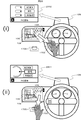
- FIG. 20 shows a state where the gesture and the steering controller 1703 are operated in the (B) navigation operation mode.
- a gesture operation menu 2001 is displayed on the external display unit 109. By moving the hand in one direction, it is guided that an item corresponding to the direction is selected.
- a steering controller operation menu 2002 is displayed as shown in FIG. 20 (ii).
- pressing one of the upper, middle and lower switches of the steering controller 1703 guides selection of an item corresponding to the switch.
- the state of (ii) in FIG. 20 if the user puts his hand over the sensing unit 103 again without pressing any switch, the state of (i) in FIG. 20 is obtained.
- FIG. 21, FIG. 22, and FIG. 23 show screen transitions of the external display unit 109 in the series of operations described in FIG. 19 and FIG.
- FIG. 21 shows screen transitions in the (B) navigation operation mode
- FIG. 22 shows the (A) audio operation mode
- FIG. 23 shows (C) the air conditioner operation mode.
- FIG. 24 shows the details of the movement in the screen of the external display unit 109 in the (B) navigation operation mode.
- the gesture operation menu 2001 is displayed on the external display unit 109.
- the user moves his / her hand upward from the position where the user holds his / her hand, only the item corresponding to the upward direction is displayed for a predetermined period of time as indicated by 2401 in FIG. Can be confirmed.
- the display of 2401 elapses for a predetermined time
- the display of the external display unit 109 returns to the state before the user holds his hand.
- the steering controller operation menu 2002 has the same movement.
- FIG. 26 (a) is a table showing the correspondence between gesture detection states and operation devices in the in-vehicle device 101 of the present embodiment.
- FIG. 26C is a table showing the correspondence between operation devices and display devices according to the running and stop states.
- the output information control unit 114 determines an operation device and a display device to be used for a predetermined menu operation according to FIGS. 26 (a) and 26 (c).
- the output information control unit 114 determines that the user is about to operate with a gesture.
- the hand is away from the sensing unit 103, it is determined that the user is about to operate with the steering controller 1703.
- the output information control unit 114 instructs the operation menu application 1701 to output a predetermined screen.
- the output information control unit 114 determines that the user is about to perform an operation using the gesture and steering controller 1703 and the commander controller 1705 when the vehicle is running. At that time, an operation menu is displayed on the HUD which is the external display unit 109. As a result, the user can visually recognize the operation menu with little line-of-sight movement from the state of visually confirming the front of the vehicle, so that an effect of suppressing the influence on the driving operation by operating the operation menu can be obtained.
- the steering controller operation menu 2002 is displayed on the external display unit 109.
- the display of the controller operation menu 2002 is troublesome. Therefore, as shown in FIG. 27, when the user returns his hand to the steering wheel, a simple menu is displayed in which the menu display portion is reduced in the external display unit 109 as shown in 2701 of FIG.
- the steering contact detection unit 1704 detects that the user touches the switch of the steering controller 1703, the steering controller operation menu 2002 may be displayed.
- the steering controller operation menu 2002 is not displayed until just before the user operates the steering controller 1703, so that the troublesomeness of the menu display can be reduced, and the display on the external display unit 109 can be replaced with other information necessary for driving.
- the effect that it can be effectively used for the display of is obtained.
- FIG. 28 shows the external appearance of the operation of the in-vehicle device 101 in this embodiment.
- a state in which a commander operation menu 2801 is displayed on the external display unit 109 when the user brings his hand close to the commander controller 1705 is added.
- a camera is used for the sensing unit 103 as shown in FIG.
- the sensing unit 103 detects in which direction the user's hand is moving around the sensing unit 103.
- the sensing unit 103 may be a sensing device other than a camera as long as the direction in which the user's hand is moving can be detected.
- the operation of the in-vehicle device 101 of this embodiment will be described.
- the basic operation is the same as that described in the third embodiment.
- the external display unit 109 is detected by detecting in which direction the user's hand is moving around the sensing unit 103. It is characterized in that the shape of the displayed operation menu and operation guide is changed.
- FIG. 28 shows a state in which the gesture and operation by the steering controller 1703 and the commander controller 1705 are performed in the (B) navigation operation mode.
- a steering controller operation menu 2002 is displayed as shown in (i) of FIG. Is done.
- an operation menu 2801 is displayed.
- the selection of one item is guided by rotating the rotary controller.
- FIG. 26B is a table showing selection of operation devices in accordance with the position and movement direction of the hand in the in-vehicle device 101 of the present embodiment.
- the output information control unit 114 determines an operation device to be used for a predetermined menu operation according to FIG.
- the output information control unit 114 determines that the user is about to operate with a gesture.
- the user's hand moves from the sensing unit 103 to the direction or position of the steering controller 1703, it is determined that the user is about to operate with the steering controller 1703.
- the user's hand moves from the sensing unit 103 to the direction or position of the commander controller 1705, it is determined that the user is about to operate with the commander controller 1705.
- the steering controller 1703 and the commander controller 1705 may be other operation devices provided in the vehicle.
- the output information control unit 114 instructs the operation menu application 1701 to output a predetermined screen. As a result, it is possible to display an operation menu and an operation guide suitable for the operation device that the user intends to operate, and an effect that the user can smoothly perform an operation using a desired operation device is obtained.
- the operation menu when displaying the operation menu, it may be based on the pointing direction of the user detected by the sensing unit 103 instead of based on the direction or position of the user's hand moving from the sensing unit 103.
- the sensing unit 103 detects that the user points to the air conditioner operation panel 2901, and based on this, the external display unit 109 is used for air conditioner operation.
- a steering controller operation menu 2302 may be displayed. Thereby, an effect that a desired operation menu can be displayed more smoothly without the user once holding the hand over the sensing unit 103 is obtained.
Landscapes
- Engineering & Computer Science (AREA)
- Theoretical Computer Science (AREA)
- General Engineering & Computer Science (AREA)
- Physics & Mathematics (AREA)
- General Physics & Mathematics (AREA)
- Human Computer Interaction (AREA)
- Mechanical Engineering (AREA)
- Transportation (AREA)
- Chemical & Material Sciences (AREA)
- Combustion & Propulsion (AREA)
- Multimedia (AREA)
- Health & Medical Sciences (AREA)
- General Health & Medical Sciences (AREA)
- Optics & Photonics (AREA)
- Audiology, Speech & Language Pathology (AREA)
- Computer Vision & Pattern Recognition (AREA)
- Psychiatry (AREA)
- Social Psychology (AREA)
- User Interface Of Digital Computer (AREA)
- Instrument Panels (AREA)
Priority Applications (3)
| Application Number | Priority Date | Filing Date | Title |
|---|---|---|---|
| CN201680004230.2A CN107107841B (zh) | 2015-02-20 | 2016-02-01 | 信息处理装置 |
| EP16752264.8A EP3260331A4 (de) | 2015-02-20 | 2016-02-01 | Informationsverarbeitungsvorrichtung |
| US15/551,308 US10466800B2 (en) | 2015-02-20 | 2016-02-01 | Vehicle information processing device |
Applications Claiming Priority (2)
| Application Number | Priority Date | Filing Date | Title |
|---|---|---|---|
| JP2015-031324 | 2015-02-20 | ||
| JP2015031324A JP6426025B2 (ja) | 2015-02-20 | 2015-02-20 | 情報処理装置 |
Publications (1)
| Publication Number | Publication Date |
|---|---|
| WO2016132876A1 true WO2016132876A1 (ja) | 2016-08-25 |
Family
ID=56688843
Family Applications (1)
| Application Number | Title | Priority Date | Filing Date |
|---|---|---|---|
| PCT/JP2016/052916 Ceased WO2016132876A1 (ja) | 2015-02-20 | 2016-02-01 | 情報処理装置 |
Country Status (5)
| Country | Link |
|---|---|
| US (1) | US10466800B2 (de) |
| EP (1) | EP3260331A4 (de) |
| JP (1) | JP6426025B2 (de) |
| CN (1) | CN107107841B (de) |
| WO (1) | WO2016132876A1 (de) |
Cited By (3)
| Publication number | Priority date | Publication date | Assignee | Title |
|---|---|---|---|---|
| JP2019028973A (ja) * | 2017-12-20 | 2019-02-21 | 京セラ株式会社 | 電子機器、プログラムおよび制御方法 |
| US10599226B2 (en) * | 2015-05-21 | 2020-03-24 | Audi Ag | Operating system and method for operating an operating system for a motor vehicle |
| US10698541B2 (en) | 2017-07-28 | 2020-06-30 | Kyocera Corporation | Electronic device, recording medium, and control method |
Families Citing this family (25)
| Publication number | Priority date | Publication date | Assignee | Title |
|---|---|---|---|---|
| JP6426025B2 (ja) * | 2015-02-20 | 2018-11-21 | クラリオン株式会社 | 情報処理装置 |
| JP6224029B2 (ja) * | 2015-05-21 | 2017-11-01 | 富士通テン株式会社 | 画像処理装置および画像処理方法 |
| JP2018182616A (ja) * | 2017-04-18 | 2018-11-15 | 京セラ株式会社 | 電子機器、制御方法、およびプログラム |
| WO2018193579A1 (ja) * | 2017-04-20 | 2018-10-25 | 矢崎総業株式会社 | 画像認識装置 |
| JP6508846B2 (ja) * | 2017-06-02 | 2019-05-08 | 本田技研工業株式会社 | 車両制御システム、車両制御方法、およびプログラム |
| JP7080598B2 (ja) * | 2017-07-21 | 2022-06-06 | ソニーセミコンダクタソリューションズ株式会社 | 車両制御装置および車両制御方法 |
| KR101951426B1 (ko) * | 2017-08-08 | 2019-02-22 | 엘지전자 주식회사 | 차량에 구비된 차량 제어 장치 및 차량의 제어방법 |
| CN109491496A (zh) * | 2017-09-12 | 2019-03-19 | 精工爱普生株式会社 | 头部佩戴型显示装置和头部佩戴型显示装置的控制方法 |
| DE102018203426A1 (de) * | 2018-03-07 | 2019-09-12 | Audi Ag | Verfahren zum Betrieb eines Kraftfahrzeugs mit einem Autopilotsystem und Kraftfahrzeug |
| WO2019202670A1 (ja) * | 2018-04-17 | 2019-10-24 | 株式会社ソシオネクスト | ジェスチャ認識方法及びジェスチャ認識装置 |
| US10850746B2 (en) | 2018-07-24 | 2020-12-01 | Harman International Industries, Incorporated | Coordinating delivery of notifications to the driver of a vehicle to reduce distractions |
| CN113924568B (zh) | 2019-06-26 | 2025-09-26 | 谷歌有限责任公司 | 基于雷达的认证状态反馈 |
| DE102019210912A1 (de) * | 2019-07-23 | 2021-01-28 | Brose Fahrzeugteile Se & Co. Kommanditgesellschaft, Bamberg | Verstellvorrichtung und Verfahren für die fremdkraftbetätigte Verstellung eines Verstellteils an einem Fahrzeug auf Basis wenigstens eines Bedienereignisses |
| CN113853566B (zh) | 2019-07-26 | 2024-05-28 | 谷歌有限责任公司 | 基于雷达的姿势识别的情境敏感控制 |
| KR102834938B1 (ko) | 2019-07-26 | 2025-07-18 | 구글 엘엘씨 | 인증된 상태 유지하기 |
| KR102479012B1 (ko) | 2019-08-30 | 2022-12-20 | 구글 엘엘씨 | 일시정지된 레이더 제스처에 대한 시각적 표시자 |
| KR102828469B1 (ko) | 2019-08-30 | 2025-07-03 | 구글 엘엘씨 | 모바일 디바이스에 대한 입력 방법 |
| WO2021050492A1 (en) * | 2019-09-12 | 2021-03-18 | Continental Automotive Systems, Inc. | Knob with display preview feature |
| JP2021102357A (ja) * | 2019-12-24 | 2021-07-15 | トヨタ自動車株式会社 | 車載機器操作装置 |
| CN114867540B (zh) * | 2019-12-27 | 2024-04-30 | 索尼集团公司 | 信息处理装置、信息处理方法和信息处理程序 |
| JP7484756B2 (ja) * | 2021-02-05 | 2024-05-16 | 株式会社デンソー | 表示システム |
| JP2023055163A (ja) * | 2021-10-05 | 2023-04-17 | 株式会社デンソー | 表示装置、画像の表示方法および画像の表示プログラム |
| CN114205759B (zh) * | 2021-11-30 | 2023-03-07 | 上海赫千电子科技有限公司 | 一种车载以太网显示屏的显示控制方法 |
| JP2024164515A (ja) * | 2023-05-15 | 2024-11-27 | 株式会社東海理化電機製作所 | ユーザインタフェースシステム、制御装置、およびコンピュータプログラム |
| EP4527661A1 (de) * | 2023-09-20 | 2025-03-26 | Bayerische Motoren Werke Aktiengesellschaft | Verfahren und vorrichtung zur erkennung einer eingabe eines benutzers eines fahrzeugs |
Citations (2)
| Publication number | Priority date | Publication date | Assignee | Title |
|---|---|---|---|---|
| JP2010129069A (ja) * | 2008-12-01 | 2010-06-10 | Fujitsu Ten Ltd | ディスプレイ装置 |
| JP2014215644A (ja) * | 2013-04-22 | 2014-11-17 | 株式会社ユピテル | 装置及びプログラム |
Family Cites Families (52)
| Publication number | Priority date | Publication date | Assignee | Title |
|---|---|---|---|---|
| US9239673B2 (en) * | 1998-01-26 | 2016-01-19 | Apple Inc. | Gesturing with a multipoint sensing device |
| JP2005174356A (ja) * | 2000-02-01 | 2005-06-30 | Toshiba Corp | 方向検出方法 |
| US7821541B2 (en) * | 2002-04-05 | 2010-10-26 | Bruno Delean | Remote control apparatus using gesture recognition |
| KR100575906B1 (ko) * | 2002-10-25 | 2006-05-02 | 미츠비시 후소 트럭 앤드 버스 코포레이션 | 핸드 패턴 스위치 장치 |
| JP3752246B2 (ja) * | 2003-08-11 | 2006-03-08 | 学校法人慶應義塾 | ハンドパターンスイッチ装置 |
| JP2005297810A (ja) * | 2004-04-13 | 2005-10-27 | Denso Corp | 車両用表示システム及びプログラム |
| EP1764674B1 (de) * | 2005-09-14 | 2012-06-13 | Volkswagen AG | Eingabevorrichtung |
| JP2009042796A (ja) * | 2005-11-25 | 2009-02-26 | Panasonic Corp | ジェスチャー入力装置および方法 |
| JP2007302223A (ja) * | 2006-04-12 | 2007-11-22 | Hitachi Ltd | 車載装置の非接触入力操作装置 |
| US8094189B2 (en) * | 2007-01-30 | 2012-01-10 | Toyota Jidosha Kabushiki Kaisha | Operating device |
| ATE489803T1 (de) | 2007-07-23 | 2010-12-15 | Ericsson Telefon Ab L M | Verfahren und vorrichtung zur verwendung in einem kommunikationsnetz |
| US8165886B1 (en) * | 2007-10-04 | 2012-04-24 | Great Northern Research LLC | Speech interface system and method for control and interaction with applications on a computing system |
| DE102008051756A1 (de) * | 2007-11-12 | 2009-05-14 | Volkswagen Ag | Multimodale Benutzerschnittstelle eines Fahrerassistenzsystems zur Eingabe und Präsentation von Informationen |
| JP4692937B2 (ja) * | 2008-09-29 | 2011-06-01 | 株式会社デンソー | 車載用電子機器操作装置 |
| JP2010184600A (ja) | 2009-02-12 | 2010-08-26 | Autonetworks Technologies Ltd | 車載用ジェスチャースイッチ装置 |
| JP2010215194A (ja) | 2009-03-19 | 2010-09-30 | Hyundai Motor Co Ltd | 車載機器の操作装置 |
| JP5648207B2 (ja) * | 2009-09-04 | 2015-01-07 | 現代自動車株式会社 | 車両用操作装置 |
| KR20110055062A (ko) * | 2009-11-19 | 2011-05-25 | 삼성전자주식회사 | 로봇 시스템 및 그 제어 방법 |
| JP2011118725A (ja) | 2009-12-04 | 2011-06-16 | Sharp Corp | 情報処理機器、情報処理方法および情報処理プログラム |
| JP5348425B2 (ja) * | 2010-03-23 | 2013-11-20 | アイシン・エィ・ダブリュ株式会社 | 表示装置、表示方法、及び表示プログラム |
| KR101334107B1 (ko) * | 2010-04-22 | 2013-12-16 | 주식회사 굿소프트웨어랩 | 차량용 멀티미디어 제어를 위한 사용자 인터페이스 장치 및 방법 |
| US8810509B2 (en) * | 2010-04-27 | 2014-08-19 | Microsoft Corporation | Interfacing with a computing application using a multi-digit sensor |
| US20130145279A1 (en) * | 2011-11-16 | 2013-06-06 | Flextronics Ap, Llc | Removable, configurable vehicle console |
| US20120224060A1 (en) * | 2011-02-10 | 2012-09-06 | Integrated Night Vision Systems Inc. | Reducing Driver Distraction Using a Heads-Up Display |
| US9015639B2 (en) * | 2011-02-11 | 2015-04-21 | Linkedin Corporation | Methods and systems for navigating a list with gestures |
| US8819555B2 (en) * | 2011-04-07 | 2014-08-26 | Sony Corporation | User interface for audio video display device such as TV |
| US20120312956A1 (en) * | 2011-06-11 | 2012-12-13 | Tom Chang | Light sensor system for object detection and gesture recognition, and object detection method |
| US8891868B1 (en) * | 2011-08-04 | 2014-11-18 | Amazon Technologies, Inc. | Recognizing gestures captured by video |
| ES2958183T3 (es) * | 2011-08-05 | 2024-02-05 | Samsung Electronics Co Ltd | Procedimiento de control de aparatos electrónicos basado en el reconocimiento de voz y de movimiento, y aparato electrónico que aplica el mismo |
| DE102011112447A1 (de) * | 2011-09-03 | 2013-03-07 | Volkswagen Aktiengesellschaft | Verfahren und Anordnung zum Bereitstellen einer graphischen Nutzerschnittstelle, insbesondere in einem Fahrzeug |
| US9383579B2 (en) * | 2011-10-12 | 2016-07-05 | Visteon Global Technologies, Inc. | Method of controlling a display component of an adaptive display system |
| CN104169839A (zh) * | 2012-03-15 | 2014-11-26 | 松下电器产业株式会社 | 手势输入操作处理装置 |
| US9448635B2 (en) * | 2012-04-16 | 2016-09-20 | Qualcomm Incorporated | Rapid gesture re-engagement |
| US20130275924A1 (en) * | 2012-04-16 | 2013-10-17 | Nuance Communications, Inc. | Low-attention gestural user interface |
| TW201419036A (zh) * | 2012-11-06 | 2014-05-16 | Pixart Imaging Inc | 感測元件陣列、控制感測裝置的方法以及相關電子裝置 |
| JP6030430B2 (ja) * | 2012-12-14 | 2016-11-24 | クラリオン株式会社 | 制御装置、車両及び携帯端末 |
| US20140181759A1 (en) * | 2012-12-20 | 2014-06-26 | Hyundai Motor Company | Control system and method using hand gesture for vehicle |
| JP5372273B2 (ja) | 2013-03-07 | 2013-12-18 | 富士通テン株式会社 | ディスプレイ装置 |
| JP2014174818A (ja) | 2013-03-11 | 2014-09-22 | Panasonic Corp | 電子装置 |
| JP2014215649A (ja) * | 2013-04-23 | 2014-11-17 | アルプス電気株式会社 | 入力装置 |
| JP5472842B2 (ja) * | 2013-04-26 | 2014-04-16 | 株式会社デンソー | 車両用操作装置 |
| US20140368423A1 (en) * | 2013-06-17 | 2014-12-18 | Nvidia Corporation | Method and system for low power gesture recognition for waking up mobile devices |
| JP5486721B2 (ja) | 2013-06-18 | 2014-05-07 | キヤノン株式会社 | 表示制御装置及び表示制御装置の制御方法、プログラム、記憶媒体 |
| EP3018568A4 (de) * | 2013-07-05 | 2017-04-19 | Clarion Co., Ltd. | Informationsverarbeitungsvorrichtung |
| US20160023604A1 (en) * | 2013-07-08 | 2016-01-28 | LightSpeed Automotive Technology | Head-Up Display Controller |
| KR101558354B1 (ko) * | 2013-11-13 | 2015-10-20 | 현대자동차 주식회사 | 차량용 블라인드 콘트롤 시스템 |
| KR101534745B1 (ko) * | 2013-12-31 | 2015-07-07 | 현대자동차 주식회사 | 제스처 인식 장치 |
| KR101556521B1 (ko) * | 2014-10-06 | 2015-10-13 | 현대자동차주식회사 | 휴먼 머신 인터페이스 장치, 그를 가지는 차량 및 그 제어 방법 |
| DE102014116292A1 (de) * | 2014-11-07 | 2016-05-12 | Visteon Global Technologies, Inc. | System zur Informationsübertragung in einem Kraftfahrzeug |
| US10596906B2 (en) * | 2014-12-22 | 2020-03-24 | Volkswagen Ag | Finger strip and use of said finger strip |
| JP6426025B2 (ja) * | 2015-02-20 | 2018-11-21 | クラリオン株式会社 | 情報処理装置 |
| US10589676B2 (en) * | 2016-06-02 | 2020-03-17 | Magna Electronics Inc. | Vehicle display system with user input display |
-
2015
- 2015-02-20 JP JP2015031324A patent/JP6426025B2/ja active Active
-
2016
- 2016-02-01 WO PCT/JP2016/052916 patent/WO2016132876A1/ja not_active Ceased
- 2016-02-01 US US15/551,308 patent/US10466800B2/en active Active
- 2016-02-01 EP EP16752264.8A patent/EP3260331A4/de not_active Withdrawn
- 2016-02-01 CN CN201680004230.2A patent/CN107107841B/zh active Active
Patent Citations (2)
| Publication number | Priority date | Publication date | Assignee | Title |
|---|---|---|---|---|
| JP2010129069A (ja) * | 2008-12-01 | 2010-06-10 | Fujitsu Ten Ltd | ディスプレイ装置 |
| JP2014215644A (ja) * | 2013-04-22 | 2014-11-17 | 株式会社ユピテル | 装置及びプログラム |
Non-Patent Citations (1)
| Title |
|---|
| See also references of EP3260331A4 * |
Cited By (3)
| Publication number | Priority date | Publication date | Assignee | Title |
|---|---|---|---|---|
| US10599226B2 (en) * | 2015-05-21 | 2020-03-24 | Audi Ag | Operating system and method for operating an operating system for a motor vehicle |
| US10698541B2 (en) | 2017-07-28 | 2020-06-30 | Kyocera Corporation | Electronic device, recording medium, and control method |
| JP2019028973A (ja) * | 2017-12-20 | 2019-02-21 | 京セラ株式会社 | 電子機器、プログラムおよび制御方法 |
Also Published As
| Publication number | Publication date |
|---|---|
| US20180059798A1 (en) | 2018-03-01 |
| JP6426025B2 (ja) | 2018-11-21 |
| CN107107841A (zh) | 2017-08-29 |
| CN107107841B (zh) | 2020-03-31 |
| US10466800B2 (en) | 2019-11-05 |
| EP3260331A1 (de) | 2017-12-27 |
| EP3260331A4 (de) | 2018-09-05 |
| JP2016153250A (ja) | 2016-08-25 |
Similar Documents
| Publication | Publication Date | Title |
|---|---|---|
| JP6282188B2 (ja) | 情報処理装置 | |
| JP6426025B2 (ja) | 情報処理装置 | |
| CN108430819B (zh) | 车载装置 | |
| US20180232057A1 (en) | Information Processing Device | |
| US9703472B2 (en) | Method and system for operating console with touch screen | |
| US20140281964A1 (en) | Method and system for presenting guidance of gesture input on a touch pad | |
| US20190391736A1 (en) | Input device and input method | |
| KR20150000076A (ko) | 차량용 블라인드 콘트롤 시스템 | |
| US20210141385A1 (en) | Method and system for operating an automatic driving function in a vehicle | |
| JP7340150B2 (ja) | 操作画像表示装置、操作画像表示システム、及び操作画像表示プログラム | |
| JP5626259B2 (ja) | 画像表示装置 | |
| CN112000263B (zh) | 车载人机交互装置 | |
| JP4840332B2 (ja) | 遠隔操作装置 | |
| JP5125977B2 (ja) | 入力支援装置 | |
| JP6798608B2 (ja) | ナビゲーションシステムおよびナビゲーションプログラム | |
| CN112241237A (zh) | 图像显示装置、图像显示系统以及图像显示方法 | |
| JP2006078432A (ja) | マルチモニタシステム | |
| JP4962387B2 (ja) | ポインタ表示・移動装置およびポインタ表示・移動装置用のプログラム | |
| JP2019153255A (ja) | 情報処理方法 | |
| KR20180068033A (ko) | 차량 단말기 및 그의 동작 제어 방법 | |
| JP2018092522A (ja) | 入力システム、入力プログラム | |
| JP2017084220A (ja) | 操作装置、制御方法、プログラム及び記憶媒体 | |
| JP2020177315A (ja) | 電子装置 | |
| JP2018163555A (ja) | 情報入力システムおよび情報入力プログラム |
Legal Events
| Date | Code | Title | Description |
|---|---|---|---|
| 121 | Ep: the epo has been informed by wipo that ep was designated in this application |
Ref document number: 16752264 Country of ref document: EP Kind code of ref document: A1 |
|
| WWE | Wipo information: entry into national phase |
Ref document number: 15551308 Country of ref document: US |
|
| REEP | Request for entry into the european phase |
Ref document number: 2016752264 Country of ref document: EP |
|
| NENP | Non-entry into the national phase |
Ref country code: DE |