WO2017006731A1 - 情報処理装置、情報処理方法、情報処理プログラム、情報処理システム、および非一時的コンピュータ読取可能情報記録媒体 - Google Patents
情報処理装置、情報処理方法、情報処理プログラム、情報処理システム、および非一時的コンピュータ読取可能情報記録媒体 Download PDFInfo
- Publication number
- WO2017006731A1 WO2017006731A1 PCT/JP2016/067872 JP2016067872W WO2017006731A1 WO 2017006731 A1 WO2017006731 A1 WO 2017006731A1 JP 2016067872 W JP2016067872 W JP 2016067872W WO 2017006731 A1 WO2017006731 A1 WO 2017006731A1
- Authority
- WO
- WIPO (PCT)
- Prior art keywords
- resource
- content
- information processing
- client device
- screen
- Prior art date
- Legal status (The legal status is an assumption and is not a legal conclusion. Google has not performed a legal analysis and makes no representation as to the accuracy of the status listed.)
- Ceased
Links
Images













Classifications
-
- H—ELECTRICITY
- H04—ELECTRIC COMMUNICATION TECHNIQUE
- H04N—PICTORIAL COMMUNICATION, e.g. TELEVISION
- H04N1/00—Scanning, transmission or reproduction of documents or the like, e.g. facsimile transmission; Details thereof
- H04N1/0035—User-machine interface; Control console
- H04N1/00501—Tailoring a user interface [UI] to specific requirements
- H04N1/00509—Personalising for a particular user or group of users, e.g. a workgroup or company
-
- G—PHYSICS
- G06—COMPUTING OR CALCULATING; COUNTING
- G06F—ELECTRIC DIGITAL DATA PROCESSING
- G06F13/00—Interconnection of, or transfer of information or other signals between, memories, input/output devices or central processing units
-
- G—PHYSICS
- G06—COMPUTING OR CALCULATING; COUNTING
- G06F—ELECTRIC DIGITAL DATA PROCESSING
- G06F13/00—Interconnection of, or transfer of information or other signals between, memories, input/output devices or central processing units
- G06F13/10—Program control for peripheral devices
- G06F13/12—Program control for peripheral devices using hardware independent of the central processor, e.g. channel or peripheral processor
- G06F13/122—Program control for peripheral devices using hardware independent of the central processor, e.g. channel or peripheral processor where hardware performs an I/O function other than control of data transfer
-
- G—PHYSICS
- G06—COMPUTING OR CALCULATING; COUNTING
- G06F—ELECTRIC DIGITAL DATA PROCESSING
- G06F16/00—Information retrieval; Database structures therefor; File system structures therefor
- G06F16/90—Details of database functions independent of the retrieved data types
- G06F16/907—Retrieval characterised by using metadata, e.g. metadata not derived from the content or metadata generated manually
-
- G—PHYSICS
- G06—COMPUTING OR CALCULATING; COUNTING
- G06F—ELECTRIC DIGITAL DATA PROCESSING
- G06F16/00—Information retrieval; Database structures therefor; File system structures therefor
- G06F16/90—Details of database functions independent of the retrieved data types
- G06F16/95—Retrieval from the web
- G06F16/957—Browsing optimisation, e.g. caching or content distillation
-
- H—ELECTRICITY
- H04—ELECTRIC COMMUNICATION TECHNIQUE
- H04N—PICTORIAL COMMUNICATION, e.g. TELEVISION
- H04N1/00—Scanning, transmission or reproduction of documents or the like, e.g. facsimile transmission; Details thereof
- H04N1/0035—User-machine interface; Control console
- H04N1/00405—Output means
- H04N1/00474—Output means outputting a plurality of functional options, e.g. scan, copy or print
-
- H—ELECTRICITY
- H04—ELECTRIC COMMUNICATION TECHNIQUE
- H04N—PICTORIAL COMMUNICATION, e.g. TELEVISION
- H04N1/00—Scanning, transmission or reproduction of documents or the like, e.g. facsimile transmission; Details thereof
- H04N1/0035—User-machine interface; Control console
- H04N1/00498—Multi-lingual facilities
-
- H—ELECTRICITY
- H04—ELECTRIC COMMUNICATION TECHNIQUE
- H04N—PICTORIAL COMMUNICATION, e.g. TELEVISION
- H04N1/00—Scanning, transmission or reproduction of documents or the like, e.g. facsimile transmission; Details thereof
- H04N1/00962—Input arrangements for operating instructions or parameters, e.g. updating internal software
- H04N1/0097—Storage of instructions or parameters, e.g. customised instructions or different parameters for different user IDs
-
- H—ELECTRICITY
- H04—ELECTRIC COMMUNICATION TECHNIQUE
- H04N—PICTORIAL COMMUNICATION, e.g. TELEVISION
- H04N1/00—Scanning, transmission or reproduction of documents or the like, e.g. facsimile transmission; Details thereof
- H04N1/00962—Input arrangements for operating instructions or parameters, e.g. updating internal software
- H04N1/00973—Input arrangements for operating instructions or parameters, e.g. updating internal software from a remote device, e.g. receiving via the internet instructions input to a computer terminal
-
- H—ELECTRICITY
- H04—ELECTRIC COMMUNICATION TECHNIQUE
- H04N—PICTORIAL COMMUNICATION, e.g. TELEVISION
- H04N2201/00—Indexing scheme relating to scanning, transmission or reproduction of documents or the like, and to details thereof
- H04N2201/0077—Types of the still picture apparatus
- H04N2201/0094—Multifunctional device, i.e. a device capable of all of reading, reproducing, copying, facsimile transception, file transception
Definitions
- the present invention relates to an information processing apparatus, an information processing method, an information processing program, an information processing system, and a non-transitory computer-readable information recording medium.
- Information provision via the network will be localized and deployed around the world.
- the language displayed on the screen via the network can be provided by switching according to the language set by the browser or application.
- Patent Document 1 A method of grouping a plurality of parts displayed on the screen and specifying localization in units of groups is known (see, for example, Patent Document 1).
- the layout of parts displayed on the screen, images used for display, etc. may be switched by localization.
- the language displayed on the screen may be switched according to the language set by the browser or application, or may be switched according to the culture.
- the case where the language is switched according to the culture means, for example, the case where the language is divided into American and English depending on the culture even if the language is English.
- an object of the present invention is to manage screen elements in a parent-child relationship and reduce data (resources) for localization.
- An information processing apparatus is an information processing apparatus that provides information indicating a resource to be displayed on a screen of a client apparatus via a network, and is a resource management unit that stores a plurality of resources.
- Each resource belongs to one of a plurality of resource groups, and each of the plurality of resource groups belongs to any content, and when two or more resource groups belong to the same content, A priority for display is given to each, and identification information is given to the content, a resource management unit, a receiving unit that receives content identification information from the client device, content identification information, Based on the display priority, resources to be displayed on the client device screen from multiple resources A selection unit for-option, the information indicating the resource and a transmission unit that transmits to the client device.
- data (resources) for localization can be reduced by managing screen elements in a parent-child relationship.
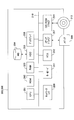
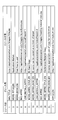
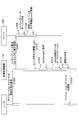
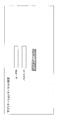
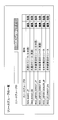
- 1 is a diagram illustrating a configuration example of an image processing system according to a first embodiment. It is a figure which shows an example of the sales system of an image processing apparatus. It is a figure which shows the example of a display of the screen of an application market (the 1). It is a figure which shows the example of a display of the screen of an application market (the 2). It is a figure which shows the example of a display of the screen of an application market (the 3). It is a figure which shows the relationship between a resource, a resource group, and content.
- 1 is a diagram illustrating a hardware configuration example of an image processing apparatus according to a first embodiment. It is a figure which shows the hardware structural example of the server which concerns on 1st Embodiment.
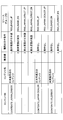
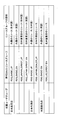
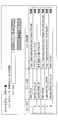
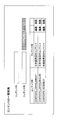
- FIG. 1 is a functional block diagram of an example of an image processing system according to a first embodiment. It is a figure which shows an example of a resource management table. It is a figure which shows an example of a resource group management table. It is a figure which shows an example of a content management table. It is a figure which shows an example of an image table. It is a figure which shows an example of a user management table. It is a figure which shows an example of a user group management table. It is a figure which shows an example of an authority management table. It is a flowchart which shows an example of operation
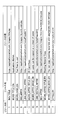
- FIG. 18 is a diagram for illustrating an example of an operation of the image processing apparatus according to the first embodiment, and is a diagram illustrating an example of a content resource table at the first loop in the flow of FIG. 17.
- FIG. 18 is a diagram for illustrating an example of an operation of the image processing apparatus according to the first embodiment, and is a diagram illustrating an example of a content resource table at the second loop in the flow of FIG. 17.
- It is a sequence diagram which shows an example of operation
- movement of the image processing system which concerns on 1st Embodiment It is a figure which shows an example of the content of the HTML file returned to the web browser installed in the image processing apparatus. It is a figure which shows the structural example of the image processing system which concerns on 2nd Embodiment.
- FIG. 1 shows an image processing system according to the first embodiment.
- the image processing system includes an image processing apparatus 100 and a server 200.
- Examples of the image processing apparatus 100 are a printer, a scanner, a copier, a facsimile, and a multifunction peripheral (MFP (Multi Function Peripheral)) having these functions.
- MFP Multi Function Peripheral
- the functions of the image processing apparatus 100 described below can be applied to apparatuses such as a projector and an electronic blackboard apparatus having a function of forming an image such as projection and display other than an apparatus having a printing function.
- the image processing apparatus 100 is connected to the server 200 via the communication network 50.
- the communication network 50 is not particularly limited.
- LAN Local Area Network
- IP Transmission Control Protocol / Internet Protocol
- VPN Virtual Private Network
- WAN Wide Area Network
- the image processing apparatus 100 accesses the server 200 and acquires (that is, selects) information indicating an element (resource) on the screen of the application market (market place) from the server 200.
- the image processing apparatus 100 creates an application market screen using the elements and displays the screen.
- the image processing apparatus 100 displays an application market screen related to the image processing apparatus 100.
- a sales system of an image processing apparatus will be described as an example of a business form.
- FIG. 2 shows an example of the sales system of the image processing apparatus.
- multifunction peripherals are sold in a sales system as shown in FIG.
- a Japan Sales Division that oversees sales in Japan
- a US Sales Division that oversees sales in the United States
- a UK Sales Division that oversees sales in the UK.
- a directly managed store that is directly operated by the Japan Sales Management Department and an agent that sells on behalf of the Japan Sales Management Department are prepared below the Japan Sales Management Department.
- a directly managed store that is directly operated by the US Sales Management Department and an agency that sells on behalf of the US Sales Management Department.
- a directly managed store that is directly operated by the UK Sales Management Department is prepared below the UK Sales Management Department.
- a link to the web application is incorporated into the screen of the application market displayed on the MFPs sold in this way.
- the link to the web application is incorporated, the display contents are changed by localizing the screen of the application market for each multi-function peripheral sold at each store.
- the application group sold through the Japan Sales Management Department is different from the application group sold through the US Sales Management Department.
- the display language of the application market screen is also English.
- a web application created by the agency may be displayed instead of the web application created by the directly managed shop.
- FIG. 3 shows an example of an application market screen incorporated in the image processing apparatus 100 sold at a directly managed store in Japan. As shown in FIG. 3, “ID card copy”, “conference material copy”, and “easy scan” are displayed on the screen on which the word “application market” is displayed.
- the display part of the word “ID card copy” is pressed by the user when installing an application that executes a function of copying a card such as a license.
- the display part of the word “conference material copy” is pressed by the user when installing an application that executes the function of copying the material distributed at the conference.
- the display part of the word “easy scan” is pressed by the user when installing an application that executes the scan function.
- FIG. 4 shows an example of an application market screen incorporated in the image processing apparatus 100 sold through a Japanese agency. As shown in FIG. 4, the words “ID card copy”, “conference material copy”, and “one-shot scan” are displayed on the screen on which the word “application market” is displayed.
- the words “ID card copy” and “meeting material copy” are the same as the same words on the screen of the application market incorporated in the image processing apparatus 100 sold in a directly managed store in Japan. Has the meaning of
- the word “one-shot scan” is a word that is pushed when installing an application similar to the application that is installed when the word “easy scan” is selected. The wording is pressed by the user when installing an application that performs the scan function.
- FIG. 5 shows an example of an application market screen incorporated in the image processing apparatus 100 sold through a directly managed store in the United States.
- the application market screen incorporated in the image processing apparatus 100 sold through a directly managed store in the United States is displayed in English.
- the words “ID Card Copy” and “Conference Material Copy” are displayed on the screen on which the word “Application Market” is displayed.
- the words “ID Card Copy” and “Conference ⁇ Material ⁇ Copy ” are“ ID card ”displayed on the screen of the application market incorporated in the image processing apparatus 100 sold in a directly managed store in Japan. It has the same meaning as the words “copy” and “copy meeting material”.
- the screen shown in FIG. 5 is different from the screen of the application market incorporated in the image processing apparatus 100 sold at a directly managed store or agency in Japan. That is, on the screen shown in FIG. 5, the wording selected when installing an application other than the application that executes the function corresponding to the words “ID ⁇ Card Copy ”and“ Conference Material Copy ”is not displayed.
- FIG. 6 shows the relationship among resources, resource groups, and contents.
- Resource is a screen element such as wording of application market.
- the resource includes a wording such as “Application Market” and a URL (Uniform Resource Locator) such as “http://applicationmarket.com/images/title.jpg”.
- a wording such as “Application Market”
- a URL Uniform Resource Locator
- Resource group is a collection of multiple resources.
- An example of the resource group is a set of resources commonly used in the image processing apparatus 100 sold in Japan.
- Content is a combination of resource groups.
- a plurality of resources are included in the resource group, and a plurality of resource groups are included in the content.
- FIG. 7 shows a hardware configuration example of the image processing apparatus 100.
- the image processing apparatus 100 includes a main body 10 capable of realizing various functions such as a copy function, a scanner function, a fax function, and a printer function, and an operation unit 20 that receives a user operation.
- accepting a user operation is a concept including accepting information (including a signal indicating a coordinate value of a screen) input according to the user operation.
- the main body 10 and the operation unit 20 are connected to each other via a dedicated communication path 32 so that they can communicate with each other.
- a USB (Universal Serial Bus) standard communication channel can be used as the communication channel 32, but any standard communication channel can be used regardless of whether it is wired or wireless.
- the main body 10 can perform an operation according to the operation received by the operation unit 20.
- the main body 10 can also communicate with an external device such as a client PC (personal computer), and can also perform an operation according to an instruction received from the external device.
- an external device such as a client PC (personal computer)
- the main body 10 includes a CPU (Central Processing Unit) 11, a ROM (Read-Only Memory) 12, a RAM (Random Access Memory) 13, an HDD (Hard Disk Drive) 14, and a communication I. / F (Interface) 15, connection I / F 16, and engine unit 17. These units are connected to each other via a system bus 18.
- CPU Central Processing Unit
- ROM Read-Only Memory
- RAM Random Access Memory
- HDD Hard Disk Drive
- the CPU 11 comprehensively controls the operation of the main body 10.
- the CPU 11 controls the overall operation of the main body 10 by executing a main body program stored in the ROM 12 or the HDD 14 or the like using the RAM 13 as a work area (working area), and the above-described copy function, scanner function, fax function, printer Implement various functions such as functions.
- the communication I / F 15 is an interface for connecting to the communication network 50.
- the connection I / F 16 is an interface for communicating with the operation unit 20 via the communication path 32.
- the engine unit 17 is hardware that performs processing other than general-purpose information processing and communication for realizing a copy function, a scanner function, a fax function, and a printer function.
- the engine unit 17 includes, for example, a scanner (image reading unit) that scans and reads an image of a document, a plotter (image forming unit) that performs printing on a sheet material such as paper, and a fax unit that performs fax communication.
- the engine unit 17 may further include specific options such as a finisher for sorting printed sheet materials and an ADF (automatic document feeder) for automatically feeding a document.
- the operation unit 20 includes a CPU 21, a ROM 22, a RAM 23, a flash memory 24, a communication I / F 25, a connection I / F 26, an operation panel 27, and an external connection I / F 28. These are connected to each other via a system bus 29.
- the CPU 21 comprehensively controls the operation of the operation unit 20.
- the CPU 21 controls the overall operation of the operation unit 20 by executing a program for the operation unit stored in the ROM 22 or the flash memory 24 using the RAM 23 as a work area, and information (image) according to the input received from the user.
- Various functions such as display are realized.
- the communication I / F 25 is an interface for connecting to the communication network 50.
- the connection I / F 26 is an interface for communicating with the main body 10 via the communication path 32.
- the operation panel 27 accepts various inputs according to user operations, and various types of information (for example, information according to accepted operations, information indicating the operating status of the image processing apparatus 100, information indicating a setting state, and the like). Is displayed.
- the operation panel 27 may be a liquid crystal display device (LCD: “Liquid” Crystal ”Display) equipped with a touch panel function, but is not limited thereto.
- the operation panel 27 may be an organic EL (Electro Luminescence) display device equipped with a touch panel function.
- the operation panel 27 may include an operation unit such as a hardware key and a display unit such as a lamp.
- the external connection I / F 28 is an interface for connecting to an external device such as an IC card reader.
- the program for the main body may be an installable or executable file.
- the main unit program in the file format may be recorded and distributed on a computer-readable recording medium such as a recording medium or a CD-ROM (Compact Disc Read-Only Memory).
- the main body program may be stored in the ROM 12 instead of the HDD 14.
- a detachable recording medium such as a CD-ROM
- a computer-readable recording medium such as a CD-R (Compact Disc Recordable), a DVD (Digital Versatile Disc), or a Blu-ray disc can be cited.
- the program for the main body may be recorded and provided on these recording media.
- the operation unit program is also an installable or executable file, and may be recorded and distributed on a computer-readable recording medium such as a recording medium or a CD-ROM. Further, the operation unit program may be stored in the ROM 22 instead of the flash memory 24. As another example of a removable recording medium such as a CD-ROM, a computer-readable recording medium such as a CD-R, DVD, or Blu-ray disc can be cited. The program for the operation unit may be provided by being recorded on these recording media.
- FIG. 8 shows a hardware configuration example of the server 200 according to the first embodiment.
- the server 200 includes a CPU 201 that controls the operation of the entire server 200, and a ROM 202 that stores programs used to drive the CPU 201 such as an IPL (Initial Program Loader).
- the server 200 further includes a RAM 203 used as a work area for the CPU 201.
- the server 200 includes an HD (Hard Disk) 204 that stores various data such as server programs, and an HDD 205 that controls reading or writing of various data with respect to the HD 204 according to the control of the CPU 201.
- the server 200 further includes a media drive 207 that controls reading and writing (storage) of data to and from a recording medium 206 such as a flash memory.
- the server 200 further includes a display 208 that displays various information such as a cursor, menu, window, character, or image, and a network I / F 209 for data transmission using the communication network 50.
- the server 200 further includes a keyboard 211 having a plurality of keys for inputting characters, numerical values, various instructions, and the like.
- the server 200 controls the reading of various data from a mouse 212 for selecting and executing various instructions, selecting a processing target, moving a cursor, and the like, and a CD-ROM 213 as an example of a removable recording medium.
- a ROM drive 214 is provided.
- the server 200 further includes a bus line 210 such as an address bus and a data bus for electrically connecting the above-described components as shown in FIG.
- the server program is also a file in an installable or executable format, and may be recorded and distributed on a computer-readable recording medium such as the recording medium 206 or the CD-ROM 213. .
- the server program may be stored in the ROM 202 instead of the HD 204.
- Other examples of the removable recording medium such as the CD-ROM 213 include a computer-readable recording medium such as a CD-R, DVD, and Blu-ray disc. You may make it provide the program for servers recorded on these recording media.
- FIG. 9 shows an example of functional blocks of the operation unit 20 included in the image processing apparatus 100.
- the operation unit 20 of the image processing apparatus 100 includes a transmission / reception unit 152, an acquisition unit 154, a storage / reading unit 156, a display control unit 158, and a communication control unit 160. Each of these units is realized by operating any of the components shown in FIG. 7 according to a command from the CPU 21 in accordance with the operation unit program stored in the flash memory 24. Further, the operation unit 20 includes a storage unit 162 realized by the flash memory 24 illustrated in FIG.
- the transmission / reception unit 152 of the operation unit 20 is realized by the communication I / F 25 illustrated in FIG.
- the transmission / reception unit 152 transmits / receives various data (information) to / from the server 200.
- the acquisition unit 154 of the operation unit 20 is realized by a command from the CPU 21 illustrated in FIG. 7 and a web browser stored in the flash memory 24, and acquires information indicating resources from the server 200.
- the display control unit 158 of the operation unit 20 is realized by a command from the operation panel 27 and the CPU 21 shown in FIG.
- the display control unit 158 performs control to display the resource based on information indicating the resource acquired by the acquisition unit 154.
- “display resource” means that if the resource is a URL of an image, the image is acquired by the URL and displayed on the screen. If the resource is a word, the word is displayed on the screen. It means to do. “Display resource” also means that if the resource is a URL link, the link is set on the screen. “Display resource” means that if the resource is a URL of a style sheet, the style sheet is acquired by the URL, and the position, color, size, etc. of the display component on the screen are controlled according to the style sheet. It shall be.
- the communication control unit 160 of the operation unit 20 is realized by the command from the CPU 21 and the communication I / F 25 shown in FIG.
- the communication control unit 160 controls communication between the image processing apparatus 100 and the server 200.
- the storage / reading unit 156 of the operation unit 20 is realized by the command from the CPU 21 and the operation unit program stored in the flash memory 24 shown in FIG.
- the storage / reading unit 156 performs processing for storing various types of data in the storage unit 162 and processing for reading out various types of data stored in the storage unit 162.
- the storage unit 162 of the operation unit 20 is realized by the ROM 22 and the flash memory 24 shown in FIG.
- the storage unit 162 stores a web browser and an operation unit program.
- the server 200 includes a transmission / reception unit 252, a content setting unit 254, a content acquisition unit 256, a user management unit 258, a resource setting unit 260, an image display unit 264, and a storage / reading unit 266.
- Each of these units is realized by any one of the constituent elements illustrated in FIG. 8 operating according to a command from the CPU 201 according to the server program stored in the HD 204.
- the server 200 has a storage unit 2000 realized by the HD 204 shown in FIG.
- the storage unit 2000 stores a resource management DB 2001 having the contents of the resource management table as shown in FIG.
- the resource management table manages the resource ID indicating information for uniquely identifying the resource, the resource name indicating the name of the resource, and the value of the resource in association with each other (that is, in association with each other).
- An example of the resource ID is represented by a numerical value.
- the resource name is a resource label and includes information indicating the type of resource.
- the resource name includes information indicating that the resource type is any one of an image URL, a wording, a URL link, and a style sheet URL.
- An example of the information indicating the URL of the image is “IMG_xxxxxx”, and an example of the information indicating the URL of the image that is the wording is “WORD_xxxxxx”.
- An example of information indicating the URL link is “LINK_xxxxxx”, and an example of information indicating the URL of the style sheet is “STYLE_xxxxxx”.
- the resource name includes information indicating the language.
- Examples of information indicating the language are JP (Japanese) and EN (English).
- the same resource name may be associated with different resource IDs.
- the storage unit 2000 also stores a resource group management DB 2002 having the contents of the resource group management table as shown in FIG.
- the resource group management table associates and manages the resource group ID, which is information for identifying the resource group, the description of the resource included in the resource group, and the resource ID of the resource included in the resource group.
- FIG. 11 also shows resource names and resource values to facilitate understanding of the resource group management table.
- the resource group ID of a resource group that is a set of resources commonly used in the image processing apparatus 100 sold in Japanese is “RSG_BASIC_JP”.
- the resource group ID of the resource group that is a set of resources commonly used in the image processing apparatus 100 sold in English is “RSG_BASIC_EN”.
- the resource group ID of a resource group that is a set of resources used in the image processing apparatus 100 sold in Japanese at a directly managed store in Japan is “RSG_JAPAN_DIRECT_JP”.
- the resource group ID of the resource group that is a set of resources used in the image processing apparatus 100 sold in English at a directly managed store in Japan is “RSG_JAPAN_DIRECT_EN”.
- the resource group ID of a resource group that is a set of resources used in the image processing apparatus 100 sold in Japanese at a Japanese agency is “RSG_JAPAN_DEALER_JP”.
- the resource group ID of the resource group that is a set of resources used in the image processing apparatus 100 sold at a directly managed store in North America is “RSG_US_DIRECT_EN”.
- the storage unit 2000 also stores a content management DB 2003 having the contents of the content management table as shown in FIG.
- the content management table associates a content ID indicating identification information for identifying the content, a content name indicating the name of the content, one or more resource groups belonging to the content, and a “condition indicating the attribute” common to the resource groups.
- “Attribute” in “condition indicating attribute” is, for example, one of a language type, a culture type, and a business form.
- each of the two or more resource groups is given a priority order between the resource groups and an inheritance order indicating a priority order for display. Managed.
- a resource group with a high inheritance order (that is, a value with a large inheritance order) is treated as a resource with a high priority for displaying the corresponding resource, and a low inheritance order (that is, a value with a low inheritance order). ) Resource groups are treated as low priority for displaying the corresponding resource.
- a resource with the same resource name as a resource included in a resource group with a lower inheritance order is also included in a resource group with a higher inheritance order among resource groups belonging to the same content.
- the resource with the same resource name as the resource name of the resource included in the resource group with the higher inheritance order is selected. Select by replacing (ie, overwriting) with the corresponding resource in the group.
- resource groups that belong to the same content and that have a resource name different from the resource name included in the resource group with the lower inheritance order are included in the resource group with the higher inheritance order.
- the resource having the different resource name included in the resource group having a high inheritance order is added and selected.
- the storage unit 2000 also stores an image DB 2004 having the contents of the image table as shown in FIG.
- the image table manages the image name and binary data in association with each other. For example, the image name “title.jpg” and binary data “Ox4749463836150003100F700000000008...” Are associated and managed by the image table shown in FIG.
- the storage unit 2000 also stores a user management DB 2005 having the contents of the user management table as shown in FIG.
- the user management table associates and manages user names, passwords, and belonging user groups. That is, the user who accesses the server 200 is managed by the user management table. For example, according to the user management table shown in FIG. 14, the user name “UserA”, the password “*************”, and the user group “Japan direct sales store” are associated and managed.
- the user management table shown in FIG. 14 the user name “UserA”, the password “*************”, and the user group “Japan direct sales store” are associated and managed.
- the storage unit 2000 also stores a user group management DB 2006 having the contents of the user group management table as shown in FIG.
- User group management is managed by the user group management table.
- the user group management table shown in FIG. 15 manages the affiliated user groups “Japan direct sales store”, “Japan agency”, and “US direct sales store”.
- the storage unit 2000 also stores an authority management DB 2007 having the contents of the authority management table as shown in FIG.
- the authority management table associates and manages the user group to which the user belongs and the resource group permitted to be referenced.
- FIG. 16 also describes resource groups for easy understanding.
- users belonging to the user group “Japan direct sales store” can refer to the resource groups “RSG_BASIC_JP”, “RSG_BASIC_EN”, “RSG_JAPAN_DIRECT_JP”, and “RSG_JAPAN_DIRECT_EN”.
- the user cannot refer to the resource group “RSG_US_DIRECT_EN”, for example.
- the transmission / reception unit 252 of the server 200 is realized by an instruction from the network I / F 209 and the CPU 201 shown in FIG.
- the transmission / reception unit 252 transmits / receives various data (information) to / from the image processing apparatus 100.
- the content setting unit 254 of the server 200 is realized by a command from the CPU 201 shown in FIG.
- the content setting unit 254 sets a content ID, a content name, an inheritance order, a condition indicating an attribute, and a resource group ID in the content management table of the content management DB 2003.
- the content acquisition unit 256 of the server 200 is realized by a command from the CPU 201 shown in FIG.
- a content resource request indicating a request for acquiring a resource transmitted by the image processing apparatus 100 is input from the transmission / reception unit 252 to the content acquisition unit 256.
- the content acquisition unit 256 When a content resource request is input, the content acquisition unit 256 generates a content table that is a storage area for storing resource group IDs of resource groups belonging to the corresponding content.
- the content acquisition unit 256 identifies and extracts the corresponding content ID from the content management table based on the content ID attached to the content resource request.
- the content acquisition unit 256 sets the resource group ID of the resource group belonging to the content represented by the extracted content ID in the content table.
- the content acquisition unit 256 sets the resource group ID while maintaining the association with the condition indicating the inheritance order and the attributes associated with the resource group ID when belonging to the content. Then, the content acquisition unit 256 arranges the resource group IDs in ascending order based on the inheritance order in which the association is held.
- the content acquisition unit 256 generates a content resource table that is a storage area for storing resource names and resource IDs of resources. Then, the content acquisition unit 256 sequentially extracts resource group IDs from the content table in ascending order, and deletes the extracted resource group IDs from the content table. The content acquisition unit 256 further determines whether or not the condition indicating the attribute in which the resource group ID extracted from the content table and the association is held matches the condition indicating the attribute attached to the content resource request. If the content acquisition unit 256 determines that the condition indicating the attribute that holds the association with the resource group matches the condition indicating the attribute attached to the content resource request, the resource acquisition unit 256 includes the resource resource included in the resource group. The ID and resource name are stored in the content resource table.
- the content acquisition unit 256 stores the resource ID and resource name of the resource in the content resource table, if the resource ID and resource name of the resource having the same resource name are already stored, the content acquisition unit 256 overwrites the resource ID and resource name. In this case, the content acquisition unit 256 changes only the resource ID to a new resource ID.
- the content acquisition unit 256 performs the same process for all resource group IDs in the content table, and then transmits information indicating the resource associated with the resource ID included in the content resource table from the transmission / reception unit 252 to the image processing apparatus 100. Send.
- the user management unit 258 of the server 200 is realized by a command from the CPU 201 shown in FIG.
- the user management unit 258 manages users included in the user management table of the user management DB 2005 and affiliated user groups included in the user group management table of the user group management DB 2006. Further, the user management unit 258 manages the affiliated user groups included in the authority management table of the authority management DB 2007 and the resource groups permitted to be referenced.
- the user management unit 258 allows the user to log in when a combination of “user name” and “password” attached to the login request is included in the user management table. To do.
- the user management unit 258 When the user management unit 258 permits a user to log in, the user management unit 258 refers to the user management table and identifies the user group to which the user belongs. When the user management unit 258 identifies the user group to which the user belongs, the user management unit 258 identifies the resource group that is permitted to refer to the identified user group by referring to the authority management table, and the user authorized to log in the user group. Allow browsing of resource groups. By setting a resource group that can be referred to for each user group to which the user belongs, the resource group can be prevented from being used by an unintended user.
- the resource setting unit 260 of the server 200 is realized by a command from the CPU 201 shown in FIG.
- the resource setting unit 260 sets a resource ID, a resource name, and a resource value in the resource management table of the resource management DB 2001.
- the resource setting unit 260 sets a resource group ID, a description, a resource ID, and a resource name in the resource group management table of the resource group management DB 2002.
- the image display unit 264 of the server 200 is realized by the command from the CPU 201 and the display 208 shown in FIG.
- the image display unit 264 acquires binary data associated with the image ID from the image table of the image DB 2004.
- the image display unit 264 transmits the binary data acquired from the image table from the transmission / reception unit 252 to the image processing apparatus 100.
- the storage / reading unit 266 of the server 200 is realized by a command from the CPU 201 shown in FIG. 8 and a server program stored in the HD 204.
- the storage / reading unit 266 performs processing for storing various data in the storage unit 2000 and processing for reading various data stored in the storage unit 2000.
- FIG. 17 shows an example of the operation of the image processing system according to the first embodiment.
- FIG. 17 shows processing in which the server 200 selects a resource according to a content resource request transmitted by the image processing apparatus 100 and returns information indicating the resource to the image processing apparatus 100.
- step S1702 the transmission / reception unit 152 of the image processing apparatus 100 transmits a content resource request to the server 200.
- a content resource request is accompanied by a condition indicating a content ID and an attribute.
- a bookmark in which a URL is registered is incorporated in the image processing apparatus 100.
- a condition indicating an attribute is added to the header of the content resource request transmitted from the image processing apparatus 100, and the URL is included in the main body.
- the server 200 that has received the content resource request can acquire the condition indicating the attribute from the header, and can determine what resource should be acquired by acquiring the query from the URL of the main body.
- a content resource request is transmitted from the image processing apparatus 100 to the server 200 when the display portion of the bookmark displayed on the screen of the image processing apparatus 100 is pressed by the user.
- condition indicating the attribute attached to the header may be incorporated into the image processing apparatus 100 when the store ships the image processing apparatus 100.
- step S1704 the transmission / reception unit 252 of the server 200 receives the content resource request transmitted by the image processing apparatus 100.
- the content acquisition unit 256 When the content resource request is received by the transmission / reception unit 252, the content acquisition unit 256 generates a content table and a content resource table.
- step S1706 the content acquisition unit 256 extracts the resource group ID of the resource group belonging to the corresponding content from the content management table using the content ID as a key. Then, the content acquisition unit 256 stores the resource group ID in the content table. At this time, the resource group ID is stored while maintaining the association with the condition indicating the inheritance order and the attributes associated with the resource group ID when belonging to the content indicated in the content management table.
- step S1708 the content acquisition unit 256 sorts the resource group IDs stored in the content table in ascending order based on the inheritance order in which the association is held.
- step S1710 the content acquisition unit 256 determines whether the content table is already empty.
- the content acquisition unit 256 receives information indicating the resource associated with the resource ID included in the content resource table in steps S1712 and S1714 from the transmission / reception unit 252. It transmits to the processing apparatus 100.
- the content acquisition unit 256 extracts resource group IDs from the content table in ascending order based on the inheritance order in which the association is held in step S1716.
- step S1718 the content acquisition unit 256 determines whether or not the resource group ID extracted from the content table and the condition indicating the attribute holding the association match the condition indicating the attribute attached to the content resource request. . If the condition indicating the attribute holding the association between the resource group ID and the attribute does not match the condition indicating the attribute attached to the content resource request, the content acquisition unit 256 returns to step S1710. If the condition indicating the attribute in which the resource group ID and the association are held matches the condition indicating the attribute attached to the content resource request, the content acquisition unit 256 proceeds to step S1720.
- condition indicating the attribute attached to the content resource request is “Japanese as the display language”
- the condition indicating the attribute in which the resource group ID extracted from the content table and the association is held is “the display language is Japanese”
- the content acquisition unit 256 determines that the condition indicating the attribute matches.
- the content acquisition unit 256 determines that the condition indicating the attribute does not match.
- the content acquisition unit 256 determines that the condition indicating the attribute matches.
- step S1720 the content acquisition unit 256 stores the resource ID and the resource name (see FIG. 11) associated with the resource group ID in the content resource table. After storing the resource ID and resource name in the content resource table, the content acquisition unit 256 returns to step S1710.
- the content acquisition unit 256 determines the order of inheritance in which the resource group ID and the association are held according to the relationship between the resource ID and the resource name already stored. Perform appropriate processing.
- a resource group with a higher inheritance order is treated as having a higher priority for displaying the corresponding resource than a resource group with a lower inheritance order.
- a resource with the same resource name as a resource name in a resource group with a low inheritance order is also included in a resource group with a high inheritance order.
- the resource with the same resource name as the resource name included in the resource group with the higher inheritance order is included in the resource group with the higher inheritance order Select by replacing (ie, overwriting) with the corresponding resource.
- a resource group with a resource name different from the resource name in the resource group with the lower inheritance order is included in the resource group with the higher inheritance order.
- a resource having the different resource name in the resource group having a high inheritance order is added and selected.
- FIGS. 18A and 18B show an example of processing in which the server 200 selects a resource according to the flow shown in FIG. More specifically, FIGS. 18A and 18B show examples of content resource tables at the first and second loops in the flow of FIG. 17, respectively. As described above, the resource ID and the resource name are stored in the content resource table. In order to facilitate understanding of the content resource table, resource values are also shown in FIGS. 18A and 18B.
- step S1704 a content table is generated.
- step S1706 the resource group ID belonging to the content corresponding to the content ID “CONTENTS_US_DIRECT” is acquired from the content management table of FIG.
- the resource group ID is stored in the content table.
- the resource group ID is stored while the association with the condition indicating the inheritance order and the attribute associated with the resource group ID when the resource ID is associated with the content ID shown in the content management table.
- the resource group IDs associated with the content ID “CONTENTS_US_DIRECT” are “RSG_BASIC_EN” and “RSG_US_DIRECT_EN” in total.
- the inheritance order “1” and “2” for the two resource group IDs are associated with the resource group ID “CONTENTS_US_DIRECT”.
- the conditions “no condition” and “no condition” indicating the attributes are associated with each other. Therefore, in this case, the resource group IDs “RSG_BASIC_EN” and “RSG_US_DIRECT_EN” retain the associations of the inheritance orders “1” and “2”, and the conditions “no condition” and “no condition” indicating attributes. Each is stored in the content table.
- step S1708 the resource group IDs stored in the content table are sorted in ascending order based on the inheritance order in which the association is held.
- step S1716 in the first loop resource group IDs are extracted from the content table in ascending order while maintaining the association.
- step S1716 the resource group ID “RSG_BASIC_EN” whose inheritance order in which the association is held is “1” is extracted from the content table.
- step S1718 it is determined whether or not the condition indicating the attribute holding the association with the resource group ID “RSG_BASIC_EN” matches the condition indicating the attribute attached to the content resource request.
- the condition indicating the attribute attached to the content resource request is “English display language”. Further, the condition indicating the attribute in which the resource group ID “RSG_BASIC_EN” and the association are held is “no condition” (see FIG. 12). Therefore, it is determined that the condition indicating the attribute in which the association is held with the resource group ID “RSG_BASIC_EN” matches the condition indicating the attribute attached to the content resource request (YES in step S1718).
- step S 1720 the resource ID and resource name associated with the resource group ID “RSG_BASIC_EN” are acquired from the resource group management table (see FIG. 11).
- the resource ID and the resource name associated with the resource group ID “RSG_BASIC_EN” are stored in the content resource table, and the process returns to step S1710.
- step S1710 the determination result in step S1710 is still NO. Therefore, in step S1716 in the second loop, the resource group ID “RSG_US_DIRECT_EN” of the resource group whose inheritance order is “2” is held from the content table. It is extracted as it is.
- step S 1718 it is determined whether or not the condition indicating the attribute holding the association with the resource group ID “RSG_US_DIRECT_EN” matches the condition indicating the attribute attached to the content resource request.
- condition indicating the attribute attached to the content resource request is “English for display language”, and the condition indicating the attribute having the resource group ID “RSG_US_DIRECT_EN” and the association is “no condition” (see FIG. 12). is there. Therefore, it is determined that the condition indicating the attribute in which the resource group ID “RSG_US_DIRECT_EN” and the association are held matches the condition indicating the attribute attached to the content resource request (YES in step S1718).
- step S1720 the resource ID and resource name associated with the resource group ID “RSG_US_DIRECT_EN” are acquired from the resource group management table (FIG. 11). Then, the resource ID and the resource name associated with the resource group ID “RSG_US_DIRECT_EN” are stored in the content resource table.
- the same resource name as the resource name (see FIG. 11) associated with the resource group ID “RSG_US_DIRECT_EN” is already stored in the content resource table. That is, among the resource IDs (see FIG. 11) associated with the resource group ID “RSG_BASIC_EN” shown in FIG. 18A, the resources with resource IDs “14”, “15”, “17”, and “20”, respectively. The names match the resource names of the resource IDs “14”, “15”, “18”, and “21” associated with the resource group ID “RSG_US_DIRECT_EN”. Therefore, in this case, the content acquisition unit 256 of the server 200 replaces the already stored resource ID and resource name with the new resource ID and resource name associated with the resource group ID “RSG_US_DIRECT_EN” (that is, overwrites). Select).
- resource IDs “14”, “15”, “17 ”And“ 20 ” are replaced with new resource IDs“ 14 ”,“ 15 ”,“ 18 ”, and“ 21 ”associated with the resource group ID“ RSG_US_DIRECT_EN ”, respectively.
- the resource group IDs “RSG_BASIC_EN” and “RSG_US_DIRECT_EN” stored in the content table have already been extracted in step S1716 of the above two loops in total. Therefore, the content table is already empty. Accordingly, information indicating the resource associated with the resource ID stored in the content resource table shown in FIG. 18B is transmitted to the image processing apparatus 100 (steps S1712 and S1714).
- the following describes an example of the relationship between the resource group with the resource group ID “RSG_BASIC_EN” and the resource group with the resource group ID “RSG_US_DIRECT_EN”.
- the resource group with the resource group ID “RSG_BASIC_EN” is “parent”, and the resource group with the resource group ID “RSG_US_DIRECT_EN” is “child”.
- the resource IDs “1”, “3”, “5”, “8”, “9”, “11” defined as the elements of the resource group ID “RSG_BASIC_EN” as the parent.
- the resources “”, “13”, and “7” do not need to be redundantly defined as resources of the resource group ID “RSG_US_DIRECT_EN” that is a child (see FIG. 11).
- FIG. 19 illustrates processing in which the image processing apparatus 100 acquires information indicating resources from the server 200.
- the user operates the operation panel 27 of the image processing apparatus 100 to request display of the application market screen.
- step S1904 the acquisition unit 154 of the image processing apparatus 100 creates a content resource request indicating information requesting information indicating the resource to be displayed on the screen, and transmits the content resource request from the transmission / reception unit 152 to the server 200.
- a condition indicating attributes such as a content ID and a display language is attached to the content resource request.
- step S1906 when the transmission / reception unit 252 of the server 200 receives the content resource request transmitted by the image processing apparatus 100, the transmission / reception unit 252 inputs the content resource request to the content acquisition unit 256.
- the content acquisition unit 256 creates a content resource table based on the condition indicating the content ID and attribute attached to the content resource request input by the transmission / reception unit 252. As a process of creating the content resource table, the method described above with reference to FIG. 17 can be applied.
- step S1908 the content acquisition unit 256 of the server 200 displays information indicating the resource associated with the resource ID included in the content resource table created in step S1906 in the json (JavaScript (registered trademark) Object Notation) format or the like. And a format used for data transfer between the image processing apparatus 100 and the image processing apparatus 100.
- json JavaScript (registered trademark) Object Notation
- step S1910 the transmission / reception unit 252 of the server 200 transmits information indicating the resource converted into the json format by the content acquisition unit 256 to the image processing apparatus 100.
- step S1912 the transmission / reception unit 152 of the image processing apparatus 100 stores the information indicating the resource converted from the server 200 received in the json format in a local storage such as the storage unit 162.
- step S1914 the acquisition unit 154 of the image processing apparatus 100 performs localization of software such as a web browser by initializing i18n (internationalization) using information indicating the resource converted into the json format.
- step S1916 the display control unit 158 of the image processing apparatus 100 creates an application market screen using information indicating the resource converted into the json format, and displays the screen on the operation panel 27. At that time, the display control unit 158 can acquire information necessary for displaying resources from the server 200 as necessary.
- FIG. 20 shows an example of the content of an HTML (HyperText Markup Language) file as an example of information indicating resources returned from the server 200 to the web browser installed in the image processing apparatus in step S1910.
- HTML HyperText Markup Language
- step S1918 the user can view the application market screen (that is, the application list screen) displayed on the operation panel 27 of the image processing apparatus 100.
- the number of servers 200 is not limited to one, and a plurality of servers 200 may be provided. Also good. And the cloud service by the server 200 mentioned above may be provided by performing the function of the server 200 by a plurality of servers.
- resources that are elements of the screen are managed in a parent-child relationship.
- localization items defined in the parent language, culture, location, business form may not be duplicated in the child language, culture, location, business form. Therefore, the load of localization work can be reduced.
- the resource group parent and child do not have to have redundant resources.
- the resource displayed on the screen may be a URL registered with a style sheet (CSS (Cascading Style Style Sheet)).
- CSS CSS
- the store can change the position, color, size, etc. of the display component on the screen of the application market.
- a URL where an image is registered may be used as a resource. This allows the store to freely change the image used on the application market screen.
- the image processing apparatus 100 may attach information indicating a display language as a condition indicating an attribute.
- the display content of the application market screen can be switched in accordance with the display language of the web browser installed in the image processing apparatus 100.
- the image processing apparatus 100 may attach information on a terminal (for example, a PC or a tablet terminal) to be accessed as a condition indicating an attribute.
- a terminal for example, a PC or a tablet terminal
- the display content of the application market screen can be switched according to the terminal accessing the image processing apparatus 100.
- FIG. 21 shows an image processing system according to the second embodiment. As shown in FIG. 21, the image processing system is obtained by adding a terminal device 300 to the image processing system of the first embodiment described with reference to FIG.
- the terminal device 300 is mainly used at a store.
- the terminal device 300 has the same hardware configuration as that of the server 200 described with reference to FIG. However, a terminal device program for controlling the terminal device 300 is recorded in the HD 204 of the terminal device 300.
- the terminal device program is a file in an installable or executable format, and is recorded on a computer-readable recording medium such as the recording medium 206 or the CD-ROM 213 for distribution. Good. Further, the terminal device program may be stored in the ROM 202 instead of the HD 204. Other examples of the removable recording medium such as the CD-ROM 213 include a computer-readable recording medium such as a CD-R, DVD, and Blu-ray disc. You may make it provide the program for terminal devices by recording on these recording media.
- FIG. 22 is a functional block diagram of an example of the terminal device 300.
- the terminal device 300 includes a transmission / reception unit 352, a setting processing unit 354, a storage / reading unit 356, a display control unit 358, and a communication control unit 360. Each of these units is realized by any one of the constituent elements illustrated in FIG. 8 operating according to a command from the CPU 201 according to the terminal device program stored in the HD 204.
- the terminal device 300 includes a storage unit 362 that is realized by the HD 204 illustrated in FIG.
- the transmission / reception unit 352 of the terminal device 300 is realized by an instruction from the network I / F 209 and the CPU 201 shown in FIG.
- the transmission / reception unit 352 transmits / receives various data (information) to / from the server 200.
- the setting processing unit 354 of the terminal device 300 is realized by a command from the CPU 201 shown in FIG. 8 and a terminal device program stored in the HD 204, accesses the server 200, and is stored in the server 200. Set various information.
- the display control unit 358 of the terminal device 300 is realized by a command from the display 208 and the CPU 201 shown in FIG.
- the display control unit 358 performs control to display a setting screen acquired when the setting processing unit 354 accesses the server 200.
- the communication control unit 360 of the terminal device 300 is realized by the command from the CPU 201 and the network I / F 209 shown in FIG.
- the communication control unit 360 controls communication between the terminal device 300 and the server 200.
- the storage / reading unit 356 of the terminal device 300 is realized by a command from the CPU 201 shown in FIG. 8 and a terminal device program stored in the HD 204.
- the storage / reading unit 356 performs processing for storing various types of data in the storage unit 362 and processing for reading out various types of data stored in the storage unit 362.
- the storage unit 362 of the terminal device 300 is realized by the ROM 202 and the HD 204 shown in FIG.
- the storage unit 362 stores a web browser and a terminal device program.
- the application market screen is set by the terminal device 300 having the above-described configuration.
- FIG. 23 shows an example of a login screen of the terminal device 300 used in the store.
- the server 200 When the user operates the terminal device 300, the server 200 is accessed, and a login screen is displayed on the terminal device 300.
- the “user ID” and “password” When the user inputs “user ID” and “password” on the login screen and presses the “login” button (that is, performs a click operation or the like using the mouse 212 for the button), the “user ID” and “Password” is transmitted to the server 200.
- the user management unit 258 of the server 200 refers to the user management table of the user management DB 2005. Then, the user management unit 258 determines whether or not a combination of “user ID” and “password” that matches the combination of “user ID” and “password” transmitted from the terminal device 300 is included in the user management table. To do. When the combination is included in the user management table, the user management unit 258 logs in the user. After login, a setting screen for the application market screen is displayed on the terminal device 300.
- FIG. 24 shows an example of a setting screen for the resource management table.
- a list of resources that have already been set is displayed on the setting screen of the resource management table.
- “resource ID”, “resource name”, and “resource value” are displayed in association with each resource. Further, for each resource, the words “update” and “delete” are displayed in association with each other.
- FIG. 25 shows the terminal device 300 when the display portion of the word “add resource” is pressed on the screen of FIG. 24 (that is, when a click operation or the like using the mouse 212 is performed on the display portion). An example of the displayed screen is shown.
- the user can add a resource by pressing a display portion of the word “add resource” on the screen of FIG. 25 (that is, performing a click operation using the mouse 212 on the display portion).
- a display portion of the word “add resource” is pressed (that is, a click operation or the like using the mouse 212 is performed on the display portion)
- “resource ID”, “resource name”, and “ A screen for entering each item of “Resource value” is displayed.
- the user can input “resource ID”, “resource name”, and “resource value” by operating the keyboard 211.
- the corresponding resource is added to the resource list by pressing the display portion of the word “add” (that is, performing a click operation using the mouse 212 on the display portion).
- FIG. 26 shows an example of a setting screen for the resource group management table. A list of already set resource groups is displayed on the setting screen of the resource group management table.
- each resource group is displayed in association with the words “resource group ID” and “description”. Further, for each resource group, the words “edit” and “delete” are displayed in association with each other.
- FIG. 27 the display portion of the word “edit” is pressed on the setting screen of the resource group management table shown in FIG. 26 (that is, a click operation or the like using the mouse 212 is performed on the display portion).
- An example of the screen displayed in the case is shown. 27.
- a field for inputting the resource ID of the resource to be added to the resource group is provided.
- the user inputs a resource ID in the field and presses the display part of the word “add resource” or “authority setting” (that is, performs a click operation using the mouse 212 on the display part), thereby A resource is added to the group.
- FIG. 28 the display part of the “authority setting” wording on the screen for editing the resource group shown in FIG. 27 is pressed (that is, a click operation using the mouse 212 is performed on the display part).
- An example of a screen displayed in the case is shown. In this screen, one or a plurality of user group names and a check box to be checked to indicate whether or not to permit are displayed in association with each other.
- the user checks the check box associated with the name of the user group that is permitted to access the resource group, and presses the display portion of the word “setting” (that is, the mouse 212 for the display portion is pressed).
- the click operation etc. which were used can be performed.
- access authority is set for the user group represented by the user group name.
- the display portion of the word “setting” is pressed, the display screen shifts to the screen shown in FIG.
- FIG. 29 shows an example of a content management table setting screen.
- a list of already set contents is displayed on the setting screen of the content management table.
- “content ID” and “content name” are displayed in association with each content.
- the words “edit” and “delete” are displayed in association with each content.
- FIG. 30 shows a case where the display portion of the word “edit” is pressed on the setting screen of the content management table shown in FIG. 29 (that is, a click operation or the like using the mouse 212 is performed on the display portion).
- An example of the screen displayed on is shown.
- the display screen shifts to a screen for editing the content associated with the pressed “edit” text.
- the screen for editing the content shown in FIG. 30 is provided with a column for inputting a resource group ID of a resource group to be added to the content and a column for inputting a condition indicating an attribute.
- the user inputs the resource group ID in the column for inputting the resource group ID, inputs the condition indicating the attribute in the column for inputting the condition indicating the attribute, and presses the display portion of the word “add resource group” (that is, A click operation using the mouse 212 can be performed on the display portion).
- a click operation using the mouse 212 can be performed on the display portion.
- the terminal device 300 that performs various settings in the server 200, various settings regarding resources, resource groups, contents, and the like can be performed.
- the server is an example of each of an information processing apparatus and a computer
- the image processing apparatus is an example of a client apparatus.
- the resource management DB, the resource group management DB, and the content management DB are examples of a resource management unit and a memory
- the transmission / reception unit is an example of a transmission unit and a reception unit.
- the content acquisition unit is an example of a selection unit
- the inheritance order is an example of display priority
- the server program is an example of an information processing program
- the image processing system is an example of an information processing system.
Landscapes
- Engineering & Computer Science (AREA)
- Theoretical Computer Science (AREA)
- Signal Processing (AREA)
- Multimedia (AREA)
- General Engineering & Computer Science (AREA)
- General Physics & Mathematics (AREA)
- Physics & Mathematics (AREA)
- Databases & Information Systems (AREA)
- Data Mining & Analysis (AREA)
- Human Computer Interaction (AREA)
- Library & Information Science (AREA)
- Information Transfer Between Computers (AREA)
- User Interface Of Digital Computer (AREA)
Priority Applications (4)
| Application Number | Priority Date | Filing Date | Title |
|---|---|---|---|
| EP16821201.7A EP3321812A4 (de) | 2015-07-06 | 2016-06-16 | Informationsverarbeitungsvorrichtung, informationsverarbeitungsverfahren, informationsverarbeitungsprogramm, informationsverarbeitungssystem und nichttemporäres computerlesbares informationsaufzeichnungsmedium |
| CN201680036555.9A CN107710176B (zh) | 2015-07-06 | 2016-06-16 | 信息处理装置、方法、程序、系统和记录介质 |
| JP2017527155A JP6390793B2 (ja) | 2015-07-06 | 2016-06-16 | 情報処理装置、情報処理方法、情報処理プログラム、情報処理システム、および非一時的コンピュータ読取可能情報記録媒体 |
| US15/832,912 US10063725B2 (en) | 2015-07-06 | 2017-12-06 | Information processing apparatus, information processing method, and information processing system |
Applications Claiming Priority (2)
| Application Number | Priority Date | Filing Date | Title |
|---|---|---|---|
| JP2015-134962 | 2015-07-06 | ||
| JP2015134962 | 2015-07-06 |
Related Child Applications (1)
| Application Number | Title | Priority Date | Filing Date |
|---|---|---|---|
| US15/832,912 Continuation US10063725B2 (en) | 2015-07-06 | 2017-12-06 | Information processing apparatus, information processing method, and information processing system |
Publications (1)
| Publication Number | Publication Date |
|---|---|
| WO2017006731A1 true WO2017006731A1 (ja) | 2017-01-12 |
Family
ID=57685029
Family Applications (1)
| Application Number | Title | Priority Date | Filing Date |
|---|---|---|---|
| PCT/JP2016/067872 Ceased WO2017006731A1 (ja) | 2015-07-06 | 2016-06-16 | 情報処理装置、情報処理方法、情報処理プログラム、情報処理システム、および非一時的コンピュータ読取可能情報記録媒体 |
Country Status (5)
| Country | Link |
|---|---|
| US (1) | US10063725B2 (de) |
| EP (1) | EP3321812A4 (de) |
| JP (1) | JP6390793B2 (de) |
| CN (1) | CN107710176B (de) |
| WO (1) | WO2017006731A1 (de) |
Cited By (1)
| Publication number | Priority date | Publication date | Assignee | Title |
|---|---|---|---|---|
| CN113727070A (zh) * | 2021-08-27 | 2021-11-30 | 杭州海康威视系统技术有限公司 | 一种设备资源管理方法、装置、电子设备及存储介质 |
Families Citing this family (7)
| Publication number | Priority date | Publication date | Assignee | Title |
|---|---|---|---|---|
| JP6446995B2 (ja) * | 2013-10-29 | 2019-01-09 | 株式会社リコー | 情報処理システム及び情報処理方法 |
| JP7310378B2 (ja) * | 2019-07-08 | 2023-07-19 | 富士通株式会社 | 情報処理プログラム、情報処理方法、および情報処理装置 |
| US11936696B2 (en) | 2020-10-13 | 2024-03-19 | Zoom Video Communications, Inc. | Sharing a screen shot of a conference application during a network conference |
| US11425176B2 (en) | 2020-10-13 | 2022-08-23 | Zoom Video Communications, Inc. | Transmitting conference application content during a network conference |
| US11363079B2 (en) | 2020-10-13 | 2022-06-14 | Zoom Video Communications, Inc. | For recording conference application activity associated with a network conference |
| US12155703B2 (en) | 2020-10-13 | 2024-11-26 | Zoom Video Communications, Inc. | System and methods for associating conference application content with an instance of a network conference |
| US11050802B1 (en) | 2020-10-13 | 2021-06-29 | Zoom Video Communications, Inc. | System and methods for running conference applications before, during, and after a network conference |
Citations (4)
| Publication number | Priority date | Publication date | Assignee | Title |
|---|---|---|---|---|
| US20040267762A1 (en) * | 2003-06-24 | 2004-12-30 | Microsoft Corporation | Resource classification and prioritization system |
| JP2008171085A (ja) * | 2007-01-09 | 2008-07-24 | Sharp Corp | コンテンツ表示装置、コンテンツデータ提供装置、コンテンツデータ配信システム、コンテンツ選択方法、プログラム、および、記録媒体 |
| JP2008262306A (ja) * | 2007-04-10 | 2008-10-30 | Sharp Corp | レイアウト調整装置、レイアウト調整方法、レイアウト調整プログラム、及び、記録媒体 |
| US20150106400A1 (en) * | 2009-03-25 | 2015-04-16 | Eloy Technology, Llc | System And Method For Intelligent Storage Of Time Shifted Content |
Family Cites Families (13)
| Publication number | Priority date | Publication date | Assignee | Title |
|---|---|---|---|---|
| US7032186B1 (en) * | 2001-09-28 | 2006-04-18 | Emc Corporation | Methods and apparatus for representing resources in a computing system environment |
| US20030084401A1 (en) | 2001-10-16 | 2003-05-01 | Abel Todd J. | Efficient web page localization |
| JP2006023853A (ja) | 2004-07-06 | 2006-01-26 | Sharp Corp | サービス提供支援システム,サービス提供支援プログラム及びそれが記録されたコンピュータ読み取り可能な記録媒体 |
| JP2006293506A (ja) * | 2005-04-07 | 2006-10-26 | Konica Minolta Business Technologies Inc | データ出力装置、データ処理装置、およびそれらを用いたデータ出力システム |
| JP4946489B2 (ja) * | 2007-02-15 | 2012-06-06 | ブラザー工業株式会社 | 周辺装置 |
| JP2010129057A (ja) | 2008-12-01 | 2010-06-10 | Ricoh Co Ltd | 情報処理装置、表示データ翻訳方法、及びプログラム |
| JP4821892B2 (ja) * | 2009-07-09 | 2011-11-24 | コニカミノルタビジネステクノロジーズ株式会社 | 画像処理システム、サーバ装置、画像形成装置及びコンピュータプログラム |
| JP5593985B2 (ja) * | 2010-09-07 | 2014-09-24 | コニカミノルタ株式会社 | 表示装置、画像形成装置及びプログラム |
| US8793286B2 (en) * | 2010-12-09 | 2014-07-29 | International Business Machines Corporation | Hierarchical multi-tenancy management of system resources in resource groups |
| JP5788006B2 (ja) * | 2011-04-28 | 2015-09-30 | 株式会社日立製作所 | 計算機システム及びその管理方法 |
| JP2013003980A (ja) * | 2011-06-20 | 2013-01-07 | Kyocera Document Solutions Inc | サーバー装置及びサーバープログラム |
| JP2013061700A (ja) * | 2011-09-12 | 2013-04-04 | Sony Corp | 情報処理装置、情報処理方法、記録媒体および情報処理システム |
| US9519642B2 (en) * | 2013-02-28 | 2016-12-13 | Open Text Sa Ulc | System, method and computer program product for multilingual content management |
-
2016
- 2016-06-16 JP JP2017527155A patent/JP6390793B2/ja not_active Expired - Fee Related
- 2016-06-16 WO PCT/JP2016/067872 patent/WO2017006731A1/ja not_active Ceased
- 2016-06-16 CN CN201680036555.9A patent/CN107710176B/zh not_active Expired - Fee Related
- 2016-06-16 EP EP16821201.7A patent/EP3321812A4/de not_active Withdrawn
-
2017
- 2017-12-06 US US15/832,912 patent/US10063725B2/en not_active Expired - Fee Related
Patent Citations (4)
| Publication number | Priority date | Publication date | Assignee | Title |
|---|---|---|---|---|
| US20040267762A1 (en) * | 2003-06-24 | 2004-12-30 | Microsoft Corporation | Resource classification and prioritization system |
| JP2008171085A (ja) * | 2007-01-09 | 2008-07-24 | Sharp Corp | コンテンツ表示装置、コンテンツデータ提供装置、コンテンツデータ配信システム、コンテンツ選択方法、プログラム、および、記録媒体 |
| JP2008262306A (ja) * | 2007-04-10 | 2008-10-30 | Sharp Corp | レイアウト調整装置、レイアウト調整方法、レイアウト調整プログラム、及び、記録媒体 |
| US20150106400A1 (en) * | 2009-03-25 | 2015-04-16 | Eloy Technology, Llc | System And Method For Intelligent Storage Of Time Shifted Content |
Non-Patent Citations (1)
| Title |
|---|
| See also references of EP3321812A4 * |
Cited By (2)
| Publication number | Priority date | Publication date | Assignee | Title |
|---|---|---|---|---|
| CN113727070A (zh) * | 2021-08-27 | 2021-11-30 | 杭州海康威视系统技术有限公司 | 一种设备资源管理方法、装置、电子设备及存储介质 |
| CN113727070B (zh) * | 2021-08-27 | 2022-12-02 | 杭州海康威视系统技术有限公司 | 一种设备资源管理方法、装置、电子设备及存储介质 |
Also Published As
| Publication number | Publication date |
|---|---|
| EP3321812A1 (de) | 2018-05-16 |
| EP3321812A4 (de) | 2018-06-13 |
| CN107710176B (zh) | 2020-10-30 |
| US10063725B2 (en) | 2018-08-28 |
| JP6390793B2 (ja) | 2018-09-19 |
| US20180097951A1 (en) | 2018-04-05 |
| CN107710176A (zh) | 2018-02-16 |
| JPWO2017006731A1 (ja) | 2018-03-22 |
Similar Documents
| Publication | Publication Date | Title |
|---|---|---|
| JP6390793B2 (ja) | 情報処理装置、情報処理方法、情報処理プログラム、情報処理システム、および非一時的コンピュータ読取可能情報記録媒体 | |
| JP5697486B2 (ja) | 印刷中継サーバ、印刷中継サーバを制御する制御方法、その制御方法のプログラム、および印刷処理方法 | |
| US20120050793A1 (en) | Network printing system, client terminal, and printing method | |
| US8373878B2 (en) | Cooperative job flow creating apparatus, cooperative job flow creating method, service processing apparatus, service processing method, management server, flow conversion method, job flow execution method, program, and storage medium | |
| US20100199210A1 (en) | Item Setting Device, Control Method and Control Program for the Device | |
| JP6825465B2 (ja) | 情報処理装置、情報処理方法、及びプログラム | |
| US10298986B2 (en) | Method and apparatus for incorporating web based selection into graphics system | |
| EP2393275B1 (de) | Informationsverarbeitungssystem, Informationsverarbeitungsvorrichtung, Steuerverfahren dafür und Programm | |
| US10893165B2 (en) | Information processing apparatus, method of controlling the same, and storage medium | |
| US11137964B2 (en) | Information processing apparatus and non-transitory computer readable medium | |
| US10878055B2 (en) | Web server | |
| JP2013210912A (ja) | データ処理装置、データ処理システム及びプログラム | |
| US20220303354A1 (en) | Service providing system, information processing method, and recording medium | |
| JP2020102149A (ja) | 情報処理システム、サービス提供装置、情報処理方法およびプログラム | |
| JP5659562B2 (ja) | 文書管理システム、情報処理装置、文書ファイルの登録方法およびファイル登録プログラム | |
| JP5810637B2 (ja) | 印刷システム、印刷物生産方法、印刷プログラム | |
| US8782512B2 (en) | Controller, method, and program product for controlling job information display, and recording medium | |
| US20230306189A1 (en) | Information processing apparatus, non-transitory computer readable medium storing program, and information processing method | |
| JP6881920B2 (ja) | 情報処理装置、制御方法、及びプログラム | |
| JP6197572B2 (ja) | サーバ装置の制御プログラム、通信装置の制御プログラム、サーバ装置および通信装置 | |
| JP2014164509A (ja) | 画像処理装置 | |
| JP6753489B2 (ja) | 情報処理システム、情報処理装置、情報処理方法、及びプログラム | |
| JP6115664B2 (ja) | 情報処理装置及びプログラム | |
| JP6544868B2 (ja) | 電子マニュアルに関連するサービスを提供するためのプログラム、サーバおよびシステム | |
| JP2017058791A (ja) | 情報処理システム、情報処理装置、情報処理方法、及びプログラム |
Legal Events
| Date | Code | Title | Description |
|---|---|---|---|
| 121 | Ep: the epo has been informed by wipo that ep was designated in this application |
Ref document number: 16821201 Country of ref document: EP Kind code of ref document: A1 |
|
| ENP | Entry into the national phase |
Ref document number: 2017527155 Country of ref document: JP Kind code of ref document: A |
|
| NENP | Non-entry into the national phase |
Ref country code: DE |
|
| WWE | Wipo information: entry into national phase |
Ref document number: 2016821201 Country of ref document: EP |