WO2017008646A1 - Procédé de sélection d'une pluralité de cibles sur un terminal de commande tactile et équipement utilisant ledit procédé - Google Patents
Procédé de sélection d'une pluralité de cibles sur un terminal de commande tactile et équipement utilisant ledit procédé Download PDFInfo
- Publication number
- WO2017008646A1 WO2017008646A1 PCT/CN2016/088298 CN2016088298W WO2017008646A1 WO 2017008646 A1 WO2017008646 A1 WO 2017008646A1 CN 2016088298 W CN2016088298 W CN 2016088298W WO 2017008646 A1 WO2017008646 A1 WO 2017008646A1
- Authority
- WO
- WIPO (PCT)
- Prior art keywords
- target
- information
- user
- candidate
- selection
- Prior art date
- Legal status (The legal status is an assumption and is not a legal conclusion. Google has not performed a legal analysis and makes no representation as to the accuracy of the status listed.)
- Ceased
Links
Images




Classifications
-
- G—PHYSICS
- G06—COMPUTING OR CALCULATING; COUNTING
- G06F—ELECTRIC DIGITAL DATA PROCESSING
- G06F3/00—Input arrangements for transferring data to be processed into a form capable of being handled by the computer; Output arrangements for transferring data from processing unit to output unit, e.g. interface arrangements
- G06F3/01—Input arrangements or combined input and output arrangements for interaction between user and computer
- G06F3/048—Interaction techniques based on graphical user interfaces [GUI]
Definitions
- the present application relates to the field of computers, and in particular, to a technique for quickly selecting multiple targets.
- a method for selecting a target such as a picture, a video, a folder, an icon, or the like on a mobile terminal device is generally: the user first clicks an operation to bring the interface of the display target into a “selected state”, and then the user clicks through the operation. Select thumbnails for each target to select multiple targets.
- the disadvantage of the prior art is that selecting multiple targets requires multiple click operations, and the more targets, the more the number of click operations, the more complicated the operation.
- the technical problem to be solved by the present application is how to simplify the operation of selecting multiple targets on a mobile terminal device.
- a method for selecting a plurality of targets on a touch terminal includes:
- the target selection between the start target and the termination target is a plurality of first candidate targets
- the selection state information of the plurality of the first candidate targets is changed.
- the obtaining the start target and the termination target according to the information of the first operation of the user and the information of the second operation connected to the first operation include:
- the starting point and the ending target pointed by the double-point simultaneous click are obtained.
- the obtaining the start target and the termination target according to the information of the first operation of the user and the information of the second operation connected to the first operation include:
- the start point and the end target pointed to by the double point simultaneous click are acquired.
- the obtaining the start target and the termination target according to the information of the first operation of the user and the information of the second operation connected to the first operation include:
- the two-point simultaneous click and the start target and the end target are obtained.
- the obtaining the start target and the termination target according to the information of the first operation of the user and the information of the second operation connected to the first operation include:
- the single click operation includes a single click operation or a single click operation.
- the changing the selection status information of the plurality of candidate targets includes:
- the selection status information of the candidate target includes the selection, the selection status information is changed to unselected;
- the selection state information is changed to selected.
- the method further includes:
- the method further includes:
- the target includes at least one of the following:
- a device for selecting multiple targets on a touch terminal includes:
- a first target selecting means for acquiring a start target and a termination target according to information of the first operation of the user and information of the second operation connected to the first operation, and the start target, the End target and sorting target selection between the start target and the end target is a plurality of first candidate targets;
- a first state changing device configured to change selection state information of the plurality of the first candidate targets.
- the first target selection device is configured to:
- the starting point and the ending target pointed by the double-point simultaneous click are obtained.
- the first target selection device is configured to:
- the two-point simultaneous click and the start target and the end target are obtained.
- the first target selection device is configured to:
- the two-point simultaneous click and the start target and the end target are obtained.
- the first target selection device is configured to:
- the single click operation includes a single click operation or a single click operation.
- the first state changing device is configured to:
- the selection status information of the candidate target includes the selection, the selection status information is changed to unselected;
- the selection state information is changed to selected.
- the device further includes:
- the first state display device is configured to display a selection state corresponding to the first candidate target on the display area based on the selection state information of the first candidate target.
- the device further includes:
- a second target selection device configured to select, according to the single click operation of the user, a target pointed to by the single click as the second candidate target;
- a second state changing device configured to change selection state information of the second candidate target
- the second state display device is configured to display a selection state of the second candidate target on the display area based on the selection state information of the second candidate target.
- the target includes at least one of the following:
- the method and device for selecting multiple targets on the touch terminal in the present application acquire the start according to the information of the first operation of the user and the information of the second operation connected with the first operation.
- Target and termination target, and selecting the starting target, the termination target, and the target between the starting target and the ending target Selecting a plurality of first candidate targets and changing selection state information of the plurality of first candidate targets, and directly switching to the selection state according to the operation of the selection target performed by the user for the first time in the browsing state, and continuing Obtaining operations of multiple selection targets performed by the user, etc., and selecting a plurality of targets to select multiple targets when selecting multiple targets, thereby simplifying operations, improving operation efficiency, and satisfying diverse needs of user operations, and further Improve user experience.
- FIG. 1 is a schematic diagram of an apparatus for selecting a plurality of target devices on a touch terminal according to an aspect of the present disclosure
- FIG. 2 is a schematic diagram of an apparatus for selecting a plurality of target devices on a touch terminal according to a preferred embodiment of the present application
- FIG. 3 and FIG. 4 are schematic diagrams showing a process of selecting a plurality of targets on a touch terminal according to a preferred embodiment of the present application
- FIG. 5 and FIG. 6 are schematic diagrams showing a process of selecting multiple targets on a touch terminal according to another preferred embodiment of the present application.
- FIG. 7 is a schematic diagram of an apparatus for selecting multiple target devices on a touch terminal according to another preferred embodiment of the present application.
- FIG. 8 and FIG. 9 are schematic diagrams showing a process of selecting a plurality of targets on a touch terminal according to another preferred embodiment of the present application.
- FIG. 10 is a schematic flowchart diagram of a method for selecting multiple targets on a touch terminal according to an aspect of the present disclosure
- FIG. 11 is a schematic flowchart diagram of a method for selecting multiple targets on a touch terminal according to a preferred embodiment of the present application.
- FIG. 12 illustrates a flow of a method of selecting a plurality of targets on a touch terminal according to an aspect of the present application.
- FIG. 1 is a schematic diagram of an apparatus for selecting a plurality of target devices on a touch terminal according to an aspect of the present application.
- the device includes a first target selection device 11 and a first state modification device 12.
- the first target selection device 11 acquires a start target and a termination target according to the information of the first operation of the user and the information of the second operation connected to the first operation, and the start target, The termination target and the target selected between the start target and the termination target are selected as a plurality of first candidate targets; the first state changing device 12 changes a plurality of the first candidate targets Select status information.
- the device 1 includes, but is not limited to, a user equipment, a network device, or a device formed by integrating a user equipment and a network device through a network.
- the user equipment includes, but is not limited to, any mobile electronic product that can interact with the user through the touchpad, that is, a touch terminal, such as a smart phone, a PDA, a POS machine, etc., and the mobile electronic product can be adopted. Any operating system, such as android operating system, iOS operating system, etc.
- the network device includes an electronic device capable of automatically performing numerical calculation and information processing according to an instruction set or stored in advance, and the hardware includes but is not limited to a microprocessor, an application specific integrated circuit (ASIC), and a programmable gate.
- ASIC application specific integrated circuit
- the network device includes, but is not limited to, a computer, a network host, a single network server, a plurality of network server sets, or a plurality of servers; wherein the cloud is composed of a large number of computers or network servers based on Cloud Computing Among them, cloud computing is a kind of distributed computing, a virtual supercomputer composed of a group of loosely coupled computers.
- the network includes, but is not limited to, the Internet, a wide area network, a metropolitan area network, a local area network, a VPN network, a wireless ad hoc network (Ad Hoc network), and the like.
- the device 1 may further include a script program running on the user equipment, the network device, or the user equipment and the network device, the network device, the touch terminal, or the network device and the touch terminal integrated through the network.
- a script program running on the user equipment, the network device, or the user equipment and the network device, the network device, the touch terminal, or the network device and the touch terminal integrated through the network.
- the above devices are continuously working.
- “continuous” refers to the above-mentioned respective devices respectively in real time or in accordance with the set or real-time adjustment of the working mode requirements, for example, when the After the target selection device 11 selects the plurality of first candidate targets according to the information of the first operation of the user and the information of the second operation that is connected to the first operation, the first state changing device 12 changes the plurality of Selecting state information of the first candidate target until obtaining information that the user stops selecting.
- the first device 1 may repeat the work multiple times, that is, the first target selection device 11 may obtain the first operation information and the second operation information of the user multiple times, each time according to the information of the first operation and the second
- the information of the operation selects a plurality of first candidate targets, and the first candidate target acquired each time may be the same, partially the same or different from the previous first candidate target, and then the first state changing device 12 is all the last time.
- the selection state information of the target the selection state information of the plurality of first candidate targets obtained at the current time is changed, and the selection is repeated until the information that the user stops the selection is obtained.
- the information that the user stops selecting may include, but is not limited to, information of a button that the user clicks “deselect” or information that the user performs a processing operation on the selected multiple targets, and the processing operations may include, but are not limited to, deletion and copying. , cut, move, or edit.
- the device 1 is configured to quickly select multiple targets on an application interface of the touch terminal, where the application interface may include, but is not limited to, a system user interface, an APP interface, a browser interface,
- the self-contained text editor includes an application of the editable text information provided by the terminal, such as a short message. Editors, memos, notes, reminders, etc.
- the communication application includes even a communication application (online chat application) or a non-timely communication application (mailbox application).
- the target includes a picture, a video, an audio, a file, a text, a link, an application, or a user information, and the user information may include a list of friends in the communication reference and a list in the address book.
- the first target selecting device 11 detects and acquires the information of the first operation and the information of the second operation, according to the information of the first operation and the information of the second operation
- the plurality of first candidate targets include at least two first candidate targets.
- the first state changing device 12 changes the selection state information of the plurality of first candidate targets, wherein the selection state information of the target includes: “checked” and “unchecked”, the first state changing device 12: changing the selection state information of the first candidate target includes: changing the selection state information of the first selected state information to the unselected first candidate target to be selected, and setting the original selection state information to the selected first waiting state
- the selection status information of the selected target is changed to unchecked, that is, unchecked.
- the first target selecting device 11 can detect and acquire the information of the first operation and the information of the second operation for the first time in the target preview state, that is, all the targets are directly switched from the preview state to the candidate to be selected. Status, to make a selection, and continue to obtain the operation of multiple selection targets performed by the user, and the like.
- the operation information of the user's other manner of starting selection may be acquired, for example, Select the option "Select" displayed in the application interface to wait for the selection.
- Select the option "Select” displayed in the application interface to wait for the selection.
- the device 1 can select a plurality of targets through the first operation and the second operation connected to the first operation, and select or deselect the selected multiple targets, thereby simplifying the user operation. Improve target selection efficiency.
- the first operation and the second operation are mutually consecutive operational actions performed by a user.
- the first operation and the second operation may include, but are not limited to, a user's click operation, a sliding operation, a user's action on the touch terminal (such as shaking, tilting or flipping, etc.), a gesture, and a voice-implemented operation. (For example, including “click”, “double click”, “slide” operation instructions dictated by the user).
- the operations such as the click operation, the sliding operation, and the like can be performed on the touch screen using a stylus, a user gesture, or a user's finger.
- first operation and the second operation may further include: after the click operation, continuously slide one turn to the initial click point and then lift to select the operation of the target within the circled range.
- modes of operation that may occur in the future, such as those applicable to the present application, can be incorporated herein by reference.
- the first operation is a two-point simultaneous click operation
- the second operation is a double-point to center sliding operation after a double-point simultaneous click operation
- the first operation is a two-point simultaneous click operation.
- the second operation is an operation in which the click stay time of the double-point simultaneous click operation exceeds the first preset time, and the first preset time may be specifically determined according to the actual scenario, and is not described herein again; a two-point simultaneous click operation, the second operation is a two-point simultaneous click operation performed in the second preset time, wherein the second preset time may be specifically determined according to the actual scene, where No further description; or, the first operation is a single click operation, and the second operation is a sliding operation of the touch screen after the single click operation.
- the first operation and the second operation are simple in operation, easy for the user to operate, and the first target selection device 11 can easily recognize the information of the first operation and the information of the second operation, thereby improving the recognition accuracy and the processing efficiency.
- the target between the start target and the end target may be sorted according to a user's usual sorting manner, for example, top-down row sorting and each row sorting from left to right, of course, Those skilled in the art should be able to understand that the above sorting method is only a distance, and other sorting manners may be specifically set according to specific scenarios, such as user operating habits, target features, and the like.
- the first target selecting device 11 is configured to obtain a double point simultaneous clicking operation according to the double point simultaneous click operation of the user and the double point to center sliding operation connected with the double point simultaneous click operation.
- the starting and ending goals are configured to obtain a double point simultaneous clicking operation according to the double point simultaneous click operation of the user and the double point to center sliding operation connected with the double point simultaneous click operation.
- the first target selecting device 11 is configured to obtain a starting point and a termination point pointed to by the double point simultaneous click according to the double point simultaneous click operation of the user and the click stay time exceeding the first preset time. aims.
- the first target selecting device 11 is configured to acquire the starting target and the ending target pointed by the double point simultaneous click according to the two double simultaneous click operations of the user in the second preset time.
- the first target selection device 11 is configured to acquire a start point pointed to by the single click operation according to the single click operation of the user and the sliding operation of staying on the touch screen after the single click operation The target and the termination target pointed to by the end of the sliding operation.
- the single click operation includes a single click operation or a single click operation.
- the first state changing device 12 changes the selection state information of the plurality of the first candidate targets. Specifically, after acquiring the plurality of the first candidate targets, the first state changing device 12 First obtaining the selection state information of each of the first candidate targets before the selection, and then changing the selection state information of the first candidate target based on the selection state information before the selection, including changing from selected to unselected or from Unchecked to change to selected.
- the first state changing device 12 is configured to: when the selected state information of the candidate target includes the selected state, change the selected state information to be unselected; when the selected state information of the candidate target is selected When unchecked, the selection status information is changed to selected.
- the first state changing device 12 records the selected selection state information including the first candidate target and the selection state information of all other objects that have not been changed until the first operation and the second performed by the user again are acquired.
- the selection state information of the first selected target to be selected again is changed, or until the user completes a complete selection process.
- FIG. 2 is a schematic diagram of an apparatus for selecting a plurality of target devices on a touch terminal according to a preferred embodiment of the present application.
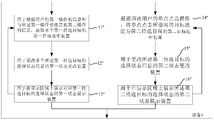
- the apparatus 1 includes a first target selecting means 11', a first state changing means 12' and a first state displaying means 13'.
- the first state display device 13' displays a selection state corresponding to the first candidate target on the display area based on the selection state information of the first candidate target.
- the content of the first target selecting device 11' and the first state changing device 12' is the same as or substantially the same as the content of the first target selecting device 11' and the first state changing device 12' of the device 1 shown in FIG.
- the content of the first target selecting device 11' and the first state changing device 12' is the same as or substantially the same as the content of the first target selecting device 11' and the first state changing device 12' of the device 1 shown in FIG.
- the first state display device 13' displays the selection state of the first candidate target according to the update of the selection state information of each first candidate target, and the first state display device 13' is according to each The update of the selection state information of an candidate target changes the visibility of the corresponding first candidate target to display the selection state of the first candidate target, which is convenient for the user to browse.
- the first state display device 13' adds a selected identifier display on the preview image of the first candidate target, or changes the color and border of the preview image of the first candidate target. , transparency, size, highlighting, etc.
- the first state display device 13' adds a background color display on the first object to be selected, or changes the color, font, size, bold mode, etc. of the first object to be selected. .
- FIG. 3 and FIG. 4 are schematic diagrams showing a process of selecting a plurality of targets on a touch terminal according to a preferred embodiment of the present application.
- a preview image is displayed on the touch screen display area of the touch terminal of the user, and the user has two previews. Pictures, then two fingers continue to stay in the touch screen display area after double-clicking (ie, do not lift off the touch screen display area) and slide closer to the center, then lift.
- the first target selecting device 11 ′ obtains the information of the first operation and the second operation composed by the foregoing operations, the image preview state is modified to the image candidate state, and the two images that are simultaneously clicked by the user at the same time are obtained.
- the first status changing device 12' changes the selection status information of the plurality of the first candidate objects to be selected.
- the first state display device 13' adds an update to the lower right corner of the preview image of all the selected first candidate targets according to the update of the selection state information of each of the first candidate targets.
- the checkmark "mark" to show the selected state of the first candidate to be selected.
- FIG. 5 and FIG. 6 are schematic diagrams showing a process of selecting a plurality of targets on a touch terminal according to another preferred embodiment of the present application. Referring to the previous example and in conjunction with FIG. 2 to FIG. 6 , in a specific scenario, after the user performs the operation shown in FIG. 3 on the touch terminal, the device 1 continues to detect and acquire the first operation information and the first performed by the user again.
- the first target selecting device 11 ′ obtains two images simultaneously clicked by the user at the start of the user as the starting target and the ending target according to the information of the first operation and the second operation obtained again. And all the pictures between the current start target and the end target, including the start target and the end target, are taken as a plurality of first candidate targets, and the first state changing device 12' selects all the previous targets. On the basis of the status information, if the selected state information of the plurality of first candidate targets currently selected as shown in FIG. 5 is unchecked, the selected state of the plurality of the first selected targets to be selected is currently selected.
- the information is changed to selected, and then the first state display device 13' updates all the selected first ones according to the selection state information of each currently selected first candidate target, as shown in FIG. Preview the lower right corner of the goal of adding a "checkmark" logo to show the first candidate target is selected. Or, if the selected state information of the plurality of first candidate targets currently selected further includes being selected, the first state changing device 12' of the first candidate target Select the status information to change to unchecked. And the first state display device 13' eliminates the "checkmark" mark in the lower right corner of the preview image of all the selected first candidate targets to show that the first candidate target is unselected, and cycles accordingly.
- FIG. 7 is a schematic diagram of an apparatus for selecting a plurality of target devices on a touch terminal according to another preferred embodiment of the present application.
- the device 1 includes: a first target selection device 11", a first state modification device 12", a first state display device 13", a second target selection device 14", a second state modification device 15", and a second state display Device 16".
- the first target selecting device 11", the first state changing device 12", the first state display device 13" and the first target selecting device 11' of the device 1 in FIG. 2, the first state changing device 12', the content of the first state display device 13' is the same or substantially the same, and for brevity, it will not be described again, and is only included herein by reference.
- the second target selection device 14" selects the target pointed by the single click as the second candidate target according to the single click operation of the user; the second state changing device 15" changes the The selection state information of the second candidate target; the second state display device 16" displays the selection state of the second candidate target on the display area based on the selection state information of the second candidate target.
- the single click operation may include a single click operation, a single point double click operation, or a single click operation, and does not leave the touch screen for more than a certain time after clicking.
- the second state changing device 15" changes the selection state information mode of the second candidate target and the first state changing device 12 of FIG. 1 changes the selection state information mode of the first candidate target Same or substantially the same; the manner in which the second state display device 16" shows the selected state of the second candidate target and the first state display device 13 in FIG. 1 change the selected state of the first candidate target
- the information is in the same or substantially the same way, and is not described here for brevity and is hereby incorporated by reference.
- the device 1 supports the selection of a single target while supporting multiple target selections, increasing the flexibility and diversity of user operations.
- FIG. 8 and 9 are schematic diagrams showing a process of selecting a plurality of targets on a touch terminal according to another preferred embodiment of the present application.
- the second target selecting means 14" selects the picture pointed by the single click operation of the user as the second candidate.
- the target as shown in FIG. 8, the original selection state information of the second candidate target is selected, and the second state changing device 15" changes the selection state information of the second candidate target to unselected.
- the second state display device 16" selects the "checkmark" in the lower right corner of the preview image of all the selected second candidate targets according to the update of the selection state information of each currently selected second candidate target.
- the logo is deleted, as shown in Figure 9 to show the second candidate. Mark as unchecked. Or, if the selected state information of the plurality of second candidate targets currently selected further includes unchecked, the second state changing device 15" changes the selection state information of the second candidate target to unselected.
- the second state display device 16" eliminates the "checkmark" identifier in the lower right corner of the preview image of the selected second candidate target to display the unselected state of the second candidate target, and cycles accordingly.
- the device provided in an embodiment of the present application acquires a start target and a termination target according to information of a first operation of the user and information of a second operation connected to the first operation, And selecting, according to the start target, the termination target, and the target between the start target and the termination target, a plurality of first candidate targets and changing a plurality of the first candidate targets Selecting the status information enables the user to select multiple targets with a small number of operations when selecting multiple targets, thereby simplifying operations, improving operational efficiency, and satisfying diverse user operations, thereby improving the user experience.
- FIG. 10 is a flow chart showing a method of selecting a plurality of targets on a touch terminal according to an aspect of the present application. The method includes steps S11 and S12.
- the step S11 includes: acquiring a start target and a termination target according to the information of the first operation of the user and the information of the second operation connected to the first operation, and the starting target, the The termination target and the sorting target between the start target and the termination target are selected as a plurality of first candidate targets; and the step S12 includes: changing selection state information of the plurality of the first candidate targets.
- step S12 changes the plurality of the first candidate targets. Select status information until you get the information that the user stopped selecting.
- the method may repeat the work multiple times, that is, the step S11 may acquire the user multiple times.
- the first operation information and the second operation information each select a plurality of first candidate targets according to the information of the first operation and the information of the second operation, and the first candidate target to be selected and the previous first candidate target are acquired each time.
- the steps may be the same, partially the same or different, and then the step S12 changes the selection state information of the plurality of first candidate targets obtained at the current time based on the selection state information of all the previous targets, and repeats until the acquisition is performed.
- the information that the user stops selecting may include, but is not limited to, information of a button that the user clicks “deselect” or information that the user performs a processing operation on the selected multiple targets, and the processing operations may include, but are not limited to, deletion and copying. , cut, move, or edit.
- the method is used to quickly select multiple targets on an application interface of the touch terminal, where the application interface may include, but is not limited to, a system user interface, an APP interface, a browser interface, and a self- With an edit text editor interface, a photo gallery interface, a video library interface, an audio library interface, a address book interface, and a communication application interface,
- the self-contained text editor includes an application of editable text information provided by the terminal, such as short message editing. Instruments, memos, notes, reminders, etc.
- the communication application includes even a communication application (online chat application) or a non-timely communication application (mailbox application).
- the target includes a picture, a video, an audio, a file, a text, a link, an application, or a user information, and the user information may include a list of friends in the communication reference and a list in the address book.
- the step S11 detects and acquires the information of the first operation and the information of the second operation, according to the information of the first operation and the information pointed by the information of the second operation
- the target selects a plurality of first candidate targets.
- the plurality of first candidate targets include at least two first candidate targets.
- the step S12 changes the selection state information of the plurality of the first candidate targets, wherein the selection state information of the target includes: “selected” and “unchecked”, and the step S12 changes the first candidate target.
- the selection state information includes: changing the selection state information of the first selected state information to the unselected first candidate target to be selected, and changing the original selection state information to the selected first candidate target selection state information to Unchecked, unchecked.
- the information of the first operation and the information of the second operation may be detected and acquired for the first time in the target preview state, that is, all the targets are directly switched from the preview state to the candidate state to perform Select and continue to obtain the operation of selecting the target multiple times by the user.
- the step S11 detects and acquires the information of the first operation and the information of the second operation
- the operation information of the user's other manner of starting selection may be acquired, for example, selected in the application interface.
- the options such as "Select” are displayed to wait for selection.
- the method can select a plurality of targets by the first operation and the second operation connected to the first operation, and select or deselect the selected multiple targets, thereby simplifying user operations and improving Target selection efficiency.
- the first operation and the second operation are mutually consecutive operational actions performed by a user.
- the first operation and the second operation may include, but are not limited to, a user's click operation, a sliding operation, a user's action on the touch terminal (such as shaking, tilting or flipping, etc.), a gesture, and a voice-implemented operation. (For example, including “click”, “double click”, “slide” operation instructions dictated by the user).
- the operations such as the click operation, the sliding operation, and the like can be performed on the touch screen using a stylus, a user gesture, or a user's finger.
- first operation and the second operation may further include: after the click operation, continuously slide one circle to the initial click point and then lift up, Select the operation of the target within the circle and so on.
- modes of operation that may occur in the future, such as those applicable to the present application, can be incorporated herein by reference.
- the first operation is a two-point simultaneous click operation
- the second operation is a double-point to center sliding operation after a double-point simultaneous click operation
- the first operation is a two-point simultaneous click operation.
- the second operation is an operation in which the click stay time of the double-point simultaneous click operation exceeds the first preset time, and the first preset time may be specifically determined according to the actual scenario, and is not described herein again; a two-point simultaneous click operation, the second operation is a two-point simultaneous click operation performed in the second preset time, wherein the second preset time may be specifically determined according to the actual scene, where No further description; or, the first operation is a single click operation, and the second operation is a sliding operation of the touch screen after the single click operation.
- the operation modes of the first operation and the second operation are simple, and the operation is easy for the user, and the step S11 easily identifies the information of the first operation and the information of the second operation, thereby improving the recognition accuracy and the processing efficiency.
- the target between the start target and the end target may be sorted according to a user's usual sorting manner, for example, top-down row sorting and each row sorting from left to right, of course, Those skilled in the art should be able to understand that the above sorting method is only a distance, and other sorting manners may be specifically set according to specific scenarios, such as user operating habits, target features, and the like.
- the step S11 includes: acquiring a starting point pointed by the double point simultaneous click according to the double point simultaneous click operation of the user and the double point to center sliding operation connected with the double point simultaneous click operation. And terminate the target.
- the step S11 includes: acquiring an initial target and a termination target pointed to by the double point simultaneous click according to the double-point simultaneous click operation of the user and the click stay time exceeding the first preset time.
- the step S11 includes: acquiring a start target and a stop target pointed to by the double point simultaneous click according to the two double point simultaneous click operations of the user in the second preset time.
- the step S11 includes: acquiring a starting target pointed to by the single-click operation and the sliding target according to the single-click operation of the user and the sliding operation of staying on the touch screen after the single-click operation
- the end target pointed to by the end of the swipe operation includes a single click operation or a single click operation.
- the step S12 changes the selection state information of the plurality of the first candidate targets. Specifically, after acquiring the plurality of the first candidate targets, the step S12 first acquires each of the first Selecting state information of the candidate target before the selection, and then changing the selection state information of the first candidate target based on the selection state information before the selection, including changing from selected to unchecked or unselected to selected.
- the step S12 includes: when the selection state information of the candidate target includes the selection, the selection state information is changed to unselected; when the selection state information of the candidate target is unselected, Then change the selection status information to selected.
- the step S12 records the selected selection state information including the first candidate target and the selection state information of all the other objects that have not been changed until the information of the first operation and the second operation performed again by the user is acquired.
- the selection state information of the first candidate target selected again is changed, or until the user completes a complete selection process.
- FIG. 11 is a flow chart showing a method for selecting multiple targets on a touch terminal according to a preferred embodiment of the present application. The method includes: step S11', step S12', and step S13'.
- the step S13' displays a selection state corresponding to the first candidate target on the display area based on the selection state information of the first candidate target.
- steps S11' and S12' are the same as or substantially the same as those of the step S11' and the step S12' of the method shown in Fig. 10.
- steps S11' and S12' are the same as or substantially the same as those of the step S11' and the step S12' of the method shown in Fig. 10.
- details are not described herein, and are only included herein by reference.
- the step S13' displays the selection state of the first candidate target according to the update of the selection state information of each first candidate target, and the step S13' selects the state information according to each of the first candidate targets.
- the update changes the visibility of the corresponding first candidate target to display the selection state of the first candidate target, which is convenient for the user to browse.
- the step S13' is on the preview image of the first candidate target.
- the step S13' adds a background color display on the first object to be selected, or changes the color, font, size, bold mode, and the like of the first object to be selected.
- a preview image is displayed on the touch screen display area of the touch terminal of the user, and the user has two previews. Pictures, then two fingers continue to stay in the touch screen display area after double-clicking (ie, do not lift off the touch screen display area) and slide closer to the center, then lift.
- the picture preview state is modified to the image candidate state, and the two images simultaneously clicked by the user at the beginning of the user are respectively obtained as the starting target.
- the step S12' changes the selection state information of the plurality of the first candidate targets to be selected.
- the step S13' is updated according to the selection state information of each of the first candidate targets, as shown in FIG. A "checkmark" mark is added to the lower right corner of the preview image of all selected first candidate targets to show the selected state of the first candidate target.
- the method may repeat the work multiple times. According to the foregoing example and in conjunction with FIG. 5 and FIG. 6, in a specific scenario, after the operation performed by the user on the touch terminal, as shown in FIG. 3, the method continues to detect and acquire the first operation information that the user performs again.
- the second operation information, the step S11 ′ according to the information of the first operation and the second operation obtained again, acquiring two pictures simultaneously clicked by the user at the start of the two points as the starting target and the ending target respectively, and the current All the pictures between the start target and the end target, including the start target and the end target, are the plurality of first candidate targets, and the step S12' is based on the selection state information of all the previous targets, such as If the selected state information of the currently selected plurality of first candidate targets shown in FIG. 5 is unchecked, the selection state information of the plurality of the first candidate targets that are currently selected is changed to be selected, and then, The step S13' is based on the update of the selection state information of each currently selected first candidate target, as shown in FIG.
- step S12' changes the selection state information of the first candidate target to unselected.
- step S13' eliminates the "checkmark" identifier in the lower right corner of the preview image of all the selected first candidate targets, so as to show that the first candidate target is unselected, and then loops.
- FIG. 12 is a schematic diagram of a method for selecting multiple target methods on a touch terminal according to another preferred embodiment of the present application.
- the method includes: step S11", step S12", step S13", step S14", step S15", and step S16".
- steps S11", S12", and S13 are the same as or substantially the same as the steps S11', S12', and S13' of the method in FIG. 10, and are not described again for the sake of brevity. It is included here by reference only.
- the step S14" selects a target pointed by the single click as the second candidate target according to the single click operation of the user; and the step S15" changes the selection state of the second candidate target.
- the step S16" displays the selection state of the second candidate target on the display area based on the selection state information of the second candidate target.
- the single click operation may include a single click. Operation, single-dot double-click operation, or single-click operation, and do not leave the touch screen for more than a certain time after clicking.
- the manner of changing the selection state information of the second candidate target in step S15" is the same as or substantially the same as the manner of changing the selection state information of the first candidate target in step S12 in FIG. 10; the step S16"
- the manner of displaying the selection state of the second candidate target is the same as or substantially the same as the method of changing the selection state information of the first candidate target in step S13 in FIG. 10, and is not described again for brevity, only by way of reference. Included here.
- the method supports the selection of a single target while supporting multiple target selections, and increases the flexibility and diversity of user operations.
- the step S14" selects the picture pointed by the single click operation of the user as the second.
- the candidate target as shown in FIG. 8, the original selection state information of the second candidate target is selected, and the step S15" changes the selection state information of the second candidate target to unselected, and
- the step S16" deletes the "checkmark" identifier in the lower right corner of the preview image of all the selected second candidate targets according to the update of the selection state information of each currently selected second candidate target, as shown in FIG. To display the second candidate target as unselected.
- the step S15 selects the second candidate target.
- the information is changed to unchecked.
- the step S16 eliminates the “checkmark” identifier in the lower right corner of the preview image of the selected second candidate target to display the unselected state of the second candidate target, and loops accordingly.
- the initial target and the termination target are obtained according to the information of the first operation of the user and the information of the second operation connected to the first operation, and Selecting the start target, the termination target, and the target sorted between the start target and the termination target as a plurality of first candidate targets and changing a selection of the plurality of first candidate targets
- the status information can be directly switched to the selected state according to the operation of the selection target performed by the user for the first time in the browsing state, and continues to acquire the operation of selecting the target multiple times by the user, and can be used when multiple targets are selected.
- a small number of operations complete the selection of multiple targets, simplifying operations, improving operational efficiency, and meeting the diverse needs of users, thereby improving the user experience.
- the terminal, the device of the service network, and the trusted party each include one or more processors (CPUs), input/output interfaces, network interfaces, and memory.
- the memory may include non-persistent memory, random access memory (RAM), and/or non-volatile memory in a computer readable medium, such as read only memory (ROM) or flash memory.
- RAM random access memory
- ROM read only memory
- Memory is an example of a computer readable medium.
- Computer readable media includes both permanent and non-persistent, removable and non-removable media.
- Information storage can be implemented by any method or technology. The information can be computer readable instructions, data structures, modules of programs, or other data.
- Examples of computer storage media include, but are not limited to, phase change memory (PRAM), static random access memory (SRAM), dynamic random access memory (DRAM), other types of random access memory (RAM), read only memory. (ROM), electrically erasable programmable read only memory (EEPROM), flash memory or other memory technology, compact disk read only memory (CD-ROM), digital versatile disk (DVD) or other optical storage, Magnetic tape cartridge, tape storage or other magnetic storage A device or any other non-transportable medium that can be used to store information that can be accessed by a computing device.
- computer readable media does not include non-transitory computer readable media, such as modulated data signals and carrier waves.
- the present application can be implemented in software and/or a combination of software and hardware, for example, using an application specific integrated circuit (ASIC), a general purpose computer, or any other similar hardware device.
- the software program of the present application can be executed by a processor to implement the steps or functions described above.
- the software programs (including related data structures) of the present application can be stored in a computer readable recording medium such as a RAM memory, a magnetic or optical drive or a floppy disk and the like.
- some of the steps or functions of the present application may be implemented in hardware, for example, as a circuit that cooperates with a processor to perform various steps or functions.
- a portion of the present application can be applied as a computer program product, such as computer program instructions, which, when executed by a computer, can invoke or provide a method and/or technical solution in accordance with the present application.
- the program instructions for invoking the method of the present application may be stored in a fixed or removable recording medium, and/or transmitted by a data stream in a broadcast or other signal bearing medium, and/or stored in a The working memory of the computer device in which the program instructions are run.
- an embodiment in accordance with the present application includes a device including a memory for storing computer program instructions and a processor for executing program instructions, wherein when the computer program instructions are executed by the processor, triggering
- the apparatus operates based on the aforementioned methods and/or technical solutions in accordance with various embodiments of the present application.
Landscapes
- Engineering & Computer Science (AREA)
- General Engineering & Computer Science (AREA)
- Theoretical Computer Science (AREA)
- Human Computer Interaction (AREA)
- Physics & Mathematics (AREA)
- General Physics & Mathematics (AREA)
- User Interface Of Digital Computer (AREA)
Abstract
La présente invention concerne un procédé de sélection d'une pluralité de cibles sur un terminal de commande tactile et un équipement utilisant ledit procédé. Le procédé comprend les étapes consistant à : obtenir une cible de début et une cible de fin en fonction d'informations relatives à une première opération d'un utilisateur et d'informations relatives à une seconde opération consécutive à la première, puis sélectionner la cible de début, la cible de fin et une cible triée entre les cibles de début et de fin à titre de pluralité de premières cibles candidates (S11) ; et modifier les informations relatives à l'état de sélection de la pluralité de premières cibles candidates (S12). Dans un état de navigation, le procédé peut commuter directement vers un état de sélection en fonction d'une opération de sélection d'une cible effectuée une première fois par un utilisateur, continuer à obtenir une pluralité d'opérations de sélection de cibles effectuées par l'utilisateur et achever une sélection d'une pluralité de cibles en quelques opérations lorsque la pluralité de cibles est sélectionnée, ce qui simplifie les opérations, augmente l'efficacité des opérations, répond aux divers besoins des opérations de l'utilisateur et améliore l'expérience utilisateur des opérations.
Applications Claiming Priority (2)
| Application Number | Priority Date | Filing Date | Title |
|---|---|---|---|
| CN201510408599.7A CN106354378B (zh) | 2015-07-13 | 2015-07-13 | 一种快速选中多个目标的方法和装置 |
| CN201510408599.7 | 2015-07-13 |
Publications (1)
| Publication Number | Publication Date |
|---|---|
| WO2017008646A1 true WO2017008646A1 (fr) | 2017-01-19 |
Family
ID=57756790
Family Applications (1)
| Application Number | Title | Priority Date | Filing Date |
|---|---|---|---|
| PCT/CN2016/088298 Ceased WO2017008646A1 (fr) | 2015-07-13 | 2016-07-04 | Procédé de sélection d'une pluralité de cibles sur un terminal de commande tactile et équipement utilisant ledit procédé |
Country Status (2)
| Country | Link |
|---|---|
| CN (1) | CN106354378B (fr) |
| WO (1) | WO2017008646A1 (fr) |
Cited By (2)
| Publication number | Priority date | Publication date | Assignee | Title |
|---|---|---|---|---|
| CN114863907A (zh) * | 2022-07-07 | 2022-08-05 | 北京中电慧声科技有限公司 | 一种文本转语音处理的标记方法及装置 |
| US12079166B2 (en) | 2022-04-18 | 2024-09-03 | Microsoft Technology Licensing, Llc | File selection user interface |
Families Citing this family (4)
| Publication number | Priority date | Publication date | Assignee | Title |
|---|---|---|---|---|
| CN108427527B (zh) * | 2017-02-14 | 2022-01-04 | 阿里巴巴集团控股有限公司 | 信息选择方法、装置和移动终端 |
| CN107193875B (zh) * | 2017-04-20 | 2021-05-28 | 深圳创维-Rgb电子有限公司 | 图片删除方法、装置及计算机可读存储介质 |
| CN110865751A (zh) * | 2019-10-09 | 2020-03-06 | 上海掌门科技有限公司 | 一种内容选择方法及电子设备 |
| CN112748845B (zh) * | 2019-10-31 | 2022-05-13 | 屈国栋 | 控制方法和装置、电子设备和显示系统 |
Citations (4)
| Publication number | Priority date | Publication date | Assignee | Title |
|---|---|---|---|---|
| US20090282332A1 (en) * | 2008-05-12 | 2009-11-12 | Nokia Corporation | Apparatus, method and computer program product for selecting multiple items using multi-touch |
| CN101739204A (zh) * | 2009-12-25 | 2010-06-16 | 宇龙计算机通信科技(深圳)有限公司 | 一种多对象批量选择方法、装置及触摸屏终端 |
| CN102262507A (zh) * | 2011-06-28 | 2011-11-30 | 中兴通讯股份有限公司 | 一种利用多点触控实现对象批量选择的方法和装置 |
| CN103324440A (zh) * | 2013-07-05 | 2013-09-25 | 广东欧珀移动通信有限公司 | 一种利用多点触控选择文字内容的方法 |
Family Cites Families (15)
| Publication number | Priority date | Publication date | Assignee | Title |
|---|---|---|---|---|
| US8416217B1 (en) * | 2002-11-04 | 2013-04-09 | Neonode Inc. | Light-based finger gesture user interface |
| FI20031758L (fi) * | 2003-12-02 | 2005-06-03 | Nokia Corp | Merkkijonojen muokkaaminen kosketusnäytöllä |
| CN101266516A (zh) * | 2008-04-24 | 2008-09-17 | 马涛 | 布局可定制的智能人机接口设备 |
| US8839128B2 (en) * | 2009-11-25 | 2014-09-16 | Cooliris, Inc. | Gallery application for content viewing |
| KR20110112980A (ko) * | 2010-04-08 | 2011-10-14 | 삼성전자주식회사 | 터치 감지 장치 및 방법 |
| CN102221956A (zh) * | 2010-04-19 | 2011-10-19 | 英业达股份有限公司 | 画面操作方法及应用其的可携式电子装置 |
| CN102662558B (zh) * | 2012-03-13 | 2018-02-13 | 中兴通讯股份有限公司 | 文字选中方法与装置及电子设备 |
| CN103777882B (zh) * | 2012-10-24 | 2017-07-11 | 腾讯科技(北京)有限公司 | 基于触摸屏的多项选中方法及装置 |
| CN103049172B (zh) * | 2012-12-20 | 2015-11-25 | 小米科技有限责任公司 | 侧边栏显示方法、装置及终端 |
| CN103941973B (zh) * | 2013-01-22 | 2018-05-22 | 腾讯科技(深圳)有限公司 | 一种批量选择的方法、装置及触摸屏终端 |
| CN103235692A (zh) * | 2013-03-28 | 2013-08-07 | 中兴通讯股份有限公司 | 一种触屏设备及其选择目标对象的方法 |
| CN104104787B (zh) * | 2013-04-12 | 2016-12-28 | 上海果壳电子有限公司 | 拍照方法、系统及手持设备 |
| CN103558979B (zh) * | 2013-10-18 | 2016-08-17 | 宇龙计算机通信科技(深圳)有限公司 | 操作界面的显示方法及终端 |
| CN104035673A (zh) * | 2014-05-14 | 2014-09-10 | 小米科技有限责任公司 | 对象控制方法及相关装置 |
| CN104679246B (zh) * | 2015-02-11 | 2017-10-20 | 华南理工大学 | 一种交互界面中人手漫游控制的穿戴式设备及控制方法 |
-
2015
- 2015-07-13 CN CN201510408599.7A patent/CN106354378B/zh active Active
-
2016
- 2016-07-04 WO PCT/CN2016/088298 patent/WO2017008646A1/fr not_active Ceased
Patent Citations (4)
| Publication number | Priority date | Publication date | Assignee | Title |
|---|---|---|---|---|
| US20090282332A1 (en) * | 2008-05-12 | 2009-11-12 | Nokia Corporation | Apparatus, method and computer program product for selecting multiple items using multi-touch |
| CN101739204A (zh) * | 2009-12-25 | 2010-06-16 | 宇龙计算机通信科技(深圳)有限公司 | 一种多对象批量选择方法、装置及触摸屏终端 |
| CN102262507A (zh) * | 2011-06-28 | 2011-11-30 | 中兴通讯股份有限公司 | 一种利用多点触控实现对象批量选择的方法和装置 |
| CN103324440A (zh) * | 2013-07-05 | 2013-09-25 | 广东欧珀移动通信有限公司 | 一种利用多点触控选择文字内容的方法 |
Cited By (3)
| Publication number | Priority date | Publication date | Assignee | Title |
|---|---|---|---|---|
| US12079166B2 (en) | 2022-04-18 | 2024-09-03 | Microsoft Technology Licensing, Llc | File selection user interface |
| CN114863907A (zh) * | 2022-07-07 | 2022-08-05 | 北京中电慧声科技有限公司 | 一种文本转语音处理的标记方法及装置 |
| CN114863907B (zh) * | 2022-07-07 | 2022-10-28 | 北京中电慧声科技有限公司 | 一种文本转语音处理的标记方法及装置 |
Also Published As
| Publication number | Publication date |
|---|---|
| CN106354378B (zh) | 2019-11-15 |
| CN106354378A (zh) | 2017-01-25 |
Similar Documents
| Publication | Publication Date | Title |
|---|---|---|
| CN109782976B (zh) | 文件处理方法、装置、终端及存储介质 | |
| US10963446B2 (en) | Techniques for collapsing views of content items in a graphical user interface | |
| US9904737B2 (en) | Method for providing contents curation service and an electronic device thereof | |
| WO2017008646A1 (fr) | Procédé de sélection d'une pluralité de cibles sur un terminal de commande tactile et équipement utilisant ledit procédé | |
| CN107291560A (zh) | 一种智能设备的内容确定方法和装置 | |
| CN103605450A (zh) | 应用图标的显示方法及智能终端 | |
| WO2019242542A1 (fr) | Procédé et dispositif de traitement d'instantané | |
| WO2017071286A1 (fr) | Procédé et appareil de mouvement d'icône | |
| WO2019047508A1 (fr) | Procédé de traitement d'informations de commentaire de livre numérique, dispositif électronique et support d'informations | |
| CN107368511A (zh) | 一种信息展示方法及装置 | |
| US20150106761A1 (en) | Information processing apparatus, method for controlling the information processing apparatus, and storage medium | |
| WO2019201197A1 (fr) | Procédé de désensibilisation d'image, dispositif électronique et support d'informations | |
| JP6555026B2 (ja) | 情報提供システム | |
| US10652105B2 (en) | Display apparatus and controlling method thereof | |
| CN112083866A (zh) | 一种表情图像的生成方法和装置 | |
| US10939171B2 (en) | Method, apparatus, and computer readable recording medium for automatic grouping and management of content in real-time | |
| WO2022247557A1 (fr) | Procédé et appareil de partage de contenu, ainsi que terminal et support de stockage | |
| CN103336662B (zh) | 提供媒体内容存取的方法及系统 | |
| US10089001B2 (en) | Operating system level management of application display | |
| US10931610B2 (en) | Method, device, user terminal and electronic device for sharing online image | |
| CN105320412A (zh) | 视频文件的处理方法及移动终端 | |
| CN111142741B (zh) | 一种文件整理方法及终端、计算机可读存储介质 | |
| CN110865751A (zh) | 一种内容选择方法及电子设备 | |
| US20180300301A1 (en) | Enhanced inking capabilities for content creation applications | |
| WO2024011095A1 (fr) | Procédés et systèmes d'enregistrement d'un élément graphique par glissement d'un élément glisser pour enregistrer |
Legal Events
| Date | Code | Title | Description |
|---|---|---|---|
| 121 | Ep: the epo has been informed by wipo that ep was designated in this application |
Ref document number: 16823793 Country of ref document: EP Kind code of ref document: A1 |
|
| NENP | Non-entry into the national phase |
Ref country code: DE |
|
| 122 | Ep: pct application non-entry in european phase |
Ref document number: 16823793 Country of ref document: EP Kind code of ref document: A1 |