WO2017183459A1 - 監査支援方法及び監査支援装置 - Google Patents
監査支援方法及び監査支援装置 Download PDFInfo
- Publication number
- WO2017183459A1 WO2017183459A1 PCT/JP2017/014262 JP2017014262W WO2017183459A1 WO 2017183459 A1 WO2017183459 A1 WO 2017183459A1 JP 2017014262 W JP2017014262 W JP 2017014262W WO 2017183459 A1 WO2017183459 A1 WO 2017183459A1
- Authority
- WO
- WIPO (PCT)
- Prior art keywords
- image
- medicine
- prescription
- identification information
- packaged
- Prior art date
- Legal status (The legal status is an assumption and is not a legal conclusion. Google has not performed a legal analysis and makes no representation as to the accuracy of the status listed.)
- Ceased
Links
Images




Classifications
-
- G—PHYSICS
- G06—COMPUTING OR CALCULATING; COUNTING
- G06V—IMAGE OR VIDEO RECOGNITION OR UNDERSTANDING
- G06V20/00—Scenes; Scene-specific elements
- G06V20/60—Type of objects
- G06V20/66—Trinkets, e.g. shirt buttons or jewellery items
-
- A—HUMAN NECESSITIES
- A61—MEDICAL OR VETERINARY SCIENCE; HYGIENE
- A61J—CONTAINERS SPECIALLY ADAPTED FOR MEDICAL OR PHARMACEUTICAL PURPOSES; DEVICES OR METHODS SPECIALLY ADAPTED FOR BRINGING PHARMACEUTICAL PRODUCTS INTO PARTICULAR PHYSICAL OR ADMINISTERING FORMS; DEVICES FOR ADMINISTERING FOOD OR MEDICINES ORALLY; BABY COMFORTERS; DEVICES FOR RECEIVING SPITTLE
- A61J1/00—Containers specially adapted for medical or pharmaceutical purposes
- A61J1/05—Containers specially adapted for medical or pharmaceutical purposes for collecting, storing or administering blood, plasma or medical fluids ; Infusion or perfusion containers
- A61J1/10—Bag-type containers
-
- A—HUMAN NECESSITIES
- A61—MEDICAL OR VETERINARY SCIENCE; HYGIENE
- A61J—CONTAINERS SPECIALLY ADAPTED FOR MEDICAL OR PHARMACEUTICAL PURPOSES; DEVICES OR METHODS SPECIALLY ADAPTED FOR BRINGING PHARMACEUTICAL PRODUCTS INTO PARTICULAR PHYSICAL OR ADMINISTERING FORMS; DEVICES FOR ADMINISTERING FOOD OR MEDICINES ORALLY; BABY COMFORTERS; DEVICES FOR RECEIVING SPITTLE
- A61J3/00—Devices or methods specially adapted for bringing pharmaceutical products into particular physical or administering forms
-
- G—PHYSICS
- G06—COMPUTING OR CALCULATING; COUNTING
- G06F—ELECTRIC DIGITAL DATA PROCESSING
- G06F18/00—Pattern recognition
- G06F18/20—Analysing
- G06F18/28—Determining representative reference patterns, e.g. by averaging or distorting; Generating dictionaries
-
- G—PHYSICS
- G06—COMPUTING OR CALCULATING; COUNTING
- G06F—ELECTRIC DIGITAL DATA PROCESSING
- G06F18/00—Pattern recognition
- G06F18/40—Software arrangements specially adapted for pattern recognition, e.g. user interfaces or toolboxes therefor
-
- G—PHYSICS
- G06—COMPUTING OR CALCULATING; COUNTING
- G06T—IMAGE DATA PROCESSING OR GENERATION, IN GENERAL
- G06T7/00—Image analysis
- G06T7/0002—Inspection of images, e.g. flaw detection
- G06T7/0004—Industrial image inspection
- G06T7/001—Industrial image inspection using an image reference approach
-
- G—PHYSICS
- G06—COMPUTING OR CALCULATING; COUNTING
- G06V—IMAGE OR VIDEO RECOGNITION OR UNDERSTANDING
- G06V10/00—Arrangements for image or video recognition or understanding
- G06V10/70—Arrangements for image or video recognition or understanding using pattern recognition or machine learning
- G06V10/77—Processing image or video features in feature spaces; using data integration or data reduction, e.g. principal component analysis [PCA] or independent component analysis [ICA] or self-organising maps [SOM]; Blind source separation
- G06V10/772—Determining representative reference patterns, e.g. averaging or distorting patterns; Generating dictionaries
-
- G—PHYSICS
- G06—COMPUTING OR CALCULATING; COUNTING
- G06V—IMAGE OR VIDEO RECOGNITION OR UNDERSTANDING
- G06V10/00—Arrangements for image or video recognition or understanding
- G06V10/94—Hardware or software architectures specially adapted for image or video understanding
- G06V10/945—User interactive design; Environments; Toolboxes
-
- G—PHYSICS
- G16—INFORMATION AND COMMUNICATION TECHNOLOGY [ICT] SPECIALLY ADAPTED FOR SPECIFIC APPLICATION FIELDS
- G16H—HEALTHCARE INFORMATICS, i.e. INFORMATION AND COMMUNICATION TECHNOLOGY [ICT] SPECIALLY ADAPTED FOR THE HANDLING OR PROCESSING OF MEDICAL OR HEALTHCARE DATA
- G16H20/00—ICT specially adapted for therapies or health-improving plans, e.g. for handling prescriptions, for steering therapy or for monitoring patient compliance
- G16H20/10—ICT specially adapted for therapies or health-improving plans, e.g. for handling prescriptions, for steering therapy or for monitoring patient compliance relating to drugs or medications, e.g. for ensuring correct administration to patients
- G16H20/13—ICT specially adapted for therapies or health-improving plans, e.g. for handling prescriptions, for steering therapy or for monitoring patient compliance relating to drugs or medications, e.g. for ensuring correct administration to patients delivered from dispensers
-
- A—HUMAN NECESSITIES
- A61—MEDICAL OR VETERINARY SCIENCE; HYGIENE
- A61J—CONTAINERS SPECIALLY ADAPTED FOR MEDICAL OR PHARMACEUTICAL PURPOSES; DEVICES OR METHODS SPECIALLY ADAPTED FOR BRINGING PHARMACEUTICAL PRODUCTS INTO PARTICULAR PHYSICAL OR ADMINISTERING FORMS; DEVICES FOR ADMINISTERING FOOD OR MEDICINES ORALLY; BABY COMFORTERS; DEVICES FOR RECEIVING SPITTLE
- A61J2200/00—General characteristics or adaptations
- A61J2200/70—Device provided with specific sensor or indicating means
-
- G—PHYSICS
- G06—COMPUTING OR CALCULATING; COUNTING
- G06T—IMAGE DATA PROCESSING OR GENERATION, IN GENERAL
- G06T2207/00—Indexing scheme for image analysis or image enhancement
- G06T2207/20—Special algorithmic details
- G06T2207/20092—Interactive image processing based on input by user
-
- G—PHYSICS
- G06—COMPUTING OR CALCULATING; COUNTING
- G06T—IMAGE DATA PROCESSING OR GENERATION, IN GENERAL
- G06T2207/00—Indexing scheme for image analysis or image enhancement
- G06T2207/30—Subject of image; Context of image processing
- G06T2207/30108—Industrial image inspection
Definitions
- the present invention relates to a drug audit support method and an audit support device, and more particularly to an audit support method and an audit support device for supporting an audit of whether or not a packaged drug is in accordance with a prescription.
- Patent Document 1 describes that drug information is extracted from a prescription, and a list is created by collating the extracted drug master image of the drug with a captured image.
- Patent Document 2 it is determined whether or not the medicine in each sachet matches the medicine in the prescription by comparing the first sachet with the image of the subsequent sachet as a master image. The collation is described.
- Patent Document 1 sufficient consideration is not given to how to obtain or generate a medicine master image.
- an image of a drug provided by a pharmaceutical company can be used as a master image.
- the imaging conditions of the master image provided by the pharmaceutical company (lighting and exposure conditions, drug background, imaging magnification, etc.)
- the imaging conditions at the time of auditing at the pharmacy do not always coincide with each other, and using comparison images under different imaging conditions may reduce the matching accuracy.
- patent document 2 presupposes that the first bag is correctly packaged among the bags of the packaged medicine, it is not described how to perform collation for the first bag.
- the present invention has been made in view of such circumstances, and an object of the present invention is to provide an audit support method and an audit support device capable of easily auditing a packaged medicine.
- the audit support method is described in a first image acquisition step of acquiring a first image that is an image of a packaged medicine and a prescription. Based on the information extraction step of extracting the identification information and quantity of the medicine, the acquired first image, the display step of displaying the extracted identification information and quantity on the display device, and the user's instruction input, When the judgment process for judging whether or not the identification information and quantity of the packaged medicine matches the displayed identification information and quantity, and when judgment is affirmed for all the medicines described in the prescription, A medicine packaged in each packaging bag based on a master image registration step of registering one image as a master image, and the registered master image and a second image that is an image acquired for each packaging bag As stated in the prescription And a collating step of collating whether or not agents.
- the first image which is an image of the packaged medicine, and the identification information and quantity of the medicine extracted from the prescription are displayed on the display device, so that the user (pharmacist) It can be easily confirmed whether or not the packaged medicine is as prescribed.
- the judgment of “whether the identification information and quantity of the packaged medicine matches the identification information and quantity extracted from the prescription and displayed” is affirmed for all the medicines described in the prescription.
- the first image is registered as the master image, it is possible to reduce the possibility of registering an inappropriate image as the master image.
- the first image acquired in the first image acquisition process is registered as a master image in the above-described case, it is easy to align the imaging conditions for the master image and the second image (the image to be collated). Therefore, the collation accuracy can be increased.
- the image registered as the master image in the first aspect may be an image for the first sachet or an image for the second and subsequent sachets.
- the audit support method extracts the storage step of storing the image and the identification information in the first storage device in association with the medicine contained in the audited sachet.
- the user since the image of the medicine contained in the audited sachet is displayed in the display step, the user (pharmacist) refers to the displayed image and the medicine packaged is prescription. It is possible to more easily check whether the image is true or not, and it is possible to reduce the possibility of registering an inappropriate image as a master image.
- storage in the storage step and image acquisition in the drug image acquisition step may be performed for each drug.
- the audit support method is described in the prescription with reference to the second storage device in which the attribute information of the medicine is stored based on the extracted identification information in the first or second aspect.
- An attribute information acquisition step for acquiring drug attribute information is further provided, and the acquired attribute information is displayed on the display device in the display step.
- the attribute information of the medicine described in the prescription is acquired based on the identification information of the medicine, and the acquired attribute information is displayed on the display device, whereby the user (pharmacist) displays the displayed attribute.
- the attribute information includes at least one of the medicine type, shape, size, color, and inscription of the medicine.
- the fourth aspect shows a specific example of attribute information.
- the audit support method is any one of the first to fourth aspects.
- the first image acquisition step a plurality of acquired images obtained by imaging the packaged medicine from a plurality of different directions.
- An image is acquired as a first image, and a plurality of images acquired as the first image are displayed in the display step.
- the fifth aspect even when it is difficult to collate due to the direction or overlap of the medicines in the packaging bag, by displaying the images obtained by imaging the medicines packaged from different directions, The user (pharmacist) can easily confirm whether or not the packaged medicine is in accordance with the prescription by referring to the displayed image, and there is a possibility that an inappropriate image is registered as a master image. Can be reduced.
- the audit support method is the prescription according to any one of the first to fifth aspects, when the collation in the collation process cannot be performed and the medicine in which the collation result is packaged in each packing bag A warning step of outputting a warning when the medicine is not as described in the above.
- the warning can be output by information such as voice, characters, symbols, light, and the like, and combinations thereof.
- Non-temporary recording media can also be cited as one embodiment of the present invention.
- Examples of such non-temporary recording media include optical disks such as CD (Compact Disk) and DVD (Digital Versatile Disk), magnetic recording devices such as HD (Hard Disk), and various semiconductor recording media. However, it is not limited to these.
- an audit support device includes a first image acquisition unit that acquires a first image that is an image of a packaged medicine, and a medicine described in a prescription.
- An information extraction unit that extracts identification information and quantity, a display unit that displays the acquired first image, the extracted identification information and quantity, and a packaged medicine based on user instruction input
- a determination unit that determines whether or not the identification information and quantity match the displayed identification information and quantity, and if the determination is affirmed for all medicines described in the prescription, the first image is the master image Based on the registered master image and the second image that is an image acquired for each sachet, the medicine packaged in each sachet is described in the prescription Check whether the drug is a street drug It comprises a part, a.
- the same configuration as in the second to sixth aspects can be further provided.
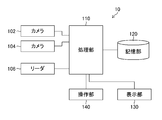
- FIG. 1 is a diagram showing a configuration of an audit support apparatus according to an embodiment of the present invention.
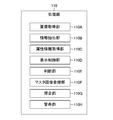
- FIG. 2 is a diagram illustrating a functional configuration of the processing unit.
- FIG. 3 is a diagram illustrating information stored in the storage unit.
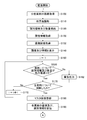
- FIG. 4 is a flowchart showing a processing procedure in the audit support apparatus.
- FIG. 5 is a flowchart (continuation of FIG. 4) showing a processing procedure in the audit support apparatus.
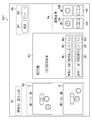
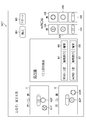
- FIG. 6 is a diagram illustrating an example of a master image registration screen.
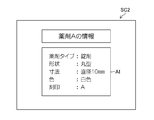
- FIG. 7 is a diagram illustrating a display example of attribute information.
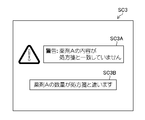
- FIG. 8 is a diagram illustrating an example of warning output.
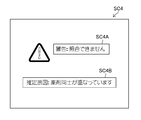
- FIG. 9 is a diagram illustrating another example of warning output.
- FIG. 10 is a diagram showing still another example of warning output.
- FIG. 11 is a diagram illustrating another example of the master image registration screen.
- FIG. 12 is a diagram showing still another example of the master image registration screen.
- FIG. 13 is a
- FIG. 1 is a diagram showing a configuration of an audit support apparatus 10 according to an embodiment of the present invention.
- the audit support apparatus 10 includes a processing unit 110, a storage unit 120, a display unit 130, and an operation unit 140, and a camera 102, a camera 104, and a reader 106 are connected to the processing unit 110.
- the audit support device 10 includes a packaging bag transport mechanism (not shown).
- the camera 102 and the camera 104 are constituted by a digital camera, and photograph the medicine packaged in a packaging bag.
- the camera 102 is arranged on the upper side in the conveyance direction of the packaging bag and the camera 104 is arranged on the lower side in the conveyance direction so that the packaged medicine can be photographed from a plurality of different directions.
- the reader 106 reads prescription information. For example, information such as a patient's name, a prescribed medicine, and its quantity is read from a prescription written on paper by OCR (OpticalcoCharacter Recognition). When a barcode or the like indicating information related to the prescribed medicine is recorded in the prescription, the barcode may be read to read information such as the prescribed medicine and its quantity. Alternatively, the user may read the prescription and input prescription information using an input device such as a keyboard included in the operation unit 140.
- OCR OpticalcoCharacter Recognition
- FIG. 2 is a diagram illustrating a main functional configuration of the processing unit 110.
- the processing unit 110 includes an image acquisition unit 110A, an information extraction unit 110B, an attribute information acquisition unit 110C, a display control unit 110D, a determination unit 110E, a master image registration unit 110F, a collation unit 110G, and a warning unit 110H. And comprising.
- These functions are performed by data stored in an EEPROM (Electronically Erasable and Programmable Read Only Memory) or the like by a device such as a CPU (Central Processing Unit) or various electronic circuits. This is performed by executing an audit support program stored in a ROM (Read Only Memory) or the like with reference to FIG.
- a RAM Random Access Memory
- FIG. 2 illustration of these devices is omitted.
- the image acquisition unit 110A controls the camera 102 and the camera 104 to acquire an image of the medicine packaged in the packaging bag.
- the camera 102, the camera 104, and the image acquisition unit 110A constitute a first image acquisition unit.
- the information extraction unit 110B extracts patient information such as name and identification information and quantity of the prescribed medicine from the prescription information read by the reader 106.
- the reader 106 and the information extraction unit 110B constitute an information extraction unit.
- the attribute information acquisition unit 110C acquires drug attribute information with reference to the storage unit 120 (attribute information 120D).
- the display control unit 110D performs display control on the display unit 130.
- the determination unit 110E determines whether the identification information and quantity of the packaged medicine match the identification information and quantity displayed on the display unit 130 based on the user's instruction input.
- the master image registration unit 110F displays the image of the drug packaged in the packaging bag as a master image (master image 120A; see FIG. 3). Is registered in the storage unit 120. Further, in this case, the master image registration unit 110F also stores images of individual drugs (drug images 120B; see FIG. 3) in the storage unit 120.
- the collation unit 110G (collation unit) is a medicine as described in the prescription of the medicine packaged in each packaging bag based on the image of the medicine packaged in each packaging bag and the master image. Check whether or not.
- the processing unit 110 has functions necessary for execution of processing in the audit support apparatus 10.
- the storage unit 120 (first storage device, second storage device) is configured by a non-temporary recording medium such as a CD (Compact Disk), a DVD (Digital Versatile Disk), a hard disk (Hard Disk), and various semiconductor memories,
- the image and information shown in FIG. 3 are stored in association with each other.
- the master image 120A is obtained by registering, as a reference for collation, an image for each packaging bag (an image including a plurality of drugs depending on the case) when it is confirmed that the packaged medicine is a medicine as prescribed. It is.
- the medicine image 120B is obtained by registering an image of each medicine when it is confirmed that the packaged medicine is a medicine as prescribed.
- the identification information 120C is information for uniquely identifying a drug, and for example, a drug name, a component amount, and a pharmaceutical company name can be used. Various pharmaceutical codes such as a so-called “YJ code (drug price information code)” may be used as identification information.
- the attribute information 120D is information indicating the attribute of the drug. In this embodiment, the attribute information 120D is the drug type, shape, size, color, and inscription of the drug, but is not limited thereto.
- the prescription information 120E stores information read by the reader 106, and includes patient name, drug identification information and quantity, usage, and the like.
- the above-described image and information are read and written between the processing unit 110 and the storage unit 120.
- the display unit 130 includes a display device such as a liquid crystal display.
- the packaged medicine image, the medicine identification information (identification information 120C) stored in the storage unit 120, and the image (master) Image 120A, medicine image 120B), prescription information (prescription information 120E), and the like can be displayed.
- the operation unit 140 includes a pointing device such as a mouse and an input device such as a keyboard, and the user can operate an image, a button, and the like displayed on the display unit 130 with the operation unit 140.
- FIGS. 4 and 5 are flowcharts showing the processing of the audit support method.
- the medicine is packaged according to the prescription in each of the continuous sachets, and the sachets are transported by a sachet transport mechanism (not shown).
- the camera 102 acquires an image of the medicine from above each packaging bag
- the camera 104 acquires an image of the medicine from below the respective packaging bag.
- the processing unit 110 acquires an image of the medicine from above and below the packaging bag using the camera 102 and the camera 104 (step S100: first image acquisition step).
- the acquired image is displayed on the display unit 130 (described later).
- the processing unit 110 reads the prescription by the reader 106 (step S110), and the information extraction unit 110B extracts the patient name, the drug identification information and quantity, and the usage described in the prescription (step S110).
- S120 Information extraction step).
- the prescription information 120E read in advance and stored in the storage unit 120 may be read and used.
- the identification information may be information such as the name of the drug and the amount of active ingredient that can identify the drug, and may be a drug code such as a YJ (drug price information) code.
- the attribute information acquisition unit 110C refers to the storage unit 120 (attribute information 120D) based on the identification information extracted in step S120, and acquires the drug attribute information described in the prescription (step S130: attribute information acquisition step).
- the image acquisition unit 110A refers to the storage unit 120 (drug image 120B) based on the identification information extracted in step S120, and acquires an image of each drug (audit drug image) described in the prescription. (Step S132: Drug image acquisition step).
- step S140 display step.
- the user confirms whether or not the medicine packaged in the packaging bag is as prescribed by the displayed screen.
- FIG. 6 shows an example of the screen SC1 displayed on the display unit 130.
- the display screen is divided into five regions R1 to R5.
- the region R1 is a region for displaying the patient's name.
- the region R2 is a region for displaying an image of the packaging medicine, the image i1 is an image captured from above, and the image i2 is an image captured from below.
- images i1 and i2 are marks of the drugs A and B, respectively, and are attached to the table of the drugs. Therefore, the images i1 and i2 show a state in which one tablet A and one tablet B are facing upward and one tablet A is turned over.
- Area R3 is an area for displaying prescription data.
- the usage of medicine, identification information (here, the name of the medicine but other identification information may be used), and the quantity are displayed.
- buttons B1 to B3 are displayed in the region R3, and the user can operate these buttons via the operation unit 140.
- the button B1 is for displaying attribute information
- the button B2 is for confirming that the packaged medicine is as prescribed
- the button B3 is for confirming that the packaged drug is not as prescribed.
- the region R4 is a region for displaying a drug image (drug image 120B) acquired from the storage unit 120.
- Images i3A and i3B are images obtained by imaging medicine A from the front and back, respectively, and images i4A and i4B are images obtained by imaging medicine B from the front and back, respectively.
- a button B4 for confirming that the medicine packaged in the packaging bag is as per the prescription, and a button B5 for discarding the photographed image when the medicine is not as per the prescription are displayed.
- the user refers to the screen SC1 displayed in step S140 and confirms whether the medicine packaged in the packaging bag is as prescribed.
- the processing unit 110 determineation unit 110E sets a counter value indicating the number of medicines to 1 (step S150).
- the user compares the medicine images i1 and i2 displayed in the region R2 with the prescription data displayed in the region R3, and confirms whether or not the packaged medicine is in accordance with the prescription.
- an image i1 obtained by imaging the medicine in the packaging bag from above with respect to the conveyance direction and an image i2 obtained by imaging from below with respect to the conveyance direction are displayed. Even if it is difficult to confirm, the user can easily confirm whether or not the packaged medicine is in accordance with the prescription, and can reduce the possibility of registering an inappropriate image as a master image.
- drug attribute information AI here, drug type, shape, size, color, and inscription, but not limited to this example
- the user refers to this attribute information AI to display an image. It can be easily confirmed whether or not the drugs in i1 and i2 are as prescribed.
- the images i3A and i3B of the medicine A and the images i4A and i4B of the medicine B displayed in the region R4 are images that have been confirmed to be in accordance with the prescription, the images i1 and i2 of the packaged medicine are displayed as the images i3A. , I3B, i4A, i4B, it is possible to easily confirm whether the packaged medicine is as prescribed.
- the determination unit 110E determines that the packaged medicine is as prescribed for the i-th medicine (Yes in step S160: determination step).
- the determination unit 110E increments the value i of the counter (step S172) and repeats the determination for all the drugs (while the determination result of step S170 is No), and when the determination is affirmed for all the drugs (the determination of step S170)
- the master image registration unit 110F registers the images i1 and i2 in the storage unit 120 (master image 120A) as master images (master medicine package images) (step S180: master image registration step).
- the master image is stored in association with the identification information (identification information 120C) and the quantity of the medicine contained in the sachet.
- step S170 it is assumed that the determination is affirmed when the OK button B2 is clicked for all drugs and the determination confirmation button B4 is clicked.
- warning unit 110H displays screen SC3 as shown in FIG. 8 on display unit 130 (step S162), and images i1 and i2 are displayed. Discard and return to step S100 to acquire an image for the next sachet.
- the screen SC3 is an example of a warning screen when the content of the medicine A does not match the prescription, and a message SC3A and a message SC3B are displayed.
- the processing unit 110 displays an image of each medicine (drug image). 120B) and the identification information (identification information 120C) are associated and stored in the storage unit 120 (first storage device) (step S190: storage step).
- the image stored in step S190 is acquired in step S132 described above and displayed in step S140.
- the images i1 and i2 obtained by imaging the packaged medicine from a plurality of different directions (above and below the packaging bag) are displayed and collated with the prescription data.
- Images i3A, i3B, i4A, and i4B that have been confirmed to be the medicines are displayed and can be collated with the images i1 and i2, and the attribute information of each medicine can be referred to by clicking the button B1.
- the captured image is registered as a master image.
- a master image can be easily registered, and there is a low possibility that an inappropriate image is registered as a master image.
- step S200 the collation unit 110G reads the master image from the storage unit 120 (master image 120A). If verification is performed subsequent to the processing up to step S190 (master image registration), the processing in step S200 may be omitted.
- the master image is read, the medicine image (second image) packaged in the packaging bag is acquired as an image to be collated (step S210). If the image for the first sachet is registered as a master image in the process up to step S190, the image for the second and subsequent sachets is acquired in step S210.
- step S220 verification process
- the verification unit 110G determines whether or not the master image and the verification target image can be verified
- step S220 verification process
- the determination is denied (No in step S220)
- the process proceeds to step S222, and the warning unit 110H outputs a warning (warning process).
- FIG. 9 shows an example of a warning output when collation cannot be performed, and a message SC4B indicating the cause (the medicines overlap in the example of FIG. 9) that is estimated as message SC4A indicating that collation cannot be performed is displayed on screen SC4. Yes.
- the warning may be issued by voice output or print output instead of screen display.
- the collation unit 110G determines whether or not to continue collation (step S224). This determination can be made based on a user instruction input via the operation unit 140, and a message corresponding to an estimated cause that cannot be collated (for example, “Please dispose because the drugs overlap”) is displayed on the display unit 130. The determination may be affirmed when processing according to the message is performed. If the process is to be continued (Yes in step S224), the process returns to step S210 to acquire an image again for the collation target packaging bag, and if the process is not continued (No in step S224), the process proceeds to step S260.
- step S230 to collate the image to be collated with the master image (collation process).
- the collation unit 110G extracts the feature amount of each drug from the image to be collated, extracts the feature amount of each drug from the master image, and compares the extracted feature amounts with each other. And the quantity of drugs that have been released can be verified.
- the feature amount of the drug include shape, size, and color.
- a local feature amount such as SIFT (Scale-Invariant Feature Transform) may be extracted and used for collation.
- SIFT Scale-Invariant Feature Transform
- Step S240 if the packaged medicine is in accordance with the prescription (Yes in Step S240), the process proceeds to Step S250 and the collation result (for example, “the second sachet is packaged according to the prescription”).
- Step S242 warning process
- FIG. 10 shows an example of warning output (display on the display unit 130) in step S242.
- the 10 includes a message SC5A stating that “the medicine in the sachet is different from the contents of the prescription” and a specific content of the warning (here, “the medicine B is not contained in the sachet and unnecessary.
- a message SC5B indicating that “a new medicine C is contained” is included.
- the warning may be issued by voice output or print output instead of screen display.
- the collation unit 110G determines whether the collation has been completed for all the packaging bags (step S260). If the determination is affirmative (Yes in step S260), the process is terminated. If the determination is negative (No in step S260), the process returns to step S210 to capture an image of the next sachet.
- a master image can be easily registered, and there is a low possibility that an inappropriate image is registered as a master image. Therefore, the user can easily audit the packaged medicine.
- FIG. 11 is a diagram showing another example of the display screen.
- a button B6 is provided in the region R3 for associating drug images (confirming that the packaged medicine is as prescribed) instead of the buttons B2 and B3. This is different from the screen SC1 shown in FIG. In FIG. 11, the reference numerals are omitted for the regions R1 to R5.
- the collating unit 110G determines whether or not the clicked images correspond to each other by comparing the feature amounts of the images. Since the images i3A and i3B are images that have been confirmed to be in accordance with the prescription (drug A image), if the determination is affirmed, one tablet of the drug A according to the prescription may be contained in the packaging bag. It is confirmed.
- the region A2R in which the back surface of the medicine A is shown in the image i1 is clicked, and then the corresponding image i3B is clicked (the order of clicking may be reversed).
- a region A2F (region on the surface of the medicine A) corresponding to the region A2R is clicked, and then an image i3B corresponding to this is clicked (the order of clicking may be reversed).
- the determination unit 110E determines whether the clicked images correspond to each other by comparing the feature amounts of the images.
- the determination unit 110E Since the images i3A and i3B are images that have been confirmed to be according to the prescription (the image of the drug A), if this determination is affirmative, the determination unit 110E has the identification information and the quantity for the drug A according to the prescription. (Yes in step S160 in FIG. 4: determination step).
- Step S160 in FIG. 4 determination step
- the determination unit 110E determines that the identification information and quantity for all the packaged medicines are as prescribed (Yes in step S170 in FIG. 4)
- the master image registration unit 110F registers the images i1 and i2 as master images.
- Step S180 Master image registration step
- the packaged medicine images i1 and i2 and the corresponding images i3A to i4B are all images acquired by the audit support apparatus 10, it is easy to align the imaging conditions and improve the accuracy of matching. Can do. In this way, the master image can be registered accurately and easily in this example, and the user can easily audit the packaged medicine.
- FIG. 12 is a modification of the example shown in FIG.
- the screen SC7 shown in FIG. 12 is different from the example of FIG. 11 in that the number of medicine images (medicine image 120B) acquired from the storage unit 120 is displayed according to the number of medicines described in the prescription. Specifically, since the prescription states that there are two tablets of medicine A per sachet, images of medicine A are displayed on screen SC7 for two tablets (images i3A and i3B are one tablet, image i5A , I5B for one tablet).
- the user associates the region A1F with the image i3A, the region A1R with the image i3B, the region A2F with the image i5A, and the region A2R with the image i5B.
- the determination unit 110E determines whether the medicine is as described in the prescription, and the master image registration unit 110F can register the master image based on the result.
- the number of medicine images acquired from the storage unit 120 is displayed according to the number of medicines described in the prescription, so that the images can be easily associated with each other. Therefore, the master image can be registered accurately and easily, and the user can easily audit the packaged medicine.
- the associated images may be identified and displayed.
- the areas A1F and A1R are associated with the images i3A and i3B and confirmed to be a prescription medicine on the screen SC6 in FIG. 11, the areas A1F and A1R can be colored.
- the screen SC7 of FIG. 12 when it is confirmed that the areas A1F and A1R are associated with the images i3A and i3B and are the medicines as prescribed, the areas A1F and A1R and the images i3A and i3B are colored, and the areas A2F and A2R are displayed.
- FIG. 13 is a diagram showing an example of such identification display.
- the areas A1F and A1R are associated with the images i3A and i3B and are medicines as prescribed, and the areas A1F, A1R and images i3A and i3B are colored.
Landscapes
- Engineering & Computer Science (AREA)
- Health & Medical Sciences (AREA)
- Theoretical Computer Science (AREA)
- General Physics & Mathematics (AREA)
- Physics & Mathematics (AREA)
- General Health & Medical Sciences (AREA)
- Computer Vision & Pattern Recognition (AREA)
- Multimedia (AREA)
- Public Health (AREA)
- Life Sciences & Earth Sciences (AREA)
- Medicinal Chemistry (AREA)
- Chemical & Material Sciences (AREA)
- Bioinformatics & Cheminformatics (AREA)
- Medical Informatics (AREA)
- Artificial Intelligence (AREA)
- Software Systems (AREA)
- Evolutionary Computation (AREA)
- Veterinary Medicine (AREA)
- Animal Behavior & Ethology (AREA)
- Pharmacology & Pharmacy (AREA)
- Data Mining & Analysis (AREA)
- Epidemiology (AREA)
- Primary Health Care (AREA)
- Evolutionary Biology (AREA)
- General Engineering & Computer Science (AREA)
- Databases & Information Systems (AREA)
- Bioinformatics & Computational Biology (AREA)
- Computing Systems (AREA)
- Quality & Reliability (AREA)
- Hematology (AREA)
- Human Computer Interaction (AREA)
- Medical Preparation Storing Or Oral Administration Devices (AREA)
Abstract
本発明は、分包薬剤の監査を容易に行うことができる監査支援方法及び監査支援装置を提供することを目的とする。本発明の一の態様に係る監査支援方法及び監査支援装置によれば、分包された薬剤の画像と、処方箋から抽出された薬剤の識別情報及び数量と、が表示装置(表示部)に表示されるので、ユーザは分包された薬剤が処方箋通りであるか否かを容易に確認することができる。また、「分包された薬剤の識別情報及び数量が、処方箋から抽出され表示された識別情報及び数量と一致しているか否か」の判断が処方箋に記載された全ての薬剤について肯定された場合にマスタ画像が登録されるので、不適切な画像をマスタ画像として登録してしまうおそれを低減できる。また、マスタ画像と照合対象の画像とで撮像条件を揃えることが容易であり、照合精度を高めることができる。
Description
本発明は薬剤の監査支援方法及び監査支援装置に係り、特に分包された薬剤が処方箋通りであるか否かの監査を支援する監査支援方法及び監査支援装置に関する。
医療現場では、医師が作成した処方箋を患者が調剤薬局に持参し、調剤薬局において処方箋にしたがって薬剤を調剤することが一般的であり、調剤の際には、処方される薬剤を一回に服用する分ごとに分包する、いわゆる「一包化」が行われている。薬剤をこのように分包(一包化)することで、薬剤の服用忘れを防止する、薬剤の取り出しを容易にする、あるいは薬剤の服用管理を容易にする、といった効果が期待される。
一方、薬剤師は調剤や薬剤の提供を行う場合、処方箋の記載事項や患者情報等に基づいて処方内容を確認することが求められており、分包された薬剤の監査においては一回の服用ごとの用法を確認することになるため、薬剤師の監査負担が大きくなる。そこで、薬剤師の監査負担を軽減するため、薬剤の色、大きさ、形状、数量等について処方箋に記載された内容と分包された薬剤の内容とを照合する監査支援方法及び監査支援装置が開発されている。例えば特許文献1に記載の技術では、処方箋から薬剤情報を抽出し、抽出した薬剤の薬剤マスタ画像と撮影画像とを照合して一覧表を作成することが記載されている。また特許文献2に記載の技術では、1番目の分包袋をマスタ画像として後続の分包袋の画像と照合することで、各分包袋の薬剤が処方箋による薬剤と一致するか否かを照合することが記載されている。
上述の特許文献1では、薬剤マスタ画像をどのように取得あるいは生成するかについて十分考慮されていない。例えば製薬会社が提供する薬剤の画像をマスタ画像として用いることは可能であるが、この場合製薬会社から提供されるマスタ画像の撮像条件(照明や露出の条件、薬剤の背景、撮像倍率等)と薬局での監査時の撮像条件とが一致するとは限らず、異なる撮像条件で比較した画像を用いることで照合精度が低下するおそれがある。また特許文献2は分包薬剤の袋のうち最初の袋が正しく分包されていることを前提としているが、最初の袋についての照合をどのように行うかは記載されていない。薬局では多岐にわたる薬剤を取り扱うことが多いため、分包薬剤の袋についての照合はユーザ(薬剤師)にとって負担が重く、また照合に誤りがあると不適切な画像がマスタ画像になるおそれがある。このように、従来の技術では薬剤師の監査負担を軽減することが困難であった。
本発明はこのような事情に鑑みてなされたもので、分包薬剤の監査を容易に行うことができる監査支援方法及び監査支援装置を提供することを目的とする。
上述した目的を達成するため、本発明の第1の態様に係る監査支援方法は、分包された薬剤の画像である第1の画像を取得する第1の画像取得工程と、処方箋に記載された薬剤の識別情報及び数量を抽出する情報抽出工程と、取得した第1の画像と、抽出された識別情報及び数量と、を表示装置に表示する表示工程と、ユーザの指示入力に基づいて、分包された薬剤の識別情報及び数量が表示された識別情報及び数量と一致しているか否かを判断する判断工程と、処方箋に記載された全ての薬剤について判断が肯定された場合に、第1の画像をマスタ画像として登録するマスタ画像登録工程と、登録されたマスタ画像と各分包袋について取得した画像である第2の画像とに基づいて、各分包袋に分包された薬剤が処方箋に記載された通りの薬剤であるか否かを照合する照合工程と、を備える。
第1の態様によれば、分包された薬剤の画像である第1の画像と、処方箋から抽出された薬剤の識別情報及び数量と、が表示装置に表示されるので、ユーザ(薬剤師)は分包された薬剤が処方箋通りであるか否かを容易に確認することができる。また、「分包された薬剤の識別情報及び数量が、処方箋から抽出され表示された識別情報及び数量と一致しているか否か」の判断が処方箋に記載された全ての薬剤について肯定された場合に、第1の画像がマスタ画像として登録されるので、不適切な画像をマスタ画像として登録してしまうおそれを低減できる。さらに、第1の画像取得工程で取得した第1の画像が上述の場合にマスタ画像として登録されるので、マスタ画像と第2の画像(照合対象の画像)とで撮像条件を揃えることが容易であり、照合精度を高めることができる。
このように、第1の態様によれば分包薬剤の監査を容易に行うことができる。なお第1の態様においてマスタ画像として登録される画像は最初の分包袋についての画像でもよいし、2つめ以降の分包袋についての画像でもよい。
第2の態様に係る監査支援方法は第1の態様において、監査済みの分包袋に含まれる薬剤について、画像と識別情報とを関連づけて第1の記憶装置に記憶する記憶工程と、抽出した識別情報に基づいて第1の記憶装置を参照して、処方箋に記載された薬剤の画像を取得する薬剤画像取得工程と、をさらに含み、表示工程では薬剤画像取得工程で取得した画像を表示する。第2の態様によれば、監査済みの分包袋に含まれる薬剤の画像が表示工程で表示されるので、ユーザ(薬剤師)は表示された画像を参照することで分包された薬剤が処方箋通りであるか否かをいっそう容易に確認することができ、また不適切な画像をマスタ画像として登録してしまうおそれを低減できる。なお第2の態様において、記憶工程における記憶及び薬剤画像取得工程における画像の取得は薬剤ごとに行ってよい。
第3の態様に係る監査支援方法は第1または第2の態様において、抽出された識別情報に基づいて、薬剤の属性情報が記憶された第2の記憶装置を参照して処方箋に記載された薬剤の属性情報を取得する属性情報取得工程をさらに備え、表示工程では取得した属性情報を表示装置に表示する。第3の態様によれば、薬剤の識別情報に基づいて処方箋に記載された薬剤の属性情報を取得し、取得した属性情報を表示装置に表示することで、ユーザ(薬剤師)は表示された属性情報を参照することで分包された薬剤が処方箋通りであるか否かをいっそう容易に確認することができ、また不適切な画像をマスタ画像として登録してしまうおそれを低減できる。
第4の態様に係る監査支援方法は第3の態様において、属性情報は薬剤の薬剤タイプ、形状、寸法、色、及び刻印のうち少なくとも1つを含む。第4の態様は属性情報の具体例を示すものである。
第5の態様に係る監査支援方法は第1から第4の態様のいずれか1つにおいて、第1の画像取得工程では、分包された薬剤を複数の異なる方向から撮像して取得した複数の画像を第1の画像として取得し、表示工程では第1の画像として取得した複数の画像を表示する。第5の態様によれば、分包袋内での薬剤の向きや重なり等により照合しづらい場合でも、分包された薬剤を複数の異なる方向から撮像して取得した画像を表示することで、ユーザ(薬剤師)は表示された画像を参照して分包された薬剤が処方箋通りであるか否かを容易に確認することができ、また不適切な画像をマスタ画像として登録してしまうおそれを低減できる。
第6の態様に係る監査支援方法は第1から第5の態様のいずれか1つにおいて、照合工程における照合が実行できない場合、及び照合の結果が各分包袋に分包された薬剤が処方箋に記載された通りの薬剤でない場合に警告を出力する警告工程を含む。第6の態様のように警告を出力することで、不適切な画像をマスタ画像として登録してしまうおそれを低減できる。なお、警告の出力は音声、文字、記号、光等の情報、及びこれらの組合せにより行うことができる。
上述した第1から第6の態様に係る監査支援方法に加え、これら態様の監査支援方法を監査支援装置に実行させる監査支援プログラム、及びそのような監査支援プログラムのコンピュータ読み取り可能なコードを記録した非一時的記録媒体も、本発明の一態様として挙げることができる。そのような非一時的記録媒体の例としてはCD(Compact Disk)やDVD(Digital Versatile Disk)等の光ディスク、HD(Hard Disk)等の磁気記録装置、及び各種の半導体記録媒体を挙げることができるが、これらに限定されるものではない。
上述した目的を達成するため、第7の態様に係る監査支援装置は、分包された薬剤の画像である第1の画像を取得する第1の画像取得部と、処方箋に記載された薬剤の識別情報及び数量を抽出する情報抽出部と、取得した第1の画像と、抽出された識別情報及び数量と、を表示する表示部と、ユーザの指示入力に基づいて、分包された薬剤の識別情報及び数量が表示された識別情報及び数量と一致しているか否かを判断する判断部と、処方箋に記載された全ての薬剤について判断が肯定された場合に、第1の画像をマスタ画像として登録するマスタ画像登録部と、登録されたマスタ画像と各分包袋について取得した画像である第2の画像とに基づいて、各分包袋に分包された薬剤が処方箋に記載された通りの薬剤であるか否かを照合する照合部と、を備える。第7の態様では、第1の態様と同様に分包薬剤の監査を容易に行うことができる。なお第7の態様において、第2から第6の態様と同様の構成をさらに備えることができる。
以上説明したように、本発明の監査支援方法及び監査支援装置によれば、分包薬剤の監査を容易に行うことができる。
以下、添付図面を参照しつつ、本発明の監査支援方法及び監査支援装置の実施形態について説明する。
<監査支援装置の構成>
図1は、本発明の一実施形態に係る監査支援装置10の構成を示す図である。監査支援装置10は処理部110と、記憶部120と、表示部130と、操作部140と、を備え、処理部110にはカメラ102,カメラ104,及びリーダ106が接続されている。監査支援装置10は、これらの他に図示せぬ分包袋搬送機構を備えている。
図1は、本発明の一実施形態に係る監査支援装置10の構成を示す図である。監査支援装置10は処理部110と、記憶部120と、表示部130と、操作部140と、を備え、処理部110にはカメラ102,カメラ104,及びリーダ106が接続されている。監査支援装置10は、これらの他に図示せぬ分包袋搬送機構を備えている。
カメラ102及びカメラ104はデジタルカメラにより構成され、分包袋に分包された薬剤を撮影する。分包された薬剤を複数の異なる方向から撮影できるように、分包袋の搬送方向上側にカメラ102が配置され、搬送方向下側にカメラ104が配置される。
リーダ106は、処方箋情報を読み取る。例えばOCR(Optical Character Recognition)により、紙に記載された処方箋から、患者氏名や処方された薬剤及びその数量等の情報を読み取る。処方された薬剤に関する情報を示すバーコード等が処方箋に記録されている場合は、そのバーコードを読み取り、処方された薬剤及びその数量等の情報を読み取ってもよい。また、ユーザが処方箋を読み取り、操作部140が有するキーボード等の入力デバイスにより処方箋情報を入力するようにしてもよい。
<処理部の構成>
図2は処理部110の主要機能構成を示す図である。処理部110は、画像取得部110Aと、情報抽出部110Bと、属性情報取得部110Cと、表示制御部110Dと、判断部110Eと、マスタ画像登録部110Fと、照合部110Gと、警告部110Hと、を備える。これらの機能(監査支援方法の各処理)は、CPU(Central Processing Unit)や各種電子回路等のデバイスが、EEPROM(Electronically Erasable and Programmable Read Only Memory:非一時的記録媒体)等に記憶されたデータを参照してROM(Read Only Memory:非一時的記録媒体)等に記憶された監査支援プログラムを実行することにより行われる。処理の際には、RAM(Random Access Memory)等が一時記憶領域や作業領域として用いられる。なお図2ではこれらデバイスの図示は省略する。
図2は処理部110の主要機能構成を示す図である。処理部110は、画像取得部110Aと、情報抽出部110Bと、属性情報取得部110Cと、表示制御部110Dと、判断部110Eと、マスタ画像登録部110Fと、照合部110Gと、警告部110Hと、を備える。これらの機能(監査支援方法の各処理)は、CPU(Central Processing Unit)や各種電子回路等のデバイスが、EEPROM(Electronically Erasable and Programmable Read Only Memory:非一時的記録媒体)等に記憶されたデータを参照してROM(Read Only Memory:非一時的記録媒体)等に記憶された監査支援プログラムを実行することにより行われる。処理の際には、RAM(Random Access Memory)等が一時記憶領域や作業領域として用いられる。なお図2ではこれらデバイスの図示は省略する。
画像取得部110Aは、カメラ102及びカメラ104を制御して分包袋に分包された薬剤の画像を取得する。カメラ102、カメラ104,及び画像取得部110Aは第1の画像取得部を構成する。情報抽出部110Bは、リーダ106で読み取った処方箋情報から氏名等の患者情報、及び処方された薬剤の識別情報及び数量を抽出する。リーダ106及び情報抽出部110Bは情報抽出部を構成する。属性情報取得部110Cは、記憶部120(属性情報120D)を参照して薬剤の属性情報を取得する。表示制御部110Dは、表示部130への表示制御を行う。判断部110E(判断部)は、ユーザの指示入力に基づいて、分包された薬剤の識別情報及び数量が表示部130に表示された識別情報及び数量と一致しているか否かを判断する。マスタ画像登録部110Fは、処方箋に記載された全ての薬剤について判断部110Eが判断を肯定した場合に、分包袋に分包された薬剤の画像をマスタ画像(マスタ画像120A;図3参照)として記憶部120に登録する。またマスタ画像登録部110Fは、この場合に個々の薬剤の画像(薬剤画像120B;図3参照)をも記憶部120に記憶する。照合部110G(照合部)は、各分包袋に分包された薬剤の画像とマスタ画像とに基づいて、各分包袋に分包された薬剤が処方箋に記載された通りの薬剤であるか否かを照合する。警告部110H(警告部)は、分包薬剤の画像とマスタ画像との照合ができない場合、及び照合の結果各分包袋に分包された薬剤が処方箋に記載された通りの薬剤でないことが判明した場合に警告を出力する。処理部110は上述した主要機能の他に、監査支援装置10における処理の実行に必要な機能を有する。
上述した構成の処理部110による処理の詳細は後述する。
<記憶部の構成>
記憶部120(第1の記憶装置、第2の記憶装置)はCD(Compact Disk)、DVD(Digital Versatile Disk)、ハードディスク(Hard Disk)、各種半導体メモリ等の非一時的記録媒体により構成され、図3に示す画像及び情報を互いに関連づけて記憶する。マスタ画像120Aは、分包された薬剤が処方箋通りの薬剤であることが確認された場合に、分包袋ごとの画像(場合により複数の薬剤が含まれる画像)を照合の基準として登録したものである。同様に、薬剤画像120Bは、分包された薬剤が処方箋通りの薬剤であることが確認された場合に、薬剤個々の画像を登録したものである。識別情報120Cは、薬剤を一意に識別するための情報であり、例えば薬剤の名称、成分量、及び製薬会社名を用いることができる。また、いわゆる「YJコード(薬価情報コード)」等の、各種医薬品コードを識別情報として用いてもよい。属性情報120Dは、薬剤の属性を示す情報であり、本実施形態では薬剤の薬剤タイプ、形状、寸法、色、及び刻印とするが、これらに限定されるものではない。処方箋情報120Eはリーダ106で読み取った情報を記憶したものであり、患者氏名、薬剤の識別情報及び数量、用法等が含まれる。
記憶部120(第1の記憶装置、第2の記憶装置)はCD(Compact Disk)、DVD(Digital Versatile Disk)、ハードディスク(Hard Disk)、各種半導体メモリ等の非一時的記録媒体により構成され、図3に示す画像及び情報を互いに関連づけて記憶する。マスタ画像120Aは、分包された薬剤が処方箋通りの薬剤であることが確認された場合に、分包袋ごとの画像(場合により複数の薬剤が含まれる画像)を照合の基準として登録したものである。同様に、薬剤画像120Bは、分包された薬剤が処方箋通りの薬剤であることが確認された場合に、薬剤個々の画像を登録したものである。識別情報120Cは、薬剤を一意に識別するための情報であり、例えば薬剤の名称、成分量、及び製薬会社名を用いることができる。また、いわゆる「YJコード(薬価情報コード)」等の、各種医薬品コードを識別情報として用いてもよい。属性情報120Dは、薬剤の属性を示す情報であり、本実施形態では薬剤の薬剤タイプ、形状、寸法、色、及び刻印とするが、これらに限定されるものではない。処方箋情報120Eはリーダ106で読み取った情報を記憶したものであり、患者氏名、薬剤の識別情報及び数量、用法等が含まれる。
処理部110による処理の際には、処理部110と記憶部120との間で上述した画像や情報の読み込み、書き込みが行われる。
<表示部及び操作部の構成>
表示部130(表示部、表示装置)は液晶ディスプレイ等の表示デバイスを備えており、分包された薬剤の画像、記憶部120に記憶された薬剤の識別情報(識別情報120C)及び画像(マスタ画像120A,薬剤画像120B)、処方箋情報(処方箋情報120E)等を表示することができる。操作部140はマウス等のポインティングデバイス及びキーボード等の入力デバイスを含んでおり、ユーザは表示部130に表示された画像やボタン等を操作部140により操作することができる。
表示部130(表示部、表示装置)は液晶ディスプレイ等の表示デバイスを備えており、分包された薬剤の画像、記憶部120に記憶された薬剤の識別情報(識別情報120C)及び画像(マスタ画像120A,薬剤画像120B)、処方箋情報(処方箋情報120E)等を表示することができる。操作部140はマウス等のポインティングデバイス及びキーボード等の入力デバイスを含んでおり、ユーザは表示部130に表示された画像やボタン等を操作部140により操作することができる。
<監査支援方法の処理>
次に、上述した構成の監査支援装置10による監査支援方法の処理について説明する。図4,5は監査支援方法の処理を示すフローチャートである。図4,5に示す処理においては、連続した分包袋のそれぞれに、処方箋にしたがって薬剤が分包され、また図示せぬ分包袋搬送機構により分包袋が搬送されるものとする。搬送と連動して、カメラ102が各分包袋の上方から薬剤の画像を取得し、カメラ104が各分包袋の下方から薬剤の画像を取得する。
次に、上述した構成の監査支援装置10による監査支援方法の処理について説明する。図4,5は監査支援方法の処理を示すフローチャートである。図4,5に示す処理においては、連続した分包袋のそれぞれに、処方箋にしたがって薬剤が分包され、また図示せぬ分包袋搬送機構により分包袋が搬送されるものとする。搬送と連動して、カメラ102が各分包袋の上方から薬剤の画像を取得し、カメラ104が各分包袋の下方から薬剤の画像を取得する。
処理が開始すると、処理部110(画像取得部110A)は、カメラ102及びカメラ104により分包袋の上方及び下方から薬剤の画像を取得する(ステップS100:第1の画像取得工程)。取得した画像は、表示部130に表示される(後述)。
次に、処理部110(情報抽出部110B)はリーダ106により処方箋を読み取り(ステップS110)、情報抽出部110Bが処方箋に記載された患者氏名、薬剤の識別情報及び数量、用法を抽出する(ステップS120:情報抽出工程)。なお、あらかじめ読み取られ記憶部120に記憶されている処方箋情報120Eを読み出して用いてもよい。識別情報は薬剤の名称及び有効成分量など薬剤が特定できる情報であればよく、YJ(薬価情報)コード等の医薬品コードでもよい。
属性情報取得部110Cは、ステップS120で抽出した識別情報に基づいて記憶部120(属性情報120D)を参照して、処方箋に記載された薬剤の属性情報を取得する(ステップS130:属性情報取得工程)。また画像取得部110Aは、ステップS120で抽出した識別情報に基づいて記憶部120(薬剤画像120B)を参照して、処方箋に記載された各薬剤の画像(監査済みの薬剤の画像)を取得する(ステップS132:薬剤画像取得工程)。
次に、表示制御部110DはステップS100~ステップS132で取得した画像及び情報を表示部130に表示する(ステップS140:表示工程)。ユーザは、表示された画面により、分包袋に分包された薬剤が処方箋通りであるか否かを確認する。
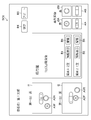
図6は表示部130に表示される画面SC1の例である。図6の例では、表示画面は5つの領域R1~R5に分かれている。領域R1は患者の氏名を表示する領域である。領域R2は分包薬剤の画像を表示する領域であり、画像i1は上方から撮像した画像、画像i2は下方から撮像した画像である。このように分包された薬剤を複数の異なる方向(上下方向)から撮影して取得した画像を表示することで、分包袋内での薬剤の向きや重なり等により照合しづらい場合でも、ユーザ(薬剤師)は分包された薬剤が処方箋通りであるか否かを容易に確認することができ、また不適切な画像をマスタ画像として登録してしまうおそれを低減できる。
なお、画像i1,i2において“A”,“B”はそれぞれ薬剤A,Bの刻印であり、薬剤の表に付されているものとする。したがって画像i1,i2は、1錠の薬剤Aと1錠の薬剤Bが上向きになっており1錠の薬剤Aが裏返しになっている状態を示している。
領域R3は処方箋データを表示する領域であり、図6の例では薬剤の用法、識別情報(ここでは薬剤の名称であるが他の識別情報でもよい)、及び数量を表示している。また領域R3にはボタンB1~B3が表示されており、ユーザは操作部140を介してこれらのボタンを操作することができる。ボタンB1は属性情報表示用であり、ボタンB2は分包薬剤が処方箋通りであることの確認用であり、ボタンB3は分包薬剤が処方箋通りでないことの確認用である。領域R4は記憶部120から取得した薬剤の画像(薬剤画像120B)を表示する領域である。画像i3A,i3Bは薬剤Aをそれぞれ表、裏から撮像した画像であり、画像i4A,i4Bは薬剤Bをそれぞれ表、裏から撮像した画像である。領域R5には、分包袋に分包された薬剤が処方箋通りであることの判断を確定するためのボタンB4,及び処方箋通りでない場合に撮影画像を廃棄するためのボタンB5が表示される。
なお、過去の薬剤監査により、薬剤A及び薬剤Bについて画像i3A,i3B,i4A,i4Bが取得されているものとする。
ユーザはステップS140で表示された画面SC1を参照して、分包袋に分包された薬剤が処方箋通りであるかを確認する。なお、処理部110(判断部110E)は、薬剤数を示すカウンタの値を1にセットしておく(ステップS150)。
ユーザは、領域R2に表示された薬剤の画像i1,i2と領域R3に表示された処方箋のデータとを比較して、分包された薬剤が処方箋通りであるか否かを確認する。領域R2には分包袋の薬剤を搬送方向に対し上方から撮像した画像i1と搬送方向に対し下方から撮像した画像i2とが表示されるので、分包袋内での薬剤の向きや重なり等により確認しづらい場合でも、ユーザは分包された薬剤が処方箋通りであるか否かを容易に確認することができ、また不適切な画像をマスタ画像として登録してしまうおそれを低減できる。
また、処方箋に記載の各薬剤について表示されているボタンB1をクリックすると、図7に示す画面SC2が表示部130に表示される。画面SC2では薬剤の属性情報AI(ここでは薬剤タイプ、形状、寸法、色、及び刻印とするが、この例には限定されない)が表示され、ユーザはこの属性情報AIを参照することで、画像i1,i2中の薬剤が処方箋通りであるか否かを容易に確認することができる。また、領域R4に表示される薬剤Aの画像i3A,i3B及び薬剤Bの画像i4A,i4Bは処方箋通りであることが確認された画像なので、分包された薬剤の画像i1,i2をこれら画像i3A,i3B,i4A,i4Bと比較することで、分包された薬剤が処方箋通りであるか否かを容易に確認することができる。
ユーザは画像i1,i2に薬剤Aが2錠含まれていること、即ち薬剤Aの識別情報及び数量が処方箋通りであることを上述した画像及び情報により確認できたら、操作部140に設けられた図示せぬポインティングデバイスによりボタンB2をクリックする。すると判断部110Eは、i番目の薬剤について、分包された薬剤が処方箋通りであると判断する(ステップS160でYes:判断工程)。そして、判断部110Eはカウンタの値iを増加させて(ステップS172)全薬剤について判断を繰り返し(ステップS170の判断結果がNoの間)、全薬剤について判断が肯定されると(ステップS170の判断結果がYes)、マスタ画像登録部110Fは画像i1,i2をマスタ画像(マスタ薬包の画像)として記憶部120(マスタ画像120A)に登録する(ステップS180:マスタ画像登録工程)。マスタ画像は、分包袋に含まれる薬剤の識別情報(識別情報120C)及び数量と関連づけて記憶されるものとする。
なおステップS170では、全薬剤についてOK用のボタンB2がクリックされた上で判断確定用のボタンB4がクリックされたときに判断が肯定されるものとする。
なお、薬剤Aまたは薬剤BについてボタンB3がクリックされると(ステップS160でNo)、警告部110Hは図8のような画面SC3を表示部130に表示し(ステップS162)、画像i1,i2を破棄してステップS100に戻り、次の分包袋について画像を取得する。画面SC1においてアボート用のボタンB5がクリックされた場合も同様である。画面SC3は薬剤Aの内容が処方箋と一致していない場合の警告画面の例であり、メッセージSC3A及びメッセージSC3Bが表示されている。
また、ステップS180までの処理で分包された薬剤が処方箋通りであることが確認される(監査済みである)と、処理部110(マスタ画像登録部110F)は個々の薬剤の画像(薬剤画像120B)と識別情報(識別情報120C)とを関連づけて記憶部120(第1の記憶装置)に記憶する(ステップS190:記憶工程)。このステップS190で記憶された画像は、上述したステップS132で取得され、ステップS140で表示される。
上述したように、本実施形態では分包された薬剤を複数の異なる方向(分包袋の上方及び下方)から撮像した画像i1,i2を表示して処方箋データと照合するが、この際処方箋通りの薬剤であることが確認された画像i3A,i3B,i4A,及びi4Bが表示されて画像i1,i2と照合可能であり、またボタンB1をクリックすることで各薬剤の属性情報を参照できる。そして全ての薬剤について処方箋通りであることが確認された場合(全薬剤についてボタンB2をクリック後にボタンB4をクリック)に撮像画像がマスタ画像として登録される。このように、本実施形態ではマスタ画像を容易に登録可能であり、不適切な画像をマスタ画像として登録してしまうおそれが低い。
ステップS200では、照合部110Gは記憶部120(マスタ画像120A)からマスタ画像を読み込む。なおステップS190までの処理(マスタ画像の登録)に引き続いて照合を行う場合は、ステップS200の処理は省略してもよい。マスタ画像を読み込んだら、分包袋に分包された薬剤の画像(第2の画像)を照合対象の画像として取得する(ステップS210)。ステップS190までの処理で1番目の分包袋についての画像がマスタ画像として登録された場合、ステップS210では2番目以降の分包袋についての画像を取得する。
ステップS210で照合対象の画像を取得したら、照合部110Gはマスタ画像と照合対象の画像との照合が可能か否かを判断する(ステップS220:照合工程)。分包袋内で薬剤が重なっている等の原因により照合そのものができない場合は判断が否定され(ステップS220でNo)、ステップS222へ進んで警告部110Hが警告を出力する(警告工程)。図9は照合ができない場合の警告出力の例であり、画面SC4において照合できない旨のメッセージSC4Aと推定される原因(図9の例では薬剤同士が重なっている)を示すメッセージSC4Bが表示されている。なお警告は画面表示でなく音声出力、印刷出力により行ってもよい。
ステップS222の警告出力後、照合部110Gは照合を継続するか否か判断する(ステップS224)。この判断は操作部140を介したユーザの指示入力に基づいて行うことができ、照合できない推定原因に応じたメッセージ(例えば、「薬剤が重なっているのでばらして下さい」)を表示部130に表示し、そのメッセージに応じた処理がなされた場合に判断を肯定してもよい。処理を継続する場合(ステップS224でYes)はステップS210へ戻って照合対象の分包袋について再度画像を取得し、処理を継続しない場合(ステップS224でNo)はステップS260へ進む。
ステップS220の結果が照合可能である場合、ステップS230へ進んで照合対象の画像とマスタ画像とを照合する(照合工程)。ステップS230では、例えば照合部110Gが照合対象の画像から各薬剤の特徴量を抽出し、またマスタ画像から各薬剤の特徴量を抽出して、抽出した特徴量同士を比較することで、分包された薬剤及びその数量を照合することができる。薬剤の特徴量としては、形状、大きさ、及び色を挙げることができる。また、SIFT(Scale-Invariant Feature Transform)のような局所特徴量を抽出して照合に用いてもよい。
照合の結果、分包された薬剤が処方箋通りである場合(ステップS240でYes)はステップS250へ進んで照合結果(例えば「2番目の分包袋は処方箋通りに分包されています」)を表示部130に出力し、薬剤が処方箋通りでない場合(ステップS240でNo)はステップS242(警告工程)へ進んで警告を出力した後にステップS260へ進む。図10はステップS242での警告出力(表示部130への表示)の例である。図10に示す画面SC5は、「分包袋の薬剤が処方箋の内容と違う」旨のメッセージSC5A、及び警告の具体的な内容(ここでは「分包袋に薬剤Bが入っておらず、不要な薬剤Cが入っている」)を示すメッセージSC5Bを含んでいる。なお警告は画面表示でなく音声出力、印刷出力により行ってもよい。
照合結果(ステップS250)または警告(ステップS242)が出力されると、照合部110Gは全分包袋について照合が終了したか否かを判断する(ステップS260)。判断が肯定されたら(ステップS260でYes)処理を終了し、判断が否定されたら(ステップS260でNo)、ステップS210へ戻って次の分包袋について画像を撮像する。
以上説明したように、本実施形態に係る監査支援装置及び監査支援方法によればマスタ画像を容易に登録可能であり、不適切な画像をマスタ画像として登録してしまうおそれが低い。したがってユーザは分包薬剤の監査を容易に行うことができる。
<マスタ画像登録の際の他の画面例>
次に、マスタ画像登録の際に表示する画面、及びその画面に対する操作の他の例について説明する。図6に示す例では各薬剤についてボタンB2が表示されこのボタンB2をクリックすることで各薬剤及びその数量が処方箋通りであることを確認するようになっているが、以下に説明する例では、対応する画像同士をクリックすることで分包された薬剤が処方箋通りであるか否かを確認する。
次に、マスタ画像登録の際に表示する画面、及びその画面に対する操作の他の例について説明する。図6に示す例では各薬剤についてボタンB2が表示されこのボタンB2をクリックすることで各薬剤及びその数量が処方箋通りであることを確認するようになっているが、以下に説明する例では、対応する画像同士をクリックすることで分包された薬剤が処方箋通りであるか否かを確認する。
図11は表示画面の他の例を示す図である。図11に示す画面SC6では、領域R3において、ボタンB2,B3に代えて薬剤画像の対応付け(分包された薬剤が処方箋通りであることの確認)を行うためのボタンB6が設けられている点が図6に示す画面SC1と異なっている。なお図11では、領域R1~R5について符号の記載を省略している。
図11に示す例では、ユーザは薬剤AについてボタンB6をクリックして、薬剤画像の対応付けを開始する。具体的には、画像i1において薬剤Aの表面が写っている領域A1Fをクリックし、次にこれに対応する画像i3Aをクリックする(クリックの順番は逆でもよい)。同様に、画像i2において領域A1Fに対応する領域A1R(薬剤Aの裏面)をクリックし、次にこれに対応する画像i3Bをクリックする(クリックの順番は逆でもよい)。照合部110Gはクリックされた画像同士が対応しているか否かを画像の特徴量比較等により判断する。画像i3A,i3Bは処方箋通りであること(薬剤Aの画像であること)が確認済みの画像なので、判断が肯定されると、処方箋通りの薬剤Aが分包袋に1錠入っていることが確認される。
図11の例では薬剤Aは2錠処方されているので、ユーザはボタンB6を再度クリックして、2錠目について薬剤画像の対応付けを行う。具体的には、画像i1において薬剤Aの裏面が写っている領域A2Rをクリックし、次にこれに対応する画像i3Bをクリックする(クリックの順番は逆でもよい)。同様に、画像i2において領域A2Rに対応する領域A2F(薬剤Aの表面の領域)をクリックし、次にこれに対応する画像i3Bをクリックする(クリックの順番は逆でもよい)。判断部110Eは、クリックされた画像同士が対応しているか否かを画像の特徴量の比較等により判断する。画像i3A,i3Bは処方箋通りであること(薬剤Aの画像であること)が確認済みの画像なので、この判断が肯定されると、判断部110Eは薬剤Aについて識別情報及び数量が処方箋通りであると判断する(図4のステップS160でYes:判断工程)ことができる。
薬剤Aと同様の処理を薬剤Bについて繰り返し、薬剤Bについても識別情報及び数量が処方箋通りであると判断された状態(図4のステップS160でYes:判断工程)でボタンB4がクリックされると、判断部110Eは分包された全薬剤について識別情報及び数量が処方箋通りであると判断し(図4のステップS170でYes)、マスタ画像登録部110Fは画像i1,i2をマスタ画像として登録する(ステップS180:マスタ画像登録工程)。以降の照合については図6について説明したのと同様に行うことができる。
本例では、このように画像同士の対応付けを行うことにより、分包された薬剤が処方箋通りであるか否かの確認を容易に行うことができる。また、分包された薬剤の画像i1,i2及び対応付けする画像i3A~i4Bはいずれも監査支援装置10で取得された画像なので、撮像条件を揃えることが容易であり、照合の精度を高めることができる。このようにして、本例でもマスタ画像を正確かつ容易に登録可能であり、ユーザは分包薬剤の監査を容易に行うことができる。
図12は図11に示す例の変形例である。図12に示す画面SC7では、記憶部120から取得した薬剤の画像(薬剤画像120B)が、処方箋に記載された薬剤の数量に応じた数表示されている点が図11の例と異なる。具体的には、1分包袋あたり薬剤Aが2錠であることが処方箋に記載されているので、画面SC7では薬剤Aの画像が2錠分(画像i3A,i3Bで1錠分、画像i5A,i5Bで1錠分)表示されている。薬剤の画像がこのように表示された画面SC7において、ユーザが例えば領域A1Fと画像i3A,領域A1Rと画像i3B,領域A2Fと画像i5A,領域A2Rと画像i5Bを対応付けすることで、分包された薬剤が処方箋に記載された通りであるか否かを判断部110Eが判断し、その結果に基づいてマスタ画像登録部110Fがマスタ画像を登録することができる。
このように、本変形例では、記憶部120から取得した薬剤の画像が、処方箋に記載された薬剤の数量に応じた数表示されるので、画像の対応付けが容易である。したがってマスタ画像を正確かつ容易に登録可能であり、ユーザは分包薬剤の監査を容易に行うことができる。
図11,12に示す態様において、対応付けされた画像を識別表示してもよい。例えば図11の画面SC6において、領域A1F,A1Rが画像i3A,i3Bと対応付けされ処方箋通りの薬剤であることが確認されたら、領域A1F,A1Rに着色することができる。また図12の画面SC7において、領域A1F,A1Rが画像i3A,i3Bと対応付けされ処方箋通りの薬剤であることが確認されたら領域A1F,A1R及び画像i3A,i3Bに着色し、領域A2F,A2Rが画像i5A,i5Bと対応付けされ処方箋通りの薬剤であることが確認されたら領域A1F,A1R及び画像i5A,i5Bに着色することができる。図13はそのような識別表示の例を示す図であり、図12の画面例において領域A1F,A1Rが画像i3A,i3Bと対応付けされて処方箋通りの薬剤であることが確認され、領域A1F,A1R及び画像i3A,i3Bが着色された状態を示している。このような識別表示を行うことで、マスタ画像を正確かつ容易に登録可能であり、ユーザは分包薬剤の監査を容易に行うことができる。
なお、本発明は上述した実施形態、他の例、及び変形例に限定されず、本発明の精神を逸脱しない範囲で種々の変形が可能である。
10 監査支援装置
102 カメラ
104 カメラ
106 リーダ
110 処理部
110A 画像取得部
110B 情報抽出部
110C 属性情報取得部
110D 表示制御部
110E 判断部
110F マスタ画像登録部
110G 照合部
110H 警告部
120 記憶部
120A マスタ画像
120B 薬剤画像
120C 識別情報
120D 属性情報
120E 処方箋情報
130 表示部
140 操作部
A1F 領域
A1R 領域
A2F 領域
A2R 領域
AI 属性情報
B1 ボタン
B2 ボタン
B3 ボタン
B4 ボタン
B5 ボタン
B6 ボタン
R1 領域
R2 領域
R3 領域
R4 領域
R5 領域
S100~S260 監査支援方法の各ステップ
SC1 画面
SC2 画面
SC3 画面
SC4 画面
SC5 画面
SC6 画面
SC7 画面
SC3A メッセージ
SC3B メッセージ
SC4A メッセージ
SC4B メッセージ
SC5A メッセージ
SC5B メッセージ
i1 画像
i2 画像
i3A 画像
i3B 画像
i4A 画像
i5A 画像
i5B 画像
102 カメラ
104 カメラ
106 リーダ
110 処理部
110A 画像取得部
110B 情報抽出部
110C 属性情報取得部
110D 表示制御部
110E 判断部
110F マスタ画像登録部
110G 照合部
110H 警告部
120 記憶部
120A マスタ画像
120B 薬剤画像
120C 識別情報
120D 属性情報
120E 処方箋情報
130 表示部
140 操作部
A1F 領域
A1R 領域
A2F 領域
A2R 領域
AI 属性情報
B1 ボタン
B2 ボタン
B3 ボタン
B4 ボタン
B5 ボタン
B6 ボタン
R1 領域
R2 領域
R3 領域
R4 領域
R5 領域
S100~S260 監査支援方法の各ステップ
SC1 画面
SC2 画面
SC3 画面
SC4 画面
SC5 画面
SC6 画面
SC7 画面
SC3A メッセージ
SC3B メッセージ
SC4A メッセージ
SC4B メッセージ
SC5A メッセージ
SC5B メッセージ
i1 画像
i2 画像
i3A 画像
i3B 画像
i4A 画像
i5A 画像
i5B 画像
Claims (7)
- 分包された薬剤の画像である第1の画像を取得する第1の画像取得工程と、
処方箋に記載された薬剤の識別情報及び数量を抽出する情報抽出工程と、
前記取得した第1の画像と、前記抽出された識別情報及び数量と、を表示装置に表示する表示工程と、
ユーザの指示入力に基づいて、前記分包された薬剤の識別情報及び数量が前記表示された識別情報及び数量と一致しているか否かを判断する判断工程と、
前記処方箋に記載された全ての薬剤について前記判断が肯定された場合に、前記第1の画像をマスタ画像として登録するマスタ画像登録工程と、
前記登録されたマスタ画像と各分包袋について取得した画像である第2の画像とに基づいて、前記各分包袋に分包された薬剤が前記処方箋に記載された通りの薬剤であるか否かを照合する照合工程と、
を備える監査支援方法。 - 監査済みの分包袋に含まれる薬剤について、画像と識別情報とを関連づけて第1の記憶装置に記憶する記憶工程と、
前記抽出した識別情報に基づいて前記第1の記憶装置を参照して、前記処方箋に記載された薬剤の画像を取得する薬剤画像取得工程と、をさらに含み、
前記表示工程では前記薬剤画像取得工程で取得した画像を表示する請求項1に記載の監査支援方法。 - 前記抽出された識別情報に基づいて、薬剤の属性情報が記憶された第2の記憶装置を参照して前記処方箋に記載された薬剤の属性情報を取得する属性情報取得工程をさらに備え、
前記表示工程では前記取得した属性情報を前記表示装置に表示する請求項1または2に記載の監査支援方法。 - 前記属性情報は前記薬剤の薬剤タイプ、形状、寸法、色、及び刻印のうち少なくとも1つを含む請求項3に記載の監査支援方法。
- 前記第1の画像取得工程では、前記分包された薬剤を複数の異なる方向から撮像して取得した複数の画像を前記第1の画像として取得し、
前記表示工程では前記第1の画像として取得した前記複数の画像を表示する請求項1から4のいずれか1項に記載の監査支援方法。 - 前記照合工程における照合が実行できない場合、及び前記照合の結果が前記各分包袋に分包された薬剤が前記処方箋に記載された通りの薬剤でない場合に警告を出力する警告工程を含む請求項1から5のいずれか1項に記載の監査支援方法。
- 分包された薬剤の画像である第1の画像を取得する第1の画像取得部と、
処方箋に記載された薬剤の識別情報及び数量を抽出する情報抽出部と、
前記取得した第1の画像と、前記抽出された識別情報及び数量と、を表示する表示部と、
ユーザの指示入力に基づいて、前記分包された薬剤の識別情報及び数量が前記表示された識別情報及び数量と一致しているか否かを判断する判断部と、
前記処方箋に記載された全ての薬剤について前記判断が肯定された場合に、前記第1の画像をマスタ画像として登録するマスタ画像登録部と、
前記登録されたマスタ画像と各分包袋について取得した画像である第2の画像とに基づいて、前記各分包袋に分包された薬剤が前記処方箋に記載された通りの薬剤であるか否かを照合する照合部と、
を備える監査支援装置。
Priority Applications (3)
| Application Number | Priority Date | Filing Date | Title |
|---|---|---|---|
| CN201780024785.8A CN109069345B (zh) | 2016-04-22 | 2017-04-05 | 监查支援方法及监查支援装置 |
| EP17785801.6A EP3446672A4 (en) | 2016-04-22 | 2017-04-05 | INSPECTION ASSISTING METHOD AND INSPECTION ASSISTING DEVICE |
| US16/165,125 US10937152B2 (en) | 2016-04-22 | 2018-10-19 | Inspection support method and inspection support device |
Applications Claiming Priority (2)
| Application Number | Priority Date | Filing Date | Title |
|---|---|---|---|
| JP2016-086312 | 2016-04-22 | ||
| JP2016086312A JP6797549B2 (ja) | 2016-04-22 | 2016-04-22 | 監査支援方法及び監査支援装置 |
Related Child Applications (1)
| Application Number | Title | Priority Date | Filing Date |
|---|---|---|---|
| US16/165,125 Continuation US10937152B2 (en) | 2016-04-22 | 2018-10-19 | Inspection support method and inspection support device |
Publications (1)
| Publication Number | Publication Date |
|---|---|
| WO2017183459A1 true WO2017183459A1 (ja) | 2017-10-26 |
Family
ID=60115919
Family Applications (1)
| Application Number | Title | Priority Date | Filing Date |
|---|---|---|---|
| PCT/JP2017/014262 Ceased WO2017183459A1 (ja) | 2016-04-22 | 2017-04-05 | 監査支援方法及び監査支援装置 |
Country Status (5)
| Country | Link |
|---|---|
| US (1) | US10937152B2 (ja) |
| EP (1) | EP3446672A4 (ja) |
| JP (1) | JP6797549B2 (ja) |
| CN (1) | CN109069345B (ja) |
| WO (1) | WO2017183459A1 (ja) |
Cited By (2)
| Publication number | Priority date | Publication date | Assignee | Title |
|---|---|---|---|---|
| JP2022025439A (ja) * | 2020-07-29 | 2022-02-10 | 富士フイルム富山化学株式会社 | 画像処理装置、薬剤識別装置及び画像処理方法 |
| JP2023037214A (ja) * | 2021-09-03 | 2023-03-15 | 大倉工業株式会社 | 一包化鑑査装置、一包化鑑査プログラムおよび一包化鑑査結果の表示方法 |
Families Citing this family (5)
| Publication number | Priority date | Publication date | Assignee | Title |
|---|---|---|---|---|
| WO2021065658A1 (ja) | 2019-10-01 | 2021-04-08 | 富士フイルム富山化学株式会社 | 薬剤照合装置、薬剤照合システム、薬剤管理方法及びプログラム |
| CN111081341A (zh) * | 2019-12-20 | 2020-04-28 | 无锡蝶和科技有限公司 | 一种袋装处方药品核对方法及系统 |
| CN113096076B (zh) * | 2021-03-26 | 2024-05-17 | 北京国尚信科技有限公司 | 一种基于机器视觉的西林瓶计数对数系统及方法 |
| CN114279967A (zh) * | 2021-12-31 | 2022-04-05 | 武汉库柏特科技有限公司 | 一种分包药品核对设备及方法 |
| JP7752597B2 (ja) * | 2022-12-26 | 2025-10-10 | 富士フイルムメディカル株式会社 | 薬剤識別装置、薬剤識別方法及びプログラム |
Citations (6)
| Publication number | Priority date | Publication date | Assignee | Title |
|---|---|---|---|---|
| JPH10162116A (ja) * | 1996-11-29 | 1998-06-19 | Yuyama Seisakusho:Kk | 薬剤監査装置 |
| JP2000276583A (ja) * | 1999-03-26 | 2000-10-06 | Takazono Sangyo Kk | 薬剤の検査装置及び検査方法 |
| WO2012005004A1 (ja) * | 2010-07-09 | 2012-01-12 | パナソニック株式会社 | 錠剤監査支援方法及び錠剤監査支援装置 |
| JP2014067342A (ja) * | 2012-09-27 | 2014-04-17 | Fujifilm Corp | 薬剤検査支援装置及び方法 |
| JP2014221134A (ja) * | 2013-05-14 | 2014-11-27 | ファルメディコ株式会社 | 一包化薬剤鑑査装置 |
| WO2015021442A1 (en) * | 2013-08-09 | 2015-02-12 | Perceptimed, Inc. | Remote pharmaceutical verification |
Family Cites Families (17)
| Publication number | Priority date | Publication date | Assignee | Title |
|---|---|---|---|---|
| JPH09253163A (ja) * | 1996-03-19 | 1997-09-30 | Tokyo Shokai:Kk | 薬剤監査支援システム |
| JPH09256163A (ja) | 1996-03-25 | 1997-09-30 | Sumitomo Kinzoku Electro Device:Kk | セラミック基板のNiめっき処理方法 |
| US6330351B1 (en) * | 1996-11-29 | 2001-12-11 | Kabushiki Kaisha Yuyama Seisakusho | Drug inspection device and drug packaging device |
| US7885822B2 (en) * | 2001-05-09 | 2011-02-08 | William Rex Akers | System and method for electronic medical file management |
| US7956894B2 (en) * | 1997-10-14 | 2011-06-07 | William Rex Akers | Apparatus and method for computerized multi-media medical and pharmaceutical data organization and transmission |
| US7860724B2 (en) * | 2002-10-30 | 2010-12-28 | Automed Technologies, Inc. | System and method for management of pharmacy workflow |
| US20050240523A1 (en) * | 2004-04-26 | 2005-10-27 | Mddc, Inc. | Method of remotely filling a prescription for a patient |
| JP2006092197A (ja) * | 2004-09-22 | 2006-04-06 | Fuji Xerox Co Ltd | 薬管理システムおよび薬管理システムに用いられる読取装置 |
| JP4256434B2 (ja) * | 2006-06-14 | 2009-04-22 | 株式会社 タフティ | 分包薬剤の検薬方法と検薬装置 |
| EP2244958B1 (en) * | 2007-12-19 | 2020-02-05 | RxSafe, LLC | Method of storing and retrieving pharmaceuticals using a pharmaceutical storage and retrieval system |
| US8055512B1 (en) * | 2008-11-21 | 2011-11-08 | Walgreen Co. | Manifest, methods and systems for multi-dose medication order fill |
| EP2542476A4 (en) * | 2010-03-05 | 2015-11-25 | Frédéric Poirier | SYSTEM FOR VERIFYING A PRESCRIBED PACKAGING AND METHOD THEREFOR |
| US9272796B1 (en) * | 2011-01-11 | 2016-03-01 | Chudy Group, LLC | Automatic drug packaging machine and package-less verification system |
| JP6009888B2 (ja) * | 2012-09-27 | 2016-10-19 | 富士フイルム株式会社 | 薬剤検査装置及び方法 |
| WO2014080966A1 (ja) * | 2012-11-22 | 2014-05-30 | 株式会社湯山製作所 | 薬剤鑑査装置 |
| US10181014B2 (en) * | 2015-03-02 | 2019-01-15 | Medifriend, Inc. | Apparatus and methods for storing and dispensing medications |
| CA2988946C (en) * | 2015-06-29 | 2024-09-10 | Yuyama Mfg. Co., Ltd. | Medicine packaging apparatus |
-
2016
- 2016-04-22 JP JP2016086312A patent/JP6797549B2/ja active Active
-
2017
- 2017-04-05 WO PCT/JP2017/014262 patent/WO2017183459A1/ja not_active Ceased
- 2017-04-05 CN CN201780024785.8A patent/CN109069345B/zh not_active Expired - Fee Related
- 2017-04-05 EP EP17785801.6A patent/EP3446672A4/en not_active Withdrawn
-
2018
- 2018-10-19 US US16/165,125 patent/US10937152B2/en not_active Expired - Fee Related
Patent Citations (6)
| Publication number | Priority date | Publication date | Assignee | Title |
|---|---|---|---|---|
| JPH10162116A (ja) * | 1996-11-29 | 1998-06-19 | Yuyama Seisakusho:Kk | 薬剤監査装置 |
| JP2000276583A (ja) * | 1999-03-26 | 2000-10-06 | Takazono Sangyo Kk | 薬剤の検査装置及び検査方法 |
| WO2012005004A1 (ja) * | 2010-07-09 | 2012-01-12 | パナソニック株式会社 | 錠剤監査支援方法及び錠剤監査支援装置 |
| JP2014067342A (ja) * | 2012-09-27 | 2014-04-17 | Fujifilm Corp | 薬剤検査支援装置及び方法 |
| JP2014221134A (ja) * | 2013-05-14 | 2014-11-27 | ファルメディコ株式会社 | 一包化薬剤鑑査装置 |
| WO2015021442A1 (en) * | 2013-08-09 | 2015-02-12 | Perceptimed, Inc. | Remote pharmaceutical verification |
Non-Patent Citations (1)
| Title |
|---|
| See also references of EP3446672A4 * |
Cited By (3)
| Publication number | Priority date | Publication date | Assignee | Title |
|---|---|---|---|---|
| JP2022025439A (ja) * | 2020-07-29 | 2022-02-10 | 富士フイルム富山化学株式会社 | 画像処理装置、薬剤識別装置及び画像処理方法 |
| JP7437259B2 (ja) | 2020-07-29 | 2024-02-22 | 富士フイルム富山化学株式会社 | 画像処理装置、薬剤識別装置、画像処理方法及び薬剤識別方法 |
| JP2023037214A (ja) * | 2021-09-03 | 2023-03-15 | 大倉工業株式会社 | 一包化鑑査装置、一包化鑑査プログラムおよび一包化鑑査結果の表示方法 |
Also Published As
| Publication number | Publication date |
|---|---|
| EP3446672A1 (en) | 2019-02-27 |
| US10937152B2 (en) | 2021-03-02 |
| CN109069345B (zh) | 2021-04-20 |
| EP3446672A4 (en) | 2019-05-01 |
| US20190050977A1 (en) | 2019-02-14 |
| CN109069345A (zh) | 2018-12-21 |
| JP6797549B2 (ja) | 2020-12-09 |
| JP2017192651A (ja) | 2017-10-26 |
Similar Documents
| Publication | Publication Date | Title |
|---|---|---|
| JP6797549B2 (ja) | 監査支援方法及び監査支援装置 | |
| JP5916032B2 (ja) | 薬剤検査支援装置及び方法 | |
| JP6009888B2 (ja) | 薬剤検査装置及び方法 | |
| JP7381954B2 (ja) | 画像処理プログラム、および、画像処理装置 | |
| JP6705379B2 (ja) | 鑑査支援システム | |
| WO2020044933A1 (ja) | 対象物照合装置及び対象物照合方法 | |
| JP6849798B2 (ja) | 薬剤検査支援装置及び薬剤検査支援方法 | |
| JP4560126B2 (ja) | 包装薬剤の調剤監査支援システム | |
| CN110603567B (zh) | 配药监查辅助装置以及配药监查辅助方法 | |
| JP6047475B2 (ja) | 画像認識装置、画像認識方法及び画像認識プログラム | |
| JP7280361B2 (ja) | 薬剤識別装置、薬剤識別方法及びプログラム | |
| JP5414879B1 (ja) | 薬剤認識装置、薬剤認識方法及び薬剤認識プログラム | |
| JP2017058920A (ja) | 薬剤監査装置及び方法 | |
| JP2015002918A (ja) | 処方箋入力装置及び方法 | |
| CN119723559B (zh) | 一种组合药丸分级识别方法 | |
| JP2020177595A (ja) | 処方箋情報受付装置、方法、及びコンピュータプログラム | |
| JP7598038B2 (ja) | 持参薬仕分装置及び持参薬仕分方法 | |
| WO2024134745A1 (ja) | 真贋判定支援情報作成補助装置 |
Legal Events
| Date | Code | Title | Description |
|---|---|---|---|
| NENP | Non-entry into the national phase |
Ref country code: DE |
|
| WWE | Wipo information: entry into national phase |
Ref document number: 2017785801 Country of ref document: EP |
|
| ENP | Entry into the national phase |
Ref document number: 2017785801 Country of ref document: EP Effective date: 20181122 |
|
| 121 | Ep: the epo has been informed by wipo that ep was designated in this application |
Ref document number: 17785801 Country of ref document: EP Kind code of ref document: A1 |