WO2017183533A1 - 画像処理プログラム、および、画像処理装置 - Google Patents
画像処理プログラム、および、画像処理装置 Download PDFInfo
- Publication number
- WO2017183533A1 WO2017183533A1 PCT/JP2017/014944 JP2017014944W WO2017183533A1 WO 2017183533 A1 WO2017183533 A1 WO 2017183533A1 JP 2017014944 W JP2017014944 W JP 2017014944W WO 2017183533 A1 WO2017183533 A1 WO 2017183533A1
- Authority
- WO
- WIPO (PCT)
- Prior art keywords
- medicine
- drug
- display device
- image
- discrimination
- Prior art date
- Legal status (The legal status is an assumption and is not a legal conclusion. Google has not performed a legal analysis and makes no representation as to the accuracy of the status listed.)
- Ceased
Links
Images






















Classifications
-
- G—PHYSICS
- G06—COMPUTING OR CALCULATING; COUNTING
- G06T—IMAGE DATA PROCESSING OR GENERATION, IN GENERAL
- G06T7/00—Image analysis
- G06T7/0002—Inspection of images, e.g. flaw detection
- G06T7/0004—Industrial image inspection
- G06T7/001—Industrial image inspection using an image reference approach
-
- A—HUMAN NECESSITIES
- A61—MEDICAL OR VETERINARY SCIENCE; HYGIENE
- A61J—CONTAINERS SPECIALLY ADAPTED FOR MEDICAL OR PHARMACEUTICAL PURPOSES; DEVICES OR METHODS SPECIALLY ADAPTED FOR BRINGING PHARMACEUTICAL PRODUCTS INTO PARTICULAR PHYSICAL OR ADMINISTERING FORMS; DEVICES FOR ADMINISTERING FOOD OR MEDICINES ORALLY; BABY COMFORTERS; DEVICES FOR RECEIVING SPITTLE
- A61J3/00—Devices or methods specially adapted for bringing pharmaceutical products into particular physical or administering forms
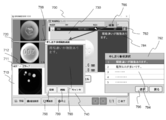
-
- G—PHYSICS
- G06—COMPUTING OR CALCULATING; COUNTING
- G06K—GRAPHICAL DATA READING; PRESENTATION OF DATA; RECORD CARRIERS; HANDLING RECORD CARRIERS
- G06K19/00—Record carriers for use with machines and with at least a part designed to carry digital markings
- G06K19/06—Record carriers for use with machines and with at least a part designed to carry digital markings characterised by the kind of the digital marking, e.g. shape, nature, code
-
- G—PHYSICS
- G06—COMPUTING OR CALCULATING; COUNTING
- G06T—IMAGE DATA PROCESSING OR GENERATION, IN GENERAL
- G06T7/00—Image analysis
-
- G—PHYSICS
- G06—COMPUTING OR CALCULATING; COUNTING
- G06V—IMAGE OR VIDEO RECOGNITION OR UNDERSTANDING
- G06V20/00—Scenes; Scene-specific elements
- G06V20/60—Type of objects
- G06V20/66—Trinkets, e.g. shirt buttons or jewellery items
-
- G—PHYSICS
- G16—INFORMATION AND COMMUNICATION TECHNOLOGY [ICT] SPECIALLY ADAPTED FOR SPECIFIC APPLICATION FIELDS
- G16H—HEALTHCARE INFORMATICS, i.e. INFORMATION AND COMMUNICATION TECHNOLOGY [ICT] SPECIALLY ADAPTED FOR THE HANDLING OR PROCESSING OF MEDICAL OR HEALTHCARE DATA
- G16H20/00—ICT specially adapted for therapies or health-improving plans, e.g. for handling prescriptions, for steering therapy or for monitoring patient compliance
- G16H20/10—ICT specially adapted for therapies or health-improving plans, e.g. for handling prescriptions, for steering therapy or for monitoring patient compliance relating to drugs or medications, e.g. for ensuring correct administration to patients
-
- G—PHYSICS
- G16—INFORMATION AND COMMUNICATION TECHNOLOGY [ICT] SPECIALLY ADAPTED FOR SPECIFIC APPLICATION FIELDS
- G16H—HEALTHCARE INFORMATICS, i.e. INFORMATION AND COMMUNICATION TECHNOLOGY [ICT] SPECIALLY ADAPTED FOR THE HANDLING OR PROCESSING OF MEDICAL OR HEALTHCARE DATA
- G16H30/00—ICT specially adapted for the handling or processing of medical images
- G16H30/40—ICT specially adapted for the handling or processing of medical images for processing medical images, e.g. editing
-
- G—PHYSICS
- G16—INFORMATION AND COMMUNICATION TECHNOLOGY [ICT] SPECIALLY ADAPTED FOR SPECIFIC APPLICATION FIELDS
- G16H—HEALTHCARE INFORMATICS, i.e. INFORMATION AND COMMUNICATION TECHNOLOGY [ICT] SPECIALLY ADAPTED FOR THE HANDLING OR PROCESSING OF MEDICAL OR HEALTHCARE DATA
- G16H70/00—ICT specially adapted for the handling or processing of medical references
- G16H70/40—ICT specially adapted for the handling or processing of medical references relating to drugs, e.g. their side effects or intended usage
-
- A—HUMAN NECESSITIES
- A61—MEDICAL OR VETERINARY SCIENCE; HYGIENE
- A61J—CONTAINERS SPECIALLY ADAPTED FOR MEDICAL OR PHARMACEUTICAL PURPOSES; DEVICES OR METHODS SPECIALLY ADAPTED FOR BRINGING PHARMACEUTICAL PRODUCTS INTO PARTICULAR PHYSICAL OR ADMINISTERING FORMS; DEVICES FOR ADMINISTERING FOOD OR MEDICINES ORALLY; BABY COMFORTERS; DEVICES FOR RECEIVING SPITTLE
- A61J2205/00—General identification or selection means
- A61J2205/40—General identification or selection means by shape or form, e.g. by using shape recognition
Definitions
- the present invention relates to an image processing program and an image processing apparatus.
- Patent Document 1 a drug identification device that automatically identifies a drug
- the medicine discrimination device various images for distinguishing the medicine are displayed on the display device for an operator who performs the discrimination, but an image that can improve the accuracy of the discrimination is displayed on the display device. This is very important.
- An object of one embodiment of the present invention is to contribute to improvement in accuracy of drug discrimination.
- the program according to an embodiment of the present invention includes a step of displaying an image obtained by imaging an area including a plurality of medicines on a display device, an image of a representative medicine selected from the plurality of medicines displayed on the display device, and the And causing the computer to execute a step of rearranging the images of the plurality of medicines and displaying them on the display device based on the similarity to the images of the plurality of medicines.
- An image processing apparatus includes a receiving unit that receives an image obtained by photographing a region including a plurality of medicines by a medicine photographing device, and an image obtained by photographing the region received by the receiving unit on a display device. Sorting the plurality of medicine images based on the step of displaying and the similarity between the representative medicine image selected from the plurality of medicines displayed on the display device and each of the plurality of medicine images. And an image processing unit that executes the step of displaying on the display device.
- FIG. 1 is a schematic diagram showing an outline of a drug discrimination system.
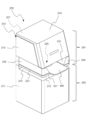
- FIG. 2 is a perspective view of the embodiment of the medicine imaging apparatus.
- FIG. 3 is a perspective view showing a state in which the front cover of the medicine photographing apparatus shown in FIG. 2 is opened.
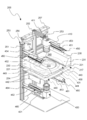
- FIG. 4 is a perspective view showing an internal configuration of the medicine photographing apparatus shown in FIG.
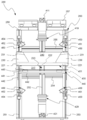
- FIG. 5 is a front view of the medicine photographing apparatus shown in FIG.
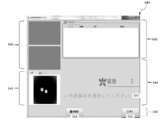
- FIG. 6 is an image at the initial stage after the drug identification software is activated.
- FIG. 7 is an image of the first stage of the returned tablet image discrimination.
- FIG. 8 is an image image of the second stage of the drug image discrimination started in FIG.
- FIG. 9 is an image of a third stage of drug image discrimination that started in FIG. FIG.
- FIG. 10 is an image image of the fourth stage of drug image discrimination started in FIG.
- FIG. 11 is an image image of the fifth stage of the drug image discrimination started in FIG.
- FIG. 12 is a diagram for explaining rearrangement of images of a plurality of medicines, and is a diagram illustrating a state of a first portion where a plurality of medicines are placed.
- FIG. 13 is a diagram showing display on a third part of a plurality of drugs by a general drug discrimination program.
- FIG. 14 is a diagram showing display on a third part of a plurality of medicines by the medicine discrimination program of the present embodiment.
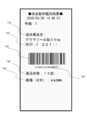
- FIG. 15 is a diagram illustrating an example of a printed returned-goods medicine discrimination result.
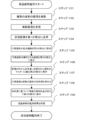
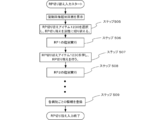
- FIG. 16 is a flowchart of processing executed by the image processing program.
- FIG. 16 is a flowchart of processing executed by the image processing program.
- FIG. 17 is a schematic diagram showing an outline of the medicine packaging system of the present embodiment.
- FIG. 18 is a diagram illustrating an example of an inquiry screen for a filling history of a medicine filled in the packaging device.
- FIG. 19 is a diagram illustrating an example of an inquiry screen for a filling history of a medicine filled in the packaging device.
- FIG. 20 is a diagram illustrating an example of a printed returned-goods medicine discrimination result.
- FIG. 21 is a diagram showing an example of an environment setting screen for setting whether or not to print the number of identified medicines and the total drug price.
- FIG. 22 is an example of an image image in discrimination of a brought-in drug.
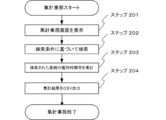
- FIG. 23 is a flowchart of a task of counting work time and cost required for drug discrimination.
- FIG. 23 is a flowchart of a task of counting work time and cost required for drug discrimination.
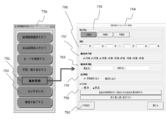
- FIG. 24 is a diagram illustrating an example of a screen for performing aggregation related to drug discrimination.
- FIG. 25 is a diagram illustrating an example of a screen for performing aggregation related to drug discrimination.
- FIG. 26 is a diagram illustrating an example of a totaling result screen such as identification time required for identifying a medicine.
- FIG. 27 is a diagram illustrating an example of a totaling result screen such as identification time required for identifying a drug.
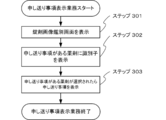
- FIG. 28 is a flowchart of the sending item display job.
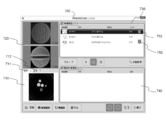
- FIG. 29 is a diagram illustrating an example of a state in which a notification item related to drug discrimination is displayed.
- FIG. 30 is a diagram illustrating an example of a state in which a notification item regarding drug discrimination is displayed.
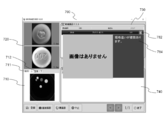
- FIG. 31 is a diagram illustrating an example of a state in which presence / absence of a notification item related to drug discrimination is displayed.
- FIG. 32 is a diagram illustrating an example of a screen for editing a notification item related to drug discrimination.
- FIG. 33 is a flowchart of a patient information input task.
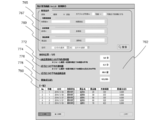
- FIG. 34 is a diagram illustrating an example of a state in which information related to a patient of a brought-in drug is displayed on a screen for performing drug discrimination.
- FIG. 35 is a diagram illustrating an example of a screen for inputting attributes of a patient who brought a medicine.
- FIG. 36 is a diagram illustrating an example of a screen for inputting attributes of a patient who brought a medicine.
- FIG. 37 is a flowchart of usage input work.
- FIG. 37 is a flowchart of usage input work.
- FIG. 38 is a diagram showing an example of a discrimination screen for discriminating drugs brought by patients.
- FIG. 39 is a diagram showing an example of a screen for inputting the usage of the medicine brought by the patient via the discrimination screen for identifying the medicine brought by the patient.
- FIG. 40 is a diagram illustrating an example of a screen for inputting the usage of the medicine brought by the patient via the discrimination screen for differentiating the medicine brought by the patient.
- FIG. 41 is a flowchart of the RP switching task.
- FIG. 42 is a flowchart of maintenance work.
- FIG. 43 is a diagram illustrating an example of a screen for changing settings relating to drug discrimination.
- FIG. 44 is a diagram illustrating an example of a screen for registering drug usage.
- FIG. 45 is a flowchart of the manual search operation for a differential medicine.
- FIG. 46 is a diagram illustrating an example of a screen for manually searching for drugs through a discrimination screen for identifying drugs.
- FIG. 47 is a diagram illustrating an example of a screen for manually searching for medicines.
- FIG. 48 is a diagram illustrating an example of a screen for manually searching for medicines.
- FIG. 49 is a diagram illustrating an example of a state in which a manually searched medicine is displayed on the discrimination screen as a discrimination result.
- FIG. 50 is a flowchart of the serial number printing job.
- FIG. 51 is a diagram showing an example of a printed medicine discrimination result.
- FIG. 52 is a diagram showing an example of a printed medicine discrimination result.
- FIG. 53 is a diagram for explaining the drug region editing function.
- FIG. 54 is a diagram showing an example of the area editing screen.
- FIG. 55 is a diagram showing an example of the cut area editing screen.
- FIG. 1 is a schematic diagram showing an outline of a drug discrimination system.
- the drug discrimination system 100 includes a drug imaging device 200 and a computer 500.
- the medicine imaging apparatus 200 images the medicine
- the computer 500 discriminates the medicine based on the obtained image data of the medicine.
- the computer 500 includes a receiving unit 510 that receives an image captured by the medicine imaging device 200, a main body 520 that includes a CPU (image processing unit), a storage device, a recording device, and the like, and a display device 530 that functions as an output device.
- a keyboard 541 and a mouse 542 functioning as an input device are provided.
- the display device 530 includes a screen 531 and a touch screen 532, and the user can input to the computer 500 via the touch screen 532.
- an image processing program 600 is installed in the computer 500. From this point of view, the computer 500 in which an image processing program (also referred to as image processing software) 600 is installed can also be called an image processing apparatus.
- the image processing program 600 is also referred to as a drug discrimination program because the computer 500 performs various processes related to drug discrimination as an example.
- the medicine discrimination program since the medicine discrimination program is installed in the computer 500, the computer 500 can also be called a medicine discrimination apparatus.
- the computer 500 is configured by a so-called PC (personal computer), and the image processing program 600 is stored in a recording device in the PC.
- the computer 500 is not a PC, for example, It may be a microcomputer incorporated in another device.
- the image processing program 600 may be written in a storage device such as a ROM (read only memory) of the device.
- the CPU of the main body 520 can also be referred to as an image processing unit that executes various types of image processing according to the image processing program 600.
- a user When performing drug discrimination, first, a user (for example, a pharmacist or the like) sets a drug to be identified in the drug imaging apparatus 200. Next, when the user operates the computer 500, the medicine imaging apparatus 200 performs imaging of the medicine. The taken image of the medicine is transmitted to the computer 500 as data. Then, the computer 500 searches for a medicine with reference to a database (not shown) based on the image data.
- a database not shown
- the computer 500 has a built-in database.
- the computer 500 refers to the MD bank without accessing the external database. Can be searched.
- the computer 500 accesses a database via a network.
- the drug instruction support system “Pharma Road” (trademark) manufactured by Yuyama Manufacturing Co., Ltd. is installed on another computer (server) in the same facility, the computer 500 is connected to a local area network (LAN). You can search for drugs by accessing Pharma Road in the server.
- the computer 500 may access the database via the Internet.
- FIG. 2 is a perspective view showing an appearance of the medicine photographing apparatus 200.
- the upper side from the placement unit 220 is referred to as an upper part 201 and the lower side is referred to as a lower part 202.
- the lower case 211 covers the lower part 202 of the medicine photographing apparatus 200.
- a cutout 212 extending in the horizontal direction is formed on the upper surface of the lower case 211.
- the notch 212 is open in the left-right direction and the front direction of the medicine photographing apparatus 200. Through this notch 212, the user can insert a long wrapping paper into the medicine photographing apparatus 200. Specifically, the wrapping paper is spread in the horizontal direction and inserted into the notch 212 from the front side. Then, the wrapping paper is moved near the center of the medicine photographing apparatus 200. Thereby, the internal camera of the medicine photographing apparatus 200 can photograph the medicine enclosed in the inside of the wrapping paper without cutting the wrapping paper.
- the internal space of the medicine photographing apparatus 200 communicates with the external space in the left-right direction by the notch portion 212, even when the wrapping paper is longer than the width of the medicine photographing apparatus 200, the user can remove the wrapping paper.
- the wrapping paper can be easily inserted into the medicine photographing apparatus 200 in the unwound state.
- a tray support member 221 that supports a member that stores a medicine is provided immediately above the notch 212. Specifically, the tray 300 is placed on the tray support member 221.
- the upper surface of the medicine imaging apparatus 200 and the upper part 201 on the front surface are covered with a cover 214.
- the cover 214 can be opened upward.
- the cover 214 is hinged by a hinge 257 (see FIG. 4) at the upper end of the back surface of the upper case 213, and the cover 214 can be rotated in the vertical direction around the hinge 257.
- FIG. 3 shows a state where the cover 214 of the medicine photographing apparatus 200 is opened.
- an upper internal space 240 that is an upper portion 201 of the internal space of the medicine photographing apparatus 200 is opened to a space in front of the medicine photographing apparatus 200.
- the user can set the tray 300 to the fitting portion 223 of the placement portion 220 through the upper inner space 240.
- the front side outer surface of the upper case 213 has a substantially inverted U shape.
- This front side outer surface is inclined, and an inclined portion 215 is formed thereby.
- the inclined portion 215 is inclined so that the distance from the back surface of the medicine photographing apparatus 200 becomes smaller from the bottom to the top.
- the tray 300 is less likely to collide with the upper case 213.
- the front surface of the cover 214 is configured to cover the inclined portion 215. Therefore, when the cover 214 is closed, the front surface thereof is located in the vicinity of the inclined portion 215 and is parallel to the inclined portion 215.
- the upper surface and the front surface of the cover 214 are obtuse, corresponding to the obtuse angle between the upper surface of the upper case 213 and the inclined portion 215.
- the lower end of the inclined portion 215 is located on the back side of the guide member 230 and the outer front surface of the lower case 211. That is, the distance from the back surface of the medicine imaging apparatus 200 to the lower end of the inclined portion 215 is smaller than the distance from the back surface of the medicine imaging apparatus 200 to the outer front surface of the guide member 230 and the outer front surface of the lower case 211. With this configuration, the user can more easily put the tray 300 into the upper internal space 240.
- an inclined surface 216 different from the inclined portion 215 is provided on the outer surface on the front side of the upper case 213. More specifically, the slope 216 is provided inside the U shape of the substantially inverted U-shaped inclined portion 215. The slope 216 is provided on the front surface of a first camera 410 (see FIG. 4), which will be described later, and protects the first camera 410. Thereby, when the user inserts the tray 300 into the upper internal space 240, it is possible to prevent the position and orientation of the first camera 410 from being shifted due to the tray 300 hitting the first camera 410. As shown in FIG. 3, the inclined surface 216 has a substantially rectangular shape and extends in the left-right direction of the medicine photographing apparatus 200.
- the distance from the back surface of the medicine photographing apparatus 200 to the inclined surface 216 gradually decreases from the top to the bottom. That is, the horizontal position of the upper end of the slope 216 is closer to the back surface of the medicine photographing apparatus 200 than the horizontal position of the lower end of the slope 216. This makes it difficult for the tray 300 to collide with the slope 216 during insertion, and the user can easily put the tray 300 in the back of the upper internal space 240.
- a pair of guide members 230 are provided between the upper case 213 and the placement portion 220.
- the outer side surface of the guide member 230 extends in the vertical direction and is located on the same plane as the outer side surface of the upper case 213.
- the inner side surface of the guide member 230 is inclined with respect to the vertical direction, whereby an inclined surface 231 is formed.
- the inclined surface 231 has a substantially square shape and extends in the front-rear direction of the medicine photographing apparatus 200.
- the slope 231 faces the upper internal space 240.
- One of the inclined surfaces 231 is located on the upper right side of the placement unit 220, and the other is located on the upper left side of the placement unit 220.
- the slope 231 is formed so as to approach the central axis of the medicine imaging apparatus 200 as it goes from top to bottom. That is, when viewed in plan, the horizontal position of the lower end of the inclined surface 231 is closer to the placement unit 220 than the horizontal position of the upper end. Furthermore, the distance between the lower ends of the two inclined surfaces 231 is substantially the same as or slightly larger than the width of the fitting portion 223 of the tray support member 221. Specifically, the distance between the lower ends of the two inclined surfaces 231 is preferably about 1 to 1.2 times the width of the fitting portion 223.
- FIG. 4 is a perspective view of the medicine photographing apparatus 200
- FIG. 5 is a front view.
- a frame 250 is provided on the back side of the medicine photographing apparatus 200. Many of the main members of the medicine photographing apparatus 200 are directly or indirectly attached to the frame 250.
- the frame 250 includes a first column 251, a second column 252, a third column 253, a first beam 254, a second beam 255, a third beam 256, and a hinge 257.
- the first column 251 is provided on the left side of the back of the medicine photographing apparatus 200
- the second column 252 is provided in the center of the back
- the third column 253 is provided on the right side of the back.
- the first column 251, the second column 252, and the third column 253 are connected by the first beam 254, the second beam 255, and the third beam 256.
- a hinge 257 for rotating the cover 214 is attached to the third beam 256 positioned at the top of the frame 250.
- the medicine photographing apparatus 200 includes a first camera 410, a second camera 420, a first light source 430, a second light source 440, a third light source 450, a fourth light source 460, and a tray support member 221. , And a guide member 230.
- the tray support member 221 and the guide member 230 are directly attached to the frame 250.
- the first camera 410, the second camera 420, the third light source 450, and the fourth light source 460 are provided via the support member. Attached to the frame 250.
- the first light source 430 is accommodated in the tray support member 221 and supported by the tray support member 221.
- the second light source 440 is attached to the lower case 211 (see FIG. 2) via a support member.
- the main members inside the medicine photographing apparatus 200 are attached to the frame 250 instead of the case 210. This facilitates removal of the case 210 and facilitates maintenance work of the internal main members.
- the tray support member 221 is provided in the vicinity of the central portion of the medicine photographing apparatus 200.
- a guide member 230 is provided immediately above the tray support member 221.
- a third light source 450 is provided above the guide member 230.
- a first camera 410 is provided at a position higher than the third light source 450, that is, in the vicinity of the upper surface of the medicine photographing apparatus 200.
- a second light source 440 is provided below the tray support member 221 at a predetermined distance.
- a fourth light source 460 is provided near the side surface of the medicine photographing apparatus 200 at a position lower than the second light source 440.
- a second camera 420 is provided at a position lower than the fourth light source 460, that is, near the bottom surface of the medicine photographing apparatus 200.
- the first light source 430 and the third light source 450 constitute an upper light source.
- the second light source 440 and the fourth light source 460 constitute a lower light source.
- the tray support member 221 is provided in the vicinity of the central portion of the medicine photographing apparatus 200 and above the space 217 for the notch portion 212.
- a first light source 430 is attached to the bottom of the tray support member 221.
- the first light source 430 includes a first ring illumination 431.
- the first ring illumination 431 includes a plurality of light emitting diodes (LEDs) arranged in an annular shape. The plurality of LEDs are arranged so as to surround the outer periphery of the hole 222 of the tray support member 221 and face the hole 222.
- a third light source 450 is provided above the guide member 230.
- the third light source 450 includes a plurality of bar lights, specifically, a first bar light 451 and a second bar light 452.
- the first bar illumination 451 is attached to the third pillar 253 via the support member 453.
- the second bar illumination 452 is attached to the first pillar 251 via the support member 454.
- the first bar illumination 451 and the second bar illumination 452 are provided on the side of the medicine photographing apparatus 200, specifically on the side of the placement unit 220. As shown in FIG.
- the first bar illumination 451 and the second bar illumination 452 are installed in a direction parallel to the front-rear direction of the medicine photographing apparatus 200, and the first bar illumination 451 and the second bar illumination 452 emit light.
- the surface faces obliquely downward, more specifically, to the mounting portion 220.
- the distance from the first bar illumination 451 and the second bar illumination 452 to the place where the medicine on the placement unit 220 is placed is from the first ring illumination 431 to the place where the medicine on the placement part 220 is placed. Greater than the distance.
- first bar illumination 451 and the second bar illumination 452 are installed at a position closer to the side surface of the medicine photographing apparatus 200 than the lower end of the inclined surface 231 of the guide member 230 and the outer periphery of the hole 222 of the tray support member 221. Yes. With such an arrangement of the third light source 450, a large space is secured in the upper internal space 240, and the user can easily place the tray 300 on the placement unit 220.
- the first bar illumination 451 and the second bar illumination 452 include a polarizing filter, and the diffused light is configured to reach the medicine through the polarizing filter.
- the direct light from the first bar illumination 451 and the second bar illumination 452 is cut by the polarization filter, and the light diffused by the polarization filter is the hole 222 of the tray support member 221, that is, the ring of the first ring illumination 431. It is configured to reach the drug through the inside.
- the third light source 450 functions as a diffusion light source or an indirect light source. Thereby, the upper side of the medicine is suitably illuminated.
- the present inventor has found that when the third light source 450 is configured as described above, the print on the surface of the medicine can be clearly photographed. In addition, it is possible to photograph clearly whether the medicine is a tablet or a capsule.
- a fourth light source 460 of the same type as the third light source 450 is provided below the second light source 440.
- the fourth light source 460 includes a plurality of bar lights, specifically, a third bar lamp 461 and a fourth bar lamp 462.
- the third bar illumination 461 is attached to the third pillar 253 via the support member 463.
- the fourth bar illumination 462 is attached to the first column 251 via the support member 464.
- the third bar illumination 461 and the fourth bar illumination 462 are provided on the side of the medicine photographing apparatus 200, similarly to the first bar illumination 451 and the second bar illumination 452.
- the 3rd bar illumination 461 and the 4th bar illumination 462 are installed in the direction parallel to the front-back direction of the chemical
- the light emitting surfaces of the third bar illumination 461 and the fourth bar illumination 462 are obliquely upward, more specifically, facing the placement unit 220.
- the distance from the third bar illumination 461 and the fourth bar illumination 462 to the placement unit 220 is the distance from the second ring illumination 441 to the placement unit 220. Bigger than.
- the third bar illumination 461 and the fourth bar illumination 462 are each provided with a polarizing filter, and light diffused through the polarizing filter reaches the medicine. It is configured as follows. Specifically, the diffused light from the third bar illumination 461 and the fourth bar illumination 462 passes through the ring of the second ring illumination 441 and reaches the medicine. Thereby, the lower side of the medicine is illuminated so that the printing becomes clear.
- the third light source 450 and the fourth light source 460 are each configured with two bar lights, but in other embodiments, four bar lights may be provided. In this case, it is preferable to arrange the bar lights so that the four bar lights form a quadrangle and surround the placement unit 220.
- a first camera 410 is installed above the first bar illumination 451 and the second bar illumination 452.
- the first camera 410 is attached to the second pillar 252 via an attachment member 411.
- the first camera 410 is fixed by the attachment member 411 so as to be positioned vertically above the placement unit 220 and to face the placement unit 220.
- the photographing region of the first camera 410 includes the hole 222 of the tray support member 221 and the inside of the ring of the first ring illumination 431.
- the 1st camera 410 can image
- a second camera 420 is installed below the third bar illumination 461 and the fourth bar illumination 462.
- the second camera 420 is attached to the second pillar 252 via an attachment member 421.
- the mounting member 421 fixes the second camera 420 so as to be positioned vertically below the placement unit 220 and to face the placement unit 220.
- the imaging area of the second camera 420 includes the inside of the ring of the second ring illumination 441.
- the 2nd camera 420 can image
- Both the first camera 410 and the second camera 420 described above can capture a color image.
- the medicine photographing apparatus 200 described above is connected to a computer 500 as shown in FIG.
- the computer 500 has an image processing program 600, and the computer 500 controls the operation of the medicine photographing apparatus 200 by the image processing program 600. Specifically, the computer 500 controls illumination in the medicine photographing apparatus 200 and causes the camera to photograph medicine. Then, the computer 500 (reception unit 510) receives the photographed medicine image from the medicine photographing apparatus 200.
- the computer 500 image processing unit
- FIG. 6 shows a screen 531 in a state where the image processing program 600 is activated. More specifically, the image processing program is called by the medication instruction support system 610, and a window 620 for the tablet discrimination menu is displayed at the lower right of the screen 531 by the image processing program. From this window 620, discrimination according to the purpose of the user is started. As shown in FIG. 6, a “tablet image discrimination” item 621, a “returned tablet image discrimination” item 622, and a “loupe” item 623 are displayed in the window 620. In the window 620, “tablet discrimination” is named. However, since the image processing program 600 can identify not only tablets but also capsules, it is added.
- the “tablet image discrimination” item 621 is used for discrimination when a drug brought by a patient is specified.
- the “loupe” item 623 is used to enlarge and display a medicine that the user wants to see during execution of the image processing program.
- returned tablet image discrimination will be described.
- ⁇ 3.2 Image discrimination of returned tablets Returned tablet image discrimination, for example, to identify and safely reuse a returned drug when a drug once prescribed for a hospitalized patient, etc. in a medical institution is returned without being taken To be done.
- a pharmacist or the like first sorts the plurality of returned medicines into the same kind of medicine by visual observation.
- the pharmacist or the like discriminates and confirms the drug determined to be the same type of drug using the returned tablet image discrimination function in the drug discrimination system 100 for the purpose of final confirmation.
- the returned tablet image discrimination is not limited to specifying the returned medicine, but can be used for other purposes. As shown in FIG.
- a “returned tablet image discrimination” item 622 is arranged in the window 620 of the tablet discrimination menu.
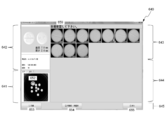
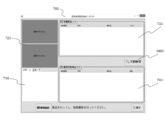
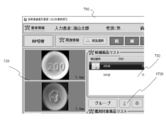
- a “returned tablet image discrimination” window 640 is displayed on the screen 531 as shown in FIG.
- Returned tablet image discrimination is used on the assumption that all the drugs to be identified are of the same type, but when different types of drugs are mixed, the user can easily mix different types of drugs.
- Various processes described below are performed so that the user can easily notice.
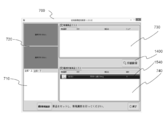
- the “returned tablet image discrimination” window 640 includes a first portion 641, a second portion 642, a third portion 643, a counting and message display portion 644, and an item display portion 645. It consists of.
- the user sets the tray 300 containing the medicine to be identified in the medicine imaging apparatus 200 and selects the “imaging” item 646.
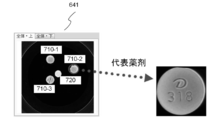
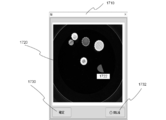
- an image of the photographed medicine is displayed in the first portion 641. That is, in the first portion 641, an image obtained by photographing an area including a plurality of medicines is displayed.
- an image taken with the first light source 430 or the second light source 440 turned on is preferably used. This is because when an image is taken under such illumination, the contrast between the background and the medicine tends to increase.
- This image includes a region including a plurality of photographed drugs.
- a “view from above” tab and a “view from below” tab are provided.
- the computer 500 automatically counts the medicines and displays the counted number of medicines on the counting and message display portion 644. Further, the computer 500 displays a message 647 on the counting and message display portion 644. This message 647 prompts the user to select one medicine (representative medicine) from among the medicines displayed in the first portion 641. When the user selects one of the medicines (representative medicines) displayed in the first portion 641, the screen changes as shown in FIG. Depending on the setting, instead of the user, the computer 500 automatically selects one of the drugs displayed in the first portion 641 as a representative drug.
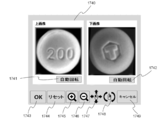
- an enlarged image of the selected representative medicine is displayed in the second portion 642.
- An image obtained by photographing the selected medicine from above is displayed on the upper portion of the second portion 642, and an image obtained by photographing the selected medicine from below is displayed in an enlarged manner on the lower portion.
- the computer 500 performs discrimination on the representative drug selected by the user or the computer 500. Further, in the first portion 641, a second label 648 is attached to the selected representative drug so that the representative drug selected by the user or the computer 500 can be easily understood.
- the computer 500 displays a list of drug information as candidates in the third portion 643.
- Each line in the list displays information on one candidate drug.
- the drugs that are more likely to be correct are displayed in the upper row of the list.
- the list display is sorted from top to bottom from the most likely drug to the lowest drug.
- the score obtained as a result of the search is used as an index to determine whether the possibility that the medicine is correct is high or low. Specifically, if the score of the possibility of matching with a medicine hit as a result of the search is high, the possibility that the medicine is correct is high, and if the score is low, the possibility of being correct is low.
- a score indicating the possibility that the candidate drug is correct an image of a drug stored in the database, a stamp or print code, and a drug name are displayed. If the setting is changed, instead of the score, the ranking of the possibility that this candidate drug is correct among all candidate drugs can be displayed. Furthermore, in addition to the drug name, a code (for example, YJ code) specifying the drug can also be displayed. In this way, when information related to one medicine is displayed together in one line, the user can easily understand. Moreover, you may display the dimension of a chemical
- the medicine image pointed to by the mouse cursor may be displayed in an enlarged manner.
- the medicine image that the user is interested in is immediately displayed. Become more visible.
- this makes it easy for the user to compare the medicine image displayed in the second portion 642 with the medicine image displayed in the third portion 643.
- the mouse cursor is moved away from the enlarged medicine image, the enlargement of the image is canceled and the medicine image returns to the original size.
- the user compares the drug displayed enlarged in the second portion 642 with the information of each candidate drug listed in the third portion 643, and selects the drug that the user determines to be correct.
- the user selects a medicine in the third portion 643, as shown in FIG. 10, the row showing the selected medicine is highlighted.
- a third indicator 652 indicating that the confirmation by the user is completed is attached to the corresponding medicine. In this state, the user selects the “differentiation start” item 651.
- FIG. 11 is a diagram showing a state where the user has selected the “start discrimination” item 651 shown in FIG.
- FIG. 11 shows a state where a returned tablet image discrimination is performed for a returned drug different from the returned drug shown in FIG.
- the second part 642 includes a master image of the medicine selected by the user in the third part 643 (a master image stored in the database corresponding to the selected medicine), and the name of the medicine. , Engraving (or printing), and the number of medicines are displayed.
- images obtained by enlarging the medicines displayed in the first portion 641 are displayed side by side.
- the size of the medicine measured by the computer 500 from the medicine image is displayed.
- the computer 500 further displays a message 659 in the third portion 643.
- This message 659 prompts the user to visually check the images of all the drugs displayed in the third portion 643.
- the user finds a different medicine as a result of visually confirming the image of the medicine displayed in the third portion 643, the user selects the medicine.
- the first portion 641 can be labeled with a drug corresponding to the different drug. Accordingly, the user can easily grasp where the different medicines are located on the tray 300, and can easily take out without mistake.
- the user can select the re-photographing item 654 to repeat the process of the above example.
- the image processing program of the present embodiment does not simply display the images of the plurality of medicines displayed in the first portion 641 side by side in the third portion 643 but also arranges the images of the plurality of medicines. It has a function to display instead. That is, the image processing program of the present embodiment, when a representative medicine is selected from a plurality of medicines displayed on the display device 530 (first portion 641), the image of the representative medicine and the display device 530 (first device). Template matching (also referred to as pattern matching) is performed between each of the images of the plurality of medicines displayed in the portion 641) and the similarity (matching rate) is obtained.
- Template matching also referred to as pattern matching
- the image of the representative medicine is an image photographed by the medicine photographing apparatus 200, and the images of each of the plurality of medicines are images photographed by the medicine photographing apparatus 200. Therefore, the image processing program obtains the similarity between images taken by the medicine photographing apparatus 200.
- the degree of similarity between images taken by the medicine imaging device 200 is obtained in such a manner that a pharmacist or the like can easily find out mixing of different kinds of medicines or the like when viewing a medicine image. This is because the images are rearranged. That is, the image processing program rearranges and displays the images of the plurality of medicines on the display device (third portion 643) based on the obtained similarity.
- FIG. 12 shows that four drugs are placed in the first portion 641, of which three drugs 710-1, 710-2, and 710-3 are of the same type and the remaining drug 720 is of a different type. is there. Further, the medicines 710-1, 710-2 and the medicine 720 are placed facing the front, and the medicine 710-3 is placed facing the back. In this case, it is assumed that the medicine 710-2 is selected as a representative medicine by the user.
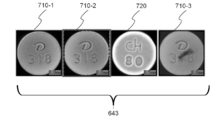
- each medicine is in the third part. 643 are displayed side by side. Specifically, the medicine 710-1 positioned at the top in the first portion 641 is displayed on the leftmost side in the third portion 643. In addition, the medicine 710-2 positioned second from the top in the first portion 641 is displayed second from the left in the third portion 643. The medicine 720 located third from the top in the first portion 641 is displayed third from the left in the third portion 643. The medicine 710-3 located at the lowest position in the first portion 641 is displayed on the rightmost side in the third portion 643.
- images of a plurality of medicines are rearranged (sorted) in ascending order of similarity obtained by the template matching, and the display device (third portion) 643). That is, since the medicine 710-1 is the same kind as the medicine 710-2 which is the representative medicine, the similarity to the medicine 710-2 is as high as about 0.9133. Since the medicine 710-2 itself is selected as the representative medicine, the similarity according to the template matching is 1. On the other hand, the medicine 710-3 is the same kind as the medicine 710-2 which is the representative medicine, but the surface has dirt attached, so the similarity to the medicine 710-2 is slightly lowered to about 0.8072. Further, since the medicine 720 is of a different type from the medicine 710-2 that is the representative medicine, the similarity to the medicine 710-2 is zero.
- the image processing program of the present embodiment displays the medicine 720 having the lowest similarity on the leftmost side of the third portion 643. Further, the image processing program displays the medicine 710-3 having the second lowest similarity second from the left of the third portion 643. Further, the image processing program displays the medicine 710-1 having the third lowest similarity third from the left of the third portion 643. Further, the image processing program displays the medicine 710-2 having the highest degree of similarity on the rightmost side of the third portion 643.
- an example is shown in which images of a plurality of medicines are rearranged and displayed on the display device (third portion 643) in descending order of similarity, but the present invention is not limited to this.
- the image processing program can rearrange images of a plurality of medicines in descending order of similarity and display them on the display device (third portion 643).
- the user can easily find different types of drugs. . That is, in the example of FIG. 14, a plurality of medicines are rearranged and displayed in order of decreasing similarity, and therefore, different kinds of medicines are likely to be displayed on the left side in the third portion 643. Therefore, the user can easily find different types of drugs by paying attention to the drug located on the left side in the images of the plurality of drugs displayed in the third portion 643. As a result, according to the present embodiment, the accuracy of drug discrimination can be improved, and the returned drug can be safely reused.
- the pharmacist or the like may sort the returned medicines into the same kind of medicine by visual observation, but there is a possibility that the different kinds of medicines may not be noticed only by visual inspection of the medicine.
- the pharmacists and the like can easily notice mixing of different types of drugs, Different types of drugs can be removed.
- the drug with dirt attached has a relatively low similarity to the representative drug, and thus may be displayed on the left side in the third portion 643.
- the user can easily find a drug with dirt attached by paying attention to the left side of the third portion 643.
- the accuracy of drug discrimination can be improved, and the returned drug can be safely reused.
- Returning the returned medicine to the original container or tablet packaging machine or the like for reuse requires considerable care and high-precision discrimination.
- a medical institution that gives priority to safety and discards the returned drug Is also present.
- a countermeasure against the recent increase in medical costs such disposal is a major social problem, and the countermeasure is urgently required.
- the present embodiment it is possible to easily find different types of drugs and drugs with dirt attached thereto, so that high-precision drug discrimination can be realized. As a result, the returned drug can be safely reused, which can be an effective measure against the recent increase in medical costs.
- the image processing program 600 of the present embodiment has a function of aligning the directions of a plurality of medicines when displaying a plurality of medicine images on the third portion 643.
- the image processing program 600 displays a plurality of medicine images on the display device (third portion 643) so that the directions of the plurality of medicine images are aligned with the representative medicine as a reference.
- the image processing program 600 rotates the orientation of the medicine 710-2 selected as the representative medicine in a direction that is easy for the operator to see (the letters D and numbers 318 on the medicine table are easy to read). .
- the image processing program 600 rotates the direction of the other medicine so that the orientation is the same as that of the medicine 710-2.
- the image processing program 600 of the present embodiment has a function of aligning the front and back of a plurality of medicines when displaying a plurality of medicine images on the third portion 643.
- the image processing program 600 displays a plurality of medicine images on the display device (third portion 643) so that the front and back of the plurality of medicines are aligned with reference to the front and back of the medicine in the representative medicine image.
- the image processing program 600 sets the third part with the medicine 710-2 facing up so that the operator can see the letter D and the number 318 of the medicine 710-2 selected as the representative medicine. 643. Then, the image processing program 600 displays other medicines on the third portion 643 facing the front in the same manner as the medicine 710-2.
- the medicine 710-3 was originally displayed face-down on the first part 641, but by this processing, it is displayed face-up on the third part 643.
- the operator can easily confirm whether different types of tablets are mixed.
- the learning function of the discrimination process of returned goods medicine can also be provided.
- the image discrimination of brought medicines since various medicines are brought in, there is a specification that a photographed tablet is newly learned and set as a master.
- the returned drug image discrimination unlike a brought-in drug, a master already exists, so the specification of further learning and resetting as a master was not originally required.
- a medicine with few scratches and dirt is selected as the representative medicine among the photographed medicines.
- a medicine with less scratches and dirt than the master may be selected as a representative medicine. If this medicine can be learned as a master, the processing accuracy in drug image discrimination can be increased.
- a specification is added that rearranges the similarities obtained by the template matching described above in ascending order or descending order. Then, the score that matches the currently registered master with a plurality of other drugs is compared with the score that matches the drug selected as the representative drug with the other drugs. If the average value of both scores is compared and the average value of the representative drug is higher, it can be judged that the representative drug is superior to the master currently used.
- the display device 530 displays an announcement as to whether or not the representative drug is to be replaced with the currently used master (learns master information). Specifically, a message prompting to update the learning data is displayed in the “Returned Tablet Image Identification” window 640, and the operator confirms the matching similarity score and decides whether or not to update the master information by learning. can do. Thereby, when a medicine with less scratches and dirt than the master is selected as the representative medicine, it can be continuously learned and updated as the master, so that the processing accuracy in the drug image discrimination can be continuously improved. .
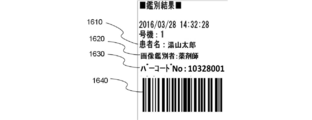
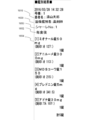
- FIG. 15 is a diagram illustrating an example of a printed returned-goods medicine discrimination result.
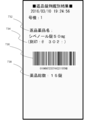
- the image processing program 600 recognizes the names of the returned medicines 732, the stamp 734, the barcode 736 (for example, GS1 code), and the total number of returned medicines 738, as shown in FIG. Etc. are printed on a medium (for example, paper).
- the image processing program 600 prints the discrimination result on a medium including an identifier indicating that the plurality of medicines are returned and identified.
- the image processing program 600 prints on a medium including an identifier indicating that a plurality of drugs have been returned and identified in the part indicating the drug lot number in the barcode 736.
- the image processing program 600 can print on the medium including the total number 740 of returned medicines in the barcode 736 as a result of identifying a plurality of medicines. Specifically, the image processing program 600 adds the total number 740 of returned medicines to the last four digits of the barcode 736 and prints it on the medium. According to this, when filling the returned medicine tablet into the medicine packaging device, the total number of returned medicines can be reflected in the medicine packaging device by reading the barcode 736 with the barcode reader of the medicine packaging device. Therefore, it is possible to save the trouble of manually inputting the total number of returned medicines.
- the image processing program 600 can print the total drug price 742 of a plurality of identified drugs as a result of identifying a plurality of drugs. Specifically, the image processing program 600 calculates the total drug price of a plurality of identified drugs by multiplying the number of tablets (740 in total) of the identified drugs and the price of each of the drugs. The total drug price 742 is printed on the medium.
- the comprehensive drug database “MD bank” (trademark) manufactured by Yuyama Manufacturing Co., Ltd. is installed in the computer 500, the price of each of the identified drugs is obtained by referring to the MD bank. However, it is not limited to this.
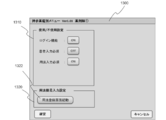
- FIG. 21 is a diagram showing an example of an environment setting screen for setting whether or not to print the number of identified medicines and the total drug price.
- the environment setting screen 744 displays a lock number printing check box 746 and a drug price printing check box 748.
- the image processing program 600 prints the total number 740 of returned medicines on the medium when printing the discrimination result.
- the image processing program 600 prints the total drug price 742 of a plurality of identified drugs on the medium when printing the discrimination result.
- FIG. 16 is a flowchart of processing executed by the image processing program.
- the image processing program 600 photographs an image of a region including a plurality of medicines by using the medicine photographing apparatus 200 (step 101).
- the image processing program 600 receives an image photographed by the medicine photographing apparatus 200 by the receiving unit 510 (step 102).
- the image processing program 600 displays the received image on the first portion 641 (step 103).
- the image processing program 600 displays an enlarged image of the representative medicine image on the second portion 642 (step 104).
- the representative drug can be arbitrarily selected by the image processing program 600 from a plurality of drugs.
- the image processing program 600 displays information on a drug that is a candidate for identifying a representative drug in the third portion 643 (step 105). Subsequently, when a drug determined to be correct by the operator is selected from candidate drugs, the image processing program 600 reads a master image of the selected drug from the database and displays it in the second portion 642. (Step 106).
- the image processing program 600 obtains the similarity between the representative medicine image and each of the plurality of medicine images displayed in the first portion 641 (step 107). Subsequently, the image processing program 600 rearranges the images of the plurality of medicines based on the obtained similarity and displays them on the third portion 643 (step 108). Note that when the image processing program 600 rearranges the plurality of images in step 108 and displays them on the third portion 643, the plurality of drugs are arranged so that the directions of the plurality of drugs are aligned with reference to the representative drug image. Images can be displayed.
- the image processing program 600 rearranges the plurality of images in step 108 and displays them on the third portion 643, the front and back of the plurality of medicines are aligned based on the front and back of the representative medicine in the representative medicine image. Images of a plurality of drugs can be displayed.
- the image processing program 600 is Then, the discrimination result of the returned medicine is printed (step 109).
- the operator can fill the medicine packaging apparatus with the returned tablets using the medium on which the discrimination result of the returned tablets is printed.
- FIG. 22 is an example of an image image in discrimination of a brought-in drug.
- a “tablet image discrimination” window 700 as shown in FIG. 22 is displayed on the display device 530.
- the “tablet image discrimination” window 700 is roughly divided into a first portion 710, a second portion 720, a third portion 730, and a fourth portion 740.
- an image photographed by the medicine photographing apparatus 200 is displayed.
- an image taken with the first light source 430 or the second light source 440 turned on is preferably used. This is because when an image is taken under such illumination, the contrast between the background and the medicine tends to increase.
- This image includes a region including a plurality of photographed drugs.
- a “view from above” tab 711 and a “view from below” tab 712 are provided at the top of the first portion 710. When the user selects the “view from above” tab 711, an image of the medicine taken from above is displayed in the first portion 710. When the “view from below” tab 712 is selected, an image obtained by photographing the medicine from below is displayed in the first portion 710.
- the computer 500 When the computer 500 acquires the captured image, the computer 500 automatically recognizes the area occupied by each medicine based on the image.
- an image of the selected medicine is enlarged and displayed in the second portion 720.
- an image obtained by photographing the selected medicine from above is displayed, and in the lower part, an image obtained by photographing the selected medicine from below is displayed in an enlarged manner.
- the selection of the medicine is automatically performed by the computer 500 from the medicines that have been identified.
- the computer 500 displays a list of candidate drugs obtained as a result of the identification in the third portion 730.
- Each line in the list displays information on one candidate drug.
- Each row in the list displays drug images, inscriptions, drug names, scores, and the like stored in the database as candidate drug information.
- the user compares the drug displayed enlarged in the second portion 720 with the information on each candidate drug listed in the third portion 730, and selects the drug that the user determines to be correct. Specifically, the user selects a line in the third portion 730 where correct drug information is displayed. Thereafter, when the user is convinced that the medicine selected by the user is the correct medicine, the user selects the “select” item 761. Then, information on the selected medicine is added to the fourth portion 740. When the confirmation of one medicine is completed, the user selects another medicine that has not yet been confirmed in the first portion 710, and performs the same procedure as described above for this selected medicine. Confirmation work is performed.
- FIG. 23 is a flowchart of a task of counting work time and cost required for drug discrimination.
- 24 and 25 are diagrams illustrating an example of a screen for performing aggregation relating to drug discrimination.
- the tablet identification menu window 750 includes a “counting work” item 752.
- the image processing program 600 displays the total operation screen 754 on the display device 530 (step S 201).
- a totaling unit 755 As a search condition for performing the totaling work, a totaling unit 755, a period 756, an extraction condition (unit) 757, an output unit 758, an output target 759, and a “CSV output” item 760 are displayed. Is displayed.
- the user can select at least one of “day designation”, “month designation”, and “year designation” in the aggregation unit 755.
- the user can designate a period for performing a task of totaling work time and cost required for drug discrimination in the period 756.
- the user can specify the number of the device that is the target of the totaling work in the extraction condition (numbered machine) 757.
- the user can select, in the output unit 758, whether to output the total result “by user” or “output by day of the week”.
- the user can designate the output target of the total result as “discrimination” or “return” in the output target 759.
- FIG. 24 shows an example of the case where “differentiation” is designated, and it is possible to output the total result of the identification when specifying the medicine brought by the patient.
- FIG. 25 is an example when “returned goods” is designated, and it is possible to output a totaling result of discrimination when specifying returned medicines.
- the user can input the extraction condition (medicine) 763 as a search condition.
- the user can input a medicine name and / or a stamp name as a search condition in the extraction condition (medicine) 763.
- the image processing program 600 searches based on the search conditions input via the totaling work screen 754. The result of drug discrimination that matches the conditions is searched (step S202).
- the image processing program 600 aggregates the discrimination time, cost, and the like based on the searched drug discrimination result (step S203). For example, the image processing program 600 measures the discrimination time required to discriminate a drug, and totals the measured discrimination time or the discrimination time per drug tablet. Further, the image processing program 600 measures the discrimination time required to discriminate a plurality of drugs, and totals the measured discrimination time and the total drug price of the plurality of discriminated drugs. Good.
- the image processing program 600 performs CSV output based on the counting result (step S204). Specifically, when “discrimination” is designated in the output target 759, the image processing program 600 totals the total discrimination work time, the average discrimination work time per medicine, the number of discrimination medicines, and the like. Then, a CSV (Comma Separated Values) file is generated and stored in a storage device or the like. As described above, by collecting the time required for the discrimination of the medicine brought by the patient and outputting the CSV, the user can easily understand how much time is required for the medicine discrimination.
- CSV Common Separated Values
- the image processing program 600 totals the total return work time, the average return work time per time, the number of returned medicines, the total drug price, etc. Create a (Comma Separated Values) file and save it in a storage device. In this way, by summing up the work time and total drug price related to the discrimination of returned medicines and outputting them in CSV format, the user needs to know how much time is required for returning medicines, and how much drug price is determined by drug discrimination. It will be easier to see if it has been reduced.
- FIG. 26 is a diagram illustrating an example of a totaling result screen such as identification time required for identifying a medicine.
- a totaling result screen such as identification time required for identifying a medicine.
- the user can select a user information search item 765, a patient information search item 767, and a medicine information search item 769 as a search condition for performing the tabulation work.
- the user can input a user ID or a user name as a search key in the user information search item 756.
- the user can input a patient ID or a patient name as a search key in the patient information search item 758.
- the user can input a medicine name or a stamp name as a search key in the medicine information search item 760.
- the image processing program 600 displays on the display device 530 the totaled result that is totaled based on the search condition input via the user information search item 765, the patient information search item 767, or the medicine information search item 769. Can do.
- the total result screen 762 includes an average discrimination time 764 per medicine, an average discrimination time 766 per day, an average number of medicines 768 per day, and search conditions.
- a list 770 of corresponding discriminations is displayed.
- the identification list 770 includes identification number, the number of the drug imaging apparatus 200 that has performed imaging of the drug, the date of the identification, the name of the user who performed the identification, the name of the patient who brought the drug, and the number of drugs identified The time required for the discrimination, the web discrimination interlocking number, and the like are displayed.
- the time required for discrimination is the time from when a medicine is newly photographed by the medicine photographing apparatus 200 until it is registered for differentiation (for example, until the “Register” item 754 is selected), and is measured by the image processing program 600. Is done. In this way, by counting the time required for the medicine discrimination and displaying it on the display device 530, the user can easily understand how much time is required for the medicine discrimination.
- FIG. 27 is a diagram illustrating an example of a totaling result screen such as identification time required for identifying a drug.
- FIG. 27 is an example of a totaling result screen such as a discrimination time required for discrimination of a plurality of returned drugs when the “returned tablet image discrimination” item 622 is selected.
- the total result screen 762 includes an average work time 772 per returned work, an average work time 774 per day, an average number of returned medicines 776 per day, a drug price (total price) ) 778 and a list of discriminations 780 corresponding to the search condition are displayed.
- the discrimination list 780 the identification number, the number of the drug imaging device 200 that performed imaging of the drug, the date of the identification, the name of the user who performed the identification, the name of the drug returned by the identification, and the returned by identification.
- the number of drugs, the time required for the discrimination, the drug price (total) of the drugs returned by the discrimination, etc. are displayed.
- the time required for discrimination is the time from when a medicine is newly photographed by the medicine photographing apparatus 200 until it is registered for differentiation (for example, until the “print” item 653 is selected), and is measured by the image processing program 600. Is done. In this way, by counting the time required for drug discrimination and the drug price of the drug returned by the discrimination and displaying it on the display device 530, the user needs to know how much time is required for the drug discrimination. Therefore, it becomes easy to grasp how much the drug price can be reduced by the drug discrimination.
- FIG. 28 is a flowchart of the sending item display job.
- FIG. 29 to FIG. 31 are diagrams showing an example of a state in which a report item relating to drug discrimination is displayed.
- the image processing program 600 displays a “tablet image identification” window 700 as shown in FIG. The information is displayed on the display device 530 (step S301).
- an image photographed by the medicine photographing apparatus 200 is displayed.
- an image of the selected medicine is enlarged and displayed in the second portion 720.
- an image obtained by photographing the selected medicine from above is displayed, and in the lower part, an image obtained by photographing the selected medicine from below is displayed in an enlarged manner.
- the selection of the medicine is automatically performed by the computer 500 from the medicines that have been identified.
- the computer 500 displays a list of candidate drugs obtained as a result of the identification in the third portion 730.
- Each line in the list displays information on one candidate drug.
- Each row in the list displays drug images, inscriptions, drug names, scores, and the like stored in the database as candidate drug information.
- a notification item is included in the candidate drug.
- an identifier 782 indicating that there is a report item is displayed on the display device 530 (step S302).
- three candidate drugs are displayed in the third portion 730, and it is shown that there are items to be reported for two drugs.
- the identifier 782 is not displayed, it indicates that there is no report item.
- the image processing program 600 displays a notification item 784 when a candidate drug or identifier 782 is selected or when the mouse cursor moves near the candidate drug or identifier 782.
- the information is displayed on the device 530 (step S303).
- the medicine image pointed to by the mouse cursor is enlarged and a delivery item 784 is displayed.
- the delivery item 784 the selected medicine has a plurality of standard differences.
- the sending item 784 can display various items depending on the medicine, such as the fact that there are a plurality of different standards, and there are a plurality of different markings on the back surface. Further, when the “returned tablet image discrimination” item 622 is selected, various items to be sent can be displayed such as, for example, LASIX changes color and is discarded without being returned.
- the image displayed on the third portion 730 is enlarged according to the operation of the user, the image of the medicine that the user is interested in immediately can be seen in detail.
- this makes it easy for the user to compare the medicine image displayed in the second part 720 with the medicine image displayed in the third part.
- the mouse cursor is moved away from the enlarged medicine image, the enlargement of the image is canceled and the medicine image returns to the original size.
- the user compares the drug displayed enlarged in the second portion 720 with the information on each candidate drug listed in the third portion 730, and selects the drug that the user determines to be correct.
- an identifier 782 indicating that there is a notification item in the candidate medicine is displayed on the display device 530, and further, a notification item 784 is displayed on the display device 530.
- the correct medicine can be selected in consideration of the contents of the delivery item 784.
- FIG. 32 is a diagram illustrating an example of a screen for editing a notification item related to drug discrimination.
- a menu screen 786 is displayed on the display device 530.
- a menu of “edit” is displayed on the menu screen 786.
- a menu of “registration” is displayed on the menu screen 786.
- a message entry screen 788 is displayed on the display device 530.
- the user can manually fill in the entry items in the entry field 790 of the entry item entry screen 788.
- a report item selection screen 792 is displayed on the display device 530.
- a pre-registered offer item list 794 is displayed on the display device 530.
- FIG. 32 shows an example in which two items to be sent are registered in advance, but the number of items to be pre-registered is arbitrary.
- the user can reflect the selected sending item in the entry field 790 by selecting an appropriate item from the sending item list 794 and clicking the selection item 796.
- the user can set the notification item described in the entry field 790 as the notification item of the candidate drug by clicking the registration item 798 on the notification item entry screen 788.
- the user can delete the notification item 784 set in the candidate medicine by clicking the deletion item 799 on the notification item entry screen 788.
- FIG. 33 is a flowchart of a patient information input task.
- FIG. 34 is a diagram illustrating an example of a state in which information related to a patient of a brought-in drug is displayed on a screen for performing drug discrimination.
- the image processing program 600 causes the computer 500 to execute a step of displaying on the display device 530 a discrimination screen for discriminating the patient's brought-in drug when the drug brought by the patient is differentiated (step S401).
- a “tablet image discrimination” window 700 is displayed on the display device 530.
- the “tablet image discrimination” window 700 displays patient information in addition to the first part 710, the second part 720, the third part 730, and the fourth part 740.
- a fifth portion 1100 is displayed.
- the patient name, sex, ward, department, etc. are displayed as information on the patient who brought the medicine to be identified.
- the fifth portion 1100 is provided with a patient attribute item 1102.
- the image processing program 600 causes the computer 500 to execute a step of accepting input of information related to the patient who brought the medicine through the discrimination screen displayed on the display device 530 (step S402). Specifically, when the patient attribute item 1102 is clicked by the user, the image processing program 600 displays a screen (attribute input screen 1110) for inputting patient attributes.
- FIG. 35 is a diagram illustrating an example of a screen for inputting attributes of a patient who brought a medicine. Information such as a patient number, patient name, identification date, ward, and department can be entered on the attribute input screen 1110.
- the attribute input screen 1110 can reflect the patient information registered in the database to the attribute input screen 1110 when the user inputs the patient number. It is like that.
- the attribute input screen 1110 allows the user to edit patient information reflected from the database. For example, when the user places the mouse cursor on a field for inputting a ward and clicks the Enter key on the keyboard, a ward selection screen 1112 is displayed on the display device 530. A ward list 1114 registered in advance is displayed on the ward selection screen 1112. When the user selects an appropriate item from the ward list 1114 and clicks the selection item 1116, the selected ward is reflected on the attribute input screen 1110. Items other than the ward can also be selected from the list.
- the attribute input screen 1110 allows the user to input patient information manually on the attribute input screen 1110. When the registered item 1118 on the attribute input screen 1110 is clicked, the image processing program 600 displays the patient information input on the attribute input screen 1110 on the fifth portion 1100 (step S403).
- FIG. 36 is a diagram illustrating an example of a screen for inputting attributes of a patient who brought a medicine. If the patient information is not registered in the database, the patient information can be registered via the patient information registration screen 1120 shown in FIG.
- the patient information registration screen 1120 is provided with columns for registering items such as a patient number, patient name, date of birth, and sex. The user can newly register patient information in the database by inputting patient information in each item and clicking the registration item 1122.
- the image processing program 600 causes the computer 500 to execute a step of associating information about the patient who brought the medicine with the discrimination result of the brought medicine (step S404).
- the image processing program 600 can store the result of identifying the medicine brought by the patient and the patient information in a storage device or the like in association with each other. Thereby, for example, it is possible to search the discrimination result of the medicine brought by the patient using the patient information such as the patient name as a search key, so that the convenience for the user can be improved.
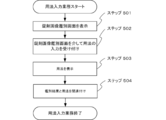
- FIG. 37 is a flowchart of usage input work.
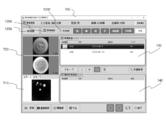
- FIG. 38 is a diagram showing an example of a discrimination screen for discriminating drugs brought by patients.
- the image processing program 600 causes the computer 500 to execute a step of displaying on the display device 530 a discrimination screen for discriminating the patient's brought-in drug when the drug brought by the patient is differentiated (step S501).
- a “tablet image discrimination” window 700 is displayed on the display device 530.
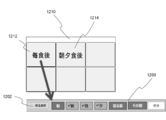
- an RP switching item 1230 is provided.
- a sixth portion that displays usage information 1200 is provided.
- the sixth portion 1200 information on the usage of the medicine to be identified is displayed.
- the sixth part 1200 is provided with a usage selection item 1202.
- the image processing program 600 causes the computer 500 to execute a step of accepting input of information regarding the usage of the medicine brought by the patient via the “Tablet Image Identification” window 700 displayed on the display device 530 (Step S502). Specifically, when the usage selection item 1202 is clicked by the user, the image processing program 600 activates (displays) a screen for selecting a usage.
- FIG. 39 is a diagram showing an example of a screen for inputting the usage of the medicine brought by the patient via the discrimination screen for identifying the medicine brought by the patient.
- the usage selection screen 1210 when the user selects, for example, the “after meal” item 1212, a check mark is added to the items “morning”, “noon”, and “evening” in the sixth portion 1200, and “after eating” "Becomes active.
- the “after dinner” item 1214 a check mark is added to the “morning” and “evening” items in the sixth portion 1200, and the “after dinner” item becomes active.
- FIG. 40 is a diagram illustrating an example of a screen for inputting the usage of the medicine brought by the patient via the discrimination screen for differentiating the medicine brought by the patient.
- a usage list 1220 is displayed.
- the usage list 1220 displays usage types such as “after meal”, “before meal”, “between meals”, “just before meal”, “immediately after meal”.
- the user can reflect the selected usage in the sixth portion 1200 by selecting any usage from the usage list 1220.
- the usage can be input via the “Tablet Image Identification” window 700, so that it is possible to save the user's trouble concerning the input setting of the usage.
- the image processing program 600 causes the computer 500 to execute a step of associating information regarding the usage of the drug brought by the patient with the discrimination result of the carried drug (step S504). Specifically, the image processing program 600 associates the result of drug discrimination brought by the patient with the usage of the drug and saves it in a storage device or the like, or prints the result of the discrimination and the drug method on a medium. can do.
- the setting is such that the activation and inactivation of the RP switching can be switched.
- the user can specify and switch the RP so that the medicine prescribed for each of the plurality of hospitals can be identified and managed.
- FIG. 41 is a flowchart of RP switching.
- the system of the discrimination report in which the discrimination data is transmitted from this apparatus it is designed so that the style of the report can be freely processed.
- a medicine brought by a patient has a remaining amount of 20 tablets in the morning, 10 tablets in the day, and 10 tablets in the evening as prescribed by the hospital A.
- An operation method and a data input method will be described below by taking, as an example, a case in which the amount prescribed by the hospital B is 5 tablets in the morning and 5 tablets in the evening.
- the image processing program 600 starts RP switching input.
- the tablet image discrimination screen set for each Rp is displayed, and the discrimination work is started (steps 506 to 508).
- the work starts by first identifying 20 tablets for Rp1 morning in the petri dish. Then, the morning identification of Rp1 is completed by pressing the morning of the usage selection button. Then, the medicine used for the discrimination is removed, and then 10 tablets for daytime are placed. After the additional shooting button is pressed, the day of the usage selection button is pushed, and then 10 tablets for evening are placed. Press the additional shooting button, then press the usage selection button evening.
- the Rp switching button is pressed to shift to the prescription of hospital B (step 903). If there is a remaining amount of 5 tablets in the morning and 5 tablets in the evening as a medicine from hospital B, 5 morning medicines are placed, the additional photographing button is pushed, and the usage selection button morning is pushed after photographing. Next, 5 tablets for the evening are placed, the additional photographing button is pushed, and the evening of the usage selection button is pushed. In this manner, the medicine discrimination from the hospital B is completed (step 508). After all the discrimination is completed, the patient information for each hospital can be newly registered in the database by clicking the registration item 1122 (step 509).
- data is transmitted for each operation performed in the above-described operation, that is, for each Rp, for each petri dish, and for each usage. It becomes possible to do.
- the operations of steps 506 to 508 are similarly executed as hospitals C, D, E.
- the petri dish has a maximum capacity of only 15 tablets, for example, when distinguishing 20 tablets for morning use as described in the embodiment of FIG. 41, 15 tablets are first placed on the dish. And press the new shooting button to execute shooting. Then, 15 tablets are taken out and the remaining 5 tablets are placed on the petri dish. After placing the remaining 5 tablets on the petri dish, next press the additional shooting button.
- the drug discrimination system 100 can be set so that the discrimination operation is continued.
- FIG. 42 is a flowchart of maintenance work.
- the image processing program 600 causes the computer 500 to execute a step of displaying a menu image related to drug identification on the display device 530 (step S601).
- the tablet identification menu window 750 in FIGS. 24 and 25 is displayed on the display device 530.
- the image processing program 600 causes the computer 500 to execute a step of accepting a setting item change input related to drug discrimination via the window 750 of the tablet discrimination menu (step S602).
- FIG. 43 is a diagram illustrating an example of a screen for changing settings relating to drug discrimination.
- the setting change screen 1300 displays a function setting item 1310 for setting use / non-use of various functions related to drug discrimination.
- usage setting item 1320 for setting the usage of the drug is displayed on the setting change screen 1300. Is displayed. The user can set use / nonuse of various functions by clicking an item for setting various functions in the function setting item 1310. Also, when the usage registration screen activation item 1322 in the usage setting item 1320 is clicked, the usage registration screen 1330 is activated (displayed).
- FIG. 44 is a diagram illustrating an example of a screen for registering drug usage.
- a usage registration item 1332, a registered item 1334, a list 1336, a confirmed item 1338, and a deleted item 1340 are displayed on the usage registration screen 1330.
- the user wants to register the usage after each meal, check the “morning”, “noon”, and “evening” items in the usage registration item 1332 so that the item “after eating” is activated.
- the registered item 1334 is clicked.
- the usage “after every meal” is displayed in the list 1336.
- the image processing program 600 registers the changed setting item, that is, the usage “after each meal” (step S603).
- the number of registrations is arbitrary. For example, when the user checks the items “morning” and “evening”, changes the item “after meal” to the item “before meal”, and clicks the registered item 1334, the usage “before morning dinner” is changed. You can register. Also, when the user places the mouse cursor on a usage that has already been registered and clicks on the delete item 1340, the usage is deleted and that portion of the list 1336 becomes blank. According to the present embodiment, the user can easily change various settings such as drug usage via the window 750 of the tablet identification menu.
- FIG. 45 is a flowchart of the manual search operation for a differential medicine.
- the image processing program 600 causes the computer 500 to execute a step of displaying a discrimination screen for identifying the medicine on the display device 530 (step S701).
- a “tablet image discrimination” window 700 as shown in FIG. 46 is displayed on the display device 530.
- FIG. 46 is a diagram illustrating an example of a screen for manually searching for drugs through a discrimination screen for identifying drugs.
- a screen for manually searching for a medicine is activated.
- a “manual search” item 1400 is provided.
- the image processing program 600 causes the computer 500 to execute a step of displaying a screen for manually searching for drugs on the display device 530 via the “tablet image discrimination” window 700 (step S702). Specifically, when the operator clicks the “manual search” item 1400, the image processing program 600 displays a medicine search screen 1410 shown in FIG. 47 on the display device 530.
- FIG. 47 is a diagram illustrating an example of a screen for manually searching for medicines.
- a search condition input item 1420 As shown in FIG. 47, on the medicine search screen 1410, a search condition input item 1420, a medicine display item 1430, a search result display item 1440, an additional item 1450, and a delivery item display item 1460 are displayed.
- “engraved” or “medicine name” can be selected as a condition for searching for a medicine. The operator selects either “engraved” or “medicine name”, inputs search conditions in the search box 1422, and clicks the search item 1424. Then, in the search result display item 1440, a list of medicines that match the search condition is displayed. When the worker selects any medicine from the list of search result display items 1440, an image of the selected medicine is displayed on the medicine display item 1430.
- an identifier 1441 indicating that there is a sending item is displayed for a medicine for which the sending item is set.
- the sent items of the selected medicine are displayed in the sent items display item 1460. For example, when a medicine for which a notification item is registered for a specific medicine is selected in the search result display item 1440 via the notification item entry screen 788 in FIG. Is displayed.
- the sending item display item 1460 is provided with a sending item editing item 1462.
- the worker can edit the notification item already set for the selected medicine by clicking the notification item editing item 1462.
- the worker can set a new report item by clicking on the report item editing item 1462 if no report item is set for the selected medicine.
- FIG. 48 is a diagram illustrating an example of a screen for manually searching for medicines.
- a drug display item 1510 for displaying an image of the selected drug a lock number input item 1520 for inputting the number of drug locks, and a fourth drug are displayed.
- An “OK” item 1530 to be added to the portion 740 is displayed.
- FIG. 49 is a diagram illustrating an example of a state in which a manually searched medicine is displayed on the discrimination screen as a discrimination result. As shown in FIG. 49, in the fourth portion 740 of the “Tablet Image Discrimination” window 700, the manually searched medicine 1540 is displayed as the discrimination target medicine together with the number of tablets.
- FIG. 50 is a flowchart of the serial number printing job.
- 51 and 51 are diagrams illustrating an example of a printed medicine discrimination result.
- FIG. 51 shows an example of a drug discrimination result when a barcode barcode product identifier (AI code) addition setting 749 in the environment setting screen 744 of FIG.
- FIG. 52 is an example of the drug discrimination result when the barcode barcode product identifier (AI code) addition setting 749 in the environment setting screen 744 of FIG.
- the image processing program 600 receives a signal for printing the identification result (step S801). Upon receiving the print instruction signal, the image processing program 600 prints the medicine discrimination result on the medium (step S802), and prints and outputs an identification number for identifying the result of the medicine discrimination on the medium (step S802). S803). Specifically, as shown in FIG. 51, in addition to the patient name 1610 and the discriminator 1620, a barcode No. 1630, a barcode 1640, and the like are printed on the medium.
- the machine No. (1 digit), the identification date (4 digits), and the serial number (3 digits) of the apparatus that performed the discrimination are output. Since the serial number is a number that is sequentially assigned each time the drug discrimination is performed, the role of the ID number for uniquely identifying each drug discrimination (drug discrimination result) while indicating the number of times the drug discrimination has been performed Fulfill. Further, the barcode No. 1630 includes the content of the barcode No. 1630 and the content of the discrimination result. For the discriminator 1620 printed on the medium, the name of the person who logs in to the system for performing drug discrimination is printed. According to the present embodiment, it is possible to easily call a discrimination result or the like in WEB discrimination simply by scanning the barcode 1640 with a barcode reader.
- the barcode barcode product identifier (AI code) addition setting 749 on the environment setting screen 744 in FIG. 21 is set so as not to add a barcode
- the patient name 1610 is included in the medium as shown in FIG.
- the petri dish No. 1650, the usage 1652, and the discrimination drug list 1654 are printed.
- the petri dish number 1650 is printed with the petri dish number used in the discrimination
- the usage 1652 is printed with the medicine usage set in FIGS. 38 to 40, for example.
- the medium without a barcode as shown in FIG. 52 can show the discrimination result in an easy-to-understand manner, for example, by pasting it on the wrapping paper after the discrimination of the medicine is completed. According to this embodiment, since two types of discrimination results as shown in FIGS. 51 and 51 can be printed according to the work purpose, the efficiency of the operator's discrimination work can be improved.
- FIG. 53 is a diagram for explaining the drug region editing function.
- the present invention is not limited to this. For example, it is possible to perform drug region editing even when identifying returned drugs, and to perform drug region editing even when not all of the drug identification has been completed. it can.
- FIG. 53 is an enlarged view of a part of the “Tablet Image Identification” window 700 for convenience of explanation. As shown in FIG. 53, the “tablet image discrimination” window 700 displays an area edit item 1700.
- FIG. 54 is a diagram showing an example of the area editing screen.
- an image 1720 photographed by the medicine photographing apparatus 200, a “confirm” item 1730, and a “close” item 1732 are displayed on the region edit screen 1710.
- the computer 500 image processing program 600
- FIG. 54 shows an example when there is a medicine 1722 that is not automatically recognized by the computer 500.
- FIG. 55 is a diagram showing an example of the cut area editing screen.
- the cut area editing screen 1740 includes an “automatic rotation” item 1741, an “automatic rotation” item 1742, an “OK” item 1743, a “reset” item 1744, an “enlargement” item 1745, and a “reduction”.
- An item 1746, a “move” item 1747, a “rotate” item 1748, and a “cancel” item 1749 are displayed.
- An “automatic rotation” item 1741 is a button for rotating the display angle of the upper image obtained by photographing the medicine from above.
- An “automatic rotation” item 1742 is a button for rotating the display angle of the lower image obtained by photographing the medicine from below.
- FIG. 56 is a schematic diagram showing an example of drug region editing.
- the operator when the area 1752 of the medicine 1750 is not correctly recognized by the computer 500, the worker clicks the medicine whose area in the image 1720 is not correctly recognized. Then, the operator corrects the region 1754 of the medicine 1750 by appropriately adjusting the position, size, angle, and the like of the upper image and / or the lower image on the cut region editing screen 1740 and clicking the “OK” item 1743. can do.
- FIG. 56 (1) when the area 1752 of the medicine 1750 is not correctly recognized by the computer 500, the worker clicks the medicine whose area in the image 1720 is not correctly recognized. Then, the operator corrects the region 1754 of the medicine 1750 by appropriately adjusting the position, size, angle, and the like of the upper image and / or the lower image on the cut region editing screen 1740 and clicking the “OK” item 1743. can do.
- FIG. 56 is a schematic diagram showing an example of drug region editing.
- FIG. 17 is a schematic diagram showing an outline of the medicine packaging system of the present embodiment.
- the medicine packaging system 800 includes a medicine packaging apparatus 900 and a computer 500.
- the medicine packaging device 900 includes a display device 910 serving as an interface for outputting various information related to medicine packaging, and a barcode reader 920 for reading a barcode.
- the medicine packaging device 900 is connected to the computer 500.
- the receiving unit 510 of the computer 500 receives, for example, various information such as a history of medicines packaged in the medicine packaging apparatus 900 from the medicine packaging apparatus 900.
- the computer connected to the medicine packaging device 900 is the same as the computer 500 connected to the medicine imaging device 200, but is not limited to this and may be another computer.
- the worker fills the medicine packaging device 900 with the returned medicine using the barcode printed on the discrimination result shown in FIG. That is, the operator first scans the barcode printed on the discrimination result with the barcode reader 920. Subsequently, the operator scans the barcode printed on the medicine cassette to be filled with the returned medicine with the barcode reader 920. Thereby, the medicine packaging device 900 collates whether or not the type of the returned medicine matches the type of the medicine corresponding to the medicine cassette. Specifically, when the barcode of the target medicine is read by the barcode reader 920, a plurality of medicine cassettes are mounted on the medicine packaging device 900, so that the medicine cassette to be filled can be easily taken out by the operator.
- an RFID in which drug information is written is mounted on the drug cassette.
- the cassette is removed from the main body and placed on a cassette information reading unit (not shown) of the drug packaging device 900, the drug information is read from the RFID. Is read, and it is verified whether or not it matches the drug information on the barcode. As a result of the collation, when it is determined that the two match, the operator can fill the medicine cassette with the returned medicine.
- FIG. 18 is a diagram illustrating an example of an inquiry screen for a filling history of a medicine filled in the packaging device.
- the image processing program 600 displays a screen for inquiring the history of the medicine filled in the packaging device (medical filling history).
- An inquiry screen 810) is displayed on the display device 530.
- the user of the packaging device 900 inputs at least one of a medicine filling date 812, a medicine name 814, a packaging device number 816, a medicine cassette No. 818, etc.
- FIG. 18 shows an example in which a filling date is input as a search key, and it is searched that two medicines are filled on the date.
- the medicine filling history inquiry screen 810 may be displayed on the display device 910 provided in the packaging device 900.
- a medicine 822 in FIG. 18 is obtained by filling a packaging device with a new medicine instead of a returned medicine.
- the user of the packaging device can refer to the drug code, the name of the drug, the filling amount, the filling date and time, the filler, the expiration date, the serial number, and the like for the medicine 822.
- the medicine 824 is obtained by filling the packaged medicine with the returned medicine.
- the user of the packaging device can refer to the medicine code, the medicine name, the filling amount, the filling date and time, and the filling person.
- the letters “TAB” are displayed in the column of the production number.
- the characters “TAB” are characters indicating that the returned medicine is filled. By displaying such characters, the user of the packaging device can recognize that the medicine 824 is returned and identified by referring to the medicine filling history inquiry screen 810.
- the image processing program 600 associates the photographed image displayed in the first part 641 with the returned and identified medicine in the medicine filling history inquiry screen 810 and the plurality of images displayed in the third part 643. At least one of the medicine rearranged images can be displayed on the display device. That is, as shown in FIG. 19, when the user of the packaging apparatus moves and selects the mouse cursor 830 to the row of the medicine 824, the row of the medicine 824 is highlighted. Corresponding to the selection of the medicine 824, a “returned tablet image discrimination” window 640 when the medicine 824 is returned is displayed on the medicine filling history inquiry screen 810.
- the user of the packaging device can track what returned medicine is filled in the packaging device by referring to the “returned tablet image discrimination” window 640 on the medicine filling history inquiry screen 810. For example, when it is detected that an inappropriate medicine is filled in the packaging device, the stage in which the medicine is filled is tracked by referring to the “Returned tablet image discrimination” window 640. can do.
- the image processing program 600 displays at least one of the captured image displayed in the first portion 641 and the rearranged images of the plurality of drugs displayed in the third portion 643 on the drug filling history inquiry screen 810. Can do.
- Reference inventions are additionally described below.
- (Reference invention 1) A receiving unit that receives an image obtained by imaging a region including a plurality of drugs by a drug imaging device; A step of displaying on the display device an image of the region received by the receiving unit; and an image of the representative medicine selected from the plurality of medicines displayed on the display device and each of the plurality of medicines
- An image processing unit that executes a step of rearranging and displaying the images of the plurality of medicines on the display device based on the similarity to An image processing apparatus.
- (Reference invention 2) An enlarged image obtained by enlarging an image of the representative medicine in an image obtained by photographing the region, or a master image corresponding to the representative medicine is displayed on the display device;
- the image processing apparatus according to (Reference Invention 1), further executing (Reference invention 3)
- the image processing unit displays an image obtained by imaging the region on a first portion of the display device, displays the enlarged image or the master image on a second portion of the display device, and displays the plurality of medicines.
- the image processing device according to (Reference Invention 2) which displays an image in which images are rearranged on a third portion of the display device.
- (Reference invention 4) The image processing device according to any one of (Reference Inventions 1 to 3), wherein the image processing unit rearranges and displays the images of the plurality of medicines on the display device in descending order of the similarity. .
- (Reference invention 5) A printing unit for printing a result of identifying the plurality of medicines on a medium; Further comprising The image processing apparatus according to any one of (Reference Inventions 1 to 4), wherein the printing unit prints an identifier indicating that the plurality of medicines have been returned and identified on the medium.
- the printing unit prints on the medium including an identifier indicating that the plurality of medicines are returned and identified in a part indicating a lot number in a barcode printed on the medium (reference An image processing apparatus according to invention 5).
- the image processing unit displays on the display device that the plurality of medicines are returned and identified when the history image indicating the history of the medicine filled in the packaging device is displayed on the display device.
- the image processing apparatus according to any one of (Reference Inventions 1 to 6).
- the image processing unit displays, on the display device, at least one of an image obtained by photographing the region and an image obtained by rearranging the images of the plurality of drugs in association with the plurality of drugs in the history image.
- the image processing unit measures a discrimination time required to discriminate the plurality of drugs, and totals the measured discrimination time and a total drug price of the plurality of identified drugs (Reference invention 1). To 11).
- the image processing unit 13 The image processing unit displays information on a drug that is a candidate for identifying a drug on the display device, and if the candidate drug includes a notification item, the notification item exists. An identifier indicating that the information is displayed on the display device, and when the candidate drug is selected, the information to be sent is displayed on the display device (Reference inventions 1 to 12). Image processing apparatus.
- the image processing unit displays a discrimination screen for discriminating the patient's brought-in drug on the display device in the case of discriminating a drug brought by the patient, and through the discrimination screen displayed on the display device.
- the image processing apparatus according to any one of (Reference Inventions 1 to 13), which receives input of information regarding a patient who has brought the medicine, and associates information about the patient who has brought the medicine with a discrimination result of the bringing medicine. .
- the image processing unit displays a discrimination screen for discriminating the patient's brought-in drug on the display device in the case of discriminating a drug brought by the patient, and through the discrimination screen displayed on the display device.
- the image processing unit displays a menu image related to drug discrimination on the display device, and accepts a change input of a setting item related to drug discrimination via the menu image (Reference inventions 1 to 15).
- the image processing apparatus according to one.
- (Reference Invention 17) The image processing apparatus according to (Reference Invention 16), wherein the setting item includes usage of a medicine to be identified.
- the image processing unit displays a discrimination screen for discriminating a drug on the display device, and displays a screen for manually searching for the drug via the discrimination screen for discriminating the drug on the display device.
- the information on the medicine inputted through the screen for manually searching for the medicine is displayed on the display device as a result of the discrimination of the medicine, according to any one of (Reference Inventions 1 to 17).
- Image processing apparatus. The printing unit prints a result of identifying a drug on a medium, and prints an identification number for identifying the result of identifying the drug on the medium in addition to the result of identifying the drug (Reference Invention 1). 18.
- the image processing device according to any one of items 18 to 18.
- the image processing unit recognizes an area occupied by a medicine to be identified, and corrects the area recognized by the image processing unit according to an operation performed by an operator (Reference inventions 1 to 19).
- the image processing apparatus according to any one of the above.
- the image processing unit recognizes an area occupied by a medicine to be identified, and adds an area not recognized by the image processing unit according to an operation performed by an operator (Reference Inventions 1 to 20).
- the image processing apparatus according to any one of the above.
- Drug identification system 200 Drug imaging device 500 ... Computer 510... Receiving unit 520 ... Body 530 ... Display device 531 ... screen 532 ... Touch screen 541 ... Keyboard 542 ... Mouse 600 ... Image processing program 640 ... "Returned tablet image discrimination" window 641... First part 642 ... second part 643 ... Third part 644 ... Counting and message display part 738 ... Total number of returned drugs 742 ... Total drug price 782 ... Identifier 784 ... Matters to send 800 ... Drug packaging system 900 ... Drug packaging device 1100: fifth part 1200 ... sixth part 1300 ... Setting change screen 1400 ... "Manual search" item 1630 ... Barcode No. 1700 ... Area edit item
Landscapes
- Engineering & Computer Science (AREA)
- Health & Medical Sciences (AREA)
- General Health & Medical Sciences (AREA)
- Public Health (AREA)
- Chemical & Material Sciences (AREA)
- Medicinal Chemistry (AREA)
- Physics & Mathematics (AREA)
- Theoretical Computer Science (AREA)
- General Physics & Mathematics (AREA)
- Primary Health Care (AREA)
- Epidemiology (AREA)
- Pharmacology & Pharmacy (AREA)
- Medical Informatics (AREA)
- Bioinformatics & Cheminformatics (AREA)
- Veterinary Medicine (AREA)
- Life Sciences & Earth Sciences (AREA)
- Animal Behavior & Ethology (AREA)
- Computer Vision & Pattern Recognition (AREA)
- Quality & Reliability (AREA)
- Toxicology (AREA)
- Multimedia (AREA)
- Nuclear Medicine, Radiotherapy & Molecular Imaging (AREA)
- Radiology & Medical Imaging (AREA)
- Medical Preparation Storing Or Oral Administration Devices (AREA)
- Image Analysis (AREA)
- Medical Treatment And Welfare Office Work (AREA)
Abstract
Description
本発明は、画像処理プログラム、および、画像処理装置に関する。
現在、一人の患者が複数の医療機関で受診するケースが多い。この場合、医師は、患者に対して他の医療機関で処方された薬を把握しておく必要がある。そのため、医師は、患者に、他の医療機関で処方された薬を持って来てもらうことがよくある。このような場合、薬が包装されている袋に薬の識別コードが印刷されていれば、処方された薬がすぐに分かるのだが、印刷されていない場合や、薬が裸で持ち込まれる場合もよくある。その場合、当該医療機関は、その薬の外観だけを手掛かりに、処方された薬を特定しなければならない。このような作業は鑑別作業と呼ばれ、通常、薬剤師或いはテクニシャンの仕事である。薬剤師が、薬剤の大きさ、形状、色等を手掛かりに、手作業で未知の薬剤を鑑別しているのが現状である。残念ながら、鑑別作業は困難で、多大な時間を要し、薬剤師の大きな負担となっている。
また、医療機関において入院患者等のために一旦処方された薬剤が服用されずに返品される場合もある。返品された薬剤を安全に再利用するために、返品薬剤を鑑別する場合もあるが、この鑑別作業にも多大な時間を要し、薬剤師の大きな負担となっている。このような負担を軽減するために、薬剤の鑑別を自動で行う薬剤鑑別装置が提案されている(特許文献1、特許文献2)。
しかしながら、このような装置は、未だに文献レベルの話に留まっており、実用には至っていない。現実に使用可能な製品として完成させるためには、装置、ソフトウェア等、薬剤鑑別システムの様々な側面で、まだまだ数多の開発が必要である。
例えば、薬剤鑑別装置おいては、鑑別を行う作業者に対して、薬剤を鑑別するための様々な画像を表示装置に表示するが、鑑別の精度を向上できるような画像を表示装置に表示することが重要である。
本発明の一実施形態の目的は、薬剤鑑別の精度の向上に貢献することである。
本発明の一実施形態のプログラムは、複数の薬剤を含む領域を撮影した画像を表示装置に表示するステップと、前記表示装置に表示された複数の薬剤のうち選択された代表薬剤の画像と前記複数の薬剤それぞれの画像との類似度に基づいて、前記複数の薬剤の画像を並び替えて前記表示装置に表示するステップと、をコンピューターに実行させる。
本発明の一実施形態の画像処理装置は、複数の薬剤を含む領域を薬剤撮影装置によって撮影した画像を受信する受信部と、前記受信部によって受信された前記領域を撮影した画像を表示装置に表示するステップ、および、前記表示装置に表示された複数の薬剤のうち選択された代表薬剤の画像と前記複数の薬剤それぞれの画像との類似度に基づいて、前記複数の薬剤の画像を並び替えて前記表示装置に表示するステップ、を実行する画像処理部と、を備える。
本発明の一実施形態によれば、薬剤鑑別の精度の向上に貢献することができる。
以下、本発明の実施形態について、図面を参照しながら詳細に説明する。なお、各図において、同様または類似した機能を発揮する構成要素には同一の参照符号を付し、重複する記載は省略する。
§1 薬剤鑑別システム
図1は、薬剤鑑別システムの概要を示す模式図である。同図に示すように、薬剤鑑別システム100は、薬剤撮影装置200と、コンピューター500とで構成される。この薬剤鑑別システム100では、薬剤撮影装置200が薬剤の撮影を行い、得られた薬剤の画像データを基に、コンピューター500が薬剤の鑑別を行う。
コンピューター500は、薬剤撮影装置200によって撮影された画像を受信する受信部510と、CPU(画像処理部)、記憶装置、記録装置等を内蔵する本体520と、出力装置として機能する表示装置530と、入力装置として機能するキーボード541およびマウス542とを備えている。また、表示装置530は、画面531とタッチスクリーン532とを備えており、使用者は、タッチスクリーン532を介してコンピューター500に入力を行うことも可能である。さらには、コンピューター500には、画像処理プログラム600がインストールされている。このような観点から、画像処理プログラム(画像処理ソフトウェアとも呼ばれる)600がインストールされたコンピューター500は、画像処理装置と呼ぶこともできる。画像処理プログラム600は、一例として薬剤の鑑別に関する各種処理をコンピューター500に行わせるようになっているので、薬剤鑑別プログラムとも呼ばれる。この場合、コンピューター500には、薬剤鑑別プログラムがインストールされているので、コンピューター500は、薬剤鑑別装置と呼ぶこともできる。なお、本実施形態では、コンピューター500は、いわゆるPC(パーソナルコンピューター)で構成され、画像処理プログラム600は、PC内の記録装置内に保存されているが、コンピューター500は、PCではなく、例えば、別の装置内に組み込まれたマイクロコンピューターであってもよい。またその場合、画像処理プログラム600は、その装置のROM(read only memory)等、記憶装置に書き込まれていてもよい。また、本体520のCPUは、画像処理プログラム600に応じて各種の画像処理を実行する画像処理部と呼ぶこともできる。
薬剤の鑑別を行うときには、まずは使用者(例えば、薬剤師など)が、鑑別を行いたい薬剤を薬剤撮影装置200にセットする。次いで、使用者によるコンピューター500の操作を契機として、薬剤撮影装置200は、薬剤の撮影を行う。撮影された薬剤の画像は、データとしてコンピューター500に送信される。そして、コンピューター500は、この画像データを基に、データベース(図示せず)を参照して、薬剤の検索を行う。
一実施形態では、コンピューター500は、データベースを内蔵している。例えば、コンピューター500に(株)湯山製作所製医薬品総合データベース「MD bank」(商標)がインストールされている場合には、コンピューター500は、外部データベースにアクセスすることなくMD bankを参照することにより、薬剤の検索を行うことができる。また、別の実施形態では、コンピューター500は、ネットワークを介してデータベースにアクセスする。例えば、同じ施設内の別のコンピューター(サーバー)に(株)湯山製作所製服薬指導支援システム「Pharma Road」(商標)がインストールされている場合には、コンピューター500は、LAN(local area network)を介してサーバー内のPharma Roadにアクセスすることにより、薬剤の検索を行うことができる。さらには、別の実施形態では、コンピューター500は、インターネットを介してデータベースにアクセスしてもよい。
以下、薬剤撮影装置200について詳細に説明する。その後、画像処理プログラム600について詳細に説明する。
§2 薬剤撮影装置
図2は、薬剤撮影装置200の外観を示す斜視図である。この図では、ケース210により内部は見えないが、薬剤撮影装置200の内部のほぼ中央部には、薬剤を載置する載置部220が設けられている。より具体的には、薬剤は、図2に示すトレイ300に入れられ、このトレイ300が、載置部220にセットされる。以下、説明の便宜上、薬剤撮影装置200のうち、載置部220より上側を上部201、下側を下部202と呼ぶ。
§2.1 薬剤撮影装置の外部構成
図2に示すように、薬剤撮影装置200では、外側からは、下側ケース211、切り欠き部212、トレイ支持部材221、ガイド部材230、上側ケース213、およびカバー214が見える。
下側ケース211は、薬剤撮影装置200の下部202をカバーしている。下側ケース211の上面には、水平方向に伸びる切り欠き部212が形成されている。この切り欠き部212は、薬剤撮影装置200の左右方向および正面方向に開放している。この切り欠き部212を通して、使用者は、長尺状の分包紙を、薬剤撮影装置200内に挿入することができる。具体的には、分包紙を水平方向に広げて、正面側から切り欠き部212に挿入する。そして、分包紙を薬剤撮影装置200の中央部付近に移動させる。これにより、分包紙を切らずに、分包紙内部に封入された薬剤を、薬剤撮影装置200の内蔵カメラが撮影できる。切り欠き部212により、薬剤撮影装置200の内部空間が左右方向の外部空間に連通しているので、分包紙が薬剤撮影装置200の幅よりも長い場合でも、使用者は、分包紙を巻き戻した状態で、分包紙を薬剤撮影装置200の内部に容易に挿入できる。
切り欠き部212の直上には、薬剤を収納する部材を支持するトレイ支持部材221が設けられている。具体的には、このトレイ支持部材221には、トレイ300が載置される。
図2に示すように、薬剤撮影装置200の上面、および前面の上部201は、カバー214により覆われている。図3に示すように、カバー214は、上方向に開くことができる。詳細には、カバー214は、上側ケース213の背面上端部でヒンジ257(図4参照)によりヒンジ留めされており、カバー214は、このヒンジ257を中心に、上下方向に回動可能である。
図3に示すように、上側ケース213の正面側外面は、略逆U字型の形状をしている。この正面側外面は傾斜しており、これにより傾斜部215が形成されている。具体的には、傾斜部215は、下から上に行くに従って薬剤撮影装置200の背面との距離が小さくなるように、傾斜している。この構成により、使用者は、トレイ300を、上側内部空間240内に入れやすくなる。使用者は、トレイ300を斜め上方向から斜め下方向に動かして、トレイ300を上側内部空間240内に挿入することが多い。その際、上に行くに従って奥に向かうように傾斜部215が傾いていると、傾斜部215の上部前方により大きな空間が確保され、トレイ300が上側ケース213にぶつかりにくくなる。なお、カバー214の前面は、この傾斜部215を覆うように構成されている。そのため、カバー214を閉めると、その前面は、傾斜部215の近傍に位置し、かつ、傾斜部215と平行になる。このように、上側ケース213の上面と傾斜部215とが鈍角をなしているのに対応して、カバー214の上面と前面とも、鈍角をなしている。
傾斜部215の下端は、ガイド部材230および下側ケース211の外側前面よりも奥側に位置している。すなわち、薬剤撮影装置200の背面から傾斜部215の下端までの距離は、薬剤撮影装置200の背面からガイド部材230の外側前面および下側ケース211の外側前面までの距離よりも小さい。この構成によって、使用者は、トレイ300を、上側内部空間240内にさらに入れやすくなる。
さらに、上側ケース213の正面側外面には、傾斜部215とは別の斜面216が設けられている。より具体的には、斜面216は、略逆U字型の傾斜部215のU字型内部に設けられている。この斜面216は、後述する第1カメラ410(図4参照)の前面に設けられ、第1カメラ410を保護している。これにより、使用者がトレイ300を上側内部空間240内に挿入するときに、トレイ300が第1カメラ410にぶつかって第1カメラ410の位置や向きがずれてしまうことを防止できる。図3に示すように、斜面216は、略四角形形状をなし、薬剤撮影装置200の左右方向に伸びている。そして、上から下に行くに従って、薬剤撮影装置200の背面から斜面216までの距離は、漸減している。すなわち、斜面216の上端の水平位置は、斜面216の下端の水平位置よりも、薬剤撮影装置200の背面に近い。これにより、挿入時、トレイ300が斜面216にぶつかりにくくなり、使用者は、トレイ300を、上側内部空間240の奥に入れやすくなる。
図3に示すように、上側ケース213と載置部220との間には、一対のガイド部材230が、設けられている。このガイド部材230の外側側面は、垂直方向に伸び、上側ケース213の外側側面と同一平面上に位置している。これに対し、図3~5に示すように、ガイド部材230の内側側面は、垂直方向に対して傾斜しており、これにより、斜面231が形成されている。この斜面231は、略四角形形状をなしており、薬剤撮影装置200の前後方向に伸びている。また、斜面231は、上側内部空間240に面している。そして、斜面231の1つは、載置部220の右側上方に位置し、もう1つは、載置部220の左側上方に位置している。この斜面231は、上から下に行くに従って、薬剤撮影装置200の中心軸に近づくように、形成されている。すなわち、平面視した場合、斜面231の下端の水平位置は、上端の水平位置よりも、載置部220に近い。さらには、2つの斜面231の下端間の距離は、トレイ支持部材221の嵌合部223の幅とほぼ同じか若干大きいものとなっている。具体的には、2つの斜面231の下端間の距離は、嵌合部223の幅の1~1.2倍程度であることが好ましい。そして、薬剤撮影装置200を平面視した場合、斜面231の下端の一部は、トレイ支持部材221の孔222の周部にほぼ接する場所に位置している。このような構成とすることにより、使用者は、トレイ300を、トレイ支持部材221の嵌合部223に載置しやすくなる。
§2.2 薬剤撮影装置の内部構成
図4および図5は、薬剤撮影装置200のケース類を除去した状態を示す図、すなわち薬剤撮影装置200の内部の主要部材を示した図である。なお、図4は、薬剤撮影装置200の斜視図であり、図5は、正面図である。
図4に示すように、薬剤撮影装置200の背面側には、フレーム250が設けられている。薬剤撮影装置200の主要部材の多くは、このフレーム250に直接または間接的に取り付けられた構成となっている。フレーム250は、第1柱251、第2柱252、第3柱253、第1梁254、第2梁255、第3梁256およびヒンジ257で構成されている。正面視した場合、第1柱251は薬剤撮影装置200の背面左側に、第2柱252は背面中央部に、第3柱253は背面右側に設けられている。そして、これら第1柱251、第2柱252、および第3柱253は、第1梁254、第2梁255、および第3梁256によって連結されている。さらには、フレーム250の頂部に位置する第3梁256には、カバー214(図3参照)を回動させるヒンジ257が取り付けられている。
図4および図5に示すように、薬剤撮影装置200は、第1カメラ410、第2カメラ420、第1光源430、第2光源440、第3光源450、第4光源460、トレイ支持部材221、およびガイド部材230を備えている。これらのうち、トレイ支持部材221およびガイド部材230は、フレーム250に直接取り付けられている、第1カメラ410、第2カメラ420、第3光源450、および第4光源460は、支持部材を介してフレーム250に取り付けられている。第1光源430は、トレイ支持部材221内に収納され、トレイ支持部材221によって支持されている。図には示されていないが、第2光源440は、支持部材を介して下側ケース211(図2参照)に取り付けられている。このように、薬剤撮影装置200の内部の主要部材は、ケース210ではなくフレーム250に取り付けられている。これにより、ケース210の取り外しが容易となり、内部主要部材のメンテナンス作業が容易となる。
トレイ支持部材221は薬剤撮影装置200の中央部付近に設けられている。また、トレイ支持部材221の直近上方には、ガイド部材230が設けられている。ガイド部材230の上方には、第3光源450が設けられている。さらに、第3光源450よりも高い位置、すなわち薬剤撮影装置200の上面近傍には、第1カメラ410が設けられている。トレイ支持部材221から所定距離離間した下方には、第2光源440が設けられている。第2光源440よりも低い位置で、薬剤撮影装置200の側面付近には、第4光源460が設けられている。第4光源460よりも低い位置、すなわち薬剤撮影装置200の底面近傍には、第2カメラ420が設けられている。このように、薬剤撮影装置200では、第1光源430と第3光源450とで上部光源が構成されている。また、薬剤撮影装置200では、第2光源440と第4光源460とで下部光源が構成されている。
前述したように、トレイ支持部材221は、薬剤撮影装置200の中央部付近で、かつ切り欠き部212用のスペース217の上方に設けられている。また、トレイ支持部材221の底部には、第1光源430が取り付けられている。第1光源430は、第1リング照明431を備えている。この第1リング照明431は、円環状に配置された複数の発光ダイオード(LED)により構成されている。これら複数のLEDは、トレイ支持部材221の孔222の外周を囲むように配置され、かつ、孔222に面している。
図4および図5に示すように、ガイド部材230の上方には、第3光源450が設けられている。この第3光源450は、複数のバー照明、具体的には第1バー照明451と第2バー照明452とで構成されている。第1バー照明451は、支持部材453を介して、第3柱253に取り付けられている。また、第2バー照明452は、支持部材454を介して、第1柱251に取り付けられている。換言すれば、これら第1バー照明451および第2バー照明452は、薬剤撮影装置200の側方、具体的には、載置部220よりも側方に設けられている。図5に示すように、第1バー照明451および第2バー照明452は、薬剤撮影装置200の前後方向と平行な方向に設置されており、第1バー照明451および第2バー照明452の発光面は、斜め下、より具体的には載置部220に向いている。また、第1バー照明451および第2バー照明452から載置部220の薬剤が載置される場所までの距離は、第1リング照明431から載置部220の薬剤が載置される場所までの距離よりも大きい。さらには、第1バー照明451および第2バー照明452は、ガイド部材230の斜面231の下端、およびトレイ支持部材221の孔222の外周よりも薬剤撮影装置200の側面に近い位置に設置されている。第3光源450のこのような配置により、上側内部空間240により大きな空間が確保され、使用者は、トレイ300を載置部220に置きやすくなる。
第1バー照明451および第2バー照明452は、偏光フィルターを備えており、この偏光フィルターを通って、拡散された光が薬剤に到達するように構成されている。詳しくは、第1バー照明451および第2バー照明452からの直接光は偏光フィルターによってカットされ、偏光フィルターによって拡散された光が、トレイ支持部材221の孔222、すなわち第1リング照明431のリング内を通って、薬剤に到達するように構成されている。すなわち、第3光源450は、拡散光源、あるいは間接光源として機能する。これにより、薬剤の上側が、好適に照明される。本発明者は、第3光源450をこのような構成にすると、薬剤の表面に付された印刷を鮮明に撮影できることを見い出した。しかも、薬剤が錠剤であろうとカプセルであろうと、印刷を鮮明に撮影できる。
図4および図5に示すように、第2光源440の下方には、第3光源450と同種の第4光源460が設けられている。この第4光源460は、複数のバー照明、具体的には第3バー照明461と第4バー照明462とで構成されている。第3バー照明461は、支持部材463を介して、第3柱253に取り付けられている。また、第4バー照明462は、支持部材464を介して、第1柱251に取り付けられている。換言すれば、これら第3バー照明461および第4バー照明462は、第1バー照明451および第2バー照明452と同様に、薬剤撮影装置200の側方に設けられている。また、第3バー照明461および第4バー照明462は、第1バー照明451および第2バー照明452と同様に、薬剤撮影装置200の前後方向と平行な方向に設置されている。第3バー照明461および第4バー照明462の発光面は、斜め上、より具体的には載置部220に向いている。第3光源450と第1光源430との関係と同様に、第3バー照明461および第4バー照明462から載置部220までの距離は、第2リング照明441から載置部220までの距離よりも大きい。第3バー照明461および第4バー照明462も、第1バー照明451および第2バー照明452と同様に、偏光フィルターを備ており、この偏光フィルターを通って拡散された光が薬剤に到達するように構成されている。詳しくは、第3バー照明461および第4バー照明462からの拡散光は、第2リング照明441のリング内を通って、薬剤に到達するように構成されている。これにより、薬剤の下側が、印刷が明瞭となるように照明される。
なお、本実施形態では、第3光源450および第4光源460は、それぞれ2つのバー照明で構成したが、他の実施形態では、バー照明は、4つ設けてもよい。この場合、4つのバー照明が四角形をなすように、かつ、載置部220を囲うように、バー照明を配置することが好ましい。
第1バー照明451および第2バー照明452の上方には、第1カメラ410が設置されている。この第1カメラ410は、取り付け部材411を介して、第2柱252に取り付けられている。そして、この取り付け部材411により、第1カメラ410は、載置部220の鉛直上方に位置し、かつ載置部220に向くように固定されている。薬剤撮影装置200を上から平面視した場合、第1カメラ410の撮影領域は、トレイ支持部材221の孔222および第1リング照明431のリングの内側を含んでいる。これにより、第1カメラ410は、載置部220に置かれた薬剤の上面、すなわち薬剤を真上から見た画像を、好適に撮影できる。
第3バー照明461および第4バー照明462の下方には、第2カメラ420が設置されている。この第2カメラ420は、取り付け部材421を介して、第2柱252に取り付けられている。そして、この取り付け部材421により、第2カメラ420は、載置部220の鉛直下方に位置し、かつ載置部220に向くように固定されている。薬剤撮影装置200を下から平面視した場合、第2カメラ420の撮影領域は、第2リング照明441のリングの内側を含んでいる。これにより、第2カメラ420は、載置部220に置かれた薬剤の下面、すなわち薬剤を真下から見た画像を、好適に撮影できる。以上述べた第1カメラ410および第2カメラ420は、いずれもカラー画像を撮影可能である。
§3 画像処理プログラムの概要
以上述べた薬剤撮影装置200は、図1に示すように、コンピューター500に接続される。コンピューター500は、画像処理プログラム600を有しており、画像処理プログラム600によって、コンピューター500が薬剤撮影装置200の動作を制御する。具体的には、コンピューター500が、薬剤撮影装置200内の照明の制御を行い、カメラに薬剤の撮影を行わせる。そして、コンピューター500(受信部510)は、撮影された薬剤の画像を、薬剤撮影装置200から受信する。コンピューター500(画像処理部)は、作業者が薬剤の鑑別を適切に行えるように、受信した画像データを各種処理・加工して表示装置530に表示する。
§3.1 基本的な操作手順
図6は、画像処理プログラム600が起動した状態の画面531を示している。より詳細には、服薬指導支援システム610によって画像処理プログラムが呼び出され、画像処理プログラムにより、画面531の右下に、錠剤鑑別メニューのウィンドウ620が表示されている。このウィンドウ620から、使用者の目的に沿った鑑別が開始される。図6に示すように、ウィンドウ620には、「錠剤画像鑑別」アイテム621と、「返品錠剤画像鑑別」アイテム622と、「ルーペ」アイテム623とが表示される。なお、ウィンドウ620では、『錠剤鑑別』と命名されているが、画像処理プログラム600は、錠剤のみならずカプセル類の鑑別も行えるので、付記しておく。「錠剤画像鑑別」アイテム621は、一例として、患者が持参した薬剤を特定する際の鑑別に用いられる。「ルーペ」アイテム623は、画像処理プログラムの実行中に使用者が見たい薬剤を拡大表示する際に用いられる。以下、返品錠剤画像鑑別について説明する。
§3.2 返品錠剤画像鑑別
返品錠剤画像鑑別は、一例としては、医療機関において入院患者等のために一旦は処方された薬剤が服用されずに返品された場合に、返品された薬剤を特定して安全に再利用するために行われる。例えば、複数の薬剤が返品された場合には、薬剤師等は、まず、複数の返品薬剤を目視によって同じ種類の薬剤に仕分けする。次に、薬剤師等は、同じ種類の薬剤であろうと判断した薬剤について、最終確認の目的で、本薬剤鑑別システム100における返品錠剤画像鑑別機能を用いて鑑別し確認する。なお、返品錠剤画像鑑別は、返品された薬剤の特定だけに限らず、他の用途で使用することもできる。図6に示すように、錠剤鑑別メニューのウィンドウ620には、「返品錠剤画像鑑別」アイテム622が配置されている。使用者がこの「返品錠剤画像鑑別」アイテム622を選択すると、図7に示すように、画面531には、「返品錠剤画像鑑別」ウィンドウ640が表示される。返品錠剤画像鑑別は、鑑別したい複数の薬剤全てが同一種類であることを想定して利用されるが、異なる種類の薬剤が混ざっている場合には、異なる種類の薬剤の混入に使用者が容易に気が付き易いように以下に説明する各種処理を行う。
図7に示すように、「返品錠剤画像鑑別」ウィンドウ640は、第1の部分641と、第2の部分642と、第3の部分643と、計数およびメッセージ表示部分644と、アイテム表示部分645とで構成される。
まず、使用者は、鑑別したい薬剤を入れたトレイ300を薬剤撮影装置200にセットし、「撮影」アイテム646を選択する。これにより、図8に示すように、第1の部分641に、撮影された薬剤の画像が表示される。すなわち、第1の部分641には、複数の薬剤を含む領域を撮影した画像が表示される。この画像には、第1光源430または第2光源440をオンにして撮影した画像が好ましく用いられる。このような照明下で画像を撮影すると、背景と薬剤との明暗がより大きくなる傾向があるからである。この画像には、撮影された複数の薬剤が含まれる領域が存在する。第1の部分641の上部には、「上からビュー」タブと、「下からビュー」タブとが設置されている。使用者が「上からビュー」タブを選択すると、薬剤を上から撮影した画像が第1の部分641に表示される。また、「下からビュー」タブを選択すると、薬剤を下から撮影した画像が第1の部分641に表示される。また、コンピューター500は、薬剤の計数を自動で行い、計数された薬剤の数を、計数およびメッセージ表示部分644に表示する。さらには、コンピューター500は、計数およびメッセージ表示部分644に、メッセージ647を表示する。このメッセージ647は、使用者に、第1の部分641に表示された薬剤の中から1つの薬剤(代表薬剤)を選択するように促す。使用者が第1の部分641に表示された薬剤の1つ(代表薬剤)を選択すると、画面は、図9に示すように変化する。なお、設定によっては、使用者に代わって、コンピューター500が、第1の部分641に表示された薬剤の中から1つを、代表薬剤として自動選択する。
代表薬剤が選択されると、選択された代表薬剤の拡大画像が第2の部分642に表示される。第2の部分642の上部には、選択された薬剤を上から撮影した画像が、また、下部には、選択された薬剤を下から撮影した画像が拡大表示される。また、代表薬剤が選択されると、コンピューター500は、使用者またはコンピューター500によって選択された代表薬剤に対して、鑑別を行う。また、第1の部分641では、使用者またはコンピューター500が選択した代表薬剤を分かりやすくするため、選択された代表薬剤には、第2標識648が付される。コンピューター500による自動鑑別が完了したら、コンピューター500は、第3の部分643に、候補となる薬剤の情報をリスト表示する。
リスト中の各行は、1つの候補薬の情報を表示している。初期設定では、確率的により正しい可能性の高い薬剤は、リストのより上の行に表示される。すなわち、リスト表示は、上から下に向かって、可能性の高い薬剤から低い薬剤の順にソートされている。ここで、薬剤が正しい可能性が高いか低いかには、検索を行った結果得られたスコアが指標となる。具体的には、検索をした結果ヒットした薬剤との一致可能性のスコアが高ければ、薬剤が正しい可能性が高く、スコアが低ければ、正しい可能性が低い。リスト中の各行には、候補薬情報として、左から順に、この候補薬が正しい可能性のスコア、データベースに保存された薬剤の画像、刻印あるいは印刷コード、薬品名が表示される。なお、設定を変えれば、スコアの代わりに、全候補薬の中でこの候補薬が正しい可能性の順位を表示することもできる。さらには、薬品名に加えて、薬剤を特定するコード(例えばYJコード)を表示することもできる。このように、1つの薬剤に関する情報を1つの行にまとめて表示すると、使用者は分かりやすい。また、リスト中の各行には、薬剤の寸法を表示してもよい。
なお、第3の部分643に表示されたリスト中の薬剤の画像の近傍にマウスカーソルを持って来ると、このマウスカーソルが指す薬剤の画像が拡大表示されるようになっていてもよい。このように、使用者の操作に応じて第3の部分643に表示された複数の薬剤の画像のうちの1つを拡大表示すると、使用者が今気になっている薬剤の画像がすぐに詳細に見えるようになる。また、これにより、使用者は、第2の部分642に表示された薬剤の画像と、第3の部分643に表示された薬剤の画像との比較が容易となる。なお、マウスカーソルを拡大された薬剤の画像から離すと、この画像の拡大が解除され、薬剤の画像は、元のサイズに戻る。
その後、使用者は、第2の部分642に拡大表示された薬剤と、第3の部分643にリスト表示された各候補薬の情報を見比べて、使用者が正しいと判断する薬剤を選択する。使用者が第3の部分643で薬剤を選択すると、図10に示すように、選択された薬剤が示されている行がハイライトされる。また、第1の部分641では、対応する薬剤に、使用者による確認が完了したことを示す第3標識652が付される。この状態において、使用者は、「鑑別開始」アイテム651を選択する。
図11は、図10に示す「鑑別開始」アイテム651を使用者が選択した状態を示す図である。説明の便宜上、図11は、図10で示した返品薬剤とは異なる返品薬剤について、返品錠剤画像鑑別を行っている様子を示している。同図に示すように、第2の部分642には、使用者によって第3の部分643において選択された薬剤のマスター画像(選択薬剤に対応してデータベースに保存されたマスター画像)、薬剤の名称、刻印(または印字)、および薬剤の個数が表示される。第3の部分643には、第1の部分641に表示された薬剤それぞれを拡大した画像が並べて表示される。各薬剤の画像の右下には、コンピューター500が、薬剤の画像から測定した薬剤の寸法が表示される。
図11に示すように、さらにコンピューター500は、メッセージ659を、第3の部分643に表示する。このメッセージ659は、使用者に、第3の部分643に表示された全薬剤の画像を目視により確認するよう促す。第3の部分643に表示された薬剤の画像を目視確認した結果、使用者が異なる薬剤を見つけた場合には、使用者は、その薬剤を選択する。異なる薬剤が選択された場合には、第1の部分641において、異なる薬剤に対応する薬剤に標識を付すことができる。これにより、使用者は、異なる薬剤がトレイ300のどの位置にあるのか容易に把握することができ間違いが無く取り出すことが容易となる。使用者がトレイ300から異なる薬剤を除去した後、使用者は再撮影アイテム654を選択することによって、上記の一例の処理が繰り返すことができる。
ここで、本実施形態の画像処理プログラムは、第1の部分641に表示された複数の薬剤それぞれの画像を第3の部分643に単に並べて表示するだけではなく、複数の薬剤それぞれの画像を並び替えて表示する機能を有する。すなわち、本実施形態の画像処理プログラムは、表示装置530(第1の部分641)に表示された複数の薬剤の中から代表薬剤が選択されたら、代表薬剤の画像と、表示装置530(第1の部分641)に表示された複数の薬剤それぞれの画像と、の間でテンプレートマッチング(パターンマッチングとも言う)を行い、類似度(マッチング率)を求める。ここで、代表薬剤の画像は薬剤撮影装置200によって撮影された画像であり、複数の薬剤それぞれの画像も薬剤撮影装置200によって撮影された画像である。したがって、画像処理プログラムは、薬剤撮影装置200によって撮影された画像同士の類似度を求めることになる。このように薬剤撮像装置200によって撮影された画像同士の類似度を求めるのは、薬剤師等が薬剤の画像を目視する際に異なる種類の薬剤等の混入を容易に発見できるように、複数の薬剤の画像の並び替えを行うためである。つまり、画像処理プログラムは、求めた類似度に基づいて、複数の薬剤の画像を並び替えて表示装置(第3の部分643)に表示する。
この点について図面を参照しながら説明する。図12は、第1の部分641に4錠の薬剤が置かれており、そのうちの3つの薬剤710-1,710-2,710‐3は同じ種類、残りの1つの薬剤720は異なる種類である。また、薬剤710-1,710-2と薬剤720は、表を向いて置かれており、薬剤710‐3は裏を向いて置かれている。この場合において、薬剤710‐2が使用者によって代表薬剤として選択されたとする。
一般的な画像処理プログラムにおいては、どの薬剤が代表薬剤として選択されたかに関わらず、図13に示すように、第1の部分641において上に位置する薬剤から順に、各薬剤を第3の部分643に並べて表示する。具体的には、第1の部分641において最も上に位置する薬剤710‐1が、第3の部分643において最も左側に表示される。また、第1の部分641において上から2番目に位置する薬剤710‐2が、第3の部分643において左から2番目に表示される。第1の部分641において上から3番目に位置する薬剤720が、第3の部分643において左から3番目に表示される。第1の部分641において最も下に位置する薬剤710‐3が、第3の部分643において最も右側に表示される。
これに対して、本実施形態の画像処理プログラムにおいては、一例として、上記テンプレートマッチングによって求めた類似度が低い順に複数の薬剤の画像を並べ替えて(ソートして)表示装置(第3の部分643)に表示する。すなわち、薬剤710‐1は、代表薬剤である薬剤710‐2と同種であるので、薬剤710‐2に対する類似度が約0.9133と高くなる。薬剤710‐2は、薬剤710‐2自体が代表薬剤として選択されているので、テンプレートマッチングによる類似度は1となる。一方、薬剤710‐3は、代表薬剤である薬剤710‐2と同種であるが表面に汚れが付着しているので、薬剤710‐2に対する類似度が約0.8072と若干低くなる。また、薬剤720は、代表薬剤である薬剤710‐2と異なる種類であるので、薬剤710‐2に対する類似度は0となる。
本実施形態の画像処理プログラムは、図14に示すように、類似度が最も低い薬剤720を第3部分643の最も左側に表示する。また、画像処理プログラムは、類似度が2番目に低い薬剤710‐3を第3部分643の左から2番目に表示する。また、画像処理プログラムは、類似度が3番目に低い薬剤710‐1を第3部分643の左から3番目に表示する。また、画像処理プログラムは、類似度が最も高い薬剤710‐2を第3部分643の最も右側に表示する。なお、本実施形態においては、類似度が低い順に複数の薬剤の画像を並べ替えて表示装置(第3の部分643)に表示する例を示したが、これには限定されない。画像処理プログラムは、類似度が高い順に複数の薬剤の画像を並べ替えて表示装置(第3の部分643)に表示することもできる。
本実施形態によれば、代表薬剤に対する類似度に基づいて複数の薬剤が並び替えられて第3の部分643に表示されるので、使用者は、異なる種類の薬剤を容易に発見することができる。すなわち、図14の例では、類似度が低い順に複数の薬剤が並び替えられて表示されるので、異なる種類の薬剤は第3の部分643において左側に表示される可能性が高い。そこで、使用者は、第3の部分643に表示された複数の薬剤の画像において特に左側に位置する薬剤に着目することによって、異なる種類の薬剤を容易に発見することができる。その結果、本実施形態によれば、薬剤鑑別の精度を向上させることができ、返品薬剤を安全に再利用することができる。複数の薬剤が返品されたら、まず、薬剤師等が返品薬剤を目視によって同じ種類の薬剤に仕分けする場合があるが、薬剤の目視だけでは異なる種類の薬剤の混入に気が付かないおそれがある。これに対して、本実施形態のように代表薬剤に対する類似度に基づいて複数の薬剤を並び替えて表示することによって、薬剤師等は、異なる種類の薬物の混入に容易に気が付くことができるので、異なる種類の薬物を取り除くことができる。また、代表薬剤と同じ種類の薬剤であったとしても、汚れが付着した薬剤については、再利用するのは好ましくない。この点、本実施形態によれば、汚れが付着した薬剤については、代表薬剤との類似度は比較的低くなるので、第3の部分643において左側に表示される可能性がある。したがって、使用者は、第3の部分643において左側に位置する着目することによって、汚れが付着した薬剤についても容易に発見することができる。その結果、本実施形態によれば、薬剤鑑別の精度を向上させることができ、返品薬剤を安全に再利用することができる。なお、返品された薬剤を再利用の為、元の容器や錠剤分包機等の機械に戻すことは、相当の注意と高い精度の鑑別が要求される。万一、異なる薬剤を容器等に戻しいれた場合、次の患者に間違って投与されるため大変危険な事態をもたらすというリスクがあるため、安全を優先し返品された薬剤を廃棄するという医療機関も存在する。しかしながら、近年の医療費高騰の対策として、このような廃棄は大きな社会問題ともなっておりその対策が急務となっているのも現状である。この点、本実施形態によれば、異なる種類の薬剤や汚れが付着した薬剤を容易に発見することができるので、高い精度の薬剤鑑別を実現することができる。その結果、返品薬剤を安全に再利用することができるので、近年の医療費高騰に対して効果的な対策となり得る。
さらに、本実施形態の画像処理プログラム600は、第3の部分643に複数の薬剤の画像を表示するにあたって、複数の薬剤の向きを揃える機能を有している。一例として、画像処理プログラム600は、代表薬剤を基準として複数の薬剤の画像の向きが揃うように複数の薬剤の画像を表示装置(第3の部分643)に表示する。例えば、図14の例では、画像処理プログラム600は、代表薬剤として選択された薬剤710-2の向きを作業者が見やすい向き(薬剤の表の文字Dと数字318が読み易い向き)に回転する。そして、画像処理プログラム600は、薬剤710-2の向きと同じ向きになるように他の薬剤の向きを回転する。このように複数の薬剤の向きを揃えることによって、作業者は、異なる種類の錠剤が混入しているか否かを容易に確認することができる。
さらに、本実施形態の画像処理プログラム600は、第3の部分643に複数の薬剤の画像を表示するにあたって、複数の薬剤の表裏を揃える機能を有している。一例として、画像処理プログラム600は、代表薬剤の画像における薬剤表裏を基準として、複数の薬剤の表裏が揃うように複数の薬剤の画像を表示装置(第3の部分643)に表示する。例えば、図14の例では、画像処理プログラム600は、代表薬剤として選択された薬剤710-2の文字Dと数字318が作業者に見えるように薬剤710-2を表に向けて第3の部分643に表示する。そして、画像処理プログラム600は、薬剤710-2と同じように他の薬剤を表に向けて第3の部分643に表示する。例えば、薬剤710-3は元々は裏を向いて第1の部分641に表示されていたが、この処理によって第3の部分643には表に向けて表示される。このように複数の薬剤の表裏を揃えることによって、作業者は、異なる種類の錠剤が混入しているか否かを容易に確認することができる。
なお、本実施形態において、返品薬の鑑別処理の学習機能を設けることもできる。従来、持参薬の画像鑑別では、様々な薬剤が持ち込まれることから、撮影した錠剤について新たに学習し、マスターとして設定するという仕様があった。一方で、返品薬画像鑑別では、持参薬と異なり、すでにマスターが存在しているので、さらに学習しマスターとして設定し直すという仕様が、本来必要とされていなかった。しかしながら、返品薬画像鑑別は持参薬画像鑑別とは違い、同じ薬品を複数同時に撮影する運用が比較的多い。そのため、撮影した複数の薬品から代表薬を選択する際に、撮影した薬品の中で、傷や汚れの少ない薬品を代表薬として選択する。場合により、マスターよりも傷や汚れの少ない薬品が代表薬として選択される場合もあり、これをマスターとして学習して行くことができれば、薬剤画像鑑別における処理精度を上げていくことができる。
本実施形態では、上述したテンプレートマッチングによって求めた類似度を昇順、あるいは、降順に並びかえる仕様を追加する。そして、現在登録されているマスターと他の複数の薬剤とをマッチングしたスコアと、代表薬として選択した薬品と他の複数の薬剤とをマッチングしたスコアを比較する。両者のスコアの平均値を比較し、代表薬の方が平均値が高かった場合は、その代表薬は、現在使用しているマスターよりも優秀である、という判断をすることができる。
次に、代表薬がマスターとして優秀である場合には、代表薬は現在使用しているマスターと置き換える(マスター情報を学習する)かどうかのアナウンスを、表示装置530に表示する。具体的には、「返品錠剤画像鑑別」ウィンドウ640に、学習データ更新を促すメッセージ表示が行われ、作業者はマッチングの類似度のスコアを確認し、マスター情報を学習により更新するか否か決定することができる。これにより、マスターよりも傷や汚れの少ない薬品が、代表薬として選択された場合に、マスターとして学習し更新し続けることができるので、薬剤画像鑑別における処理精度を持続的に向上することができる。
§3.3 返品錠剤鑑別の結果印刷
図11において、作業者による目視確認の結果、異なる薬剤が混入していないことが確認されたら、作業者は、「印刷」アイテム653を選択する。「印刷」アイテム653が選択されたら、画像処理プログラム600は、返品薬剤の鑑別結果を印刷する。図15は、印刷された返品薬剤鑑別結果の一例を示す図である。
画像処理プログラム600は、図15に示すように、複数の薬剤を鑑別した結果として、返品された薬剤の名称732、刻印734、バーコード736(例えばGS1コード)、および、返品薬剤の総数738、などを媒体(例えば、紙)に印字する。ここで、画像処理プログラム600は、複数の薬剤が返品されて鑑別された薬剤であることを示す識別子を含めて鑑別結果を媒体に印字する。具体的には、画像処理プログラム600は、バーコード736における薬剤のロット番号を示す部分に、複数の薬剤が返品されて鑑別された薬剤であることを示す識別子を含めて媒体に印字する。
また、画像処理プログラム600は、図20に示すように、複数の薬剤を鑑別した結果として、バーコード736に、返品薬剤の総数740を含めて媒体に印字することができる。具体的には、画像処理プログラム600は、バーコード736の最後部の4桁に返品薬剤の総数740を付加して媒体に印字する。これによれば、返品錠剤を薬剤分包装置に充填する際に、薬剤分包装置のバーコードリーダーでバーコード736を読み取ることによって、薬剤分包装置に返品薬剤の総数を反映することができるので、手入力で返品薬剤の総数を入力する手間を省くことができる。
また、画像処理プログラム600は、図20に示すように、複数の薬剤を鑑別した結果として、鑑別された複数の薬剤の合計薬価742を印字することができる。具体的には、画像処理プログラム600は、鑑別された複数の薬剤の錠数(総数740)と、複数の薬剤それぞれの薬価と、を乗じることによって、鑑別された複数の薬剤の合計薬価を算出し、合計薬価742を媒体に印字する。鑑別した複数の薬剤それぞれの薬価は、例えば、コンピューター500に(株)湯山製作所製医薬品総合データベース「MD bank」(商標)がインストールされている場合には、MD bankを参照することにより取得することができるが、これに限られない。
なお、鑑別された薬剤の錠数および合計薬価を印字するか否かは、ユーザーが任意に設定することができる。図21は、鑑別された薬剤の錠数および合計薬価を印字するか否かを設定する環境設定画面の一例を示す図である。
図21に示すように、環境設定画面744には、錠数印字チェックボックス746と、薬価印字チェックボックス748と、が表示される。ユーザーが錠数印字チェックボックス746にチェックを入れると、画像処理プログラム600は、鑑別結果を印字する際に、返品薬剤の総数740を媒体に印字する。また、ユーザーが薬価印字チェックボックス748にチェックを入れると、画像処理プログラム600は、鑑別結果を印字する際に、鑑別された複数の薬剤の合計薬価742を媒体に印字する。
§3.4 画像処理プログラムのフローチャート
次に、画像処理プログラム600によって実行される返品薬剤の鑑別処理について、フローチャートを用いて説明する。図16は、画像処理プログラムによって実行される処理のフローチャートである。まず、画像処理プログラム600は、薬剤撮影装置200に複数の薬剤がセットされたら、複数の薬剤を含む領域を撮影した画像を薬剤撮影装置200によって撮影する(ステップ101)。続いて、画像処理プログラム600は、薬剤撮影装置200によって撮影された画像を受信部510によって受信する(ステップ102)。続いて、画像処理プログラム600は、受信された画像を第1の部分641に表示する(ステップ103)。続いて、画像処理プログラム600は、作業者によって代表薬剤が選択されたら、代表薬剤の画像の拡大画像を第2の部分642に表示する(ステップ104)。なお、代表薬剤は、画像処理プログラム600が複数の薬剤の中から任意に選択することもできる。
続いて、画像処理プログラム600は、代表薬剤を鑑別するための候補となる薬剤の情報を第3の部分643に表示する(ステップ105)。続いて、画像処理プログラム600は、候補となる薬剤の中から作業者によって正しいと判断された薬剤が選択されたら、選択された薬剤のマスター画像をデータベースから読みだして第2の部分642に表示する(ステップ106)。
続いて、画像処理プログラム600は、代表薬剤の画像と第1の部分641に表示された複数の薬剤それぞれの画像の類似度を求める(ステップ107)。続いて、画像処理プログラム600は、求めた類似度に基づいて複数の薬剤の画像を並び替えて第3の部分643に表示する(ステップ108)。なお、画像処理プログラム600は、ステップ108において複数の画像を並び替えて第3の部分643に表示する際に、代表薬剤の画像を基準として複数の薬剤の画像の向きが揃うように複数の薬剤の画像を表示することができる。また、画像処理プログラム600は、ステップ108において複数の画像を並び替えて第3の部分643に表示する際に、代表薬剤の画像における代表薬剤の表裏を基準として複数の薬剤の表裏が揃うように複数の薬剤の画像を表示することができる。
作業者が第3の部分643に並べて表示された複数の薬剤を観察した結果、異なる種類の薬剤が混入していないことが確認され、「印刷」アイテム653が選択されたら、画像処理プログラム600は、返品薬剤の鑑別結果を印刷する(ステップ109)。作業者は、返品錠剤の鑑別結果が印刷された媒体を用いて、返品錠剤を薬剤分包装置に充填することができる。
§3.5 持参薬剤の鑑別
次に、患者が持参した薬剤の鑑別について説明する。図22は、持参薬剤の鑑別における画像イメージの一例である。使用者によって図6に示す「錠剤画像鑑別」アイテム621が選択され、患者が持参した薬剤が鑑別されると、図22に示すような「錠剤画像鑑別」ウィンドウ700が表示装置530に表示される。「錠剤画像鑑別」ウィンドウ700は、第1の部分710と、第2の部分720と、第3の部分730と、第4の部分740と、に大きく分けられる。
第1の部分710には、薬剤撮影装置200によって撮影された画像が表示される。この画像には、第1光源430または第2光源440をオンにして撮影した画像が好ましく用いられる。このような照明下で画像を撮影すると、背景と薬剤との明暗がより大きくなる傾向があるからである。この画像には、撮影された複数の薬剤が含まれる領域が存在する。第1の部分710の上部には、「上からビュー」タブ711と、「下からビュー」タブ712とが設置されている。使用者が「上からビュー」タブ711を選択すると、薬剤を上から撮影した画像が第1の部分710に表示される。また、「下からビュー」タブ712を選択すると、薬剤を下から撮影した画像が第1の部分710に表示される。
コンピューター500が撮像画像を取得すると、コンピューター500は、その画像に基づいて、各薬剤が占有する領域を自動で認識する。使用者が、第1の部分710に表示された薬剤の1つを選択すると、選択された薬剤の画像が、第2の部分720に拡大表示される。第2の部分720の上部には、選択された薬剤を上から撮影した画像が、また、下部には、選択された薬剤を下から撮影した画像が拡大表示される。なお、使用者の手間を省くため、画像処理プログラム600の設定によっては、薬剤の選択は、コンピューター500が、鑑別が完了した薬剤の中から自動で行う。
選択された薬剤の鑑別が完了している場合には、コンピューター500は、第3の部分730に、鑑別の結果得られた候補薬のリストを表示する。リスト中の各行は、1つの候補薬の情報を表示している。リスト中の各行には、候補薬情報として、データベースに保存された薬剤の画像、刻印、薬品名、スコアなどが表示される。
使用者は、第2の部分720に拡大表示された薬剤と、第3の部分730にリスト表示された各候補薬の情報を見比べて、使用者が正しいと判断する薬剤を選択する。具体的には、使用者は、第3の部分730の中で、正しい薬剤の情報が表示されている行を選択する。その後、使用者は、自身が選択した薬剤が正しい薬剤だと確信したら、「選択」アイテム761を選択する。すると、選択された薬剤の情報が、第4の部分740に追加される。1個の薬剤の確認作業が完了したら、使用者は、まだ確認が完了していない別の薬剤を、第1の部分710で選択し、この選択された薬剤に対して上記と同様の要領で、確認作業を行う。
第1の部分710に表示された全ての薬剤に関して、使用者が第3の部分730での選択を全て完了した場合には、あるいは設定によってはコンピューター500による自動鑑別が全て完了した時点で、使用者が「登録」アイテム754を選択すると、薬剤の鑑別作業が完了する。すなわち、使用者が「登録」アイテム754を選択すると、鑑別結果が服薬指導支援システム610に送信され、「錠剤画像鑑別」ウィンドウ700が閉じられる。
§3.6 鑑別に要した作業時間とコストの集計業務
次に、薬剤の鑑別に要した作業時間とコストの集計業務について説明する。図23は、薬剤の鑑別に要した作業時間とコストの集計業務のフローチャートである。図24,25は、薬剤の鑑別に関する集計を行うための画面の一例を示す図である。図24,25に示すように、錠剤鑑別メニューのウィンドウ750には、「集計業務」アイテム752が含まれる。ユーザーが、「集計業務」アイテム752をクリックすると、画像処理プログラム600は、集計業務画面754を表示装置530に表示する(ステップS201)。
集計業務画面754には、集計業務を行うための検索条件として、集計単位755と、期間756と、抽出条件(号機)757と、出力単位758と、出力対象759と、「CSV出力」アイテム760と、が表示される。ユーザーは、集計単位755において、「日指定」、「月指定」、「年指定」の少なくとも1つを選択することができる。また、ユーザーは、期間756において、薬剤鑑別に要した作業時間とコストの集計業務を行う期間を指定することができる。また、ユーザーは、抽出条件(号機)757において、集計業務を行う対象となる装置の号機を指定することができる。
また、ユーザーは、出力単位758において、集計結果を「利用者別に出力」するか、または、「曜日別に出力」するかを選択することができる。また、ユーザーは、出力対象759において、集計結果の出力対象を「鑑別」または「返品」のいずれかに指定することができる。図24は、「鑑別」を指定した場合の一例であり、患者が持参した薬剤を特定する際の鑑別の集計結果を出力することができる。一方、図25は、「返品」を指定した場合の一例であり、返品された薬剤を特定する際の鑑別の集計結果を出力することができる。なお、図25に示すように、出力対象759において「返品」が指定された場合には、ユーザーは、抽出条件(薬品)763を検索条件として入力することができる。具体的には、ユーザーは、抽出条件(薬品)763において、薬品名および/または刻印名を検索条件として入力することができる。
集計業務を行うための検索条件が入力された状態で、ユーザーが「CSV出力」アイテム760をクリックすると、画像処理プログラム600は、集計業務画面754を介して入力された検索条件に基づいて、検索条件に合致する薬剤鑑別の結果を検索する(ステップS202)。
続いて、画像処理プログラム600は、検索された薬剤鑑別の結果に基づいて、鑑別時間やコストなどを集計する(ステップS203)。例えば、画像処理プログラム600は、薬剤を鑑別するために要した鑑別時間を計測し、計測した鑑別時間、または、薬剤の1錠当たりの鑑別時間、を集計するようになっている。また、画像処理プログラム600は、複数の薬剤を鑑別するために要した鑑別時間を計測し、計測した鑑別時間と、鑑別された複数の薬剤の合計薬価と、を集計するようになっていてもよい。
続いて、画像処理プログラム600は、集計結果に基づいてCSV出力を行う(ステップS204)。具体的には、画像処理プログラム600は、出力対象759において「鑑別」が指定された場合には、鑑別作業時間合計、1薬品当たりの鑑別作業時間平均、および、鑑別薬品数、などを集計して、CSV(Comma Separated Values)ファイルを生成し、記憶装置等へ保存する。このように、患者が持参した薬剤の鑑別に要した時間などを集計してCSV出力することによって、ユーザーは、薬剤鑑別にどの程度の時間を要しているかを把握し易くなる。
一方、画像処理プログラム600は、出力対象759において「返品」が指定された場合には、返品作業時間合計、1回当たりの返品作業時間平均、返品薬品数、薬価合計などを集計して、CSV(Comma Separated Values)ファイルを生成し、記憶装置等へ保存する。このように、返品薬剤の鑑別に関する作業時間や薬価合計などを集計してCSV出力することによって、ユーザーは、返品薬剤鑑別にどの程度の時間を要しており、薬剤鑑別によってどの程度の薬価を削減できているかを把握し易くなる。
すなわち、返品された薬剤を再利用の為、元の容器や錠剤分包機等の機械に戻すことは、相当の注意と高い精度の鑑別が要求される。万一、異なる薬剤を容器等に戻しいれた場合、次の患者に間違って投与されるため大変危険な事態をもたらすというリスクがあるため、安全を優先し返品された薬剤を廃棄するという医療機関も存在する。しかしながら、近年の医療費高騰の対策として、このような廃棄は大きな社会問題ともなっておりその対策が急務となっているのも現状である。ところが、鑑別を行うためには、鑑別を実施する作業者のコストが生じるので、返品薬剤を鑑別して再利用することによって削減できるコストと、返品薬剤の鑑別によって生じるコストのバランスを考慮することが好ましい。この点、本実施形態によれば、ユーザーは、返品薬剤の鑑別にどの程度の時間(コスト)を要しているのか、および、返品薬剤の鑑別によってどの程度の薬価を削減できているのか、を把握し易くなる。その結果、返品薬剤の鑑別業務を適正に実施できるようになる。
なお、上記の実施形態では、薬剤鑑別に関する作業時間等の集計結果をCSV出力する例を示したが、これに限定されず、画像処理プログラム600は、集計結果を表示装置530に表示することもできる。図26は、薬剤を鑑別するために要した鑑別時間などの集計結果画面の一例を示す図である。図26の例は、上述の「錠剤画像鑑別」アイテム621または「返品錠剤画像鑑別」アイテム622が選択された場合において、患者が持参した薬剤または返品薬剤を特定する際の鑑別に要した鑑別時間などの集計結果画面の一例である。また、図26の例では、ユーザーは、集計業務を行うための検索条件として、利用者情報検索アイテム765と、患者情報検索アイテム767と、薬品情報検索アイテム769と、を選択することができる。ユーザーは、利用者情報検索アイテム756に、検索キーとして、利用者IDまたは利用者名を入力することができる。また、ユーザーは、患者情報検索アイテム758に、検索キーとして、患者IDまたは患者名を入力することができる。また、ユーザーは、薬品情報検索アイテム760に、検索キーとして、薬品名または刻印名を入力することができる。画像処理プログラム600は、利用者情報検索アイテム765、患者情報検索アイテム767、または、薬品情報検索アイテム769を介して入力された検索条件に基づいて集計された集計結果を表示装置530に表示することができる。
具体的には、図26に示すように、集計結果画面762には、1薬品当たりの平均鑑別時間764、1日当たりの平均鑑別時間766、1日当たりの平均鑑別薬品数768、および、検索条件に該当する鑑別の一覧770、が表示される。鑑別の一覧770には、鑑別No、薬剤の撮影を実施した薬剤撮影装置200の号機、鑑別を実施した日付、鑑別を実施した利用者名、薬剤を持参した患者の名前、鑑別された薬剤数、鑑別に要した時間、WEB鑑別連動Noなどが表示される。なお、鑑別に要した時間は、薬剤撮影装置200によって薬剤を新規撮影してから鑑別登録するまで(例えば、「登録」アイテム754が選択されるまで)の時間であり、画像処理プログラム600によって計測される。このように、薬剤の鑑別に要した時間などを集計して表示装置530に表示することによって、ユーザーは、薬剤鑑別にどの程度の時間を要しているかを把握し易くなる。
また、図27は、薬剤を鑑別するために要した鑑別時間などの集計結果画面の一例を示す図である。図27は、「返品錠剤画像鑑別」アイテム622が選択された場合において、返品された複数の薬剤の鑑別に要した鑑別時間などの集計結果画面の一例である。
具体的には、図27に示すように、集計結果画面762には、1返品業務あたりの平均作業時間772、1日当たりの平均作業時間774、1日当たりの平均返品薬品数776、薬価(総合計)778、および、検索条件に該当する鑑別の一覧780、が表示される。鑑別の一覧780には、鑑別No、薬剤の撮影を実施した薬剤撮影装置200の号機、鑑別を実施した日付、鑑別を実施した利用者名、鑑別により返品された薬品名、鑑別により返品された薬剤数、鑑別に要した時間、鑑別により返品された薬品の薬価(合計)などが表示される。なお、鑑別に要した時間は、薬剤撮影装置200によって薬剤を新規撮影してから鑑別登録するまで(例えば、「印刷」アイテム653が選択されるまで)の時間であり、画像処理プログラム600によって計測される。このように、薬剤の鑑別に要した時間、および、鑑別により返品された薬剤の薬価などを集計して表示装置530に表示することによって、ユーザーは、薬剤鑑別にどの程度の時間を要しており、薬剤鑑別によってどの程度の薬価を削減できているかを把握し易くなる。
§3.7 薬剤鑑別における申し送り事項
次に、薬剤鑑別を行う際の申し送り事項の表示について説明する。なお、以下では、「錠剤画像鑑別」アイテム621が選択された場合において、患者が持参した薬剤を鑑別する際に、申し送り事項を表示する例について説明する。しかしながら、これに限らず、「返品錠剤画像鑑別」アイテム622が選択された場合において、返品された複数の薬剤を鑑別する際にも、同様に申し送り事項を表示することができる。
図28は、申し送り事項表示業務のフローチャートである。図29~図31は、薬剤の鑑別に関する申し送り事項を表示した状態の一例を示す図である。上述のように、使用者によって「錠剤画像鑑別」アイテム621が選択され、患者が持参した薬剤が鑑別されると、画像処理プログラム600は、図29に示すような「錠剤画像鑑別」ウィンドウ700を表示装置530に表示する(ステップS301)。
第1の部分710には、薬剤撮影装置200によって撮影された画像が表示される。使用者が、第1の部分710に表示された薬剤の1つを選択すると、選択された薬剤の画像が、第2の部分720に拡大表示される。第2の部分720の上部には、選択された薬剤を上から撮影した画像が、また、下部には、選択された薬剤を下から撮影した画像が拡大表示される。なお、使用者の手間を省くため、画像処理プログラム600の設定によっては、薬剤の選択は、コンピューター500が、鑑別が完了した薬剤の中から自動で行う。
選択された薬剤の鑑別が完了している場合には、コンピューター500は、第3の部分730に、鑑別の結果得られた候補薬のリストを表示する。リスト中の各行は、1つの候補薬の情報を表示している。リスト中の各行には、候補薬情報として、データベースに保存された薬剤の画像、刻印、薬品名、スコアなどが表示される。
ここで、画像処理プログラム600は、図29に示すように、薬剤を鑑別するための候補となる薬剤の情報を表示装置530に表示する際に、候補となる薬剤に申し送り事項が含まれている場合には、申し送り事項が存在することを示す識別子782を表示装置530に表示する(ステップS302)。この例では、第3の部分730に3つの候補となる薬剤が表示されており、そのうち2つの薬剤には申し送り事項が存在することを示している。一方、識別子782が表示されていない薬剤については、申し送り事項が存在しないことを示している。
画像処理プログラム600は、図30,31に示すように、候補となる薬剤または識別子782が選択されるか、或いは候補となる薬剤または識別子782の近傍にマウスカーソルが移動すると、申し送り事項784を表示装置530に表示する(ステップS303)。本実施形態では、第3の部分730に表示されたリスト中の薬剤の画像の近傍にマウスカーソルが移動すると、このマウスカーソルが指す薬剤の画像が拡大表示されるとともに、申し送り事項784が表示される。図30,31の例においては、申し送り事項784として、選択された薬剤には規格違いが複数あることを示している。申し送り事項784は、規格違いが複数あることの他、裏面の刻印違いが複数あることなど、薬剤に応じて様々な事項を表示することができる。また、「返品錠剤画像鑑別」アイテム622が選択された場合においては、例えば、ラシックスは変色するので返品せずに廃棄すること、など様々な申し送り事項を表示することができる。
このように、使用者の操作に応じて第3の部分730に表示された画像を拡大表示すると、使用者が今気になっている薬剤の画像がすぐに詳細に見えるようになる。また、これにより、使用者は、第2の部分720に表示された薬剤の画像と、第3の部分に表示された薬剤の画像との比較が容易となる。なお、マウスカーソルを拡大された薬剤の画像から離すと、この画像の拡大が解除され、薬剤の画像は、元のサイズに戻る。
使用者は、第2の部分720に拡大表示された薬剤と、第3の部分730にリスト表示された各候補薬の情報を見比べて、使用者が正しいと判断する薬剤を選択する。その際に、本実施形態では、候補となる薬剤に申し送り事項が存在することを示す識別子782を表示装置530に表示し、さらに、申し送り事項784を表示装置530に表示するので、使用者は、申し送り事項784の内容も考慮した上で、正しい薬剤を選択することができる。
なお、使用者は、申し送り事項784を閲覧、登録、編集、削除することができる。図32は、薬剤の鑑別に関する申し送り事項を編集するための画面の一例を示す図である。図32に示すように、使用者が候補となる薬剤または識別子782の近傍にマウスカーソルを持ってきて、右クリックすると、メニュー画面786が表示装置530に表示される。本例においては、候補となる薬剤に既に申し送り事項784が設定されているという前提であるので、メニュー画面786には、「編集」のメニューが表示される。一方、候補となる薬剤に申し送り事項784が未設定の場合にはメニュー画面786に「登録」のメニューが表示される。
図32において「編集」メニューが選択されると、申し送り事項記入画面788が表示装置530に表示される。使用者は、申し送り事項記入画面788の記入欄790に、手入力で申し送り事項を記入することができる。また、記入欄790に何も記入されていない状態でマウスカーソルを当てて、例えばキーボードのEnterキーをクリックすると、申し送り事項選択画面792が表示装置530に表示される。申し送り事項選択画面792には、予め登録された申し送り事項リスト794が表示される。図32は、2つの申し送り事項が予め登録されている例を示しているが、申し送り事項の事前登録の数は任意である。使用者は、申し送り事項リスト794の中から、適切なものを選択した上で、選択アイテム796をクリックすることによって、選択した申し送り事項を記入欄790に反映することができる。また、使用者は、申し送り事項記入画面788の登録アイテム798をクリックすることによって、記入欄790に記載された申し送り事項を、候補となる薬剤の申し送り事項として設定することができる。また、使用者は、申し送り事項記入画面788の削除アイテム799をクリックすることによって、候補となる薬剤に設定されている申し送り事項784を削除することができる。
§3.8 持参薬剤鑑別における患者情報の関連付け
次に、患者が持参した薬剤を鑑別する場合において、鑑別結果に、薬剤を持参した患者に関する情報を関連付ける態様について説明する。図33は、患者情報入力業務のフローチャートである。図34は、薬剤の鑑別を行うための画面において持参薬剤の患者に関する情報を表示した状態の一例を示す図である。
画像処理プログラム600は、患者が持参した薬剤を鑑別する場合において、患者の持参薬剤を鑑別するための鑑別画面を表示装置530に表示するステップをコンピューター500に実行させる(ステップS401)。その結果、図34に示すように、表示装置530には、「錠剤画像鑑別」ウィンドウ700が表示される。本実施形態においては、「錠剤画像鑑別」ウィンドウ700には、第1の部分710、第2の部分720、第3の部分730、および、第4の部分740に加えて、患者情報を表示する第5の部分1100が表示される。第5の部分1100には、鑑別対象となる薬剤を持参した患者の情報として、患者氏名、性別、病棟、および、診療科などが表示される。また、第5の部分1100には、患者属性アイテム1102が設けられる。
画像処理プログラム600は、表示装置530に表示された鑑別画面を介して、薬剤を持参した患者に関する情報の入力を受け付けるステップをコンピューター500に実行させる(ステップS402)。具体的には、画像処理プログラム600は、使用者によって患者属性アイテム1102がクリックされたら、患者の属性を入力するための画面(属性入力画面1110)を表示する。図35は、薬剤を持参した患者の属性を入力する画面の一例を示す図である。属性入力画面1110には、患者番号、患者氏名、鑑別日、病棟、診療科などの情報を入力可能になっている。属性入力画面1110は、データベースに患者情報が予め登録されている場合には、使用者が患者番号を入力することにより、データベースに登録されている患者情報を属性入力画面1110に反映することができるようになっている。また、属性入力画面1110は、データベースから反映された患者情報を使用者が編集できるようになっている。例えば、使用者が病棟を入力する欄にマウスカーソルを当てて、キーボードのEnterキーをクリックすると、病棟選択画面1112が表示装置530に表示される。病棟選択画面1112には、予め登録された病棟リスト1114が表示される。使用者が病棟リスト1114の中から適切なものを選択した上で、選択アイテム1116をクリックすると、選択した病棟が属性入力画面1110に反映されるようになっている。病棟以外の項目についても同様にリストの中から選択することができる。また、属性入力画面1110は、使用者が属性入力画面1110において手入力で患者情報を入力することもできるようになっている。画像処理プログラム600は、属性入力画面1110の登録アイテム1118がクリックされたら、属性入力画面1110において入力された患者情報を、第5の部分1100に表示する(ステップS403)。
一方、データベースに患者情報が登録されていない場合には、患者情報を新規登録することができるようになっている。図36は、薬剤を持参した患者の属性を入力する画面の一例を示す図である。データベースに患者情報が登録されていない場合には、図36に示す患者情報登録画面1120を介して患者情報を登録することができる。患者情報登録画面1120には、患者番号、患者氏名、生年月日、性別などの項目を登録する欄が設けられる。使用者は、各項目に患者情報を入力して、登録アイテム1122をクリックすることにより、患者情報をデータベースに新規登録することができる。
また、本実施形態において、画像処理プログラム600は、持参薬剤の鑑別結果に、薬剤を持参した患者に関する情報を関連付けるステップをコンピューター500に実行させる(ステップS404)。具体的には、画像処理プログラム600は、患者が持参した薬剤の鑑別結果と、患者情報と、を関連付けて記憶装置等へ保存することができる。これにより、例えば、患者名などの患者情報を検索キーとして、その患者が持参した薬剤の鑑別結果を検索することができるので、使用者の利便性を向上させることができる。
§3.9 持参薬剤鑑別における用法入力
次に、患者が持参した薬剤を鑑別する場合における用法入力について説明する。図37は、用法入力業務のフローチャートである。図38は、患者が持参した薬剤を鑑別するための鑑別画面の一例を示す図である。画像処理プログラム600は、患者が持参した薬剤を鑑別する場合において、患者の持参薬剤を鑑別するための鑑別画面を表示装置530に表示するステップをコンピューター500に実行させる(ステップS501)。その結果、図38に示すように、表示装置530には、「錠剤画像鑑別」ウィンドウ700が表示される。「錠剤画像鑑別」ウィンドウ700には、RP切替アイテム1230が設けられる。
また、「錠剤画像鑑別」ウィンドウ700には、第1の部分710、第2の部分720、第3の部分730、および、第4の部分740に加えて、用法情報を表示する第6の部分1200が備えられる。第6の部分1200には、鑑別対象となる薬剤の用法の情報が表示される。また、第6の部分1200には、用法選択アイテム1202が設けられる。
画像処理プログラム600は、表示装置530に表示された「錠剤画像鑑別」ウィンドウ700を介して、患者が持参した薬剤の用法に関する情報の入力を受け付けるステップをコンピューター500に実行させる(ステップS502)。具体的には、使用者によって用法選択アイテム1202がクリックされると、画像処理プログラム600は、用法を選択するための画面を起動(表示)する。図39は、患者が持参した薬剤を鑑別するための鑑別画面を介して、患者が持参した薬剤の用法を入力する画面の一例を示す図である。用法選択画面1210において、使用者が例えば「毎食後」アイテム1212を選択すると、第6の部分1200においては、「朝」、「昼」、「夕」の項目にチェックマークが追加され、「食後」の項目がアクティブになる。また、使用者が「朝夕食後」アイテム1214を選択すると、第6の部分1200においては、「朝」、「夕」の項目にチェックマークが追加され、「食後」の項目がアクティブになる。
また、使用者は、用法選択画面1210にはない用法を選択することもできる。図40は、患者が持参した薬剤を鑑別するための鑑別画面を介して、患者が持参した薬剤の用法を入力する画面の一例を示す図である。図40に示すように、第6の部分1200に表示されている「食後」の項目をクリックすると、用法リスト1220が表示される。用法リスト1220には、「食後」、「食前」、「食間」、「食直前」、「食直後」、などの用法の種類が表示される。使用者は、用法リスト1220の中から任意の用法を選択することによって、選択した用法を第6の部分1200に反映することができる。本実施形態によれば、「錠剤画像鑑別」ウィンドウ700を介して用法を入力することができるので、用法の入力設定に関する使用者の手間を省くことができる。
また、本実施形態において、画像処理プログラム600は、持参薬剤の鑑別結果に、患者が持参した薬剤の用法に関する情報を関連付けるステップをコンピューター500に実行させる(ステップS504)。具体的には、画像処理プログラム600は、患者が持参した薬剤の鑑別結果と、薬剤の用法と、を関連付けて記憶装置等へ保存したり、鑑別結果と薬剤の方法とを媒体に印字したりすることができる。
ところで、持参薬剤は複数の薬局から処方されている場合が多々あり、各病院にて処方された薬剤を持参してくる場合の鑑別も、日常的に生じ得る。本実施形態において、使用者は、RP切替アイテム1230をクリックする度に、RP切替の活性および不活性を切り替えることができるように設定している。背景としては、患者は一人であっても、複数の病院で受診を行っていて、そのような場合は、患者側はそれぞれの病院にて処方された薬剤を持参してくるからである。その場合、RP切替アイテム1230を設けることによって、使用者がRPの切り替えを指定することで、複数の病院ごとに処方された薬剤の鑑別を実行し管理することができる。
例えば、病院Aで処方された薬剤をRp1として鑑別を行い、次に病院Bで処方された薬剤をRp2として鑑別を行う必要が有る場合には、RP切替ボタン1230をクリックすることにより、RP切替を活性化させる。そして、RP切替の中で、Rp1からRp2に切り替えて鑑別をそれぞれ実行する。これにより、各病院ごとに設定されたRpごとに、持参薬剤の鑑別を行うことができ、それぞれの病院ごとの薬剤の管理をすることができる。
図41は、RP切替のフローチャートである。本装置から鑑別データが送信される鑑別報告書のシステムにおいて、自由に報告書のスタイルが加工できるよう設計されている。例えば、ある一人の患者が持参した薬剤が、病院Aから処方されたものとして、朝に20錠、昼に10錠、夕方に10錠の残量があるとする。そして、病院Bから処方されたものが、朝に5錠、夕方に5錠の残量があった場合を例に、以下に操作方法およびデータ入力方法を説明する。
使用者によってRP切替ボタン1230がクリックされると(ステップ505)、画像処理プログラム600は、RP切り替え入力がスタートする。先ずは、Rpごとに設定された錠剤画像鑑別画面が表示され、鑑別作業が開始される(ステップ506~508)。病院Aからの薬剤として、朝に20錠、昼に10錠、夕方に10錠の残量がある場合は、先ずシャーレにRp1の朝用の薬剤20錠を鑑別することから作業が始まる。そして、その後に用法選択ボタンの朝を押すことでRp1の朝の鑑別が完了する。そして、鑑別に使用した薬剤は取り除き、続いて昼用の薬剤10錠を載置し、追加撮影ボタンを押してから用法選択ボタンの昼を押す、続いて夕用の薬剤10錠を載置して追加撮影ボタンを押し、用法選択ボタンの夕を押す。これらの作業は、すでに図38~40にて説明した通りである。このようにして、病院Aからの薬剤の鑑別を先ずは完了させる(ステップ902)。
次にRp切替ボタンを押すことで病院Bの処方の鑑別に移行する(ステップ903)。病院Bからの薬剤として、朝に5錠、夕方に5錠の残量がある場合は、朝用の薬剤5錠を載置し、追加撮影ボタンを押して撮影後に用法選択ボタンの朝を押す。次に夕方用の薬剤5錠を載置して追加撮影ボタンを押し、用法選択ボタンの夕を押す。このようにして、病院Bからの薬剤の鑑別を完了させる(ステップ508)。全ての鑑別が完了した後に、登録アイテム1122をクリックすることにより、各病院ごとの患者情報をデータベースに新規登録することができる(ステップ509)。
なお、本実施形態の鑑別報告書作成のシステムでは、上記の作業で実行した各操作ごと、即ち、Rpごと、シャーレごと、用法ごとにデータが送信されるので、自由に鑑別報告書の設計をすることが可能となる。さらに、複数の病院がある場合は、同様に、ステップ506から508の作業を、病院C、D、E・・・と実行して行く。また、シャーレの最大容量が、例えば15錠までしか載置できない場合、図41の実施形態で説明したような、朝用の薬剤20錠を鑑別する際には、先ずは15錠をシャーレに載置し、新規撮影ボタンを押して撮影を実行する。そして、15錠は取り出して、残りの5錠をシャーレに載置する。残りの5錠をシャーレに載置した後に、次は追加撮影ボタンを押す。そして、用法選択ボタンの朝を押すことでRp1の朝の鑑別が完了し、システム上認識される。そして、鑑別に使用した薬剤は取り除き、続いて、昼用の薬剤10錠を載置し、追加撮影ボタンを押してから用法選択ボタンの昼を押す、続いて夕用の薬剤10錠を載置して追加撮影ボタンを押し、用法選択ボタンの夕を押す。このように、シャーレの最大容量を超えた場合でも、鑑別作業を続けるように、本薬剤鑑別システム100を設定することもできる。
§3.10 メンテナンス機能
次に、薬剤鑑別のメニュー画面から薬剤鑑別の設定項目を変更する機能について説明する。図42は、メンテナンス業務のフローチャートである。まず、薬剤を鑑別する場合において、画像処理プログラム600は、表示装置530に薬剤の鑑別に関するメニュー画像を表示するステップをコンピューター500に実行させる(ステップS601)。これにより、図24,25における錠剤鑑別メニューのウィンドウ750が表示装置530に表示される。続いて、画像処理プログラム600は、錠剤鑑別メニューのウィンドウ750を介して、薬剤の鑑別に関する設定項目の変更入力を受け付けるステップをコンピューター500に実行させる(ステップS602)。具体的には、図24,25における錠剤鑑別メニューのウィンドウ750の「メンテナンス」アイテム753がクリックされると、画像処理プログラム600は、図43に示す設定変更画面1300を表示装置530に表示する。図43は、薬剤の鑑別に関する設定を変更するための画面の一例を示す図である。
図43に示すように、設定変更画面1300には、薬剤鑑別に関する各種機能の使用/不使用を設定するための機能設定アイテム1310が表示される。また、図43に示すように、薬剤の鑑別に関する設定項目は、鑑別の対象となる薬剤の用法を含んでいるため、設定変更画面1300には、薬剤の用法を設定するための用法設定アイテム1320が表示される。使用者は、機能設定アイテム1310における各種機能を設定するためのアイテムをクリックすることによって、各種機能の使用/不使用を設定することができる。また、用法設定アイテム1320における用法登録画面起動アイテム1322がクリックされると、用法登録画面1330が起動(表示)される。図44は、薬剤の用法を登録するための画面の一例を示す図である。
図44に示すように、用法登録画面1330には、用法登録アイテム1332と、登録アイテム1334と、リスト1336と、確定アイテム1338と、削除アイテム1340と、が表示される。使用者は、例えば、毎食後という用法を登録したい場合には、用法登録アイテム1332における「朝」、「昼」、「夕」の項目にチェックマークを入れて、「食後」という項目がアクティブになっている状態で登録アイテム1334をクリックする。すると、図44に示すように、リスト1336に「毎食後」という用法が表示される。画像処理プログラム600は、この状態において、確定アイテム1338がクリックされると、変更された設定項目、つまり「毎食後」という用法を登録する(ステップS603)。
なお、この例では、6個の用法を登録することができるが、登録数は任意である。例えば、使用者が「朝」、「夕」の項目にチェックを入れて、「食後」という項目を「食前」という項目に変更し、登録アイテム1334をクリックすると、「朝夕食前」という用法を登録することができる。また、使用者が、既に登録されている用法にマウスカーソルを当てて削除アイテム1340をクリックすると、その用法が削除されてリスト1336の当該部分が空欄になる。本実施形態によれば、使用者は、錠剤鑑別メニューのウィンドウ750を介して、薬剤の用法など各種設定を容易に変更することができる。
§3.11 鑑別薬剤の手動検索
次に、鑑別薬剤の手動検索について説明する。図45は、鑑別薬剤の手動検索業務のフローチャートである。薬剤を鑑別する場合において、画像処理プログラム600は、薬剤を鑑別するための鑑別画面を表示装置530に表示するステップをコンピューター500に実行させる(ステップS701)。これにより、図46に示すような「錠剤画像鑑別」ウィンドウ700が表示装置530に表示される。図46は、薬剤を鑑別するための鑑別画面を介して薬剤を手動検索するための画面の一例を示す図である。「錠剤画像鑑別」ウィンドウ700には、第1の部分710、第2の部分720、第3の部分730、および、第4の部分740に加えて、薬剤を手動検索するための画面を起動するための「手動検索」アイテム1400が備えられる。
画像処理プログラム600は、「錠剤画像鑑別」ウィンドウ700を介して、薬剤を手動検索するための画面を表示装置530に表示するステップをコンピューター500に実行させる(ステップS702)。具体的には、作業者が「手動検索」アイテム1400をクリックすると、画像処理プログラム600は、図47に示す薬剤検索画面1410を表示装置530に表示する。図47は、薬剤を手動検索するための画面の一例を示す図である。
図47に示すように、薬剤検索画面1410には、検索条件入力アイテム1420と、薬剤表示アイテム1430と、検索結果表示アイテム1440と、追加アイテム1450と、申し送り事項表示アイテム1460と、が表示される。検索条件入力アイテム1420には、薬剤を検索するための条件として、「刻印」または「薬品名」を選択できるようになっている。作業者は、「刻印」または「薬品名」のいずれかを選択した上で、検索ボックス1422に検索条件を入力し、検索アイテム1424をクリックする。すると、検索結果表示アイテム1440には、検索条件に合致する薬剤のリストが表示される。作業者が検索結果表示アイテム1440のリストの中からいずれかの薬剤を選択すると、選択された薬剤の画像が薬剤表示アイテム1430に表示される。
なお、検索結果表示アイテム1440のリストに表示された薬剤のうち、申し送り事項が設定されている薬剤には、申し送り事項が存在することを示す識別子1441が表示される。さらに、作業者が検索結果表示アイテム1440のリストの中からいずれかの薬剤を選択すると、申し送り事項表示アイテム1460に、選択された薬剤の申し送り事項が表示される。例えば、図32における申し送り事項記入画面788を介して特定の薬剤に申し送り事項が登録された薬剤が検索結果表示アイテム1440で選択された場合には、登録された申し送り事項が申し送り事項表示アイテム1460に表示される。本実施形態のように申し送り事項を薬剤検索画面1410に表示することによって、作業者の手動検索による鑑別ミスが発生するのを抑制することができる。
なお、申し送り事項表示アイテム1460には、申し送り事項編集アイテム1462が設けられている。作業者は、申し送り事項編集アイテム1462をクリックすることによって、選択された薬剤に既に設定された申し送り事項を編集することができる。また、作業者は、申し送り事項編集アイテム1462をクリックすることによって、選択された薬剤に申し送り事項が設定されていない場合には、新規に申し送り事項を設定したりすることができる。
検索結果表示アイテム1440で薬剤が選択された状態において、作業者が追加アイテム1450をクリックすると、図48に示す錠数入力画面1500が表示装置530に表示される。図48は、薬剤を手動検索するための画面の一例を示す図である。図48に示すように、錠数入力画面1500には、選択された薬剤の画像を表示する薬剤表示アイテム1510と、薬剤の錠数を入力するための錠数入力アイテム1520と、薬剤を第4の部分740に追加するための「OK」アイテム1530と、が表示される。
作業者が、手動検索した薬剤の錠数を錠数入力アイテム1520に入力して、「OK」アイテム1530をクリックすると、画像処理プログラム600は、手動検索された薬剤を薬剤検索結果として錠数とともに第4の部分740に反映(表示)する(ステップS703)。図49は、手動検索した薬剤を鑑別結果として鑑別画面に表示した状態の一例を示す図である。図49に示すように、「錠剤画像鑑別」ウィンドウ700の第4の部分740には、手動検索された薬剤1540が、鑑別対象薬剤として、錠数とともに表示される。本実施形態によれば、例えば、バーコードがついていないPTPシートの薬剤のように、コンピューター500による自動鑑別が難しい薬剤であっても、作業者が手動検索を行うことによって鑑別リストに追加することができるので、利便性を向上させることができる。
§3.12 WEB鑑別用の連番印字
次に、WEB鑑別用の連番印字について説明する。図50は、連番印字業務のフローチャートである。図51,51は、印刷された薬剤鑑別結果の一例を示す図である。図51は、図21の環境設定画面744における印字バーコード商品識別子(AIコード)付加設定749で、バーコードをつける設定にした場合の薬剤鑑別結果の一例である。一方、図52は、図21の環境設定画面744における印字バーコード商品識別子(AIコード)付加設定749で、バーコードをつけない設定にした場合の薬剤鑑別結果の一例である。
患者が持参した薬剤について鑑別が完了し、作業者から鑑別結果を印刷する操作が行われたら、画像処理プログラム600は、鑑別結果の印刷指示の信号を受信する(ステップS801)。画像処理プログラム600は、印刷指示の信号を受信したら、薬剤鑑別結果を媒体に印字するとともに(ステップS802)、薬剤を鑑別した結果を識別するための識別番号を媒体に印字して出力する(ステップS803)。具体的には、図51に示すように、媒体には、患者名1610、鑑別者1620に加えて、バーコードNo1630、およびバーコード1640などが印字される。
バーコードNo1630には、鑑別を行った装置の号機No(1桁)、鑑別の日付(4桁)、および、連番(3桁)が出力される。連番は、薬剤鑑別を行うたびに順次付される番号であるので、薬剤鑑別が行われた回数を示すとともに、個々の薬剤鑑別(薬剤鑑別結果)を一意に識別するためのID番号の役割を果たす。また、バーコードNo1630には、バーコードNo1630の内容、および、鑑別結果の内容が含まれている。また、媒体に印字される鑑別者1620については、薬剤鑑別を行うためのシステムへのログイン者の氏名が印字される。本実施形態によれば、バーコード1640をバーコードリーダーでスキャンするだけで、WEB鑑別において鑑別結果等を容易に呼び出すことができる。
一方、図21の環境設定画面744における印字バーコード商品識別子(AIコード)付加設定749で、バーコードをつけない設定にした場合には、図52に示すように、媒体には、患者名1610、鑑別者1620に加えて、シャーレNo1650、用法1652、および、鑑別薬剤リスト1654が印字される。シャーレNo1650には、鑑別を行った際に用いられたシャーレの番号が印字され、用法1652には、例えば図38~図40において設定された薬剤の用法が印字される。図52に示すようなバーコードなしの媒体は、例えば、薬剤の鑑別が終了した後の分包紙に貼り付けることによって、鑑別結果を分かり易く示すことができる。本実施形態によれば、作業目的に応じて図51,51に示すような2種類の鑑別結果を印字することができるので、作業者の鑑別業務の効率を向上することができる。
§3.13 薬剤の領域編集
次に、薬剤の領域編集機能について説明する。図53は、薬剤の領域編集機能について説明するための図である。以下では、患者が持参した薬剤を鑑別する場合において、持参薬剤の全てが鑑別完了した後に、薬剤の領域編集を行う一例を説明するが、これには限定されない。例えば、返品された薬剤の鑑別を行う場合にも薬剤の領域編集を行うことができるし、また、薬剤の全ての鑑別が完了していない段階でも、薬剤の領域編集を行うようにすることができる。
薬剤を鑑別する場合は、図53に示すような「錠剤画像鑑別」ウィンドウ700が表示装置530に表示される。図53は、説明の便宜上、「錠剤画像鑑別」ウィンドウ700の一部を拡大表示している。図53に示すように、「錠剤画像鑑別」ウィンドウ700には、領域編集アイテム1700が表示される。
作業者が領域編集アイテム1700をクリックすると、図54に示す領域編集画面1710が表示装置530に表示される。図54は、領域編集画面の一例を示す図である。図54に示すように、領域編集画面1710には、薬剤撮影装置200によって撮影された画像1720と、「確定」アイテム1730と、「閉じる」アイテム1732と、が表示される。図54に示すように、コンピューター500(画像処理プログラム600)は、薬剤を鑑別する際には、薬剤撮影装置200によって撮影された画像に基づいて、各薬剤が占有する領域を自動で認識する。ただし、図54は、コンピューター500によって自動認識されなかった薬剤1722が存在している場合の一例を示している。
作業者によって「確定」アイテム1730がクリックされると、以下に説明する切り取り領域編集によって編集された結果が確定されるようになっている。また、作業者によって「閉じる」アイテム1732がクリックされると、領域編集画面1710が閉じて「錠剤画像鑑別」ウィンドウ700に戻るようになっている。
作業者が画像1720内の薬剤のいずれかをクリックすると、図55に示す切り取り領域編集画面1740が表示装置530に表示される。図55は、切り取り領域編集画面の一例を示す図である。図55に示すように、切り取り領域編集画面1740には、「自動回転」アイテム1741、「自動回転」アイテム1742、「OK」アイテム1743、「リセット」アイテム1744、「拡大」アイテム1745、「縮小」アイテム1746、「移動」アイテム1747、「回転」アイテム1748、および、「キャンセル」アイテム1749が表示される。
「自動回転」アイテム1741は、薬剤を上から撮影した上画像の表示角度を回転させるためのボタンである。「自動回転」アイテム1742は、薬剤を下から撮影した下画像の表示角度を回転させるためのボタンである。作業者によって「自動回転」アイテム1741または「自動回転」アイテム1742がクリックされると、上画像または下画像の表示角度が回転され、上画像と下画像の互いの表示角度が合わせられる。作業者によって「OK」アイテム1743がクリックされると、領域編集が終了して領域編集画面1710に戻るようになっている。
作業者によって「リセット」アイテム1744がクリックされると、編集内容が取り消されるようになっている。作業者によって「拡大」アイテム1745がクリックされると、上画像および下画像が拡大される。一方、作業者によって「縮小」アイテム1746がクリックされると、上画像および下画像が縮小される。「移動」アイテム1747に示されるように、作業者がマウスを左クリックした状態でドラッグすると、上画像および/または下画像の位置が移動する。また、「回転」アイテム1748に示されるように、作業者がマウスを右クリックした状態でドラッグすると、上画像および/または下画像がドラッグした方向にドラッグした分だけ回転する。作業者によって「キャンセル」アイテム1749がクリックされると、切り取り領域編集画面1740が閉じて領域編集画面1710に戻るようになっている。
作業者は、切り取り領域編集画面1740における各アイテムおよびマウスを操作することによって、例えば、コンピューター500によって自動認識されなかった薬剤や、コンピューター500によって自動認識されたが正しい領域が認識されなかった薬剤について、領域を補正または追加することができる。図56は、薬剤の領域編集の一例を示す模式図である。例えば、図56(1)に示すように、コンピューター500によって薬剤1750の領域1752が正しく認識されていない場合、作業者は、画像1720内の領域が正しく認識されていない薬剤をクリックする。そして、作業者は、切り取り領域編集画面1740において上画像および/または下画像の位置、大きさ、角度などを適宜調整し、「OK」アイテム1743をクリックすることによって、薬剤1750の領域1754を補正することができる。また、図56(2)に示すように、コンピューター500によって薬剤1750の領域が全く認識されていない場合には、作業者は、画像1720内の領域が認識されていない薬剤をクリックする。そして、作業者は、切り取り領域編集画面1740において上画像および/または下画像の位置、大きさ、角度などを適宜調整し、「OK」アイテム1743をクリックすることによって、薬剤1750の領域1756を新規で追加することができる。領域1756を新規追加した場合には、作業者は、図46に示す「手動検索」アイテム1400を用いて鑑別対象薬剤を手動検索することができる。
§4 薬剤分包システム
次に、薬剤分包システムについて説明する。図17は、本実施形態の薬剤分包システムの概要を示す模式図である。同図に示すように、薬剤分包システム800は、薬剤分包装置900と、コンピューター500とを備えている。薬剤分包装置900は、薬剤の分包に関する各種情報を出力するインターフェースとしての表示装置910と、バーコードを読み取るためのバーコードリーダー920と、を備えている。薬剤分包装置900は、コンピューター500に接続されている。コンピューター500の受信部510は、例えば、薬剤分包装置900に分包された薬剤の履歴などの各種情報を薬剤分包装置900から受信する。なお、説明の便宜上、薬剤分包装置900に接続されるコンピューターについては、薬剤撮像装置200と接続されたコンピューター500と同様のものとしているが、これに限らず他のコンピューターであってもよい。
作業者は、図15に示す鑑別結果に印字されたバーコードを用いて、返品された薬剤を、薬剤分包装置900に充填する。すなわち、作業者は、まず、鑑別結果に印字されたバーコードをバーコードリーダ920でスキャンする。続いて、作業者は、返品薬剤を充填しようとしている薬剤カセットに印字されたバーコードをバーコードリーダ920でスキャンする。これによって、薬剤分包装置900は、返品薬剤の種類と、薬剤カセットに対応する薬剤の種類とが一致しているか否かを照合する。具体的には、バーコードリーダ920で対象薬剤のバーコードを読み込ませると、薬剤分包装置900には複数の薬剤カセットが搭載されており、充填対象となる薬剤カセットが作業者が取り出しやすいように装置本体の正面に移動してきたり、対象薬剤カセットのLED等が点灯するなどして、取り外しのミスをなくすように促す。更に、薬剤カセットには薬剤情報が書き込まれたRFIDが搭載されており、カセットを本体から取り外し、薬剤分包装置900のカセット情報読み取り部(図示せず)に載置すると、前記RFIDから薬剤情報が読み取られ、バーコードの薬剤情報と一致しているか否かを照合する。照合の結果、両者が一致していると判断された場合には、作業者は、返品薬剤を薬剤カセットに充填することができる。
§4.1 充填薬剤のトレーサビリティ
次に、分包装置に充填された返品薬剤のトレーサビリティについて説明する。図18は、分包装置に充填された薬剤の充填履歴の照会画面の一例を示す図である。図18に示すように、画像処理プログラム600は、分包装置のユーザーから充填薬剤の履歴照会の要求を受信したら、分包装置に充填された薬剤の履歴を照会するための画面(薬剤充填履歴照会画面810)を表示装置530に表示する。分包装置900のユーザは、薬剤充填履歴照会画面810において、薬剤の充填日付812、薬剤の名称814、分包装置の号機816、薬剤カセットNo818などの少なくとも1つを検索キーとして入力することによって、分包装置への薬剤の充填履歴を照会することができる。図18では、充填日付を検索キーとして入力することによって、当該日付に2件の薬剤が充填されたことが検索された例を示している。なお、薬剤充填履歴照会画面810は、分包装置900に備えられた表示装置910に表示されてもよい。
図18における薬剤822は、返品薬剤ではなく新品薬剤を分包装置に充填したものである。分包装置のユーザは、薬剤822について、薬剤のコード、薬剤の名称、充填量、充填日時、充填者、使用期限、および、製造番号などを参照することができる。一方、薬剤824は、返品鑑別された薬剤を分包装置に充填したものである。図18に示すように、返品鑑別された薬剤については、分包装置のユーザは、薬剤のコード、薬剤の名称、充填量、充填日時、充填者を参照することができる。また、薬剤824については、製造番号の欄に「TAB」という文字が表示される。「TAB」という文字は、返品薬剤が充填されたことを示す文字である。このような文字を表示することによって、分包装置のユーザは、薬剤充填履歴照会画面810を参照することによって、薬剤824が返品されて鑑別された薬剤であることを認識することができる。
また、画像処理プログラム600は、薬剤充填履歴照会画面810における、返品されて鑑別された薬剤に対応づけて、第1の部分641に表示した撮影画像、および、第3の部分643に表示した複数の薬剤の並び替え画像、の少なくとも一方を表示装置に表示することができる。すなわち、図19に示すように、分包装置のユーザがマウスカーソル830を薬剤824の行に移動させて選択すると、薬剤824の行がハイライトされる。また、薬剤824の選択に対応して、薬剤充填履歴照会画面810には、薬剤824の返品鑑別を行った際の「返品錠剤画像鑑別」ウィンドウ640が表示される。分包装置のユーザは、薬剤充填履歴照会画面810において「返品錠剤画像鑑別」ウィンドウ640を参照することにより、分包装置にどのような返品薬剤が充填されたかを追跡することができる。例えば、分包装置に不適切な薬剤が充填されたことが発覚した場合に、その薬剤がどの段階で充填されたものであるかを、「返品錠剤画像鑑別」ウィンドウ640を参照することにより追跡することができる。
なお、図19の例では、「返品錠剤画像鑑別」ウィンドウ640を表示する例を示したが、これには限定されない。画像処理プログラム600は、少なくとも、第1の部分641に表示した撮影画像、および、第3の部分643に表示した複数の薬剤の並び替え画像、の一方を薬剤充填履歴照会画面810に表示することができる。
§5 参考発明
以下、参考発明を付記する。
(参考発明1)
複数の薬剤を含む領域を薬剤撮影装置によって撮影した画像を受信する受信部と、
前記受信部によって受信された前記領域を撮影した画像を表示装置に表示するステップ、および、前記表示装置に表示された複数の薬剤のうち選択された代表薬剤の画像と前記複数の薬剤それぞれの画像との類似度に基づいて、前記複数の薬剤の画像を並び替えて前記表示装置に表示するステップ、を実行する画像処理部と、
を備えた画像処理装置。
(参考発明2)
前記領域を撮影した画像における前記代表薬剤の画像を拡大した拡大画像、又は、前記代表薬剤に対応するマスター画像を前記表示装置に表示するステップ、
をさらに実行する、(参考発明1)に記載の画像処理装置。
(参考発明3)
前記画像処理部は、前記領域を撮像した画像を前記表示装置の第1の部分に表示し、前記拡大画像又は前記マスター画像を前記表示装置に第2の部分に表示し、前記複数の薬剤の画像を並び替えた画像を前記表示装置の第3の部分に表示する、(参考発明2)に記載の画像処理装置。
(参考発明4)
前記画像処理部は、前記類似度が高い順または低い順に前記複数の薬剤の画像を並べ替えて前記表示装置に表示する、(参考発明1~3)のいずれか1つに記載の画像処理装置。
(参考発明5)
前記複数の薬剤を鑑別した結果を媒体に印字する印字部、
をさらに備え、
前記印字部は、前記複数の薬剤が返品されて鑑別された薬剤であることを示す識別子を前記媒体に印字する、(参考発明1~4)のいずれか1つに記載の画像処理装置。
(参考発明6)
前記印字部は、前記媒体に印字されるバーコードにおけるロット番号を示す部分に、前記複数の薬剤が返品されて鑑別された薬剤であることを示す識別子を含めて前記媒体に印字する、(参考発明5)に記載の画像処理装置。
(参考発明7)
前記画像処理部は、分包装置に充填された薬剤の履歴を示す履歴画像を表示装置に表示する際に、前記複数の薬剤が返品されて鑑別された薬剤であることを前記表示装置に表示する、(参考発明1~6)のいずれか1つに記載の画像処理装置。
(参考発明8)
前記画像処理部は、前記履歴画像における前記複数の薬剤に対応づけて、前記領域を撮影した画像、および、前記複数の薬剤の画像を並び替えた画像、の少なくとも一方を前記表示装置に表示する、(参考発明7)に記載の画像処理装置。
(参考発明9)
前記印字部は、鑑別された前記複数の薬剤の錠数を前記媒体に印字する、(参考発明5)に記載の画像処理装置。
(参考発明10)
前記印字部は、鑑別された前記複数の薬剤の錠数と、前記複数の薬剤それぞれの薬価と、に基づいて、鑑別された前記複数の薬剤の合計薬価を前記媒体に印字する、(参考発明5)に記載の画像処理装置。
(参考発明11)
前記画像処理部は、前記複数の薬剤を鑑別するために要した鑑別時間を計測し、前記計測した鑑別時間、または、前記複数の薬剤の1錠当たりの鑑別時間、を集計する、(参考発明1~10)のいずれか1つに記載の画像処理装置。
(参考発明12)
前記画像処理部は、前記複数の薬剤を鑑別するために要した鑑別時間を計測し、前記計測した鑑別時間と、鑑別された前記複数の薬剤の合計薬価と、を集計する、(参考発明1~11)のいずれか1つに記載の画像処理装置。
(参考発明13)
前記画像処理部は、薬剤を鑑別するための候補となる薬剤の情報を、前記表示装置に表示し、前記候補となる薬剤に申し送り事項が含まれている場合には、前記申し送り事項が存在することを示す識別子を前記表示装置に表示するとともに、前記候補となる薬剤が選択された際には前記申し送り事項を前記表示装置に表示する、(参考発明1~12)のいずれか1つに記載の画像処理装置。
(参考発明14)
前記画像処理部は、患者が持参した薬剤を鑑別する場合において、前記患者の持参薬剤を鑑別するための鑑別画面を前記表示装置に表示し、前記表示装置に表示された前記鑑別画面を介して前記薬剤を持参した患者に関する情報の入力を受け付け、前記持参薬剤の鑑別結果に、前記薬剤を持参した患者に関する情報を関連付ける、(参考発明1~13)のいずれか1つに記載の画像処理装置。
(参考発明15)
前記画像処理部は、患者が持参した薬剤を鑑別する場合において、前記患者の持参薬剤を鑑別するための鑑別画面を前記表示装置に表示し、前記表示装置に表示された前記鑑別画面を介して前記患者が持参した薬剤の用法に関する情報の入力を受け付け、前記持参薬剤の鑑別結果に、前記患者が持参した薬剤の用法に関する情報を関連付ける、(参考発明1~14)のいずれか1つに記載の画像処理装置。
(参考発明16)
前記画像処理部は、前記表示装置に薬剤の鑑別に関するメニュー画像を表示し、前記メニュー画像を介して、前記薬剤の鑑別に関する設定項目の変更入力を受け付ける、(参考発明1~15)のいずれか1つに記載の画像処理装置。
(参考発明17)
前記設定項目は、前記鑑別の対象となる薬剤の用法を含む、(参考発明16)に記載の画像処理装置。
(参考発明18)
前記画像処理部は、薬剤を鑑別するための鑑別画面を前記表示装置に表示し、前記薬剤を鑑別するための鑑別画面を介して、前記薬剤を手動検索するための画面を前記表示装置に表示し、前記薬剤を手動検索するための画面を介して入力された薬剤の情報を、前記薬剤を鑑別した結果として前記表示装置に表示する、(参考発明1~17)のいずれか1つに記載の画像処理装置。
(参考発明19)
前記印字部は、薬剤を鑑別した結果を媒体に印字し、前記薬剤を鑑別した結果に加えて、前記薬剤を鑑別した結果を識別するための識別番号を前記媒体に印字する、(参考発明1~18)のいずれか1つに記載の画像処理装置。
(参考発明20)
前記画像処理部は、鑑別対象となる薬剤が占有する領域を認識するとともに、前記画像処理部によって認識された領域を、作業者によって行われる操作に応じて補正する、(参考発明1~19)のいずれか1つに記載の画像処理装置。
(参考発明21)
前記画像処理部は、鑑別対象となる薬剤が占有する領域を認識するとともに、前記画像処理部によって認識されなかった領域を、作業者によって行われる操作に応じて追加する、(参考発明1~20)のいずれか1つに記載の画像処理装置。
100・・・薬剤鑑別システム
200・・・薬剤撮影装置
500・・・コンピューター
510・・・受信部
520・・・本体
530・・・表示装置
531・・・画面
532・・・タッチスクリーン
541・・・キーボード
542・・・マウス
600・・・画像処理プログラム
640・・・「返品錠剤画像鑑別」ウィンドウ
641・・・第1の部分
642・・・第2の部分
643・・・第3の部分
644・・・計数およびメッセージ表示部分
738・・・返品薬剤の総数
742・・・合計薬価
782・・・識別子
784・・・申し送り事項
800・・・薬剤分包システム
900・・・薬剤分包装置
1100・・・第5の部分
1200・・・第6の部分
1300・・・設定変更画面
1400・・・「手動検索」アイテム
1630・・・バーコードNo
1700・・・領域編集アイテム
Claims (25)
-
複数の薬剤を含む領域を撮影した画像を表示装置に表示するステップと、
前記表示装置に表示された複数の薬剤のうち選択された代表薬剤の画像と前記複数の薬剤それぞれの画像との類似度に基づいて、前記複数の薬剤の画像を並び替えて前記表示装置に表示するステップと、
をコンピューターに実行させることを特徴とするプログラム。
-
前記領域を撮影した画像における前記代表薬剤の画像を拡大した拡大画像、又は、前記代表薬剤に対応するマスター画像を前記表示装置に表示するステップ、
をさらにコンピューターに実行させる、請求項1に記載のプログラム。
-
前記領域を撮像した画像は、前記表示装置の第1の部分に表示され、
前記拡大画像又は前記マスター画像は、前記表示装置に第2の部分に表示され、
前記複数の薬剤の画像を並び替えた画像は、前記表示装置の第3の部分に表示される、
請求項2に記載のプログラム。
-
前記複数の薬剤の画像を並び替えて前記表示装置に表示するステップは、前記類似度が高い順または低い順に前記複数の薬剤の画像を並べ替えて前記表示装置に表示する、
請求項1~3のいずれか1項に記載のプログラム。
-
前記複数の薬剤の画像を並び替えて前記表示装置に表示するステップは、前記代表薬剤の画像を基準として前記複数の薬剤の画像の向きが揃うように前記複数の薬剤の画像を前記表示装置に表示する、
請求項1~4のいずれか1項に記載のプログラム。
-
前記複数の薬剤の画像を並び替えて前記表示装置に表示するステップは、前記代表薬剤の画像における前記代表薬剤の表裏を基準として前記複数の薬剤の表裏が揃うように前記複数の薬剤の画像を前記表示装置に表示する、
請求項1~5のいずれか1項に記載のプログラム。
-
前記代表薬剤を鑑別するための候補となる薬剤の情報を、前記表示装置に表示するステップ、
をさらにコンピューターに実行させる、請求項1~6のいずれか1項に記載のプログラム。
-
前記複数の薬剤を鑑別した結果を媒体に印字するステップ、
をさらにコンピューターに実行させ、
前記印字するステップは、前記複数の薬剤が返品されて鑑別された薬剤であることを示す識別子を前記媒体に印字する、
請求項1~7のいずれか1項に記載のプログラム。
-
前記印字するステップは、前記媒体に印字されるバーコードにおけるロット番号を示す部分に、前記複数の薬剤が返品されて鑑別された薬剤であることを示す識別子を含めて前記媒体に印字する、
請求項8に記載のプログラム。
-
分包装置に充填された薬剤の履歴を示す履歴画像を表示装置に表示するステップ、
をさらにコンピューターに実行させ、
前記履歴画像を前記表示装置に表示するステップは、前記複数の薬剤が返品されて鑑別された薬剤であることを前記表示装置に表示する、
請求項1~9のいずれか1項に記載のプログラム。
-
前記履歴画像における前記返品されて鑑別された薬剤に対応づけて、前記領域を撮影した画像、および、前記複数の薬剤の画像を並び替えた画像、の少なくとも一方を前記表示装置に表示するステップ、
をさらにコンピューターに実行させる請求項10に記載のプログラム。
-
前記印字するステップは、鑑別された前記複数の薬剤の錠数を前記媒体に印字する、
請求項8に記載のプログラム。
-
前記印字するステップは、鑑別された前記複数の薬剤の錠数と、前記複数の薬剤それぞれの薬価と、に基づいて、鑑別された前記複数の薬剤の合計薬価を前記媒体に印字する、
請求項8に記載のプログラム。
-
前記複数の薬剤を鑑別するために要した鑑別時間を計測し、前記計測した鑑別時間、または、前記複数の薬剤の1錠当たりの鑑別時間、を集計するステップ、
をさらにコンピューターに実行させる請求項1~13のいずれか1項に記載のプログラム。
-
前記複数の薬剤を鑑別するために要した鑑別時間を計測し、前記計測した鑑別時間と、鑑別された前記複数の薬剤の合計薬価と、を集計するステップ、
をさらにコンピューターに実行させる請求項1~13のいずれか1項に記載のプログラム。
-
薬剤を鑑別するための候補となる薬剤の情報を、前記表示装置に表示するステップ、
をさらにコンピューターに実行させ、
前記候補となる薬剤の情報を前記表示装置に表示するステップは、前記候補となる薬剤に申し送り事項が含まれている場合には、前記申し送り事項が存在することを示す識別子を前記表示装置に表示するとともに、前記候補となる薬剤が選択された際には前記申し送り事項を前記表示装置に表示する、
請求項1~15のいずれか1項に記載のプログラム。
-
患者が持参した薬剤を鑑別する場合において、前記患者の持参薬剤を鑑別するための鑑別画面を前記表示装置に表示するステップと、
前記表示装置に表示された前記鑑別画面を介して前記薬剤を持参した患者に関する情報の入力を受け付けるステップと、
前記持参薬剤の鑑別結果に、前記薬剤を持参した患者に関する情報を関連付けるステップと、
をさらにコンピューターに実行させる、
請求項1~16のいずれか1項に記載のプログラム。
-
患者が持参した薬剤を鑑別する場合において、前記患者の持参薬剤を鑑別するための鑑別画面を前記表示装置に表示するステップと、
前記表示装置に表示された前記鑑別画面を介して前記患者が持参した薬剤の用法に関する情報の入力を受け付けるステップと、
前記持参薬剤の鑑別結果に、前記患者が持参した薬剤の用法に関する情報を関連付けるステップと、
をさらにコンピューターに実行させる、
請求項1~17のいずれか1項に記載のプログラム。
-
前記表示装置に薬剤の鑑別に関するメニュー画像を表示するステップと、
前記メニュー画像を介して、前記薬剤の鑑別に関する設定項目の変更入力を受け付けるステップと、
をさらにコンピューターに実行させる、
請求項1~18のいずれか1項に記載のプログラム。
-
前記設定項目は、前記鑑別の対象となる薬剤の用法を含む、
請求項19に記載のプログラム。
-
薬剤を鑑別するための鑑別画面を前記表示装置に表示するステップと、
前記薬剤を鑑別するための鑑別画面を介して、前記薬剤を手動検索するための画面を前記表示装置に表示するステップと、
前記薬剤を手動検索するための画面を介して入力された薬剤の情報を、前記薬剤を鑑別した結果として前記表示装置に表示するステップと、
をさらにコンピューターに実行させる、
請求項1~20のいずれか1項に記載のプログラム。
-
薬剤を鑑別した結果を媒体に印字するステップ、
をさらにコンピューターに実行させ、
前記印字するステップは、前記薬剤を鑑別した結果に加えて、前記薬剤を鑑別した結果を識別するための識別番号を前記媒体に印字する、
請求項1~21のいずれか1項に記載のプログラム。
-
鑑別対象となる薬剤が占有する領域を認識する認識ステップと、
前記認識ステップによって認識された領域を、作業者によって行われる操作に応じて補正するステップと、
をさらにコンピューターに実行させる、
請求項1~22のいずれか1項に記載のプログラム。
-
鑑別対象となる薬剤が占有する領域を認識する認識ステップと、
前記認識ステップによって認識されなかった領域を、作業者によって行われる操作に応じて追加するステップと、
をさらにコンピューターに実行させる、
請求項1~23のいずれか1項に記載のプログラム。
-
複数の薬剤を含む領域を薬剤撮影装置によって撮影した画像を受信する受信部と、
前記受信部によって受信された前記領域を撮影した画像を表示装置に表示するステップ、および、前記表示装置に表示された複数の薬剤のうち選択された代表薬剤の画像と前記複数の薬剤それぞれの画像との類似度に基づいて、前記複数の薬剤の画像を並び替えて前記表示装置に表示するステップ、を実行する画像処理部と、
を備えた画像処理装置。
Priority Applications (7)
| Application Number | Priority Date | Filing Date | Title |
|---|---|---|---|
| EP17785872.7A EP3446673A4 (en) | 2016-04-19 | 2017-04-12 | PICTURE PROCESSING PROGRAM AND PICTURE PROCESSING DEVICE |
| CN201780024857.9A CN109069346B (zh) | 2016-04-19 | 2017-04-12 | 用于药剂鉴别的程序和图像处理装置 |
| KR1020217041512A KR102481315B1 (ko) | 2016-04-19 | 2017-04-12 | 화상 처리 프로그램, 및, 화상 처리 장치 |
| AU2017252847A AU2017252847A1 (en) | 2016-04-19 | 2017-04-12 | Image processing program and image processing device |
| JP2018513128A JP6879298B2 (ja) | 2016-04-19 | 2017-04-12 | 画像処理プログラム、および、画像処理装置 |
| KR1020187030093A KR102355337B1 (ko) | 2016-04-19 | 2017-04-12 | 화상 처리 프로그램, 및, 화상 처리 장치 |
| AU2022203243A AU2022203243B2 (en) | 2016-04-19 | 2022-05-13 | Image Processing Program and Image Processing Apparatus |
Applications Claiming Priority (6)
| Application Number | Priority Date | Filing Date | Title |
|---|---|---|---|
| JP2016083485 | 2016-04-19 | ||
| JP2016-083485 | 2016-04-19 | ||
| JP2016-105421 | 2016-05-26 | ||
| JP2016105421 | 2016-05-26 | ||
| JP2017066820 | 2017-03-30 | ||
| JP2017-066820 | 2017-03-30 |
Publications (1)
| Publication Number | Publication Date |
|---|---|
| WO2017183533A1 true WO2017183533A1 (ja) | 2017-10-26 |
Family
ID=60115943
Family Applications (1)
| Application Number | Title | Priority Date | Filing Date |
|---|---|---|---|
| PCT/JP2017/014944 Ceased WO2017183533A1 (ja) | 2016-04-19 | 2017-04-12 | 画像処理プログラム、および、画像処理装置 |
Country Status (6)
| Country | Link |
|---|---|
| EP (1) | EP3446673A4 (ja) |
| JP (4) | JP6879298B2 (ja) |
| KR (2) | KR102481315B1 (ja) |
| CN (1) | CN109069346B (ja) |
| AU (2) | AU2017252847A1 (ja) |
| WO (1) | WO2017183533A1 (ja) |
Cited By (8)
| Publication number | Priority date | Publication date | Assignee | Title |
|---|---|---|---|---|
| JPWO2018173649A1 (ja) * | 2017-03-23 | 2019-12-12 | 富士フイルム富山化学株式会社 | 薬剤認識装置、薬剤認識方法、及び薬剤認識プログラム |
| WO2020054431A1 (ja) * | 2018-09-10 | 2020-03-19 | グローリー株式会社 | 貨幣情報提供システム、貨幣情報提供用データベースサーバ、貨幣情報提供方法及び貨幣情報提供プログラム |
| JPWO2019244729A1 (ja) * | 2018-06-19 | 2020-06-25 | 株式会社湯山製作所 | 薬剤仕分装置 |
| JP2022021728A (ja) * | 2020-07-22 | 2022-02-03 | 株式会社トーショー | 薬剤判別ソフトウェア及び薬剤判別装置 |
| JP2023054062A (ja) * | 2019-04-26 | 2023-04-13 | 株式会社湯山製作所 | 薬剤撮影補助装置、薬剤撮影装置、薬剤鑑別方法及び薬剤鑑別システム |
| JP2023105994A (ja) * | 2022-01-20 | 2023-08-01 | 株式会社湯山製作所 | 薬剤判別ソフトウェア |
| JP2024016110A (ja) * | 2016-04-19 | 2024-02-06 | 株式会社湯山製作所 | 画像処理プログラム、および、画像処理装置 |
| JP2024059980A (ja) * | 2018-08-07 | 2024-05-01 | 株式会社湯山製作所 | ピッキング支援システム |
Families Citing this family (5)
| Publication number | Priority date | Publication date | Assignee | Title |
|---|---|---|---|---|
| WO2021246052A1 (ja) * | 2020-06-04 | 2021-12-09 | 富士フイルム株式会社 | 画像生成装置、方法およびプログラム、学習装置、方法およびプログラム |
| WO2022045119A1 (ja) * | 2020-08-31 | 2022-03-03 | 富士フイルム富山化学株式会社 | 薬剤リスト表示方法及びプログラム、薬剤リスト |
| CN116830149A (zh) * | 2021-01-26 | 2023-09-29 | 富士胶片富山化学株式会社 | 药剂识别装置、药剂识别方法及程序、药剂识别系统、药剂载置台、照明装置、拍摄辅助装置、已学习模型及学习装置 |
| JP2023017224A (ja) | 2021-07-26 | 2023-02-07 | トヨタ自動車株式会社 | 車両用空調装置 |
| US12150917B2 (en) * | 2022-01-27 | 2024-11-26 | Express Scripts Strategic Development, Inc. | Medication change system and methods |
Citations (3)
| Publication number | Priority date | Publication date | Assignee | Title |
|---|---|---|---|---|
| JP2013137775A (ja) * | 2006-09-29 | 2013-07-11 | Yuyama Manufacturing Co Ltd | 薬剤管理指導支援システム |
| JP2014067342A (ja) * | 2012-09-27 | 2014-04-17 | Fujifilm Corp | 薬剤検査支援装置及び方法 |
| WO2015152225A1 (ja) * | 2014-03-31 | 2015-10-08 | 株式会社湯山製作所 | 薬剤撮影装置 |
Family Cites Families (9)
| Publication number | Priority date | Publication date | Assignee | Title |
|---|---|---|---|---|
| JPH05245186A (ja) | 1992-03-02 | 1993-09-24 | N T T Data Tsushin Kk | 製剤識別装置 |
| JPH0916681A (ja) | 1995-06-26 | 1997-01-17 | Bunkichi Kato | 薬剤鑑別装置 |
| JP4638274B2 (ja) * | 2005-05-10 | 2011-02-23 | 富士フイルム株式会社 | 画像選択方法、画像選択装置、プログラム、およびプリント注文受付機 |
| CN103238166A (zh) * | 2011-02-14 | 2013-08-07 | 株式会社汤山制作所 | 配药确认装置 |
| US8861816B2 (en) * | 2011-12-05 | 2014-10-14 | Illinois Tool Works Inc. | Method and apparatus for prescription medication verification |
| JP2014053791A (ja) * | 2012-09-07 | 2014-03-20 | Panasonic Corp | 画像処理装置、画像処理プログラムおよび画像撮影装置 |
| JP6009888B2 (ja) * | 2012-09-27 | 2016-10-19 | 富士フイルム株式会社 | 薬剤検査装置及び方法 |
| CN106572943A (zh) | 2014-08-22 | 2017-04-19 | 株式会社汤山制作所 | 药剂分类装置 |
| CN109069346B (zh) * | 2016-04-19 | 2022-02-01 | 株式会社汤山制作所 | 用于药剂鉴别的程序和图像处理装置 |
-
2017
- 2017-04-12 CN CN201780024857.9A patent/CN109069346B/zh active Active
- 2017-04-12 EP EP17785872.7A patent/EP3446673A4/en active Pending
- 2017-04-12 KR KR1020217041512A patent/KR102481315B1/ko active Active
- 2017-04-12 WO PCT/JP2017/014944 patent/WO2017183533A1/ja not_active Ceased
- 2017-04-12 JP JP2018513128A patent/JP6879298B2/ja active Active
- 2017-04-12 AU AU2017252847A patent/AU2017252847A1/en not_active Abandoned
- 2017-04-12 KR KR1020187030093A patent/KR102355337B1/ko active Active
-
2021
- 2021-04-28 JP JP2021076125A patent/JP2021121327A/ja active Pending
-
2022
- 2022-05-13 AU AU2022203243A patent/AU2022203243B2/en active Active
- 2022-07-11 JP JP2022110951A patent/JP7381954B2/ja active Active
-
2023
- 2023-10-30 JP JP2023185415A patent/JP2024016110A/ja active Pending
Patent Citations (3)
| Publication number | Priority date | Publication date | Assignee | Title |
|---|---|---|---|---|
| JP2013137775A (ja) * | 2006-09-29 | 2013-07-11 | Yuyama Manufacturing Co Ltd | 薬剤管理指導支援システム |
| JP2014067342A (ja) * | 2012-09-27 | 2014-04-17 | Fujifilm Corp | 薬剤検査支援装置及び方法 |
| WO2015152225A1 (ja) * | 2014-03-31 | 2015-10-08 | 株式会社湯山製作所 | 薬剤撮影装置 |
Cited By (17)
| Publication number | Priority date | Publication date | Assignee | Title |
|---|---|---|---|---|
| JP2024016110A (ja) * | 2016-04-19 | 2024-02-06 | 株式会社湯山製作所 | 画像処理プログラム、および、画像処理装置 |
| JPWO2018173649A1 (ja) * | 2017-03-23 | 2019-12-12 | 富士フイルム富山化学株式会社 | 薬剤認識装置、薬剤認識方法、及び薬剤認識プログラム |
| JPWO2019244729A1 (ja) * | 2018-06-19 | 2020-06-25 | 株式会社湯山製作所 | 薬剤仕分装置 |
| KR20210019409A (ko) * | 2018-06-19 | 2021-02-22 | 가부시키가이샤 유야마 세이사쿠쇼 | 약제 분류 장치 |
| KR102952117B1 (ko) | 2018-06-19 | 2026-04-13 | 가부시키가이샤 유야마 세이사쿠쇼 | 약제 분류 장치 |
| US12183442B2 (en) | 2018-06-19 | 2024-12-31 | Yuyama Mfg. Co., Ltd. | Medicine sorting device |
| KR102736546B1 (ko) | 2018-06-19 | 2024-12-02 | 가부시키가이샤 유야마 세이사쿠쇼 | 약제 분류 장치 |
| JP2024059980A (ja) * | 2018-08-07 | 2024-05-01 | 株式会社湯山製作所 | ピッキング支援システム |
| JP7594230B2 (ja) | 2018-08-07 | 2024-12-04 | 株式会社湯山製作所 | ピッキング支援システム |
| WO2020054431A1 (ja) * | 2018-09-10 | 2020-03-19 | グローリー株式会社 | 貨幣情報提供システム、貨幣情報提供用データベースサーバ、貨幣情報提供方法及び貨幣情報提供プログラム |
| US11941693B2 (en) | 2018-09-10 | 2024-03-26 | Glory Ltd. | Currency information provision system, database server for currency information provision, currency information provision method, and currency information provision program |
| JP2024015271A (ja) * | 2019-04-26 | 2024-02-01 | 株式会社湯山製作所 | 薬剤撮影補助装置、薬剤撮影装置、薬剤鑑別方法及び薬剤鑑別システム |
| JP2023054062A (ja) * | 2019-04-26 | 2023-04-13 | 株式会社湯山製作所 | 薬剤撮影補助装置、薬剤撮影装置、薬剤鑑別方法及び薬剤鑑別システム |
| JP7424628B2 (ja) | 2020-07-22 | 2024-01-30 | 株式会社トーショー | 薬剤判別ソフトウェア及び薬剤判別装置 |
| JP2022021728A (ja) * | 2020-07-22 | 2022-02-03 | 株式会社トーショー | 薬剤判別ソフトウェア及び薬剤判別装置 |
| JP2023105994A (ja) * | 2022-01-20 | 2023-08-01 | 株式会社湯山製作所 | 薬剤判別ソフトウェア |
| JP7769208B2 (ja) | 2022-01-20 | 2025-11-13 | 株式会社湯山製作所 | 薬剤撮影装置 |
Also Published As
| Publication number | Publication date |
|---|---|
| AU2017252847A1 (en) | 2018-11-15 |
| AU2022203243A1 (en) | 2022-06-02 |
| CN109069346B (zh) | 2022-02-01 |
| JP6879298B2 (ja) | 2021-06-02 |
| EP3446673A4 (en) | 2019-10-02 |
| KR20180137492A (ko) | 2018-12-27 |
| JP2022130740A (ja) | 2022-09-06 |
| JP2024016110A (ja) | 2024-02-06 |
| JP2021121327A (ja) | 2021-08-26 |
| JP7381954B2 (ja) | 2023-11-16 |
| JPWO2017183533A1 (ja) | 2019-02-28 |
| AU2022203243B2 (en) | 2024-03-28 |
| KR20210158394A (ko) | 2021-12-30 |
| KR102481315B1 (ko) | 2022-12-23 |
| KR102355337B1 (ko) | 2022-01-24 |
| EP3446673A1 (en) | 2019-02-27 |
| CN109069346A (zh) | 2018-12-21 |
Similar Documents
| Publication | Publication Date | Title |
|---|---|---|
| JP7381954B2 (ja) | 画像処理プログラム、および、画像処理装置 | |
| JP7238942B2 (ja) | 薬剤判別ソフトウェア | |
| JP6027510B2 (ja) | 薬剤登録装置およびプログラム | |
| JP7424628B2 (ja) | 薬剤判別ソフトウェア及び薬剤判別装置 | |
| JP7769208B2 (ja) | 薬剤撮影装置 | |
| JP5852057B2 (ja) | 薬剤登録装置およびプログラム | |
| JP2022021724A (ja) | 薬剤判別ソフトウェア | |
| JP6132781B2 (ja) | 薬剤登録装置およびプログラム | |
| JP2020177595A (ja) | 処方箋情報受付装置、方法、及びコンピュータプログラム | |
| JP5830501B2 (ja) | 薬剤登録装置およびプログラム | |
| JP5895309B2 (ja) | 薬剤登録装置およびプログラム | |
| JP6312905B2 (ja) | 薬剤監査装置及びプログラム | |
| JP6155205B2 (ja) | 薬剤監査装置及びプログラム |
Legal Events
| Date | Code | Title | Description |
|---|---|---|---|
| WWE | Wipo information: entry into national phase |
Ref document number: 2018513128 Country of ref document: JP |
|
| ENP | Entry into the national phase |
Ref document number: 20187030093 Country of ref document: KR Kind code of ref document: A |
|
| NENP | Non-entry into the national phase |
Ref country code: DE |
|
| ENP | Entry into the national phase |
Ref document number: 2017252847 Country of ref document: AU Date of ref document: 20170412 Kind code of ref document: A |
|
| WWE | Wipo information: entry into national phase |
Ref document number: 2017785872 Country of ref document: EP |
|
| ENP | Entry into the national phase |
Ref document number: 2017785872 Country of ref document: EP Effective date: 20181119 |
|
| 121 | Ep: the epo has been informed by wipo that ep was designated in this application |
Ref document number: 17785872 Country of ref document: EP Kind code of ref document: A1 |