WO2018123607A1 - Marqueur orienté vers le haut, dispositif de traitement d'image, procédé de traitement d'images, et programme - Google Patents
Marqueur orienté vers le haut, dispositif de traitement d'image, procédé de traitement d'images, et programme Download PDFInfo
- Publication number
- WO2018123607A1 WO2018123607A1 PCT/JP2017/044840 JP2017044840W WO2018123607A1 WO 2018123607 A1 WO2018123607 A1 WO 2018123607A1 JP 2017044840 W JP2017044840 W JP 2017044840W WO 2018123607 A1 WO2018123607 A1 WO 2018123607A1
- Authority
- WO
- WIPO (PCT)
- Prior art keywords
- air
- circles
- circle
- hue
- sign
- Prior art date
- Legal status (The legal status is an assumption and is not a legal conclusion. Google has not performed a legal analysis and makes no representation as to the accuracy of the status listed.)
- Ceased
Links
Images
















Classifications
-
- G—PHYSICS
- G01—MEASURING; TESTING
- G01C—MEASURING DISTANCES, LEVELS OR BEARINGS; SURVEYING; NAVIGATION; GYROSCOPIC INSTRUMENTS; PHOTOGRAMMETRY OR VIDEOGRAMMETRY
- G01C7/00—Tracing profiles
- G01C7/02—Tracing profiles of land surfaces
- G01C7/04—Tracing profiles of land surfaces involving a vehicle which moves along the profile to be traced
-
- G—PHYSICS
- G01—MEASURING; TESTING
- G01C—MEASURING DISTANCES, LEVELS OR BEARINGS; SURVEYING; NAVIGATION; GYROSCOPIC INSTRUMENTS; PHOTOGRAMMETRY OR VIDEOGRAMMETRY
- G01C15/00—Surveying instruments or accessories not provided for in groups G01C1/00 - G01C13/00
- G01C15/02—Means for marking measuring points
- G01C15/06—Surveyors' staffs; Movable markers
-
- G—PHYSICS
- G06—COMPUTING OR CALCULATING; COUNTING
- G06T—IMAGE DATA PROCESSING OR GENERATION, IN GENERAL
- G06T17/00—Three-dimensional [3D] modelling for computer graphics
- G06T17/05—Geographic models
-
- G—PHYSICS
- G06—COMPUTING OR CALCULATING; COUNTING
- G06T—IMAGE DATA PROCESSING OR GENERATION, IN GENERAL
- G06T7/00—Image analysis
- G06T7/10—Segmentation; Edge detection
- G06T7/11—Region-based segmentation
-
- G—PHYSICS
- G06—COMPUTING OR CALCULATING; COUNTING
- G06T—IMAGE DATA PROCESSING OR GENERATION, IN GENERAL
- G06T7/00—Image analysis
- G06T7/60—Analysis of geometric attributes
- G06T7/62—Analysis of geometric attributes of area, perimeter, diameter or volume
-
- G—PHYSICS
- G06—COMPUTING OR CALCULATING; COUNTING
- G06T—IMAGE DATA PROCESSING OR GENERATION, IN GENERAL
- G06T7/00—Image analysis
- G06T7/90—Determination of colour characteristics
-
- G—PHYSICS
- G06—COMPUTING OR CALCULATING; COUNTING
- G06V—IMAGE OR VIDEO RECOGNITION OR UNDERSTANDING
- G06V10/00—Arrangements for image or video recognition or understanding
- G06V10/20—Image preprocessing
- G06V10/255—Detecting or recognising potential candidate objects based on visual cues, e.g. shapes
-
- G—PHYSICS
- G06—COMPUTING OR CALCULATING; COUNTING
- G06V—IMAGE OR VIDEO RECOGNITION OR UNDERSTANDING
- G06V10/00—Arrangements for image or video recognition or understanding
- G06V10/40—Extraction of image or video features
- G06V10/56—Extraction of image or video features relating to colour
-
- G—PHYSICS
- G06—COMPUTING OR CALCULATING; COUNTING
- G06V—IMAGE OR VIDEO RECOGNITION OR UNDERSTANDING
- G06V20/00—Scenes; Scene-specific elements
- G06V20/10—Terrestrial scenes
- G06V20/13—Satellite images
-
- G—PHYSICS
- G06—COMPUTING OR CALCULATING; COUNTING
- G06V—IMAGE OR VIDEO RECOGNITION OR UNDERSTANDING
- G06V20/00—Scenes; Scene-specific elements
- G06V20/10—Terrestrial scenes
- G06V20/17—Terrestrial scenes taken from planes or by drones
-
- G—PHYSICS
- G06—COMPUTING OR CALCULATING; COUNTING
- G06T—IMAGE DATA PROCESSING OR GENERATION, IN GENERAL
- G06T2207/00—Indexing scheme for image analysis or image enhancement
- G06T2207/10—Image acquisition modality
- G06T2207/10024—Color image
-
- G—PHYSICS
- G06—COMPUTING OR CALCULATING; COUNTING
- G06T—IMAGE DATA PROCESSING OR GENERATION, IN GENERAL
- G06T2207/00—Indexing scheme for image analysis or image enhancement
- G06T2207/10—Image acquisition modality
- G06T2207/10032—Satellite or aerial image; Remote sensing
-
- G—PHYSICS
- G06—COMPUTING OR CALCULATING; COUNTING
- G06T—IMAGE DATA PROCESSING OR GENERATION, IN GENERAL
- G06T2207/00—Indexing scheme for image analysis or image enhancement
- G06T2207/30—Subject of image; Context of image processing
- G06T2207/30181—Earth observation
-
- G—PHYSICS
- G06—COMPUTING OR CALCULATING; COUNTING
- G06V—IMAGE OR VIDEO RECOGNITION OR UNDERSTANDING
- G06V2201/00—Indexing scheme relating to image or video recognition or understanding
- G06V2201/12—Acquisition of 3D measurements of objects
Definitions
- the present technology relates to an anti-air sign, an image processing device, an image processing method, and a program, and in particular, for example, an anti-air sign that enables an anti-air sign to be accurately detected from a captured image obtained by photographing the anti-air sign.
- the present invention relates to a processing device, an image processing method, and a program.
- Patent Document 1 For example, by taking a picture with an anti-air sign installed, and creating a three-dimensional model based on the orientation point where the anti-air sign shown in the captured image obtained by the picture is installed, you can measure buildings and other things in real space An easy technique has been proposed (see, for example, Patent Document 1).
- the present technology has been made in view of such a situation, and makes it possible to accurately detect an anti-air sign from a photographed image obtained by photographing the anti-air sign.
- the image processing apparatus or the program of the present technology has a plane shape in which a plurality of circles are arranged concentrically, and an image obtained by photographing an anti-air sign in which the adjacent circles of the plurality of circles have different luminance or hue
- a candidate area extracting unit that extracts a candidate area that is a candidate for an area in which the anti-air sign appears, a feature quantity extracting unit that extracts a feature quantity of the candidate area, and the anti-air sign based on the feature quantity.
- An image processing apparatus including an identifying unit to be identified, or a program for causing a computer to function as such an image processing apparatus.
- the image processing method of the present technology has a planar shape in which a plurality of circles are concentrically arranged, and from a captured image obtained by photographing an anti-air sign in which the luminance or hue of adjacent circles of the plurality of circles are different from each other,
- An image processing method comprising: extracting a candidate area that is a candidate for an area in which an anti-air sign appears; extracting a feature quantity of the candidate area; and identifying the anti-air sign based on the feature quantity is there.
- a plurality of circles have a planar shape in which concentric circles are arranged, and adjacent circles of the plurality of circles have different brightness or hue.
- Candidate areas, which are candidates for areas where the anti-aircraft sign is reflected, are extracted from the captured image obtained by capturing the signs, and feature quantities of the candidate areas are extracted. Then, the anti-air sign is identified based on the feature amount.
- the anti-air marker of the present technology is an anti-air marker having a planar shape in which a plurality of circles having different radii are concentrically arranged, and adjacent circles of the plurality of circles have different luminance or hue.
- the planar shape is a shape in which a plurality of circles having different radii are arranged concentrically, and the luminance or hue of adjacent circles among the plurality of circles is different.
- the image processing apparatus may be an independent apparatus or an internal block constituting one apparatus.
- the components of the image processing apparatus can be distributed and incorporated in a plurality of apparatuses.
- the program can be provided by being transmitted via a transmission medium or by being recorded on a recording medium.
- FIG. 1 is a plan view showing a first example of an anti-air sign 10.
- FIG. 4 is a plan view showing a second example of the anti-air sign 10.
- FIG. 6 is a plan view showing a third example of the anti-air sign 10.
- 3 is a perspective view showing an example of a second multi-circular marker as the anti-air marker 10.
- FIG. It is a figure explaining the color of the anti-air mark 10. It is a figure explaining the presence or absence of generation
- FIG. 2 is a block diagram illustrating a configuration example of computer hardware as a cloud server 30.
- FIG. It is a block diagram which shows the functional structural example of the cloud server 30 which functions as an image processing apparatus (detection apparatus).
- 5 is a flowchart for explaining an example of detection processing for detecting an anti-air mark 10. It is a flowchart explaining the example of the detailed process of binarization of each pixel of a picked-up image. It is a figure which shows the example of the template image of the anti-air marker 10 (circle 11 and 12). It is a figure which shows the example of the filter which emphasizes the color attached
- FIG. 2 is a block diagram illustrating a configuration example of a drone 20.
- FIG. It is a figure explaining the outline
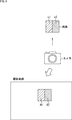
- FIG. 1 is a diagram illustrating an outline of an embodiment of a soil volume measurement system to which the present technology is applied.
- soil volume is measured by UAV (Unmanned Aerial Vehicle).
- an anti-air sign 10 is installed on the ground.
- the anti-air sign 10 can be installed manually, or can be installed by spreading from a flying body such as an unmanned aircraft such as a drone or an aircraft operated by a person. Furthermore, the anti-air sign 10 itself may be moved by installing the anti-air sign 10 on the back of the drone.
- the anti-air sign 10 is aerial shot.
- a camera 21 is mounted on the drone 20, the drone 20 is caused to fly, and the anti-air sign 10 is photographed (aerial shooting of the anti-air sign 10) with the camera 21 mounted on the drone 20.
- a captured image (for example, a still image) obtained by capturing the anti-air sign 10 with the camera 21 is transmitted to, for example, the cloud server 30 by wireless communication or wired communication.
- the cloud server 30 detects the anti-air sign 10 shown in the photographed image by performing image processing of the photographed image from the camera 21. Further, the cloud server 30 creates a three-dimensional model of the ground topography using the detection result of the anti-air sign 10, and measures the soil volume of the ground topography from the three-dimensional model, and measures the soil volume. The measurement result of is output.
- the processing performed by the cloud server 30 described above can be performed by the drone 20 instead of the cloud server 30.
- the process performed by the cloud server 30 can be shared between the drone 20 and the cloud server 30.
- the method of aerial shooting of the anti-air sign 10 is not limited to the method using the drone 20. That is, aerial photography of the anti-air sign 10 can be performed using, for example, a flying object that a person rides and controls, an artificial satellite, or the like, in addition to a method using an unmanned aircraft such as the drone 20.
- the anti-air sign 10 paper or plastic on which a predetermined figure is printed can be employed. Further, as the anti-air mark 10, a stack of flat materials such as plastic and rubber having a predetermined shape can be adopted. Furthermore, as the anti-air marker 10, a display panel such as an LCD (Liquid Crystal Display) or an organic EL (Electro Luminescence) display that displays a predetermined figure can be adopted. Further, as the anti-air marking 10, it is also possible to adopt an unfolded deployment such as a reflex board.
- LCD Liquid Crystal Display
- organic EL Electro Luminescence
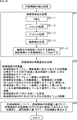
- FIG. 2 is a flowchart for explaining an example of a work flow of soil volume measurement performed by the soil volume measurement system of FIG.
- step S11 an administrator who performs soil volume measurement prepares a prior plan for soil volume measurement.
- determination of the flight route of the drone 20, determination of the orientation point (position to be used) where the anti-air sign 10 is installed, and the like are performed.
- step S12 the anti-air marking 10 is installed at the control points set at intervals of about several hundred meters, for example, according to the advance plan.
- the installation of the anti-air sign 10 can be performed by, for example, a human hand or a movable robot. Further, the anti-air marking 10 itself may be a movable robot.
- step S13 the horizontal position (latitude and longitude) and altitude of the orientation point where the anti-air sign 10 is installed are measured.
- step S14 the drone 20 is caused to fly in accordance with the advance plan, and the camera 21 mounted on the drone 20 is used to take an aerial view of the anti-air sign 10, that is, the ground on which the anti-air sign 10 is installed (as an object of soil measurement). Photographing of a predetermined ground surface range) is performed.
- the aerial shooting of the anti-air sign 10 one or more captured images are captured as captured image data. Further, the aerial shooting of the anti-air sign 10 is performed such that when the shooting ranges reflected in all the shot images are collected, the entire range in which the anti-air marking 10 is installed is reflected in the collection of shooting ranges.
- the aerial shooting of the anti-air sign 10 is performed so that a shooting range reflected in a certain shot image and a shooting range reflected in another shot image overlap.
- step S15 the anti-air sign 10 installed on the ground is collected, and photographed image data obtained by capturing the anti-air sign 10 with the camera 21 is uploaded (transmitted) to the cloud server 30.
- step S ⁇ b> 16 the cloud server 30 performs a detection process for detecting the anti-air mark 10 (image) reflected in the captured image from the captured image captured by the camera 21.
- step S17 the cloud server 30 uses the horizontal position and altitude of the orientation point measured in step S13 and the detection result data of the anti-air marker 10 obtained by the detection process performed in step S16 to perform three-dimensional Process to generate model data.
- step S18 the cloud server 30 performs a soil volume measurement process using the ground three-dimensional model data, and performs a process of outputting measurement result data of the soil volume measurement.
- FIG. 3 is a plan view showing a first example of the anti-air sign 10.
- the anti-air sign 10 in FIG. 3 is an anti-air sign called star type, X (X) type, plus (+) type, respectively.
- a range that overlaps a shooting range that appears in one shot image and a shooting range that appears in another shot image a time for uploading the shot image to the cloud server 30, and the cloud server 30 takes a shot. It is possible to reduce a load or the like when processing an image.
- the anti-air sign 10 (image thereof) shown in the photographed image becomes small.
- the anti-air sign 10 is a sign with white and black, such as a star-shaped, X-shaped, or plus-type anti-air sign, white expansion, black contraction, etc.
- a snow cover may cause a similar pattern between the black soil on the ground and the snow white, which may reduce the detection accuracy for detecting the anti-air sign 10 from the captured image.
- the intersection of the boundary lines (extension lines) between white and black (areas marked with) is detected as the center of the anti-air sign 10. Is done. Therefore, when white expansion and black contraction occur, the detection accuracy for detecting the center of the anti-air marker 10 may decrease.
- FIG. 4 is a plan view showing a second example of the anti-air sign 10.
- a black circle is arranged in a white rectangle.
- the anti-air sign 10 of FIG. 4 has a simple configuration as compared to the anti-air sign 10 of FIG. 3, so an object that appears in a black circle shape in the captured image may be erroneously detected as the anti-air sign 10. obtain.
- the anti-air sign 10 of FIG. 4 has one circle, it can be said to be a single circular sign.
- FIG. 5 is a plan view showing a third example of the anti-air sign 10.
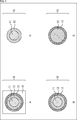
- 5 has a plane shape in which a plurality of circles having different radii are arranged concentrically, and the adjacent circles of the plurality of circles have different hues.
- planar shape means the shape of the object drawn on the plan view when the object is represented on the plan view.
- the anti-air sign 10 of FIG. 5 has a plurality of circles, it can be said to be a multi-circle sign.
- the anti-air marker 10 of a plurality of circular markers (the same applies to the single circular marker in FIG. 4), the anti-air marker 10 is detected without considering the direction (rotation) of the anti-air marker 10 shown in the captured image. It is possible to reduce the load of the detection process for detecting the anti-air mark 10 in the cloud server 30. Furthermore, the center of the anti-air mark 10 can be easily detected.
- FIG. 5A is a plan view showing an example of a first multi-circular sign as the anti-air sign 10.
- 5A includes three circles 11, 12, and 13 having different radii arranged concentrically and includes the three circles 11 to 13, for example, a square or a rectangle. It has a planar shape in which a rectangular frame region 14 is arranged.
- the color of the circle 11 with the smallest radius is, for example, blue, which is one of chromatic colors (colors with hue), and the color of the circle 12 with the second smallest radius is, for example, , The other chromatic color is red. Furthermore, the color of the circle 13 with the third smallest (largest) radius is, for example, black which is one of achromatic colors.
- the hues of the adjacent circles are different. Therefore, the hues of the adjacent circles 11 and 12 are different, and the hues of the adjacent circles 12 and 13 are different. If so, the hues of the non-adjacent circles 11 and 13 may be the same.
- achromatic black chromatic red, and achromatic black can be employed.
- the frame area 14 can be made of, for example, rectangular paper or plastic.
- the anti-air mark 10 can be formed by printing circles 11 to 13 on the frame area 14 of paper, plastic, or the like.
- the circles 11 to 13 and the frame region 14 can be made of a flat plate material such as plastic or rubber, for example.
- the anti-air marking 10 is configured by stacking the flat materials as the circles 11 to 13 and the frame region 14 in order from the bottom to the frame region 14 and the circles 13, 12, and 11. Can do.
- the anti-air sign 10 is configured by a display panel such as an LCD or an organic EL display, for example, and the circle 11 to 13 and the frame region 14 are displayed on the display panel, thereby functioning as the anti-air sign 10. Can do.
- FIG. 5B is a plan view showing an example of a second multi-circular sign as the anti-air sign 10.
- the anti-air marker 10 of FIG. 5B has a configuration in which three circles 11 to 13 having different radii are arranged concentrically.
- FIG. 5C is a plan view showing an example of a third multiple circular sign as the anti-air sign 10.
- the anti-air marking 10 in FIG. 5C has a configuration in which the circle 13 and the frame region 14 are not provided with respect to the multiple circular marking in FIG. 5A. Therefore, the anti-air marker 10 of FIG. 5C has a configuration in which two circles 11 and 12 having different radii are arranged concentrically.
- FIG. 5D is a plan view showing an example of a fourth multi-circular sign as the anti-air sign 10.
- the anti-air sign 10 of FIG. 5D has a configuration in which the circle 11 and the frame region 14 are not provided with respect to the multi-circular sign of FIG. 5A. Therefore, the anti-air marker 10 of FIG. 5D has a configuration in which two circles 12 and 13 having different radii are arranged concentrically.
- the anti-air marking 10 for example, a configuration in which the frame region 14 is provided in the multi-circular label of C and D in FIG. 5, or four or more circles having different radii are arranged concentrically. A configuration can be employed.
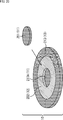
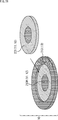
- FIG. 6 is a perspective view showing an example of a second multi-circular sign as the anti-air sign 10 of FIG. 5B.
- the second multi-circular sign is composed of three circles 11 to 13 in a planar shape, it is hereinafter also referred to as a three-circle sign.
- a three-circle sign as the anti-air sign 10 of FIG. 6 is a cylindrical member having a low height (hereinafter also referred to as a cylindrical member 11) to be a circle 11, and a flat plate-like member (hereinafter to be referred to as a cylindrical member 11). And a circular member 12) and a flat plate-like circular member (hereinafter also referred to as a circular member 13) to be a circle 13.
- the anti-air sign 10 of FIG. 6 is configured by stacking the cylindrical member 11, the circular members 12 and 13 in the order of the circular members 13, 12 and the cylindrical member 11 from the bottom to the top.
- the cylindrical member 11 can be made of, for example, plastic (ABS resin) or the like. Furthermore, the columnar member 11 has a hollow interior, and an illuminance detection device including an illuminance sensor that detects the illuminance of the anti-air sign 10 (upper), a communication device including an antenna and a circuit that performs wireless communication, and further, the illuminance A recording device (not shown) including a recording medium such as a semiconductor for recording information detected by the detection device in time series can be incorporated.
- the anti-air marker 10 may incorporate these illuminance detection devices and the like in a part other than the columnar member 11 of the anti-air marker.
- the anti-air sign 10 may include a sensor other than the illuminance sensor incorporated in the cylindrical member 11 or other members, and data related to the anti-air sign detected by the sensor may be transmitted by a communication device or recorded by a recording device. .
- the illuminance detecting device and the communication device are built in the cylindrical member 11, the information on the illuminance detected by the illuminance detecting device in the anti-air sign 10 can be transmitted by the communication device.
- Information such as illuminance transmitted from the anti-air sign 10 can be received by the cloud server 30 and used for processing in the cloud server 30.
- the columnar member 11 can be configured in a flat circular shape like the circular members 12 and 13.
- the apparatus incorporated in the cylindrical member 11 can be taken out (removed) from the cylindrical member 11 for charging or the like.
- the circular member 12 can be composed of a member that is not easily discolored by ultraviolet rays, such as rubber. By configuring the circular member 12 with a member that is not easily discolored by ultraviolet rays, when the hue of the color attached to the circular member 12 is used for detection of the anti-air mark 10, It can suppress that the detection accuracy of the anti-air mark 10 falls.
- the circular member 13 can be made of an insulator such as polypropylene, for example. By configuring the circular member 13 with an insulator, the circular member 12, the columnar member 11, the communication device incorporated in the columnar member 11, and the ground (earth) are electrically connected. It is possible to prevent connection.
- an insulator such as polypropylene
- At least the hue of the color of the circular member 12 is used for identification of the anti-air marker 10 (extraction of candidate regions that are candidates for the anti-air marker 10 from the captured image). It is done.
- the circular member 12 contacts the ground when the anti-air mark 10 is installed on the ground. Since various colors may exist as the color of the installation location of the anti-air sign 10, depending on the color of the installation location of the anti-air sign 10, the color of the circular member 12 and the location of the installation location of the anti-air sign 10 are determined in the photographed image. A large color mixture occurs between colors, and the identification of the anti-air mark 10 is affected according to the color mixture level.
- the anti-air sign 10 by providing the circular member 13, it is possible to prevent color mixing between the color of the circular member 12 and the color of the place where the anti-air sign 10 is installed.
- the color mixture between the colors of the circular members 12 and 13 affects the identification of the anti-air mark 10.
- the degree of color mixing between the color of the circular member 12 and the color of the anti-air mark 10 installation location depends on the installation location of the anti-air sign 10. Depends on the color of the. Therefore, the degree to which the color mixture between the color of the circular member 12 and the color of the installation place of the anti-air sign 10 affects the identification of the anti-air sign 10 varies depending on the color of the installation place of the anti-air sign 10.
- the anti-air sign 10 is configured by providing the circular member 13, the degree of color mixing between the colors of the circular members 12 and 13 varies depending on the color of the place where the anti-air sign 10 is installed. do not do. Therefore, the degree to which the color mixture between the colors of the circular members 12 and 13 affects the identification of the anti-air mark 10 does not vary depending on the color of the place where the anti-air mark 10 is installed.
- a person carries a certain number of anti-air signs 10 in consideration of carrying the anti-air sign 10 when the person installs the anti-air sign 10.
- a size of about 30 cm in diameter such as a 10-30 cm square, can be employed.
- FIG. 7 is a diagram for explaining the colors of the anti-air sign 10.
- the cloud server 30 detects the anti-air sign 10 shown in the captured image from the captured image obtained by the aerial shooting.
- the cloud server 30 detects the anti-air sign 10 using, for example, the hue of a circle (circular member) 12. That is, the cloud server 30 detects the anti-air marker 10 using, for example, the hue itself of the circle 12 or the distance between the hue of the circle 12 and the hue of the circle 11 adjacent to the circle 12.
- the colors of the circles 11 and 12 have a certain altitude, for example, It is effective that the color is less likely to cause color mixing (color with a low degree of color mixing) when shooting from an altitude at which aerial photography is planned.
- the area of the portion of the circle 12 excluding the circle 11 is about 1.0 to 3.0 times the area of the circle 11, and the discriminability of the circle 12 is increased. Has been confirmed.
- the combination of the colors of the circles 11 and 12 is a combination that is as small as possible that it exists in the natural world. Is effective.
- the color combinations of the circles 11 and 12 are combinations in which the hues of the respective colors are as different as possible.
- the combinations of the colors of the circles 11 and 12 are combinations with the lowest possible degree of color mixing when shooting from a certain altitude, that is, for example, the hue of the circle 11 and the hue of the circle 12 obtained from the captured image. It is effective that the distance is as large as possible.
- FIG. 7 shows an example of the histogram of the hue of each pixel of the circles 11 and 12 obtained from the captured image obtained by capturing the anti-air marker 10.
- the circle 12 means an annular portion excluding the circle 11 in the entire circle as the circle 12 unless otherwise specified.
- pixels of a circle 11 (estimated region) and a circle 12 (estimated pixel) are detected from the captured image, and each of the pixels of the circles 11 and 12 is targeted.
- the frequency (number of pixels) of pixels having a hue is shown.
- the horizontal axis represents hue
- the vertical axis represents frequency
- the hue histogram (hereinafter also referred to as the hue histogram) for the pixels of the circles 11 and 12 detected from the captured image includes, for example, a distribution having a peak at the first hue as shown in FIG. There are two distributions, a distribution having a peak at the second hue.
- the distance between the hues of the circles 11 and 12 for example, the distance between the peaks of the two distributions existing in the hue histogram (the difference in hue between the peaks) can be employed.
- the distance between the hues of the circles 11 and 12 for example, a difference in integrated values such as an average value of hues of the pixels of the circles 11 and 12 detected from the captured image can be employed.
- the hue distance DF of each of the circles 11 and 12 for example, if the difference in the average value of the hues of the pixels of the circles 11 and 12 detected from the captured image is adopted, the hues of the circles 11 and 12 respectively.
- the distance DF is expressed by the equation (1).
- H i, j represents the hue of the pixel at the position (i, j) of the captured image.
- N1 and N2 represent the numbers of pixels of the circles 11 and 12 detected from the captured image, respectively.
- the summation ( ⁇ ) of the first term on the right side represents the summation for the pixel of the circle 11 (pixel of (i, j) ⁇ Area1) detected from the captured image, and the summation ( ⁇ ) represents a summation for the pixel of the circle 12 (pixel of (i, j) ⁇ Area2) detected from the captured image.
- the pixel value of the pixel of the captured image is represented by an R (Red) value, a G (Green) value, and a B (Blue) value in the RGB color space
- the R value, G value, and B The value can be converted into a hue H (Hue), a saturation S (Saturation), and a luminance L (Lightness) in the HLS space according to Expression (2).
- the distance DF between the hues of the circles 11 and 12 represents the degree of color mixing of the colors of the circles 11 and 12, and the greater the distance DF, the smaller the degree of color mixing.
- two predetermined colors having a hue distance DF that is equal to or greater than a predetermined threshold TH are adopted as the colors of the circles 11 and 12 as colors that are unlikely to generate color mixing (colors with a small degree of color mixing). it can.
- two colors whose hue distance DF is equal to or greater than a predetermined threshold TH are also referred to as colors where no color mixture occurs, and two colors whose hue distance DF is not equal to or greater than the predetermined threshold TH are mixed. It is also referred to as a color in which the above occurs.
- FIG. 8 is a diagram for explaining the presence / absence of occurrence of predetermined two colors.
- hue distance DF for example, the difference in the average value of hues (difference absolute value) in Equation (1) is adopted.
- one color c1 and the other color c2 of two predetermined colors c1 and c2 having different hues are attached to two adjacent areas, for example, the same degree as the anti-air sign 10
- a size sign is photographed with a camera to obtain a photographed image in which the sign is reflected.
- Shooting of the captured image on which the sign is reflected can be performed at a distance similar to that in the case of performing the aerial shooting of the anti-air marker 10, for example.
- the sign (region) is detected from the photographed image in which the sign is reflected, and the area A1 to which the color c1 is attached (estimated to be attached) and the area to which the color c2 is attached from the sign Specify A2.
- the hue distance DF of each of the areas A1 and A2 is calculated according to the equation (1) using the pixel values of the respective pixels of the areas A1 and A2.
- the colors c1 and c2 are assumed to be two colors that are likely to be mixed colors (prone to occur), and the two colors are not adopted as the colors of the circles 11 and 12. can do.
- the colors c1 and c2 can be adopted as the colors of the circles 11 and 12 as two colors that do not generate (are unlikely to be mixed). .
- the threshold value TH of the distance DF for example, the threshold value TH represented by the equation (3) can be adopted.
- H 1 is the hue of the pixel in the region to which the color c1 appears in the captured image obtained when close-up shooting (for example, shooting at the shortest focusing distance) of the color c1 alone is performed.
- H 2 is reflected in the photographed image obtained when performing color c2 single close-up photography, represents the average value of the hue of the pixel color c2 is attached region.
- the theoretical hues of the colors c1 and c2 for example, the average values of the hues of the pixels in the areas marked with the colors c1 and c2 that appear in the captured image obtained when close-up shooting is performed. Is done. Therefore, the theoretical hues of the colors c1 and c2 can also be adopted as H 1 and H 2 .
- the hue distance DF is 0.5 times or more of the hue difference
- the colors c1 and c2 are It can be adopted as 12 colors (colors).
- the anti-air sign 10 of the anti-air sign 10 caused by the color mixture of the colors attached to the adjacent circles 11 and 12 is used. A decrease in detection accuracy can be suppressed and the anti-air marker 10 can be detected with high accuracy.
- the detection accuracy of the anti-air marker 10 can be further improved as compared with the case where only the two colors having the distance DF equal to or greater than the threshold TH are used as the colors 11 and 12.
- rectangular areas are used as the areas A1 and A2.
- circular areas similar to the circles 11 and 12 may be used as the areas A1 and A2, respectively. it can.
- FIG. 9 is a block diagram showing a configuration example of computer hardware as the cloud server 30 of FIG.
- the cloud server 30 includes a CPU (Central Processing Unit) 32, and an input / output interface 40 is connected to the CPU 32 via the bus 31.
- CPU Central Processing Unit
- the CPU 32 When a command is input by operating the input unit 37 by a user (operator) or the like via the input / output interface 40, the CPU 32 stores the instruction in a ROM (Read Only Memory) 33 accordingly. Run the program. Alternatively, the CPU 32 loads a program stored in the hard disk 35 into a RAM (Random Access Memory) 34 and executes it.
- the CPU 32 is configured by one or a plurality of processing circuits.
- the CPU 32 performs various processes and causes the cloud server 30 to function as a device having a predetermined function. Then, the CPU 32 outputs the processing results of various processes as needed, for example, via the input / output interface 40, from the output unit 36, or from the communication unit 38, and further recorded in the hard disk 35.
- the input unit 37 includes a keyboard, a mouse, a microphone, and the like.
- the output unit 36 includes an LCD, a speaker, and the like.
- the program executed by the CPU 32 can be recorded in advance in a hard disk 35 or ROM 33 as a recording medium built in the cloud server 30.
- the program can be stored (recorded) in the removable recording medium 41.
- a removable recording medium 41 can be provided as so-called package software.
- examples of the removable recording medium 41 include a flexible disk, a CD-ROM (Compact Disc Read Only Memory), an MO (Magneto Optical) disc, a DVD (Digital Versatile Disc), a magnetic disc, a semiconductor memory, and the like.
- the program can be downloaded to the cloud server 30 via a communication network or a broadcast network and installed in the built-in hard disk 35. That is, for example, the program is wirelessly transferred from the download site to the cloud server 30 via a digital satellite broadcasting artificial satellite, or to the cloud server 30 via a network such as a LAN (Local Area Network) or the Internet. It can be transferred by wire.
- a communication network or a broadcast network installed in the built-in hard disk 35. That is, for example, the program is wirelessly transferred from the download site to the cloud server 30 via a digital satellite broadcasting artificial satellite, or to the cloud server 30 via a network such as a LAN (Local Area Network) or the Internet. It can be transferred by wire.
- LAN Local Area Network
- the CPU 32 causes the cloud server 30 to function as a device having a predetermined function by executing a program.
- the CPU 32 causes the cloud server 30 to function as an image processing apparatus that performs image processing of a captured image from the camera 21.
- the cloud server 30 as the image processing apparatus performs a detection process for detecting the anti-air sign 10 shown in the captured image. Therefore, it can also be said that the cloud server 30 is a detection device that performs such detection processing.
- FIG. 10 is a block diagram illustrating a functional configuration example of the cloud server 30 that functions as the image processing apparatus (detection apparatus) as described above.
- the cloud server 30 includes a candidate area extraction unit 61, a feature amount extraction unit 62, and an identification unit 63.
- the candidate area extraction unit 61, the feature amount extraction unit 62, and the identification unit 63 are configured by the CPU 32 of FIG. 9, for example.
- the captured image from the camera is supplied to the candidate area extraction unit 61 and the identification unit 63.
- the candidate area extraction unit 61 extracts candidate areas that are candidates for the area in which the anti-air marker 10 (circle 12) appears from the captured image obtained by capturing the anti-air sign 10 from the camera 21 and supplies the candidate area to the feature amount extraction unit 62. To do.
- the feature amount extraction unit 62 extracts the feature amount of the candidate region from the candidate region from the candidate region extraction unit 61 and supplies it to the identification unit 63.
- the identification unit 63 identifies the anti-air marker 10 (the circle 12) (the region in which the image is displayed) reflected in the captured image based on the feature amount of the candidate region from the feature amount extraction unit 62.
- the identification unit 63 identifies whether or not the candidate area is the anti-air mark 10 based on the feature amount of the candidate area.
- the identification unit 63 detects the anti-air marker 10 from the captured image from the camera 21 based on the identification result of the anti-air marker 10, and the detection result (for example, the image of the anti-air marker 10 or the anti-air marker in the captured image). 10 position).
- FIG. 11 is a flowchart illustrating an example of a detection process for detecting the anti-air sign 10 performed by the CPU 32 of the cloud server 30 as the image processing apparatus of FIG.
- step S31 the candidate area extraction unit 61 performs a candidate area extraction process for extracting a candidate area from the captured image from the camera 21.
- the candidate area extraction unit 61 determines whether the pixel is a color pixel attached to the circle 12 of the anti-air marker 10 or a pixel other than the color. Each pixel (pixel value) of the captured image is binarized.
- the candidate area extraction unit 61 uses the hue H (Hue) of the red HSV space that is the color of the circle 12 as a red color.
- H Hue
- a pixel having a hue H in the range of 320 to 360 (degrees) is determined to be a pixel of the color attached to the circle 12, and the pixel value is set to one of 0 and 1 For example, set to 1.
- the candidate area extraction unit 61 does not select pixels other than the range of the hue H from 320 to 360 (pixels that are not determined to be pixels of the color attached to the circle 12) as pixels of the color attached to the circle 12. It is determined that the pixel is a pixel, and the pixel value is set to 0 which is the other of 0 and 1.
- the binarization of the pixel of the photographed image can be performed using not only the hue H of the HSV space of the color of the circle 12 but also the saturation S (Saturation) and the brightness (luminance) V (Value). .
- pixels having a hue H in the HSV space in the range of 320 to 360 and a saturation S in the range of 30 to 255 are represented by the circle 12 It can be determined that the pixel is a color pixel attached to.
- a pixel whose hue H in the HSV space is in the range of 320 to 360, saturation S is in the range of 30 to 255, and brightness V is in the range of 50 to 255 is the color of the color attached to the circle 12. It can be determined that it is a pixel.
- binarization for extracting a candidate area can be performed using at least the hue of the hue, saturation, and brightness of the color of the circle 12. .
- the anti-air mark 10 is reflected by performing binarization for extracting the candidate area by using at least the hue of the saturation or brightness in addition to the hue of the circle 12. As a region, a more probable candidate region is extracted, and as a result, the detection accuracy of the anti-air marker 10 can be improved.
- the candidate area extraction unit 61 performs binarized image erosion processing (erosion processing) obtained by binarization of the captured image to suppress binarized image noise. To do.
- the candidate area extraction unit 61 performs a dilation process (expansion process) on the binarized image after the erosion process.
- the candidate area extraction unit 61 determines that the pixel area having a pixel value of 1 in the binarized image after the dilation process, that is, Contour detection processing is performed to detect the contour of the pixel region estimated to be 12.
- the candidate area extraction unit 61 extracts an area corresponding to the smallest rectangle circumscribing the outline detected by the outline detection process as a candidate area from the captured image. This is supplied to the feature quantity extraction unit 62.
- candidate areas are extracted for each of the plurality of contours.
- step S32 the feature amount extraction unit 62 performs a feature amount extraction process for extracting the feature amount of each candidate region from the candidate region extraction unit 61, and obtains candidate regions obtained by the feature amount extraction process.
- the feature amount is supplied to the identification unit 63.
- the feature quantity extraction unit 62 can extract, for example, the feature quantities of the following candidate areas in the feature quantity extraction process.
- the feature amount extraction unit 62 estimates, for example, the size of the candidate region and the size of the anti-air marker 10 (the circle 12 thereof) when the anti-air marker 10 is reflected in the captured image.
- a ratio to the estimated size (hereinafter also referred to as a size ratio) can be obtained.
- the captured image captured by the camera 21 is recorded in a file in, for example, EXIF (Exchangeable Image File Format) format.
- EXIF Exchangeable Image File Format
- GPS information such as shooting date / time, focal length, latitude of shooting position, longitude, altitude (altitude), etc. is recorded as shooting metadata.
- the feature amount extraction unit 62 estimates the size of the anti-air marker 10 when the anti-air marker 10 is shown in the captured image, for example, from the altitude and focal length of the imaging position recorded in the EXIF format file.
- the size ratio it is possible to suppress identification of a candidate area that is too large or too small as an anti-air mark 10 (the area of the circle 12). For example, the closer the size ratio is to 1.0, the easier it is for the candidate area to be identified as the anti-air mark 10 (its circle 12).
- the feature quantity extraction unit 62 can obtain, for example, the aspect ratio of the candidate area as the feature quantity of the candidate area.
- the aspect ratio of the candidate area it is possible to suppress the identification of the horizontally or vertically candidate area as the anti-air mark 10. For example, as the aspect ratio of the candidate area is closer to 1.0, the candidate area is more easily identified by the anti-air mark 10.
- the feature quantity extraction unit 62 can obtain, for example, the correlation (similarity) between the candidate area and the template image of the anti-air traffic sign 10 (circles 11 and 12) as the feature quantity of the candidate area. For example, as the correlation between the candidate area and the template image is larger (there is a correlation), the candidate area is more easily identified by the anti-air marker 10.
- a template image of the anti-air sign 10 is prepared in advance.
- the correlation for example, a correlation coefficient, an average value of the sum of squares of differences, or the like can be adopted.
- the feature amount extraction unit 62 can obtain, for example, a correlation between a candidate region and a rotated image obtained by rotating the candidate region as the feature amount of the candidate region. The larger the correlation between the candidate area and the rotated image, the easier it is for the candidate area to be identified by the anti-air mark 10.
- the anti-air mark 10 has symmetry because the circles 11 to 13 are arranged concentrically.
- the symmetry of the anti-air marker 10 is used to identify the anti-air marker 10. Identification accuracy can be improved.
- the rotation of the candidate image when obtaining the rotated image is performed by a predetermined angle other than an integer multiple of 2 ⁇ .
- the feature quantity extraction unit 62 applies a filter (function) that emphasizes the colors attached to the circles 11 and 12 to the candidate area and the template image, and the candidate area and the template after the application of the filter are applied.
- the correlation with the image can be obtained as the feature amount of the candidate area. For example, as the correlation between the candidate area after applying the filter and the template image is larger, the candidate area is more easily identified by the anti-air marker 10.
- a filter to be applied to the candidate region and the template image for example, only the color attached to one of the circles 11 and 12 in addition to the filter that emphasizes the color attached to the circles 11 and 12.
- a filter or the like that emphasizes can be employed.
- the feature amount extraction unit 62 can obtain the hue distance of each of the circles 11 and 12 as the feature amount of the candidate area.
- the feature amount extraction unit 62 assumes that the candidate region is a region circumscribing the circle 12, and uses the hues of the pixels in which the circles 11 and 12 that would exist in the candidate region are used in FIG.
- the hue distance of each of the circles 11 and 12 described, for example, the distance DF of the equation (1) can be obtained as the feature amount of the candidate region.
- the candidate region is easily identified by the anti-air mark 10.
- step S ⁇ b> 33 the identification unit 63 displays, for each candidate region, an anti-air marker 10 (circle 12) (in the circle 12) (in the captured image) from the captured image based on the feature amount of the candidate region from the feature amount extraction unit 62. Area).
- the identification unit 63 identifies whether or not the candidate area is the anti-air mark 10 based on the feature amount of the candidate area.
- the identifying unit 63 detects the anti-air marker 10 from the photographed image from the camera 21 based on the identification result, and outputs the detection result.
- a three-dimensional model on the ground is created using the detection result of the anti-air sign 10 obtained as described above.
- each feature amount of the candidate area is threshold-processed, and it is identified whether the candidate area is the anti-air mark 10 by majority decision of the processing result of the threshold process, weighted addition of points indicating the process result, or the like. Can do.
- each feature quantity of the candidate area is input to a classifier configured by a neural network or the like that has been learned in advance, and the candidate area is the anti-air marker 10 based on the output of the classifier in response to the input. Whether it can be identified.
- the feature amount of the candidate area extracted by the feature amount extraction unit 62 is not limited to the above-described feature amount.
- the anti-air marker 10 can be detected with higher accuracy by including the distances DF of the hues of the circles 11 and 12 in the feature amount of the candidate region.
- the candidate area extraction unit 61 detects (binarizes for) the candidate area using at least the hue of the circle 12, so for example, red It is possible that an area in which the pylon is shown is extracted as a candidate area. In this case, if the feature amount of the candidate area does not include the hue distance DF of each of the circles 11 and 12, there is a high possibility that the candidate area in which the pylon appears is erroneously identified as the anti-air marker 10.
- the cylindrical member 11 of the anti-air sign 10 includes an illuminance detection device that detects the illuminance of the anti-air mark 10, a communication device that performs wireless communication, and the like, the cloud server 30
- the detection process of FIG. 11 can be performed using the illuminance information regarding the illuminance of the anti-air sign 10 detected by the illuminance detection device (the distribution of the illuminance (luminance) of the anti-air sign 10) detected from the anti-air sign 10.
- the candidate area extraction unit 61 can extract a candidate area using illuminance information.
- the candidate area extraction unit 61 uses the illuminance information to estimate the hue, saturation, and lightness range of the circle 12 of the anti-air marker 10 that appears in the captured image, and the hue or saturation within the range. It is possible to determine that the pixel having the brightness and the brightness is a pixel in which the circle 12 is reflected, and to extract (binarize for) the candidate area.
- the identification unit 63 can identify the anti-air sign 10 using the illuminance information.
- the identifying unit 63 compares the hue distance DF of each of the circles 11 and 12 as the feature amount of the candidate region with the threshold value TH of the expression (3), and based on the comparison result, When the distance DF is greater than or equal to the threshold value TH, the possibility of identifying that the candidate area is the anti-air marker 10 can be increased, and the anti-air marker 10 can be identified.
- the identification unit 63 can set the threshold TH used for the identification of the anti-air sign 10 as described above using the illuminance information.
- the identification unit 63 estimates the hue of each pixel of the circles 11 and 12 obtained when the anti-air marker 10 is photographed under the illuminance condition represented by the illuminance information, and the circles 11 and 12 obtained by the estimation
- the average value of the hue (estimated value) of each pixel can be used as H 1 and H 2 in Expression (3) to set the threshold value TH in Expression (3).
- the detection accuracy of the anti-air marker 10 can be improved by extracting candidate areas and identifying the anti-air marker 10 by using the illuminance information of the anti-air marker 10 detected by the illuminance detection device. it can.
- FIG. 12 is a flowchart for explaining an example of detailed processing of binarization of each pixel of the captured image performed in step S31-1 in FIG.
- step S51 the candidate area extraction unit 61 selects one of the pixels of the captured image that has not yet been selected as the target pixel, as the target pixel, and the process proceeds to step S52.
- step S52 the candidate area extraction unit 61 obtains the hue H of the target pixel by obtaining it, and the process proceeds to step S53.
- step S53 the candidate area extraction unit 61 determines whether or not the hue H of the target pixel can be regarded as the hue of the color of the circle 12, that is, the hue H of the target pixel satisfies the expressions ⁇ ⁇ H and H ⁇ . Determine if it meets.
- ⁇ and ⁇ represent the minimum value and the maximum value of the range that can be regarded as the hue of the color of the circle 12, respectively.
- step S53 If it is determined in step S53 that the hue H of the target pixel satisfies the expressions ⁇ ⁇ H and H ⁇ , the process proceeds to step S54.
- step S54 the candidate area extraction unit 61 assumes that the pixel of interest is a pixel of the hue of the circle 12, sets the pixel value of the pixel of interest to 1 indicating that the pixel of the circle 12 has a hue, The process proceeds to step S56.
- Step S53 when it is determined that the hue H of the target pixel does not satisfy at least one of Expression ⁇ ⁇ H and Expression H ⁇ , the process proceeds to Step S55.
- the candidate area extraction unit 61 sets the pixel value of the target pixel to 0 indicating that the pixel of interest is not a pixel of the hue of the circle 12, assuming that the pixel of interest is not a pixel of the hue of the circle 12, and Proceed to S56.
- step S56 the candidate area extraction unit 61 determines whether all the pixels of the captured image have been selected as the target pixel.
- step S56 If it is determined in step S56 that all the pixels of the captured image have not yet been selected as the target pixel, the process returns to step S51.
- step S51 the candidate area extraction unit 61 newly selects one of the pixels of the captured image that has not yet been selected as the pixel of interest as the pixel of interest, and thereafter the same processing is repeated. .
- step S56 If it is determined in step S56 that all the pixels of the captured image have been selected as the target pixel, the binarization process ends.
- FIG. 13 is a diagram illustrating an example of a template image of the anti-air marker 10 (circles 11 and 12) used by the feature amount extraction unit 62 to extract feature amounts of candidate areas.
- Gaussian function defined by the coefficients a, ⁇ , and ⁇ is expressed as Gaussian (a, ⁇ , ⁇ ) as shown in Equation (4).
- an image defined by a Gaussian function shown in FIG. 13 can be employed as the template image.
- FIG. 13A shows a first example of a template image
- FIG. 13B shows a second example of a template image.
- Equation (4) the hue as the pixel value of the template image is represented by y, and the variable x of the Gaussian function Gaussian (a, ⁇ , ⁇ ) in Equation (4) represents the distance from the center of the template image.
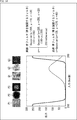
- FIG. 14 is a diagram illustrating an example of a filter used when emphasizing the colors attached to the circles 11 and 12 of the candidate region and the template image in the feature amount extraction processing in step S32 of FIG.
- the filter that emphasizes the colors attached to the circle 11 is a blue filter that emphasizes blue and is attached to the circle 12.
- the filter that emphasizes the color is a red filter that emphasizes red.
- Equation (4) the hue input to the filter.
- the solid line represents the input / output characteristics of the red filter
- the dotted line represents the input / output characteristics of the blue filter.
- an image P1 is a candidate area in which a circle 12 appears, and the candidate area adopting the hue H as a pixel value is resized to 50 ⁇ 50 pixels in the horizontal and vertical directions, and the center 30 ⁇ 30 It is the image which extracted the pixel.
- the image Q1 is a candidate area where the circle 12 is not reflected, and the candidate area adopting the hue H as the pixel value is resized to 50 ⁇ 50 pixels, and the center 30 ⁇ 30 pixels are extracted. is there.
- the images P2 and Q2 are images obtained by applying a blue filter to the images P1 and Q1, respectively, and the images P3 and Q3 are images obtained by applying a red filter to the images P1 and Q1, respectively.
- FIG. 15 is a flowchart for explaining an example of processing for extracting the hue distance DF of each of the circles 11 and 12 as the feature amount in the feature amount extraction processing performed in step S32 of FIG.
- step S71 the feature amount extraction unit 62 assumes that the candidate region is a region circumscribing the circle 12, and pixels (pixels that should be reflected) in which each of the circles 11 and 12 existing in the candidate region appears.
- each of them is also referred to as a pixel in the region of the circle 11 and a pixel in the region of the circle 12), and the process proceeds to step S72.
- step S72 the feature amount extraction unit 62 obtains the hue H of each pixel in the region of the circle 11 by obtaining the hue H and obtains the hue H of each pixel in the region of the circle 12, and the processing is performed in step S72. Proceed to S73.
- step S73 the feature quantity extraction unit 62 follows the equation (1) and calculates the average value of the hue H of each pixel in the region of the circle 11 ( ⁇ H i, j / N1 in the first term on the right side of the equation (1)) and the circle.
- the difference absolute value with respect to the average value of hue H of each pixel in the 12 regions ( ⁇ H i, j / N2 in the second term on the right side of the equation (1)) is obtained as the hue distance DF of each of the circles 11 and 12 and processed. Ends.
- a single circular sign shown in FIG. 4 and a plurality of circular signs shown in FIGS. 5 and 6 are installed in a mixed manner, and the single circular sign is detected with sufficient accuracy. If it is possible to detect a single circular marker without detecting multiple circular markers, and if it is not possible to detect a single circular marker with sufficient accuracy, Label detection can be performed.
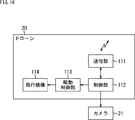
- FIG. 16 is a block diagram showing a configuration example of the drone 20 of FIG.
- the drone 20 includes a communication unit 111, a control unit 112, a drive control unit 113, and a flight mechanism 114.
- the communication unit 111 performs wireless or wired communication with the cloud server 30, a controller (proportional control system) (not shown) that controls the drone 20, and other arbitrary devices under the control of the control unit 112.
- the control unit 112 includes a CPU, a memory, and the like (not shown), and controls the communication unit 111, the drive control unit 113, and the camera 21.
- control unit 112 causes the communication unit 111 to transmit a captured image captured by the camera 21.
- the drive control unit 113 controls the driving of the flight mechanism 114 according to the control of the control unit 112.
- the flight mechanism 114 is a mechanism for flying the drone 20, and includes, for example, a motor and a propeller (not shown).
- the flight mechanism 114 is driven according to the control of the drive control unit 113 and causes the drone 20 to fly.
- the control unit 112 drives the flight mechanism 114 by controlling the drive control unit 113 according to the signal from the proportional control system received by the communication unit 111, for example. . Thereby, the drone 20 flies according to the operation of the proportional control system.
- control unit 112 controls the camera 21 in accordance with a signal from the proportional control system, and performs shooting.
- a captured image obtained by photographing with the camera 21 is transmitted from the communication unit 111 via the control unit 112.
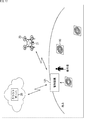
- FIG. 17 is a diagram illustrating an outline of another embodiment of the soil amount measurement system to which the present technology is applied.
- the soil volume measurement system in FIG. 17 includes an anti-air sign 10, a drone 20, a cloud server 30, and a control device 121.
- the soil volume measurement system of FIG. 17 is different from the case of FIG. 1 in that a control device 121 is newly provided.
- the control device 121 is composed of a dedicated device that functions as a GCS (Ground Control Station) (Ground Control Station).
- the control device 121 is configured by a device having a communication function such as a PC (Personal Computer), a tablet, or a smartphone executing a program for causing such a device to function as a GCS.
- the control device 121 communicates with the drone 20 in accordance with the operation of the operator, controls the flight of the drone 20, acquires the position, takes a command for the camera 21 mounted on the drone 20, and takes a picture taken by the camera 21. Gives an image acquisition command.
- the control device 121 performs detection processing for detecting the anti-air marker 10 (image thereof) from the photographed image acquired from the drone 20 in accordance with the operation of the operator, and displays the detection result of the anti-air marker 10 obtained by the detection processing. be able to. The operator can confirm from the detection result of the anti-air mark 10 whether the anti-air mark 10 has been properly captured.
- the operator When shooting of the anti-air sign 10 is not properly performed, for example, when the anti-air mark 10 cannot be detected by the detection process, the operator operates the control device 121 to fly the drone 20 again. The anti-air mark 10 can be photographed.
- the control device 121 can upload the captured image acquired from the drone 20 to the cloud server 30.
- the anti-air sign 10 includes an illuminance detection device and transmits illuminance information detected by the illuminance detection device
- the illuminance information is stored in the control device 121. Can be received.
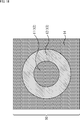
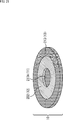
- FIG. 18 is a plan view showing a first modification of the anti-air sign 10 of a multi-circular sign.
- the anti-air sign 10 of FIG. 18 is composed of circles 11 and 12 (or circles 12 and 13) and a frame region 14, and the circle 13 (or circle 11) is not provided for the anti-air mark 10 of FIG. It has a configuration.
- the anti-air sign 10 of FIG. 18 has a configuration in which a frame region 14 is provided with respect to the anti-air sign 10 of FIG. 5C (or D).
- achromatic black chromatic red, and achromatic black can be employed, respectively.
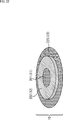
- FIG. 19 is a perspective view showing a second modification of the anti-air mark 10 of a multi-circular sign.
- 19 is, for example, a cylindrical member 201 having a predetermined height (thickness) to be a circle 11, a substantially annular member 202 having a predetermined height to be a circle 12, and a circle 13. It is comprised by the substantially annular member 203 of predetermined height.
- the heights of the members 201 to 203 are the same.
- the member 202 has a substantially annular shape in which a central portion of a cylinder having a predetermined height is hollowed out into a cylindrical shape, and the cylindrical member 201 is fitted into a hollow portion of the member 202 cut out into a cylindrical shape. ing.
- the member 203 has a substantially annular shape in which a central portion of a cylinder having a predetermined height is hollowed out in a cylindrical shape, and the substantially annular member 202 is formed in the hollow portion of the member 203 that is hollowed in a cylindrical shape. It is inserted.
- the inside of the member 201, 202, or 203 is configured as a cavity, and the illuminance detection device described in FIG. 6 and the like can be incorporated in the member 201, 202, or 203. .
- the illuminance detection device and the like can be built in a plurality of members 201 to 203.
- the height (thickness) of the columnar member that becomes the circle 11 protrudes compared to the circular member that becomes the circle 12 and the circular member that becomes the circle 13. Therefore, depending on the direction of sunlight, the shadow of the columnar member that becomes the circle 11 may be greatly formed on the circle 12, and the detection accuracy of the anti-air marker 10 may deteriorate.
- the anti-air sign 10 of FIG. 19 is composed of a cylindrical member 201 and substantially annular members 202 and 203.
- the anti-air sign 10 has a circle 11 or a circle on the upper surface of a cylindrical member having a predetermined height. It can be configured by coloring to be 13.
- the anti-air marker 10 of FIG. 19 is colored, for example, on a circular cylindrical member 203 having a predetermined height, and the member is fitted into a substantially annular member 203. It can be configured by coloring the circles 12 and 13 on a substantially annular member and fitting the member 201 into the member.
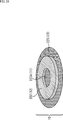
- FIG. 20 is a perspective view showing a third modification of the anti-air sign 10 of a multi-circular sign.
- a predetermined height to be a circle 13 This is composed of a substantially annular member 213.
- the anti-air sign 10 of FIG. 20 differs from the case of FIG. 19 in that a member 213 is provided instead of the member 203.
- the member 213 is a substantially annular shape in which a central portion of a cylinder having a predetermined height is hollowed out in a columnar shape so as to leave the bottom plate 213A, or a central portion of a cylinder having a predetermined height is hollowed out in a cylindrical shape to form a bottom plate 213A. It has a substantially annular shape.
- the substantially annular member 202 is fitted into the hollow portion of the member 203 that is hollowed out in a columnar shape, and the cylindrical member 201 can be attached to and detached from the hollow portion of the member 202 that is hollowed out into a cylindrical shape. It is configured.
- the bottom plate 213A has the same color as the member 201, that is, the bottom plate 213A exposed from the hollow portion of the member 202 functions as the circle 11 in the anti-air marking 10 with the columnar member 201 removed.
- the color is achromatic black.
- the depth of the hollow portion of the member 213 hollowed out in a columnar shape is the same as the height of the members 201 and 202. Therefore, when the member 202 (and the member 201) is fitted in the hollow portion of the member 213, the upper surface of the anti-air marker 10 becomes a flat surface.
- the inside of the member 201 is configured as a cavity, and the illuminance detection device described with reference to FIG.
- the anti-air marker 10 can be used by attaching the cylindrical member 201 to the hollow portion of the member 202 that is hollowed out in a cylindrical shape.
- the columnar member 201 can be removed from the anti-air sign 10 and the anti-air sign 10 can be used.
- a shadow of the member 202 can be formed on the exposed bottom plate 213A.
- the color of the bottom plate 213A is black, the exposed bottom plate 213A has a black color.
- the shadow of the member 202 that can be formed does not (almost) affect the detection accuracy of the anti-air marker 10.
- the members 202 and 213 in FIG. 20 are hollowed out so that the member 201 can be attached to and detached from, for example, a central portion of one cylindrical member having a predetermined height, leaving a bottom plate 213A.
- Such a member can be configured by coloring the circle 11 to the circle 13.
- FIG. 21 is a perspective view showing a fourth modification of the anti-air sign 10 of a multi-circular sign.
- 21 is composed of a member 202 and a member 213.
- the anti-air sign 10 of FIG. 21 is configured in the same manner as in FIG. 20 except that the detachable member 201 is not provided.
- the inside of the member 202 or 213 is configured as a hollow, and the illuminance detection device described with reference to FIG. 6 and the like can be incorporated in the member 202 or 213.
- the illuminance detection device or the like can be built in over the members 202 and 213.
- the shadow of the member 202 can be formed on the exposed bottom plate 213A in the same manner as the anti-air marker 10 with the columnar member 201 removed in FIG. 20, but here, the bottom plate 213A is formed.
- the shade of the member 202 that can be formed on the exposed bottom plate 213A does not affect the detection accuracy of the anti-air marker 10.
- FIG. 22 is a perspective view showing a fifth modification of the anti-air sign 10 of a multi-circular sign.
- the anti-air sign 10 of FIG. 22 is configured in the same manner as in FIG. 19 except that a member 223 is provided instead of the member 203.
- the air-air marker 10 of FIG. 22 is configured such that the member 201 is fitted into the member 202, and the member 202 into which the member 201 is fitted (or one columnar member configured as the circles 11 and 12) is attached to the member 223. Consists of overlapping.
- the inside of the member 201 or 202 is configured as a cavity, and the illuminance detection device described with reference to FIG. 6 or the like can be incorporated in the member 201 or 202.
- the illuminance detection device or the like can be built in the members 201 and 202.
- the shadow of the member 202 can be formed on the member 223.
- the color of the member 223 that becomes the circle 13 is black, the member 202 that can be formed on the member 223 The shadow does not affect the detection accuracy of the anti-air mark 10.
- FIG. 23 is a perspective view showing a sixth modification of the anti-air sign 10 of a multi-circular sign.
- the member 201 is configured to be attachable to and detachable from the hollow portion of the member 202 cut out in a columnar shape.
- the circular portion 223A as a part of the member 223 is exposed from the hollow portion, but the circular portion 223A functions as the circle 11.
- the color is the same as that of the member 201, that is, an achromatic black here.
- the member 201 has a hollow interior, and the illuminance detection device described with reference to FIG. 6 and the like can be incorporated in the member 201.
- the anti-air marker 10 can be used by attaching the cylindrical member 201 to the hollow portion of the member 202 that is hollowed out in a cylindrical shape.
- the columnar member 201 can be removed from the anti-air sign 10 and the anti-air sign 10 can be used.
- a shadow of the member 202 can be formed on the exposed circular portion 223A. Regardless of whether the member 201 is attached or detached, the shadow of the member 202 can be formed on the member 223.
- the color of the member 223 including the circular portion 223A is black here, the shadow of the member 202 that can be formed on the member 223 including the circular portion 223A does not affect the detection accuracy of the anti-air sign 10.
- FIG. 24 is a perspective view showing a seventh modification of the anti-air mark 10 of a multi-circular sign.
- the member 202 has a hollow interior, and the illuminance detection device described with reference to FIG. 6 and the like can be incorporated in the member 202.
- the shadow of the member 202 can be formed on the circular portion 223A or the member 223, as in the case of FIG. 23, but the color of the member 223 including the circular portion 223A is black. The shadow of the member 202 does not affect the detection accuracy of the anti-air marker 10.
- FIG. 25 is a perspective view showing an eighth modification of the anti-air sign 10 of a multi-circular sign.
- the member 213 has a substantially circular shape in which a central portion of a cylinder having a predetermined height is hollowed out into a cylindrical shape leaving a bottom plate 213A, or a central portion of a cylinder having a predetermined height. It is hollow in a columnar shape and has a substantially annular shape with a bottom plate 213A.
- the bottom plate 213 ⁇ / b> A of the member 213 is colored so that the bottom plate 213 ⁇ / b> A functions as the circles 11 and 12. That is, here, the circular area at the center of the bottom plate 213A is black so that it functions as the circle 11, and the area around the circle is red so that it functions as the circle 12. Yes.
- the member 213 (the portion that functions as the circle 13) has a hollow interior, and the illuminance detection device described with reference to FIG. 6 and the like can be incorporated in the member 213.
- FIG. 26 is a perspective view showing a ninth modification of the anti-air marking 10 of a multi-circular sign.
- 26 is composed of a columnar member 231 and a member 213 having a predetermined height to be circles 11 and 12.
- the member 231 has, for example, the same shape (columnar shape) as the member 202 into which the member 201 of FIG. 19 is fitted. Further, the member 231 is colored to be the circles 11 and 12 so that the member 231 functions as the circles 11 and 12.
- the member 231 is detachable from the hollow portion of the member 213.
- the inside of the member 231 is configured as a cavity, and the illuminance detection device and the like described in FIG. 6 and the like can be incorporated in the member 231.
- the member 231 can be attached to the hollow portion of the member 213 and the anti-air marker 10 can be used.
- the member 231 can be removed from the anti-air sign 10 and the anti-air sign 10 can be used.
- the member 231 can be composed of, for example, the members 201 and 202 in FIG.
- FIG. 27 is a perspective view showing a tenth modification of the anti-air sign 10 of a multi-circular sign.
- 27 is configured by, for example, stacking the member 201 on the area of the bottom plate 213A of the member 213 that is to be the circle 11.
- the inside of the member 201 or the member 213 (the portion that functions as the circle 13) is formed as a hollow, and the illuminance detection device or the like described in FIG. be able to.
- the members 201 and 213 can be formed as cavities, and an illuminance detection device or the like can be incorporated in the members 201 and 213 separately.
- the anti-air marking 10 in which the circles 11 and 13 have a certain thickness is not limited to the above-described configuration. That is, the anti-air marking 10 in which the circles 11 and 13 have a certain thickness can be configured such that one or both of the part that becomes the circle 11 and the part that becomes the circle 13 can be attached and detached.
- FIG. 28 is a perspective view showing an eleventh modification of the anti-air sign 10 of a multi-circular sign.
- a circle 11 to a circle 13 are drawn on the upper surface of the member 250 by printing or the like.
- the member 250 can be made of, for example, a translucent material such as white, and the inside can be made hollow.
- the member 250 can incorporate, for example, a lighting device (not shown).
- the anti-air mark 10 can be caused to emit light by turning on the lighting device.
- the anti-air sign 10 By emitting the anti-air sign 10, it is possible to shoot in a state where the anti-air sign 10 can be detected even in a dark situation such as at night, or the anti-air sign 10 can be used as a landmark when landing the drone 20. .
- FIG. 29 is a plan view showing a twelfth modification of the anti-air sign 10 of a multi-circular sign.
- a red circle 12 portion and a white frame region 14 portion are formed of a light emitter such as an LED (Light Emitting Diode).
- a light emitter such as an LED (Light Emitting Diode).
- the red circle 12 and the white frame region 14 are illuminated so that the anti-air marker 10 can be photographed in a dark state such as at night, or the anti-air marker 10 can be captured by the drone 20. It can be used as a landmark when landing.
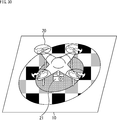
- FIG. 30 is a perspective view showing a thirteenth modification of the anti-air marking 10 of a multi-circular sign.
- the anti-air sign 10 of FIG. 30 has a design of the anti-air sign 10 drawn on a drone landing pad by printing or the like, and thus functions as an anti-air sign and also as a landing pad.
- the landing pad is used to prevent the sand on the ground from rolling up and entering the drone's motor, etc. when the drone is taking off and landing, and to clarify the landing location of the drone.
- the drone 20 can detect the position of the landing pad serving as the anti-air mark 10 from the captured image.
- the drone 20 takes into consideration the mounting position of the camera 21 so that the anti-air sign 10 reflected in the captured image taken by the camera 21 is always at a fixed position. By controlling the state, it is possible to take off and land vertically with respect to the anti-air sign 10, and the convenience of the landing pad that is the anti-air sign 10 can be enhanced.
- the anti-air sign 10 of FIG. 30 it is possible to recognize the change in the design of the anti-air sign 10 shown in the photographed image and the take-off and landing of the drone 20, and to record the time of take-off and landing. Such time can be used for automatic creation of reports such as soil volume measurement.
- the anti-air marker 10 has a planar shape in which a plurality of circles having different radii are concentrically arranged, and a marker having a different hue of adjacent circles among the plurality of circles is employed.
- a label having a planar shape in which a plurality of circles having different radii are concentrically arranged, and the luminance or hue of adjacent circles among the plurality of circles can be employed.
- “hue” can be read as “luminance or hue”.
- circles 11 to 13 circles having different luminance or hue of adjacent circles can be adopted.
- the luminance or hue of adjacent circles be different. Therefore, the luminance or hue of adjacent circles 11 and 12 are different, and the luminance or hue of adjacent circles 12 and 13 are different. Thus, the luminance or hue of the non-adjacent circles 11 and 13 may be the same.
- adjacent circles may differ only in luminance or hue, or both luminance and hue may differ.
- the detection of the anti-air mark 10 is performed using the distance of the brightness of each of the adjacent circles 11 and 12, and further using the distance of the hue as necessary, the color combinations of the circles 11 and 12 exist in nature. It is effective that the combination is as small as possible.
- the color combinations of the circles 11 and 12 are combinations in which the luminance or hue of each color is as different as possible.
- the combination of the colors of the circles 11 and 12 is a combination in which the degree of color mixing is as low as possible when shooting from a certain altitude, for example, the luminance or hue of the circle 11 obtained from the captured image and the luminance of the circle 12. Or it is effective that the distance to the hue is as large as possible.
- the distance between the peaks of the two distributions existing in the hue histogram may be employed as the hue distance between the circles 11 and 12. it can.
- the distance between the luminances of the circles 11 and 12 includes a distribution having a peak at the first luminance appearing in a luminance histogram for pixels of the circles 11 and 12 detected from the captured image, and a second value.
- the distance between the peaks of the two distributions (the difference in luminance between the peaks) can be adopted.
- the difference in the integrated values such as the average value of the hues of the pixels of the circles 11 and 12 detected from the captured image.
- the luminance distances of the circles 11 and 12 are similarly determined as the luminances of the pixels of the circles 11 and 12 detected from the captured image. Differences in integrated values such as average values can be employed.
- FIG. 31 is a diagram showing the HLS color space.
- the vertical axis represents the luminance L
- the vertical axis to the luminance L axis (hereinafter also referred to as the luminance axis) is on a two-dimensional plane
- the distance from the luminance axis represents the saturation S.
- the angle around the luminance axis represents the hue H.
- a point on the luminance axis represents an achromatic color.
- FIG. 32 is a diagram for explaining the outline of detection of the anti-air sign 10 using luminance.
- the image processing apparatus in FIG. 10 uses the distance (brightness difference) between each of the circles 11 and 12 (regions assumed (estimated)) of the anti-air signs 10 shown in the photographed image, from the candidate region to anti-air. It is possible to distinguish between the area of the sign 10 and the area that is not.
- the area of the anti-air marking 10 and the area other than the candidate area are compared with each other with relatively high accuracy using the luminance distance of each of the circles 11 and 12. Can be determined.
- the image processing apparatus of FIG. 10 uses the hue distances (hue differences) of the circles 11 and 12 of the anti-air marker 10 shown in the photographed image when the luminance distances of the circles 11 and 12 are small. From the candidate area, it is possible to discriminate between the area of the anti-air mark 10 and the other area.
- the image processing apparatus uses the distances of the 12 hues, the area of the anti-air mark 10 and the area that is not the area can be determined from the candidate areas.
- the detection of the anti-air mark 10 using the luminance is performed using the luminance distances of the adjacent circles 11 and 12, and further, the luminance distances of the adjacent circles 12 and 13 and the non-adjacent circles 11 and 13, respectively. Can also be performed using the distance of the brightness.
- FIG. 33 is a diagram for explaining an outline of detection of the anti-air sign 10 using luminance when the anti-air sign 10 has circles 11 to 13.
- the anti-air sign 10 When the anti-air sign 10 has circles 11 to 13, the luminance distance A of the circles 11 and 12, the luminance distance B of the circles 11 and 13, and the luminance distance C of the circles 12 and 13, respectively. It can be used to detect the anti-air marker 10.
- the anti-air marker 10 can be detected using the hue distances of the circles 12 and 13 respectively.
- FIG. 34 is a flowchart for explaining another example of the detection process for detecting the anti-air sign 10 performed by the CPU 32 of the cloud server 30 as the image processing apparatus of FIG.
- step S131 the candidate area extraction unit 61 performs a candidate area extraction process for extracting a candidate area from the captured image from the camera 21.
- the candidate area extraction unit 61 binarizes each pixel (its pixel value) to 1 or 0 depending on whether or not it is a pixel of the circle 12 of the anti-air marker 10. Turn into.
- the binarization in step S131-1 can be performed, for example, by performing threshold processing on the luminance and hue of the pixel.
- the candidate area extraction unit 61 performs erosion processing (erosion processing) of the binarized image obtained by binarizing the captured image, and suppresses noise of the binarized image. To do.
- the candidate area extraction unit 61 performs dilation processing (expansion processing) on the binarized image after erosion processing.
- step S131-4 the candidate area extraction unit 61 in the binarized image after the dilation process, for example, the area of the pixel whose pixel value is 1, that is, the captured image .
- a contour detection process is performed to detect the contour of the pixel region in which the circle 12 is estimated to be reflected.
- the candidate area extraction unit 61 extracts an area corresponding to the smallest rectangle circumscribing the outline detected by the outline detection process as a candidate area from the captured image. This is supplied to the feature quantity extraction unit 62.
- candidate areas are extracted for each of the plurality of contours.
- step S132 the feature amount extraction unit 62 performs feature amount extraction processing for extracting the feature amount of each candidate region from the candidate region extraction unit 61, and obtains candidate regions obtained by the feature amount extraction processing.
- the feature amount is supplied to the identification unit 63.
- the feature amount extraction unit 62 obtains, for example, the distance between the respective luminances of the circles 11 and 12 in the feature amount extraction process in step S132, in addition to the same feature amount as in step S32 in FIG.
- the feature amount extraction unit 62 obtains the brightness distance of each of the circles 11 and 12 instead of the hue distance of each of the circles 11 and 12, and the brightness distance is small. In some cases, the hue distances of the circles 11 and 12 are obtained.
- step S133 the identification unit 63 displays, for each candidate region, an anti-air marker 10 (a circle 12) (in the captured image) from the captured image based on the feature amount of the candidate region from the feature amount extraction unit 62. Area).
- the identification unit 63 identifies whether the candidate area is the anti-air marker 10 based on the feature amount of the candidate area, as in step S33 of FIG.
- the identifying unit 63 detects the anti-air marker 10 from the photographed image from the camera 21 based on the identification result, and outputs the detection result.
- step S133 when the distance between each of the circles 11 and 12 is large (when the distance is greater than or equal to the threshold), the identification unit 63 identifies whether the candidate region is the anti-air marker 10 or not. This can be done without using the distance of each of the 12 hues.
- step S133 the identification unit 63 determines whether the candidate area is the anti-air marker 10 when the distance between the luminances of the circles 11 and 12 is small (not large). Each color distance can be used.
- the anti-air marker 10 can be detected with higher accuracy by including the brightness and hue distance of each of the circles 11 and 12 in the feature amount of the candidate region.
- FIG. 35 is a flowchart for explaining an example of detailed processing of binarization of each pixel of the captured image performed in step S131-1 in FIG.
- a chromatic color for example, red
- luminance L and the hue H exist is used in order to easily distinguish the color from the natural world.
- step S151 the candidate area extraction unit 61 selects one of the pixels of the captured image that has not yet been selected as the target pixel, as the target pixel, and the process proceeds to step S152.
- step S152 the candidate area extraction unit 61 obtains the luminance L and hue H of the pixel of interest by obtaining the luminance, and the process proceeds to step S153.
- step S153 the candidate area extraction unit 61 determines whether the hue H of the target pixel can be regarded as the hue of the color of the circle 12, that is, the hue H of the target pixel satisfies the expressions ⁇ ⁇ H and H ⁇ . Determine if it meets.
- ⁇ and ⁇ represent a minimum value and a maximum value in a range that can be regarded as the hue of the color of the circle 12, and are set in advance.
- the candidate area extraction unit 61 determines whether the luminance L of the target pixel can be regarded as the luminance of the circle 12, that is, the luminance L of the target pixel satisfies the expressions ⁇ ⁇ H and H ⁇ . Determine if it meets.
- ⁇ and ⁇ represent a minimum value and a maximum value in a range that can be regarded as the luminance of the circle 12, and are set in advance.
- step S153 it is determined that the hue H of the target pixel satisfies Expression ⁇ ⁇ H and Expression H ⁇ , and the luminance L of the target pixel satisfies Expression ⁇ ⁇ H and Expression H ⁇ . If so, the process proceeds to step S154.
- step S154 the candidate area extraction unit 61 sets the pixel value of the target pixel to 1 indicating that the target pixel is a pixel of the luminance and hue of the circle 12, assuming that the target pixel is a pixel of the luminance and hue of the circle 12. Then, the process proceeds to step S156.
- step S153 the hue H of the target pixel does not satisfy at least one of the formula ⁇ ⁇ H and the formula H ⁇ , or the luminance L of the target pixel has the formula ⁇ ⁇ H and If it is determined that at least one of the expressions H ⁇ is not satisfied, the process proceeds to step S155.
- step S155 the candidate area extraction unit 61 sets the pixel value of the target pixel to 0 indicating that the target pixel is not the luminance and hue pixel of the circle 12, assuming that the target pixel is not the luminance and hue pixel of the circle 12. The process proceeds to step S156.
- step S156 the candidate area extraction unit 61 determines whether all pixels of the captured image have been selected as the target pixel.
- step S156 If it is determined in step S156 that all the pixels of the captured image have not yet been selected as the target pixel, the process returns to step S151.
- step S151 the candidate area extraction unit 61 newly selects one of the pixels of the captured image that has not yet been selected as the target pixel, as the target pixel, and thereafter the same processing is repeated. .
- step S156 If it is determined in step S156 that all the pixels of the captured image have been selected as the target pixel, the binarization process ends.
- FIG. 36 is a flowchart for explaining an example of processing for extracting the luminance distances of the circles 11 and 12 as feature amounts in the feature amount extraction processing performed in step S132 of FIG.
- step S171 the feature amount extraction unit 62 assumes that the candidate region is a region circumscribing the circle 12, and pixels (pixels that should be reflected) in which each of the circles 11 and 12 existing in the candidate region appears. The pixel in the region of the circle 11 and the pixel in the region of the circle 12) are detected, and the process proceeds to step S172.
- step S172 the feature amount extraction unit 62 obtains the luminance of each pixel in the area of the circle 11 by obtaining the luminance and obtains the luminance of each pixel in the area of the circle 12, and the process proceeds to step S173. move on.
- step S173 the feature amount extraction unit 62 calculates the absolute difference between the average value of the luminance of each pixel in the area of the circle 11 and the average value of the luminance of each pixel in the area of the circle 12, and The luminance distance is obtained, and the process ends.
- the detection of the anti-air sign 10 from the photographed image can be performed using one or both of the luminance and the hue distance between adjacent circles of the anti-air sign 10.
- the processing performed by the computer such as the cloud server 30 according to the program does not necessarily have to be performed in time series in the order described as the flowchart. That is, the processing performed by the computer according to the program includes processing executed in parallel or individually (for example, parallel processing or object processing).
- the program may be processed by one computer (processor), or may be distributedly processed by a plurality of computers. Furthermore, the program may be transferred to a remote computer and executed.
- the system means a set of a plurality of components (devices, modules (parts), etc.), and it does not matter whether all the components are in the same housing. Accordingly, a plurality of devices housed in separate housings and connected via a network and a single device housing a plurality of modules in one housing are all systems. .
- the present technology uses an aerial view of an anti-air sign other than the soil volume measurement system, for example, a building or the like.
- the present invention can be applied to a system that performs arbitrary measurement.
- the present technology can take a cloud computing configuration in which one function is shared by a plurality of devices via a network and is jointly processed.
- each step described in the above flowchart can be executed by one device or can be shared by a plurality of devices.
- the plurality of processes included in the one step can be executed by being shared by a plurality of apparatuses in addition to being executed by one apparatus.
- this technique can take the following structures.
- a plurality of circles have a planar shape arranged concentrically,
- a candidate area extraction unit that extracts candidate areas that are candidates for areas where the anti-air signs appear, from a captured image obtained by photographing the anti-air signs that have different brightness or hue of adjacent circles of the plurality of circles;
- a feature quantity extraction unit for extracting feature quantities of the candidate area;
- An image processing apparatus comprising: an identification unit that identifies the anti-aircraft sign based on the feature amount.
- the candidate region extraction unit extracts the candidate region using at least the hue of the hue, saturation, and brightness of the circle having the second smallest radius among the plurality of circles.
- the feature amount extraction unit extracts, as the feature amount, a distance between a luminance or hue of a circle having the smallest radius and a luminance or hue of a circle having the second smallest radius among the plurality of circles. ⁇ 1 > Or ⁇ 2>. ⁇ 4> The feature quantity extraction unit extracts, as the feature quantity, a correlation between the candidate area and a rotated image obtained by rotating the candidate area by a predetermined angle other than an integer multiple of 2 ⁇ . ⁇ 1> to ⁇ 3> The image processing apparatus according to any one of the above.
- the feature amount extraction unit applies a filter that emphasizes the color attached to the circle to the candidate area and the template image of the anti-air sign, and the candidate area and the template after the application of the filter
- the image processing apparatus according to any one of ⁇ 1> to ⁇ 4>, wherein a correlation with an image is extracted as the feature amount.
- the anti-air sign has a built-in detection device that acquires information on the anti-air sign,
- the image processing device according to any one of ⁇ 1> to ⁇ 5>, wherein the candidate region extraction unit extracts the candidate region using information regarding the anti-air sign detected by the detection device.
- the anti-air sign has a built-in illuminance detection device that detects illuminance
- the feature amount extraction unit extracts, as the feature amount, a distance between a luminance or hue of a circle having the smallest radius and a luminance or hue of a circle having the second smallest radius among the plurality of circles
- the identification unit compares the distance with a predetermined threshold, and based on the comparison result, the illuminance detection uses the predetermined threshold used to identify whether the candidate region is the anti-air marker.
- the image processing device according to any one of ⁇ 1> to ⁇ 6>, which is set using illuminance of the anti-air sign detected by the device.
- ⁇ 8> The image processing apparatus according to any one of ⁇ 1> to ⁇ 7>, wherein a three-dimensional model is created using the identification result of the anti-air sign.
- ⁇ 9> The image processing apparatus according to ⁇ 8>, wherein soil volume is measured from the three-dimensional model.
- a plurality of circles have a planar shape arranged concentrically, Extracting a candidate area that is a candidate for an area in which the anti-air mark appears from a captured image obtained by photographing an anti-air sign in which the brightness or hue of an adjacent circle of the plurality of circles is different; Extracting a feature amount of the candidate area;
- An image processing method comprising: identifying the anti-air sign based on the feature amount.
- a plurality of circles have a planar shape arranged concentrically, A candidate area extraction unit that extracts candidate areas that are candidates for areas where the anti-air signs appear, from a captured image obtained by photographing the anti-air signs that have different brightness or hue of adjacent circles of the plurality of circles; A feature quantity extraction unit for extracting feature quantities of the candidate area; A program for causing a computer to function as an identification unit that identifies the anti-air sign based on the feature amount.
- a plurality of circles having different radii have a planar shape arranged concentrically, An anti-air mark in which the brightness or hue of adjacent circles of the plurality of circles is different.
- the colors of two adjacent circles of the plurality of circles are the luminance or the hue of each of the two areas obtained from a photographed image obtained by photographing a marker attached to two areas where the colors of the two circles are adjacent.
- the anti-air marker according to any one of ⁇ 12> to ⁇ 14>, wherein the two distances are predetermined two colors that make a distance between them a predetermined threshold value or more.
- ⁇ 16> The anti-air marking according to ⁇ 15>, wherein colors of a circle having the smallest radius and a circle having the second smallest radius among the plurality of circles are the predetermined two colors.
- ⁇ 17> The anti-air marking according to ⁇ 16>, wherein an area of a portion of the circle having the second smallest radius excluding the circle having the smallest radius is approximately 1.0 to 3.0 times the area of the circle having the smallest radius.
- ⁇ 18> The anti-air sign according to any one of ⁇ 12> to ⁇ 17>, wherein the plurality of circles are arranged concentrically and have a planar shape in which a rectangle including the plurality of circles is arranged.
- ⁇ 19> The anti-air sign according to any one of ⁇ 12> to ⁇ 18>, wherein an illuminance detection device that detects illuminance is incorporated in a circle having the smallest radius among the plurality of circles.
Landscapes
- Engineering & Computer Science (AREA)
- Physics & Mathematics (AREA)
- General Physics & Mathematics (AREA)
- Theoretical Computer Science (AREA)
- Multimedia (AREA)
- Remote Sensing (AREA)
- Geometry (AREA)
- Computer Vision & Pattern Recognition (AREA)
- Radar, Positioning & Navigation (AREA)
- Software Systems (AREA)
- Astronomy & Astrophysics (AREA)
- Computer Graphics (AREA)
- Image Analysis (AREA)
Abstract
La présente invention concerne un marqueur orienté vers le haut, un dispositif de traitement d'image, un procédé de traitement d'image et un programme qui permettent de détecter avec précision un marqueur orienté vers le haut dans une image photographiée dans laquelle le marqueur orienté vers le haut a été photographié. Le marqueur orienté vers le haut présente une forme plate à l'intérieur de laquelle une pluralité de cercles concentriques sont disposés de telle sorte que des cercles adjacents présentent des couleurs différentes. Une unité d'extraction de zone candidate extrait, à partir de l'image photographiée dans laquelle le marqueur orienté vers le haut a été photographié, de zones candidates qui sont des candidats pour la zone dans laquelle le marqueur orienté vers le haut est représenté, et une unité d'extraction de valeur de caractéristique extrait des valeurs de caractéristiques pour les zones candidates. Une unité d'identification identifie le marqueur orienté vers le haut sur la base des valeurs de caractéristiques. La présente invention peut être utilisée, par exemple, lors de la détection d'un marqueur orienté vers le haut installé sur le sol dans une image photographiée par voie aérienne.
Priority Applications (7)
| Application Number | Priority Date | Filing Date | Title |
|---|---|---|---|
| EP17886696.8A EP3564620A4 (fr) | 2016-12-27 | 2017-12-14 | Marqueur orienté vers le haut, dispositif de traitement d'image, procédé de traitement d'images, et programme |
| JP2018559026A JP7095600B2 (ja) | 2016-12-27 | 2017-12-14 | 対空標識、画像処理装置、画像処理方法、及び、プログラム |
| US16/467,289 US11164029B2 (en) | 2016-12-27 | 2017-12-14 | Survey marker, image processing apparatus, image processing method, and program |
| CN201780079293.9A CN110100149B (zh) | 2016-12-27 | 2017-12-14 | 勘测标记、图像处理装置、图像处理方法和程序 |
| US17/480,577 US12146765B2 (en) | 2016-12-27 | 2021-09-21 | Survey marker, image processing apparatus, image processing method, and program |
| JP2022101192A JP2022133328A (ja) | 2016-12-27 | 2022-06-23 | 画像処理装置、及び、画像処理方法 |
| JP2023184471A JP7732488B2 (ja) | 2016-12-27 | 2023-10-27 | 画像処理装置、及び、画像処理方法 |
Applications Claiming Priority (2)
| Application Number | Priority Date | Filing Date | Title |
|---|---|---|---|
| JP2016253064 | 2016-12-27 | ||
| JP2016-253064 | 2016-12-27 |
Related Child Applications (2)
| Application Number | Title | Priority Date | Filing Date |
|---|---|---|---|
| US16/467,289 A-371-Of-International US11164029B2 (en) | 2016-12-27 | 2017-12-14 | Survey marker, image processing apparatus, image processing method, and program |
| US17/480,577 Continuation US12146765B2 (en) | 2016-12-27 | 2021-09-21 | Survey marker, image processing apparatus, image processing method, and program |
Publications (1)
| Publication Number | Publication Date |
|---|---|
| WO2018123607A1 true WO2018123607A1 (fr) | 2018-07-05 |
Family
ID=62707441
Family Applications (1)
| Application Number | Title | Priority Date | Filing Date |
|---|---|---|---|
| PCT/JP2017/044840 Ceased WO2018123607A1 (fr) | 2016-12-27 | 2017-12-14 | Marqueur orienté vers le haut, dispositif de traitement d'image, procédé de traitement d'images, et programme |
Country Status (5)
| Country | Link |
|---|---|
| US (2) | US11164029B2 (fr) |
| EP (1) | EP3564620A4 (fr) |
| JP (3) | JP7095600B2 (fr) |
| CN (1) | CN110100149B (fr) |
| WO (1) | WO2018123607A1 (fr) |
Cited By (4)
| Publication number | Priority date | Publication date | Assignee | Title |
|---|---|---|---|---|
| JP2020094974A (ja) * | 2018-12-14 | 2020-06-18 | 株式会社フジタ | 変位計測マーカー及び変位計測システム |
| JPWO2021255940A1 (fr) * | 2020-06-19 | 2021-12-23 | ||
| JP2023121893A (ja) * | 2022-02-22 | 2023-09-01 | 新明工業株式会社 | 着陸システム |
| WO2025257972A1 (fr) * | 2024-06-12 | 2025-12-18 | Jfeエンジニアリング株式会社 | Procédé de mesure de dimension, système de mesure de dimension et procédé de préparation de construction |
Families Citing this family (12)
| Publication number | Priority date | Publication date | Assignee | Title |
|---|---|---|---|---|
| WO2017128273A1 (fr) * | 2016-01-29 | 2017-08-03 | Hewlett Packard Enterprise Development Lp | Détermination de bloc d'erreur |
| ES2893959T3 (es) * | 2016-08-26 | 2022-02-10 | Sz Dji Technology Co Ltd | Métodos y sistema de aterrizaje autónomo |
| WO2020097072A1 (fr) | 2018-11-05 | 2020-05-14 | Usic, Llc | Systèmes et procédés destinés à un appareil de marquage autonome |
| US11467582B2 (en) | 2018-11-05 | 2022-10-11 | Usic, Llc | Systems and methods for an autonomous marking apparatus |
| US10896483B2 (en) * | 2018-12-14 | 2021-01-19 | Adobe Inc. | Dynamic content generation system |
| CN110514182A (zh) * | 2019-08-21 | 2019-11-29 | 喻昕蕾 | 一种水文现场的远程测量系统及方法 |
| KR102108756B1 (ko) * | 2019-12-02 | 2020-05-11 | 대한민국 | 부채형태로 변형 가능한 대공표지 |
| CN111754576B (zh) * | 2020-06-30 | 2023-08-08 | 广东博智林机器人有限公司 | 一种架体量测系统、图像定位方法、电子设备及存储介质 |
| CN112184713A (zh) * | 2020-11-06 | 2021-01-05 | 上海柏楚电子科技股份有限公司 | 切割含焊缝管材的控制方法、装置、切割系统、设备与介质 |
| CN114593714A (zh) * | 2022-03-14 | 2022-06-07 | 国网山东省电力公司德州供电公司 | 一种用于倾斜摄影建模的地面像控点装置 |
| TWI859589B (zh) * | 2022-09-30 | 2024-10-21 | 財團法人工業技術研究院 | 量測卡、應用其之量測系統及量測方法 |
| CN119323569B (zh) * | 2024-12-18 | 2025-02-28 | 陕西秦通电力集团有限公司 | 基于机器视觉的开关柜内部元器件装配检测方法 |
Citations (8)
| Publication number | Priority date | Publication date | Assignee | Title |
|---|---|---|---|---|
| JPH06294618A (ja) * | 1993-04-09 | 1994-10-21 | Ishikawajima Harima Heavy Ind Co Ltd | 2物体間の相対的位置及び角度の検出方法及び装置とこれに用いるマーカー |
| JPH1183440A (ja) * | 1997-07-18 | 1999-03-26 | Art Wing:Kk | 動作データ作成システム |
| JP2005140550A (ja) | 2003-11-04 | 2005-06-02 | Universal Technology Corp | 三次元モデル作成方法 |
| JP2005140547A (ja) * | 2003-11-04 | 2005-06-02 | 3D Media Co Ltd | 3次元計測方法、3次元計測装置、及びコンピュータプログラム |
| JP2014066538A (ja) * | 2012-09-25 | 2014-04-17 | Mitsubishi Electric Corp | 写真計測用ターゲット及び写真計測方法 |
| JP2014126424A (ja) * | 2012-12-26 | 2014-07-07 | Kawasaki Heavy Ind Ltd | 三次元計測用シール |
| US20160320535A1 (en) * | 2015-04-30 | 2016-11-03 | Mark Wegmann | Bands of retroreflective targets and methods of making same |
| JP2016194515A (ja) * | 2015-04-01 | 2016-11-17 | Terra Drone株式会社 | 点群データ生成用画像の撮影方法、及び当該画像を用いた点群データ生成方法 |
Family Cites Families (23)
| Publication number | Priority date | Publication date | Assignee | Title |
|---|---|---|---|---|
| US3633285A (en) * | 1970-03-09 | 1972-01-11 | Litton Systems Inc | Laser markmanship trainer |
| GB1449522A (en) * | 1974-06-05 | 1976-09-15 | Rank Organisation Ltd | Aircraft parking position indicator |
| WO1995027676A1 (fr) * | 1994-04-08 | 1995-10-19 | Stora Feldmühle Ag | Procede permettant d'initier a temps un changement de rouleau de papier |
| DE4442154A1 (de) * | 1994-04-08 | 1995-10-12 | Feldmuehle Ag Stora | Verfahren zum Einleiten eines vorzeitigen Rollenwechsels |
| IL133233A (en) * | 1997-05-30 | 2005-05-17 | British Broadcasting Corp | Position determination |
| EP1220182A3 (fr) * | 2000-12-25 | 2005-08-17 | Matsushita Electric Industrial Co., Ltd. | Dispositif et programme de détection d'images et support de mémoire pour ledit programme |
| JP2002211494A (ja) * | 2001-01-17 | 2002-07-31 | Todaka Seisakusho:Kk | 無人ヘリコプタ用飛行計画装置 |
| JP2002357419A (ja) | 2001-02-20 | 2002-12-13 | Kyushu Techno Research Kk | 斜め航空写真及び疑似オルソ画像。 |
| JP3789396B2 (ja) | 2002-06-10 | 2006-06-21 | 株式会社Gis九州 | 消波ブロック等の地上敷設定型物の三次元モデリング方法および三次元モデリングプログラムならびにそのプログラムを記録したコンピュータ読み取り可能な記録媒体 |
| CN1188660C (zh) * | 2003-04-11 | 2005-02-09 | 天津大学 | 一种摄像机标定方法及其实施装置 |
| KR100506095B1 (ko) | 2003-11-17 | 2005-08-03 | 삼성전자주식회사 | 지능형 시스템에 있어서 표식검출방법 및 장치 |
| JP4069855B2 (ja) * | 2003-11-27 | 2008-04-02 | ソニー株式会社 | 画像処理装置及び方法 |
| JP4498224B2 (ja) * | 2005-06-14 | 2010-07-07 | キヤノン株式会社 | 画像処理装置およびその方法 |
| CN101324435A (zh) * | 2007-06-15 | 2008-12-17 | 展讯通信(上海)有限公司 | 一种获得方向信息的方法与装置 |
| CN201177499Y (zh) * | 2008-01-08 | 2009-01-07 | 何淑娟 | 倾角测量装置 |
| US8411910B2 (en) * | 2008-04-17 | 2013-04-02 | Biometricore, Inc. | Computationally efficient feature extraction and matching iris recognition |
| CN102222352B (zh) * | 2010-04-16 | 2014-07-23 | 株式会社日立医疗器械 | 图像处理方法和图像处理装置 |
| CN102663391B (zh) * | 2012-02-27 | 2015-03-25 | 安科智慧城市技术(中国)有限公司 | 一种图像的多特征提取与融合方法及系统 |
| CN102902973B (zh) * | 2012-09-28 | 2016-01-20 | 中国科学院自动化研究所 | 一种具有旋转不变性的图像特征的提取方法 |
| JP2014235494A (ja) * | 2013-05-31 | 2014-12-15 | 富士ゼロックス株式会社 | 画像処理装置及びプログラム |
| JP6510247B2 (ja) | 2015-01-27 | 2019-05-08 | 株式会社トプコン | 測量データ処理装置、測量データ処理方法およびプログラム |
| CN205000207U (zh) * | 2015-09-10 | 2016-01-27 | 西南交通大学 | Cpⅳ网测量标志组件 |
| CN205066771U (zh) * | 2015-10-21 | 2016-03-02 | 中国矿业大学 | 摄影测量相控点标志 |
-
2017
- 2017-12-14 WO PCT/JP2017/044840 patent/WO2018123607A1/fr not_active Ceased
- 2017-12-14 CN CN201780079293.9A patent/CN110100149B/zh active Active
- 2017-12-14 JP JP2018559026A patent/JP7095600B2/ja active Active
- 2017-12-14 EP EP17886696.8A patent/EP3564620A4/fr not_active Withdrawn
- 2017-12-14 US US16/467,289 patent/US11164029B2/en active Active
-
2021
- 2021-09-21 US US17/480,577 patent/US12146765B2/en active Active
-
2022
- 2022-06-23 JP JP2022101192A patent/JP2022133328A/ja active Pending
-
2023
- 2023-10-27 JP JP2023184471A patent/JP7732488B2/ja active Active
Patent Citations (8)
| Publication number | Priority date | Publication date | Assignee | Title |
|---|---|---|---|---|
| JPH06294618A (ja) * | 1993-04-09 | 1994-10-21 | Ishikawajima Harima Heavy Ind Co Ltd | 2物体間の相対的位置及び角度の検出方法及び装置とこれに用いるマーカー |
| JPH1183440A (ja) * | 1997-07-18 | 1999-03-26 | Art Wing:Kk | 動作データ作成システム |
| JP2005140550A (ja) | 2003-11-04 | 2005-06-02 | Universal Technology Corp | 三次元モデル作成方法 |
| JP2005140547A (ja) * | 2003-11-04 | 2005-06-02 | 3D Media Co Ltd | 3次元計測方法、3次元計測装置、及びコンピュータプログラム |
| JP2014066538A (ja) * | 2012-09-25 | 2014-04-17 | Mitsubishi Electric Corp | 写真計測用ターゲット及び写真計測方法 |
| JP2014126424A (ja) * | 2012-12-26 | 2014-07-07 | Kawasaki Heavy Ind Ltd | 三次元計測用シール |
| JP2016194515A (ja) * | 2015-04-01 | 2016-11-17 | Terra Drone株式会社 | 点群データ生成用画像の撮影方法、及び当該画像を用いた点群データ生成方法 |
| US20160320535A1 (en) * | 2015-04-30 | 2016-11-03 | Mark Wegmann | Bands of retroreflective targets and methods of making same |
Cited By (4)
| Publication number | Priority date | Publication date | Assignee | Title |
|---|---|---|---|---|
| JP2020094974A (ja) * | 2018-12-14 | 2020-06-18 | 株式会社フジタ | 変位計測マーカー及び変位計測システム |
| JPWO2021255940A1 (fr) * | 2020-06-19 | 2021-12-23 | ||
| JP2023121893A (ja) * | 2022-02-22 | 2023-09-01 | 新明工業株式会社 | 着陸システム |
| WO2025257972A1 (fr) * | 2024-06-12 | 2025-12-18 | Jfeエンジニアリング株式会社 | Procédé de mesure de dimension, système de mesure de dimension et procédé de préparation de construction |
Also Published As
| Publication number | Publication date |
|---|---|
| EP3564620A4 (fr) | 2020-09-16 |
| US20200065605A1 (en) | 2020-02-27 |
| US12146765B2 (en) | 2024-11-19 |
| JPWO2018123607A1 (ja) | 2019-10-31 |
| JP2024001271A (ja) | 2024-01-09 |
| US11164029B2 (en) | 2021-11-02 |
| JP7095600B2 (ja) | 2022-07-05 |
| CN110100149B (zh) | 2021-08-24 |
| EP3564620A1 (fr) | 2019-11-06 |
| US20220004796A1 (en) | 2022-01-06 |
| JP2022133328A (ja) | 2022-09-13 |
| CN110100149A (zh) | 2019-08-06 |
| JP7732488B2 (ja) | 2025-09-02 |
Similar Documents
| Publication | Publication Date | Title |
|---|---|---|
| JP7732488B2 (ja) | 画像処理装置、及び、画像処理方法 | |
| US11733042B2 (en) | Information processing apparatus, information processing method, program, and ground marker system | |
| US20200201360A1 (en) | Systems and methods for automated landing of a drone | |
| US10546195B2 (en) | Methods and systems for automatic object detection from aerial imagery | |
| KR101799778B1 (ko) | 원형 교통 표지 인식 환경에서 화이트 이너 서클과 관련된 확인 장치 및 그 방법 | |
| CN109726640A (zh) | 无人机系统对运动物体的识别追踪方法 | |
| Mukadam et al. | Detection of landing areas for unmanned aerial vehicles | |
| Al-Sheary et al. | Crowd monitoring system using unmanned aerial vehicle (UAV) | |
| US20220366651A1 (en) | Method for generating a three dimensional, 3d, model | |
| CN112115784B (zh) | 一种车道线识别的方法、装置、可读存储介质和电子设备 | |
| CN111784768B (zh) | 基于三色四灯标记识别的无人机姿态估计方法及系统 | |
| CN107424156A (zh) | 基于仿仓鸮眼视觉注意的无人机自主编队精准测量方法 | |
| TW202125324A (zh) | 航拍影像自動物體偵測之方法及系統 | |
| Sirmacek et al. | Automatic crowd density and motion analysis in airborne image sequences based on a probabilistic framework | |
| KR101199959B1 (ko) | 영상 내 교통표지판 인식 시스템 | |
| Eaton et al. | Image segmentation for automated taxiing of unmanned aircraft | |
| Batra et al. | A Drone Based Image Dataset Generation Methodology for Single Image Super Resolution | |
| KR102959740B1 (ko) | 드론 영상을 이용한 기준점 자동탐지장치 및 그 방법 | |
| Sereewattana et al. | Color marker detection with various imaging conditions and occlusion for UAV automatic landing control | |
| US20250278894A1 (en) | Method for creating 3d objects for aerial view video based map, and computer program recorded on recording medium for executing method therefor | |
| Sadhasivam et al. | Object Based Automatic Detection of Urban Buildings Using UAV Images | |
| JP2019095415A (ja) | 両面仕立ての対空標識 | |
| HK1255087B (zh) | 航拍影像自动物体侦测的方法及系统 | |
| Hou | An automated road sign inventory system based on computer vision |
Legal Events
| Date | Code | Title | Description |
|---|---|---|---|
| 121 | Ep: the epo has been informed by wipo that ep was designated in this application |
Ref document number: 17886696 Country of ref document: EP Kind code of ref document: A1 |
|
| ENP | Entry into the national phase |
Ref document number: 2018559026 Country of ref document: JP Kind code of ref document: A |
|
| NENP | Non-entry into the national phase |
Ref country code: DE |
|
| ENP | Entry into the national phase |
Ref document number: 2017886696 Country of ref document: EP Effective date: 20190729 |