WO2018189802A1 - 画像処理装置、画像処理方法、及びプログラム - Google Patents
画像処理装置、画像処理方法、及びプログラム Download PDFInfo
- Publication number
- WO2018189802A1 WO2018189802A1 PCT/JP2017/014774 JP2017014774W WO2018189802A1 WO 2018189802 A1 WO2018189802 A1 WO 2018189802A1 JP 2017014774 W JP2017014774 W JP 2017014774W WO 2018189802 A1 WO2018189802 A1 WO 2018189802A1
- Authority
- WO
- WIPO (PCT)
- Prior art keywords
- image
- area
- region
- image processing
- processing apparatus
- Prior art date
- Legal status (The legal status is an assumption and is not a legal conclusion. Google has not performed a legal analysis and makes no representation as to the accuracy of the status listed.)
- Ceased
Links
Images


Classifications
-
- G—PHYSICS
- G06—COMPUTING OR CALCULATING; COUNTING
- G06T—IMAGE DATA PROCESSING OR GENERATION, IN GENERAL
- G06T7/00—Image analysis
- G06T7/10—Segmentation; Edge detection
- G06T7/194—Segmentation; Edge detection involving foreground-background segmentation
-
- G—PHYSICS
- G06—COMPUTING OR CALCULATING; COUNTING
- G06T—IMAGE DATA PROCESSING OR GENERATION, IN GENERAL
- G06T7/00—Image analysis
- G06T7/10—Segmentation; Edge detection
- G06T7/11—Region-based segmentation
-
- G—PHYSICS
- G06—COMPUTING OR CALCULATING; COUNTING
- G06T—IMAGE DATA PROCESSING OR GENERATION, IN GENERAL
- G06T7/00—Image analysis
- G06T7/10—Segmentation; Edge detection
- G06T7/162—Segmentation; Edge detection involving graph-based methods
-
- G—PHYSICS
- G06—COMPUTING OR CALCULATING; COUNTING
- G06T—IMAGE DATA PROCESSING OR GENERATION, IN GENERAL
- G06T7/00—Image analysis
- G06T7/60—Analysis of geometric attributes
-
- G—PHYSICS
- G06—COMPUTING OR CALCULATING; COUNTING
- G06V—IMAGE OR VIDEO RECOGNITION OR UNDERSTANDING
- G06V10/00—Arrangements for image or video recognition or understanding
- G06V10/70—Arrangements for image or video recognition or understanding using pattern recognition or machine learning
- G06V10/74—Image or video pattern matching; Proximity measures in feature spaces
- G06V10/75—Organisation of the matching processes, e.g. simultaneous or sequential comparisons of image or video features; Coarse-fine approaches, e.g. multi-scale approaches; using context analysis; Selection of dictionaries
- G06V10/758—Involving statistics of pixels or of feature values, e.g. histogram matching
-
- G—PHYSICS
- G06—COMPUTING OR CALCULATING; COUNTING
- G06T—IMAGE DATA PROCESSING OR GENERATION, IN GENERAL
- G06T2207/00—Indexing scheme for image analysis or image enhancement
- G06T2207/20—Special algorithmic details
- G06T2207/20021—Dividing image into blocks, subimages or windows
-
- G—PHYSICS
- G06—COMPUTING OR CALCULATING; COUNTING
- G06T—IMAGE DATA PROCESSING OR GENERATION, IN GENERAL
- G06T2207/00—Indexing scheme for image analysis or image enhancement
- G06T2207/20—Special algorithmic details
- G06T2207/20081—Training; Learning
-
- G—PHYSICS
- G06—COMPUTING OR CALCULATING; COUNTING
- G06T—IMAGE DATA PROCESSING OR GENERATION, IN GENERAL
- G06T2207/00—Indexing scheme for image analysis or image enhancement
- G06T2207/20—Special algorithmic details
- G06T2207/20112—Image segmentation details
- G06T2207/20156—Automatic seed setting
-
- G—PHYSICS
- G06—COMPUTING OR CALCULATING; COUNTING
- G06T—IMAGE DATA PROCESSING OR GENERATION, IN GENERAL
- G06T2207/00—Indexing scheme for image analysis or image enhancement
- G06T2207/20—Special algorithmic details
- G06T2207/20112—Image segmentation details
- G06T2207/20161—Level set
Definitions
- the present invention relates to an image processing apparatus, an image processing method, and a program.
- Non-Patent Document 1 describes a technique called Grabcut for separating a foreground region and a background region in an image.
- Non-Patent Document 2 is not intended to extract the foreground region, but a technique for automatically detecting individual elements in the image and setting a bounding box surrounding each element in the image. Is described.
- Non-Patent Document 1 in order to execute Grabcut, the user has to manually specify an area indicating an object. For this reason, for example, when there are a large number of images for which the foreground area is desired to be extracted, the user needs to manually specify the area indicating the object for each of the large number of images, which is very troublesome.
- the bounding box of Non-Patent Document 2 is extracted as it is as the foreground region, a large number of bounding boxes are set in one image. It is difficult to identify which is optimal. Even if you select a bounding box for the foreground area in some way, the bounding box is a rectangle that encloses the element (the circumscribed rectangle) and is not cut along the outline of the object, so there are many foreground areas. The foreground region extraction accuracy cannot be increased.
- the present invention has been made in view of the above problems, and an object thereof is to improve the extraction accuracy of the foreground region while saving the user's trouble.
- an image processing apparatus includes an image acquisition unit that acquires an image including a background and an object, and a plurality of elements corresponding to a plurality of elements in the image, respectively.
- An element area setting means for setting an element area; an overlapping area specifying means for specifying an overlapping area in which the degree of overlapping of each element area is a predetermined level or more in the image; and the image based on the overlapping area.
- foreground area extracting means for extracting a foreground area corresponding to the object.
- An image processing method includes an image acquisition step for acquiring an image including a background and an object, and an element region setting for setting a plurality of element regions respectively corresponding to a plurality of elements in the image for the image
- a superimposing area specifying step for specifying an overlapping area in which the degree of overlapping of each element area is a predetermined level or more in the image, and a foreground corresponding to the object from the image based on the overlapping area
- a foreground region extracting step for extracting a region.
- the program according to the present invention includes an image acquisition unit that acquires an image including a background and an object, an element region setting unit that sets a plurality of element regions respectively corresponding to a plurality of elements in the image, In the image, a foreground for extracting a foreground area corresponding to the object from the image based on the overlap area, an overlap area specifying means for specifying an overlap area in which the degree of overlap of each element area is a predetermined degree or more
- the computer is caused to function as a region extraction unit.
- the information storage medium according to the present invention is a computer-readable information storage medium storing the above program.
- the foreground area extracting unit may extract the foreground area by performing a separation process for separating the foreground and the background on the image based on the superimposed area. It is characterized by.
- the superimposing region setting unit calculates a numerical value indicating the degree of the overlapping of the pixel based on a determination result of whether or not each pixel is included in each element region.
- the overlap region is specified based on a determination result of whether or not the numerical value is equal to or greater than a threshold value.
- the numerical value indicates the brightness of the corresponding pixel of the determination image having the same size as the image.
- the image processing apparatus further includes a threshold setting unit that sets the threshold according to the image, and the superimposing region setting unit is configured such that the numerical value of each pixel is the threshold setting unit. It is characterized by determining whether it is more than the threshold set by (1).
- the superimposing region setting unit may determine whether the numerical value of each pixel is equal to or greater than a threshold value set by the threshold setting unit. And determining whether the similarity between the shape of the temporary overlapping region and the basic shape is a predetermined value or more based on the data indicating the basic shape of the object, Until the similarity is determined to be equal to or greater than the predetermined value, the threshold value is repeatedly changed to determine the similarity, and the superimposition region specifying unit determines that the temporary area is determined to be similar to the basic shape.
- a superimposing area is specified as the superimposing area.
- the image is associated with attribute information indicating an attribute of the object, and the threshold setting unit sets the threshold according to the attribute information of the image. It is characterized by that.
- the threshold value setting means sets the threshold value according to a histogram of the image.
- the superimposing area setting unit weights each element area based on a position of each element area in the image and calculates the numerical value.
- the overlapping area setting unit weights each element area based on the size of each element area, and calculates the numerical value.
- the image is a product image showing a product that is sold and sold using the Internet
- the object is the product shown in the product image
- the image acquisition unit includes: The product image uploaded via the Internet is acquired, and the foreground area is an area where the product is shown in the product image, and the image processing apparatus is extracted from the product image Search information acquisition means for acquiring search information for the product based on the foreground region is further included.
- FIG. 1 is a diagram illustrating a hardware configuration of the image processing apparatus.
- the image processing apparatus 10 is a computer that can execute image processing, and is, for example, a server computer, a personal computer, or a mobile terminal (including a smartphone or a tablet computer). As illustrated in FIG. 1, the image processing apparatus 10 includes a control unit 11, a storage unit 12, a communication unit 13, an operation unit 14, and a display unit 15.
- the control unit 11 includes at least one microprocessor.
- the control unit 11 executes processing according to programs and data stored in the storage unit 12.
- the storage unit 12 includes a main storage unit and an auxiliary storage unit.
- the main storage unit is a volatile memory such as a RAM
- the auxiliary storage unit is a non-volatile memory such as a ROM, an EEPROM, a flash memory, or a hard disk.
- the communication unit 13 is a communication interface for wired communication or wireless communication, and performs data communication via a network.
- the operation unit 14 is an input device, for example, a pointing device such as a touch panel or a mouse, a keyboard, or a button.
- the operation unit 14 transmits details of operations performed by the user to the control unit 11.
- the display unit 15 is, for example, a liquid crystal display unit or an organic EL display unit. The display unit 15 displays a screen according to instructions from the control unit 11.
- the program and data described as being stored in the storage unit 12 may be supplied via a network.
- the hardware configuration of the image processing apparatus 10 is not limited to the above example, and various hardware can be applied. For example, even if a reading unit (for example, an optical disk drive or a memory card slot) for reading a computer-readable information storage medium or an input / output unit (for example, a USB port) for inputting / outputting data to / from an external device is included. Good.
- a program or data stored in an information storage medium may be supplied to the image processing apparatus 10 via a reading unit or an input / output unit.
- the image processing apparatus 10 acquires a foreground area in which a product is photographed from a product image in order to acquire information (for example, a color and a pattern) for searching for a product sold and sold via the Internet. To extract. As described above, foreground regions with high accuracy can be extracted by using Gracut, but in this case, it is necessary to manually specify the product portion from the product image, which takes time and effort for the user.
- the image processing apparatus 10 estimates a region where the bounding boxes overlap multiple times as a product part, and executes a Grabcut on the region, so that the user selects the product part. Even if it is not specified, it is possible to extract a foreground region with high accuracy.
- this technique details of this technique will be described.
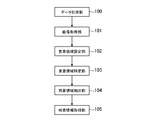
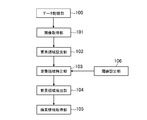
- FIG. 2 is a functional block diagram illustrating an example of functions realized by the image processing apparatus 10.
- the image processing apparatus 10 includes a data storage unit 100, an image acquisition unit 101, an element region setting unit 102, a superimposition region specification unit 103, a foreground region extraction unit 104, and a search information acquisition unit 105.
- the image processing apparatus 10 includes a data storage unit 100, an image acquisition unit 101, an element region setting unit 102, a superimposition region specification unit 103, a foreground region extraction unit 104, and a search information acquisition unit 105.
- the data storage unit 100 is realized mainly by the storage unit 12.
- the data storage unit 100 stores an image including a background and an object.
- the image may be a captured image obtained by photographing a real space with a camera, or may be computer graphics (hereinafter simply referred to as CG).
- CG computer graphics
- the image may be a photographed image obtained by photographing a product with a camera, or a CG created by processing the photographed image with graphic software (for example, a character string indicating the unit price or shipping cost of the photographed image. Or a CG drawn entirely by graphic software without using a captured image.
- the image may be stored in various data formats, for example, BMP format, JPEG format, PNG format, or GIF format.
- the number of colors of the image may be arbitrary, and may be, for example, a color image or a gray scale image.
- the number of bits of the color image or the gray scale image may be arbitrary, and may be, for example, a 24-bit RGB image or an 8-bit gray scale image.
- the background is, for example, an image portion around the object and a state behind the object (scenery).
- the background is a subject farther from the camera than the object and is a subject behind the object.
- the background is a subject whose part is hidden by the object.
- the background may be a 3D model or a 2D model farther from the viewpoint (virtual camera) than the object, or may be an image drawn on a layer below the object layer. .
- the object is, for example, an image portion surrounded by a background, and is a foreground on the near side (viewpoint side) with respect to the background.
- the object is a subject closer to the camera than the background, and a subject in front of the background.
- an object is a subject that hides part of the background.
- the object may be a 3D model or a 2D model closer to the viewpoint than the background, or may be an image drawn on a layer above the background layer.
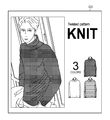
- FIG. 3 is a diagram illustrating an example of an image.
- the image G ⁇ b> 1 a product image indicating a product that is sold and sold using the Internet will be described.
- merchandise is bought and sold using an online shopping mall, a flea market application, or an internet auction.
- the object is clothes for the product
- the background is a space (for example, a window or a door) behind the model wearing the product. Note that when an object is placed on a plane such as a desk or floor, the background is a plane such as a desk or floor.
- the image G1 may be composed only of the background and the object, or may include other parts.
- the image G1 includes portions other than the background and the object.
- information about the product for example, a character string “KNIT” indicating the material of the product
- information about other related products for example, Images of other products of different colors.
- the image G1 can include various types of information such as the price of the product and the shipping cost.
- the image G1 is prepared by the seller of the product.
- a store or an exhibitor prepares and uploads an image G1 by photographing a product or using graphic software.
- the data storage unit 100 stores the uploaded image G1.
- the data stored in the data storage unit 100 is not limited to the above example.
- the data storage unit 100 may store data necessary for extracting the foreground region from the image G1, and for example, the data storage unit 100 stores a determination image and a threshold value for specifying a superimposition region described later.
- product search information acquired by the search information acquisition unit 105 described later may be stored.
- the image acquisition unit 101 is realized mainly by the control unit 11.
- the image acquisition unit 101 acquires an image G1 including a background and an object.
- the image G1 is a product image indicating a product that is sold or sold using the Internet
- the image acquisition unit 101 acquires the image G1 uploaded via the Internet.
- the image acquisition unit 101 acquires the image G1 stored in the data storage unit 100.
- the image acquisition unit 101 may acquire the image G1 directly from the camera.
- the image acquisition unit 101 may acquire the image G1 from the information storage medium or the database server.
- the element region setting unit 102 is realized mainly by the control unit 11.
- the element area setting unit 102 sets a plurality of element areas respectively corresponding to a plurality of elements in the image G1 for the image G1.
- the element is, for example, an individual component included in the image, and is a component of an object or a background.
- the element is an object that can be identified based on learning data obtained by learning the basic shape of the object.
- the object is a person, a mannequin, an animal, or an imaginary character
- individual parts for example, eyes, nose, mouth, etc.
- the object is a product
- parts constituting the product, a pattern or character string on the product surface, a pattern or character string on a package or label, and the like correspond to the elements.
- the product is clothes
- the sleeves and hems of the clothes, seams, wrinkles, patterns, logos, and the like correspond to the elements.
- the product is an electrical appliance
- a component included in the electrical appliance, a pattern on the surface of the electrical appliance, a logo, or the like corresponds to the element.
- the package or label pattern or character string of the food product or the pattern of the surface of the food product corresponds to the element.
- the image G1 is CG
- a character string or a pattern input by graphic software corresponds to an element.
- the element region is, for example, a region including part or all of the element.
- the element region is a bounding box will be described.
- the case where the element region is a circumscribed rectangle of the element will be described.
- the element region may not be a circumscribed rectangle, but may be a rectangle including a margin around the element.
- the shape of the element region may be an arbitrary shape, and may be, for example, a polygon other than a square, or a circle or an ellipse.
- the element area setting unit 102 may determine an element area so as to include a part or all of each element detected from the image G1.
- the method described in (1) may be used.
- learning data obtained by learning the basic shape of the object is stored in advance in the data storage unit 100, and the element region setting unit 102 detects a shape similar to the basic shape of the element from the image G1, A circumscribed rectangle having a shape may be used as the element region.
- Various methods such as a pattern matching method can be applied to the similarity of shapes.
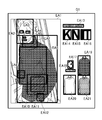
- FIG. 4 is a diagram illustrating an example of the element region set in the image G1.
- the element area setting unit 102 sets the bounding box of each element detected from the image G1 as the element area EA.
- the number of element regions EA is reduced.
- FIG. 4 shows only 21 element areas EA1 to EA21.
- element areas EA of hundreds, thousands, or more may be set. Good.
- the element area EA1 is an area where the entire face of the model wearing the product is detected as an element.
- the element areas EA2 to EA5 are areas in which the right eye, the left eye, the nose, and the mouth are detected as elements, respectively.
- the element areas EA6 to EA12 are areas where clothes, which are objects, are detected as elements, and are, for example, the entire clothes, a neck portion, a trunk portion, a right arm sleeve portion, a wrinkle portion, and the like.
- the element areas EA13 to EA21 are areas in which a product description or a product with a different color is detected as an element.
- the object part (the photographed part of the clothes as a product) is set so that the element areas EA6 to EA12 overlap each other, and the other part overlaps the element area EA. Absent. For example, since the entire character in the image G1 is detected as one element, the element areas EA13 to EA18 do not overlap. Further, for example, the products of different colors in the image G1 are photographed small and no details appear, and the entire products of different colors are detected as one element, so the element areas EA19 to EA21 do not overlap.
- the overlapping area specifying unit 103 is realized mainly by the control unit 11.
- the overlapping area specifying unit 103 specifies an overlapping area in which the degree of overlapping of each element area EA is equal to or greater than a predetermined degree in the image G1.
- the degree of overlap refers to, for example, the number of overlapping element areas EA (multiple overlaps) when all the element areas EA have the same weighting in order to specify the overlap area as in this embodiment. ). Further, for example, when the weight is changed depending on the element area EA (for example, modifications (5) to (6) described later), the numerical value is calculated based on the weight of the element area EA.
- the overlapping region may be one continuous region or a plurality of regions separated from each other.
- the overlapping area is an area composed of pixels in which the overlapping number of the element areas EA is a predetermined number or more.
- a numerical value indicating the degree of overlap is associated with each pixel of the image G1.
- This numerical value may be a numerical value that has a correlation with the degree of overlap.
- a case where a large numerical value means that the degree of overlapping is large will be described. Smallness may mean that the degree of overlap is large.
- the brightness of the corresponding pixel of the determination image having the same size as the image G1 will be described as a numerical value indicating the degree of overlap.
- the brightness is the brightness information of the color, and is also called a pixel value or luminance.
- Corresponding pixels are pixels having the same position (coordinates).
- the brightness of an n-bit grayscale image is used as an example.
- the brightness of each pixel is represented by an integer from 0 to 2 n ⁇ 1 .
- 0 is black
- 2 n-1 is white
- the value between them is an intermediate color (gray).
- the image (FIG. 3) from which the foreground region is extracted is referred to as an original image G1, and is a determination image (FIG. 5) that has the same size and changes the brightness. Is referred to as a determination image G2.
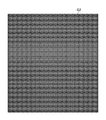
- FIG. 5 is a diagram illustrating an example of the determination image G2.
- the determination image G2 has the same number of vertical and horizontal pixels as the original image G1.
- an arbitrary brightness is set as an initial value, and here, a case where the initial value of the brightness is 0 (black) will be described.
- the initial value of brightness may be 2 n-1 (white) or a value of 1 or more and less than 2 n-1 (intermediate color).
- the superimposing area specifying unit 103 changes the brightness of the determination image G2 based on each element area EA. For example, the overlapping area specifying unit 103 calculates the brightness of the determination image G2 based on the determination result of whether or not each pixel is included in each element area EA, and determines whether or not the brightness is equal to or greater than a threshold value. Based on the determination result, the overlapping region is specified. In other words, the overlapping area specifying unit 103 calculates the brightness of the determination image G2 for each element area EA based on the result of specifying the pixels included in the element area EA.
- the overlapping area specifying unit 103 may change the lightness inside the element area EA or may change the lightness outside the element area EA. That is, the overlapping area specifying unit 103 may change the brightness of either the element area EA or the outside of the element area EA. In other words, the overlapping area specifying unit 103 may change the brightness of pixels included in the element area EA, or may change the brightness of pixels not included in the element area EA. In the present embodiment, the case where the overlapping area specifying unit 103 changes the brightness in the element area EA will be described as an example.
- the overlapping area specifying unit 103 may increase or decrease the brightness. Whether to increase or decrease the brightness may be determined by, for example, the initial value of the brightness of the determination image G2. The brightness may be increased if the initial value is low, and the brightness may be decreased if the initial value is high. In the present embodiment, since the initial value of lightness is 0, the overlapping region specifying unit 103 will be described as an example in which the lightness is increased.
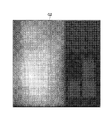
- FIG. 6 is a diagram illustrating an example of the determination image G2 whose brightness has changed.
- the brightness of each pixel is expressed by the density (density) of halftone dots, which means that the darker the halftone dots, the lower the brightness, and the thinner the halftone dots, the higher the brightness.
- the overlapping area specifying unit 103 specifies a pixel included in the element area EA for each element area EA, and increases the brightness of the pixel.
- the amount of increase in brightness may be arbitrary, and is 1 here, but may be 2 or more.
- the portion where the element areas EA overlap each other has a high brightness and becomes white.
- the portion where the element area EA does not overlap has a low brightness and is dark.
- the overlapping area specifying unit 103 specifies the overlapping area based on the determination result of whether or not the brightness of each pixel is equal to or higher than the threshold value.
- the threshold value is stored in advance in the data storage unit 100 and will be described as a fixed value in the present embodiment. However, the threshold value may be changed according to a user input, or may be changed to the original image G1 as in a modification example described later. A corresponding value may be set.
- high brightness means that the overlapping degree of the element areas EA is large, so the overlapping area specifying unit 103 selects an area composed of pixels in which the brightness of each pixel of the determination image G2 is greater than or equal to a threshold value. And identified as a superimposition region. For example, the overlapping area specifying unit 103 binarizes the determination image G2 based on the comparison result between the brightness of each pixel and the threshold value, and specifies the overlapping area.
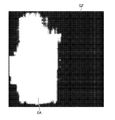
- FIG. 7 is a diagram illustrating an example of the binarized determination image G2.
- the overlapping region specifying unit 103 sets pixels whose brightness is equal to or higher than the threshold as white pixels and pixels whose brightness is lower than the threshold as black pixels.
- the binarized determination image G2 may be in the gray scale format, but may be converted into a monochrome format because there are no intermediate colors.
- the overlapping area specifying unit 103 specifies an area where white pixels are continuous in the determination image G2 as the overlapping area OA.
- the foreground area extraction unit 104 is realized mainly by the control unit 11.
- the foreground area extraction unit 104 extracts a foreground area corresponding to the object from the original image G1 based on the overlapping area OA.
- the foreground area is an area including a part or all of the object, and the overlapping area OA may be used as it is as the foreground area.
- the foreground area extracting unit 104 uses the original image G1 based on the overlapping area OA.
- a foreground region is extracted by executing a separation process for separating the foreground and the background will be described.
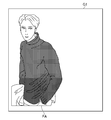
- FIG. 8 is a diagram illustrating an example of the foreground area.
- the foreground area FA is an area in which the product is photographed in the product image.
- the foreground area extraction unit 104 extracts the foreground area FA by designating the overlapping area OA as an object part and executing Grabcut.
- Grabcut is a technique for extracting the foreground area FA by repeating Graphcut.
- Grabcut is described as an example of the separation process, but the separation process itself may be a process for separating the background and the foreground, and various known processes can be applied.
- ScribbleSup method https://arxiv.org/abs/1604.05144
- Lazy Snapping method http://home.cse.ust.hk/ ⁇ cktang/sample_pub). /lazy_snapping.pdf
- a background difference method may be used, or Graphcut may be used.
- the search information acquisition unit 105 is realized mainly by the control unit 11.
- the search information acquisition unit 105 acquires product search information based on the foreground area FA extracted from the original image G1.
- the search information is information that can be used in the search for products, and can be said to be information indicating the characteristics or attributes of the products.
- the search information includes the color, pattern, shape, type (genre or category), size, etc. of the product.
- the search information acquisition unit 105 acquires product search information by performing image analysis on the foreground area FA. For example, if color is used as the search information, the search information acquisition unit 105 may generate a histogram of the foreground area FA and use the frequency of each gradation as the search information, or the most frequently used color or frequency is equal to or greater than a threshold value. May be acquired as search information. In addition, for example, the search information acquisition unit 105 may acquire an average value of colors in the foreground area FA as search information, or a predetermined location (for example, a pixel in the center or near the center) in the foreground area FA. You may acquire a color as search information.
- a pattern is used as the search information
- various pattern patterns are stored in the data storage unit 100, and the search information acquisition unit 105 performs pattern matching on the foreground area FA to obtain a similar pattern.
- Get pattern as search information if a pattern is used as the search information, various pattern patterns are stored in the data storage unit 100, and the search information acquisition unit 105 performs pattern matching on the foreground area FA to obtain a similar pattern. Get pattern as search information.
- a shape pattern is stored in the data storage unit 100 for each product type, and the search information acquisition unit 105 selects the foreground area FA. Then, pattern matching is performed, and the type of product corresponding to the similar shape pattern is acquired as search information. Further, for example, if size is used as search information, a shape pattern is stored in the data storage unit 100 for each size, and the search information acquisition unit 105 performs pattern matching on the foreground area FA and performs similar processing. The size corresponding to the shape pattern to be acquired is acquired as search information.
- FIG. 9 is a flowchart showing an example of processing executed in the image processing apparatus 10.
- the process shown in FIG. 9 is executed by the control unit 11 operating according to a program stored in the storage unit 12.
- the process described below is an example of a process executed by the functional block shown in FIG.
- the control unit 11 acquires the original image G1 stored in the storage unit 12 (S1).
- the original image G1 to be processed may be specified by the user, or may be all or part of the original image G1 from which the foreground area FA has not yet been extracted, among the original images G1 stored in the storage unit 12. May be.
- the control unit 11 detects an element in the original image G1, and sets an element area EA corresponding to each element (S2). In S2, the control unit 11 sets a bounding box surrounding the element detected from the original image G1 as the element area EA.
- the control unit 11 prepares a determination image G2 having the same size as the original image G1, and increases the brightness of each pixel in each element area EA (S3). In S3, the control unit 11 increases the brightness of each pixel in the element area EA for each element area EA. The control unit 11 performs the same process for all the element regions EA detected in S2, and increases the brightness of the determination image G2. The control unit 11 binarizes the determination image G2 whose brightness has been increased in S3 (S4). In S ⁇ b> 4, the control unit 11 sets a pixel having a lightness equal to or higher than the threshold as a white pixel and a pixel having a lightness lower than the threshold as a black pixel.
- the control unit 11 identifies the white pixel region of the determination image G2 binarized in S4 as the overlapping region OA (S5).
- the control unit 11 extracts the foreground area FA from the original image G1 by executing Grabcut on the original image G1 based on the overlapping area OA specified in S5 (S6). In S6, the control unit 11 executes Grabcut assuming that the overlapping area OA is designated as the object part.
- the control unit 11 extracts search information from the foreground area FA extracted in S6 (S7).
- the control unit 11 extracts search information by performing image analysis on the foreground area FA.
- the control unit 11 records the original image G1 and the search information extracted in S7 in association with each other in the storage unit 12 (S8), and the process ends.
- the foreground area FA extraction process can be automated by extracting the foreground area FA from the original image G1 based on the overlapping area OA having a high degree of overlapping of the element areas EA. This saves the user trouble. Furthermore, since the foreground area FA close to the contour of the object can be extracted, the extraction accuracy of the foreground area FA can be improved.
- the image processing apparatus 10 can execute the separation process such as Grabcut on the overlap area OA, so that the separation process can be executed without the user specifying the object portion, and the foreground area FA with high accuracy can be executed. It is possible to save the user's trouble when extracting.
- the separation process such as Grabcut on the overlap area OA
- the image processing apparatus 10 can simplify the specifying process of the overlapping area OA by specifying the overlapping area OA using a numerical value indicating the degree of overlap of the element areas EA.
- the foreground area FA can be extracted quickly.
- the image processing apparatus 10 can simplify the specifying process of the overlapping area OA by specifying the overlapping area OA using the brightness of the determination image G2 having the same size as the original image G1, The processing load on the image processing apparatus 10 can be reduced, and the foreground area FA can be extracted quickly.
- search information is acquired by analyzing the foreground area FA of the original image G1, the accuracy of the search information can be improved, and a highly reliable product search becomes possible.
- the threshold value to be compared with the brightness of each pixel of the determination image G2 has been described as a fixed value, but the threshold value may be a variable value. That is, the lightness threshold value used as a reference when the determination image G2 is binarized may be a variable value instead of a fixed value.
- FIG. 10 is a functional block diagram of the modified example (1).
- a threshold setting unit 106 is realized in addition to the functions described in the embodiment.
- the threshold setting unit 106 is realized mainly by the control unit 11.
- the threshold setting unit 106 sets a threshold corresponding to the original image G1.
- the threshold corresponding to the original image G1 is a threshold corresponding to the feature of the original image G1.
- the features of the original image G1 are, for example, color features and shape features.
- setting the threshold value means changing the threshold value so as to be a numerical value corresponding to the original image G1.
- the threshold setting unit 106 sets a threshold associated with the feature of the original image G1.
- the feature of the original image G1 may be indicated in the accompanying information associated with the original image G1.
- the incidental information may be, for example, the size of the original image G1 other than the attribute information of the modification (3).
- the threshold setting unit 106 may set the threshold so that the detection condition of the overlapping area OA becomes severer as the size of the original image G1 is larger.
- the incidental information indicating the characteristics of the original image G1 may be the resolution of the original image G1.
- the threshold setting unit 106 may set the threshold such that the higher the resolution of the original image G1, the stricter the detection conditions for the overlapping area OA.
- the characteristics of the original image G1 may be obtained by analyzing the original image G1 instead of the accompanying information.
- the number of element regions EA may be used in addition to the histogram analysis of the modification example (4).
- the threshold setting unit 106 may set the threshold so that the detection condition of the overlapping area OA becomes severer as the total number of element areas EA increases.
- the threshold setting unit 106 may set the threshold so that the detection condition of the overlapping area OA becomes severe when the element area EA exists near the end.
- the threshold value setting unit 106 may set a threshold value according to the feature of the original image G1, and for example, may set a threshold value according to the data format and data amount of the original image G1, or the original image G1.
- a threshold value may be set according to the size of the element area EA detected from.
- the superimposition region specifying unit 103 determines whether the brightness of each pixel is equal to or greater than the threshold set by the threshold setting unit 106. That is, when the threshold value is changed by the threshold value setting unit 106, the overlapping area specifying unit 103 executes the determination process based on the changed threshold value.
- the details of the determination process of the overlapping area specifying unit 103 are as described in the embodiment.
- the overlapping area OA is extracted based on the threshold corresponding to the original image G1, the accuracy of the foreground area FA can be increased.
- the threshold setting unit 106 changes the threshold, so the contour of the overlapping area OA also changes.
- the threshold value changes so that the detection condition of the overlapping area OA becomes stricter, the overlapping area OA becomes smaller and its outline may resemble the outline of the object.
- the threshold value is changed so that the detection condition of the overlapping area OA becomes less sweet, the overlapping area OA becomes large, and its outline may not resemble the outline of the object. For this reason, the threshold setting unit 106 may repeatedly change the threshold until the shape of the object is recognized from the outline of the overlapping area OA.
- the superposition region specifying unit 103 specifies the temporary superposition region OA based on the determination result as to whether or not the brightness of each pixel of the determination image G2 is equal to or greater than the threshold set by the threshold setting unit 106.
- the method for specifying the provisional overlap area OA is the same as the method for specifying the overlap area OA described in the embodiment. However, in the modification (2), the overlapping area specifying unit 103 does not specify the temporary overlapping area OA as the overlapping area OA until the shape of the object is recognized.
- the superposition region specifying unit 103 determines whether the similarity between the shape of the temporary superposition region OA and the basic shape is equal to or greater than a predetermined value based on the learning data indicating the basic shape of the object.
- the learning data is data obtained by learning the basic shape of the contour of the object, and is stored in the data storage unit 100 in advance.
- the overlapping area specifying unit 103 acquires the similarity between the shape of the temporary overlapping area OA and the basic shape of the object based on the learning data, and determines whether the similarity is a predetermined value or more.
- the similarity acquisition method itself may use a known pattern matching method or the like.
- the similarity is a numerical value indicating the degree of similarity (matching degree) of the shape, and the higher the similarity, the more similar in shape.
- the similarity is equal to or greater than a predetermined value, the shape of the temporary overlapping area OA and the basic shape of the object are similar.
- the threshold setting unit 106 determines the similarity by repeatedly changing the threshold until it is determined that the similarity is equal to or greater than a predetermined value.
- the threshold setting unit 106 may increase the threshold or decrease the threshold. For example, if the threshold is too low, the temporary overlapping area OA becomes too large and does not resemble the basic shape of the object, so the threshold may be increased. Further, for example, if the threshold is too high, the temporary overlapping area OA becomes too small, and in this case too, it does not resemble the basic shape of the object. That is, the threshold value setting unit 106 changes the threshold value until the shape of the temporary overlapping area OA becomes plausible.
- the amount of change in the threshold value may be a fixed value, may be determined randomly, or may be determined depending on the degree of similarity between the shape of the temporary overlapping area OA and the basic shape.
- the threshold setting unit 106 may increase the amount of change in the threshold if the current degree of similarity is low, or may decrease the amount of change in the threshold if the current degree of similarity is reasonably high.
- the superimposition region specifying unit 103 again determines similarity with the basic shape of the object based on the threshold value changed by the threshold value setting unit 106.
- the overlapping area specifying unit 103 specifies the temporary overlapping area OA when determined to be similar to the basic shape as the overlapping area OA. In other words, until it is determined that the shape of the temporary overlapping area OA and the basic shape are similar, the threshold value change by the threshold setting unit 106, the specification of the temporary overlapping area OA by the overlapping area specifying unit 103, and the basic shape When the determination of no is repeated and they are similar, the overlapping area OA is determined.
- the foreground area FA is extracted based on the overlapping area OA close to the shape of the object, and the ratio of objects in the overlapping area OA increases (the background ratio in the overlapping area OA decreases).
- the accuracy of the foreground area FA can be increased.
- the threshold setting unit 106 sets a threshold corresponding to the attribute information of the original image G1. Also good.
- the attribute information is information indicating what the object is.
- the attribute information is the classification of the object, for example, the type of the object (for example, the genre / category of the product).
- the data storage unit 100 of the modified example (3) stores the original image G1 and attribute information in association with each other.
- the attribute information is designated by the seller of the product and uploaded together with the original image G1.
- the attribute information may be specified by a user other than the seller, for example, an administrator of an online shopping mall.
- Information indicating the relationship between the attribute information and the threshold value may be stored in the data storage unit 100. This information may be in a mathematical expression format or a table format, or may be described as part of the program code.
- the threshold setting unit 106 sets a threshold associated with the attribute information of the original image G1.
- the object is often photographed from a distance so that the whole can be accommodated, and many backgrounds may be photographed in the original image G1. For this reason, unless the detection conditions for the overlapping area OA are strict, the overlapping area OA includes a lot of background, and the accuracy of the foreground area FA may be lowered. Therefore, for example, if the attribute information of the object indicates a predetermined value (a value classified as a large object), the threshold setting unit 106 sets the threshold so that the detection condition of the overlapping area OA becomes strict. Also good.
- the threshold value setting unit 106 sets the threshold value so that the detection condition of the overlapped area OA becomes less sweet if the attribute information of the object indicates a predetermined value (a value that is classified as an object having few appearance features). May be set.
- the overlapping area OA is extracted based on the threshold value corresponding to the attribute of the object, and the ratio of the object in the overlapping area OA can be increased, or the overlapping area OA can be easily detected. Therefore, the accuracy of the foreground area FA can be increased.
- the threshold setting unit 106 may set a threshold corresponding to the histogram of the original image G1.
- the histogram is information indicating the frequency (number of pixels) of the gradation for each gradation of the original image G1.
- the gradation is also referred to as brightness, pixel value, or luminance described above.
- the threshold setting unit 106 sets a threshold corresponding to the characteristics of the histogram of the original image G1.
- the characteristics of the histogram are the characteristics of the frequency of each gradation. For example, whether the frequency is uniformly distributed (there are many colors) in each gradation, or is the frequency concentrated on a specific gradation? Etc.
- the information indicating the relationship between the characteristics of the histogram and the threshold value may be stored in the data storage unit 100. This information may be in a mathematical expression format or a table format, or may be described as part of the program code.
- the threshold setting unit 106 sets a threshold associated with the histogram features of the original image G1.
- the threshold setting unit 106 may set the threshold so that the detection condition of the overlapping area OA becomes severer as the color variation indicated by the histogram increases.
- the threshold value setting unit 106 may set the threshold value such that the detection condition of the overlapping area OA becomes sweeter as the color variation indicated by the histogram is smaller.
- the overlapping area OA is extracted based on the threshold value corresponding to the histogram of the original image G1, and the ratio of objects in the overlapping area OA is increased, or the overlapping area OA is easily detected. Therefore, the accuracy of the foreground area FA can be increased.
- the overlapping area OA may be specified in consideration of the position of each element area EA in the original image G1. For example, since the object is often photographed near the center of the original image G1, the weight of the element area EA near the center may be increased.
- the superposed area specifying unit 103 of this modification weights each element area EA based on the position of each element area EA in the original image G1, and calculates the brightness.
- Information indicating the relationship between the position of the element area EA and the weighting may be stored in the data storage unit 100. This information may be in a mathematical expression format or a table format, or may be described as part of the program code.
- the overlapping area specifying unit 103 calculates the brightness of the determination image G2 based on the weighting associated with the position of the element area EA.
- the overlapping area specifying unit 103 increases the weight of the element area EA as the element area EA is closer to the center of the original image G1. The closer the area EA is to the end of the original image G1, the smaller the weight of the element area EA is.
- a product description may be written near the center of the original image G1, and products of different colors may be arranged on both sides of the original image G1.
- the overlapping area specifying unit 103 causes the element area EA to be closer to the center of the original image G1.
- the weight of the element area EA may be increased as the element area EA is closer to the end of the original image G1.
- the position where the weight of the element area EA is increased is not limited to the center or the end of the original image G1. For example, if there are many objects in the right half of the original image G1, the right half of the weight may be increased or the left half of the original image G1 may be increased. If there are many objects, the left half weight may be increased. Which position of the original image G1 is to be weighted may be determined in consideration of the trend of the layout of the product image, may be determined according to the type of product (genre / category), and the type of the original image G1 (For example, whether it is a product image or a landscape image) may be determined.
- the overlapping area OA is specified in consideration of the position of the element area EA in the original image G1, the ratio of objects in the overlapping area OA is increased or the overlapping area OA is detected. This can improve the accuracy of the foreground area FA.
- the overlapping area OA may be specified in consideration of the size of each element area EA. For example, since the object is often photographed large in the original image G1, the weight of the large element area EA may be increased.
- the superposed area specifying unit 103 of this modification weights each element area EA based on the size of each element area EA, and calculates brightness.
- Information indicating the relationship between the size of the element area EA and the weight may be stored in the data storage unit 100. This information may be in a mathematical expression format or a table format, or may be described as part of the program code.
- the overlapping area specifying unit 103 calculates the brightness of the determination image G2 based on the weighting associated with the size of the element area EA.
- the overlapping area specifying unit 103 increases the weight of the element area EA as the element area EA is larger, and the smaller the element area EA as the element area EA is. The weight of the element area EA may be reduced.
- a superimposition region specifying unit 103 may increase the weight of the element area EA as the element area EA is smaller, and decrease the weight of the element area EA as the element area EA is larger.
- the overlapping area OA is specified in consideration of the size of the element area EA, the ratio of objects in the overlapping area OA is increased, or the overlapping area OA is easily detected. Therefore, the accuracy of the foreground area FA can be increased.
- the processing of the overlapping area specifying unit 103 is not limited to this.
- the overlapping area specifying unit 103 may specify the overlapping area OA from the overlapping degree of the element areas EA.
- the initial value of the brightness of the determination image G2 may be 2 n-1 (white) instead of 0 (black) as shown in FIG.
- the overlapping area specifying unit 103 may reduce the brightness in the element area EA. For example, a portion of the determination image G2 where the element regions EA overlap several times has low brightness and is blackish.
- the overlapping area specifying unit 103 specifies an area composed of pixels whose lightness of the determination image G2 is less than a threshold value as the overlapping area. For example, the overlapping area specifying unit 103 specifies a black pixel area as the overlapping area in the binarized determination image G2.
- the overlapping area specifying unit 103 may increase the brightness outside the element area EA. In this case, a portion of the determination image G2 where the element areas EA overlap several times remains low in brightness and becomes blackish. For this reason, the overlapping area specifying unit 103 specifies an area including pixels whose brightness of the determination image G2 is less than the threshold value as the overlapping area. For example, the overlapping area specifying unit 103 specifies a black pixel area as the overlapping area in the binarized determination image G2.
- the overlapping area specifying unit 103 may reduce the brightness outside the element area EA. In this case, a portion of the determination image G2 where the element regions EA overlap several times remains high in brightness and becomes white. For this reason, the overlapping area specifying unit 103 specifies an area including pixels whose brightness of the determination image G2 is equal to or higher than a threshold value as the overlapping area. For example, the overlapping area specifying unit 103 specifies a white pixel area in the binarized determination image G2 as the overlapping area.
- the determination image G2 may be a color image.
- the lightness any one lightness of R, G, and B may be used, or two or three lightnesses may be used.
- the process shown in FIG. 9 may be executed every time the original image G1 is uploaded, may be executed when the user of the image processing apparatus 10 performs a predetermined operation, or may be a batch file. It may be executed when a predetermined time has arrived.
- the image processing apparatus 10 may be an online shopping mall, a flea market application, or an Internet auction manager side apparatus, or a seller side apparatus.
- the seller's side extracts the foreground area FA and acquires search information, and uploads it together with the original image G1.
- the image processing apparatus 10 may be a third party apparatus that is neither an administrator nor a seller.
- the foreground area extraction unit 104 may extract the overlap area OA as it is as the foreground area FA without performing the separation process on the overlap area OA.
- the brightness for each pixel is not used, but a numerical value that is not particularly related to the brightness may be used.
- the overlapping area specifying unit 103 may vote for the pixels in the element area EA, and may set pixels having a predetermined number of votes or more as the overlapping area OA. In this case, the number of votes for each pixel corresponds to a numerical value indicating the degree of overlap. Furthermore, this numerical value does not need to be prepared for each pixel, and one numerical value may be prepared for a plurality of pixels to simplify the process of specifying the overlapping area OA.
- the product is described as an example of the object, but the object may be an object that can be a foreground, and may not be a product.
- the object may be a person, an animal, a plant, a building, or the like.
- the object may be a vehicle such as an automobile or a motorcycle.
- the object may be a 3D model or a 2D model arranged in the virtual space.
- the 3D model or the 2D model may be a fictitious character, or may be a clothes, a building, or a vehicle drawn with graphic software.
- the image processing apparatus 10 may perform a predetermined process based on the foreground area FA extracted by the foreground area extraction unit 104. For example, the image processing apparatus 10 may record the original image G1 and the foreground area FA in the data storage unit 100 in association with each other.
- the foreground area FA may be used for various purposes. For example, the foreground area FA may be used for display on the display unit 15 or may be used for learning the basic shape of the object.
- the foreground area FA may be used to classify the attribute information of the original image G1. That is, the foreground area FA may be used for the purpose of classifying what is captured in the original image G1.
- the data storage unit 100 does not need to be included in the image processing apparatus 10 and may be realized by a database server.
Landscapes
- Engineering & Computer Science (AREA)
- Theoretical Computer Science (AREA)
- Computer Vision & Pattern Recognition (AREA)
- Physics & Mathematics (AREA)
- General Physics & Mathematics (AREA)
- Computing Systems (AREA)
- Evolutionary Computation (AREA)
- General Health & Medical Sciences (AREA)
- Medical Informatics (AREA)
- Software Systems (AREA)
- Databases & Information Systems (AREA)
- Artificial Intelligence (AREA)
- Health & Medical Sciences (AREA)
- Multimedia (AREA)
- Geometry (AREA)
- Image Analysis (AREA)
Priority Applications (4)
| Application Number | Priority Date | Filing Date | Title |
|---|---|---|---|
| US16/312,245 US10991104B2 (en) | 2017-04-11 | 2017-04-11 | Image processing device, image processing method, and program |
| EP17905661.9A EP3611701A4 (de) | 2017-04-11 | 2017-04-11 | Bildverarbeitungsvorrichtung, bildverarbeitungsverfahren und programm |
| JP2018546922A JP6529686B2 (ja) | 2017-04-11 | 2017-04-11 | 画像処理装置、画像処理方法、及びプログラム |
| PCT/JP2017/014774 WO2018189802A1 (ja) | 2017-04-11 | 2017-04-11 | 画像処理装置、画像処理方法、及びプログラム |
Applications Claiming Priority (1)
| Application Number | Priority Date | Filing Date | Title |
|---|---|---|---|
| PCT/JP2017/014774 WO2018189802A1 (ja) | 2017-04-11 | 2017-04-11 | 画像処理装置、画像処理方法、及びプログラム |
Publications (1)
| Publication Number | Publication Date |
|---|---|
| WO2018189802A1 true WO2018189802A1 (ja) | 2018-10-18 |
Family
ID=63792482
Family Applications (1)
| Application Number | Title | Priority Date | Filing Date |
|---|---|---|---|
| PCT/JP2017/014774 Ceased WO2018189802A1 (ja) | 2017-04-11 | 2017-04-11 | 画像処理装置、画像処理方法、及びプログラム |
Country Status (4)
| Country | Link |
|---|---|
| US (1) | US10991104B2 (de) |
| EP (1) | EP3611701A4 (de) |
| JP (1) | JP6529686B2 (de) |
| WO (1) | WO2018189802A1 (de) |
Families Citing this family (8)
| Publication number | Priority date | Publication date | Assignee | Title |
|---|---|---|---|---|
| US11138699B2 (en) * | 2019-06-13 | 2021-10-05 | Adobe Inc. | Utilizing context-aware sensors and multi-dimensional gesture inputs to efficiently generate enhanced digital images |
| CN111222356A (zh) * | 2020-01-14 | 2020-06-02 | 河北省烟草公司沧州市公司 | 图像识别方法、扫码方法、扫码终端和商品销售管理系统 |
| CN112200783B (zh) * | 2020-09-30 | 2024-06-28 | 北京搜狗科技发展有限公司 | 一种商品图像的处理方法及装置 |
| CN112511767B (zh) * | 2020-10-30 | 2022-08-02 | 山东浪潮科学研究院有限公司 | 一种视频拼接方法及设备、存储介质 |
| KR102561734B1 (ko) * | 2021-02-15 | 2023-07-31 | 엔에이치엔클라우드 주식회사 | 이미지 복원 기반 상품검색 방법 및 시스템 |
| CN113065922B (zh) * | 2021-04-13 | 2021-12-07 | 南京莫愁智慧信息科技有限公司 | 基于移动互联网和大数据分析的电子商务购物平台商品智能匹配推荐方法 |
| US12534347B2 (en) * | 2021-04-30 | 2026-01-27 | Nec Corporation | Vehicle control apparatus, control method, and non-transitory computer readable medium |
| CN113627512B (zh) * | 2021-08-05 | 2024-08-20 | 上海购吖科技有限公司 | 一种图片识别方法及装置 |
Citations (3)
| Publication number | Priority date | Publication date | Assignee | Title |
|---|---|---|---|---|
| JP2001266158A (ja) * | 2000-01-11 | 2001-09-28 | Canon Inc | 画像処理装置、画像処理システム、画像処理方法、及び記憶媒体 |
| JP2004030696A (ja) * | 1997-12-19 | 2004-01-29 | Fujitsu Ltd | 文字列抽出装置及びパターン抽出装置 |
| JP2014225286A (ja) * | 2009-10-23 | 2014-12-04 | 楽天株式会社 | 情報提供装置、情報提供方法、情報提供プログラム、及びそのプログラムを記録するコンピュータ読み取り可能な記録媒体 |
Family Cites Families (9)
| Publication number | Priority date | Publication date | Assignee | Title |
|---|---|---|---|---|
| JP3601658B2 (ja) | 1997-12-19 | 2004-12-15 | 富士通株式会社 | 文字列抽出装置及びパターン抽出装置 |
| JP3506958B2 (ja) * | 1998-09-10 | 2004-03-15 | 富士写真フイルム株式会社 | 画像処理方法、画像処理装置及び記録媒体 |
| US20060059432A1 (en) * | 2004-09-15 | 2006-03-16 | Matthew Bells | User interface having viewing area with non-transparent and semi-transparent regions |
| JP6000699B2 (ja) * | 2012-07-05 | 2016-10-05 | オリンパス株式会社 | 細胞分裂過程追跡装置、及び細胞分裂過程追跡プログラム |
| JP6642970B2 (ja) * | 2015-03-05 | 2020-02-12 | キヤノン株式会社 | 注目領域検出装置、注目領域検出方法及びプログラム |
| US20160343054A1 (en) * | 2015-05-18 | 2016-11-24 | Status Quo Innovation, Llc | Image acquisition and feature extraction apparatus, method of feature extraction and feature identification, and method for creating and providing advertisement content |
| US9635276B2 (en) * | 2015-06-10 | 2017-04-25 | Microsoft Technology Licensing, Llc | Determination of exposure time for an image frame |
| JP6517652B2 (ja) * | 2015-10-01 | 2019-05-22 | 日本電信電話株式会社 | 物体顕著性マップ算出装置、方法、及びプログラム |
| US20180047193A1 (en) * | 2016-08-15 | 2018-02-15 | Qualcomm Incorporated | Adaptive bounding box merge method in blob analysis for video analytics |
-
2017
- 2017-04-11 JP JP2018546922A patent/JP6529686B2/ja active Active
- 2017-04-11 US US16/312,245 patent/US10991104B2/en active Active
- 2017-04-11 EP EP17905661.9A patent/EP3611701A4/de active Pending
- 2017-04-11 WO PCT/JP2017/014774 patent/WO2018189802A1/ja not_active Ceased
Patent Citations (3)
| Publication number | Priority date | Publication date | Assignee | Title |
|---|---|---|---|---|
| JP2004030696A (ja) * | 1997-12-19 | 2004-01-29 | Fujitsu Ltd | 文字列抽出装置及びパターン抽出装置 |
| JP2001266158A (ja) * | 2000-01-11 | 2001-09-28 | Canon Inc | 画像処理装置、画像処理システム、画像処理方法、及び記憶媒体 |
| JP2014225286A (ja) * | 2009-10-23 | 2014-12-04 | 楽天株式会社 | 情報提供装置、情報提供方法、情報提供プログラム、及びそのプログラムを記録するコンピュータ読み取り可能な記録媒体 |
Non-Patent Citations (1)
| Title |
|---|
| See also references of EP3611701A4 * |
Also Published As
| Publication number | Publication date |
|---|---|
| US10991104B2 (en) | 2021-04-27 |
| US20190236789A1 (en) | 2019-08-01 |
| JP6529686B2 (ja) | 2019-06-12 |
| EP3611701A1 (de) | 2020-02-19 |
| EP3611701A4 (de) | 2020-12-02 |
| JPWO2018189802A1 (ja) | 2019-04-18 |
Similar Documents
| Publication | Publication Date | Title |
|---|---|---|
| JP6529686B2 (ja) | 画像処理装置、画像処理方法、及びプログラム | |
| US10049308B1 (en) | Synthesizing training data | |
| US9552656B2 (en) | Image-based color palette generation | |
| US9741137B2 (en) | Image-based color palette generation | |
| US9177391B1 (en) | Image-based color palette generation | |
| US10304408B2 (en) | Method and apparatus for changing background color of toolbar with dominant color of picture | |
| US9311889B1 (en) | Image-based color palette generation | |
| CN109784281A (zh) | 基于人脸特征的产品推荐方法、装置及计算机设备 | |
| CN109711345B (zh) | 一种火焰图像识别方法、装置及其存储介质 | |
| US11972506B2 (en) | Product image generation system | |
| JP6292884B2 (ja) | 製品のカスタマイズに用いるデジタル画像を生成するために赤外線写真を用いる方法 | |
| CN114730377A (zh) | 鞋类认证设备及认证流程 | |
| KR20190134933A (ko) | 이미지 내 객체의 대표 특성을 추출하는 방법, 장치 및 컴퓨터 프로그램 | |
| US8812376B2 (en) | Techniques for generating an electronic shopping list | |
| CN104978565B (zh) | 一种普适性的图像文字提取方法 | |
| TW201443807A (zh) | 視覺化服飾檢索 | |
| CN112884074B (zh) | 基于决策树的图像设计方法、设备、存储介质及装置 | |
| KR101643550B1 (ko) | 비선형 공간에서 고속 선명도 확산 방법을 이용하여 색상불변 특성을 검출하고 표현하는 시스템 및 그 방법 | |
| US20160321733A1 (en) | Product search device, system, method, and program | |
| JP7677429B2 (ja) | メディアコンテンツのオーバーレイに適した画像スペースの検出 | |
| KR20200092452A (ko) | Gui 디자인에 대한 피드백을 제공하는 방법 및 장치 | |
| JP6154545B2 (ja) | 情報処理装置 | |
| CN116563570A (zh) | 一种颜色识别方法、装置、电子设备及存储介质 | |
| CN109859228A (zh) | 基于图像识别推荐鞋款类型的方法、装置及计算机设备 | |
| CN113034631B (zh) | 主题图标的生成方法及其装置、计算机设备 |
Legal Events
| Date | Code | Title | Description |
|---|---|---|---|
| ENP | Entry into the national phase |
Ref document number: 2018546922 Country of ref document: JP Kind code of ref document: A |
|
| 121 | Ep: the epo has been informed by wipo that ep was designated in this application |
Ref document number: 17905661 Country of ref document: EP Kind code of ref document: A1 |
|
| NENP | Non-entry into the national phase |
Ref country code: DE |
|
| ENP | Entry into the national phase |
Ref document number: 2017905661 Country of ref document: EP Effective date: 20191111 |