WO2019069476A1 - Terminal - Google Patents
Terminal Download PDFInfo
- Publication number
- WO2019069476A1 WO2019069476A1 PCT/JP2017/046429 JP2017046429W WO2019069476A1 WO 2019069476 A1 WO2019069476 A1 WO 2019069476A1 JP 2017046429 W JP2017046429 W JP 2017046429W WO 2019069476 A1 WO2019069476 A1 WO 2019069476A1
- Authority
- WO
- WIPO (PCT)
- Prior art keywords
- application
- screen
- image
- event
- displayed
- Prior art date
- Legal status (The legal status is an assumption and is not a legal conclusion. Google has not performed a legal analysis and makes no representation as to the accuracy of the status listed.)
- Ceased
Links
Images



Classifications
-
- G—PHYSICS
- G06—COMPUTING OR CALCULATING; COUNTING
- G06F—ELECTRIC DIGITAL DATA PROCESSING
- G06F3/00—Input arrangements for transferring data to be processed into a form capable of being handled by the computer; Output arrangements for transferring data from processing unit to output unit, e.g. interface arrangements
- G06F3/14—Digital output to display device ; Cooperation and interconnection of the display device with other functional units
- G06F3/1423—Digital output to display device ; Cooperation and interconnection of the display device with other functional units controlling a plurality of local displays, e.g. CRT and flat panel display
-
- G—PHYSICS
- G06—COMPUTING OR CALCULATING; COUNTING
- G06F—ELECTRIC DIGITAL DATA PROCESSING
- G06F1/00—Details not covered by groups G06F3/00 - G06F13/00 and G06F21/00
- G06F1/16—Constructional details or arrangements
- G06F1/1613—Constructional details or arrangements for portable computers
- G06F1/1615—Constructional details or arrangements for portable computers with several enclosures having relative motions, each enclosure supporting at least one I/O or computing function
- G06F1/1616—Constructional details or arrangements for portable computers with several enclosures having relative motions, each enclosure supporting at least one I/O or computing function with folding flat displays, e.g. laptop computers or notebooks having a clamshell configuration, with body parts pivoting to an open position around an axis parallel to the plane they define in closed position
-
- G—PHYSICS
- G06—COMPUTING OR CALCULATING; COUNTING
- G06F—ELECTRIC DIGITAL DATA PROCESSING
- G06F1/00—Details not covered by groups G06F3/00 - G06F13/00 and G06F21/00
- G06F1/16—Constructional details or arrangements
- G06F1/1613—Constructional details or arrangements for portable computers
- G06F1/1633—Constructional details or arrangements of portable computers not specific to the type of enclosures covered by groups G06F1/1615 - G06F1/1626
- G06F1/1637—Details related to the display arrangement, including those related to the mounting of the display in the housing
- G06F1/1647—Details related to the display arrangement, including those related to the mounting of the display in the housing including at least an additional display
-
- G—PHYSICS
- G06—COMPUTING OR CALCULATING; COUNTING
- G06F—ELECTRIC DIGITAL DATA PROCESSING
- G06F1/00—Details not covered by groups G06F3/00 - G06F13/00 and G06F21/00
- G06F1/16—Constructional details or arrangements
- G06F1/1613—Constructional details or arrangements for portable computers
- G06F1/1633—Constructional details or arrangements of portable computers not specific to the type of enclosures covered by groups G06F1/1615 - G06F1/1626
- G06F1/1675—Miscellaneous details related to the relative movement between the different enclosures or enclosure parts
- G06F1/1677—Miscellaneous details related to the relative movement between the different enclosures or enclosure parts for detecting open or closed state or particular intermediate positions assumed by movable parts of the enclosure, e.g. detection of display lid position with respect to main body in a laptop, detection of opening of the cover of battery compartment
-
- G—PHYSICS
- G06—COMPUTING OR CALCULATING; COUNTING
- G06F—ELECTRIC DIGITAL DATA PROCESSING
- G06F3/00—Input arrangements for transferring data to be processed into a form capable of being handled by the computer; Output arrangements for transferring data from processing unit to output unit, e.g. interface arrangements
- G06F3/01—Input arrangements or combined input and output arrangements for interaction between user and computer
- G06F3/048—Interaction techniques based on graphical user interfaces [GUI]
- G06F3/0487—Interaction techniques based on graphical user interfaces [GUI] using specific features provided by the input device, e.g. functions controlled by the rotation of a mouse with dual sensing arrangements, or of the nature of the input device, e.g. tap gestures based on pressure sensed by a digitiser
-
- G—PHYSICS
- G06—COMPUTING OR CALCULATING; COUNTING
- G06F—ELECTRIC DIGITAL DATA PROCESSING
- G06F3/00—Input arrangements for transferring data to be processed into a form capable of being handled by the computer; Output arrangements for transferring data from processing unit to output unit, e.g. interface arrangements
- G06F3/01—Input arrangements or combined input and output arrangements for interaction between user and computer
- G06F3/048—Interaction techniques based on graphical user interfaces [GUI]
- G06F3/0487—Interaction techniques based on graphical user interfaces [GUI] using specific features provided by the input device, e.g. functions controlled by the rotation of a mouse with dual sensing arrangements, or of the nature of the input device, e.g. tap gestures based on pressure sensed by a digitiser
- G06F3/0488—Interaction techniques based on graphical user interfaces [GUI] using specific features provided by the input device, e.g. functions controlled by the rotation of a mouse with dual sensing arrangements, or of the nature of the input device, e.g. tap gestures based on pressure sensed by a digitiser using a touch-screen or digitiser, e.g. input of commands through traced gestures
-
- G—PHYSICS
- G06—COMPUTING OR CALCULATING; COUNTING
- G06F—ELECTRIC DIGITAL DATA PROCESSING
- G06F9/00—Arrangements for program control, e.g. control units
- G06F9/06—Arrangements for program control, e.g. control units using stored programs, i.e. using an internal store of processing equipment to receive or retain programs
- G06F9/44—Arrangements for executing specific programs
- G06F9/451—Execution arrangements for user interfaces
-
- H—ELECTRICITY
- H04—ELECTRIC COMMUNICATION TECHNIQUE
- H04M—TELEPHONIC COMMUNICATION
- H04M1/00—Substation equipment, e.g. for use by subscribers
- H04M1/02—Constructional features of telephone sets
- H04M1/0202—Portable telephone sets, e.g. cordless phones, mobile phones or bar type handsets
- H04M1/0206—Portable telephones comprising a plurality of mechanically joined movable body parts, e.g. hinged housings
- H04M1/0208—Portable telephones comprising a plurality of mechanically joined movable body parts, e.g. hinged housings characterized by the relative motions of the body parts
- H04M1/0214—Foldable telephones, i.e. with body parts pivoting to an open position around an axis parallel to the plane they define in closed position
- H04M1/0216—Foldable in one direction, i.e. using a one degree of freedom hinge
-
- H—ELECTRICITY
- H04—ELECTRIC COMMUNICATION TECHNIQUE
- H04M—TELEPHONIC COMMUNICATION
- H04M1/00—Substation equipment, e.g. for use by subscribers
- H04M1/02—Constructional features of telephone sets
- H04M1/0202—Portable telephone sets, e.g. cordless phones, mobile phones or bar type handsets
- H04M1/0206—Portable telephones comprising a plurality of mechanically joined movable body parts, e.g. hinged housings
- H04M1/0241—Portable telephones comprising a plurality of mechanically joined movable body parts, e.g. hinged housings using relative motion of the body parts to change the operational status of the telephone set, e.g. switching on/off, answering incoming call
- H04M1/0243—Portable telephones comprising a plurality of mechanically joined movable body parts, e.g. hinged housings using relative motion of the body parts to change the operational status of the telephone set, e.g. switching on/off, answering incoming call using the relative angle between housings
-
- H—ELECTRICITY
- H04—ELECTRIC COMMUNICATION TECHNIQUE
- H04M—TELEPHONIC COMMUNICATION
- H04M1/00—Substation equipment, e.g. for use by subscribers
- H04M1/02—Constructional features of telephone sets
- H04M1/0202—Portable telephone sets, e.g. cordless phones, mobile phones or bar type handsets
- H04M1/026—Details of the structure or mounting of specific components
- H04M1/0266—Details of the structure or mounting of specific components for a display module assembly
-
- H—ELECTRICITY
- H04—ELECTRIC COMMUNICATION TECHNIQUE
- H04M—TELEPHONIC COMMUNICATION
- H04M2250/00—Details of telephonic subscriber devices
- H04M2250/16—Details of telephonic subscriber devices including more than one display unit
Definitions
- the present invention relates to user interface technology.
- Patent Document 1 discloses a technique for appropriately implementing the arrangement of display areas in the case where a plurality of identical application programs are started on a multi-monitor.
- an object of this invention is to make an application into a use quick state in the 2nd screen in the display apparatus which has 2 screens.
- the present invention in one aspect, includes a first screen, a second screen, a detection unit for detecting a predetermined event in the own terminal, and an image of a first application on the first screen when the event is detected. And a display control unit configured to display an image of a second application associated with the first application on the second screen.
- a main body having a first case having the first screen, a second case having the second screen, and a connecting portion that connects the first case and the second case in a foldable manner.
- the detection unit may detect, as the event, that the main body has a predetermined degree of opening. Furthermore, the detection unit may detect that the main body further has a predetermined inclination as the event.
- an execution unit that executes the process associated with the event among the processes performed by the second application is provided. It may be
- the reception unit is configured to receive an operation to a screen selected from the first screen and the second screen, and after the image of the second application is displayed, the first screen is selected to be selected. You may provide the reception part which receives operation as an existing screen. Furthermore, the reception unit is configured to receive an operation on a screen selected from the first screen and the second screen, and is associated with the detected event among the first screen and the second screen. The screen may be provided with a reception unit that receives an operation as the selected screen.
- the display control unit may display an image of an application associated with a time zone including a time when the event is detected as an image of the second application.
- the display control unit further includes a measurement unit that measures the position of the own terminal, and the image of the application associated with the position measured when the event is detected. It may be displayed as an image of the second application.
- the image processing apparatus further includes an accumulation unit that accumulates a history of combinations of applications in which images are simultaneously displayed on the first screen and the second screen, and the display control unit is displayed when the event is detected.
- the image of the application having a large number of combination histories with the first application may be displayed as the image of the second application with priority.
- a priority is set for each event, and when the image of the application is already displayed on the second screen, the display control unit is configured to set the priority of the second application in comparison with the application.
- the image of the second application may be displayed on the second screen when is higher.
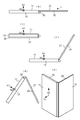
- FIG. 1 shows an appearance of a smartphone 1 according to an embodiment.
- the smartphone 1 includes a main body 40 having a first housing 10, a second housing 20, and a hinge 30.
- Each of the first housing 10 and the second housing 20 is a housing having a rectangular parallelepiped plate shape.
- the first housing 10 has a first screen 11 of rectangular shape
- the second housing 20 has a second screen 21 of rectangular shape.
- the first screen 11 is provided with a speaker port 12 to which a voice of a telephone is output.
- the first screen 11 and the second screen 21 are screens whose housings are different, and are physically separated screens.
- the first case 10 and the first screen 11 are examples of the “first case” and the “first screen” in the present invention
- the second case 20 and the second screen 21 are the “second case” in the present invention.
- second screen “second screen”.
- the terms “first” and “second” are for convenience, and are not limited to this correspondence.
- the housing provided with the speaker opening 12 may be an example of the “second housing” in the present invention
- the other housing may be an example of the “first housing” in the present invention.
- the hinge 30 is a so-called hinge that rotatably connects the first housing 10 and the second housing 20.
- the hinge 30 has a first rotation member and a second rotation member which can rotate around the rotation axis.
- the end 13 of the long side of the first screen 11 of the first housing 10 is fixed to the first rotating member, and the second screen 21 of the second housing 20 is fixed to the second rotating member.
- the long side end 22 is fixed.
- the first housing 10 and the second housing 20 are in a closed state in which the angle formed by the first screen 11 and the second screen 21 (hereinafter referred to as “hinge angle”) is 0 degrees.
- the hinge angle becomes 360 degrees and rotates to the opposite side closed state.
- the first screen 11 and the second screen 21 face outward when the hinge angle is 0 degree and the case is closed, and the first screen is displayed when the hinge angle is 360 degrees and the case is closed to the opposite side 11 and the 2nd screen 21 turn inward.
- the hinge angle is also the angle formed by the first housing 10 and the second housing 20.
- the hinge angle is a value representing the degree of opening of the main body 40, that is, the degree of opening of the first housing 10 and the second housing 20.
- the hinge angle is set to 180 degrees to 0 degrees or 360 degrees, the first housing 10 and the second housing 20 are folded.
- the hinge 30 foldably connects the first housing 10 and the second housing 20.
- the hinge 30 is an example of the “connector” in the present invention.
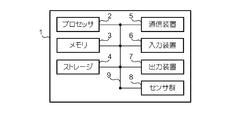
- FIG. 2 shows the hardware configuration of the smartphone 1.
- the smartphone 1 is a computer including the processor 2, the memory 3, the storage 4, the communication device 5, the input device 6, the output device 7, the sensor group 8, and the bus 9.
- Each of these devices is generally housed inside the main body 40 (some devices have a part exposed to the outside like a screen).
- the term "device” can be read as a circuit, a device, a unit, or the like. In addition, one or more devices may be included, or some devices may not be included.
- the processor 2 operates, for example, an operating system to control the entire computer.
- the processor 2 may be configured by a central processing unit (CPU: Central Processing Unit) including an interface with a peripheral device, a control device, an arithmetic device, a register, and the like.
- the processor 2 includes storage (OS) and / or communication of a program (program code) including an OS (Operating System: operating system) and various applications (hereinafter simply referred to as “applications”), software modules, data, etc. It reads from the device 5 to the memory 3 and executes various processing according to these.
- OS Operating System
- applications hereinafter simply referred to as “applications”
- the processor 2 executes, for example, a browser, a social networking service (SNS) application, an electronic mail application, a telephone application, a telephone directory application, a map application, a video playback application, a book browsing application, a document creation application, a camera application, etc. as applications. .
- the number of processors 2 that execute various processes may be one or two or more, and two or more processors 2 may perform various processes simultaneously or sequentially. Also, the processor 2 may be implemented by one or more chips.
- the program may be transmitted from the network via a telecommunication link.
- the memory 3 is a computer readable recording medium, and includes, for example, at least one of a ROM (Read Only Memory), an EPROM (Erasable Programmable ROM), an EEPROM (Electrically Erasable Programmable ROM), and a RAM (Random Access Memory). It may be done.
- the memory 3 may be called a register, a cache, a main memory (main storage device) or the like.
- the memory 3 can store the above-described program (program code), software modules, data, and the like.
- the storage 4 is a computer readable recording medium, and may be configured by at least one of a hard disk drive, a flexible disk, a flash memory (for example, a card, a stick, a key drive), a magnetic strip, and the like.
- the storage 4 may be called an auxiliary storage device.
- the above-mentioned storage medium may be, for example, a database including the memory 3 and / or the storage 4, a server or any other suitable medium.
- the communication device 5 is hardware (transmission / reception device) for performing communication between computers via a wired and / or wireless network, and is also called, for example, a network device, a network controller, a network card, a communication module, or the like.
- the input device 6 is an input device (for example, a microphone, a switch, a button, a sensor, and the like) that receives an input from the outside.
- the output device 7 is an output device (for example, a display, a speaker, an LED lamp, etc.) that performs output to the outside.
- the input device 6 and the output device 7 integrally constitute a touch screen.
- the touch screen is provided on each of the first screen 11 and the second screen 21 so that an input operation by the user can be accepted on either screen.
- the sensor group 8 includes various sensors.
- the sensor group 8 includes, for example, a strain sensor provided on the hinge 30 as a sensor for measuring the hinge angle indicating the degree of opening of the main body 40 described above.
- the strain sensor is provided such that the strain increases as the hinge angle increases.
- the sensor group 8 also has, for example, a triaxial magnetic sensor as a sensor for measuring the tilt of the main body 40.
- the inclination of the main body 40 is represented by six angles formed by two reference directions and the vertical direction, the north-south direction and the east-west direction, and the values measured by the triaxial magnetic sensor represent the six angles.
- the direction of the normal extending from the center P1 of the first screen 11 shown in FIG. 1 is the reference direction A1 and the speaker opening along the long side of the first screen 11 from the same center P1.
- a direction extending in the direction of 12 is used as a reference direction A2.
- the sensor included in the sensor group 8 is not limited to the above-described strain sensor and magnetic sensor, and any sensor may be used as long as it outputs a value representing the degree of opening of the main body 40 and the inclination of the main body 40. It is also good.
- the respective devices such as the processor 2 and the memory 3 are mutually accessible via a bus 9 for communicating information.
- the bus 9 may be configured by a single bus or may be configured by different buses among the devices.
- the smartphone 1 includes hardware such as a microprocessor, a digital signal processor (DSP), an application specific integrated circuit (ASIC), a programmable logic device (PLD), and a field programmable gate array (FPGA). And part or all of each functional block may be realized by the hardware.
- processor 2 may be implemented in at least one of these hardware.
- the smartphone 1 is foldable and images are displayed on two screens, so that the opening condition of various main bodies 40 (the opening condition of the first housing 10 and the second housing 20. Represented by the hinge angle And the inclination of the main body 40 (represented by the orientation of the reference direction A1 in this embodiment).
- the combination of the degree of opening of the main body 40 or the degree of opening of the main body 40 and the inclination of the main body 40 which is considered to be particularly frequently used is referred to as a style.
- FIG. 3 shows an example of the style of the smartphone 1.
- the smartphone 1 viewed from the longitudinal direction of the hinge 30 is shown.
- the first screen 11 and the second screen 21 are arranged in parallel, and can be used as one large screen.
- the degree of opening of the main body 40 is 180 degrees, the fully open style is assumed regardless of the inclination of the main body 40.
- the case where the degree of opening of the main body 40 is 0 degrees as shown in FIG. 3B is referred to as a “fully closed style”.
- the fully closed style is assumed regardless of the inclination of the main body 40.
- FIG. 3C the case where the opening degree of the main body 40 is about 240 degrees, and the reference direction A1 indicating the inclination of the main body 40 is directed vertically upward and the reference direction A2 is directed horizontally Because it is similar to the form when using a notebook PC (Personal Computer), it is called "notebook PC style".
- the opening degree of the main body 40 is about 60 degrees (for example, ⁇ 10 degrees is acceptable), and the reference direction A1 representing the inclination of the main body 40 is vertical about 30 degrees with respect to the horizontal direction
- the upper side is oriented (for example, ⁇ 10 degrees) and the reference direction A2 is horizontally oriented (for example, ⁇ 10 degrees) is referred to as “tent style” because it resembles a tent shape.
- the smartphone 1 viewed from diagonally above is shown.
- the opening degree of the main body 40 is about 90 degrees (for example, ⁇ 45 degrees)
- the reference direction A1 representing the inclination of the main body 40 is horizontal (for example, ⁇ 10 degrees)
- the case where the reference direction A2 is directed vertically upward or downward, that is, vertically oriented (for example, ⁇ 10 degrees allowed) is referred to as “vertically-placed style”.
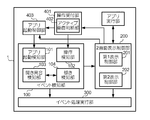
- FIG. 4 shows a functional configuration realized by the smartphone 1.
- the smartphone 1 includes an event detection unit 100 that is an example of the “detection unit” of the present invention, a two-screen display control unit 200 that is an example of the “display control unit” of the present invention, and an example of the “execution unit” of the present invention And an operation reception unit 401, an application activation control unit 403, and an application execution unit 404.
- the operation receiving unit 401 receives the user's operation on the own terminal (smartphone 1).
- the operation accepting unit 401 accepts the user's operation on the touch screen provided on the first screen 11 and the second screen 21 as described above.
- the operation accepting unit 401 accepts an operation on a screen selected from the first screen 11 and the second screen 21.
- the operation reception unit 401 is an example of the “reception unit” in the present invention.
- the selected screen is a screen in a state in which all operations according to the displayed image are received, and is a so-called active screen (active screen).
- the screen which is not selected is a screen which is in a state where it does not receive all the operations according to the displayed image, and is a so-called inactive screen (inactive screen).
- the operation receiving unit 401 receives an operation of tapping the inactive screen as a switching operation for switching the inactive screen to the active screen. That is, the user can select an active screen by tapping the inactive screen.
- the operation reception unit 401 includes an active screen determination unit 402.
- the active screen determination unit 402 determines which of the first screen 11 and the second screen 21 is currently the active screen.
- the active screen determination unit 402 performs this determination, for example, by storing a screen ID indicating one of the first screen 11 and the second screen 21 which is the active screen.
- the active screen determination unit 402 stores a screen ID indicating a screen for which an operation has been received, the active screen determination unit 402 determines that the screen is an active screen.
- the active screen determination unit 402 determines that the screen is the inactive screen, and the stored screen ID indicates the screen Overwrite with the ID (which will be the screen ID of the new active screen).
- the determination of the active screen may be performed, for example, by associating a flag with the screen ID of the active screen.
- the operation receiving unit 401 determines that the screen on which the operation is received is the active screen by the active screen determination unit 402, if the operation is an operation for activating the application, the application activation control indicating the application ID indicating the application is performed. It supplies to the part 403.
- the application activation control unit 403 reads a program, data, parameters, and the like related to the application identified by the supplied application ID, develops the program, data, and the like in a memory, and activates the application.
- the application execution unit 404 executes a process related to the application activated by the application activation control unit 403.
- the application execution unit 404 provides an application image, which is an image prepared to be displayed on the screen in its own application, to a two-screen display control unit 200 described later.
- the provision of the application image may be performed by supplying the data of the application image itself to the two-screen display control unit 200, or by notifying the storage location of the application image to the two-screen display control unit 200. It is also good.
- the event detection unit 100 detects a predetermined event in the own terminal (smartphone 1) (detecting that a predetermined event has occurred). For example, the event detection unit 100 detects, as an event, that a predetermined application (such as an SNS application) has been activated and that a predetermined operation (such as a store search operation using a browser) has been performed using the predetermined application. .
- a predetermined application such as an SNS application
- a predetermined operation such as a store search operation using a browser
- the event detection unit 100 detects that the own terminal has become a predetermined style as an event. Specifically, the event detection unit 100 detects, as a predetermined event, that the main body 40 has a predetermined degree of opening and, depending on the style, a predetermined inclination. The event detection unit 100 also detects an event in which activation of a predetermined application, a predetermined operation, and a predetermined style are combined.
- the event detection unit 100 includes an application activation detection unit 101, an operation detection unit 102, an opening degree detection unit 103, and an inclination detection unit 104 as functions for detecting each event.
- the application activation detection unit 101 detects that a predetermined application (for example, an SNS application or the like) has been activated.
- the application activation control unit 403 detects activation of a predetermined application whose application image is displayed on the first screen 11 in the present embodiment.
- the application activation control unit 403 When the application activation control unit 403 activates an application, the application activation control unit 403 supplies the application activation detection unit 101 with an application ID indicating the application and a screen ID of a screen on which an application image of the application is displayed.
- the application activation detection unit 101 stores, for example, a list of application IDs indicating a predetermined application, and when the application ID included in the list is supplied together with the screen ID indicating the first screen 11, the predetermined application Is detected on the first screen 11.
- the operation detection unit 102 detects that a predetermined operation has been performed.
- the operation receiving unit 401 detects that a predetermined operation has been performed on a predetermined application whose application image is displayed on the first screen 11.
- a predetermined operation for example, an operation of inputting a predetermined place name into a map application (place name input operation) or an operation of inputting a predetermined store name into a browser (store name input operation) is used.
- the operation reception unit 401 supplies the application detection ID of the application whose application image is displayed on the first screen 11 and the character string input by the received operation to the operation detection unit 102.
- the operation detection unit 102 stores a list of a set of an application ID of a predetermined application and a predetermined place name or a predetermined store name, and a character string indicating the application ID and the place name or the store name included in the list When it is determined that the predetermined operation described above has been performed.
- an operation specific to a predetermined application may be used as the predetermined operation, and for example, an operation (musical instrument operation operation) of playing an instrument with an instrument performance application is used.
- the operation receiving unit 401 supplies the application detection unit 102 with an application ID indicating the application for which the operation has been received and an operation ID indicating the operation.
- the operation detection unit 102 stores a list of a set of an application ID indicating a predetermined application and an operation ID indicating a predetermined operation, and the set of the application ID and the operation ID included in the list is supplied. , Detects that a predetermined operation has been performed.
- prescribed operation is detected as mentioned above may be newly started in order to perform this operation, it may not be so.
- the smartphone 1 even if the application image of the activated application is not displayed, the application may be operating in the background and the application image may also be held. Therefore, for example, even when a browser operating in the background is called to display the application image and a predetermined store name is input, a predetermined operation is detected (in other words, even if a predetermined operation is detected) The activation of a predetermined application is not necessarily detected).
- the degree-of-opening detection unit 103 detects that the degree of opening of the main body 40 has become a predetermined degree of opening based on the measurement result of the sensor group 8.
- the inclination detection unit 104 detects that the inclination of the main body 40 has become a predetermined inclination based on the measurement result of the sensor group 8.
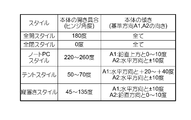
- the opening condition detection unit 103 and the inclination detection unit 104 detect these, for example, the style, the opening condition of the main body 40 (hinge angle), and the inclination of the main body 40 (direction of the reference directions A1 and A2). It stores and uses the style detection table associated with it.
- FIG. 5 shows an example of the style detection table.
- “180 degrees” and “all” are associated with “full open style” and “0 degrees” and “all” are associated with the degree of opening and inclination of the main body 40 with “full closed style”.
- “notebook PC style” “220 to 260 degrees” and “A1: vertically upward 0 to 10 degrees, A2: horizontal to ⁇ 10 degrees” are associated as the degree of opening and inclination of the main body 40.
- “A1: vertically upward and 0 to 10 degrees” indicates that the direction of the reference direction A1 is in the range of 0 to 10 degrees with respect to the vertically upward.
- A2 horizontal direction and ⁇ 10 degrees
- the direction of the reference direction A2 is 10 degrees ( ⁇ 10 degrees) to the angle formed vertically upward with respect to the horizontal direction, and the angle formed vertically downward is 10 degrees ( ⁇ It indicates that the orientation fits within 10 degrees.
- Teent style “50 to 70 degrees” and “A1: horizontal and +20 to +40 degrees, A2: horizontal and ⁇ 10 degrees”; “vertically installed style”: “45 to 135 degrees”
- A1: horizontal and ⁇ 10 degrees, A2: vertical and 0 to 10 degrees” are associated with the opening degree and inclination of the main body 40.
- the opening degree detection unit 103 Detects that the opening degree of the main body 40 has become a predetermined opening degree. If it is detected that 0 degrees and 180 degrees of them are detected, the style is determined regardless of the inclination of the main body 40, so the styles associated with the detected opening degree of the main body 40 (full closed style and full open) Style) has been detected.
- the opening degree detection unit 103 When detecting that the opening degree of the main body 40 has become a predetermined opening degree, the opening degree detection unit 103 notifies the tilt detection unit 104 of a style corresponding to the detected opening degree.
- the inclination detecting unit 104 includes the above six angles formed by the reference directions A1 and A2 measured by the magnetic sensors of the sensor group 8 within the range of the inclination of the main body 40 associated with the notified style.
- the detection by the inclination detection unit 104 is performed only when the detection by the opening degree detection unit 103 is performed. Therefore, when the detection by the inclination detection unit 104 is performed, the style associated with the combination of the detected degree of opening of the main body 40 and the inclination of the main body 40 is detected.
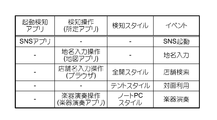
- the event detection unit 100 detects an event based on the above detection results. Since the event detection unit 100 performs this detection, an event in which an application (start detection application) whose start is detected, a detected operation (detection operation) and a detected style (detection style) are associated with an event.
- the detection table is stored and used.
- FIG. 6 shows an example of the event detection table. In the example of FIG. 6, a predetermined application is also shown for the detection operation.
- an event named “SNS activation” is associated with the detection application “SNS application”.
- an event named “place name input” is associated with a detection operation “place name input operation (map application)”, and a detection style “store name input operation (browser)” and a detection style "full open style”
- An event named "store search” is associated.
- an event named "face-to-face use” is associated with the detection style “tent style”, and “instrument performance” for the detection operation “instrument performance operation (instrument performance application)” and the detection style "notebook PC style” The event named is associated with it.
- the event detection unit 100 detects an event associated with each of the above detection results in the event detection table. For example, when the application activation detection unit 101 detects the “SNS application”, the event detection unit 100 detects an event “SNS activation”, and indicates the “tent style” by the opening condition detection unit 103 and the inclination detection unit 104. When the degree of opening and inclination are detected, an event of "face-to-face use” is detected.
- the event detection unit 100 determines that those detection results are simultaneously obtained. For example, when the “store name input operation” and the “full open style” are detected within a predetermined period, the event detection unit 100 determines that they are simultaneously detected, and associates the detection results with the detection results in the event detection table. Detect an event called "Store Search". When the event detection unit 100 detects an event in this manner, the event detection unit 100 supplies the detection result to the two-screen display control unit 200 and the event processing execution unit 300.
- the two-screen display control unit 200 controls the first screen 11 and the second screen 21 to display the above-described application image (image prepared to be displayed on the screen in the application).
- the two-screen display control unit 200 causes the active screen to display an application image of the application activated by the activation operation performed on the active screen.
- the two-screen display control unit 200 includes a first display control unit 201 and a second display control unit 202.
- the first display control unit 201 displays the application image on the first screen 11, and the second display control unit 202 displays the application image on the second screen 21. That is, the application image of the application activated when the first screen 11 is an active screen is displayed on the first screen 11 by the first display control unit 201, and is activated when the second screen 21 is an active screen. The application image of the application is displayed on the second screen 21 by the second display control unit 202.
- the two-screen display control unit 200 is an application image (hereinafter referred to as a “first application image”) of a first application defined in advance on the first screen 11 when an event is detected by the event detection unit 100.
- first application image an application image of the second application associated with the first application
- second application image an application image of the second application associated with the first application
- the state of the second screen 21 is not considered.
- the two-screen display control unit 200 stores a display application table in which an event, a first application (first application), and a second application (second application) are associated with each other.
- FIG. 7 shows an example of the display application table.
- the “SNS application” and the “photo viewing application” are associated with the event “SNS activation” as the first application and the second application.
- map application and “weather forecast application” are associated with “place name input”
- “browser” and “map application” are associated with “store search” as a first application and a second application.
- the "moving image reproduction application” is associated with “face-to-face use”
- the "instrument performance application” and the “score display application” are associated with the “musical instrument performance” as the first application and the second application.
- the two-screen display control unit 200 Since the application image is displayed as a first application image by the first display control unit 201, a photo browsing is a second application associated with an event called SNS activation and a SNS application in the display application table.
- the application image of the application is displayed on the second screen 21 as a second application image.
- the two-screen display control unit 200 calls the second application and holds the second application image stored therein 2 Display on screen 21.
- the two-screen display control unit 200 requests the application activation control unit 403 to activate the second application.
- the application activation control unit 403 receives this request, the application activation control unit 403 activates the requested second application.
- the two-screen display control unit 200 causes the second screen 21 to display the second application image of the second application activated in this way.
- the two-screen display control unit 200 detects that the place name input is detected as an event
- the first screen 11 in which the operation of inputting the place name which is this event is received Since the application image is displayed as the first application image by the first display control unit 201, the application image of the weather forecast application associated in the display application table with the place name input and the map application is displayed on the second screen 21. Display.
- the two-screen display control unit 200 detects that the face-to-face use is detected as an event, does the first display control unit 201 have an application currently displayed on the first screen 11? If it is determined that the application is present, it is determined whether or not the application is a video playback application that is the first application associated with the event of "face-to-face use".
- the two-screen display control unit 200 determines that the moving image reproduction application is displayed on the first screen 11, those events and the first application are associated in the display application table
- the application image of the video reproduction application is displayed on the second screen 21.
- the two-screen display control unit 200 notifies the event processing execution unit 300 to that effect.
- the event processing execution unit 300 executes the processing associated with the detected event among the processing performed by the second application.
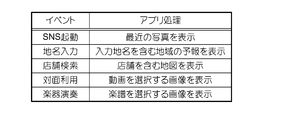
- the event processing execution unit 300 stores an application processing table in which an event is associated with processing (application processing) of a second application to be executed.
- FIG. 8 shows an example of the application processing table.
- an application process “display recent picture” is associated with an event “SNS activation”.
- "Display forecast of area including input place name” for "place name input” "show map including store” for “store name input”
- select video for face-to-face use” “Display image” is associated with “play musical score”
- “display image for selecting score” is associated as event and application processing.
- the event processing execution unit 300 is notified of the fact that the photo browsing application is displayed on the second screen 21 from the two-screen display control unit 200, the photo browsing application The process of displaying the stored recent picture is executed as an application process associated with the event. Further, when the event processing execution unit 300 is notified that the moving image reproduction application is displayed on the second screen 21 from the two-screen display control unit 200 when the face-to-face use is detected as an event, the moving image reproduction application A process of displaying an image for selecting a moving image is executed as an application process associated with the event.
- the two-screen display control unit 200 causes the second screen 21 to start the second application and display the second application image when a predetermined event is detected.
- the second application image is displayed on the second screen 21 even if the above is not performed.
- the switching operation of the active screen (operation on the second screen 21) is not performed, so the first screen 11 is the active screen. It is maintained as it is.
- the second screen 21 may be the active screen.
- the operation receiving unit 401 sets the selected screen (active screen) to the first screen 11. Switch to accept the operation.
- the two-screen display control unit 200 notifies the operation reception unit 401 to that effect.
- the active screen determination unit 402 of the operation reception unit 401 stores the screen ID of the second screen 21 as the screen ID of the active screen when the notification is received, the screen ID of the first screen 11 is displayed. Overwrite with screen ID.
- the operation receiving unit 401 always receives the operation as the screen (active screen) in which the first screen 11 is selected even after the second application image is displayed.
- the smartphone 1 performs an application image display process of displaying a second application image when an event is detected based on the above configuration.
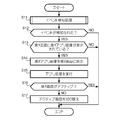
- FIG. 9 shows an example of the operation procedure in the application image display process. This operation procedure is started when the power of the smartphone 1 is turned on, and is repeated at predetermined time intervals (for example, every 0.5 seconds).
- the smartphone 1 performs a process (event detection process) of detecting the above-described event (step S11).
- the smartphone 1 determines whether an event is detected (step S12), and ends the operation procedure when it is determined that the event is not detected (NO). If the smartphone 1 (two-screen display control unit 200) determines that (YES) is detected in step S12, it determines whether or not the first application image is displayed on the first screen 11 (step S13). ).
- step S13 If the smartphone 1 (two-screen display control unit 200) determines that the display is not displayed (NO) in step S13, the operation procedure ends.
- the smartphone 1 (two-screen display control unit 200) is associated with the detected application and the first application in which the first application image is displayed.
- the second application image of the second application is displayed (step S14).
- the smartphone 1 executes the application process of the second application associated with the detected event (step S15). Subsequently, the smartphone 1 (the operation receiving unit 401) determines whether the first screen 11 is active (step S16), and ends the operation procedure when it is determined that the first screen 11 is active (YES). If the smartphone 1 (the operation receiving unit 401) determines that the screen is not active (NO) in step S16, the smartphone 1 switches the active screen from the second screen 21 to the first screen 11 (step S17), and ends this operation procedure. Do.
- the foldable terminal having the two screens of the smartphone 1
- the first application when the predetermined event described above is detected and the first application is displayed on the first screen 11, those events and the first The second application image of the second application associated with one application is displayed.
- the application can be quickly made available on the second screen (the second screen 21 in the present embodiment) without performing an operation for displaying the second application image.
- a specific style is detected as an event, and for example, the full-open style is detected if the degree of opening of the main body is a predetermined degree of opening (the hinge angle is 180 degrees).
- the user wants to use the second application associated with the first application in addition to the first application, the user can activate the second application only by changing the degree of opening of the main body.
- the tent style is represented by the inclination of the main body in addition to the degree of opening of the main body. This makes it possible to increase the types of applications that can be activated as the second application, as compared to the case of detecting only the style represented only by the degree of opening of the main body.
- the second screen 21 is activated.
- the state of the first screen 11 is maintained as the active screen.
- the second application is displayed when the first application image is displayed on the first screen 11 when an event is detected.
- the image is displayed on the second screen 21.
- the present invention is not limited to this.
- the second application image is displayed when the first application image is displayed on the second screen 21. It may be displayed on one screen 11.
- an application image of a telephone application is displayed only on the first screen 11 provided with the speaker opening 12.
- the application displayed on the second screen 21 is set as the first application, and the application image of the telephone application is displayed on the first screen 11 as the second application image. Just do it.
- the second application image is displayed on the other screen. Even if one application image is already displayed, the second application image is not displayed on one screen. However, when the first application image is already displayed on the other screen, the second application image may be displayed on one screen.
- the two-screen display control unit 200 causes the second application image to be displayed on one of the first screen 11 and the second screen 21 when an event is detected. Display the app image on the other screen.
- the second screen can quickly make the application available.
- the telephone application is defined to display an application image on the first screen 11 in which the speaker port 12 is provided.
- the camera application is set to display an application image on the first screen 11.
- the two-screen display control unit 200 causes the second application image to be displayed on the designated screen. For example, when an event called SNS activation is detected in the example of FIG. 7, the two-screen display control unit 200 causes the second screen 21 to display the second application image as it is if the second application is a photo browsing application. If the second application is a camera application, the second application image is displayed on the first screen 11 defined as a screen for displaying an application image of the camera application.
- the two-screen display control unit 200 may consider the time zone when determining an application for displaying an application image.
- the two-screen display control unit 200 displays, as a second application image, an application image of the second application associated with a time zone including the time when an event is detected in addition to the first application.
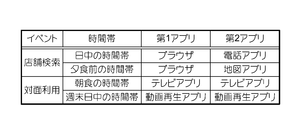
- the two-screen display control unit 200 stores a display application table in which an event, a time zone, a first application, and a second application are associated with each other.
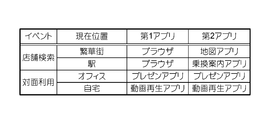
- FIG. 10 shows an example of the display application table of this modification.
- “Tent style” includes “TV app” for “Break time”, “Video playback application” for “Weekend day time” as the first and second apps. It is associated. For example, when the store search is detected in the time zone before dinner and the application images of the browser associated with them are displayed on the first screen 11 as the first application image, the two-screen display control unit 200 The second application image is displayed on the second screen 21 with the map application as the second application.
- the two-screen display control unit 200 detects the telephone application, for example, when the store search is detected in the breakfast time zone and the application image of the browser associated with them is displayed as the first application image. 2 Display the second application image as an application.
- the telephone application is determined to display the application image on the first screen 11 as described in the above-described modification, in this case, the first application image is displayed on the second screen 21.
- a 2 application image is displayed on the first screen 11.
- the event processing execution unit 300 detects a predetermined event and the second application image of the second application is displayed, the detected event in the processing performed by the second application and A process associated with a time zone including the time when the event is detected may be executed.
- the event processing execution unit 300 executes processing to switch to the channel of the news program if it is the time zone of breakfast, If it is a time zone, the process of switching to the channel of the variety program is executed. This makes it possible to save time and effort of the user who is to execute the process when the process to be performed first is generally determined in the application that is often used in a specific time zone.
- the two-screen display control unit 200 may take into consideration the current, past, or future position of the smartphone when deciding an application for displaying an application image.
- the sensor group 8 illustrated in FIG. 2 functions as a measurement unit that measures the position of the own terminal, such as a GPS (Global Positioning System).
- the two-screen display control unit 200 displays, as a second application image, an application image of the second application associated with the current position measured when an event is detected in addition to the first application.
- the two-screen display control unit 200 stores a current position table in which position information measured by the sensor group 8 is associated with current positions such as an office, a home, a downtown, and a station.
- FIG. 11 shows an example of the display application table of this modification.
- “browser” and “map application” exist at the current position “business district”
- “browser” and “transfer guidance application” exist at the current position “station”. It is matched as a 1st application and a 2nd application.
- both "presentation application” corresponds to the current position "office”
- “video playback application” corresponds to the current position "home” as the first application and the second application. It is attached.
- the two-screen display control unit 200 detects a store search, and the application image of the browser associated with them is the first screen 11 as the first application image.
- the application image of the map application which is the second application associated with the downtown area, is displayed on the second screen 21 as a second application image.
- the two-screen display control unit 200 causes the second screen 21 to display an application image of the transfer guidance application associated with the station as a second application image.
- the application when there is an application that is often used in a specific place, the application can be made available quickly in that place compared to other applications.
- the event processing execution unit 300 detects a predetermined event and the second application image of the second application is displayed, the current position among the processing performed by the second application is performed.
- the associated processing may be executed.
- the event processing execution unit 300 displays a map around the current position as processing associated with the downtown, for example, when the current location is a downtown, a store search is detected, and the second application image of the map application is displayed.
- the shop search is detected at the station and the second application image of the transfer guide application is displayed, the nearest station is input as the station name of the departure point as the process associated with the station. Execute the process This makes it possible to save time and effort of the user who executes the process when the process to be performed first is generally determined in the application that is often used in a specific place.
- the operation receiving unit 401 may not always receive an operation with the first screen 11 as an active screen even after the second application image is displayed. For example, when the event receiving unit 100 detects an event and the two-screen display control unit 200 displays the second application image, the operation receiving unit 401 always selects the second screen 21 (active screen (active screen)). The operation may be accepted as being).
- the active screen determination unit 402 of the operation reception unit 401 stores the screen ID of the first screen 11 as the screen ID of the active screen when the second application image is displayed, the screen ID is selected It is executed by overwriting the screen ID of the second screen 21.
- the operation on the second application in which the second application image is displayed can be quickly made available.
- the operation accepting unit 401 may accept an operation with the screen associated with the detected event among the first screen 11 and the second screen 21 as the active screen.
- the first screen 11 is set as an active screen, and when musical instrument performance is detected as an event. 2 Screen 21 is made an active screen.
- the operation after the two application images are displayed It will be possible to do it quickly.
- Opening degree and inclination are not limited to those described in the embodiments.
- the hinge angle indicating a predetermined degree of opening may be changed (for example, the degree of opening in the fully open style may be 175 degrees or 170 degrees instead of 180 degrees).
- the allowable degree of each opening degree and each inclination may be changed (for example, ⁇ 10 degrees may be ⁇ 5 degrees or ⁇ 15 degrees).
- Style The style that the smartphone can take is not limited to the one described in the example.
- the style when placed on the floor (the reference direction A1 points vertically upward) and the style when held by the hand (the reference direction A1 points slightly vertically upward from the horizontal direction) are different styles It is also good.
- the style when held vertically (the reference direction A2 points near the upper vertical) and the style when held horizontally (the reference direction A2 points horizontally) are different styles It may be defined.
- the opening degree and inclination of the main body 40 specific to the style are determined, and the combination of frequently used applications is determined in the style, the display and event by the two-screen display control unit 200
- Application processing by the processing execution unit 300 is executed. As a result, it is possible to save the trouble of the user and quickly make the application available on the second screen.
- the first application, the second application, and the application process are determined in advance, but for example, those set by the user may be used.
- the usage history of the application of the user may be accumulated, and the combination of applications frequently used by the user and the process frequently used may be used as the first application, the second application, and the application process.
- the two-screen display control unit 200 accumulates a history of combinations of applications that displayed application images on the first screen 11 and the second screen 21 at the same time (specifically, the two-screen display control unit 200 Application ID is associated and stored).
- the two-screen display control unit 200 in this case is an example of the "storage unit” in the present invention.
- the two-screen display control unit 200 gives priority to the second application image of the application having a larger history of combination with the first application displayed on the first screen 11 when the event is detected. And the second screen 21 is displayed.
- the two-screen display control unit 200 in this case is an example of the “display control unit” in the present invention.
- the two-screen display control unit 200 may always display, for example, the application image of the application having the largest combination history with the first application as the second application image, or the combination with the first application.
- the probability of displaying an application image of an application having a large number of histories as the second application image may be increased.
- the application image of the application that the user frequently uses with the first application that is, the application image of the application that is more likely to be used by the user who is displaying the first application, is more easily displayed as the second application image , That app can be made available quickly.
- the application activation control unit 403 accumulates a history of processing performed first by the user among the processing of the second application in which the second application image is displayed, and the event processing execution unit 300
- the process is prioritized and executed as the application process. Good.
- the event processing execution unit 300 A process of displaying a search field is executed as an application process. In this way, processing that is more likely to be executed by the user than other processing can be executed as application processing.
- the above history (history of combination of applications and history of processing) is stored in association with the current time or the current position, and an event is detected and the first application image is displayed. If the time zone including the current time or the history where the current position is common is accumulated more, the two-screen display control unit 200 is preferentially displayed as the second application, and the history is accumulated more
- the event processing execution unit 300 may execute as the application processing with priority as the processing being performed.
- the second application image is displayed without considering the state of the second screen, but the state of the second screen may be considered.
- the two-screen display control unit 200 has already displayed an application image of some application on the second screen 21 when an event is detected and the first application image is displayed on the first screen 11
- the second application image is displayed on the second screen 21 when the priority of the second application is higher than that of the application.
- the priority of this application is determined, for example, for each event.
- FIG. 12 shows an example of the priority of an application.
- “Transit guidance application”, “scheduler”, and “map application” have higher priority than the second application
- “TV application” and “Distributed video browsing application Etc. are determined to have lower priority than the second application.
- “TV application”, “Distributed video viewing application”, and “Video playback application” have higher priority than the second application
- the two-screen display control unit 200 displays a television application having lower priority than the second application on the second screen 21. If it is set, the application image of the map application which is the second application is displayed on the second screen 21 as the second application image, but the transfer guidance application having higher priority than the second application is displayed on the second screen 21 If it is, the application image of the map application which is the second application is not displayed on the second screen 21.
- the two-screen display control unit 200 is a moving image that is the second application.
- the application image of the reproduction application is not displayed on the second screen 21.
- the transfer guidance application is displayed on the second screen 21
- the priority is lower than that of the second application when the face-to-face use is detected, so the two-screen display control unit 200 is a moving image that is the second application.
- the application image of the reproduction application is displayed on the second screen 21 as a second application image.
- the “map application” in the store search with “*” in the drawing and the “moving image reproduction application” in the face-to-face use are the same applications as the second application.
- the second application image may be displayed again by lowering the priority or not determining the priority for the same application as the second application (finally, the second application image is displayed) It doesn't change.
- the application image of such an application is displayed by setting the priority of the application that is likely to be used together with the first application to be higher than the second application when a predetermined event occurs. It is possible to prevent the display from being switched to another application image (second application image) even though it has been switched.
- the inclination of the main body 40 may be defined by a method different from the above embodiment.
- the reference direction may be one. If only the reference direction A1 is used, the inclination of the main body 40 is defined as the direction in which the first screen 11 faces, and if only the reference direction A2 is used, the vertical direction of the first screen 11 (direction along the long side) is The inclination of the main body 40 is defined as the facing direction.
- a reference direction different from that of the embodiment may be used.
- the direction along the short side of the first screen 11 may be used, or the direction of the normal to the second screen 21 may be used.
- the front direction the direction of the normal to the screen
- the vertical direction the longitudinal direction of the screen
- any reference direction may be used.
- the attitude of the main body 40 may be determined.
- the hinge 30 of the smartphone 1 rotatably connects the first housing 10 and the second housing 20 so that the hinge angle changes from 0 degrees to 360 degrees, but any range between them And the hinge angle may be changed so as to change.
- the first housing 10 and the second housing 20 are connected such that the first screen 11 and the second screen 21 face outward when the hinge angle becomes 0 degree.
- the first housing 10 and the second housing 20 may be connected so that the first screen 11 and the second screen 21 face inward when the hinge angle becomes 0 degree.
- deformation of the housing may be caused by a connecting mechanism other than the hinge.
- the functional configuration of the smartphone is not limited to that shown in FIG.
- a plurality of functional blocks shown in FIG. 4 may be integrated into one functional block.
- part of the functions may be separated to provide a new function block.
- the opening degree detection unit 103 and the inclination detection unit 104 may be integrated to be a style detection unit that detects the style of the smartphone, or a function of requesting the application activation control unit 403 to activate the second application. May be separated from the two-screen display control unit 200 to newly provide a function as a start request unit.
- functions equivalent to the functions shown in FIG. 4 may be realized in the entire functional configuration.
- the present invention is applicable not only to a smartphone but also to, for example, a tablet terminal.
- the present invention can be applied to any terminal that has two screens and can realize each function shown in FIG.
- the present invention further includes an information processing method for realizing the above-described function in a terminal, and a program for causing a computer to realize the information processing method.
- This program may be provided in the form of a recording medium such as an optical disc storing the program, or may be downloaded to a computer via a network such as the Internet, provided in a form such as installing it and making it available. It may be done.
- the input and output information and the like may be stored in a specific place (for example, a memory) or may be managed by a management table. Information to be input or output may be overwritten, updated or added. The output information etc. may be deleted. The input information or the like may be transmitted to another device.
- Software Software may be called software, firmware, middleware, microcode, hardware description language, or any other name, and may be an instruction, instruction set, code, code segment, program code, program Should be interpreted broadly to mean: subprograms, software modules, applications, software applications, software packages, routines, subroutines, objects, executables, threads of execution, procedures, functions, etc.
- software, instructions, etc. may be sent and received via a transmission medium.
- software may use a wireline technology such as coaxial cable, fiber optic cable, twisted pair and digital subscriber line (DSL) and / or a website, server or other using wireless technology such as infrared, radio and microwave When transmitted from a remote source, these wired and / or wireless technologies are included within the definition of transmission medium.
- wireline technology such as coaxial cable, fiber optic cable, twisted pair and digital subscriber line (DSL) and / or a website, server or other using wireless technology such as infrared, radio and microwave
Landscapes
- Engineering & Computer Science (AREA)
- Theoretical Computer Science (AREA)
- General Engineering & Computer Science (AREA)
- Physics & Mathematics (AREA)
- Human Computer Interaction (AREA)
- General Physics & Mathematics (AREA)
- Computer Hardware Design (AREA)
- Signal Processing (AREA)
- Software Systems (AREA)
- Mathematical Physics (AREA)
- User Interface Of Digital Computer (AREA)
- Telephone Function (AREA)
- Digital Computer Display Output (AREA)
- Controls And Circuits For Display Device (AREA)
Abstract
La présente invention concerne un dispositif d'affichage qui consiste : en un premier écran (11) ; en un second écran (12) ; en une unité de détection (100, 103, 104) qui détecte un événement d'autoterminal prescrit ; et en une unité de commande d'affichage (200) qui, lorsque l'événement a été détecté et une image pour une première application est affichée sur le premier écran, amène une image destinée à une seconde application qui est associée à la première application à être affichée sur le second écran.
Priority Applications (2)
| Application Number | Priority Date | Filing Date | Title |
|---|---|---|---|
| EP17928017.7A EP3674874A4 (fr) | 2017-10-05 | 2017-12-25 | Terminal |
| US16/648,419 US20200264825A1 (en) | 2017-10-05 | 2017-12-25 | Terminal |
Applications Claiming Priority (2)
| Application Number | Priority Date | Filing Date | Title |
|---|---|---|---|
| JP2017-195368 | 2017-10-05 | ||
| JP2017195368A JP6538795B2 (ja) | 2017-10-05 | 2017-10-05 | 表示装置 |
Publications (1)
| Publication Number | Publication Date |
|---|---|
| WO2019069476A1 true WO2019069476A1 (fr) | 2019-04-11 |
Family
ID=65994613
Family Applications (1)
| Application Number | Title | Priority Date | Filing Date |
|---|---|---|---|
| PCT/JP2017/046429 Ceased WO2019069476A1 (fr) | 2017-10-05 | 2017-12-25 | Terminal |
Country Status (4)
| Country | Link |
|---|---|
| US (1) | US20200264825A1 (fr) |
| EP (1) | EP3674874A4 (fr) |
| JP (1) | JP6538795B2 (fr) |
| WO (1) | WO2019069476A1 (fr) |
Families Citing this family (6)
| Publication number | Priority date | Publication date | Assignee | Title |
|---|---|---|---|---|
| JP6567621B2 (ja) * | 2017-10-04 | 2019-08-28 | 株式会社Nttドコモ | 表示装置 |
| US12008232B2 (en) * | 2019-03-24 | 2024-06-11 | Apple Inc. | User interfaces for viewing and accessing content on an electronic device |
| CN112506386B (zh) | 2019-09-16 | 2023-08-01 | 华为技术有限公司 | 一种折叠屏显示方法及电子设备 |
| JP7604158B2 (ja) * | 2020-10-02 | 2024-12-23 | キヤノン株式会社 | 電子機器、電子機器の制御方法およびプログラム |
| JP2022108147A (ja) * | 2021-01-12 | 2022-07-25 | レノボ・シンガポール・プライベート・リミテッド | 情報処理装置、及び制御方法 |
| JP2024013972A (ja) * | 2022-07-21 | 2024-02-01 | レノボ・シンガポール・プライベート・リミテッド | 携帯型情報処理装置 |
Citations (8)
| Publication number | Priority date | Publication date | Assignee | Title |
|---|---|---|---|---|
| JP2003122581A (ja) * | 2001-10-17 | 2003-04-25 | Casio Comput Co Ltd | 情報処理装置、アプリケーションプログラム起動方法及びシステムプログラム |
| JP2012027562A (ja) | 2010-07-20 | 2012-02-09 | Toshiba Corp | 情報処理装置および表示領域の配置方法 |
| JP2013074408A (ja) * | 2011-09-27 | 2013-04-22 | Kyocera Corp | 携帯端末、表示制御方法及びプログラム |
| JP2013543620A (ja) * | 2010-10-01 | 2013-12-05 | ゼット124 | フォーカスに基づいて起動されるハードウェアボタン |
| JP2014107714A (ja) * | 2012-11-28 | 2014-06-09 | Nec Casio Mobile Communications Ltd | 携帯端末装置 |
| JP2015041271A (ja) * | 2013-08-22 | 2015-03-02 | ソニー株式会社 | 情報処理装置、記憶媒体、および制御方法 |
| JP2015069230A (ja) * | 2013-09-26 | 2015-04-13 | Kddi株式会社 | 携帯端末装置およびプログラム |
| JP2015190986A (ja) * | 2014-03-27 | 2015-11-02 | 株式会社リコー | 情報処理装置、情報処理方法、及びプログラム |
Family Cites Families (8)
| Publication number | Priority date | Publication date | Assignee | Title |
|---|---|---|---|---|
| US8890802B2 (en) * | 2008-06-10 | 2014-11-18 | Intel Corporation | Device with display position input |
| KR101569776B1 (ko) * | 2009-01-09 | 2015-11-19 | 삼성전자주식회사 | 접히는 표시부를 가지는 휴대 단말기 및 이의 운용 방법 |
| JP5783177B2 (ja) * | 2010-08-05 | 2015-09-24 | 日本電気株式会社 | 携帯端末および表示制御方法 |
| JPWO2012144632A1 (ja) * | 2011-04-20 | 2014-07-28 | Necカシオモバイルコミュニケーションズ株式会社 | 情報処理装置、情報処理方法及びプログラム |
| JP2013246724A (ja) * | 2012-05-28 | 2013-12-09 | Panasonic Corp | 表示装置、表示制御方法、及び表示制御プログラム |
| JPWO2014142269A1 (ja) * | 2013-03-14 | 2017-02-16 | 京セラ株式会社 | 電子機器 |
| KR102331956B1 (ko) * | 2014-02-10 | 2021-11-29 | 삼성전자주식회사 | 사용자 단말 장치 및 이의 디스플레이 방법 |
| KR20170053513A (ko) * | 2015-11-06 | 2017-05-16 | 삼성전자주식회사 | 복수의 디스플레이들을 포함하는 전자 장치 및 그 동작 방법 |
-
2017
- 2017-10-05 JP JP2017195368A patent/JP6538795B2/ja active Active
- 2017-12-25 WO PCT/JP2017/046429 patent/WO2019069476A1/fr not_active Ceased
- 2017-12-25 US US16/648,419 patent/US20200264825A1/en not_active Abandoned
- 2017-12-25 EP EP17928017.7A patent/EP3674874A4/fr not_active Ceased
Patent Citations (8)
| Publication number | Priority date | Publication date | Assignee | Title |
|---|---|---|---|---|
| JP2003122581A (ja) * | 2001-10-17 | 2003-04-25 | Casio Comput Co Ltd | 情報処理装置、アプリケーションプログラム起動方法及びシステムプログラム |
| JP2012027562A (ja) | 2010-07-20 | 2012-02-09 | Toshiba Corp | 情報処理装置および表示領域の配置方法 |
| JP2013543620A (ja) * | 2010-10-01 | 2013-12-05 | ゼット124 | フォーカスに基づいて起動されるハードウェアボタン |
| JP2013074408A (ja) * | 2011-09-27 | 2013-04-22 | Kyocera Corp | 携帯端末、表示制御方法及びプログラム |
| JP2014107714A (ja) * | 2012-11-28 | 2014-06-09 | Nec Casio Mobile Communications Ltd | 携帯端末装置 |
| JP2015041271A (ja) * | 2013-08-22 | 2015-03-02 | ソニー株式会社 | 情報処理装置、記憶媒体、および制御方法 |
| JP2015069230A (ja) * | 2013-09-26 | 2015-04-13 | Kddi株式会社 | 携帯端末装置およびプログラム |
| JP2015190986A (ja) * | 2014-03-27 | 2015-11-02 | 株式会社リコー | 情報処理装置、情報処理方法、及びプログラム |
Non-Patent Citations (1)
| Title |
|---|
| See also references of EP3674874A4 |
Also Published As
| Publication number | Publication date |
|---|---|
| EP3674874A4 (fr) | 2020-11-25 |
| JP2019067346A (ja) | 2019-04-25 |
| JP6538795B2 (ja) | 2019-07-03 |
| US20200264825A1 (en) | 2020-08-20 |
| EP3674874A1 (fr) | 2020-07-01 |
Similar Documents
| Publication | Publication Date | Title |
|---|---|---|
| JP6567622B2 (ja) | 表示装置 | |
| JP6538795B2 (ja) | 表示装置 | |
| US8145269B2 (en) | Mobile terminal and method for displaying menu on the same | |
| US8787968B2 (en) | Mobile terminal and image display method therein | |
| US8340635B2 (en) | Capability model for mobile devices | |
| US9026947B2 (en) | Mobile terminal and method for displaying an image in a mobile terminal | |
| US8612740B2 (en) | Mobile terminal with a dedicated screen of a first operating system (OS) with at least an icon to touch for execution in a second OS | |
| CN111066306A (zh) | 在局域网内共享数据的方法及电子设备 | |
| EP2388715A1 (fr) | Terminal mobile et son procédé de contrôle pour la navigation de pages Web | |
| JP6567621B2 (ja) | 表示装置 | |
| KR20150071252A (ko) | 전자장치에서 화면 구성 제어를 위한 방법 및 장치 | |
| US12008219B2 (en) | User interface presentation method and apparatus, computer-readable medium and electronic device | |
| CN110362762B (zh) | 内容数据展示方法、装置、电子设备及存储介质 | |
| KR20110026971A (ko) | 이동 단말기 및 이것의 디스플레이 제어 방법 | |
| US11818852B2 (en) | Folding terminal control method and apparatus, terminal, and storage medium | |
| CN113741756A (zh) | 信息处理方法、装置、终端和存储介质 | |
| CN111159604A (zh) | 图片资源加载方法及装置 | |
| CN118779055A (zh) | 会话界面的展示方法、装置、电子设备、存储介质和程序产品 | |
| US9648157B2 (en) | Mobile terminal and method of controlling information publication via a website in a mobile terminal | |
| CN112083840A (zh) | 控制电子设备的方法、装置、终端及存储介质 | |
| CN115774822A (zh) | 数据更新方法、装置、终端及存储介质 | |
| CN111310031B (zh) | 房源信息展示方法、装置、终端及存储介质 | |
| KR100632217B1 (ko) | 대기 화면 제어 방법 및 장치 | |
| CN120085956A (zh) | 界面编辑方法、装置、电子设备、存储介质和程序产品 |
Legal Events
| Date | Code | Title | Description |
|---|---|---|---|
| 121 | Ep: the epo has been informed by wipo that ep was designated in this application |
Ref document number: 17928017 Country of ref document: EP Kind code of ref document: A1 |
|
| ENP | Entry into the national phase |
Ref document number: 2017928017 Country of ref document: EP Effective date: 20200323 |
|
| NENP | Non-entry into the national phase |
Ref country code: DE |