WO2019077766A1 - 情報処理端末 - Google Patents
情報処理端末 Download PDFInfo
- Publication number
- WO2019077766A1 WO2019077766A1 PCT/JP2017/046430 JP2017046430W WO2019077766A1 WO 2019077766 A1 WO2019077766 A1 WO 2019077766A1 JP 2017046430 W JP2017046430 W JP 2017046430W WO 2019077766 A1 WO2019077766 A1 WO 2019077766A1
- Authority
- WO
- WIPO (PCT)
- Prior art keywords
- pinch
- touch screen
- designation
- touch
- displayed
- Prior art date
- Legal status (The legal status is an assumption and is not a legal conclusion. Google has not performed a legal analysis and makes no representation as to the accuracy of the status listed.)
- Ceased
Links
Images



Classifications
-
- G—PHYSICS
- G06—COMPUTING OR CALCULATING; COUNTING
- G06F—ELECTRIC DIGITAL DATA PROCESSING
- G06F3/00—Input arrangements for transferring data to be processed into a form capable of being handled by the computer; Output arrangements for transferring data from processing unit to output unit, e.g. interface arrangements
- G06F3/01—Input arrangements or combined input and output arrangements for interaction between user and computer
- G06F3/048—Interaction techniques based on graphical user interfaces [GUI]
- G06F3/0484—Interaction techniques based on graphical user interfaces [GUI] for the control of specific functions or operations, e.g. selecting or manipulating an object, an image or a displayed text element, setting a parameter value or selecting a range
- G06F3/04842—Selection of displayed objects or displayed text elements
-
- G—PHYSICS
- G06—COMPUTING OR CALCULATING; COUNTING
- G06F—ELECTRIC DIGITAL DATA PROCESSING
- G06F3/00—Input arrangements for transferring data to be processed into a form capable of being handled by the computer; Output arrangements for transferring data from processing unit to output unit, e.g. interface arrangements
- G06F3/01—Input arrangements or combined input and output arrangements for interaction between user and computer
- G06F3/048—Interaction techniques based on graphical user interfaces [GUI]
- G06F3/0481—Interaction techniques based on graphical user interfaces [GUI] based on specific properties of the displayed interaction object or a metaphor-based environment, e.g. interaction with desktop elements like windows or icons, or assisted by a cursor's changing behaviour or appearance
- G06F3/0482—Interaction with lists of selectable items, e.g. menus
-
- G—PHYSICS
- G06—COMPUTING OR CALCULATING; COUNTING
- G06F—ELECTRIC DIGITAL DATA PROCESSING
- G06F3/00—Input arrangements for transferring data to be processed into a form capable of being handled by the computer; Output arrangements for transferring data from processing unit to output unit, e.g. interface arrangements
- G06F3/01—Input arrangements or combined input and output arrangements for interaction between user and computer
- G06F3/048—Interaction techniques based on graphical user interfaces [GUI]
- G06F3/0484—Interaction techniques based on graphical user interfaces [GUI] for the control of specific functions or operations, e.g. selecting or manipulating an object, an image or a displayed text element, setting a parameter value or selecting a range
- G06F3/04845—Interaction techniques based on graphical user interfaces [GUI] for the control of specific functions or operations, e.g. selecting or manipulating an object, an image or a displayed text element, setting a parameter value or selecting a range for image manipulation, e.g. dragging, rotation, expansion or change of colour
-
- G—PHYSICS
- G06—COMPUTING OR CALCULATING; COUNTING
- G06F—ELECTRIC DIGITAL DATA PROCESSING
- G06F3/00—Input arrangements for transferring data to be processed into a form capable of being handled by the computer; Output arrangements for transferring data from processing unit to output unit, e.g. interface arrangements
- G06F3/01—Input arrangements or combined input and output arrangements for interaction between user and computer
- G06F3/048—Interaction techniques based on graphical user interfaces [GUI]
- G06F3/0487—Interaction techniques based on graphical user interfaces [GUI] using specific features provided by the input device, e.g. functions controlled by the rotation of a mouse with dual sensing arrangements, or of the nature of the input device, e.g. tap gestures based on pressure sensed by a digitiser
- G06F3/0488—Interaction techniques based on graphical user interfaces [GUI] using specific features provided by the input device, e.g. functions controlled by the rotation of a mouse with dual sensing arrangements, or of the nature of the input device, e.g. tap gestures based on pressure sensed by a digitiser using a touch-screen or digitiser, e.g. input of commands through traced gestures
- G06F3/04883—Interaction techniques based on graphical user interfaces [GUI] using specific features provided by the input device, e.g. functions controlled by the rotation of a mouse with dual sensing arrangements, or of the nature of the input device, e.g. tap gestures based on pressure sensed by a digitiser using a touch-screen or digitiser, e.g. input of commands through traced gestures for inputting data by handwriting, e.g. gesture or text
-
- G—PHYSICS
- G06—COMPUTING OR CALCULATING; COUNTING
- G06F—ELECTRIC DIGITAL DATA PROCESSING
- G06F40/00—Handling natural language data
- G06F40/10—Text processing
- G06F40/12—Use of codes for handling textual entities
- G06F40/123—Storage facilities
-
- G—PHYSICS
- G06—COMPUTING OR CALCULATING; COUNTING
- G06F—ELECTRIC DIGITAL DATA PROCESSING
- G06F40/00—Handling natural language data
- G06F40/10—Text processing
- G06F40/166—Editing, e.g. inserting or deleting
-
- G—PHYSICS
- G06—COMPUTING OR CALCULATING; COUNTING
- G06F—ELECTRIC DIGITAL DATA PROCESSING
- G06F2203/00—Indexing scheme relating to G06F3/00 - G06F3/048
- G06F2203/048—Indexing scheme relating to G06F3/048
- G06F2203/04808—Several contacts: gestures triggering a specific function, e.g. scrolling, zooming, right-click, when the user establishes several contacts with the surface simultaneously; e.g. using several fingers or a combination of fingers and pen
Definitions
- the present invention relates to user interface technology.
- Patent Document 1 when a press-and-hold gesture is detected on an editable content displayed on a touch screen display, a content magnifier which expands the editable content is displayed to cause the content to be selected, and the selected content is copied.
- Technology is disclosed.
- Patent 2017-79073 gazette
- an object of the present invention is to reduce the time and effort required to attach an object displayed on a touch screen to another place.
- a display control unit that displays content including a plurality of selectable objects on a touch screen, and a pinch-in operation performed on the touch screen are displayed on the touch screen.
- a specification determination unit that determines whether the specification operation is specification of one or more objects included in the content, and when it is determined that the pinch-in operation is the specification operation, the one or more objects specified by the specification operation.
- an instruction determination is performed to determine whether the pinch-out operation instructs paste-up of an object stored in the clipboard or an instruction operation when a pinch-out operation is performed on a touch screen.
- a display control unit for displaying content including a plurality of selectable objects on the touch screen, and when it is determined that the instruction operation is performed, the object stored in the clipboard is displayed on the touch screen.
- a display control unit for displaying the content generated by inserting the content into the content, on the touch screen.
- the specification determining unit is configured to perform the pinch-in operation It is determined that
- the designation determination unit determines that the pinch-in operation is the designation operation.
- the content is the plurality of objects arranged on the touch screen according to a predetermined rule, and the first reception unit is displayed at a first touch position related to the pinch-in operation. An operation of selecting an object group included in a range from one object to a second object displayed at the second touch position is accepted as the selection operation.
- the first reception unit when the first reception unit performs an operation of tracing a plurality of objects arranged according to a predetermined rule while touching a position different from the position related to the operation of tracing, the first reception unit performs the operation of the tracing operation.
- An operation of selecting a designated object group is accepted as the selection operation.
- the instruction determination unit determines that the pinch-out operation is the instruction operation when the pinch-out operation is performed in a state where the touch is performed at a position different from the position related to the pinch-out operation. Do.
- the image processing apparatus further includes a second reception unit that receives a designation operation for designating a sticking position of an object, and the pinch out operation is performed in a state where the sticking position is designated by the accepted designation operation;
- the instruction determination unit determines that the pinch out operation is the instruction operation.
- the instruction determination unit determines that the pinch-out operation is the instruction operation.
- FIG. 1 shows a hardware configuration of a smartphone 1 according to an embodiment.
- the smartphone 1 is a computer including a processor 2, a memory 3, a storage 4, a communication device 5, an input device 6, an output device 7, and a bus 8.
- the term "device” can be read as a circuit, a device, a unit, or the like.
- the processor 2 operates, for example, an operating system to control the entire computer.
- the processor 2 may be configured by a central processing unit (CPU: Central Processing Unit) including an interface with a peripheral device, a control device, an arithmetic device, a register, and the like.
- CPU Central Processing Unit
- the processor 2 includes storage (OS) and / or communication of a program (program code) including an OS (Operating System: operating system) and various applications (hereinafter simply referred to as “applications”), software modules, data, etc. It reads from the device 5 to the memory 3 and executes various processing according to these.
- the number of processors 2 that execute various processes may be one or two or more, and two or more processors 2 may perform various processes simultaneously or sequentially.
- the processor 2 may be implemented by one or more chips.
- the program may be transmitted from the network via a telecommunication link.
- the memory 3 is a computer readable recording medium, and includes, for example, at least one of a ROM (Read Only Memory), an EPROM (Erasable Programmable ROM), an EEPROM (Electrically Erasable Programmable ROM), and a RAM (Random Access Memory). It may be done.
- the memory 3 may be called a register, a cache, a main memory (main storage device) or the like.
- the memory 3 can store the above-described program (program code), software modules, data, and the like.
- the storage 4 is a computer readable recording medium, and may be configured by at least one of a hard disk drive, a flexible disk, a flash memory (for example, a card, a stick, a key drive), a magnetic strip, and the like.
- the storage 4 may be called an auxiliary storage device.
- the above-mentioned storage medium may be, for example, a database including the memory 3 and / or the storage 4, a server or any other suitable medium.
- the communication device 5 is hardware (transmission / reception device) for performing communication between computers via a wired and / or wireless network, and is also called, for example, a network device, a network controller, a network card, a communication module, or the like.
- the input device 6 is an input device (for example, a microphone, a switch, a button, a sensor, and the like) that receives an input from the outside.
- the output device 7 is an output device (for example, a display, a speaker, an LED lamp, etc.) that performs output to the outside.
- the input device 6 and the output device 7 integrally constitute a touch screen 10.
- the touch screen 10 is an output device for displaying an image and an input device for receiving an operation of the user.
- the touch screen 10 includes a display surface 11 for displaying an image, and a position detection sensor 12 for detecting a position (touch position) touched by the user on the display surface 11.
- a position detection sensor 12 for detecting a position (touch position) touched by the user on the display surface 11.
- the position detection sensor 12 in the present embodiment, a sensor capable of simultaneously detecting two touch positions is used. Thereby, the touch screen 10 receives an input represented by two touch positions.
- the respective devices such as the processor 2 and the memory 3 are mutually accessible via a bus 8 for communicating information.
- the bus 8 may be configured by a single bus or may be configured by different buses among the devices.
- the smartphone 1 includes hardware such as a microprocessor, a digital signal processor (DSP), an application specific integrated circuit (ASIC), a programmable logic device (PLD), and a field programmable gate array (FPGA). And part or all of each functional block may be realized by the hardware.
- DSP digital signal processor
- ASIC application specific integrated circuit
- PLD programmable logic device
- FPGA field programmable gate array
- processor 2 may be implemented in at least one of these hardware.
- the processor 2 of the smartphone 1 executes a program to control each unit to realize the function group described below.
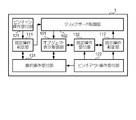
- FIG. 2 shows a functional configuration realized by the smartphone 1.
- the smartphone 1 includes an object display control unit 101, a clipboard control unit 102, a designation operation determination unit 111, an instruction operation determination unit 112, a pinch in operation reception unit 121, a pinch out operation reception unit 122, and a selection operation reception unit And a designated operation receiving unit 132.
- the object display control unit 101 causes the touch screen 10 to display an image including one or more objects.
- the object display control unit 101 is an example of the “display control unit” in the present invention.
- the object is, for example, a character string, a photographic image, a drawn image (so-called CG (Computer Graphics)), an image representing data or an image representing a program (icon, shortcut image, etc.).
- CG Computer Graphics
- Data indicating these objects are stored in storage means such as an external device accessible via the memory 3, the storage 4 or the communication device 5.
- the object display control unit 101 reads out data indicating an object from the storage means, generates an image including the read object (for example, an image of a screen of an application, an image of a web page, etc.), and generates the generated image as a touch screen Display on 10
- the pinch-in operation receiving unit 121 receives a pinch-in operation performed on the touch screen 10.
- the pinch-in operation is an operation of touching two places on the touch screen 10 to bring the two touch positions closer. For example, when two touch positions are detected, the pinch-in operation reception unit 121 repeatedly calculates the distance between them at a predetermined time interval (for example, every 0.1 seconds), and the calculated distance is constant. Or when the rate decreases by a certain rate, the operation is accepted as a pinch-in operation.
- the method of accepting the pinch-in operation is not limited to this, and another known method may be used.
- the pinch out operation receiving unit 122 receives a pinch out operation performed on the touch screen 10.
- the pinch out operation is an operation of touching two places on the touch screen 10 and moving away the two touch positions. For example, when two touch positions are detected, the pinch-out operation reception unit 122 repeatedly calculates the distance between them at a predetermined time interval (for example, every 0.1 seconds), and the calculated distance is constant. When the length or a certain rate increases, the operation is accepted as a pinch out operation.
- the method of accepting the pinch out operation is not limited to this, and other known methods may be used.
- the selection operation receiving unit 131 receives a selection operation for selecting an object displayed on the touch screen 10.
- the selection operation reception unit 131 is an example of the “first reception unit” in the present invention.
- the selection operation reception unit 131 performs a pinch out operation on the touch screen 10 that displays an object group arranged along one or more rows or one or more columns at a first touch position of the pinch out operation. Is received as a selection operation for selecting an object group arranged from the objects displayed on the screen to the objects displayed on the second touch position.
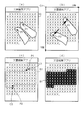
- FIG. 3 shows an example of the object selection operation.
- the object display control unit 101 causes the touch screen 10 to display the character string edited by the document editing application as an object group arranged along one or more lines.
- the pinch out operation receiving unit 122 supplies the coordinates of the touch position P1 and the coordinates of the touch position P2 to the selection operation receiving unit 131 each time both touch positions are detected.
- This coordinate is, for example, a coordinate in a coordinate system around an arbitrary point on the display surface 11.
- a coordinate system represented by an X-axis along the left-right direction and a Y-axis along the up-down direction with the point O1 at the upper left corner of the display surface 11 as a center is used.
- the selection operation reception unit 131 acquires information (object related information) related to the object displayed from the object display control unit 101.
- the selection operation reception unit 131 is an object that indicates information indicating each character included in the character string, the center coordinates and size of the characters, and the direction (row or column) in which the character strings are arranged. Acquire as related information.
- the selection operation reception unit 131 specifies the character C1 displayed at the touch position P1 and the character C2 displayed at the touch position P2 as shown in FIG. 3C from the acquired object related information, and the character The character string B1 in the range from C1 to the character C2 is specified.
- the selection operation reception unit 131 displays the specified character string B1, that is, the object (character C1) displayed at the first touch position (touch position P1) to the second touch position (touch position P2).
- the pinch out operation shown in FIGS. 3A and 3B is accepted.
- the selection operation reception unit 131 uses the information (object information) indicating the selected object group as information that can specify the specified character string B1 (for example, the number of characters from the beginning to the characters C1 and C2 (the 32nd and 98th characters) ) Is supplied to the object display control unit 101.
- the object display control unit 101 highlights the character string B1 indicated by the supplied object information as shown in (d) of FIG. This enables the user to identify the object group selected by the pinch out operation.
- the characters displayed at both touch positions change, so the objects selected according to that, that is, the highlight display
- the character string also changes.
- the touch position P1 at which the distance becomes short like that.
- the touch position P2 is also determined to be two touch positions in the received selection operation.
- the selection operation reception unit 131 pinches as a selection operation to select the character string finally identified as the selected object group. Accept the out operation.
- both of the head (for example, the character displayed at the touch position P1) and the tail (for example, the character displayed at the touch position P2) of the object to be selected are changed by pinch out operation. While you can choose.
- the object display control unit 101 maintains the highlight display of the selected character string B1 even after the user releases the finger.
- the object selected by the pinch out operation is determined when the user removes the finger from the touch screen 10.
- the selection operation reception unit 131 holds object information indicating the selected object group (character string B1 in the example of FIG. 3) until the selection operation is performed again.
- the character string is written horizontally, but in the case of vertical writing, the character string can be selected by the same method.
- contents including not only characters but also photographic images and CG as objects
- the selection operation reception unit 131 specifies the characters displayed at the first touch position and the second touch position, the photo image, the CG, etc., and the characters arranged from the first touch position to the second touch position , A pinch out operation is accepted as a selection operation for selecting a photographic image, CG and the like.
- the specification operation determination unit 111 determines whether the pinch-in operation is a specification operation for specifying the object.
- the designation operation determination unit 111 is an example of the “designation determination unit” in the present invention. There are two ways to specify an object. The first is designation of an object as a so-called copy and paste target (copy target) for copying files, data, etc. to another place.
- the second is specification of an object as a so-called cut-and-paste object (moving object) in which files, data, etc. are moved to another place.
- the designation operation determination unit 111 performs a pinch-in operation performed in a state where an object displayed on the touch screen 10 is selected (for example, a state where highlight display is performed as illustrated in FIG. 3D). Is determined to be a designation operation for designating the object as a copy target or a move target.
- the specification operation determination unit 111 determines that the specification operation is to specify an object as a copy target, and the movement direction is the second. If it is included in the range, it is determined that the operation is a designation operation to designate an object as a movement target.
- the first range is a range of ⁇ 10 degrees between the direction along the X-axis (X-axis direction) and the second range is an angle between the direction along the Y-axis (Y-axis direction)
- the range is ⁇ 10 degrees (this range is an example, and may be a different range).
- FIG. 4 shows an example of a pinch-in operation performed as a designation operation of an object.
- the character string B1 shown in FIG. 3D is in a selected state (highlighted state).
- the user touches the touch position P1 and the touch position P2 on the touch screen 10 as shown in FIGS. 4B and 4D.
- a movement to narrow the distance between the touch position P1 and the touch position P2, ie, a pinch-in operation is performed.
- the touch position P1 moves in the X-axis positive direction D1, and the touch position P2 moves in the X-axis negative direction D2.
- the touch position P1 moves in the Y-axis positive direction D3 and the touch position P2 moves in the Y-axis negative direction D4.
- the designation operation determination unit 111 When coordinates are supplied from the pinch-in operation reception unit 121, the designation operation determination unit 111 includes the moving direction of the touch position in the pinch-in operation represented by the supplied coordinates in the first range or the second range. Determine if there is. In the example of FIGS. 4A and 4B, the designation operation determination unit 111 determines that the movement direction is included in the first range, and in the example of FIGS. 4C and 4D. For example, it is determined that the movement direction is included in the second range.
- the specification operation determination unit 111 acquires the object information.
- the accepted pinch-in operation is a designation operation that designates the object indicated by the acquired object information as a copy target. judge.
- the accepted pinch-in operation is a designation operation in which the object indicated by the acquired object information is designated as the movement target. Determine that there is.
- the clipboard control unit 102 together with the information indicating whether the acquired object information is the copy target or the move target.
- the clipboard control unit 102 controls a clipboard, which is a shared memory area capable of temporarily storing data. For example, when the designation operation determination unit 111 determines that the pinch-in operation is the designation operation of the object, the clipboard control unit 102 stores the object designated by the designation operation in the clipboard.
- the clipboard control unit 102 is an example of the “storage unit” in the present invention.
- the clipboard control unit 102 stores the object (character string B1 in the example of FIG. 4) designated by the designation operation in the clipboard by saving the object indicated by the object information supplied from the designation operation determination unit 111 in the clipboard. .
- the clipboard control unit 102 notifies the object display control unit 101 of the fact that the object is stored in the clipboard.
- the object display control unit 101 When the object display control unit 101 receives this notification, it displays the character string E1 of "copied.” As shown in FIG. 4B, for example, as information indicating that the object to be copied is stored in the clipboard. Display. Further, when the clipboard control unit 102 is supplied with the object information and information indicating that the object is a movement target, the clipboard control unit 102 instructs the object display control unit 101 to delete the object indicated by the object information.
- the object display control unit 101 When the object display control unit 101 receives this instruction, the object display control unit 101 deletes the character string B1, which is the object instructed as shown in FIG. 4D, and causes the remaining character string to be displayed on the touch screen 10. Further, the object display control unit 101 causes the touch screen 10 to display a character string E2 "cut" as shown in FIG. 4D, for example, as information indicating that the object to be moved has been deleted. .
- the designation operation reception unit 132 receives a designation operation for designating a pasting position of an object.
- the designation operation reception unit 132 is an example of the “second reception unit” in the present invention.
- the designation operation reception unit 132 receives the designation operation of the sticking position by the same method as the selection operation reception unit 131.
- the designation operation reception unit 132 displays a pinch out operation on the touch screen 10 that displays selectable objects arranged according to a predetermined rule at the first touch position of the pinch out operation. It accepts as a specification operation in which a portion where an object group arranged in a range from an object to an object displayed at the second touch position is displayed is a sticking position.
- An object group arranged according to a predetermined rule is, for example, characters (text document) arranged at predetermined intervals along one or more rows or one or more columns.
- the pinch out operation receiving unit 122 When the pinch out operation receiving unit 122 receives a pinch out operation, the pinch out operation receiving unit 122 supplies the coordinates of the two touch positions representing the pinch out operation to the designated operation receiving unit 132 each time both touch positions are detected. When the coordinates are supplied, the designated operation receiving unit 132 acquires object related information from the object display control unit 101. The designated operation receiving unit 132 specifies one or more objects (for example, one or more characters) displayed at both touch positions from the acquired object related information, and an object group arranged between the objects. Identify (eg, a string).
- objects for example, one or more characters
- the designated operation reception unit 132 determines the group of objects thus identified, that is, the group of objects included in the range from the first object displayed at the first touch position to the second object displayed at the second touch position. It accepts as a designation operation in which the displayed position is the paste position.
- the designation operation reception unit 132 uses the object display control unit 101 as information (for example, information indicating the order of arrangement of objects from the top of the object) which can specify the specified object group as information (pasting position information) indicating the specified pasting position. Supply to
- the object display control unit 101 highlights the object group displayed at the sticking position indicated by the supplied sticking position information. Thereby, the user can identify the sticking position designated by the pinch out operation.
- the designation operation reception unit 132 designates information capable of specifying objects before and after the insertion position and the insertion position
- the object display control unit 101 is supplied with information indicating that it has been done as pasting position information.
- the object display control unit 101 makes the sticking position (insertion position) distinguishable by, for example, displaying the image of the cursor in a blinking manner at the insertion position.
- the pasting position is determined when the user releases the pinched-out finger, as in the case of the selected objects described above.
- the designated operation receiving unit 132 holds pasting position information indicating the designated pasting position until another operation is performed.
- the designation of the pasting position may also be vertical writing of the character string, as in the case of the selection of the object, or the pasting position may include a photographic image, CG and the like.
- the instruction operation determination unit 112 determines whether the pinch-out operation is an instruction operation instructing to paste an object stored in the clipboard.
- the instruction operation determination unit 112 is an example of the “instruction determination unit” in the present invention.
- the instruction operation determination unit 112 instructs the pinch out operation performed in a state in which the pasting position is designated, to paste the object stored in the clipboard to the pasting position. judge.
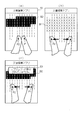
- FIG. 5 shows an example of a pinch out operation performed as a paste instruction operation.
- the character string B2 of the character strings edited in the document editing application is designated (highlighted) as a pasting position.
- the user touches the touch position P1 and the touch position P2 of the touch screen 10, and then the touch position P1 and the touch position P2 as shown in FIG. 5 (b).
- the movement to widen the distance, that is, the pinch out operation is performed.
- the pinch out operation receiving unit 122 When the pinch out operation receiving unit 122 receives the pinch out operation, the pinch out operation receiving unit 122 notifies the instruction operation determination unit 112 to that effect.
- the instruction operation determination unit 112 receives this notification, when the designated operation reception unit 132 holds the pasting position information, the pasting position information is acquired.
- the pointing operation determination unit 112 determines that the pinching-out operation is the pasting operation because the pinching-out operation is performed in a state where the pasting position is designated. And supplies the acquired pasting position information to the clipboard control unit 102.
- the clipboard control unit 102 refers to the clipboard and determines whether an object is stored. If the clipboard control unit 102 determines that the object is stored, the clipboard control unit 102 reads the object and supplies it with the pasting position information to the object display control unit 101, and if it is determined that the object is not stored, The object display control unit 101 is notified of this.
- the object display control unit 101 displays the object at the pasting position indicated by the pasting position information. Accordingly, when the instruction operation determination unit 112 determines that the pinch out operation is the attachment instruction operation, the object display control unit 101 displays the object stored in the clipboard as illustrated in FIG. 5B.
- the touch screen 10 displays an image in which (character string B1 in the example of FIG. 5) is designated by the designation operation (in the example of FIG. 5, the portion where the character string B2 is displayed).
- the object display control unit 101 displays “the object is stored as information to notify the user to that effect, for example, as shown in FIG.
- the character string E3 is displayed on the touch screen 10. This informs the user that the object to be pasted is not stored in the clipboard.
- the smartphone 1 performs a saving process of saving an object on the clipboard and a pasting process of pasting the saved object based on the above configuration.
- the operation procedure in the storage process and the pasting process is started when the power of the smartphone 1 is turned on and the OS is activated, and is repeatedly performed at predetermined time intervals (for example, every 0.5 seconds).
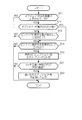
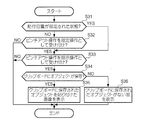
- FIG. 6 shows an example of the operation procedure in the storage process.
- the smartphone 1 determines whether an image including one or more objects is displayed on the touch screen 10 (step S11), and ends the operation procedure when it is determined that the image is not displayed (NO). .
- the smartphone 1 determines whether an object is selected (step S12).
- step S13 determines whether a pinch out operation has been received as a selection operation of an object. If it is determined that the result is not (NO), this operation procedure is ended.
- the smartphone 1 specified operation determination unit 111 determines whether or not the pinch-in operation is received as the specified operation of the object (step S14). If it is determined that there is no (NO), this operation procedure ends.
- the smartphone 1 also performs the operation of step S14 when it is determined in step S13 that the pinch-out operation has been accepted as the object selection operation (YES). If the smartphone 1 (the clipboard control unit 102) determines that the pinch-in operation has been received as the object specification operation (YES) in step S14, the selected object group is stored in the clipboard (step S15).
- the smartphone 1 determines whether the moving direction of the touch position in the pinch-in operation accepted as the designation operation of the object is included in the second range (step S21). If the smartphone 1 (object display control unit 101) determines in step S21 that it is included in the second range (YES), the selected object group is deleted and displayed (step S22), and the second range is displayed. If it is determined that it is not included in (NO), this operation procedure ends without changing the display.
- FIG. 7 shows an example of the operation procedure in the sticking process.
- the smartphone 1 determines whether a pasting position is designated on the touch screen 10 (step S31). If the smartphone 1 (designated operation accepting unit 132) determines that the state is not the state designated in step S31 (NO), it determines whether or not the pinch out operation is accepted as the sticking position designated operation (step S32), If it is determined that it has not been accepted (NO), this operation procedure is ended.
- step S31 When it is determined that the state is designated (YES) in step S31, and when it is determined that the pinch-out operation is accepted as the designation operation of the sticking position (YES) in step S32, the smartphone 1 (instruction operation determination unit 112) It is determined whether or not a pinch out operation has been received as a sticking instruction operation (step S33), and when it is determined that the pinch out operation has not been received (NO), this operation procedure is ended.
- step S34 the smartphone 1 (the clipboard control unit 102) determines whether an object is stored in the clipboard (step S34) .
- the smartphone 1 causes the touch screen 10 to display an image pasted with the object stored in the clipboard (step S35). If it is determined that the data is not stored (NO), the fact is displayed on the touch screen 10 (step S36), and this operation procedure is ended.
- the conventional method is to long-press the object to display a pop-up menu and copy, cut, or paste a menu. You must do a series of actions to select.
- the object is stored in the clipboard when the pinch-in operation is performed, and the object is pasted when the pinch-out operation is performed. Therefore, compared with the conventional method, the object displayed on the touch screen is placed elsewhere. It is possible to reduce the time and effort to paste it.
- the pinch-in operation is similar to the operation of pinching an object, it is intuitively easy to understand that it leads to the result of pinching the object and storing it on the clipboard as compared with other operations.
- the pinch out operation is similar to the operation of releasing the jammed object, it is intuitively easy to be connected to the result of pasting the object stored in the clipboard as compared with other operations.
- the conventional method when designating the pasting position, particularly when designating the place where the object is already displayed as the pasting position, the above long press and display of the pop-up menu, selection or all selection etc. It is necessary to carry out a series of operations of selecting the menu of.
- the sticking position is designated by performing the pinch-out operation, it is possible to reduce the trouble in specifying the sticking position as compared with the conventional method.
- the assignment of pinch in operation and pinch in operation may not be uniformly applied to all displayed content.
- processing other than saving or sticking may be assigned depending on the type of content.
- enlargement / reduction processing is assigned to pinch-out and pinch-in operations, while enlargement is performed for contents such as documents, books, and lists. ⁇ Reduction processing is not assigned.
- the selection operation receiving unit 131 receives the selection operation of the object by the pinch-in operation or the pinch-in operation described above, while the standard assignment is
- the object selection operation may be accepted by the above-described conventional method (a method using long press and a pop-up menu).
- the designating operation determination unit 111 determines the designating operation of the object by the method of the above-described embodiment, the designating operation is performed by the designating operation.
- the clipboard control unit 102 may save the designated object on the clipboard. For example, when a map is displayed by a map application and a pinch-in operation is performed with a specific area specified as an object, the pinch-in operation is determined to be an object specification operation, and as a result, the map is reduced. The image of the designated area will be saved on the clipboard without performing display processing.
- the specification operation reception unit 132 also receives the specification operation of the sticking position by the method of the above embodiment when the content to which the standard assignment is not applied is displayed.
- the designating operation of the sticking position may be accepted by the above-described conventional method (a method using long press and a pop-up menu).
- the designation operation determination unit 112 can also determine the paste instruction operation by the method of the above-described embodiment even if the standard assignment is applied. In that case, the pointing operation determination unit 112 determines that the pinch out operation performed in the state where the sticking position is specified is the sticking instruction operation, and the pinch out performed in the state where the sticking position is not specified. It is determined that the operation is an operation for performing the enlargement display process.
- the selection operation receiving unit 131 selects the group of objects traced by the operation. Accept as a selection operation.
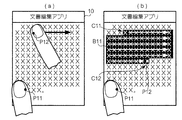
- FIG. 8 shows an example of the object selection operation of this modification.
- the character string shown in FIG. 3 is displayed as an object group.
- FIG. 8A while the user touches a touch position P11 on the lower left of the touch screen 10 using a certain finger, a character C11 on the second line is selected using the other finger. From the state where the displayed touch position P12 is touched, the operation of moving the character string of each line to the touch position P12 where the character C12 of the seventh line is displayed as shown in FIG. 8 (b) It is carried out. That is, an operation of tracing a character string which is an object displayed side by side on the touch screen 10 is performed while touching another portion (touch position P11) of the touch screen 10.
- the selection operation reception unit 131 receives a character string B11 (a portion highlighted by the object display control unit 101), which is a group of characters C11 to C12, which are object groups traced by the operation, as a selection operation.
- the selection operation receiving unit 131 determines the object selected by the selection operation, for example, when the finger being touched is released. In this case, even if the tracing operation is interrupted once, the selection range can be expanded by performing the tracing operation again.
- the selection operation reception unit 131 receives a discontinuous character string as a selection operation when the characters subjected to the tracing operation are not continuous (for example, when tracing the second and fifth lines). . This allows non-consecutive objects to be selected at one time. Note that, when an operation of tracing a character string traced once in the opposite direction is performed, the selection operation reception unit 131 may be accepted as an operation of canceling the selection of the character string. This makes it possible to correct unnecessary characters when they are selected.
- the selection operation reception unit 131 is selected when the user touches using a finger and performs pinch-in operation as an object specification operation using two other fingers without releasing the finger. Objects may be determined. In addition, even when the user releases the touched finger, the selection operation reception unit 131 determines that the object selection operation is continued when the user again touches within the predetermined time, and the characters selected so far In addition to the column, a selection operation may be accepted to select the character string traced thereafter.
- the designation operation determination unit 111 performs a pinch-in operation performed on a place other than the place where the touch is performed, It is determined that the designation operation is to designate an object included in the image. In this case, since the determination is performed based on the three touch positions, in the present modification, a sensor capable of simultaneously detecting the three touch positions is used as the position detection sensor 12.
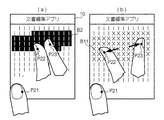
- FIG. 9 shows an example of the designation operation of the object of this modification.
- a state in which the character string B11 is selected is shown.
- the user touches the touch position P22 and the touch position P23 while touching the touch position P21 on the lower left of the touch screen 10, as shown in FIG. 9B.
- a movement to narrow the distance between the touch position P22 and the touch position P23, that is, a pinch-in operation is performed.
- the designating operation determination unit 111 determines that the pinch-in operation is a designating operation to designate the selected character string B11 as a copy target. judge.
- the designating operation determining unit 111 determines that the pinch-in operation is a designating operation for designating the selected character string B11 as a moving object. judge.
- the designated operation reception unit 132 displays the group of objects traced by the operation. It accepts as a designation operation to designate the place being placed as a sticking position.
- the designation operation reception unit 132 receives the designation operation of the sticking position by the same method as the selection operation reception unit 131 described in the description of FIG. 8.
- the designated operation reception unit 132 makes the operation high. It accepts as a designation operation for designating, as a pasting position, a portion where the light-displayed character string B11 is displayed. In the state where the touch screen is touched, the pointing operation determination unit 112 instructs the paste out operation of the pinch out operation performed on a place other than the place where the touch is performed, to the object stored in the clipboard. It is determined that the instruction operation is performed.
- FIG. 10 shows an example of the paste instruction operation of this modification.
- the character string B2 in the character string is designated as the pasting position.
- the user touches the touch position P22 and the touch position P23 on the touch screen 10 while touching the touch position P21 on the lower left of the touch screen 10 as shown in FIG. A pinch out operation is performed as shown in (b).
- the instruction operation determination unit 112 determines that the pinch out operation is the attachment instruction operation because the pinch out operation is performed at another location while the touch screen is touched, and acquires the pasting position information. And supplies it to the clipboard control unit 102. Thereafter, the clipboard control unit 102 and the object display control unit 101 operate in the same manner as in the embodiment, and a character string B11 which is an object stored in the clipboard is pasted.
- the operation, the pinch-in operation, and the pinch-out operation are performed to a location other than the location being touched, and the operation reception and determination are performed. Is done.
- the pinch-in operation and the pinch-out operation are assigned other processes (such as reduced display process and enlarged display process) and the image to which the process is applied is displayed, object selection, object It is possible to save to the clipboard, specify the pasting position, and paste the object.
- the pinch-in operation reception unit 121 supplies the designated operation determination unit 111 with information indicating the touch position measured in the received pinch-in operation. Further, the pinch out operation receiving unit 122 supplies information indicating the touch position measured in the received pinch out operation to the selection operation receiving unit 131, the designation operation receiving unit 132, and the pointing operation determination unit 112.
- the selection operation reception unit 131 is a period in which the first two touch positions in the accepted pinch-out operation are touched (that is, a period in which the two touch positions are first measured and then continuously measured). Is determined to be longer than a predetermined period (for example, 1 second), it is determined that the long press is performed at the beginning of the pinch out operation. It should be noted that the measurement of the first touch position may be regarded as the first touch position being measured if it is not completely the same position, for example, a position shifted by several pixels.
- the selection operation reception unit 131 determines, from the object displayed at the first touch position of the pinch-out operation, the pinch-out operation (pinch-out operation from the long-press operation) that is determined to be long pressed first. [2] Accept as a selection operation to select an object group in the range up to the object displayed at the touch position. In this modified example, if the period in which the first two touch positions are touched is less than the predetermined period, it can not be accepted as the object selection operation, so the enlargement display process for pinch out operation is performed on the image being displayed. If the assignment is applied, the enlarged display process is performed.
- the designation operation reception unit 132 is an object in a range from an object displayed at the first touch position of the pinch out operation to an object displayed at the second touch position for the pinch out operation from the long press. It accepts as a designation operation to designate a portion where a group is displayed as a sticking position.
- the designated operation determination unit 111 performs a pinch-in operation (a pinch-in operation from a long press) in which a period in which the first two touch positions performed on the touch screen 10 on which the image is displayed is touched is longer than a predetermined period. It is determined that the operation (i) is a designating operation for designating an object included in the image.
- the instruction operation determination unit 112 determines that the pinch out operation (pinch out operation from the long press) determined to be long pressed first is an instruction operation instructing to paste the object stored in the clipboard. judge.
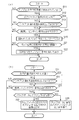
- FIG. 11 shows an example of an operation procedure in the storage process and the paste process of the present modification.
- FIG. 11A shows an example of the operation procedure of the storage process.
- step S11 determination of presence / absence of image display
- step S13 determination of presence / absence of selection operation
- the smartphone 1 determines whether or not the pinch-in operation from the long press has been received as the specified operation of the object (step S41).
- the smartphone 1 ends this operation procedure when it is determined that it has not been accepted (NO) in step S41, and performs operations after step S15 (storage in the clipboard) when it is determined that it has been accepted (YES).
- FIG. 11B shows an example of the operation procedure of the sticking process. In this example, first, step S31 (determination of the designated state of the sticking position) and step S32 (determination of the presence or absence of acceptance of the designation operation) shown in FIG. 7 are performed.
- the smartphone 1 determines whether or not the pinch out operation from the long press has been received as the attachment instruction operation (step S51). If the smartphone 1 determines that it has not been accepted (NO) in step S51, it ends this operation procedure, and if it determines that it has been accepted (YES), it performs the operations after step S34 (judgement as to whether object is stored) .
- the method described in each of the above examples may be used in combination with the conventional method.
- the object selected by the conventional method may be stored on the clipboard by the object designating operation (pinch-in operation) described in the embodiment.
- the object may be pasted by the instruction operation (pinch out operation) described in the embodiment at the pasting position designated by the touch + tracing operation described in the modification.
- the touch screen It is possible to reduce the trouble of pasting the object displayed on to other places.
- the functional configuration of the smartphone is not limited to that shown in FIG.
- a plurality of functional blocks shown in FIG. 2 may be integrated into one functional block.
- part of the functions may be separated to provide a new function block.
- the selection operation reception unit 131 and the designation operation reception unit 132 may be integrated as a range determination unit that determines the range of objects to be copied, moved, or replaced.
- the clipboard control unit 102 may separately provide a function of instructing the object display control unit 101 to delete the object when the object to be moved is stored in the clipboard, and a function called a deletion request unit may be newly provided.
- functions equivalent to the functions shown in FIG. 2 may be realized in the entire functional configuration.
- the present invention is applicable not only to a smartphone, but also to, for example, a tablet terminal and a feature phone. Also, for example, the main body of the desktop personal computer does not have a touch screen, but the present invention can be applied by connecting an external display having a touch screen. In short, the present invention can be applied to any information processing apparatus which performs processing for controlling a touch screen and which realizes each function shown in FIG.
- the present invention can also be understood as an information processing method for realizing processing executed by an information processing apparatus in addition to such an information processing apparatus, and as a program for causing a computer that controls the information processing apparatus to function. Can also be captured.
- This program may be provided in the form of a recording medium such as an optical disc storing the program, or may be downloaded to a computer via a network such as the Internet, provided in a form such as installing it and making it available. It may be done.
- the input and output information and the like may be stored in a specific place (for example, a memory) or may be managed by a management table. Information to be input or output may be overwritten, updated or added. The output information etc. may be deleted. The input information or the like may be transmitted to another device.
- Software Software may be called software, firmware, middleware, microcode, hardware description language, or any other name, and may be an instruction, instruction set, code, code segment, program code, program Should be interpreted broadly to mean: subprograms, software modules, applications, software applications, software packages, routines, subroutines, objects, executables, threads of execution, procedures, functions, etc.
- software, instructions, etc. may be sent and received via a transmission medium.
- software may use a wireline technology such as coaxial cable, fiber optic cable, twisted pair and digital subscriber line (DSL) and / or a website, server or other using wireless technology such as infrared, radio and microwave When transmitted from a remote source, these wired and / or wireless technologies are included within the definition of transmission medium.
- wireline technology such as coaxial cable, fiber optic cable, twisted pair and digital subscriber line (DSL) and / or a website, server or other using wireless technology such as infrared, radio and microwave
- DESCRIPTION OF SYMBOLS 1 ... smart phone, 101 ... object display control part, 102 ... clipboard control part, 111 ... specification operation determination part, 112 ... instruction operation determination part, 121 ... pinch in operation reception part, 122 ... pinch out operation reception part, 131 ... selection operation Reception unit, 132: a designated operation reception unit.
Landscapes
- Engineering & Computer Science (AREA)
- Theoretical Computer Science (AREA)
- General Engineering & Computer Science (AREA)
- Physics & Mathematics (AREA)
- General Physics & Mathematics (AREA)
- Human Computer Interaction (AREA)
- Health & Medical Sciences (AREA)
- Artificial Intelligence (AREA)
- Audiology, Speech & Language Pathology (AREA)
- Computational Linguistics (AREA)
- General Health & Medical Sciences (AREA)
- User Interface Of Digital Computer (AREA)
Abstract
情報処理端末(1)は、複数の選択可能なオブジェクトを含むコンテンツをタッチスクリーン(10)に表示する表示制御部と、前記タッチスクリーンに対して行われたピンチイン操作が、前記タッチスクリーンに表示されているコンテンツに含まれる1以上のオブジェクトを指定する指定操作であるかを判定する指定判定部(111)と、前記ピンチイン操作が前記指定操作であると判定された場合、当該指定操作により指定された1以上のオブジェクトをクリップボードに保存する保存部(102)とを備える。
Description
本発明は、ユーザインターフェースの技術に関する。
特許文献1には、タッチスクリーンディスプレイに表示された編集可能コンテンツ上でプレスアンドホールドジェスチャを検出するとその編集可能コンテンツを拡大したコンテンツマグニファイヤを表示してコンテンツを選択させ、選択されたコンテンツをコピーする技術が開示されている。
スマートフォン等のタッチスクリーンを備える装置において、画面に表示されている文字、画像等のオブジェクトのコピーを別の場所にペーストしたい場合、ユーザは、例えば、特許文献1の技術のようにオブジェクトを長押ししてポップアップメニューを表示させ、ポップアップメニューから「コピー」を選択し、コピーしたオブジェクトをペーストしたい場所を長押ししてポップアップメニューを表示させ、ポップアップメニューから「ペースト」を選択する、といった一連の動作を行わなければならない。この一連の動作は手間と時間を要する。
そこで、本発明は、タッチスクリーンに表示されているオブジェクトを他の場所に貼り付けるまでの手間を軽減することを目的とする。
そこで、本発明は、タッチスクリーンに表示されているオブジェクトを他の場所に貼り付けるまでの手間を軽減することを目的とする。
本発明は、一の態様において、複数の選択可能なオブジェクトを含むコンテンツをタッチスクリーンに表示する表示制御部と、前記タッチスクリーンに対して行われたピンチイン操作が、前記タッチスクリーンに表示されているコンテンツに含まれる1以上のオブジェクトを指定する指定操作であるかを判定する指定判定部と、前記ピンチイン操作が前記指定操作であると判定された場合、当該指定操作により指定された1以上のオブジェクトをクリップボードに保存する保存部とを備える情報処理端末を提供する。
本発明は、他の態様において、タッチスクリーンに対してピンチアウト操作が行われた場合に、当該ピンチアウト操作がクリップボードに保存されたオブジェクトの貼り付けを指示するか指示操作かを判定する指示判定部と、複数の選択可能なオブジェクトを含むコンテンツをタッチスクリーンに表示する表示制御部であって、前記指示操作であると判定された場合、クリップボードに保存されているオブジェクトを前記タッチスクリーンに表示されているコンテンツに挿入して生成されたコンテンツを、当該タッチスクリーンに表示する表示制御部とを備える情報処理端末を提供する。
好ましい態様において、前記指定判定部は、前記ピンチイン操作が行われている際に、前記ピンチイン操作が行われている位置とは異なる位置においてタッチがなされている場合に、当該ピンチイン操作を前記指定操作であると判定する。
好ましい態様において、前記ピンチイン操作において、最初にタッチされた2点が、所定の期間以上タッチし続けられていた場合に、前記指定判定部は当該ピンチイン操作を前記指定操作であると判定する。
好ましい態様において、前記コンテンツは、前記複数のオブジェクトを所定の規則に従って前記タッチスクリーン上に配置したものであり、前記第1受付部は、当該ピンチイン操作に係る第1タッチ位置に表示されている第1のオブジェクトから第2タッチ位置に表示されている第2のオブジェクトまでの範囲に含まれるオブジェクト群を選択する操作を前記選択操作として受け付ける。
好ましい態様において、前記コンテンツは、前記複数のオブジェクトを所定の規則に従って前記タッチスクリーン上に配置したものであり、前記第1受付部は、当該ピンチイン操作に係る第1タッチ位置に表示されている第1のオブジェクトから第2タッチ位置に表示されている第2のオブジェクトまでの範囲に含まれるオブジェクト群を選択する操作を前記選択操作として受け付ける。
好ましい態様において、前記第1受付部は、所定の規則に従って配置された複数のオブジェクトをなぞる操作が、当該なぞる操作に係る位置とは異なる位置をタッチしながら行われた場合に、当該なぞる操作により指定されたオブジェクト群を選択する操作を前記選択操作として受け付ける。
好ましい態様において、前記指示判定部は、前記ピンチアウト操作が、当該ピンチアウト操作に係る位置とは異なる位置においてタッチされた状態で行われた場合、当該ピンチアウト操作を前記指示操作であると判定する。
好ましい態様において、前記指示判定部は、前記ピンチアウト操作が、当該ピンチアウト操作に係る位置とは異なる位置においてタッチされた状態で行われた場合、当該ピンチアウト操作を前記指示操作であると判定する。
好ましい態様において、オブジェクトの貼付位置を指定する指定操作を受け付ける第2受付部を備え、前記ピンチアウト操作が、受け付けられた前記指定操作により前記貼付位置が指定された状態で行われた場合に、前記指示判定部は当該ピンチアウト操作を前記指示操作であると判定する。
好ましい態様において、前記ピンチアウト操作において、最初にタッチされた2点が、所定の期間以上タッチされ続けていた場合に、前記指示判定部は当該前記ピンチアウト操作を前記指示操作であると判定する。
好ましい態様において、前記ピンチアウト操作において、最初にタッチされた2点が、所定の期間以上タッチされ続けていた場合に、前記指示判定部は当該前記ピンチアウト操作を前記指示操作であると判定する。
本発明によれば、タッチスクリーンに表示されているオブジェクトを他の場所に貼り付けるまでの手間を軽減することができる。
[1]実施例
図1は実施例に係るスマートフォン1のハードウェア構成を表す。スマートフォン1は、プロセッサ2と、メモリ3と、ストレージ4と、通信装置5と、入力装置6と、出力装置7と、バス8という各装置を備えるコンピュータである。なお、ここでいう「装置」という文言は、回路、デバイス及びユニット等に読み替えることができる。
図1は実施例に係るスマートフォン1のハードウェア構成を表す。スマートフォン1は、プロセッサ2と、メモリ3と、ストレージ4と、通信装置5と、入力装置6と、出力装置7と、バス8という各装置を備えるコンピュータである。なお、ここでいう「装置」という文言は、回路、デバイス及びユニット等に読み替えることができる。
また、各装置は、1つ又は複数含まれていてもよいし、一部の装置が含まれていなくてもよい。プロセッサ2は、例えば、オペレーティングシステムを動作させてコンピュータ全体を制御する。プロセッサ2は、周辺装置とのインターフェース、制御装置、演算装置、レジスタなどを含む中央処理装置(CPU:Central Processing Unit)で構成されてもよい。
また、プロセッサ2は、OS(Operating System:オペレーティングシステム)及び各種のアプリケーション(以下では簡単に「アプリ」ともいう)を含むプログラム(プログラムコード)、ソフトウェアモジュール及びデータ等を、ストレージ4及び/又は通信装置5からメモリ3に読み出し、これらに従って各種の処理を実行する。各種処理を実行するプロセッサ2は1つでもよいし、2以上であってもよく、2以上のプロセッサ2は、同時又は逐次に各種処理を実行してもよい。
また、プロセッサ2は、1以上のチップで実装されてもよい。プログラムは、電気通信回線を介してネットワークから送信されてもよい。メモリ3は、コンピュータ読み取り可能な記録媒体であり、例えば、ROM(Read Only Memory)、EPROM(Erasable Programmable ROM)、EEPROM(Electrically Erasable Programmable ROM)及びRAM(Random Access Memory)等の少なくとも1つで構成されてもよい。メモリ3は、レジスタ、キャッシュ及びメインメモリ(主記憶装置)等と呼ばれてもよい。
メモリ3は、前述したプログラム(プログラムコード)、ソフトウェアモジュール及びデータ等を保存することができる。ストレージ4は、コンピュータが読み取り可能な記録媒体であり、例えば、ハードディスクドライブ、フレキシブルディスク、フラッシュメモリ(例えば、カード、スティック、キードライブ)、磁気ストリップなどの少なくとも1つで構成されてもよい。
ストレージ4は、補助記憶装置と呼ばれてもよい。上述の記憶媒体は、例えば、メモリ3及び/又はストレージ4を含むデータベース、サーバその他の適切な媒体であってもよい。通信装置5は、有線及び/又は無線ネットワークを介してコンピュータ間の通信を行うためのハードウェア(送受信デバイス)であり、例えばネットワークデバイス、ネットワークコントローラ、ネットワークカード、通信モジュールなどともいう。
入力装置6は、外部からの入力を受け付ける入力デバイス(例えば、マイクロフォン、スイッチ、ボタン、センサなど)である。出力装置7は、外部への出力を実施する出力デバイス(例えば、ディスプレイ、スピーカ、LEDランプなど)である。スマートフォン1においては、入力装置6及び出力装置7は、一体となってタッチスクリーン10を構成している。
タッチスクリーン10は、画像を表示する出力デバイスであると共に、ユーザの操作を受け付ける入力デバイスである。タッチスクリーン10は、画像を表示する表示面11と、表示面11上でユーザがタッチした位置(タッチ位置)を検出する位置検出センサ12とを備える。位置検出センサ12は、本実施例では、2カ所のタッチ位置を同時に検出することが可能なセンサが用いられている。これにより、タッチスクリーン10は、2カ所のタッチ位置が表す入力を受け付ける。
プロセッサ2及びメモリ3等の各装置は、情報を通信するためのバス8を介して互いにアクセス可能となっている。バス8は、単一のバスで構成されてもよいし、装置間で異なるバスで構成されてもよい。また、スマートフォン1は、マイクロプロセッサ、デジタル信号プロセッサ(DSP:Digital Signal Processor)、ASIC(Application Specific Integrated Circuit)、PLD(Programmable Logic Device)、及び、FPGA(Field Programmable Gate Array)等のハードウェアを含んで構成されてもよく、当該ハードウェアにより、各機能ブロックの一部又は全てが実現されてもよい。例えば、プロセッサ2は、これらのハードウェアの少なくとも1つで実装されてもよい。
スマートフォン1のプロセッサ2がプログラムを実行して各部を制御することで以下に述べる機能群が実現される。
図2はスマートフォン1が実現する機能構成を表す。スマートフォン1は、オブジェクト表示制御部101と、クリップボード制御部102と、指定操作判定部111と、指示操作判定部112と、ピンチイン操作受付部121と、ピンチアウト操作受付部122と、選択操作受付部131と、指定操作受付部132とを備える。
図2はスマートフォン1が実現する機能構成を表す。スマートフォン1は、オブジェクト表示制御部101と、クリップボード制御部102と、指定操作判定部111と、指示操作判定部112と、ピンチイン操作受付部121と、ピンチアウト操作受付部122と、選択操作受付部131と、指定操作受付部132とを備える。
オブジェクト表示制御部101は、1以上のオブジェクトを含む画像をタッチスクリーン10に表示させる。オブジェクト表示制御部101は本発明の「表示制御部」の一例である。オブジェクトとは、例えば、文字列、写真画像、描画された画像(いわゆるCG(Computer Graphics))、データを表す画像又はプログラムを表す画像(アイコン、ショートカット画像など)等である。
これらのオブジェクトを示すデータは、メモリ3、ストレージ4又は通信装置5を介してアクセス可能な外部装置等の記憶手段に記憶されている。オブジェクト表示制御部101は、それらの記憶手段からオブジェクトを示すデータを読み出して、読み出したオブジェクトを含む画像(例えばアプリの画面の画像及びウェブページの画像等)を生成し、生成した画像をタッチスクリーン10に表示させる。
ピンチイン操作受付部121は、タッチスクリーン10に対して行われたピンチイン操作を受け付ける。ピンチイン操作とは、タッチスクリーン10上の2カ所にタッチして、それら2つのタッチ位置を近づける操作である。ピンチイン操作受付部121は、例えば、タッチ位置が2カ所検出された場合に、それらの間の距離を所定の時間間隔(例えば0.1秒毎)で繰り返し算出し、算出した距離が一定の長さ又は一定の割合減少した場合に、その操作をピンチイン操作として受け付ける。なお、ピンチイン操作の受付方法はこれに限らず、他の周知の方法が用いられてもよい。
ピンチアウト操作受付部122は、タッチスクリーン10に対して行われたピンチアウト操作を受け付ける。ピンチアウト操作とは、タッチスクリーン10上の2カ所にタッチして、それら2つのタッチ位置を遠ざける操作である。ピンチアウト操作受付部122は、例えば、タッチ位置が2カ所検出された場合に、それらの間の距離を所定の時間間隔(例えば0.1秒毎)で繰り返し算出し、算出した距離が一定の長さ又は一定の割合増加した場合に、その操作をピンチアウト操作として受け付ける。なお、ピンチアウト操作の受付方法はこれに限らず、他の周知の方法が用いられてもよい。
選択操作受付部131は、タッチスクリーン10に表示されているオブジェクトを選択する選択操作を受け付ける。選択操作受付部131は本発明の「第1受付部」の一例である。選択操作受付部131は、本実施例では、1以上の行又は1以上の列に沿って並べられたオブジェクト群を表示するタッチスクリーン10に対するピンチアウト操作を、そのピンチアウト操作の第1タッチ位置に表示されているオブジェクトから第2タッチ位置に表示されているオブジェクトまで並べられたオブジェクト群を選択する選択操作として受け付ける。
なお、以下の例では、ピンチイン操作及びピンチアウト操作に他の処理(縮小表示処理及び拡大表示処理等)が割り当てられていない画像が表示されているものとする。
図3はオブジェクトの選択操作の一例を表す。図3では、オブジェクト表示制御部101がタッチスクリーン10に文書編集アプリで編集された文字列を1以上の行に沿って並べられたオブジェクト群として表示させている。
図3はオブジェクトの選択操作の一例を表す。図3では、オブジェクト表示制御部101がタッチスクリーン10に文書編集アプリで編集された文字列を1以上の行に沿って並べられたオブジェクト群として表示させている。
この例では、ユーザが、図3(a)に表すようにタッチスクリーン10のタッチ位置P1及びタッチ位置P2をタッチしている状態から図3(b)に表すようにタッチ位置P1及びタッチ位置P2の距離を広げる動き、すなわちピンチアウト操作を行っている。ピンチアウト操作受付部122は、このピンチアウト操作を受け付けると、タッチ位置P1及びタッチ位置P2の座標を両タッチ位置が検出される度に選択操作受付部131に供給する。
この座標は、例えば表示面11の任意の点を中心とした座標系における座標である。本実施例では表示面11の左上隅の点O1を中心として左右方向に沿ったX軸と上下方向に沿ったY軸とで表される座標系を用いる。選択操作受付部131は、タッチ位置P1及びタッチ位置P2の座標が供給されると、オブジェクト表示制御部101から表示されているオブジェクトに関する情報(オブジェクト関連情報)を取得する。
図3の例では、選択操作受付部131は、文字列に含まれる各文字と、それらの文字の中心座標及びサイズと、それらの文字列の並ぶ方向(行又は列)とを示す情報をオブジェクト関連情報として取得する。選択操作受付部131は、取得したオブジェクト関連情報から、図3(c)に表すようにタッチ位置P1に表示されている文字C1とタッチ位置P2に表示されている文字C2を特定し、その文字C1から文字C2までの範囲の文字列B1を特定する。
こうして、選択操作受付部131は、特定した文字列B1、すなわち、第1タッチ位置(タッチ位置P1)に表示されているオブジェクト(文字C1)から第2タッチ位置(タッチ位置P2)に表示されているオブジェクト(文字C2)までの範囲のオブジェクト群(文字列B1)を選択する選択操作として、図3(a)、(b)に表すピンチアウト操作を受け付ける。
選択操作受付部131は、選択されたオブジェクト群を示す情報(オブジェクト情報)として、特定した文字列B1を特定可能な情報(例えば文字C1及びC2に至るまでの文頭から文字数(32番目と98番目)を示す情報)をオブジェクト表示制御部101に供給する。オブジェクト表示制御部101は、供給されたオブジェクト情報が示す文字列B1を、図3(d)に表すようにハイライト表示(背景色の反転表示など)する。これにより、ピンチアウト操作により選択されたオブジェクト群をユーザが識別可能になる。
ユーザが指をタッチスクリーン10から離さずにタッチ位置P1及びタッチ位置P2を移動させると、両タッチ位置に表示されている文字が変化するので、それに従って選択されるオブジェクト群、すなわちハイライト表示される文字列も変化する。その際、タッチ位置P1及びタッチ位置P2の距離が短くなっても、選択操作受付部131は、一度選択操作としてピンチアウト操作を受け付けたのであれば、そのように距離が短くなったタッチ位置P1及びタッチ位置P2も受け付けた選択操作における2つのタッチ位置であると判断する。
ユーザが望んだ文字列がハイライト表示されたところでユーザがタッチスクリーン10から指を離すと、選択操作受付部131は、選択されたオブジェクト群として最後に特定した文字列を選択する選択操作としてピンチアウト操作を受け付ける。このように、スマートフォン1においては、選択するオブジェクトの先頭(例えばタッチ位置P1に表示されている文字)及び最後尾(例えばタッチ位置P2に表示されている文字)の両方をピンチアウト操作により変更しながら選択することができる。
そして、オブジェクト表示制御部101は、ユーザが指を離した後も選択された文字列B1のハイライト表示を維持する。こうしてピンチアウト操作により選択されるオブジェクトは、ユーザがタッチスクリーン10から指を離したときに確定する。選択操作受付部131は、再び選択操作が行われるまで、選択されたオブジェクト群(図3の例では文字列B1)を示すオブジェクト情報を保持する。
なお、図3の例では、文字列が横書きであったが、縦書きの場合も同じ方法で文字列を選択することができる。また、オブジェクトとして文字だけでなく写真画像及びCG等が含まれているコンテンツの場合も、それらの写真画像及びCG等が所定の規則に従って配置されていれば、図3で述べた方法でオブジェクトの選択操作を受け付けることが可能である。その場合、選択操作受付部131は、第1タッチ位置及び第2タッチ位置に表示されている文字、写真画像及びCG等を特定し、第1タッチ位置から第2タッチ位置まで並べられている文字、写真画像及びCG等を選択する選択操作としてピンチアウト操作を受け付ける。
指定操作判定部111は、オブジェクトが表示されているタッチスクリーン10にピンチイン操作が行われた場合にそのピンチイン操作がそのオブジェクトを指定する指定操作であるか否かを判定する。指定操作判定部111は本発明の「指定判定部」の一例である。オブジェクトの指定には2通りある。1つ目は、ファイル及びデータ等を別の場所に複製するいわゆるコピー&ペーストの対象(複製対象)としてのオブジェクトの指定である。
2つ目は、ファイル及びデータ等を別の場所に移動するいわゆるカット&ペーストの対象(移動対象)としてのオブジェクトの指定である。指定操作判定部111は、本実施例では、タッチスクリーン10に表示されているオブジェクトが選択された状態(例えば図3(d)のようにハイライト表示がされた状態)で行われたピンチイン操作を、そのオブジェクトを複製対象又は移動対象として指定する指定操作であると判定する。
指定操作判定部111は、例えば、ピンチイン操作におけるタッチ位置の移動方向が第1の範囲に含まれていればオブジェクトを複製対象として指定する指定操作であると判定し、その移動方向が第2の範囲に含まれていればオブジェクトを移動対象として指定する指定操作であると判定する。例えば、第1の範囲はX軸に沿った方向(X軸方向)と成す角度が±10度の範囲であり、第2の範囲はY軸に沿った方向(Y軸方向)と成す角度が±10度の範囲である(この範囲は一例であり、これとは異なる範囲であってもよい)。
図4はオブジェクトの指定操作として行われるピンチイン操作の例を表す。図4では、図3(d)に表す文字列B1が選択された状態(ハイライト表示された状態)となっている。この例では、図4(a)、(c)に表すようにユーザがタッチスクリーン10のタッチ位置P1及びタッチ位置P2をタッチしている状態から図4(b)、(d)に表すようにタッチ位置P1及びタッチ位置P2の距離を狭くする動き、すなわちピンチイン操作を行っている。
図4(a)、(b)の例では、タッチ位置P1がX軸正方向D1に移動し、タッチ位置P2がX軸負方向D2に移動している。図4(c)、(d)の例では、タッチ位置P1がY軸正方向D3に移動し、タッチ位置P2がY軸負方向D4に移動している。ピンチイン操作受付部121は、ピンチイン操作を受け付けると、ピンチイン操作を表したタッチ位置P1及びタッチ位置P2の座標の履歴を指定操作判定部111に供給し、受け付け後もタッチ位置が継続して検出される度にその座標を指定操作判定部111に供給する。
指定操作判定部111は、ピンチイン操作受付部121から座標が供給されると、供給された座標が表すピンチイン操作におけるタッチ位置の移動方向が上記の第1の範囲又は第2の範囲に含まれているか否かを判断する。指定操作判定部111は、図4(a)、(b)の例であれば移動方向が第1の範囲に含まれていると判断し、図4(c)、(d)の例であれば移動方向が第2の範囲に含まれていると判断する。
指定操作判定部111は、いずれかの範囲に含まれていると判断すると、選択操作受付部131がオブジェクト情報を保持している場合には、そのオブジェクト情報を取得する。指定操作判定部111は、移動方向が第1の範囲に含まれていると判断した場合は、受け付けられたピンチイン操作が、取得したオブジェクト情報が示すオブジェクトを複製対象として指定する指定操作であると判定する。
また、指定操作判定部111は、移動方向が第2の範囲に含まれていると判断した場合は、受け付けられたピンチイン操作が、取得したオブジェクト情報が示すオブジェクトを移動対象として指定する指定操作であると判定する。指定操作判定部111は、指定されたオブジェクトが複製対象又は移動対象のいずれかであると判定すると、取得したオブジェクト情報を、複製対象及び移動対象のいずれであるかを示す情報と共にクリップボード制御部102に供給する。
クリップボード制御部102は、データを一時的に保存可能な共有のメモリ領域であるクリップボードを制御する。クリップボード制御部102は、例えば、指定操作判定部111によりピンチイン操作がオブジェクトの指定操作であると判定された場合、その指定操作により指定されたオブジェクトをクリップボードに保存する。クリップボード制御部102は本発明の「保存部」の一例である。
クリップボード制御部102は、指定操作判定部111から供給されたオブジェクト情報が示すオブジェクトをクリップボードに保存することで、指定操作により指定されたオブジェクト(図4の例では文字列B1)をクリップボードに保存する。クリップボード制御部102は、オブジェクト情報と共に複製対象であることを示す情報が供給された場合には、オブジェクトをクリップボードに保存した後にその旨をオブジェクト表示制御部101に通知する。
オブジェクト表示制御部101は、この通知を受け取ると、複製対象のオブジェクトがクリップボードに保存されたことを示す情報として例えば図4(b)に表すように「コピーされました。」という文字列E1を表示させる。また、クリップボード制御部102は、オブジェクト情報と共に移動対象であることを示す情報が供給された場合には、そのオブジェクト情報が示すオブジェクトを削除するようオブジェクト表示制御部101に指示する。
オブジェクト表示制御部101は、この指示を受け取ると、図4(d)に表すように指示されたオブジェクトである文字列B1を削除して、残りの文字列をタッチスクリーン10に表示させる。また、オブジェクト表示制御部101は、移動対象のオブジェクトが削除されたことを示す情報として例えば図4(d)に表すように「カットされました。」という文字列E2をタッチスクリーン10に表示させる。
以上がクリップボードへのオブジェクトの保存に関する構成である。続いて、クリップボードのオブジェクトの貼り付けに関する構成を説明する。指定操作受付部132は、オブジェクトの貼付位置を指定する指定操作を受け付ける。指定操作受付部132は本発明の「第2受付部」の一例である。指定操作受付部132は、本実施例では、選択操作受付部131と同様の方法で貼付位置の指定操作を受け付ける。
具体的には、指定操作受付部132は、所定の規則に従って配置された選択可能なオブジェクト群を表示するタッチスクリーン10に対するピンチアウト操作を、そのピンチアウト操作の第1タッチ位置に表示されているオブジェクトから第2タッチ位置に表示されているオブジェクトまでの範囲に配置されたオブジェクト群が表示されている箇所を貼付位置とする指定操作として受け付ける。所定の規則に従って配置されたオブジェクト群とは、例えば1以上の行又は1以上の列に沿って所定の間隔で配置された文字(テキスト文書)である。
ピンチアウト操作受付部122は、ピンチアウト操作を受け付けると、ピンチアウト操作を表した2つのタッチ位置の座標を両タッチ位置が検出される度に指定操作受付部132に供給する。指定操作受付部132は、この座標が供給されると、オブジェクト表示制御部101からオブジェクト関連情報を取得する。指定操作受付部132は、取得したオブジェクト関連情報から、両タッチ位置に表示されている1または複数のオブジェクト(例えば1または複数の文字)を特定し、それらのオブジェクトの間に配置されたオブジェクト群(例えば文字列)を特定する。
指定操作受付部132は、こうして特定したオブジェクト群、すなわち第1タッチ位置に表示されている第1のオブジェクトから第2タッチ位置に表示されている第2のオブジェクトまでの範囲に含まれるオブジェクト群が表示されている箇所を貼付位置とする指定操作として受け付ける。指定操作受付部132は、指定された貼付位置を示す情報(貼付位置情報)として、特定したオブジェクト群を特定可能な情報(例えばオブジェクトの先頭からの並び順を示す情報)をオブジェクト表示制御部101に供給する。
オブジェクト表示制御部101は、供給された貼付位置情報が示す貼付位置に表示されているオブジェクト群をハイライト表示する。これにより、ピンチアウト操作により指定された貼付位置をユーザが識別可能になる。なお、隣り合うオブジェクトの間が貼付位置(いわゆる挿入が行われる挿入位置)として指定された場合、指定操作受付部132は、その挿入位置の前後のオブジェクトを特定可能な情報と、挿入位置が指定された旨とを示す情報を貼付位置情報としてオブジェクト表示制御部101に供給する。
この場合、オブジェクト表示制御部101は、挿入位置に例えばカーソルの画像を点滅表示させることで、貼付位置(挿入位置)を識別可能とする。貼付位置は、上記の選択されたオブジェクト群と同じくユーザがピンチアウト操作をした指を離したときに確定する。指定操作受付部132は、他の操作が行われるまで、指定された貼付位置を示す貼付位置情報を保持する。なお、貼付位置の指定も、オブジェクトの選択と同様に、文字列が縦書きでもよいし、貼付位置に写真画像及びCG等が含まれていてもよい。
指示操作判定部112は、タッチスクリーン10にピンチアウト操作が行われた場合にそのピンチアウト操作がクリップボードに保存されたオブジェクトの貼り付けを指示する指示操作であるか否かを判定する。指示操作判定部112は本発明の「指示判定部」の一例である。指示操作判定部112は、本実施例では、貼付位置が指定された状態で行われたピンチアウト操作を、クリップボードに保存されたオブジェクトのその貼付位置への貼り付けを指示する指示操作であると判定する。
図5は貼り付けの指示操作として行われるピンチアウト操作の例を表す。図5では、文書編集アプリにおいて編集された文字列のうち文字列B2が貼付位置として指定された状態(ハイライト表示された状態)となっている。この状態で、ユーザは、図5(a)に表すようにタッチスクリーン10のタッチ位置P1及びタッチ位置P2をタッチしている状態から図5(b)に表すようにタッチ位置P1及びタッチ位置P2の距離を広くする動き、すなわちピンチアウト操作を行っている。
ピンチアウト操作受付部122は、ピンチアウト操作を受け付けると、その旨を指示操作判定部112に通知する。指示操作判定部112は、この通知を受け取ると、指定操作受付部132が貼付位置情報を保持している場合には、その貼付位置情報を取得する。指示操作判定部112は、貼付位置情報を取得した場合、貼付位置が指定された状態で行われたピンチアウト操作であることになるから、このピンチアウト操作を貼り付けの指示操作であると判定し、取得した貼付位置情報をクリップボード制御部102に供給する。
クリップボード制御部102は、貼付位置情報が供給されると、クリップボードを参照し、オブジェクトが保存されているか否かを判断する。クリップボード制御部102は、オブジェクトが保存されていると判断した場合には、そのオブジェクトを読み出してオブジェクト表示制御部101に貼付位置情報と共に供給し、オブジェクトが保存されていないと判断した場合にはその旨をオブジェクト表示制御部101に通知する。
オブジェクト表示制御部101は、クリップボード制御部102からオブジェクト及び貼付位置情報が供給された場合、そのオブジェクトをその貼付位置情報が示す貼付位置に表示させる。これにより、オブジェクト表示制御部101は、指示操作判定部112によりピンチアウト操作が貼り付けの指示操作であると判定された場合、図5(b)に表すように、クリップボードに保存されているオブジェクト(図5の例では文字列B1)を指定操作により指定された貼付位置(図5の例では文字列B2が表示されている箇所)に貼り付けた画像をタッチスクリーン10に表示させる。
また、オブジェクト表示制御部101は、クリップボード制御部102からオブジェクトが保存されていない旨が通知された場合、その旨をユーザに伝える情報として例えば図5(c)に表すように「オブジェクトが保存されていません。」という文字列E3をタッチスクリーン10に表示させる。これにより、貼り付けるべきオブジェクトがクリップボードに保存されていないことがユーザに伝えられる。
スマートフォン1は、上記の構成に基づいて、オブジェクトをクリップボードに保存する保存処理及び保存したオブジェクトを貼り付ける貼付処理を行う。保存処理及び貼付処理における動作手順は、スマートフォン1の電源が投入されてOSが起動することを契機に開始され、所定の時間間隔(例えば0.5秒毎など)で繰り返し行われる。
図6は保存処理における動作手順の一例を表す。まず、スマートフォン1は、1以上のオブジェクトを含む画像がタッチスクリーン10に表示されているか否かを判断し(ステップS11)、表示されていない(NO)と判断した場合はこの動作手順を終了する。スマートフォン1は、ステップS11で表示されている(YES)と判断した場合は、オブジェクトが選択された状態か否かを判断する(ステップS12)。
スマートフォン1(選択操作受付部131)は、ステップS12で選択された状態でない(NO)と判断した場合は、ピンチアウト操作をオブジェクトの選択操作として受け付けたか否かを判断し(ステップS13)、受け付けていない(NO)と判断した場合はこの動作手順を終了する。ステップS12で選択された状態である(YES)と判断した場合、スマートフォン1(指定操作判定部111)は、ピンチイン操作をオブジェクトの指定操作として受け付けたか否かを判定し(ステップS14)、受け付けていない(NO)と判断した場合はこの動作手順を終了する。
また、スマートフォン1(指定操作判定部111)は、ステップS13でピンチアウト操作をオブジェクトの選択操作として受け付けた(YES)と判断した場合もステップS14の動作を行う。スマートフォン1(クリップボード制御部102)は、ステップS14でピンチイン操作をオブジェクトの指定操作として受け付けた(YES)と判断した場合、選択されたオブジェクト群をクリップボードに保存する(ステップS15)。
次に、スマートフォン1(オブジェクト表示制御部101)は、オブジェクトの指定操作として受け付けたピンチイン操作におけるタッチ位置の移動方向が第2の範囲に含まれるか否かを判断する(ステップS21)。スマートフォン1(オブジェクト表示制御部101)は、ステップS21で第2の範囲に含まれる(YES)と判断した場合は、選択されたオブジェクト群を削除して表示し(ステップS22)、第2の範囲に含まれない(NO)と判断した場合は、表示を変えることなくこの動作手順を終了する。
図7は貼付処理における動作手順の一例を表す。まず、スマートフォン1は、タッチスクリーン10上で貼付位置が指定された状態か否かを判断する(ステップS31)。スマートフォン1(指定操作受付部132)は、ステップS31で指定された状態でない(NO)と判断した場合は、ピンチアウト操作を貼付位置の指定操作として受け付けたか否かを判断し(ステップS32)、受け付けていない(NO)と判断した場合はこの動作手順を終了する。
ステップS31で指定された状態である(YES)と判断した場合と、ステップS32でピンチアウト操作を貼付位置の指定操作として受け付けた(YES)と判断した場合、スマートフォン1(指示操作判定部112)は、ピンチアウト操作を貼り付けの指示操作として受け付けたか否かを判定し(ステップS33)、受け付けていない(NO)と判断した場合はこの動作手順を終了する。
スマートフォン1(クリップボード制御部102)は、ステップS33でピンチアウト操作を貼り付けの指示操作として受け付けた(YES)と判断した場合、クリップボードにオブジェクトが保存されているか否かを判断する(ステップS34)。スマートフォン1(オブジェクト表示制御部101)は、ステップS34で保存されている(YES)と判断した場合はクリップボードに保存されているオブジェクトを貼り付けた画像をタッチスクリーン10に表示させ(ステップS35)、保存されていない(NO)と判断した場合はその旨をタッチスクリーン10に表示させてから(ステップS36)、この動作手順を終了する。
タッチスクリーン10に表示されているオブジェクトを複製又は移動させて他の場所に貼り付ける際に、従来の方法では、オブジェクトを長押ししてポップアップメニューを表示させてコピー、切り取り、貼り付けというメニューを選択する一連の動作を行わなくてはならない。本実施例では、ピンチイン操作を行えばオブジェクトがクリップボードに保存され、ピンチアウト操作を行えばオブジェクトが貼り付けられるので、従来の方法に比べて、タッチスクリーンに表示されているオブジェクトを他の場所に貼り付けるまでの手間を軽減することができる。
また、ピンチイン操作は物をつまむ動作と似ているので、他の操作に比べて、オブジェクトをつまんでクリップボードに保存するという結果に繋がることが直観的に分かり易い。そして、ピンチアウト操作はつまんだ物を離す動作に似ているので、他の操作に比べて、クリップボードに保存されたオブジェクトを貼り付ける結果に繋がることが直観的に分かり易い。
また、従来の方法では、オブジェクトを選択する際にも、当該オブジェクトを長押ししてポップアップメニューを表示させて選択又は全て選択等のメニューを選択する一連の動作を行わなくてはならない。本実施例では、ピンチアウト操作を行えばオブジェクトが選択されるので、従来の方法に比べて、オブジェクトを選択する際の手間を軽減することができる。
また、従来の方法では、貼付位置を指定する際にも、特に既にオブジェクトが表示されている箇所を貼付位置として指定する場合には、上記の長押し・ポップアップメニューの表示・選択又は全て選択等のメニューの選択という一連の動作を行わなくてはならない。本実施例では、ピンチアウト操作を行えば貼付位置が指定されるので、従来の方法に比べて、貼付位置を指定する際の手間を軽減することができる。
また、従来の方法において、文字列などの選択可能な単位によって構成されるコンテンツから特定の部分のオブジェクト群を選択する際にマウスを用いる場合、選択対象範囲のオブジェクトの一端(先頭又は最後尾)にカーソルを合わせてドラッグ操作をすることでオブジェクトが選択される。この場合、一度合わせたカーソルの位置を選択中に変更することができないので、当該一端の位置が間違っていれば選択操作をやり直さなければならない。
これに対し本実施例では、選択するオブジェクト又は指定する貼付位置の先頭及び最後尾の両方をピンチアウト操作により変更しながら選択することができるので、オブジェクトの選択操作及び貼付位置の指定操作のやり直しを不要にすることができる。
これに対し本実施例では、選択するオブジェクト又は指定する貼付位置の先頭及び最後尾の両方をピンチアウト操作により変更しながら選択することができるので、オブジェクトの選択操作及び貼付位置の指定操作のやり直しを不要にすることができる。
[2]変形例
上述した実施例は本発明の実施の一例に過ぎず、以下のように変形させてもよい。
上述した実施例は本発明の実施の一例に過ぎず、以下のように変形させてもよい。
[2-1]ピンチイン操作・ピンチアウト操作への処理の割り当て
ピンチイン操作及びピンチアウト操作に対して、保存または貼付以外の処理が予め割り当てられていてもよい。ピンチイン操作に対して画像の縮小表示処理を割り当て、ピンチアウト操作に対して画像の拡大表示処理を割り当てるUI設計が一般的に行われている。
ピンチイン操作及びピンチアウト操作に対して、保存または貼付以外の処理が予め割り当てられていてもよい。ピンチイン操作に対して画像の縮小表示処理を割り当て、ピンチアウト操作に対して画像の拡大表示処理を割り当てるUI設計が一般的に行われている。
このような既存のUI設計を考慮し、ピンチイン操作およびピンチイン操作の割り当ては、表示される全てのコンテンツに対して一様に適用しなくてもよい。例えば、コンテンツの種類によって、保存または貼付以外の処理を割り当ててもよい。一例として、地図、写真及びCG等の画像に対しては、ピンチアウト操作およびピンチイン操作に対してそれぞれ拡大・縮小処理が割り当てられいる一方、文書、書籍及びリスト等のコンテンツに対しては、拡大・縮小処理は割り当てられていない。
具体的には、選択操作受付部131は、標準的な割当てが適用されないコンテンツが表示されている場合には、上述したピンチイン操作またはピンチイン操作によってオブジェクトの選択操作を受け付ける一方、標準的な割り当てが適用されるコンテンツが表示されている場合には、上述した従来の方法(長押しとポップアップメニューを用いた方法)でオブジェクトの選択操作を受け付けてもよい。
具体的には、選択操作受付部131は、標準的な割当てが適用されないコンテンツが表示されている場合には、上述したピンチイン操作またはピンチイン操作によってオブジェクトの選択操作を受け付ける一方、標準的な割り当てが適用されるコンテンツが表示されている場合には、上述した従来の方法(長押しとポップアップメニューを用いた方法)でオブジェクトの選択操作を受け付けてもよい。
ピンチイン操作・ピンチアウト操作に対して標準的な割当てが存在する場合であっても、指定操作判定部111が上述した実施例の方法でオブジェクトの指定操作を判定した場合には、その指定操作により指定されたオブジェクトをクリップボード制御部102がクリップボードに保存してもよい。
例えば、地図アプリによって地図が表示されている場合において、特定のエリアがオブジェクトとして指定された状態でピンチイン操作が行われた場合、そのピンチイン操作はオブジェクトの指定操作と判定され、その結果地図の縮小表示処理は行われずに、指定されたエリアの画像がクリップボードに保存されることになる。
例えば、地図アプリによって地図が表示されている場合において、特定のエリアがオブジェクトとして指定された状態でピンチイン操作が行われた場合、そのピンチイン操作はオブジェクトの指定操作と判定され、その結果地図の縮小表示処理は行われずに、指定されたエリアの画像がクリップボードに保存されることになる。
また、指定操作受付部132も、選択操作受付部131と同様に、標準的な割当てが適用されないコンテンツが表示されている場合には上記実施例の方法で貼付位置の指定操作を受け付け、標準的な割当てが適用されるコンテンツが表されている場合には上述した従来の方法(長押しとポップアップメニューを用いた方法)で貼付位置の指定操作を受け付けてもよい。
一方、指示操作判定部112も、指定操作判定部111と同様に、標準的な割当てが適用されていても、上述の実施例の方法で貼り付けの指示操作を判定することができる。その場合、指示操作判定部112は、貼付位置が指定された状態で行われたピンチアウト操作は貼り付けの指示操作であると判定し、貼付位置が指定されていない状態で行われたピンチアウト操作は拡大表示処理を行う操作であると判定する。
本変形例では、ピンチイン操作がオブジェクトの指定操作であると判定された場合にオブジェクトのクリップボードへの保存処理が行われ、ピンチアウト操作が貼り付けの指示操作であると判定された場合に貼り付け処理が行われる。具体的には、オブジェクトが選択された状態のときに保存処理が行われ、貼付位置が指定された状態のときに貼付処理が行われる。これらの状態は、ユーザが保存処理及び貼付処理を優先的に行いたいことが明らかな状態である。
このように、本変形例によれば、ピンチイン操作及びピンチアウト操作に対してそれぞれ保存(および削除)および貼付以外の処理が割り当てられている場合に、当該処理も行われるようにしつつ、必要な場合には保存処理及び貼付処理を行わせることができる。また、オブジェクトの選択操作の受け付け及び貼付位置の指定も、ピンチイン操作及びピンチアウト操作への他の処理の割り当てが適用されない場合には実施例の方法で行うことで、常に従来の方法を用いる場合に比べて、オブジェクトを選択する際の手間及び貼付位置を指定する際の手間を軽減することができる。
[2-2]タッチ+ピンチイン操作・ピンチアウト操作
オブジェクトの選択操作の受け付け、貼付位置の指定操作の受け付け、オブジェクトの指定操作の判定及び貼り付けの指示操作の判定は、上述の実施例とは異なる方法で行われてもよい。本変形例では、ピンチイン操作及びピンチアウト操作が行われるときに、タッチスクリーン10の他の位置がタッチされた状態であるか否かによって、操作を受け付けるか否か及び操作を判定するか否かを決定する。
オブジェクトの選択操作の受け付け、貼付位置の指定操作の受け付け、オブジェクトの指定操作の判定及び貼り付けの指示操作の判定は、上述の実施例とは異なる方法で行われてもよい。本変形例では、ピンチイン操作及びピンチアウト操作が行われるときに、タッチスクリーン10の他の位置がタッチされた状態であるか否かによって、操作を受け付けるか否か及び操作を判定するか否かを決定する。
例えば、選択操作受付部131は、タッチスクリーン10に並べて表示されたオブジェクトをなぞる操作がタッチスクリーン10の他の箇所をタッチしながら行われた場合に、その操作によりなぞられたオブジェクト群を選択する選択操作として受け付ける。
図8は本変形例のオブジェクトの選択操作の一例を表す。図8では、図3に表す文字列がオブジェクト群として表示されている。
図8は本変形例のオブジェクトの選択操作の一例を表す。図8では、図3に表す文字列がオブジェクト群として表示されている。
この例では、ユーザが、図8(a)に表すように、ある指を用いてタッチスクリーン10の左下のタッチ位置P11をタッチしながら、他の指を用いて、2行目の文字C11が表示されているタッチ位置P12をタッチしている状態から、各行の文字列をなぞっていき、図8(b)に表すように7行目の文字C12が表示されているタッチ位置P12まで動かす操作を行っている。すなわち、タッチスクリーン10に並べて表示されたオブジェクトである文字列をなぞる操作がタッチスクリーン10の他の箇所(タッチ位置P11)をタッチしながら行われている。
選択操作受付部131は、その操作によりなぞられたオブジェクト群である文字C11からC12まで並んだ文字列B11(オブジェクト表示制御部101によりハイライト表示されている部分)を選択する選択操作として受け付ける。選択操作受付部131は、この選択操作により選択されたオブジェクトを、例えばタッチしている指を離したときに確定する。その場合、一度なぞる操作を中断しても、再度続きからなぞる操作を行うことで、選択する範囲を広げることができる。
また、選択操作受付部131は、なぞる操作が行われた文字が連続していない場合(例えば2行目と5行目をなぞった場合など)、不連続な文字列を選択する選択操作として受け付ける。これにより、連続していないオブジェクトを一度に選択することができる。なお、選択操作受付部131は、一度なぞった文字列を反対向きになぞる操作が行われた場合、その文字列の選択を解除する操作として受け付けてもよい。これにより、不要な文字まで選択した場合にそれを修正することができる。
また、選択操作受付部131は、ユーザがある指を用いてタッチし、その指を離さずに、他の二つの指を用いてオブジェクトの指定操作としてのピンチイン操作が行ったときに、選択されたオブジェクトを確定させてもよい。また、選択操作受付部131は、ユーザがタッチした指を離した場合でも、所定時間内に再びタッチしたときには、オブジェクトの選択操作が継続されていると判断して、それまでに選択された文字列に加えてその後になぞられた文字列を選択する選択操作を受け付けてもよい。
指定操作判定部111は、1以上のオブジェクトを含む画像が表示されたタッチスクリーン10がタッチされた状態で、このタッチがされている箇所とは別の箇所に対して行われたピンチイン操作を、その画像に含まれているオブジェクトを指定する指定操作であると判定する。この場合、3カ所のタッチ位置によって判定が行われるので、本変形例では、位置検出センサ12として、3カ所のタッチ位置を同時に検出することが可能なセンサが用いられる。
図9は本変形例のオブジェクトの指定操作の一例を表す。図9の例では、図8の例で説明したように文字列B11が選択された状態が表されている。この例では、ユーザは、図9(a)に表すようにタッチスクリーン10の左下のタッチ位置P21をタッチしながら、タッチ位置P22及びタッチ位置P23をタッチしている状態から図9(b)に表すようにタッチ位置P22及びタッチ位置P23の距離を狭くする動き、すなわちピンチイン操作を行っている。
このピンチイン操作ではタッチ位置の移動方向が第1の範囲に含まれているので、指定操作判定部111は、このピンチイン操作を、選択された文字列B11を複製対象として指定する指定操作であると判定する。なお、タッチ位置の移動方向が第2の範囲に含まれている場合には、指定操作判定部111は、このピンチイン操作を、選択された文字列B11を移動対象として指定する指定操作であると判定する。
指定操作受付部132は、このようにタッチスクリーン10に並べて表示されたオブジェクトをなぞる操作がタッチスクリーン10の他の箇所をタッチしながら行われた場合に、その操作によりなぞられたオブジェクト群が表示されている箇所を貼付位置として指定する指定操作として受け付ける。指定操作受付部132は、図8の説明で述べた選択操作受付部131と同様の方法で貼付位置の指定操作を受け付ける。
従って、ユーザが図8の例のように、タッチ位置P11をタッチしながら文字C11から文字C12まで各行に沿って文字列をなぞる操作を行うと、指定操作受付部132は、この操作を、ハイライト表示された文字列B11が表示されている箇所を貼付位置として指定する指定操作として受け付ける。指示操作判定部112は、タッチスクリーンがタッチされた状態で、このタッチがされている箇所とは別の箇所に対して行われたピンチアウト操作を、クリップボードに保存されたオブジェクトの貼り付けを指示する指示操作であると判定する。
図10は本変形例の貼り付けの指示操作の一例を表す。図10では、図5(a)の例のように文字列のうち文字列B2が貼付位置として指定された状態となっている。この状態で、ユーザは、図10(a)に表すようにタッチスクリーン10の左下のタッチ位置P21をタッチしながら、タッチスクリーン10のタッチ位置P22及びタッチ位置P23をタッチしている状態から図10(b)に表すようにピンチアウト操作を行っている。
指示操作判定部112は、タッチスクリーンがタッチされた状態で別の箇所にピンチアウト操作が行われているので、このピンチアウト操作が貼り付けの指示操作であると判定し、貼付位置情報を取得してクリップボード制御部102に供給する。以下クリップボード制御部102及びオブジェクト表示制御部101が実施例と同様に動作して、クリップボードに保存されていたオブジェクトである文字列B11が貼り付けられる。
本変形例では、以上のとおり、タッチスクリーン10をタッチした状態で、タッチされている箇所とは別の箇所に対してなぞる操作、ピンチイン操作及びピンチアウト操作が行われることで操作の受け付け及び判定が行われる。この方法であれば、ピンチイン操作及びピンチアウト操作に他の処理(縮小表示処理及び拡大表示処理等)が割り当てられてそれが適用される画像が表示されている場合でも、オブジェクトの選択、オブジェクトのクリップボードへの保存、貼付位置の指定及びオブジェクトの貼り付けを行うことができる。
[2-3]長押し+ピンチイン操作・ピンチアウト操作
ピンチイン操作及びピンチアウト操作が行われるときに、最初のタッチ位置で長押しが行われたか否かによって、オブジェクトの選択操作の受け付け又は貼付位置の指定操作の受け付けと、オブジェクトの指定操作の判定又は貼り付けの指示操作の判定が行われてもよい。
ピンチイン操作及びピンチアウト操作が行われるときに、最初のタッチ位置で長押しが行われたか否かによって、オブジェクトの選択操作の受け付け又は貼付位置の指定操作の受け付けと、オブジェクトの指定操作の判定又は貼り付けの指示操作の判定が行われてもよい。
本変形例では、ピンチイン操作受付部121が、受け付けたピンチイン操作において測定されたタッチ位置を示す情報を指定操作判定部111に供給する。また、ピンチアウト操作受付部122が、受け付けたピンチアウト操作において測定されたタッチ位置を示す情報を選択操作受付部131、指定操作受付部132及び指示操作判定部112に供給する。
選択操作受付部131は、受け付けられたピンチアウト操作における最初の2カ所のタッチ位置がタッチされた期間(すなわちそれら2カ所のタッチ位置が最初に測定されてから継続して測定され続けた期間)が所定の期間(例えば1秒)以上である場合に、ピンチアウト操作の最初に長押しがされたと判断する。なお、最初のタッチ位置の測定は、完全に同じ位置でなくとも例えば数ピクセル程度ずれた位置であれば最初のタッチ位置が測定されたとみなしてもよい。
選択操作受付部131は、このように最初に長押しがされたと判断したピンチアウト操作(長押しからのピンチアウト操作)を、そのピンチアウト操作の第1タッチ位置に表示されているオブジェクトから第2タッチ位置に表示されているオブジェクトまでの範囲にあるオブジェクト群を選択する選択操作として受け付ける。本変形例では、最初の2カ所のタッチ位置がタッチされた期間が所定の期間未満だとオブジェクトの選択操作として受け付けられないので、表示中の画像に対してピンチアウト操作への拡大表示処理の割り当てが適用されていれば、拡大表示処理が行われることになる。
この長押しの有無による処理の使い分けは、他の操作にも適用される。例えば、指定操作受付部132は、長押しからのピンチアウト操作を、そのピンチアウト操作の第1タッチ位置に表示されているオブジェクトから第2タッチ位置に表示されているオブジェクトまでの範囲にあるオブジェクト群が表示されている箇所を貼付位置として指定する指定操作として受け付ける。
また、指定操作判定部111は、画像が表示されたタッチスクリーン10に対して行われた最初の2カ所のタッチ位置がタッチされた期間が所定の期間以上であるピンチイン操作(長押しからのピンチイン操作)を、その画像に含まれているオブジェクトを指定する指定操作であると判定する。また、指示操作判定部112は、最初に長押しがされたと判断したピンチアウト操作(長押しからのピンチアウト操作)を、クリップボードに保存されているオブジェクトの貼り付けを指示する指示操作であると判定する。
図11は本変形例の保存処理及び貼付処理における動作手順の一例を表す。図11(a)では保存処理の動作手順の一例が表されている。この例では、まず、図6に表すステップS11(画像表示の有無の判断)からステップS13(選択操作の受け付け有無の判断)までが行われる。次に、スマートフォン1(指定操作判定部111)は、長押しからのピンチイン操作をオブジェクトの指定操作として受け付けたか否かを判定する(ステップS41)。
スマートフォン1は、ステップS41で受け付けていない(NO)と判断した場合はこの動作手順を終了し、受け付けた(YES)と判断した場合はステップS15(クリップボードへの保存)以降の動作を行う。図11(b)では貼付処理の動作手順の一例が表されている。この例では、まず、図7に表すステップS31(貼付位置の指定状態の判断)及びステップS32(指定操作の受け付け有無の判断)が行われる。
次に、スマートフォン1(指示操作判定部112)は、長押しからのピンチアウト操作を貼り付けの指示操作として受け付けたか否かを判定する(ステップS51)。スマートフォン1は、ステップS51で受け付けていない(NO)と判断した場合はこの動作手順を終了し、受け付けた(YES)と判断した場合はステップS34(オブジェクトの保存有無の判断)以降の動作を行う。
従来の方法では、上記のとおり、長押しの後にポップアップメニューが表示されてそこからメニューを選択する一連の動作が必要である。一方、本変形例では、オブジェクトを他の場所に貼り付けるために長押しの操作が必要であるが、従来の長押しの後の一連の動作の代わりにピンチイン操作又はピンチアウト操作を行うだけでよい。メニューの選択には、自分が選択したいメニューの位置を確認する手間が必要であるが、本変形例の場合ピンチイン操作又はピンチアウト操作を行うだけでよいのでその手間が不要である。
従って、本変形例においても、従来の方法に比べて、タッチスクリーンに表示されているオブジェクトを他の場所に貼り付けるまでの手間を軽減することができる。また、従来の方法では、長押しの後に指を一度離して選択したいメニューをタッチするため、そのメニューに対して指を正確に移動させる必要がある。これに対し、本変形例では、長押しの後に指を離すことなくピンチイン操作又はピンチアウト操作を行うので、指を移動させる位置に気を使う必要がなく、従来の方法に比べて簡単に操作を行うことができる。
[2-4]選択及び指定の方法
オブジェクトの選択方法及び貼付範囲の指定方法に関し、上記の各例で述べた方法と従来の方法とを組み合わせて用いてもよい。例えば従来の方法で選択されたオブジェクトを実施例で述べたオブジェクトの指定操作(ピンチイン操作)によりクリップボードに保存してもよい。また、上記変形例で述べたタッチ+なぞる操作で指定した貼付位置に実施例で述べた指示操作(ピンチアウト操作)によりオブジェクトを貼り付けてもよい。いずれの場合も、少なくともオブジェクトの指定操作及び貼り付けの指示操作として実施例又は変形例で述べた方法が用いられていれば、それらの操作に従来の方法が用いられる場合に比べて、タッチスクリーンに表示されているオブジェクトを他の場所に貼り付けるまでの手間を軽減することができる。
オブジェクトの選択方法及び貼付範囲の指定方法に関し、上記の各例で述べた方法と従来の方法とを組み合わせて用いてもよい。例えば従来の方法で選択されたオブジェクトを実施例で述べたオブジェクトの指定操作(ピンチイン操作)によりクリップボードに保存してもよい。また、上記変形例で述べたタッチ+なぞる操作で指定した貼付位置に実施例で述べた指示操作(ピンチアウト操作)によりオブジェクトを貼り付けてもよい。いずれの場合も、少なくともオブジェクトの指定操作及び貼り付けの指示操作として実施例又は変形例で述べた方法が用いられていれば、それらの操作に従来の方法が用いられる場合に比べて、タッチスクリーンに表示されているオブジェクトを他の場所に貼り付けるまでの手間を軽減することができる。
[2-5]機能構成
スマートフォンの機能構成は図2に表すものに限らない。例えば図2に表す複数の機能ブロックを1つの機能ブロックに統合してもよい。また、1つの機能ブロックに複数の機能が含まれている場合に、機能の一部を分離させて新たな機能ブロックを設けてもよい。
スマートフォンの機能構成は図2に表すものに限らない。例えば図2に表す複数の機能ブロックを1つの機能ブロックに統合してもよい。また、1つの機能ブロックに複数の機能が含まれている場合に、機能の一部を分離させて新たな機能ブロックを設けてもよい。
具体例を挙げると、例えば選択操作受付部131及び指定操作受付部132を統合して複製、移動又は置換する対象となるオブジェクトの範囲を決定する範囲決定部としてもよい。また、クリップボード制御部102が、移動対象のオブジェクトをクリップボードに保存したときにオブジェクト表示制御部101にそのオブジェクトを削除するよう指示する機能を分離させて削除要求部という機能を新たに設けてもよい。要するに、機能構成の全体で図2に表す各機能と同等の機能が実現されていればよい。
[2-6]発明のカテゴリ
本発明は、スマートフォンに限らず、例えばタブレット端末及びフィーチャーフォンにも適用可能である。また、例えばデスクトップパソコンの本体は、タッチスクリーンを備えていないが、タッチスクリーンを備える外付けのディスプレイを接続することで、本発明を適用することができる。要するに、本発明は、タッチスクリーンを制御する処理を行う情報処理装置であって図2に表す各機能を実現するものであれば適用することができる。
本発明は、スマートフォンに限らず、例えばタブレット端末及びフィーチャーフォンにも適用可能である。また、例えばデスクトップパソコンの本体は、タッチスクリーンを備えていないが、タッチスクリーンを備える外付けのディスプレイを接続することで、本発明を適用することができる。要するに、本発明は、タッチスクリーンを制御する処理を行う情報処理装置であって図2に表す各機能を実現するものであれば適用することができる。
また、本発明は、そのような情報処理装置の他、情報処理装置が実施する処理を実現するための情報処理方法としても捉えられるし、情報処理装置を制御するコンピュータを機能させるためのプログラムとしても捉えられる。このプログラムは、それを記憶させた光ディスク等の記録媒体の形態で提供されてもよいし、インターネット等のネットワークを介してコンピュータにダウンロードさせ、それをインストールして利用可能にするなどの形態で提供されてもよい。
[2-7]処理手順等
本明細書で説明した各実施例の処理手順、シーケンス、フローチャートなどは、矛盾がない限り、順序を入れ替えてもよい。例えば、本明細書で説明した方法については、例示的な順序で様々なステップの要素を提示しており、提示した特定の順序に限定されない。
本明細書で説明した各実施例の処理手順、シーケンス、フローチャートなどは、矛盾がない限り、順序を入れ替えてもよい。例えば、本明細書で説明した方法については、例示的な順序で様々なステップの要素を提示しており、提示した特定の順序に限定されない。
[2-8]入出力された情報等の扱い
入出力された情報等は特定の場所(例えばメモリ)に保存されてもよいし、管理テーブルで管理してもよい。入出力される情報等は、上書き、更新、又は追記され得る。出力された情報等は削除されてもよい。入力された情報等は他の装置へ送信されてもよい。
入出力された情報等は特定の場所(例えばメモリ)に保存されてもよいし、管理テーブルで管理してもよい。入出力される情報等は、上書き、更新、又は追記され得る。出力された情報等は削除されてもよい。入力された情報等は他の装置へ送信されてもよい。
[2-9]ソフトウェア
ソフトウェアは、ソフトウェア、ファームウェア、ミドルウェア、マイクロコード、ハードウェア記述言語と呼ばれるか、他の名称で呼ばれるかを問わず、命令、命令セット、コード、コードセグメント、プログラムコード、プログラム、サブプログラム、ソフトウェアモジュール、アプリケーション、ソフトウェアアプリケーション、ソフトウェアパッケージ、ルーチン、サブルーチン、オブジェクト、実行可能ファイル、実行スレッド、手順、機能などを意味するよう広く解釈されるべきである。
ソフトウェアは、ソフトウェア、ファームウェア、ミドルウェア、マイクロコード、ハードウェア記述言語と呼ばれるか、他の名称で呼ばれるかを問わず、命令、命令セット、コード、コードセグメント、プログラムコード、プログラム、サブプログラム、ソフトウェアモジュール、アプリケーション、ソフトウェアアプリケーション、ソフトウェアパッケージ、ルーチン、サブルーチン、オブジェクト、実行可能ファイル、実行スレッド、手順、機能などを意味するよう広く解釈されるべきである。
また、ソフトウェア、命令などは、伝送媒体を介して送受信されてもよい。例えば、ソフトウェアが、同軸ケーブル、光ファイバケーブル、ツイストペア及びデジタル加入者回線(DSL)などの有線技術及び/又は赤外線、無線及びマイクロ波などの無線技術を使用してウェブサイト、サーバ、又は他のリモートソースから送信される場合、これらの有線技術及び/又は無線技術は、伝送媒体の定義内に含まれる。
[2-10]情報、信号
本明細書で説明した情報、信号などは、様々な異なる技術のいずれかを使用して表されてもよい。例えば、上記の説明全体に渡って言及され得るデータ、命令、コマンド、情報、信号、ビット、シンボル、チップなどは、電圧、電流、電磁波、磁界若しくは磁性粒子、光場若しくは光子、又はこれらの任意の組み合わせによって表されてもよい。
本明細書で説明した情報、信号などは、様々な異なる技術のいずれかを使用して表されてもよい。例えば、上記の説明全体に渡って言及され得るデータ、命令、コマンド、情報、信号、ビット、シンボル、チップなどは、電圧、電流、電磁波、磁界若しくは磁性粒子、光場若しくは光子、又はこれらの任意の組み合わせによって表されてもよい。
[2-11]「に基づいて」の意味
本明細書で使用する「に基づいて」という記載は、別段に明記されていない限り、「のみに基づいて」を意味しない。言い換えれば、「に基づいて」という記載は、「のみに基づいて」と「に少なくとも基づいて」の両方を意味する。
本明細書で使用する「に基づいて」という記載は、別段に明記されていない限り、「のみに基づいて」を意味しない。言い換えれば、「に基づいて」という記載は、「のみに基づいて」と「に少なくとも基づいて」の両方を意味する。
[2-12]「及び」、「又は」
本明細書において、「A及びB」でも「A又はB」でも実施可能な構成については、一方の表現で記載された構成を、他方の表現で記載された構成として用いてもよい。例えば「A及びB」と記載されている場合、他の記載との不整合が生じず実施可能であれば、「A又はB」として用いてもよい。
本明細書において、「A及びB」でも「A又はB」でも実施可能な構成については、一方の表現で記載された構成を、他方の表現で記載された構成として用いてもよい。例えば「A及びB」と記載されている場合、他の記載との不整合が生じず実施可能であれば、「A又はB」として用いてもよい。
[2-13]態様のバリエーション等
本明細書で説明した各実施例は単独で用いてもよいし、組み合わせて用いてもよいし、実行に伴って切り替えて用いてもよい。また、所定の情報の通知(例えば、「Xであること」の通知)は、明示的に行うものに限られず、暗黙的(例えば、当該所定の情報の通知を行わない)ことによって行われてもよい。
本明細書で説明した各実施例は単独で用いてもよいし、組み合わせて用いてもよいし、実行に伴って切り替えて用いてもよい。また、所定の情報の通知(例えば、「Xであること」の通知)は、明示的に行うものに限られず、暗黙的(例えば、当該所定の情報の通知を行わない)ことによって行われてもよい。
以上、本発明について詳細に説明したが、当業者にとっては、本発明が本明細書中に説明した実施例に限定されるものではないということは明らかである。本発明は、特許請求の範囲の記載により定まる本発明の趣旨及び範囲を逸脱することなく修正及び変更態様として実施することができる。従って、本明細書の記載は、例示説明を目的とするものであり、本発明に対して何ら制限的な意味を有するものではない。
1…スマートフォン、101…オブジェクト表示制御部、102…クリップボード制御部、111…指定操作判定部、112…指示操作判定部、121…ピンチイン操作受付部、122…ピンチアウト操作受付部、131…選択操作受付部、132…指定操作受付部。
Claims (10)
- 複数の選択可能なオブジェクトを含むコンテンツをタッチスクリーンに表示する表示制御部と、
前記タッチスクリーンに対して行われたピンチイン操作が、前記タッチスクリーンに表示されているコンテンツに含まれる1以上のオブジェクトを指定する指定操作であるかを判定する指定判定部と、
前記ピンチイン操作が前記指定操作であると判定された場合、当該指定操作により指定された1以上のオブジェクトをクリップボードに保存する保存部と
を備える情報処理端末。 - タッチスクリーンに対してピンチアウト操作が行われた場合に、当該ピンチアウト操作がクリップボードに保存されたオブジェクトの貼り付けを指示するか指示操作かを判定する指示判定部と、
複数の選択可能なオブジェクトを含むコンテンツをタッチスクリーンに表示する表示制御部であって、前記指示操作であると判定された場合、クリップボードに保存されているオブジェクトを前記タッチスクリーンに表示されているコンテンツに挿入して生成されたコンテンツを、当該タッチスクリーンに表示する表示制御部と
を備える情報処理端末。 - 前記指定判定部は、前記ピンチイン操作が行われている際に、前記ピンチイン操作が行われている位置とは異なる位置においてタッチがなされている場合に、当該ピンチイン操作を前記指定操作であると判定する
請求項1に記載の情報処理端末。 - 前記コンテンツを構成する1以上のオブジェクトを選択する選択操作を受け付ける第1受付部をさらに備え、
前記指定判定部は、前記ピンチイン操作が、該受け付けられた選択操作により1のオブジェクトが選択された状態で行われたものである場合に、当該ピンチイン操作を前記指定操作であると判定する
請求項1に記載の情報処理端末。 - 前記ピンチイン操作において、最初にタッチされた2点が所定の期間以上タッチし続けられていた場合に、前記指定判定部は当該ピンチイン操作を前記指定操作であると判定する
請求項1に記載の情報処理端末。 - 前記コンテンツは、前記複数のオブジェクトを所定の規則に従って前記タッチスクリーン上に配置したものであり、
前記第1受付部は、当該ピンチイン操作に係る第1タッチ位置に表示されている第1のオブジェクトから第2タッチ位置に表示されている第2のオブジェクトまでの範囲に含まれるオブジェクト群を選択する操作を前記選択操作として受け付ける
請求項4に記載の情報処理端末。 - 前記第1受付部は、所定の規則に従って配置された複数のオブジェクトをなぞる操作が、当該なぞる操作に係る位置とは異なる位置をタッチしながら行われた場合に、当該なぞる操作により指定されたオブジェクト群を選択する操作を前記選択操作として受け付ける
請求項4に記載の情報処理端末。 - 前記指示判定部は、前記ピンチアウト操作が、当該ピンチアウト操作に係る位置とは異なる位置においてタッチされた状態で行われた場合、当該ピンチアウト操作を前記指示操作であると判定する
請求項2に記載の情報処理端末。 - オブジェクトの貼付位置を指定する指定操作を受け付ける第2受付部を備え、
前記ピンチアウト操作が、受け付けられた前記指定操作により前記貼付位置が指定された状態で行われた場合に、前記指示判定部は当該ピンチアウト操作を前記指示操作であると判定する
請求項2に記載の情報処理端末。 - 前記ピンチアウト操作において、最初にタッチされた2点が、所定の期間以上タッチされ続けていた場合に、前記指示判定部は当該前記ピンチアウト操作を前記指示操作であると判定する
請求項2に記載の情報処理端末。
Priority Applications (2)
| Application Number | Priority Date | Filing Date | Title |
|---|---|---|---|
| EP17929009.3A EP3674875A4 (en) | 2017-10-17 | 2017-12-25 | DATA PROCESSING TERMINAL DEVICE |
| US16/648,924 US20200249832A1 (en) | 2017-10-17 | 2017-12-25 | Information processing terminal |
Applications Claiming Priority (2)
| Application Number | Priority Date | Filing Date | Title |
|---|---|---|---|
| JP2017-200858 | 2017-10-17 | ||
| JP2017200858A JP6592056B2 (ja) | 2017-10-17 | 2017-10-17 | 情報処理装置 |
Publications (1)
| Publication Number | Publication Date |
|---|---|
| WO2019077766A1 true WO2019077766A1 (ja) | 2019-04-25 |
Family
ID=66173919
Family Applications (1)
| Application Number | Title | Priority Date | Filing Date |
|---|---|---|---|
| PCT/JP2017/046430 Ceased WO2019077766A1 (ja) | 2017-10-17 | 2017-12-25 | 情報処理端末 |
Country Status (4)
| Country | Link |
|---|---|
| US (1) | US20200249832A1 (ja) |
| EP (1) | EP3674875A4 (ja) |
| JP (1) | JP6592056B2 (ja) |
| WO (1) | WO2019077766A1 (ja) |
Families Citing this family (2)
| Publication number | Priority date | Publication date | Assignee | Title |
|---|---|---|---|---|
| US20180039401A1 (en) * | 2016-08-03 | 2018-02-08 | Ge Aviation Systems Llc | Formatting text on a touch screen display device |
| JP2023161830A (ja) | 2022-04-26 | 2023-11-08 | キヤノン株式会社 | 情報処理装置、情報処理方法及びプログラム |
Citations (4)
| Publication number | Priority date | Publication date | Assignee | Title |
|---|---|---|---|---|
| JP2013097593A (ja) * | 2011-11-01 | 2013-05-20 | Sony Corp | 情報処理装置、情報処理方法及びプログラム |
| JP2014153833A (ja) * | 2013-02-06 | 2014-08-25 | Fujitsu Mobile Communications Ltd | 電子機器、文字列操作方法、及びプログラム |
| JP2016062155A (ja) * | 2014-09-16 | 2016-04-25 | 京セラドキュメントソリューションズ株式会社 | 電子機器、及び、タッチパネルの操作方法 |
| JP2017079073A (ja) | 2009-03-16 | 2017-04-27 | アップル インコーポレイテッド | タッチスクリーンディスプレイを有する多機能デバイスでの編集の方法およびグラフィカルユーザインターフェース |
Family Cites Families (8)
| Publication number | Priority date | Publication date | Assignee | Title |
|---|---|---|---|---|
| US9239673B2 (en) * | 1998-01-26 | 2016-01-19 | Apple Inc. | Gesturing with a multipoint sensing device |
| JP5257841B2 (ja) * | 2008-10-21 | 2013-08-07 | 日本電気株式会社 | コマンド入力システム、その方法及びそのプログラム |
| JP5232033B2 (ja) * | 2009-01-30 | 2013-07-10 | 株式会社東芝 | 情報処理装置、情報操作方法およびプログラム |
| JP5229750B2 (ja) * | 2010-10-29 | 2013-07-03 | キヤノンマーケティングジャパン株式会社 | 情報処理装置、情報処理方法、およびそのプログラム |
| KR101838260B1 (ko) * | 2011-06-03 | 2018-03-13 | 구글 엘엘씨 | 텍스트를 선택하기 위한 제스처들 |
| JP5619063B2 (ja) * | 2012-04-09 | 2014-11-05 | 京セラドキュメントソリューションズ株式会社 | 表示入力装置及びこれを備えた画像形成装置 |
| US9225810B2 (en) * | 2012-07-03 | 2015-12-29 | Sony Corporation | Terminal device, information processing method, program, and storage medium |
| JP6229816B2 (ja) * | 2015-03-27 | 2017-11-15 | 日本電気株式会社 | モバイル監視装置、プログラム、及び制御方法 |
-
2017
- 2017-10-17 JP JP2017200858A patent/JP6592056B2/ja active Active
- 2017-12-25 US US16/648,924 patent/US20200249832A1/en not_active Abandoned
- 2017-12-25 WO PCT/JP2017/046430 patent/WO2019077766A1/ja not_active Ceased
- 2017-12-25 EP EP17929009.3A patent/EP3674875A4/en not_active Ceased
Patent Citations (4)
| Publication number | Priority date | Publication date | Assignee | Title |
|---|---|---|---|---|
| JP2017079073A (ja) | 2009-03-16 | 2017-04-27 | アップル インコーポレイテッド | タッチスクリーンディスプレイを有する多機能デバイスでの編集の方法およびグラフィカルユーザインターフェース |
| JP2013097593A (ja) * | 2011-11-01 | 2013-05-20 | Sony Corp | 情報処理装置、情報処理方法及びプログラム |
| JP2014153833A (ja) * | 2013-02-06 | 2014-08-25 | Fujitsu Mobile Communications Ltd | 電子機器、文字列操作方法、及びプログラム |
| JP2016062155A (ja) * | 2014-09-16 | 2016-04-25 | 京セラドキュメントソリューションズ株式会社 | 電子機器、及び、タッチパネルの操作方法 |
Also Published As
| Publication number | Publication date |
|---|---|
| JP2019074948A (ja) | 2019-05-16 |
| EP3674875A4 (en) | 2020-11-18 |
| JP6592056B2 (ja) | 2019-10-16 |
| US20200249832A1 (en) | 2020-08-06 |
| EP3674875A1 (en) | 2020-07-01 |
Similar Documents
| Publication | Publication Date | Title |
|---|---|---|
| JP6364893B2 (ja) | 端末装置、電子ホワイトボードシステム、電子ホワイトボードの入力支援方法、及びプログラム | |
| US11112962B2 (en) | Content-based directional placement application launch | |
| US20140075354A1 (en) | Apparatus and method for providing user interface for data management | |
| CN104035671A (zh) | 页操作方法及其电子装置 | |
| CN106980431B (zh) | 移动终端中应用程序图标的管理方法和装置 | |
| US9189150B2 (en) | Information processing device, information processing method, and computer-readable medium that determine an area of a display screen to which an input operation belongs | |
| US10908764B2 (en) | Inter-context coordination to facilitate synchronized presentation of image content | |
| US9632697B2 (en) | Information processing apparatus and control method thereof, and non-transitory computer-readable medium | |
| JP5981175B2 (ja) | 図面表示装置、及び図面表示プログラム | |
| JP7732283B2 (ja) | 表示装置、表示システム、表示制御方法、及びプログラム | |
| US9495063B2 (en) | Displaying tooltips to users of touch screens | |
| US9965134B2 (en) | Method and apparatus for providing a user interface for a file system | |
| JP6777825B2 (ja) | 情報処理装置及び情報処理方法 | |
| CN105723314A (zh) | 两步内容选择 | |
| US11868705B2 (en) | Associating document part with another document | |
| JP6592056B2 (ja) | 情報処理装置 | |
| CN114116087B (zh) | 双系统间的界面操作方法、装置、电子设备及介质 | |
| KR20070005651A (ko) | 복수 송신처와 복수 수신처의 데이터 전송 방법 및시스템과 컴퓨터 판독가능 기록 매체 | |
| JP2022179604A (ja) | 情報処理装置、情報処理方法、及びプログラム | |
| JP6773977B2 (ja) | 端末装置及び操作制御プログラム | |
| WO2019024507A1 (zh) | 一种触摸控制方法、装置及终端 | |
| US12430499B2 (en) | Information processing apparatus, non-transitory computer readable medium, and information processing method for preventing an unintentional hiding of a document image during a user operation | |
| US20220198123A1 (en) | Information processing device and non-transitory computer readable medium | |
| US20140375576A1 (en) | Facilitating touch screen users to select elements in a densely populated display | |
| CN114442881A (zh) | 一种信息显示方法及装置、电子设备和可读存储介质 |
Legal Events
| Date | Code | Title | Description |
|---|---|---|---|
| 121 | Ep: the epo has been informed by wipo that ep was designated in this application |
Ref document number: 17929009 Country of ref document: EP Kind code of ref document: A1 |
|
| ENP | Entry into the national phase |
Ref document number: 2017929009 Country of ref document: EP Effective date: 20200323 |
|
| NENP | Non-entry into the national phase |
Ref country code: DE |