WO2020008600A1 - Système de gestion de navigateur, procédé de gestion de navigateur, programme de gestion de navigateur et programme client - Google Patents
Système de gestion de navigateur, procédé de gestion de navigateur, programme de gestion de navigateur et programme client Download PDFInfo
- Publication number
- WO2020008600A1 WO2020008600A1 PCT/JP2018/025568 JP2018025568W WO2020008600A1 WO 2020008600 A1 WO2020008600 A1 WO 2020008600A1 JP 2018025568 W JP2018025568 W JP 2018025568W WO 2020008600 A1 WO2020008600 A1 WO 2020008600A1
- Authority
- WO
- WIPO (PCT)
- Prior art keywords
- user terminal
- browser
- image file
- server
- data
- Prior art date
- Legal status (The legal status is an assumption and is not a legal conclusion. Google has not performed a legal analysis and makes no representation as to the accuracy of the status listed.)
- Ceased
Links
Images



Classifications
-
- G—PHYSICS
- G06—COMPUTING OR CALCULATING; COUNTING
- G06F—ELECTRIC DIGITAL DATA PROCESSING
- G06F16/00—Information retrieval; Database structures therefor; File system structures therefor
- G06F16/90—Details of database functions independent of the retrieved data types
- G06F16/95—Retrieval from the web
- G06F16/957—Browsing optimisation, e.g. caching or content distillation
- G06F16/9574—Browsing optimisation, e.g. caching or content distillation of access to content, e.g. by caching
-
- G—PHYSICS
- G06—COMPUTING OR CALCULATING; COUNTING
- G06F—ELECTRIC DIGITAL DATA PROCESSING
- G06F16/00—Information retrieval; Database structures therefor; File system structures therefor
- G06F16/90—Details of database functions independent of the retrieved data types
- G06F16/95—Retrieval from the web
- G06F16/958—Organisation or management of web site content, e.g. publishing, maintaining pages or automatic linking
-
- G—PHYSICS
- G06—COMPUTING OR CALCULATING; COUNTING
- G06F—ELECTRIC DIGITAL DATA PROCESSING
- G06F40/00—Handling natural language data
- G06F40/10—Text processing
- G06F40/103—Formatting, i.e. changing of presentation of documents
-
- H—ELECTRICITY
- H04—ELECTRIC COMMUNICATION TECHNIQUE
- H04L—TRANSMISSION OF DIGITAL INFORMATION, e.g. TELEGRAPHIC COMMUNICATION
- H04L67/00—Network arrangements or protocols for supporting network services or applications
- H04L67/01—Protocols
- H04L67/02—Protocols based on web technology, e.g. hypertext transfer protocol [HTTP]
-
- H—ELECTRICITY
- H04—ELECTRIC COMMUNICATION TECHNIQUE
- H04L—TRANSMISSION OF DIGITAL INFORMATION, e.g. TELEGRAPHIC COMMUNICATION
- H04L67/00—Network arrangements or protocols for supporting network services or applications
- H04L67/01—Protocols
- H04L67/06—Protocols specially adapted for file transfer, e.g. file transfer protocol [FTP]
Definitions
- One aspect of the present invention relates to a browser management system, a browser management method, a browser management program, and a client program.
- Patent Literature 1 describes a method of tracking user activity using a tracking server site.
- the tracking server site creates cookie data based on the click information and transmits the cookie data to the user terminal.
- the advertiser site receives cookie data from the user terminal and writes a cookie to the user terminal based on the cookie data.
- the advertiser site acquires a cookie from the user terminal, creates a tracking message including the record information of the cookie, and transmits the message to the tracking server site.
- Patent Document 1 The technology described in Patent Document 1 is based on the use of HTTP cookies (HTTP @ cookie). However, there are environments in which HTTP cookies cannot be used, and it is desired to specify a browser using a method other than HTTP cookies.
- a browser management system includes at least one processor, and at least one processor specifies a browser in response to a process for displaying a web page on a browser of a user terminal. And generates an image file including a plurality of pixels indicating the data sequence, and transmits the image file to the user terminal to store the data sequence in a cache of the user terminal.
- a browser management program includes, in response to a process for displaying a web page on a browser of a user terminal, generating a data sequence for identifying the browser, Generating an image file including a plurality of pixels, and transmitting the image file to the user terminal for storing the data sequence in a cache of the user terminal, the computer system.
- an image file indicating a data string for specifying the browser is stored in the cache of the user terminal. Therefore, by using the image file, the browser can be specified without using the HTTP cookie.
- a browser can be specified by a method other than the HTTP cookie.
- FIG. 2 is a diagram illustrating a general hardware configuration of a computer used in the browser management system according to the embodiment.
- 9 is a flowchart illustrating an example of an operation of the user terminal.
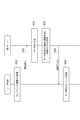
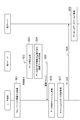
- FIG. 6 is a sequence diagram illustrating an example of an operation of the browser management system according to the first embodiment. It is a figure showing an example of functional composition of a browser management system concerning a 2nd embodiment.
- FIG. 14 is a sequence diagram illustrating an example of an operation of the browser management system according to the second embodiment. It is a figure showing an example of functional composition of a browser management system concerning a 3rd embodiment.
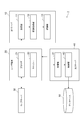
- FIG. 13 is a flowchart illustrating an example of an operation of the browser management system according to the third embodiment. It is a figure showing an example of application of a browser management system concerning a 4th embodiment. It is a figure showing an example of functional composition of a browser management system concerning a 4th embodiment. It is a sequence diagram showing an example of operation of a browser management system concerning a 4th embodiment. It is a figure showing an example of application of a browser management system concerning a 5th embodiment. It is a figure showing an example of functional composition of a browser management system concerning a 5th embodiment. It is a sequence diagram showing an example of operation of a browser management system concerning a 5th embodiment. It is a figure showing an example of application of a browser management system concerning a 6th embodiment. It is a figure showing an example of functional composition of a browser management system concerning a 6th embodiment. It is a sequence diagram showing an example of operation of a browser management system concerning a 6th embodiment.
- the browser management system is a computer system that provides a mechanism for identifying a browser of a user terminal. With this browser management system, it becomes possible to realize stateful processing on a computer system using a stateless protocol.
- Stateless refers to a method in which the system does not retain data indicating the current state.
- An example of a stateless protocol includes, but is not limited to, HTTP (Hypertext ⁇ Transfer ⁇ Protocol).
- stateful refers to a method in which data indicating the current state is held by the system and the state is reflected in processing.
- ⁇ ⁇ Various services can be realized by stateful processing. Examples of the service include electronic commerce (EC), conversion tracking, affiliate tracking, analytics, targeting, and unauthorized access countermeasures. However, the types of services that involve stateful processing are not limited to these. Browser management systems can be built for any service.
- the browser management system does not use a conventionally known HTTP cookie but uses a new method different from the conventional technology.
- the browser management system allows a user to input an image file (hereinafter, simply referred to as “image file”) in which a data string for specifying a browser (hereinafter, also simply referred to as “data string”) is embedded.
- image file an image file
- data string a data string for specifying a browser
- the browser management system is described in detail while showing some embodiments as examples.
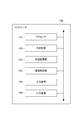
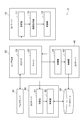
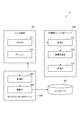
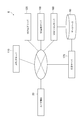
- FIG. 1 is a diagram illustrating an example of a functional configuration of a browser management system 1 according to the first embodiment.
- the browser management system 1 includes a first server 10.
- the first server 10 can be connected to one or more user terminals 20 via a communication network.
- the user terminal 20 can be connected to the web server 30 via a communication network.
- the configuration of the communication network connecting the computers is not limited at all.
- a communication network may be established using at least one of the Internet and an intranet.
- the user terminal 20 is a computer operated by a user who receives an arbitrary online service.
- the user terminal 20 includes a browser 21 and a cache 22.
- the browser 21 is software for displaying a web page on a monitor.
- the user terminal 20 may include a plurality of types of browsers 21.
- the cache 22 has a function of temporarily storing data in a computer.
- the method of implementing the cache 22 is not limited.
- the cache 22 may be implemented using a cache memory, a disk cache, or a cache file.
- the type of computer used as the user terminal is not limited.
- the user terminal may be a portable or stationary personal computer.
- the user terminal may be a mobile terminal such as a high-performance mobile phone (smartphone), a mobile phone, a personal digital assistant (PDA), or a tablet.
- PDA personal digital assistant
- the web server 30 is a computer that provides the user terminal 20 with a website capable of providing a stateful service (hereinafter, simply referred to as “website”).
- a web site is a collection of one or more web pages under a particular domain name.
- a web page is a document of one page that can be browsed by a browser. Examples of websites include EC sites, news sites, portal sites, blog sites, and social networking service (SNS) sites. However, examples of websites are not limited to these.
- SNS social networking service
- the first server 10 is a computer that executes a process for specifying the browser 21 of the user terminal 20. More specifically, the first server 10 transmits the image file in which the data sequence is embedded to the user terminal 20.
- the first server 10 includes a receiving unit 11, an image generating unit 12, and a transmitting unit 13 as functional elements.
- the receiving unit 11 is a functional element that receives a request for an image file from the user terminal 20 that processes a web page.
- the image generation unit 12 is a functional element that generates an image file in which a data string is embedded in response to the request.
- the transmission unit 13 is a functional element that transmits the image file to the user terminal 20 in order to store the data string in the cache 22.
- the first server 10 is composed of one or more computers. When a plurality of computers are used, these computers are connected via a communication network such as the Internet or an intranet, so that one first server 10 is logically constructed.
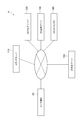
- FIG. 2 shows a general hardware configuration of the computer 100 constituting the first server 10.
- the computer 100 includes a processor 101, a main storage unit 102, an auxiliary storage unit 103, a communication control unit 104, an input device 105, and an output device 106.
- the processor 101 executes an operating system and an application program.
- the main storage unit 102 includes, for example, a ROM and a RAM.
- the auxiliary storage unit 103 is composed of, for example, a hard disk or a flash memory, and generally stores a larger amount of data than the main storage unit 102.
- the auxiliary storage unit 103 stores a first program for causing at least one computer to function as the first server 10.
- the communication control unit 104 includes, for example, a network card or a wireless communication module.
- the input device 105 includes, for example, a keyboard, a mouse, a touch panel, and the like.
- the output device 106 includes, for example, a monitor and a speaker.
- Each functional element of the first server 10 is realized by reading the first program on the processor 101 or the main storage unit 102 and executing the program.
- the first program includes a code for implementing each functional element of the first server 10.
- the processor 101 operates the communication control unit 104, the input device 105, or the output device 106 according to the first program to read and write data in the main storage unit 102 or the auxiliary storage unit 103.
- each functional element of the first server 10 is realized.
- Data or a database necessary for processing may be stored in the main storage unit 102 or the auxiliary storage unit 103.
- the first program may be provided after being fixedly recorded on a tangible recording medium such as a CD-ROM, a DVD-ROM, and a semiconductor memory.
- the first program may be provided via a communication network as a data signal superimposed on a carrier wave.
- the provided first program may be stored in the auxiliary storage unit 103.
- the first server 10 is a computer different from the web server 30, but the configuration of the server is not limited to this.
- one server may have the functions of both the first server 10 and the web server 30.
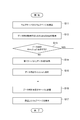
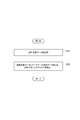
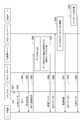
- FIG. 3 is a flowchart illustrating an example of the operation of the user terminal 20.
- step S12 the user terminal 20 acquires JavaScript (registered trademark) for acquiring a data string.
- the user terminal 20 acquires the script according to the ⁇ script> tag described in the received web page.
- the script is a relatively simple program executed on the browser 21.
- the user terminal 20 executes subsequent steps (for example, at least a part of steps S13 to S17) by executing the script.
- the script is not limited to JavaScript (registered trademark), and another script language may be used.
- step S13 the user terminal 20 checks whether or not a data string corresponding to the website is stored in the cache 22. If the data string already exists in the cache 22 (YES in step S13), the user terminal 20 does not request the first server 10 for the data string because there is no need to newly acquire the data string. On the other hand, if the data string does not exist in cache 22 (NO in step S13), the process proceeds to step S14.
- step S14 the user terminal 20 acquires a data sequence corresponding to the website from the first server 10.
- the user terminal 20 obtains the data sequence by receiving the image file in which the data sequence is embedded from the first server 10.
- the user terminal 20 stores the data string in the cache 22.
- the user terminal 20 may store the image file in the cache 22. Since an image file includes a data string, storing an image file is an example of storing a data string.
- the user terminal 20 may extract a data string from the image file and store the data string in the cache 22.
- the user terminal 20 can transmit the data string to the server side (network side).
- the server that receives the request obtains the data string, and can execute a process based on the current state of the browser 21, thereby realizing a stateful process.
- step S16 the user terminal 20 reads a data string from the cache 22, and transmits the data string to a predetermined server.
- the transmission destination of the data string is not limited, and may be, for example, any one of the redirect server, the beacon server, and the web server 30.
- step S17 the user terminal 20 displays the received web page on the monitor.
- Steps S11 to S17 are processing for displaying a web page on the browser 21 of the user terminal 20.
- a client program is prepared to execute this processing.
- the user terminal 20 can execute the processing of steps S11 to S17.
- the client program may be provided after being fixedly recorded on a tangible recording medium, or may be provided via a communication network.
- Client programs can be provided separately from other programs.
- step S21 the user terminal 20 executes a process related to the web page selected by the user.
- the “process related to the web page” is a process for displaying the web page on the browser 21 of the user terminal 20, and includes at least a part of the above-described steps S11 to S17.
- step S23 the image generation unit 12 generates a data string for specifying the browser 21.
- “Specifying a browser” refers to recognizing one browser on one website while distinguishing it from other browsers. It should be noted that the data string is an identifier for specifying the browser 21, not an identifier for specifying the user terminal 20.
- the data string is data represented by one character string composed of a plurality of characters that can be processed by a computer.
- the image generation unit 12 generates the data sequence so that the data sequence includes a sufficient amount of information for specifying the browser 21 on the website.
- the information amount can be represented by 2 n (that is, n bits), and the larger the index n, the larger the information amount of the data string.
- the image generation unit 12 may generate the data string by using an arbitrary method.
- the data column may be a value that may be reused for another browser or the same browser in the future, or a unique value that is generated only once (ie, for another browser or the same browser in the future) A disposable value that is not likely to be used again.)
- the configuration of the data string is not limited.
- the image generation unit 12 may generate a data string including at least one of a system time (for example, the current date and time) and an IP address.
- the data string uses a combination of the IP address of the first server 10, a thread ID indicating a thread executed on the first server 10 for the user terminal 20, and the system time. May be generated.
- the data sequence may be generated using a combination of the IP address and port number of the user terminal 20, the IP address and port number of the first server 10, and the system time.
- the image generation unit 12 may generate a data sequence using a random number, automatic increment, or a sequence.
- the image generation unit 12 generates an image file including a plurality of pixels indicating the data string. Specifically, the image generation unit 12 generates an image file by converting a data string into a plurality of pixel values of a plurality of pixels.
- the color mode (method for setting colors), the number of pixels, and the generation method of the image file are not limited, and the image generation unit 12 may generate the image file using an arbitrary method.
- the image file may be represented in RGB colors.
- the image generation unit 12 converts the data string into a plurality of pixel values (RGB values) of the plurality of pixels, thereby converting the data string.
- the image file is represented by a plurality of pixels, and an image file including the plurality of pixels is generated.
- Each pixel may be defined by an additional value in addition to the RGB value.
- an individual pixel may be further defined by using an alpha value indicating transmittance, which is used in alpha blending (Alpha Blending). Since the information amount of each color of RGB is 8 bits, the information amount of one pixel is 2 (8 ⁇ 3) (that is, 24 bits). If the data sequence is converted into RGB values of k pixels, the image generation unit 12 can embed 2 (8 ⁇ 3 ⁇ k) information amounts in k pixels.
- the image file may be represented in grayscale.
- the image generation unit 12 converts the data string into a plurality of pixel values (gray scale values) of the plurality of pixels, thereby expressing the data string with a plurality of pixels. Then, an image file including the plurality of pixels is generated. Since the information amount of the gray scale is 8 bits, the information amount of one pixel is 2 8 (that is, 8 bits). If the data sequence is converted into gray scale values of k pixels, the image generation unit 12 can embed 2 (8 ⁇ k) information amounts in k pixels.
- the image generation unit 12 may generate an image file including a plurality of pixels in which a data sequence is embedded. Alternatively, the image generation unit 12 may generate an image file including a plurality of pixels in which the data string is embedded and one or more pixels in which the data string is not embedded. That is, the image generation unit 12 may generate an image file including other information in addition to the data string.
- the shape of the generated image file is not limited.
- the shape of the image file may be square, rectangular, linear, substantially circular, or other polygonal, or more complex shapes.
- the image generation unit 12 may generate a 2 (pixel) ⁇ 2 (pixel) image file (the amount of information is 96 bits) or 3 (pixel) ⁇
- An image file of 3 (pixels) (the amount of information is 216 bits) may be generated.
- step S25 the transmitting unit 13 transmits the image file to the user terminal 20.
- This image file can be said to be a response to the image request.
- the user terminal 20 receives the image file. This receiving process can be said to be a part of step S14.
- the browser management system 2 provides a mechanism for storing the data sequence generated in the first embodiment on the server side.
- This mechanism is an example of a configuration for realizing stateful processing on a computer system using a stateless protocol.
- FIG. 5 is a diagram showing an example of a functional configuration of the browser management system 2.
- the browser management system 2 includes the same first server 10 as that shown in the first embodiment, and a second server 40 that stores a data string on the server side (network side).
- the second server 40 is a computer that executes a process for specifying the browser 21 of the user terminal 20.
- Each of the first server 10 and the second server 40 can be connected to one or more user terminals 20 via a communication network.
- the second server 40 includes a receiving unit 41 and a storage unit 42 as functional elements.
- the receiving unit 41 is a functional element that receives a data string from the user terminal 20.
- the storage unit 42 is a functional element that stores the data string in the database 50.
- the second server 40 also includes one or a plurality of computers 100. When a plurality of computers are used, these computers are connected via a communication network such as the Internet or an intranet, so that one second server 40 is logically constructed.
- the computer 100 stores a second program for causing at least one computer to function as the second server 40.
- the second program includes a code for implementing each functional element of the second server 40.
- Each functional element of the second server 40 is realized by reading the second program on the processor 101 or the main storage unit 102 and executing the program.
- the database 50 is a device that stores data strings.
- the mounting method of the database 50 is not limited, and may be, for example, a relational database.
- the location where the database 50 is provided is not limited.
- the database 50 may be a component of the browser management system 2 or may be provided in a computer system different from the browser management system 2.
- the database 50 may function as a key-value store (Key-Value @ Store: KVS) for storing and acquiring a value (value) using a key (key).
- KVS key-value store
- the second server 40 is a computer different from the first server 10 and the web server 30, but the configuration of the server is not limited to this.
- one server may have the function of at least two of the first server 10, the second server 40, and the web server 30.
- step S27 after step S26, the user terminal 20 acquires a data string from the cache 22.
- This processing may be executed by JavaScript (registered trademark) of the received web page, or may be executed in response to another system event.
- the method of acquiring the data string is not limited.
- the user terminal 20 may read the image file from the cache 22. Since a data string is embedded in this image file, reading the image file from the cache 22 is an example of a process for acquiring the data string from the cache 22.
- the user terminal 20 may acquire the data sequence by reading the image file from the cache 22 and extracting the data sequence from the image file.
- the user terminal 20 can obtain the data string by reading the data string from the cache 22.
- step S28 the user terminal 20 transmits the data sequence to the second server 40.
- the transmission method of the data string is not limited.
- the user terminal 20 may transmit the image file read from the cache 22 to the second server 40. Since a data sequence is embedded in the image file, transmitting the image file is an example of a process of transmitting the data sequence.
- the user terminal 20 may transmit the read or extracted data sequence to the second server 40.
- the user terminal 20 may transmit to the second server 40 a URL in which a data string is set in the URL parameter.
- the receiving unit 41 receives the data sequence (may be an image file).
- the storage unit 42 stores the data string in the database 50.
- the storage unit 42 may extract a data string from the image file and store the data string in the database 50.
- the storage unit 42 may store the image file in the database 50. Since a data string is embedded in the image file, storing the image file is an example of processing for storing the data string.
- the storage unit 42 may store the data string in the database 50. By storing the data string in the database 50, the data string can be referred to later on the server side (network side). Therefore, it is possible to execute stateful processing.
- the storage unit 42 may generate a record by associating a data string with another arbitrary data item, and store the record in the database 50.
- FIG. 7 is a diagram showing an example of a functional configuration of the browser management system 3.
- the browser management system 3 includes the same first server 10 and second server 40 as those described in the second embodiment, and a third server 60 that refers to a data string stored in the database 50.
- the third server 60 is a computer that executes a process for specifying the browser 21 of the user terminal 20.
- Each of the first server 10, the second server 40, and the third server 60 can be connected to one or more user terminals 20 via a communication network.
- the third program may be provided after being fixedly recorded on a tangible recording medium, or may be provided via a communication network.
- the third program may be provided together with the first program and the second program, or may be provided separately from at least one of the first program and the second program.
- the third server 60 is a computer different from any of the first server 10, the second server 40, and the web server 30, but the configuration of the server is not limited to this.
- one server may have the functions of at least two of the first server 10, the second server 40, the third server 60, and the web server 30.
- step S31 the receiving unit 61 of the third server 60 acquires the processing target data from the user terminal 20.
- the processing target data may include a data string, but the specific contents and configuration of the processing target data are not limited.
- the determination unit 62 specifies the browser 21 by comparing the processing target data with a data string in the database 50.
- the determination unit 62 determines whether or not the processing target data includes a data string by comparing at least a part of the processing target data with one or more data strings in the database 50.
- the determination unit 62 extracts a data string from the image file and performs comparison.
- the determination unit 62 determines that the processing target data has been sent from the browser 21 corresponding to the data string. As a result, the determination unit 62 can specify the browser 21 that has transmitted the processing target data. If the processing target data does not include any of the data strings in the database 50, the determination unit 62 determines that the transmission source of the processing target data is unknown.
- the processing after the browser 21 is specified by the determination unit 62 is not limited.
- the third server 60 can execute arbitrary processing after specifying the browser 21.
- another server such as the web server 30 may execute an arbitrary process.
- the third server 60 or another server may execute an arbitrary process for providing a stateful service.
- the fourth embodiment is an example in which the browser management system according to the present disclosure is applied to affiliate tracking in a voluntary chain (VC).
- VC voluntary chain
- FIG. 9 is a diagram illustrating an example of application of the browser management system 4.
- FIG. 10 is a diagram illustrating an example of a functional configuration of the browser management system 4.
- the server side includes a media server 110, a VC web server 120, a VC image server 130, a VC redirector 140, and an advertiser server 150.
- the user terminal 20 can be connected to each of these servers via a communication network (for example, the Internet).
- the media server 110 is a computer that provides an advertisement medium to the user terminal 20.
- the media server 110 transmits a web page (advertisement medium) including an affiliate advertisement to the user terminal 20 in response to a request from the user terminal 20.
- affiliate advertisements are advertisements that are posted on advertising media installed on the Internet, and when a viewer (user) of the advertising media purchases a product in response to the advertisement, a success fee is mainly paid to the media. It is an advertisement in a form to be given.
- the advertisement medium is an intermediary for transmitting the affiliate advertisement to the viewer, and more specifically, is a web page on which arbitrary information is posted.
- the method of expressing the affiliate advertisement on the advertisement medium is not limited, and may be, for example, a banner advertisement.
- the VC web server 120 is a web server of a voluntary chain, and is a computer that provides a script for acquiring a data string.
- the script may be, for example, JavaScript (registered trademark).
- the $ VC image server 130 is a computer that transmits an image file in which a data sequence is embedded to the user terminal 20.
- the VC image server 130 can be said to be an example of the first server 10 in the first, second, and third embodiments.
- the VC image server 130 includes a receiving unit 131, an image generating unit 132, and a transmitting unit 133 as functional elements.
- the receiving unit 131 is a functional element that receives a request for an image file from the user terminal 20 that executes a process for displaying a web page.
- the image generation unit 132 is a functional element that generates an image file in response to the request.
- the transmission unit 133 is a functional element that transmits the image file to the user terminal 20 in order to store the data string in the cache 22.
- the receiving unit 131, the image generating unit 132, and the transmitting unit 133 execute the same functions as those of the receiving unit 11, the image generating unit 12, and the transmitting unit 13, respectively.
- the VC redirector 140 is a computer that stores a data string on the server side (network side).
- the VC redirector 140 can be said to be an example of the second server 40 in the second and third embodiments.
- the VC redirector 140 includes a receiving unit 141 and a storage unit 142 as functional elements.
- the receiving unit 141 is a functional element that receives a data string from the user terminal 20.
- the storage unit 142 is a functional element that stores the data string in the database 50.
- the receiving unit 141 and the storing unit 142 perform the same functions as the receiving unit 41 and the storing unit 42 in the second and third embodiments, respectively.
- both the VC image server 130 and the VC redirector 140 are computers that execute processing for specifying the browser 21 of the user terminal 20.
- the advertiser server 150 is a computer that provides a user with a virtual store operated by an affiliate advertisement advertiser. A user who accesses the virtual store by clicking the affiliate advertisement can purchase a product at the virtual store.
- Commodity is any tangible or intangible thing that is traded for a fee or free of charge, and thus is a concept that includes the provision of services.
- the type of product is not limited at all.
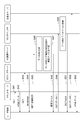
- FIG. 11 is a sequence diagram illustrating an example of the operation of the browser management system 4.
- step S42 the media server 110 transmits the HTML data specified in the request to the user terminal 20.
- This HTML data includes a ⁇ script> tag.
- step S43 the user terminal 20 transmits an HTTP request (GET method) for acquiring the JavaScript (registered trademark) indicated by the ⁇ script> tag to the VC web server 120.
- HTTP request for acquiring the JavaScript (registered trademark) indicated by the ⁇ script> tag
- step S44 the VC web server 120 transmits JavaScript (registered trademark) to the user terminal 20 in response to the request.
- JavaScript registered trademark
- step S45 the user terminal 20 executes the script and sends an image request using the GET method to the VC image server 130.
- the receiving unit 131 receives the image request. Step S45 corresponds to step S22 described above.
- step S46 the image generation unit 132 of the VC image server 130 generates a data sequence for specifying the browser 21 of the user terminal 20. Step S46 corresponds to step S23.
- step S47 the image generation unit 132 generates an image file including a plurality of pixels indicating the data string. Step S47 corresponds to step S24.
- step S48 the transmission unit 133 of the VC image server 130 transmits the image file to the user terminal 20.
- Step S48 corresponds to step S25.
- the user terminal 20 receives the image file and stores the data string in the cache 22. This storing process corresponds to step S26. Therefore, the user terminal 20 may store the image file, or may store a data string extracted from the image file.
- step S49 the user terminal 20 transmits an HTTP request including the data string to the VC redirector 140 using the GET method.
- Step S49 corresponds to step S28. Therefore, the user terminal 20 may transmit the image file, or may transmit a data string extracted from the image file.
- the receiving unit 141 receives the data string.
- step S50 the storage unit 142 of the VC redirector 140 stores the data string in the database 50.
- Step S50 corresponds to step S29. Therefore, the storage unit 142 may store an image file, or may store a received data string or a data string extracted from the image file.
- the storage unit 142 may generate a record by associating a data string with another data item, and store the record in the database 50.
- the storage unit 142 may include at least one of a user ID, a medium owner ID, an advertiser ID, and a tracking key in a record.
- the user ID is an identifier for uniquely identifying a user.
- the media owner ID is an identifier for uniquely identifying the media owner who is a publisher of the advertising media.
- the advertiser ID is an identifier for uniquely specifying the advertiser of the affiliate advertisement.
- a tracking key is an identifier used to track user operations within a particular website.
- step S52 the user terminal 20 reads the data string from the cache 22 in response to the "302 $ Found", and transmits a request (GET method) including the data string to the advertiser server 150.
- step S53 the advertiser server 150 transmits the specified HTML data to the user terminal 20 in response to the request.
- the advertiser server 150 can execute stateful processing based on the fact that the data string received in step S52 is already stored in the database 50.
- the fifth embodiment is an example in which the browser management system according to the present disclosure is applied to analytics.
- the analytic is a method of analyzing a site from which a user has accessed, or a method of analyzing a route that the user follows in a website.
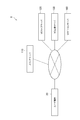
- FIG. 12 is a diagram illustrating an example of application of the browser management system 5.
- FIG. 13 is a diagram illustrating an example of a functional configuration of the browser management system 5.
- the server side includes a media server 110, a VC web server 120, a VC image server 130, and a VC beacon server 160.
- the user terminal 20 can be connected to each of these servers via a communication network (for example, the Internet).
- the configurations of the media server 110, the VC web server 120, and the VC image server 130 are the same as those of the fourth embodiment.
- the VC beacon server 160 is a computer that stores a data string on the server side (network side). It can be said that the VC beacon server 160 is an example of the second server 40 in the second and third embodiments.
- the VC beacon server 160 includes a receiving unit 161 and a storage unit 162 as functional elements.
- the receiving unit 161 is a functional element that receives a data string from the user terminal 20.
- the storage unit 162 is a functional element that stores the data string in the database 50.
- the receiving unit 161 and the storing unit 162 perform the same functions as those of the receiving unit 41 and the storing unit 42, respectively.
- both the VC image server 130 and the VC beacon server 160 are computers that execute processing for specifying the browser 21 of the user terminal 20.
- FIG. 14 is a sequence diagram illustrating an example of the operation of the browser management system 5.
- the processing of steps S61 to S68 is the same as the processing of steps S41 to S48 in the fifth embodiment.
- the user terminal 20 receives the image file sent from the VC image server 130 in step S68 and stores the data string in the cache 22.
- the user terminal 20 may store an image file or a data string extracted from the image file.
- step S69 the user terminal 20 transmits an HTTP request including the data string to the VC beacon server 160 using the GET method.
- Step S69 corresponds to step S28 in the second embodiment. Therefore, the user terminal 20 may transmit the image file, or may transmit a data string extracted from the image file.
- the receiving unit 161 receives the data string.
- step S70 the storage unit 162 of the VC beacon server 160 stores the data string in the database 50.
- Step S70 corresponds to step S29. Therefore, the storage unit 162 may store an image file, or may store a received data sequence or a data sequence extracted from the image file. As in the fourth embodiment, the storage unit 162 may generate a record by associating a data string with another data item, and store the record in the database 50.
- the storage unit 162 may include at least one of a user ID, a media owner ID, an advertiser ID, and a tracking key in a record.
- step S71 the VC beacon server 160 transmits a transparent image used for analytics to the user terminal 20.
- the user terminal 20 receives the transmitted image.
- this transparent image is an image different from the image file in which the data sequence for specifying the browser 21 is embedded.
- the sixth embodiment is an example in which the browser management system according to the present disclosure is applied to targeting.
- Targeting is a method of tracking which websites a user has accessed on the Internet.
- FIG. 15 is a diagram illustrating an example of application of the browser management system 6.
- FIG. 16 is a diagram illustrating an example of a functional configuration of the browser management system 6.
- the server side includes a media server 110, a VC web server 120, a VC image server 130, a VC beacon server 160, and an advertisement server 170.
- the user terminal 20 can be connected to each of these servers via a communication network (for example, the Internet).
- the configurations of the media server 110, the VC web server 120, the VC image server 130, and the VC beacon server 160 are the same as in the fifth embodiment.
- the advertisement server 170 is a computer that provides an affiliate advertisement to be put on an advertisement medium to a user.
- the advertisement server 170 may execute a process of comparing the processing target data transmitted from the browser 21 with a data string in the database 50 to specify the browser 21. Therefore, it can be said that the advertisement server 170 is an example of the third server 60 in the third embodiment.
- the advertisement server 170 includes a receiving unit 171 and a determining unit 172 as functional elements.
- the receiving unit 171 is a functional element that receives processing target data from the user terminal 20.
- the determination unit 172 is a functional element that specifies the browser 21 by comparing the processing target data with a data string in the database 50.
- the receiving unit 171 and the determining unit 172 perform the same functions as those of the receiving unit 61 and the determining unit 62, respectively.
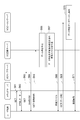
- FIG. 17 is a sequence diagram illustrating an example of the operation of the browser management system 6.
- steps S81 to S91 is the same as the processing of steps S61 to S71 in the fifth embodiment.
- step S92 the user terminal 20 transmits an HTTP request (GET method) for acquiring an affiliate advertisement to the advertisement server 170.
- This request includes the data string read from the cache 22.
- the receiving unit 171 receives the request. This reception corresponds to step S31, and therefore, the HTTP request corresponds to data to be processed.
- step S93 the determination unit 172 of the advertisement server 170 refers to the database 50 based on the request, and determines whether the same data string included in the request is stored in the database 50. .
- the determination unit 172 can specify the browser 21 based on the determination result.
- Step S93 corresponds to step S32.
- the advertisement server 170 can execute further processing required for targeting (this processing can be said to be stateful processing) based on the determination result.
- step S94 the advertisement server 170 transmits the data of the specified affiliate advertisement (advertisement data) to the user terminal 20 in response to the request.
- the user terminal 20 receives the advertisement data and displays an advertisement medium including an affiliate advertisement on a monitor.
- the user terminal 20 transmits an HTTP request using a GET method.
- the use of the GET method is not essential, and the user terminal 20 may use another HTTP request method (for example, a POST method).
- the browser management system includes at least one processor, and at least one processor responds to a process for displaying a web page on a browser of a user terminal, A data sequence for specifying the browser is generated, an image file including a plurality of pixels indicating the data sequence is generated, and the image file is transmitted to the user terminal to store the data sequence in a cache of the user terminal.
- a browser management method is a browser management method executed by at least one processor, which identifies a browser in response to a process for displaying a web page on a browser of a user terminal. Generating an image file including a plurality of pixels indicating the data sequence, and transmitting the image file to the user terminal to store the data sequence in a cache of the user terminal. including.
- a browser management program includes, in response to a process for displaying a web page on a browser of a user terminal, generating a data sequence for identifying the browser, Generating an image file including a plurality of pixels, and transmitting the image file to the user terminal for storing the data sequence in a cache of the user terminal, the computer system.
- an image file indicating a data string for specifying the browser is stored in the cache of the user terminal. Therefore, by using the image file, the browser can be specified without using the HTTP cookie.
- the data string is stored in a cache independent of a specific service, and the data string is used as needed. Can be read from the cache. Therefore, this new technology replacing HTTP cookies can be applied to various online services. That is, this new technique of embedding a data string in an image file is highly versatile.
- At least one processor may generate an image file by converting a data string into a plurality of pixel values corresponding to a plurality of pixels. By converting the data sequence into pixel values, the data sequence can be efficiently embedded in the image file.
- a plurality of pixels may be represented by RGB or gray scale.
- the data string By converting the data string into RGB or grayscale pixel values, the data string can be efficiently embedded in the image file.
- a web page includes a script for acquiring an image file, and at least one processor generates a data string in response to execution of the script on the user terminal.
- An image file may be generated, and the image file may be transmitted.
- the data string may be obtained by receiving a character string including the data string from the user terminal. In this case, there is no need to extract a data string from the image file on the server side, so that the processing load on the server side can be reduced.
- a client program causes a computer to execute a step of receiving an image file from the browser management system and a step of storing a data string in a cache.
- a data string for specifying the browser is stored in the cache of the user terminal. Therefore, by using the data string, the browser can be specified without using the HTTP cookie.
- the configuration of the browser management system is not limited to the above embodiments, and the browser management system may be configured using one or more arbitrary servers.
- the browser management system includes at least one processor.
- the processor that executes the first process may be the same as or different from the processor that executes the second process.
- “At least one processor performs the first processing and the second processing” means that there is no limitation on which processor performs which processing.
- the database 50 stores the data strings, but the storage device is not limited to the database 50.
- the browser management system may store the data string in a storage device other than the database (for example, any type of memory).
- 1 to 6 Browser management system, 10: First server, 11: Receiver, 12: Image generator, 13: Transmitter, 20: User terminal, 21: Browser, 22: Cache, 30: Web server, 40 ... Second server, 41 receiving unit, 42 storage unit, 50 database (storage device), 60 third server, 61 receiving unit, 62 determining unit, 110 media server, 120 VC web server, 130 .. VC image server, 131 receiving unit, 132 image generating unit, 133 transmitting unit, 140 VC redirector, 141 receiving unit, 142 storage unit, 150 advertiser server, 160 VC beacon server, 161. Receiving unit, 162 storage unit, 170 advertising server, 171 receiving unit, 172 determining unit.
Landscapes
- Engineering & Computer Science (AREA)
- Theoretical Computer Science (AREA)
- Databases & Information Systems (AREA)
- General Engineering & Computer Science (AREA)
- Physics & Mathematics (AREA)
- General Physics & Mathematics (AREA)
- Signal Processing (AREA)
- Computer Networks & Wireless Communication (AREA)
- Data Mining & Analysis (AREA)
- Health & Medical Sciences (AREA)
- Artificial Intelligence (AREA)
- Audiology, Speech & Language Pathology (AREA)
- Computational Linguistics (AREA)
- General Health & Medical Sciences (AREA)
- Information Transfer Between Computers (AREA)
Abstract
Selon un mode de réalisation de la présente invention, un système de gestion de navigateur comprend au moins un processeur. Ledit processeur : (A) en réponse à un processus d'affichage d'une page Web sur le navigateur d'un terminal d'utilisateur, génère une chaîne de données pour spécifier le navigateur ; (B) génère un fichier d'image qui comprend une pluralité d'images indiquant la chaîne de données ; et (C) transmet le fichier d'image au terminal d'utilisateur afin que la chaîne de données soit stockée dans une mémoire cache du terminal d'utilisateur.
Priority Applications (4)
| Application Number | Priority Date | Filing Date | Title |
|---|---|---|---|
| PCT/JP2018/025568 WO2020008600A1 (fr) | 2018-07-05 | 2018-07-05 | Système de gestion de navigateur, procédé de gestion de navigateur, programme de gestion de navigateur et programme client |
| US17/256,399 US11258845B2 (en) | 2018-07-05 | 2018-07-05 | Browser management system, browser management method, browser management program, and client program |
| JP2020528633A JP7145215B2 (ja) | 2018-07-05 | 2018-07-05 | ブラウザ管理システム、ブラウザ管理方法、ブラウザ管理プログラム、およびクライアントプログラム |
| EP18925414.7A EP3819779A4 (fr) | 2018-07-05 | 2018-07-05 | Système de gestion de navigateur, procédé de gestion de navigateur, programme de gestion de navigateur et programme client |
Applications Claiming Priority (1)
| Application Number | Priority Date | Filing Date | Title |
|---|---|---|---|
| PCT/JP2018/025568 WO2020008600A1 (fr) | 2018-07-05 | 2018-07-05 | Système de gestion de navigateur, procédé de gestion de navigateur, programme de gestion de navigateur et programme client |
Publications (1)
| Publication Number | Publication Date |
|---|---|
| WO2020008600A1 true WO2020008600A1 (fr) | 2020-01-09 |
Family
ID=69059438
Family Applications (1)
| Application Number | Title | Priority Date | Filing Date |
|---|---|---|---|
| PCT/JP2018/025568 Ceased WO2020008600A1 (fr) | 2018-07-05 | 2018-07-05 | Système de gestion de navigateur, procédé de gestion de navigateur, programme de gestion de navigateur et programme client |
Country Status (4)
| Country | Link |
|---|---|
| US (1) | US11258845B2 (fr) |
| EP (1) | EP3819779A4 (fr) |
| JP (1) | JP7145215B2 (fr) |
| WO (1) | WO2020008600A1 (fr) |
Cited By (1)
| Publication number | Priority date | Publication date | Assignee | Title |
|---|---|---|---|---|
| JP2022041717A (ja) * | 2020-09-01 | 2022-03-11 | キヤノン株式会社 | 情報処理システム、情報処理システムの制御方法 |
Families Citing this family (1)
| Publication number | Priority date | Publication date | Assignee | Title |
|---|---|---|---|---|
| JP6915579B2 (ja) * | 2018-04-06 | 2021-08-04 | 日本電信電話株式会社 | 信号分析装置、信号分析方法および信号分析プログラム |
Citations (4)
| Publication number | Priority date | Publication date | Assignee | Title |
|---|---|---|---|---|
| JP2006113884A (ja) * | 2004-10-15 | 2006-04-27 | Value Commerce Co Ltd | 広告配信装置、コンピュータプログラム、プログラム格納媒体 |
| JP4647717B2 (ja) | 1999-11-09 | 2011-03-09 | バリュー・コマース・インターナショナル・リミテッド | 電子商取引においてユーザのアクティビティをトラッキングするシステム |
| JP2014130542A (ja) * | 2012-12-28 | 2014-07-10 | Ricoh Co Ltd | 画像形成装置、セッション管理方法及びプログラム |
| JP2014241114A (ja) * | 2013-06-12 | 2014-12-25 | 富士ソフト株式会社 | サーバ装置、サーバ装置制御方法、およびコンピュータプログラム |
Family Cites Families (14)
| Publication number | Priority date | Publication date | Assignee | Title |
|---|---|---|---|---|
| US7756967B1 (en) * | 1999-04-26 | 2010-07-13 | Mainstream Scientific, Llc | Apparatus and method of hosting internet content |
| US7103357B2 (en) * | 1999-11-05 | 2006-09-05 | Lightsurf Technologies, Inc. | Media spooler system and methodology providing efficient transmission of media content from wireless devices |
| JP2004533641A (ja) * | 2001-05-02 | 2004-11-04 | ビットストリーム インコーポレーティッド | 非線形カラー・バランスを使用して副画素最適化フォント・ビットマップを生成及び表示するための方法、システム、及びプログラム |
| US20080177994A1 (en) * | 2003-01-12 | 2008-07-24 | Yaron Mayer | System and method for improving the efficiency, comfort, and/or reliability in Operating Systems, such as for example Windows |
| US7634570B2 (en) * | 2003-03-12 | 2009-12-15 | Microsoft Corporation | Managing state information across communication sessions between a client and a server via a stateless protocol |
| US8533141B2 (en) * | 2010-08-31 | 2013-09-10 | Vibrant Media, Inc. | Systems and methods for rule based inclusion of pixel retargeting in campaign management |
| WO2013067437A1 (fr) * | 2011-11-02 | 2013-05-10 | Hoffman Michael Theodor | Systèmes et procédés pour une synthèse, un commerce et une distribution dynamiques de produits numériques |
| US9123084B2 (en) * | 2012-04-12 | 2015-09-01 | Activevideo Networks, Inc. | Graphical application integration with MPEG objects |
| US8606011B1 (en) * | 2012-06-07 | 2013-12-10 | Amazon Technologies, Inc. | Adaptive thresholding for image recognition |
| US9942299B2 (en) * | 2013-03-15 | 2018-04-10 | Yottaa Inc. | System and method for managing multiple variants of an HTTP object |
| US10686781B1 (en) * | 2013-12-24 | 2020-06-16 | Affirm Inc. | System and method for passwordless logins |
| US20160026730A1 (en) * | 2014-07-23 | 2016-01-28 | Russell Hasan | Html5-based document format with parts architecture |
| US9978095B2 (en) * | 2014-08-30 | 2018-05-22 | Digimarc Corporation | Methods and arrangements including data migration among computing platforms, E.G. through use of steganographic screen encoding |
| US9342617B1 (en) * | 2015-05-19 | 2016-05-17 | Parrable, Inc. | Unique identifiers for browsers |
-
2018
- 2018-07-05 WO PCT/JP2018/025568 patent/WO2020008600A1/fr not_active Ceased
- 2018-07-05 JP JP2020528633A patent/JP7145215B2/ja active Active
- 2018-07-05 EP EP18925414.7A patent/EP3819779A4/fr not_active Withdrawn
- 2018-07-05 US US17/256,399 patent/US11258845B2/en active Active
Patent Citations (4)
| Publication number | Priority date | Publication date | Assignee | Title |
|---|---|---|---|---|
| JP4647717B2 (ja) | 1999-11-09 | 2011-03-09 | バリュー・コマース・インターナショナル・リミテッド | 電子商取引においてユーザのアクティビティをトラッキングするシステム |
| JP2006113884A (ja) * | 2004-10-15 | 2006-04-27 | Value Commerce Co Ltd | 広告配信装置、コンピュータプログラム、プログラム格納媒体 |
| JP2014130542A (ja) * | 2012-12-28 | 2014-07-10 | Ricoh Co Ltd | 画像形成装置、セッション管理方法及びプログラム |
| JP2014241114A (ja) * | 2013-06-12 | 2014-12-25 | 富士ソフト株式会社 | サーバ装置、サーバ装置制御方法、およびコンピュータプログラム |
Non-Patent Citations (1)
| Title |
|---|
| See also references of EP3819779A4 |
Cited By (2)
| Publication number | Priority date | Publication date | Assignee | Title |
|---|---|---|---|---|
| JP2022041717A (ja) * | 2020-09-01 | 2022-03-11 | キヤノン株式会社 | 情報処理システム、情報処理システムの制御方法 |
| US12254336B2 (en) | 2020-09-01 | 2025-03-18 | Canon Kabushiki Kaisha | Information processing system and method of controlling information processing system |
Also Published As
| Publication number | Publication date |
|---|---|
| US11258845B2 (en) | 2022-02-22 |
| EP3819779A4 (fr) | 2022-02-16 |
| US20210120074A1 (en) | 2021-04-22 |
| EP3819779A1 (fr) | 2021-05-12 |
| JPWO2020008600A1 (ja) | 2021-04-22 |
| JP7145215B2 (ja) | 2022-09-30 |
Similar Documents
| Publication | Publication Date | Title |
|---|---|---|
| US11455665B2 (en) | System and method for affiliate link generation | |
| US9665256B2 (en) | Identifying selected dynamic content regions | |
| US9141611B2 (en) | Aggregated web analytics request systems and methods | |
| EP2433258B1 (fr) | Livraison protégée de contenu électronique | |
| US9646096B2 (en) | System and methods for analyzing and improving online engagement | |
| US8843619B2 (en) | System and method for monitoring visits to a target site | |
| US20100082808A1 (en) | System and method for automatically delivering relevant internet content | |
| JP7637127B2 (ja) | サードパーティ・クッキーなしにウェブ・パブリッシャー・インベントリをプログラマティック・エクスチェンジに接続すること | |
| US20110010235A1 (en) | Method and System for Setting an Online Coupon Cookie | |
| US8799404B2 (en) | Weather analytics systems and methods | |
| TWI435226B (zh) | A method of reading a system, a terminal, an image server, a computer program product, a terminal, and an image server | |
| US9081865B2 (en) | Identifying selected elements in dynamic content | |
| JP7145215B2 (ja) | ブラウザ管理システム、ブラウザ管理方法、ブラウザ管理プログラム、およびクライアントプログラム | |
| EP4123545A1 (fr) | Procédé de diffusion de publicité et système de diffusion de publicité | |
| JP7240451B2 (ja) | トラッキングシステム、トラッキング方法及びトラッキングプログラム | |
| WO2009116179A1 (fr) | Système de fourniture d'informations correspondant à un contenu de journal internet | |
| CN1953403A (zh) | 用于呈现监控报告的方法和系统 | |
| US20130311359A1 (en) | Triple-click activation of a monetizing action | |
| US12554942B2 (en) | Large language model-based responses to targeted UI elements | |
| JP7557578B2 (ja) | トラッキングシステム、トラッキング方法及びトラッキングプログラム | |
| KR20100033557A (ko) | 광고정보 제공 방법 및 시스템과 이를 위한 기록매체 |
Legal Events
| Date | Code | Title | Description |
|---|---|---|---|
| 121 | Ep: the epo has been informed by wipo that ep was designated in this application |
Ref document number: 18925414 Country of ref document: EP Kind code of ref document: A1 |
|
| ENP | Entry into the national phase |
Ref document number: 2020528633 Country of ref document: JP Kind code of ref document: A |
|
| NENP | Non-entry into the national phase |
Ref country code: DE |
|
| WWE | Wipo information: entry into national phase |
Ref document number: 2018925414 Country of ref document: EP |