WO2020121776A1 - Dispositif de réception et procédé de commande - Google Patents
Dispositif de réception et procédé de commande Download PDFInfo
- Publication number
- WO2020121776A1 WO2020121776A1 PCT/JP2019/045714 JP2019045714W WO2020121776A1 WO 2020121776 A1 WO2020121776 A1 WO 2020121776A1 JP 2019045714 W JP2019045714 W JP 2019045714W WO 2020121776 A1 WO2020121776 A1 WO 2020121776A1
- Authority
- WO
- WIPO (PCT)
- Prior art keywords
- content
- display
- control unit
- user
- voice
- Prior art date
- Legal status (The legal status is an assumption and is not a legal conclusion. Google has not performed a legal analysis and makes no representation as to the accuracy of the status listed.)
- Ceased
Links
Images







Classifications
-
- H—ELECTRICITY
- H04—ELECTRIC COMMUNICATION TECHNIQUE
- H04N—PICTORIAL COMMUNICATION, e.g. TELEVISION
- H04N21/00—Selective content distribution, e.g. interactive television or video on demand [VOD]
- H04N21/40—Client devices specifically adapted for the reception of or interaction with content, e.g. set-top-box [STB]; Operations thereof
- H04N21/47—End-user applications
- H04N21/482—End-user interface for programme selection
- H04N21/4828—End-user interface for programme selection for searching programme descriptors
-
- G—PHYSICS
- G06—COMPUTING OR CALCULATING; COUNTING
- G06F—ELECTRIC DIGITAL DATA PROCESSING
- G06F3/00—Input arrangements for transferring data to be processed into a form capable of being handled by the computer; Output arrangements for transferring data from processing unit to output unit, e.g. interface arrangements
- G06F3/16—Sound input; Sound output
- G06F3/167—Audio in a user interface, e.g. using voice commands for navigating, audio feedback
-
- G—PHYSICS
- G10—MUSICAL INSTRUMENTS; ACOUSTICS
- G10L—SPEECH ANALYSIS TECHNIQUES OR SPEECH SYNTHESIS; SPEECH RECOGNITION; SPEECH OR VOICE PROCESSING TECHNIQUES; SPEECH OR AUDIO CODING OR DECODING
- G10L15/00—Speech recognition
- G10L15/22—Procedures used during a speech recognition process, e.g. man-machine dialogue
-
- H—ELECTRICITY
- H04—ELECTRIC COMMUNICATION TECHNIQUE
- H04H—BROADCAST COMMUNICATION
- H04H60/00—Arrangements for broadcast applications with a direct linking to broadcast information or broadcast space-time; Broadcast-related systems
- H04H60/61—Arrangements for services using the result of monitoring, identification or recognition covered by groups H04H60/29-H04H60/54
- H04H60/65—Arrangements for services using the result of monitoring, identification or recognition covered by groups H04H60/29-H04H60/54 for using the result on users' side
-
- H—ELECTRICITY
- H04—ELECTRIC COMMUNICATION TECHNIQUE
- H04N—PICTORIAL COMMUNICATION, e.g. TELEVISION
- H04N21/00—Selective content distribution, e.g. interactive television or video on demand [VOD]
- H04N21/40—Client devices specifically adapted for the reception of or interaction with content, e.g. set-top-box [STB]; Operations thereof
- H04N21/41—Structure of client; Structure of client peripherals
- H04N21/422—Input-only peripherals, i.e. input devices connected to specially adapted client devices, e.g. global positioning system [GPS]
- H04N21/42203—Input-only peripherals, i.e. input devices connected to specially adapted client devices, e.g. global positioning system [GPS] sound input device, e.g. microphone
-
- H—ELECTRICITY
- H04—ELECTRIC COMMUNICATION TECHNIQUE
- H04N—PICTORIAL COMMUNICATION, e.g. TELEVISION
- H04N21/00—Selective content distribution, e.g. interactive television or video on demand [VOD]
- H04N21/40—Client devices specifically adapted for the reception of or interaction with content, e.g. set-top-box [STB]; Operations thereof
- H04N21/43—Processing of content or additional data, e.g. demultiplexing additional data from a digital video stream; Elementary client operations, e.g. monitoring of home network or synchronising decoder's clock; Client middleware
- H04N21/431—Generation of visual interfaces for content selection or interaction; Content or additional data rendering
- H04N21/4312—Generation of visual interfaces for content selection or interaction; Content or additional data rendering involving specific graphical features, e.g. screen layout, special fonts or colors, blinking icons, highlights or animations
-
- H—ELECTRICITY
- H04—ELECTRIC COMMUNICATION TECHNIQUE
- H04N—PICTORIAL COMMUNICATION, e.g. TELEVISION
- H04N21/00—Selective content distribution, e.g. interactive television or video on demand [VOD]
- H04N21/40—Client devices specifically adapted for the reception of or interaction with content, e.g. set-top-box [STB]; Operations thereof
- H04N21/43—Processing of content or additional data, e.g. demultiplexing additional data from a digital video stream; Elementary client operations, e.g. monitoring of home network or synchronising decoder's clock; Client middleware
- H04N21/439—Processing of audio elementary streams
- H04N21/4394—Processing of audio elementary streams involving operations for analysing the audio stream, e.g. detecting features or characteristics in audio streams
-
- H—ELECTRICITY
- H04—ELECTRIC COMMUNICATION TECHNIQUE
- H04N—PICTORIAL COMMUNICATION, e.g. TELEVISION
- H04N21/00—Selective content distribution, e.g. interactive television or video on demand [VOD]
- H04N21/40—Client devices specifically adapted for the reception of or interaction with content, e.g. set-top-box [STB]; Operations thereof
- H04N21/47—End-user applications
- H04N21/472—End-user interface for requesting content, additional data or services; End-user interface for interacting with content, e.g. for content reservation or setting reminders, for requesting event notification, for manipulating displayed content
-
- H—ELECTRICITY
- H04—ELECTRIC COMMUNICATION TECHNIQUE
- H04N—PICTORIAL COMMUNICATION, e.g. TELEVISION
- H04N5/00—Details of television systems
- H04N5/76—Television signal recording
- H04N5/765—Interface circuits between an apparatus for recording and another apparatus
- H04N5/775—Interface circuits between an apparatus for recording and another apparatus between a recording apparatus and a television receiver
-
- G—PHYSICS
- G10—MUSICAL INSTRUMENTS; ACOUSTICS
- G10L—SPEECH ANALYSIS TECHNIQUES OR SPEECH SYNTHESIS; SPEECH RECOGNITION; SPEECH OR VOICE PROCESSING TECHNIQUES; SPEECH OR AUDIO CODING OR DECODING
- G10L15/00—Speech recognition
- G10L15/22—Procedures used during a speech recognition process, e.g. man-machine dialogue
- G10L2015/223—Execution procedure of a spoken command
-
- H—ELECTRICITY
- H04—ELECTRIC COMMUNICATION TECHNIQUE
- H04H—BROADCAST COMMUNICATION
- H04H60/00—Arrangements for broadcast applications with a direct linking to broadcast information or broadcast space-time; Broadcast-related systems
- H04H60/35—Arrangements for identifying or recognising characteristics with a direct linkage to broadcast information or to broadcast space-time, e.g. for identifying broadcast stations or for identifying users
- H04H60/37—Arrangements for identifying or recognising characteristics with a direct linkage to broadcast information or to broadcast space-time, e.g. for identifying broadcast stations or for identifying users for identifying segments of broadcast information, e.g. scenes or extracting programme ID
- H04H60/372—Programme
-
- H—ELECTRICITY
- H04—ELECTRIC COMMUNICATION TECHNIQUE
- H04H—BROADCAST COMMUNICATION
- H04H60/00—Arrangements for broadcast applications with a direct linking to broadcast information or broadcast space-time; Broadcast-related systems
- H04H60/35—Arrangements for identifying or recognising characteristics with a direct linkage to broadcast information or to broadcast space-time, e.g. for identifying broadcast stations or for identifying users
- H04H60/38—Arrangements for identifying or recognising characteristics with a direct linkage to broadcast information or to broadcast space-time, e.g. for identifying broadcast stations or for identifying users for identifying broadcast time or space
- H04H60/41—Arrangements for identifying or recognising characteristics with a direct linkage to broadcast information or to broadcast space-time, e.g. for identifying broadcast stations or for identifying users for identifying broadcast time or space for identifying broadcast space, i.e. broadcast channels, broadcast stations or broadcast areas
- H04H60/43—Arrangements for identifying or recognising characteristics with a direct linkage to broadcast information or to broadcast space-time, e.g. for identifying broadcast stations or for identifying users for identifying broadcast time or space for identifying broadcast space, i.e. broadcast channels, broadcast stations or broadcast areas for identifying broadcast channels
-
- H—ELECTRICITY
- H04—ELECTRIC COMMUNICATION TECHNIQUE
- H04H—BROADCAST COMMUNICATION
- H04H60/00—Arrangements for broadcast applications with a direct linking to broadcast information or broadcast space-time; Broadcast-related systems
- H04H60/35—Arrangements for identifying or recognising characteristics with a direct linkage to broadcast information or to broadcast space-time, e.g. for identifying broadcast stations or for identifying users
- H04H60/38—Arrangements for identifying or recognising characteristics with a direct linkage to broadcast information or to broadcast space-time, e.g. for identifying broadcast stations or for identifying users for identifying broadcast time or space
- H04H60/41—Arrangements for identifying or recognising characteristics with a direct linkage to broadcast information or to broadcast space-time, e.g. for identifying broadcast stations or for identifying users for identifying broadcast time or space for identifying broadcast space, i.e. broadcast channels, broadcast stations or broadcast areas
- H04H60/44—Arrangements for identifying or recognising characteristics with a direct linkage to broadcast information or to broadcast space-time, e.g. for identifying broadcast stations or for identifying users for identifying broadcast time or space for identifying broadcast space, i.e. broadcast channels, broadcast stations or broadcast areas for identifying broadcast stations
Definitions
- the present disclosure relates to a receiving device and a control method.
- Patent Document 1 discloses a technique of a display control device that executes voice recognition by recognizing the content of a voice uttered by a user, specifies a voice command, and executes processing.
- the attention option is specified from a plurality of options according to the voice input according to a predetermined criterion, the other is specified as the alternative option, and the attention option is displayed larger than the other options, thereby making a selection. You can express what is done.
- Patent Document 1 when the option is executed, it is necessary to input a voice that represents a phrase such as “begin” again, and the steps from selection to execution may be troublesome.
- a search process for searching for a channel or content based on a phrase recognized from a user's uttered voice, and selecting one channel or content from a plurality of channels or contents obtained by the search process Processing, displaying the selected content or content being broadcast on the selected channel on a display unit, and further displaying on the display unit a plurality of channels or contents obtained by the search processing.
- a reception device includes a control unit that performs a process of displaying item images as options.
- a processor searches for a channel or content based on a phrase recognized from a user's uttered voice, and selects one channel or content among a plurality of channels or content obtained by the search. Selecting, displaying the selected content or content being broadcast on the selected channel on a display unit, and further displaying on the display unit a plurality of channels or contents obtained by the search.
- a control method including displaying an item image as an option is proposed.
- FIG. 19 is an explanatory diagram for describing an overview of an information processing device according to an embodiment of the present disclosure. It is a block diagram which shows an example of the hardware constitutions of the information processing apparatus by this embodiment.
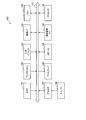
- FIG. 3 is a block diagram showing an example of a configuration of logical functions realized by a memory and a processor of the information processing device shown in FIG. 2.
- It is a flowchart which shows an example of the flow of the operation processing of an information processing apparatus when the audio
- It is a figure which shows the example of a display of the UI image at the time of audio
- FIG. 1 is an explanatory diagram illustrating an overview of an information processing device 100 according to an embodiment of the present disclosure.
- the information processing apparatus 100 is distributed from a broadcast signal broadcast from a radio tower 200 by each broadcasting station or from the Internet 220 (specifically, a content distribution server communicatively connected via the Internet). It is a so-called television device including a display 108, which is a receiving device for receiving the content data.
- the information processing device 100 (reception device) is not limited to a television device, and may be a smart phone, a projector, a car navigation system, a recorder having a recording/playback function connected to a television device, a player having a playback function, or the like. It may be an external device.
- the information processing device 100 is a television device.
- the information processing device 100 includes a microphone 102 and a display 108.
- the microphone 102 collects the voice uttered by the user.
- the display 108 displays an image generated by the information processing device 100.
- the images displayed by display 108 may include user interface (UI) images in addition to content images.
- UI user interface
- the user U speaks the word “NNN”, which is the name of the channel.
- the information processing apparatus 100 recognizes the user's uttered voice, searches for a channel based on the phrase “NNN”, and controls to switch to one channel selected from the search results, for example, “NNN comprehensive”.
- the display 108 the video of the program currently being broadcast in "NNN general” is displayed. Selection of candidates when there are a plurality of search results can be determined according to a predetermined priority. For example, when the user U voice-inputs "Show me NNN" (channel name), the channel of "NNN” is “NNN comprehensive", “NNN first", “NNNAA”, and "NNN".
- the information processing apparatus 100 When there are a plurality of such as “premier”, the information processing apparatus 100 automatically selects the channel most likely to be viewed by the user U based on a predetermined priority and automatically switches the display screen. It is possible to answer the request of the user U as much as possible.
- the name of the channel is not limited to the example of “NNN”, and may include all names that can identify the channel, including the official name and abbreviation of each broadcasting station.
- the information processing apparatus 100 can identify the user who is watching by voice recognition, face recognition (image recognition), and user information such as account information, each of the search results based on the user's preference information and viewing history. You may make it calculate a priority and select the channel with the highest priority.
- the information processing apparatus 100 after automatically selecting from the search result and switching the channel, displays on the screen an item image 30 (30a to 30d) indicating the name or the like of each channel (selection item) according to the search result. To do. There is no problem if the channel automatically selected by the information processing apparatus 100 is as expected by the user, but if it is different from the channel requested by the user, it is assumed that the channel will be selected again immediately. Therefore, the information processing apparatus 100 according to the present embodiment displays the item images 30a to 30d indicating the search result (for example, the name of each searched channel) in the order of priority and prompts the user to input a voice when changing the channel. It is possible to support.
- the item images 30a to 30d may be displayed for a certain period of time (for example, several seconds), and when the timeout occurs after the certain period of time, the display may disappear without any operation.
- the user refers to the reading item displayed in the item image 30, performs voice input again with a more accurate name, and selects a desired channel (for example, not the automatically selected “NNN comprehensive”, but another selection candidate). "NNN 1st" or "NNN AA").
- the information processing apparatus 100 may also display an image (not shown in FIG. 1) on the display 108 together with the item images 30 (30a to 30d), which prompts an input when selecting another channel.
- the image prompting for input for example, the user may be prompted to input a cursor using a remote controller or a smartphone, or a voice input may be prompted using a microphone icon.
- a description such as "If you want to watch another channel, please speak that item again" may be displayed.
- the user can intuitively understand which item should be read out. It will be possible.
- the information processing apparatus 100 records the channel selected by the user as viewing history and preference information together with the user information and time information, thereby making it possible to further improve the accuracy of automatic channel selection.
- the channel is searched (that is, the program is searched) when the voice of the channel name is input, but the present disclosure is not limited to this, and the program name and the genre are designated.
- application name and external input device name even when abstract voice input such as "Show me a recommendation" is performed, content search for broadcast programs, recorded programs, Internet distribution programs, applications, etc. can be performed. You can do it.
- the information processing apparatus 100 searches for content in response to a user's voice input, and when a plurality of content items are searched, the content item that is likely to be requested by the user. Is automatically selected according to a predetermined criterion and displayed on the display 108, and an item image showing the search result is displayed.
- the item image indicating the search result may be, for example, one in which information composed only of text is displayed overlaid on the content image.
- the content is automatically selected and displayed (that is, executed) to save the user's trouble, and the search result is selected as a selection candidate item.
- the search result is selected as a selection candidate item.
- displaying it is possible to support voice input when the user selects another candidate, and to answer the user's request as much as possible.
- an image prompting voice input of a reading item may be displayed together, and it is possible to avoid reading that is difficult to recognize or ambiguous reading.
- the information processing apparatus 100 at least voice detection by the microphone 102 is possible (that is, a state in which power is being supplied to the processor 112 and the microphone 102), and the display 108 is OFF (that is, power is supplied to the display 108).
- a voice input of a request (content search) by the user is recognized in a standby state in which the information processing apparatus 100 is not performed, the information processing apparatus 100 is automatically turned on (at least the display 108 is turned on). May be performed.
- the voice input of the request by the user may be recognized by recognizing a word (search word, for example, designation of a channel name, a program name, a genre, etc.) that follows after a predetermined call such as an agent name. Good.
- the information processing apparatus 100 performs a content search based on the words and phrases recognized by voice, and when a plurality of candidates are searched, displays the content selected according to a predetermined criterion on the display 108, and also an item image showing the search result. Is also displayed on the display 108. In this way, it becomes possible to automatically turn on the power of the information processing apparatus 100 by voice input for content search.
- the information processing device 100 performs the voice recognition process, but the present disclosure is not limited to this, and the voice recognition process is performed by an external device (smart speaker, smartphone, tablet) connected to the information processing device 100.
- Terminal a local terminal such as a PC, or a server on the Internet).
- the microphone 102 is provided in the information processing apparatus 100, but the present disclosure is not limited to this, and the microphone 102 is an external device (smart speaker or the like) connected to the information processing apparatus 100.
- Voice terminal or mobile terminal such as a smartphone
- An external device such as a voice terminal may detect the user voice, perform voice recognition processing, and control to automatically turn on the power of the information processing device 100.
- the detected user voice on the network may be detected.
- the control may be performed by transmitting the information to the server, causing the server to execute the voice recognition process, and automatically turning on the power of the information processing apparatus 100 based on the recognition result.
- an input device such as a remote controller receives a voice input, transmits the received user utterance information to the information processing apparatus 100, and the information processing apparatus 100 performs voice recognition processing or information transmission to a server. You may.
- the information processing apparatus 100 performs a content search based on the voice recognition result, and when a plurality of candidates are searched, displays the content selected according to a predetermined criterion on the display 108, and also displays an item image indicating the search result. It is displayed on the display 108.
- the voice reception and voice recognition start processing may be started using a button or icon arranged on a device such as a remote controller or a smartphone.
- FIG. 2 is a block diagram showing an example of the hardware configuration of the information processing device 100.
- the information processing apparatus 100 includes a camera 101, a microphone 102, an input device 103, a communication interface (I/F) 104, a memory 105, a tuner 106, a decoder 107, a display 108, a speaker 109, and a remote control I/F.
- An F110, a bus 111 and a processor 112 are provided.
- the camera 101 has an image sensor such as a CCD (Charge Coupled Device) or a CMOS (Complementary Metal Oxide Semiconductor), and captures an image.
- the image captured by the camera 101 (each frame forming a moving image) is treated as an input image for processing by the information processing apparatus 100.
- the microphone 102 collects the voice uttered by the user and generates a voice signal.
- the voice signal generated by the microphone 102 is treated as an input voice for voice recognition by the information processing device 100.
- the input device 103 is a device used by the user to directly operate the information processing apparatus 100.
- the input device 103 may include, for example, buttons, switches, dials, and the like arranged in the housing of the information processing apparatus 100.
- the input device 103 detects a user input, the input device 103 generates an input signal corresponding to the detected user input.
- the communication I/F 104 mediates communication between the information processing device 100 and another device (external device).
- the communication I/F 104 supports any wireless communication protocol or wired communication protocol and establishes a communication connection with another device.
- the communication I/F 104 may be a connection port such as a USB (Universal Serial Bus) terminal, an optical audio terminal, an HDMI (registered trademark) (High-Definition Multimedia Interface) terminal, or the like.
- USB Universal Serial Bus
- HDMI registered trademark
- HDMI High-Definition Multimedia Interface
- the communication I/F 104 may be composed of a communication device for connecting to a network.
- the communication I/F 104 may be a communication card for wired or wireless LAN (Local Area Network), Bluetooth (registered trademark), Wi-Fi (registered trademark), or WUSB (Wireless USB).
- the communication I/F 104 may be a router for optical communication, a router for ADSL (Asymmetric Digital Subscriber Line), or a modem for various kinds of communication.
- the communication I/F 104 transmits and receives signals and the like to and from the Internet and other communication devices using a predetermined protocol such as TCP/IP.
- the network connected to the communication I/F 104 is a network connected by wire or wirelessly, such as the Internet or a home LAN.
- the communication I/F 104 may receive a content signal from an external device (for example, an internet distribution server), extract content data from the content signal, and generate a content image based on the content data.
- an external device for example, an internet distribution server
- the memory 105 is composed of a storage medium such as a semiconductor memory or a hard disk, and stores programs and data for processing by the information processing apparatus 100, and content data.
- the data stored by the memory 105 may include, for example, feature data for image recognition and voice recognition described later. It should be noted that some or all of the programs and data described in this specification may be acquired from an external data source (for example, a data server, a network storage, or an external memory) without being stored in the memory 105. Good.
- Tuner The tuner 106 extracts and demodulates a content signal of a desired channel from a broadcast signal received via an antenna (not shown). Then, the tuner 106 outputs the demodulated content signal to the decoder 107.
- the decoder 107 decodes content data from the content signal input from the tuner 106.
- the decoder 107 may decode the content data from the content signal received via the communication I/F 104.
- a content image can be generated based on the content data decoded by the decoder 107.
- the display 108 has a screen including an LCD (Liquid Crystal Display), an OLED (Organic light-Emitting Diode), a CRT (Cathode Ray Tube), and the like, and displays an image generated by the information processing apparatus 100. indicate.
- the content image and the UI image (item image 30 or the like) described with reference to FIG. 1 can be displayed on the screen of the display 108.
- the speaker 109 has circuit elements such as a diaphragm and an amplifier, and outputs a sound based on an output sound signal generated by the information processing device 100.
- the volume of the speaker 109 can be changed.
- the remote control I/F 110 is an interface that receives a remote control signal (infrared signal or other wireless signal) transmitted from a remote controller used by a user. When the remote control I/F 110 detects the remote control signal, the remote control I/F 110 generates an input signal corresponding to the detected remote control signal.
- a remote control signal infrared signal or other wireless signal
- Bus 111 interconnects the camera 101, microphone 102, input device 103, communication I/F 104, memory 105, tuner 106, decoder 107, display 108, speaker 109, remote control I/F 110 and processor 112. To do.
- the processor 112 may be, for example, a CPU (Central Processing Unit) or a DSP (Digital Signal Processor).
- the processor 112 operates various functions of the information processing apparatus 100 described later by executing a program stored in the memory 105 or another storage medium.
- the hardware configuration of the information processing apparatus 100 according to this embodiment has been described above.
- the hardware configuration illustrated in FIG. 2 is an example, and the present disclosure is not limited to this.
- the information processing apparatus 100 may not have the camera 101, and an external device such as a smartphone may be used instead of the remote controller.
- FIG. 3 is a block diagram showing an example of a configuration of logical functions realized by the memory 105 and the processor 112 of the information processing apparatus 100 shown in FIG. It is a block diagram which shows an example of a structure of a logical function.
- the information processing device 100 includes a voice acquisition unit 120, a voice recognition unit 130, an application unit 150, a feature database (DB) 140, and a control unit 160.
- the control unit 160 includes a search control unit 162, a selection control unit 164, and a display control unit 166.
- some of the functional blocks illustrated in FIG. 3 may be realized in a device outside the information processing device 100 (for example, in a cloud computing environment).
- the control unit 160 may cause an external control function to execute the control process described below, instead of executing the control process by itself.
- the voice recognition unit 130 may cause an external voice recognition function to perform the process instead of performing the voice recognition process described below.
- the voice acquisition unit 120 acquires the voice signal generated by the microphone 102 as an input voice. Then, the voice acquisition unit 120 outputs the acquired input voice to the voice recognition unit 130.
- the voice recognition unit 130 recognizes the voice of the user based on the input voice input from the voice acquisition unit 120.
- the voice recognition unit 130 converts the input voice into text indicating its content, and outputs the text to the control unit 160 or the application unit 150.
- the voice recognition unit 130 may identify the speaker (user) by using the voice feature data stored in the feature DB 140 in the recognition of the input voice input from the voice acquisition unit 120.
- the voice recognition unit 130 outputs the speaker identification result to the control unit 160 and the application unit 150.
- the feature DB 140 stores in advance voice feature data used by the voice recognition unit 130 for voice recognition.
- the voice feature data may include, for example, a voice feature amount indicating a feature of speech for each user.
- the feature DB 140 may also store image feature data used by the application unit 150 for image recognition.
- the image feature data may include, for example, known image feature amounts of a predetermined portion such as the hand or face of the user.
- the image feature data may also include face image data for each user.
- the feature DB may be referred to or acquired from an external device such as an external server, or may include feature data of another person.
- the application unit 150 executes various application functions of the information processing apparatus 100. For example, the program reproduction function, the electronic program guide (EPG; Electronic Program Guide) display function, the recording setting function, the external input switching function, the photo reproduction function, the video reproduction function, the music reproduction function, the Internet browsing function, etc. May be performed.
- the application unit 150 outputs an application image and a sound (which may include a content image) generated through the application function to the control unit 160.
- At least a part of the application functions executed by the application unit 150 cooperates with the voice recognition unit 130 and receives voice input from the user.
- the program reproduction function may change the setting of the channel and volume of the television program or the Internet distributed program, or reproduce the recorded program according to the audio content recognized by the audio recognition unit 130.
- the electronic program guide display function can change the channel and time zone of the electronic program guide to be displayed according to the voice content recognized by the voice recognition unit 130.
- the recording setting function can set a recording date and time and a channel according to the voice content recognized by the voice recognition unit 130.
- the data of the recorded program can be stored in the memory 105 of the information processing device 100.
- the external input switching function can switch the external input according to the voice content recognized by the voice recognition unit 130.
- the photo reproduction function can reproduce the photo taken on the specified date recognized by the voice recognition unit 130.
- the internet browsing function may perform an internet search using the keyword recognized by the voice recognition unit 130.
- An image captured by the camera 101 may be input to the application unit 150.
- the application unit 150 can recognize an input image.
- the predetermined part is recognized by comparing the image feature amount extracted from the input image with the image feature amount stored in advance in the feature DB 140 for a predetermined part of the user's body.
- the predetermined portion may include, for example, at least one of the hand and the face of the user.
- the application unit 150 identifies the user by face recognition.
- the application unit 150 can recognize a predetermined gesture from the movement of the hand. That is, at least a part of the application functions executed by the application unit 150 receives the gesture input of the user.
- search control unit 162 At least a part of the application functions executed by the application unit 150 cooperates with the voice recognition unit 130 to receive voice input from the user and search for content desired by the user. Control the processing. For example, in the program playback function, when a program is displayed by receiving a voice input from the user, the search control unit 162 includes at least a word (search word) recognized by the voice recognition unit 130 (partial match). The channel (channel number or channel name) corresponding to, the program name currently being broadcast or distributed on the Internet, the recorded program, the application, etc. are searched. The recorded program may be stored in the memory 105, or may be stored in an external device such as a recorder connected via the communication I/F 104.
- the search control unit 162 when receiving the voice input from the user to switch the external, includes at least the word (search word) recognized by the voice recognition unit 130 (partially matches). Search for the external input device corresponding to the name.
- the selection control unit 164 controls the selection of one content item to be executed from the search results of the search control unit 162. If there is one search result, the selection control unit 164 may select this. However, if there are multiple search results, the selection control unit 164 selects the content that is likely to be requested by the user, and therefore, the predetermined control is performed. The content of 1 is selected according to the criteria of.
- the predetermined criterion is, for example, a priority calculated based on a person (specifically, a viewing user), a time (specifically, a viewing time), or the like.
- the selection control unit 164 refers to, for example, at least one of the viewing history information acquired from the viewing history DB 172 and the user preference information acquired from the preference DB 174, and searches according to at least one of the viewing user and the current time. Each priority of the created content can be calculated.
- the identification of the viewing user can be performed by voice recognition, image recognition (face recognition), or reference to user information.
- the selection control unit 164 based on the viewing history or preference information of the viewing user identified by voice recognition or the like, the channel/program/genre (for example, viewing in the latest predetermined period) that the viewing user often views.
- Channels/programs/genres, which have a high frequency, are given higher priority, or programs, genres, etc. often recorded by the viewing user are given higher priority.
- the genre is a classification according to the content of the content, and examples thereof include news, music, drama, movies, and variety.
- the selection control unit 164 increases the priority of the channel/program/genre frequently viewed by the viewing user at the current time, the program/genre often recorded, and the like.
- the selection control unit 164 acquires information such as the entertainer, singer, and character that the viewing user likes from the preference information, and increases the priority of the content in which they appear in the search results. Good.
- the selection control unit 164 may also calculate the priority according to the combination of viewing users and the number of users. For example, based on the viewing history, channels/programs/genres that are often watched by parents only, channels/programs/genres that are often watched by children only, channels/programs/genres that are often watched by families, etc. Can be specified and the priority can be calculated appropriately.
- the selection control unit 164 for example, prioritizes channels/programs/genres frequently viewed in the current time zone, programs/genres frequently recorded, and the like. May be higher.
- the viewing history information or preference information of the viewing user may be combined with the viewing history information or preference information of another person to determine the priority, or the priority may be determined only from the viewing history information or preference information of another person. May be.
- the priority may be set based on
- the selection control unit 164 may increase the priority of, for example, the channel, program, or genre selected most recently based on only the viewing history regardless of the person or the time.
- the selection control unit 164 may make the priority of an unviewed program higher than that of a viewed program when the search result includes a recorded program.
- the viewing history DB 172 stores viewing history of contents (broadcast programs, recorded programs, Internet distribution programs, applications, etc.).
- the viewing history may include the viewing time of the content, the number of times the application has been used, the information of the viewing user, the search history of the user and the selection history of the search result.
- the viewing history DB 172 may store recording reservation information.
- the viewing history DB 172 may be built in the information processing apparatus 100, or may be referred to or acquired from an external device such as an external server. Further, the viewing history DB 172 may include information other than that of the user of the information processing device 100.
- the preference DB 174 stores user preference information.
- the preference information may be acquired from an answer obtained by conducting a questionnaire to the user in advance, or may be acquired from the user's viewing history, program search history, recording reservation information, or the like.
- the information processing device 100 or an external device may determine the user's preference information by voice recognition or image recognition using a camera.
- the preference information DB 174 may be built in the information processing device 100, or may be referred to or acquired from an external device such as an external server. Further, the preference information DB 174 may include information other than the user of the information processing device 100.
- the display control unit 166 controls the display of images via the display 108.
- the display control unit 166 causes the display 108 to display the application image input from the application unit 150.
- the display control unit 166 generates a search result and an output image according to the selection result, and displays the output image on the display 108.
- the program reproduction application is activated in the application unit 150, and according to the voice input by the user, the search control unit 162 controls the search of the content, and the selection control unit 164 reproduces (executes) the search result.
- the display control unit 166 performs control of displaying the selected content on the display 108 (that is, execution of the selected content). Further, the display control unit 166 generates an item image (may display the name of the content as the reading item) indicating the search result, and displays the item image on the display 108.
- the item image After the item image is displayed, it may disappear automatically if there is no input from the user for a certain period of time, or the displayed time is determined based on the user setting, the information in the preference information DB, or the like. It may be like this.
- the item image indicating the name of the automatically selected content in the search result may be highlighted, or the content selected by the selection control unit 164 may not be displayed in the item image. Further, the display control unit 166 may also display an image prompting an input when switching the content.
- the control unit 160 may control the search control unit 162, the selection control unit 164, and the display control unit 166, as well as the entire information processing apparatus 100.
- the control unit 160 controls to continue accepting the voice input by the user in at least the standby state in which the voice detection by the microphone 102 and the voice recognition by the voice recognition unit 130 are ON.
- the content of the voice input by the user is related to the program reproduction function (for example, the content of the voice input is " ⁇ [predetermined call for system name, etc.], "NNN (channel name)" attached, etc.")
- the control unit 160 turns on the power of the entire information processing apparatus 100 including the display 108.
- control unit 160 activates the program reproduction application by the application unit 150, and displays on the display 108 the image of the content selected by the selection control unit 164 from the one or more contents searched by the search control unit 162 based on the voice input. Control to display. At this time, as described above, the control unit 160 can also perform control to superimpose and display an item image indicating the name of each searched content item or an image prompting an input when switching to another content item on the image of the content item. ..
- the information processing apparatus 100 receives the voice input by the user, and when the voice input requesting the content reproduction is detected, the information processing apparatus 100 is powered off. When turned on, the content requested by the user can be displayed.
- the voice input can be accepted by the voice device (for example, a smart speaker) connected to the information processing device 100.
- the voice device may send the detected user voice to a voice recognition server on the cloud. Therefore, in this case, the information processing apparatus 100 is automatically turned on by the control signal transmitted from the voice device or the server on the cloud, and displays the content requested by the user based on the voice recognition result.
- the functional configuration of the information processing apparatus 100 has been specifically described above.
- the functional configuration of the information processing apparatus 100 illustrated in FIG. 3 is an example, and the present embodiment is not limited to this.
- at least a part of the functional configuration of the information processing device 100 illustrated in FIG. 3 may be included in an external device (local terminal or cloud server) that is communicatively connected to the information processing device 100.
- the information processing apparatus 100 in the standby state may be automatically turned on by operating any button arranged on the remote controller or the like, or may be automatically turned on based on voice recognition. It is also possible to adopt a configuration that does not have the function.
- FIG. 4 is a flowchart showing an example of a flow of operation processing of the information processing apparatus 100 when a voice input of a channel name according to the first embodiment is performed.
- the information processing apparatus 100 first uses the microphone 102 to utter a voice of the user (for example, “ ⁇ [predetermined call for system name or the like], “attach NNN (channel name)”, etc.”) ) Is detected, the voice recognition unit 130 performs voice recognition (step S103).
- a voice of the user for example, “ ⁇ [predetermined call for system name or the like], “attach NNN (channel name)”, etc.”
- the voice recognition unit 130 performs voice recognition (step S103).
- the power supply state of the information processing apparatus 100 is the standby state in which the display 108 is OFF but the voice input can be accepted.
- step S106 the control unit 160 of the information processing device 100 turns on the power of the information processing device 100 (step S106). This causes the display 108 to light up. If the information processing apparatus 100 is already turned on and the display 108 is lit, the process of step S106 is skipped.
- the search control unit 162 searches for a channel corresponding to the channel name input by voice, based on the voice recognition result (step S109).
- the selection control unit 164 selects one channel based on the priority (step S112). For example, the selection control unit 164 may increase the priority of a channel that is frequently viewed in the current time zone and select the channel based on the current time and the viewing history. Further, the selection control unit 164 may identify the speaker (that is, the viewing user) by voice recognition, and calculate the priority of each searched channel based on the viewing history and the preference information of the viewing user. Further, the priority may be calculated based on the past user's selection history or selection data by another user who uses the same function.
- the priority may be determined in consideration of the setting made by the user for the channel and the content. Specifically, for example, the user can specify the priority of channels and contents, or set the priority of programs included in the list of watching schedules, contents added to favorites, and programs reserved for recording. Any processing may be performed.
- the display control unit 166 performs control (channel selection) to display the video of the program currently broadcast on the channel selected by the selection control unit 164 on the display 108 (step S115).
- step S118 control may be performed to generate an image that prompts a voice input for switching channels or a remote controller operation and display the image on the display 108.
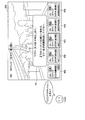
- FIG. 5 shows a display example of the UI image at the time of voice input according to the present embodiment.
- the search control unit 162 searches for a channel corresponding to “NNN”. If there are multiple channels that include the word "NNN” in their names, such as “NNN general”, “NNN first”, “NNN AA”, and “NNN premiere” (terrestrial broadcasting, satellite broadcasting, cable TV ( (Broadcast), and may include Internet distribution content).
- the selection control unit 164 selects a channel most likely to be requested by the user from a plurality of channels (selection candidates) according to the priority based on the viewing history of the user.
- the user's utterance may be started by operating a button arranged on the remote controller without starting a predetermined call, or may be started by operating a mobile terminal such as a smartphone.
- the voice reception may be performed on the remote controller or the smartphone side, or may be performed on the information processing device 100 side.
- the display control unit 166 controls to switch the display screen of the display 108 to the selected channel, as shown in the lower part of FIG. Further, the display control unit 166 displays the item image 30 (30a to 30e) indicating the search result on the switched screen, for example, for a certain period of time. Accordingly, when the automatically selected channel does not match the user's request, it is possible to support the voice input when the user changes the channel again.
- the item image 30 may be continuously displayed until some instruction is given by the user, or the display time may be dynamically changed based on the state of the user instead of being constant.
- the display control unit 166 displays an item image 30 (30a to 30e) indicating each channel of the search result and an image 33 prompting a voice input when changing the channel. , Are displayed on the display 108.
- the display control unit 166 may display the item images 30a to 30e side by side in order of priority from the left or from top, or may display them at random on the entire screen of the display 108.
- an image prompting for input by a button, a touch panel, or a gesture of a user of a remote controller or a smartphone may be displayed instead, or nothing may be displayed.
- the name of the channel may be displayed as a reading item in a predetermined display mode.
- the title information of the program currently broadcast on the channel, the channel number, the channel mark, and Information related to channels and broadcast programs such as an electronic program guide (EPG) may be displayed.
- the item image 30 may display a broadcast status indicating how far the currently broadcast program is currently broadcast over the entire broadcast time.
- the display control unit 166 highlights the item image 30a indicating the currently selected channel among the item images so as to be different from other item images, or displays an icon such as “select”. This may clearly indicate that the current selection is made.
- Reading item is a word or phrase recommended for reading, which makes it possible to avoid reading that is difficult to recognize or ambiguous reading.
- the channel name of the item image 30 is the reading item, but the reading item is what character information is displayed on the item image 30 (including the character information displayed as image data). May be.
- the display mode of the reading item is made different from other texts, or a speaker, a mouth, or an illustration spoken by a person is attached so that the user can easily recognize the reading item. You can In addition, as shown in FIG.
- the display mode of the reading item 301 and the display mode of the instruction word portion 331 in the text that describes the reading item in the image 33 prompting the voice input are associated (for example, the character color, the background color, Alternatively, by making the typeface the same), it is possible to make it easier for the user to recognize the reading item.
- an image 332 such as an illustration of a microphone, an illustration of a mouth, or an illustration showing how a person speaks may be displayed.
- the information processing apparatus 100 selects the channel of the uttered name by the selection control unit 164 and selects it by the display control unit 166.
- the video of the channel is controlled to be displayed on the display 108 (step S115). Also in this case, the item image showing the search result may be displayed again (step S118).
- the UI images that support voice input may be displayed for a certain period of time (for example, several seconds).
- the display control unit 166 ends the display of the item image (step S130).
- the display control unit 166 also displays an image prompting voice input or remote controller operation for switching channels, in step S130, the display of the image prompting such voice input or controller operation is also terminated.
- the display time of these images may be determined based on user settings, user information, or the like, or may be dynamically determined based on the user's past selection information, current behavior, or the like.
- the final tuning result is stored in the viewing history DB 172 as the viewing history together with the time information and the user identification information, and is used when the priority is calculated by the selection control unit 164 at the next tuning. By repeating such processing, it is possible to more reliably select the content that is highly likely to be requested by the user.
- the information stored in the viewing history DB 172 may be used, for example, to determine the display time of the item image or the display content of the image prompting the input, and the information regarding the processing for determining them is also the viewing history DB 172. Can be stored in.
- Second embodiment Simultaneous display of current broadcast program and recorded program>
- the channel is selected according to the voice input of the channel name, and the control of displaying the program currently being broadcast on the channel on the display 108 is performed.
- the information processing apparatus 100 may select the recorded program of the selected channel. That is, the selection target may include the recorded program in addition to the current broadcast program of the searched channel, and the current broadcast program and the recorded program may be simultaneously displayed in the item image showing the search result.
- the current broadcast program and the recorded program may be searched in response to the voice input of the program name, and may be displayed as the selection target and the item image indicating the search result.
- the currently broadcast program and the recorded program are simultaneously displayed will be specifically described.
- step S109 the search target includes recorded programs in addition to programs currently being broadcast.
- the search control unit 162 outputs the search result including the recorded program of the searched channel.
- the search target, the search result, and the item image may include only the recorded program and not the program currently being broadcast.
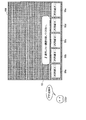
- FIG. 6 is a diagram illustrating a case where a program currently being broadcast and a recorded program according to the present embodiment are simultaneously displayed as search results.
- the search control unit 162 causes the search control unit 162 to include “NNN” and one or more channels included in at least part of the sights. Then, the recorded program of each searched channel is searched.
- the recorded program may be stored in the memory 105 or may be stored in an external device (for example, a recorder) connected to the information processing device 100.
- the recorded programs to be searched may be limited to those that have not been viewed, or the unviewed programs among the recorded programs may be given the following high priority, or the viewed programs may be given low priority. Good.
- the selection control unit 164 selects, from the search results, the content with the highest predetermined priority (for example, the priority based on the user's viewing history, preference information, time, etc.). For example, when the user inputs a voice while watching a program currently being broadcast, the selection control unit 164 selects a currently broadcast program of a channel that the user often views, and displays the display 108. Switch.
- the highest predetermined priority for example, the priority based on the user's viewing history, preference information, time, etc.
- the display control unit 166 displays the item images 30 (30a, 30f, 30g, 30b, 30c) showing the search results, for example, in order of priority. Since the recorded results are also included in the search result, the display control unit 166 displays “recording mark” on the target item image 30 in order to clearly indicate that the recorded program is not the program currently being broadcast even on the same channel. May be displayed (see the item images 30f and 30g in FIG. 6), or the display mode of the item image indicating the recorded program may be different from the others.
- the display of the reading items may be made clear by changing the display mode or adding an illustration image such as a speaker, as in the first embodiment.
- the channel names of the item images 30 are duplicated, it cannot be distinguished by reading the channel names. Therefore, the reading of the program title or the identification number (not shown) attached to the item image 30 is used as the reading item. You may be prompted to perform voice input.
- the display mode of the program title 302 is changed in the item images 30f and 30g with overlapping channel names to clearly indicate that the item is a reading item.
- the information processing apparatus 100 automatically selects the channel based on the priority according to the person or the time even when the voice input is performed by designating the entire receivable content or a part thereof, instead of the channel name. It is possible to selectively display them.
- the operation processing of this embodiment is similar to the operation processing of the first embodiment described mainly with reference to FIG.
- the search control unit 162 determines that the receivable content is currently receivable in step S109.
- Content terrestrial broadcasting, satellite broadcasting, cable television (wired broadcasting), Internet distribution content, and the like
- the selection control unit 164 may, for example, view history and preference information of the recognized viewing user.
- a channel is selected according to the priority of the channel (or program) calculated based on user information, user settings, information of other users, and the like.
- FIG. 7 is a diagram for explaining a display example in the case where a voice input regarding the current program according to the present embodiment is made.
- the information processing apparatus 100 automatically selects the display screen of the display 108 according to the priority in response to a voice input such as “show the current program” by the viewing user. While switching to the selected channel (when the power is off, it may be displayed after automatically turning on the power), and the item images 30 showing other candidate channels are displayed in order of priority. To do.
- the information processing apparatus 100 may also display an image 35 that prompts an input when selecting another channel.
- the audio input designating all or a part of the currently receivable content such as “current program” is not limited to the broadcast program and may be the content distributed on the Internet.
- the Internet control contents may be included in the search target by the search control unit 162.
- voice input is like “terrestrial wave” or “satellite broadcast” (more specifically, for example, “program currently broadcast by terrestrial wave” or “put satellite broadcast program”). (Voice input) or the transmission means may be designated, in which case the currently receivable program is searched through the corresponding transmission means.
- the program genres include, for example, movies, dramas, varieties, music, news, documentaries, etc.
- the information processing apparatus 100 searches for a program corresponding to a genre that is voice-input by the user, and reproduces the program selected based on the priority according to the user's viewing history, preference information, etc., as in the above embodiments. At the same time (when the power is off, the power may be automatically turned on and then displayed), and the item images indicating the search results may be arranged and displayed in order of priority.
- the user may set a favorite genre in advance to search for a more detailed genre or a content having a plurality of genre attributes such as a documentary about music. Further, the information processing apparatus 100 may also display an image prompting an input when selecting another program, as in the above embodiments.
- the genre of the program is given as an example here, the genre of the content is not limited to this example, and may be, for example, a moving image, music, an image, an application, or a moving image content such as jazz, rock, or ballad. Other content genres may be used.
- the search target is not limited to the current broadcast program, but may be recorded programs (unviewed programs may be limited, or viewed programs may be lowered in priority), Internet distribution programs, VOD (Video). On Demand items, live streaming videos, and other content that is currently available for viewing.
- Each item image showing the search result displayed as a selection candidate includes a display showing whether the content is a recorded program, an Internet distributed program, etc., and a display of a channel number, a channel name, a program title, etc. Done.
- the information processing apparatus 100 can automatically select and display a program according to the priority according to the person, time, etc. even when an abstract audio input for asking for recommended content is performed.
- the search target includes a wide range of currently viewable contents such as currently broadcast programs, recorded programs, and Internet distribution contents.
- the information processing apparatus 100 selects the viewing history and the preference information of the user from the currently viewable content, as in the above embodiments. Based on the above, the recommended content is searched (for example, a program in which an actor the user likes, a program in a genre the user likes, etc.), and a priority (for example, a priority based on a person or time. For example, the content selected in accordance with the recorded program that has been viewed may be lowered in priority (if the power is off, it may be automatically turned on and then played). .. Then, the information processing apparatus 100 displays the item images indicating the search results in order of priority (display of the reading item), and also an image prompting input when switching to another content, as in each of the above-described embodiments. You may perform the operation displayed together.
- the recommended content for example, a program in which an actor the user likes, a program in a genre the user likes, etc.
- a priority for example, a priority based on a person or time. For example
- the information processing apparatus 100 searches the currently viewable content (broadcast program, recorded program, Internet distribution content, etc.) for the target content. Then, when the searched content is a plurality of contents having an order (a plurality of contents having the same title name are searched for), the information processing apparatus 100 lists, for example, in ascending order of the numbers, and has been viewed or before the staff roll. The content having the lowest number is selected (except an example of content that can be judged to be almost finished), and the display 108 controls the reproduction. By including not only the unviewed content but also the content whose viewing has been interrupted in the middle of the execution selection target, it is possible to reproduce the content that has been viewed halfway without being excluded.
- the information processing apparatus 100 may preferentially select the content that was viewed halfway. Further, when the viewing user can be identified by voice recognition or the like, the information processing apparatus 100 refers to the viewing history of the viewing user and refers to the viewing state of the viewing user with respect to the searched content, thereby performing personalized playback control. It is also possible to realize
- FIG. 8 is a diagram illustrating a display example when a title of content having an order such as a drama according to the present embodiment is input by voice.
- a voice such as “show me XX (drama title)”
- the search control unit 162 of the information processing apparatus 100 selects the title “from the currently viewable program”. Search the contents of " ⁇ ”.
- the selection control unit 164 lists the searched contents, for example, in ascending order of number (story number, series number, etc.), and excludes programs that can be judged to have been substantially viewed, such as those that have been viewed or before the staff roll. Then, the content with the lowest number (in the example shown in FIG. 8, for example, “Drama Episode 10”) is selected. Then, the display control unit 166 performs control to automatically reproduce (that is, execute) the selected program on the display 108 (when the display on the display 108 is off, it is automatically turned on and then displayed). May be).
- serial drama series when there are a plurality of serial drama series that include the keyword “XX” in the title, the content of the highest priority may be selected and the series of each drama may be displayed in the item image. .. In that case, if the user specifies another serial drama series, select the content with the highest priority in that serial drama series, play it, and then display another episode in the series as an item image. The processing that does may be performed.
- the display control unit 166 selects the item images 40 (40a to 40e) indicating the name of the content searched according to the user's voice input, and the other content searched by the viewing user. You may perform the process which displays the image 42 which prompts the voice input at the time of performing on the reproduction screen of the selected content. Accordingly, it is possible to provide a voice input UI that responds to the user's request as much as possible.
- the information processing apparatus 100 may specify the item image indicating the content being executed among the item images 40a to 40e shown in FIG. 8 by highlighting it by changing the color. Further, the information processing apparatus 100 may also display information indicating the viewing state of each content, for example, a bar indicating the previous playback position (viewed position), in the item images 40a to 40e. This allows the viewing user to intuitively understand the viewing state of each content. In addition to the bar display, an icon or the like indicating a command that can be accepted for reproduction control such as “reproduction from continuation/reproduction from beginning” may be displayed. Further, the information processing apparatus 100 may display a “NEW” mark or the like for unviewed content, as shown in FIG. 8.
- the item image 40 also includes channel information, content name (program title, etc.), content summary, information indicating whether the content is currently a broadcast program, a recorded program, a VOD item, an Internet distribution content, or the like. It may be displayed, or a still image or a moving image thumbnail may be displayed. Information about channels and contents, still images, and moving image thumbnails may be acquired from a distribution source of each content, or may be acquired from different sources such as a program information transmission server. The moving image thumbnail of the content displayed in the item image 40 may be acquired from the moving image distribution server, the memory 105, or the like and reproduced before the user selects the content.
- the moving image thumbnail of the broadcast program can be acquired from the VOD server, and the moving image recorded for the broadcast program can be reproduced in the item image 40 as the moving image thumbnail of the broadcast program.
- the moving image thumbnail For the still image and the moving image thumbnail, the early part of the content may be used, an arbitrary position in the content may be used, or a moving image dedicated to the thumbnail may be used.
- information indicating the viewing state such as a bar indicating the reproduction position, displaying a still image or a moving image thumbnail, displaying an icon indicating a voice-acceptable command, etc.
- information indicating the viewing state such as a bar indicating the reproduction position, displaying a still image or a moving image thumbnail, displaying an icon indicating a voice-acceptable command, etc.
- the information processing apparatus 100 receives video and audio data from an external device such as a recorder, a game machine, a PC, a digital camera, and a smartphone connected via the communication I/F 104, and outputs and reproduces the data from the display 108 and the speaker 109. It is possible to A plurality of external devices can be connected to the information processing device 100 (or the information processing device 100 can be connected to the plurality of external devices via a distributor). In a situation where one or more external devices are connected to the information processing device 100, the user can select or switch the external devices by voice input. Search processing and display of a voice input UI image by the information processing apparatus 100 in this case will be described below with reference to FIGS. 9 and 10.
- FIG. 9 is a flowchart showing an example of the flow of operation processing when a voice input designating an external input is made according to this example.
- a predetermined call call of an agent
- a predetermined search phrase a predetermined search phrase
- step S303 when the information processing apparatus 100 detects a user's uttered voice (voice input) (step S303), if the information processing apparatus 100 is powered off, it is turned on. You may perform operation (step S306). At this time, the display 108 may remain OFF (being unselected because it has not been selected).
- the user's voice input is performed by an external device such as a voice terminal
- the external device detects a predetermined voice input by the user (for example, calling an agent and uttering a search phrase).
- control for turning on the power of the information processing apparatus 100 to be connected may be performed.
- the information processing apparatus 100 is already powered on or when some content is already displayed on the display 108, the power state or the like is left as it is.
- the search control unit 162 of the information processing device 100 searches for an external device connected to the information processing device 100 (step S309).
- the display control unit 166 of the information processing device 100 displays the item images 45 (45a to 45e) indicating the name of the external device (or the name of the external input) searched by the search control unit 162.
- the list is displayed according to the priority based on the user's viewing history and the like, and is displayed on the display 108 (step S312).
- FIG. 10 is a diagram showing an example of a screen displaying a search result when voice input is performed to designate an external input according to the present embodiment.
- search results are displayed on the display 108 in response to a voice input “external input” by the user, for example.
- the search results may be arranged in descending order of priority, or may be randomly displayed on the entire screen.
- the priority can be calculated by the display control unit 166 based on at least one of person and time. More specifically, for example, the display control unit 166 refers to the viewing history to calculate a high priority of an external device that is frequently used at the current time, or when the viewing user can recognize the priority, Calculates a high priority for an external device that is frequently used by.
- the control unit 160 does not perform a series of automatic selection and execution of external input and execution (startup of an external device) from the search result,
- the search result may be displayed on the display 108 to allow the user to select an external input to be selected and executed. Therefore, for example, when the external device is not activated, as shown in FIG. 10, when the item image 45 is displayed, it is in a state in which nothing is displayed on the background screen. Further, when some content is already reproduced on the display 108, the item image 45 may be displayed while continuing the display of the content.
- the name displayed on the item image 45 is a reading item recommended for voice recognition, and it is desirable that the name is easy to recognize and the ambiguity is eliminated as much as possible.
- a standard name of external input (“HDMI1/2/3”) or a name corresponding to the device type of the external device (recorder 1/2/3, player 1/2/3, tuner 1/2/3, device) 1/2/3) is assumed.
- These names may be determined by the communication I/F 104 or the control unit 160.
- the display control unit 166 may display the name (product name or the like) of the CEC (Consumer Electronics Control) device in the item image 45 as the detailed information of the external device together with the reading item.
- CEC Consumer Electronics Control
- the display control unit 166 may explicitly indicate the reading item in the item image 45 by changing the display mode such as highlighting the reading item, or indicates the attribute of the external device (for example, the icon indicating the recorder). You may display such an icon image.
- the display control unit 166 may also display a speaker, a mouth, or an icon indicating how a person speaks near the reading item so that the user can intuitively understand which description is the reading item. It is possible.
- the display control unit 166 may also display an image prompting the selection of the external device from the displayed search result (item image) on the display 108 (step S315). Specifically, as shown in FIG. 10, for example, an image 47 showing a guidance sentence such as "Please speak the item you want to select.” is displayed.
- the character portions of “item” and “item to be selected” in the guidance sentence are same as the display mode of the reading item displayed in the item image 45 (for example, typeface, Character color, background color of characters, etc. are made the same), and reading items are further clarified, so that it is possible to avoid reading with a name that is difficult to recognize or ambiguous voice input.
- the display control unit 166 of the information processing device 100 displays the content input from the uttered external device on the display 108 (step S321). That is, the control unit 160 controls to switch the external input to the external device (external input) selected by the user. At this time, if the power of the target external device has been turned off, the control unit 160 controls to turn on the power of the external device (start control).
- the item image 45 indicating the search result and the image 47 prompting voice input are displayed on the display 108. You can As a result, it is possible to assist in switching the external device by voice input again.
- Example of voice input "HDMI” The selection of the external input by the user's voice input has been described above. It should be noted that when the voice input by the user is a more specific designation for an external device or external input path such as “HDMI” or “recorder”, there are a plurality of options (a plurality of HDMI inputs and recorders exist. Also in the case), the information processing apparatus 100 displays the item image indicating the search result (a plurality of HDMI inputs or recorders) on the display 108, as in the case of the external input device described with reference to FIG. 10. Further, an image prompting selection of an external device may be displayed on the display 108.
- a voice input for designating an HDMI input is made by the user, and as a result of the search performed by the search control unit 162, a plurality of HDMI inputs (for example, “HDMI1”, “HDMI2”, “HDMI3”, and “ HDMI4"), the display control unit 166 lists them in order of priority according to, for example, a person (viewing user), time (current time), and the like, and displays an item image indicating these (for example, "HDMI1”). , “HDMI2”, “HDMI3”, and “HDMI4”) are displayed on the display 108. In order to clearly indicate the item to be read out, the display mode may be changed or an icon such as a speaker may be displayed together.
- HDMI may be selected and executed based on the priority, and the content reproduced by the external device or the menu screen (home screen) of the external device may be displayed on the display 108. If the external device is not activated at the time of voice input, the selected external device may be activated, or the background image is displayed when the item image of the search result is displayed on the display 108 without being activated. It may not be displayed at all.
- the display control unit 166 may also display an image prompting selection, such as “speak the item you want to select”, as in the example shown in FIG.
- an image prompting selection such as “speak the item you want to select”, as in the example shown in FIG.
- the display control unit 166 may also display an image prompting selection, such as “speak the item you want to select”, as in the example shown in FIG.
- by matching the display mode of the character prompting the voice input with the reading item or displaying the microphone icon or the like near the character prompting the voice input It is possible to surely prompt voice input by reading items.
- the display control unit 166 is selected when the user inputs a voice input (selection of external input) such as “HDMI1”, “HDMI2”, “HDMI3”, or “HDMI4” based on the item image 45. Switch to external input. Specifically, the display control unit 166 controls to display the content transmitted from the selected external input destination on the display 108. At this time, if the power of the external device of the external input destination is turned off, the information processing device 100 turns on the power of the target external device (start control) and then acquires the content from the external device. ..
- the content acquired from the external device may be a menu screen or the like of the external device.
- the information processing apparatus 100 searches the display controllable application for a startable application and displays it.
- the control unit 166 displays the search result on the display 108.
- the voice input may be based not only on the name of a specific application but also on a function name such as “photo app”, or simply “app”.
- FIG. 11 is a diagram showing an example of a screen displaying a search result when voice input is made regarding activation of an application according to the present embodiment.
- search results are controlled by the display control unit 166 in response to a voice input such as “display application” by the user. It is displayed on the display 108.
- the search results may be arranged in descending order of priority, or may be randomly displayed on the entire screen.
- the priority may be calculated by the display control unit 166 based on, for example, at least one of person and time. More specifically, for example, the display control unit 166 refers to the viewing history to calculate a high priority of an application often used at the current time, or when the viewing user can recognize the priority, Calculate high priority for frequently used applications.
- an icon indicating a command (option) that can be accepted by the application an icon of the application itself (for example, an icon indicating the application on the menu screen of the information processing apparatus 100).
- an icon for example, a headphone mark in the case of a music reproduction application
- the attribute of the application may be displayed.
- the control unit 160 does not perform a series of automatic selection and application execution (application startup, etc.) from the search result.
- the search result may be displayed on the display 108 to allow the user to select an application to be selected and executed.
- a series of processes for automatically selecting and executing one application based on the priority is performed. You may break. Therefore, for example, when the display of the display 108 is OFF (a state in which power is not supplied), as shown in FIG. 11, when the item image 50 is displayed, nothing is displayed on the background screen. Can be.
- the item image 50 may be displayed while the display of the content is continued.
- the display control unit 166 may also display on the display 108 an image 52 that prompts the user to select an application, such as “Please speak the item you want to select”.
- an application such as “Please speak the item you want to select”.
- the characters for prompting the voice input shown in the image 52 and the display mode of the reading item (for example, the application name) shown in the item image 50 are matched, or the character for prompting the voice input shown in the image 52.
- the control unit 160 activates (executes) the selected application and controls the display of the application screen on the display 108.
- the application is automatically selected and executed previously, the application that is not executed may be displayed in the item image 50, and a different application may be selected by the user based on this.
- the application is started, and the application screen (content) is displayed on the display 108, the item image 50 showing the search result and the image 52 prompting voice input are displayed on the display 108. It may be displayed. As a result, it is possible to assist in switching applications by voice input again.
- the information processing apparatus 100 can perform recording reservation, viewing reservation, and content deletion according to the user's voice input even when the display 108 is OFF.
- FIGS. 12 and 13 a specific description will be given with reference to FIGS. 12 and 13.
- FIG. 12 is a flowchart showing an example of the flow of operation processing of recording reservation or viewing reservation when the power is off according to the present embodiment.
- “when the power is off” means a state in which at least voice detection by the microphone 102 and voice recognition by the voice recognition unit 130 are possible (state in which power is being supplied to the processor 112 and the microphone 102).
- the display 108 is OFF (a state in which power is not supplied to the display 108).
- the information processing apparatus 100 makes a "Reservation reservation for XX (title of program)", “Reservation reservation for XX (title of program)”, etc. , Utterance voice relating to recording/viewing reservation is detected (step S503).
- the voice recognition unit 130 of the information processing device 100 recognizes a speech voice that follows after a predetermined call from the user such as an agent call, and specifies a command such as a recording reservation and a viewing reservation. Good.
- control unit 160 controls the power supplies of the information processing apparatus 100 to be in the ON state except for the display 108 (step S506).
- the application unit 150 executes recording reservation or viewing reservation based on the voice recognition result by the voice recognition unit 130 (step S509).
- the recording/viewing reservation information is stored in the memory 105, for example.
- the application unit 150 may make a recording/viewing reservation for the user (by associating the information of the user as a reservation person) for the user when the speaker (user) can judge by voice recognition or the like. ..
- the information processing apparatus 100 may feedback to the user by voice using the speaker 109 (for example, a response sound such as “recording/viewing reservation made”). Playback). Further, the recording/viewing reservation may be made so that the actual recording or viewing process is performed by an external device connected to the information processing apparatus 100.
- the control unit 160 turns off the power of the information processing device 100 (step S512).
- the power OFF means a power supply state in which at least a function of executing recording/viewing reservation and a voice recognition function are possible (that is, power is supplied to the extent that these functions can be executed).
- FIG. 13 is a flow chart showing an example of the flow of operation processing of content deletion when the power is turned off according to this embodiment.
- the information processing apparatus 100 detects an utterance voice regarding deletion of a recorded program such as “Delete XX (title name of recorded program)” (step S603).
- the voice recognition unit 130 of the information processing apparatus 100 may recognize a speech voice that follows after a predetermined call from the user such as calling an agent, and specify a command such as content deletion.
- control unit 160 controls the power supply of the information processing apparatus 100 to be in the ON state except for the display 108 (step S606).
- the application unit 150 deletes the designated recorded program based on the voice recognition result by the voice recognition unit 130 (step S609).
- the recorded program data is stored in the memory 105, for example. Even when the recorded program data is stored in the external device connected to the information processing device 100, the application unit 150 can perform control to delete the recorded program stored in the external device.
- the information processing apparatus 100 may give a feedback to the user by voice using the speaker 109 (for example, “Deleted “ ⁇ (title of recorded program)”). Play the response voice).
- the control unit 160 turns off the power of the information processing device 100 (step S612).
- the power supply OFF means a power supply state in which at least a voice recognition function is possible (that is, power supply is being performed to such a function).
- the program displayed in the item image 30 is displayed.
- a voice input of a name may be accepted.
- the information processing apparatus 100 searches the currently viewable content for content that matches the program name input by voice. If the retrieved contents are a plurality of contents having an order, the information processing apparatus 100, as described in the sixth embodiment, lists up, for example, in ascending order of the numbers, and has been viewed or before the staff roll. Except for programs that you can judge to have finished watching, the content with the lowest number is selected and automatically played.
- the search and selection processing of the current broadcast program and the recorded program according to the voice input of the program name described in the second embodiment, and the entire currently receivable content or one of the contents described in the third embodiment By combining the search and selection process of the currently receivable content including the Internet distributed content according to the voice input that specifies the part, the current broadcast program, the recorded program and the Internet distributed content can be input in response to the program name input.
- a search and selection process for receivable content may be performed.
- the content to be searched/executed is mainly described based on the moving image content such as a broadcast program.
- the type of content is It doesn't matter.
- the content to be played back may be audio content (for example, music), and the music is played back by an application executable by the information processing apparatus 100.
- the target to be searched based on the priority may be an audio content or an application for reproducing the audio content.
- one music piece or application is selected based on the same procedure as any of the above-described embodiments or a combination thereof, and an item image including the music pieces or applications that have not been selected as options is displayed on the display 108. To be done.
- an album art image (jacket image) of a music piece, a UI image of an application, or the like can be displayed as the selected content.
- the channel described in the above embodiment may be a channel such as a radio or a music distribution station that broadcasts audio content such as music. In the case of other types of contents such as still image contents and WEB pages of the embodiment, the same procedure can be performed.
- a search process for searching a channel or content based on a word or phrase recognized from a user's uttered voice A process of selecting one channel or content from a plurality of channels or contents obtained by the search process; A process of displaying the selected content or content broadcast on the selected channel on a display unit;
- the receiving device further includes a control unit that performs a process of displaying, as an option, each item image indicating a plurality of channels or contents obtained by the search process on the display unit.
- the control unit displays an image on the display unit that prompts voice input when selecting the plurality of channels or contents.
- the receiving device includes a descriptive sentence for prompting the voice input of the reading item displayed in the item image.
- the description of the image prompting the voice input includes characters in a display mode that matches the display mode of the reading item displayed in the item image.
- the control unit is The reception according to any one of (1) to (4), wherein the channel or content is selected in accordance with at least one of the user's viewing history and preference information, or a priority based on time information. apparatus.
- the control unit is The receiving device according to (5), which performs a process of displaying each item image indicating a plurality of channels or contents obtained by the search process in the order of high priority.
- the receiving device is A receiving unit for receiving a broadcast program transmitted from a broadcasting station, A communication unit for receiving distribution contents distributed via the Internet, The receiving device according to (7), further including: (9) The receiving device according to (3) or (4), wherein the reading item is a channel name or a content name. (10)
- the control unit is When the word/phrase is a word/phrase related to external input or application, each item image indicating the standard name of the searched external input, the name of the external device of the external input destination, or the name of the application is displayed on the display unit as an option.
- the receiving device which thereafter performs a process of displaying an image of an external input or an application selected by a user's voice input on the display unit.
- the control unit is When the display unit is powered off, the display unit is powered on and then the process of displaying the selected content or the content broadcast on the selected channel is performed. )-(10) The receiving device according to any one of the items. (12) The control unit is When the word/phrase is a word/phrase related to the name of the channel or program, the channel or program is searched, and the highest priority based on the person or time is obtained from the broadcast program and the recorded program corresponding to the searched channel or program.
- the receiving device according to any one of (1) to (11), which performs a process of selecting the program and displaying the selected program on the display unit.
- the control unit is The receiving device according to (12), wherein a priority of a program that the user has already viewed is lower than a priority of unviewed content.
- the control unit is Voice reception processing is started by a signal from the external operation terminal, The receiving device according to any one of (1) to (13), wherein the voice reception process is performed by a microphone included in an external operation terminal.
- the receiving device is a remote controller or a mobile terminal having a physical key or a virtual key for performing a start operation of the voice reception process.
- the control unit is In the case where the phrase is designation of an external device that has not been activated, the external device is activated, and a process of displaying a home screen of the external device on the display unit is performed, any one of (1) to (15) above.
- the control unit is The receiving device according to any one of (1) to (17), which performs a process of displaying the item image on the display unit for a certain period of time.
- the control unit is The receiving device according to any one of (1) to (18), wherein information indicating a broadcast status or a viewing status of each content is displayed in the item image.
- the processor Searching a channel or content based on a word or phrase recognized from a user's spoken voice, Selecting one channel or content from the plurality of channels or contents obtained by the search; Displaying the selected content or the content broadcast on the selected channel on a display unit; Furthermore, displaying each item image showing a plurality of channels or contents obtained by the search as an option on the display unit, Including a control method.
Landscapes
- Engineering & Computer Science (AREA)
- Multimedia (AREA)
- Signal Processing (AREA)
- Human Computer Interaction (AREA)
- Health & Medical Sciences (AREA)
- Audiology, Speech & Language Pathology (AREA)
- Theoretical Computer Science (AREA)
- Physics & Mathematics (AREA)
- General Engineering & Computer Science (AREA)
- General Physics & Mathematics (AREA)
- General Health & Medical Sciences (AREA)
- Computational Linguistics (AREA)
- Acoustics & Sound (AREA)
- Databases & Information Systems (AREA)
- Two-Way Televisions, Distribution Of Moving Picture Or The Like (AREA)
- User Interface Of Digital Computer (AREA)
Abstract
La présente invention concerne un dispositif de réception qui est pourvu d'une unité de commande pour effectuer : un processus de recherche pour rechercher des canaux ou un contenu sur la base d'une phrase reconnue à partir d'un énoncé d'utilisateur ; un processus pour sélectionner un canal ou un élément de contenu parmi une pluralité de canaux ou d'éléments de contenu obtenus par le biais du processus de recherche ; un processus pour afficher le contenu sélectionné, ou le contenu diffusé sur le canal sélectionné, sur une unité d'affichage ; et un processus pour afficher en outre des images d'article représentant la pluralité de canaux ou d'éléments de contenu obtenus par le biais du processus de recherche sous la forme d'options sur l'unité d'affichage.
Priority Applications (5)
| Application Number | Priority Date | Filing Date | Title |
|---|---|---|---|
| EP19896919.8A EP3896985A4 (fr) | 2018-12-11 | 2019-11-21 | Dispositif de réception et procédé de commande |
| US17/311,084 US11748059B2 (en) | 2018-12-11 | 2019-11-21 | Selecting options by uttered speech |
| JP2020559912A JP7488192B2 (ja) | 2018-12-11 | 2019-11-21 | 受信装置および制御方法 |
| US18/229,523 US12530168B2 (en) | 2018-12-11 | 2023-08-02 | Selecting options by uttered speech |
| JP2024076681A JP7808143B2 (ja) | 2018-12-11 | 2024-05-09 | 受信装置および制御方法 |
Applications Claiming Priority (2)
| Application Number | Priority Date | Filing Date | Title |
|---|---|---|---|
| JP2018231615 | 2018-12-11 | ||
| JP2018-231615 | 2018-12-11 |
Related Child Applications (2)
| Application Number | Title | Priority Date | Filing Date |
|---|---|---|---|
| US17/311,084 A-371-Of-International US11748059B2 (en) | 2018-12-11 | 2019-11-21 | Selecting options by uttered speech |
| US18/229,523 Continuation US12530168B2 (en) | 2018-12-11 | 2023-08-02 | Selecting options by uttered speech |
Publications (1)
| Publication Number | Publication Date |
|---|---|
| WO2020121776A1 true WO2020121776A1 (fr) | 2020-06-18 |
Family
ID=71077262
Family Applications (1)
| Application Number | Title | Priority Date | Filing Date |
|---|---|---|---|
| PCT/JP2019/045714 Ceased WO2020121776A1 (fr) | 2018-12-11 | 2019-11-21 | Dispositif de réception et procédé de commande |
Country Status (4)
| Country | Link |
|---|---|
| US (2) | US11748059B2 (fr) |
| EP (1) | EP3896985A4 (fr) |
| JP (2) | JP7488192B2 (fr) |
| WO (1) | WO2020121776A1 (fr) |
Cited By (2)
| Publication number | Priority date | Publication date | Assignee | Title |
|---|---|---|---|---|
| WO2022044904A1 (fr) * | 2020-08-28 | 2022-03-03 | ソニーグループ株式会社 | Dispositif et procédé de traitement d'informations |
| JP2024113424A (ja) * | 2023-02-09 | 2024-08-22 | Necパーソナルコンピュータ株式会社 | 情報処理システム及び入力制御方法 |
Families Citing this family (6)
| Publication number | Priority date | Publication date | Assignee | Title |
|---|---|---|---|---|
| JP6684949B1 (ja) * | 2019-06-24 | 2020-04-22 | 株式会社Cygames | 情報処理プログラム、情報処理方法および情報処理システム |
| CA3125124A1 (fr) * | 2020-07-24 | 2022-01-24 | Comcast Cable Communications, Llc | Systemes et methodes d'entrainement de modeles de commandes vocales |
| US11166063B1 (en) * | 2020-12-08 | 2021-11-02 | Rovi Guides, Inc. | Enhanced set-top box control |
| KR20240093675A (ko) * | 2021-10-21 | 2024-06-24 | 엘지전자 주식회사 | 디스플레이 장치 |
| CN116541589A (zh) * | 2022-01-26 | 2023-08-04 | 花瓣云科技有限公司 | 播放记录显示方法及相关设备 |
| US12363367B2 (en) * | 2022-10-03 | 2025-07-15 | Roku, Inc. | Tailoring and censoring content based on a detected audience |
Citations (4)
| Publication number | Priority date | Publication date | Assignee | Title |
|---|---|---|---|---|
| JP2000244838A (ja) * | 1998-12-22 | 2000-09-08 | Pioneer Electronic Corp | 番組選択装置及び番組選択方法 |
| JP2004096530A (ja) * | 2002-09-02 | 2004-03-25 | Matsushita Electric Ind Co Ltd | 選局装置およびテレビ受信システム |
| JP2015095002A (ja) | 2013-11-08 | 2015-05-18 | 株式会社ソニー・コンピュータエンタテインメント | 表示制御装置、表示制御方法、プログラム及び情報記憶媒体 |
| JP2016029495A (ja) * | 2015-10-08 | 2016-03-03 | パナソニックIpマネジメント株式会社 | 映像表示装置および映像表示方法 |
Family Cites Families (20)
| Publication number | Priority date | Publication date | Assignee | Title |
|---|---|---|---|---|
| JP4292646B2 (ja) | 1999-09-16 | 2009-07-08 | 株式会社デンソー | ユーザインタフェース装置、ナビゲーションシステム、情報処理装置及び記録媒体 |
| US7096185B2 (en) | 2000-03-31 | 2006-08-22 | United Video Properties, Inc. | User speech interfaces for interactive media guidance applications |
| US7792828B2 (en) * | 2003-06-25 | 2010-09-07 | Jericho Systems Corporation | Method and system for selecting content items to be presented to a viewer |
| JP2007142840A (ja) * | 2005-11-18 | 2007-06-07 | Canon Inc | 情報処理装置及び情報処理方法 |
| US7970763B2 (en) * | 2006-02-21 | 2011-06-28 | Microsoft Corporation | Searching and indexing of photos based on ink annotations |
| US20080098433A1 (en) * | 2006-10-23 | 2008-04-24 | Hardacker Robert L | User managed internet links from TV |
| CN101816151A (zh) * | 2007-10-05 | 2010-08-25 | 夏普株式会社 | 通信装置及其控制方法、通信系统、数据传送系统、通信装置控制程序以及记录有该控制程序的记录介质 |
| US20120260284A1 (en) * | 2011-04-07 | 2012-10-11 | Sony Corporation | User interface for audio video display device such as tv personalized for multiple viewers |
| WO2013012107A1 (fr) * | 2011-07-19 | 2013-01-24 | 엘지전자 주식회사 | Dispositif électronique et procédé de commande de celui-ci |
| KR20130065250A (ko) * | 2011-12-09 | 2013-06-19 | 삼성전자주식회사 | 디스플레이 장치 및 그를 이용한 디스플레이 방법 |
| WO2014089837A1 (fr) * | 2012-12-14 | 2014-06-19 | Hewlett-Packard Development Company, L.P. | Atténuation de la luminosité d'un dispositif d'affichage |
| JP2014126600A (ja) | 2012-12-25 | 2014-07-07 | Panasonic Corp | 音声認識装置、音声認識方法、およびテレビ |
| KR102030114B1 (ko) * | 2013-01-07 | 2019-10-08 | 삼성전자주식회사 | 서버 및 그의 제어 방법 |
| KR20140089862A (ko) | 2013-01-07 | 2014-07-16 | 삼성전자주식회사 | 디스플레이 장치 및 그의 제어 방법 |
| US9338493B2 (en) * | 2014-06-30 | 2016-05-10 | Apple Inc. | Intelligent automated assistant for TV user interactions |
| KR102499124B1 (ko) * | 2016-01-21 | 2023-02-15 | 삼성전자주식회사 | 디스플레이 장치 및 디스플레이 장치의 제어 방법 |
| WO2018056105A1 (fr) | 2016-09-26 | 2018-03-29 | ソニー株式会社 | Appareil de traitement d'informations, procédé de traitement d'informations, programme et système de traitement d'informations |
| CN107943894A (zh) * | 2017-11-16 | 2018-04-20 | 百度在线网络技术(北京)有限公司 | 用于推送多媒体内容的方法和装置 |
| US10560737B2 (en) * | 2018-03-12 | 2020-02-11 | Amazon Technologies, Inc. | Voice-controlled multimedia device |
| KR102472010B1 (ko) * | 2018-05-04 | 2022-11-30 | 삼성전자주식회사 | 전자 장치 및 전자 장치의 기능 실행 방법 |
-
2019
- 2019-11-21 WO PCT/JP2019/045714 patent/WO2020121776A1/fr not_active Ceased
- 2019-11-21 US US17/311,084 patent/US11748059B2/en active Active
- 2019-11-21 JP JP2020559912A patent/JP7488192B2/ja active Active
- 2019-11-21 EP EP19896919.8A patent/EP3896985A4/fr active Pending
-
2023
- 2023-08-02 US US18/229,523 patent/US12530168B2/en active Active
-
2024
- 2024-05-09 JP JP2024076681A patent/JP7808143B2/ja active Active
Patent Citations (4)
| Publication number | Priority date | Publication date | Assignee | Title |
|---|---|---|---|---|
| JP2000244838A (ja) * | 1998-12-22 | 2000-09-08 | Pioneer Electronic Corp | 番組選択装置及び番組選択方法 |
| JP2004096530A (ja) * | 2002-09-02 | 2004-03-25 | Matsushita Electric Ind Co Ltd | 選局装置およびテレビ受信システム |
| JP2015095002A (ja) | 2013-11-08 | 2015-05-18 | 株式会社ソニー・コンピュータエンタテインメント | 表示制御装置、表示制御方法、プログラム及び情報記憶媒体 |
| JP2016029495A (ja) * | 2015-10-08 | 2016-03-03 | パナソニックIpマネジメント株式会社 | 映像表示装置および映像表示方法 |
Cited By (8)
| Publication number | Priority date | Publication date | Assignee | Title |
|---|---|---|---|---|
| WO2022044904A1 (fr) * | 2020-08-28 | 2022-03-03 | ソニーグループ株式会社 | Dispositif et procédé de traitement d'informations |
| JPWO2022044904A1 (fr) * | 2020-08-28 | 2022-03-03 | ||
| CN115917493A (zh) * | 2020-08-28 | 2023-04-04 | 索尼集团公司 | 信息处理装置和信息处理方法 |
| EP4207789A4 (fr) * | 2020-08-28 | 2024-02-28 | Saturn Licensing LLC | Dispositif et procédé de traitement d'informations |
| US12413815B2 (en) | 2020-08-28 | 2025-09-09 | Saturn Licensing Llc | Information processing device and information processing method |
| JP7774567B2 (ja) | 2020-08-28 | 2025-11-21 | サターン ライセンシング エルエルシー | 情報処理装置及び情報処理方法 |
| JP2024113424A (ja) * | 2023-02-09 | 2024-08-22 | Necパーソナルコンピュータ株式会社 | 情報処理システム及び入力制御方法 |
| JP7597838B2 (ja) | 2023-02-09 | 2024-12-10 | Necパーソナルコンピュータ株式会社 | 情報処理システム及び入力制御方法 |
Also Published As
| Publication number | Publication date |
|---|---|
| US20230401030A1 (en) | 2023-12-14 |
| EP3896985A4 (fr) | 2022-01-05 |
| EP3896985A1 (fr) | 2021-10-20 |
| JP2024105480A (ja) | 2024-08-06 |
| US12530168B2 (en) | 2026-01-20 |
| JPWO2020121776A1 (ja) | 2021-10-28 |
| JP7488192B2 (ja) | 2024-05-21 |
| JP7808143B2 (ja) | 2026-01-28 |
| US20220043627A1 (en) | 2022-02-10 |
| US11748059B2 (en) | 2023-09-05 |
Similar Documents
| Publication | Publication Date | Title |
|---|---|---|
| JP7808143B2 (ja) | 受信装置および制御方法 | |
| JP4796209B1 (ja) | 表示装置、制御装置、テレビジョン受像機、表示装置の制御方法、プログラム及び記録媒体 | |
| JP7774567B2 (ja) | 情報処理装置及び情報処理方法 | |
| CN101631249A (zh) | 在回放期间把超前内容警报插入媒体项 | |
| JP2012234341A (ja) | 映像表示装置およびメニュー画面表示方法 | |
| KR20160039830A (ko) | 멀티미디어 장치 및 그의 음성 가이드 제공방법 | |
| JP2006191486A (ja) | 情報処理装置および方法、並びにプログラム | |
| TWI587253B (zh) | 提供口述影像可用性通知的方法與設備 | |
| KR20190051379A (ko) | 전자 장치 및 그 제어 방법 | |
| WO2021197068A1 (fr) | Dispositif d'affichage et procédé de recommandation de contenu | |
| JP2011170735A (ja) | サーバ装置、電子機器、検索システム、検索方法及びプログラム | |
| CN113573095B (zh) | 显示装置及其操作方法 | |
| JP6825767B2 (ja) | 情報端末装置、レコーダ及びコンテンツ視聴プログラム | |
| US12301912B2 (en) | Display device for providing speech recognition service | |
| JP2026071252A (ja) | 受信装置および方法 | |
| WO2022094305A1 (fr) | Procédé de recommandation d'une ressource de média, procédé de lecture d'une ressource de média de recommandation, et appareil d'affichage | |
| KR102700206B1 (ko) | 디스플레이 장치 | |
| WO2013105306A1 (fr) | Récepteur de télévision, procédé de contrôle de récepteur de télévision, programme et support d'enregistrement | |
| US20250392777A1 (en) | Display device and operating method therefor | |
| KR20090077477A (ko) | 멀티미디어 컨텐츠 리스트 제공방법 및 이를 적용한멀티미디어 기기 | |
| JP2013117979A (ja) | 映像表示装置およびメニュー画面表示方法 | |
| KR20150137146A (ko) | 영상제공장치의 동작 방법 | |
| JP2007318312A (ja) | 記録再生装置及びこの装置を用いた番組情報取得方法 |
Legal Events
| Date | Code | Title | Description |
|---|---|---|---|
| 121 | Ep: the epo has been informed by wipo that ep was designated in this application |
Ref document number: 19896919 Country of ref document: EP Kind code of ref document: A1 |
|
| ENP | Entry into the national phase |
Ref document number: 2020559912 Country of ref document: JP Kind code of ref document: A |
|
| NENP | Non-entry into the national phase |
Ref country code: DE |
|
| ENP | Entry into the national phase |
Ref document number: 2019896919 Country of ref document: EP Effective date: 20210712 |