WO2021014716A1 - 画像処理装置、画像処理方法、プログラム - Google Patents
画像処理装置、画像処理方法、プログラム Download PDFInfo
- Publication number
- WO2021014716A1 WO2021014716A1 PCT/JP2020/018810 JP2020018810W WO2021014716A1 WO 2021014716 A1 WO2021014716 A1 WO 2021014716A1 JP 2020018810 W JP2020018810 W JP 2020018810W WO 2021014716 A1 WO2021014716 A1 WO 2021014716A1
- Authority
- WO
- WIPO (PCT)
- Prior art keywords
- shaking
- image
- processing
- shake
- change
- Prior art date
- Legal status (The legal status is an assumption and is not a legal conclusion. Google has not performed a legal analysis and makes no representation as to the accuracy of the status listed.)
- Ceased
Links
Images
















Classifications
-
- G—PHYSICS
- G06—COMPUTING OR CALCULATING; COUNTING
- G06F—ELECTRIC DIGITAL DATA PROCESSING
- G06F3/00—Input arrangements for transferring data to be processed into a form capable of being handled by the computer; Output arrangements for transferring data from processing unit to output unit, e.g. interface arrangements
- G06F3/01—Input arrangements or combined input and output arrangements for interaction between user and computer
- G06F3/048—Interaction techniques based on graphical user interfaces [GUI]
- G06F3/0484—Interaction techniques based on graphical user interfaces [GUI] for the control of specific functions or operations, e.g. selecting or manipulating an object, an image or a displayed text element, setting a parameter value or selecting a range
-
- G—PHYSICS
- G06—COMPUTING OR CALCULATING; COUNTING
- G06F—ELECTRIC DIGITAL DATA PROCESSING
- G06F1/00—Details not covered by groups G06F3/00 - G06F13/00 and G06F21/00
- G06F1/16—Constructional details or arrangements
- G06F1/1613—Constructional details or arrangements for portable computers
- G06F1/1633—Constructional details or arrangements of portable computers not specific to the type of enclosures covered by groups G06F1/1615 - G06F1/1626
- G06F1/1684—Constructional details or arrangements related to integrated I/O peripherals not covered by groups G06F1/1635 - G06F1/1675
- G06F1/1686—Constructional details or arrangements related to integrated I/O peripherals not covered by groups G06F1/1635 - G06F1/1675 the I/O peripheral being an integrated camera
-
- G—PHYSICS
- G06—COMPUTING OR CALCULATING; COUNTING
- G06F—ELECTRIC DIGITAL DATA PROCESSING
- G06F1/00—Details not covered by groups G06F3/00 - G06F13/00 and G06F21/00
- G06F1/16—Constructional details or arrangements
- G06F1/1613—Constructional details or arrangements for portable computers
- G06F1/1633—Constructional details or arrangements of portable computers not specific to the type of enclosures covered by groups G06F1/1615 - G06F1/1626
- G06F1/1684—Constructional details or arrangements related to integrated I/O peripherals not covered by groups G06F1/1635 - G06F1/1675
- G06F1/1694—Constructional details or arrangements related to integrated I/O peripherals not covered by groups G06F1/1635 - G06F1/1675 the I/O peripheral being a single or a set of motion sensors for pointer control or gesture input obtained by sensing movements of the portable computer
-
- G—PHYSICS
- G06—COMPUTING OR CALCULATING; COUNTING
- G06F—ELECTRIC DIGITAL DATA PROCESSING
- G06F3/00—Input arrangements for transferring data to be processed into a form capable of being handled by the computer; Output arrangements for transferring data from processing unit to output unit, e.g. interface arrangements
- G06F3/01—Input arrangements or combined input and output arrangements for interaction between user and computer
- G06F3/03—Arrangements for converting the position or the displacement of a member into a coded form
- G06F3/033—Pointing devices displaced or positioned by the user, e.g. mice, trackballs, pens or joysticks; Accessories therefor
- G06F3/0346—Pointing devices displaced or positioned by the user, e.g. mice, trackballs, pens or joysticks; Accessories therefor with detection of the device orientation or free movement in a three-dimensional [3D] space, e.g. 3D mice, 6-DOF [six degrees of freedom] pointers using gyroscopes, accelerometers or tilt-sensors
-
- G—PHYSICS
- G06—COMPUTING OR CALCULATING; COUNTING
- G06F—ELECTRIC DIGITAL DATA PROCESSING
- G06F3/00—Input arrangements for transferring data to be processed into a form capable of being handled by the computer; Output arrangements for transferring data from processing unit to output unit, e.g. interface arrangements
- G06F3/01—Input arrangements or combined input and output arrangements for interaction between user and computer
- G06F3/048—Interaction techniques based on graphical user interfaces [GUI]
- G06F3/0484—Interaction techniques based on graphical user interfaces [GUI] for the control of specific functions or operations, e.g. selecting or manipulating an object, an image or a displayed text element, setting a parameter value or selecting a range
- G06F3/04845—Interaction techniques based on graphical user interfaces [GUI] for the control of specific functions or operations, e.g. selecting or manipulating an object, an image or a displayed text element, setting a parameter value or selecting a range for image manipulation, e.g. dragging, rotation, expansion or change of colour
-
- G—PHYSICS
- G06—COMPUTING OR CALCULATING; COUNTING
- G06F—ELECTRIC DIGITAL DATA PROCESSING
- G06F3/00—Input arrangements for transferring data to be processed into a form capable of being handled by the computer; Output arrangements for transferring data from processing unit to output unit, e.g. interface arrangements
- G06F3/01—Input arrangements or combined input and output arrangements for interaction between user and computer
- G06F3/048—Interaction techniques based on graphical user interfaces [GUI]
- G06F3/0484—Interaction techniques based on graphical user interfaces [GUI] for the control of specific functions or operations, e.g. selecting or manipulating an object, an image or a displayed text element, setting a parameter value or selecting a range
- G06F3/04847—Interaction techniques to control parameter settings, e.g. interaction with sliders or dials
-
- G—PHYSICS
- G06—COMPUTING OR CALCULATING; COUNTING
- G06T—IMAGE DATA PROCESSING OR GENERATION, IN GENERAL
- G06T5/00—Image enhancement or restoration
- G06T5/73—Deblurring; Sharpening
-
- H—ELECTRICITY
- H04—ELECTRIC COMMUNICATION TECHNIQUE
- H04N—PICTORIAL COMMUNICATION, e.g. TELEVISION
- H04N23/00—Cameras or camera modules comprising electronic image sensors; Control thereof
- H04N23/60—Control of cameras or camera modules
-
- H—ELECTRICITY
- H04—ELECTRIC COMMUNICATION TECHNIQUE
- H04N—PICTORIAL COMMUNICATION, e.g. TELEVISION
- H04N23/00—Cameras or camera modules comprising electronic image sensors; Control thereof
- H04N23/60—Control of cameras or camera modules
- H04N23/62—Control of parameters via user interfaces
-
- H—ELECTRICITY
- H04—ELECTRIC COMMUNICATION TECHNIQUE
- H04N—PICTORIAL COMMUNICATION, e.g. TELEVISION
- H04N23/00—Cameras or camera modules comprising electronic image sensors; Control thereof
- H04N23/60—Control of cameras or camera modules
- H04N23/63—Control of cameras or camera modules by using electronic viewfinders
- H04N23/631—Graphical user interfaces [GUI] specially adapted for controlling image capture or setting capture parameters
-
- H—ELECTRICITY
- H04—ELECTRIC COMMUNICATION TECHNIQUE
- H04N—PICTORIAL COMMUNICATION, e.g. TELEVISION
- H04N23/00—Cameras or camera modules comprising electronic image sensors; Control thereof
- H04N23/60—Control of cameras or camera modules
- H04N23/63—Control of cameras or camera modules by using electronic viewfinders
- H04N23/633—Control of cameras or camera modules by using electronic viewfinders for displaying additional information relating to control or operation of the camera
- H04N23/635—Region indicators; Field of view indicators
-
- H—ELECTRICITY
- H04—ELECTRIC COMMUNICATION TECHNIQUE
- H04N—PICTORIAL COMMUNICATION, e.g. TELEVISION
- H04N23/00—Cameras or camera modules comprising electronic image sensors; Control thereof
- H04N23/60—Control of cameras or camera modules
- H04N23/68—Control of cameras or camera modules for stable pick-up of the scene, e.g. compensating for camera body vibrations
- H04N23/681—Motion detection
- H04N23/6812—Motion detection based on additional sensors, e.g. acceleration sensors
-
- H—ELECTRICITY
- H04—ELECTRIC COMMUNICATION TECHNIQUE
- H04N—PICTORIAL COMMUNICATION, e.g. TELEVISION
- H04N23/00—Cameras or camera modules comprising electronic image sensors; Control thereof
- H04N23/60—Control of cameras or camera modules
- H04N23/68—Control of cameras or camera modules for stable pick-up of the scene, e.g. compensating for camera body vibrations
- H04N23/681—Motion detection
- H04N23/6815—Motion detection by distinguishing pan or tilt from motion
-
- H—ELECTRICITY
- H04—ELECTRIC COMMUNICATION TECHNIQUE
- H04N—PICTORIAL COMMUNICATION, e.g. TELEVISION
- H04N23/00—Cameras or camera modules comprising electronic image sensors; Control thereof
- H04N23/60—Control of cameras or camera modules
- H04N23/68—Control of cameras or camera modules for stable pick-up of the scene, e.g. compensating for camera body vibrations
- H04N23/682—Vibration or motion blur correction
- H04N23/683—Vibration or motion blur correction performed by a processor, e.g. controlling the readout of an image memory
-
- H—ELECTRICITY
- H04—ELECTRIC COMMUNICATION TECHNIQUE
- H04N—PICTORIAL COMMUNICATION, e.g. TELEVISION
- H04N23/00—Cameras or camera modules comprising electronic image sensors; Control thereof
- H04N23/80—Camera processing pipelines; Components thereof
Definitions
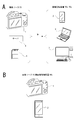
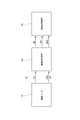
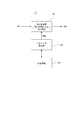
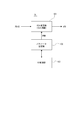
- the image processing device TDx When the shaking change processing is performed, the image processing device TDx performs a process of associating the image data with the shaking information at the time of imaging and the shaking change information SMI that can specify the processing amount of the shaking change processing. Then, the associated image data, the shaking information at the time of imaging, and the shaking change information SMI are collectively or separately transmitted to the image processing device TDy via wired communication, wireless communication, or a recording medium. Can be done.
- the term "associate" means, for example, to make the other information available (linkable) when processing one piece of information (data, commands, programs, etc.). That is, the information associated with each other may be collected as one file or the like, or may be individual information.
- FIG. 2 shows image data transmitted from the image processing device TDx to the image processing device TDy as image data VD2.
- the image data VD2 is an image in which the shake removal by the image pickup apparatus 1 is canceled, an image in which the shake removal is performed by the image processing device TDx, or before the shake change processing is performed by the image processing device TDx.
- FIG. 2 shows the metadata MTD2 transmitted from the image processing device TDx to the image processing device TDy.
- the metadata MTD2 may have the same information as the metadata MTD1 or may have some different information. However, the metadata MTD2 includes shaking information during imaging.
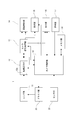
- the RAM in the memory unit 19 is used for temporarily storing data, programs, and the like as a work area for various data processing of the CPU of the camera control unit 18.
- the ROM and flash memory (non-volatile memory) in the memory unit 19 include an OS (Operating System) for the CPU to control each unit, content files such as image files, application programs for various operations, and firmware. It is used for memory of etc.
- the image data to which the lens distortion correction, the trapezoidal distortion correction, the focal plane distortion correction, the electronic image stabilization, and the optical image stabilization have been performed can be captured before each correction processing, that is, by imaging. It is possible to return to the state when the image sensor 12a of the element unit 12 is imaged.
- the association between each frame and the IMU data is released, and the IMU data can be managed in chronological order.
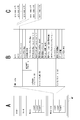
- the IMU data corresponding to the exposure center of gravity (timing of the broken line W) of each line of the current frame is specified. This can be calculated if the temporal relationship between the IMU data and the effective pixel area of the image sensor 12a is known.
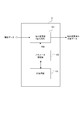
- the outputs of these direction-specific processing units 58, 59, and 60 are supplied to the gain calculation units 44, 45, and 46, respectively, and the low-frequency gain LG, the mid-frequency gain MG, and the high-frequency gain HG are given, respectively. Then, it is synthesized by the synthesis unit 61 and output as the adjusted quaternion eQD value.
- FIG. 24 shows a processing example of the image processing apparatus TDy that has acquired such image data VD2, metadata MTD2, and shaking change information SMI. After that, for the same processing as the above-mentioned processing, the same step number is assigned to avoid duplicate explanation of the processing content. Note that, as in FIG. 14, step ST30 is a “sway change” in a broad sense, and the processes of steps ST13, ST14, ST15, and ST16 are performed.
- the CPU 71 of the information processing device 70 that functions as the image processing device TDy reads out the image data pPD for each frame as the process of step ST20.
- the image data pPD refers to the image data reproduced from the recording medium in step ST20.
- the image data pPD to be reproduced is the image data iPD described in FIG.
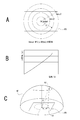
- the CPU 71 reads out the camera parameter CP corresponding to the image data pPD of the current playback frame for pasting on the celestial sphere model MT in step ST13.
- the CPU 71 is set in step ST41 based on the UI processing in step ST40 so as to be used in the shaking information adjustment processing in step ST15.
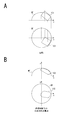
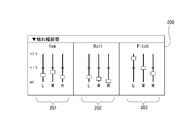
- FIG. 26 shows an example of the swing width adjustment image 200 as the second embodiment. Since the yaw adjustment unit 201 is adjusted for lateral shaking, it is provided with a slider that slides in the lateral direction. Since the roll adjusting unit 202 is adjusted for shaking in the rotation direction, a slider that slides in the circular direction is provided. Since the pitch adjusting unit 203 is adjusted for shaking in the vertical direction, a slider for sliding operation in the vertical direction is provided. By doing so, the user can easily understand the direction of the sway that can be adjusted, and can easily perform the desired operation.
- step S102 When the CPU 71 detects the operation of the slider of the swing width adjustment image 200, it proceeds from step S102 to step S103, acquires the operation information (slider operation value), and sets the shake change parameter PRM according to the operation information in step S104. Then, it is output to the shaking change process (step ST30 in FIG. 14). Then, the CPU 71 returns to step S101.
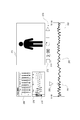
- the waveform monitor 270 shows, for example, a sway waveform in the vicinity of the current position (key frame) in each of the yaw direction, the roll direction, and the pitch direction.
- each shaking waveform is shown as "before adjustment”, which is the waveform before adjustment by the operation of the shaking width adjustment image 200.
- the waveform monitor 270 is provided with a switching button 279, and when the user operates the switching button 279, the displayed sway waveform is "after adjustment”. That is, the waveform is switched to the waveform adjusted by the operation of the swing width adjustment image 200 and displayed.
- a toggle operation of the switching button 279 the user can alternately see the “after adjustment” and “before adjustment” fluctuation waveforms, and can visually confirm the adjustment condition.
- the "after adjustment” and "before adjustment” fluctuation waveforms may be displayed in parallel.
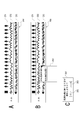
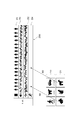
- FIGS. 34 and 35 show a series of processes divided, and the connection relationship of the flowchart is indicated by "c1" and "c2". Further, in the processing, it is assumed that the timelines 250A and the preset buttons 210 and 211 of FIGS. 31 and 32 are displayed instead of the shaking timeline 252 in the display of FIG. 33, and the shaking timeline 252 in the timeline 250A is displayed. In, keyframes are displayed as shown in FIG. 33.
- step S231 This is a process of setting a section to which the shaking change by the user operation is applied based on the key frame.
- the method of this setting is various as described above, but for example, the section from the key frame to the end of the image is set as the application section.
- the CPU 71 returns to step S200 through the above processes of steps S230 and S231.
- step S204 When the CPU 71 detects that the user has performed the swing width adjustment operation, that is, the slider operation of the swing width adjustment image 200, the CPU 71 proceeds from step S204 to step S220 and confirms whether the target section for reflecting the operation has been set. To do. If the target section is not set, that is, if the user has not set the key frame, the CPU 71 proceeds to step S222, for example, setting the entire section of the moving image as the target section and shaking according to the operation value of the slider this time.
- the change parameter PRM is applied to all sections. Of course, it is an example to cover the entire section.
- the user can change the shaking of the video according to the image content and editing intention.
- the operation can be performed intuitively.
- with regard to shaking even if you do not have detailed knowledge of frequency components and directional components such as yaw, roll, and pitch, you can specify the shaking as an image of animal shaking, vehicle shaking, etc., so the ease of operation is high.
- the UI processing unit 103 gives an example in which keyframes can be specified on the timeline 250A (shaking timeline 252) by user operation (steps S202 and S230 in FIGS. 33, 34 and 35). , S231, etc.).
- the user can arbitrarily specify a certain part (section, scene) in the moving image. This is a convenient function for specifying the playback section and the shaking edit location.
- the UI processing unit 103 gives an example of performing a process of reproducing an image on the timeline 250A (swaying timeline 252) with reference to a keyframe specified by a user operation (FIGS. 33 and 33). 34 and steps S202, S230, S207, S250, S252, S253, etc. in FIG. 35).
- the user can arbitrarily specify a certain part in the moving image and instruct the playback thereof. Therefore, the user can confirm the shaking state by looking at the reproduced image at an arbitrary location.
Landscapes
- Engineering & Computer Science (AREA)
- Theoretical Computer Science (AREA)
- General Engineering & Computer Science (AREA)
- Multimedia (AREA)
- Signal Processing (AREA)
- Human Computer Interaction (AREA)
- Physics & Mathematics (AREA)
- General Physics & Mathematics (AREA)
- Computer Hardware Design (AREA)
- Studio Devices (AREA)
- Image Processing (AREA)
- User Interface Of Digital Computer (AREA)
Priority Applications (4)
| Application Number | Priority Date | Filing Date | Title |
|---|---|---|---|
| EP20843980.2A EP4007261A4 (de) | 2019-07-24 | 2020-05-11 | Bildverarbeitungsvorrichtung, bildverarbeitungsverfahren und programm |
| JP2021534552A JP7586081B2 (ja) | 2019-07-24 | 2020-05-11 | 画像処理装置、画像処理方法、プログラム |
| CN202080051579.8A CN114175616B (zh) | 2019-07-24 | 2020-05-11 | 图像处理设备、图像处理方法和程序 |
| US17/626,245 US12368955B2 (en) | 2019-07-24 | 2020-05-11 | Image processing device, image processing method, and program |
Applications Claiming Priority (2)
| Application Number | Priority Date | Filing Date | Title |
|---|---|---|---|
| JP2019136087 | 2019-07-24 | ||
| JP2019-136087 | 2019-07-24 |
Publications (1)
| Publication Number | Publication Date |
|---|---|
| WO2021014716A1 true WO2021014716A1 (ja) | 2021-01-28 |
Family
ID=74193299
Family Applications (1)
| Application Number | Title | Priority Date | Filing Date |
|---|---|---|---|
| PCT/JP2020/018810 Ceased WO2021014716A1 (ja) | 2019-07-24 | 2020-05-11 | 画像処理装置、画像処理方法、プログラム |
Country Status (5)
| Country | Link |
|---|---|
| US (1) | US12368955B2 (de) |
| EP (1) | EP4007261A4 (de) |
| JP (1) | JP7586081B2 (de) |
| CN (1) | CN114175616B (de) |
| WO (1) | WO2021014716A1 (de) |
Cited By (1)
| Publication number | Priority date | Publication date | Assignee | Title |
|---|---|---|---|---|
| WO2022241410A1 (en) * | 2021-05-08 | 2022-11-17 | NEP Supershooters, L.P. | System and method for visual enhancement of a scene during capture thereof |
Families Citing this family (2)
| Publication number | Priority date | Publication date | Assignee | Title |
|---|---|---|---|---|
| USD1013717S1 (en) * | 2021-01-08 | 2024-02-06 | Sony Group Corporation | Display screen or portion thereof with an animated graphical user interface |
| CN120017968A (zh) * | 2025-03-12 | 2025-05-16 | 维沃移动通信有限公司 | 图像处理方法、装置、电子设备、存储介质及程序产品 |
Citations (6)
| Publication number | Priority date | Publication date | Assignee | Title |
|---|---|---|---|---|
| JP2006180471A (ja) * | 2004-11-25 | 2006-07-06 | Casio Comput Co Ltd | カメラ、撮影画像の選択/記録方法、及びプログラム |
| JP2006203463A (ja) * | 2005-01-19 | 2006-08-03 | Matsushita Electric Ind Co Ltd | 画像表示方法、画像撮像方法、及び画像合成方法 |
| JP2014153778A (ja) * | 2013-02-05 | 2014-08-25 | Nk Works Co Ltd | 画像処理プログラム、画像処理装置および画像処理方法 |
| JP2015216510A (ja) | 2014-05-12 | 2015-12-03 | キヤノン株式会社 | 撮像装置、その制御方法および情報処理システム |
| WO2016002322A1 (ja) * | 2014-07-02 | 2016-01-07 | ソニー株式会社 | 画像処理装置、画像処理方法およびプログラム |
| JP2018074337A (ja) * | 2016-10-27 | 2018-05-10 | キヤノン株式会社 | 動画処理装置、動画処理方法およびプログラム |
Family Cites Families (15)
| Publication number | Priority date | Publication date | Assignee | Title |
|---|---|---|---|---|
| JP4306679B2 (ja) * | 2005-12-28 | 2009-08-05 | ソニー株式会社 | 振れ検出装置、振れ補正装置、撮像装置 |
| JP5111306B2 (ja) * | 2008-08-29 | 2013-01-09 | キヤノン株式会社 | 像ブレ補正機能を有する光学機器及びその制御方法 |
| JP4915424B2 (ja) | 2009-02-19 | 2012-04-11 | ソニー株式会社 | 画像処理装置、カメラモーション成分算出方法、画像処理プログラム及び記録媒体 |
| JP2011097512A (ja) * | 2009-11-02 | 2011-05-12 | Canon Inc | 画像処理装置、画像処理方法、及びコンピュータプログラム |
| JP2015034879A (ja) * | 2013-08-08 | 2015-02-19 | キヤノン株式会社 | 像振れ補正装置およびその制御方法、レンズ鏡筒、光学機器、並びに撮像装置 |
| JP2015126436A (ja) * | 2013-12-26 | 2015-07-06 | ソニー株式会社 | 画像処理装置、画像処理方法およびプログラム |
| US9501154B2 (en) * | 2014-04-21 | 2016-11-22 | Microsoft Technology Licensing, Llc | Interactively stylizing camera motion |
| US9912868B2 (en) * | 2015-09-15 | 2018-03-06 | Canon Kabushiki Kaisha | Image-blur correction apparatus, tilt correction apparatus, method of controlling image-blur correction apparatus, and method of controlling tilt correction apparatus |
| JP6592335B2 (ja) | 2015-11-05 | 2019-10-16 | キヤノン株式会社 | 像ブレ補正装置及び方法 |
| JP6700831B2 (ja) * | 2016-02-12 | 2020-05-27 | キヤノン株式会社 | 画像処理装置、撮像装置、画像処理方法、及びプログラム |
| US20170007857A1 (en) | 2016-07-20 | 2017-01-12 | Cong Meng | Brake Shoes Mechanism |
| JP2018098612A (ja) * | 2016-12-12 | 2018-06-21 | キヤノン株式会社 | 画像処理装置及び画像処理方法、撮像装置、プログラム、記憶媒体 |
| JP2019029832A (ja) * | 2017-07-31 | 2019-02-21 | キヤノン株式会社 | 撮像装置 |
| JP7009107B2 (ja) * | 2017-08-03 | 2022-01-25 | キヤノン株式会社 | 撮像装置およびその制御方法 |
| EP3745705B1 (de) * | 2018-03-23 | 2025-08-27 | Huawei Technologies Co., Ltd. | Verfahren und endgerät zum verhindern des verwackelns von videobildern |
-
2020
- 2020-05-11 CN CN202080051579.8A patent/CN114175616B/zh active Active
- 2020-05-11 WO PCT/JP2020/018810 patent/WO2021014716A1/ja not_active Ceased
- 2020-05-11 JP JP2021534552A patent/JP7586081B2/ja active Active
- 2020-05-11 US US17/626,245 patent/US12368955B2/en active Active
- 2020-05-11 EP EP20843980.2A patent/EP4007261A4/de active Pending
Patent Citations (6)
| Publication number | Priority date | Publication date | Assignee | Title |
|---|---|---|---|---|
| JP2006180471A (ja) * | 2004-11-25 | 2006-07-06 | Casio Comput Co Ltd | カメラ、撮影画像の選択/記録方法、及びプログラム |
| JP2006203463A (ja) * | 2005-01-19 | 2006-08-03 | Matsushita Electric Ind Co Ltd | 画像表示方法、画像撮像方法、及び画像合成方法 |
| JP2014153778A (ja) * | 2013-02-05 | 2014-08-25 | Nk Works Co Ltd | 画像処理プログラム、画像処理装置および画像処理方法 |
| JP2015216510A (ja) | 2014-05-12 | 2015-12-03 | キヤノン株式会社 | 撮像装置、その制御方法および情報処理システム |
| WO2016002322A1 (ja) * | 2014-07-02 | 2016-01-07 | ソニー株式会社 | 画像処理装置、画像処理方法およびプログラム |
| JP2018074337A (ja) * | 2016-10-27 | 2018-05-10 | キヤノン株式会社 | 動画処理装置、動画処理方法およびプログラム |
Non-Patent Citations (1)
| Title |
|---|
| See also references of EP4007261A4 |
Cited By (2)
| Publication number | Priority date | Publication date | Assignee | Title |
|---|---|---|---|---|
| WO2022241410A1 (en) * | 2021-05-08 | 2022-11-17 | NEP Supershooters, L.P. | System and method for visual enhancement of a scene during capture thereof |
| US12015851B2 (en) | 2021-05-08 | 2024-06-18 | NEP Supershooters, L.P. | System and method for visual enhancement of a scene during capture thereof |
Also Published As
| Publication number | Publication date |
|---|---|
| CN114175616A (zh) | 2022-03-11 |
| EP4007261A1 (de) | 2022-06-01 |
| EP4007261A4 (de) | 2022-09-14 |
| US20220264008A1 (en) | 2022-08-18 |
| CN114175616B (zh) | 2024-10-29 |
| JPWO2021014716A1 (de) | 2021-01-28 |
| JP7586081B2 (ja) | 2024-11-19 |
| US12368955B2 (en) | 2025-07-22 |
Similar Documents
| Publication | Publication Date | Title |
|---|---|---|
| JP5428210B2 (ja) | 情報処理装置、撮像システム、録画制御方法及びプログラム | |
| JP7444162B2 (ja) | 画像処理装置、画像処理方法、プログラム | |
| CN103491331A (zh) | 显示控制设备、显示控制方法和程序 | |
| JP2009232382A (ja) | 画像処理装置、画像処理方法、プログラム | |
| JPWO2011099299A1 (ja) | 映像抽出装置、撮影装置、プログラム及び記録媒体 | |
| JP7405131B2 (ja) | 画像処理装置、画像処理方法、プログラム | |
| JPWO2020170604A1 (ja) | 情報処理装置、情報処理方法、プログラム | |
| JP2010050795A (ja) | カメラ、画像合成方法、およびプログラム | |
| JP7586081B2 (ja) | 画像処理装置、画像処理方法、プログラム | |
| JP4161773B2 (ja) | 映像編集装置,映像編集装置の処理方法 | |
| JP4140518B2 (ja) | 情報処理装置および方法、並びにプログラム | |
| JP7513081B2 (ja) | 画像処理装置、画像処理方法、プログラム | |
| JP4946935B2 (ja) | 撮像装置 | |
| JP2006262135A (ja) | 撮影装置、動画再生装置、動画記録再生プログラム | |
| WO2021181966A1 (ja) | 画像処理装置、画像処理方法、プログラム | |
| WO2021181965A1 (ja) | 画像処理装置、画像処理方法、プログラム | |
| JP2021002803A (ja) | 画像処理装置、その制御方法、プログラム | |
| JP5602818B2 (ja) | カメラ、画像再生装置、画像合成方法、およびプログラム | |
| JP5724203B2 (ja) | 動画ファイル生成装置、動画ファイル生成方法、及び動画ファイル生成プログラム | |
| WO2024070618A1 (ja) | 撮像装置、プログラム、撮像システム | |
| JP2010034933A (ja) | 画像処理装置、画像処理方法、及びプログラム | |
| JP2022052361A (ja) | ハイライト動画生成装置 | |
| JP2008067023A (ja) | コンテンツ記録装置 | |
| JP2017011630A (ja) | 画像処理装置および撮像システム | |
| JP2017102588A (ja) | 画像処理装置および画像処理装置の制御方法 |
Legal Events
| Date | Code | Title | Description |
|---|---|---|---|
| 121 | Ep: the epo has been informed by wipo that ep was designated in this application |
Ref document number: 20843980 Country of ref document: EP Kind code of ref document: A1 |
|
| ENP | Entry into the national phase |
Ref document number: 2021534552 Country of ref document: JP Kind code of ref document: A |
|
| NENP | Non-entry into the national phase |
Ref country code: DE |
|
| WWE | Wipo information: entry into national phase |
Ref document number: 2020843980 Country of ref document: EP |
|
| ENP | Entry into the national phase |
Ref document number: 2020843980 Country of ref document: EP Effective date: 20220224 |