WO2024252834A1 - 情報処理方法、情報処理装置、及び情報処理プログラム - Google Patents
情報処理方法、情報処理装置、及び情報処理プログラム Download PDFInfo
- Publication number
- WO2024252834A1 WO2024252834A1 PCT/JP2024/017113 JP2024017113W WO2024252834A1 WO 2024252834 A1 WO2024252834 A1 WO 2024252834A1 JP 2024017113 W JP2024017113 W JP 2024017113W WO 2024252834 A1 WO2024252834 A1 WO 2024252834A1
- Authority
- WO
- WIPO (PCT)
- Prior art keywords
- annotation
- annotator
- information processing
- evaluation value
- test
- Prior art date
- Legal status (The legal status is an assumption and is not a legal conclusion. Google has not performed a legal analysis and makes no representation as to the accuracy of the status listed.)
- Ceased
Links
Images






Classifications
-
- G—PHYSICS
- G06—COMPUTING OR CALCULATING; COUNTING
- G06F—ELECTRIC DIGITAL DATA PROCESSING
- G06F18/00—Pattern recognition
- G06F18/20—Analysing
- G06F18/21—Design or setup of recognition systems or techniques; Extraction of features in feature space; Blind source separation
- G06F18/214—Generating training patterns; Bootstrap methods, e.g. bagging or boosting
-
- G—PHYSICS
- G06—COMPUTING OR CALCULATING; COUNTING
- G06N—COMPUTING ARRANGEMENTS BASED ON SPECIFIC COMPUTATIONAL MODELS
- G06N20/00—Machine learning
-
- G—PHYSICS
- G06—COMPUTING OR CALCULATING; COUNTING
- G06T—IMAGE DATA PROCESSING OR GENERATION, IN GENERAL
- G06T7/00—Image analysis
-
- G—PHYSICS
- G06—COMPUTING OR CALCULATING; COUNTING
- G06V—IMAGE OR VIDEO RECOGNITION OR UNDERSTANDING
- G06V10/00—Arrangements for image or video recognition or understanding
- G06V10/70—Arrangements for image or video recognition or understanding using pattern recognition or machine learning
- G06V10/77—Processing image or video features in feature spaces; using data integration or data reduction, e.g. principal component analysis [PCA] or independent component analysis [ICA] or self-organising maps [SOM]; Blind source separation
- G06V10/774—Generating sets of training patterns; Bootstrap methods, e.g. bagging or boosting
-
- G—PHYSICS
- G09—EDUCATION; CRYPTOGRAPHY; DISPLAY; ADVERTISING; SEALS
- G09B—EDUCATIONAL OR DEMONSTRATION APPLIANCES; APPLIANCES FOR TEACHING, OR COMMUNICATING WITH, THE BLIND, DEAF OR MUTE; MODELS; PLANETARIA; GLOBES; MAPS; DIAGRAMS
- G09B19/00—Teaching not covered by other main groups of this subclass
-
- G—PHYSICS
- G09—EDUCATION; CRYPTOGRAPHY; DISPLAY; ADVERTISING; SEALS
- G09B—EDUCATIONAL OR DEMONSTRATION APPLIANCES; APPLIANCES FOR TEACHING, OR COMMUNICATING WITH, THE BLIND, DEAF OR MUTE; MODELS; PLANETARIA; GLOBES; MAPS; DIAGRAMS
- G09B5/00—Electrically-operated educational appliances
- G09B5/02—Electrically-operated educational appliances with visual presentation of the material to be studied, e.g. using film strip
Definitions
- This disclosure relates to technology for annotating images.
- Patent Document 1 discloses a technology that accepts annotations for creating learning data and evaluates the annotations based on the contribution of the learning data to which the accepted annotations are added.
- Patent document 2 discloses a technology that keeps a history of annotations that users have entered for video content, and calculates the user's contribution points for the annotations by weighting them based on the type and frequency of the annotations.
- the conventional technology only discloses how to evaluate annotations, and does not take into consideration improving the annotation skills of annotators. As a result, the conventional technology is unable to efficiently improve annotator skills.
- This disclosure has been made to solve these problems, and aims to provide technology that efficiently improves annotator skills.
- An information processing method is an information processing method in a computer, which obtains an annotation work history by an annotator, which annotations are added to original learning data to generate learning data for a machine learning model, calculates an evaluation value for evaluating the annotations based on the work history, generates a training menu corresponding to the evaluation value for improving the annotation skills, and outputs the training menu to a display of the annotator.
- annotators' skills can be improved efficiently.
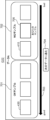
- FIG. 13 is a diagram showing a display screen of a first example of an accuracy development menu.
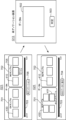
- FIG. 13 is a diagram showing a display screen of a second example of an accuracy development menu.
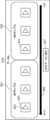
- FIG. 13 is a diagram showing a display screen of a third example of an accuracy development menu.
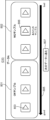
- FIG. 13 is a diagram showing a display screen of a fourth example of an accuracy development menu.
- FIG. 13 is a diagram showing a display screen of a fifth example of an accuracy development menu.
- FIG. 13 is a diagram showing a display screen of a first example of a time efficiency training menu.
- FIG. 13 is a diagram showing a display screen of a second example of a time efficiency training menu.
- FIG. 13 is a diagram showing a display screen of a third example of a time efficiency training menu.
- FIG. 1 illustrates an annotation test for accuracy.
- FIG. 1 illustrates a time-efficient annotation test.
- FIG. 11 is a diagram illustrating how a threshold value is set.
- FIG. 13 is an explanatory diagram of a fourth example of the accuracy evaluation value.
- FIG. 13 is an explanatory diagram of a fifth example of the accuracy evaluation value.
- FIG. 13 is an explanatory diagram of a seventh example of an accuracy evaluation value.
- An information processing method is an information processing method in a computer, which obtains an annotation work history by an annotator, which annotations are added to original learning data to generate learning data for a machine learning model, calculates an evaluation value for evaluating the annotations based on the work history, generates a training menu corresponding to the evaluation value, the training menu for improving the annotation skills, and outputs the training menu to a display of the annotator.
- a display screen of a training menu according to the evaluation value for the annotation is displayed on the annotator's display. Therefore, the annotator can overcome annotations that he or she is weak at through the training menu. This allows the annotator's skills to be improved efficiently. It also prevents inexperienced annotators from mass-producing training data with undesirable annotations.
- the evaluation value may be calculated for each of a plurality of evaluation criteria
- the training menu may include training menu content corresponding to the evaluation criteria for which the calculated evaluation value does not satisfy a reference condition.
- the annotator is presented with training menu contents corresponding to the evaluation criteria for which the evaluation value does not satisfy the reference condition, so that the annotator's annotation skills for evaluation criteria that he or she is weak at can be efficiently improved.
- the multiple evaluation criteria may include an accuracy evaluation criterion for evaluating the accuracy of the annotation and a time efficiency evaluation criterion for evaluating the work time of the annotation.
- This configuration allows annotators' skills to be improved efficiently in terms of accuracy and time efficiency.
- the annotations may be classified into a plurality of annotation items, the evaluation value may be calculated for each annotation item for each of the plurality of evaluation criteria, and the development menu may include development menu content corresponding to the evaluation criteria and annotation items for which the calculated evaluation value does not satisfy the reference condition.
- the annotator is presented with a training menu that corresponds to the evaluation criteria and annotation items whose evaluation values do not satisfy the standard conditions, so that the annotator can efficiently improve his/her annotation skills for evaluation criteria and annotation items that he/she is weak at or that require work from the annotator.
- the multiple annotation items may be at least one of a type that assigns a class label to an object included in an image, a type that assigns a bounding box to the object, and a type that assigns a time division label to a time-series image.
- This configuration makes it possible to efficiently improve annotator skills in at least one of assigning class labels, assigning bounding boxes, and assigning time segment labels.
- the training menu may be configured with a display screen including at least one of good annotation samples showing the annotations made by a good annotator or correct annotation samples to which a correct annotation has been assigned, and bad annotation samples showing the annotations made by a bad annotator.
- This configuration allows the annotator to specifically understand at least the bad annotations out of the good annotations and the bad annotations.
- the good annotation sample and the bad annotation sample may be images showing the results of the annotation by the good annotator and the bad annotator.
- This configuration allows the annotator to concretely understand at least the bad annotation results out of the good annotation results and the bad annotation results.
- the good annotation sample and the bad annotation sample may be video images showing the process in which the annotations are added by the good annotator and the bad annotator.
- This configuration allows the annotator to specifically understand the steps required to add annotations accurately.
- the training menu may include an annotation test having test content according to the evaluation value, the annotation test tasking the annotator with adding the annotation to a test image.
- This configuration ensures that annotators can improve their annotation skills in areas where they are weak.
- the annotation test may include calculating a test score of the annotation test from the result of the annotation test, determining whether the annotation test has passed or failed from the test score, and resuming the annotation work if it is determined that the annotator has passed the annotation test.
- the training menu may include outputting an annotation sample to the display if the annotator is determined to have failed the annotation test.
- annotation samples are presented to annotators who have been unable to overcome their annotation weaknesses, allowing them to reliably understand the annotations they are weak at.
- the information processing method according to any one of (1) to (11) above may further include displaying on the display a setting screen for a threshold for evaluating the evaluation value.
- the threshold can be set arbitrarily, making it possible to train annotators who can provide annotations that meet the requirements of, for example, the annotation requester. Furthermore, by setting the threshold appropriately, it is possible to prevent the mass production of training data to which low-quality annotations have been provided. Furthermore, by setting the threshold appropriately, it is possible to prevent the training of annotators who spend a great deal of time providing overly accurate annotations.
- the threshold value may include a first threshold value for evaluating the accuracy of the annotation
- the setting screen may include a first setting screen for setting the first threshold value
- the first setting screen may include an adjustment unit for adjusting the first threshold value and a display field for displaying an annotation sample according to the first threshold value.
- the threshold can be adjusted while viewing annotation samples corresponding to the first threshold, making it easy to set the first threshold to meet the required annotation standards.
- the threshold value may include a second threshold value for evaluating the accuracy of the annotation
- the setting screen may include a second setting screen for setting the second threshold value
- the second setting screen may include an adjustment section for adjusting the second threshold value and a display field for displaying the work time of the annotation per sample according to the second threshold value.
- This configuration makes it easy to set the second threshold because the threshold can be adjusted while checking the work time per sample according to the second threshold.
- the annotation may include a plurality of annotation items
- displaying the setting screen may include receiving an instruction to select one annotation item from the plurality of annotation items, and displaying a setting screen for setting the threshold value for the one annotation item.
- This configuration makes it possible to set thresholds for each annotation item.
- the calculation of the evaluation value may include dividing the annotation given by the annotator to a person included in the image into an upper body region corresponding to the upper body of the person and a lower body region corresponding to the lower body of the person, calculating an IOU (Interaction Over Union) of the upper body region and an IOU of the lower body region, and calculating the evaluation value based on a weighted average of the IOU of the upper body and the IOU of the lower body such that the weight value of the IOU of the upper body region is higher than the weight value of the IOU region of the lower body.
- IOU Interaction Over Union
- the upper body contains many human features such as the face, so there is a tendency for the accuracy of annotations for people to be emphasized more for the upper body than for the lower body.
- the evaluation value is calculated based on the weighted average of both IOUs so that the IOU for the upper body is weighted higher than the IOU for the lower body, so annotations that accurately annotate the upper body can be highly evaluated.
- the calculation of the evaluation value may include calculating a correct answer inclusion ratio, which is the ratio of annotations added to an image by the annotator to correct annotations, and calculating the evaluation value based on the IOU (Interaction Over Union) of the annotations and the correct answer inclusion ratio.
- a correct answer inclusion ratio is the ratio of annotations added to an image by the annotator to correct annotations
- the evaluation value may be calculated based on an annotation result given by the annotator to evaluation data included in a dataset on which the annotator performs the annotation, and the evaluation data may be the original learning data having hidden correct annotations.
- annotators can be evaluated through actual annotation work, without requiring them to perform dedicated annotation work to calculate an evaluation value.
- An information processing device includes a processor, and the processor executes the following processes: acquiring an annotation work history of an annotator, the annotations being assigned to original learning data to generate learning data for a machine learning model, calculating an evaluation value for evaluating the annotations based on the work history, generating a training menu corresponding to the evaluation value for improving annotation skills, and outputting the training menu to a display of the annotator.
- This configuration makes it possible to provide an information processing device that efficiently improves annotator skills.
- an information processing program causes a computer to execute a process of acquiring an annotation work history by an annotator, the annotations being added to original learning data to generate learning data for a machine learning model, calculating an evaluation value for evaluating the annotations based on the work history, generating a training menu corresponding to the evaluation value for improving the annotation skills, and outputting the training menu to a display of the annotator.
- This configuration makes it possible to provide an information processing program that efficiently improves annotator skills.
- the present disclosure can also be realized as an information processing system that operates by such an information processing program.
- a computer program can be distributed on a non-transitory computer-readable recording medium such as a CD-ROM or via a communication network such as the Internet.
- (Embodiment) 1 is a block diagram showing an example of the overall configuration of an information processing system according to an embodiment.
- the information processing system includes an information processing device 1 and a terminal device 2.
- the information processing device 1 and the terminal device 2 are connected to each other so as to be able to communicate with each other via a network NT.
- An example of the network NT is a wide area communication network including the Internet and a mobile phone communication network.
- the information processing device 1 is configured, for example, as a computer such as a cloud server. However, this is just one example, and the information processing device 1 may also be configured as an edge computer.
- the terminal device 2 is composed of a portable computer such as a tablet terminal or a smartphone, or a stationary computer.
- the terminal device 2 includes a central processing unit (CPU), a memory, a display, an operation unit, and a communication circuit.
- the terminal device 2 is a terminal used by an annotator. Although one terminal device 2 is shown in FIG. 1 for the sake of convenience of explanation, this is only an example, and there may be more than one terminal device 2.
- the information processing device 1 includes a processor 10, a memory 20, and a communication unit 30.
- the processor 10 is composed of a central processing unit (CPU), and includes an acquisition unit 11, an evaluation unit 12, a generation unit 13, an output unit 14, and a setting unit 15.
- the acquisition units 11 to 15 are realized, for example, by the processor 10 executing an information processing program. However, this is just one example, and the acquisition units 11 to 15 may be composed of dedicated hardware circuits. Furthermore, the acquisition units 11 to 15 may be distributed across multiple computers, or some of the functions may be implemented in the terminal device 2.
- the acquisition unit 11 acquires an annotation work history by the annotator.
- the work history includes the learning data to which annotations have been added, the work time required for annotation for each learning data , the identifier of the annotator , the identifier of the learning data, and the identifier of the data set to which the learning data belongs.
- the original learning data to be annotated by the annotator includes evaluation data for which a correct annotation has already been determined.
- the annotation is evaluated based on the annotation added by the annotator to this evaluation data. Note that the evaluation data presented to the annotator does not have a correct annotation added, so the annotator cannot recognize the correct annotation.
- An annotator is a person who adds annotations to original learning data.
- the annotator uses the terminal device 2 to add annotations to the original learning data.
- the acquisition unit 11 acquires the annotation results sent from the terminal device 2 as a work history using the communication unit 30, and stores the acquired work history in a work history database in the memory 20.
- the original learning data is data before annotations are added. For example, still images and video images including an object to be recognized are used as the original learning data.
- the annotation result includes the annotated learning data, the work time required for annotation for each learning data, the annotator's identifier, the learning data identifier, and the identifier of the dataset to which the learning data belongs, etc.
- Annotations include class labels attached to objects contained in an image, and bounding boxes attached to objects. Annotations may also be time segment labels that indicate time segments within a video that meet certain conditions. The term used to distinguish these annotations is called annotation item.
- An object is an object that is the target of recognition by a machine learning model.
- a time segment that satisfies a specified condition refers to a section in which an object is in a specific state during the entire period of a video. For example, a section in which a person is walking or a section in which a fire is occurring corresponds to a time segment that satisfies a specified condition.
- a class label is character data that indicates the type of object, such as dog, cat, etc.
- a bounding box is a frame that is added to surround an object in an image to indicate the location where the object is located. The shape of the frame is, for example, a rectangle.
- the machine learning model may be a deep neural network, a convolutional neural network, a random forest, a decision tree, a support vector machine, etc.
- the machine learning model may be trained in advance using a general-purpose dataset. In this case, the machine learning model may additionally learn the training data created by an annotator trained through the training menu of the present disclosure.
- the evaluation unit 12 calculates an evaluation value for evaluating the annotation based on the work history.
- An evaluation value is calculated for each of a plurality of evaluation criteria.
- the plurality of evaluation criteria include an accuracy evaluation criterion for evaluating the accuracy of the annotation and a time efficiency evaluation criterion for evaluating the work time for the annotation.
- an evaluation value for the accuracy evaluation criterion is referred to as an accuracy evaluation value
- an evaluation value for the time efficiency evaluation criterion is referred to as a time evaluation value.
- the accuracy evaluation value is expressed by the error defined for each annotation item. The smaller the error, the higher the evaluation standard for accuracy. Therefore, the smaller the accuracy evaluation value, the higher the evaluation.
- the error may include an object-level error calculated for each object and a data-level error calculated for one training data.
- the data-level error is expressed, for example, as the average value of the object-level errors in one training data.
- the error indicates the discrepancy between the correct annotation and the annotation given by the annotator. For example, when the annotation is a class label or a time segment label, the error is "0" if the given class label is correct, and "1" if it is incorrect. For example, when the annotation is a bounding box, the error is expressed as 1-IOU (Interaction over Union). IOU is the ratio of the area indicated by the logical product of the correct bounding box and the given bounding box to the area indicated by the logical sum of the correct bounding box and the given bounding box. Details of the error will be given later.
- IOU is the ratio of the area indicated by the logical product of the correct bounding box and the given bounding box to the area indicated by the logical sum of the correct bounding box and the given bounding box. Details of the error will be given later.
- the time evaluation value is expressed as the amount of work time required to annotate each piece of training data.
- the evaluation criterion for time efficiency is that the shorter the work time, the higher the evaluation. Therefore, the smaller the time evaluation value, the higher the evaluation.
- the multiple evaluation criteria may include an evaluation criterion for quality variability and an evaluation criterion for monetary cost.
- the quality variability the more the evaluation unit 12 may decrease the evaluation value and increase the annotator's evaluation.
- the smaller the monetary cost the more the evaluation unit 12 may decrease the evaluation value and lower the annotator's evaluation.
- the evaluation unit 12 may calculate an accuracy evaluation value and a time evaluation value for each annotation item. Furthermore, the evaluation unit 12 may calculate an accuracy evaluation value and a time evaluation value for each combination of an annotation item and a dataset.
- a dataset refers to a group of learning data organized by type. For example, a group of images taken at a certain site constitutes one dataset. Examples of sites include a factory and a construction site. Therefore, the datasets are classified as a dataset of factory ⁇ , a dataset of factory ⁇ , a dataset of construction site ⁇ , and a dataset of construction site ⁇ .
- the generation unit 13 generates a training menu according to the evaluation value, for improving annotation skills.
- the training menu may include training menu content according to an evaluation criterion for which the evaluation value calculated by the evaluation unit 12 does not satisfy the standard condition. For example, if the accuracy evaluation value does not satisfy the standard condition, a training menu for improving annotation accuracy is generated. For example, if the time evaluation value does not satisfy the standard condition, a training menu for shortening annotation work time is generated. For example, if both the accuracy evaluation value and the time evaluation value do not satisfy the standard condition, training menus for both are generated.
- the generation unit 13 may generate a training menu to improve annotation skills for annotation items whose evaluation values do not satisfy the standard conditions. If an evaluation value is calculated for each pair of an annotation item and a dataset, the generation unit 13 may generate a training menu to improve annotation skills for pairs whose evaluation values do not satisfy the standard conditions.
- a threshold value is used as the evaluation criterion. As described above, the smaller the evaluation value, the higher the evaluation of the annotation. Therefore, the generation unit 13 may determine that the standard condition is met when the evaluation value is smaller than the threshold, and may determine that the standard condition is not met when the evaluation value is larger than the threshold.
- the threshold value may be the average of the evaluation values that correspond to the bottom X% of all annotators who performed the annotation. X may be an appropriate value such as 10, 20, or 30. For example, when evaluation values are calculated for the learning data D1 to Dn, it is assumed that the evaluation values that correspond to the bottom X% for each of the learning data D1 to Dn are V1 to Vn. In this case, the threshold value is the average of the evaluation values V1 to Vn.
- the training menu may be configured with a display screen including at least bad annotation samples among good annotation samples showing annotations made by good annotators or correct annotation samples with correct annotations, and bad annotation samples showing annotations made by bad annotators.
- a good annotator may be an experienced annotator, or an annotator whose evaluation value is in the top Y% of all annotators. Y may be an appropriate value such as 10, 20, or 30.
- a bad annotator may be an annotator whose evaluation value is in the bottom X% of all annotators.
- good annotation samples and bad annotation samples are collectively referred to as annotation samples.
- the good annotation sample and the bad annotation sample may be images showing the results of annotation by a good annotator and a bad annotator.
- the good annotation samples and the bad annotation samples may be video images showing the process of annotations being added by good and bad annotators.
- the training menu may include an annotation test that has test content according to the evaluation value and tasks the annotator with the task of adding annotations to a test image.
- the generation unit 13 may execute a process of calculating a test score for the annotation test from the results of the annotation test, a process of determining whether the annotation test passed or failed from the test score, and a process of resuming annotation work if it is determined that the annotator passed the annotation test.
- the output unit 14 outputs the training menu generated by the generation unit 13 to the display of the annotator.
- the output unit 14 may generate display data for displaying a display screen of the training menu on the display, and transmit the generated display data to the terminal device 2 using the communication unit 30.
- the setting unit 15 displays the above-mentioned threshold setting screen on the display of the annotator.
- the setting unit 15 may transmit display data of the setting screen to the terminal device 2 using the communication unit 30.
- the setting unit 15 includes a process for receiving an instruction to select one annotation item from among multiple annotation items, and a process for displaying a setting screen for setting a threshold value for the one annotation item.
- the setting unit 15 stores the threshold value set via the setting screen in the memory 20.
- the setting screen includes a first setting screen for setting a first threshold for evaluating the accuracy evaluation value.
- the first setting screen includes an adjustment section for adjusting the first threshold, and a display field for displaying annotation samples according to the first threshold.
- the setting screen may include a second setting screen for setting a second threshold for evaluating the time evaluation value.
- the second setting screen includes an adjustment section for adjusting the second threshold, and a display field for displaying the annotation work time per sample according to the second threshold.
- the memory 20 is composed of a rewritable non-volatile storage device such as a solid state drive or a hard disk drive, and stores the work history database and thresholds.
- the work history database stores the work history acquired by the acquisition unit 11.
- the communication unit 30 is a communication circuit for connecting the information processing device 1 to the network NT.
- the communication unit 30 transmits display data for the training menu to the terminal device 2, and transmits display data for the setting screen to the terminal device 2.
- the communication unit 30 receives the results of the annotation transmitted from the terminal device 2.
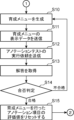
- FIG. 2 is a flowchart showing an example of processing of the information processing device 1 in the embodiment.
- FIG. 3 is a continuation of the flowchart of FIG. 2.
- the evaluation unit 12 determines whether or not the annotator to be evaluated (hereinafter referred to as the target annotator) is a new annotator.
- a new annotator is an annotator whose annotations are evaluated for the first time by the information processing device 1.
- the evaluation unit 12 may determine whether or not the annotator is a new annotator based on the annotation information transmitted from the terminal device 2.
- the memory 20 stores annotation information of annotators whose annotations have been evaluated.
- the evaluation unit 12 may determine that the target annotator is a new annotator, and if the transmitted annotation information is stored in the memory 20 as evaluated annotation information, the evaluation unit 12 may determine that the target annotator is not a new annotator.
- step S1 If it is determined that the target annotator is a new annotator (YES in step S1), processing proceeds to step S2; if it is determined that the target annotator is not a new annotator (NO in step S1), processing proceeds to step S3.
- step S2 the generation unit 13 generates a training menu for the new annotator, and the output unit 14 transmits display data of the generated training menu for the new annotator to the terminal device 2 via the communication unit 30.
- the display of the terminal device 2 displays a display screen of the training menu for the new annotator.
- the training menu for the new annotator includes information for allowing the new annotator to master the basics of annotation.
- the training menu for the new annotator may include the contents of a frequently presented training menu that is determined based on the browsing history of training menus performed by existing annotators. This allows the new annotator to be trained efficiently.
- the acquisition unit 11 transmits an annotation work request to the terminal device 2 using the communication unit 30.
- the work request includes a dataset including the original learning data to be the subject of the annotation work.
- the dataset included in this work request is referred to as the target dataset.
- the work request also includes work instructions for multiple annotation items.
- the original learning data included in the dataset are displayed sequentially on the display of the terminal device 2, and the target annotator annotates each piece of original learning data.
- the results of the annotations applied by the target annotator to each piece of original learning data are transmitted from the terminal device 2 to the information processing device 1.
- step S4 the acquisition unit 11 acquires the annotation results sent from the terminal device 2 as a work history.
- the acquired work history is stored in a work history database.
- step S5 the evaluation unit 12 reads out the work history of the target annotator for the target dataset from the work history database, and calculates the average accuracy evaluation value for each annotation item from the read out work history. For example, if the annotation items include the assignment of a class label and the assignment of a bounding box, the average accuracy evaluation value is calculated for each of the assignment of the class label and the assignment of the bounding box.
- step S6 the generation unit 13 extracts annotation items that do not satisfy the standard conditions.
- the generation unit 13 may extract annotation items whose average accuracy evaluation value is greater than the first threshold value as annotation items that do not satisfy the standard conditions.
- step S7 the evaluation unit 12 reads out the work history of the target annotator for the target dataset from the work history database, and calculates the average value of the time evaluation value for each annotation item from the read out work history. For example, if the annotation items include the assignment of a class label and the assignment of a bounding box, the average value of the time evaluation value for each of the assignment of the class label and the assignment of the bounding box is calculated.
- step S8 the generation unit 13 extracts annotation items that do not satisfy the standard condition.
- the generation unit 13 may extract annotation items whose average time evaluation value is greater than the second threshold value as annotation items that do not satisfy the standard condition.
- step S9 the generation unit 13 determines whether or not there are any annotation items that do not satisfy the criteria conditions from the extraction results of step S6 or step S8. If it is determined that there are no annotation items that do not satisfy the criteria conditions (NO in step S9), the process returns to step S3. In this case, a request for annotation work on the next target data set is sent to the terminal device 2, and the annotator performs annotation work on the next target data set. Note that if NO in step S9, the process may be terminated.
- step S9 If it is determined that there is an annotation item that meets the criteria (YES in step S9), processing proceeds to step S10.
- step S10 the generation unit 13 generates a training menu to improve the annotator's skills for annotation items that do not meet the criteria.
- step S11 the output unit 14 transmits display data for the generated training menu to the terminal device 2 using the communication unit 30.
- step S12 the output unit 14 sends a request to run an annotation test to the terminal device 2 using the communication unit 30. This causes the target annotator to run the annotation test using the terminal device 2.
- step S13 the generation unit 13 obtains the answer to the annotation test by the target annotator using the communication unit 30.
- step S14 the generation unit 13 calculates a test score from the answers to the annotation test, and determines from the calculated test score whether the target annotator passed the annotation test. If the target annotator passed the annotation test, the process proceeds to step S15. If the target annotator failed the annotation test, the process returns to step S10. In this case, the target annotator will review the same training menu again.
- step S15 the generation unit 13 resets the evaluation value (accuracy evaluation value or time evaluation value) for the annotation item that was determined in step S9 to not satisfy the reference condition.
- step S15 ends, the process returns to step S3.
- the target annotator again annotates the target dataset.
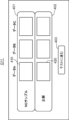
- FIG. 4 shows a display screen G11 of a first example of an accuracy training menu.
- the accuracy training menu is a training menu that is generated when it is determined that the accuracy evaluation value of the target annotator does not satisfy the reference conditions.
- the display screen G11 includes an NG sample column 401, a correct answer column 402, and a test button 403.
- the NG sample column 401 displays a bad annotation sample 410 for each of the data A, B, and C. NG means bad.
- the correct answer column 402 displays a correct annotation sample 420 for each of the data A, B, and C.
- the data A, B, and C are three evaluation data randomly selected from the evaluation data included in the target dataset to which annotations related to the target annotation item have been added.
- the target annotation item is an annotation item for which the target annotator has been determined not to satisfy the standard conditions.
- the three bad annotation samples 410 displayed in the NG sample column 401 are bad annotation samples randomly selected from the bad annotation samples in each of the data A, B, and C.
- the correct annotation sample 420 displayed in the correct answer column 402 is an annotation sample to which correct annotations have been added for data A, B, and C.
- the bad annotation samples 410 displayed in the NG sample column 401 may include bad annotation samples from the target annotator.
- the test button 403 is a button that is pressed when the target annotator performs an annotation test.
- the target annotator compares the bad annotation sample 410 and the correct annotation sample 420, checks for annotation issues, and then presses the test button 403.
- the target annotator can press the test button 403 on the condition that he/she has finished playing all the video displayed in the NG sample column 401 and the correct answer column 402.
- the content of the video indicates what time division label was assigned to what period.
- the target annotator viewing the display screen G11 can compare the bad annotation sample 410 with the correct annotation sample 420 to confirm the reason why the target annotator was determined not to satisfy the standard conditions. This improves the accuracy of the target annotator's annotations. Furthermore, since the display screen G11 displays the bad annotation samples 410 of other annotators, the target annotator can check in advance possible annotation mistakes that may occur in the future. This prevents possible annotation mistakes from occurring in the future.
- the display screen G11 displays annotation samples for three pieces of data A to C, but this is just one example, and annotation samples for four or more pieces of data may be displayed, or annotation samples for two or fewer pieces of data may be displayed. Furthermore, the three pieces of data A to C may be three pieces of original learning data randomly selected from the original learning data to which the target annotation has been added, regardless of the data set.
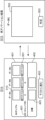
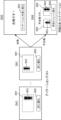
- FIG. 5 is a diagram showing a display screen G12 of a second example of the accuracy training menu.
- Display screen G12 differs from display screen G11 in that it prompts the target annotator to re-enter annotations for each defective annotation sample 410, and displays the correct annotation sample 420 after the re-annotation has been entered.
- components that are the same as those in display screen G11 are given the same reference numerals and descriptions thereof are omitted.
- the target annotator inputs an operation to press the re-annotation button 501 corresponding to one piece of data from among data A to C.
- the generation unit 13 then displays a re-annotation screen G13 for the one piece of data on the display.
- the re-annotation screen G13 includes a work field 502.
- the work field 502 displays the original learning data corresponding to the one piece of data. In the example of FIG. 5, the original learning data for data C is displayed.
- the target annotator inputs the re-annotation for this original learning data and inputs an operation to press the judgment button 503.
- the generation unit 13 then re-displays the display screen G12 on the display.
- the re-displayed display screen G12 displays the correct annotation sample 420 corresponding to the data 1 in the correct answer column 402, and displays the pass/fail judgment result for the re-annotation in the NG sample column 401.
- the generation unit 13 judges the re-annotation as pass if the accuracy evaluation value of the re-annotation is smaller than the threshold, and judges the re-annotation as fail if the accuracy evaluation value of the re-annotation is larger than the threshold. If the threshold is, for example, an accuracy evaluation value equivalent to the bottom X%, then if the accuracy evaluation value of the re-annotation is smaller than the accuracy evaluation value equivalent to the bottom X%, it is judged as pass.
- the target annotator displays the re-annotation screen G13 for all of data A to C and inputs the re-annotation. Then, if the re-annotation for all of data A to C passes, the target annotator can press the test button 403 to proceed to the annotation test.
- display screen G12 provides the following effects.
- the target annotator can actually input re-annotations and have the pass/fail judged, thereby acquiring good annotation skills. Also, since the correct annotation sample 420 is not displayed until the first re-annotation is performed, the target annotator can easily recognize the difference between his/her own annotations and the correct annotations.
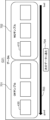
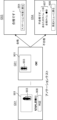
- FIG. 6 shows a display screen G14 of a third example of the accuracy training menu.
- Display screen G14 differs from display screen G12 in that it displays the re-annotation score instead of the pass/fail result of the re-annotation.
- the NG sample column 401 of display screen G14 includes a score display column 601 that displays the re-annotation score for each of data A to C.
- the score is a numerical value of the accuracy evaluation value, expressed on a five-level scale from 1 to 5. For example, the scores are determined as follows: the top 80% of all annotators receive 5 points for the accuracy evaluation value ranking, the top 80% to 60% of all annotators receive 4 points, and so on.
- the generation unit 13 may determine that the re-annotation passes if the score is 3 points or more, for example.
- the score display field 601 displays the pass criteria, such as 3 points or more being pass.
- Display screen G14 has the following effect in addition to the effects of display screens G11 and G12.
- Display screen G14 displays the evaluation of the re-annotation with a five-level score, and this score is determined based on the ranking, so the evaluation of the re-annotation can be made relative. As a result, the target annotator can more easily understand the quality of his or her re-annotation.
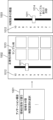
- FIG. 7 is a diagram showing a display screen G21 of a fourth example of the accuracy training menu.
- Display screen G21 differs from display screens G11, G12, and G14 in that it displays a good annotation sample 430 and a bad annotation sample 410 for each of data A to C.
- Display screen G21 also differs from display screens G11, G12, and G14 in that it displays a good annotation sample 430 instead of a correct annotation sample 420.
- FIG. 7 shows an example of display screen G21 for data A.
- Display screen G21 includes an OK sample column 701, an NG sample column 702, a gauge 703, and a forward button 704. Display screen G21 has the OK sample column 701 on the left side and the NG sample column 702 on the right side. Since correct annotation samples are not displayed on display screen G21, data A to C are not limited to evaluation data, and three original learning data randomly selected from a target dataset to which annotations related to the target annotation item have been added can be used. Furthermore, data A to C may be three original learning data randomly selected from original learning data to which annotations related to the target annotation item have been added, regardless of the dataset.
- the OK sample column 701 displays three good annotation samples 430 randomly selected from the good annotation samples in data A in a horizontal row from the left in descending order of accuracy evaluation value.
- the NG sample column 702 displays three bad annotation samples randomly selected from the bad annotation samples in data A in a horizontal row from the left in descending order of accuracy evaluation value.
- the NG sample column 702 may also include bad annotation samples from the target annotator.
- Gauge 703 is an image in the shape of a horizontally long arrow pointing to the left, and indicates that the annotation sample placed to the left is a better annotation sample.
- the next button 704 is pressed when the target annotator wants to display good annotation samples, etc. for the next data.
- the generation unit 13 causes the display screen G21 for data B to be displayed on the display.
- the target annotator can press the forward button 704 on the condition that the target annotator has finished playing all the video displayed in the OK sample column 701 and the NG sample column 702.
- the display screen G21 for data C displays a test button 403 (see FIG. 4) instead of the forward button 704. By pressing the test button 403, the target annotator can take an annotation test.
- the target annotator viewing the display screen G21 can determine the level of accuracy with which annotation should be performed, thereby improving the accuracy of annotation.
- the target annotator can check possible annotation mistakes in advance. This prevents possible annotation mistakes from occurring in the future.
- the OK sample column 701 and the NG sample column 702 display the good annotation samples and bad annotation samples, respectively, in order of highest accuracy evaluation value, so the target annotator can intuitively understand what kind of annotation will satisfy the standard conditions.
- FIG. 8 is a diagram showing a display screen G22 of a fifth example of the accuracy training menu.
- Display screen G22 differs from display screen G21 in that it always displays defective annotation samples 705 of the target annotator mixed in the NG sample column 702. Other than this, the configuration of display screen G22 is the same as display screen G21, so a detailed description will be omitted.
- Display screen G21 clearly displays the target annotator's defective annotation samples 705, allowing the target annotator to check the level of accuracy of their own annotations.
- FIG. 9 is a diagram showing a display screen G23 of a sixth example of the accuracy training menu.
- Display screen G23 differs from display screen G22 in that the target annotator is prompted to re-annotate the target annotator's defective annotation samples 705.
- the NG sample column 702 displays the bad annotation sample 705 of the target annotator.
- the target annotator inputs an operation of pressing the re-annotation button 706.
- the generation unit 13 displays the re-annotation screen G13 on the display.
- the re-annotation screen G13 displays the original learning data of the bad annotation sample 705 in the work column 502.
- the target annotator who inputted the re-annotation in the work column 502 inputs an operation of pressing the judge button 503.
- the generation unit 13 judges whether the re-annotation is successful. If the re-annotation is successful, the generation unit 13 displays the display screen G25 on the display. The display screen G25 is displayed when the re-annotation is successful.
- the display screen G25 since the re-annotation is successful, in the display screen G25, the original learning data to which the re-annotation has been added is added as a good annotation sample 411 to the OK sample column 701. Furthermore, because the re-annotation has passed, a proceed button 704 is displayed on the display screen G25.
- the generation unit 13 displays on the display a display screen G23 that displays the good annotation sample 430 of the next data, data B, and the like.
- display screen G23 appears on the display.
- the target annotator again inputs the operation of pressing the re-annotation button 706 to perform re-annotation.
- display screen G23 is configured so that the next data cannot be viewed unless the re-annotation passes.
- FIG. 10 shows a display screen G31 of a first example of a time efficiency training menu.
- the time efficiency training menu is a training menu that is generated when it is determined that the time evaluation value of the target annotator does not satisfy the reference condition.
- Display screen G31 includes an OK sample column 801, an NG sample column 802, and a test button 804.
- the NG sample column 802 displays a bad annotation sample 810 for each of data A, B, and C.
- the bad annotation sample 810 is a bad annotation sample randomly selected from the bad annotation samples for each of data A, B, and C.
- the NG sample column 802 may include a bad annotation sample of the target annotator.
- the OK sample column 801 displays good annotation samples 820 for each of the data A, B, and C.
- the good annotation samples 820 are good annotation samples randomly selected from the good annotation samples for each of the data A, B, and C.
- data A to C are not limited to evaluation data, and three pieces of data randomly selected from a target data set to which annotations related to the target annotation items have been added can be used. Furthermore, data A to C may be three pieces of original learning data randomly selected from original learning data to which annotations related to the target annotation items have been added, regardless of the data set.
- the bad annotation sample 810 and the good annotation sample 820 are video images. These video images show the process in which a bad annotator and a good annotator annotate the original training data. This allows the target annotator to confirm what procedure they should follow to annotate in order to increase the time evaluation value.
- the target annotator can play back the annotation sample by inputting the operation of pressing the play button 803 provided on the annotation sample.
- the target annotator can press the test button 804. Pressing the test button 804 allows the target annotator to take an annotation test.
- the target annotator viewing the display screen G31 can ascertain the reason why the sample was determined not to satisfy the standard conditions, thereby improving the accuracy of the annotation. Also, by comparing the good annotation sample 820 with the poor annotation sample 810, the target annotator can determine the procedure and speed at which annotation should be performed, thereby shortening the annotation work time. Furthermore, since the poor annotation samples 810 of other annotators are displayed on the display screen G31, the target annotator can check possible annotation mistakes in advance. This prevents possible annotation mistakes from occurring in the future.
- FIG. 11 is a diagram showing a display screen G32 of a second example of a time efficiency training menu.
- Display screen G32 differs from display screen G31 in that it displays good annotation samples 820 and poor annotation samples 810 for each of data A to C.
- display screen G32 for data A is shown as an example.
- the selection criteria for data A to C are the same as for display screen G31.
- Display screen G32 includes an OK sample column 801, an NG sample column 802, a gauge 805, and a forward button 807.
- Display screen G32 has the OK sample column 801 on the left side and the NG sample column 802 on the right side.
- the OK sample column 801 displays three good annotation samples 820 randomly selected from the good annotation samples in data A in a horizontal row from the left in descending order of time evaluation value.
- the NG sample column 802 displays three bad annotation samples randomly selected from the bad annotation samples in data A in a horizontal row from the left in descending order of time evaluation value.
- the NG sample column 802 may also include bad annotation samples from the target annotator.
- Gauge 805 is an image in the shape of a horizontally long arrow pointing to the left, and indicates that the annotation sample placed to the left is a better annotation sample.
- the next button 807 is pressed when the target annotator wants to display good annotation samples, etc. for the next data.
- the generation unit 13 causes the display screen G32 for data B to be displayed on the display.
- Display screen G32 has the following effects in addition to those of display screen G31.
- the OK sample column 801 and the NG sample column 802 respectively display good annotation samples 820 and bad annotation samples 810 in descending order of time evaluation value, allowing the target annotator to intuitively understand what kind of annotations will satisfy the standard conditions.
- FIG. 12 is a diagram showing a display screen G33 of a third example of a time efficiency training menu.
- Display screen G33 differs from display screen G32 in that it always displays defective annotation samples 806 of the target annotator mixed in the NG sample column 802. Other than this, the configuration of display screen G33 is the same as display screen G32, so a detailed description will be omitted.
- display screen G33 has the following effect: Since display screen G33 clearly displays the target annotator's defective annotation samples 806, the target annotator can check the level of time efficiency of his or her own annotations.
- Figure 13 is a diagram explaining the annotation test for accuracy.
- the annotation test for accuracy is performed on annotation items for which the accuracy evaluation value of the target annotator is determined to not satisfy the standard conditions.
- the test screen G41 is a screen for a target annotator taking an annotation test to input annotations.
- the generation unit 13 displays the test screen G41 when the target annotator inputs an operation to press the test buttons 403, 804 described above.
- the test screen G41 includes a test image 901 and a proceed button 902.
- the test image 901 is, for example, randomly selected from the evaluation data included in the target dataset in which the target annotator has been determined not to satisfy the standard conditions.
- the target annotator performs annotation to add a bounding box 903. This is because it has been determined that the accuracy evaluation value of the annotation to add a bounding box for the target dataset does not satisfy the standard conditions. If it has been determined that the accuracy evaluation value of the annotation to add a class label does not satisfy the standard conditions, the target annotator is given an annotation test to add a class label.
- the target annotator When the target annotator has finished annotating the test image 901, the target annotator inputs an operation to press the next button 902. The generation unit 13 then displays the next test screen G41 on the display. Then, when the task of annotating all the test screens G41 is completed, the generation unit 13 determines whether the annotation test passed or failed.
- the generation unit 13 calculates an accuracy evaluation value by comparing the correct annotation with the annotation of the target annotator for each test image 901.
- the generation unit 13 calculates the average of the accuracy evaluation values calculated for each test image 901. This average is an example of a test score. If the calculated average of the accuracy evaluation values is smaller than a first threshold value for the test, the generation unit 13 determines that the annotation test is passed. As the first threshold value for the test, the average of the accuracy evaluation values corresponding to, for example, the bottom X% for each test image 901 is used.
- the generation unit 13 determines that the annotation test is passed, it displays a pass screen G43 on the display.
- the pass screen G43 includes a message indicating that the test has been passed, and a back button 904. If an operation to press the back button 904 is input, the generation unit 13 returns the process to step S3 in FIG. 2. This allows the target annotator to resume the task of adding annotations to the target dataset.
- the generation unit 13 determines that the annotation test has failed, it displays a failure screen G44 on the display.
- the failure screen G44 includes a message indicating failure, a test result image 905, and a back button 906.
- the test result image 905 is a test image 901 that has been annotated by the target annotator and whose accuracy evaluation criteria do not satisfy the reference conditions.
- the target annotator looks at the bounding box 903 included in the test result image 905 to confirm the shortcomings of the annotations that he or she has added.
- the target annotator presses the back button 906.
- the generation unit 13 displays the test screen G41 on the display again and resumes the annotation test.
- FIG. 14 is a diagram explaining the annotation test for time efficiency.
- the annotation test for time efficiency is performed on annotation items for which the time evaluation value of the target annotator is determined not to satisfy the reference condition.
- the test screen G51 is a screen for a target annotator taking an annotation test to input annotations.
- the generation unit 13 displays the test screen G41 when the target annotator inputs an operation to press the above-mentioned test buttons 403, 804.
- Test screen G51 differs from test screen G41 in that it has a judgement button 908 instead of a proceed button 902.
- the target annotator annotates a test image 901.
- annotation is performed to add a bounding box 903.
- the generation unit 13 starts measuring the annotation work time.
- the target annotator When the target annotator has finished annotating the test image 901, the target annotator inputs an operation to press the judgment button 908. Then, the generation unit 13 calculates an accuracy evaluation value of the annotation given to the test image 901, and if the calculated accuracy evaluation value is smaller than the first threshold value, that is, if the annotation result does not correspond to a bad annotation sample, the generation unit 13 displays the test screen G51 having the next test image 901 on the display. On the other hand, if the calculated accuracy evaluation value is larger than the first threshold value, that is, if the annotation result corresponds to a bad annotation sample, the generation unit 13 displays the test screen G51 having the same test image 901 on the display again.
- the test screen G51 is configured such that annotation cannot be made to the next test image 901 until annotation that satisfies the accuracy standard condition is made.
- the generation unit 13 stops measuring the annotation work time for the previous test image 901 and acquires the work time for the previous test image 901. This work time becomes the time evaluation value for the previous test image 901.
- the generation unit 13 judges whether the annotations are successful or not.
- the generation unit 13 calculates the average value of the time evaluation values of each test image 901, and if the calculated average value of the time evaluation values is smaller than a second threshold value for the test, the annotation test is determined to be passed.
- a second threshold value for the test the average value of the time evaluation values corresponding to, for example, the bottom X% for each test image 901 is used.
- the generation unit 13 determines that the annotation test is passed, it displays a pass screen G53 on the display.
- the pass screen G53 is the same as the pass screen G43.
- the generation unit 13 determines that the annotation test is a failure, it displays a failure screen G54 on the display.
- the failure screen G54 differs from the failure screen G44 in that it includes a test result column 907.
- the test result column 907 displays the average work time per test image 901 for the target annotator in the annotation test, i.e., the average time evaluation value. Furthermore, the test result column 907 displays the passing time. The passing time is the second threshold value for the test described above.
- Target annotators who are not good at efficient annotation cannot resume annotation work unless they pass the time-efficiency annotation test. This prevents annotation work from being performed by annotators whose level of annotation time efficiency does not meet the standard, and allows for efficient generation of large amounts of training data.
- Figure 15 is a diagram explaining how the threshold is set.
- the setting unit 15 displays on the display a selection screen 1001 for selecting an annotation item.
- the annotator inputs an operation to select a target annotation item from the selection screen 1001.
- the annotation items to be selected include "surround area with rectangle”, “classify area”, and "select time segment”.
- "Surround area with rectangle” is an annotation item that assigns a bounding box.
- "Classify area” is an annotation item that assigns a class label.
- Select time segment is an annotation item that assigns a time segment label.
- the annotator selects the annotation item for which he wishes to set a threshold from among these annotation items.
- the setting unit 15 displays the first setting screen 1002 and the second setting screen 1003 on the display.
- the first setting screen 1002 is a setting screen for the first threshold, that is, the threshold for evaluating the accuracy evaluation value.
- the first setting screen 1002 includes an adjustment section 1011, a gauge 1012, and a sample column 1013.
- the adjustment section 1011 is configured as a GUI component of an adjustment knob.
- the gauge 1012 indicates the adjustment range of the adjustment section 1011 in 10 stages from 1 to 10.
- the adjustment section 1011 is configured to be slidable in the vertical direction along the gauge 1012, and is configured to be able to adjust the first threshold in 10 stages from 1 to 10.
- stage "10" corresponds to an accuracy evaluation value equivalent to the top 10% of all annotators
- stage “9” corresponds to an accuracy evaluation value equivalent to the top 20% of all annotators, and so on.
- the stages "1" to "10” are assigned accuracy evaluation values corresponding to the rankings.
- the sample column 1013 displays multiple annotation samples that satisfy the accuracy evaluation value corresponding to the stage indicated by the adjustment unit 1011. This allows the annotator to check the annotation level according to the stage.
- six annotation samples are displayed, but this is just one example.
- the second setting screen 1003 is a setting screen for the second threshold, i.e., the threshold for evaluating the time evaluation value.
- the second setting screen 1003 differs from the first setting screen 1002 in that it has a reference time column 1014 instead of the sample column 1013.
- stage “10” corresponds to a time evaluation value that is in the top 10% of all annotators
- stage “9” corresponds to a time evaluation value whose ranking is in the top 20% of all annotators
- Stages "1" to “10” are assigned time evaluation values that correspond to their respective rankings.
- the reference time column 1014 displays the work time per sample that corresponds to the stage indicated by the adjustment unit 1011.
- the work time per sample is the annotation work time that can be spent on one piece of original learning data, and is the time evaluation value assigned to each stage.
- the setting unit 15 may automatically determine the other threshold. For example, when the first threshold is set to stage “9" in the first setting screen 1002, the setting unit 15 may automatically set the second threshold to stage “1", and when the first threshold is set to stage "8" in the first setting screen 1002, the setting unit 15 may automatically set the second threshold to stage "2".
- the accuracy evaluation value is defined as the error between the correct annotation and the annotation added by the annotator.
- the first example of the accuracy evaluation value applies when the annotation item is the assignment of a class label or a time segment label.
- the error is "0", so the accuracy evaluation value is "0".
- the class label assigned by the annotator is incorrect, the error is "1", so the accuracy evaluation value is "1".
- the second example of the accuracy evaluation value applies when an annotation item assigns multiple class labels or multiple time interval labels to the original training data.
- the error, or accuracy evaluation value in this case is defined as follows:
- the total number of classes is the total number of class labels to be assigned to the original learning data. For example, when there are three class labels to be assigned to a certain original learning data, the total number of classes is three.
- the number of missing class labels is the number of missing class labels assigned by the annotator with respect to the total number of classes. For example, when only two class labels are assigned to original learning data having a total number of three classes, the number of missing class labels is one.
- the number of erroneously assigned class labels is, for example, the number of class labels erroneously assigned by the annotator to a certain original learning data. For example, when a cat class label is assigned to a dog object, the number of erroneously assigned class labels is one.
- the third example of the accuracy evaluation value applies when the annotation item is the assignment of a bounding box.
- the accuracy evaluation value is defined as 1-IOU.
- the fourth example of the accuracy evaluation value is applied when the annotation item is the assignment of a bounding box and the original learning data includes a human object.
- person estimation such as person matching or attribute estimation
- the upper body provides more useful information than the lower body. Therefore, the evaluation unit 12 calculates the accuracy evaluation value so that a bounding box in which the upper body is cut off has a larger error than a bounding box in which the lower body is cut off.
- the evaluation unit 12 divides the bounding box assigned to the person into an upper body region corresponding to the upper body of the person, and a lower body region corresponding to the lower body of the person.
- the evaluation unit 12 calculates the IOU (Interaction Over Union) of the upper body region and the IOU of the lower body region.
- the evaluation unit 12 calculates the weighted average of the IOU of the upper body region and the IOU of the lower body region as the accuracy evaluation value, so that the weighted value of the IOU of the upper body region is higher than the weighted value of the IOU of the lower body region.
- the accuracy evaluation value is defined as follows.
- Accuracy evaluation value 1 - (0.8 x upper IOU + 0.2 x lower IOU) (2) 0.8 is the weight value of the upper IOU. 0.2 is the weight value of the lower IOU. The upper IOU is the IOU of the upper body region. The lower IOU is the IOU of the lower body region. Note that the weight values in the above formula are just examples, and any value may be used as long as the weight value of the upper IOU is greater than the weight value of the lower IOU, subject to the constraint that the sum of both weight values is 1.
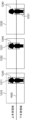
- FIG. 16 is an explanatory diagram of a fourth example of the accuracy evaluation value.
- Image 1210 is an image to which a correct answer bounding box 1211 has been assigned for person 1240.
- Image 1220 is an image to which a bounding box 1221 with the lower body cut off has been assigned for person 1240.
- Image 1230 is an image to which a bounding box 1231 with the upper body cut off has been assigned for person 1240.
- the bounding boxes 1221 and 1231 will be collectively referred to as the target bounding box.
- the evaluation unit 12 divides the target bounding box into upper and lower parts by a boundary line 1600.
- the boundary line 1600 is a straight line that bisects the correct answer bounding box 1211 into upper and lower parts.
- the bounding boxes 1221 and 1231 are divided into an upper body region and a lower body region, respectively.
- the evaluation unit 12 calculates the upper IOU and lower IOU of the target bounding box.
- the upper IOU is expressed as the ratio of the area indicated by the logical product of the upper body region of the correct bounding box and the upper body region of the target bounding box to the area indicated by the logical sum of the upper body region of the correct bounding box and the upper body region of the target bounding box.
- the lower IOU is expressed as the ratio of the area indicated by the logical product of the lower body region of the correct bounding box and the lower body region of the target bounding box to the area indicated by the logical sum of the lower body region of the correct bounding box and the lower body region of the target bounding box.
- the evaluation unit 12 substitutes the upper IOU and lower IOU into the above formula (2) to calculate the accuracy evaluation value.
- bounding box 1221 cuts off the lower body but includes the entire upper body.
- bounding box 1231 includes the entire lower body but cuts off the upper body. Therefore, bounding box 1221 has a smaller accuracy evaluation value than bounding box 1231. As a result, bounding box 1221 has a higher accuracy evaluation value than bounding box 1231.
- the fifth example of the accuracy evaluation value is applied when the annotation item is the assignment of a bounding box and the original learning data includes an object with an abnormal part.
- An abnormal part is an area that indicates a scratch or dangerous part.
- the evaluation unit 12 calculates the accuracy evaluation value so that the error is large for a bounding box that does not include all abnormal parts.
- the evaluation unit 12 calculates the correct inclusion ratio, which is the ratio of the target bounding box to the correct bounding box.
- the evaluation unit 12 calculates the accuracy evaluation value based on the IOU (Interaction Over Union) of the target bounding box and the correct inclusion ratio.
- the accuracy evaluation value is defined as follows.
- Accuracy evaluation value 1 - (0.5 x IOU + 0.5 x correct answer ratio) (3)
- the weight value between the IOU and the correct answer inclusion rate is 0.5. Note that the weight value is an example, and any appropriate value can be used.
- the correct inclusion rate is expressed as the ratio of the area of the correct bounding box to the area of the logical product of the correct bounding box and the target bounding box.
- FIG. 17 is an explanatory diagram of a fifth example of accuracy evaluation values.
- Image 1310 is an image in which a correct answer bounding box 1311 is assigned to object 1312
- image 1320 is an image in which a bounding box 1321 with a correct answer inclusion ratio of 1.0 is assigned
- image 1330 is an image in which a bounding box 1331 with a correct answer inclusion ratio of 0.7 is assigned.
- Bounding box 1321 contains all of correct answer bounding box 1311. On the other hand, bounding box 1331 does not contain all of correct answer bounding box 1311. Therefore, bounding box 1321 has a smaller accuracy evaluation value than bounding box 1331, and is evaluated higher.
- the sixth example of the accuracy evaluation value is applied when the annotation item is the assignment of a time interval label.
- the accuracy evaluation value is defined by the following formula.
- Accuracy evaluation value 1 - IOU (4)
- the IOU is expressed as the ratio of the time indicated by the logical product of the correct answer interval and the target interval to the time indicated by the logical sum of the correct answer interval and the target interval to which a time segment label has been added.
- the seventh example of the accuracy evaluation value is applied when the annotation item is the assignment of a time segment label and the original learning data includes an object in an abnormal section.
- the seventh example of the accuracy evaluation value is applied when evaluating an annotation that assigns a label to an abnormal section out of the entire section of a video.
- FIG. 18 is an explanatory diagram of a seventh example of accuracy evaluation values.
- Graph 1400 shows a correct answer section 1401, which has been assigned a correct answer category label, among the playback sections of the original learning data consisting of video.
- Graph 1410 shows a target section 1411, which has a correct answer inclusion rate of 1.0, among the playback sections of the original learning data consisting of video.
- Graph 1420 shows a target section 1421, which has a correct answer inclusion rate of 0.8, among the entire section of the original image data consisting of video.
- the accuracy evaluation value is calculated using formula (3) above.
- the correct answer inclusion rate is expressed as the proportion of time indicated by the logical product of correct answer section 1401 and target section (1411, 1421) relative to correct answer section 1401.
- target section 1411 includes all of correct answer section 1401, so the correct answer inclusion rate is 1.
- target section 1421 does not include all of correct answer section 1401, so the correct answer inclusion rate is a value less than 1.
- the accuracy evaluation value for the case of graph 1410 is calculated to be smaller than that for the case of graph 1420, resulting in a higher evaluation.
- the evaluation unit 12 calculates the accuracy evaluation value so that when all abnormal sections are not included, the error is larger than when all abnormal sections are included. This allows more careful annotation to be performed in case of missing abnormal sections.
- a display screen of a training menu according to the evaluation value for the annotation is displayed on the annotator's display. Therefore, the annotator can overcome annotations that he or she is weak at through the training menu. This allows the annotator's skills to be improved efficiently.
- This disclosure will be useful in the technical field of generating training data.
Landscapes
- Engineering & Computer Science (AREA)
- Theoretical Computer Science (AREA)
- General Physics & Mathematics (AREA)
- Physics & Mathematics (AREA)
- Computer Vision & Pattern Recognition (AREA)
- Evolutionary Computation (AREA)
- Artificial Intelligence (AREA)
- Data Mining & Analysis (AREA)
- Business, Economics & Management (AREA)
- Software Systems (AREA)
- Educational Administration (AREA)
- Educational Technology (AREA)
- General Engineering & Computer Science (AREA)
- Computing Systems (AREA)
- Medical Informatics (AREA)
- Entrepreneurship & Innovation (AREA)
- Health & Medical Sciences (AREA)
- Multimedia (AREA)
- General Health & Medical Sciences (AREA)
- Databases & Information Systems (AREA)
- Mathematical Physics (AREA)
- Life Sciences & Earth Sciences (AREA)
- Bioinformatics & Cheminformatics (AREA)
- Bioinformatics & Computational Biology (AREA)
- Evolutionary Biology (AREA)
- Electrically Operated Instructional Devices (AREA)
Abstract
情報処理装置は、アノテータによるアノテーションの作業履歴を取得し、アノテーションは、機械学習モデルの学習データを生成するために原学習データに対して付与され、作業履歴に基づいてアノテーションを評価する評価値を算出し、評価値に応じた育成メニューであって、アノテーションのスキルを向上させるための育成メニューを生成し、育成メニューをアノテータのディスプレイに出力する。
Description
本開示は、画像にアノテーションを付与する技術に関するものである。
特許文献1には、学習用データを作成するためのアノテーションを受け付け、受け付けたアノテーションが付与された学習データの学習への貢献に基づいて、アノテーションを評価する技術が開示されている。
特許文献2には、映像コンテンツに対してユーザが入力したアノテーションの履歴を保持し、アノテーションの種別及び頻度に基づく重みづけにより、アノテーションに対するユーザの貢献ポイントを算出する技術が開示されている。
このように、従来技術は、アノテーションを評価することが開示されているに過ぎず、アノテータによるアノテーションのスキルを向上させることは考慮されていない。そのため、従来技術は、アノテータのスキルを効率よく向上させることはできない。
本開示は、このような課題を解決するためになされたものであり、アノテータのスキルを効率良く向上させる技術を提供することを目的とする。
本開示の一態様における情報処理方法は、コンピュータにおける情報処理方法であって、アノテータによるアノテーションの作業履歴を取得し、前記アノテーションは、機械学習モデルの学習データを生成するために原学習データに対して付与され、前記作業履歴に基づいて前記アノテーションを評価する評価値を算出し、前記評価値に応じた育成メニューであって、前記アノテーションのスキルを向上させるための前記育成メニューを生成し、前記育成メニューを前記アノテータのディスプレイに出力する。
本開示によれば、アノテータのスキルを効率良く向上させることができる。
(本開示の一態様に至る知見)
様々なデータで学習された汎用性の高い機械学習モデルをそのまま使うのではなく、現場独自のデータを用いて機械学習モデルを追加学習し、その現場に特化した高性能な機械学習モデルを獲得したいというニーズがある。例えば、ある工場の製造ラインにおいて機械学習モデルを用いて物体認識を行うような場合である。
様々なデータで学習された汎用性の高い機械学習モデルをそのまま使うのではなく、現場独自のデータを用いて機械学習モデルを追加学習し、その現場に特化した高性能な機械学習モデルを獲得したいというニーズがある。例えば、ある工場の製造ラインにおいて機械学習モデルを用いて物体認識を行うような場合である。
追加学習を行う場合、現場で収集された独自データに正解を示すアノテーションが付与された学習データを大量に準備する必要がある。このような学習データは、アノテータが大量の独自データに対して正解となるアノテーションを付与することにより生成される。高性能の機械学習モデルを生成するには、正確にアノテーションが付与された学習データを大量に準備する必要がある。そのためには、信頼性の高いアノテーションを高速に付与できるアノテータの育成が不可欠である。
従来技術においては、アノテーションに対するモチベーションが高まるようにアノテーションを評価することや、アノテーションの貢献度に応じてアノテーションを評価するが行われているに過ぎない。そのため、従来技術は、アノテータのスキルを効率よく向上させることはできない。
本開示は、このような課題を解決するためになされたものである。
(1)本開示の一態様における情報処理方法は、コンピュータにおける情報処理方法であって、アノテータによるアノテーションの作業履歴を取得し、前記アノテーションは、機械学習モデルの学習データを生成するために原学習データに対して付与され、前記作業履歴に基づいて前記アノテーションを評価する評価値を算出し、前記評価値に応じた育成メニューであって、前記アノテーションのスキルを向上させるための前記育成メニューを生成し、前記育成メニューを前記アノテータのディスプレイに出力する。
この構成によれば、アノテーションに対する評価値に応じた育成メニューの表示画面がアノテータのディスプレイに表示される。そのため、アノテータは、育成メニューを通じて自身が苦手とするアノテーションを克服できる。これによって、アノテータのスキルを効率よく高めることができる。また、未熟なアノテータが望ましくないアノテーションを付与した学習データが量産されることを防止できる。
(2)上記(1)記載の情報処理方法において、前記評価値は、複数の評価基準のそれぞれについて算出され、前記育成メニューは、算出された前記評価値が基準条件を満たしていない評価基準に応じた育成メニュー内容を含んでもよい。
この構成によれば、評価値が基準条件を満たしていない評価基準に応じた育成メニュー内容がアノテータに提示されるので、アノテータが苦手とする評価基準に対するアノテーションのスキルを効率よく向上させることができる。
(3)上記(2)記載の情報処理方法において、前記複数の評価基準は、前記アノテーションの正確さを評価する正確性の評価基準及び前記アノテーションの作業時間を評価する時間効率性の評価基準を含んでもよい。
この構成によれば、正確性及び時間効率性に関してアノテータのスキルを効率よく向上させることができる。
(4)上記(2)又は(3)記載の情報処理方法において、前記アノテーションは複数のアノテーション項目に分類され、前記評価値は、前記複数の評価基準のそれぞれについてアノテーション項目ごとに算出され、前記育成メニューは、算出された前記評価値が前記基準条件を満たしていない評価基準及びアノテーション項目に応じた育成メニュー内容を含んでもよい。
この構成によれば、評価値が基準条件を満たしていない評価基準及びアノテーション項目に応じた育成メニューがアノテータに提示されるので、アノテータが苦手とする評価基準及びアノテーション項目又はアノテータに作業が要求される評価基準及びアノテーション項目に対するアノテーションのスキルを効率よく向上させることができる。
(5)上記(4)記載の情報処理方法において、前記複数のアノテーション項目は、画像に含まれるオブジェクトにクラスラベルを付与する種別と、前記オブジェクトにバウンディングボックスを付与する種別と、時系列画像について時間区分ラベルを付与する種別との少なくとも1つであってもよい。
この構成によれば、クラスラベルの付与、バウンディングボックスの付与、及び時間区分ラベルの付与の少なくとも1つに関してアノテータのスキルを効率よく向上させることができる。
(6)上記(1)~(5)のいずれか1つに記載の情報処理方法において、前記育成メニューは、優良アノテータが行った前記アノテーションを示す優良アノテーションサンプル又は正解アノテーションが付与された正解アノテーションサンプルと、不良アノテータが行った前記アノテーションを示す不良アノテーションサンプルとのうち少なくとも前記不良アノテーションサンプルを含む表示画面で構成されてもよい。
この構成によれば、良いアノテーション及び悪いアノテーションのうち少なくとも悪いアノテーションをアノテータに具体的に理解させることができる。
(7)上記(6)記載の情報処理方法において、前記優良アノテーションサンプル及び前記不良アノテーションサンプルは、前記優良アノテータ及び前記不良アノテータによる前記アノテーションの結果を示す画像であってもよい。
この構成によれば、良いアノテーションの結果及び悪いアノテーションの結果のうち少なくとも悪いアノテーションの結果をアノテータに具体的に理解させることができる。
(8)上記(6)記載の情報処理方法において、前記優良アノテーションサンプル及び前記不良アノテーションサンプルは、前記優良アノテータ及び不良アノテータにより前記アノテーションが付与される過程を示す動画像であってもよい。
この構成によれば、どのような手順でアノテーションを付与すれば正確なアノテーションを付与できるのかをアノテータに具体的に理解させることができる。
(9)上記(1)~(8)のいずれか1つに記載の情報処理方法において、前記育成メニューは、前記評価値に応じたテスト内容を有するアノテーションテストであって、テスト画像に対して前記アノテーションを付与する作業を前記アノテータに課す前記アノテーションテストを含んでもよい。
この構成によれば、アノテータが苦手とするアノテーションのスキルを確実に向上させることができる。
(10)上記(9)記載の情報処理方法において、前記アノテーションテストは、前記アノテーションテストの結果から前記アノテーションテストのテストスコアを算出することと、前記テストスコアから前記アノテーションテストの合否を判定することと、前記アノテータが前記アノテーションテストに合格したと判定された場合、前記アノテーションの作業を再開させることと、を含んでもよい。
この構成によれば、苦手なアノテーションを克服したアノテータによりアノテーション作業が行われるので、正確にアノテーションが付与された学習データが得られる。
(11)上記(10)記載の情報処理方法において、前記育成メニューは、前記アノテータが前記アノテーションテストに不合格であると判定された場合、アノテーションサンプルを前記ディスプレイに出力することを含んでもよい。
この構成によれば、苦手なアノテーションを克服できなかったアノテータにはアノテーションサンプルが提示されるので、苦手とするアノテーションをアノテータに確実に理解させることができる。
(12)上記(1)~(11)のいずれか1つに記載の情報処理方法において、さらに、前記評価値を評価するための閾値の設定画面を前記ディスプレイに表示することを含んでもよい。
この構成によれば、閾値を任意に設定できるので、例えばアノテーションの依頼者の要求を満たすアノテーションを付与できるアノテータを育成できる。さらに、閾値を適切に設定することで、低品質なアノテーションが付与された学習データが量産されることを防止できる。また、閾値を適切に設定することで、過剰に正確なアノテーションを多大な時間をかけて付与するアノテータが育成されることを防止できる。
(13)上記(12)記載の情報処理方法において、前記閾値は、前記アノテーションの正確性を評価する第1閾値を含み、前記設定画面は、前記第1閾値を設定するための第1設定画面を含み、前記第1設定画面は、前記第1閾値を調整するため調整部と、前記第1閾値に応じたアノテーションサンプルを表示する表示欄と、を含んでもよい。
この構成によれば、第1閾値に応じたアノテーションサンプルを閲覧しながら閾値を調整できるので、要求されるアノテーションの基準を満たすように第1閾値を設定することが容易になる。
(14)上記(12)又は(13)記載の情報処理方法において、前記閾値は、前記アノテーションの正確性を評価する第2閾値を含み、前記設定画面は、前記第2閾値を設定するための第2設定画面を含み、前記第2設定画面は、前記第2閾値を調整するための調整部と、前記第2閾値に応じた1サンプルあたりの前記アノテーションの作業時間を表示する表示欄とを含んでもよい。
この構成によれば、第2閾値に応じた1サンプルあたりの作業時間を確認しながら閾値を調整できるので、第2閾値の設定が容易になる。
(15)上記(12)~(14)のいずれか1つに記載の情報処理方法において、前記アノテーションは、複数のアノテーション項目を含み、前記設定画面の表示は、前記複数のアノテーション項目のうち、1のアノテーション項目の選択指示を受け付けることと、前記1のアノテーション項目に関する前記閾値を設定するための設定画面を表示することと、を含んでもよい。
この構成によれば、アノテーション項目別に閾値を設定することが可能となる。
(16)上記(1)~(15)のいずれか1つに記載の情報処理方法において、前記評価値の算出は、前記アノテータが画像に含まれる人物に対して付与した前記アノテーションを、前記人物の上半身に対応する上半身領域と、前記人物の下半身に対応する下半身領域とに分けることと、前記上半身領域のIOU(Interaction Over Union)及び前記下半身領域のIOUを算出することと、前記上半身領域のIOUの重み値が前記下半身のIOU領域の重み値よりも高くなるように、前記上半身のIOUと前記下半身のIOUとを重みづけ平均した値に基づいて前記評価値を算出することと、を含んでもよい。
上半身は顔などの人物の特徴を多く含むので、人物に対するアノテーションは上半身が下半身よりも正確性が重視される傾向がある。この構成によれば、上半身のIOUが下半身のIOUよりも重み値が高くなるように、両IOUが重み付け平均された値に基づいて評価値が算出されるので、上半身について正確にアノテーションが付与されているアノテーションを高く評価することができる。
(17)上記(1)~(16)のいずれか1つに記載の情報処理方法において、前記評価値の算出は、正解アノテーションに対する前記アノテータが画像に付与したアノテーションの割合である正解包含割合を算出することと、前記アノテーションのIOU(Interaction Over Union)及び前記正解包含割合に基づいて前記評価値を算出することと、を含んでもよい。
異常検知のための学習データは、異常部分が全て含まれるようにアノテーションを付与することが要求される傾向がある。異常部分の一部にしかアノテーションが付与されていない学習データを学習した機械学習モデルは、異常を見落とす可能性が高まるからである。本構成では、正解包含割合に基づいてアノテーションが評価されるので、異常検知を正確に行うように機械学習モデルを学習させる学習データを得ることが可能となる。
(18)上記(1)~(17)のいずれか1つに記載の情報処理方法において、前記評価値は、前記アノテータが前記アノテーションを行うデータセットに含まれる評価用データに対して前記アノテータが付与したアノテーション結果に基づいて算出され、前記評価用データは非表示の正解アノテーションを持つ前記原学習データであってもよい。
この構成によれば、評価値を算出するために専用のアノテーションの作業をアノテータに課すことなく、実際のアノテーション作業を通じてアノテータを評価できる。
(19)本開示の別の一態様における情報処理装置は、プロセッサを含む情報処理装置であって、前記プロセッサは、アノテータによるアノテーションの作業履歴を取得し、前記アノテーションは、機械学習モデルの学習データを生成するために原学習データに対して付与され、前記作業履歴に基づいて前記アノテーションを評価する評価値を算出し、前記評価値に応じた育成メニューであって、前記アノテーションのスキルを向上させるための前記育成メニューを生成し、前記育成メニューを前記アノテータのディスプレイに出力する、処理を実行する。
この構成によれば、アノテータのスキルを効率よく高める情報処理装置を提供できる。
(20)本開示のさらに別の一態様における情報処理プログラムは、コンピュータに、アノテータによるアノテーションの作業履歴を取得し、前記アノテーションは、機械学習モデルの学習データを生成するために原学習データに対して付与され、前記作業履歴に基づいて前記アノテーションを評価する評価値を算出し、前記評価値に応じた育成メニューであって、前記アノテーションのスキルを向上させるための前記育成メニューを生成し、前記育成メニューを前記アノテータのディスプレイに出力する、処理を実行させる。
この構成によれば、アノテータのスキルを効率よく高める情報処理プログラムを提供できる。
本開示は、このような情報処理プログラムによって動作する情報処理システムとして実現することもできる。また、このようなコンピュータプログラムを、CD-ROM等のコンピュータ読取可能な非一時的な記録媒体あるいはインターネット等の通信ネットワークを介して流通させることができるのは、言うまでもない。
なお、以下で説明する実施の形態は、いずれも本開示の一具体例を示すものである。以下の実施の形態で示される数値、形状、構成要素、ステップ、ステップの順序などは、一例であり、本開示を限定する主旨ではない。また、以下の実施の形態における構成要素のうち、最上位概念を示す独立請求項に記載されていない構成要素については、任意の構成要素として説明される。また全ての実施の形態において、各々の内容を組み合わせることもできる。
(実施の形態)
図1は、実施の形態における情報処理システムの全体構成の一例を示すブロック図である。情報処理システムは、情報処理装置1及び端末装置2を含む。情報処理装置1及び端末装置2はネットワークNTを介して相互に通信可能に接続されている。ネットワークNTの一例はインターネット及び携帯電話通信網を含む広域通信網である。
図1は、実施の形態における情報処理システムの全体構成の一例を示すブロック図である。情報処理システムは、情報処理装置1及び端末装置2を含む。情報処理装置1及び端末装置2はネットワークNTを介して相互に通信可能に接続されている。ネットワークNTの一例はインターネット及び携帯電話通信網を含む広域通信網である。
情報処理装置1は、例えばクラウドサーバなどのコンピュータで構成される。但し、これは一例であり、情報処理装置1はエッジコンピュータで構成されてもよい。
端末装置2は、タブレット端末及びスマートフォンなどの携帯型コンピュータ又は据え置き型コンピュータで構成される。端末装置2は、中央演算処理装置(CPU)、メモリ、ディスプレイ、操作部、及び通信回路を含む。端末装置2は、アノテータにより使用される端末である。図1では、説明の便宜上1台の端末装置2を示したが、これは一例であり、端末装置2の数は複数であってもよい。
情報処理装置1は、プロセッサ10、メモリ20、及び通信部30を含む。プロセッサ10は、中央演算処理装置(CPU)で構成され、取得部11、評価部12、生成部13、出力部14、及び設定部15を含む。取得部11~設定部15は、例えば、プロセッサ10が情報処理プログラムを実行することで実現される。但し、これは一例であり、取得部11~設定部15は、専用のハードウェア回路で構成されてもよい。また、取得部11~設定部15は、複数台のコンピュータに分散配置されてもよいし、一部の機能が端末装置2に実装されていてもよい。
取得部11は、アノテータによるアノテーションの作業履歴を取得する。作業履歴は、アノテーションが付与された学習データ、学習データごとのアノテーションに要した作業時間、アノテータの識別子、学習データの識別子、及び学習データが属するデータセットの識別子等を含む。アノテータがアノテーションを行う原学習データの中には、正解アノテーションが既に定まっている評価用データが含まれている。アノテーションの評価はこの評価用データに対してアノテータが付与したアノテーションに基づいて行われる。なお、アノテータに提示される評価用データには正解アノテーションが付与されていないので、アノテータは正解アノテーションを認識できない。
アノテータとは、原学習データに対してアノテーションを付与する人物である。本実施の形態では、アノテータは端末装置2を用いて原学習データに対してアノテーションを付与する。そのため、取得部11は、端末装置2から送信されたアノテーションの結果を作業履歴として通信部30を用いて取得し、取得した作業履歴をメモリ20の作業履歴データベースに保存する。原学習データとは、アノテーションが付与される前のデータである。例えば、原学習データとしては、認識対象となるオブジェクトを含む静止画像及び動画像が採用される。アノテーションの結果には、アノテーションが付された学習データ、学習データごとのアノテーションに要した作業時間、アノテータの識別子、学習データの識別子、及び学習データが属するデータセットの識別子等が含まれる。
アノテーションは、画像に含まれるオブジェクトに付されるクラスラベル、オブジェクトに付されるバウンディングボックスなどが該当する。また、アノテーションは、動画像の中から所定条件満たす時間区分を示す時間区分ラベルであってもよい。これらのアノテーションを区別する用語をアノテーション項目と呼ぶ。
オブジェクトは、機械学習モデルが認識対象とする物体である。所定条件を満たす時間区分とは、動画像の全期間のうちあるオブジェクトが特定の状態にある区間を指す。例えば、人物の歩行している区間、火事が発生している区間などが所定条件を満たす時間区分に該当する。クラスラベルとは、犬、猫、などというようにオブジェクトの種類を示す文字データである。バウンディングボックスは、画像内において、オブジェクトが存在する位置を示すためにオブジェクトを取り囲むように付与された枠である。枠の形状は例えば四角形である。
機械学習モデルは、教師有り学習を行う機械学習モデルであればどのような機械学習モデルが採用されてもよい。例えば、機械学習モデルは、ディープニューラルネットワーク、畳み込みニューラルネットワーク、ランダムフォレスト、決定木、サポートベクトルマシンなどである。機械学習モデルは予め汎用のデータセットを用いて機械学習されていてもよい。この場合、機械学習モデルは、本開示の育成メニューを通じて育成されたアノテータが作成した学習データを追加学習すればよい。
評価部12は、作業履歴に基づいてアノテーションを評価する評価値を算出する。評価値は、複数の評価基準のそれぞれについて算出される。複数の評価基準には、アノテーションの正確さを評価する正確性の評価基準及びアノテーションの作業時間を評価する時間効率性の評価基準を含む。以下、正確性の評価基準に対する評価値を正確性評価値と呼び、時間効率性の評価基準に対する評価値を時間評価値と呼ぶ。
正確性評価値は、アノテーション項目ごとに定義された誤差により表される。正確性の評価基準はこの誤差が小さいほど評価が高くなる。そのため、正確性評価値は値が小さいほど評価が高いことを示す。
1つの学習データに対してアノテーション対象となる複数のオブジェクトが存在する場合、誤差はオブジェクトごとに算出されるオブジェクトレベル誤差と、1つの学習データに対して算出されるデータレベル誤差とが含まれてもよい。データレベル誤差は、例えば、1つの学習データにおけるオブジェクトレベル誤差の平均値で表される。
誤差は、正解アノテーションとアノテータが付与したアノテーションとのずれを示す。例えば、アノテーションがクラスラベル又は時間区分ラベルの場合の誤差は、付与されたクラスラベルが正しければ「0」、誤っている場合は「1」となる。例えば、アノテーションがバウンディングボックスの場合の誤差は1-IOU(Interaction over Union)で表される。IOUは、正解バウンディングボックスと付与されたバウンディングボックスとの論理和が示す面積に対する、正解バウンディングボックスと付与されたバウンディングボックスとの論理積が示す面積の割合である。誤差の詳細は後述する。
時間評価値は、学習データあたりのアノテーションに要した作業時間で表される。時間効率性の評価基準は、この作業時間が短いほど評価が高くなる。したがって、時間評価値は、値が小さいほど評価が高いことを示す。
但し、これは一例であり、複数の評価基準には、品質のばらつきの評価基準、及び金銭的コストの評価基準が含まれていてもよい。この場合、評価部12は、品質ばらつきが小さいほど、評価値を減少させ、アノテータの評価を上げればよい。また、評価部12は、金銭的コストが小さいほど、評価値を減少させ、アノテータの評価を下げればよい。
評価部12は、正確性評価値及び時間評価値のそれぞれをアノテーション項目ごとに算出してもよい。さらに、評価部12は、正確性評価値及び時間評価値のそれぞれをアノテーション項目とデータセットとの組み合わせごとに算出してもよい。データセットとは、種類別に纏められた1群の学習データのことを指す。例えば、ある現場で撮影された1群の画像が1つのデータセットとなる。現場の一例は、工場、建築現場などである。したがって、データセットは、工場αのデータセット、工場βのデータセット、建築現場γのデータセット、建築現場δのデータセットというように分類される。
生成部13は、評価値に応じた育成メニューであって、アノテーションのスキルを向上させるための育成メニューを生成する。育成メニューは、評価部12により算出された評価値が基準条件を満たしていない評価基準に応じた育成メニュー内容を含んでもよい。例えば、正確性評価値が基準条件を満たしていない場合、アノテーションの正確性を高めるための育成メニューが生成される。例えば、時間評価値が基準条件を満たしていない場合、アノテーションの作業時間を短くするための育成メニューが生成される。例えば、正確性評価値及び時間評価値の両方が基準条件を満たしていない場合、両方の育成メニューが生成される。
評価値がアノテーション項目ごとに算出される場合、生成部13は、評価値が基準条件を満たしていないアノテーション項目についてアノテーションのスキルを向上させる育成メニューを生成すればよい。評価値がアノテーション項目とデータセットとの組ごとに算出された場合、生成部13は、評価値が基準条件を満たしていない組についてアノテーションのスキルを向上させる育成メニューを生成すればよい。
評価基準としては閾値が採用される。評価値は上述したように値が小さいほどアノテーションの評価が高いことを示す。したがって、生成部13は、評価値が閾値より小さい場合、基準条件を満たしていると判定し、評価値が閾値より大きい場合、基準条件を満たしていないと判定すればよい。閾値としては、アノテーションを行った全アノテータにおける順位が下位X%に相当する評価値の平均値が採用できる。Xは10、20、30などの適宜の値が採用できる。例えば、評価値が学習データD1~Dnについて算出された場合において、学習データD1~Dnのそれぞれについて下位X%に相当する評価値がV1~Vnであったとする。この場合、閾値は、評価値V1~Vnの平均値となる。
育成メニューは、優良アノテータが行ったアノテーションを示す優良アノテーションサンプル又は正解アノテーションが付与された正解アノテーションサンプルと、不良アノテータが行ったアノテーションを示す不良アノテーションサンプルとのうち少なくとも不良アノテーションサンプルを含む表示画面で構成されてもよい。優良アノテータとは、熟練アノテータであってもよいし、全アノテータのうち評価値が上位Y%に入るアノテータであってもよい。Yは、例えば、10、20、30などの適宜の値が採用できる。不良アノテータとは、全アノテータのうち評価値が下位X%に入るアノテータであってもよい。以下、優良アノテーションサンプルと不良アノテーションサンプルとを総称する場合、アノテーションサンプルと呼ぶ。
優良アノテーションサンプル及び不良アノテーションサンプルは、優良アノテータ及び不良アノテータによるアノテーションの結果を示す画像であってもよい。
優良アノテーションサンプル及び不良アノテーションサンプルは、優良アノテータ及び不良アノテータによりアノテーションが付与される過程を示す動画像であってもよい。
育成メニューは、評価値に応じたテスト内容を有するアノテーションテストであって、テスト画像に対してアノテーションを付与する作業をアノテータに課すアノテーションテストを含んでもよい。
アノテーションテストにおいて、生成部13は、アノテーションテストの結果からアノテーションテストのテストスコアを算出する処理と、テストスコアからアノテーションテストの合否を判定する処理と、アノテータがアノテーションテストに合格したと判定された場合、アノテーション作業を再開させる処理と、を実行してもよい。
出力部14は、生成部13により生成された育成メニューをアノテータのディスプレイに出力する。例えば、出力部14は、育成メニューの表示画面をディスプレイに表示するための表示データを生成し、生成した表示データを通信部30を用いて端末装置2に送信すればよい。
設定部15は、上述の閾値の設定画面をアノテータのディスプレイに表示する。この場合、設定部15は、設定画面の表示データを通信部30を用いて端末装置2に送信すればよい。
設定部15は、複数のアノテーション項目のうち、1のアノテーション項目の選択指示を受け付ける処理と、1のアノテーション項目に関する閾値を設定するための設定画面を表示する処理と、を含む。設定部15は、設定画面を通じて設定された閾値をメモリ20に記憶する。
設定画面は、正確性評価値を評価するための第1閾値を設定するための第1設定画面を含む。第1設定画面は、第1閾値を調整するため調整部と、第1閾値に応じたアノテーションサンプルを表示する表示欄と、を含む。
設定画面は、時間評価値を評価するための第2閾値を設定するための第2設定画面を含んでもよい。第2設定画面は、第2閾値を調整するための調整部と、第2閾値に応じた1サンプルあたりの前記アノテーションの作業時間を表示する表示欄とを含む。
メモリ20は、ソリッドステートドライブ、ハードディスクドライブなどの書き換え可能な不揮発性の記憶装置で構成され、作業履歴データベース及び閾値を記憶する。作業履歴データベースは、取得部11が取得した作業履歴を記憶する。
通信部30は、情報処理装置1をネットワークNTに接続するための通信回路である。通信部30は、育成メニューの表示データを端末装置2に送信したり、設定画面の表示データを端末装置2に送信したりする。通信部30は、端末装置2から送信されたアノテーションの結果を受信する。
図2は、実施の形態における情報処理装置1の処理の一例を示すフローチャートである。図3は、図2の続きのフローチャートである。ステップS1において、評価部12は、評価対象となるアノテータ(以下、対象アノテータと呼ぶ。)が新規アノテータであるか否かを判定する。新規アノテータとは、今回、情報処理装置1により初めてアノテーションが評価されるアノテータである。例えば、評価部12は、端末装置2から送信されるアノテータ情報に基づいて新規アノテータか否かを判定すればよい。メモリ20には、アノテーションが評価済であるアノテータのアノテータ情報が記憶されている。したがって、評価部12は、端末装置2から送信されたアノテータ情報が評価済のアノテータ情報としてメモリ20に記憶されていなければ、対象アノテータは新規アノテータであると判定し、送信されたアノテータ情報が評価済のアノテータ情報としてメモリ20に記憶されている場合、対象アノテータは新規アノテータでないと判定すればよい。
対象アノテータが新規アノテータであると判定された場合(ステップS1でYES)、処理はステップS2に進み、対象アノテータが新規アノテータでないと判定された場合(ステップS1でNO)、処理はステップS3に進む。
次に、ステップS2において、生成部13は、新規アノテータ用の育成メニューを生成し、出力部14は、生成された新規アノテータ用の育成メニューの表示データを通信部30を介して端末装置2に送信する。これにより、端末装置2のディスプレイは、新規アノテータ用の育成メニューの表示画面を表示する。新規アノテータ用の育成メニューは、新規アノテータにアノテーションの基本をマスターさせるための情報を含む。例えば、新規アノテータ用の育成メニューは、既存のアノテータが行った育成メニューの閲覧履歴をもとに決定される高頻度で提示された育成メニューの内容を含んでいてもよい。これにより、新規アノテータを効率よく教育できる。
次に、ステップS3において、取得部11は、アノテーションの作業依頼を通信部30を用いて端末装置2に送信する。作業依頼は、アノテーションの作業対象となる原学習データを含むデータセットが含まれる。以下、この作業依頼に含まれるデータセットを対象データセットと呼ぶ。また、作業依頼には複数のアノテーション項目についての作業指示が含まれる。端末装置2のディスプレイには、データセットに含まれる原学習データが順次表示され、対象アノテータは、各原学習データについてアノテーションを付与していく。対象アノテータが各原学習データに付与したアノテーションの結果は、端末装置2から情報処理装置1に送信される。
次に、ステップS4において、取得部11は、端末装置2から送信されたアノテーションの結果を作業履歴として取得する。取得した作業履歴は作業履歴データベースに保存される。
以下、ステップS5、S6からなる処理と、ステップS7、S8からなる処理とが並行して行われる。
ステップS5において、評価部12は、対象アノテータの対象データセットについての作業履歴を作業履歴データベースから読み出し、読み出した作業履歴から、アノテーション項目ごとに正確性評価値の平均値を算出する。例えば、アノテーション項目として、クラスラベルの付与と、バウンディングボックスの付与とが含まれる場合、クラスラベルの付与とバウンディングボックスの付与とのそれぞれについて正確性評価値の平均値が算出される。
次に、ステップS6において、生成部13は、基準条件を満たしていないアノテーション項目を抽出する。この場合、生成部13は、正確性評価値の平均値が第1閾値より大きいアノテーション項目を、基準条件を満たしていないアノテーション項目として抽出すればよい。
ステップS7において、評価部12は、対象アノテータの対象データセットについての作業履歴を作業履歴データベースから読み出し、読み出した作業履歴から、アノテーション項目ごとに時間評価値の平均値を算出する。例えば、アノテーション項目として、クラスラベルの付与と、バウンディングボックスの付与とが含まれる場合、クラスラベルの付与とバウンディングボックスの付与とのそれぞれについて時間評価値の平均値が算出される。
次に、ステップS8において、生成部13は、基準条件を満たしていないアノテーション項目を抽出する。この場合、生成部13は、時間評価値の平均値が第2閾値より大きいアノテーション項目を、基準条件を満たしていないアノテーション項目として抽出すればよい。
次に、ステップS9において、生成部13は、ステップS6又はステップS8の抽出結果から、基準条件を満たしていないアノテーション項目が有るか否かを判定する。基準条件を満たしていないアノテーション項目がないと判定された場合(ステップS9でNO)、処理はステップS3に戻る。この場合、次の対象データセットに対するアノテーションの作業依頼が端末装置2に送信され、アノテータは次の対象データセットに対するアノテーション作業を行う。なお、ステップS9でNOの場合、処理は終了されてもよい。
基準条件を満たすアノテーション項目があると判定された場合(ステップS9でYES)、処理はステップS10に進む。
次に、ステップS10において、生成部13は、基準条件を満たしていないアノテーション項目についてアノテータのスキルを向上させるための育成メニューを生成する。
次に、ステップS11において、出力部14は、生成した育成メニューの表示データを通信部30を用いて端末装置2に送信する。
次に、ステップS12において、出力部14は、アノテーションテストの実行依頼を端末装置2に通信部30を用いて送信する。これにより、対象アノテータは端末装置2を用いてアノテーションテストを実行する。
次に、ステップS13において、生成部13は、対象アノテータによるアノテーションテストの解答を通信部30を用いて取得する。
次に、ステップS14において、生成部13は、アノテーションテストの解答からテストスコアを算出し、算出したテストスコアから対象アノテータがアノテーションテストに合格したか否かを判定する。対象アノテータがアノテーションテストに合格した場合、処理はステップS15に進む。対象アノテータがアノテーションテストに不合格の場合、処理はステップS10に戻る。この場合、再度、対象アノテータは同じ育成メニューを確認することになる。
次に、ステップS15において、生成部13は、ステップS9で基準条件を満たしていないと判定されたアノテーション項目についての評価値(正確性評価値又は時間評価値)をリセットする。ステップS15が終了すると、処理はステップS3に戻る。この場合、対象アノテータは再度、対象データセットに対してアノテーションを付与する。
図4は、正確性の育成メニューの第1例の表示画面G11を示す図である。正確性の育成メニューとは、対象アノテータの正確性評価値が基準条件を満たしていないと判定された場合に生成される育成メニューである。
表示画面G11は、NGサンプル欄401、正解欄402、及びテストボタン403を含む。NGサンプル欄401は、データA、B、Cのそれぞれについての不良アノテーションサンプル410を表示する。NGとは不良を意味する。正解欄402は、データA、B、Cのそれぞれの正解アノテーションサンプル420を表示する。データA、B、Cは、対象アノテーション項目に係るアノテーションが付与された対象データセットに含まれる評価用データの中からランダムに選ばれた3つの評価用データである。対象アノテーション項目とは、対象アノテータが基準条件を満たしていないと判定されたアノテーション項目である。NGサンプル欄401に表示される3つの不良アノテーションサンプル410は、データA、B、Cのそれぞれにおける不良アノテーションサンプルの中からランダムに選ばれた不良アノテーションサンプルである。
正解欄402に表示される正解アノテーションサンプル420は、データA、B、Cに対して正解アノテーションが付与されたアノテーションサンプルである。
NGサンプル欄401に表示される不良アノテーションサンプル410は対象アノテータの不良アノテーションサンプルが含まれていてもよい。
テストボタン403は、対象アノテータがアノテーションテストを実施する場合に押されるボタンである。対象アノテータは、不良アノテーションサンプル410及び正解アノテーションサンプル420を見比べて、アノテーションの注意点を確認した後、テストボタン403を押す。
なお、対象データセットに含まれる原学習データが動画像の場合、不良アノテーションサンプル410及び正解アノテーションサンプル420は、動画像で構成される。この場合、対象アノテータがNGサンプル欄401及び正解欄402に表示された全ての動画像を再生し終えたことを条件に、対象アノテータはテストボタン403を押すことが可能になる。動画像の内容は、どの期間にどのような時間区分ラベルが付されたかを示す内容となる。
表示画面G11を閲覧した対象アノテータは、不良アノテーションサンプル410と、正解アノテーションサンプル420とを見比べることで、基準条件を満たさないと判定された原因を確認できる。これにより、対象アノテータのアノテーションの正確性が向上する。さらに、表示画面G11には、他のアノテータの不良アノテーションサンプル410が表示されるので、対象アノテータは今後起こり得るアノテーションのミスを事前に確認できる。これにより、今後起こり得るアノテーションのミスが未然に防止される。
表示画面G11は、3つのデータA~Cについてのアノテーションサンプルを表示するが、これは一例であり、4つ以上のデータについてのアノテーションサンプルを表示してもよいし、2つ以下のデータについてのアノテーションサンプルを表示してもよい。また、3つのデータA~Cは、データセットを問わず、対象アノテーションが付与された原学習データからランダムに選ばれた3つの原学習データであってもよい。
図5は、正確性の育成メニューの第2例の表示画面G12を示す図である。表示画面G12は、各不良アノテーションサンプル410について、対象アノテータに再度アノテーションを入力させ、再アノテーションの入力後に正解アノテーションサンプル420を表示する点が表示画面G11と相違する。表示画面G12において表示画面G11と同一の構成要素は同一の符号を付し説明を省略する。
対象アノテータは、データA~Cの中から1のデータに対応する再アノテーションボタン501を押す操作を入力する。すると、生成部13は、1のデータに対する再アノテーション画面G13をディスプレイに表示する。再アノテーション画面G13は、作業欄502を含む。作業欄502は、1のデータに対応する原学習データを表示する。図5の例では、データCの原学習データが表示されている。
対象アノテータは、この原学習データに対して再アノテーションを入力し、判定ボタン503を押す操作を入力する。すると、生成部13は、表示画面G12をディスプレイに再表示させる。再表示された表示画面G12は、正解欄402に前記1のデータに対応する正解アノテーションサンプル420を表示するとともに、NGサンプル欄401に再アノテーションに対する合否の判定結果を表示する。生成部13は、再アノテーションの正確性評価値が閾値より小さい場合、合格と判定し、再アノテーションの正確性評価値が閾値より大きい場合、不合格と判定する。閾値が例えば、下位X%に相当する正確性評価値であるとすると、再アノテーションの正確性評価値が、下位X%に相当する正確性評価値より小さければ、合格と判定される。
図5の例では、データAの再アノテーションは合格しているため、データAの判定結果として「OK」が表示されている。一方、データBの再アノテーションは合格していないので、データBの判定結果として「NG」が表示されている。そのため、対象アノテータは、合格するまでデータBの再アノテーションを行う必要がある。
対象アノテータは、データA~Cの全てについて再アノテーション画面G13を表示して再アノテーションを入力する。そして、データA~Cの再アノテーションが全て合格した場合、対象アノテータはテストボタン403を押す操作を入力してアノテーションテストに進むことができる。
表示画面G12は、表示画面G11の効果に加え、以下の効果が得られる。対象アノテータは実際に再アノテーションを入力し、合否が判定されることで、良いアノテーションを身に着けることができる。また、一度目の再アノテーションを行うまで正解アノテーションサンプル420が表示されないので、対象アノテータは、自分のアノテーションと正解アノテーションとの差の認識が容易になる。
図6は、正確性の育成メニューの第3例の表示画面G14を示す図である。表示画面G14は、再アノテーションの合否ではなく、再アノテーションの点数を表示する点が表示画面G12と相違する。表示画面G14のNGサンプル欄401には、データA~Cのそれぞれに対する再アノテーションの点数を表示する点数表示欄601を含む。
点数は、正確性評価値を1~5の5段階で数値化したものである。例えば、正確性評価値の順位が、全アノテータの上位80%までは5点、全アノテータの上位80%から60%までは4点、・・・というように、点数は決定される。生成部13は、例えば、点数が3点以上であれば、再アノテーションは合格と判定すればよい。点数表示欄601には、3点以上で合格、というように合格基準を表示する。
表示画面G14は表示画面G11、G12の効果に加えて以下の効果が得られる。表示画面G14では、再アノテーションの評価が5段階の点数で表示され、この点数は順位に基づいて決定されるので、再アノテーションの評価を相対化することができる。その結果、対象アノテータは自身の再アノテーションの良否をさらに容易に理解できる。
図7は、正確性の育成メニューの第4例の表示画面G21を示す図である。表示画面G21は、データA~Cごとに優良アノテーションサンプル430と不良アノテーションサンプル410とを表示する点が表示画面G11、G12、G14と相違する。また、表示画面G21は、正解アノテーションサンプル420ではなく優良アノテーションサンプル430を表示する点が表示画面G11、G12、G14と相違する。図7では、データAについての表示画面G21が例示されている。
表示画面G21は、OKサンプル欄701、NGサンプル欄702、ゲージ703、及び進むボタン704を含む。表示画面G21は左側にOKサンプル欄701を配置し、右側にNGサンプル欄702を配置する。表示画面G21においては、正解アノテーションサンプルが表示されないので、データA~Cは評価用データに限らず、対象アノテーション項目に係るアノテーションが付与された対象データセットの中からランダムに選ばれた3つの原学習データが採用可能である。また、データA~Cは、データセットを問わず、対象アノテーション項目に係るアノテーションが付与された原学習データの中からランダムに選ばれた3つの原学習データであってもよい。
OKサンプル欄701は、データAにおける優良アノテーションサンプルの中からランダムに選ばれた3つの優良アノテーションサンプル430を正確性評価値が高い順に左側から横一列で表示する。NGサンプル欄702は、データAにおける不良アノテーションサンプルの中からランダムに選ばれた3つの不良アノテーションサンプルを正確性評価値が高い順に左側から横一列で表示する。NGサンプル欄702は対象アノテータの不良アノテーションサンプルを含んでいてもよい。
ゲージ703は、横方向に長い左向きの矢印形状の画像であり、左側に配置されたアノテーションサンプルほど優良なアノテーションサンプルであることを示す。
進むボタン704は、対象アノテータが次のデータについての優良アノテーションサンプル等を表示させる場合に押されるボタンである。進むボタン704が押された場合、生成部13は、データBの表示画面G21をディスプレイに表示させる。
なお、対象データセットが動画像の場合、不良アノテーションサンプル410及び優良アノテーションサンプル430は動画像で構成される。この場合、対象アノテータがOKサンプル欄701及びNGサンプル欄702に表示された全ての動画像を再生し終えたことを条件に、対象アノテータは、進むボタン704を押すことが可能となる。
なお、データCの表示画面G21は、進むボタン704に代えて、テストボタン403(図4参照)を表示する。テストボタン403を押すことで対象アノテータはアノテーションテストを受けることが可能となる。
表示画面G21を閲覧した対象アノテータは、優良アノテーションサンプル430と不良アノテーションサンプル410とを見比べることで、どれくらいの精度でアノテーションを行えば良いかが分かり、アノテーションの正確性を高めることができる。また、表示画面G21は、他のアノテータの不良アノテーションサンプルを表示することが可能であるので、対象アノテータは今後起こり得るアノテーションのミスを事前に確認できる。これにより、今後起こり得るアノテーションのミスが未然に防止される。OKサンプル欄701及びNGサンプル欄702はそれぞれ優良アノテーションサンプル及び不良アノテーションサンプルを正確性評価値が高い順番に表示するので、対象アノテータはどのようなアノテーションを行えば基準条件を満たすのかを感覚的に理解できる。
図8は、正確性の育成メニューの第5例の表示画面G22を示す図である。表示画面G22は、NGサンプル欄702に対象アノテータの不良アノテーションサンプル705を必ず混ぜて表示する点が表示画面G21と相違する。これ以外、表示画面G22の構成は表示画面G21と同じであるので詳細な説明は省略する。
表示画面G22は表示画面G21に加えてさらに以下の効果が得られる。表示画面G21では対象アノテータの不良アノテーションサンプル705が明示されるので、対象アノテータは自身の正確性におけるアノテーションのレベルを確認できる。
図9は、正確性の育成メニューの第6例の表示画面G23を示す図である。表示画面G23は、対象アノテータの不良アノテーションサンプル705を対象アノテータに再アノテーションさせる点が表示画面G22と相違する。
表示画面G23において、NGサンプル欄702は対象アノテータの不良アノテーションサンプル705を表示する。対象アノテータは、再アノテーションボタン706を押す操作を入力する。すると、生成部13は、再アノテーション画面G13をディスプレイに表示する。再アノテーション画面G13は、作業欄502に不良アノテーションサンプル705の原学習データを表示する。作業欄502において再アノテーションを入力した対象アノテータは判定ボタン503を押す操作を入力する。すると、生成部13は、再アノテーションの合否を判定する。再アノテーションが合格した場合、生成部13は、ディスプレイに表示画面G25を表示する。表示画面G25は再アノテーションが合格した場合に表示される。この例では、再アノテーションが合格であるので、表示画面G25において、OKサンプル欄701は、再アノテーションが付与された原学習データを優良アノテーションサンプル411として追加されている。また、再アノテーションが合格であるので、表示画面G25には進むボタン704が表示されている。対象アノテータが進むボタン704を押す操作を入力すると、生成部13は、次のデータであるデータBの優良アノテーションサンプル430などを表示する表示画面G23をディスプレイに表示する。
一方、再アノテーションが不合格の場合、ディスプレイには表示画面G23が表示される。この場合、対象アノテータは再度、再アノテーションボタン706を押す操作を入力し、再アノテーションを行う。すなわち、表示画面G23は、再アノテーションに合格しなければ、次のデータを閲覧できないように構成されている。
図10は、時間効率性の育成メニューの第1例の表示画面G31を示す図である。時間効率性の育成メニューとは、対象アノテータの時間評価値が基準条件を満たしていないと判定された場合に生成される育成メニューである。
表示画面G31は、OKサンプル欄801、NGサンプル欄802、及びテストボタン804を含む。NGサンプル欄802は、データA、B、Cのそれぞれについて、不良アノテーションサンプル810を表示する。不良アノテーションサンプル810は、データA、B、Cのそれぞれについて、不良アノテーションサンプルの中からランダムに選ばれた不良アノテーションサンプルである。NGサンプル欄802は対象アノテータの不良アノテーションサンプルを含んでいてもよい。
OKサンプル欄801は、データA、B、Cのそれぞれについて、優良アノテーションサンプル820を表示する。優良アノテーションサンプル820は、データA、B、Cのそれぞれについて、優良アノテーションサンプルの中からランダムに選ばれた優良アノテーションサンプルである。
表示画面G31において、データA~Cは評価用データに限らず、対象アノテーション項目に係るアノテーションが付与された対象データセットの中からランダムに選ばれた3つのデータが採用可能である。また、データA~Cは、データセットを問わず、対象アノテーション項目に係るアノテーションが付与された原学習データの中からランダムに選ばれた3つの原学習データであってもよい。
不良アノテーションサンプル810及び優良アノテーションサンプル820は、動画像である。この動画像は、不良アノテータ及び優良アノテータが原学習データに対してアノテーションを付与する過程を示す動画像である。これにより、対象アノテータは、時間評価値を上げるにはどのような手順でアノテーションを付与すればよいかが確認できる。
対象アノテータは、アノテーションサンプルに設けられた再生ボタン803を押す操作を入力することで、アノテーションサンプルを再生できる。対象アノテータは、全てのアノテーションサンプルの再生が終了すると、テストボタン804を押すことが可能になる。テストボタン804を押すと対象アノテータはアノテーションテストを受けることが可能となる。
表示画面G31を閲覧した対象アノテータは、不良アノテーションサンプル810と、優良アノテーションサンプル820とを見比べることで、基準条件を満たさないと判定された原因を確認でき、アノテーションの正確性を向上させることができる。また、対象アノテータは、優良アノテーションサンプル820と不良アノテーションサンプル810とを見比べることで、どのような手順及び速度でアノテーションをすればよいかが分かり、アノテーションの作業時間を短縮できる。さらに、表示画面G31には、他のアノテータの不良アノテーションサンプル810が表示されるので、対象アノテータは今後起こり得るアノテーションのミスを事前に確認できる。これにより、今後起こり得るアノテーションのミスが未然に防止される。
図11は、時間効率性の育成メニューの第2例の表示画面G32を示す図である。表示画面G32は、データA~Cごとに優良アノテーションサンプル820と不良アノテーションサンプル810とを表示する点が表示画面G31と相違する。図11では、データAについての表示画面G32が例示されている。データA~Cの選定基準は表示画面G31と同じである。
表示画面G32は、OKサンプル欄801、NGサンプル欄802、ゲージ805、及び進むボタン807を含む。表示画面G32は左側にOKサンプル欄801を配置し、右側にNGサンプル欄802を配置する。
OKサンプル欄801は、データAにおける優良アノテーションサンプルの中からランダムに選ばれた3つの優良アノテーションサンプル820を時間評価値が高い順に左側から横一列で表示する。NGサンプル欄802は、データAにおける不良アノテーションサンプルの中からランダムに選ばれた3つの不良アノテーションサンプルを時間評価値が高い順に左側から横一列で表示する。NGサンプル欄802は対象アノテータの不良アノテーションサンプルを含んでいてもよい。
ゲージ805は、横方向に長い左向きの矢印形状の画像であり、左側に配置されたアノテーションサンプルほど優良なアノテーションサンプルであることを示す。
進むボタン807は、対象アノテータが次のデータについての優良アノテーションサンプル等を表示させる場合に押されるボタンである。進むボタン807が押された場合、生成部13は、データBの表示画面G32をディスプレイに表示させる。
表示画面G32は表示画面G31に加えて以下の効果が得られる。OKサンプル欄801及びNGサンプル欄802はそれぞれ優良アノテーションサンプル820及び不良アノテーションサンプル810を時間評価値が高い順番に表示するので、対象アノテータはどのようなアノテーションを行えば基準条件を満たすのかを感覚的に理解できる。
図12は、時間効率性の育成メニューの第3例の表示画面G33を示す図である。表示画面G33は、NGサンプル欄802に対象アノテータの不良アノテーションサンプル806を必ず混ぜて表示する点が表示画面G32と相違する。これ以外、表示画面G33の構成は表示画面G32と同じであるので詳細な説明は省略する。
表示画面G33は表示画面G32に加えてさらに以下の効果が得られる。表示画面G33では対象アノテータの不良アノテーションサンプル806が明示されるので、対象アノテータは自身のアノテーションの時間効率性のレベルを確認できる。
次に、アノテーションテストについて説明する。図13は、正確性のアノテーションテストを説明する図である。正確性のアノテーションテストは、対象アノテータの正確性評価値が基準条件を満たしていないと判定されたアノテーション項目について実施される。
テスト画面G41は、アノテーションテストを受ける対象アノテータがアノテーションを入力するための画面である。生成部13は、対象アノテータが前述したテストボタン403、804を押す操作を入力した場合、テスト画面G41を表示する。
テスト画面G41は、テスト画像901及び進むボタン902を含む。テスト画像901は、例えば、対象アノテータが基準条件を満たしていないと判定された対象データセットに含まれる評価用データの中からランダムに選ばれる。この例では、対象アノテータはバウンディングボックス903を付与するアノテーションを実施している。これは、対象データセットに対してバウンディングボックスを付与するアノテーションの正確性評価値が基準条件を満たしていないと判定されたからである。クラスラベルを付与するアノテーションの正確性評価値が基準条件を満たしていないと判定された場合、対象アノテータはクラスラベルを付与するアノテーションテストが課される。
テスト画像901に対するアノテーションが終了した対象アノテータは、進むボタン902を押す操作を入力する。すると、生成部13は、次のテスト画面G41をディスプレイに表示する。そして、全てのテスト画面G41についてアノテーションを付与する作業が終了すると、生成部13は、アノテーションテストの合否を判定する。
生成部13は、各テスト画像901について正解アノテーションと対象アノテータのアノテーションとを比較して正確性評価値を算出する。生成部13は、各テスト画像901について算出した正確性評価値の平均値を算出する。この平均値はテストスコアの一例である。生成部13は、算出した正確性評価値の平均値がテスト用の第1閾値より小さい場合、アノテーションテストは合格と判定する。テスト用の第1閾値としては、各テスト画像901において例えば下位X%に相当する正確性評価値の平均値が採用される。
生成部13は、アノテーションテストが合格と判定した場合、合格画面G43をディスプレイに表示する。合格画面G43は、合格した旨のメッセージと、戻るボタン904を含む。生成部13は、戻るボタン904が押す操作が入力された場合、図2のステップS3に処理を戻す。これにより、対象アノテータは、対象データセットに対してアノテーションを付与する作業を再開する。
一方、生成部13は、アノテーションテストが不合格と判定した場合、不合格画面G44をディスプレイに表示する。不合格画面G44は、不合格である旨のメッセージと、テスト結果画像905と、戻るボタン906とを含む。テスト結果画像905は、対象アノテータによるアノテーション済みのテスト画像901であって、正確性評価基準が基準条件を満たしていないテスト画像901である。対象アノテータは、テスト結果画像905に含まれるバウンディングボックス903を見て、自身が付与したアノテーションの悪い点を確認する。
この確認が終了すると、対象アノテータは戻るボタン906を押す。戻るボタン906を押す操作が入力されると、生成部13は、再度、テスト画面G41をディスプレイに表示し、アノテーションテストを再開させる。
このように、正確なアノテーションが苦手な対象アノテータは正確性のアノテーションテストに合格しなければ、アノテーション作業を再開できない。そのため、アノテーションの正確性のレベルが基準を満たしていないアノテータによりアノテーション作業が行われることが防止され、質の悪い学習データが生成されることを防止できる。
図14は、時間効率性のアノテーションテストを説明する図である。時間効率性のアノテーションテストは、対象アノテータの時間評価値が基準条件を満たしていないと判定されたアノテーション項目について実施される。
テスト画面G51は、アノテーションテストを受ける対象アノテータがアノテーションを入力するための画面である。生成部13は、対象アノテータが前述のテストボタン403、804を押す操作を入力した場合、テスト画面G41を表示する。
テスト画面G51は、進むボタン902に代えて判定ボタン908を有する点がテスト画面G41と相違する。対象アノテータは、テスト画面G41と同様、テスト画像901に対してアノテーションを付与する。ここでは、バウンディングボックス903を付与するアノテーションが実施されている。テスト画面G51を表示すると生成部13は、アノテーションの作業時間の計測を開始する。
テスト画像901に対するアノテーションが終了した対象アノテータは、判定ボタン908を押す操作を入力する。すると、生成部13は、テスト画像901に付与されたアノテーションの正確性評価値を算出し、算出した正確性評価値が第1閾値よりも小さい、すなわち、アノテーションの結果が不良アノテーションサンプルに該当していなければ、次のテスト画像901を有するテスト画面G51をディスプレイに表示する。一方、生成部13は、算出した正確性評価値が第1閾値よりも大きい、すなわち、アノテーションの結果が不良アノテーションサンプルに該当していれば、再度、同じテスト画像901を有するテスト画面G51をディスプレイに表示する。このように、テスト画面G51は、正確性の基準条件を満たすアノテーションが行われるまで、次のテスト画像901に対してアノテーションが行えない構成になっている。これにより、対象アノテータは、早いだけで雑なアノテーションを行った場合、次のテスト画像901に進めず、アノテーションテストに合格することが困難になる。次のテスト画像901に進んだ場合、生成部13は、前のテスト画像901についてのアノテーションの作業時間の計測を停止し、前のテスト画像901の作業時間を取得する。この作業時間は前のテスト画像901の時間評価値となる。
全てのテスト画面G51についてアノテーションを付与する作業が終了すると、生成部13はアノテーションの合否を判定する。
生成部13は、各テスト画像901の時間評価値の平均値を算出し、算出した時間評価値の平均値がテスト用の第2閾値より小さい場合、アノテーションテストは合格と判定する。テスト用の第2閾値としては、各テスト画像901において例えば下位X%に相当する時間評価値の平均値が採用される。
生成部13は、アノテーションテストが合格と判定した場合、合格画面G53をディスプレイに表示する。合格画面G53は、合格画面G43と同じである。
一方、生成部13は、アノテーションテストが不合格と判定した場合、不合格画面G54をディスプレイに表示する。不合格画面G54は、テスト結果欄907を含む点が不合格画面G44と相違する。テスト結果欄907は、アノテーションテストにおける対象アノテータの1枚のテスト画像901当たりの作業時間の平均値、すなわち、時間評価値の平均値を表示する。さらに、テスト結果欄907は、合格タイムを表示する。合格タイムは、上述した、テスト用の第2閾値である。
効率の良いアノテーションが苦手な対象アノテータは時間効率性のアノテーションテストに合格しなければ、アノテーション作業を再開できない。そのため、アノテーションの時間効率性のレベルが基準を満たしていないアノテータによりアノテーション作業が行われることが防止され、大量の学習データが効率よく生成される。
次に、閾値の設定について説明する。図15は、閾値が設定される様子を説明する図である。まず、設定部15は、アノテーション項目を選択する選択画面1001をディスプレイに表示する。アノテータは、選択画面1001から目的とするアノテーション項目を選択する操作を入力する。この例では、選択されるアノテーション項目としては、「領域を矩形で囲う」、「領域を分類」、及び「時間区分を選択」がある。「領域を矩形で囲う」はバウンディングボックスを付与するアノテーション項目である。「領域を分類」はクラスラベルを付すアノテーション項目である。「時間区分を選択」は時間区分ラベルを付与するアノテーション項目である。アノテータはこれらのアノテーション項目の中から閾値の設定を希望するアノテーション項目を選択する。
アノテーション項目を選択する操作が入力されると、設定部15は、第1設定画面1002及び第2設定画面1003をディスプレイに表示する。
第1設定画面1002は、第1閾値、すなわち、正確性評価値を評価するための閾値の設定画面である。第1設定画面1002は、調整部1011、ゲージ1012、及びサンプル欄1013を含む。調整部1011は、調整つまみのGUI部品で構成されている。ゲージ1012は、調整部1011の調整範囲を1~10の10段階で示す。調整部1011は、ゲージ1012に沿って上下方向にスライド可能に構成されており、1~10の10段階で第1閾値が調整可能に構成されている。例えば、段階「10」は、全アノテータの上位10%に相当する正確性評価値が該当し、段階「9」は、全アノテータの上位20%に相当する正確性評価値が該当する、というように段階「1」~「10」にはそれぞれ順位に相当する正確性評価値が割り付けられている。
サンプル欄1013は、調整部1011が示す段階に相当する正確性評価値を満たす複数のアノテーションサンプルを表示する。これにより、アノテータは、段階に応じたアノテーションのレベルを確認することができる。ここでは、6枚のアノテーションサンプルが表示されているが、これは一例である。
第2設定画面1003は、第2閾値、すなわち、時間評価値を評価するための閾値の設定画面である。第2設定画面1003は、サンプル欄1013に代えて基準時間欄1014を有している点が第1設定画面1002と相違する。
第2設定画面1003においては、段階「10」は、全アノテータの上位10%に相当する時間評価値が該当し、段階「9」は、時間評価値の順位が全アノテータの上位20%に相当する時間評価値が該当する、というように段階「1」~「10」にはそれぞれ順位に相当する時間評価値が割り付けられている。
基準時間欄1014は、調整部1011が示す段階に相当する1サンプルあたりの作業時間を表示する。1サンプルあたりの作業時間とは、1枚の原学習データに対して費やすことができるアノテーションの作業時間であり、各段階に割り付けられた時間評価値である。
なお、正確性と時間効率性とはトレードオフの関係にある。そのため、設定部15は、第1設定画面1002及び第2設定画面1003のうちいずれか一方において閾値が決定された場合、他方の閾値を自動的決定してもよい。例えば、設定部15は、第1設定画面1002において第1閾値が段階「9」に設定された場合、第2閾値を段階「1」に自動的に設定し、第1設定画面1002において第1閾値が段階「8」に設定された場合、第2閾値を段階「2」に自動的に設定すればよい。
次に、正確性評価値の詳細な算出方法について説明する。
上述したように、正確性評価値は、正解アノテーションとアノテータが付与したアノテーションとの誤差によって定義される。
正確性評価値の第1例は、アノテーション項目がクラスラベルの付与又は時間区分ラベルを付与する場合に適用される。この場合、上述したように、アノテータが付与したクラスラベルが正解の場合、誤差は「0」なので、正確性評価値は「0」となる。一方、アノテータが付与したクラスラベルが誤っている場合、誤差は「1」なので正確性評価値は「1」となる。
正確性評価値の第2例は、アノテーション項目が原学習データについて複数のクラスラベル又は複数の時間区分ラベルを付与する場合に適用される。この場合の誤差、すなわち正確性評価値は以下のように定義される。
正確性評価値=(不足するクラスラベル数+誤って付与されたクラスラベル数)/総クラス数 (1)
総クラス数は、原学習データに対して付与するべきクラスラベルの総数である。例えば、ある原学習データについて付与対象となるクラスラベルが3つの場合、総クラス数は3となる。不足するクラスラベル数は、総クラス数に対するアノテータが付与したクラスラベルの不足数である。例えば、総クラス数が3の原学習データに対して、2つのクラスラベルしか付与されていない場合、不足するクラスラベル数は1となる。誤って付与されたクラスラベル数は、例えば、ある原学習データについてアノテータが誤って付与したクラスラベルの数である。例えば、犬のオブジェクトに対して猫のクラスラベルが付与された場合、誤って付与したクラスラベル数は1となる。
総クラス数は、原学習データに対して付与するべきクラスラベルの総数である。例えば、ある原学習データについて付与対象となるクラスラベルが3つの場合、総クラス数は3となる。不足するクラスラベル数は、総クラス数に対するアノテータが付与したクラスラベルの不足数である。例えば、総クラス数が3の原学習データに対して、2つのクラスラベルしか付与されていない場合、不足するクラスラベル数は1となる。誤って付与されたクラスラベル数は、例えば、ある原学習データについてアノテータが誤って付与したクラスラベルの数である。例えば、犬のオブジェクトに対して猫のクラスラベルが付与された場合、誤って付与したクラスラベル数は1となる。
正確性評価値の第3例は、アノテーション項目がバウンディングボックスの付与の場合に適用される。この場合、上述したように、正確性評価値は、1-IOUで定義される。
正確性評価値の第4例は、アノテーション項目がバウンディングボックスの付与であり、原学習データが人物のオブジェクトを含む場合に適用される。人物照合又は属性推定などの人物推定では、下半身よりも上半身の方が有用な情報となる。そこで、評価部12は、下半身が切れているバウンディングボックスよりも上半身が切れているバウンディングボックスの方が誤差が大きくなるように正確性評価値を算出する。
評価部12は、人物に対して付与したバウンディングボックスを、人物の上半身に対応する上半身領域と、人物の下半身に対応する下半身領域とに分ける。評価部12は、上半身領域のIOU(Interaction Over Union)及び下半身領域のIOUを算出する。評価部12は、上半身領域のIOUの重み値が下半身のIOU領域の重み値よりも高くなるように、上半身領域のIOUと下半身領域のIOUとを重みづけ平均した値を正確性評価値として算出する。正確性評価値は以下のように定義される。
正確性評価値=1-(0.8×上IOU+0.2×下IOU) (2)
0.8は、上IOUの重み値である。0.2は下IOUの重み値である。上IOUは、上半身領域のIOUである。下IOUは下半身領域のIOUである。なお、上式の重み値は一例であり、両重み値の和が1との制約の下、上IOUの重み値が、下IOUの重み値よりも大きければ、どのような値が採用されてもよい。
0.8は、上IOUの重み値である。0.2は下IOUの重み値である。上IOUは、上半身領域のIOUである。下IOUは下半身領域のIOUである。なお、上式の重み値は一例であり、両重み値の和が1との制約の下、上IOUの重み値が、下IOUの重み値よりも大きければ、どのような値が採用されてもよい。
図16は、正確性評価値の第4例の説明図である。画像1210は、人物1240について正解バウンディングボックス1211が付与された画像である。画像1220は人物1240について下半身が切れたバウンディングボックス1221が付与された画像である。画像1230は人物1240について上半身が切れたバウンディングボックス1231が付与された画像である。以下、バウンディングボックス1221、1231を総称する場合、対象バウンディングボックスと呼ぶ。評価部12は、対象バウンディングボックスを境界線1600で上下に分ける。境界線1600は、正解バウンディングボックス1211を上下に2等分する直線である。
これにより、バウンディングボックス1221、1231はそれぞれ上半身領域及び下半身領域に分けられる。評価部12は、対象バウンディングボックスの上IOU及び下IOUを算出する。
上IOUは、正解バウンディングボックスの上半身領域と対象バウンディングボックスの上半身領域との論理和が示す面積に対する、正解バウンディングボックスの上半身領域と対象バウンディングボックスの上半身領域との論理積が示す面積の割合で示される。
下IOUは、正解バウンディングボックスの下半身領域と対象バウンディングボックスの下半身領域との論理和が示す面積に対する、正解バウンディングボックスの下半身領域と対象バウンディングボックスの下半身領域との論理積が示す面積の割合で示される。
そして、評価部12は、上IOU及び下IOUを上述の式(2)に代入して正確性評価値を算出する。
図16の例では、バウンディングボックス1221は下半身が切れているが上半身は全て含まれている。一方、バウンディングボックス1231は、下半身は全て含まれているが、上半身が切れている。そのため、バウンディングボックス1221の方がバウンディングボックス1231よりも正確性評価値は小さくなる。その結果、バウンディングボックス1221の方がバウンディングボックス1231よりも正確性の評価が高くなる。
正確性評価値の第5例は、アノテーション項目がバウンディングボックスの付与であり、原学習データが異常部分のオブジェクトを含む場合に適用される。異常部分とは、傷や危険部分を示す領域である。異常部分を検出する場合、異常がある問題部部分の見落としを防ぐことが重要である。そこで、評価部12は、異常部分を全て含んでいないバウンディングボックスについて誤差が大きくなるように正確性評価値を算出する。
具体的には、評価部12は、正解バウンディングボックスに対する対象バウンディングボックスの割合である正解包含割合を算出する。評価部12は、対象バウンディングボックスのIOU(Interaction Over Union)及び正解包含割合に基づいて正確性評価値を算出する。正確性評価値は以下のように定義される。
正確性評価値=1-(0.5×IOU+0.5×正解包含割合) (3)
0.5は、IOUと正解包含割合との重み値である。なお、重み値の値は一例であり、適宜の値が採用できる。
0.5は、IOUと正解包含割合との重み値である。なお、重み値の値は一例であり、適宜の値が採用できる。
正解包含割合は、正解バウンディングボックスの面積に対する、正解バウンディングボックスと対象バウンディングボックスとの論理積が示す面積の割合で示される。
図17は、正確性評価値の第5例の説明図である。画像1310はオブジェクト1312に対して正解バウンディングボックス1311が付与された画像1310であり、画像1320は正解包含割合が1.0の場合のバウンディングボックス1321が付与された画像であり、画像1330は正解包含割合が0.7のバウンディングボックス1331が付与された画像である。
バウンディングボックス1321は正解バウンディングボックス1311を全て含んでいる。一方、バウンディングボックス1331は、正解バウンディングボックス1311を全て含んでいない。そのため、バウンディングボックス1321の方がバウンディングボックス1331よりも正確性評価値が小さくなり、評価が高くなる。
正確性評価値の第6例は、アノテーション項目が時間区分ラベルの付与の場合に適用される。この場合、正確性評価値は以下の式で定義される。
正確性評価値=1-IOU (4)
この場合、IOUは、正解区間と時間区分ラベルが付与された対象区間との論理和が示す時間に対する、正解区間と対象区間との論理積が示す時間の割合で表される。
この場合、IOUは、正解区間と時間区分ラベルが付与された対象区間との論理和が示す時間に対する、正解区間と対象区間との論理積が示す時間の割合で表される。
正確性評価値の第7例は、アノテーション項目が時間区分ラベルの付与であり、原学習データが異常区間のオブジェクトを含む場合に適用される。すなわち、正確性評価値の第7例は、動画像の全区間のうち、異常区間にラベルを付与するアノテーションを評価する場合に適用される。
図18は、正確性評価値の第7例の説明図である。グラフ1400は、動画像からなる原学習データの再生区間のうち正解区分ラベルが付与された正解区間1401を示す。グラフ1410は、動画像からなる原学習データの再生区間のうち、正解包含割合が1.0である対象区間1411を示す。グラフ1420は、動画像からなる原画像データの全区間のうち、正解包含割合が0.8である対象区間1421を示す。
第7例において、正確性評価値は上述の式(3)で算出される。
但し、この場合の正解包含割合は、正解区間1401に対する、正解区間1401と対象区間(1411、1421)との論理積が示す時間の割合で表される。グラフ1410のケースでは、対象区間1411は正解区間1401を全て含むので、正解包含割合は1である。グラフ1420のケースでは、対象区間1421は正解区間1401の全てを含んでいないので、正解包含割合は1より小さい値になる。
したがって、グラフ1410のケースがグラフ1420のケースよりも正確性評価値は小さく算出され、評価が高くなる。
危険状態が発生している異常区間を検出する場合、異常区間を全て検出することが重要である。そこで、評価部12は、異常区間が全て含まれていない場合、異常区間を全て含んでいる場合に比べて誤差が大きくなるように正確性評価値を算出する。これにより、異常区間の漏れに対してより慎重なアノテーションが行われることになる。
以上説明したように、本実施の形態によれば、アノテーションに対する評価値に応じた育成メニューの表示画面がアノテータのディスプレイに表示される。そのため、アノテータは、育成メニューを通じて自身が苦手とするアノテーションを克服できる。これによって、アノテータのスキルを効率よく高めることができる。
本開示は、学習データを生成する技術分野において有用となる。
Claims (20)
- コンピュータにおける情報処理方法であって、
アノテータによるアノテーションの作業履歴を取得し、前記アノテーションは、機械学習モデルの学習データを生成するために原学習データに対して付与され、
前記作業履歴に基づいて前記アノテーションを評価する評価値を算出し、
前記評価値に応じた育成メニューであって、前記アノテーションのスキルを向上させるための前記育成メニューを生成し、
前記育成メニューを前記アノテータのディスプレイに出力する、
情報処理方法。 - 前記評価値は、複数の評価基準のそれぞれについて算出され、
前記育成メニューは、算出された前記評価値が基準条件を満たしていない評価基準に応じた育成メニュー内容を含む、
請求項1記載の情報処理方法。 - 前記複数の評価基準は、前記アノテーションの正確さを評価する正確性の評価基準及び前記アノテーションの作業時間を評価する時間効率性の評価基準を含む、
請求項2記載の情報処理方法。 - 前記アノテーションは複数のアノテーション項目に分類され、
前記評価値は、前記複数の評価基準のそれぞれについてアノテーション項目ごとに算出され、
前記育成メニューは、算出された前記評価値が前記基準条件を満たしていない評価基準及びアノテーション項目に応じた育成メニュー内容を含む、
請求項2又は3記載の情報処理方法。 - 前記複数のアノテーション項目は、画像に含まれるオブジェクトにクラスラベルを付与する種別と、前記オブジェクトにバウンディングボックスを付与する種別と、時系列画像について時間区分ラベルを付与する種別との少なくとも1つである、
請求項4記載の情報処理方法。 - 前記育成メニューは、優良アノテータが行った前記アノテーションを示す優良アノテーションサンプル又は正解アノテーションが付与された正解アノテーションサンプルと、不良アノテータが行った前記アノテーションを示す不良アノテーションサンプルとのうち少なくとも前記不良アノテーションサンプルを含む表示画面で構成される、
請求項1又は2記載の情報処理方法。 - 前記優良アノテーションサンプル及び前記不良アノテーションサンプルは、前記優良アノテータ及び前記不良アノテータによる前記アノテーションの結果を示す画像である、
請求項6記載の情報処理方法。 - 前記優良アノテーションサンプル及び前記不良アノテーションサンプルは、前記優良アノテータ及び不良アノテータにより前記アノテーションが付与される過程を示す動画像である、
請求項6記載の情報処理方法。 - 前記育成メニューは、前記評価値に応じたテスト内容を有するアノテーションテストであって、テスト画像に対して前記アノテーションを付与する作業を前記アノテータに課す前記アノテーションテストを含む、
請求項1又は2記載の情報処理方法。 - 前記アノテーションテストは、
前記アノテーションテストの結果から前記アノテーションテストのテストスコアを算出することと、
前記テストスコアから前記アノテーションテストの合否を判定することと、
前記アノテータが前記アノテーションテストに合格したと判定された場合、前記アノテーションの作業を再開させることと、を含む、
請求項9記載の情報処理方法。 - 前記育成メニューは、前記アノテータが前記アノテーションテストに不合格であると判定された場合、アノテーションサンプルを前記ディスプレイに出力することを含む、
請求項10記載の情報処理方法。 - さらに、前記評価値を評価するための閾値の設定画面を前記ディスプレイに表示することを含む、
請求項1又は2記載の情報処理方法。 - 前記閾値は、前記アノテーションの正確性を評価する第1閾値を含み、
前記設定画面は、前記第1閾値を設定するための第1設定画面を含み、
前記第1設定画面は、
前記第1閾値を調整するため調整部と、
前記第1閾値に応じたアノテーションサンプルを表示する表示欄と、を含む、
請求項12記載の情報処理方法。 - 前記閾値は、前記アノテーションの正確性を評価する第2閾値を含み、
前記設定画面は、
前記第2閾値を設定するための第2設定画面を含み、
前記第2設定画面は、
前記第2閾値を調整するための調整部と、
前記第2閾値に応じた1サンプルあたりの前記アノテーションの作業時間を表示する表示欄と、を含む、
請求項12記載の情報処理方法。 - 前記アノテーションは、複数のアノテーション項目を含み、
前記設定画面の表示は、
前記複数のアノテーション項目のうち、1のアノテーション項目の選択指示を受け付けることと、
前記1のアノテーション項目に関する前記閾値を設定するための設定画面を表示することと、を含む、
請求項12記載の情報処理方法。 - 前記評価値の算出は、
前記アノテータが画像に含まれる人物に対して付与した前記アノテーションを、前記人物の上半身に対応する上半身領域と、前記人物の下半身に対応する下半身領域とに分けることと、
前記上半身領域のIOU(Interaction Over Union)及び前記下半身領域のIOUを算出することと、
前記上半身領域のIOUの重み値が前記下半身のIOU領域の重み値よりも高くなるように、前記上半身のIOUと前記下半身のIOUとを重みづけ平均した値に基づいて前記評価値を算出することと、を含む、
請求項1又は2記載の情報処理方法。 - 前記評価値の算出は、
正解アノテーションに対する前記アノテータが画像に付与したアノテーションの割合である正解包含割合を算出することと、
前記アノテーションのIOU(Interaction Over Union)及び前記正解包含割合に基づいて前記評価値を算出することと、を含む、
請求項1又は2記載の情報処理方法。 - 前記評価値は、前記アノテータが前記アノテーションを行うデータセットに含まれる評価用データに対して前記アノテータが付与したアノテーション結果に基づいて算出され、
前記評価用データは、非表示の正解アノテーションを持つ前記原学習データである、
請求項1又は2記載の情報処理方法。 - プロセッサを含む情報処理装置であって、
前記プロセッサは、
アノテータによるアノテーションの作業履歴を取得し、前記アノテーションは、機械学習モデルの学習データを生成するために原学習データに対して付与され、
前記作業履歴に基づいて前記アノテーションを評価する評価値を算出し、
前記評価値に応じた育成メニューであって、前記アノテーションのスキルを向上させるための前記育成メニューを生成し、
前記育成メニューを前記アノテータのディスプレイに出力する、処理を実行する、
情報処理装置。 - コンピュータに、
アノテータによるアノテーションの作業履歴を取得し、前記アノテーションは、機械学習モデルの学習データを生成するために原学習データに対して付与され、
前記作業履歴に基づいて前記アノテーションを評価する評価値を算出し、
前記評価値に応じた育成メニューであって、前記アノテーションのスキルを向上させるための前記育成メニューを生成し、
前記育成メニューを前記アノテータのディスプレイに出力する、処理を実行させる、
情報処理プログラム。
Applications Claiming Priority (2)
| Application Number | Priority Date | Filing Date | Title |
|---|---|---|---|
| JP2023093448 | 2023-06-06 | ||
| JP2023-093448 | 2023-06-06 |
Publications (1)
| Publication Number | Publication Date |
|---|---|
| WO2024252834A1 true WO2024252834A1 (ja) | 2024-12-12 |
Family
ID=93795250
Family Applications (1)
| Application Number | Title | Priority Date | Filing Date |
|---|---|---|---|
| PCT/JP2024/017113 Ceased WO2024252834A1 (ja) | 2023-06-06 | 2024-05-08 | 情報処理方法、情報処理装置、及び情報処理プログラム |
Country Status (1)
| Country | Link |
|---|---|
| WO (1) | WO2024252834A1 (ja) |
Citations (8)
| Publication number | Priority date | Publication date | Assignee | Title |
|---|---|---|---|---|
| JP2011048280A (ja) * | 2009-08-28 | 2011-03-10 | Kansai Electric Power Co Inc:The | 教育支援システム |
| JP2015166975A (ja) * | 2014-03-04 | 2015-09-24 | 富士ゼロックス株式会社 | 注釈情報付与プログラム及び情報処理装置 |
| JP2020003708A (ja) * | 2018-06-29 | 2020-01-09 | 株式会社日立システムズ | コンテンツ提示システムおよびコンテンツ提示方法 |
| JP2020024665A (ja) * | 2018-08-02 | 2020-02-13 | パナソニックIpマネジメント株式会社 | 情報処理方法、及び情報処理システム |
| JP2021518966A (ja) * | 2018-11-01 | 2021-08-05 | ▲騰▼▲訊▼科技(深▲セン▼)有限公司 | 医用画像認識方法及びシステム、並びに、モデルトレーニング方法、コンピュータ装置、及びプログラム |
| JP2021168055A (ja) * | 2020-04-13 | 2021-10-21 | カラクリ株式会社 | 情報処理装置、アノテーション評価プログラム、及びアノテーション評価方法 |
| JP2022085670A (ja) * | 2020-11-27 | 2022-06-08 | ソフトバンク株式会社 | 情報処理装置、情報処理方法及び情報処理プログラム |
| JP2022112258A (ja) * | 2021-01-21 | 2022-08-02 | キヤノン株式会社 | 情報処理システム、情報処理装置、情報処理方法、及びプログラム |
-
2024
- 2024-05-08 WO PCT/JP2024/017113 patent/WO2024252834A1/ja not_active Ceased
Patent Citations (8)
| Publication number | Priority date | Publication date | Assignee | Title |
|---|---|---|---|---|
| JP2011048280A (ja) * | 2009-08-28 | 2011-03-10 | Kansai Electric Power Co Inc:The | 教育支援システム |
| JP2015166975A (ja) * | 2014-03-04 | 2015-09-24 | 富士ゼロックス株式会社 | 注釈情報付与プログラム及び情報処理装置 |
| JP2020003708A (ja) * | 2018-06-29 | 2020-01-09 | 株式会社日立システムズ | コンテンツ提示システムおよびコンテンツ提示方法 |
| JP2020024665A (ja) * | 2018-08-02 | 2020-02-13 | パナソニックIpマネジメント株式会社 | 情報処理方法、及び情報処理システム |
| JP2021518966A (ja) * | 2018-11-01 | 2021-08-05 | ▲騰▼▲訊▼科技(深▲セン▼)有限公司 | 医用画像認識方法及びシステム、並びに、モデルトレーニング方法、コンピュータ装置、及びプログラム |
| JP2021168055A (ja) * | 2020-04-13 | 2021-10-21 | カラクリ株式会社 | 情報処理装置、アノテーション評価プログラム、及びアノテーション評価方法 |
| JP2022085670A (ja) * | 2020-11-27 | 2022-06-08 | ソフトバンク株式会社 | 情報処理装置、情報処理方法及び情報処理プログラム |
| JP2022112258A (ja) * | 2021-01-21 | 2022-08-02 | キヤノン株式会社 | 情報処理システム、情報処理装置、情報処理方法、及びプログラム |
Similar Documents
| Publication | Publication Date | Title |
|---|---|---|
| CN113851020A (zh) | 一种基于知识图谱的自适应学习平台 | |
| US10311743B2 (en) | Systems and methods for providing a multi-modal evaluation of a presentation | |
| US20130280678A1 (en) | Aircrew training system | |
| Martinez et al. | A comprehensive guide to conduct a systematic review and meta-analysis in medical research | |
| CN110750653A (zh) | 信息处理方法、装置、电子设备及介质 | |
| US11954566B2 (en) | Data collection system for machine learning and a method for collecting data | |
| TWI582626B (zh) | 餐飲環境圖像自動分類系統與其方法 | |
| US12175779B2 (en) | Information processing device and information processing method to evaluate a person in charge of labeling | |
| CN109523188A (zh) | 面向人机界面显示的舰员认知特性工效测评方法及系统 | |
| JP6900736B2 (ja) | 学習支援装置及びプログラム | |
| JP2020024665A (ja) | 情報処理方法、及び情報処理システム | |
| JP4619809B2 (ja) | 言語処理機能測定装置 | |
| Benton et al. | The reliability of setting grade boundaries using comparative judgement | |
| US20240120071A1 (en) | Quantifying and visualizing changes over time to health and wellness | |
| JP2021128415A (ja) | 機械学習方法および機械学習用情報処理装置 | |
| JP6170662B2 (ja) | 理解傾向測定システム | |
| WO2024252834A1 (ja) | 情報処理方法、情報処理装置、及び情報処理プログラム | |
| US20080312985A1 (en) | Computerized evaluation of user impressions of product artifacts | |
| CN109960640A (zh) | 软件质量评价系统及方法 | |
| Pedroso et al. | Development and psychometric properties of TQWL-42 to measure the quality of work life | |
| JP6636602B1 (ja) | 試験問題解析システム、方法、およびプログラム | |
| JP7163648B2 (ja) | 情報処理装置及びプログラム | |
| JP7807407B2 (ja) | 心理特性推定システム及び方法 | |
| Hidayat et al. | User experience analysis on geek academy website as job training institution using the user experience questionnaire (ueq) and usability testing methods | |
| CN112381712A (zh) | 图片处理方法、装置、计算机可读存储介质及电子设备 |
Legal Events
| Date | Code | Title | Description |
|---|---|---|---|
| 121 | Ep: the epo has been informed by wipo that ep was designated in this application |
Ref document number: 24819071 Country of ref document: EP Kind code of ref document: A1 |
|
| NENP | Non-entry into the national phase |
Ref country code: DE |