WO2024256938A1 - Dispositif de traitement d'informations, système de traitement d'informations et programme d'ordinateur - Google Patents
Dispositif de traitement d'informations, système de traitement d'informations et programme d'ordinateur Download PDFInfo
- Publication number
- WO2024256938A1 WO2024256938A1 PCT/IB2024/055594 IB2024055594W WO2024256938A1 WO 2024256938 A1 WO2024256938 A1 WO 2024256938A1 IB 2024055594 W IB2024055594 W IB 2024055594W WO 2024256938 A1 WO2024256938 A1 WO 2024256938A1
- Authority
- WO
- WIPO (PCT)
- Prior art keywords
- product
- products
- image
- imaging
- operation mode
- Prior art date
- Legal status (The legal status is an assumption and is not a legal conclusion. Google has not performed a legal analysis and makes no representation as to the accuracy of the status listed.)
- Ceased
Links
Images



Classifications
-
- G—PHYSICS
- G07—CHECKING-DEVICES
- G07G—REGISTERING THE RECEIPT OF CASH, VALUABLES, OR TOKENS
- G07G1/00—Cash registers
- G07G1/0036—Checkout procedures
-
- G—PHYSICS
- G06—COMPUTING OR CALCULATING; COUNTING
- G06V—IMAGE OR VIDEO RECOGNITION OR UNDERSTANDING
- G06V40/00—Recognition of biometric, human-related or animal-related patterns in image or video data
- G06V40/50—Maintenance of biometric data or enrolment thereof
-
- G—PHYSICS
- G06—COMPUTING OR CALCULATING; COUNTING
- G06Q—INFORMATION AND COMMUNICATION TECHNOLOGY [ICT] SPECIALLY ADAPTED FOR ADMINISTRATIVE, COMMERCIAL, FINANCIAL, MANAGERIAL OR SUPERVISORY PURPOSES; SYSTEMS OR METHODS SPECIALLY ADAPTED FOR ADMINISTRATIVE, COMMERCIAL, FINANCIAL, MANAGERIAL OR SUPERVISORY PURPOSES, NOT OTHERWISE PROVIDED FOR
- G06Q20/00—Payment architectures, schemes or protocols
- G06Q20/08—Payment architectures
- G06Q20/20—Point-of-sale [POS] network systems
- G06Q20/202—Interconnection or interaction of plural electronic cash registers [ECR] or to host computer, e.g. network details, transfer of information from host to ECR or from ECR to ECR
-
- G—PHYSICS
- G06—COMPUTING OR CALCULATING; COUNTING
- G06Q—INFORMATION AND COMMUNICATION TECHNOLOGY [ICT] SPECIALLY ADAPTED FOR ADMINISTRATIVE, COMMERCIAL, FINANCIAL, MANAGERIAL OR SUPERVISORY PURPOSES; SYSTEMS OR METHODS SPECIALLY ADAPTED FOR ADMINISTRATIVE, COMMERCIAL, FINANCIAL, MANAGERIAL OR SUPERVISORY PURPOSES, NOT OTHERWISE PROVIDED FOR
- G06Q20/00—Payment architectures, schemes or protocols
- G06Q20/08—Payment architectures
- G06Q20/20—Point-of-sale [POS] network systems
- G06Q20/208—Input by product or record sensing, e.g. weighing or scanner processing
-
- G—PHYSICS
- G06—COMPUTING OR CALCULATING; COUNTING
- G06V—IMAGE OR VIDEO RECOGNITION OR UNDERSTANDING
- G06V10/00—Arrangements for image or video recognition or understanding
- G06V10/70—Arrangements for image or video recognition or understanding using pattern recognition or machine learning
- G06V10/764—Arrangements for image or video recognition or understanding using pattern recognition or machine learning using classification, e.g. of video objects
-
- G—PHYSICS
- G07—CHECKING-DEVICES
- G07G—REGISTERING THE RECEIPT OF CASH, VALUABLES, OR TOKENS
- G07G1/00—Cash registers
- G07G1/0009—Details of the software in the checkout register, electronic cash register [ECR] or point of sale terminal [POS]
-
- G—PHYSICS
- G07—CHECKING-DEVICES
- G07G—REGISTERING THE RECEIPT OF CASH, VALUABLES, OR TOKENS
- G07G1/00—Cash registers
- G07G1/0036—Checkout procedures
- G07G1/0045—Checkout procedures with a code reader for reading of an identifying code of the article to be registered, e.g. barcode reader or radio-frequency identity [RFID] reader
- G07G1/0054—Checkout procedures with a code reader for reading of an identifying code of the article to be registered, e.g. barcode reader or radio-frequency identity [RFID] reader with control of supplementary check-parameters, e.g. weight or number of articles
- G07G1/0063—Checkout procedures with a code reader for reading of an identifying code of the article to be registered, e.g. barcode reader or radio-frequency identity [RFID] reader with control of supplementary check-parameters, e.g. weight or number of articles with means for detecting the geometric dimensions of the article of which the code is read, such as its size or height, for the verification of the registration
-
- G—PHYSICS
- G07—CHECKING-DEVICES
- G07G—REGISTERING THE RECEIPT OF CASH, VALUABLES, OR TOKENS
- G07G1/00—Cash registers
- G07G1/0036—Checkout procedures
- G07G1/0045—Checkout procedures with a code reader for reading of an identifying code of the article to be registered, e.g. barcode reader or radio-frequency identity [RFID] reader
- G07G1/0054—Checkout procedures with a code reader for reading of an identifying code of the article to be registered, e.g. barcode reader or radio-frequency identity [RFID] reader with control of supplementary check-parameters, e.g. weight or number of articles
- G07G1/0072—Checkout procedures with a code reader for reading of an identifying code of the article to be registered, e.g. barcode reader or radio-frequency identity [RFID] reader with control of supplementary check-parameters, e.g. weight or number of articles with means for detecting the weight of the article of which the code is read, for the verification of the registration
-
- G—PHYSICS
- G07—CHECKING-DEVICES
- G07G—REGISTERING THE RECEIPT OF CASH, VALUABLES, OR TOKENS
- G07G1/00—Cash registers
- G07G1/12—Cash registers electronically operated
- G07G1/14—Systems including one or more distant stations co-operating with a central processing unit
- G07G1/145—PLU-management
-
- G—PHYSICS
- G06—COMPUTING OR CALCULATING; COUNTING
- G06V—IMAGE OR VIDEO RECOGNITION OR UNDERSTANDING
- G06V20/00—Scenes; Scene-specific elements
- G06V20/60—Type of objects
- G06V20/68—Food, e.g. fruit or vegetables
Definitions
- the present invention relates to an information processing device, an information processing system, and a computer program.
- a technology known as object scanning is known that identifies an object by comparing an image of the object captured with a learning image that serves as a reference image for image recognition.
- Patent Document 1 discloses an item identification device that includes a tray on which items are placed, a backlight source that illuminates the bottom side of the tray with backlight light, a digital camera that captures images of items on the tray, and an identification computer that recognizes the image from the digital camera and identifies the items.
- This item identification device cuts out the items on the tray from a difference image between an image when the backlight source is on and an image when the backlight source is off.
- Patent Document 2 discloses a product recognition device that includes a storage unit that prestores an image database in which at least learning image information and product names are associated with each other for a plurality of products, a learning unit that performs machine learning using the learning image information and the product names stored in the image database to generate a trained identification engine, and an identification unit that uses the identification engine to identify the product name of a target product based on the image information of the target product.
- image learning for object scanning requires capturing an image of each target product, specifying the product each time, and registering the image, which is extremely tedious.
- one of the objectives of the present invention is to provide a device that can easily register learning images to be used in object scanning.
- Another object of the present invention is to provide a device that can easily set product sales targets.
- the information processing device comprises an imaging means for imaging a product, an extraction means for extracting candidate products for which a learning image is to be added based on the image of the product imaged by the imaging means and by referring to a product information storage means for storing product information, a designation acceptance means for accepting designation of a product for which the learning image is to be additionally registered from the candidate products extracted by the extraction means, and a registration means for registering the image of the product imaged by the imaging means as the learning image in the product information storage means in association with the product designated by the designation acceptance means.
- the information processing device includes an imaging means for imaging a product, an extraction means for extracting product candidates corresponding to the product image captured by the imaging means in a predetermined operation mode in which an operation for purchasing the product is performed, based on the product image captured by the imaging means, by referring to a product information storage means that stores product information, and a setting means for setting the product extracted by the extraction means in the predetermined operation mode as a product for sale or a product not for sale.
- Figure 1 is a diagram showing the configuration of a system equipped with a weighing device according to an embodiment of the present invention.
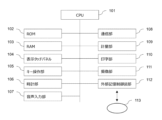
- Figure 2 is a functional block diagram showing the hardware configuration of a weighing device according to an embodiment of the present invention.
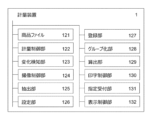
- Figure 3 is a functional block diagram showing the software configuration of a weighing device according to an embodiment of the present invention.
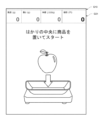
- Figure 4 shows an example of a screen displayed on a weighing device according to an embodiment of the present invention, showing the standby screen in the first operation mode.
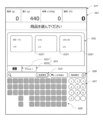
- Figure 5 shows an example of a screen displayed on a weighing device according to an embodiment of the present invention, showing a screen for selecting a product in the first operation mode.
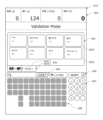
- Figure 6 shows an example of a screen displayed on a weighing device according to an embodiment of the present invention, showing a screen for selecting a product in the second operation mode.
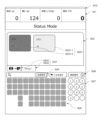
- Figure 7 shows an example of a screen displayed on a weighing device according to an embodiment of the present invention, showing a screen for selecting a product in the third operation mode.
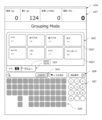
- Figure 8 shows an example of a screen displayed on a weighing device according to an embodiment of the present invention, showing a screen for selecting a product in the fourth operation mode.
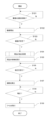
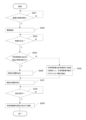
- Figure 9 is an example of processing by a weighing device according to an embodiment of the present invention, and is a processing flow diagram showing the overall processing in the first operation mode.
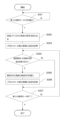
- Figure 10 is a process flow diagram showing an example of processing by a weighing device according to an embodiment of the present invention, which shows the process of extracting product items in the first operation mode.
- Figure 11 is an example of processing by a weighing device according to an embodiment of the present invention, and is a processing flow diagram showing the overall processing in the second operation mode.
- Figure 12 is an example of processing by a weighing device according to an embodiment of the present invention, and is a processing flow diagram showing the overall processing in the third operation mode.
- Figure 13 is an example of processing by a weighing device according to an embodiment of the present invention, and is a processing flow diagram showing the overall processing in the fourth operation mode.
- Fig. 1 shows an example of the configuration of a system including a weighing device 1 according to this embodiment
- Fig. 2 shows the hardware configuration of the weighing device 1.
- the weighing device 1 according to this embodiment is an embodiment of an information processing device according to the present invention.
- the weighing device 1 is installed in a supermarket that sells fresh foods such as vegetables and fruits. In the fresh food section of the supermarket, products such as vegetables and fruits that are sold individually are sorted by type and displayed in their respective display areas. Since each product is sold individually, there is no label with a price or barcode printed on it.
- the customer or store clerk weighs the required amount of each type of product and receives labels for the number of products to be purchased from the weighing device 1.
- the customer or store clerk then attaches the labels to the products.
- a symbol code containing information such as the price is printed on the label, and the symbol code can be read by the POS terminal 3 to register the product in the POS terminal 3 etc. as a product to be purchased.
- the weighing device 1 displays a list of selectable products on the screen of the display touch panel 104 and accepts the selection of products to be purchased from an operator such as a customer or a store clerk.
- the weighing device 1 also weighs the weight of the products placed on the weighing unit 109, retrieves product data such as the unit price of the product selected by the operator on the display touch panel 104 from a storage unit such as the RAM 103, calculates the price of the product, and issues a label.
- the weighing device 1 according to this embodiment performs an object scan of the product selected by a customer or a store clerk, and presents the customer or store clerk with candidate products that can be selected.
- the "object scan” referred to here means a process of capturing an image of the product, performing image recognition of the product, and identifying the product by comparing it with a learning image, and is executed by the imaging control unit 124 and extraction unit 125 (see FIG. 3) described later.
- the product data and a part or all of the product file 121 may be stored not only in a memory unit such as the RAM 103 provided in the weighing device 1 body, but also in an appropriate configuration connected by wire or wirelessly.
- learning images and learning data for object scanning described later do not need to be stored in the weighing device 1 body, but may be stored in, for example, the upper store controller 2 or cloud server 4, and the weighing device 1 may refer to them.
- the store controller 2 is a computer that manages various data within the supermarket, and is connected to the weighing device 1 and POS terminal 3 via a LAN (Local Area Network).
- the various data include, for example, a product file that stores information such as product selling prices stored by the POS terminal 3, a product file 121 (described below) stored by the weighing device 1 (see FIG. 3), and a performance file sent from the POS terminal 3.
- the POS terminal 3 is a so-called POS register, and performs operations such as registering products purchased by customers (including fresh foods weighed by the weighing device 1, as well as products with pre-labeled products) and settling the price.
- Product labels have product identification numbers such as product codes, and in the case of labels issued by the weighing device 1, price information according to weight printed in the form of bar codes or two-dimensional codes, and the POS terminal 3 is equipped with a reading device that reads these bar codes or two-dimensional codes.
- the POS terminal 3 then performs product registration processing based on the bar code or two-dimensional code information read by the reading device and information such as the product selling price stored in memory.
- a store may have a plurality of POS terminals 3.
- the POS terminals 3 may include a self-service terminal operated by a customer in addition to a terminal operated by a store clerk.
- the cloud server 4 is a device that executes processes performed by devices in the store, including the weighing device 1, and stores data necessary for the processes, and is provided as appropriate.
- the weighing device 1 performs object scanning of the products, but the weighing device 1 may only capture images of the products, and the cloud server 4 may perform processes related to image recognition and analysis.
- the cloud server 4 may be configured to generate matching data (learning images) using deep learning using AI (Artificial Intelligence), thereby improving the accuracy of the object scan.
- the store controller 2 and the cloud server 4 constitute a higher-level management device for the weighing device 1 and the POS terminal 3.
- the higher-level device may be constituted by a single terminal or device, or may be constituted by a terminal or device different from the cloud server 4.
- the higher-level device may be a terminal or device within a store that is connected to a network such as a LAN, or may be a terminal or device outside the store that is connected to a network such as the Internet.
- FIG. 2 shows the hardware configuration of the weighing device 1, and FIG.
- the hardware configuration of the weighing device 1 includes a CPU 101, a ROM 102, a RAM 103, a display touch panel 104, a key operation unit 105, a clock unit 106, a voice input unit 107, a communication unit 108, a weighing unit 109, a printing unit 110, an imaging unit 111, and an external memory control unit 112.
- the CPU 101 is a central processing unit that controls the operation of the weighing device 1, and realizes the operation of the weighing device 1 according to the program by reading and executing a program from the ROM 102.
- the ROM 102 is a read-only memory in which the above-mentioned program is stored.
- the RAM 103 is a write/read memory at any time, and stores the product file 121, which will be described later, an icon table, and other temporary data.
- the display touch panel 104 is a user input/output interface between the weighing device 1 and an operator such as a customer, and displays preset keys G221 (see FIG. 5, etc.) for specifying the product to be weighed and various other information on the screen, and accepts input of specifications from the operator using the displayed preset keys G221. Examples of screen displays on the display touch panel 104 will be described later.
- data on the product corresponding to the preset key G221 specified on the screen by the operator is read from the product file 121 in the RAM 103, and the price of that product is calculated.
- the key operation unit 105 is for performing input other than that performed on the display touch panel 104.
- the clock unit 106 outputs time information. This time information is used to control the display mode of the preset keys G221 (see FIG. 5, etc.) displayed on the display touch panel 104.
- the voice input unit 107 is for voice input, allowing the operator to input product information by voice.
- the communication unit 108 is a LAN interface and controls communication with the store controller 2.
- a product file 121 is acquired from the store controller 2 via this communication unit 108.
- a program may be transferred from the store controller 2 to the weighing device 1 via the communication unit 108.
- the transferred program may be stored in the RAM 103, for example.
- the weighing unit 109 measures the weight of the product placed on the weighing tray provided on the top of the weighing device 1 main body using a mass detection method using a load cell, etc., and outputs the weighed value.
- the weighing unit 109 is composed of a mass detection unit and an A/D converter, and the A/D converter converts the analog signal input from the mass detection unit into a digital signal.
- the printing unit 110 constitutes an issuing unit that issues labels on which the price, barcode, etc. are printed for the products weighed by the weighing unit 109.
- This label is printed based on the weighing value output from the weighing unit 109 as the weighing result and product information (such as unit price data) related to the product in the product file stored in the RAM 103.
- the label is a sticker that can be affixed to the product or the bag the product is packed in.
- the information required for the payment of the product is printed on the label and issued, but this is not limited to this, and the information may be printed on the bag containing the product.
- the imaging unit 111 is a device that captures images of the products placed on the weighing unit 109, and is composed of an image sensor such as a color CCD image sensor or a color CMOS image sensor.
- the number of imaging units 111 is arbitrary, and multiple imaging units 111 may be provided.
- the imaging units 111 may be arranged, for example, facing at different angles, so that images of the items placed on the weighing unit 109 can be captured from multiple angles.
- a portable storage medium 113 such as a DVD-ROM or USB memory is connected to the external storage control unit 112.
- Information including programs is stored in the portable storage medium 113, and the external storage control unit 112 reads and writes the information.
- the above-mentioned arithmetic unit such as the CPU 101 and the storage device such as the RAM 103 constitute the following functional blocks: a product file 121, a weighing control unit 122, a change detection unit 123, an imaging control unit 124, an extraction unit 125, a setting unit 126, a registration unit 127, a grouping unit 128, a calculation unit 129, a printing control unit 130, a designation receiving unit 131, and a display control unit 132.
- the functional units may be realized in a higher-level device such as a store controller 2 connected by wire or wirelessly, or in a cloud server 4 connected via the Internet or the like.
- the weighing device 1 is mainly switched between the first to fourth operation modes and executes functions corresponding to each operation mode.
- the first operation mode is an operation mode used when providing services to customers
- the second to fourth operation modes are so-called maintenance modes in which product information is set, and the screen displayed in the maintenance mode can be said to constitute a maintenance screen.
- the first operation mode is an operation mode in which a customer performs operations to purchase or trade goods.
- this first operation mode is an operation mode in which goods are weighed and priced, and goods placed on the weighing unit 109 as goods to be purchased are weighed and a label indicating the price is issued.
- the weighing device 1 has the functions of a POS terminal 3 or the information processing device according to the present invention is configured as a POS terminal 3, in this first operation mode, goods are weighed and goods are registered as goods to be purchased.
- the weighing device 1 performs weighing and pricing, it may be configured as a device that only weighs, with pricing being performed by another linked device.
- the second operation mode is a mode for registering a learning image of a product.
- this second operation mode an image of the product captured by the imaging unit 111 is registered as a learning image of the product.
- the third operation mode is a mode in which products are set as for sale or not for sale. In this third mode, it is possible to set whether the store will treat products registered in the product file 121 as for sale or not for sale. Such settings are required depending on the seasonal availability of products and the availability of stock, as described below.
- the fourth operation mode is a mode for grouping products, in which a plurality of types of products that are commonly associated with a predetermined learning image are registered as one group.
- functions that are not specifically mentioned for a specific mode are performed commonly to all modes.
- the product file 121 is a file that stores product information for each product to be weighed by the weighing device 1, comprising the following items of product identification information: product code, product name, classification, preset key name, image for preset key, weight (mass), unit price, product color, learning image, group information, and sales target settings, and constitutes a product information storage means.
- the product file 121 can also register barcode category (in-store barcode system), cost, unit weight, tare weight, etc.
- the product file 121 may be created by the store controller 2 or the cloud server 4 and sent to the weighing device 1 and stored in the RAM 103. However, this does not prevent the weighing device 1 from creating the product file 121 in other embodiments.
- the selling price may be updated at least once a day, or at other predetermined times.
- the barcode category is used to set categories relating to PLU codes such as JAN (EAN) codes, and barcode systems (types) when in-store barcodes are used for products sold by weight.
- EAN JAN
- types barcode systems
- the product code is product identification information and is also called a product number.
- the product name is the name of the product and is set for search purposes.
- a classification is a category (item) according to the nature of each product. By classifying and registering each product into a specific classification, when a specific classification tab is selected, products belonging to the specific classification are narrowed down.
- the preset key name is a product name or the like that is displayed on the preset key G221 (see FIG. 5, etc.), and if no name is entered, the general name of the product is set.
- the preset key images are images used when displaying the preset keys G221 for receiving the designation of a product. The preset key images show patterns, photographic images, text information, and the like that allow the user to grasp the product.
- the unit weight data is a value set as an average value per product, and is data used to calculate the number of products from the weight value measured by the weighing device 1. This weight data can also be used to determine whether multiple products are placed on the weighing unit 109. Therefore, this data is set only for products sold by the number, such as apples. For products that are not sold by the number, such as meat sold by the gram, the price is calculated using only the unit price data (price per gram). The unit price data is set as the amount per product for products sold by the number, and as the amount per 100 grams for products sold by the gram. In addition, it is possible to set "sold by gram" or "sold by number” in the sales category so that apples and the like can be sold by the gram.
- the transaction amount is calculated according to the unit weight setting.
- the unit weight may be registered by inputting the number of products placed on the weighing plate, or may be registered by the measured value.
- the number of products placed on the weighing plate may be input, and the average weight may be stored by division based on the number of products.
- the color of the product is designated as a color associated with the product. One or more colors can be arbitrarily registered as the color of the product so as to accommodate various perceptions of the color of the product.
- the training image is an image of a product, and serves as a reference image to be referenced when recognizing and identifying the product in the captured image by object scanning and extracting product candidates from the product file 121.
- Training images can be registered by capturing an image of an actual product using the imaging unit 111, or by reading image data captured in advance. For example, a product code can be specified, and training images of the target product can be captured in sequence and registered. Multiple training images can be registered for one product. New training images can be automatically generated from previously registered training images using deep learning using AI, and can be registered.
- the group information is information that specifies a group of products to which product images captured by the imaging unit 111 are associated as learning images. That is, for products set in a specific group, the learning image of one product belonging to the specific group is also associated with other products belonging to the specific group. For example, if there are "apples” that are the same fruit variety but are sold in different regions or brands, when these are grouped, the "apples" from each region or brand are treated as belonging to the same group, regardless of their origin or brand. Then, as described below, when a learning image is associated with one product belonging to the same group, the same learning image is also associated with products other than the one product that belongs to the same group.
- the sales target setting is information indicating whether the store will treat the product as a sale target product or a non-sale target product, and is set by the setting unit 126 described later.
- This sales target setting can also be performed for each product called up by calling up a specific product from a list of products by calling up the product number, but in this embodiment, the setting unit 126 described later can be used to specify a specific product from the candidate products extracted by the extraction processing unit.
- the sales target setting is not limited to the example where an operator specifies a product and sets the product as a sales target product or a non-sale target product, but may be set so that the product is automatically treated as a sales target product or a non-sale target product according to a preset period, etc.
- a sales period such as from one specified date to another specified date may be set for the product, and the product may be treated as a sales target product or a non-sale target product depending on whether the date and time of use of the weighing device 1 falls within the sales period.
- a sales period is set for the product in the product file 121, and the weighing device 1 acquires calendar information held by the device itself or an external terminal when the power is turned on.
- the calendar information is referred to to determine whether the current date and time for a specific product falls within the sales period, and if so, the specific product is treated as a sales target product, and if not, the specific product is treated as a non-sale target product.
- the sales period can also be set according to the season.
- the season in which the product is treated as a for-sale product is set, and a separate seasonal master that associates dates with seasons is also provided.
- the weighing device 1 refers to the seasonal master to determine the season of the day, and sets the product as a for-sale product or a non-for-sale product.
- the season set for the product is not limited to one of spring, summer, autumn and winter, but overlapping seasons such as spring, summer and autumn and winter can be set.
- the product may be treated as a sale item as long as it falls in one of the overlapping seasons, or the operator may select from a pop-up screen in which of the set seasons the product will be treated as a sale item or a non-sale item.
- the season master may be associated with location information of the store in which the weighing device 1 is set. In this way, the seasonal setting may be reflected depending on the location, such as spring in Hokkaido and summer in Okinawa for the same date and time.
- the seasonal sales target setting may be switched ON/OFF by any operation such as a predetermined button, and thus it is possible to set whether or not the seasonal sales target setting is reflected in the product on the day.
- the season master may be divided into categories in the product file 121 and referenced.
- the sales period can also be set on a monthly basis.
- a flag can be set for a product to indicate whether it will be treated as a product for sale in a specific month.
- the weighing device 1 determines the month of the current day based on the current day's date, and sets the product as a product for sale or a product for sale according to the flag.
- both the seasonal setting and the monthly setting described above may be provided, allowing the operator to selectively set the desired one.
- the weighing control unit 122 controls the weighing unit 109 to weigh the weight of the product placed on the weighing plate of the weighing unit 109 .
- the change detection unit 123 is a functional unit that detects a change in the weight on the weighing plate being measured by the weighing unit 109.
- the change detection unit 123 detects that the weight has changed by a predetermined value or more within a predetermined time, and determines that the weight has changed.
- the change detection unit 123 may also calculate the amount of change in the weight of the product being measured by the weighing unit 109, and determine that the weight has changed when the amount of change is equal to or greater than a predetermined value.
- the change detection unit 123 may also calculate the amount of change in weight as one aspect of the weight change, and detect that the weight is fluctuating.
- the change detection unit 123 can also detect whether the weight being measured is stable or not.
- a stable weight state refers to a state in which the weight value of the product being measured by the weighing unit 109 is within a predetermined threshold value for a predetermined short period of time, for example.
- the imaging control unit 124 controls the imaging unit 111 to capture an image of a commodity placed on the weighing unit 109.
- the imaging control unit 124 may start imaging for object scanning when the change detection unit 123 detects a weight change in the weighing unit 109, or may start imaging for object scanning when the weight of the commodity weighed by the weighing control unit 122 is within the transaction weighing range. For example, a scale mark of 20 or more marks from the minimum scale mark is treated as the transaction weight. Also, an operation for object scanning may be started in response to an arbitrary operation by the operator.
- the extraction unit 125 is a functional unit that extracts product information from the product file 121. For example, the extraction unit 125 extracts product candidates from the product file 121 that correspond to product images captured by the imaging unit 111, or extracts product information from the product file 121 in response to a search such as a product number search.
- the extraction unit 125 recognizes products in the image captured by the imaging unit 111 in a so-called object scan using an appropriate image analysis technique or general object recognition technique. In recognizing products, general object recognition may be performed by dividing the image into regions for each object. In addition, the number or types of products placed on the weighing unit 109 may be specified.
- the extraction unit 125 may calculate the similarity between the captured product image and the learning images of each product registered in the product file 121 as an absolute evaluation or a relative evaluation.
- various extraction modes may be set. For example, if the similarity of the product with the highest similarity is lower than a predetermined value, three products may be extracted as candidates in order of similarity. Also, if the similarity of the product with the highest similarity is 70% and there are multiple products within a range of similarity of -5% (65%) from that, all products within that range may be extracted as candidates.
- the extraction unit 125 may start the extraction process in response to a change in weight without waiting for the weight of the weighed product to stabilize, or may start the extraction process when a change in weight is detected. Also, the extraction process may be performed when the weight weighed by the weighing control unit 122 is stable.
- the extraction unit 125 may specify the color of the product from the captured image of the product in the object scan, and compare it with the registered product color to specify a product with a similar color.
- the extraction unit 125 may use the color as one of the similarity indices, and may select products with similar colors as candidates for captured products.
- the color of the product may be specified from the image, or may be registered in advance in the product file 121.
- the color similarity may be calculated, for example, from each element of hue, lightness, or saturation, or a combination thereof, or any other technique may be used, such as calculation by projecting onto an appropriate coordinate system.
- the extraction unit 125 may function as follows, particularly in each operation mode.
- the extraction unit 125 refers to the product file 121 based on the image of the product captured by the imaging unit 111, that is, extracts product candidates captured by the imaging unit 111, i.e., product candidates placed on the weighing unit 109 as products to be purchased.
- the extraction unit 125 may first extract product candidates corresponding to the captured product image from products set as products to be sold. Since products not to be sold should not be displayed in principle, the accuracy of extracting appropriate candidates can be increased by targeting only products to be sold as the target for product candidate extraction.
- the extraction unit 125 may further extract product candidates corresponding to the captured product image from products set as products not to be sold.
- the extraction unit 125 refers to the product file 121 and extracts candidates for products to which learning images are to be added, based on the image of the product captured by the imaging unit 111.
- the extraction unit 125 may extract candidates for products corresponding to the image captured by the imaging unit 111 from both products set as products for sale and products set as products not for sale, i.e., from all products regardless of the sales target setting.
- a candidate for a product to which a learning image is to be added cannot be extracted based on the image captured by the imaging unit 111, a product for which a learning image is not registered in the product file 121, i.e., a product for which a learning image is not associated, may be extracted as a candidate for a product for which a learning image is to be newly registered.
- a candidate for a product cannot be extracted because a learning image is not registered in association with the product, or the amount of learning is small, i.e., there are few learning images associated with the product, a message indicating "not learned" may be displayed on the screen.
- product designation can be accepted from a state in which product candidates have been extracted in the first operation mode or the second operation mode, but regardless of this, product candidates for which sales target setting is to be performed may be extracted by referring to the product file 121 based on the image of the product captured by the imaging unit 111, or product candidates may be extracted based on a product number search, etc.
- the extraction unit 125 extracts product candidates from all products regardless of the sales target setting.
- any multiple products are extracted from all products registered in the product file 121 by product number search or the like.
- product candidates corresponding to the product image captured by the imaging unit 111 may be extracted.
- any operation mode in the extraction process by the extraction unit 125, among all products including products for sale and products not for sale, products that do not have associated learning images for object scanning, i.e., products for which learning images are not registered in the product file 121, may be excluded from the targets of object scanning, i.e., extraction targets.
- the setting unit 126 sets whether a product registered in the product file 121 is a sale product or a non-sale product.
- the setting by the setting unit 126 to set a product as a sale product or a non-sale product is sometimes referred to as a "sale target setting.”
- the setting process by the setting unit 126 is executed in the third operation mode, but can also be executed during execution of the first operation mode. That is, during execution of the first operation mode in which a product is registered as a purchase target product, the extraction unit 125 extracts product candidates, and when the user performs an arbitrary operation to change to the third operation mode while the product candidates are displayed, the first operation mode is temporarily put on hold and the operation mode is switched to the third operation mode.
- the product extracted by the extraction unit 125 can be set as a product for sale or a product not for sale.
- the operation performed in the first operation mode until the operation mode is changed to the third operation mode is maintained in effect, and when the sales target setting is completed in the third operation mode and the operation returns to the first operation mode, the operation that was maintained in effect can be continued.
- the second operation mode or the fourth operation mode may be switched to the third operation mode in the same manner as the first operation mode is switched to the third operation mode.
- the operations in the first operation mode that are effectively maintained when changing to the third operation mode include, for example, the measurement value of the product, and operations and information related to the product candidates.
- the products to be extracted as candidates may change depending on the similarity of the products. Therefore, when returning from the third operation mode to the first operation mode, the extraction process by the extraction unit 125 may be executed again.
- this new product candidate may be extracted and displayed in addition to the product candidates previously extracted in the first operation mode, or a predetermined number of product candidates may be displayed in order of similarity from the products previously extracted and the new product candidate.
- the result of the new extraction process is reflected in the result of the extraction process in the previous first operation mode, and it can be said that the first operation mode is effectively maintained.
- the processing results of the previous first operation mode can be erased, and the extraction process by the extraction unit 125, or a series of processes starting from image capture, can be executed from the beginning.
- the sales target setting by the setting unit 126 can also be said to be a setting (extraction target setting) for whether or not the extraction unit 125 will extract candidates for each product in the first operation mode.
- the registration unit 127 registers the learning image of the product in the product file 121. Specifically, in the second operation mode, the registration unit 127 registers the image of the product captured by the imaging unit 111 as a learning image in the product file 121 in association with the product designated by the designation receiving unit 131 described later.
- the registration destination of the learning image may be a file provided separately from the product file 121, such as a file (storage area) for registering learning images, as long as the image is associated with the product.
- the registration unit 127 registers the image of the product captured by the imaging unit 111 as a learning image in the product file 121 in association with the product designated by the designation acceptance unit 131 and all products grouped with it.
- the learning images are not registered.
- a product is called up by searching for a product number, and the image of the product is registered as a learning image.
- the registration of learning images progresses to a certain extent from the initial stage, it becomes possible to extract product candidates by object scanning, and the learning image is associated with the product by simply selecting a specific product from the product candidates displayed corresponding to the captured image of the product, and learning progresses.
- a cancel button may be provided to "not register” or "skip" the captured product image as a learning image, so that the registration can be canceled.
- the process of registering the captured product image as a learning image may be canceled.
- the grouping unit 128 groups predetermined products in the fourth operation mode, and registers the setting in the product file 121.
- the setting for grouping products by the grouping unit 128 may be referred to as a "group setting.”
- the calculation unit 129 calculates the price based on the measurement value and unit price of the product by referring to the product file 121.
- the calculation unit 129 also performs calculations required for selling the product, such as calculating the tax-inclusive price based on the tax rate of the consumption tax or the like, as appropriate.
- the printing control unit 130 issues a label reflecting information such as the weight measured by the weighing unit 109 and the price calculated by the calculation unit 129.
- the printing control unit 130 controls the printing unit 110 to print information required for payment for the product on a label or the like, based on the product information related to the product in the product file 121, the weighing value output as the weighing result from the weighing unit 109, the price calculated by the calculation unit 129, etc.
- the printing control unit 130 may print the information on a bag containing the product.
- the printing control unit 130 may present the information to be printed to the operator and wait for a confirmation input indicating that the presented information is correct before issuing a label, or may issue a label immediately upon generation of the information to be printed without waiting for the confirmation input.
- the information required for the payment of the product may be associated with a recording medium capable of identifying a member or a transaction, such as an IC tag or a barcode (membership card).
- a recording medium capable of identifying a member or a transaction such as an IC tag or a barcode (membership card).
- an input screen for identifying the recording medium may be displayed to prompt the operator to enter the information.
- the designation receiving unit 131 is a means for displaying product candidates extracted from the product file 121 as product candidates corresponding to the product image captured by the imaging unit 111 and receiving designations from the operator.
- the designation receiving unit 131 is realized, for example, by an operator displayed on a screen operated by the operator and provided for each product. For example, the operator may be displayed as a preset key G221 (see FIG. 5, etc.) on which product information is displayed, as described later. This allows the operator to easily grasp the product and designate the product with a simple operation even if multiple product candidates are extracted.
- the specification receiving unit 131 receives a specification of a product for which a label is to be issued from the product candidates extracted by the extraction unit 125 .
- the designation receiving unit 131 receives designation of a product for which a learning image is to be registered from the product candidates extracted by the extraction unit 125. If a learning image has not yet been associated with the designated product, a new registration is performed, whereas if a learning image has already been associated with the designated product, an additional registration is performed.
- the designation receiving unit 131 receives a designation of a product for which the setting of a product to be sold or a product not to be sold is switched from the product candidates extracted by the extraction unit 125.
- the setting of the product may be switched to a product to be sold or a product not to be sold in response to the reception of an operation to designate the product.
- the designation receiving unit 131 receives designation of products to be grouped from the product candidates extracted by the extraction unit 125. Note that in the fourth operation mode, a plurality of products may be designated from the product candidates, and an operation requesting registration may be executed to request registration of the group. In this case, until the operation requesting registration is executed, the product may be selected or deselected according to the designation of the product. Also, the operation requesting registration may be performed in various ways, such as by pressing a button separately provided on the screen or a completion key of a mechanical key.
- the designation when products are grouped, when accepting the designation of the target for registering a learning image from among the candidate products, the designation may be accepted based on the product code of the product, or a specific product from the grouped products may be displayed as a representative product and the designation may be accepted.
- the specific representative product may be, for example, the product with the lowest product code number when grouped, or the product first selected when grouped, and is not limited thereto.
- the specific representative product may be the above-mentioned one.
- the display control unit 132 is a functional unit that displays various information, such as information about the products extracted by the extraction unit 125, on the display touch panel 104.
- the display control unit 132 displays an operator representing each product extracted as a candidate for a product corresponding to the product image captured by the imaging unit 111 on a specification screen described later.
- the operator is used to receive a specification from the user for each extracted product and to set a sales target by the setting unit 126, and is displayed, for example, as a preset key G221 (see FIG. 5, etc.) on which product information is displayed.
- the display control unit 132 displays the controls of multiple products extracted by the extraction unit 125 as candidates for the captured product on the selection screen
- the product candidates displayed as the controls may be displayed, for example, in the order of product numbers stored in the product file 121.
- the product candidates may also be displayed in the order of similarity calculated by the extraction unit 125.
- a predetermined number of product candidates with high similarity may also be displayed in the order of product numbers.
- Product candidates with high similarity may be displayed in a different manner from other product candidates. This can guide the selection of a product with high similarity, and even if the accuracy of the extraction by the extraction unit 125 decreases, the product can be selected without performing special operations.
- the order does not have to be determined strictly by similarity. For example, product candidates with a similarity of 90% or more may be displayed without distinguishing between different display modes as product candidates with the same similarity. Furthermore, if the extraction unit 125 extracts only products with a similarity of less than 90% and 70% or more, the operators for all extracted products may be displayed without narrowing down the candidates in order of similarity. This increases the probability that at least one of the operators displayed on the specified screen is appropriate, and eliminates the need to request the operator to specify a product using other special operations.
- the product controls may not be displayed, and instead a screen to call a store clerk or a message requesting that a different item of the same product be placed may be displayed. This is because there is a risk that a product that is not on display may have been placed on the weighing unit 109, or there may be a malfunction in the object scanning function, such as dirt adhering to the lens of the imaging unit 111 or a malfunction in the imaging unit, and therefore inspection is required before continued use.
- the display control unit 132 may display a product search screen. From the search screen, products registered in the product file 121 can be searched for, for example, by product name, product number, department, or classification. Product names and product numbers may be searched for by either exact match or partial match. The operator can specify any product from the search results. Furthermore, if the extraction unit 125 is unable to extract any product candidates, all products may be displayed on the specification screen to accept product specification.
- the display control unit 132 may display the controls for all products by any classification, such as department.
- the classification may be by color, or by type, such as fruits and vegetables.
- the display of the controls corresponding to each classification may be performed by a display area or display page that can be switched by selecting a tab.
- the image of the product obtained by the object scan may be registered as a learning image in the product file 121. Whether or not such a setting is performed may be determined at the time of setup as an optional process.
- FIG. 4 shows a screen G10 (standby screen) in the first operation mode when no product has been placed on the weighing unit 109 and weighing and pricing is ready to be performed.
- the words "Place the product in the center of the scale and start” are displayed along with an illustration showing this, thereby urging the operator to place the product on the weighing section 109.
- a product information display area G21 is provided at the top of the screen G10.
- the product information display area G21 displays the product's tare weight, weight (or number of pieces), unit price, and price.
- the column displaying the weight reflects the weighing value measured by the weighing unit 109. To display the number of pieces, the number can be calculated from the weight and unit weight.
- the tare weight and unit price are read from the product file 121 when product candidates are extracted by the extraction unit 125 and the operator specifies a product.
- the price is calculated and displayed by the calculation unit 129 based on the tare weight, weight (or number of pieces), and unit price. In the illustrated example, all values are zero because no product has been placed on the weighing unit 109.
- FIG. 5 shows a screen G11 in which a product is placed on the weighing unit 109 and product candidates extracted by the extraction unit 125 are displayed in the first operation mode.
- the screen G11 is provided with a preset key display area G22, tabs G23, a character input area G24, a virtual keyboard G25, a numeric input area G26, and a numeric keypad G27.
- the weight of the product placed on the weighing unit 109 is displayed as the weight.
- a preset key G221 which is an operator for accepting product specification, is displayed in a pressable manner for each product candidate extracted by the extraction unit 125 in response to the product image captured by the imaging unit 111.
- the specification of the product for which a label is to be issued is accepted in response to pressing this preset key G221.
- the extraction unit 125 extracts only products that are set as sales products. Therefore, in the preset key display area G22, only preset keys G221 corresponding to products that are set as sales products are displayed, and those corresponding to products that are set as non-sale products are not displayed. In addition, if the products extracted by the extraction unit 125 include products that are grouped, other products that are grouped may also be extracted, and the preset keys G221 of the other extracted products may be displayed in the preset key display area G22. However, even in this case, it is preferable not to display products that are set as non-sale products.
- the preset keys G221 may be displayed in a display mode that allows the similarities to be distinguished. For example, when there is one product with a similarity of 90% or more and two products with a similarity of less than 90%, the product with a similarity of 90% or more may be displayed in a different mode from the other products to guide the operator's selection. On the other hand, when there are two or more products with a similarity of 90% or more, the display mode may not be changed. When there are only products with a similarity of less than 90% as candidates, the display mode of the preset keys G221 may be similarly left unchanged, or all preset keys G221 may be displayed without narrowing down the candidates by similarity.
- the display (arrangement) of the preset keys G221 may be in ascending or descending order of the product code, etc., or in order of similarity.
- the display columns of the preset keys G221 for that product and other products may be in two rows. That is, when there is one product with a similarity of 90% or more, the preset keys G221 for that product may be displayed in the first row and the others may be displayed in the second row, or may be displayed with an interval of one preset key G221.
- the operator may be notified to place a different individual of the same product on the weighing unit 109, or the use may be stopped, or a store clerk may be called.
- the notification may be made in various ways, such as displaying a message on the screen, illuminating a sign light, or outputting a sound or buzzer.
- the illustrated preset key G221 displays the name of the product, but other product information registered in the product file 121, such as the unit price, may also be displayed as appropriate.
- a button or operation for moving to a screen for editing product information may also be associated with the preset key G221 so that the product information displayed on the preset key G221 can be edited. In this case, it is preferable to return to the original product designation screen when editing of the product information is completed.
- buttons and operations may also be provided in other operation modes.
- the tab G23 includes a tab G231 for accepting an operation mode switching operation, and a tab G232 for allowing a classification of each product to be specified.
- the tab G231 accepts switching of the operation mode, but the switching operation is not enabled when weighing and pricing products, and is enabled when, for example, a store clerk or the like performs authorization authentication as described below.
- the switching operation is enabled, the operation mode can be switched from the first operation mode to another operation mode, such as the third operation mode, by pressing the tab G231.
- the preset keys G221 of the products classified in the specific tab G232 are displayed in the preset key display area G22, or the preset keys G221 displayed in the preset key display area G22 are narrowed down to those related to the products classified in the specific tab G232. Note that, in the figure, only one tab G232 is provided that can specify the classification for each product, but multiple tabs may be provided depending on the classification.
- the character input area G24 is an area for inputting product information characters using a virtual keyboard G25 that displays the Japanese syllabary.
- a search process or a narrowing down process is executed by referring to the product file 121, and a preset key G221 corresponding to the entered product name is displayed in the preset key display area G22, or the preset keys G221 already displayed in the preset key display area G22 are narrowed down to those corresponding to the product name.
- the character input area G24 may be configured to allow the color of the product to be input as the product information. For example, by inputting "green" in the character input area G24, the preset key G221 of the product associated with the color green is displayed in the preset key display area G22.
- the numeric input area G26 is an area for inputting numeric values relating to product information, such as a product code, from the numeric keypad G27.
- product information such as a product code
- a preset key G221 corresponding to the input product code is displayed in the preset key display area G22, or the preset keys G221 already displayed in the preset key display area G22 are narrowed down to those corresponding to the product code.
- the character input area G24 and the virtual keyboard G25, and the numeric input area G26 and the numeric keypad G27 all constitute a search means for searching for a specific product, and a filtering means for narrowing down the search results to products that meet specific conditions. This makes it possible to call up products that are not displayed as preset keys G221 in the preset key display area G22.
- the screen transitions to a label issuance confirmation screen for confirming the contents and issuing a label.
- the label issuance confirmation screen for example, the tare weight, weight, unit price, and price of the product are specifically displayed in the product information display area G21 provided in the same manner as the screen G11.
- the printing control unit 130 controls the printing unit 110 to print the label, and the label is issued.
- the operator may perform an operation such as pressing a cancel button or a button for returning to the screen for specifying the product.
- the issuance of the label may be canceled by removing the product from the weighing unit 109.
- information on the specified product may be transmitted to an external device as registration data.
- the change detection unit 123 detects a change in the weight measured by the weighing unit 109 at a stage before the designation of the preset key G221 is accepted, the product extraction process and, depending on the settings and circumstances, the process may be executed again from the image capture, and the product candidates may be redisplayed and updated.
- the preset key G221 is designated at a timing before the product candidates are redisplayed in this way, it may be treated as if a product was designated from the product candidates extracted by the process executed before the reprocessing.
- ⁇ Screen example (second operation mode)> 6 shows a screen G12 when an image of a captured product is registered as a learning image in the second operation mode.
- This screen G12 is an example of a screen that is displayed when a product is placed on the weighing unit 109 and object-scanned in a situation where the learning image has been registered to the extent that it can be object-scanned.
- the screen G12 displays "Validation Mode" (the system name corresponding to the second operation mode), so that the operator can understand that the operation mode is the second operation mode.
- the fact that the operation mode is different from the other operation modes may be recognized by the background color, the display mode of the preset key G221, or other character strings.
- the operator can perform the operation with a feeling of operation that is roughly the same as that of the first operation mode.
- the designation of the product to which the learning image is to be added is accepted in response to pressing of the preset key G221 displayed in the preset key display area G22.
- the learning image is associated with the designated product and registered in the product file 121.
- the products extracted by the extraction unit 125 include a group setting
- only the preset key G221 of a representative product among the products set in the group may be displayed in the preset key display area G22. Even if only the preset key G221 of the representative product is displayed in this manner, when the designation of the preset key G221 of one product is accepted, the learning image is also associated with the other grouped products, so that even a group of products that are indistinguishable from one another in appearance can be collectively associated with the learning image.
- the preset keys G221 displayed in the preset key display area G22 in the second operation mode are not limited to those whose corresponding products are set as sale products, but also include those whose corresponding products are set as non-sale products.
- the preset keys G221 displayed in the preset key display area G22 may be displayed in order of product similarity or ascending or descending order of product code, as in the case of the first operation mode described above.
- pressing tab G231 switches the operation mode from the second operation mode to the first operation mode, and an image is displayed on tab G231 that enables the user to recognize that the operation mode is being switched.
- the screen may display, for example, preset keys G221 of all products registered in the product file 121.
- the operator designates the preset key G221 of a product for which the captured product image is to be registered as a learning image.
- the captured product image is associated with the product designated as the learning image and registered in the product file 121.
- the screen displaying the preset keys G221 of all the products registered in the product file 121 may be configured with multiple pages that can be switched between tabs, and in this case, the operator can view products classified into a predetermined type by switching between tabs and specify a desired product from among them. Also, it may be possible to narrow down the products by searching for a product name, or by selecting a department or classification (category). Also, instead of displaying the preset keys G221 of all the products registered in the product file 121 on the screen, product candidates may be displayed as preset keys G221 in response to a search such as a product name search.
- the imaging unit 111 captures an image of a product and the extraction unit 125 extracts product candidates
- all products registered in the product file 121 may be displayed as preset keys G221.
- a specific preset key G221 is designated, a learning image is associated with the corresponding product and registered in the product file 121.
- the preset key display area G22 may be configured to narrow down the products by switching tabs, etc., and the tabs may be switched depending on whether or not a learning image is registered, in addition to the department and classification (category). This allows a learning image to be registered by specifying a product, regardless of whether a learning image has been registered or not.
- the screen When a specific preset key G221 is selected from the preset key display area G22 in this second operation mode, the screen does not transition to the label issuance confirmation screen as in the first operation mode, but instead informs the user that the learning image has been registered.
- the notice may be a message displayed on the screen indicating that the learning image has been registered, or may be output by voice. It may also be sent to another higher-level terminal such as the store controller 2.
- the screen After the notice has been displayed for a specified period of time, or after an operation such as pressing a button to accept the notice, the screen returns to the screen waiting for a product to be placed on the weighing unit 109 so that the learning image can be registered.
- FIG. 7 shows a screen G13 for setting a product as a sales target in the third operation mode.
- "Status Mode" the system name corresponding to the third operation mode
- the fact that the operation mode is different from the other operation modes may be indicated by the background color or the display mode of the preset key G221.
- the preset key G221 displayed in the preset key display area G22 is pressed to accept the designation of a product, and the sales target setting of the product is switched. That is, in the third operation mode, the preset key G221 also serves as an operator for setting the sales target by the setting unit 126, and each time the preset key G221 is pressed, the designated product is set as a sales target product or a non-sale target product, and the setting is registered in the product file 121.
- the display mode of the preset key G221 may differ depending on whether the corresponding product is set as a product for sale or a product not for sale. That is, in the illustrated example, the preset key G221-1 indicating "kiwi", which is set as a product for sale, is displayed in blue, and the preset key G221-2 indicating "lemon”, which is set as a product not for sale, is displayed in yellow. Then, when the preset key G221 is pressed, a change in the sales target setting is registered in response to the press, and the color of the preset key G221 also changes to the corresponding color.
- this color scheme is just one example, and any color scheme may be used as long as it allows for a distinction between for-sale and non-sale items. Furthermore, it is not limited to distinction by color, and various forms can be adopted as long as it allows for a distinction between for-sale and non-sale items, for example, one may be made to blink, or a design or wording that allows a distinction between the two may be added to either or both of them. Furthermore, for-sale and non-sale items may be displayed in groups, which makes it easy to understand when there are many product candidates.
- the display mode of the preset key G221 displayed in the third operation mode may also be different from that of the preset key G221 displayed in the first operation mode.
- the preset key G221 of a product set as a product for sale is displayed in blue
- the preset key G221 of a product not set as a product for sale is displayed in yellow
- the preset key G221 displayed in the first operation mode is displayed in white. This makes it easy to understand in which operation mode the operation is being performed.
- all preset keys G221 of the extracted products are displayed regardless of whether the products corresponding to the preset keys G221 are grouped, and even grouped products can be individually set. In addition, if group settings are made for the extracted products, all preset keys G221 of the grouped products may be displayed in the preset key display area G22.
- the third operation mode may be switched in response to an arbitrary operation by an operator such as a store clerk during the execution of the first operation mode.
- an operator such as a store clerk during the execution of the first operation mode.
- the preset key G221 if a preset key G221 of a specific commodity that should be a commodity not for sale is displayed, the first operation mode is temporarily put on hold and the operation mode is switched to the third operation mode.
- the preset key display area G22 of the third operation mode to which the operation mode is switched the preset key G221 displayed in the first operation mode is displayed in a manner that makes it possible to distinguish whether the preset key G221 is set as a commodity for sale or a commodity not for sale.
- the operator can change the setting of the specific commodity from a commodity for sale to a commodity not for sale and return to the first operation mode.
- the preset key G221 of the specific commodity that was previously displayed as a commodity for sale is hidden.
- this does not prevent the third operation mode from being executed separately from the execution of the first operation mode, and the third operation mode can be executed, for example, by selecting the third operation mode from a menu screen independent of each operation mode.
- pressing the tab G231 switches the operation mode from the third operation mode to the first operation mode, and an image is displayed on the tab G231 that enables the user to recognize that the operation mode is being switched.
- the target product for which the sales target is to be set can be specified from the candidate products extracted by object scanning, so the number of steps can be reduced compared to searching for the target product by product number from the list of products registered in the product file 121 and setting the sales target.
- the sales target can be set with an operation feeling similar to that of registering learning images in the second operation mode described above, the operator can easily become accustomed to the operation.
- the store clerk needs to check whether the object scan is performed correctly after the product is displayed.
- the check can be performed by checking whether the correct product candidate is displayed as a preset key G221 on the screen G11 by object scanning when the product is placed on the weighing unit 109 in the first operation mode. If several other items of the same type are placed on the weighing unit 109 and suitable product candidates are extracted as expected, preparation is complete. On the other hand, if suitable product candidates are not extracted, it is necessary to check the sales target setting of the product. At this time, it is convenient for an operator such as a store clerk to perform authority authentication from the screen G11 where weighing and pricing are performed and transition to the third operation mode.
- the authority may be authenticated by scanning the barcode of the store clerk with the imaging unit 111, for example, or by entering a password, and is not particularly limited.
- transition to the third operation mode may be triggered not only by pressing the tab G231 described above, but also by authority authentication performed during the first operation mode.
- the operator transitions to the third operation mode, as described above, he or she can check the sales target setting for each product candidate on screen G13, indicating whether the product is for sale or not, and can also switch the sales target setting.
- FIG. 8 shows a screen G14 for grouping products in the fourth operation mode.
- “Grouping Mode” the system name corresponding to the fourth operation mode
- the operation mode is the fourth operation mode.
- the grouping unit 128 groups the designated multiple products and registers the group setting in the product file 121.
- the group setting is validly accepted as long as there are two or more.
- products can be selected and deselected according to the designation of the preset keys G221.
- the operation to request registration can be performed in various ways, such as pressing a button provided separately on the screen or a completion key on a mechanical key.
- the flow of processing executed by the weighing device 1 will be described for each operation mode.
- the weighing device 1 When the weighing device 1 is powered on, it displays a menu screen from which an operation mode can be selected. When a specific operation mode is selected from the menu screen, a standby screen for that operation mode is displayed. From the standby screen for each operation mode, it may be possible to return to the menu screen by performing a specific operation. However, it may also be possible to provide a switching means such as an operation mode switching button on the screen for each operation mode, and to transition from a specific operation mode to another operation mode in response to the operation of the switching means.
- a switching means such as an operation mode switching button on the screen for each operation mode, and to transition from a specific operation mode to another operation mode in response to the operation of the switching means.
- FIG. 9 shows the process flow in the first operation mode.
- a change in weight on the weighing unit 109 is detected by the change detection unit 123 (S101), and the above-mentioned screen G11 is displayed.
- the weighing control unit 122 constantly executes weighing by the weighing unit 109, and the weighed value is displayed on screen G11. Also, in the subsequent processing, when the product is removed from the weighing unit 109 and the weight becomes zero, the screen returns to the standby screen G10.
- the imaging unit 111 captures an image of the commodity placed on the weighing unit 109 in response to a change in weight (S102).
- the extraction unit 125 extracts product candidates corresponding to the imaged product from the product file 121 (S104). The extraction process will be described in detail later.
- the display control unit 132 displays the extracted product candidates as operators (preset keys G221) on the screen (S105).
- the calculation unit 129 calculates a price according to the product weight (or the number calculated from the unit weight) (S107), and the price is displayed on the screen.
- the printing control unit 130 controls the printing unit 110 to print the label (S109).
- FIG. 10 shows a detailed flow of the extraction process in S104 described above.
- the extraction unit 125 attempts to extract candidate products from the products set as the products to be sold, based on the product image captured by the imaging unit 111, and by referring to the product file 121 (S111).
- the similarity between the product image and the registered learning image is calculated.
- the product is extracted as a candidate (S112).
- the extraction unit 125 attempts to extract a candidate product from the products set as not eligible for sale (S113). As a result, if a candidate product corresponding to the imaged product can be extracted from the products set as not eligible for sale, the extraction unit 125 extracts the product as a candidate (S112).
- error processing is executed (S114).
- error processing for example, a store clerk call screen is displayed to prompt the store clerk to call, or a guide is displayed requesting the user to place a different item of the same product.
- the store clerk may call the corresponding product by searching for a product number, or when the product is placed on the weighing unit 109 again in response to the guide requesting the user to place a different item of the same product, the above-mentioned series of processes from S101 are executed again.
- a preset key may be displayed together with a message such as "Please select from the preset keys" to prompt the user to specify a product.
- the label is printed with a barcode and product code that encodes payment information including, for example, the product name, price, content volume corresponding to the weight, unit price, store name, price, etc., and the customer can make payment based on the information printed on the label.
- a product when a product is extracted from the products set as non-sale products in S113, the fact may be displayed on the screen, the display mode of the preset key G221 may be changed, or the product may not be displayed on the screen as a preset key G221, but may be displayed as a mark that only a store clerk can understand.
- audio output, lighting or blinking of a sign lamp, notification to another terminal, etc. may be output.
- a candidate product cannot be extracted from the products for sale, an attempt is made to extract a candidate product from products not eligible for sale.
- an error process may be performed without attempting to extract a candidate product from products not eligible for sale.
- a product set as a product not eligible for sale can be extracted, the fact may be notified by a mark displayed on the screen in a manner that only the store clerk can understand.
- the manner of notification may be the same as that described above, or may be other manners.
- the error processing step of S114 it is possible that in extracting candidate products corresponding to the captured image, there is a product associated with a learning image that is at least a certain level of similarity, but the similarity is not sufficient to display it as a candidate, or no candidates could be extracted from the products associated with the learning image. Therefore, the situation may be notified to store clerks, etc. in a manner that allows them to recognize each situation, such as by displaying a message or mark. In this way, when it is determined that a learning image has not been registered, the corresponding product can be called up immediately by searching for the product number, etc., without having to try to understand the product's status from a maintenance screen, etc.
- step S104 may be performed simultaneously with step S103 or before the weight stabilizes. However, if step S104 is performed after the conditions of step S103 are satisfied, the product's posture stabilizes and the similarity can be calculated in a stationary state, ensuring higher identification accuracy.
- FIG. 11 shows the process flow in the second operation mode.
- the change detection unit 123 detects a change in weight on the weighing unit 109 (S201), and the above-mentioned screen G12 is displayed.
- the imaging unit 111 captures an image of the product placed on the weighing unit 109 in response to the weight change (S202)
- the weighing unit 109 waits for the weight to stabilize (S203).
- the weighing control unit 122 constantly weighs the product using the weighing unit 109, and the weighed value is displayed on the screen G12. Also, when the product is removed from the weighing unit 109 and the weight becomes zero, the screen returns to the standby screen.
- the extraction unit 125 attempts to extract a candidate product to which a learning image is to be added by referring to the product file 121 based on the captured product image (S204). As a result, if a product is identified that is associated with a learning image that matches the captured product image at a similarity level equal to or higher than a predetermined similarity level, the identified product is extracted as a candidate product to which a learning image is to be added (S205).
- the extraction unit 125 may attempt to extract product candidates from both products set as products eligible for sale and products set as products not eligible for sale.
- the display control unit 132 displays the extracted product candidates as operators (preset keys G221) on the screen (S207).
- the registration unit 127 acquires the captured image of the product as a learning image and registers it in the product file 121 in association with the designated product (S209).
- FIG. 12 shows a process flow in the third operation mode.
- a flow of processing performed by switching the operation mode to the third operation mode while the first operation mode is being executed will be described.
- a switch in the operation mode is accepted in a state in which product candidates are displayed as preset keys G221 in step S105 (S301)
- a sales target setting for the product is read from the product file 121 (S302)
- the sales target setting is reflected in the display mode of the preset keys G221 (S303).
- the operator checks the sales target setting of the product from the display mode of the preset key G221, and when the operator determines that the product requires a change in setting, he/she requests a change in the designated sales target setting of the product using the preset key G221 (S304).
- the setting unit 126 changes the sales target setting of the designated product and registers it in the product file 121 (S305).
- the setting is reflected in the display mode of the preset key G221 of the target product (S306).
- the operation mode switches to the first operation mode, and the label is printed via steps S106 and onward.
- the sales target setting is performed for each product by switching from the first operation mode to the third operation mode.
- an image of the product may be captured from a predetermined standby screen of the third operation mode to display a preset key G221 for the product, and the sales target setting may be switched for each preset key G221.
- the operation mode is switched from a state in which the preset key G221 is displayed in the first operation mode to the third operation mode
- FIG. 13 shows a process flow in the fourth operation mode.
- a product is read from the product file 121 and the preset key G221 is displayed on the screen (S401).
- the product displayed as the preset key G221 may be, for example, one extracted by a product number search or the like, or may be one extracted from all the products registered in the product file 121.
- the designation reception unit 131 accepts this (S402).
- the grouping unit 128 groups the designated multiple products and sets the group in the product file 121 (S404).
- the weighing device 1 allows easy sales target setting for products extracted by object scanning.
- the extracted products are displayed as specifiable preset keys G221, allowing settings to be easily updated by touching (pressing) the keys, and the settings are conveniently displayed in a manner that is easy to understand at a glance.
- object scanning also extracts products similar to the captured product, which is useful because it allows sales target settings for similar products to be updated at the same time.
- settings can be made with the same operational feel as normal transactions, and there is no need to go through the trouble of selecting target or non-target products from a product list.
- learning images can be registered and products can be set by general-purpose and simple operations for any product registered in the product file 121.
- the order is not to specify the product number, then photograph the product and input the image, but to photograph the product and then specify the product number (product), it is possible to register learning images consecutively without switching product numbers.
- a learning image is generated by the imaging unit 111 simply by placing the product on the weighing unit 109, and for products for which learning images have already been registered, candidate products for which learning images are to be registered are automatically extracted by object scanning, eliminating the need to go through the trouble of specifying the products for which learning images are to be registered.
- the operation screen is not a special one, but can be operated while imagining a normal operation screen.
- learning images for products having similar appearances can be registered together, which is convenient.
- sales target settings can be easily made for products extracted by object scanning.
- the extracted products are displayed as specifiable preset keys G221, and settings can be easily updated by touching (pressing) the keys, and the settings are displayed in a manner that is easy to understand at a glance, which is convenient.
- object scanning also extracts products similar to the captured product, which is useful because it allows the sales target settings for similar products to be updated at the same time.
- settings can be made with the same operational feel as normal transactions, and there is no need to go through the trouble of selecting target or non-target products from a product list.
- the POS terminal 3 performs processes such as product extraction by object scanning, product registration as a product to be purchased, and product settlement for registered products.
- the POS terminal 3 can be of any type, including a normal POS terminal where a store clerk performs the process from product registration to settlement, a full-self-service POS terminal where the customer registers the product and settles the payment, and a semi-self-service POS terminal where the store clerk registers the product at a registration machine and the customer settles the payment at a settlement machine, and each POS terminal has the functional units that are known to be included in POS terminals.
- the POS terminal 3 has a display/operation unit for displaying various information and performing operations, a reading unit for reading various codes to obtain information, a settlement unit for settlement with various payment media and cash, and a communication unit for enabling data communication with the store controller 2, etc.
- the POS terminal 3 may not only register learning images, but also display multiple product candidates from captured product images as preset keys G221 and accept selections as described above when registering products. Also, the POS terminal 3 may be able to set sales targets in the same manner as described above.
- learning images of products sold to customers are registered, but the object of object scanning or the object for registering learning images may be other than such products.
- containers used for bulk sales may be the object. That is, in bulk sales, containers of multiple sizes are used when selling products such as prepared foods and fruits, and the multiple sizes of containers may be provided to customers by the store at different prices for each size.
- each container has a different tare weight depending on the size. In this case, it would be convenient if the container could be object scanned when putting a product into the container, and the price of the container could be reflected in the settlement amount or the tare weight of the container could be subtracted from the measured value.
- the present invention can be configured as a computer program or a method invention depending on the viewpoint of the present invention.
- the computer program can be provided by being stored in various data-readable recording media, or can be provided by being downloadable via a network such as the Internet.
- the information processing device of the present invention can be configured as a POS terminal or a display device, but in addition, any device that performs at least image processing, regardless of its name, etc., can constitute an information processing device of the present invention.
- these software resources can be distributed or consolidated into any of the hardware resources through appropriate design, and the hardware resources can also be configured as physically integrated devices or separate devices.
- the weighing device 1 can be configured as an information processing system including a cloud server 4 positioned as a higher-level device of the weighing device 1.
- the weighing device 1 includes at least a display touch panel 104, a weighing unit 109, an image capturing unit 111, a weighing control unit 122, an image capturing control unit 124, and a display control unit 132.
- the cloud server 4 also includes an extraction unit 125 that extracts product candidates according to the image of the product captured by the image capturing unit 111.
- the weighing device 1 and the cloud server 4 transmit and receive information required by each other via a network.
- the weighing device 1 transmits to the cloud server 4 an image of the product, information specifying a product to register a learning image from among the product candidates, and the like, and the cloud server 4 transmits to the weighing device 1 information related to the product candidates extracted based on the image of the product.
- the weighing device 1 transmits to the cloud server 4 images of the products and information related to the sales target setting operation performed by the operator, and the cloud server 4 transmits to the weighing device 1 information related to candidate products extracted based on the images of the products.
- An information processing device comprises an imaging means for imaging an object, an extraction means for extracting an object corresponding to the object imaged by the imaging means from a specified storage means based on a similarity using a learning image as a reference image, a designation acceptance means for accepting designation of a specified object from one or more objects extracted by the extraction means, and an acquisition means for acquiring an image of the specified object designated by the designation acceptance means and the object imaged by the imaging means as the learning image. If there is no learning image of the object imaged by the imaging means or the extraction means cannot extract an object based on the learning image, the designation acceptance means accepts designation from all objects registered in the specified storage means, and if an object is extracted by the extraction means based on the image of the object imaged by the imaging means, it accepts designation from the extracted object.
- the device may also include a setting means for setting whether an item extracted by the extraction means based on a learning image of the item captured by the imaging means is to be a target or not to be extracted by the extraction means in an operation mode for executing a transaction.
- the device may be provided with a switching means for switching between a first mode and a second mode, and the specification receiving means may function by the switching means to receive an instruction in the first mode to have the image of the item captured by the imaging means acquired as the learning image by the acquisition means, and to receive a setting in the second mode as to whether the item is to be a target or not to be extracted by the extraction means in the operation of executing the transaction.
- the present invention relates to an information processing device, an information processing system, and a computer program.
- a technology known as object scanning is known that identifies an object by comparing an image of the object captured with a learning image that serves as a reference image for image recognition.
- JP 2017-162217 A discloses an item identification device that includes a tray on which items are placed, a backlight source that illuminates the bottom side of the tray with backlight light, a digital camera that captures the items on the tray, and an identification computer that recognizes the image from the digital camera and identifies the items.
- This item identification device cuts out the items on the tray from a difference image between an image when the backlight source is on and an image when the backlight source is off.
- Image learning for object scanning required capturing an image of each target product, specifying the product each time and registering the image, which was extremely tedious.
- one of the objectives of the present invention is to provide a device that can easily register learning images to be used in object scanning.
- an information processing device includes an imaging means for imaging a product, an extraction means for extracting candidate products for which a learning image is to be added based on the image of the product imaged by the imaging means and by referring to a product information storage means for storing product information, a designation receiving means for receiving designation of a product for which the learning image is to be additionally registered from the candidate products extracted by the extraction means, and a registration means for registering the image of the product imaged by the imaging means as the learning image in the product information storage means in association with the product designated by the designation receiving means.
- the extraction means When the extraction means is unable to extract a candidate product to which the learning image is to be added based on the image of the product captured by the imaging means, the extraction means may extract a product to which the learning image is not associated as a candidate product to which the learning image is to be newly registered, and the designation receiving means may receive a designation of a product to which the learning image is to be newly registered from the candidate products extracted by the extraction means.
- the extraction means may include a display means for displaying, in the case where a candidate product to which the learning image is to be added cannot be extracted based on the image of the product captured by the imaging means, a selectable product stored in the product information storage means as a candidate product for which the learning image is to be newly registered, and the designation receiving means may receive a designation of a product for which the learning image is to be newly registered from the candidate products displayed by the display means.
- the extraction means may extract candidates for products to which the learning image is to be added based on the image of the product captured by the imaging means when the weight of the product measured by the weighing means is within the transaction weighing range, by referring to a product information storage means that stores product information.
- the system may further include a grouping means for grouping specified products, and when the product designated by the designation acceptance means is one of the products grouped by the grouping means, the registration means may register an image captured by the imaging means as the learning image in the product information storage means in association with all products grouped with the product designated by the designation acceptance means.
- An information processing system is configured such that an information processing device and a higher-level management device can communicate with each other via a network.
- the information processing device includes an imaging means for imaging a product, and a designation receiving means for receiving designation of a product for which a learning image is to be added from among candidates for a product for which the image of the product imaged by the imaging means is to be added as a learning image.
- the management device includes a product information storage means for storing product information, an extraction means for extracting candidates for a product for which the learning image is to be added by referring to the product information storage means based on the image of the product imaged by the imaging means, and a registration means for registering the image of the product imaged by the imaging means as the learning image in the product information storage means in association with the product specified by the designation receiving means.
- a computer program causes a computer to execute an imaging process for imaging a product, an extraction process for extracting candidate products to which the learning image is to be added by referring to a product information storage means that stores product information based on the image of the product imaged by the imaging process, a designation acceptance process for accepting designation of a product to which the learning image is to be added from the candidate products extracted by the extraction process, and a registration process for registering the image of the product imaged by the imaging process as the learning image in the product information storage means in association with the product specified in the designation acceptance process.
- a computer program in a system in which an information processing device and a higher-level management device are configured to be able to communicate with each other via a network, causes the information processing device to execute an imaging process for imaging a product, and a designation acceptance process for accepting, from among candidates for products to which the image of the product imaged by the imaging process is to be added as a learning image, a designation of a product for which the learning image is to be added and registered, and causes the management device to execute an extraction process for extracting candidates for products to which the learning image is to be added by referring to a product information storage means that stores product information based on the image of the product imaged by the imaging process, and a registration process for registering the image of the product imaged by the imaging process as the learning image in the product information storage means in association with the product specified in the designation acceptance process.
- the item identification device according to the embodiment of the present invention described above makes it easy to register learning images to be used for object scanning.
- Japanese Patent No. 7125179 discloses a product recognition device that includes a storage unit that pre-stores an image database in which at least learning image information and product names are associated with each other for a plurality of products, a learning unit that performs machine learning using the learning image information and the product names stored in the image database to generate a trained identification engine, and an identification unit that uses the identification engine to identify the product name of a target product based on the image information of the target product.
- one of the objectives of the present invention is to provide a device that can easily set product sales targets.
- the information processing device comprises an imaging means for imaging a product, an extraction means for extracting product candidates corresponding to the product image captured by the imaging means in a predetermined operation mode in which an operation for purchasing the product is performed, based on the product image captured by the imaging means, by referring to a product information storage means for storing product information, and a setting means for setting the product extracted by the extraction means in the predetermined operation mode as a product for sale or a product not for sale.
- the system may further include a display control means for displaying an operator for setting by the setting means for each product extracted by the extraction means as a candidate product, and the display control means may vary the display mode of the operator depending on whether the product is set as a product for sale or a product not for sale.
- the system may have a predetermined operation mode and a product information maintenance mode, and the extraction means may extract product candidates from products set as the products to be sold in the predetermined operation mode, and may extract product candidates from products set as the products to be sold and products set as products not to be sold in the maintenance mode.
- the extraction means may, in the specified operation mode, when it is not possible to extract a candidate product from the products set as the products for sale, extract a candidate product from the products set as the products not for sale and output a message to that effect.
- the extraction means may refer to the product information storage means, use a learning image associated with the product as a reference image, and extract candidate products corresponding to the image of the product captured by the imaging means, and may exclude from the extraction targets products that are not associated with the learning image, among the products for sale and the products not for sale.
- An information processing system is configured such that an information processing device and a higher-level management device can communicate with each other via a network
- the information processing device includes an imaging means for imaging a commodity
- the management device includes a product information storage means for storing product information, an extraction means for extracting candidate products corresponding to the image of the commodity captured by the imaging means by referring to the product information storage means based on the image of the commodity captured by the imaging means in a predetermined operation mode in which an operation for purchasing the commodity is performed, and a setting means for setting the commodity extracted by the extraction means in the predetermined operation mode as a product for sale or a product not for sale.
- a computer program causes a computer to execute an imaging process for imaging a product, an extraction process for extracting product candidates corresponding to the product image captured by the imaging process in a predetermined operation mode in which an operation for purchasing the product is performed, by referring to a product information storage means that stores product information based on the product image captured by the imaging process, and a setting process for setting the product extracted by the extraction process in the predetermined operation mode as a product for sale or a product not for sale.
- a computer program in a system in which an information processing device and a higher-level management device are configured to be able to communicate with each other via a network, causes the information processing device to execute an imaging process for imaging a product, and causes the management device to execute, in a predetermined operation mode in which an operation is performed to purchase the product, an extraction process for extracting product candidates corresponding to the product image captured by the imaging process by referring to a product information storage means that stores product information based on the product image captured by the imaging process, and a setting process for setting the product extracted by the extraction process in the predetermined operation mode as a product for sale or a product not for sale.
- the item identification device makes it easy to set sales targets based on products extracted by object scanning.
- Measuring device information processing device
- 104 Display touch panel (display means)
- 109 Measuring part (measuring means)
- Printing unit 111: Imaging unit (imaging means) 121: Product file (product information storage means)
- 129 Calculation unit 130: Printing control unit 131: Designation reception unit (designation reception means)
- 132 Display control unit 2: Store controller 3: POS terminal 4: Cloud server
- G21 Product information display area
- G22 Preset key display area
- G221 Preset key
Landscapes
- Engineering & Computer Science (AREA)
- Physics & Mathematics (AREA)
- General Physics & Mathematics (AREA)
- Theoretical Computer Science (AREA)
- Business, Economics & Management (AREA)
- Multimedia (AREA)
- Accounting & Taxation (AREA)
- Medical Informatics (AREA)
- Evolutionary Computation (AREA)
- Human Computer Interaction (AREA)
- Software Systems (AREA)
- Health & Medical Sciences (AREA)
- Artificial Intelligence (AREA)
- Computer Vision & Pattern Recognition (AREA)
- Computing Systems (AREA)
- Databases & Information Systems (AREA)
- General Health & Medical Sciences (AREA)
- General Business, Economics & Management (AREA)
- Finance (AREA)
- Strategic Management (AREA)
- Geometry (AREA)
- Computer Networks & Wireless Communication (AREA)
- Management, Administration, Business Operations System, And Electronic Commerce (AREA)
- Cash Registers Or Receiving Machines (AREA)
Abstract
Priority Applications (3)
| Application Number | Priority Date | Filing Date | Title |
|---|---|---|---|
| EP24822914.8A EP4730292A1 (fr) | 2023-06-16 | 2024-06-07 | Dispositif de traitement d'informations, système de traitement d'informations et programme d'ordinateur |
| CN202480039982.7A CN121311931A (zh) | 2023-06-16 | 2024-06-07 | 信息处理设备、信息处理系统和计算机程序 |
| US19/407,640 US20260087907A1 (en) | 2023-06-16 | 2025-12-03 | Information processing device, information processing system, and recording medium |
Applications Claiming Priority (4)
| Application Number | Priority Date | Filing Date | Title |
|---|---|---|---|
| JP2023098914A JP2024179780A (ja) | 2023-06-16 | 2023-06-16 | 情報処理装置、情報処理システム、及びコンピュータプログラム |
| JP2023098913A JP2024179779A (ja) | 2023-06-16 | 2023-06-16 | 情報処理装置、情報処理システム、及びコンピュータプログラム |
| JP2023-098914 | 2023-06-16 | ||
| JP2023-098913 | 2023-06-16 |
Related Child Applications (1)
| Application Number | Title | Priority Date | Filing Date |
|---|---|---|---|
| US19/407,640 Continuation US20260087907A1 (en) | 2023-06-16 | 2025-12-03 | Information processing device, information processing system, and recording medium |
Publications (1)
| Publication Number | Publication Date |
|---|---|
| WO2024256938A1 true WO2024256938A1 (fr) | 2024-12-19 |
Family
ID=93851425
Family Applications (1)
| Application Number | Title | Priority Date | Filing Date |
|---|---|---|---|
| PCT/IB2024/055594 Ceased WO2024256938A1 (fr) | 2023-06-16 | 2024-06-07 | Dispositif de traitement d'informations, système de traitement d'informations et programme d'ordinateur |
Country Status (4)
| Country | Link |
|---|---|
| US (1) | US20260087907A1 (fr) |
| EP (1) | EP4730292A1 (fr) |
| CN (1) | CN121311931A (fr) |
| WO (1) | WO2024256938A1 (fr) |
Citations (3)
| Publication number | Priority date | Publication date | Assignee | Title |
|---|---|---|---|---|
| JP2015035077A (ja) * | 2013-08-08 | 2015-02-19 | 東芝テック株式会社 | 情報処理装置、店舗システム及びプログラム |
| JP2017162217A (ja) | 2016-03-10 | 2017-09-14 | 株式会社ブレイン | 物品識別システム |
| JP7125179B1 (ja) | 2022-01-27 | 2022-08-24 | Necプラットフォームズ株式会社 | 商品認識装置、商品認識システム、商品認識方法、及びプログラム |
-
2024
- 2024-06-07 WO PCT/IB2024/055594 patent/WO2024256938A1/fr not_active Ceased
- 2024-06-07 EP EP24822914.8A patent/EP4730292A1/fr active Pending
- 2024-06-07 CN CN202480039982.7A patent/CN121311931A/zh active Pending
-
2025
- 2025-12-03 US US19/407,640 patent/US20260087907A1/en active Pending
Patent Citations (3)
| Publication number | Priority date | Publication date | Assignee | Title |
|---|---|---|---|---|
| JP2015035077A (ja) * | 2013-08-08 | 2015-02-19 | 東芝テック株式会社 | 情報処理装置、店舗システム及びプログラム |
| JP2017162217A (ja) | 2016-03-10 | 2017-09-14 | 株式会社ブレイン | 物品識別システム |
| JP7125179B1 (ja) | 2022-01-27 | 2022-08-24 | Necプラットフォームズ株式会社 | 商品認識装置、商品認識システム、商品認識方法、及びプログラム |
Also Published As
| Publication number | Publication date |
|---|---|
| US20260087907A1 (en) | 2026-03-26 |
| CN121311931A (zh) | 2026-01-09 |
| EP4730292A1 (fr) | 2026-04-22 |
Similar Documents
| Publication | Publication Date | Title |
|---|---|---|
| CN101159084B (zh) | 自结账终端 | |
| KR101139801B1 (ko) | 영수증 판독을 통한 자동 정보 수집 시스템 및 방법 | |
| US8927882B2 (en) | Commodity search device that identifies a commodity based on the average unit weight of a number of commodities resting on a scale falling within a predetermined weight deviation of a referece unit weight stored in a database | |
| JP4874166B2 (ja) | チェックアウト端末 | |
| EP3211388B1 (fr) | Système de pesage | |
| JP4558013B2 (ja) | セルフチェックアウト端末 | |
| US7971787B2 (en) | Commodity-vending system and weight-scale apparatus | |
| US7416119B1 (en) | Methods and apparatus for automatically determining and deducting weight of containers for products | |
| CN111753837A (zh) | 学习完毕模型生成方法及其装置、商品判别方法及其装置 | |
| JP2022120166A (ja) | 販売データ処理装置、プログラム、及び販売データ処理システム | |
| US20190026549A1 (en) | Data processing apparatus and method, and non-transitory computer readable medium | |
| JP2024177513A (ja) | 商品販売データ処理システム | |
| JP2010257485A (ja) | セルフチェックアウト端末、及びチェックアウトプログラム | |
| JP7595375B2 (ja) | 商品販売データ処理システム、携帯端末装置、及びコンピュータ | |
| US20190043033A1 (en) | Point-of-sale terminal | |
| JP2020160930A (ja) | 商品販売データ処理装置、及びプログラム | |
| JP7665177B2 (ja) | 商品販売データ処理システム、プログラム及び携帯端末 | |
| JP5885708B2 (ja) | 情報処理装置、店舗システム及びプログラム | |
| US20260087907A1 (en) | Information processing device, information processing system, and recording medium | |
| JP2024179780A (ja) | 情報処理装置、情報処理システム、及びコンピュータプログラム | |
| JP2024179779A (ja) | 情報処理装置、情報処理システム、及びコンピュータプログラム | |
| US11587103B2 (en) | Object detection system using image recognition, object detection device using image recognition, object detection method using image recognition, and non-transitory storage medium | |
| WO2020045464A1 (fr) | Dispositif de positionnement de marchandise, procédé de positionnement de marchandise, système de positionnement de marchandise et programme de positionnement de marchandise | |
| JP2018142192A (ja) | Posシステム | |
| JP2023146552A (ja) | 物品識別装置、物品識別方法、コンピュータプログラム、および物品識別システム |
Legal Events
| Date | Code | Title | Description |
|---|---|---|---|
| 121 | Ep: the epo has been informed by wipo that ep was designated in this application |
Ref document number: 24822914 Country of ref document: EP Kind code of ref document: A1 |
|
| WWE | Wipo information: entry into national phase |
Ref document number: 2024822914 Country of ref document: EP |
|
| NENP | Non-entry into the national phase |
Ref country code: DE |
|
| ENP | Entry into the national phase |
Ref document number: 2024822914 Country of ref document: EP Effective date: 20260116 |
|
| ENP | Entry into the national phase |
Ref document number: 2024822914 Country of ref document: EP Effective date: 20260116 |
|
| ENP | Entry into the national phase |
Ref document number: 2024822914 Country of ref document: EP Effective date: 20260116 |
|
| ENP | Entry into the national phase |
Ref document number: 2024822914 Country of ref document: EP Effective date: 20260116 |
|
| WWP | Wipo information: published in national office |
Ref document number: 2024822914 Country of ref document: EP |