EP0316883A2 - Faksimile-Einrichtung - Google Patents
Faksimile-Einrichtung Download PDFInfo
- Publication number
- EP0316883A2 EP0316883A2 EP88119046A EP88119046A EP0316883A2 EP 0316883 A2 EP0316883 A2 EP 0316883A2 EP 88119046 A EP88119046 A EP 88119046A EP 88119046 A EP88119046 A EP 88119046A EP 0316883 A2 EP0316883 A2 EP 0316883A2
- Authority
- EP
- European Patent Office
- Prior art keywords
- buttons
- touch
- input
- facsimile device
- predetermined position
- Prior art date
- Legal status (The legal status is an assumption and is not a legal conclusion. Google has not performed a legal analysis and makes no representation as to the accuracy of the status listed.)
- Withdrawn
Links
Images



Classifications
-
- H—ELECTRICITY
- H04—ELECTRIC COMMUNICATION TECHNIQUE
- H04N—PICTORIAL COMMUNICATION, e.g. TELEVISION
- H04N1/00—Scanning, transmission or reproduction of documents or the like, e.g. facsimile transmission; Details thereof
- H04N1/32—Circuits or arrangements for control or supervision between transmitter and receiver or between image input and image output device, e.g. between a still-image camera and its memory or between a still-image camera and a printer device
-
- H—ELECTRICITY
- H04—ELECTRIC COMMUNICATION TECHNIQUE
- H04N—PICTORIAL COMMUNICATION, e.g. TELEVISION
- H04N1/00—Scanning, transmission or reproduction of documents or the like, e.g. facsimile transmission; Details thereof
- H04N1/0035—User-machine interface; Control console
- H04N1/00352—Input means
-
- H—ELECTRICITY
- H04—ELECTRIC COMMUNICATION TECHNIQUE
- H04N—PICTORIAL COMMUNICATION, e.g. TELEVISION
- H04N1/00—Scanning, transmission or reproduction of documents or the like, e.g. facsimile transmission; Details thereof
- H04N1/0035—User-machine interface; Control console
- H04N1/00352—Input means
- H04N1/00384—Key input means, e.g. buttons or keypads
-
- H—ELECTRICITY
- H04—ELECTRIC COMMUNICATION TECHNIQUE
- H04N—PICTORIAL COMMUNICATION, e.g. TELEVISION
- H04N1/00—Scanning, transmission or reproduction of documents or the like, e.g. facsimile transmission; Details thereof
- H04N1/0035—User-machine interface; Control console
- H04N1/00352—Input means
- H04N1/00397—Switches, knobs or the like
-
- H—ELECTRICITY
- H04—ELECTRIC COMMUNICATION TECHNIQUE
- H04N—PICTORIAL COMMUNICATION, e.g. TELEVISION
- H04N1/00—Scanning, transmission or reproduction of documents or the like, e.g. facsimile transmission; Details thereof
- H04N1/0035—User-machine interface; Control console
- H04N1/00405—Output means
-
- H—ELECTRICITY
- H04—ELECTRIC COMMUNICATION TECHNIQUE
- H04N—PICTORIAL COMMUNICATION, e.g. TELEVISION
- H04N1/00—Scanning, transmission or reproduction of documents or the like, e.g. facsimile transmission; Details thereof
- H04N1/0035—User-machine interface; Control console
- H04N1/00405—Output means
- H04N1/00408—Display of information to the user, e.g. menus
- H04N1/00413—Display of information to the user, e.g. menus using menus, i.e. presenting the user with a plurality of selectable options
-
- H—ELECTRICITY
- H04—ELECTRIC COMMUNICATION TECHNIQUE
- H04N—PICTORIAL COMMUNICATION, e.g. TELEVISION
- H04N1/00—Scanning, transmission or reproduction of documents or the like, e.g. facsimile transmission; Details thereof
- H04N1/0035—User-machine interface; Control console
- H04N1/00405—Output means
- H04N1/0049—Output means providing a visual indication to the user, e.g. using a lamp
-
- H—ELECTRICITY
- H04—ELECTRIC COMMUNICATION TECHNIQUE
- H04N—PICTORIAL COMMUNICATION, e.g. TELEVISION
- H04N1/00—Scanning, transmission or reproduction of documents or the like, e.g. facsimile transmission; Details thereof
- H04N1/0035—User-machine interface; Control console
- H04N1/00496—Constructional details of the interface or console not otherwise provided for, e.g. rotating or tilting means
-
- H—ELECTRICITY
- H04—ELECTRIC COMMUNICATION TECHNIQUE
- H04N—PICTORIAL COMMUNICATION, e.g. TELEVISION
- H04N1/00—Scanning, transmission or reproduction of documents or the like, e.g. facsimile transmission; Details thereof
- H04N1/32—Circuits or arrangements for control or supervision between transmitter and receiver or between image input and image output device, e.g. between a still-image camera and its memory or between a still-image camera and a printer device
- H04N1/32037—Automation of particular transmitter jobs, e.g. multi-address calling, auto-dialing
-
- H—ELECTRICITY
- H04—ELECTRIC COMMUNICATION TECHNIQUE
- H04N—PICTORIAL COMMUNICATION, e.g. TELEVISION
- H04N1/00—Scanning, transmission or reproduction of documents or the like, e.g. facsimile transmission; Details thereof
- H04N1/32—Circuits or arrangements for control or supervision between transmitter and receiver or between image input and image output device, e.g. between a still-image camera and its memory or between a still-image camera and a printer device
- H04N1/32037—Automation of particular transmitter jobs, e.g. multi-address calling, auto-dialing
- H04N1/32058—Abbreviated dialing, e.g. one-touch dialing
Definitions
- This invention relates to a facsimile device having a one-touch dialing function.
- a facsimile device has an automatic dialing function such as an abbreviated dialing function and group dialing function in order to simplify the dialing operation for calling up a to-be-communicated facsimile device.
- an automatic dialing function such as an abbreviated dialing function and group dialing function in order to simplify the dialing operation for calling up a to-be-communicated facsimile device.
- a high-class facsimile device which further has a one-touch dialing function is provided.
- the one-touch dialing function is used to call up a specified facsimile device which is to be frequently communicated with the present facsimile device. In this case, the telephone number of the specified facsimile device is automatically dialed by simply depressing a corresponding one-touch dialing button.
- the above dialing functions are accompanied by various processes such as a setting process for previously setting the phone numbers of the specified facsimile devices and a printing process for printing a list of the currently set phone numbers.
- various function keys and dial setting numeral buttons are used to selectively start the above processes. That is, each process starting command is input into the facsimile device by operating one of the function keys and at least one of the numeral buttons.
- the lowering in the operability may be prevented by, for example, independently providing input buttons for starting the various processes.
- the total number of buttons increases, thus making the operation panel large and the manufacturing cost high. Therefore, the above solution is not effective.
- An object of this invention is to provide a facsimile device in which unwanted increase in the number of buttons can be prevented and an excellent operability can be attained.
- a facsimile device comprising a plurality of one-touch buttons; a book panel selectively set in a predetermined position to indicate the indices of the one-touch buttons; a memory unit for storing a plurality of telephone numbers of specified objects to be communicated; a sensor for detecting that the book panel is set in the predetermined position; and a button function converting circuit for causing the one-touch buttons to function as one-touch dialing buttons which are operated to read out corresponding telephone numbers of the specified objects from the memory unit and effect the dialing operation when the sensor has detected that the book panel is set in the predetermined position, and causing the one-touch buttons to function as input buttons having functions different from the one-touch buttons when the sensor has detected that the book panel is not set in the predetermined position.
- the one-touch buttons can be operated as the input buttons for inputting staring commands of the setting process for setting phone numbers of the specified objects such as facsimile devices to be communicated and the printing process for printing the list of the phone numbers of the specified facsimile devices.
- the input operation of the starting command can be completed by operating only the one-touch button, thus enhancing the operability.
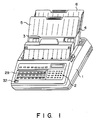
- Fig. 1 shows the appearance of the facsimile device.
- the facsimile device includes causing 1, operation unit 2, original insertion port 3, original discharging port 4, transmission original guide plate 5 and reception original guide plate 6.
- Operation unit 2 is arranged in the front upper portion of casing 1, and original insertion port 3 and original discharging port 4 are formed in the rear upper portion of casing 1.
- Transmission original guide plate 5 is mounted to define original insertion port 3 and reception original guide plate 6 is mounted to define original discharging port 4.
- Operation unit 2 includes execution section 20, push-phone dialing section 21, group selecting section 24, one-touch input section 25, function controller 26, liquid crystal display unit 27 and LED setion 8.
- Liquid crystal section 27 is used to display and phone number dialed, dialing time, message and the like
- LED section 28 is used to display the operating conditions set by function controller 26.
- Function controller 26 incudes various control buttons of "automatic”, “manual”, “copy”, “half-tone”, “contrast”, “mode”, “start” and “stop” which are generally provided in the normal facsimile devices.
- Execution section 20 includes abbreviated dialing specifying button 20A, enter button 20B, clear button 20C and various execution buttons.
- Push-phone dialing section 21 includes numeral buttons of "0" to “9", and symbol buttons of "*" and "#".
- Group selecting section 24 includes six group selecting buttons 24A to 24F arranged in a matrix form of 3 rows ⁇ 2 columns.
- One-touch input section 25 includes 18 one-touch dialing buttons 25A to 25R arranged in a matrix form of 3 row ⁇ 6 columns.
- the facsimile device further includes book panel 29 mounted on operation unit 2 so as to be freely rotated through 180° with respect to axis 31 and set into an open or closed condition, recess 32 for permitting book panel 29 to be easily opened by a finger, optical sensor 33 for detecting the open or closed condition of book panel 29, and index indicating section 34 which is covered with or hidden by book panel 29 when it is set in the closed condition.
- Book panel 29 has openings 30A to 30X corresponding to one-touch dial buttons 25A to 25R and group selection buttons 24A to 24F, and portions of book panel 29 which surround openings 30A to 30X may be used as areas on which indices indicating the names of the to-be-communicated object (A Co., B Co., ---; X group, Y group, ---) are written.
- one-touch dial buttons 25A to 25R are each used for one-touch dialing transmission effected by dialing the phone number of a corresponding specified to-be-communicated object, for example, a facsimile device.
- one-touch dial buttons 25A to 25R and group selection buttons 24A to 24F are formed to project from openings 30A to 30X, respectively, and the indices written on book panel 29 are respectively assigned to one-touch dial buttons 25A to 25R.
- one-touch dial buttons 25A to 25R are each used to input a starting command for a corresponding one of the predetermined processes contained in the functions of the facsimile device.
- one-touch dial buttons 25A to 25F are allotted for effecting the data setting processes for the one-touch dialing function, abbreviated dialing function, group dialing function, pass word function, self-ID transmission function and confidential transmission function.
- one-touch dial buttons 25G to 25L are allotted for effecting the data list printing processes for the one-touch dialing function, abbreviated dialing function, group dialing function, timer confirmation function, latest communication acknowledgement function, and activity report function.
- one-touch dial button 25M to 25R are allotted for effecting the processes of special functions, that is, polling function, timer function, encryption function, multi-copy function, total page function and test parameter function.
- Index indicating section 34 has section indicating areas 34A, 34B and 34C which correspond to the various data setting process, various data list printing process and specified function execution process and which are colored in red, yellow and blue, respectively. The aforementioned function names are written as the indices of one-touch dial buttons 25A to 25R on the corresponding areas.
- Optical sensor 33 is a sensor constituted by a set of light emitting element and a light receiving element.
- optical sensor 33 detects that book panel 29 is set in the closed condition when the light receiving element has received the reflected light, and detects that book panel 29 is set in the open condition when the light receiving element has not received the reflected light.
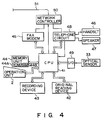
- Fig. 4 is a circuit diagram of the facsimile device.
- the facsimile device includes CPU 41, original reading device 42, recording device 43, memory unit 44, facsimile modem 45, handset 46, speaker 47, telephone circuit 48, I/O port 49, and network control device 50.
- CPU 41 is connected to operation unit 2, original reading device 42, recording device 43, memory unit 44, facsimile mode 45, telephone circuit 48, I/O port 49, and network control device 50 to control the whole operation of the facsimile device.
- Handset 46 and speaker 47 are connected to telephone circuit 48.
- FAX modem 45 and telephone circuit 48 are connected to network control device 50 which in turn is connected to telephone line 51.
- I/0 port 49 is connected to optical sensor 33.
- Memory unit 44 includes ROM 44A for storing the control program for CPU 41 and RAM 44B for temporarily storing I/O data of CPU 41.
- RAM 44B includes memory areas allocated for one-touch dial buttons 25A to 25R and each storing one telephone number of a to-be-communicated facsimile.
- original reading device 42 is used to optically read image such as characters and patterns of transmission original inserted into original insertion port 3, and convert the image into electrical image data.
- Recording device 43 is used to print the received image data or various data on recording paper.
- Network control device 50 serves to selectively connect one of FAX modem 45 and telephone circuit 48 to telephone line 51. When the facsimile device is set in the transmission/reception ready condition, telephone line 51 is connected to telephone circuit 48.
- Image data generated from original reading device 42 is supplied to FAX modem 45 by means of CPU 41 and is converted into a facsimile signal format by means of FAX modem 45.
- the facsimile signal is transmitted from FAX modem 45 via network control device 50 and telephone line 51.
- facsimile reception mode when the facsimile device is called via telephone line 51, telephone circuit 48 detects the call and informs CPU 41 of this fact. As a result, network control device 50 connects telephone line 51 to FAX modem 45, and FAX modem 45 extracts image data from the received facsimile signal. The image data is supplied to recording device 43 via CPU 41 which in turn prints the image data on the recording paper.
- Fig. 5 is a flowchart showing the operation of the facsimile device. After the power source is turned on, the facsimile device starts the operation shown in Fig. 5. After the operation is started, the initialization process is first effected in step S1, and then it is repeatedly checked in step S2 whether or not the button input operation is effected. When the button input operation is detected, it is checked in step S3 whether or not the operated button is one of one-touch dial buttons 25A to 25R. If it is detected that none of the one-touch dial buttons is operated, the process corresponding to the operated button is effected in step S4, and then step S2 is effected again.
- step S5 If it is detected in step S3 that the operated button is one of one-touch dial buttons 25A to 25R, it is checked in step S5 whether book panel 29 is set in the closed condition or not. When it is detected that book panel 29 is set in the closed condition, the telephone number of a to-be-communicated facsimile corresponding to the operated button is dialed to effect the facsimile transmission process in step S6. In contrast, when book panel 29 is set in the open condition, it is checked in step S7 whether or not the operated button is one of one-touch dial buttons 25A to 25F of the setting process section.
- step S8 When it is detected that the operated button is one of one-touch dial buttons 25A to 25F of the setting process section, the setting process corresponding to the operated button is effected in step S8, and then step S2 is effected again.
- the operated button is different from any one of one-touch dial buttons 25A to 25F of the setting process section, it is checked in step S9 whether or not the operated button is one of one-touch dial buttons 25G to 25L of the list printing process section.
- the list printing process corresponding to the operated button is effected in step S10, and then step S2 is effected again.
- step S11 when it is detected that the operated button is different from any one of one-touch dial buttons 25G to 25L of the list printing process section, the special function execution process corresponding to the operated button is effected in step S11, and then step S2 is effected again.
- book panel 29 is usually kept in the closed condition so as to permit the one-touch dial transmission to be effected at any time.
- book panel 29 is set into the open condition, and one-touch dial button 25M is operated with reference to the indices of one-touch dial buttons 25A to 25R indicated by index indicating section 34. As a result, the execution process of the polling function can be started.
- one-touch dial transmission process can be started.
- a corresponding to-be-communicated facsimile is specified by operated one-touch dial button 25F, and the telephone number of the specified to-be-communicated facsimile is read out from memory unit 44 and dialed.
- the staring command for process relating to each function can be input to the facsimile device by a simple operation of setting book panel 29 into the open condition and depressing one of one-touch dial buttons 25A to 25R. Further, since the button operation can be effected with reference to the indices of one-touch dial buttons 25A to 25R indicated by index indicating section 34, the operability can be enhanced.
- buttons 25A to 25R function as input buttons for inputting the starting command of various processes other than the one-touch dial transmission process when book panel 29 is set in the open condition, it is not necessary to provide input buttons separately from one-touch dial buttons 25A to 25R in order to input the starting command for the various processes. In other words, increase in the total number of buttons can be suppressed, thus preventing operation unit 2 from being made large and the manufacturing cost from being made high.
- the one-touch dial buttons on each row are used to input the starting command for the similar processes and section indicating areas 34A, 34B and 34C are set in different colors. As a result, the operability is further enhanced.
- one-touch dial buttons 25A to 25R are modified when book panel 29 is set into the open condition.
- group selection buttons 24A to 24F to function as a memory button, memory erase button, file printing button, file listing button and the like as in the case of one-touch dial buttons 25A to 25R.
- the memory button is used to permit original reading device 42 to read image of the transmission original when the transmission original is set in original insertion port 3 and store the read image data as an image file into memory unit 44.
- the memory button is also used to permit one image file stored in memory unit 44 to be transmitted when the transmission original is not set in original insertion port 3.
- the memory erase button is used to erase one image film from memory unit 44.
- the file printing button is used to print one image file stored in memory unit 44.
- the file listing button is used to output the list of all the image files stored in memory unit 44.
- numeral buttons of dial section 21 are selectively to specify one of the image files.
- the one-touch dial buttons on each row are used to input the starting command for the similar processes, but it is possible to use the one-touch dial buttons on each column so as to input the starting command for the similar processes.
- the setting process of various data, the list printing process of various data and the execution process of the specified functions are set as the processing sections, but processing sections other than these processing sections can be set.
- optical sensor 33 is used to detect the open or closed condition of book panel 29, but it may be replaced by a mechanical switch.
- book panel 29 is mounted so as to be selectively set into the open or closed condition, but it is also possible to detachably mount book panel 29.
Landscapes
- Engineering & Computer Science (AREA)
- Multimedia (AREA)
- Signal Processing (AREA)
- Automation & Control Theory (AREA)
- Human Computer Interaction (AREA)
- Facsimiles In General (AREA)
- Facsimile Transmission Control (AREA)
- Telephonic Communication Services (AREA)
Applications Claiming Priority (2)
| Application Number | Priority Date | Filing Date | Title |
|---|---|---|---|
| JP292765/87 | 1987-11-19 | ||
| JP62292765A JPH01133453A (ja) | 1987-11-19 | 1987-11-19 | ファクシミリ装置 |
Publications (2)
| Publication Number | Publication Date |
|---|---|
| EP0316883A2 true EP0316883A2 (de) | 1989-05-24 |
| EP0316883A3 EP0316883A3 (de) | 1990-09-05 |
Family
ID=17786048
Family Applications (1)
| Application Number | Title | Priority Date | Filing Date |
|---|---|---|---|
| EP19880119046 Withdrawn EP0316883A3 (de) | 1987-11-19 | 1988-11-15 | Faksimile-Einrichtung |
Country Status (3)
| Country | Link |
|---|---|
| EP (1) | EP0316883A3 (de) |
| JP (1) | JPH01133453A (de) |
| KR (1) | KR920005195B1 (de) |
Cited By (2)
| Publication number | Priority date | Publication date | Assignee | Title |
|---|---|---|---|---|
| EP0454387A3 (en) * | 1990-04-26 | 1992-05-06 | Canon Kabushiki Kaisha | Data communication apparatus with pre-recorded telephone numbers |
| US5216705A (en) * | 1989-07-12 | 1993-06-01 | Canon Kabushiki Kaisha | Data communication apparatus with an abbreviated dial key having a plurality of dial data and capable of selecting one of two communication functions |
Family Cites Families (5)
| Publication number | Priority date | Publication date | Assignee | Title |
|---|---|---|---|---|
| JPS5920294A (ja) * | 1982-07-28 | 1984-02-01 | Takasago Corp | ロジウム一価カチオン錯体の製造方法 |
| JPS6171753A (ja) * | 1984-09-14 | 1986-04-12 | Hitachi Heating Appliance Co Ltd | 自動ダイヤル機能付電話機 |
| US4661976A (en) * | 1986-04-21 | 1987-04-28 | Mfb Enterprises, Inc. | Automatic telephone dialer utilizing an electronic telephone book |
| JPS62261275A (ja) * | 1986-05-08 | 1987-11-13 | Tokyo Electric Co Ltd | フアクシミリ装置 |
| FR2602608A1 (fr) * | 1986-08-07 | 1988-02-12 | Campo Herve | Clavier avec plaque indexee amovible identifiant les fonctions des touches et les programmations a utiliser |
-
1987
- 1987-11-19 JP JP62292765A patent/JPH01133453A/ja active Pending
-
1988
- 1988-11-15 EP EP19880119046 patent/EP0316883A3/de not_active Withdrawn
- 1988-11-15 KR KR1019880015032A patent/KR920005195B1/ko not_active Expired
Cited By (3)
| Publication number | Priority date | Publication date | Assignee | Title |
|---|---|---|---|---|
| US5216705A (en) * | 1989-07-12 | 1993-06-01 | Canon Kabushiki Kaisha | Data communication apparatus with an abbreviated dial key having a plurality of dial data and capable of selecting one of two communication functions |
| EP0454387A3 (en) * | 1990-04-26 | 1992-05-06 | Canon Kabushiki Kaisha | Data communication apparatus with pre-recorded telephone numbers |
| US5189696A (en) * | 1990-04-26 | 1993-02-23 | Canon Kabushiki Kaisha | Data communication apparatus |
Also Published As
| Publication number | Publication date |
|---|---|
| JPH01133453A (ja) | 1989-05-25 |
| KR920005195B1 (ko) | 1992-06-29 |
| KR890009161A (ko) | 1989-07-15 |
| EP0316883A3 (de) | 1990-09-05 |
Similar Documents
| Publication | Publication Date | Title |
|---|---|---|
| EP0244869B1 (de) | Faksimilegerät | |
| US7612904B2 (en) | Data processing method in network system connected with image processing apparatus | |
| US4907264A (en) | Telephone set with subscriber listing | |
| US4829559A (en) | Facsimile apparatus with a mode for receiving non-image information | |
| EP0316883A2 (de) | Faksimile-Einrichtung | |
| US5521716A (en) | Data storage device having a selective voice and image data erasing function | |
| US5438428A (en) | Data storage device with selectable type data storages | |
| US5239386A (en) | Communication apparatus used with a card-like device | |
| US5189527A (en) | Facsimile communication device | |
| US6295071B1 (en) | Image processing apparatus and operation mode changing method therefor | |
| KR930010144B1 (ko) | 팩시밀리의 단축번호 자동입력방법 | |
| JP3706866B2 (ja) | 画像処理装置及び該画像処理装置の動作モード変更方法 | |
| JP2778686B2 (ja) | フアクシミリ装置 | |
| US6169606B1 (en) | Facsimile-copy combined apparatus | |
| KR0138268B1 (ko) | 통신단말장치 및 다이얼번호발신방법 | |
| EP0410461B1 (de) | Faksimileübertragungsgerät | |
| JP3078968B2 (ja) | 画像形成装置 | |
| JPS62149244A (ja) | 通信装置 | |
| JP3069396B2 (ja) | ファクシミリ装置 | |
| JP2590371B2 (ja) | 通信装置 | |
| JP4026523B2 (ja) | ファクシミリ装置 | |
| JPH09284435A (ja) | ファクシミリ装置 | |
| KR20010068805A (ko) | 죠그 다이얼을 이용한 단축 다이얼링 수행방법과 선택메뉴 기능설명 메세지 송출방법 | |
| JPS6253980B2 (de) | ||
| JP2007013789A (ja) | 多機能装置及び多機能装置用表示プログラム |
Legal Events
| Date | Code | Title | Description |
|---|---|---|---|
| PUAI | Public reference made under article 153(3) epc to a published international application that has entered the european phase |
Free format text: ORIGINAL CODE: 0009012 |
|
| 17P | Request for examination filed |
Effective date: 19881115 |
|
| AK | Designated contracting states |
Kind code of ref document: A2 Designated state(s): DE FR GB SE |
|
| PUAL | Search report despatched |
Free format text: ORIGINAL CODE: 0009013 |
|
| AK | Designated contracting states |
Kind code of ref document: A3 Designated state(s): DE FR GB SE |
|
| 17Q | First examination report despatched |
Effective date: 19920722 |
|
| STAA | Information on the status of an ep patent application or granted ep patent |
Free format text: STATUS: THE APPLICATION IS DEEMED TO BE WITHDRAWN |
|
| 18D | Application deemed to be withdrawn |
Effective date: 19921202 |