EP0400620B1 - Verfahren zum Verstecken oder Sichtbarmachen von Zellen in einem elektronischen Kalkulationsblatt - Google Patents
Verfahren zum Verstecken oder Sichtbarmachen von Zellen in einem elektronischen Kalkulationsblatt Download PDFInfo
- Publication number
- EP0400620B1 EP0400620B1 EP90110286A EP90110286A EP0400620B1 EP 0400620 B1 EP0400620 B1 EP 0400620B1 EP 90110286 A EP90110286 A EP 90110286A EP 90110286 A EP90110286 A EP 90110286A EP 0400620 B1 EP0400620 B1 EP 0400620B1
- Authority
- EP
- European Patent Office
- Prior art keywords
- row
- rows
- subordinate
- dominant
- formula
- Prior art date
- Legal status (The legal status is an assumption and is not a legal conclusion. Google has not performed a legal analysis and makes no representation as to the accuracy of the status listed.)
- Expired - Lifetime
Links
Images









Classifications
-
- G—PHYSICS
- G06—COMPUTING OR CALCULATING; COUNTING
- G06F—ELECTRIC DIGITAL DATA PROCESSING
- G06F40/00—Handling natural language data
- G06F40/10—Text processing
- G06F40/166—Editing, e.g. inserting or deleting
- G06F40/177—Editing, e.g. inserting or deleting of tables; using ruled lines
- G06F40/18—Editing, e.g. inserting or deleting of tables; using ruled lines of spreadsheets
-
- G—PHYSICS
- G06—COMPUTING OR CALCULATING; COUNTING
- G06F—ELECTRIC DIGITAL DATA PROCESSING
- G06F40/00—Handling natural language data
- G06F40/10—Text processing
- G06F40/166—Editing, e.g. inserting or deleting
- G06F40/177—Editing, e.g. inserting or deleting of tables; using ruled lines
Definitions
- This invention relates to a method of determining hierarchical relationships among cells in a spreadsheet and more particularly a method of hiding and showing cells in a spreadsheet based on hierarchical relationships among the cells.
- Spreadsheets are commonly used for a wide variety of applications. These include financial applications such as budgets, forecasts, income statements and balance sheets; database applications such as customer lists, sales records, personnel files, and equipment inventories. Other applications include graphics and even word processing.
- spreadsheet software so useful and widespread is its simplicity and versatility. It offers a raw two (or more) dimensional grid of cells which the user can utilize as desired. Numbers and/or words can be entered into any of the cells as desired. A wide variety of operations are then available for use with this data, such as totaling, sorting, graphing, copying, moving, word justification, and more. This combination of free-form data entry and then extensive commands for operating on the data is a powerful combination which allows spreadsheet software to be used effectively in a wide range of applications.
- spreadsheet data is limited to RAM which limits the size of the worksheets that users may operate; (2) large worksheets become unwieldy such that it is hard to create summary views of the worksheet for viewing, printing, or graphing; and (3) the operations offered by the spreadsheet software are unaware of the structure inherent in financial worksheets (i.e. categories and time periods).
- spreadsheet software A limitation in all of the popular spreadsheet software today is that the spreadsheet data must be held in free RAM (i.e. the RAM that is left over after the operating system, the spreadsheet software, and any co-resident applications are loaded) while the worksheet is being used.
- free RAM i.e. the RAM that is left over after the operating system, the spreadsheet software, and any co-resident applications are loaded
- spreadsheet software does not take advantage of disk storage to hold data that is being operated on. This is a severe limitation for users wanting to work with large spreadsheets.
- the only solution for users desiring more spreadsheet data space is to purchase more RAM, and then using special-purpose hardware or software called expanded memory to expand beyond DOS's 640K-byte memory limit.
- the present invention as claimed provides a method for hiding and showing spreadsheet cells of a worksheet being displayed on a computer system display means.
- the hiding and showing is based upon hierarchical relationships among the spreadsheet cells.
- This technique is implemented by first determining hierarchical relationships among cells based on cell indentation, content, and formulas. A group of contiguous cells having a common hierarchical relationship is then selected and hidden. Totals for the group of cells may then be shown in place of hidden cells.
- the hidden group of cells may be stored in a memory location other than main memory such as a magnetic or optical disk. The group of cells may then be retrieved from memory and shown on the display means.
- the user can increase the size of the worksheet without being constrained by the size of the computer main memory.
- the user can easily create a summary worksheet without duplication or loss of data while also preserving the structure of the worksheet.
- a smaller or summary worksheet it is easier to find items of interest and it is easier to understand and absorb the contents of the worksheet.
- this technique allows the user to more easily create reports and graphs with varying levels of summary or detail.
- a first preferred embodiment of the present invention is a technique for showing and hiding sections of the worksheet corresponding to different hierarchies within the worksheet. This process referred to is hereinafter referred to as spreadsheet outlining.
- spreadsheet outlining By showing or hiding different levels of detail and totals within the worksheet, the user can easily create different summary views of the worksheet, all within the same single worksheet.
- the user may hide rows to create a summary view by row category and/or hide columns to create a summary view by time period. This is much simpler, easier, faster, and reliable than creating multiple versions with formulas and links between versions.
- the user may hide across the third dimension (and so forth for an n-dimensional spreadsheet).
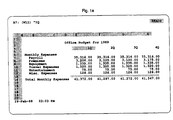
- Fig. 1a shows a screen displaying a portion of a budget worksheet.
- the user may hide a portion of the budget such as the detail rows under Payroll as shown in Fig. 1b.
- the user may hide the entire Monthly Expenses category rows as Shown in Fig. 1c or several portions of the Monthly Expenses category rows as shown in Fig. 1d.
- the user may hide or compress the monthly totals columns as shown in Fig. 1e.
- hidden data may be moved off the worksheet. It can be moved to a variety of places, including to a disk drive, to an unused portion of the spreadsheet, or to other storage devices. Alternative embodiments may also move the data to RAM or simply suppress the display of the data without moving it.
- a category When a category is hidden, the totals for that category remain on the worksheet.
- a financial worksheet will have a row with a category label, followed by detail lines, followed by a total line for that category, (e.g., see Payroll in Fig. 1a).
- the first embodiment moves the detail rows (Holly, Jim, Stan, Audrey) and the overscore out of the worksheet. If the data is being moved out of the spreadsheet entirely (e.g. to disk) and the total line contains formulas to calculate the totals, the first embodiment records the total formulas and replaces the total formulas with just the total numbers themselves. The total numbers are then moved up to the category label row (next to Payroll). The total label ("Total Payroll") is then moved off the worksheet. The result is shown in Fig. 1b. When the hidden data is later reshown, the process is reversed and the total formulas are reinserted. When hiding columns to show only the totals for higher-level time periods (e.g. hiding months to show only quarter and year totlas), if the totals wasn't already present in the worksheet, the first embodiment calculates them and then treats them as if they were. Alternative embodiments may also calculate totals for rows.
- Moving the hidden data to a disk drive or other storage device provides the benefit of freeing the RAM that was used for that data, releasing it for use by other data. This allows the worksheet to grow beyond the size of RAM. That is, hidden portions of the worksheet reside on disk, while the un-hidden portions remain in RAM. To view the portion on disk, the user requests that the hidden portion be "shown". This has the effect of moving the hidden portion from disk to RAM for reinsertion in the spreadsheet. If there is not enough RAM to hold the data to be shown, the user is prompted to select another category of data to be hidden on disk.
- Spreadsheet Outlining has additional capabilities for manipulating financial worksheets.
- a re-organization facility allows the user to point to a category title, point to where it should be put in the worksheet structure, and then have it automatically moved to the indicated place. All subsidiary rows are moved with the category title and no further spreadsheet operations such as inserting or deleting blank rows are necessary.
- the first embodiment exists within the context of an Electronic Spreadsheet (initially Lotus Development Corporation's 1-2-3). Such a spreadsheet is characterized by the ability to store data (numbers, text-labels, formulas) in cells organized in a two dimensional matrix in memory (a spreadsheet).
- a spreadsheet is characterized by the ability to store data (numbers, text-labels, formulas) in cells organized in a two dimensional matrix in memory (a spreadsheet).
- the host spreadsheet program maintains and displays the data
- the first embodiment is responsible for extending the host's command set and functionality to implement outlining and storage of hidden data on disk.
- the outlining and storage of hidden data on disk could be integrated with the spreadsheet program to create a second preferred embodiment offering all these functions.
- Fig. 2a is a block diagram showing the first embodiment within a computer system 100.
- the first embodiment (hereinafter referred to as Bud) 102 resides with a host spreadsheet program 104 in a computer 106. Both the first embodiment (Bud) and the host handle communications from a keyboard 108 and a disk 110.
- Fig. 2b is a block diagram showing the second embodiment within computer system 100.
- the second embodiment is an Integrated Spreadsheet Outliner 114 having all the functions of the first embodiment and the host spreadsheet program described above. However, there are efficiencies of implementation by combining the two programs.
- the functionality involved is the ability to analyze data on the spreadsheet in order to discover hierarchical organizations of data which can then be manipulated so as to give the appearance of hiding and showing groupings and sub-groupings of data.
- Data manipulation consists of combinations of: moving data to/from remote regions of the spreadsheet, moving data to/from secondary storage media (typically magnetic disk drives), setting hidden column attributes, and introducing new data representing summary information calculated from the original data.
- BUD is implemented as an addin product for Lotus 123.
- the first embodiment receives control at several points.
- the user may invoke Bud by pressing a certain key sequence. This causes a routing to display a menu allowing the user to select an action such as hiding rows, showing rows, or setting the column detail display level. These commands will then be dispatched to the appropriate routines.
- Fig. 3a shows the process when a previously saved worksheet file is loaded by the host spreadsheet.
- Bud will first open a previously saved companion file (step 200).
- the companion file has the same name as the worksheet file, but with a different extension (.bud). If there is no companion file (step 202), Bud will examine the sheet for Bud specific information (Step 204). If tag formulas indicating hidden rows stored to disk are detected (step 206), Bud will initialize a swap file (step 208) and display a "lost hidden data" message (step 210).
- Bud will copy the companion file to a swap file (step 214), read the linkage information (step 216), and free list information (step 218), and truncate the swap file to hidden data (step 220), before closing the companion file (step 222).
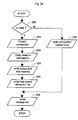
- Fig. 3b shows the process when a worksheet file is saved by the host spreadsheet.
- Bud will be notified so that it may save a companion file. If on sheet storage is used (step 230), Bud only writes some basic header information with house keeping into the companion file (step 232). If on-disk storage is used (step 230), the swap file is copied to the companion (steps 234 and 236), linkage information and free-list information is written (steps 238 and 240) before closing the companion file (step 242).
- Hierarchical groupings are determined in two distinct ways, one for each axis of the spreadsheet matrix.
- a row group consists of a "parent” row, subsidiary “children” rows below it, and possibly a total row below the children.
- a row group is determined primarily from the relative indentation of data within a row.
- a row's indentation is determined by scanning from left to right until a non-blank cell is encountered. If this cell is textual, then the number of leading spaces in the text is considered low-order indentation information. That is, a whole column of indentation is always more significant than any number of leading spaces. Rows of greater indentation are considered to be "owned” or grouped under preceding rows of lesser indentation. If no indentation is used or it is ambiguous, labels and formulas are also examined.
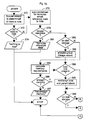
- the indentation of a row is determined by the GetLevel routine whose flowchart is given in Fig. 3c.
- a first step 250 column and indentation variables are initialized.
- the cell at (row, col) is examined (step 252). If cell is blank, col is incremented (step 254) and tested against the maximum column scanning limit (step 256) to control looping.
- the column scanning limit is the right most column used by the user unless the user specifies a different column. If the cell is non-blank (step 252) and contains text (step 258), the text is retrieved.
- a loop is used to count the number of leading spaces in the text (steps 258, 260, 262, and 264).
- the level information is encoded as 256 times the column indentation plus the count of leading spaces (step 266).
- the discovery of row ownership is done through the ScopeForward routine whose flowchart is given Figs. 3d and 3e.
- the variable row begins with the value of the row to be scoped. If the initial row already has hidden rows (step 270), there is no further scope (step 272). If the initial row does not already have hidden rows, then the level information and label of the parent row are recorded for later comparison (step 274). Any initial blank rows are skipped (step 276).
- the IndentRow and TotalRow variables are initialized (step 278). These variables represent the furthest scoped rows due to indentation detection and to summary total formula detection respectively.
- the row indentation level is then calculated (step 280).
- step 282 If the row is a blank row (step 282), the blank count is incremented (step 284) and if past a threshold value (step 286), the main scoping loop is terminated. If the row is outdented from the parent row (step 288), the scoping loop is terminated. If the row is the first row (step 290), then the indScope flag is set based the indentation of this first row (step 292). If indent scoping is active (step 294), the current row level is compared against the parent row level (step 296). If it's indented, IndentRow is advanced to current row (step 298), otherwise indentation scoping is de-activated (step 300).
- an indented row will flag subsequent termination of the scoping loop (steps 302 and 304). If the row contains a total label that matches the value text of the parent's label (step 306), the scope is determined to reach the current row (step 308). If the label does not match (step 306) and there is a summary formula present (step 310), the formula is examined. If the formula refers to cells prior to the parent row (step 312), the scoping loop is terminated. Otherwise, TotRow is advanced to the current row (step 314). The current row variable is then incremented (step 316) and tested for row scanning limits before continuing the main scoping loop (step 320). Upon completion of the main scoping loop (off page connector A), the greater of the IndentRow and TotalRow values is used to determine the scope of the parent row (steps 322, 324, 326 and 328).
- Column-wise hierarchies are determined by the relationship of column header cells to the time based groupings: month, quarter, and year. There are no “owner” columns, but there will be total columns which represent summary data for columns to the left of the respective total columns, based on the time periods included in the total. For example, there may be a column for "Year 1988" which is the total for the 12 previous columns representing data for "January 88" through “December 88".
- the SetColLevel routine handles column wise hierarchy scanning and detail level control as given in Fig. 3f.
- the level of detail display is supplied by the user. Columns are first fully expanded by looping over all columns (steps 330-340). Each column is shown by turning off the "hidden" attribute (step 334). If the column is a temporary total (step 336), it is removed and scanning continues with the next column which will now be at the temporary's index. Otherwise, the column index is incremented (step 340) to continue showing columns. After the columns are fully expanded, the column scanning information is then reinitialized (steps 342, 344). The columns are again examined from left to right with a loop (steps 344-360).
- Each pass through the loop will use a routine to find the next set of columns which are contained in the same period as the current column. If the last column spanned is a total (step 350), it is refreshed (step 352). Otherwise, a temporary total column is inserted (step 354) and the next column variable is incremented (step 356). All the spanned columns (but not the last one) are then hidden (step 358), and the current column is advance to the next column (step 360) after the span.
- rows are examined sequentially starting from the current row to determine which rows belong to the group to be hidden (step 370). This involves examining indentation levels, labels, and formulas, as described above in "Discovering Groups”. If no rows are discovered to be owned by the current row (step 372), no action is taken (step 374).
- the formulas of all rows must be examined to determine if they reference data that is about to be hidden (removed) from the spreadsheet (step 376). References to the total line, if present, are allowed, as this data will remain available. If invalid references are discovered (step 378), the hide operation is disallowed (step 380).
- on-sheet remote storage and off-sheet disk-storage (step 382).
- step 384 memory availability is first calculated (step 384) and examined (step 386). If memory is available, the hidden row data is moved to a special reserved area of the spreadsheet matrix.
- step 388 and 390 exchange parent's and total line's label, if present (steps 388 and 390). This is because the total line will remain on the worksheet, but without the detail showing, the relevant label is that of the parent then move interior detail lines (and parent line if total present) to reserved area (step 392). Move subsequent lines (and total line) up to cover area vacated by interior lines (step 394).
- install a linkage formula in column A step 396) to connect the visible line (parent or total, as appropriate) to the hidden rows. This linkage formula causes a plus-sign to appear in the reserved spreadsheet column.
- step 382 If off-sheet (step 382), a group linkage record is allocated (step 398), parent and total line's labels are exchanged (steps 388 and 390). Interior detail lines are transferred by writing the contents of each cell sequentially to the disk file area allocated. As each line is successivefully written (steps 400-402), a row locator record is allocated and linked to the list of row locators from the group linkage record (steps 404, 406, 408). If a total line is present (step 410), save the total line to the disk file and replace its formulas with constants representing their current values (steps 412-414) before covering hidden areas (step 394).
- the linkage formula in Column A contains the ID number of a group-record which is linked to the list of row-records made in steps 400-410. If an error is encountered when writing hidden lines to disk (step 402 or 414), the hide operation is undone by releasing allocated file space (step 416), freeing group and row locator records (step 418) and re-exchanging the parent and total labels (steps 420, 422).
- Hidden groups may be shown in response to commands given by the program operator. This is the inverse operation to hiding rows and when successful will restore the spreadsheet to the appearance it had before the hide operation. Examine row for presence of linkage formula in the first column (step 426). If no linkage, there is no hidden data (step 428). Calculate number of hidden rows and memory requirements (steps 430 and 432). If there is insufficient memory (step 434), allow user to hide other rows or terminate the show operation (see Swapping below) (steps 436, 438, 440, 442, 444 and 446). Open blank area on sheet by moving subsequent rows down (step 448). If on-sheet move hidden row data into newly opened area (steps 450, 452).
- step 456, 458, and 460 If on disk, follow row-record links sequentially from group record and sequentially read cell contents from disk swap file (steps 456, 458, and 460). If total line present, exchange parent's and total's label (steps 462 and 464). If off-sheet storage, read total line's formulas from final hidden row record (steps 466 and 468). Release all disk storage allocated to the lines displayed (step 472) and free the group and row-locator records (step 474). Remove linkage formula from column A (step 476).
- the hierarchical organization of rows gives the program operator a convenient grouping for swapping spreadsheet data in and out of limited memory. With off-sheet storage, memory is reclaimed when groups are hidden. This enables the creation of spreadsheets larger than the central memory capacity of the computer.
- the entire sheet may not be displayed at one time. It is possible that there will not be enough memory available to execute a show command.
- the program will allow the operator to point at an alternative group to hide. The program will hide the alternative group and then re-attempt the original show command (carefully keeping track of the shifting of row data due to hide operations). This loop will continue until the show operation succeeds or the operator terminates the command.
- Columns are hidden or shown based on a request to homogeneously display data at a given time-based interval: months, quarters, years, or all-data.
- data is not physically transferred, rather the hidden-column attribute of the host spreadsheet program is manipulated to prevent display of the desired columns.
- Temporary columns may be introduced to display summary (total) data for groups of columns.
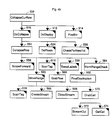
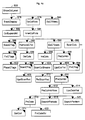
- Figs. 4a-d are a structure chart of Bud. Each block represents a module or routine that is executed to perform a function. A block has a blackened upper right corner if the module is repeated elsewhere in the structure chart. A block has a shadow if it is shown in more detail in another drawing. It will be understood that in Figs 4a-4d, a calling module includes a function call to another called module if the calling module (e.g. PutRow 538) is shown above and pointing to the called module(s) (e.g. OpenStream 542, PlaceCell 544, and PlaceTag 536).
- the calling module e.g. PutRow 538
- the called module(s) e.g. OpenStream 542, PlaceCell 544, and PlaceTag 536.
Landscapes
- Engineering & Computer Science (AREA)
- Theoretical Computer Science (AREA)
- Health & Medical Sciences (AREA)
- Artificial Intelligence (AREA)
- Audiology, Speech & Language Pathology (AREA)
- Computational Linguistics (AREA)
- General Health & Medical Sciences (AREA)
- Physics & Mathematics (AREA)
- General Engineering & Computer Science (AREA)
- General Physics & Mathematics (AREA)
- Management, Administration, Business Operations System, And Electronic Commerce (AREA)
- Document Processing Apparatus (AREA)
Claims (26)
- In einem Computer mit einer Anzeigeeinrichtung, einer Eingabeeinrichtung und einem Prozessor zum Ausführen eines Kalkulationsblattprogramms, wobei das Kalkulationsblattprogramm hervorruft, daß eine Vielzahl von sich kreuzenden Reihen und Spalten auf der Anzeigeeinrichtung angezeigt wird, manche von der Vielzahl von Reihen einen vordefinierten Zusammenhang mit anderen Reihen aufweisen und der vordefinierte Zusammenhang entweder dominant oder untergeordnet ist, umfaßt ein Verfahren zum Verstecken ausgewählter Reihen von der Vielzahl von Reihen die Schritte, daßa) eine dominante Reihe identifiziert wird, die einen dominanten Zusammenhang mit zumindest einer untergeordneten Reihe aufweist;b) die zumindest eine untergeordnete Reihe, die einen untergeordneten Zusammenhang mit der dominanten Reihe aufweist, automatisch ausgewählt wird; undc) die ausgewählte, zumindest eine untergeordnete Reihe derart versteckt wird, daß die zumindest eine untergeordnete Reihe nicht auf der Anzeigeeinrichtung angezeigt wird.
- Verfahren nach Anspruch 1, worin jede von der Vielzahl von Reihen ein in eine Rangordnung eingereihtes Einrükkungsniveau aufweist, und der Schritt des Auswählens der zumindest einen untergeordneten Reihe weiter den Schritt umfaßt, daß
die in die Rangordnung eingereihten Einrückungsniveaus eines Untersatzes von der Vielzahl von Reihen mit dem in eine Rangordnung eingereihten Einrückungsniveau der dominanten Reihe verglichen werden, um zu bestimmen, ob ein untergeordneter Zusammenhang zwischen den Reihen in dem Untersatz und der dominanten Reihe vorhanden ist. - Verfahren nach Anspruch 2, worin jede der Reihen in dem Untersatz einen Beginn aufweist und jede zumindest eine Leerstelle enthält, und der Schritt des Vergleichens der in eine Rangordnung eingereihten Einrückungsniveaus die Schritte umfaßt, daßdie Anzahl der Leerstellen bei dem Beginn von jeder der Reihen in dem Untersatz gezählt wird;ein in eine Rangordnung eingereihtes Einrückungsniveau jeder der Reihen in dem Untersatz unter Verwendung der gezählten Anzahl der Leerstellen zugewiesen wird; unddas in eine Rangordnung eingereihte Einrückungsniveau von jeder der Reihen in dem Untersatz mit dem Einrükkungsniveau der dominanten Reihe verglichen wird.
- Verfahren nach Anspruch 2, worin der Schritt des Vergleichens der in eine Rangordnung eingereihten Einrükkungsniveaus die Schritte umfaßt, daßder Untersatz von der Vielzahl von Reihen identifiziert wird, als daß er eine Gruppe von benachbarten Reihen ist, die unter der dominanten Reihe angezeigt werden;das Einrückungsniveau von jeder der Reihen in dem Untersatz bestimmt wird; unddas Einrückungsniveau von jeder der Reihen in dem Untersatz mit dem Einrückungsniveau der dominanten Reihe verglichen wird.
- Verfahren nach Anspruch 1, worin jede von der Vielzahl von Reihen eine Reihenmarkierung aufweist, die Text enthält, und der Schritt des automatischen Auswählens der zumindest einen untergeordneten Reihe weiter umfaßt, daßder Text, der in den Reihenmarkierungen eines Untersatzes von der Vielzahl von Reihen enthalten ist, mit dem Text verglichen wird, der in der Reihenmarkierung der dominanten Reihe enthalten ist, um eine Reihe zu lokalisieren, die eine Reihenmarkierung aufweist, die den Text, der in der Reihenmarkierung der dominanten Reihe enthalten ist, und zusätzlichen Text umfaßt, der eine Summenreihe oder eine Zusammenfassungsreihe anzeigt; undals die zumindest eine untergeordnete Reihe zumindest eine der Reihen identifiziert wird, die zwischen der dominanten Reihe und der lokalisierten Reihe angezeigt werden.
- Verfahren nach Anspruch 1, worin die Spalten Spaltenköpfe aufweisen, die Zeitperioden anzeigen, und das Verfahren weiter die Schritte umfaßt, daßzumindest eine der Spalten automatisch ausgewählt wird, indem die Spaltenköpfe untersucht werden, um zeitbasierte Gruppierungen zu bestimmen;die zumindest eine ausgewählte Spalte versteckt wird; undzumindest eine Zusammenfassungsspalte angezeigt wird, die Summen der versteckten Spalten enthält.
- Verfahren nach Anspruch 6, welches weiter die Schritte umfaßt, daß
die ausgewählte, zumindest eine Spalte in Ansprechen auf ein vordefiniertes Signal von der Eingabeeinrichtung angezeigt wird. - Verfahren nach Anspruch 1, welches weiter den Schritt umfaßt, daß
die versteckte, zumindest eine untergeordnete Reihe in Ansprechen auf ein vordefiniertes Signal von der Eingabeeinrichtung angezeigt wird. - Verfahren nach Anspruch 1, welches weiter die Schritte umfaßt, daßdie dominante Reihe auf der Anzeigeeinrichtung durch eine Zusammenfassungsreihe ersetzt wird, die Summen der zumindest einen untergeordneten Reihe enthält; unddie zumindest eine untergeordnete Reihe auf der Anzeigeeinrichtung durch Reihen ersetzt wird, die nicht versteckt worden sind, wodurch das Kalkulationsblatt komprimiert wird, um eine Zusammenfassungsansicht zu schaffen.
- Verfahren nach Anspruch 9, welches weiter den Schritt umfaßt, daß
eine Markierung für die Zusammenfassungsreihe aus der Markierung der dominanten Reihe aufgebaut und angezeigt wird. - Verfahren nach Anspruch 1, welches weiter die Schritte umfaßt, daßeine Bezugsreihe ausgewählt wird, die nicht innerhalb der zumindest einen untergeordneten Reihe liegt, die eine erste Formel enthält, wobei die erste Formel Bezug auf eine Reihe innerhalb der zumindest einen untergeordneten Reihe nimmt;die erste Formel der ausgewählten Bezugsreihe gespeichert wird; unddie erste Formel der ausgewählten Bezugsreihe durch eine zweite Formel ersetzt wird, die eine Konstante verwendet, um den Bezug zu der Reihe innerhalb der zumindest einen untergeordneten Reihe zu ersetzen.
- Verfahren nach Anspruch 11, welches weiter die Schritte umfaßt, daßdie zumindest eine untergeordnete Reihe zurückgeholt wird;die gespeicherte erste Formel zurückgeholt wird; unddie zweite Formel der ausgewählten Bezugsreihe durch die zurückgeholte erste Formel ersetzt wird.
- Verfahren nach Anspruch 1, worin der Schritt des Identifizierens einer dominanten Reihe den Schritt umfaßt, daß
eine dominante Reihe in Ansprechen auf ein vordefiniertes Signal von der Eingabeinrichtung identifiziert wird. - Verfahren nach einem der vorhergehenden Ansprüche, worin jede von der Vielzahl von Reihen eine Reihenmarkierung aufweist, und der Schritt des automatischen Auswählens der zumindest einen untergeordneten Reihe weiter umfaßt, daß
jede der Reihenmarkierungen eines Untersatzes der Reihen mit der Reihenmarkierung der dominanten Reihe verglichen wird, um zu bestimmen, ob der vordefinierte Zusammenhang zwischen der dominanten Reihe und der untergeordneten Reihe vorhanden ist. - Verfahren nach Anspruch 14, worin die Reihenmarkierungen in eine Rangordnung eingereihte Einrückungsniveaus aufweisen, und der Schritt des automatischen Auswählens der zumindest einen untergeordneten Reihe weiter den Schritt umfaßt, daß
die Einrückungsniveaus jeder Reihenmarkierung eines Untersatzes der Reihen mit dem Einrückungsniveau der Reihenmarkierung der dominanten Reihe verglichen werden, um zu bestimmen, ob der vordefinierte Zusammenhang vorhanden ist. - Verfahren nach Anspruch 15, worin zumindest eine von der Vielzahl von Reihen eine Leerreihenmarkierung aufweist, und der Schritt des Vergleichens der Einrückungsniveaus umfaßt, daß
ein maximales Einrückungniveau zumindest einer von der Vielzahl von Reihen, die eine Leerreihenmarkierung auf. weisen, zugewiesen wird. - Verfahren nach Anspruch 14, worin die Reihenmarkierungen Text enthalten, und der Schritt des automatischen Auswählens der zumindest einen untergeordneten Reihe weiter . die Schritte umfaßt, daßder Text, der in jeder Reihenmarkierung eines Untersatzes der Reihen enthalten ist, mit dem Text verglichen wird, der in der Reihenmarkierung der dominanten Reihe enthalten ist, um eine Reihe zu lokalisieren, die eine Reihenmarkierung aufweist, die den Text, der in der Reihenmarkierung der dominanten Reihe enthalten ist, und zusätzlichen Text umfaßt, der eine Summenreihe oder eine Zusammenfassungsreihe anzeigt; undals die ausgewählte untergeordnete Reihe zumindest eine der Reihen identifiziert wird, die zwischen der dominanten Reihe und der lokalisierten Reihe angezeigt wird.
- Verfahren nach Anspruch 14, wobei das Kalkulationsblatt eine Vielzahl von Spalten aufweist, die die Reihen kreuzen, die Vielzahl von Spalten Spaltenköpfe aufweist, die Zeitperioden anzeigen, und das Verfahren weiter die Schritte umfaßt, daßzumindest eine von der Vielzahl von Spalten ausgewählt wird, indem die Spaltenköpfe untersucht werden, um zeitbasierte Gruppierungen zu bestimmen;die ausgewählte, zumindest eine Spalte versteckt wird; undzumindest eine Zusammenfassungsspalte angezeigt wird, die Summen der versteckten Spalten enthält.
- Verfahren nach Anspruch 14, welches weiter die Schritte umfaßt, daß
die versteckte, zumindest eine untergeordnete Reihe in Ansprechen auf ein vordefiniertes Signal von der Eingabeeinrichtung angezeigt wird. - Verfahren nach Anspruch 14, welches weiter die Schritte umfaßt, daßdie dominante Reihe auf der Anzeigeeinrichtung durch eine Summenreihe ersetzt wird, die Summen der ausgewählten, zumindest einen untergeordneten Reihe enthält; unddie ausgewählte, zumindest eine untergeordnete Reihe auf der Anzeigeeinrichtung durch Reihen ersetzt wird, die nicht ausgewählt worden sind, wodurch die Kalkulationsblattanzeige komprimiert wird, um eine Zusammenfassungsansicht zu schaffen.
- Verfahren nach Anspruch 20, welches weiter den Schritt umfaßt, daß
eine Markierung für die Zusammenfassungsreihe aus der Markierung der dominanten Reihe aufgebaut und angezeigt wird. - Verfahren nach Anspruch 14, welches weiter die Schritte umfaßt, daßeine Bezugsreihe ausgewählt wird, die nicht innerhalb der ausgewählten, zumindest einen untergeordneten Reihe liegt, die eine erste Formel enthält, wobei die erste Formel auf eine Zelle innerhalb der Gruppe der untergeordneten Reihen Bezug nimmt;die erste Formel der ausgewählten Bezugsreihe gespeichert wird; unddie erste Formel der ausgewählten Bezugsreihe durch eine zweite Formel ersetzt wird, die eine Konstante verwendet, um den Bezug auf die Reihe innerhalb der ausgewählten, zumindest einen untergeordneten Reihe zu ersetzen.
- Verfahren nach Anspruch 22, welches weiter die Schritte umfaßt, daßdie ausgewählte, zumindest eine untergeordnete Reihe zurückgeholt wird;die gespeicherte erste Formel zurückgeholt wird; unddie zweite Formel der ausgewählten Bezugsreihe durch die zurückgeholte erste Formel ersetzt wird.
- Verfahren nach einem der vorhergehenden Ansprüche, worin die Vielzahl von Reihen zumindest eine Summenreihe umfaßt, die eine Formel enthält, die den vordefinierten Zusammenhang zwischen der dominanten Reihe und der untergeordneten Reihe anzeigt, welches weiter die Schritte umfaßt, daßa) die Summenreihe automatisch identifiziert wird, indem die Inhalte eines Untersatzes von der Vielzahl von Reihen untersucht werden, um eine Reihe zu lokalisieren, die eine Formel enthält, die den vordefinierten Zusammenhang zwischen der untergeordneten Reihe und der dominanten Reihe anzeigt;b) die zumindest eine untergeordnete Reihe automatisch ausgewählt wird, indem zumindest eine der Reihen ausgewählt wird, die zwischen der dominanten Reihe und der Summenreihe angezeigt werden.
- Verfahren nach Anspruch 24, welches weiter die Schritte umfaßt, daßdie dominante Reihe auf dem Anzeigemittel durch die Summenreihe ersetzt wird; unddie ausgewählte, zumindest eine untergeordnete Reihe auf der Anzeigeeinrichtung durch Reihen ersetzt wird, die nicht ausgewählt worden sind, wodurch das Kalkulationsblatt komprimiert wird, um eine Zusammenfassungsansicht zu schaffen.
- Verfahren nach einem der vorhergehenden Ansprüche, worin die dominante Reihe, die einen dominanten Zusammenhang mit zumindest einer untergeordneten Reihe aufweist, automatisch identifiziert wird.
Applications Claiming Priority (2)
| Application Number | Priority Date | Filing Date | Title |
|---|---|---|---|
| US35967889A | 1989-05-31 | 1989-05-31 | |
| US359678 | 1989-05-31 |
Publications (3)
| Publication Number | Publication Date |
|---|---|
| EP0400620A2 EP0400620A2 (de) | 1990-12-05 |
| EP0400620A3 EP0400620A3 (de) | 1993-02-24 |
| EP0400620B1 true EP0400620B1 (de) | 1997-07-30 |
Family
ID=23414838
Family Applications (1)
| Application Number | Title | Priority Date | Filing Date |
|---|---|---|---|
| EP90110286A Expired - Lifetime EP0400620B1 (de) | 1989-05-31 | 1990-05-30 | Verfahren zum Verstecken oder Sichtbarmachen von Zellen in einem elektronischen Kalkulationsblatt |
Country Status (3)
| Country | Link |
|---|---|
| EP (1) | EP0400620B1 (de) |
| JP (1) | JPH0743707B2 (de) |
| DE (1) | DE69031149T2 (de) |
Families Citing this family (8)
| Publication number | Priority date | Publication date | Assignee | Title |
|---|---|---|---|---|
| JP3388655B2 (ja) * | 1995-07-28 | 2003-03-24 | シャープ株式会社 | データ処理装置 |
| JPH09204423A (ja) * | 1996-01-29 | 1997-08-05 | Nec Corp | 表データ処理装置 |
| US6317750B1 (en) * | 1998-10-26 | 2001-11-13 | Hyperion Solutions Corporation | Method and apparatus for accessing multidimensional data |
| US7130071B2 (en) * | 2001-02-20 | 2006-10-31 | Eastman Kodak Company | Page and subset feature selection user interface |
| US7788584B2 (en) * | 2005-08-03 | 2010-08-31 | International Business Machines Corporation | Computer-implemented method, system, and program product for hiding columns in an electronic table |
| WO2008107338A1 (fr) * | 2007-02-23 | 2008-09-12 | Enrico Maim | Procedes d'extraction, de combinaison, de synthese et de visualisation de donnees multidimensionnelles provenant de differentes sources |
| US8001155B2 (en) * | 2008-06-20 | 2011-08-16 | Microsoft Corporation | Hierarchically presenting tabular data |
| JP6716873B2 (ja) | 2015-08-10 | 2020-07-01 | 富士通株式会社 | データ処理方法、データ処理プログラムおよび情報処理装置 |
Family Cites Families (1)
| Publication number | Priority date | Publication date | Assignee | Title |
|---|---|---|---|---|
| US4989141A (en) * | 1987-06-01 | 1991-01-29 | Corporate Class Software | Computer system for financial analyses and reporting |
-
1990
- 1990-05-30 DE DE69031149T patent/DE69031149T2/de not_active Expired - Fee Related
- 1990-05-30 EP EP90110286A patent/EP0400620B1/de not_active Expired - Lifetime
- 1990-05-31 JP JP2143271A patent/JPH0743707B2/ja not_active Expired - Lifetime
Non-Patent Citations (1)
| Title |
|---|
| US pages 1869 - 1876 R.B. MILLER 'Simplified matrix programming' * |
Also Published As
| Publication number | Publication date |
|---|---|
| DE69031149D1 (de) | 1997-09-04 |
| EP0400620A2 (de) | 1990-12-05 |
| EP0400620A3 (de) | 1993-02-24 |
| JPH0743707B2 (ja) | 1995-05-15 |
| JPH03163660A (ja) | 1991-07-15 |
| DE69031149T2 (de) | 1998-01-15 |
Similar Documents
| Publication | Publication Date | Title |
|---|---|---|
| US5255356A (en) | Method for hiding and showing spreadsheet cells | |
| CA2157972C (en) | Cut-and-paste method and data processing system in table | |
| US8230321B2 (en) | System in an electronic spreadsheet for displaying and/or hiding range of cells | |
| US8095867B2 (en) | System and computer program product for copying and pasting displayed elements of a range of cells in an electronic spreadsheet | |
| US7370271B2 (en) | Methods and apparatus for generating a spreadsheet report template | |
| US7275207B2 (en) | System and method in an electronic spreadsheet for displaying and/or hiding range of cells | |
| CN1030804C (zh) | 应用多维数据图符的方法与设备 | |
| US20020091728A1 (en) | Multidimensional electronic spreadsheet system and method | |
| US6725422B1 (en) | Method and system in an electronic spreadsheet for introducing new elements in a cell named range according to different modes | |
| US7971134B2 (en) | Method and system in an electronic spreadsheet for persistently filling by samples a range of cells | |
| US20020049785A1 (en) | Method and system in an electronic spreadsheet for persistently self-replicatig multiple ranges of cells through a copy-paste operation | |
| US20010007988A1 (en) | Method and system in an electronic spreadsheet for adding or removing elements from a cell named range according to different modes | |
| JPH06505819A (ja) | 並列使用マルチユーザ・リレーショナル・データベース管理システム及びその方法 | |
| CA2287030A1 (en) | Method and apparatus for accessing multidimensional data | |
| EP0400620B1 (de) | Verfahren zum Verstecken oder Sichtbarmachen von Zellen in einem elektronischen Kalkulationsblatt | |
| US20030188258A1 (en) | System and method in an electronic spreadsheet for displaying and/or hiding range of cells | |
| EP0326162B1 (de) | Datenbanksystem mit Faksimileanmerkungen und Verfahren zur Faksimileanmerkungen-Verwaltung | |
| JPS6037945B2 (ja) | 階層木構造のテキストを順序構造で表示する方法 | |
| CA2166809C (en) | Data management using nested records and code points | |
| Brown et al. | A graphics editor for labanotation | |
| EP0364384B1 (de) | Verfahren zur Behandlung von Markierungselementen eines Dokumentendatenstroms | |
| US5649191A (en) | Information searching apparatus for managing and retrieving document data stored in a storage unit | |
| US7676469B1 (en) | Maintaining and displaying user ordered lists | |
| Tierney | XLISP-STAT A Statistical Environment Based on the XLISP Language | |
| Brun | HBOOK: Statistical analysis and histogramming: Reference manual |
Legal Events
| Date | Code | Title | Description |
|---|---|---|---|
| PUAI | Public reference made under article 153(3) epc to a published international application that has entered the european phase |
Free format text: ORIGINAL CODE: 0009012 |
|
| AK | Designated contracting states |
Kind code of ref document: A2 Designated state(s): DE FR GB IT |
|
| PUAL | Search report despatched |
Free format text: ORIGINAL CODE: 0009013 |
|
| AK | Designated contracting states |
Kind code of ref document: A3 Designated state(s): DE FR GB IT |
|
| RAP1 | Party data changed (applicant data changed or rights of an application transferred) |
Owner name: MICROSOFT CORPORATION |
|
| 17P | Request for examination filed |
Effective date: 19930708 |
|
| 17Q | First examination report despatched |
Effective date: 19940524 |
|
| GRAG | Despatch of communication of intention to grant |
Free format text: ORIGINAL CODE: EPIDOS AGRA |
|
| GRAH | Despatch of communication of intention to grant a patent |
Free format text: ORIGINAL CODE: EPIDOS IGRA |
|
| GRAH | Despatch of communication of intention to grant a patent |
Free format text: ORIGINAL CODE: EPIDOS IGRA |
|
| GRAA | (expected) grant |
Free format text: ORIGINAL CODE: 0009210 |
|
| AK | Designated contracting states |
Kind code of ref document: B1 Designated state(s): DE FR GB IT |
|
| PG25 | Lapsed in a contracting state [announced via postgrant information from national office to epo] |
Ref country code: IT Free format text: LAPSE BECAUSE OF FAILURE TO SUBMIT A TRANSLATION OF THE DESCRIPTION OR TO PAY THE FEE WITHIN THE PRE;WARNING: LAPSES OF ITALIAN PATENTS WITH EFFECTIVE DATE BEFORE 2007 MAY HAVE OCCURRED AT ANY TIME BEFORE 2007. THE CORRECT EFFECTIVE DATE MAY BE DIFFERENT FROM THE ONE RECORDED.SCRIBED TIME-LIMIT Effective date: 19970730 |
|
| REF | Corresponds to: |
Ref document number: 69031149 Country of ref document: DE Date of ref document: 19970904 |
|
| ET | Fr: translation filed | ||
| PLBE | No opposition filed within time limit |
Free format text: ORIGINAL CODE: 0009261 |
|
| STAA | Information on the status of an ep patent application or granted ep patent |
Free format text: STATUS: NO OPPOSITION FILED WITHIN TIME LIMIT |
|
| 26N | No opposition filed | ||
| PGFP | Annual fee paid to national office [announced via postgrant information from national office to epo] |
Ref country code: FR Payment date: 20010518 Year of fee payment: 12 |
|
| PGFP | Annual fee paid to national office [announced via postgrant information from national office to epo] |
Ref country code: DE Payment date: 20010522 Year of fee payment: 12 |
|
| PGFP | Annual fee paid to national office [announced via postgrant information from national office to epo] |
Ref country code: GB Payment date: 20010530 Year of fee payment: 12 |
|
| REG | Reference to a national code |
Ref country code: GB Ref legal event code: IF02 |
|
| PG25 | Lapsed in a contracting state [announced via postgrant information from national office to epo] |
Ref country code: GB Free format text: LAPSE BECAUSE OF NON-PAYMENT OF DUE FEES Effective date: 20020530 |
|
| PG25 | Lapsed in a contracting state [announced via postgrant information from national office to epo] |
Ref country code: DE Free format text: LAPSE BECAUSE OF NON-PAYMENT OF DUE FEES Effective date: 20021203 |
|
| GBPC | Gb: european patent ceased through non-payment of renewal fee |
Effective date: 20020530 |
|
| PG25 | Lapsed in a contracting state [announced via postgrant information from national office to epo] |
Ref country code: FR Free format text: LAPSE BECAUSE OF NON-PAYMENT OF DUE FEES Effective date: 20030131 |
|
| REG | Reference to a national code |
Ref country code: FR Ref legal event code: ST |
|
| REG | Reference to a national code |
Ref country code: GB Ref legal event code: 732E Free format text: REGISTERED BETWEEN 20150312 AND 20150318 |