EP0422577A2 - Verfahren und Vorrichtung zum Anzeigen von simulierten Tastaturen auf berührungsempfindlichen Anzeigen - Google Patents
Verfahren und Vorrichtung zum Anzeigen von simulierten Tastaturen auf berührungsempfindlichen Anzeigen Download PDFInfo
- Publication number
- EP0422577A2 EP0422577A2 EP90119322A EP90119322A EP0422577A2 EP 0422577 A2 EP0422577 A2 EP 0422577A2 EP 90119322 A EP90119322 A EP 90119322A EP 90119322 A EP90119322 A EP 90119322A EP 0422577 A2 EP0422577 A2 EP 0422577A2
- Authority
- EP
- European Patent Office
- Prior art keywords
- touch
- sensitive display
- keyboard
- simulated keyboard
- displaying
- Prior art date
- Legal status (The legal status is an assumption and is not a legal conclusion. Google has not performed a legal analysis and makes no representation as to the accuracy of the status listed.)
- Withdrawn
Links
Images







Classifications
-
- G—PHYSICS
- G06—COMPUTING OR CALCULATING; COUNTING
- G06F—ELECTRIC DIGITAL DATA PROCESSING
- G06F3/00—Input arrangements for transferring data to be processed into a form capable of being handled by the computer; Output arrangements for transferring data from processing unit to output unit, e.g. interface arrangements
- G06F3/01—Input arrangements or combined input and output arrangements for interaction between user and computer
- G06F3/048—Interaction techniques based on graphical user interfaces [GUI]
- G06F3/0487—Interaction techniques based on graphical user interfaces [GUI] using specific features provided by the input device, e.g. functions controlled by the rotation of a mouse with dual sensing arrangements, or of the nature of the input device, e.g. tap gestures based on pressure sensed by a digitiser
- G06F3/0488—Interaction techniques based on graphical user interfaces [GUI] using specific features provided by the input device, e.g. functions controlled by the rotation of a mouse with dual sensing arrangements, or of the nature of the input device, e.g. tap gestures based on pressure sensed by a digitiser using a touch-screen or digitiser, e.g. input of commands through traced gestures
- G06F3/04886—Interaction techniques based on graphical user interfaces [GUI] using specific features provided by the input device, e.g. functions controlled by the rotation of a mouse with dual sensing arrangements, or of the nature of the input device, e.g. tap gestures based on pressure sensed by a digitiser using a touch-screen or digitiser, e.g. input of commands through traced gestures by partitioning the display area of the touch-screen or the surface of the digitising tablet into independently controllable areas, e.g. virtual keyboards or menus
Definitions
- This invention relates to computer systems and more particularly to touch-sensitive input/output (“I/O") devices thereof.
- a touch sensitive display of this type generally has a conventional video display screen provided with a transparent touch-sensitive screen as a frontplate.
- the touch sensitive display is used in conjunction with application programs specifically designed to take advantage of this type of I/O device.
- application programs can cause the display screens to display simulated conventional typewriter keyboards.
- the simulated keyboard is then available for entering data and commands for later use or execution in the application program that generated the keyboard.
- the simulated keyboards in such applications are dedicated for use only in the specific applications in which they have been programmed.
- each key of the simulated keyboard is represented by a discretely-defined area bounded by a frame.
- an indicium of an alpha-numeric character, or a character representing punctuation, other symbol, or function is visible through the touch-sensitive-screen overlaying the display.
- the user For typing on the simulated keyboard, the user touches the touch-sensitive-screen on the displayed keys in the same fashion that a typist uses a conventional typewriter.
- the "touches" on the display cause the generation of coded electrical signals corresponding to the locations that are touched, and thereby representing the displayed characters (e.g., capital or lower case letters depending on whether the displayed shift key is touched) or functions selected by the user.
- the coded electrical signals then are processed by the computer in the same manner that it would process the electrical signals generated by a conventional keyboard input device.
- the touch-sensitive display as a combination I/O device presents certain complications. For instance, when the simulated keyboard is "called up" and displayed on the screen, it may very well occupy the entire raster or a substantial portion thereof. In order to accommodate such a simulated keyboard, either the normal output screen of that program must be removed from view in its entirety, or the window in which the simulated keyboard appears must be an overlay which replaces and, thereby, removes from view, a substantial portion of the program's normal output screen.
- the simulated keyboard were positioned in the same place on the screen whenever it were displayed in such programs, the simulated keyboard, as often as not, would replace or cover the "active portion" of the software output screen.
- the active portion is the area of the screen into which the information being typed is to be entered. It is easy to understand that, if the user must enter data in such programs without the active portion of the software output screen being visible, data-entry accuracy and/or efficiency would suffer, to say the least.
- U.S. Patent No. 4,763,356 discloses the use of a simulated typewriter-type keyboard on a touch-sensitive display used specifically in filling out electronic forms.
- This patent even suggests a limited solution for the geometric conflict problem mentioned above; namely, whenever the application displays a simulated keyboard, the user can move the keyboard each time it appears so as not to cover a user-selectable portion of the screen. For that purpose, a movement icon is displayed with the simulated keyboard, and when the movement icon is touched by the user, the displayed keyboard is moved in the direction of the point touched.
- the invention resides in the provision of a touch-sensitive simulated keyboard which is a general-purpose, rather than application-dedicated, I/O tool-- similar in that way to a conventional keyboard device or mouse.
- the simulated keyboard program remains resident in computer memory and can be used at the discretion of the computer user at any time in conjunction with any application program run on the computer.
- the invention resides in techniques for automatically positioning a simulated keyboard, e.g., a typewriter-type keyboard, to avoid geometric conflicts between the active portion of a normal software output screen and the simulated keyboard window.
- a simulated keyboard e.g., a typewriter-type keyboard
- the simulated keyboard is positioned automatically in a part of the screen which does not include the active region.
- the active region is indicated by the cursor.
- the simulated keyboard is positioned in the bottom portion, e.g. the bottom half, of the screen whenever the cursor is located in the top half of the screen, and vice versa.
- the keyboard automatically appears in a portion of the screen, e.g., the bottom half, while the software output screen appears in its entirety, though reduced in height (e.g., by 50%), in another portion, e.g. the top half, of the screen.
- the software output screen is concealed by the simulated keyboard, but rather concurrent display of both in their entirety is achieved.
- this approach is tantamount to providing electronically a second display when needed for the concurrent display of input and output screens, albeit, using height compression to "squeeze" a full screen's information into a half screen with an attending decrease in resolution.
- both of the above-mentioned techniques are user-selectable alternatives.
- the computer user on touching a displayed control button and making a selection from a menu, the computer user activates the simulated keyboard and can cause it to be positioned automatically with respect to the cursor, i.e., use the above-mentioned first positioning technique, whenever the simulated keyboard is displayed.
- the computer user can cause both the application output screen and the simulated keyboard input screen to be concurrently displayed, i.e., use the above-mentioned second positioning technique, whenever the simulated keyboard is called to screen.
- the computer user is provided with a third option, that of manually locating the simulated keyboard at any desired position on the display raster.
- the simulated keyboard can be displayed on the screen or removed therefrom simply by touching a displayed toggle control button.
- the touch-sensitive keyboard in accordance with the invention is preferably a general-purpose input/output device that is controlled at the operating system level rather than the software application level.
- the control of the simulated keyboard display including its position within the display's raster and, in the first technique, with respect to the cursor, is the responsibility of the basic input/output services of the computer.
- the touch-sensitive keyboard is resident within the computer as a system utility and is independent of any specific application run on the computer.
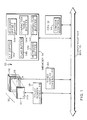
- FIGURE 1 shows a computer system 10 in accordance with a preferred practice of the invention.
- a central processing unit (“CPU") 12 which communicates with a memory 14 and peripherals via a bus 15.
- CPU central processing unit
- peripherals include an interactive user interface 16, touch screen controller 18 and display controller 20.
- the user interface 16 has a transparent touch-sensitive input screen or panel (the "touch screen") 24 and a conventional display unit 26.
- the display unit 26 has an output screen 28.
- the touch screen 24 overlays, i.e., mounts as a frontplate directly over, the output screen 28.
- Shown on the output screen 28 is a simulated keyboard, generally designated at K.
- the touch screen 24 in a preferred embodiment is a glass plate coated on its touch-sensitive side 24a (i.e., the side facing away from the output screen 28) with a resistive material, and then covered on that side with a Mylar contact sheet (not separately shown).
- the contact sheet is maintained at a small, substantially-uniform distance from the touch-sensitive side of the glass plate. Pressure exerted on the contact sheet by a finger, stylus or other object, (herein called a "touch”) causes the contact sheet to make electrical contact with the resistive coating.
- the touch screen controller 18 impresses a voltage gradient across the resistive coating alternately in the "x" (i.e., horizontal) and "y" (i.e., vertical) directions.
- the touch produces voltage signals detectable by the touch screen controller 18 which are representative of the average Cartesian coordinates in the x- and y- directions of the touched area of the screen.
- These voltage signals are converted to digital signals by the touch screen controller 18.
- These digital signals represent each of, for instance, 256, discrete positions on the touch screen 24 in each direction.
- two 8-bit bytes are used to represent the x-coordinate
- two 8-bit bytes are used to represent the y-coordinate.
- the digital signal representing each such touch constitutes a coordinate set having the following format: where "x1" and "x2" are the two bytes or characters representing the x-coordinate, and "y1" and "y2" are the two bytes or characters representing the y-coordinate.
- Each such five-character coordinate set completely defines a touch.
- the five-character coordinate sets are transmitted by the touch screen controller 18 over the communication bus 15 to the CPU 12 for processing.
- a suitable communication signal for transmitting the coordinates to the CPU 12 preferably includes alignment bits added as a header and between each of the characters to identify their boundaries, thereby aiding data recovery at the CPU 12.
- Suitable touch screens and touch screen controllers are commercially-available, e.g., from ELOGRAPHICS of Oak Ridge, Tennessee, U.S.A.
- the CPU 12 receives the coordinate sets from the touch-screen controller 18, and stores the sets as data structures 14a each sequentially in an x,y buffer 14a, which is, for example, a six-byte section of the memory 14.
- the CPU 12 includes a cursor control 35 for tracking and storing the location of the cursor, and controlling its position on the display. Both the CPU 12 and memory 14 can be implemented using conventional, commercially available hardware.
- the memory 14 also includes a flag buffer 14b, a keyboard buffer 14c, a keyboard offset buffer 14d, a character table buffer 14e and a character buffer 14f. These are described below.
- the display 26 is preferably a liquid crystal display which is back lit.
- a suitable size for the raster of the display 26 is, for example, 640 x 400 (i.e., 400 rows of pixels, with 640 pixels in each row), although other raster sizes providing a different number of rows or a different number of pixels in each row also can be used.
- the computer system 10 can also include other components and features conventionally found in personal computers or computer terminals.
- Computer 10 is shown and described only to the extent necessary to convey an enabling understanding of the best mode of implementing the invention, as will be apparent to those skilled in the art
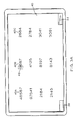
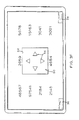
- FIGURES 2A and 2B depict display layouts for the touch-sensitive display 26 showing two control "buttons” (i.e., keys): a touch screen function button 34 appears in the lower right-hand corner of the screen 28, and a display/remove keyboard toggle button 36 appears in the lower left-hand corner of the screen 28, as viewed in those drawings.
- buttons i.e., keys
- a menu 38 appears on-screen, as shown in FIGURE 2B.
- the user can then select one or more entries (i.e., "functions") in the menu 38.
- the first function ACTIVATE KEYBOARD
- a keyboard e.g., a conventional 101-key QWERTY typewriter keyboard K
- DE-ACTIVATE KEYBOARD when selected, causes the previously activated simulated keyboard K to be deactivated.
- the third function when selected, causes the simulated keyboard K to be positioned automatically with respect to the cursor to appear on the screen in a portion thereof away from the active area of the screen.
- the fourth function MANUAL KEYBOARD POSITIONING, when selected, causes the simulated keyboard K to be positioned in a user movable location on the screen.
- the fifth function SPLIT SCREEN TO DISPLAY BOTTOM KEYBOARD, when selected, causes the simulated keyboard K to appear in the bottom portion of the screen and, simultaneously therewith, causes the software output screen to appear in its entirety in height-compacted form, in the opposite, i.e., top, portion of the screen.
- the sixth function, EXIT when selected, causes the menu 38 to disappear from view.
- the computer system 10 After the computer user has activated the simulated keyboard K and otherwise made his/her selections from the menu 38, the computer system 10 is ready for entry of data or commands, using the simulated keyboard K.
- the simulated keyboard K can be used to enter data or commands for running, for example, commercially-available standard software packages such as data processing, spread sheet, and data-base management programs, which have been designed for use with conventional keyboard devices. It can be appreciated that the simulated keyboard K is a general-purpose input device, useful in conjunction with a broad range of computer application programs.
- the previously-activated simulated keyboard K is displayed on user-command, i.e., by the user pressing the display/remove keyboard toggle button 36.
- the simulated keyboard K is not desired, it is removed from the screen by again pressing button 36.
- the button 36 only will cause the simulated keyboard K to appear if the keyboard K has been activated (and not thereafter deactivated) using the touch screen function button 34.
- the simulated keyboard K will appear in the position determined by the user's selection of one of the third, fourth, or fifth functions of the menu 38.
- the simulated keyboard K is positioned in accordance with, e.g., the third function, AUTO KEYBOARD POSITIONING, which is selected by the computer as the default positioning technique.
- FIGURE 3A depicts an illustrative example of a software output screen 40 having multiple columns 40A, 40B, 40C, each of four lines, of numbers.
- the output screen 40 in FIGURE 3A also has the control buttons 34, 36 in the same positions as in FIGURES 2A and 2B.
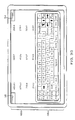
- the FIGURES 3B through 3G each show a portion of the output screen 40 in addition to an input screen, as described below.
- a simulated keyboard K appears over a portion of the screen 40, as if it had been displayed by the computer in AUTOMATIC POSITIONING mode.
- the toggle button 36 is pressed, the previously-activated simulated keyboard K appears on screen in a window 44 occupying, e.g., as shown in FIGURE 3B, a bottom portion 46a of the display 28 if a cursor 48 is in a top portion 46b, and, as shown in FIGURE 3C, occupying the top portion 46b if the cursor 48 is in the bottom portion 46b.
- the cursor 48 indicates, as stated above, the active portion (e.g., half) of the screen in which information is being inserted, deleted or manipulated by the simulated keyboard K, or, simply, which is of interest to the computer user.
- the active half of the software output screen and the simulated keyboard K are displayed concurrently. This occurs regardless of whether the active half is the top or bottom portion 46a, 46b of the screen.
- the computer system 10 automatically changes the position of the simulated keyboard K when the active half of the screen changes.
- the cursor 48 is moved to occupy the opposite portion 46a, 46b of the screen (for example, by a computer user manipulating its position using the simulated keyboard K)
- the simulated keyboard itself, changes positions.
- control buttons 34, 36 are shifted to occupy the corners of the screen in the half not containing the simulated keyboard K.
- the control buttons 34, 36 need not shift locations as just described. In that case, the buttons 34, 36 can remain in, for example, the bottom portion of the screen.
- FIGURES 3D and 3E illustrate the MANUAL POSITIONING mode.
- the simulated keyboard K appears in the portion of the screen, e.g., top, bottom or any intermediate portion, selected by the computer user, regardless of where the cursor 48 is located.
- the simulated keyboard K is located in a window 44 in an intermediate portion 46c of the screen, and the cursor 48 happens to be above the keyboard window 44, although it also could have been below or blocked from view by the keyboard window 44.
- the position of the simulated keyboard K is independent of the position of the cursor.
- the simulated keyboard window 44 is again in the intermediate portion 46c of the screen, though one line of text higher, and therefore, masking the cursor 48 from view.
- the location in which the entered text would normally appear is hidden from view on the screen of FIGURE 3E.
- a manual-positioning tool 50 To manually position the simulated keyboard K, a manual-positioning tool 50, as shown in FIGURE 3F, Is displayed in a window 52 on the screen when the manual keyboard positioning function is selected.
- the manual-positioning tool 50 includes arrows 54 pointing in left, right, up and down as viewed in that drawing, in each of four orthogonally related directions. Touching any of the arrows 54 causes the window 52 to shift in the direction to which the touched arrow points. The simulated keyboard K will then appear shifted in the same direction by the amount selected by the user. Of course, if the simulated keyboard K occupies the full rastor of the screen from left to right, then it only can be manually moved up or down.
- the simulated keyboard K is displayed and used pursuant to a computer program stored in, for example, memory 14 (FIGURE 1). An enabling understanding of that program now will now be provided by describing a suitable algorithm 100 therefor.
- FIGURE 4 depicts, in flow chart form, a simulated keyboard call-up routine 100a of algorithm 100, which is called KEYBOARD ENTRYPOINT.
- a simulated keyboard call-up routine 100a of algorithm 100 which is called KEYBOARD ENTRYPOINT.
- an x,y coordinates set data structure from the x,y buffer 14a (FIGURE 1) is fetched.
- this fetched data structure is tested to determine whether it contains a valid set of coordinates of a touch, i.e., whether the first byte thereof is set. If it is not set, then the x,y coordinates set is not valid, and the algorithm 100 proceeds to block 106 (as indicated by the letter "B" appearing in the balloon in the drawing) at which normal keyboard processing can be carried out. Such normal processing can include the use of a conventional keyboard device (not shown). On the other hand, if the first byte is set, then a valid set of coordinates has been fetched, and the algorithm 100 proceeds to block 108.
- the fetched coordinates are tested to determine whether they correspond to the coordinates of the touch screen keyboard control keys 34, 36 (FIGURE 2A). If the coordinates do correspond to those of the buttons 36, 38, then, as illustrated by block 110, the algorithm 100 calls a TOUCHSCREEN FUNCTIONS ROUTINE 100b.
- the TOUCHSCREEN FUNCTIONS ROUTINE 100b is shown in FIGURE 5. It is the method by which touch screen function selection is carried out.
- the algorithm 100 tests whether the fetched coordinates correspond to the display/remove keyboard toggle button 36. Since the test of block 108 has already established that the coordinates do correspond to one of the buttons 34, 36, if the coordinates do not correspond to button 36, it follows that they must correspond to the other button, the touch screen function button 34. In that case, the algorithm 100 proceeds to the right hand branch identified at 114 in FIGURE 5. On the other hand, if the coordinates do correspond to the toggle control button 36, then the algorithm 100 proceeds to the left hand branch identified at 116 on FIGURE 5.
- the function menu 38 of FIGURE 2B is displayed on the touch screen, and then the algorithm 100 awaits a touch to indicate which function is to be selected.
- the computer user touches the menu 38 a new x,y coordinates data structure is produced, and, in block 120, is fetched from the x,y buffer 36 (FIGURE 1) as before.
- this newly fetched data structure is tested to determine whether it contains a valid x,y coordinates set. If valid coordinates are not received, it means, for example, that the simulated keyboard K was touched at a point other than along the menu entries. If that is the case, the algorithm 100 loops back to block 120 to again await a touch on the touch sensitive screen. On the other hand, if the x,y coordinates are valid, i.e., correspond to a menu entry, then the algorithm 100 serially tests to determine which, if any, of the functions of the menu 38 correspond to the coordinates.
- the algorithm 100 tests whether the coordinates correspond to the first function of the menu 38. If the coordinates do correspond to the first function, then the algorithm 100 goes to block 126 at which the simulated keyboard K is activated, and the KEYBOARD ACTIVE flag in the flag buffer 14b of memory 14 is set, for example, to a value of one to indicate that condition. Then, the algorithm 100 returns to the KEYBOARD ENTRY POINT ROUTINE 100a, as indicated at block 128. After returning to the KEYBOARD ENTRYPOINT ROUTINE 100a of FIGURE 4 from the TOUCHSCREEN FUNCTIONS ROUTINE 100b, algorithm 100 goes to block 102 to await another touch.
- the algorithm 100 next proceeds to block 130, at which it tests whether the coordinates correspond to the second function. If they do, then, the simulated keyboard K is deactivated and the KEYBOARD ACTIVE flag is cleared to, for example, zero to indicate that condition.
- the algorithm 100 proceeds to block 136, at which it tests whether they correspond to the third function. If they do, then AUTOMATIC POSITIONING mode has been selected, in which case, in block 138, the AUTOMATIC POSITION flag in the flag buffer 14b of memory 14 is set to LOGIC ONE. Then, the algorithm 100 returns to the KEYBOARD ENTRYPOINT ROUTINE 100a, as described above and indicated at block 128.
- the TOUCHSCREEN FUNCTIONS ROUTINE 100b next proceeds to block 140 of FIGURE 6, as indicated by the letter "C" in a balloon. There, if the third function also was not selected, then the algorithm 100 tests whether the fourth function, manual positioning of the simulated keyboard K, was selected. If this mode were selected, then the AUTOMATIC POSITIONING flag is cleared to, for example, a value of zero in block 142 and positioning arrows are displayed on the screen (as shown in FIGURE 3F) in block 144. Then, in block 146, the computer user manually positions the simulated keyboard K by touching the arrow (or arrows) corresponding to the direction in which the user wishes the simulated keyboard K to move.
- the algorithm 100 tests whether the coordinates correspond to the fifth function, i.e., SPLIT SCREEN mode. This is performed in block 150. If they do correspond, the algorithm 100 proceeds to block 152 at which it tests whether the AUTOMATIC POSITIONING flag has been set to, for example, a value of two. If it does have that value, then, in block 154, the algorithm 100 deactivates the SPLIT SCREEN mode. Next, in block 156, the algorithm 100 causes the AUTOMATIC POSITIONING flag to be cleared to zero to indicate the deactivation of the SPLIT SCREEN mode. Then, the algorithm 100 returns to the KEYBOARD ENTRYPOINT ROUTINE 100a, as described above and indicated at block 128.
- the algorithm 100 returns to the KEYBOARD ENTRYPOINT ROUTINE 100a, as described above and indicated at block 128.
- the algorithm 100 proceeds to block 160, at which the SPLIT SCREEN mode is activated. Subsequently, in block 162, the AUTOMATIC POSITIONING flag is set to a value of two to indicate that condition. Then, the algorithm 100 returns to the KEYBOARD ENTRYPOINT ROUTINE 100a, as described above and indicated at block 128.
- the algorithm 100 tests whether they correspond to the sixth function, EXIT. if they do not, the aigorithm 100 flows to block 120, as indicated by the "D" in a balloon. However, if EXIT was touched, then, the algorithm 100 returns to the KEYBOARD ENTRYPOINT ROUTINE 100a, as described above and indicated at block 128.
- the algorithm 100 proceeds along the left hand branch 166 to block 164.
- the algorithm 100 tests whether the simulated keyboard K is active, i.e., whether the KEYBOARD ACTIVE flag is set to a value of one. If it is not, then the algorithm 100 ignores that touch, and returns to the KEYBOARD ENTRYPOINT ROUTINE 100a, as described above and indicated in block 128.
- the algorithm 100 tests whether a KEYBOARD ON flag is set to a value of one. If that also is set to that value, that indicates that the simulated keyboard K had been displayed on the screen immediately prior to the touch of button 36. Accordingly, the algorithm 100 proceeds to block 168, at which the KEYBOARD ON flag is cleared to zero, and, then, to block 170, at which a DISPLAY KEYBOARD ROUTINE 100C is called.
- the algorithm 100 proceeds to block 172, at which the KEYBOARD ON flag is set to a value of one, and, then, to block 174, at which the DISPLAY KEYBOARD ROUTINE 100C is called.
- the DISPLAY KEYBOARD ROUTINE 100c is depicted in FIGURE 7.
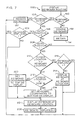
- the algorithm 100 first determines, in block 190, whether the simulated keyboard K is displayed, by determining whether the KEYBOARD ON flag stored in the flag buffer 14b of memory 14 (FIGURE 1) has a value of one. If it is displayed, then, in block 192, it is removed from the screen and the algorithm 100 returns, as indicated in block 194, to the previous routine from which the DISPLAY KEYBOARD ROUTINE 100C was entered.
- the algorithm 100 next tests in block 196 whether the KEYBOARD ACTIVE flag is set to a value of one to indicate that the simulated keyboard K is active. If it is not active, then, in block 197, the simulated keyboard K is removed from the screen. Afterwards, the algorithm 100 returns, as indicated in block 194, to the previous routine from which the DISPLAY KEYBOARD ROUTINE 100C was entered.
- the algorithm 100 determines whether the AUTOMATIC POSITIONING flag has a value of respectively zero. If the value is zero, then, in block 202, the algorithm 100 tests whether the simulated keyboard K is displayed. This is performed by determining whether the KEYBOARD DISPLAY flag stored in the flag buffer 14b of the memory 14 (FIGURE 1) has a value of one. If that flag has that value, then the algorithm 100 returns, as indicated in block 194, to the previous routine from which the DISPLAY KEYBOARD ROUTINE 100C was entered.
- the algorithm 100 jumps to block 204.
- the simulated keyboard K is displayed at the screen location identified by the contents of the KEYBOARD POSITION buffer 36 (FIGURE 1).
- the KEYBOARD DISPLAY flag is set to a value of one.
- the aigorithm 100 returns, as indicated in block 194, to the previous routine from which the DISPLAY KEYBOARD ROUTINE 100C was entered.
- the AUTOMATIC POSITIONING flag does not have a value of zero, it again is tested, this time in block 208 to determine whether it has a value of one. If the value is one, then, in block 210, the cursor location is fetched from the cursor control 35 and is compared with the keyboard location stored in the keyboard position buffer 36. If the locations do not conflict, i.e., if the cursor location does not fall within the keyboard location, then the algorithm 100 proceeds to block 212.
- the algorithm 100 tests whether the simulated keyboard K is displayed by determining whether the KEYBOARD DISPLAY flag has a value of one. If it is displayed, then the algorithm 100 returns, as indicated in block 194, to the previous routine from which the DISPLAY KEYBOARD ROUTINE 100C was entered. If the keyboard K is not displayed, then, in block 214, the simulated keyboard K is displayed at that keyboard location.
- the algorithm 100 proceeds to block 216. There, the cursor location is tested to determine whether it falls within the top half of the screen, which, for example, in a display having 25 lines in the y-directions is the top 12 lines of the screen. If it does fall within the top half, then, in block 218, the keyboard location coordinates are reset to position the simulated keyboard K in the bottom half of the display. Afterwords, the algorithm 100 proceeds to block 204, wherein the simulated keyboard K is displayed at that location, as described above.
- the keyboard coordinates are set to the top half, and the algorithm 100 goes to block 204, wherein the simulated keyboard K is displayed at that location, as described above.
- the algorithm 100 next inquires whether the LCD display is of sufficient size to produce legible screens in SPLIT SCREEN mode, for example, whether it is a 640 x 400 display. If not, the SPLIT SCREEN mode would not be suitable, and, in block 226, the simulated keyboard K is deactivated by changing the KEYBOARD ACTIVE flag to zero. Then, the algorithm 100 goes to block 194, and then returns to the previous routine.
- the display contoller 20 automatically is re-programmed to drive the display in SPLIT SCREEN mode.
- the screen is driven as though it were two separate screens, for example, one physically above the other as shown in FIGURE 3G.
- both parts of the split screen are in CGA mode.
- the simulated keyboard K is displayed in the bottom half of the screen while the normal software output is displayed in the top, or vica versa. Then, the algorithm 100 returns, as indicated in block 194, to the previous routine from which the DISPLAY KEYBOARD ROUTINE 100C was entered.
- the algorithm 100 After the DISPLAY KEYBOARD ROUTINE 100c is completed, the algorithm 100 returns to the KEYBOARD ENTRYPOINT ROUTINE 100a, as described above and indicated at block 128.
- the algorithm 100 proceeds to block 232.
- the algorithm 100 tests whether the simulated keyboard K is active, i.e., the KEYBOARD ACTIVE flag is set to a value of one. If not, the touch is ignored and the algorithm 100 proceeds to block 106 as described above.
- the algorithm 100 again calls and executes the DISPLAY KEYBOARD ROUTINE 100C of FIGURE 7, as described above.
- the algorithm 100 fetches the next set of coordinates from the x,y buffer 14a, as described above. The algorithm 100 then, in block 240, tests whether these are valid, again as described above. If the coordinates are not valid, they are ignored and the algorithm 100 proceeds to block 106, as described above. On the other hand if the coordinates are valid, the algorithm 100 in block 242 proceeds to the TOUCHSCREEN TRANSLATE ROUTINE 100d of FIGURE 8.
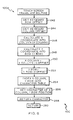
- the TOUCHSCREEN TRANSLATE ROUTINE 100d translates the set of coordinates of a touch on the simulated keyboard K into a character-identifying signal.
- character in the foregoing term is used in a comprehensive sense to denote an alpha-numeric character, punctuation, or other symbol, or function identified by the selection and pressing (i.e. touching) of a key on the simulated keyboard K by the computer user.
- a complication arising in this translation is due to the mobility (i.e., re-positioning) of the simulated keyboard K on the touch screen. Since the simulated keyboard K can be moved to any of a variety of locations on the screen, it is necessary to determine an offset in the x- and y- directions of the simulated keyboard K from a fixed point of reference, or origin, e.g. the upper left hand corner pixel of the screen. Preferably, this origin is the same as used in determining the set of coordinates of the touch.
- the CPU 12 calculates the offset in the x- direction (i.e., the "column offset") and in the y-direction (i.e., the "row offset”). This offset is stored in the KEYBOARD OFFSET buffer 14d in the memory 14.
- FIGURE 8 can now be described starting with blocks 242 and 244, at which the row and column offsets, respectively, are fetched from the KEYBOARD OFFSET buffer 14d.
- the algorithm 100 calculates a value for the x- coordinate into the column which is identified by the x-coordinate of the touch, and calculates a y-coordinate into the row which is identified by the y-coordinate of the touch. These are called respectively the "x column” and "y row”.
- the respective row and column offsets are subtracted from the values of the x column and y row to yield new coordinates which define the location of a "touched" key within the keyboard window itself.
- algorithm 100 proceeds with block 106, as described above, in which normal DOS keyboard processing takes place, and then, in block 250, returns to begin algorithm 100 over again.
Landscapes
- Engineering & Computer Science (AREA)
- General Engineering & Computer Science (AREA)
- Theoretical Computer Science (AREA)
- Human Computer Interaction (AREA)
- Physics & Mathematics (AREA)
- General Physics & Mathematics (AREA)
- Position Input By Displaying (AREA)
- Input From Keyboards Or The Like (AREA)
Applications Claiming Priority (2)
| Application Number | Priority Date | Filing Date | Title |
|---|---|---|---|
| US42124289A | 1989-10-13 | 1989-10-13 | |
| US421242 | 1989-10-13 |
Publications (2)
| Publication Number | Publication Date |
|---|---|
| EP0422577A2 true EP0422577A2 (de) | 1991-04-17 |
| EP0422577A3 EP0422577A3 (en) | 1992-02-26 |
Family
ID=23669751
Family Applications (1)
| Application Number | Title | Priority Date | Filing Date |
|---|---|---|---|
| EP19900119322 Withdrawn EP0422577A3 (en) | 1989-10-13 | 1990-10-09 | Method and apparatus for displaying simulated keyboards on touch-sensitive displays |
Country Status (3)
| Country | Link |
|---|---|
| EP (1) | EP0422577A3 (de) |
| JP (1) | JPH03166618A (de) |
| CA (1) | CA2027103A1 (de) |
Cited By (30)
| Publication number | Priority date | Publication date | Assignee | Title |
|---|---|---|---|---|
| WO1993013471A1 (es) * | 1991-12-24 | 1993-07-08 | Rank Xerox Española S.A. | Sistema instantaneo de informacion |
| WO1994027241A3 (en) * | 1993-05-12 | 1995-01-05 | Ryzhov Vladimir A | Means for entering symbol data into a computer system |
| EP0651544A3 (de) * | 1993-11-01 | 1997-12-03 | International Business Machines Corporation | Persönliches Kommunikationsgerät mit einer berührungsempfindlichen Steueranzeige |
| WO1999014657A1 (en) * | 1997-09-12 | 1999-03-25 | Ericsson, Inc. | Image based keyboard for a small computing device |
| WO2000073920A3 (en) * | 1999-06-01 | 2001-06-14 | Innovation Quest Ltd | Method and system of creating floating windows for displaying sponsor information, messages or programs in non-obtrusive areas of the graphic user interface of a software application |
| EP0863457A3 (de) * | 1997-03-06 | 2002-10-02 | Samsung Electronics Co., Ltd. | Verfahren zur Verteilung eines Rechnerbildschirms |
| US20060033724A1 (en) * | 2004-07-30 | 2006-02-16 | Apple Computer, Inc. | Virtual input device placement on a touch screen user interface |
| EP1835383A1 (de) * | 2006-03-14 | 2007-09-19 | Research In Motion Limited | Bildschirmanzeige bei einer Anwendungsschaltung |
| DE102007048222A1 (de) | 2007-10-08 | 2009-04-09 | Gräf, Stefan | Berührungsempfindlicher Bildschirm in Drucktechnik |
| US7653883B2 (en) | 2004-07-30 | 2010-01-26 | Apple Inc. | Proximity detector in handheld device |
| DE102008061831A1 (de) * | 2008-12-11 | 2010-06-17 | Wincor Nixdorf International Gmbh | Anzeige-und Bedienvorrichtung |
| EP2304530A4 (de) * | 2008-06-25 | 2011-12-21 | Lg Electronics Inc | Anzeigeanordnung und verfahren zu ihrer steuerung |
| EP2386941A3 (de) * | 2010-05-14 | 2012-02-01 | Sony Corporation | Vorrichtung und Verfahren zur Informationsverarbeitung sowie Programm |
| US8239784B2 (en) | 2004-07-30 | 2012-08-07 | Apple Inc. | Mode-based graphical user interfaces for touch sensitive input devices |
| US8381135B2 (en) | 2004-07-30 | 2013-02-19 | Apple Inc. | Proximity detector in handheld device |
| CN103677630A (zh) * | 2012-09-25 | 2014-03-26 | 三星电子株式会社 | 在便携式装置中处理分屏视图的设备和方法 |
| US8745526B2 (en) | 2006-03-14 | 2014-06-03 | Blackberry Limited | Screen display in application switching |
| US9239677B2 (en) | 2004-05-06 | 2016-01-19 | Apple Inc. | Operation of a computer with touch screen interface |
| US9239673B2 (en) | 1998-01-26 | 2016-01-19 | Apple Inc. | Gesturing with a multipoint sensing device |
| US9292111B2 (en) | 1998-01-26 | 2016-03-22 | Apple Inc. | Gesturing with a multipoint sensing device |
| JP2016105297A (ja) * | 2010-11-05 | 2016-06-09 | アップル インコーポレイテッド | ソフトキーボードを操作するためのデバイス、方法及びグラフィカルユーザインタフェース |
| US10042549B2 (en) | 2011-01-24 | 2018-08-07 | Apple Inc. | Device, method, and graphical user interface with a dynamic gesture disambiguation threshold |
| WO2018143910A1 (en) | 2017-01-31 | 2018-08-09 | Hewlett-Packard Development Company, L.P. | Keyboard backlights via display surfaces |
| US10365819B2 (en) | 2011-01-24 | 2019-07-30 | Apple Inc. | Device, method, and graphical user interface for displaying a character input user interface |
| KR20190127641A (ko) * | 2019-11-06 | 2019-11-13 | 삼성전자주식회사 | 휴대단말기의 분할화면 처리장치 및 방법 |
| DE10196846B4 (de) * | 2000-10-31 | 2021-02-25 | Intel Corporation | Verfahren und System zur Eingabe von Daten |
| EP3764214A4 (de) * | 2018-03-23 | 2021-04-07 | Huawei Technologies Co., Ltd. | Anwendungsfensteranzeigeverfahren und -endgerät |
| KR20210038522A (ko) * | 2019-11-06 | 2021-04-07 | 삼성전자주식회사 | 휴대단말기의 분할화면 처리장치 및 방법 |
| CN113312124A (zh) * | 2021-03-30 | 2021-08-27 | 海南视联通信技术有限公司 | 一种软键盘弹出调用方法和装置 |
| KR20220044929A (ko) * | 2021-03-30 | 2022-04-12 | 삼성전자주식회사 | 휴대단말기의 분할화면 처리장치 및 방법 |
Families Citing this family (12)
| Publication number | Priority date | Publication date | Assignee | Title |
|---|---|---|---|---|
| CA2078607A1 (en) * | 1991-12-13 | 1993-06-14 | Thomas H. Speeter | Intelligent work surfaces |
| JP3633033B2 (ja) * | 1995-05-10 | 2005-03-30 | カシオ計算機株式会社 | 画像作成装置 |
| WO1998041914A1 (en) * | 1997-03-19 | 1998-09-24 | Hitachi, Ltd. | Input apparatus |
| JP2002244798A (ja) * | 2001-02-19 | 2002-08-30 | Digital Electronics Corp | プログラマブル表示器 |
| JP2002244780A (ja) * | 2001-02-19 | 2002-08-30 | Digital Electronics Corp | ユーザインターフェース装置、および、そのプログラム |
| JP2003122474A (ja) * | 2001-09-27 | 2003-04-25 | Internatl Business Mach Corp <Ibm> | コンピュータ装置、画像表示方法、プログラム、記録媒体 |
| JP4417002B2 (ja) * | 2002-01-09 | 2010-02-17 | ソニー株式会社 | 電子機器及びその制御方法並びにプログラム |
| JP4747510B2 (ja) * | 2004-04-26 | 2011-08-17 | ソニー株式会社 | 情報処理装置 |
| JP5611649B2 (ja) * | 2010-04-26 | 2014-10-22 | 株式会社東芝 | 情報処理装置及び入力制御方法 |
| JP5634135B2 (ja) * | 2010-06-03 | 2014-12-03 | 株式会社Pfu | 画像読取装置、画像処理方法、および、プログラム |
| CN105700698B (zh) * | 2016-01-05 | 2018-07-24 | 湖南工业大学 | 矩阵式键盘状态识别及编码电路 |
| JP6835202B2 (ja) * | 2017-03-03 | 2021-02-24 | 株式会社島津製作所 | 移動型x線撮影装置および移動型x線撮影装置の表示部の制御方法 |
Family Cites Families (3)
| Publication number | Priority date | Publication date | Assignee | Title |
|---|---|---|---|---|
| JPS6365486A (ja) * | 1986-09-08 | 1988-03-24 | ミノルタ株式会社 | デイスプレイ表示装置 |
| US4763356A (en) * | 1986-12-11 | 1988-08-09 | AT&T Information Systems, Inc. American Telephone and Telegraph Company | Touch screen form entry system |
| US5031119A (en) * | 1989-06-12 | 1991-07-09 | Tandy Corporation | Split screen keyboard emulator |
-
1990
- 1990-10-05 CA CA002027103A patent/CA2027103A1/en not_active Abandoned
- 1990-10-09 EP EP19900119322 patent/EP0422577A3/en not_active Withdrawn
- 1990-10-15 JP JP2276135A patent/JPH03166618A/ja active Pending
Cited By (59)
| Publication number | Priority date | Publication date | Assignee | Title |
|---|---|---|---|---|
| WO1993013471A1 (es) * | 1991-12-24 | 1993-07-08 | Rank Xerox Española S.A. | Sistema instantaneo de informacion |
| WO1994027241A3 (en) * | 1993-05-12 | 1995-01-05 | Ryzhov Vladimir A | Means for entering symbol data into a computer system |
| US5786809A (en) * | 1993-05-12 | 1998-07-28 | Ryzhov; Vladimir Alexandrovich | Method of entry of symbolic information into computer system |
| EP0651544A3 (de) * | 1993-11-01 | 1997-12-03 | International Business Machines Corporation | Persönliches Kommunikationsgerät mit einer berührungsempfindlichen Steueranzeige |
| EP0863457A3 (de) * | 1997-03-06 | 2002-10-02 | Samsung Electronics Co., Ltd. | Verfahren zur Verteilung eines Rechnerbildschirms |
| US6639606B1 (en) | 1997-03-06 | 2003-10-28 | Samsung Electronics Co., Ltd. | Display screen split method for a computer system |
| WO1999014657A1 (en) * | 1997-09-12 | 1999-03-25 | Ericsson, Inc. | Image based keyboard for a small computing device |
| US6104384A (en) * | 1997-09-12 | 2000-08-15 | Ericsson, Inc. | Image based keyboard for a small computing device |
| US9239673B2 (en) | 1998-01-26 | 2016-01-19 | Apple Inc. | Gesturing with a multipoint sensing device |
| US9292111B2 (en) | 1998-01-26 | 2016-03-22 | Apple Inc. | Gesturing with a multipoint sensing device |
| WO2000073920A3 (en) * | 1999-06-01 | 2001-06-14 | Innovation Quest Ltd | Method and system of creating floating windows for displaying sponsor information, messages or programs in non-obtrusive areas of the graphic user interface of a software application |
| US7039872B1 (en) | 1999-06-01 | 2006-05-02 | Mossman Associates Inc | Method and system of creating floating windows for displaying sponsor information, messages or programs in non-obtrusive areas of the graphic user interface of a software application |
| DE10196846B4 (de) * | 2000-10-31 | 2021-02-25 | Intel Corporation | Verfahren und System zur Eingabe von Daten |
| US9606668B2 (en) | 2002-02-07 | 2017-03-28 | Apple Inc. | Mode-based graphical user interfaces for touch sensitive input devices |
| US9239677B2 (en) | 2004-05-06 | 2016-01-19 | Apple Inc. | Operation of a computer with touch screen interface |
| US8479122B2 (en) | 2004-07-30 | 2013-07-02 | Apple Inc. | Gestures for touch sensitive input devices |
| US10042418B2 (en) | 2004-07-30 | 2018-08-07 | Apple Inc. | Proximity detector in handheld device |
| US20060033724A1 (en) * | 2004-07-30 | 2006-02-16 | Apple Computer, Inc. | Virtual input device placement on a touch screen user interface |
| US8239784B2 (en) | 2004-07-30 | 2012-08-07 | Apple Inc. | Mode-based graphical user interfaces for touch sensitive input devices |
| US8381135B2 (en) | 2004-07-30 | 2013-02-19 | Apple Inc. | Proximity detector in handheld device |
| US7653883B2 (en) | 2004-07-30 | 2010-01-26 | Apple Inc. | Proximity detector in handheld device |
| US8612856B2 (en) | 2004-07-30 | 2013-12-17 | Apple Inc. | Proximity detector in handheld device |
| US11036282B2 (en) | 2004-07-30 | 2021-06-15 | Apple Inc. | Proximity detector in handheld device |
| US9348458B2 (en) | 2004-07-30 | 2016-05-24 | Apple Inc. | Gestures for touch sensitive input devices |
| CN101263443B (zh) * | 2005-09-16 | 2012-09-05 | 苹果公司 | 在触摸屏上产生显示的计算机实现的方法和装置 |
| CN102736848A (zh) * | 2005-09-16 | 2012-10-17 | 苹果公司 | 触摸屏用户界面上的虚拟输入设备布置 |
| EP1835383A1 (de) * | 2006-03-14 | 2007-09-19 | Research In Motion Limited | Bildschirmanzeige bei einer Anwendungsschaltung |
| US8745526B2 (en) | 2006-03-14 | 2014-06-03 | Blackberry Limited | Screen display in application switching |
| US9785318B2 (en) | 2006-03-14 | 2017-10-10 | Blackberry Limited | Screen display in application switching |
| DE202007018891U1 (de) | 2007-10-08 | 2010-04-29 | Gräf, Stefan | Berührungsloser Bildschirm in Drucktechnik |
| DE102007048222A1 (de) | 2007-10-08 | 2009-04-09 | Gräf, Stefan | Berührungsempfindlicher Bildschirm in Drucktechnik |
| EP2304530A4 (de) * | 2008-06-25 | 2011-12-21 | Lg Electronics Inc | Anzeigeanordnung und verfahren zu ihrer steuerung |
| DE102008061831A1 (de) * | 2008-12-11 | 2010-06-17 | Wincor Nixdorf International Gmbh | Anzeige-und Bedienvorrichtung |
| EP2386941A3 (de) * | 2010-05-14 | 2012-02-01 | Sony Corporation | Vorrichtung und Verfahren zur Informationsverarbeitung sowie Programm |
| JP2016105297A (ja) * | 2010-11-05 | 2016-06-09 | アップル インコーポレイテッド | ソフトキーボードを操作するためのデバイス、方法及びグラフィカルユーザインタフェース |
| US10365819B2 (en) | 2011-01-24 | 2019-07-30 | Apple Inc. | Device, method, and graphical user interface for displaying a character input user interface |
| US10042549B2 (en) | 2011-01-24 | 2018-08-07 | Apple Inc. | Device, method, and graphical user interface with a dynamic gesture disambiguation threshold |
| US12050744B2 (en) | 2012-09-25 | 2024-07-30 | Samsung Electronics Co., Ltd. | Apparatus and method for processing split view in portable device |
| US9753573B2 (en) | 2012-09-25 | 2017-09-05 | Samsung Electronics Co., Ltd. | Apparatus and method for processing split view in portable device |
| CN103677630B (zh) * | 2012-09-25 | 2018-10-26 | 三星电子株式会社 | 在便携式装置中处理分屏视图的设备和方法 |
| US10114507B2 (en) | 2012-09-25 | 2018-10-30 | Samsung Electronics Co., Ltd. | Apparatus and method for processing split view in portable device |
| CN103677630A (zh) * | 2012-09-25 | 2014-03-26 | 三星电子株式会社 | 在便携式装置中处理分屏视图的设备和方法 |
| US10394377B2 (en) | 2012-09-25 | 2019-08-27 | Samsung Electronics Co., Ltd. | Apparatus and method for processing split view in portable device |
| US11662851B2 (en) | 2012-09-25 | 2023-05-30 | Samsung Electronics Co., Ltd. | Apparatus and method for processing split view in portable device |
| US9189061B2 (en) | 2012-09-25 | 2015-11-17 | Samsung Electronics Co., Ltd. | Apparatus and method for processing split view in portable device |
| US10761651B2 (en) | 2012-09-25 | 2020-09-01 | Samsung Electronics Co., Ltd. | Apparatus and method for processing split view in portable device |
| US11287919B2 (en) | 2012-09-25 | 2022-03-29 | Samsung Electronics Co., Ltd. | Apparatus and method for processing split view in portable device |
| EP2712157A1 (de) * | 2012-09-25 | 2014-03-26 | Samsung Electronics Co., Ltd | Vorrichtung und Verfahren zur Verarbeitung der geteilten Ansicht in tragbarer Vorrichtung |
| EP3577538A4 (de) * | 2017-01-31 | 2020-07-29 | Hewlett-Packard Development Company, L.P. | Tastaturhintergrundbeleuchtungen über anzeigeoberflächen |
| US10923026B2 (en) | 2017-01-31 | 2021-02-16 | Hewlett-Packard Development Company, L.P. | Keyboard backlights via display surfaces |
| WO2018143910A1 (en) | 2017-01-31 | 2018-08-09 | Hewlett-Packard Development Company, L.P. | Keyboard backlights via display surfaces |
| EP3764214A4 (de) * | 2018-03-23 | 2021-04-07 | Huawei Technologies Co., Ltd. | Anwendungsfensteranzeigeverfahren und -endgerät |
| US11287944B2 (en) | 2018-03-23 | 2022-03-29 | Huawei Technologies Co., Ltd. | Application window display method and terminal |
| EP4235390A3 (de) * | 2018-03-23 | 2023-10-25 | Huawei Technologies Co., Ltd. | Anwendungsfensteranzeigeverfahren und -endgerät |
| US11989383B2 (en) | 2018-03-23 | 2024-05-21 | Huawei Technologies Co., Ltd. | Application window display method and terminal |
| KR20210038522A (ko) * | 2019-11-06 | 2021-04-07 | 삼성전자주식회사 | 휴대단말기의 분할화면 처리장치 및 방법 |
| KR20190127641A (ko) * | 2019-11-06 | 2019-11-13 | 삼성전자주식회사 | 휴대단말기의 분할화면 처리장치 및 방법 |
| CN113312124A (zh) * | 2021-03-30 | 2021-08-27 | 海南视联通信技术有限公司 | 一种软键盘弹出调用方法和装置 |
| KR20220044929A (ko) * | 2021-03-30 | 2022-04-12 | 삼성전자주식회사 | 휴대단말기의 분할화면 처리장치 및 방법 |
Also Published As
| Publication number | Publication date |
|---|---|
| JPH03166618A (ja) | 1991-07-18 |
| EP0422577A3 (en) | 1992-02-26 |
| CA2027103A1 (en) | 1991-04-14 |
Similar Documents
| Publication | Publication Date | Title |
|---|---|---|
| EP0422577A2 (de) | Verfahren und Vorrichtung zum Anzeigen von simulierten Tastaturen auf berührungsempfindlichen Anzeigen | |
| CA2043752C (en) | Method and apparatus for displaying simulated keyboards on touch-sensitive displays | |
| AU652767B2 (en) | Computer with tablet input to standard programs | |
| AU658574B2 (en) | Computer with separate display plane and user interface processor | |
| US5491495A (en) | User interface having simulated devices | |
| EP0243925B1 (de) | Befehlseingabesystem für einen elektronischen Rechner | |
| EP0727730B1 (de) | Verfahren zur vergrösserten Sichtbarkeit und Auswahlmöglichkeit von Ikonen | |
| EP0980039B1 (de) | Verfahren und Vorrichtung zur Zeicheneingabe mit einer virtuellen Tastatur | |
| US5821930A (en) | Method and system for generating a working window in a computer system | |
| EP0403125B1 (de) | Zoommodusbetriebsarten in einem Anzeigegerät | |
| KR100464194B1 (ko) | 데이타 처리 시스템내의 표시영역에 적합한 아이콘 크기의 자동 조정 | |
| EP0493990A2 (de) | Bildverschiebungssteuerung und Verfahren | |
| EP0661619A1 (de) | Dateneingabevorrichtung mit Anzeigetastatur | |
| US5146049A (en) | Method and system for inputting coordinates using digitizer | |
| EP0100798A1 (de) | Rechnergestütztes Entwurfssystem | |
| JP3228584B2 (ja) | タッチパネルにおけるマウス入力方式 | |
| JPH04127310A (ja) | 文字入力方式 | |
| CN214474947U (zh) | 一种液晶显示屏 | |
| HK1024313B (en) | Method and apparatus for character entry with a virtual keyboard | |
| JPH05158647A (ja) | マルチウィンドウ管理装置 | |
| JPH05298053A (ja) | 情報処理装置 |
Legal Events
| Date | Code | Title | Description |
|---|---|---|---|
| PUAI | Public reference made under article 153(3) epc to a published international application that has entered the european phase |
Free format text: ORIGINAL CODE: 0009012 |
|
| AK | Designated contracting states |
Kind code of ref document: A2 Designated state(s): AT BE CH DE DK ES FR GB GR IT LI LU NL SE |
|
| PUAL | Search report despatched |
Free format text: ORIGINAL CODE: 0009013 |
|
| AK | Designated contracting states |
Kind code of ref document: A3 Designated state(s): AT BE CH DE DK ES FR GB GR IT LI LU NL SE |
|
| STAA | Information on the status of an ep patent application or granted ep patent |
Free format text: STATUS: THE APPLICATION HAS BEEN WITHDRAWN |
|
| 18W | Application withdrawn |
Withdrawal date: 19921001 |