EP0488925A2 - Méthode graphique pour indiquer, dans un système ordinateur, une position de - et réaliser une opération sur - une pluralité d'objets sélectionnés - Google Patents
Méthode graphique pour indiquer, dans un système ordinateur, une position de - et réaliser une opération sur - une pluralité d'objets sélectionnés Download PDFInfo
- Publication number
- EP0488925A2 EP0488925A2 EP19910480166 EP91480166A EP0488925A2 EP 0488925 A2 EP0488925 A2 EP 0488925A2 EP 19910480166 EP19910480166 EP 19910480166 EP 91480166 A EP91480166 A EP 91480166A EP 0488925 A2 EP0488925 A2 EP 0488925A2
- Authority
- EP
- European Patent Office
- Prior art keywords
- window
- block
- objects
- scroll bar
- icon
- Prior art date
- Legal status (The legal status is an assumption and is not a legal conclusion. Google has not performed a legal analysis and makes no representation as to the accuracy of the status listed.)
- Withdrawn
Links
Images


Classifications
-
- G—PHYSICS
- G06—COMPUTING OR CALCULATING; COUNTING
- G06F—ELECTRIC DIGITAL DATA PROCESSING
- G06F3/00—Input arrangements for transferring data to be processed into a form capable of being handled by the computer; Output arrangements for transferring data from processing unit to output unit, e.g. interface arrangements
- G06F3/01—Input arrangements or combined input and output arrangements for interaction between user and computer
- G06F3/048—Interaction techniques based on graphical user interfaces [GUI]
- G06F3/0484—Interaction techniques based on graphical user interfaces [GUI] for the control of specific functions or operations, e.g. selecting or manipulating an object, an image or a displayed text element, setting a parameter value or selecting a range
- G06F3/0485—Scrolling or panning
- G06F3/04855—Interaction with scrollbars
Definitions
- the present invention relates generally to windowed computer user interfaces, and more particularly to a graphical interface that supports direct manipulation of objects.
- the user may select objects to act upon. Selection is the act of marking a choice. The user may select 0, 1, or more objects. A user may also scroll the window, causing items to appear and disappear from direct view. During scrolling, a user's selection may no longer be immediately visible. Subsequent actions can affect selections, even though the selected objects are not visible.
- a user selects more than one object, it may not be possible to see all selections simultaneously. For example, in a large list of items it may not be possible to view simultaneously the first and last item of the list. Thus, if these two items are selected, it will not be possible to view both selections at once. Here the user is forced to remember what the other selections are, since they cannot be all viewed at the same time.
- a typical user task involves scrolling information and selecting a number of objects or items on which to perform an action. For example, the user may scroll a list of mail received and select individual mail items to print.
- Conventional user interface designs allow direct manipulation of a selected item to be interpreted as manipulating all selected items.
- the user does not know where the selected objects are when they have been scrolled out of sight. In order to review the selections the user must scroll slowly through the data until he or she finds the selected objects.
- a scroll bar is positioned in the window for an application.
- a marker icon is automatically placed in the scroll bar in response to the selection.
- a marker icon is placed in the scroll bar to indicate the position of each additional selection.
- the scroll bar includes a slider box that indicates where in the data the window is positioned. The user can thus know where the selections are with respect to the current window view and can immediately view individual selections by clicking the mouse or similar pointing device on each marker. Alternately, the user may drag the slider box to the marker to view the given selection. If the user deselects an object, the marker icon for the object is deleted.
- the user can perform an action on the selected objects by direct manipulation.
- the user does so by dragging a marker icon out of the scroll bar to a target object.
- the system automatically displays a selection collection icon that represents the selected objects.
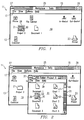
- Figure 1 is a pictorial view of a window entitled "Workplace-Daily”.
- Figure 2 is a pictorial view similar to Figure 1 in which a window entitled “Folder-Project X” has been opened and the object entitled “Document 2" has been selected.
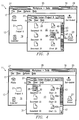
- Figure 3 is a pictorial view similar to Figure 2 in which the "Folder-Project X" window has been scrolled and the object entitled “Chart 19" has been selected.
- Figure 4 is a pictorial view similar to Figure 3 in which the "Folder-Project X" window has been been scrolled and the object entitled “Document 31" has been selected.
- Figure 5 is a pictorial view similar to Figure 4 showing direct manipulation of the selection collection object icon.
- Figure 6 is a flowchart of the initialization routine of the present invention.
- Figure 7 is a flowchart of a preferred software implementation of the present invention.
- FIG. 8 is a flowchart showing details of the "UP-DATE" routine of Figure 7.
- FIG. 9 is a flowchart showing details of the "DRAG" routine of Figure 7.
- Figure 10 is a flowchart showing an implementation of the "DROP" routine of Figure 7.
- FIG 11 is a flowchart showing an implementation of the "SCROLL" routine of Figure 7.
- Figure 12 is a flowchart showing an implementation of the "SCROLL TO SELECTION" routine of Figure 7.
- Window 11 includes a border or frame 13 that forms the outer boundary of the window. Contained within border 13 are a title bar 15 and an action bar 17. The remainder of window 11 consists of a client area 19, which is populated with a plurality of icons, including a folder icon 21, which is labeled "Project X", and a printer icon 23.
- Title bar 15 includes a window title 25, which identifies the window, a system menu icon 27, and window sizing icons 29.
- System menu icon 27 allows the user to display a pull-down menu containing actions that the user can perform on the window. Such actions are related to the window itself and not to the object that is displayed in the window. For example, actions include MOVE, which allows the user to reposition the window on the screen, MINIMIZE, which reduces the size of the window, and MAXIMIZE, which enlarges the window to the size of the screen.
- Window-sizing icons 29 provide a fast way to use a mouse or pointing device to perform the actions of MINIMIZE and MAXIMIZE without requiring a menu.
- Action bar 17 contains a list of actions of the applications shown in the window. Each action in the list in action bar 17 has an associated pull-down menu that lists the individual actions that are contained within each general action listed in action bar 17. For example, the FILE pull-down enables the user to work with files through actions that manipulate the file as a whole.
- the individual actions contained within the FILE action include NEW, which allows users to create a new file, and SAVE, which writes the existing file to a storage device.
- a pointer 30 is movable by the user by means of a mouse (not shown). The user can move pointer 30 about the screen and, by means of the mouse buttons, select objects, open windows, directly manipulate objects, and perform other operations.
- folder 21 is shown emphasized highlighted by means of a grey box 28. The emphasis indicates that folder 21 has been selected. The selection is made by positioning pointer 30 on folder 21 and clicking mouse button number one. The selected object is available for action.
- Object window 31 contains the contents of the "Project X" folder represented by icon 21.
- Window 31 was opened by choosing the "Open” option from the pull-down menu associated with the "File” action of action bar 17. Window 31 could also have been opened by placing pointer 30 on folder 21 and double clicking mouse button number one.
- Window 31 is similar to window 11 in that it includes a frame 35, a title bar 37, an action bar 39, and a client area 41 that is populated with a plurality of document and chart icons.
- Window 31 also includes a scroll bar 43, which allow the user, in effect, to move window frame 35 to view the contents of the object within client area 41.
- Scroll bar 43 contains a slider box 47, which represents the position and size of the visible information in relation to all the information that is available. For example, if slider box 47 is one-third of the way down from the top of scroll bar 43, the portion of information the user sees is one-third of the way down from the top of the information.
- Document icon 53 was selected by placing pointer 30 thereon and clicking mouse button number one.
- icon 53 was selected, a marker icon 49 was placed automatically in scroll bar 43 inside slider box 47. Marker icon 49 indicates that a selection has been made near the top of the data.
- window 31 has been scrolled to make visible additional items in client area 41.
- Slider box 47 indicates that window 31 has been scrolled to a position approximately midway between its top and bottom.
- Emphasis box 28 indicates that the icon 55 for the object entitled “chart 19" has been selected.
- a marker icon 49a has been placed in scroll bar 43 within slider box 47 to indicate the selection of icon 55.
- Marker icon 49 remains visible. Thus, the user can tell at a glance that two selections have been made and their positions in the data.
- window 31 has been scrolled to the bottom of the data.
- An additional selection has been made, as indicated by the emphasis box 28 on document icon 61.
- the selection of icon 61 is also indicated by marker icon 49b, which has been displayed in scroll bar 43 within slider box 47. The user thus knows that three selections have been made and he or she can review the selections by moving pointer 30 to one of the markers and clicking mouse button number one, which will scroll the window 31 to view the selected object.
- Figure 5 depicts the direct manipulation of a selection collection object icon 51 to print the selected objects.
- Selection collection object icon 51 is created by moving printer to one of the markers and holding down mouse button number two while dragging the marker out of scroll bar 47. When the marker is dragged out of scroll bar 47, icon 51 is displayed on the screen.
- Selection collection object icon 51 is directly manipulated by dragging it to printer icon 23. When selection collection object icon 51 is dropped on printer icon 23, the selected documents and charts will be printed.
- FIG. 6 a program is selected at block 63. Upon selection, the program and addressing pointers are loaded and storage is opened at block 65. Then, in block 67, the window frame is constructed. After the window frame has been constructed, the window data for the selected program is obtained at block 69 and the window image is constructed at block 71. Then, the data for the window is loaded at block 73, the mouse pointer is fetched at block 75, and the data and the mouse pointer are displayed in the window at block 77.
- the input is monitored at block 79.
- decision block 81 if the user makes a selection, the system monitors the pointer or cursor at block 83 and provides selection emphasis at block 85.
- selection emphasis consists of putting a grey box 28 over the selected object. Then, referring again to Figure 7, the system performs UPDATE, which is generally indicated at block 87.
- the relative position of the selection is located in the scroll bar or slider box at block 89. Then, at block 91, the type of object selected is determined and, at block 93, an icon symbol for that object type is obtained. Then, an icon of the appropriate size and emphasis is constructed at block 95 and the display buffer for the scroll bar and slider box is obtained at block 97.
- the selections are saved in the display buffer at block 105, and the new selection is fit into the display buffer at block 107. Then, the updated window is re-displayed at block 109 and the system returns to block 79 of Figure 7 and continues to monitor the input.
- the system performs the drag routine, which is indicated generally at 111.
- the system tests at decision block 113 whether or not there are existing selections; if not, error feedback is provided to the user at block 115 and the system returns to block 79 and continues to monitor user input. If there are existing selections, then the scroll bar and slider box are scanned and the selections are counted at block 117. Then an icon frame is built at block 119 and a selection icon, which is a composite graphic image of the icons within the scroll bar and slider box, is built at block 121. Then, the window client area display buffer is fetched at block 123 and updated with the selection cursor attached to the selection icon in block 125. Then, the updated window is redisplayed at block 127 and the system returns to continue monitoring input at block 79.
- the system performs the DROP routine which is generally indicated at 131.
- a preferred software implementation of the DROP routine is shown in Figure 10. As shown at block 133, all selected information is moved or copied at the drop point. The system tests at block 135 whether the action is a MOVE. If it is, all selections are removed from the scroll bar or slider box at block 137. Then the data buffer is updated at block 139 to reflect the MOVE or COPY operation on the data and the updated window is re-displayed at block 141. Then, the system returns to block 79 and continues to monitor user input.
- the system performs the SCROLL routine which is indicated generally at 145 and shown in detail in Figure 11.
- the window display buffer is fetched at block 147.
- the updated slider box position is determined at block 155.
- the window client area display buffer is fetched at block 157 and the display buffer is updated for the new slider box position at block 159.
- the display buffer is updated for the new scroll bar selections at block 161 and the display buffer is updated for the new data in the client area at block 163. Then, the updated window is re-displayed at block 165 and the system returns to block 79 of Figure 7 and continues to monitor user input.
- the present invention allows the user to review the selections made by pointing to the selection marker icons in the scroll bar or slider box and scrolling to them by clicking mouse button number one thereon. If, at decision block 167, the user makes a selection in the scroll bar or slider box, the system performs the SCROLL TO SELECTION routine indicated generally at 169 and shown in detail in Figure 12. Referring to Figure 12, the marker icon position is matched to the selection in the client area at block 171 and the scroll bar selections and positions are saved at block 173. Then, the window client area display buffer is fetched at block 175.
- the display buffer is updated for the new slider box position at block 177, the display buffer is updated for the scroll bar selections at block 179, and the display buffer is updated for new data in the client area at block 181. Then, the updated window is re-displayed at block 183 and the system returns to block 79 of Figure 7 to continue monitoring user input. As shown generally at block 185 of Figure 7, other actions may be performed.
- the present invention allows the user to see at a glance how many selections have been made and to review those selections quickly and easily.
- the present invention also allows the user to perform operations on the selections as a group by direct manipulation.
Landscapes
- Engineering & Computer Science (AREA)
- General Engineering & Computer Science (AREA)
- Theoretical Computer Science (AREA)
- Human Computer Interaction (AREA)
- Physics & Mathematics (AREA)
- General Physics & Mathematics (AREA)
- Digital Computer Display Output (AREA)
- User Interface Of Digital Computer (AREA)
Applications Claiming Priority (2)
| Application Number | Priority Date | Filing Date | Title |
|---|---|---|---|
| US61962890A | 1990-11-28 | 1990-11-28 | |
| US619628 | 1990-11-28 |
Publications (2)
| Publication Number | Publication Date |
|---|---|
| EP0488925A2 true EP0488925A2 (fr) | 1992-06-03 |
| EP0488925A3 EP0488925A3 (en) | 1993-01-20 |
Family
ID=24482684
Family Applications (1)
| Application Number | Title | Priority Date | Filing Date |
|---|---|---|---|
| EP19910480166 Withdrawn EP0488925A3 (en) | 1990-11-28 | 1991-10-25 | Graphical method of indicating the position of and performing an operation on a plurality of selected objects in a computer system |
Country Status (4)
| Country | Link |
|---|---|
| US (1) | US5550969A (fr) |
| EP (1) | EP0488925A3 (fr) |
| JP (1) | JPH0685145B2 (fr) |
| CA (1) | CA2052768C (fr) |
Cited By (6)
| Publication number | Priority date | Publication date | Assignee | Title |
|---|---|---|---|---|
| WO2000019306A1 (fr) * | 1998-09-28 | 2000-04-06 | 3M Innovative Properties Company | Commande d'affichage de commentaires de logiciels |
| EP0584913B1 (fr) * | 1992-08-27 | 2000-05-03 | Sun Microsystems, Inc. | Procédé et dispositif pour fournir des consultations rapides de collections |
| WO2005096125A3 (fr) * | 2004-03-31 | 2005-12-08 | Ibm | Materialisation dynamique d'entites qui disparaissent de l'ecran |
| EP1956472A1 (fr) * | 2007-01-31 | 2008-08-13 | Research In Motion Limited | Système et procédé d'organisation des icônes pour des applications sur un dispositif mobile |
| EP2584430A1 (fr) * | 2011-10-17 | 2013-04-24 | Research In Motion Limited | Interface utilisateur pour dispositif électronique |
| US8601370B2 (en) | 2007-01-31 | 2013-12-03 | Blackberry Limited | System and method for organizing icons for applications on a mobile device |
Families Citing this family (73)
| Publication number | Priority date | Publication date | Assignee | Title |
|---|---|---|---|---|
| US5581275A (en) * | 1992-02-28 | 1996-12-03 | Hewlett-Packard Company | Method and apparatus for locating a predetermined position in a computer file |
| US5859638A (en) * | 1993-01-27 | 1999-01-12 | Apple Computer, Inc. | Method and apparatus for displaying and scrolling data in a window-based graphic user interface |
| US6212577B1 (en) * | 1993-03-03 | 2001-04-03 | Apple Computer, Inc. | Method and apparatus for improved interaction with an application program according to data types and actions performed by the application program |
| JP3517457B2 (ja) * | 1994-09-08 | 2004-04-12 | キヤノン株式会社 | ウィンドウシステム及びその制御方法 |
| US5873106A (en) * | 1995-09-18 | 1999-02-16 | Oracle Corporation | Geometry management for displaying objects on a computer |
| JP3886019B2 (ja) * | 1995-10-11 | 2007-02-28 | シャープ株式会社 | 情報処理装置およびウインドウ表示方法 |
| US5801699A (en) * | 1996-01-26 | 1998-09-01 | International Business Machines Corporation | Icon aggregation on a graphical user interface |
| US5680561A (en) * | 1996-08-26 | 1997-10-21 | International Business Machines Corporation | Effectively locating an object within a compound document using an elevator |
| US5867678A (en) * | 1996-12-16 | 1999-02-02 | International Business Machines Corporation | Method and system for searching and retrieving specific types of objects contained within a compound document |
| US6014140A (en) * | 1997-01-10 | 2000-01-11 | International Business Machines Corporation | Method and system for locating and displaying the position of a cursor contained within a page of a compound document |
| US6008811A (en) * | 1997-02-28 | 1999-12-28 | International Business Machines Corporation | Drag and drop metaphors for non-programmable emulation environments |
| US5874957A (en) * | 1997-02-28 | 1999-02-23 | International Business Machines Corporation | Method and apparatus for improved scrolling functionality in a graphical user interface utilizing a software tether |
| US5912668A (en) * | 1997-05-30 | 1999-06-15 | Sony Corporation | Controlling a screen display of a group of images represented by a graphical object |
| US5903267A (en) * | 1997-07-11 | 1999-05-11 | International Business Machines Corporation | Document interface mechanism and method for navigating through large documents |
| US6157381A (en) * | 1997-11-18 | 2000-12-05 | International Business Machines Corporation | Computer system, user interface component and method utilizing non-linear scroll bar |
| AU1810099A (en) * | 1998-01-13 | 1999-08-02 | Sony Electronics Inc. | Graphical user interface for enabling manipulation of graphic images on a display screen |
| US6222541B1 (en) | 1998-01-20 | 2001-04-24 | International Business Machines Corporation | Method and apparatus for fast-path location and selection of links |
| US6204846B1 (en) | 1999-02-16 | 2001-03-20 | International Business Machines Corporation | Data set user interface control for use in accessing information in a computer |
| US6147683A (en) * | 1999-02-26 | 2000-11-14 | International Business Machines Corporation | Graphical selection marker and method for lists that are larger than a display window |
| US6339438B1 (en) | 1999-07-27 | 2002-01-15 | International Business Machines Corporation | Scroll bar with integrated advertisement |
| US6405192B1 (en) | 1999-07-30 | 2002-06-11 | International Business Machines Corporation | Navigation assistant-method and apparatus for providing user configured complementary information for data browsing in a viewer context |
| US6356908B1 (en) | 1999-07-30 | 2002-03-12 | International Business Machines Corporation | Automatic web page thumbnail generation |
| US6665838B1 (en) | 1999-07-30 | 2003-12-16 | International Business Machines Corporation | Web page thumbnails and user configured complementary information provided from a server |
| US6738084B1 (en) * | 1999-09-13 | 2004-05-18 | International Business Machines Corporation | Interactive scrolling reference method |
| US6856326B1 (en) * | 2000-01-28 | 2005-02-15 | International Business Machines Corporation | Smooth scrolling system and method |
| GB2365676B (en) * | 2000-02-18 | 2004-06-23 | Sensei Ltd | Mobile telephone with improved man-machine interface |
| US7191408B2 (en) * | 2000-04-27 | 2007-03-13 | Quin Land Co., Ltd. | Display control system to view intended pages |
| US20020126154A1 (en) * | 2001-03-12 | 2002-09-12 | Watson Edwin George | Method for displaying and scrolling data including display status feedback |
| US6778192B2 (en) * | 2001-04-05 | 2004-08-17 | International Business Machines Corporation | System and method for creating markers on scroll bars of a graphical user interface |
| JP2003076719A (ja) * | 2001-06-22 | 2003-03-14 | Sony Computer Entertainment Inc | 情報閲覧プログラム、情報閲覧プログラムを記録した記録媒体、情報閲覧装置及び方法、情報生成プログラム、情報生成プログラムを記録した記録媒体、情報生成装置及び方法、情報生成閲覧システム |
| US20030142141A1 (en) * | 2002-01-28 | 2003-07-31 | International Business Machines Corporation | Displaying specified resource usage |
| US20030142137A1 (en) * | 2002-01-28 | 2003-07-31 | International Business Machines Corporation | Selectively adjusting the order of windows in response to a scroll wheel rotation |
| US20030142149A1 (en) * | 2002-01-28 | 2003-07-31 | International Business Machines Corporation | Specifying audio output according to window graphical characteristics |
| US20030142133A1 (en) * | 2002-01-28 | 2003-07-31 | International Business Machines Corporation | Adjusting transparency of windows to reflect recent use |
| US6954905B2 (en) * | 2002-01-28 | 2005-10-11 | International Business Machines Corporation | Displaying transparency characteristic aids |
| US7146573B2 (en) * | 2002-01-28 | 2006-12-05 | International Business Machines Corporation | Automatic window representation adjustment |
| US20030142143A1 (en) * | 2002-01-28 | 2003-07-31 | International Business Machines Corporation | Varying heights of application images to convey application status |
| US20030142140A1 (en) * | 2002-01-28 | 2003-07-31 | International Business Machines Corporation | Adjusting the tint of a translucent window to convey status |
| US7107545B2 (en) * | 2002-02-04 | 2006-09-12 | Draeger Medical Systems, Inc. | System and method for providing a graphical user interface display with a conspicuous image element |
| US20090138825A1 (en) * | 2002-09-30 | 2009-05-28 | Matias Duarte | Image navigation apparatus and method |
| US7689914B2 (en) | 2002-12-12 | 2010-03-30 | Apple Inc. | Sticky functionality |
| EP1510911A3 (fr) * | 2003-08-28 | 2006-03-22 | Sony Corporation | Dispositif, procédé et programme pour manipuler des informations et support de mémoire contenant programme pour manipuler des informations |
| DE10360659A1 (de) * | 2003-12-23 | 2005-07-21 | Daimlerchrysler Ag | Bediensystem für ein Kraftfahrzeug |
| US20050234979A1 (en) * | 2004-04-16 | 2005-10-20 | Alcatel | Map navigation with breadcrumb buttons |
| US9830066B2 (en) | 2004-12-22 | 2017-11-28 | Conversant Wireless Licensing S.A R.L. | Mobile communications terminal and method |
| US20060161856A1 (en) * | 2005-01-20 | 2006-07-20 | International Business Machines Corporation | Data collection tool for a computer |
| US20060184901A1 (en) * | 2005-02-15 | 2006-08-17 | Microsoft Corporation | Computer content navigation tools |
| US7701471B1 (en) * | 2005-03-02 | 2010-04-20 | Adobe Systems Incorporated | Methods and apparatus to display a viewing region |
| JP4405430B2 (ja) * | 2005-05-12 | 2010-01-27 | 任天堂株式会社 | ゲームプログラムおよびゲーム装置 |
| US7855803B2 (en) | 2005-06-20 | 2010-12-21 | Canon Kabushiki Kaisha | Printing control apparatus, information processing apparatus, control method therefor, computer program, and computer-readable storage medium |
| JP4590312B2 (ja) * | 2005-06-20 | 2010-12-01 | キヤノン株式会社 | 情報処理装置及びその制御方法、並びにコンピュータプログラム及びコンピュータ可読記憶媒体 |
| US7475360B2 (en) * | 2005-08-11 | 2009-01-06 | International Business Machines Corporation | Method for dynamically providing scroll indicators |
| JP2007114844A (ja) * | 2005-10-18 | 2007-05-10 | Seiko Epson Corp | ユーザインタフェース装置 |
| US20070100896A1 (en) * | 2005-11-03 | 2007-05-03 | International Business Machines Corporation | System and method for persistent selection of objects across multiple directories |
| US8732614B2 (en) | 2005-12-30 | 2014-05-20 | Google Inc. | Toolbar document content sharing |
| JP4816106B2 (ja) * | 2006-01-27 | 2011-11-16 | ソニー株式会社 | 情報表示装置、情報表示方法、情報表示プログラム、音楽再生装置及び音楽再生プログラム |
| US7475359B2 (en) * | 2006-02-09 | 2009-01-06 | International Business Machines Corporation | User interface for a tabbed pane |
| USD600219S1 (en) | 2006-04-26 | 2009-09-15 | Panasonic Corporation | Lead frame |
| US7793226B2 (en) * | 2006-08-14 | 2010-09-07 | International Business Machines Corporation | Method and system for grouping and stacking tab user interface objects with icon status indicators |
| US20080320463A1 (en) * | 2007-06-25 | 2008-12-25 | Harold Lee Peterson | System, method and computer-readable medium for enhanced user deletion of software from a computer |
| US20090327965A1 (en) * | 2008-06-27 | 2009-12-31 | Microsoft Corporation | Selection of items in a virtualized view |
| JP5487679B2 (ja) * | 2009-03-31 | 2014-05-07 | ソニー株式会社 | 情報処理装置、情報処理方法および情報処理プログラム |
| US8977982B1 (en) * | 2010-05-28 | 2015-03-10 | A9.Com, Inc. | Techniques for navigating information |
| US8555195B2 (en) * | 2010-06-29 | 2013-10-08 | Ricoh Co., Ltd. | Bookmark function for navigating electronic document pages |
| US20120030624A1 (en) * | 2010-07-30 | 2012-02-02 | Migos Charles J | Device, Method, and Graphical User Interface for Displaying Menus |
| DE102010048810A1 (de) | 2010-10-20 | 2012-04-26 | Hüttinger Elektronik Gmbh + Co. Kg | System zur Bedienung mehrerer Plasma- und/oder Induktionserwärmungsprozesse |
| DE102010048809A1 (de) | 2010-10-20 | 2012-04-26 | Hüttinger Elektronik Gmbh + Co. Kg | Leistungsversorgungssystem für eine Plasmaanwendung und/oder eine Induktionserwärmungsanwendung |
| EP2584443A1 (fr) * | 2011-10-17 | 2013-04-24 | Research In Motion Limited | Interface utilisateur pour dispositif électronique |
| JP6024319B2 (ja) * | 2012-09-11 | 2016-11-16 | コニカミノルタ株式会社 | 制御装置、画像形成装置、制御プログラム、およびプログラム |
| WO2014192496A1 (fr) * | 2013-05-29 | 2014-12-04 | ソニー株式会社 | Dispositif de traitement d'informations, procédé et programme de notification d'informations de mise à jour |
| JP6059114B2 (ja) * | 2013-08-28 | 2017-01-11 | 京セラ株式会社 | 携帯端末、結合制御プログラムおよび結合制御方法 |
| US10558349B2 (en) | 2015-09-15 | 2020-02-11 | Medidata Solutions, Inc. | Functional scrollbar and system |
| JP6742881B2 (ja) * | 2016-10-11 | 2020-08-19 | キヤノン株式会社 | 情報処理装置とその制御方法及びプログラム |
Family Cites Families (9)
| Publication number | Priority date | Publication date | Assignee | Title |
|---|---|---|---|---|
| US5040131A (en) * | 1987-12-23 | 1991-08-13 | International Business Machines Corporation | Graphical processing |
| US4862390A (en) * | 1987-12-24 | 1989-08-29 | Hewlett-Packard Company | Method and apparatus for selection of one from a plurality of entries listed on a computer display |
| US5333247A (en) * | 1988-06-10 | 1994-07-26 | International Business Machines Corporation | Scrolling tool for text and graphics in a display system |
| JPH0778717B2 (ja) * | 1989-01-19 | 1995-08-23 | シャープ株式会社 | データ表示装置 |
| US5214756A (en) * | 1989-03-10 | 1993-05-25 | International Business Machines Corporation | Direct manipulation of icons via conversational linking |
| US5014222A (en) * | 1989-06-30 | 1991-05-07 | Bull Hn Information Systems Inc. | Method of manipulating images larger than a viewport |
| JP2865751B2 (ja) * | 1989-12-15 | 1999-03-08 | 株式会社日立製作所 | 表示画面スクロール方式 |
| US5339391A (en) * | 1990-05-14 | 1994-08-16 | Microelectronics And Computer Technology Corporation | Computer display unit with attribute enhanced scroll bar |
| EP0509160A1 (fr) * | 1991-04-16 | 1992-10-21 | International Business Machines Corporation | Système de traitement de données avec fenêtres d'affichage |
-
1991
- 1991-10-01 JP JP3278904A patent/JPH0685145B2/ja not_active Expired - Lifetime
- 1991-10-04 CA CA002052768A patent/CA2052768C/fr not_active Expired - Fee Related
- 1991-10-25 EP EP19910480166 patent/EP0488925A3/en not_active Withdrawn
-
1994
- 1994-01-12 US US08/180,514 patent/US5550969A/en not_active Expired - Fee Related
Cited By (10)
| Publication number | Priority date | Publication date | Assignee | Title |
|---|---|---|---|---|
| EP0584913B1 (fr) * | 1992-08-27 | 2000-05-03 | Sun Microsystems, Inc. | Procédé et dispositif pour fournir des consultations rapides de collections |
| WO2000019306A1 (fr) * | 1998-09-28 | 2000-04-06 | 3M Innovative Properties Company | Commande d'affichage de commentaires de logiciels |
| US6331866B1 (en) | 1998-09-28 | 2001-12-18 | 3M Innovative Properties Company | Display control for software notes |
| WO2005096125A3 (fr) * | 2004-03-31 | 2005-12-08 | Ibm | Materialisation dynamique d'entites qui disparaissent de l'ecran |
| US7716597B2 (en) | 2004-03-31 | 2010-05-11 | International Business Machines Corporation | Dynamic materialization of disappearing entities |
| CN1938676B (zh) * | 2004-03-31 | 2011-03-23 | 国际商业机器公司 | 显示信息的方法和装置 |
| EP1956472A1 (fr) * | 2007-01-31 | 2008-08-13 | Research In Motion Limited | Système et procédé d'organisation des icônes pour des applications sur un dispositif mobile |
| US8601370B2 (en) | 2007-01-31 | 2013-12-03 | Blackberry Limited | System and method for organizing icons for applications on a mobile device |
| CN101308443B (zh) * | 2007-01-31 | 2015-06-17 | 黑莓有限公司 | 用于在移动设备上组织应用程序的图标的系统和方法 |
| EP2584430A1 (fr) * | 2011-10-17 | 2013-04-24 | Research In Motion Limited | Interface utilisateur pour dispositif électronique |
Also Published As
| Publication number | Publication date |
|---|---|
| US5550969A (en) | 1996-08-27 |
| CA2052768C (fr) | 1998-05-05 |
| JPH0685145B2 (ja) | 1994-10-26 |
| EP0488925A3 (en) | 1993-01-20 |
| JPH04267426A (ja) | 1992-09-24 |
| CA2052768A1 (fr) | 1992-05-29 |
Similar Documents
| Publication | Publication Date | Title |
|---|---|---|
| US5550969A (en) | Graphical method of indicating the position of and performing an operation on a plurality of selected objects in a computer system | |
| US5140677A (en) | Computer user interface with window title bar mini-icons | |
| US7904828B2 (en) | Computer system with graphical user interface including drawer-like windows | |
| CA2040342C (fr) | Interface utilisateur a icones de titre | |
| US9411487B2 (en) | User interface presentation of information in reconfigured or overlapping containers | |
| US7266768B2 (en) | Systems and methods for manipulating electronic information using a three-dimensional iconic representation | |
| US7010755B2 (en) | Virtual desktop manager | |
| US5583984A (en) | Computer system with graphical user interface including automated enclosures | |
| US9684436B2 (en) | User interface for providing consolidation and access | |
| JPH077334B2 (ja) | オブジェクトを作成するためのシステム及び方法 | |
| JPH07104766B2 (ja) | データ処理システムのメニューから複数のオブジェクトを表示する方法及び装置 | |
| JPH06332661A (ja) | コントロール・ウィンドウ・コンテナ、コンピュータ・システムおよびファイル・ウィンドウ管理方法 | |
| AU5787599A (en) | Display control for software notes | |
| EP0656580A2 (fr) | Procédé et système pour le stockage automatique d'un objet dans une interface utilisateur graphique d'un système de traitement de données | |
| EP0480859A2 (fr) | Interface utilisateur-ordinateur avec indication visuelle de validité d'un objet destination pendant une opération de manipulation directe | |
| EP0475870A2 (fr) | Méthode de sélection et d'opération sur des objets dans un système interactif à fenêtres |
Legal Events
| Date | Code | Title | Description |
|---|---|---|---|
| PUAI | Public reference made under article 153(3) epc to a published international application that has entered the european phase |
Free format text: ORIGINAL CODE: 0009012 |
|
| AK | Designated contracting states |
Kind code of ref document: A2 Designated state(s): DE FR GB IT |
|
| RIN1 | Information on inventor provided before grant (corrected) |
Inventor name: FLEMING, STEPHEN S. Inventor name: TORRES, ROBERT J. |
|
| 17P | Request for examination filed |
Effective date: 19920917 |
|
| PUAL | Search report despatched |
Free format text: ORIGINAL CODE: 0009013 |
|
| AK | Designated contracting states |
Kind code of ref document: A3 Designated state(s): DE FR GB IT |
|
| 17Q | First examination report despatched |
Effective date: 19960213 |
|
| STAA | Information on the status of an ep patent application or granted ep patent |
Free format text: STATUS: THE APPLICATION IS DEEMED TO BE WITHDRAWN |
|
| 18D | Application deemed to be withdrawn |
Effective date: 19961024 |