EP0602947A1 - Système multimedia ayant des mécanismes logiciels pour interfaces et contrôles standard, pour le fonctionnement d'appareil multimedia - Google Patents
Système multimedia ayant des mécanismes logiciels pour interfaces et contrôles standard, pour le fonctionnement d'appareil multimedia Download PDFInfo
- Publication number
- EP0602947A1 EP0602947A1 EP93310118A EP93310118A EP0602947A1 EP 0602947 A1 EP0602947 A1 EP 0602947A1 EP 93310118 A EP93310118 A EP 93310118A EP 93310118 A EP93310118 A EP 93310118A EP 0602947 A1 EP0602947 A1 EP 0602947A1
- Authority
- EP
- European Patent Office
- Prior art keywords
- control
- mmd
- multimedia
- response
- message
- Prior art date
- Legal status (The legal status is an assumption and is not a legal conclusion. Google has not performed a legal analysis and makes no representation as to the accuracy of the status listed.)
- Withdrawn
Links
Images


Classifications
-
- G—PHYSICS
- G06—COMPUTING OR CALCULATING; COUNTING
- G06F—ELECTRIC DIGITAL DATA PROCESSING
- G06F3/00—Input arrangements for transferring data to be processed into a form capable of being handled by the computer; Output arrangements for transferring data from processing unit to output unit, e.g. interface arrangements
- G06F3/01—Input arrangements or combined input and output arrangements for interaction between user and computer
- G06F3/03—Arrangements for converting the position or the displacement of a member into a coded form
- G06F3/033—Pointing devices displaced or positioned by the user, e.g. mice, trackballs, pens or joysticks; Accessories therefor
-
- G—PHYSICS
- G06—COMPUTING OR CALCULATING; COUNTING
- G06F—ELECTRIC DIGITAL DATA PROCESSING
- G06F16/00—Information retrieval; Database structures therefor; File system structures therefor
- G06F16/40—Information retrieval; Database structures therefor; File system structures therefor of multimedia data, e.g. slideshows comprising image and additional audio data
Definitions
- This invention relates to the field of data processing, and, more particularly, to an improved multimedia system having a software mechanism that provides standardized interfaces and controls for the operation of multimedia devices.
- a multimedia system is designed to present various multimedia materials in various combinations of text, graphics, video, image, animation, sound, etc.
- the hardware may include a personal computer to which various multimedia devices can be attached.
- the hardware runs under the control of an operating system and multimedia application programs.
- Recent commercially available multimedia systems provide multimedia application developers the capability to control the multimedia devices via software.
- application developers create programs that allow end users to control a device by manipulating simulated controls, such as buttons, dials, and other elements, on a computer display screen.
- the application programmers have been required to create their own custom designed device control screens as well as handle all user interactions, device communications, and screen changes.
- Such custom development has resulted in inconsistent user interfaces, requires knowledge of the device and device control methods, and duplicates effort for multiple applications. These problems reduce useability and increase development expense.
- the present invention provides a multimedia data processing system and a method of operating such a system, the system comprising a processor, a storage system including a memory for storing at least one multimedia application program (MMAP) and a multitasking operating system for execution by said processor, a monitor for displaying screens of information, and connector means for connecting one or more multimedia devices into said MMDPS, each device having a plurality of controllable functions, each device being in one class of a plurality of different classes of multimedia devices, characterised in that the MMAPS includes: first means for opening a multimedia device (hereinafter referred to as open MMD) and for thereafter transmitting signals to said open MMD in response to said first means receiving device commands, said signals being operative to control said controllable functions of said open MMD; second means comprising a user interface including a display screen on said monitor; and multimedia device control means (MMDCM) layered between said first means and said second means, said MMDCM comprising a plurality of application-program-selectable class-specific control elements,
- the invention provides a multimedia system with a set of standardized multimedia controls by which a consistent user interface is presented from different application programs.
- the invention provides a multimedia control program that interacts with a multimedia application program to control a multimedia device without requiring the application program developer to have an in-depth knowledge of the multimedia device to be controlled.
- the invention further provides a multimedia control program which provides common functions available for use by multimedia application programs, so as to relieve application programmers of duplicate development effort and to thereby increase multimedia programmer productivity.
- the invention provides a multimedia control program which creates user interfaces comprising display screens having a common look and feel, the screens containing graphic controllers that can be manipulated by users to control multimedia devices.
- a multimedia system includes a multimedia device control means having a plurality of application program selectable controls for a plurality of different classes of multimedia devices. Each class has a different set of controllable device functions or attributes.
- a unique control panel is created in a user interface for controlling operation of a device. The selected control preferably performs all of the processing actions necessary to control the device in response to user selections on the interface, without involvement of the application program in such actions.
- the multimedia application program preferably includes a plurality of predetermined templates defining different control panels which contain user manipulable controllers.
- the application program sends a message to the control program indicating its selection and the control program creates the desired control screen from the selected template.
- FIG. 1 there is shown an exemplary multimedia data processing system comprising a personal computer 10 operable under a multitasking operating system such as OS/2 Version 2.0, to execute application programs (OS/2 is a trademark of International Business Machines Corporation).
- Computer 10 comprises a microprocessor 12 connected to a local bus 14 which, in turn, is connected to a bus interface controller (BIC) 16, a math coprocessor 18, and a small computer system interface (SCSI) adapter 20.
- BIC bus interface controller
- SCSI small computer system interface
- Microprocessor 12 is preferably one of the family of 80xxx microprocessors, such as an 80386 microprocessor, and local bus 14 includes conventional data, address, and control lines conforming to the architecture of such processor.
- Adapter 20 is also connected to a SCSI bus 22 which is connected to a SCSI hard drive (HD) 24 designated as the C:drive, the bus also being connectable to other SCSI devices (not shown).
- Adapter 20 is also connected to a NVRAM 30 and to a read only memory (ROM) 32.
- HD SCSI hard drive
- ROM read only memory
- BIC 16 performs two primary functions, one being that of a memory controller for accessing a main memory 36 and a ROM 38.
- Main memory 36 is a dynamic random access memory (RAM) that stores data and programs for execution by microprocessor 12 and math coprocessor 18.
- ROM 38 stores a POST program 40 and a BIOS 42.
- POST program 40 performs a standard power-on, self-test of the system when computer 10 is started by turning the power on or by a keyboard reset.
- An address and control bus 37 connects BIC 16 with memory 36 and ROM 38.
- a data bus 39 connects memory 36 and ROM 38 with a data buffer 41 that is further connected to data bus 14D of bus 14. Control lines 45 interconnect BIC 16 and data buffer 41.
- BIC 16 The other primary function of BIC 16 is to interface between bus 14 and an I/O bus 44 designed in conformance with Micro Channel (MC) architecture.
- Bus 44 is further connected to an input/output controller (IOC) 46, a video signal processor (VSP) 48, a digital signal processor (DSP) 49, and a plurality of expansion connectors (EC) or slots 50.
- VSP 48 is further connected to a video RAM (VRAM) 60 and a multiplexor (MUX) 62.
- VRAM 60 stores text and graphic information for controlling what appears on the screen of a monitor 68.
- MUX 62 is further connected to a digital to analog converter (DAC) 68 and to a connector or terminal 70 that is connectable to a video feature bus (VFB).
- DAC 66 is connected to monitor 68 that provides a conventional output screen or display for viewing by a user.
- IOC 46 controls operation of plurality of I/O devices including a floppy disc drive 72 designated as the A:drive, a printer 74, and a keyboard 76.
- Drive 72 comprises a controller (not shown) and a removable floppy disc or diskette 73.
- IOC 46 also is connected to a mouse connector 78, a serial port connector 80, and a speaker connector 82, which allow various optional devices to be connected into the system.
- a mouse 79 is connected to connector 78.
- DSP 49 is further connected to an instruction RAM 84, a data RAM 96, an analog interface controller (AIC) 88, and an audio controller (90).
- RAMS 84 and 86 respectively hold instructions and data used by DSP 49 for processing signals.
- Audio controller 90 controls various audio inputs and outputs and is connected to a plurality of connectors 92 by which various devices can be connected to the system. Such devices include a headphone, a microphone, a speaker, a musical instrument digitizing interface (MIDI), and devices requiring an audio line-in and line-out functions.
- Various other multimedia devices (MMD) 96 can be also attached to the system through an EC 50 and adapter card 94.
- system 10 further includes a video disc player 108 having a control line connected to connector 80 of the serial port for receiving start/stop signals through the serial port.
- Player 108 is also connected to and transmits video signals to an auxiliary video card 110 that has a connection to a monitor 112 and another connection 108 to VFB connector 70.
- Memory 36 stores various programs for execution in the system, which programs include application programs 100, including multimedia application programs (MMAP) 102, and an operating system 98 which includes OS/2 multimedia presentation manager (MMPM) 104 and a multimedia device control program (MMDCP) 106.
- MMAP multimedia application programs
- MMPM multimedia presentation manager
- MMDCP multimedia device control program
- Fig. 1 illustrates an exemplary multimedia system
- the operating system is general purpose and is designed to run or control data processing systems having configurations that are different from the one shown in Fig. 1.
- the invention is embodied primarily in MMDCP 106 and its interaction with operating system 98 and the hardware.
- the combination and interaction of hardware and software is referred to herein as a software mechanism".
- Fig. 2 illustrates an exemplary control screen 200 in which a plurality of windows or panels are displayed on a monitor in response to execution of a sample program named "VIDPLAY".
- This program creates a display of a control screen 200 that includes a video window 202, an audio control panel 204, a video control panel 206, and a player control panel 208.
- a standard cursor 210 that is manipulated through use of mouse 79.
- Window 202 contains a title bar 212 bearing the title "Sample VIDPLAY", a window control button 213, a sizing button 215, a menu bar 214, and a video viewing area 216.
- the window itself is conventional and can be manipulated by means of cursor 210 to change the position and size of the window.
- Audio control panel 204 contains a title bar 218 identifying the panel as an "Audio" control panel, and a control area containing various simulated controllers or controls 220-224.
- Control 220 is a mute button
- controls 221-224 are dials for respectively controlling volume, balance, treble, and bass.
- each dial includes reference marks 228 around the periphery of a circular knob, a bovable pointer 229, a decrease button 226, and an increase button 227.
- Buttons 226 and 227 respectively display graphic symbols "-" and "+” which generally denote the button function.
- Also included in control 221 is a legend "Volume" signifying the function of the device being controlled.
- Video control panel 206 has a title bar 230 displaying the legend "Video", a freeze button 231, and dial controls 232-236 for controlling the brightness, contrast, color, tint, and sharpness, of the video device, e.g., monitor 112 (Fig. 1).
- Player control panel 208 displays the legend "Player Control” in title bar 240, push buttons 241-248, and a slider control 249.
- Buttons 241-248 include different symbols symbolic of different player functions controlled thereby. Such buttons provide, for video disc player 108, controls of eject, pause, play, play backward, record, repeat, rewind, scan forward, scan backward, step backward (frame backward), step forward (frame advance), and stop.
- Slider control 249 displays the current device position in time or frame based units.
- each button presents a visual differentiation between actuated and non-actuated conditions. This can be accomplished by shadowing the buttons to give appearances of being pushed in or sticking out from the plane of the display.
- Some of the buttons may also be animated. For example, scan forward and scan backward buttons may have a series of arrows that are successively highlighted to simulate the direction of movement.
- control screen 200 as shown in Fig. 2 is intended to primarily show what samples of different control panels look like. Quite obviously, in any given system, the type and number of panels is dependent upon what multimedia devices are connected to the system, and what controls are selected to be shown. Further variations in such control panels and how they are created are described hereinafter.
- Fig. 3 illustrates the layered structure of the software mechanism and the primary programs that are executed concurrently in a multitasking mode, in accordance with the invention.
- a user interface 126 communicates with MMAP 102 and MMDCP 106, both of which are above MMPM 104.
- the latter program interacts with the IBM OS/2 Presentation Manager (PM) program 99 which is above the operating system kernel 98, which sits on top of device drivers 120.
- PM 99 also communicates with MMAP 102 and MMDCP 106.
- a device communications program 122 is between drivers 120 and BIOS 42 which is the lowest software layer and provides device specific processing for operating multimedia devices 124. These devices include video disc player 118, and any MMD 96 such as video tape, digital audio, compact disc (CD), and digital video devices.
- MMAP 102 is a user oriented application program providing access to services of multimedia devices appropriate to the application, e.g., a video disc browsing program.
- MMAP 102 interacts with MMDCP 106 for the purpose of providing a user interface for the appropriate device, and with MMPM 104 for opening and closing the device and accessing specific features or performing custom processing not available via the more generic MMDCP 106.
- MMPM 104 implements a high level, device independent interface to multimedia devices for application use and includes support for device context switching, data streaming, and management of device contention.
- PM 99 is used for its screen management functions and capability of creating windows on a display screen.
- OS/2 kernel 98 represents the services provided by the IBM OS/2 operating system. These services generally include functions for process and resource management.
- OS/2 device drivers 120 are device specific control programs providing a software interface for controlling individual devices.
- a device driver at this level generally provides services for a device of a specific type and manufacturer.
- Device communications 122 indicates a communication mechanism by which a device driver accesses an attached device. Some devices are card type adapters installed in the system for access by the system bus. External devices are generally attached to the computer by a cable plugged into the parallel port or the serial port.
- MMDCP 106 comprises an audio control 101, a video control 103, a player control 105, one or more control instances 107, panel templates 109, interface logic 111, and device logic 113.
- Controls 101, 103, and 105 are separate generic routines or programs for controlling multimedia devices having audio, video, and player attributes.
- an application program first opens a device, and then sends a message to MMDCP to create a control screen which is done by making an instance or copy of the appropriate control and then attaching the control instance to the device. That is, once the instance has been made, it is necessary to inform it of the identity of the device it will be controlling so that the commands can be sent to the proper device. After attachment, the control instance performs its primary function of controlling the particular device, as described in more detail hereinafter.
- Fig. 4 illustrates various functions 134, 136, and 138 as performed in the prior art by a typical application program 102' and the interfaces between such program and user interface (UI) 126' and MMPM 104.
- the illustration is for a system having a single multimedia device 124.
- the graphics on the screen display together with the means for manipulating the graphics and making selections, form the user interface 126' through which the user interacts with the system to control operation of the multimedia devices.
- Input messages 130 from the user into the application program 102' include UI selections made by the user actuating the various buttons, sliders, dials, etc.
- Output communications or messages 132 from the application to the user interface include controlling and updating the panel display, indicating changes in status of the multimedia devices, enabling and disabling buttons or controls which are or are not appropriate for the current device state. For example, if a device is not playing, then the pause button is disabled because its use is not applicable.
- Other application interactions 128, such as those not pertinent to the control of a MMD, may also occur with the user interface.
- Various input/output messages 140 and 142 also communicate between the application and MMPM 104.
- Application 102' may receive as input messages 142 continuous notifications on the status of the multimedia devices, the results of commands, timed event notifications and device error notifications.
- the application output messages 140 include device open/close and other commands, command terminates, and status requests.
- the program In response to the application program being run or executed, the program is initially operative to create, by function or step 134, a control screen on a monitor which screen includes one or more controllers. The size, appearance, location, contents, etc. of the control screen are the full responsibility of the application. Once the controllers are displayed, the user can thereafter manipulate the controls and make selections to control operation of a MMD.
- a destroy message 134 destroys the control screen initially created.
- Functions 136 are performed in response to the application program receiving messages 130 and include detecting UI actions, evaluating the selection as to what action was selected, determining if the selection is valid or invalid, and generating various output messages 140.
- application 102 In response to the application program receiving messages 142, application 102' evaluates responses to commands, updates the UI to reflect new conditions, and processes the notifications of timed events and device errors. The application also sends messages 132 as appropriate in response to such processing.
- the messages and interactions explained with reference to Fig. 4 indicate what an application program would have to do in the absence of the invention. It is to be appreciated that application programs normally perform functions in addition to those related to MMD control but inasmuch as the invention is concerned with MMD control, the additional functions have been omitted for simplicity.
- MMAP 102 is greatly simplified and reduced relative to the equivalent prior art application program 102' because MMDCP 106 performs most of the functions for generating and receiving communications with the user interface and with MMPM 104.
- MMAP 102 is run, a series of instructions 102I are executed. The first instruction is to create a window and this is done by PM 99. The second instruction is to open the device to be controlled and this is done by sending a DEVICE OPEN command 162. The third instruction is to create a control and this is done by sending a CREATE message 150. The fourth instruction IDENTIFY DEVICE sends a DEVICE ID message 152 identifying the particular device to be controlled to MMDCP.
- MMDCP 106 creates a control instance 107 and attaches it to open device 124. After that, control processing including generating and receiving communications from the UI and the MMPM, is done by control instance 107 thereby relieving the application from doing similar functions and being concerned with knowledge of individual devices.
- Control instance 107 receives input messages 130 from UI 126, transmits messages 132 to the UI, and communicates with MMPM 104 via two way communications 164.
- Control instance 107 in response to receiving various inputs, performs the functions described below with reference to Fig. 7.
- the control screen presents a control interface to the end user, and control instance 107 translates actions and selections on the interface into appropriate media control and system commands.
- MMDCP 106 can create three different types of control panels: a video control panel for a device, such as a graphics/video overlay adapter, having video attributes; an audio control panel for a device, such as an amp/mixer device, having audio attributes; and a player control panel for a device, such as a videodisc player, having player attributes.
- a video control panel typically includes a freeze push button, and circular sliders or dials to control brightness, contrast, saturation, hue, and sharpness.
- An audio control panel typically includes a mute push button and a series of circular sliders to control volume, balance, treble, and bass.
- a player control panel typically includes push buttons for combinations of the following player actions: eject, pause, play backward,play forward, play reverse, record, repeat, rewind, scan backward, scan forward, scan reverse, step backward, step forward, and stop.
- a player control panel might also include a linear slider for position display. It should be obvious that the individual controls depend on the capabilities of the attached multimedia device(s) and the configuration of the player control screen.
- Fig. 6 illustrates the manner in which MMDCP 106 controls two multimedia operations for a MMAP that runs two multimedia devices.
- the devices might be , e.g., a player device 124-1 such as videodisc player 108 connected to the serial port, and an audio device 124-2 connected to one of the expansion connectors 50 and accessible over the system bus.
- MMAP 102 needs to send a first DEVICE OPEN message 162-1, a first DEVICE ID message 152-1, and a first CREATE message 150-1 to create a player control instance 107P, and to then send a second DEVICE OPEN message 162-2, a second DEVICE ID message 152-2, and a second CREATE message 150-2 to create an audio control instance 107A.
- respective player and audio device drivers 120-1 and 120-2 and respective device communications 122-1 and 122-2 have to have been loaded into the system, for establishing communications with the respective multimedia devices.
- the control screen 200 in Fig. 2 could display player control panel 208 and audio control panel 204.
- each control instance manages its attached device and configures itself according to the device capabilities.
- player control instance 107P receives communications 130-1 for the UI and sends messages 132-1 to the UI
- audio control instance 107A receives messages 130-2 from the UI and sends messages 132-2 to the UI.
- the application program has to implement and manage the additional functionality to address and handle the functional differences between player and audio devices.
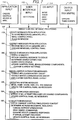
- Fig. 7 shows further details of control message processing that is done in response to receiving messages or inputs 170, 172, 174, and 176 from four sources, namely, MMAP 102, UI 126, the operating system, and multimedia device 124 inputs through MMPM 104.
- MMDCP is operative to perform the functions 178 and acquire the resources (e.g., memory) for the display, make the desired control panels, and place them on the screen.
- actions 180 release the resources, and discard the window and any control panels on the screen.
- actions 182 comprise checking the validity of the device ID, making a control instance by copying the control and then attaching the control instance to the open device, determining device capabilities, querying the device status, and updating the control panels, e.g., by enabling or disabling components and changing current settings.
- the attaching is simply notifying the control instance of the ID of device to be controlled.
- Actions 184 are functions or actions performed in response to miscellaneous messages from the application and include enabling or disabling the sending of notification messages to the application,toggling application notify on/off, toggling device communication on/off, and using custom control panel layout.
- Action 186 updates control panels as necessary in response to receiving messages from the operating system. Such messages include hide, show, move, paint, etc.
- actions 188 include updating the control panel as necessary. If an error has occurred, a recovery attempt is made or the component is disabled.
- Timed events are events which occur at a device asynchronously with respect to a command issued to the device. For example, if the device is instructed to play for a certain amount of time, the completion of the play command is a timed event which results in a notification being sent to MMDCP 106. At this point, MMDCP 106 stops animating the play button and changes the appearance of the play button to be consistent with a "stop" state.
- Other timed events might include position notifications and cuepoints.
- actions 190 are performed to check the current control panel/device context, and determine what actions are necessary. If for example, a device is already playing and the play button is selected, the context indicates no action is necessary and the selection of the play button is ignored.
- the actions to be done include cancelling current operations, sending device commands, examining device command responses, attempting error recovery, and updating the control panel as necessary.
- a typical sequence of actions that occur can be illustrated by the example of audio control panel 204 and volume controller 221 (Fig. 2).
- the user desires a volume increase.
- the mouse is manipulated to position cursor 210 on button 227 and then clicked and held until the volume increases to the desired level.
- presentation manager 99 determines which application,the cursor is currently being operated under, which window the cursor is being operated in, and which object in the window has been selected.
- the object is the audio controller volume increase button.
- PM 99 then sends a user interface message 172 (Fig. 7) to the audio control instance which message identifies the object and the control action desired.
- the audio control instance In response to receiving the message, the audio control instance then performs the functions 190 and determines what actions are necessary. The first is to decide whether to cancel any current operation. If the mute button is on, it would be cancelled to allow audio to be produced by the device. Next, a volume increase device command is sent to the audio device to increase the volume by an increment. At this point the device responds and if the response indicates such action has been done without error, the next action is to update the pointer of the volume dial and this is done by sending a message through PM 99 and user interface which thereupon redraws the volume dial pointer to a new position representing an increment of volume increase. The sequence of actions repeat until the mouse button is released, or until the maximum volume is reached.
- An optional action could be performed before communicating with the device, to give the application program the opportunity to handle the user selection. This is useful in situations where operational customization is done by the application, instead of operating by the control instance. With this option, the application would send a return code indicating it will or will not handle the message.
- MMDCP 106 includes a variety of panel templates 109 that are used in making a control panel in 178.
- MMDCP provides the application programmer with the options of accepting a default panel, a minimal panel, a complete panel, or a custom panel.
- a complete panel includes all the supported dials, buttons, sliders, etc. for controlling a particular device.
- a minimal panel includes only those controllers generally considered absolutely necessary. Naturally, the minimal panel occupies less screen area than a complete panel.
- a custom panel could be defined by the application and use any subset of the components of a complete panel, change relative positions, include other functions, etc.
- the templates also include vertically oriented panels, such as the audio and video panels shown in Fig. 2, and horizontally oriented panels, for both complete and minimal panels.
- Additional options include animated buttons (such as movement of arrows on a Play button when a device is playing), and the ability for an application to request that the control only present a user interface but not communicate with the device. This option may be useful if the application desires to control other devices while taking advantage of the user interface standards and processing.
- the designs of the panels provide a uniform appearance and common look and feel between different applications.
- a device ID is obtained, a window is created, a player control instance is created, and the device is set.
- the player control instance will display the control screen including the player control panel, handle all user interface actions, communicate with the videodisc player, etc. No other code in the application program is needed to perform or process selections from the control panel.
- an application program must first create an instance of a control and second, attach the instance to an open device before the control instance can assume responsibility for managing the user interface with the attached device.
- the first action involves creating a window of the proper window class.
- There is a window class For each type of supported device to be controlled: audio attributes, video attributes, and player attributes.
- presentation manager an application program creates a window using the PM call WinCreateWindow.
- WinCreateWindow has several parameters including the window class and window style.
- the window style of the MMDCP specifies, among other things, the orientation of the control panel (vertical or horizontal) and the degree of desired device control (minimal, complete).
- the control program uses the style to select one of four layouts for the initial appearance. For example, audio control 204 in Fig. 2 is a vertical, complete control. The result thus promotes a consistent user interface.
- the panel templates 109 each specify the type of components and their positions using a dialog template of PM.
- the dialog template corresponding to the layout of audio control panel 204 is:
- the window class specified in the dialog template is ignored for each of the predefined components such as the mute button or the volume dial.
- the MMDCP uses the information in the template to create each of the desired components.
- the subset of components present influences the subsequent operation of the MMDCP.
- a minimal audio control includes only a volume dial and a mute button.
- a request to update the control panel would query the device only for the applicable information, i.e., the volume and mute status.
- a complete audio control would cause a query of the device for all of the components, i.e., the mute, volume, bass, and treble status.
- the template mechanism also allows the MMAP to specify an alternative layout for a control panel. This is done through an optional miscellaneous application message 184 to USE CUSTOM CONTROL PANEL LAYOUT.
- the MMAP provides the desired template to the MMDCP after the panel is created.
- the custom template supersedes any layout selected at MMDCP creation time. If neither minimal nor complete is specified in the style, then the MMDCP assumes that the MMAP will subsequently provide a layout and no components are created until this is done.
Landscapes
- Engineering & Computer Science (AREA)
- Theoretical Computer Science (AREA)
- General Engineering & Computer Science (AREA)
- Physics & Mathematics (AREA)
- General Physics & Mathematics (AREA)
- Human Computer Interaction (AREA)
- Multimedia (AREA)
- Data Mining & Analysis (AREA)
- Databases & Information Systems (AREA)
- Digital Computer Display Output (AREA)
- User Interface Of Digital Computer (AREA)
Applications Claiming Priority (2)
| Application Number | Priority Date | Filing Date | Title |
|---|---|---|---|
| US07/991,034 US5428730A (en) | 1992-12-15 | 1992-12-15 | Multimedia system having software mechanism providing standardized interfaces and controls for the operation of multimedia devices |
| US991034 | 1992-12-15 |
Publications (1)
| Publication Number | Publication Date |
|---|---|
| EP0602947A1 true EP0602947A1 (fr) | 1994-06-22 |
Family
ID=25536785
Family Applications (1)
| Application Number | Title | Priority Date | Filing Date |
|---|---|---|---|
| EP93310118A Withdrawn EP0602947A1 (fr) | 1992-12-15 | 1993-12-15 | Système multimedia ayant des mécanismes logiciels pour interfaces et contrôles standard, pour le fonctionnement d'appareil multimedia |
Country Status (3)
| Country | Link |
|---|---|
| US (1) | US5428730A (fr) |
| EP (1) | EP0602947A1 (fr) |
| JP (1) | JP2509459B2 (fr) |
Cited By (9)
| Publication number | Priority date | Publication date | Assignee | Title |
|---|---|---|---|---|
| EP0713171A1 (fr) * | 1994-11-21 | 1996-05-22 | Nec Corporation | Système de communication de données multimedia avec une pluralité de types d'interface utilisateur graphique |
| EP0731420A3 (fr) * | 1995-02-03 | 1999-02-03 | Olympus Optical Co., Ltd. | Système optique d'enregistrement/reproduction d'informations multimédia utilisant des données codées |
| US5881318A (en) * | 1996-07-09 | 1999-03-09 | Gateway 2000, Inc. | Keyboard audio controls for integrated CD-ROM players |
| US5990872A (en) * | 1996-10-31 | 1999-11-23 | Gateway 2000, Inc. | Keyboard control of a pointing device of a computer |
| EP1542124A1 (fr) * | 2003-12-01 | 2005-06-15 | Sony Corporation | Menu dynamique pour la selection d'une application pour un dispositif connecté |
| EP1120713A4 (fr) * | 1999-05-19 | 2005-08-31 | Matsushita Electric Industrial Co Ltd | Dispositif et procede de construction d'un reseau audiovisuel virtuel, et support dans lequel un programme de mise en oeuvre dudit procede est enregistre |
| US7079112B1 (en) | 1997-07-09 | 2006-07-18 | Gateway Inc. | Pointing device with absolute and relative positioning capability |
| CN102122517A (zh) * | 2003-03-25 | 2011-07-13 | 汤姆森许可贸易公司 | 用于表示动画菜单按钮的方法 |
| CN102184738A (zh) * | 2011-03-24 | 2011-09-14 | 广东欧珀电子工业有限公司 | 一种多模式菜单的设置方法 |
Families Citing this family (114)
| Publication number | Priority date | Publication date | Assignee | Title |
|---|---|---|---|---|
| US5301326A (en) * | 1991-09-24 | 1994-04-05 | Microsoft Corporation | Method and system for controlling the execution of an application program |
| US8352400B2 (en) | 1991-12-23 | 2013-01-08 | Hoffberg Steven M | Adaptive pattern recognition based controller apparatus and method and human-factored interface therefore |
| US10361802B1 (en) | 1999-02-01 | 2019-07-23 | Blanding Hovenweep, Llc | Adaptive pattern recognition based control system and method |
| CN1113302C (zh) * | 1993-07-30 | 2003-07-02 | 佳能株式会社 | 通过通信线路控制设备的控制器和方法 |
| JP3185505B2 (ja) * | 1993-12-24 | 2001-07-11 | 株式会社日立製作所 | 会議録作成支援装置 |
| KR960003651B1 (ko) * | 1993-12-24 | 1996-03-21 | 재단법인 한국전자통신연구소 | 고속 로컬버스용 통합 멀티미디어 보드회로 |
| US5699089A (en) * | 1994-03-03 | 1997-12-16 | Applied Voice Technology | Central control for sequential-playback objects |
| US5615401A (en) * | 1994-03-30 | 1997-03-25 | Sigma Designs, Inc. | Video and audio data presentation interface |
| US5880729A (en) * | 1994-05-16 | 1999-03-09 | Apple Computer, Inc. | Graphical user interfaces having animated control elements |
| US6404433B1 (en) * | 1994-05-16 | 2002-06-11 | Apple Computer, Inc. | Data-driven layout engine |
| CA2153445C (fr) * | 1994-09-08 | 2002-05-21 | Ashok Raj Saxena | Interface utilisateur pour unite de sauvegarde de supports video |
| AU3461595A (en) * | 1994-09-30 | 1996-04-26 | Apple Computer, Inc. | Method and apparatus for displaying and accessing control and status information in a computer system |
| US5748956A (en) * | 1995-01-13 | 1998-05-05 | U.S. West Technologies, Inc. | Method and system for managing multimedia assets for proper deployment on interactive networks |
| JP3548617B2 (ja) | 1995-01-31 | 2004-07-28 | 株式会社日立製作所 | 情報検索装置 |
| US5630174A (en) * | 1995-02-03 | 1997-05-13 | Cirrus Logic, Inc. | Adapter for detecting whether a peripheral is standard or multimedia type format and selectively switching the peripheral to couple or bypass the system bus |
| US5680323A (en) * | 1995-06-23 | 1997-10-21 | Canon Information Systems, Inc. | Multimedia player |
| DE19530955A1 (de) * | 1995-08-23 | 1997-02-27 | Miro Computer Prod Ag | Bedienungsanordnung für eine Mehrzahl von Multimediageräten |
| US5726883A (en) * | 1995-10-10 | 1998-03-10 | Xerox Corporation | Method of customizing control interfaces for devices on a network |
| US5796951A (en) * | 1995-12-22 | 1998-08-18 | Intel Corporation | System for displaying information relating to a computer network including association devices with tasks performable on those devices |
| JPH09237141A (ja) * | 1996-02-29 | 1997-09-09 | Toshiba Corp | コンピュータシステム及びコンピュータシステムに適用する拡張ユニット |
| US5839095A (en) * | 1996-06-07 | 1998-11-17 | Liu; Johny | Multimedia control center for controlling peripheral devices of a personal computer |
| US5832499A (en) * | 1996-07-10 | 1998-11-03 | Survivors Of The Shoah Visual History Foundation | Digital library system |
| US5813014A (en) * | 1996-07-10 | 1998-09-22 | Survivors Of The Shoah Visual History Foundation | Method and apparatus for management of multimedia assets |
| US5799372A (en) * | 1996-08-21 | 1998-09-01 | Toshiba America Information Systems, Inc. | System for supporting a monitor |
| SG54388A1 (en) * | 1996-09-04 | 1998-11-16 | Creative Tech Ltd | Method and system for facilitating irda support and integrated multimedia control for a cd-rom drive |
| US5790817A (en) * | 1996-09-25 | 1998-08-04 | Advanced Micro Devices, Inc. | Configurable digital wireless and wired communications system architecture for implementing baseband functionality |
| US5953532A (en) * | 1997-01-03 | 1999-09-14 | Ncr Corporation | Installation and deinstallation of application programs |
| US5930797A (en) * | 1997-04-15 | 1999-07-27 | Avid Technology, Inc. | Method and system for representing hierarchical time-based data structures and to extract information therefrom |
| US6081266A (en) * | 1997-04-21 | 2000-06-27 | Sony Corporation | Interactive control of audio outputs on a display screen |
| US5990884A (en) * | 1997-05-02 | 1999-11-23 | Sony Corporation | Control of multimedia information with interface specification stored on multimedia component |
| US6268845B1 (en) | 1997-06-11 | 2001-07-31 | Compaq Computer Corporation | Bezel button controls over USB |
| US6289466B1 (en) * | 1997-06-11 | 2001-09-11 | Compaq Computer Corporation | Usage of monitor bezel buttons to control and indicate multimedia functions |
| US6081855A (en) * | 1998-04-15 | 2000-06-27 | Oak Technology, Inc. | Digital versatile disc playback system with flexible input interface |
| US6188399B1 (en) | 1998-05-08 | 2001-02-13 | Apple Computer, Inc. | Multiple theme engine graphical user interface architecture |
| US7865832B2 (en) * | 1999-07-26 | 2011-01-04 | Sony Corporation | Extended elements and mechanisms for displaying a rich graphical user interface in panel subunit |
| US7966078B2 (en) | 1999-02-01 | 2011-06-21 | Steven Hoffberg | Network media appliance system and method |
| JP2000307594A (ja) * | 1999-04-21 | 2000-11-02 | Nec Corp | Av機器の機能の最適処理分散システム |
| US6819761B1 (en) | 1999-09-16 | 2004-11-16 | Silicon Laboratories, Inc. | Programmable constant current “off hook” circuit |
| TWI236599B (en) * | 2000-06-02 | 2005-07-21 | Yamaha Corp | Multimedia system with synchronization of music and image tracks |
| US6581071B1 (en) | 2000-09-12 | 2003-06-17 | Survivors Of The Shoah Visual History Foundation | Surveying system and method |
| US6574638B1 (en) | 2000-09-12 | 2003-06-03 | Survivors Of The Shoah Visual History Foundation | Method and apparatus for cataloguing multimedia data using surveying data |
| US20020120833A1 (en) * | 2001-02-15 | 2002-08-29 | Inventec Corporation | Method for automatic obtaining the ID number of items of a volume control program |
| KR100538217B1 (ko) * | 2002-06-19 | 2005-12-21 | 삼성전자주식회사 | 모니터 제어 방법 및 장치 |
| TW200407783A (en) * | 2002-11-12 | 2004-05-16 | Mitac Technology Corp | Replacement method and apparatus for panel of audio player |
| US7610553B1 (en) * | 2003-04-05 | 2009-10-27 | Apple Inc. | Method and apparatus for reducing data events that represent a user's interaction with a control interface |
| US7328412B1 (en) * | 2003-04-05 | 2008-02-05 | Apple Inc. | Method and apparatus for displaying a gain control interface with non-linear gain levels |
| KR100513278B1 (ko) * | 2003-04-17 | 2005-09-09 | 삼성전자주식회사 | 사용자 인터페이스 제공 시스템 및 방법 |
| US7619762B2 (en) * | 2003-04-28 | 2009-11-17 | Lexmark International, Inc. | Customizable multi-function printing device |
| US7197702B2 (en) * | 2003-06-13 | 2007-03-27 | Microsoft Corporation | Web page rendering mechanism using external programmatic themes |
| US7398472B2 (en) * | 2004-07-09 | 2008-07-08 | Microsoft Corporation | Defining the visual appearance of user-interface controls |
| JP4689247B2 (ja) | 2004-11-19 | 2011-05-25 | キヤノン株式会社 | カメラ及びその制御方法 |
| US8510662B1 (en) * | 2005-06-27 | 2013-08-13 | Oracle America, Inc. | Effects framework for GUI components |
| CN101248417A (zh) * | 2005-08-24 | 2008-08-20 | 松下电器产业株式会社 | 媒体处理方法、媒体处理程序 |
| JP4640046B2 (ja) | 2005-08-30 | 2011-03-02 | 株式会社日立製作所 | デジタルコンテンツ再生装置 |
| US7559027B2 (en) * | 2006-02-28 | 2009-07-07 | Palm, Inc. | Master multimedia software controls |
| US7447998B2 (en) * | 2006-05-04 | 2008-11-04 | International Business Machines Corporation | Graphical interface for tree view |
| JP2008158892A (ja) * | 2006-12-25 | 2008-07-10 | Toshiba Corp | 音量調整方法及び情報処理装置 |
| USD580950S1 (en) * | 2007-06-15 | 2008-11-18 | Microsoft Corporation | Icon for a portion of a display screen |
| USD580453S1 (en) * | 2007-06-15 | 2008-11-11 | Microsoft Corporation | Icon for a portion of a display screen |
| AU2009200129B2 (en) * | 2008-01-18 | 2015-06-25 | Lifescan Scotland Limited | Analyte testing method and system |
| US8387015B2 (en) * | 2008-01-31 | 2013-02-26 | Microsoft Corporation | Scalable automated empirical testing of media files on media players |
| US9495210B1 (en) * | 2008-06-30 | 2016-11-15 | EMC IP Holding Company LLC | Logical device model |
| KR101542744B1 (ko) | 2009-03-18 | 2015-08-10 | 삼성전자주식회사 | 네트워크에서 피제어장치를 제어하는 방법 및 그 장치 |
| EP2497280A2 (fr) * | 2009-11-06 | 2012-09-12 | TP Vision Holding B.V. | Procédé et appareil permettant le rendu d'un élément multimédia selon une pluralité de modalités |
| JP5413154B2 (ja) * | 2009-11-27 | 2014-02-12 | 株式会社リコー | 表示装置、画像形成装置、カスタマイズ方法、プログラム |
| US8502856B2 (en) | 2010-04-07 | 2013-08-06 | Apple Inc. | In conference display adjustments |
| US8742250B2 (en) * | 2010-08-09 | 2014-06-03 | Palo Alto Research Center Incorporated | Stationary sunlight redirecting system for increasing the efficiency of fixed-tilt PV farm |
| US9417754B2 (en) | 2011-08-05 | 2016-08-16 | P4tents1, LLC | User interface system, method, and computer program product |
| JP6031186B2 (ja) | 2012-05-09 | 2016-11-24 | アップル インコーポレイテッド | ユーザインタフェースオブジェクトを選択するためのデバイス、方法及びグラフィカルユーザインタフェース |
| WO2013169849A2 (fr) | 2012-05-09 | 2013-11-14 | Industries Llc Yknots | Dispositif, procédé et interface utilisateur graphique permettant d'afficher des objets d'interface utilisateur correspondant à une application |
| WO2013169842A2 (fr) | 2012-05-09 | 2013-11-14 | Yknots Industries Llc | Dispositif, procédé, et interface utilisateur graphique permettant de sélectionner un objet parmi un groupe d'objets |
| CN104508618B (zh) | 2012-05-09 | 2018-01-05 | 苹果公司 | 用于针对在用户界面中执行的操作提供触觉反馈的设备、方法和图形用户界面 |
| WO2013169851A2 (fr) | 2012-05-09 | 2013-11-14 | Yknots Industries Llc | Dispositif, procédé et interface d'utilisateur graphique pour faciliter l'interaction de l'utilisateur avec des commandes dans une interface d'utilisateur |
| WO2013169865A2 (fr) | 2012-05-09 | 2013-11-14 | Yknots Industries Llc | Dispositif, procédé et interface d'utilisateur graphique pour déplacer un objet d'interface d'utilisateur en fonction d'une intensité d'une entrée d'appui |
| WO2013169843A1 (fr) | 2012-05-09 | 2013-11-14 | Yknots Industries Llc | Dispositif, procédé et interface graphique utilisateur pour manipuler des objets graphiques encadrés |
| WO2013169846A1 (fr) | 2012-05-09 | 2013-11-14 | Yknots Industries Llc | Dispositif, procédé et interface graphique utilisateur pour afficher des informations supplémentaires en réponse à un contact d'utilisateur |
| EP2847662B1 (fr) | 2012-05-09 | 2020-02-19 | Apple Inc. | Dispositif, procédé et interface d'utilisateur graphique pour obtenir une rétroaction destinée à modifier des états d'activation d'un objet d'interface d'utilisateur |
| WO2013169845A1 (fr) | 2012-05-09 | 2013-11-14 | Yknots Industries Llc | Dispositif, procédé et interface graphique utilisateur pour faire défiler des régions imbriquées |
| WO2013169875A2 (fr) | 2012-05-09 | 2013-11-14 | Yknots Industries Llc | Dispositif, méthode et interface utilisateur graphique d'affichage de contenu associé à une affordance correspondante |
| CN104487930A (zh) | 2012-05-09 | 2015-04-01 | 苹果公司 | 用于移动和放置用户界面对象的设备、方法和图形用户界面 |
| EP2847659B1 (fr) | 2012-05-09 | 2019-09-04 | Apple Inc. | Dispositif, procédé et interface graphique utilisateur permettant une transition entre des états d'affichage en réponse à un geste |
| US10902179B2 (en) | 2012-12-10 | 2021-01-26 | Microsoft Technology Licensing, Llc | Modification of file graphic appearance within a collection canvas |
| WO2014105274A1 (fr) | 2012-12-29 | 2014-07-03 | Yknots Industries Llc | Dispositif, procédé et interface utilisateur graphique pour naviguer dans des hiérarchies d'interface utilisateur |
| HK1215094A1 (zh) | 2012-12-29 | 2016-08-12 | Apple Inc. | 用於根據具有模擬三維特徵的控制圖標的外觀變化來移動光標的設備、方法和圖形用戶界面 |
| AU2013368441B2 (en) | 2012-12-29 | 2016-04-14 | Apple Inc. | Device, method, and graphical user interface for forgoing generation of tactile output for a multi-contact gesture |
| CN107831991B (zh) | 2012-12-29 | 2020-11-27 | 苹果公司 | 用于确定是滚动还是选择内容的设备、方法和图形用户界面 |
| AU2013368443B2 (en) | 2012-12-29 | 2016-03-24 | Apple Inc. | Device, method, and graphical user interface for transitioning between touch input to display output relationships |
| WO2014105279A1 (fr) | 2012-12-29 | 2014-07-03 | Yknots Industries Llc | Dispositif, procédé et interface utilisateur graphique pour une commutation entre des interfaces utilisateur |
| WO2015183366A1 (fr) | 2014-05-30 | 2015-12-03 | Apple, Inc. | Continuité |
| US10095396B2 (en) | 2015-03-08 | 2018-10-09 | Apple Inc. | Devices, methods, and graphical user interfaces for interacting with a control object while dragging another object |
| US9990107B2 (en) | 2015-03-08 | 2018-06-05 | Apple Inc. | Devices, methods, and graphical user interfaces for displaying and using menus |
| US10048757B2 (en) | 2015-03-08 | 2018-08-14 | Apple Inc. | Devices and methods for controlling media presentation |
| US9645732B2 (en) | 2015-03-08 | 2017-05-09 | Apple Inc. | Devices, methods, and graphical user interfaces for displaying and using menus |
| US9632664B2 (en) | 2015-03-08 | 2017-04-25 | Apple Inc. | Devices, methods, and graphical user interfaces for manipulating user interface objects with visual and/or haptic feedback |
| US9639184B2 (en) | 2015-03-19 | 2017-05-02 | Apple Inc. | Touch input cursor manipulation |
| US20170045981A1 (en) | 2015-08-10 | 2017-02-16 | Apple Inc. | Devices and Methods for Processing Touch Inputs Based on Their Intensities |
| US10152208B2 (en) | 2015-04-01 | 2018-12-11 | Apple Inc. | Devices and methods for processing touch inputs based on their intensities |
| US10200598B2 (en) | 2015-06-07 | 2019-02-05 | Apple Inc. | Devices and methods for capturing and interacting with enhanced digital images |
| US9860451B2 (en) | 2015-06-07 | 2018-01-02 | Apple Inc. | Devices and methods for capturing and interacting with enhanced digital images |
| US9830048B2 (en) | 2015-06-07 | 2017-11-28 | Apple Inc. | Devices and methods for processing touch inputs with instructions in a web page |
| US9891811B2 (en) | 2015-06-07 | 2018-02-13 | Apple Inc. | Devices and methods for navigating between user interfaces |
| US10346030B2 (en) | 2015-06-07 | 2019-07-09 | Apple Inc. | Devices and methods for navigating between user interfaces |
| US10416800B2 (en) | 2015-08-10 | 2019-09-17 | Apple Inc. | Devices, methods, and graphical user interfaces for adjusting user interface objects |
| US10248308B2 (en) | 2015-08-10 | 2019-04-02 | Apple Inc. | Devices, methods, and graphical user interfaces for manipulating user interfaces with physical gestures |
| US10235035B2 (en) | 2015-08-10 | 2019-03-19 | Apple Inc. | Devices, methods, and graphical user interfaces for content navigation and manipulation |
| US9880735B2 (en) | 2015-08-10 | 2018-01-30 | Apple Inc. | Devices, methods, and graphical user interfaces for manipulating user interface objects with visual and/or haptic feedback |
| DE102015117479B4 (de) * | 2015-10-14 | 2024-06-27 | Canon Production Printing Germany Gmbh & Co. Kg | Verfahren zum Synchronisieren von Bedienfeldern eines Produktionssystems |
| US10637986B2 (en) | 2016-06-10 | 2020-04-28 | Apple Inc. | Displaying and updating a set of application views |
| US12242707B2 (en) | 2017-05-15 | 2025-03-04 | Apple Inc. | Displaying and moving application views on a display of an electronic device |
| US11822761B2 (en) | 2021-05-15 | 2023-11-21 | Apple Inc. | Shared-content session user interfaces |
| US11907605B2 (en) | 2021-05-15 | 2024-02-20 | Apple Inc. | Shared-content session user interfaces |
| US12449961B2 (en) | 2021-05-18 | 2025-10-21 | Apple Inc. | Adaptive video conference user interfaces |
| US12405631B2 (en) | 2022-06-05 | 2025-09-02 | Apple Inc. | Displaying application views |
| US12578837B2 (en) | 2022-09-23 | 2026-03-17 | Apple Inc. | User interfaces for managing sharing of content in three-dimensional environments |
Citations (1)
| Publication number | Priority date | Publication date | Assignee | Title |
|---|---|---|---|---|
| EP0489576A2 (fr) * | 1990-12-04 | 1992-06-10 | SONY ELECTRONICS INC. (a Delaware corporation) | Dispositif et méthode de visualisation contrôlés par ordinateur |
Family Cites Families (15)
| Publication number | Priority date | Publication date | Assignee | Title |
|---|---|---|---|---|
| US5060140A (en) * | 1986-01-16 | 1991-10-22 | Jupiter Technology Inc. | Universal programmable data communication connection system |
| JPH0812206B2 (ja) * | 1986-03-07 | 1996-02-07 | ヒューレット・パッカード・カンパニー | 測定器制御装置 |
| US5291587A (en) * | 1986-04-14 | 1994-03-01 | National Instruments, Inc. | Graphical system for executing a process and for programming a computer to execute a process, including graphical variable inputs and variable outputs |
| US4914568A (en) * | 1986-10-24 | 1990-04-03 | National Instruments, Inc. | Graphical system for modelling a process and associated method |
| US4901221A (en) * | 1986-04-14 | 1990-02-13 | National Instruments, Inc. | Graphical system for modelling a process and associated method |
| GB2191918B (en) * | 1986-06-16 | 1990-09-05 | Ibm | Data display system |
| US5109515A (en) * | 1987-09-28 | 1992-04-28 | At&T Bell Laboratories | User and application program transparent resource sharing multiple computer interface architecture with kernel process level transfer of user requested services |
| US5040131A (en) * | 1987-12-23 | 1991-08-13 | International Business Machines Corporation | Graphical processing |
| US4866638A (en) * | 1988-03-04 | 1989-09-12 | Eastman Kodak Company | Process for producing human-computer interface prototypes |
| US5041992A (en) * | 1988-10-24 | 1991-08-20 | University Of Pittsburgh | Interactive method of developing software interfaces |
| US5065345A (en) * | 1988-11-04 | 1991-11-12 | Dyned International, Inc. | Interactive audiovisual control mechanism |
| US5313574A (en) * | 1990-06-13 | 1994-05-17 | Hewlett-Packard Company | Method for starting processing of an iconic programming system |
| JPH0727447B2 (ja) * | 1990-07-05 | 1995-03-29 | 富士ゼロックス株式会社 | ハイパーメディア装置 |
| US5293476A (en) * | 1991-03-12 | 1994-03-08 | Hewlett-Packard Co. | System for entering and modifying variable names for terminals of icons in an iconic programming system |
| US5333299A (en) * | 1991-12-31 | 1994-07-26 | International Business Machines Corporation | Synchronization techniques for multimedia data streams |
-
1992
- 1992-12-15 US US07/991,034 patent/US5428730A/en not_active Expired - Fee Related
-
1993
- 1993-12-10 JP JP5340997A patent/JP2509459B2/ja not_active Expired - Lifetime
- 1993-12-15 EP EP93310118A patent/EP0602947A1/fr not_active Withdrawn
Patent Citations (1)
| Publication number | Priority date | Publication date | Assignee | Title |
|---|---|---|---|---|
| EP0489576A2 (fr) * | 1990-12-04 | 1992-06-10 | SONY ELECTRONICS INC. (a Delaware corporation) | Dispositif et méthode de visualisation contrôlés par ordinateur |
Non-Patent Citations (3)
| Title |
|---|
| "Creation/modification of the audio signal processor setup for a PC audio editor", IBM TECHNICAL DISCLOSURE BULLETIN., vol. 30, no. 10, March 1988 (1988-03-01), NEW YORK US, pages 367 - 376 * |
| T. YAGER :: "Style Meets Substance in Matrox Studio", BYTE, vol. 17, no. 12, November 1992 (1992-11-01), ST PETERBOROUGH US, pages 261 - 264, XP000316398 * |
| W. ANDREWS :: "Graphics/audio software simplifies man-machine interface in real-time", COMPUTER DESIGN, vol. 28, no. 11, 1 June 1989 (1989-06-01), LITTLETON, MASSACHUSETTS US, pages 42 - 45, XP000210316 * |
Cited By (14)
| Publication number | Priority date | Publication date | Assignee | Title |
|---|---|---|---|---|
| EP0713171A1 (fr) * | 1994-11-21 | 1996-05-22 | Nec Corporation | Système de communication de données multimedia avec une pluralité de types d'interface utilisateur graphique |
| US5815148A (en) * | 1994-11-21 | 1998-09-29 | Nec Corporation | Multi-media data communication system having a plurality of types of graphical user interfaces |
| EP0731420A3 (fr) * | 1995-02-03 | 1999-02-03 | Olympus Optical Co., Ltd. | Système optique d'enregistrement/reproduction d'informations multimédia utilisant des données codées |
| US5881318A (en) * | 1996-07-09 | 1999-03-09 | Gateway 2000, Inc. | Keyboard audio controls for integrated CD-ROM players |
| WO1998001804A3 (fr) * | 1996-07-09 | 1999-03-18 | Gateway 2000 Inc | Commandes audio par clavier pour lecteurs de cd-rom integres |
| AU712933B2 (en) * | 1996-07-09 | 1999-11-18 | Gateway 2000, Inc. | Keyboard audio controls for integrated CD-rom players |
| US5990872A (en) * | 1996-10-31 | 1999-11-23 | Gateway 2000, Inc. | Keyboard control of a pointing device of a computer |
| US7079112B1 (en) | 1997-07-09 | 2006-07-18 | Gateway Inc. | Pointing device with absolute and relative positioning capability |
| EP1120713A4 (fr) * | 1999-05-19 | 2005-08-31 | Matsushita Electric Industrial Co Ltd | Dispositif et procede de construction d'un reseau audiovisuel virtuel, et support dans lequel un programme de mise en oeuvre dudit procede est enregistre |
| CN102122517A (zh) * | 2003-03-25 | 2011-07-13 | 汤姆森许可贸易公司 | 用于表示动画菜单按钮的方法 |
| CN102122517B (zh) * | 2003-03-25 | 2013-10-30 | 汤姆森许可贸易公司 | 用于表示动画菜单按钮的方法 |
| EP1542124A1 (fr) * | 2003-12-01 | 2005-06-15 | Sony Corporation | Menu dynamique pour la selection d'une application pour un dispositif connecté |
| US7802190B2 (en) | 2003-12-01 | 2010-09-21 | Sony Corporation | Application display apparatus and application display system |
| CN102184738A (zh) * | 2011-03-24 | 2011-09-14 | 广东欧珀电子工业有限公司 | 一种多模式菜单的设置方法 |
Also Published As
| Publication number | Publication date |
|---|---|
| JP2509459B2 (ja) | 1996-06-19 |
| JPH06222902A (ja) | 1994-08-12 |
| US5428730A (en) | 1995-06-27 |
Similar Documents
| Publication | Publication Date | Title |
|---|---|---|
| US5428730A (en) | Multimedia system having software mechanism providing standardized interfaces and controls for the operation of multimedia devices | |
| US5687334A (en) | User interface for configuring input and output devices of a computer | |
| US5740436A (en) | System architecture for configuring input and output devices of a computer | |
| US6118451A (en) | Apparatus and method for controlling dialog box display and system interactivity in a computer-based system | |
| JP2732557B2 (ja) | Guiの機能を変更する方法及びデータ処理システム | |
| US8015542B1 (en) | System and method for creating a graphical program which invokes methods and properties of objects | |
| US6064812A (en) | System and method for developing automation clients using a graphical data flow program | |
| US6064816A (en) | System and method for performing class propagation and type checking in a graphical automation client | |
| US6239796B1 (en) | Apparatus and method for controlling dialog box display and system interactivity in a signal measurement system | |
| KR100953806B1 (ko) | 어플리케이션 및 사용자에게 공지되는 사용자 인터페이스엘리먼트들을 형성하기 위한 시스템 및 방법 | |
| CA1292080C (fr) | Syteme de menus commande par la situation de fonctionnement | |
| US6990652B1 (en) | System and method for determining methods and properties to be invoked on objects in a graphical program | |
| US5734597A (en) | Graphical user interface interaction between time and date controls | |
| US20030179240A1 (en) | Systems and methods for managing virtual desktops in a windowing environment | |
| US20020030683A1 (en) | Method for graphically annotating a waveform display in a signal-measurement system | |
| JPH0685873A (ja) | ハイパーメディアシステムとハイパー構造内で通信する相互接続された複数のエディタとの間の通信用超高レベル双方向プロトコル | |
| US5745713A (en) | Movie-based facility for launching application programs or services | |
| AU653268B2 (en) | Audio output method and apparatus in multi-window system | |
| KR100562905B1 (ko) | 어플리케이션 프로그램 모듈의 동적 배치 방법 | |
| JPH07225665A (ja) | データ処理装置 | |
| US20050156925A1 (en) | Graphical user interface for pre-boot operating environment | |
| TW302453B (fr) | ||
| JP2000099317A (ja) | ユーザインタフェース設計装置及び方法 | |
| US6717595B1 (en) | Computer-based list editor | |
| US20060285701A1 (en) | System and method for OS control of application access to audio hardware |
Legal Events
| Date | Code | Title | Description |
|---|---|---|---|
| PUAI | Public reference made under article 153(3) epc to a published international application that has entered the european phase |
Free format text: ORIGINAL CODE: 0009012 |
|
| AK | Designated contracting states |
Kind code of ref document: A1 Designated state(s): DE FR GB |
|
| 17P | Request for examination filed |
Effective date: 19941021 |
|
| STAA | Information on the status of an ep patent application or granted ep patent |
Free format text: STATUS: THE APPLICATION HAS BEEN WITHDRAWN |
|
| 18W | Application withdrawn |
Withdrawal date: 19961023 |