EP0613095A2 - Procédé et dispositif pour générer des bases de données d'opérations et d'opérandes et pour les utiliser pour le traitement d'images en couleur - Google Patents
Procédé et dispositif pour générer des bases de données d'opérations et d'opérandes et pour les utiliser pour le traitement d'images en couleur Download PDFInfo
- Publication number
- EP0613095A2 EP0613095A2 EP94300002A EP94300002A EP0613095A2 EP 0613095 A2 EP0613095 A2 EP 0613095A2 EP 94300002 A EP94300002 A EP 94300002A EP 94300002 A EP94300002 A EP 94300002A EP 0613095 A2 EP0613095 A2 EP 0613095A2
- Authority
- EP
- European Patent Office
- Prior art keywords
- operand
- image processing
- image
- database
- operands
- Prior art date
- Legal status (The legal status is an assumption and is not a legal conclusion. Google has not performed a legal analysis and makes no representation as to the accuracy of the status listed.)
- Withdrawn
Links
Images


Classifications
-
- G—PHYSICS
- G06—COMPUTING OR CALCULATING; COUNTING
- G06T—IMAGE DATA PROCESSING OR GENERATION, IN GENERAL
- G06T9/00—Image coding
- G06T9/20—Contour coding, e.g. using detection of edges
-
- G—PHYSICS
- G06—COMPUTING OR CALCULATING; COUNTING
- G06F—ELECTRIC DIGITAL DATA PROCESSING
- G06F16/00—Information retrieval; Database structures therefor; File system structures therefor
- G06F16/50—Information retrieval; Database structures therefor; File system structures therefor of still image data
- G06F16/53—Querying
- G06F16/532—Query formulation, e.g. graphical querying
-
- G—PHYSICS
- G06—COMPUTING OR CALCULATING; COUNTING
- G06F—ELECTRIC DIGITAL DATA PROCESSING
- G06F16/00—Information retrieval; Database structures therefor; File system structures therefor
- G06F16/50—Information retrieval; Database structures therefor; File system structures therefor of still image data
- G06F16/58—Retrieval characterised by using metadata, e.g. metadata not derived from the content or metadata generated manually
- G06F16/583—Retrieval characterised by using metadata, e.g. metadata not derived from the content or metadata generated manually using metadata automatically derived from the content
- G06F16/5838—Retrieval characterised by using metadata, e.g. metadata not derived from the content or metadata generated manually using metadata automatically derived from the content using colour
Definitions
- the present invention relates to image processing generally and more particularly to pre-press processing of color images.
- the present invention seeks to provide a method and system for color image processing in which the unit which is processed is not a raster unit such as a pixel but rather is an operand.
- each operand is a meaningful entity with useful characteristics.
- Operands are typically not defined on a grid, unlike raster units. Instead, their locations and borders are preferably determined by the type of color processing operation which it is desired to perform or the type of color processing operation which it is believed might be performed in future.
- a method for storing an image in an image processing database format including the steps of automatically defining a multiplicity of regions in the image, uniting individual ones of the regions in accordance with user input, thereby to define a plurality of image processing operands, and generating an image processing operand database by storing the locations of the image processing operands.
- At least one of the following features is generally uniform within each of the multiplicity of regions: color, gray level, and texture.
- a method for storing an image in an image processing database format including the steps of defining a plurality of image processing operands in the image, determining at least one image processing feature of at least one of the image processing operands, and generating an image processing operand database including the locations and features of the image processing operands.
- the step of defining operands includes the steps of automatically defining a multiplicity of regions in the color image, and uniting individual ones of the regions in accordance with user input, thereby to define the plurality of image processing operands.
- the step of defining operands includes the steps of receiving at least a portion of a preliminary operand contour from a user, and analyzing the vicinity of the preliminary operand contour in order to automatically generate an improved operand contour.
- each image processing feature includes one of the following features: a semantic feature, resolution, spatial fequency, contrast, noise level, lighting, alpha masking, brightness, color, dynamic color range, pattern, position in space, 3D configuration, and a characterization of a spatial relationships with another operand.
- the characterization of a spatial relationship includes one of the following characterizations: one operand is on top of the other, one operand is under the other, one operand is next to the other, one operand is inside the other, and one operand contains the other.
- the method includes the step of performing an image processing operation at least twice on at least two respective operand sets, each of the operand sets including at least one of the operands in the operand database.
- the method also includes the step of generating a database of image processing operations by storing, for at least one operand of an operand set of at least one image processing operation, an indication of operand features pertinent to the image processing operation.
- the method also includes the step of performing an image processing operation from the image processing operations database on at least one image processing operand in the operand database by automatically modifying, within the operand, at least one image processing feature which is pertinent to the image processing operation according to the operation database.
- a method for employing an image processing database format to process an image including the steps of generating an image processing operand database by defining a plurality of image processing operands in the image and storing the locations of the image processing operands, performing an image processing operation at least twice on an at least two respective operand sets, each of the operand sets including at least one of the operands in the operand database.
- a method for processing an image by employing an image processing operation in which a modified feature value is assigned to all image locations whose original feature value falls within a range of the image processing operation including the steps of defining the location of an image processing operand including a multiplicity of image locations, for at least one feature characterizing individual image locations, determining the range of the feature within the operand, and performing the image processing operation on the image processing operand by defining the range of the operation as the range of the feature within the operand.
- each image location includes a pixel.
- the image processing operation includes the operation of assigning a new color value.
- a method for representing image processing operations in memory including the step of storing, for at least one operand in an operand set of at least one image processing operation, an indication of operand features pertinent to the image processing operation.
- each of the image processing operations includes an individual one of the following operations: color correction, shape distortion, tint, copy, filters, delete object, simple merge, complex merge, cut-and-paste, and shadow.
- the image is a raster image.
- the step of performing includes the step of storing the image processing operation to be performed.
- color image processing apparatus including color image memory in which a representation of a color image is stored, an operations database memory in which a plurality of characteristics of at least one color image processing operation is stored, an operand database memory in which a plurality of features of at least one color image operand is stored, and a control unit which is operative to retrieve at least one operation from the operations database and at least one operand from the operand database memory and to perform the operation on the operand by modifying the representation of the color image.
- apparatus for storing an image in an image processing database format, the apparatus including an automatic image region defining unit operative to automatically define a multiplicity of regions in the image, a user-interfacing operand generator operative to unite individual ones of the regions in accordance with user input, thereby to define a plurality of image processing operands, and an image processing operand database generator operative to store locations of the image processing operands within the image.
- apparatus for storing an image in an image processing database format, the apparatus including an operand defining user interface allowing a user to define a plurality of image processing operands in the image, an operand analyzer operative to determine at least one image processing feature of at least one of the image processing operands, and a operand database generator operative to generate an image processing operand database including the locations and features of the image processing operands.
- apparatus for employing an image processing database format to process an image
- the apparatus including an operand database generator operative to generate an image processing operand database by defining a plurality of image processing operands in the image and storing the locations of the image processing operands, and an operand-based image processor in communication with the operand database and operative to perform an image processing operation at least twice on an at least two respective operand sets, each of the operand sets including at least one of the operands in the operand database.
- apparatus for processing an image by employing an image processing operation in which a modified feature value is assigned to all image locations whose original feature value falls within a range of the image processing operation including an operation location designator operative to define the location of an image processing operand including a multiplicity of image locations, a feature range identifier, operative, for at least one feature characterizing individual image locations, to determine the range of the feature within the operand, and an image processor communicating with the feature range identifier for performing the image processing operation on the image processing operand by defining the range of the operation as the range of the feature within the operand.
- apparatus for representing image processing operations in memory including an operand feature memory in which is stored, for at least one operand in an operand set of at least one image processing operation, an indication of operand features pertinent to the image processing operation.
- FIG. 1 is a simplified flowchart of an image processing method operative in accordance with a preferred embodiment of the present invention.
- a particular feature of the method of Fig. 1 is that at least one operands are defined in a color image to be processed. Operands are portions of the colored image which are suitable units for a user-selected operation. For example, given a picture of a fruit bowl, a user may wish to perform an operation such as a change in the lighting model on each of a plurality of grapes in the fruit bowl. In this case, each grape is defined as an operand.
- Step 102 At least one operand is defined in the image and at least the location thereof, and preferably other characteristics or features thereof, is stored in an operands database.
- the operand is assigned a name or title and the name or title is also stored in the operand database.
- One method of identifying operands for database storage is as follows: The color image of interest is displayed to the user on a suitable device such as a CRT. The user traces the contour of each operand. This option is suitable for defining operands with a relatively simple contour which may include a large number of regions.
- the user provides a rough trace of the contour which serves as a preliminary indication of the contour and the system is operative to automatically analyze the vicinity of the contour as preliminarily indicated in order to automatically generate an improved operand contour.
- a method for implementing this embodiment is described in copending coassigned Israel Patent Application 100256, a copy of which is appended hereto and is referenced Appendix A.
- the above operand contour delineation method also allows a user to delineate the contour of a portion of an operand to be included in or added to an existing operand and also to delineate the contour of a portion of an operand to be excluded or deleted from an existing operand.
- a commercially available tool for creating, maintaining and accessing a database is DBASE.
- step 102 is interactive, as explained in more detail below with reference to Fig. 2.
- Step 106 At least one operation is defined which is to be performed on one or more operands in the image. For each operation, an operand set and/or a parameter set are defined and stored, thereby to provide an operations database.
- An operand set is a set of one or more operands on which the operation is performed.
- a color correction operation in which the color of a selected operand is modified may have a single-member operand set.
- the color correction operation has a two-member operand set comprising the selected operand and the "target" operand.
- a merge operation also typically has at least two members in its operand set including a first member and a second member which is transported into adjacency with the first member.
- a parameter set is a set of one or more parameters which characterize the operation.
- the parameter set may include a target color range and a transformation or correspondence defined between a source color range and the target color range.
- Sample operations which may be stored in an operations database include the following types of operations: color correction; shape distortion; tint; copy; filters; delete object; simple merge; complex merge; cut-and-paste and shadow.
- Shape distortion refers to distortion of the configuration or shape of a particular operand. For example, unsmiling lips may be distorted into smiling lips. Increasing or descreasing the size of an image are also examples of distortion.
- Tint refers to coloring a particular operand a particular color using a particular color distribution defined over the area of the operand and, preferably, a particular noise model.
- the color, distribution and noise may each be determined directly by the user or may be defined by the user's indicating that the color, distribution and/or noise characterizing another, colored operand, are to be employed.
- Coding refers to copying a particular operand onto another location of the color image, and either deleting the former contents of that location of the color image, or creating a transparency effect in which both the copied operand and the former contents of the location, are visible.
- Delete object refers to deleting a particular operand from a color image.
- the "hole” in the image where the object or operand used to be may be covered by replacing the deleted operand with another operand, or alternatively by generating color content which brings the "hole” into accordance with its surroundings. For example, if a scar is deleted from the face of a model, skin colors may be assigned at the "hole” location which match the color of the skin surrounding the "hole”.
- “Simple merge” refers to copying an operand into a particular location of a color image and uniformizing one or more of the operand's characteristics, such as resolution and/or noise, with the corresponding characteristic/s of its vicinity in the color image.
- the operand may be rotated, scaled or distorted in the course of merging.
- Complex merge refers to a merge operation which is similar to the “simple merge” operation described above except that, additionally, the borders of the merged operand are smoothed such that there is a smoother transition between the operand and its vicinity.
- Cut-and-paste refers to a procedure in which a portion of a color image is deleted, which portion may be defined as a first operand, and is replaced by copying in a second operand and merging the second operand with the remainder of the color image.
- Step 108 Pertinent features for each operand in the operand set of each operation are defined and stored in the operations database.
- the pertinent features for the selected operand may include one or more color categories to be found in the operand. For example, a user may wish to lighten all green areas in a green and red apple.
- a pertinent feature of the apple operand, which is included in the operand set of the "lighten" operation, is the range of colors which are to be categorized as green.
- Sample features which are useful for performing a variety of color processing operations include the following:
- Step 110 The levels of at least one operand feature is measured, quantified or determined and is stored for at least one of the operands in the operands database.
- the dynamic color range may be determined and stored for each of a plurality of operands in an operand database by identifying, for each operand, the maximum and minimum values for each color component.
- the operand features to be stored for a particular operand are determined by determining which operations it may be desired to perform on the operand, and by accessing the list of pertinent features for each such operation, provided in step 108.
- Step 114 An operation is selected by the user.
- Step 116 The user is prompted to select operands which will constitute the operand set for the selected operation.
- Methods for enabling a user to select an operand include, but are not limited to, the following:
- the selected operation is performed on the selected operands.
- the operand set of color correction may include a single operand whose color is to be corrected.
- the pertinent feature of the operand is the source range of colors in the operand which are to be modified.
- the parameters of the operation include a color transformation from the source color range to a target color range including one or more colors.
- At least one pertinent feature of at least one operand in the user-selected operand set of the user-selected operation is automatically modified.
- a merge operation may be performed and the light models of the two operands being merged may be automatically brought into accordance.
- Step 120 An individual operation may be performed more than once, wherein, each time, the operand set includes different operands from the operand database.
- Step 122 The user may perform additional operations on the color image, until he is satisfied with the color image.
- FIG. 2 is a simplified flowchart of a method for implementing operand definition step 102.
- the method preferably comprises the following steps: Step 200: The image is automatically partitioned into regions, on the basis of any suitable criterion.
- the Knife is a system, developed at Stanford University, CA, USA, which partitions a colored image into regions on the basis of color density.
- an image may be automatically partitioned into regions on the basis of color density by using a color density edge detection method such as the method described in copending coassigned Israel Patent Application 100256, a copy of which is appended hereto and is referenced Appendix A.
- Still another alternative method for semi-automatic partitioning into regions on the basis of color density employs the Density Mask, which is a function provided on the Prisma workstation, commercially available from Scitex Corporation, Herzlia, Israel.
- the Density Mask is particularly advantageous in partitioning an image which includes an extremely fragmented or jagged body of a particular color, such as a person's hair, portions of sky behind a complicated structure such as a tree or the Eiffel tower.
- the Density Mask is described in User Guide 1 which is marketed with the Prisma workstation.
- the image may be partitioned on the basis of gray level or texture.
- an existing partition of the image into regions may be employed.
- Step 204 The image is displayed to the user such that the partition into regions is visible. Any suitable display format may be employed. For example, an identifying character such as a number may be superimposed upon each region. To view the contour of an individual region, the user inputs the identifying character and the contour of the individual region is highlighted or otherwise brought into view.
- a network of lines representing region borders may be superimposed upon the displayed color image.
- Step 210 The user indicates, for each operand to be defined, at least one region to be included in the operand. Typically, a plurality of regions are included in each operand. Included regions are identified by indicating a single point therewithin, using any suitable device such as a mouse. This option is particularly suitable for defining operands which include a relatively small number of regions but which may have a complex contour.
- step 210 enables a user to define regions to be included in or added to an operand and also to define regions to be excluded or deleted from an existing operand.
- operands may be defined by performing steps 214 and 216.
- step 214 which may be performed together with step 200, the level of at least one feature is determined and stored for each of the regions in the partition defined in step 200.
- Step 214 is similar to step 108 of Fig. 1 except that the unit of interest is a region rather than an operand.
- operands are defined by indicating a range of levels of one or more features. For example, in an image which depicts a scene including a tree, the color density of each region may be determined and stored in step 214. In step 216, a "tree" operand may be defined by indicating a range of color densities which include the greens and browns characteristic of a tree.
- step 108 may be implemented as follows: to determine the level of a particular feature for a particular operand, the levels of that feature in each of the regions within the operand are suitable combined. For example, noise levels of a plurality of regions within an individual operand may be combined into an operand level noise vector, comprising a mean noise level and a standard deviation of noise value.
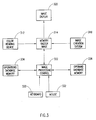
- Fig. 3 is a simplified block diagram of color processing apparatus suitable for implementing the method of Fig. 1.
- the apparatus of Fig. 3 comprises a color reading device 312 such as a Smart Scanner, commercially available from Scitex Corporation, Herzlia, Israel, which is operative to provide a digital or electronic representation of a color image, such as a raster, continuous tone representation of a color image.
- the term "color image”, as employed herein, is not intended to exclude single tone images such as a black and white image.
- the digital or electronic representation of the color image is stored in a suitable digital or electronic storage device 314 such as a frame buffer.
- Scanner 312 may be replaced or supplemented with an image creation system 318 such as a Blaze workstation, commercially available from Scitex, which is operative to directly generate, by computerized techniques, a digital or electronic representation of a color image for storage in memory 314.
- image creation system 318 such as a Blaze workstation, commercially available from Scitex, which is operative to directly generate, by computerized techniques, a digital or electronic representation of a color image for storage in memory 314.
- An analog representation of the image is provided to the user on an image display device 320 such as a CRT.
- An image processing control unit 322 communicates with a user in accordance with the method shown and described above with reference to Fig. 1, via one or more suitable user input devices such as a keyboard 330 and/or a mouse 332. As explained in detail above, the image processing control unit 322 is operative to create and store an operations database 334, to create and store an operands database 336, and to employ the databases 334 and 336 to modify the raster image 314.
- Databases 334 and 336 may be stored on any suitable form of electronic or digital memory, such as a hard disk or such as the main memory of a computer.
- An example of a procedure suitable for defining operands as in step 102 is the XtAddEventHandler subroutine of the Enhanced X-windows toolkit, described in the User Interface, Vol. 8, AIX Version 3.2 for RISC System/6000, commercially available from IBM.
Landscapes
- Engineering & Computer Science (AREA)
- Theoretical Computer Science (AREA)
- Physics & Mathematics (AREA)
- General Physics & Mathematics (AREA)
- Library & Information Science (AREA)
- Databases & Information Systems (AREA)
- General Engineering & Computer Science (AREA)
- Data Mining & Analysis (AREA)
- Mathematical Physics (AREA)
- Multimedia (AREA)
- Processing Or Creating Images (AREA)
- Image Processing (AREA)
- Image Analysis (AREA)
Applications Claiming Priority (2)
| Application Number | Priority Date | Filing Date | Title |
|---|---|---|---|
| IL10455393 | 1993-01-28 | ||
| IL10455393A IL104553A (en) | 1993-01-28 | 1993-01-28 | A standard and method for creating databases for actions and workers and for the above use of processing figures |
Publications (2)
| Publication Number | Publication Date |
|---|---|
| EP0613095A2 true EP0613095A2 (fr) | 1994-08-31 |
| EP0613095A3 EP0613095A3 (fr) | 1995-07-05 |
Family
ID=11064467
Family Applications (1)
| Application Number | Title | Priority Date | Filing Date |
|---|---|---|---|
| EP94300002A Withdrawn EP0613095A3 (fr) | 1993-01-28 | 1994-01-04 | Procédé et dispositif pour générer des bases de données d'opérations et d'opérandes et pour les utiliser pour le traitement d'images en couleur. |
Country Status (2)
| Country | Link |
|---|---|
| EP (1) | EP0613095A3 (fr) |
| IL (1) | IL104553A (fr) |
Family Cites Families (5)
| Publication number | Priority date | Publication date | Assignee | Title |
|---|---|---|---|---|
| GB2194117B (en) * | 1986-08-14 | 1991-05-01 | Canon Kk | Image processing apparatus |
| JPH01177272A (ja) * | 1988-01-06 | 1989-07-13 | Fuji Xerox Co Ltd | 画像処理装置 |
| US5086346A (en) * | 1989-02-08 | 1992-02-04 | Ricoh Company, Ltd. | Image processing apparatus having area designation function |
| US5307180A (en) * | 1991-12-18 | 1994-04-26 | Xerox Corporation | Method and apparatus for controlling the processing of digital image signals |
| CA2080209A1 (fr) * | 1992-01-10 | 1993-07-11 | Eric Allen Brewer | Systeme d'affichage organise spatialement pour ordinateur |
-
1993
- 1993-01-28 IL IL10455393A patent/IL104553A/en not_active IP Right Cessation
-
1994
- 1994-01-04 EP EP94300002A patent/EP0613095A3/fr not_active Withdrawn
Also Published As
| Publication number | Publication date |
|---|---|
| EP0613095A3 (fr) | 1995-07-05 |
| IL104553A0 (en) | 1993-05-13 |
| IL104553A (en) | 1996-10-31 |
Similar Documents
| Publication | Publication Date | Title |
|---|---|---|
| US6009209A (en) | Automated removal of red eye effect from a digital image | |
| US6160923A (en) | User directed dust and compact anomaly remover from digital images | |
| US5739819A (en) | Method and apparatus for generating an artificial shadow in a two dimensional color image | |
| US5317678A (en) | Method for changing color of displayed images by use of color components | |
| DE69329049T2 (de) | Methode zur Verarbeitung von Daten, die dreidimensionale graphische Objekte repräsentieren | |
| US5175806A (en) | Method and apparatus for fast surface detail application to an image | |
| US6529202B2 (en) | Color adviser | |
| US5809179A (en) | Producing a rendered image version of an original image using an image structure map representation of the image | |
| US6791573B2 (en) | Smart erasure brush | |
| US5751852A (en) | Image structure map data structure for spatially indexing an imgage | |
| JP3483929B2 (ja) | 3次元画像生成方法 | |
| DE69328464T2 (de) | Methode zur Berechnung der Beleuchtung für Daten dreidimensionaler Objekte | |
| EP0693738A2 (fr) | Dispositif et méthode pour produire des masques colorés | |
| DE69331486T2 (de) | Bilddatenverarbeitung | |
| EP0391572A2 (fr) | Méthode d'utilisation d'une liste hierarchique pour la visualisation globale | |
| JPS63172383A (ja) | 画素を色変調する方法 | |
| JPH03218581A (ja) | 画像セグメンテーション方法 | |
| JPH11513508A (ja) | 床用カバーまたはその他の織物の画像を操作するための方法およびシステム | |
| US5222206A (en) | Image color modification in a computer-aided design system | |
| CN110248242B (zh) | 一种图像处理和直播方法、装置、设备和存储介质 | |
| Yee et al. | Segmentation and adaptive assimilation for detail-preserving display of high-dynamic range images | |
| US5355446A (en) | Method and apparatus for preparing picture masks | |
| JP2651787B2 (ja) | 対話的ボリューム・レンダリング方法及び装置 | |
| GB2312120A (en) | Producing a transition region surrounding an image | |
| US5754688A (en) | Method and apparatus for stereologic analysis of two-dimensional images |
Legal Events
| Date | Code | Title | Description |
|---|---|---|---|
| PUAI | Public reference made under article 153(3) epc to a published international application that has entered the european phase |
Free format text: ORIGINAL CODE: 0009012 |
|
| AK | Designated contracting states |
Kind code of ref document: A2 Designated state(s): DE FR GB IT |
|
| PUAL | Search report despatched |
Free format text: ORIGINAL CODE: 0009013 |
|
| AK | Designated contracting states |
Kind code of ref document: A3 Designated state(s): DE FR GB IT |
|
| 17P | Request for examination filed |
Effective date: 19951121 |
|
| STAA | Information on the status of an ep patent application or granted ep patent |
Free format text: STATUS: THE APPLICATION HAS BEEN WITHDRAWN |
|
| 18W | Application withdrawn |
Withdrawal date: 19961014 |