EP0637794A1 - Vorrichtung und Gestaltungsverfahren für ein kleines tragbaren Berechnungsgerät - Google Patents
Vorrichtung und Gestaltungsverfahren für ein kleines tragbaren Berechnungsgerät Download PDFInfo
- Publication number
- EP0637794A1 EP0637794A1 EP94305667A EP94305667A EP0637794A1 EP 0637794 A1 EP0637794 A1 EP 0637794A1 EP 94305667 A EP94305667 A EP 94305667A EP 94305667 A EP94305667 A EP 94305667A EP 0637794 A1 EP0637794 A1 EP 0637794A1
- Authority
- EP
- European Patent Office
- Prior art keywords
- hand
- stylus
- button
- held
- display screen
- Prior art date
- Legal status (The legal status is an assumption and is not a legal conclusion. Google has not performed a legal analysis and makes no representation as to the accuracy of the status listed.)
- Granted
Links
Images




Classifications
-
- G—PHYSICS
- G06—COMPUTING OR CALCULATING; COUNTING
- G06F—ELECTRIC DIGITAL DATA PROCESSING
- G06F1/00—Details not covered by groups G06F3/00 - G06F13/00 and G06F21/00
- G06F1/16—Constructional details or arrangements
- G06F1/1613—Constructional details or arrangements for portable computers
- G06F1/1633—Constructional details or arrangements of portable computers not specific to the type of enclosures covered by groups G06F1/1615 - G06F1/1626
- G06F1/1637—Details related to the display arrangement, including those related to the mounting of the display in the housing
- G06F1/1643—Details related to the display arrangement, including those related to the mounting of the display in the housing the display being associated to a digitizer, e.g. laptops that can be used as penpads
-
- G—PHYSICS
- G06—COMPUTING OR CALCULATING; COUNTING
- G06F—ELECTRIC DIGITAL DATA PROCESSING
- G06F1/00—Details not covered by groups G06F3/00 - G06F13/00 and G06F21/00
- G06F1/16—Constructional details or arrangements
- G06F1/1613—Constructional details or arrangements for portable computers
- G06F1/1626—Constructional details or arrangements for portable computers with a single-body enclosure integrating a flat display, e.g. Personal Digital Assistants [PDAs]
-
- G—PHYSICS
- G06—COMPUTING OR CALCULATING; COUNTING
- G06F—ELECTRIC DIGITAL DATA PROCESSING
- G06F1/00—Details not covered by groups G06F3/00 - G06F13/00 and G06F21/00
- G06F1/16—Constructional details or arrangements
- G06F1/1613—Constructional details or arrangements for portable computers
- G06F1/1633—Constructional details or arrangements of portable computers not specific to the type of enclosures covered by groups G06F1/1615 - G06F1/1626
- G06F1/1684—Constructional details or arrangements related to integrated I/O peripherals not covered by groups G06F1/1635 - G06F1/1675
-
- G—PHYSICS
- G06—COMPUTING OR CALCULATING; COUNTING
- G06F—ELECTRIC DIGITAL DATA PROCESSING
- G06F15/00—Digital computers in general; Data processing equipment in general
- G06F15/02—Digital computers in general; Data processing equipment in general manually operated with input through keyboard and computation using a built-in program, e.g. pocket calculators
- G06F15/0225—User interface arrangements, e.g. keyboard, display; Interfaces to other computer systems
-
- G—PHYSICS
- G06—COMPUTING OR CALCULATING; COUNTING
- G06F—ELECTRIC DIGITAL DATA PROCESSING
- G06F3/00—Input arrangements for transferring data to be processed into a form capable of being handled by the computer; Output arrangements for transferring data from processing unit to output unit, e.g. interface arrangements
- G06F3/01—Input arrangements or combined input and output arrangements for interaction between user and computer
- G06F3/048—Interaction techniques based on graphical user interfaces [GUI]
- G06F3/0487—Interaction techniques based on graphical user interfaces [GUI] using specific features provided by the input device, e.g. functions controlled by the rotation of a mouse with dual sensing arrangements, or of the nature of the input device, e.g. tap gestures based on pressure sensed by a digitiser
- G06F3/0488—Interaction techniques based on graphical user interfaces [GUI] using specific features provided by the input device, e.g. functions controlled by the rotation of a mouse with dual sensing arrangements, or of the nature of the input device, e.g. tap gestures based on pressure sensed by a digitiser using a touch-screen or digitiser, e.g. input of commands through traced gestures
-
- G—PHYSICS
- G06—COMPUTING OR CALCULATING; COUNTING
- G06F—ELECTRIC DIGITAL DATA PROCESSING
- G06F2200/00—Indexing scheme relating to G06F1/04 - G06F1/32
- G06F2200/16—Indexing scheme relating to G06F1/16 - G06F1/18
- G06F2200/161—Indexing scheme relating to constructional details of the monitor
- G06F2200/1614—Image rotation following screen orientation, e.g. switching from landscape to portrait mode
Definitions
- This invention relates generally to computing devices and specifically to a hand-held computing device.
- a step down in size from a personal computer is a "laptop” or “notebook” computer.
- Laptop computers typically use a compact keyboard for input and a flat-panel display screen for output. Some laptops use a small “track ball” or a movable key on the keyboard as an additional input means for moving a cursor on the display. Other input devices may be connected to the laptop computer.
- the hand-held computer is limited in its output devices, also. If a display screen is used on a hand-held computer it must be limited to a few square inches instead of the tens of square inches available on display screens in laptop or personal computers.
- One way to overcome this problem is to allow the display in a hand-held computer to be used as a scrolling window over an image that is too large to be displayed all at once.
- providing an efficient mechanism by which the user of a hand-held computer can both scroll the window and input data to the computer presents a problem.
- a hand-held computer Another concern in the design of a hand-held computer is to provide for right and left "handedness" of the user.
- one efficient means of user input in a hand-held computer is the use of a stylus that is held and manipulated in the same way as a typical pen or pencil. With the stylus, the display screen of the hand-held computer is used as the paper or pad being "written" upon.
- a hand-held computer design that allows for a user to hold the computer in either the left or right hands and write with the free hand is highly desirable as this would allow either type of user to operate the computer.
- such an "either handed" design is complicated if the hand-held computer requires the holding hand to manipulate input controls. This typically means that the controls, if designed, e.g., for the fingers of the left hand, are not operable in the same way by the fingers of the right hand.
- the physical design of a hand-held computer should be ergonomic so that the computer is comfortable to hold and not strenuous to operate, thereby reducing operator fatigue and the chance of injury.
- a hand-held computing device includes a housing having a first axis.
- the housing has a first side that is oriented substantially perpendicular to the first axis.
- Input means are coupled to the first side and are arranged symmetrically with respect to the first axis.
- three buttons are coupled to the first side and the buttons are arranged in a row symmetrically with the first axis. This allows a user to hold the device, e.g., in the left hand with the first, second and third fingers operating the buttons.
- the device can also be held in the right hand with the first, second and third fingers of right hand operating the same three buttons in a similar way.
- the display control means includes second display generation means for generating the second display based on the first display so that the second display is substantially the same as the first display viewed from a first viewing position when the display screen is turned upside-down relative to the first viewing position.
- the device preferably further comprises a display screen coupled to a surface of the housing; position sensing means coupled to the display means for sensing the position of an object brought into close proximity to the display screen, wherein the position sensing means outputs position coordinates relative to a first position on the display screen; and coordinate transforming means for transforming the position coordinates, wherein the coordinate transforming means performs a first transformation on the position coordinates when the control signal means indicates the first mode of operation, and wherein in the coordinate transforming means performs a second transformation on the position coordinates when the control signal means indicates the second mode of operation.
- the invention further provides a hand-held computing device according to claim 5 of the appended claims.
- the present invention also provides a hand-held computing device including a housing and a display screen coupled to the housing.
- Stylus sensing means is used to determine the position of a stylus, as manipulated by the free hand of the user, near the display screen.
- Input means are provided coupled to the housing to allow the user to indicate first and second stylus modes.
- Processing means within the housing governs the display of information on the screen in response to signals from the stylus sensing means and the input means.
- Stylus mode control means are also included that are responsive to the input means for controlling the response of the processor to signals from the stylus sensing means.
- a user uses the stylus to input strokes into the hand-held computer.
- the way that these strokes are interpreted by the computer is determined by the user's manipulations of the input means, e.g., depressing one or more buttons on the housing.
- the stylus mode control means preferably includes case control means for causing the processor to interpret signals from the stylus sensing means as indicating a lower case letter when the input means indicates the first stylus mode, and for causing the processor to interpret signals from the stylus sensing means as indicating an upper case letter when the input means indicates the second stylus mode.
- the stylus mode control means including letter separation means for causing the processor to designate previously received signals from the stylus sensing means as a completed character.
- the invention further provides a method for processing input signals in a hand-held computer, according to claim 9 of the appended claims.
- a hand-held computing device includes a housing substantially fitting within the palm of the user's hand so that when the housing is held, the fingers are curved around the housing.
- a button is slidably coupled to the housing and operable by a finger of the user's holding hand, wherein the direction of slide of the button is substantially parallel to a line from the second to the first knuckle of the operating finger and a convex surface is provided on the button on the side of the button facing the operating finger.
- the convex surface substantially follows the curved shape of the operating finger. The provision of the convex surface on the button reduces operator fatigue and allows the operator to comfortably hold the computer and to operate the button.
- Fig. 1A is a top view of the hand-held computer 100 of the present invention.
- Fig. 1A is about 30% larger than a preferred embodiment of the actual device.
- a prototype product embodying the invention is designated as the "TAB" computer
- Housing 102 includes buttons such as first button 104, second button 106 and third button 108 arranged along side 110 of hand-held computer 100.
- Fig 1A also shows display screen 112 mounted on a surface of housing 102.
- Display screen 112 is shown having images such as graphic symbol 114 and text and numbers 116.
- display screen 112 is a liquid crystal display screen that includes a touch-sensitive surface for sensing the position of a stylus (not shown) when the stylus is brought into contact with the screen.
- the touch screen can also sense, for example, finger pressure so that a user may input signals to hand-held computer 100 by touching the screen with the stylus, a fingertip or other object.
- LEDs infrared light emitting diodes
- photo detector window 122 Also shown in Fig. 1A are infrared light emitting diodes ("LEDs") at 118 and 120, photo detector window 122 and infrared LED receiver 124.
- LEDs infrared light emitting diodes
- Fig. 1B illustrates the side view of hand-held computer 100 of the present invention.
- Fig. 1B shows housing 102 of hand-held computer 100 from the side.
- LED transmitters are shown at 140 and 142 of Fig. 1B.
- Button 108 is shown slightly protruding from housing 102 in Fig. 1B.
- LEDs on the opposite side of the computer there are two LEDs on the opposite side of the computer from the side shown in Fig. 1B.
- the LEDs on the opposite side are analogously placed to LED transmitters 140 and 142 so that they are located perpendicularly across the longitudinal axis of the device from LED transmitters 140 and 142.
- the hand-held computer has six LED transmitters, 118, 120, and four more placed approximately at 101, 103, 105 and 107, as shown in Fig. 1A.
- the placement of the LED transmitters is chosen so that when the device is held and operated, at least four of the LEDs are advantageously oriented toward the room's infrared transmitter/receiver and not obscured by the users hand.
- Infrared receiver 124 is located as far away as possible from the transmitters yet is positioned so as not to be significantly obscured regardless of whether the computer is held in the left or right hands.
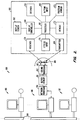
- Fig. 2 is a block diagram showing the system level organization of the present invention
- Fig. 2 illustrates functions performed by subsystems enclosed in rectangular blocks.
- the rectangular blocks within boundary 160 are functions that are performed by hardware or software within or coupled to housing 102 of hand-held computer 100 of Fig. 1A.
- the hand-held computer of the present invention includes means for performing the functions of display screen 162, display controller 164, speaker 166, button input 168, position sensor 170, memory 172, transmitter 174, stylus input 176, receiver 178, and processor 180.
- These subsystems communicate with one or more applications programs that are executed on one or more computers such as computer 186 in a distributed network 198 that is external to the hand-held computer Communication between the application software and subsystems in the hand-held computer is via infrared signals transmitted by transmitter 174 and received by receiver 178 on the hand-held computer side.
- Each computer in distributed computer 198 is coupled to an infrared transmitter and receiver typically located in the ceiling of the room within which the hand-held computer is being used.
- Transmitter 182 and receiver 184 for computer 186 are shown in Fig. 2.
- Transmitter 182 and receiver 184 are coupled to processor 186 through coding processor 192, buffer memory 191 and network processor 190 that convert infrared signals to digital signals and vice-versa.
- Computer 186 is thus in communication with processor 180 of the hand-held computer.
- Computer 186 may also be coupled to one or more other computers as shown by connections to computer 187 and computer 188 by bus 194.
- Computer 186 is used to execute the software of an application program for performing a variety of computing functions.
- an office building equipped with a transmitter/receiver in each office would allow users of handheld computers to communicate with each other to exchange messages, schedule trips and coordinate meetings.
- Sensors could be incorporated into the network to provide the outside weather conditions or whether someone was present that day.
- Control functions could be interfaced to the network so that, for example, the room temperature could be adjusted, lighting can be turned on or off, devices such as a coffee machine can be controlled, etc.
- each of the functional blocks shown in Fig. 2 may be by widely varying means as are known in the art.
- computers such as 186 and 188 may be any of a variety of commercially available computers.
- Processor 180 may be any of a variety of microprocessors typically embodied in integrated circuit chips.
- Memory such as memory 172 may be volatile or non-volatile memory including solid state, magnetic, bubble memory, read-only memory, etc.
- Display screen 162 may be a liquid crystal display, electroluminescent display, plasma display, cathode ray tube, etc.
- Stylus input 176 may be implemented by a pressure sensitive surface, light beam or other proximity sensing means.
- Distributed network 198 represents any generalized computer network such as a bus, star, ring, etc., network.
- Fig. 2 merely illustrates the functional aspects of the handheld computer of the present invention, shown within box 160, and the relationship of these functional aspects to an external computer network.
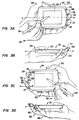
- Figs. 3A-D show the hand-held computer of the present invention in relation to the fingers of a user's hand during operation of the hand-held computer. In Figs. 3A-D, some of the detail has been omitted for clarity and ease of discussion.
- Fig. 3A hand-held computer 100 is shown being held by the left-hand 300 of a user while the user's right hand 302 is shown holding a stylus 304 in contact with display screen 306 (referred to herein as a "left held” configuration).
- Fig. 3A shows the position of the user's fingers in relation to the control buttons of the present invention.
- the user's left index finger 308, left middle finger 310, and left ring finger 312 are shown in contact with first button 314, second button 316, and third button 318, respectively.
- Buttons 314-318 are arranged at the right side 320 of hand-held computer 100. Buttons 314-318 are also arranged symmetrically with respect to line A-A'. Since the three buttons 314-318 are arranged in a row, they are actually symmetrical to a plane normal to the page and passing through the line A-A'.
- Line A-A' is approximately centered along the major axis of hand-held computer 100.
- Fig. 3B shows line A-A' in a side view of hand-held computer 100.
- Fig. 3B also illustrates the user's left hand 300 in a side view as it grips hand-held computer 100 in the same manner as in Fig. 3A.
- the display screen 306 is not visible in Fig. 3B but is attached to the top surface 330 of hand-held computer 100 shown in Fig. 3B.
- first button 314 and second button 316 are also not visible.
- a small portion of button 318 is shown at 332.
- button 318 shown at 332 is slightly curved, giving the button a convex shape so that the button more closely follows the curvature of left ring finger 312 when the user is holding hand-held computer 100.
- Fig. 1B is an expanded view of hand-held computer 100 without the illustration of the user's hand, and in the technical drawings of Appendix A.
- Fig. 3C shows hand-held computer 100 being held in a user's right hand 350 (a "right held” configuration).
- the user's left hand 352 now holds stylus 304.
- the user's right index finger 354, right middle finger 356 and right ring finger 358 are shown.
- right index finger 354 operates a different button than left index finger 308 of Fig. 3A. This is because hand-held computer 100 has been turned upside-down from its orientation in Fig. 3A. Thus, top edge 322 of Fig. 3A is now toward the bottom of the illustration in Fig. 3C.
- first button 314 now contacts right ring finger 358
- second button 316 contacts right middle finger 356
- third button 318 contacts right index finger 354.
- the buttons operated by the first and ring fingers are switched when the hand-held computer 100 is held in the right hand as opposed to being held in the left hand.
- Fig. 3D shows hand-held computer 100 in a side view still being held in the user's right hand, the same hand as is holding hand-held computer 100 in Fig. 3C.
- a portion of button 314 can be seen at 360.
- Button 314 is thus seen to have a similar curvature to button 318 as shown in Fig. 3B and as further detailed in Fig. 1B as explained above.
- Button 316 (not shown) has a similar curvature.
- a further aid in contour-fitting the hand-held computer to the user's hand is belt clip 109. While the primary function of the belt clip is to allow the computer to be attached to a belt to free the user's hands, a secondary function is to allow the mid-sections of the user's grasping hand to further support the computer. Nub 107 of Fig. 1B is provided so that hand-held computer 100 will sit "flat" on a flat surface, such as a desktop, when the computer is placed down and viewed without being held. The belt clip is detachable.
- buttons 314-318 also illustrate the direction of movement of buttons 314-318.
- button 314 is shown as having a sliding direction from B to B'.
- Arrows 366 and 368 show the directions of slide of buttons 316 and 318, respectively.
- the direction along B-B' is also shown corresponding to the direction of slide of button 314.
- This direction can also be approximately defined as the direction substantially parallel with a line drawn from the second to first knuckles of the user's right ring finger as shown in Fig. 3D by noting second knuckle 362 and first knuckle 364 of the user's right ring finger.
- This direction is "into" hand-held computer 100 or towards the palm of the user's holding hand
- Figs. 3A-D show how the hand-held computer of the present invention is capable of being held in either the left or right hands in a left held or right held configuration.
- Buttons on the hand-held computer are operable with the holding hand by using the first, middle and ring fingers of the holding hand to depress the buttons located at the side of the computer.
- the way in which the hand-held computer is operated with either the left or right holding hand is essentially the same, except that the buttons operated by the first and ring fingers are switched when the computer is held in the right hand as compared to the left hand.
- Figs. 3A-D show how the hand-held computer of the present invention is capable of being held in either the left or right hands in a left held or right held configuration.
- Buttons on the hand-held computer are operable with the holding hand by using the first, middle and ring fingers of the holding hand to depress the buttons located at the side of the computer.
- the way in which the hand-held computer is operated with either the left or right holding hand is essentially
- buttons shaped in a smooth convex curve to more closely follow the contour of fingers of the grasping hand to allow the user to more easily hold and operate the hand-held computer.
- buttons shaped in a smooth convex curve to more closely follow the contour of fingers of the grasping hand to allow the user to more easily hold and operate the hand-held computer.
- Figs. 4A, 4B and 5 will next be discussed to describe how the hand-held computer of the present invention assigns functions to the buttons and "flips" the display in order to accommodate left held or right held operation.
- Fig. 4A illustrates hand-held computer 100 of the present invention as it functions in a left held configuration.
- Fig. 4B illustrates hand-held computer 100 as it functions in a right neld configuration.
- FIG. 4A showing the left held configuration
- photodetector window 382 is shown at the top of hand-held computer 100.
- FIG. 4B hand-held computer 100 is turned upside down from its orientation in Fig. 4A so that photodetector window 382 is now at the bottom edge of handheld computer 100
- Photodetector window 382 is used to sense ambient light levels to turn certain functions of the handheld computer off when the room lights are off.
- Photodetector window 382 is of interest here as a way to identify the orientation of hand-held computer 100 in the Figures. Note that, even though in Fig 4B the hand-held computer is turned upside down from its orientation in Fig. 4A, the text on display screen 380 in Fig. 4B is still right-side up and readable. This is due to processor 180 and display controller 164 of Fig. 2 reorienting the display image so that it is readable when hand-held computer 100 is used in a right held configuration.
- Figs. 4A and 4B show a menu labelled "TAB Local Menu” on display screen 380.
- the menu contains menu items "Power down”, “Left/Right mode”, “Agent ESC”, “Battery check”, 'Local Applications”, and "Quit local mode”.
- buttons 384, 386, and 388 are given functions of, respectively, "UP,” “SELECT,” and “DOWN” Button 384 is used to move selection box 390 of Fig. 4A upwards through the menu items and button 388 is used to move selection box 390 downwards in the menu selection.
- selection box 390 is moved to a different line, it encloses the item on that line.
- the menu item currently enclosed by the selection box is the "current" item.
- selection box 390 when button 384 is depressed, selection box 390 will move upwards to enclose the selection 'Left/Right mode".
- button 388 When button 388 is pressed with the display as shown in Fig. 4A, the selection box 390 will move downward to enclose menu item "Battery check”.
- Depressing button 386 will select the current menu item enclosed in selection box 390.
- depressing button 386 when bounding box 390 encloses the menu item "Battery check" hand-held computer 100 will issue commands to activate software and hardware to perform a battery check of the handheld computer.
- the current item is indicated by displaying the line of the current item, e.g., "Agent ESC", in Fig. 4A, in reversed video.
- buttons 384, 386 and 388 perform the same functions, except that the functions assigned to buttons 384 and 388 have been switched from the assignment to the buttons in Fig. 4A.
- button 388 now performs the "up” function while button 384 performs the "down” function.
- depressing button 388 with selection box 390 enclosing the term "Agent ESC” will cause bounding box 390 to move upwards to enclose menu item "Left/Right mode".
- button 384 is depressed with the display and configuration as shown in Fig.
- selection box 390 will move downwards to enclose menu item "Battery check" Button 386 has the same function in both the configurations shown in Fig. 4A and 4B, namely, that of selecting the menu item enclosed by the selection box 390.
- both left held and right held operations can be performed in a manner which is intuitive to the user.
- the index finger in either the left held or right held configurations, moves the selection box upwards while the ring finger is used to move the selection box downwards.
- This provides a convenient user interface in either the left held or right held modes of operation since, as a user looks at the screen, the index finger is "above" the ring finger.
- the operation of menu item selection only involves the use of one of the user's hands Namely, the grasping, or holding, hand.
- the hand-held computer of the present invention is capable of performing desirable functions in an efficient manner while only requiring manipulation by one of the user's hands.
- hand-held computer 100 includes means for "flipping" the display so that it is readable in a normal orientation in either the left held or right held configurations.
- Another way to describe the "flipping" of the display is as a rotation of each "on" display element or pixel in the display screen about a point located at the center of the display screen.
- the flipping of the display may be by any means as is commonly known in the art. For example, where the display is made up of an array of pixels, the pixels can be read left to right, top to bottom, starting from the upper left hand corner into a buffer and rewritten to the array in a "first-in, first-out” manner starting from the lower right corner of the array and going right to left, bottom to top.
- buttons 384, 386, and 388 may likewise be implemented by a variety of methods.
- a processor either the one in the hand-held computer or in the distributed system
- it is a simple manner, in software or hardware, to cause the invoking of a function dependent upon the state (i.e, depressed or not depressed) of a button
- Software in the hand-held computer or the distributed system can easily reassign which button state invokes a given function.
- Fig. 4A the lower-left-hand corner of the display is considered the origin and the X and Y axes are shown as axes 392.
- Fig. 4B the lower-left-hand corner is also considered the origin and the axes are shown as axes 394.
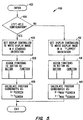
- Fig. 5 shows flowchart 400 used to illustrate the broad logical flow of a routine to handle button function reassignment, coordinate mapping and display re-orientation in the hand-held computer of the present invention.
- Flowchart 400 is but one example of a method to handle switching between left held and right held configurations and it will be readily apparent that other flowcharts accomplishing the same task are possible.
- Flowchart 400 is entered at 402.
- the user indicates the configuration, either left held or right held, by inputting a command either with the stylus or through one or more of the buttons.
- the routine of flowchart 400 is invoked when application software determines that the user has indicated a change in the configuration.
- a device such as a mercury switch or other gravity sensing device could be used to determine which end of the hand-held computer was being held upwards and which end was being held downwards.
- step 404 the routine of flowchart 400 executes step 404 which checks to see whether a left held configuration is in effect. If a left held configuration is in effect, execution proceeds to step 406 where the processor sets the display controller to write display image information in a standard orientation on the display screen.
- step 408 is executed where functions are assigned to buttons and according to a first pattern. As shown in the box corresponding to step 408, button 1 will invoke function 1, button 2 will invoke function 2, and button 3 will invoke function 3. The functions themselves are arbitrary. For example, in accordance with the example discussed in connection with Figs. 4A and 4B, function 1 is the UP function, function 2 the SELECT function and function 3 the DOWN function. Button 1 is button 384, button 2 is button 386 and button 3 is button 388.
- step 409 is executed to calculate the relative X, Y coordinates given position values from the position sensor. For example, if the coordinate axes 392 of Fig. 4A are defined as the reference for screen position values (Xscreen, Yscreen) that the position sensor outputs, then the relative X, Y coordinates are merely the Xscreen, Yscreen coordinates.
- step 409 the routine of flowchart 400 is exited at step 410.
- step 412 the processor sets the display controller to write display image information in a "flipped" orientation, that is, upside-down from the orientation set at step 406.
- step 414 functions are assigned to buttons as follows: button 1 invokes function 3, button 2 invokes function 2, and button 3 invokes function 1.
- the function assignment in step 414 is in accordance with discussion above in connection Figs. 4A and 4B so that index fingers of either left held or right held operating configurations perform the same function, middle fingers perform the same function, and ring fingers perform the same function.
- step 415 the routine of flowchart 400 proceeds to step 415 where relative X.
- Y coordinates are calculated by subtracting the Xscreen, Yscreen coordinate values from Xmax, Ymax, respectively. This ensures that points on the display screen expressed in relative coordinates are the same with respect to the user's orientation regardless of left held or right held contiguration. For example, relative coordinates of 0, 0 are always at the lower left ot the display screen as viewed by the user.
- flowchart 400 terminates execution at step 410.
- stylus 450 is shown being used to draw on touch-sensitive display screen 452.
- Stylus 450 has drawn an arc 454 as shown in Fig. 6A in drawing arc 454, stylus 450 enters a region at 456 near the top of display screen 452.
- control button 458 is depressed throughout the course of the drawing (for ease of illustration, the user's hands are not shown). Control button 458 is depressed in the direction shown by arrow 460.
- Figure 6B shows hand-held computer 100 and stylus 450 once again.
- control button 458 is shown in its extended, or un-depressed, position.
- the display screen acts as a scrolling window over an image that is larger than the size of display screen 452.
- Fig. 6B shows the display at some time after stylus 450 has been placed at about region 456 at the top of the display screen.
- control button 458 is seen to affect the manner in which the hand-held computer processes input signals from the stylus. Similar to the above discussion, scroll sensitive regions to the right, left and bottom of display screen 452 are implemented in a preferred embodiment, so that, with control button 458 in an extended position, scrolling in any of four directions is possible. By making scrolling regions overlap near the corners of the display, diagonal scrolling is possible.
- Another possibility is to allow a user to "scale” the image in the display screen, thus allowing for “zooming” in and out to bring more or less of the image into the display screen area.
- This is accomplished similar to window scrolling, with, for example, a button being designated as a “scale button” and depressing this button causing stylus position information to be interpreted as a scale speed and scale direction indication.
- a stylus position near the top of the display screen with the scale button depressed zooms out, a stylus position near the bottom of the display screen zooms in. If the stylus position is very near the top or bottom of the display screen then the zoom would be fast out or fast in, respectively.
- control button 458 is used as described while control button 462 forces "straight line” drawing, that is when control button 462 is depressed, the user may draw a line on the display which will be forced to be a straight vertical or horizontal line.
- Control button 464 is used to exit the drawing program when depressed.
- button presses to affect stylus input are possible.
- a stylus movement is used to represent a character (e.g., arc 454 of Fig. 6A could represent a letter of the alphabet)
- depressing a button at some time during or after drawing the arc could cause the character to be designated as a character that is capitalized, underlined, bold-faced, etc.
- a button press is used to signify that a character has been completed. This is necessary since the computer would be unable to automatically detect whether a character is, for example, an uncompleted "E” or a completed "F".
- Fig. 7 shows flowchart 500 that illustrates the steps of a routine to interpret stylus input according to a button press as discussed above in connection with Figs. 6A and 6B.
- the routine of flowchart 500 is entered at 502.
- this routine is called when stylus input 176 of Fig. 2 sends position information about a change in stylus position to processor 180.
- Processor 180 relays the information to a processor in distributed system 198, such as processor 186, that is executing an application program comprising a drawing utility.
- step 504 is executed to test whether a button, such as control button 458 of Fig. 6A, as discussed above, is depressed. Button sensing information is passed to the application program in a manner similar to the passing of the stylus information. If the button is detected as depressed, then execution proceeds to step 506 where the new stylus position is used to invoke a drawing command such as drawing a line, pulling down a menu with options, erasing a mark, etc. After the drawing command has been accomplished, execution of the routine of flowchart 500 is exited at 508.
- a button such as control button 458 of Fig. 6A, as discussed above
- step 504 If, at step 504, the button is sensed as not depressed, execution continues to step 510 where a test is made as to whether the stylus position is in a scroll region of the screen such as region 456 of Fig. 6A. If not, the routine exits at 508. However, if the stylus position is in a scroll region then software instructions are executed at step 512 to scroll the display in the indicated direction. The routine then exits at step 508.
- the routine of Fig. 7 implements a method for allowing stylus input to be processed in different ways depending on the state of a control (the button) in the present invention.
Landscapes
- Engineering & Computer Science (AREA)
- Theoretical Computer Science (AREA)
- General Engineering & Computer Science (AREA)
- Computer Hardware Design (AREA)
- Human Computer Interaction (AREA)
- Physics & Mathematics (AREA)
- General Physics & Mathematics (AREA)
- Computing Systems (AREA)
- Position Input By Displaying (AREA)
- Calculators And Similar Devices (AREA)
Applications Claiming Priority (2)
| Application Number | Priority Date | Filing Date | Title |
|---|---|---|---|
| US9968693A | 1993-07-29 | 1993-07-29 | |
| US99686 | 1993-07-29 |
Publications (2)
| Publication Number | Publication Date |
|---|---|
| EP0637794A1 true EP0637794A1 (de) | 1995-02-08 |
| EP0637794B1 EP0637794B1 (de) | 2000-03-29 |
Family
ID=22276145
Family Applications (1)
| Application Number | Title | Priority Date | Filing Date |
|---|---|---|---|
| EP94305667A Expired - Lifetime EP0637794B1 (de) | 1993-07-29 | 1994-07-29 | Kleiner, tragbarer Rehner |
Country Status (4)
| Country | Link |
|---|---|
| US (1) | US5825675A (de) |
| EP (1) | EP0637794B1 (de) |
| JP (1) | JPH0778120A (de) |
| DE (1) | DE69423679T2 (de) |
Cited By (16)
| Publication number | Priority date | Publication date | Assignee | Title |
|---|---|---|---|---|
| WO1997025667A1 (de) * | 1996-01-09 | 1997-07-17 | Siemens Aktiengesellschaft | Über ein sequentiell zu durchlaufendes menü steuerbare vorrichtung und verfahren zur sequentiellen menüsteuerung |
| WO1997026636A1 (fr) * | 1996-01-19 | 1997-07-24 | Raoul Parienti | Ardoise communicante |
| EP0825515A1 (de) * | 1996-08-15 | 1998-02-25 | Xybernaut Corporation | Auf dem Körper zu tragender Rechner |
| EP0827061A1 (de) * | 1996-08-29 | 1998-03-04 | Xybernaut Corporation | Mobiler Rechner |
| EP0911720A1 (de) * | 1997-10-23 | 1999-04-28 | Hewlett-Packard Company | Vorrichtung zur Dateneingabe durch einen Benutzer |
| EP0883053A3 (de) * | 1997-06-06 | 1999-09-08 | Philips Patentverwaltung GmbH | System zur menügeführten Befehlseingabe |
| WO1999057628A1 (en) * | 1998-05-01 | 1999-11-11 | Honeywell Inc. | Hand-held computer apparatus with three button interface and methods regarding same |
| WO1999057627A1 (en) * | 1998-05-01 | 1999-11-11 | Honeywell Inc. | Handheld computer apparatus and methods regarding same |
| FR2781901A1 (fr) * | 1998-07-29 | 2000-02-04 | Christian Dollet | Systeme de protection pour ordinateur portable ou ordinateur de poche |
| WO2001073673A3 (de) * | 2000-03-31 | 2002-05-10 | Borgward Glenn Rolus | Universelles digitales mobilgerät |
| WO2002097597A1 (en) * | 2001-05-30 | 2002-12-05 | Palm, Inc. | Portable electronic device |
| US6597346B1 (en) | 1998-10-02 | 2003-07-22 | Honeywell Inc. | Hand held computer with see-through display |
| EP1575248A1 (de) * | 2004-03-08 | 2005-09-14 | Nec Corporation | Tragbares und klappbares Informationsterminal |
| US7242371B2 (en) | 1998-10-02 | 2007-07-10 | Honeywell International, Inc. | Wireless electronic display |
| WO2011129718A1 (ru) * | 2010-03-29 | 2011-10-20 | Mikheyev Alexander Alexandrovich | Универсальное устройство ввода информации в персональный компьютер (варианты) |
| US9483087B2 (en) | 2013-11-29 | 2016-11-01 | At&T Intellectual Property I, L.P. | Multi-orientation mobile device, computer-readable storage unit therefor, and methods for using the same |
Families Citing this family (73)
| Publication number | Priority date | Publication date | Assignee | Title |
|---|---|---|---|---|
| US5973734A (en) | 1997-07-09 | 1999-10-26 | Flashpoint Technology, Inc. | Method and apparatus for correcting aspect ratio in a camera graphical user interface |
| DE19741453A1 (de) | 1997-09-19 | 1999-03-25 | Packing Gmbh Agentur Fuer Desi | Digitales Buch |
| GB9722766D0 (en) | 1997-10-28 | 1997-12-24 | British Telecomm | Portable computers |
| US6160540A (en) * | 1998-01-12 | 2000-12-12 | Xerox Company | Zoomorphic computer user interface |
| KR100595926B1 (ko) | 1998-01-26 | 2006-07-05 | 웨인 웨스터만 | 수동 입력 통합 방법 및 장치 |
| US6151208A (en) * | 1998-06-24 | 2000-11-21 | Digital Equipment Corporation | Wearable computing device mounted on superior dorsal aspect of a hand |
| USD416895S (en) * | 1998-08-04 | 1999-11-23 | Sony Corporation Of America | CDMA based personal assistant |
| US6317141B1 (en) | 1998-12-31 | 2001-11-13 | Flashpoint Technology, Inc. | Method and apparatus for editing heterogeneous media objects in a digital imaging device |
| USD419993S (en) * | 1999-01-29 | 2000-02-01 | Inforetech Golf Technology 2000, Inc. | Hand-held communicator |
| USD425887S (en) * | 1999-03-17 | 2000-05-30 | Mitsubishi Denki Kabushiki Kaisha | Portable telephone device |
| US6538636B1 (en) * | 1999-07-06 | 2003-03-25 | Intel Corporation | Apparatus and method for configuring a hand-held interactive device |
| EP1145215A2 (de) * | 1999-07-10 | 2001-10-17 | Koninklijke Philips Electronics N.V. | Verfahren zur progressiven unterhaltung einer plasmaanzeigetafel |
| US6433791B2 (en) | 1999-08-10 | 2002-08-13 | Smar Research Corporation | Displaceable display arrangement |
| USD442156S1 (en) | 1999-12-13 | 2001-05-15 | Cyberbank Co., Ltd. | Personal data assistant type multimedia portable phone |
| WO2001048587A1 (en) | 1999-12-28 | 2001-07-05 | Aiwa Co., Ltd. | Electronic device with display function |
| US6693367B1 (en) * | 2000-04-25 | 2004-02-17 | Snap-On Technologies, Inc. | Single-hand held diagnostic display unit |
| US6982728B1 (en) * | 2000-05-18 | 2006-01-03 | Palm, Inc. | Portable electronic system having multiple display modes for reorienting the display of data on a display screen |
| US6696924B1 (en) | 2000-06-05 | 2004-02-24 | Tonia H Socinski | Hand-held apparatus for monitoring drug-nutrient-mineral interactions and method therefor |
| DE10049411A1 (de) * | 2000-10-05 | 2002-04-18 | Siemens Ag | Handhabbare Vorrichtung |
| US6646633B1 (en) * | 2001-01-24 | 2003-11-11 | Palm Source, Inc. | Method and system for a full screen user interface and data entry using sensors to implement handwritten glyphs |
| US6806865B2 (en) | 2001-02-05 | 2004-10-19 | Palm, Inc. | Integrated joypad for handheld computer |
| US20020163504A1 (en) * | 2001-03-13 | 2002-11-07 | Pallakoff Matthew G. | Hand-held device that supports fast text typing |
| US6795304B1 (en) | 2001-04-27 | 2004-09-21 | Palmone, Inc. | Keyboard sled with rotating screen |
| US7142195B2 (en) | 2001-06-04 | 2006-11-28 | Palm, Inc. | Interface for interaction with display visible from both sides |
| US6950988B1 (en) | 2001-06-11 | 2005-09-27 | Handspring, Inc. | Multi-context iterative directory filter |
| USD466877S1 (en) | 2001-06-11 | 2002-12-10 | Handspring, Inc. | Hand-held device with keyboard |
| US7356361B1 (en) | 2001-06-11 | 2008-04-08 | Palm, Inc. | Hand-held device |
| USD467235S1 (en) | 2001-06-11 | 2002-12-17 | Handspring, Inc. | Hand-held device with handwriting area |
| US7395089B1 (en) | 2001-06-11 | 2008-07-01 | Palm, Inc | Integrated personal digital assistant device |
| US6975304B1 (en) | 2001-06-11 | 2005-12-13 | Handspring, Inc. | Interface for processing of an alternate symbol in a computer device |
| US6957397B1 (en) | 2001-06-11 | 2005-10-18 | Palm, Inc. | Navigating through a menu of a handheld computer using a keyboard |
| JP3671883B2 (ja) * | 2001-08-15 | 2005-07-13 | ソニー株式会社 | 画像記録再生装置 |
| US6552282B2 (en) | 2001-09-19 | 2003-04-22 | Palm, Inc. | Floating button design for a handheld computer |
| US6888532B2 (en) * | 2001-11-30 | 2005-05-03 | Palmone, Inc. | Automatic orientation-based user interface for an ambiguous handheld device |
| US6822852B2 (en) * | 2001-12-18 | 2004-11-23 | Qualcomm, Incorporated | Handheld devices |
| US20030117376A1 (en) * | 2001-12-21 | 2003-06-26 | Elen Ghulam | Hand gesturing input device |
| US7665043B2 (en) | 2001-12-28 | 2010-02-16 | Palm, Inc. | Menu navigation and operation feature for a handheld computer |
| USD491156S1 (en) | 2002-03-11 | 2004-06-08 | Nec Corporation | Portable wireless telephone |
| US7248248B2 (en) * | 2002-08-12 | 2007-07-24 | Microsoft Corporation | Pointing system for pen-based computer |
| WO2004061594A2 (en) * | 2002-12-16 | 2004-07-22 | Microsoft Corporation | Systems and metzhods for interfacing with computer devices |
| US7987433B2 (en) * | 2003-04-15 | 2011-07-26 | International Business Machines Corporation | Methods, systems and computer program products for multidimensional movement in a display window |
| USD499710S1 (en) * | 2003-07-08 | 2004-12-14 | Nokia Corporation | Handset |
| US7379762B2 (en) * | 2003-09-04 | 2008-05-27 | Creative Technology Ltd. | Portable digital device orientation |
| MY138739A (en) * | 2004-04-30 | 2009-07-31 | Sony Emcs Malaysia Sdn Bhd | Portable electronic device |
| DE102004030395A1 (de) * | 2004-06-23 | 2006-01-19 | Frogdesign Hartmut Esslinger Gmbh | Bedienvorrichtung für mobile elektronische Geräte und Verfahren zur Anordnung der Bedienelemente einer Bedienvorrichtung an einem derartigen Gerät |
| US20060022953A1 (en) * | 2004-07-30 | 2006-02-02 | Nokia Corporation | Left-hand originated user interface control for a device |
| US7847789B2 (en) * | 2004-11-23 | 2010-12-07 | Microsoft Corporation | Reducing accidental touch-sensitive device activation |
| KR20060080949A (ko) * | 2005-01-06 | 2006-07-12 | 엘지전자 주식회사 | 이동통신 단말기의 메뉴 키 변환 방법 |
| US7493321B2 (en) * | 2005-02-23 | 2009-02-17 | International Business Machines Corporation | Method, system, and computer program product for creating navigation views based on historical user behavior |
| US7251552B2 (en) * | 2005-04-22 | 2007-07-31 | Snap-On Incorporated | Diagnostic display unit including replaceable display protector |
| US7730422B2 (en) * | 2006-01-25 | 2010-06-01 | Microsoft Corporation | Smart icon placement across desktop size changes |
| EP1971116B1 (de) * | 2006-03-31 | 2017-09-13 | Drnc Holdings, Inc. | Mobiltelefon mit sensor zur detektierung der benutzerhandhabung |
| US8656282B2 (en) * | 2007-01-31 | 2014-02-18 | Fall Front Wireless Ny, Llc | Authoring tool for providing tags associated with items in a video playback |
| US9224145B1 (en) | 2006-08-30 | 2015-12-29 | Qurio Holdings, Inc. | Venue based digital rights using capture device with digital watermarking capability |
| EP2062113A1 (de) * | 2006-09-05 | 2009-05-27 | Nokia Corporation | Mobiles elektronisches gerät mit konkurrierenden eingabeeinrichtungen |
| US8797267B2 (en) * | 2006-09-12 | 2014-08-05 | Virgin Mobile Usa, L.P. | Virtual hard keys on a wireless device |
| US8269727B2 (en) | 2007-01-03 | 2012-09-18 | Apple Inc. | Irregular input identification |
| US8130203B2 (en) | 2007-01-03 | 2012-03-06 | Apple Inc. | Multi-touch input discrimination |
| US7855718B2 (en) | 2007-01-03 | 2010-12-21 | Apple Inc. | Multi-touch input discrimination |
| US7742783B2 (en) * | 2007-05-10 | 2010-06-22 | Virgin Mobile Usa, L.P. | Symmetric softkeys on a mobile electronic device |
| CN101470539B (zh) * | 2007-12-27 | 2011-03-16 | 英业达股份有限公司 | 应用于按键功能切换的触控方法及应用其电子装置 |
| KR101555511B1 (ko) * | 2008-10-09 | 2015-09-25 | 삼성전자주식회사 | 압전 센서를 이용한 휴대 단말기의 홀드 기능 제어 방법 및장치 |
| KR20100067381A (ko) * | 2008-12-11 | 2010-06-21 | 삼성전자주식회사 | 사용자 인터페이스 제공 방법 및 이를 위한 휴대 단말기 |
| US8259075B2 (en) | 2009-01-06 | 2012-09-04 | Hewlett-Packard Development Company, L.P. | Secondary key group layout for keyboard |
| TW201101117A (en) * | 2009-06-26 | 2011-01-01 | Ibm | Handheld device, method and computer program product for user selecting control unit of application program |
| RU2440598C1 (ru) * | 2010-08-23 | 2012-01-20 | Николай Евгеньевич Староверов | Компьютерная клавиатура |
| US20120297339A1 (en) * | 2011-01-27 | 2012-11-22 | Kyocera Corporation | Electronic device, control method, and storage medium storing control program |
| CN104509078A (zh) * | 2012-08-09 | 2015-04-08 | 李永贵 | 手机键盘与鼠标 |
| EP2796979B1 (de) * | 2013-04-27 | 2018-03-21 | Spreadtrum Communications (Shanghai) Co., Ltd. | Verfahren und Vorrichtung zur Einstellung eines graphischen Objekts nach Bedienerpräferenz |
| CN104571879B (zh) * | 2013-10-11 | 2019-03-08 | 联想(北京)有限公司 | 一种控制方法及电子设备 |
| CN105867816A (zh) * | 2016-03-29 | 2016-08-17 | 乐视控股(北京)有限公司 | 一种页面调节的方法和终端 |
| DK180081B1 (en) * | 2018-06-01 | 2020-04-01 | Apple Inc. | Access to system user interfaces on an electronic device |
| CN112527232A (zh) * | 2019-09-19 | 2021-03-19 | 华为技术有限公司 | 音量调节方法、装置、终端设备和存储介质 |
Citations (7)
| Publication number | Priority date | Publication date | Assignee | Title |
|---|---|---|---|---|
| EP0104709A2 (de) * | 1982-09-29 | 1984-04-04 | Van Dalen, Johannes | Tragbare Vorrichtung mit Handbedienung mittels mehrerer Tasten |
| JPH02898A (ja) * | 1988-01-13 | 1990-01-05 | Sony Tektronix Corp | 2次元スクロール方法 |
| EP0398055A2 (de) * | 1989-05-15 | 1990-11-22 | International Business Machines Corporation | Arbeitsunterlage mit flacher berührungsempfindlicher Anzeige für ein Datenverarbeitungssystem |
| EP0458316A2 (de) * | 1990-05-22 | 1991-11-27 | Kabushiki Kaisha Toshiba | Computer mit integrierter Anzeigevorrichtung für handschriftliche Eingabe und einer Tastatur |
| JPH0488545A (ja) * | 1990-07-31 | 1992-03-23 | Sony Corp | 小型情報処理装置 |
| JPH0488546A (ja) * | 1990-07-31 | 1992-03-23 | Sony Corp | 情報処理装置 |
| EP0539599A1 (de) * | 1991-05-15 | 1993-05-05 | Fujitsu Limited | Hinweisvorrichtung und steuerungsverfahren |
Family Cites Families (8)
| Publication number | Priority date | Publication date | Assignee | Title |
|---|---|---|---|---|
| US4005388A (en) * | 1973-11-21 | 1977-01-25 | Termiflex Corporation | Hand-held interactive terminal |
| US4120036A (en) * | 1975-09-05 | 1978-10-10 | Sharp Kabushiki Kaisha | Time information correction in combination timepiece and calculator |
| US4062181A (en) * | 1976-01-16 | 1977-12-13 | Hughes Aircraft Company | Combination watch-calculator construction |
| DE7607299U1 (de) * | 1976-03-10 | 1976-12-09 | Robert Bosch Gmbh, 7000 Stuttgart | Blitzlichtgeraet, insbesondere elektronenblitzgeraet |
| US5109354A (en) * | 1989-03-31 | 1992-04-28 | Kyocera Corporation | Electronic system pocketbook apparatus |
| US5128672A (en) * | 1990-10-30 | 1992-07-07 | Apple Computer, Inc. | Dynamic predictive keyboard |
| US5103376A (en) * | 1991-02-19 | 1992-04-07 | At&T Bell Laboratories | Dual position computer arrangement |
| US5432510A (en) * | 1993-03-22 | 1995-07-11 | Matthews; Walter S. | Ambidextrous single hand chordic data management device |
-
1994
- 1994-07-21 JP JP6169659A patent/JPH0778120A/ja active Pending
- 1994-07-29 EP EP94305667A patent/EP0637794B1/de not_active Expired - Lifetime
- 1994-07-29 DE DE69423679T patent/DE69423679T2/de not_active Expired - Fee Related
-
1995
- 1995-05-22 US US08/446,389 patent/US5825675A/en not_active Expired - Lifetime
Patent Citations (7)
| Publication number | Priority date | Publication date | Assignee | Title |
|---|---|---|---|---|
| EP0104709A2 (de) * | 1982-09-29 | 1984-04-04 | Van Dalen, Johannes | Tragbare Vorrichtung mit Handbedienung mittels mehrerer Tasten |
| JPH02898A (ja) * | 1988-01-13 | 1990-01-05 | Sony Tektronix Corp | 2次元スクロール方法 |
| EP0398055A2 (de) * | 1989-05-15 | 1990-11-22 | International Business Machines Corporation | Arbeitsunterlage mit flacher berührungsempfindlicher Anzeige für ein Datenverarbeitungssystem |
| EP0458316A2 (de) * | 1990-05-22 | 1991-11-27 | Kabushiki Kaisha Toshiba | Computer mit integrierter Anzeigevorrichtung für handschriftliche Eingabe und einer Tastatur |
| JPH0488545A (ja) * | 1990-07-31 | 1992-03-23 | Sony Corp | 小型情報処理装置 |
| JPH0488546A (ja) * | 1990-07-31 | 1992-03-23 | Sony Corp | 情報処理装置 |
| EP0539599A1 (de) * | 1991-05-15 | 1993-05-05 | Fujitsu Limited | Hinweisvorrichtung und steuerungsverfahren |
Non-Patent Citations (4)
| Title |
|---|
| "STYLUS-BASED INTERFACE WITH FULL MOUSE EMULATION", IBM TECHNICAL DISCLOSURE BULLETIN, vol. 34, no. 10B, March 1992 (1992-03-01), NEW YORK US, pages 413 - 414, XP000302790 * |
| PATENT ABSTRACTS OF JAPAN vol. 14, no. 129 (P - 1020) 12 March 1990 (1990-03-12) * |
| PATENT ABSTRACTS OF JAPAN vol. 16, no. 313 (P - 1383) 9 July 1992 (1992-07-09) * |
| WEISER M.: "SOME COMPUTER SCIENCE ISSUES IN UBIQUITOUS COMPUTING", COMMUNICATIONS OF THE ASSOCIATION FOR COMPUTING MACHINERY, vol. 36, no. 7, July 1993 (1993-07-01), NEW YORK US, pages 75 - 84, XP000384568 * |
Cited By (20)
| Publication number | Priority date | Publication date | Assignee | Title |
|---|---|---|---|---|
| WO1997025667A1 (de) * | 1996-01-09 | 1997-07-17 | Siemens Aktiengesellschaft | Über ein sequentiell zu durchlaufendes menü steuerbare vorrichtung und verfahren zur sequentiellen menüsteuerung |
| WO1997026636A1 (fr) * | 1996-01-19 | 1997-07-24 | Raoul Parienti | Ardoise communicante |
| FR2743915A1 (fr) * | 1996-01-19 | 1997-07-25 | Parienti Raoul | Ardoise communiquante |
| EP0825515A1 (de) * | 1996-08-15 | 1998-02-25 | Xybernaut Corporation | Auf dem Körper zu tragender Rechner |
| EP0827061A1 (de) * | 1996-08-29 | 1998-03-04 | Xybernaut Corporation | Mobiler Rechner |
| US6104399A (en) * | 1997-06-06 | 2000-08-15 | U.S. Philips Corporation | System for menu-driven instruction input |
| EP0883053A3 (de) * | 1997-06-06 | 1999-09-08 | Philips Patentverwaltung GmbH | System zur menügeführten Befehlseingabe |
| EP0911720A1 (de) * | 1997-10-23 | 1999-04-28 | Hewlett-Packard Company | Vorrichtung zur Dateneingabe durch einen Benutzer |
| WO1999057627A1 (en) * | 1998-05-01 | 1999-11-11 | Honeywell Inc. | Handheld computer apparatus and methods regarding same |
| WO1999057628A1 (en) * | 1998-05-01 | 1999-11-11 | Honeywell Inc. | Hand-held computer apparatus with three button interface and methods regarding same |
| US6911969B1 (en) | 1998-05-01 | 2005-06-28 | Honeywell International Inc. | Handheld computer apparatus |
| FR2781901A1 (fr) * | 1998-07-29 | 2000-02-04 | Christian Dollet | Systeme de protection pour ordinateur portable ou ordinateur de poche |
| US6597346B1 (en) | 1998-10-02 | 2003-07-22 | Honeywell Inc. | Hand held computer with see-through display |
| US7242371B2 (en) | 1998-10-02 | 2007-07-10 | Honeywell International, Inc. | Wireless electronic display |
| WO2001073673A3 (de) * | 2000-03-31 | 2002-05-10 | Borgward Glenn Rolus | Universelles digitales mobilgerät |
| WO2002097597A1 (en) * | 2001-05-30 | 2002-12-05 | Palm, Inc. | Portable electronic device |
| US6816154B2 (en) | 2001-05-30 | 2004-11-09 | Palmone, Inc. | Optical sensor based user interface for a portable electronic device |
| EP1575248A1 (de) * | 2004-03-08 | 2005-09-14 | Nec Corporation | Tragbares und klappbares Informationsterminal |
| WO2011129718A1 (ru) * | 2010-03-29 | 2011-10-20 | Mikheyev Alexander Alexandrovich | Универсальное устройство ввода информации в персональный компьютер (варианты) |
| US9483087B2 (en) | 2013-11-29 | 2016-11-01 | At&T Intellectual Property I, L.P. | Multi-orientation mobile device, computer-readable storage unit therefor, and methods for using the same |
Also Published As
| Publication number | Publication date |
|---|---|
| JPH0778120A (ja) | 1995-03-20 |
| EP0637794B1 (de) | 2000-03-29 |
| DE69423679D1 (de) | 2000-05-04 |
| DE69423679T2 (de) | 2000-08-17 |
| US5825675A (en) | 1998-10-20 |
Similar Documents
| Publication | Publication Date | Title |
|---|---|---|
| US5825675A (en) | Apparatus and configuration method for a small, hand-held computing device | |
| US6999065B1 (en) | Linear touch input device | |
| US5528266A (en) | Flat touch screen workpad for a data processing system | |
| CN1661538B (zh) | 用于具有触摸屏的终端的指示设备和使用该设备的方法 | |
| US7199787B2 (en) | Apparatus with touch screen and method for displaying information through external display device connected thereto | |
| EP1016952B1 (de) | Personalrechnersystem | |
| US20040104894A1 (en) | Information processing apparatus | |
| US20030080947A1 (en) | Personal digital assistant command bar | |
| US20060119588A1 (en) | Apparatus and method of processing information input using a touchpad | |
| US20080316183A1 (en) | Swipe gestures for touch screen keyboards | |
| JP3744552B2 (ja) | ペン入力装置 | |
| US20030081016A1 (en) | Personal digital assistant mouse | |
| EP0538257B1 (de) | Digitalisiertablett mit zweimodenläufer/maus | |
| KR20130053364A (ko) | 복합 휴먼 인터페이스 장치 및 방법 | |
| JPH10228350A (ja) | 入力装置 | |
| KR20110023654A (ko) | 핑거 마우스 | |
| US20010033268A1 (en) | Handheld ergonomic mouse | |
| JPH0580938A (ja) | 入力装置 | |
| KR100503056B1 (ko) | 컴퓨터 시스템에서의 터치 패드 처리장치 및 그 방법과, 터치패드 모듈 | |
| KR20200019426A (ko) | 스마트 터치패드 인터페이스 방법 및 그 장치 | |
| KR20020076592A (ko) | 마우스의 지능형 포인팅 장치 및 방법 | |
| KR20090042425A (ko) | 입력 장치 및 입력 방법 | |
| KR20240091509A (ko) | 자동 모드 변환이 가능한 비광학식 펜 마우스 | |
| KR20060118821A (ko) | 포인팅디바이스를 이용한 애플리케이션 실행 방법, 장치 및애플리케이션 실행 프로그램을 기록한 컴퓨터로 읽을 수있는 매체 | |
| US20030081015A1 (en) | Personal digital assistant command bar method |
Legal Events
| Date | Code | Title | Description |
|---|---|---|---|
| PUAI | Public reference made under article 153(3) epc to a published international application that has entered the european phase |
Free format text: ORIGINAL CODE: 0009012 |
|
| AK | Designated contracting states |
Kind code of ref document: A1 Designated state(s): DE FR GB |
|
| 17P | Request for examination filed |
Effective date: 19950808 |
|
| 17Q | First examination report despatched |
Effective date: 19980713 |
|
| GRAG | Despatch of communication of intention to grant |
Free format text: ORIGINAL CODE: EPIDOS AGRA |
|
| RTI1 | Title (correction) |
Free format text: A SMALL, HAND-HELD COMPUTING DEVICE |
|
| GRAG | Despatch of communication of intention to grant |
Free format text: ORIGINAL CODE: EPIDOS AGRA |
|
| GRAH | Despatch of communication of intention to grant a patent |
Free format text: ORIGINAL CODE: EPIDOS IGRA |
|
| GRAH | Despatch of communication of intention to grant a patent |
Free format text: ORIGINAL CODE: EPIDOS IGRA |
|
| GRAA | (expected) grant |
Free format text: ORIGINAL CODE: 0009210 |
|
| AK | Designated contracting states |
Kind code of ref document: B1 Designated state(s): DE FR GB |
|
| REF | Corresponds to: |
Ref document number: 69423679 Country of ref document: DE Date of ref document: 20000504 |
|
| ET | Fr: translation filed | ||
| PLBE | No opposition filed within time limit |
Free format text: ORIGINAL CODE: 0009261 |
|
| STAA | Information on the status of an ep patent application or granted ep patent |
Free format text: STATUS: NO OPPOSITION FILED WITHIN TIME LIMIT |
|
| 26N | No opposition filed | ||
| REG | Reference to a national code |
Ref country code: GB Ref legal event code: IF02 |
|
| PGFP | Annual fee paid to national office [announced via postgrant information from national office to epo] |
Ref country code: FR Payment date: 20050708 Year of fee payment: 12 |
|
| PGFP | Annual fee paid to national office [announced via postgrant information from national office to epo] |
Ref country code: DE Payment date: 20050721 Year of fee payment: 12 |
|
| PGFP | Annual fee paid to national office [announced via postgrant information from national office to epo] |
Ref country code: GB Payment date: 20050727 Year of fee payment: 12 |
|
| PG25 | Lapsed in a contracting state [announced via postgrant information from national office to epo] |
Ref country code: GB Free format text: LAPSE BECAUSE OF NON-PAYMENT OF DUE FEES Effective date: 20060729 |
|
| PG25 | Lapsed in a contracting state [announced via postgrant information from national office to epo] |
Ref country code: DE Free format text: LAPSE BECAUSE OF NON-PAYMENT OF DUE FEES Effective date: 20070201 |
|
| GBPC | Gb: european patent ceased through non-payment of renewal fee |
Effective date: 20060729 |
|
| REG | Reference to a national code |
Ref country code: FR Ref legal event code: ST Effective date: 20070330 |
|
| PG25 | Lapsed in a contracting state [announced via postgrant information from national office to epo] |
Ref country code: FR Free format text: LAPSE BECAUSE OF NON-PAYMENT OF DUE FEES Effective date: 20060731 |