EP0660216B1 - Verfahren und System zum Aufzeigen von Alternativen zur Auswahl durch Gebrauch von adaptiven Lernen - Google Patents
Verfahren und System zum Aufzeigen von Alternativen zur Auswahl durch Gebrauch von adaptiven Lernen Download PDFInfo
- Publication number
- EP0660216B1 EP0660216B1 EP94120331A EP94120331A EP0660216B1 EP 0660216 B1 EP0660216 B1 EP 0660216B1 EP 94120331 A EP94120331 A EP 94120331A EP 94120331 A EP94120331 A EP 94120331A EP 0660216 B1 EP0660216 B1 EP 0660216B1
- Authority
- EP
- European Patent Office
- Prior art keywords
- character
- characters
- group
- alternative
- selection
- Prior art date
- Legal status (The legal status is an assumption and is not a legal conclusion. Google has not performed a legal analysis and makes no representation as to the accuracy of the status listed.)
- Expired - Lifetime
Links
Images





Classifications
-
- G—PHYSICS
- G06—COMPUTING OR CALCULATING; COUNTING
- G06F—ELECTRIC DIGITAL DATA PROCESSING
- G06F3/00—Input arrangements for transferring data to be processed into a form capable of being handled by the computer; Output arrangements for transferring data from processing unit to output unit, e.g. interface arrangements
- G06F3/01—Input arrangements or combined input and output arrangements for interaction between user and computer
- G06F3/02—Input arrangements using manually operated switches, e.g. using keyboards or dials
- G06F3/023—Arrangements for converting discrete items of information into a coded form, e.g. arrangements for interpreting keyboard generated codes as alphanumeric codes, operand codes or instruction codes
- G06F3/0233—Character input methods
- G06F3/0237—Character input methods using prediction or retrieval techniques
-
- G—PHYSICS
- G06—COMPUTING OR CALCULATING; COUNTING
- G06F—ELECTRIC DIGITAL DATA PROCESSING
- G06F3/00—Input arrangements for transferring data to be processed into a form capable of being handled by the computer; Output arrangements for transferring data from processing unit to output unit, e.g. interface arrangements
- G06F3/01—Input arrangements or combined input and output arrangements for interaction between user and computer
- G06F3/02—Input arrangements using manually operated switches, e.g. using keyboards or dials
- G06F3/023—Arrangements for converting discrete items of information into a coded form, e.g. arrangements for interpreting keyboard generated codes as alphanumeric codes, operand codes or instruction codes
- G06F3/0233—Character input methods
- G06F3/0236—Character input methods using selection techniques to select from displayed items
-
- G—PHYSICS
- G06—COMPUTING OR CALCULATING; COUNTING
- G06F—ELECTRIC DIGITAL DATA PROCESSING
- G06F3/00—Input arrangements for transferring data to be processed into a form capable of being handled by the computer; Output arrangements for transferring data from processing unit to output unit, e.g. interface arrangements
- G06F3/01—Input arrangements or combined input and output arrangements for interaction between user and computer
- G06F3/048—Interaction techniques based on graphical user interfaces [GUI]
- G06F3/0481—Interaction techniques based on graphical user interfaces [GUI] based on specific properties of the displayed interaction object or a metaphor-based environment, e.g. interaction with desktop elements like windows or icons, or assisted by a cursor's changing behaviour or appearance
- G06F3/0482—Interaction with lists of selectable items, e.g. menus
Definitions
- the invention relates generally to a method and system for presenting alternatives for selection, and, more specifically, to a method and system for presenting alternatives for selection using adaptive learning techniques.
- a human user uses a keyboard to input characters that may be displayed or stored.
- a keyboard to input characters that may be displayed or stored.
- FIG. 1 is a screen image illustrating the state of the screen when a user types the code for a character that cannot be generated by a keyboard.
- the screen image shows a program window 100 generated by a program for inputting, displaying, and storing characters. Overlaying the program window 100 is a character code input window 101.
- the character code input window 101 contains the code for the a-accent-aigu character 102, typed by the user.
- This mechanism requires the user to issue an instruction to enter character code mode, and to refer to or memorize a chart of character codes. Oftentimes such requirements are cumbersome to a user.
- a user may input a character that cannot be generated by a keyboard through the use of a pointing device, such as a mouse.
- the pointing device is used to select a character from a character set displayed on a video display.
- Figure 2 is a screen image for an instance wherein a user is selecting a character from a displayed character set.
- the screen image shows a program window 200 generated by a program for inputting, displaying, and storing characters. Overlaying the program window is a character set display window 201, which contains a visual representation of a character set 203.
- a character selection box 202 shows that the user is selecting the a-accent-aigu character.
- a user To input the a-accent-aigu character, a user might have to use a control key or menu selection to display a character selection chart, then locate and use a pointing device to select the a-accent-aigu character.
- the primary drawbacks of this approach are that it is time-consuming and prone to error. Specifically, a user must first issue an instruction to display the character selection chart, and then to locate the desired character among hundreds of characters. Both of these tasks are time-consuming and prone to user error.
- JP 62-274360 and patent abstract of Japan, vol. 12, no. 161 disclose a word processor capable of operating on Kana, Katakana, English and other special European language characters. By depressing a conversion key a character or a special character to which an accent mark has been put, and the corresponding character appears successively on a display.
- the invention is advantageous in that is facilitates the input of characters that cannot be generated using the keyboard.
- the invention provides a method and system for efficiently presenting a series of alternatives for a user's selection using adaptive learning.
- a software facility receives a request to select an item from an identified group of alternatives.
- the facility presents items from the group of alternatives identified by the request in decreasing order of their likelihood of selection.
- the facility subsequently receives an indication of the alternative to select, and proceeds to select that alternative.
- the items each correspond to a set of one or more characters that cannot be generated using an available keyboard, and, when the user uses the facility to select an item, the facility inputs the corresponding set of characters.
- the preferred embodiment of the present invention provides a method and system for efficiently presenting a series of alternatives for a user's selection using adaptive learning.
- the preferred embodiment of the invention presents a series of alternatives for a user's selection in the order of their anticipated likelihood of selection based upon previous selections from among the alternatives.
- the preferred embodiment described herein operates quickly and occupies relatively little memory.
- a software facility comprising steps carried out by a computer system, inputs characters that cannot be generated by a keyboard.
- the facility is a program written in the macro language of an application program, such as a word processing program.
- a user uses the facility to input a character that cannot be generated by a keyboard (target character) by first typing a key on the keyboard to input a character related by an intuitive theme to the target character, then repeatedly invoking a replace function to replace the typed character with each character in turn of a group of characters related to the typed character (character group, or simply group) until the desired character is selected.
- the user inputs an a character by typing the a key on the keyboard, then selects the a-accent-aigu character by repeatedly invoking a replace function to replace the a character with characters related to the a character until the replace function replaces the a character with an a-accent-aigu character.
- the facility automatically reorders the groups to present related characters in decreasing order of their anticipated likelihood of selection after a selection is made so that the next time the replace function is invoked, the new order is used.
- a user may also reorder the groups, change the characters included in each group, add groups, and delete groups.
- Table 1 below presents a few sample groups.
- the group theme and group members are listed.
- Each theme is one way of associating characters that cannot be generated using the keyboard with one or more "key characters" that may be generated using the keyboard.
- the lower case letters theme can be used to associate foreign language characters that appear to contain the a character with the key character the a character, which may be generated by the keyboard.
- the currency symbols theme can be used to associate foreign currency symbols that cannot be generated using the keyboard with the key character (the dollar sign) character ("$").
- the facility can also replace key characters that have been inserted in the document by some other method. For example, the facility is able to replace characters inserted in the document using the above-discussed prior art methods of inputting a numerical character code or using a pointing device to select a character from a display character set, as well as characters earlier entered using the facility.
- FIG. 3 is a high-level block diagram of the general-purpose computer system upon which the facility preferably operates.
- the computer system 300 contains a central processing unit (CPU) 301, a computer memory (memory) 302, and input/output devices 303.
- the input/output devices are a keyboard 304, a display device 305, such as a monitor, and storage device 306, such as a hard disk drive.
- the memory contains the program for the facility 307 and other programs 308-309 for inputting, displaying, and storing characters. Character groups like those shown in Table 1 are preferably stored in memory as arrays of characters, also called strings.
- each group is preferably stored by first storing the key character, then storing the characters of the group in decreasing anticipated likelihood of selection.
- the key character is also preferably stored at the end of the group, so that the user may select the key character if the user does not wish to select any of the other characters in the group. Storing the key character at the end of the group also has the advantage that the user may loop through the group repeatedly if desired.
- All of the programs preferably execute on the CPU.
- the computer system shown in Figure 3 is part of a distributed processing system, in which multiple computer systems that are connected by communication links work together to execute programs, executing each of a number of different parts of a single program on the CPUs of different computer systems.
- FIG 4 is a flow diagram showing the steps required to use the facility to input a target character. While the steps shown in the other flow diagram figures are preferably executed by the facility, these steps shown in Figure 4 are preferably carried out by a human user.
- the user determines the key character that corresponds to the target character. In most cases, this involves identifying the theme most likely to encompass the target character, then determine the key character for the correct group having that theme. As an example, suppose the target character was the a-accent-aigu character. Because the a-accent-aigu character looks something like the a character, it is likely to be in a group having the theme lowercase letters and for which the key character is the a character.
- the user types the key character, in this case the a character.
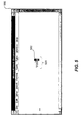
- Figure 5 is a screen image showing the user carrying out step 402.
- the screen image shows a program window 500 generated by a program for inputting, displaying, and storing characters.
- the program window 500 containing text 501.
- the user has already entered the a character 502.
- the user invokes the Replace function.
- the Replace function replaces the key character with the next character in the key group.
- the user preferably invokes the Replace function by typing a command key combination on the keyboard that is received by a program that is able to execute the facility.
- the Replace function is described in more detail below.
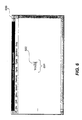
- Figure 6 is a screen image showing the replacement of the key character with the first character in the key character's group.
- the screen image shows a program window 600 containing text 601.
- the Replace function has replaced the last letter of the text 601 with an a-umlaut character ("ä") 602.
- step 404 if the replace function replaced the key character with the target character, then these steps conclude, else the user continues its step 403 to invoke the replace function again. Since the key character a was replaced with an a-umlaut character and not the target character a-accent-aigu, the user continues at step 403. In step 403, the user invokes the replace function again.
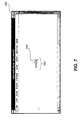
- Figure 7 is a screen image showing the replacement of the key character with the second character following the key character in the key character's group.
- the screen image shows a program window 700 containing text 701.
- the Replace function has replaced the last character of the text 701 with the next character in the group, the a-accent-aigu character 702.
- step 404 because the key character has been replaced with the target character, these steps conclude.
- the facility updates the order of the group that contains the a-accent-aigu character. This involves determining whether the selection of the a-accent-aigu character changes the order of anticipated likelihood of selection of the characters within the group for the future, and, if so, reorders the group to reflect the new order of anticipated likelihood of selection of the characters in the group.
- the facility uses several different update approaches, described below, to determine whether a selection changes the order of anticipated likelihood of selection of the characters in a group.
- the a-accent-aigu character is considered to be the most likely character to be selected the next time a character is selected from its group.
- the facility therefore reorders the group, moving the a-accent-aigu character to the position immediately after the a character.
- the next time the user uses the facility to input an a-accent-aigu character, the a-accent-aigu character, and not the a-umlaut character will be the first character in the group after the a character.
- the user will therefore only have to invoke the Replace function once to replace the a character with the target character, the a-accent-aigu character. This reflects the adaptive learning nature of the facility.
- FIG. 8 is a flow diagram showing the steps required for the replace function in step 403. These steps are carried out by the facility.
- the Replace function receives a designated character and, if the designated character is in a group, replaces the designated character with a character that follows the designated character in the group.
- step 801 if the user has made a selection since the last invocation of the replace function, the facility continues at step 802, else the facility continues its step 803.
- the determination made in step 801 involves checking whether the position of the cursor has moved since the last invocation of the Replace function.
- the facility preferably stores the position of the cursor during each invocation of the replace function.
- the facility compares the current location of the cursor to the stored location of the cursor from the last invocation of the Replace function.
- the facility makes the determination in step 801 by storing the designated character during each invocation of the replace function and comparing the present designated character to the designated character stored during the last invocation of the replace function. If the designated characters are different, then the facility continues at step 802. In step 802, the facility updates the order of likelihood of selection of the characters in the group from which the selection was made. Step 802 is discussed in more detail below. After step 802, the facility continues at step 803. In step 803, if the designated character is in a group, then the facility continues its step 805, else the facility continues at step 804.
- step 804 the facility provides the user with an indication that the replace function failed, such as an audible beep. These steps then conclude.
- step 805 the facility presents the character that follows the designated character in the group that contains the designated character.
- Step 805 involves identifying the character to be presented by reading the group that contains the designated character, then inputting the character to be presented, causing its display on the display device. The facility identifies the character to be presented by locating the designated character in the group and identifying the character that follows the identified character in the group. In order to make the group circular, i.e., to permit the user to traverse the entire list multiple times, if desired, if the designated character is the last character of the group, then the facility identifies the first character of the group.
- this is accomplished by appending the first character of the group to the end of the group. This way, the first character in the group follows the second-to-last character in the group, completing the circularity of the group. The facility then returns success and these steps conclude.
- Step 802 for updating the order of the group in which the last selection was made reorders the group if the last selection changes the order of anticipated likelihood of selection in the future.
- the facility provides three different approaches for performing step 802. The facility may order the group based upon the recency of the selection of each character in the group, the frequency of selection of each of the characters in the group, or so that if the selected character is the first member of a character pair (pair), then the second member of the same character pair becomes the first character in the group. Each of the approaches is described in detail below.
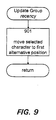
- Figure 9 is a flow diagram showing the steps required for the update group step 802 under the recency of selection approach.
- the last character selected from its group is considered to be the most likely character to be selected the next time a character is selected from its group.
- the a-accent-aigu character is the last character that was selected from its group
- the a-accent-aigu character is considered to be the most likely character to be selected the next time a character is selected from its group.
- the facility moves the selected character from its present location in the group that contains it to the position immediately following the key character, shifting each of the other characters back one position.
- Figure 10 is a flow diagram that shows the steps required for the update group step 802 under the frequency of selection approach.
- the character most frequently selected from the group is considered most likely to be selected the next time a character is selected from the group.
- the facility increments the counter for the selected character.
- the facility sorts the group containing the selected character. For example, if the a-accent-aigu character has been selected more frequently than any of the other characters in its group, then the a-accent-aigu character is considered to be the most likely character to be selected the next time a character is selected from its group. Under this approach, the facility maintains a counter for each character in each group.
- the counters are preferably stored in arrays, each array corresponding to a group. If any counter grows to a value approaching the largest value that may be stored in the memory space allocated to a counter, the facility preferably reduces all the counter values for the group so that the counter values bear the same relationship to one another, but the largest one does not threaten the capacity of the space allocated for it.
- FIG 11 is a flow diagram that shows the steps required for step 1002.
- a current character variable for maintaining position within the group while traversing it is set equal to the position of the select character in the group. For example, if the selected character is the fourth character in its group, the current character variable is set equal to four.
- the facility if the current character is greater than one, then the facility continues at step 1103, else these steps conclude.
- the facility if the counter value for the character in the position current character minus one is less than the counter value for the character in the position current character, then the facility continues its step 1104, else these steps conclude.
- the facility exchanges the counter value for the character in position current character minus one with the counter value for the character in position current character.
- step 1105 the facility exchanges the character and position current character minus one with the character and position current character.
- step 1106 the facility decrements the value of the current character variable.
- the facility then continues at step 1102 to compare the next pair of counter values.
- Figure 12 is a flow diagram showing the steps required for the update group step 802 under the character pairs approach.
- the character pairs approach if the selected characters the first member of a pair of characters, then the second member of the same pair of characters is considered to be the most likely character to be selected the next time a character is selected from that group. For example, when the left brace character (" ⁇ ") is selected, the right brace character (" ⁇ ") is considered to be the most likely character to be selected the next time a character is selected from that group.
- step 1201 if the selected character is the first member of a pair of characters, then the facility continues its step 1202, else these steps conclude.
- step 1201 requires the facility maintain a separate data structure for storing character pairs, such as a linked list of character pair structures, each containing a first member character and a second member character. For example, one character pair structure would have a left brace character as its first member and the right brace character as its second member.
- the facility determines whether the selected character is the first member of a pair by traversing the linked list in comparing the selected character to the first member of each character pair structure.
- step 1202 the facility moves the second member of the character pair whose first member is the selected character to the beginning of the group containing the selected character.
- All of the data structures associated with the facility are preferably maintained in a persistent manner, so that the optimized order of each group is not lost.
- the facility preferably stores these data structures on the storage device and retrieves them when they are needed by the facility.
- the data structures are preferably stored in a form in which they may be readily edited by the user, such as plain text. This permits the user to reorder or add characters to a group and add or delete a group.
- the user may also preferably elect among the approaches for updating a group.
- the user may preferably elect a single approach, or may elect to combine the character pairs approach with the frequency or recency approach.
- the facility maintains a separate copy of its data structures for each user of the facility.
- the facility may also be used to input other kinds of symbols or pictures that can somehow be related to key characters on the keyboard. Also, instead of a single character, each selection corresponds to a series of one or more characters. The facility may further be used to present menu items in decreasing order of likelihood of selection. The facility may also be used by non-human users, such as computer programs requesting services from an operating system.
Landscapes
- Engineering & Computer Science (AREA)
- General Engineering & Computer Science (AREA)
- Theoretical Computer Science (AREA)
- Human Computer Interaction (AREA)
- Physics & Mathematics (AREA)
- General Physics & Mathematics (AREA)
- Input From Keyboards Or The Like (AREA)
- Document Processing Apparatus (AREA)
- Machine Translation (AREA)
Claims (25)
- Verfahren in einem Computersystem (300) zum Darstellen alternativer Zeichen aus einer Gruppe alternativer Zeichen zur Auswahl durch einen Benutzer des Computersystems, wobei das Verfahren die folgenden Schritte umfasst:dadurch gekennzeichnet, dass:Empfangen (401, 402) einer Aufforderung zum Auswählen eines alternativen Zeichens, wobei die Aufforderung eine Gruppe alternativer Zeichen angibt;Anzeigen (403) eines ersten Zeichens (602) in der Gruppe; undin Reaktion auf Benutzereingabe, Austauschen (403, 404) des angezeigten Zeichens gegen ein nächstes Zeichen in der Gruppe, bis das gewünschte Zeichen in der Gruppe angezeigt wird,
die Zeichen in der Gruppe in einer Folge absteigenden Reihenfolge der erwarteten Wahrscheinlichkeit ihrer Auswahl auf der Grundlage vorangegangener Auswahlen aus den Alternativen angeordnet sind. - Verfahren nach Anspruch 1, dadurch gekennzeichnet, dass die Zeichen in der Folge in einer Reihenfolge angeordnet sind, die das Zeichen widerspiegelt, das als letztes aus der angegebenen Gruppe ausgewählt wurde.
- Verfahren nach Anspruch 2, dadurch gekennzeichnet, dass die Zeichen in der Folge in absteigender Reihenfolge des Zurückliegens der letzten Auswahl angeordnet sind.
- Verfahren nach Anspruch 2, dadurch gekennzeichnet, dass zuerst ein Zeichen dargestellt wird, das häufig auf das Zeichen folgt, das als letztes aus der angegebenen Gruppe ausgewählt wurde.
- Verfahren nach Anspruch 1, dadurch gekennzeichnet, dass die Zeichen in der Folge in absteigender Reihenfolge der relativen Häufigkeit der Auswahl angeordnet sind.
- Verfahren nach einem der Ansprüche 1 bis 5, dadurch gekennzeichnet, dass der Schritt des Empfangens einer Aufforderung zum Auswählen eines alternativen Zeichens die folgenden Schritte einschließt:Verknüpfen einer Gruppe alternativer Zeichen mit einem vorgegebenen Tastenzeichen, undAuswählen (402) des vorgegebenen Tastenzeichens durch den Benutzer.
- Verfahren nach einem der Ansprüche 1 bis 6, dadurch gekennzeichnet, dass das erste Zeichen ein Zeichen in einem Alphabet einer ersten natürlichen Sprache ist, und wenigstens eines der alternativen Zeichen in der Folge ein Zeichen in einem Alphabet einer zweiten natürlichen Sprache ist, die sich von der ersten natürlichen Sprache unterscheidet.
- Verfahren nach einem der Ansprüche 1 bis 7, dadurch gekennzeichnet, dass das Computersystem (300) eine Speichervorrichtung (302, 306) enthält, und wobei ein Protokoll der alternativen Zeichen, die bereits von dem Benutzer aus der Folge ausgewählt wurden, in der Speichervorrichtung gespeichert wird.
- Verfahren nach Anspruch 8, dadurch gekennzeichnet, dass die Zeichen in der Folge entsprechend der Häufigkeit des Auftretens in dem Protokoll vorher ausgewählter alternativer Zeichen angeordnet sind, so dass das am häufigsten auftretende Zeichen das erste Zeichen ist.
- Verfahren nach Anspruch 8, dadurch gekennzeichnet, dass die Zeichen in der Folge entsprechend dem Zurückliegen des Eintrags in das Protokoll bereits ausgewählter alternativer Zeichen angeordnet sind, so dass das zuletzt gewählte alternative Zeichen das erste Zeichen ist.
- Verfahren nach einem der Ansprüche 1 bis 10, gekennzeichnet durch die folgenden Schritte:Auswählen des gewünschten Zeichens aus diesen Zeichen in der Folge; undNeuordnen (802) der Folge alternativer Zeichen in absteigender Reihenfolge der Wahrscheinlichkeit ihrer Auswahl auf der Grundlage der Auswahl des gewünschten Zeichens.
- Verfahren nach einem der Ansprüche 1 bis 11, gekennzeichnet durch den folgenden Schritt:
Ändern wenigstens eines der Zeichen in der Folge zu einem neuen Zeichen in Reaktion auf eine Aufforderung von dem Benutzer. - Verfahren nach einem der Ansprüche 1 bis 12, gekennzeichnet durch den folgenden Schritt:
Verknüpfen einer neuen Folge von Zeichen mit einem vorgegebenen Tastenzeichen in Reaktion auf eine Aufforderung von dem Benutzer, so dass eines der Zeichen aus der neuen Folge eingegeben wird, wenn das vorgegebene Tastenzeichen ausgewählt wird. - Verfahren nach einem der Ansprüche 1 bis 13, gekennzeichnet durch den Schritt des Eingebens der Gruppe einer oder mehrerer gewünschter Zeichen, deren Auswahl erfasst wird.
- Verfahren nach einem der Ansprüche 1 bis 14, gekennzeichnet durch den Schritt des Eingebens des ausgewählten Zeichens, so als ob es auf einer Tastatur geschrieben worden wäre.
- Verfahren nach einem der Ansprüche 1 bis 15, dadurch gekennzeichnet, dass die Schritte des Anzeigens und Austauschens von einem Makroprogramm gesteuert ausgeführt werden, das im Zusammenhang mit einem Anwendungsprogramm ausgeführt wird.
- Verfahren nach einem der Ansprüche 1 bis 16, dadurch gekennzeichnet, dass keine zwei Gruppen das gleiche Zeichen enthalten.
- Verfahren nach einem der Ansprüche 1 bis 17, dadurch gekennzeichnet, dass der Schritt des Austauschens den Schritt des Erfassens, ob das nächste Zeichen ausgewählt worden ist, einschließt.
- Verfahren nach einem der Ansprüche 1 bis 18, gekennzeichnet durch den Schritt des Erfassens, ob ein Austauschzeichen, das bereits zuvor gegen ein ausgetauschtes Zeichen ausgetauscht wurde, ausgewählt worden ist.
- Verfahren nach Anspruch 19, dadurch gekennzeichnet, dass in dem Erfassungsschritt festgestellt wird, ob ein vorgegebener Zeitraum seit dem Empfangsschritt vergangen ist, und, wenn dies der Fall ist, erfasst wird, dass das auf das bezeichnete Zeichen folgende Zeichen in der angegebenen Zeichengruppe ausgewählt worden ist.
- Verfahren nach einem der Ansprüche 1 bis 20, dadurch gekennzeichnet, dass Zeichen in ein Dokument an einer beweglichen Zeigerposition eingegeben werden, und das Verfahren des Weiteren vor dem Austauschen den Schritt des Feststellens, ob die aktuelle Zeigerposition verändert worden ist, einschließt.
- Verfahren nach einem der Ansprüche 1 bis 21, dadurch gekennzeichnet, dass die Gruppe alternativer Zeichen eine Gruppe von Gruppenzeichen ist.
- Computerlesbares Speichermedium, das Befehle speichert, die ein Computersystem veranlassen, das Verfahren nach einem der Ansprüche 1 bis 22 auszuführen.
- Computersystem zum Darstellen alternativer Zeichen aus einer Gruppe alternativer Zeichen zur Auswahl durch einen Benutzer, wobei das System umfasst:dadurch gekennzeichnet, dass:eine Einrichtung (304), die eine Aufforderung zum Auswählen eines alternativen Zeichens empfängt, wobei die Aufforderung eine Gruppe alternativer Zeichen angibt;eine Anzeigeeinrichtung (305), die ein erstes Zeichen (602) in der Gruppe anzeigt; undeine Einrichtung (307), die in Reaktion auf Benutzereingabe das angezeigte Zeichen gegen ein nächstes Zeichen in der Gruppe austauscht, bis das gewünschte Zeichen in der Gruppe angezeigt wird,
die Zeichen in der Gruppe in einer Folge absteigender Reihenfolge der erwarteten Wahrscheinlichkeit ihrer Auswahl auf der Grundlage vorangegangener Auswahlen aus den Alternativen angeordnet sind. - System nach Anspruch 24, dadurch gekennzeichnet, dass es das Verfahren nach einem der Ansprüche 2 bis 22 ausführt.
Applications Claiming Priority (2)
| Application Number | Priority Date | Filing Date | Title |
|---|---|---|---|
| US17154093A | 1993-12-22 | 1993-12-22 | |
| US171540 | 1993-12-22 |
Publications (2)
| Publication Number | Publication Date |
|---|---|
| EP0660216A1 EP0660216A1 (de) | 1995-06-28 |
| EP0660216B1 true EP0660216B1 (de) | 2001-10-31 |
Family
ID=22624121
Family Applications (1)
| Application Number | Title | Priority Date | Filing Date |
|---|---|---|---|
| EP94120331A Expired - Lifetime EP0660216B1 (de) | 1993-12-22 | 1994-12-21 | Verfahren und System zum Aufzeigen von Alternativen zur Auswahl durch Gebrauch von adaptiven Lernen |
Country Status (5)
| Country | Link |
|---|---|
| US (1) | US5706450A (de) |
| EP (1) | EP0660216B1 (de) |
| JP (3) | JPH07225760A (de) |
| CA (1) | CA2137981C (de) |
| DE (1) | DE69428868T2 (de) |
Cited By (7)
| Publication number | Priority date | Publication date | Assignee | Title |
|---|---|---|---|---|
| US7679534B2 (en) | 1998-12-04 | 2010-03-16 | Tegic Communications, Inc. | Contextual prediction of user words and user actions |
| US7712053B2 (en) | 1998-12-04 | 2010-05-04 | Tegic Communications, Inc. | Explicit character filtering of ambiguous text entry |
| US7720682B2 (en) | 1998-12-04 | 2010-05-18 | Tegic Communications, Inc. | Method and apparatus utilizing voice input to resolve ambiguous manually entered text input |
| US7881936B2 (en) | 1998-12-04 | 2011-02-01 | Tegic Communications, Inc. | Multimodal disambiguation of speech recognition |
| US8095364B2 (en) | 2004-06-02 | 2012-01-10 | Tegic Communications, Inc. | Multimodal disambiguation of speech recognition |
| US8583440B2 (en) | 2002-06-20 | 2013-11-12 | Tegic Communications, Inc. | Apparatus and method for providing visual indication of character ambiguity during text entry |
| US8938688B2 (en) | 1998-12-04 | 2015-01-20 | Nuance Communications, Inc. | Contextual prediction of user words and user actions |
Families Citing this family (27)
| Publication number | Priority date | Publication date | Assignee | Title |
|---|---|---|---|---|
| JPH10166667A (ja) * | 1996-12-09 | 1998-06-23 | King Jim Co Ltd | 文字印刷装置 |
| US5953541A (en) * | 1997-01-24 | 1999-09-14 | Tegic Communications, Inc. | Disambiguating system for disambiguating ambiguous input sequences by displaying objects associated with the generated input sequences in the order of decreasing frequency of use |
| FI972908A7 (fi) * | 1997-07-09 | 1999-01-10 | Nokia Mobile Phones Ltd | Mukautettava valikko-ohjattu käytt¦liittymä |
| EP1248183B1 (de) * | 1997-09-25 | 2012-07-04 | Tegic Communications, Inc. | System zur UnterdrÜckung der Vieldeutigkeit einer verringerten Tastatur |
| AU746674B2 (en) * | 1997-09-25 | 2002-05-02 | Tegic Communications, Inc. | Reduced keyboard disambiguating system |
| FI974576L (fi) * | 1997-12-19 | 1999-06-20 | Nokia Mobile Phones Ltd | Menetelmä tekstin kirjoittamiseksi matkaviestimeen ja matkaviestin |
| JPH11203032A (ja) * | 1998-01-14 | 1999-07-30 | Seiko Epson Corp | 文字入力方法およびその装置 |
| US6646573B1 (en) | 1998-12-04 | 2003-11-11 | America Online, Inc. | Reduced keyboard text input system for the Japanese language |
| US6636162B1 (en) | 1998-12-04 | 2003-10-21 | America Online, Incorporated | Reduced keyboard text input system for the Japanese language |
| US6204848B1 (en) * | 1999-04-14 | 2001-03-20 | Motorola, Inc. | Data entry apparatus having a limited number of character keys and method |
| US6965752B2 (en) * | 1999-08-27 | 2005-11-15 | Ecollege.Com | On-line educational system having an electronic notebook feature |
| US6633314B1 (en) * | 2000-02-02 | 2003-10-14 | Raja Tuli | Portable high speed internet device integrating cellular telephone and palm top computer |
| US20020115477A1 (en) * | 2001-02-13 | 2002-08-22 | Raja Singh | Portable high speed internet access device with scrolling |
| FR2807560B1 (fr) * | 2000-04-10 | 2002-07-05 | Georges Emile Rieu | Procede et appareil d'edition d'images representatives d'idees |
| KR100498323B1 (ko) * | 2001-01-16 | 2005-07-01 | 엘지전자 주식회사 | 이동통신 단말기의 특수문자 선택방법 |
| US6871043B2 (en) | 2001-02-02 | 2005-03-22 | Ecollege.Com | Variable types of sensory interaction for an on-line educational system |
| US6868280B2 (en) | 2001-03-02 | 2005-03-15 | Nokia Corporation | Method and apparatus for entering information in a mobile device with special characters |
| US20030040850A1 (en) * | 2001-08-07 | 2003-02-27 | Amir Najmi | Intelligent adaptive optimization of display navigation and data sharing |
| US8176428B2 (en) * | 2002-12-03 | 2012-05-08 | Datawind Net Access Corporation | Portable internet access device back page cache |
| KR100508123B1 (ko) * | 2003-07-04 | 2005-08-10 | 엘지전자 주식회사 | 기호 입력방법 및 장치 |
| US7831423B2 (en) * | 2006-05-25 | 2010-11-09 | Multimodal Technologies, Inc. | Replacing text representing a concept with an alternate written form of the concept |
| US20080131031A1 (en) * | 2006-12-05 | 2008-06-05 | Sherryl Lee Lorraine Scott | Handheld electronic device with diacritical selection and text disambiguation |
| US8296676B2 (en) * | 2007-10-15 | 2012-10-23 | Harman International Industries, Incorporated | System for a text speller |
| US9342155B2 (en) * | 2011-03-31 | 2016-05-17 | Nokia Technologies Oy | Character entry apparatus and associated methods |
| KR101370834B1 (ko) | 2012-10-18 | 2014-03-07 | 삼성전자주식회사 | 디스플레이 장치 및 이의 문자 입력 방법 |
| KR102157264B1 (ko) * | 2013-10-30 | 2020-09-17 | 삼성전자주식회사 | 디스플레이 장치 및 그 ui 제공 방법 |
| US11556709B2 (en) | 2020-05-19 | 2023-01-17 | International Business Machines Corporation | Text autocomplete using punctuation marks |
Family Cites Families (5)
| Publication number | Priority date | Publication date | Assignee | Title |
|---|---|---|---|---|
| GB8322579D0 (en) * | 1983-08-23 | 1983-09-28 | Holden R | Keyboards |
| US5125071A (en) * | 1986-09-10 | 1992-06-23 | Hitachi, Ltd. | Computer command input unit giving priority to frequently selected commands |
| JPH081639B2 (ja) * | 1986-11-18 | 1996-01-10 | シャープ株式会社 | ワードプロセッサ |
| CN1023916C (zh) * | 1989-06-19 | 1994-03-02 | 张道政 | 简繁五笔字根汉字输入系统 |
| US5387042A (en) * | 1993-06-04 | 1995-02-07 | Brown; Carl W. | Multilingual keyboard system |
-
1994
- 1994-12-13 CA CA002137981A patent/CA2137981C/en not_active Expired - Lifetime
- 1994-12-15 JP JP6311082A patent/JPH07225760A/ja active Pending
- 1994-12-21 EP EP94120331A patent/EP0660216B1/de not_active Expired - Lifetime
- 1994-12-21 DE DE69428868T patent/DE69428868T2/de not_active Expired - Lifetime
-
1996
- 1996-04-29 US US08/641,089 patent/US5706450A/en not_active Expired - Lifetime
-
2006
- 2006-06-16 JP JP2006167891A patent/JP2006260604A/ja active Pending
-
2008
- 2008-06-13 JP JP2008155776A patent/JP4313422B2/ja not_active Expired - Lifetime
Cited By (10)
| Publication number | Priority date | Publication date | Assignee | Title |
|---|---|---|---|---|
| US7679534B2 (en) | 1998-12-04 | 2010-03-16 | Tegic Communications, Inc. | Contextual prediction of user words and user actions |
| US7712053B2 (en) | 1998-12-04 | 2010-05-04 | Tegic Communications, Inc. | Explicit character filtering of ambiguous text entry |
| US7720682B2 (en) | 1998-12-04 | 2010-05-18 | Tegic Communications, Inc. | Method and apparatus utilizing voice input to resolve ambiguous manually entered text input |
| US7881936B2 (en) | 1998-12-04 | 2011-02-01 | Tegic Communications, Inc. | Multimodal disambiguation of speech recognition |
| US8938688B2 (en) | 1998-12-04 | 2015-01-20 | Nuance Communications, Inc. | Contextual prediction of user words and user actions |
| US8381137B2 (en) | 1999-12-03 | 2013-02-19 | Tegic Communications, Inc. | Explicit character filtering of ambiguous text entry |
| US8972905B2 (en) | 1999-12-03 | 2015-03-03 | Nuance Communications, Inc. | Explicit character filtering of ambiguous text entry |
| US8990738B2 (en) | 1999-12-03 | 2015-03-24 | Nuance Communications, Inc. | Explicit character filtering of ambiguous text entry |
| US8583440B2 (en) | 2002-06-20 | 2013-11-12 | Tegic Communications, Inc. | Apparatus and method for providing visual indication of character ambiguity during text entry |
| US8095364B2 (en) | 2004-06-02 | 2012-01-10 | Tegic Communications, Inc. | Multimodal disambiguation of speech recognition |
Also Published As
| Publication number | Publication date |
|---|---|
| JP2008287730A (ja) | 2008-11-27 |
| JPH07225760A (ja) | 1995-08-22 |
| CA2137981C (en) | 2001-04-17 |
| US5706450A (en) | 1998-01-06 |
| JP4313422B2 (ja) | 2009-08-12 |
| JP2006260604A (ja) | 2006-09-28 |
| CA2137981A1 (en) | 1995-06-23 |
| EP0660216A1 (de) | 1995-06-28 |
| DE69428868D1 (de) | 2001-12-06 |
| DE69428868T2 (de) | 2002-04-11 |
Similar Documents
| Publication | Publication Date | Title |
|---|---|---|
| EP0660216B1 (de) | Verfahren und System zum Aufzeigen von Alternativen zur Auswahl durch Gebrauch von adaptiven Lernen | |
| US5263174A (en) | Methods for quick selection of desired items from hierarchical computer menus | |
| US5515497A (en) | Method and apparatus for selecting and displaying items in a notebook graphical user interface | |
| US5805911A (en) | Word prediction system | |
| EP0536077B1 (de) | Verfahren und System zur Verbesserung des interaktiven Suchens in einer Datenbank | |
| EP0388148B1 (de) | Übersetzungssystem von mehreren Sprachen | |
| US6353442B1 (en) | Information processing apparatus, information processing method, and providing medium | |
| US5982365A (en) | System and methods for interactively generating and testing help systems | |
| EP0733964B1 (de) | Auf Auslassungen basierende Darstellung von geordneten Daten | |
| EP0650129A2 (de) | Verfahren und System zum automatischen Formatieren eines durch den Benutzer ausgewählten Texts | |
| US5007019A (en) | Electronic thesaurus with access history list | |
| EP0619550B1 (de) | Vorrichtung und Verfahren zum Suchen von Daten | |
| US20070150821A1 (en) | GUI-maker (data-centric automated GUI-generation) | |
| EP0994409A2 (de) | Kennzeichnungsreiter | |
| JPH04281566A (ja) | 文書検索装置 | |
| JPH0991299A (ja) | 階層的に関連した情報の生成方法及びコンピュータ制御ディスプレイシステム | |
| US20030052920A1 (en) | Document navigation system | |
| EP0519827B1 (de) | System zur Wahl/zum Wechsel von Metaphern in Datenprozessoren | |
| US5479383A (en) | Retrieval apparatus with repeated retrieval of inputted characters | |
| JPH045726A (ja) | 階層表示装置 | |
| JPH06195386A (ja) | データ検索装置 | |
| JP2715971B2 (ja) | 情報入力装置 | |
| JPH04318672A (ja) | 情報検索装置 | |
| JPH03189765A (ja) | 電子ファイリング装置 | |
| JPH03113672A (ja) | データ検索装置 |
Legal Events
| Date | Code | Title | Description |
|---|---|---|---|
| PUAI | Public reference made under article 153(3) epc to a published international application that has entered the european phase |
Free format text: ORIGINAL CODE: 0009012 |
|
| AK | Designated contracting states |
Kind code of ref document: A1 Designated state(s): DE FR GB |
|
| 17P | Request for examination filed |
Effective date: 19951222 |
|
| 17Q | First examination report despatched |
Effective date: 19981208 |
|
| GRAG | Despatch of communication of intention to grant |
Free format text: ORIGINAL CODE: EPIDOS AGRA |
|
| GRAG | Despatch of communication of intention to grant |
Free format text: ORIGINAL CODE: EPIDOS AGRA |
|
| GRAH | Despatch of communication of intention to grant a patent |
Free format text: ORIGINAL CODE: EPIDOS IGRA |
|
| GRAH | Despatch of communication of intention to grant a patent |
Free format text: ORIGINAL CODE: EPIDOS IGRA |
|
| GRAA | (expected) grant |
Free format text: ORIGINAL CODE: 0009210 |
|
| AK | Designated contracting states |
Kind code of ref document: B1 Designated state(s): DE FR GB |
|
| REF | Corresponds to: |
Ref document number: 69428868 Country of ref document: DE Date of ref document: 20011206 |
|
| REG | Reference to a national code |
Ref country code: GB Ref legal event code: IF02 |
|
| ET | Fr: translation filed | ||
| PLBE | No opposition filed within time limit |
Free format text: ORIGINAL CODE: 0009261 |
|
| STAA | Information on the status of an ep patent application or granted ep patent |
Free format text: STATUS: NO OPPOSITION FILED WITHIN TIME LIMIT |
|
| 26N | No opposition filed | ||
| PGFP | Annual fee paid to national office [announced via postgrant information from national office to epo] |
Ref country code: GB Payment date: 20131126 Year of fee payment: 20 |
|
| PGFP | Annual fee paid to national office [announced via postgrant information from national office to epo] |
Ref country code: FR Payment date: 20131126 Year of fee payment: 20 |
|
| PGFP | Annual fee paid to national office [announced via postgrant information from national office to epo] |
Ref country code: DE Payment date: 20131230 Year of fee payment: 20 |
|
| REG | Reference to a national code |
Ref country code: DE Ref legal event code: R071 Ref document number: 69428868 Country of ref document: DE |
|
| REG | Reference to a national code |
Ref country code: DE Ref legal event code: R071 Ref document number: 69428868 Country of ref document: DE |
|
| REG | Reference to a national code |
Ref country code: GB Ref legal event code: PE20 Expiry date: 20141220 |
|
| REG | Reference to a national code |
Ref country code: DE Ref legal event code: R082 Ref document number: 69428868 Country of ref document: DE Representative=s name: GRUENECKER, KINKELDEY, STOCKMAIR & SCHWANHAEUS, DE |
|
| PG25 | Lapsed in a contracting state [announced via postgrant information from national office to epo] |
Ref country code: GB Free format text: LAPSE BECAUSE OF EXPIRATION OF PROTECTION Effective date: 20141220 |
|
| REG | Reference to a national code |
Ref country code: GB Ref legal event code: 732E Free format text: REGISTERED BETWEEN 20150108 AND 20150114 |
|
| REG | Reference to a national code |
Ref country code: DE Ref legal event code: R082 Ref document number: 69428868 Country of ref document: DE Representative=s name: GRUENECKER PATENT- UND RECHTSANWAELTE PARTG MB, DE Effective date: 20150126 Ref country code: DE Ref legal event code: R081 Ref document number: 69428868 Country of ref document: DE Owner name: MICROSOFT TECHNOLOGY LICENSING, LLC, REDMOND, US Free format text: FORMER OWNER: MICROSOFT CORP., REDMOND, WASH., US Effective date: 20150126 |
|
| REG | Reference to a national code |
Ref country code: FR Ref legal event code: TP Owner name: MICROSOFT TECHNOLOGY LICENSING, LLC, US Effective date: 20150724 |