EP0662655A2 - Méthode et système pour l'adaptation de l'interface utilisateur graphique dans un système de traitement de données - Google Patents
Méthode et système pour l'adaptation de l'interface utilisateur graphique dans un système de traitement de données Download PDFInfo
- Publication number
- EP0662655A2 EP0662655A2 EP94480165A EP94480165A EP0662655A2 EP 0662655 A2 EP0662655 A2 EP 0662655A2 EP 94480165 A EP94480165 A EP 94480165A EP 94480165 A EP94480165 A EP 94480165A EP 0662655 A2 EP0662655 A2 EP 0662655A2
- Authority
- EP
- European Patent Office
- Prior art keywords
- user interface
- graphical user
- region
- data processing
- processing system
- Prior art date
- Legal status (The legal status is an assumption and is not a legal conclusion. Google has not performed a legal analysis and makes no representation as to the accuracy of the status listed.)
- Withdrawn
Links
Images




Classifications
-
- G—PHYSICS
- G06—COMPUTING OR CALCULATING; COUNTING
- G06F—ELECTRIC DIGITAL DATA PROCESSING
- G06F3/00—Input arrangements for transferring data to be processed into a form capable of being handled by the computer; Output arrangements for transferring data from processing unit to output unit, e.g. interface arrangements
- G06F3/01—Input arrangements or combined input and output arrangements for interaction between user and computer
- G06F3/048—Interaction techniques based on graphical user interfaces [GUI]
- G06F3/0481—Interaction techniques based on graphical user interfaces [GUI] based on specific properties of the displayed interaction object or a metaphor-based environment, e.g. interaction with desktop elements like windows or icons, or assisted by a cursor's changing behaviour or appearance
Definitions
- the present invention relates in general to a method and system for modifying functions and/or features of graphic user interface elements within a data processing system and in particular to a method and system for the installation of optional functions and/or features in system-wide and application specific graphic user interface environments. Still more particularly, the present invention relates to a method and system for modifying functions and/or features of graphic user interface environments utilizing graphic manipulation of selected graphic user interface elements to initiate the installation of optional functions and/or features.
- GUIs graphical user interfaces
- GUIs While such GUIs have shortened the time required for inexperienced users to learn to operate a data processing system, and increased the efficiency of experienced data processing system users, many data processing system users desire the capability to add additional functions and/or features to such GUI environments. Such additional functions and/or features may enhance the operation of, or add new features to, a system-wide GUI environment, or a GUI environment created by a selected application program.
- Norton Desktop 2.0 by Symantec Corp., of Cupertino, California, is an example of a software package that enhances the operation of Windows, a system-wide GUI, provided by Microsoft Corp., of Redmond, Washington.
- Norton Desktop enhances the display of system-generated directory windows by adding a user-definable button bar, from which a user may view, edit, and otherwise manipulate selected files directly. Such a button bar is usually displayed along the bottom edge of an open directory window.
- Today, system-wide customization (i.e., modification of functions and/or features) of a GUI environment in a known system may be accomplished by placing optional functions and/or features into designated directories or folders within the data processing system start-up disk. Examples of functions or features which may be added to a window in this manner include a display of a clock or timing device, or a display of the current vertical and horizontal position of a cursor. Thereafter, as the data processing system boots at start-up, these optional functions and/or features are loaded and incorporated into the system software, and thereafter modify the system software, to provide an optional function and/or feature.
- a user may be required to utilize dialog boxes and/or control panels provided by the manufacturer of the application software.
- Figure 1 illustrates one example of a known control panel 2 which may be utilized to customize an application-generated GUI.
- Control panel 2 utilizes two list boxes: list box 4 and list box 6.
- List box 4 indicates the optional functions and/or features which are available for customizing the GUI
- list box 6 indicates the optional functions and/or features already installed in the application-generated GUI.
- a group of pushbuttons 8 are utilized to load (i.e., install) or move (i.e., remove) optional functions and/or features.
- Such installation control panels may be more suited for the installation of fonts and small utility programs called desk accessories, rather than for the installation of optional functions, which may require a user to select a location for a display associated with that particular optional function and/or feature.
- GUI environment customization may vary from one application to another, users who have mastered the customization techniques of one application may be required to learn new techniques for customizing another application. That is, there may be little or no transfer of learning from the customization process of one application to another. Furthermore, techniques for customizing different GUI elements within the same application may also vary. Therefore, a user may be required to learn three or more different techniques for varying GUI environments; one to customize the system-wide GUI, a second to customize a first characteristic of an application-generated GUI environment, and yet a third to customize other characteristics of the same application-generated GUI environment.
- a method and system are disclosed in a data processing system for customizing a graphic user interface environment by utilizing graphic manipulation of selected graphic user interface elements in order to initiate the installation of optional functions and/or features.
- a graphical user interface element within a graphic user interface is displayed within a first region of a display screen.
- a data processing system user is then permitted to temporarily remove the graphical user interface element from that first region of the display screen by temporarily rendering that graphic user interface element transparent or by temporarily displaying that graphic user interface element within an alternate region within the display screen.
- a selected area is designated within the first region, and a user-selectable object which is representative of an optional function and/or feature is displayed at the selected area within the first region, in response to that designation.
- the graphical user interface element is then restored to the first region, and the user-selectable object is thereafter displayed at the selected area within the graphical user interface element, thereby enabling a user to customize the graphical user interface element by adding an object within an existing element of a graphic user interface which represents an optional function and/or feature within the graphic user interface element.
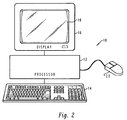
- data processing system 10 preferably includes a processor 12 which is coupled to a keyboard 14 and a display device 16 in a manner well known in the art.
- Display device 16 preferably includes a display screen 18.
- data processing system 10 may be implemented by utilizing any suitable computer including main frame computers, mini computers, so-called personal computers, or workstations, which may be coupled to a main frame host computer.
- One example of a data processing system which may be utilized to implement the method and system of the present invention is the International Business Machines Corporation PS/2 or RS/6000.
- PS/2 and RS/6000 are registered trademarks of International Business Machines Corporation, located in Armonk, New York.
- Data processing system 10 may also include a pointing device, such as mouse 20.
- pointing device such as mouse 20.
- FIG. 3 depicts a more detailed high level block diagram which further illustrates the preferred data processing system 10 of Figure 2.
- data processing system 10 is controlled primarily by software executed within central processing unit (CPU) 30.
- CPU 30 is coupled to display 32, and receives user input from user input device 34.
- CPU 30 is also coupled to memory 36 and one or more direct access storage devices (DASDs) depicted at block 38.
- Memory 36 and DASD 38 may be utilized for storing data sets and application programs.
- User input device 34 may be implemented utilizing one or more of the following: a keyboard, a mouse, a touch sensitive tablet or screen, a joystick, a track ball, or a screen activated light pen.
- CPU 30 may also be coupled to audio output device 40 and peripheral controller 42.
- Audio output device 40 may include an amplifier and speaker system.
- Peripheral controller 42 may be utilized to control peripheral devices, such as a logic analyzer (not shown) or other electronic equipment.
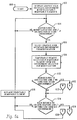
- CPU 30 is preferably suitably programmed to implement the process depicted in the flowcharts of Figures 5a-5c.
- a window 50 is provided having a display area 52, which may be utilized to display application or system related text, graphics, icons, image data, or the like.
- Title bar 54 is displayed along the top of window 50, and provides a region for the display of window title 56, faceplate control icon 58, and window controls 60.
- Window title 56 may be utilized to designate an application name and/or an object name.
- An object is an item that can be manipulated as a unit and that a user may work with to perform a task.
- An object may be represented as text, image, graphic, video, or audio.
- a text file which may comprise a document created by a word processing application, may be considered an object.
- Window controls 60 may be utilized to control the display of window 50.
- a maximize button may be utilized to enlarge a window to the largest size possible for a particular view or to enlarge the size of the window to substantially fill the work place area of display screen 18.
- a minimize button may be utilized to remove window 50 from the work place, and add a minimized-window visual, such as an application-defined icon, within the work place which represents the minimized window.
- Faceplate control button 58 is provided and utilized during the GUI environment customization process in accordance with the method and system of the present invention as will be discussed below in greater detail.
- a menu bar 62 is provided. Those familiar with GUIs will appreciate that a command within menu bar 62 may be selected graphically, utilizing a pointing device, such as a mouse 20, or by the selection of a particular keyboard key associated with a selected command. Typically, upon user selection of a particular command within menu bar 62, a so-called drop down command list is provided and utilized to display individual commands which are categorized under the particular general command selected by the user from menu bar 62.
- Pointer 64 is displayed on display screen 18 and is generally moved utilizing a pointing device, such as mouse 20. Pointer 64 is utilized to designate choices and objects that a user may wish to select or otherwise interact with. As depicted in Figure 4a, pointer 64 is located overlapping faceplate control button 58. The action lines depicted above the index finger of pointer 64 indicate that a user has depressed (i.e., clicked) a button on mouse 20.
- window 50 is depicted along with window 70, which contains optional function and/or feature icons 72 and 74.
- Optional function and/or feature icon 72 is associated with an optional function and/or feature, which, when installed in a GUI element, displays a clock function.
- Optional function and/or feature icon 74 is associated with an optional function and/or feature, which, when installed in a GUI element, displays a date function.
- window 50 is depicted with a portion of title bar 54 referred to as faceplate 76 illustrated in an open position.
- faceplate 76 is a graphical user interface element, which, in normal operation, occupies a region of display screen 18 that coincides with title bar 54.
- faceplate 76 has been removed or opened in response to a user selecting faceplate control button 58, as depicted previously in Figure 4a.
- faceplate 76 When faceplate 76 is open, it appears to have pivoted along the bottom edge of title bar 54 and come to rest below title bar 54, where it partially obscures menu bar 62. By opening faceplate 76, a user may thereafter place title bar 54, in a customization mode.
- GUI user interface elements such as, for example, menu bar 62, other icons, or other graphic elements which comprise the GUI environment, may be susceptible to being placed in such a customization mode in accordance with the method and system of the present invention.
- the process of customizing a GUI environment may comprise altering the appearance or the functionality of a particular element within a GUI environment.
- an optional function and/or feature which may be associated with a GUI element, which does not modify the appearance of the GUI element immediately upon installation, but rather, may alter the functionality of such GUI element during a subsequent user interaction.
- an optional function and/or feature may be associated with window title 56 which, in response to a user selection, displays a logical location within a storage disk of the object contained in the window.
- GUI element may be selectively modified by associating an optional function and/or feature with a selected GUI element by any one of several programming techniques known in the art, such as, for example, a software patch.
- title bar 54 may be customized to display the current time and date, for example.
- a user first selects an optional function and/or feature icon, such as either optional function and/or feature icon 72 or 74, which are each associated with an optional function and/or feature that will perform a desired modification on a designated GUI element.
- an optional function and/or feature icon such as either optional function and/or feature icon 72 or 74, which are each associated with an optional function and/or feature that will perform a desired modification on a designated GUI element.
- a user may then drag the optional function and/or feature icon to a selected point within title bar 54, as illustrated by the bold arrows in Figure 4b.
- the user may drop the optional function and/or feature icon, thus locating a display associated with the optional function and/or feature and associating the optional function and/or feature with the selected GUI element.
- clock display 80 and date display 82 are depicted after being located within title bar 54. As illustrated, the user has positioned pointer 64 over faceplate control button 58, and has depressed or clicked a button on mouse 20, closing faceplate 76.
- pointer 64 over faceplate control button 58
- button on mouse 20 closing faceplate 76.
- FIG. 4d a pictorial representation is illustrated which depicts window 50 having a customized title bar 54.
- Clock display 80 and date display 82 each represents an optional function and/or feature which has been installed in title bar 54.
- Block 102 illustrates the display, within display screen 18, of a graphic user interface environment with selectably removable elements.
- selectably removable element is faceplate 76, as illustrated in Figures 4b and 4c.
- selectably removable elements may be associated with any graphically distinguishable region of a GUI environment, such as for example, a title bar, a menu bar, an icon, or any other such graphic element which comprises the GUI environment.
- the process next determines whether or not a user desires to modify the functions and/or features of a GUI environment, as depicted at decision block 104. If a user does not desire to modify functions and/or features, the process iterates until such time as a user desires to modify functions and/or features. Alternatively, if a user desires to modify functions and/or features of the GUI environment, a user may then select a graphic user interface environment for modification, as illustrated at block 106. Such a selection may be accomplished by graphically positioning a pointer, within a display screen, through the manipulation of a pointing device.
- a selectably removable element such as a faceplate
- a GUI environment may be temporarily rendered the element transparent or by depicting such a faceplate in an open position, in much the same way as a hinged access panel would appear after being opened, and as illustrated in Figures 4b and 4c.
- the process determines whether or not a user desires to add a function and/or feature to the selected GUI environment. If a user desires to add functions and/or features, the process passes to block 114 of Figure 5b, via off-page connector A, as depicted at reference numeral 112.
- FIG. 5b a process is illustrated for adding an optional function and/or feature to a GUI environment.
- the user selects an icon associated with an optional function and/or feature to be added, as illustrated at block 114.
- a user drags an icon associated with the optional function and/or feature to the display region previously occupied by the selectably removable element, as depicted at block 116.
- the user drops the icon associated with the optional function and/or feature at a selected location within the region previously occupied by the selectably removable element, as illustrated at block 118.
- the process displays the icon, or the display associated with the optional function and/or feature at the selected location, as depicted at block 120.
- the process passes to block 122 of Figure 5a, via off-page connector B, as illustrated at reference numeral 122.
- Such a process of dragging and dropping an icon associated with an optional function and/or feature is illustrated in Figure 4b.
- the user drops the icon associated with the optional function and/or feature at a selected location that is unrelated to the region previously occupied by the selectably removable element, as illustrated at block 132.
- the process then removes the icon, or display associated with the optional function and/or feature, from the region previously occupied by the selectably removable element, as depicted at block 134.
- the process passes, via off-page connector D, as depicted at reference numeral 136, to block 138 of Figure 5a.
- a user may select and place a GUI element in a customization mode by opening a faceplate, and thereafter select, drag, and drop an icon associated with an optional function and/or feature into an area within the region occupied by the selected GUI element in order to add optional functions and/or features to the GUI environment.
- One example of adding such an optional function and/or feature is the installation of a clock or calendar display within unused areas of a window title bar.
- such installation of optional functions and/or features may alter the functionality of any graphically distinguishable region of a GUI environment.
- a preferred embodiment of the present invention provides an improved method and system for modifying functions and/or features of a graphic user interface environment utilizing graphic manipulation of selected graphic user interface elements to initiate the installation of optional functions and/or features.
Landscapes
- Engineering & Computer Science (AREA)
- General Engineering & Computer Science (AREA)
- Theoretical Computer Science (AREA)
- Human Computer Interaction (AREA)
- Physics & Mathematics (AREA)
- General Physics & Mathematics (AREA)
- User Interface Of Digital Computer (AREA)
- Digital Computer Display Output (AREA)
Applications Claiming Priority (2)
| Application Number | Priority Date | Filing Date | Title |
|---|---|---|---|
| US08/177,296 US6201539B1 (en) | 1994-01-04 | 1994-01-04 | Method and system for customizing a data processing system graphical user interface |
| US177296 | 1994-01-04 |
Publications (1)
| Publication Number | Publication Date |
|---|---|
| EP0662655A2 true EP0662655A2 (fr) | 1995-07-12 |
Family
ID=22648049
Family Applications (1)
| Application Number | Title | Priority Date | Filing Date |
|---|---|---|---|
| EP94480165A Withdrawn EP0662655A2 (fr) | 1994-01-04 | 1994-12-06 | Méthode et système pour l'adaptation de l'interface utilisateur graphique dans un système de traitement de données |
Country Status (3)
| Country | Link |
|---|---|
| US (1) | US6201539B1 (fr) |
| EP (1) | EP0662655A2 (fr) |
| JP (1) | JP2732557B2 (fr) |
Cited By (3)
| Publication number | Priority date | Publication date | Assignee | Title |
|---|---|---|---|---|
| GB2380577A (en) * | 1997-09-21 | 2003-04-09 | Microsoft Corp | Custom control for a standard user interface control specified by the data provider |
| WO2002039245A3 (fr) * | 2000-11-09 | 2005-02-03 | Change Tools Inc | Systeme d'interface pouvant etre defini par un utilisateur, procede et produit de programme informatique associes |
| US7810038B2 (en) | 2002-05-03 | 2010-10-05 | International Business Machines Corporation | Method for modifying a GUI for an application |
Families Citing this family (57)
| Publication number | Priority date | Publication date | Assignee | Title |
|---|---|---|---|---|
| JP2001069580A (ja) * | 1999-08-31 | 2001-03-16 | Matsushita Electric Ind Co Ltd | Av機器コントロール装置 |
| JP3773716B2 (ja) | 1999-09-13 | 2006-05-10 | 富士通株式会社 | グラフィカルユーザインターフェース表示装置及びその装置での処理をコンピュータにて行なわせるためのプログラムを格納した記録媒体 |
| US7895530B2 (en) * | 2000-11-09 | 2011-02-22 | Change Tools, Inc. | User definable interface system, method, support tools, and computer program product |
| US20030028619A1 (en) * | 2001-07-31 | 2003-02-06 | International Business Machines Corporation | Linking user-defined panels to existing product panels |
| US20040122915A1 (en) * | 2001-11-28 | 2004-06-24 | John Saare | Method and system for an extensible client specific calendar application in a portal server |
| US20030142141A1 (en) * | 2002-01-28 | 2003-07-31 | International Business Machines Corporation | Displaying specified resource usage |
| US20030142143A1 (en) * | 2002-01-28 | 2003-07-31 | International Business Machines Corporation | Varying heights of application images to convey application status |
| US20030142133A1 (en) * | 2002-01-28 | 2003-07-31 | International Business Machines Corporation | Adjusting transparency of windows to reflect recent use |
| US20030142140A1 (en) * | 2002-01-28 | 2003-07-31 | International Business Machines Corporation | Adjusting the tint of a translucent window to convey status |
| US6954905B2 (en) * | 2002-01-28 | 2005-10-11 | International Business Machines Corporation | Displaying transparency characteristic aids |
| US7146573B2 (en) * | 2002-01-28 | 2006-12-05 | International Business Machines Corporation | Automatic window representation adjustment |
| US20030142137A1 (en) * | 2002-01-28 | 2003-07-31 | International Business Machines Corporation | Selectively adjusting the order of windows in response to a scroll wheel rotation |
| US20030142149A1 (en) * | 2002-01-28 | 2003-07-31 | International Business Machines Corporation | Specifying audio output according to window graphical characteristics |
| US7130400B2 (en) * | 2002-04-27 | 2006-10-31 | Bellsouth Intellectual Property Corporation | Graphical animation and sound for Internet Call-Waiting messages |
| US7005846B2 (en) * | 2002-07-17 | 2006-02-28 | Agilent Technologies, Inc. | System and method for application control in measurement devices |
| US7912899B2 (en) * | 2002-09-06 | 2011-03-22 | Oracle International Corporation | Method for selectively sending a notification to an instant messaging device |
| US7945846B2 (en) | 2002-09-06 | 2011-05-17 | Oracle International Corporation | Application-specific personalization for data display |
| US7243124B1 (en) | 2002-09-06 | 2007-07-10 | Oracle International Corporation | Architecture for general purpose near real-time business intelligence system with client devices and methods therefor |
| US7899879B2 (en) | 2002-09-06 | 2011-03-01 | Oracle International Corporation | Method and apparatus for a report cache in a near real-time business intelligence system |
| US7941542B2 (en) * | 2002-09-06 | 2011-05-10 | Oracle International Corporation | Methods and apparatus for maintaining application execution over an intermittent network connection |
| US7412481B2 (en) | 2002-09-16 | 2008-08-12 | Oracle International Corporation | Method and apparatus for distributed rule evaluation in a near real-time business intelligence system |
| US8255454B2 (en) | 2002-09-06 | 2012-08-28 | Oracle International Corporation | Method and apparatus for a multiplexed active data window in a near real-time business intelligence system |
| US7272660B1 (en) | 2002-09-06 | 2007-09-18 | Oracle International Corporation | Architecture for general purpose near real-time business intelligence system and methods therefor |
| US7454423B2 (en) | 2002-09-06 | 2008-11-18 | Oracle International Corporation | Enterprise link for a software database |
| US8165993B2 (en) * | 2002-09-06 | 2012-04-24 | Oracle International Corporation | Business intelligence system with interface that provides for immediate user action |
| US7668917B2 (en) * | 2002-09-16 | 2010-02-23 | Oracle International Corporation | Method and apparatus for ensuring accountability in the examination of a set of data elements by a user |
| US7401158B2 (en) * | 2002-09-16 | 2008-07-15 | Oracle International Corporation | Apparatus and method for instant messaging collaboration |
| US7426059B2 (en) | 2002-09-16 | 2008-09-16 | Oracle International Corporation | Data presentation methods and apparatus to facilitate printing and reviewing |
| US20040113941A1 (en) * | 2002-12-12 | 2004-06-17 | Xerox Corporation | User interface customization |
| US7904823B2 (en) * | 2003-03-17 | 2011-03-08 | Oracle International Corporation | Transparent windows methods and apparatus therefor |
| US7184801B2 (en) * | 2003-05-12 | 2007-02-27 | Good Technology, Inc. | Mobile application builder |
| US7113964B1 (en) | 2003-06-05 | 2006-09-26 | Iteration Software, Inc. | Method and apparatus for archiving data in a relational database system |
| US7199802B2 (en) * | 2003-10-24 | 2007-04-03 | Microsoft Corporation | Multiple-mode window presentation system and process |
| US20050198610A1 (en) * | 2004-03-03 | 2005-09-08 | Ulf Fildebrandt | Providing and using design time support |
| US8181119B1 (en) * | 2004-06-02 | 2012-05-15 | Apple Inc. | User interface with inline customization |
| US7490295B2 (en) * | 2004-06-25 | 2009-02-10 | Apple Inc. | Layer for accessing user interface elements |
| US20060109242A1 (en) * | 2004-11-19 | 2006-05-25 | Simpkins Daniel S | User interface for impaired users |
| US20060123345A1 (en) * | 2004-12-06 | 2006-06-08 | International Business Machines Corporation | Platform-independent markup language-based gui format |
| EP1839237A4 (fr) * | 2004-12-21 | 2010-08-25 | Dart Chart Systems Llc | Procede, dispositif et systeme informatique de documentation et de collecte de donnees multimedia et multiculturelles |
| US20070276683A1 (en) * | 2006-05-15 | 2007-11-29 | Accenture Global Services Gmbh | Systems, applications and products in data processing for inter-company pricing |
| US8041613B2 (en) * | 2006-05-15 | 2011-10-18 | Accenture Global Services Limited | Systems, applications and products in data processing for cross dock |
| US20070265874A1 (en) * | 2006-05-15 | 2007-11-15 | Accenture Global Services Gmbh | Systems, applications and products in data processing for partner determination |
| US8117093B2 (en) * | 2006-05-15 | 2012-02-14 | Accenture Global Services Limited | Systems, applications and products in data processing for expedite orders |
| US20070276685A1 (en) * | 2006-05-15 | 2007-11-29 | Accenture Global Services Gmbh | Systems, applications and products in data processing for end customer |
| US20080082610A1 (en) * | 2006-09-29 | 2008-04-03 | Breise Devin W | Method and apparatus for providing collaborative user interface feedback |
| TW200830166A (en) * | 2007-01-15 | 2008-07-16 | Asustek Comp Inc | Method and computer system capable of presenting program graphics interface on title bar of window |
| US9791994B2 (en) | 2007-06-08 | 2017-10-17 | Apple Inc. | User interface for application interface manipulation |
| US8751920B2 (en) * | 2007-10-30 | 2014-06-10 | Perot Systems Corporation | System and method for image processing with assignment of medical codes |
| WO2009070319A1 (fr) * | 2007-11-27 | 2009-06-04 | Ortiz David J | Interface utilisateur graphique informatique et système d'affichage |
| US9349109B2 (en) | 2008-02-29 | 2016-05-24 | Adobe Systems Incorporated | Media generation and management |
| US8789205B2 (en) * | 2010-04-21 | 2014-07-22 | Microsoft Corporation | Role-based graphical user interfaces |
| US20130239031A1 (en) | 2012-03-06 | 2013-09-12 | Apple Inc. | Application for viewing images |
| US9189876B2 (en) | 2012-03-06 | 2015-11-17 | Apple Inc. | Fanning user interface controls for a media editing application |
| US9131192B2 (en) | 2012-03-06 | 2015-09-08 | Apple Inc. | Unified slider control for modifying multiple image properties |
| US8971623B2 (en) | 2012-03-06 | 2015-03-03 | Apple Inc. | Overlaid user interface tools for applying effects to image |
| US9202433B2 (en) | 2012-03-06 | 2015-12-01 | Apple Inc. | Multi operation slider |
| US10572274B2 (en) * | 2017-09-22 | 2020-02-25 | Microsoft Technology Licensing, Llc | Cross platform custom functions |
Family Cites Families (15)
| Publication number | Priority date | Publication date | Assignee | Title |
|---|---|---|---|---|
| US4692858A (en) | 1984-02-02 | 1987-09-08 | Trillian Computer Corporation | Visual interface between user and computer system |
| US4868765A (en) * | 1986-01-02 | 1989-09-19 | Texas Instruments Incorporated | Porthole window system for computer displays |
| US4860204A (en) | 1987-02-05 | 1989-08-22 | Softron, Inc. | Computer based workstation for development of graphic representation of computer programs |
| US5005119A (en) | 1987-03-02 | 1991-04-02 | General Electric Company | User interactive control of computer programs and corresponding versions of input/output data flow |
| US4819233A (en) | 1987-04-08 | 1989-04-04 | Westinghouse Electric Corp. | Verification of computer software |
| US4964075A (en) | 1987-05-08 | 1990-10-16 | A. J. Weiner, Inc. | Software and hardware independent auxiliary user programmable intelligent keyboard |
| US5157763A (en) * | 1987-10-15 | 1992-10-20 | International Business Machines Corporation | Visually assisted method for transfer of data within an application or from a source application to a receiving application |
| US5041992A (en) | 1988-10-24 | 1991-08-20 | University Of Pittsburgh | Interactive method of developing software interfaces |
| JPH034296A (ja) * | 1989-05-31 | 1991-01-10 | Toshiba Corp | 情報パネル装置 |
| US5251291A (en) * | 1989-10-13 | 1993-10-05 | International Business Machines Corporation | Method of selectively transferring video displayed information |
| US5301268A (en) * | 1990-10-10 | 1994-04-05 | Fuji Xerox Co., Ltd. | Apparatus for transferring information between different window systems |
| CA2071309C (fr) * | 1991-11-15 | 1998-01-20 | Daryl J. Kahl | Methode et appareil utilisant des icones de donnees |
| JP3182836B2 (ja) * | 1992-02-21 | 2001-07-03 | 株式会社デンソー | タイヤバランス検知装置 |
| US5404316A (en) * | 1992-08-03 | 1995-04-04 | Spectra Group Ltd., Inc. | Desktop digital video processing system |
| US5404442A (en) * | 1992-11-30 | 1995-04-04 | Apple Computer, Inc. | Visible clipboard for graphical computer environments |
-
1994
- 1994-01-04 US US08/177,296 patent/US6201539B1/en not_active Expired - Fee Related
- 1994-10-31 JP JP6266628A patent/JP2732557B2/ja not_active Expired - Fee Related
- 1994-12-06 EP EP94480165A patent/EP0662655A2/fr not_active Withdrawn
Cited By (5)
| Publication number | Priority date | Publication date | Assignee | Title |
|---|---|---|---|---|
| GB2380577A (en) * | 1997-09-21 | 2003-04-09 | Microsoft Corp | Custom control for a standard user interface control specified by the data provider |
| GB2380577B (en) * | 1997-09-21 | 2003-12-17 | Microsoft Corp | Presenting a custom control in a data filtering interface of a computer system |
| WO2002039245A3 (fr) * | 2000-11-09 | 2005-02-03 | Change Tools Inc | Systeme d'interface pouvant etre defini par un utilisateur, procede et produit de programme informatique associes |
| US6918091B2 (en) | 2000-11-09 | 2005-07-12 | Change Tools, Inc. | User definable interface system, method and computer program product |
| US7810038B2 (en) | 2002-05-03 | 2010-10-05 | International Business Machines Corporation | Method for modifying a GUI for an application |
Also Published As
| Publication number | Publication date |
|---|---|
| JPH07210353A (ja) | 1995-08-11 |
| JP2732557B2 (ja) | 1998-03-30 |
| US6201539B1 (en) | 2001-03-13 |
Similar Documents
| Publication | Publication Date | Title |
|---|---|---|
| US6201539B1 (en) | Method and system for customizing a data processing system graphical user interface | |
| US5140677A (en) | Computer user interface with window title bar mini-icons | |
| US5664128A (en) | Object storage apparatus for use with data sets in computer applications | |
| US6710788B1 (en) | Graphical user interface | |
| US5621876A (en) | Method and apparatus for modifying a display matrix in a computer window by adding one column or row at a time | |
| US5828376A (en) | Menu control in a graphical user interface | |
| US6072486A (en) | System and method for creating and customizing a deskbar | |
| US5559948A (en) | Apparatus and method for manipulating an object in a computer system graphical user interface | |
| US5757371A (en) | Taskbar with start menu | |
| US5668964A (en) | Graphical user interface for creating a new notebook with a dragged page | |
| US6393429B1 (en) | File handling device, and a recording medium storing a file handling program | |
| US5867678A (en) | Method and system for searching and retrieving specific types of objects contained within a compound document | |
| US6014140A (en) | Method and system for locating and displaying the position of a cursor contained within a page of a compound document | |
| JP3849880B2 (ja) | 複合文書におけるコンピュータ/ヒューマンインタフェースシステム | |
| EP0820002B1 (fr) | Fenêtre à multi-carreaux intégrant la reconfiguration des espaces de travail | |
| US5754174A (en) | User interface with individually configurable panel interfaces for use in a computer system | |
| EP1637986B1 (fr) | Interface utilisateur pour afficher des commandes de fonctionnalité de logiciel sélectionnables appropriées à un objet choisi | |
| US5825360A (en) | Method for arranging windows in a computer workspace | |
| US6008809A (en) | Apparatus and method for viewing multiple windows within a dynamic window | |
| US6806892B1 (en) | Layer viewport for enhanced viewing in layered drawings | |
| US7603628B2 (en) | User interface for and method of managing icons on group-by-group basis using skin image | |
| US6175364B1 (en) | Framework and method for interfacing a GUI, container with a GUI component | |
| US6040833A (en) | Method and system for display manipulation of multiple applications in a data processing system | |
| CN101504601B (zh) | 控件创造和编辑环境 | |
| US5745111A (en) | Method and system for automatic presentation of default-drop target icons at window borders |
Legal Events
| Date | Code | Title | Description |
|---|---|---|---|
| PUAI | Public reference made under article 153(3) epc to a published international application that has entered the european phase |
Free format text: ORIGINAL CODE: 0009012 |
|
| AK | Designated contracting states |
Kind code of ref document: A2 Designated state(s): DE FR GB |
|
| 17P | Request for examination filed |
Effective date: 19951115 |
|
| STAA | Information on the status of an ep patent application or granted ep patent |
Free format text: STATUS: THE APPLICATION HAS BEEN WITHDRAWN |
|
| 18W | Application withdrawn |
Withdrawal date: 19961028 |