EP0690426A2 - Système d'entraînement à l'emploi de l'ordinateur - Google Patents
Système d'entraînement à l'emploi de l'ordinateur Download PDFInfo
- Publication number
- EP0690426A2 EP0690426A2 EP95650017A EP95650017A EP0690426A2 EP 0690426 A2 EP0690426 A2 EP 0690426A2 EP 95650017 A EP95650017 A EP 95650017A EP 95650017 A EP95650017 A EP 95650017A EP 0690426 A2 EP0690426 A2 EP 0690426A2
- Authority
- EP
- European Patent Office
- Prior art keywords
- screen
- simulation
- commands
- media
- command
- Prior art date
- Legal status (The legal status is an assumption and is not a legal conclusion. Google has not performed a legal analysis and makes no representation as to the accuracy of the status listed.)
- Granted
Links
Images




Classifications
-
- G—PHYSICS
- G09—EDUCATION; CRYPTOGRAPHY; DISPLAY; ADVERTISING; SEALS
- G09B—EDUCATIONAL OR DEMONSTRATION APPLIANCES; APPLIANCES FOR TEACHING, OR COMMUNICATING WITH, THE BLIND, DEAF OR MUTE; MODELS; PLANETARIA; GLOBES; MAPS; DIAGRAMS
- G09B19/00—Teaching not covered by other main groups of this subclass
- G09B19/0053—Computers, e.g. programming
-
- G—PHYSICS
- G06—COMPUTING OR CALCULATING; COUNTING
- G06F—ELECTRIC DIGITAL DATA PROCESSING
- G06F9/00—Arrangements for program control, e.g. control units
- G06F9/06—Arrangements for program control, e.g. control units using stored programs, i.e. using an internal store of processing equipment to receive or retain programs
- G06F9/44—Arrangements for executing specific programs
- G06F9/451—Execution arrangements for user interfaces
-
- G—PHYSICS
- G09—EDUCATION; CRYPTOGRAPHY; DISPLAY; ADVERTISING; SEALS
- G09B—EDUCATIONAL OR DEMONSTRATION APPLIANCES; APPLIANCES FOR TEACHING, OR COMMUNICATING WITH, THE BLIND, DEAF OR MUTE; MODELS; PLANETARIA; GLOBES; MAPS; DIAGRAMS
- G09B7/00—Electrically-operated teaching apparatus or devices working with questions and answers
- G09B7/02—Electrically-operated teaching apparatus or devices working with questions and answers of the type wherein the student is expected to construct an answer to the question which is presented or wherein the machine gives an answer to the question presented by a student
- G09B7/04—Electrically-operated teaching apparatus or devices working with questions and answers of the type wherein the student is expected to construct an answer to the question which is presented or wherein the machine gives an answer to the question presented by a student characterised by modifying the teaching program in response to a wrong answer, e.g. repeating the question or supplying a further explanation
Definitions
- the invention relates to a computer based training system comprising a user input means, a system controller, a storage means storing training data, and a user output means including a video screen.
- the invention also relates to a method for producing such a system.
- WO 92/20059 (Matsushita) describes a demonstration control system having the ability to record, annotate and playback a graphic display.
- British Patent Specification No. GB 2,175,470 describes a video display controller which is particularly directed to providing overlays from diverse sources.
- European Patent Specification Nos. EP 518,554 and 498,106 (Adobe Systems) relate to control of pixels for generation of clear displays. The trend has therefore been towards providing a wide range of programs and hardware devices which are efficient at performing particular communication tasks.
- Another processor means receives the semantic commands and executes them and an instruction object is responsive to the syntactic actions taken by the user and displays information on a monitor.
- An agent means sends sematic commands to the instruction object to indicate which information to display on the monitor and for intercepting semantic commands sent from the first action processor to the first command processor.
- a shell is provided to teach skills for a live training subject application. This considerably limits the range of training options which may be used. Further, such a system appears to provide relatively little scope for integration of a wide variety of media devices in a flexible way for effective user training.
- the invention is directed towards providing a computer based training system which:-
- the invention is also directed towards providing a process for producing a computer based training system, the process utilising features of the end product training system for efficient and flexible production.
- the invention is characterised in that:- said storage means stores independently addressable media records having media interface data; said storage means stores an interface file comprising a series of interface action commands, each action command being associated with a media record and comprising code for instructing an interfacing action to be performed using data retrieved from the record; said system controller comprises means for:- identifying a sequence of action commands which are associated with an interfacing event, being an event which the system performs automatically between interactivity points at which a user may input a signal; automatically performing interfacing actions according to said sequence of action commands to perform an event; and receiving a user input signal at an interactivity point after completing the event, acting in response to the received input signal, and subsequently identifying action commands for the next event and performing said event to continue an execution path sequentially using commands in the interface file.
- the interface file further comprises interactivity point commands which delimit sequences of action commands for events
- the system controller comprises means for recognising said interactivity point commands and directing interactivity inputs according to said commands.
- the system controller comprises means for directing retrieval of training programs at an interactivity point and for operating according to the training programs before returning to the execution path of the interface file at the next action command.
- said training programs include simulation programs having code for directing the system controller to perform operations simulating the training subject.
- the simulation programs have a discrete structure with a discrete simulation handler piece of code associated with a screen input control during simulation.
- system controller comprises means for directing transfer of control to an execution path of an alternative control file at an interactivity point upon receipt of a user input instruction.
- the interface file comprises screen commands delimiting commands for a plurality of events
- the system controller comprises means for directing generation of a new video screen environment upon detection of a screen command.
- the system controller comprises means for:- directing generation of a fresh interfacing screen environment for display of training data upon detection of a conceptual screen command; and directing generation of a simulation screen environment having screen input areas simulating those of the training subject upon detection of a simulation screen command.
- the media records comprise text data records and audio records, the records being individually addressable by being delimited in a common format and further comprise graphic bitmap and graphic animation records.
- the media video control records.
- the invention provides a computer based training system comprising a user input means, a system controller, a storage means storing training data, and a user output means including a video screen, wherein, said storage means stores independently addressable media records having media interface data; said storage means stores an interface file comprising a series of interface action commands, each action command being associated with a media record and comprising code for instructing an interfacing action to be performed using data retrieved from the record; said system controller comprises means for:- identifying a sequence of action commands which are associated with an interfacing event, being an event which the system performs automatically between interactivity points at which a user may input a signal; automatically performing interfacing actions according to said sequence of action commands to perform an event; and receiving a user input signal at an interactivity point after completing the event, acting upon the received signal by retrieving a simulation program and carrying out simulation operations according to the program, and subsequently identifying action commands for the next event and performing said event to continue an execution path using sequential commands in the interface file.
- the simulation programs may have a discrete structure comprising a discrete piece of code providing a simulation handler associated with a screen input area providing a screen control during simulation.
- the system controller comprises means for dynamically linking simulation handlers with screen controls during simulation, and for disconnecting all simulation handlers at the end of use of a simulation program.
- the invention provides a method of producing data and programs for loading in a target computer to provide a computer based training system, the method comprising the steps of:- storing a master media data document having flags; generating a memory storyboard having a cellular structure in which there are groups of cells, each group associated with an interfacing event of the target computer, and each of the cells within a group being individually addressable; a production controller reading the master media data document, recognising flags within the document, and pre-assigning each cell to an interfacing action according to the flags; automatically transferring media data from the master media data document to relevant pre-assigned cells within the storyboard; processing each cell of the storyboard in turn to generate an interface file having action commands associated with cells of the storyboard, each action command comprising code for directing an interfacing action of a training system with respect to an associated cell; generating a set of media records storing media data also stored in cells of the storyboard; and combining said media records and said interface file together with a
- the method comprises the further steps of:- displaying and verifying a graphic stored in a media record; comparing a pixelmap of the graphic with that of the next graphic pixelmap in operational display order; and automatically determining pixelmap differences and generating a frame around the difference pixels; storing the pixelmap differences in a media record; and modifying the associated interface file command accordingly.
- the method comprises the further step of emulating training system operation by use of the interface file, editing cells within each storyboard group, and editing the associated interface commands accordingly.
- the method comprises the further steps of stripping text data from the master media data document, transferring it to a text file, transferring text data to the storyboard cells from said text file, and storing the text file to provide media records for text data.
- the training system operates extremely quickly to provide a wide variety of media output and media interfacing actions generally.
- Interactivity inputs are provided for in a very simple and flexible manner with a wide range of options provided to a user.
- What, in effect, has been achieved is automatic sequential processing within the training system, with the facility given to the user that he or she may provide input to redirect or alter in many ways the training session at apparently any point in it's operation.
- These underlying technical features also apply to the production method, particularly as the interface file forms an integral part of both the end product training system and the production method.
- individual interfacing actions are identified and recorded in the storyboard cells and these are then used to produce the interface file. Broadly speaking, the production method could be viewed as a reverse of the end product operation.
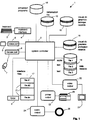
- FIG. 1 A schematic overview illustrating the overall construction of a computer based training system 1 of the invention is shown in Fig. 1.
- the system 1 comprises a system controller 2 having a microprocessor circuit of a computer such as a microcomputer operating under control of a system control program.
- the system 1 has the following components:- a keyboard 3 and interface 4; a microphone 5 and voice port 6; and a mouse 7 and mouse port 8.
- the system controller 2 is connected to a random access memory (RAM) 9 and operates in conjunction with various storage structures and these include:- an initialisation file 10, graphics bitmap records 15 and graphics animation records 16 within a visual database, a number of interface files 17, a set of data records 18, and a set 19 of simulation and auxiliary training programs.
- RAM random access memory
- the system 1 comprises the following components:- a video output controller 20 and a screen 21, a printer controller 22 and a printer 23, and an audio output controller 24 and a speaker 25.
- the system 1 further comprises various hardware components found in conventional microcomputers and workstations.
- the input and output components of the system 1 are conventional and indeed the hardware components of the system may be bought in the form of a conventional multimedia hardware system.
- the invention is provided by the manner in which the system controller 2 operates at a technical level to provide the commercial end-user benefits discussed in the introductory part of this specification. Of particular importance is the manner in which the system controller 2 operates in conjunction with the interface files 17, as these files direct use of the stored data and also help to provide an efficient and flexible production method for the system.
- the bitmap records 15 are bitmap stills at the required resolution for the video screen 21.
- the graphics animation records 16 are each a combination of frames to provide an animation visual effect.
- the records 15 and 16 are all individually addressable and each relate to a single graphic interfacing action. In general, a full pixelmap is stored for a first record, and records for subsequent display only include pixelmaps for the difference between the current display and the previous one.
- the data records 18 include both text data and also audio data records.
- the data is stored in a common, ASCII format with delimiters to separate the records.
- the data records are individually addressable in this way, and like the graphic records, each relate to a single interfacing action.
- the text data records include headers for training Units, each Unit relating to a subject or part of a subject to be learned by the user.
- the text data records also include header records for Topics, there being a number of Topics within each Unit.
- Each of the Topic header records includes the location and number of screen flags of the associated interface file. These are described in much more detail below, however, for the present, suffice to say that there is an interface file 17 associated with each Unit.
- Each interface file 17 includes a number of screen commands, each screen command relating to a screen environment.
- the visual database records 15 and 16 and the data records 19 are shown separately because they are used to generate different outputs. However, in operation of the system controller 2, they are processed similarly as they are individually addressable and relate to a single interfacing action of a media type. They may therefore be referred to as individually addressable media records.
- Each of the interface files 17 comprises a series of commands which are sequentially interpolated by the system controller 2.
- commands there are three broad categories of commands as follows:-
- the Argument includes the Unit number, the screen number and the total number of screens within that Unit.
- the Screen command indicates that a conceptual screen is to be generated and the necessary instructions to do this are contained in the action commands which follow sequentially. These commands are used to generate a conceptual screen including interactive buttons for such functions as Exit, Course, Help, Navigate, Review, Footnote and Continue.
- the second type of screen flag namely, Simscrn + Argument indicates the start of a simulation screen environment.
- the arguments are the same as for the screen command.
- the Simscrn command is interpreted by the controller as an instruction to generate an initial simulation screen using a simulation program 18 associated with the particular interface file 17 being used.
- the simulation screen includes a window which contains the simulation display and control buttons. These buttons differ from the conceptual screen buttons in appearance and are contained in a floating and resizable panel. This sets the background image and includes any menu items, dialogs and controls needed to create a replica of the application being simulated.
- the training system 1 may be used to simulate another application such as Lotus NotesTM.
- the most important such command is the Pause command.
- the controller halts the execution path through the action commands and awaits a user input. The most common use for this command is waiting for the user to press a Continue button to move on through the course.
- the Pause command defers execution of the action commands until the next event is triggered by a user input.
- the word "event” is intended to mean the set of interfacing actions carried out between interactivity points during the execution path.
- An important aspect of the pause command is that it allows a user to select Exit Course, Help, Navigate, Footnote, or Review buttons on the screen.
- Another interactivity point command is the command Qcall which directs the controller 2 to automatically retrieve a question according to a question auxiliary program and receive interactive inputs.
- the first argument of the Qcall command specifies the name of this program file.
- the second argument is a code which matches with a code in the question file and identifies the section of the file relating to the particular question. Therefore, execution of the action commands is temporarily suspended while the question file program is used whereby the user can provide feedback.
- the simulation programs which may be activated at interactivity point commands direct simulation of the training subject's front end interface. This allows the following features and advantages:
- the interactivity point command Task results in retrieval of a simulation program 19.
- a simulation program comprises code or script in a discrete format, a discrete piece of code or script being associated directly with a screen pixel display area.
- the simulation program causes a dialog to be displayed on the video screen. This dialog contains a statement indicating what is to be done in the task and allows the user select a button to cause display of an exercise dialog and a button to cause display of a dialog containing a list of the steps required to complete the task successfully.
- the controller 2 continues on the execution path with the next command.
- the next command is usually the Step command, which is also an interactivity point command.
- each Step command causes the controller to suspend execution of the action commands and execute a simulation program 19.
- the simulation program 19 contains all of the information needed to execute it and judge the step.
- the controller 2 enters an idle loop while waiting for the user to attempt the step. While in this loop, the controller 2 can process input signals given by the user. If the user completes the step successfully, a flag is set to indicate that the step is finished and the controller 2 reverts back to the execution path. If the user's attempt at the step was incorrect, a dialog is displayed which contains some feedback and allows the user the option to try the step again or to be shown the correct method. Again, simulation programs may be needed to do this.
- the Exercise interactivity point command is similar in nature as it suspends the execution path and causes the controller 2 to retrieve a simulation program 19.
- This program directs display of an exercise statement and a list of the tasks comprising the exercise.
- a scrolling list box is employed to display the task list and this automatically disables the scrolling function if the entire list of tasks can be displayed at once.
- the graphic can be in BMP, DIB or GIF format.
- the graphic is initially read into a temporary off-screen buffer of the controller 20 and is then transferred onto the main visible picture area using either a bitblt API function or a custom control. Also, if the graphic is in GIF format, it must be converted to bitmap format. This is done with conversion code or a custom control.
- the controller 2 causes the controller 2 to draw a text box on the screen.
- the arguments for the textbox indicate the position of the text box; the x coordinates are from the left side of the screen to the right, while the y coordinates are from the bottom to the top.
- the command arguments are parsed and read into a user defined variable structure. This variable contains such information as the position of the text box, the text it contains, the number of lines of text in it and whether or not it is loaded.
- the text for the textbox is read form a text data record 18 which only contains text for textboxes, growboxes and noteboxes.
- the text Before being printed to the on-screen text box, the text is automatically wrapped in a multiline text edit control. This control will have been previously set to the width of the textbox.
- the text can then be printed line by line into the on-screen textbox. It is possible to underline sections of the text, or to print it in red or blue. The method for doing this is the same as for the growbox.
- a footnote is included with the text for a textbox. This is indicated by formatting characters in the text file. If a footnote is available, a small icon is included beside the text in the growbox and the footnote button on the screen is enabled.
- the controller 2 draws an extended textbox.
- the Growbox command is always preceded by a Textbox command, usually a few lines earlier. Therefore a textbox will already be visible on the screen.
- the arguments for the growbox will be the same in the x-direction as for the related textbox, and the arguments for the y-direction will be for an area below and slightly overlapping it. This is the position for the extension to the textbox.
- the command arguments are parsed and read into a user defined variable structure, which is of the same type as the one used for the original textbox.
- a user defined variable structure which is of the same type as the one used for the original textbox.
- One of the fields in this structure defines it as relating to a growbox.
- the textbox structure is also contained in the textbox structure. This is read from text data record 18 which only contains text for textboxes, growboxes and noteboxes.
- the text Before being printed to the on-screen text box, the text is put into a multiline text edit control. This control will have been previously set to the width of the growbox, and it automatically wraps the text to fit. The text can then be printed line by line into the on-screen growbox.
- a footnote is included with the text for a growbox. This is indicated by formatting characters in the text file. If a footnote is available, a small icon is included beside the text in the growbox and the footnote button on the screen is enabled.
- the Notebox command causes a dialog to be displayed on the screen with some text and an OK button in it.
- the Notebox has much in common with the Textbox and Growbox commands and uses the same data structure type in the code.
- One of the fields in the textbox data structure serves as a flag to indicate whether it represents a notebox or not.
- the notebox is also capable of displaying sections of its text as underlined text or displaying it in red or blue.
- the mechanism for doing this is the same as described in the growbox section above.
- the notebox dialog is shown modally on the screen, so the user must clear it by pressing the OK button to proceed with the course.
- the arguments included with the Isave command describe an area on screen and a name. Only the name is used to keep track of the textboxes and growboxes on the screen. This is stored as a field in the textbox data structure.
- the Rcall command provides the ability to call an auxiliary program 19 specifically written to implement some functionality not normally catered for in the interface file commands.
- the argument is a unique code which identifies the auxiliary program to be executed.
- the code language consists of a rich library of instructions which provide the ability to manipulate the screen, externally from the system control program itself. It is most commonly used in simulation and wide conceptual screens. Examples of its use are manipulation of menus, dialogs, toolbars and controls used to simulate a third party's application which is the subject of the training course.
- the routine may be hardcoded into the system control program.
- the Rcall action command is therefore different from the other action commands in that it uses an auxiliary program 19, although it is not an interactivity point command.
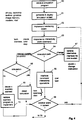
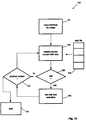
- step 31 the controller 2 retrieves the initialisation file 10 and in step 32, it detects a system identifier.
- the controller 2 detects from the initialisation file 10 settings for input pixel areas, namely the input buttons which are required for general operation of the system.
- step 34 the controller 2 retrieves from the initialisation file 10 output start-up messages for the user and these are displayed on the screen 21.
- step 35 utility programs are retrieved and the controller 2 reads through an indicated set of text data records 18 to identify unit header records.
- the controller 2 in step 36 determines the educational structure within each Unit by retrieving Topic headers and data relating to screens used in the Topics. This data includes the location of screen commands within the interface file associated with the Topic.
- steps 35 and 36 the controller 2 directs display of lists of the available Units and Topics in a hierarchial menu arrangement.
- Input instructions are received in step 37 indicating the required Unit and Topic and in step 38, the controller 2 retrieves the interface file 17 which is associated withe the particular Unit.
- step 39 the controller 2 reads the relevant screen command which has been identified by the relevant Topic header and determines in step 40 if it is a simulation screen flag or a conceptual screen flag. In either event, all of the interface file commands between that screen flag and the next screen flag are written to the RAM 9, as indicated by the steps 41 and 42.
- step 43 the controller automatically performs all of the actions between the screen command and the first interactivity point command. This set of actions which are performed automatically in sequence are referred to as an interfacing event. In this case, the event is the generation of an initial conceptual screen. Possible action commands are indicated next to the step 43 in Fig. 3.
- step 44 an interactivity point command is reached and where the screen flag is a conceptual screen flag, this may be the command Pause or the command Qcall .
- step 45 the controller 2 determines how to proceed with program execution. This depends on the nature of the interactivity point command and the nature of the input which is received from the user. The execution path may be suspended and this is referred to as an internal transfer of control in Fig. 3.
- step 46 is carried out wherein the controller 2 retrieves an auxiliary program and implements it.
- the auxiliary program may be a program related to the Review button which allows the user to review all of the steps which have taken place up to that point in execution as they are logged as they take place.
- the input which is received from the user may indicate that the execution path is to be halted permanently, in which case the controller 2 retrieves an alternative interface file and re-starts processing according to the desired screen command in that file. This is much like starting afresh at another Unit and Topic.
- the controller 2 may automatically continue on the same execution path by implementing a program such as that identified by the Qcall command before continuing with the next action command. There is no user choice of whether or not to use this program as it is retrieved and implemented automatically. The interactive inputs are required during use of the program such as to answer questions, however, they do not initiate retrieval of the program. As indicated by the decision step 49, the controller 2 returns to step 39 if there are no further events in the screen, and returns to step 43 if there is another event.
- step 60 the controller 2 retrieves a simulation program associated with the interface file and uses it to generate an initial screen in step 61.
- step 62 the controller 2 implements an interfacing event, as described above using a sequence of action commands before the next interactivity point command.
- step 63 a response is received after an interactivity point command is implemented and a decision is made as to further execution in step 64.
- the execution path may be changed completely if the user requests a different Unit and Topic as indicated by step 67. Again, execution may continue on the path using either the Qcall or the Task interactivity point commands. Alternatively, there may be an internal transfer of control, the nature of which is decided in the decision step 68.
- the controller 2 retrieves one of the simulation programs 9 and directs a simulation operation such as task, exercise or step operations, as described above.
- each of the simulation programs has a discrete structure with a discrete piece of code or script providing a simulation handler associated with each input button or pixel area of a screen, also referred to as a screen control. They also include additional code for such operations as evaluating how a user performed at a task.
- a simulation program The following is an example of a simulation program.
- a dedicated scripting language is used in which the word EVENT indicates the start of a discrete simulation handler and the words END EVENT indicate the end.
- Each of these units is performed in response to an input at a pixel area (referred to also as a screen control) on a screen such as button_1 CLICK.
- a screen control referred to also as a screen control
- each discrete piece of code may be referred to as a simulation handler.
- Some handlers include conditions at the start of the execution of the script code for a particular input at a screen control or input area is dependent on the state of another control on the screen.
- the simulation program links simulation handlers with input areas or controls of the screen. Therefore, user interaction with a control may change during simulation. Further, it is possible to use the same control for different purposes at different times. For example, if two dialogs were used at different times in a task, the same control might be used for the "OK" button on each. This avoids the need to store two sets of control data in memory, while presenting only one on the screen for the user.
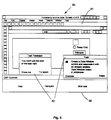
- FIG. 5 shows a sample simulation screen 81 in which there are superimposed windows 82 for performance of simulation operations.
- the general screen 81 is generated immediately after a simulation screen command is read and the windows 82 are generated in response to a simulation program at a Task interactivity point command.
- the pixel area 82 is part of a conceptual screen.
- the controller 2 retrieves an auxiliary program such as a Help program and performs the necessary operations before returning control back to the execution path as indicated by the step 66.
- an auxiliary program such as a Help program
- a further sequence of action commands may be implemented by return to the step 62, or alternatively, a next screen command may be read by returning to the step 39.
- a master document is a document produced by an author of the text information which is to be communicated by the system. This document is generated using a standard word processor and therefore is easy to produce by the author.
- the master document comprises various headers such as "Unit” and "Topic” headers, there being a number of Topics in each Unit.
- the master document contains only text data, however, it could include graphics or visual data generally, or audio control data.
- a storyboard 103 is also generated.
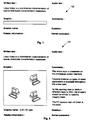
- a storyboard in this specification means a memory structure which has individually addressable cells, there being a group of cells associated with one interfacing action during operation of the system which is produced. Each of these cells is individually addressable. As shown in Fig. 6, there are five cells for each group. Each cell relates to an interfacing action, and each group to an event. The groups are based around screen displays, however individual cells may relate to interfacing actions for different media such as audio.
- the method involves the production controller reading the master document 102 and automatically recognising the various flags.
- the flags need not necessarily be deliberately inserted into the master document for the production method as they could be conventional flags used for other purposes in a word processor document.
- the automatic recognition step 104 involves recognition of many different flags such as screen breaks, headers, footers and topic flags.
- step 105 the information associated with the flags is used to pre-assign the function of each cell in each group of the storyboard 103.
- Each screen break flag (to initiate a new screen display) causes the production controller to automatically refer to the next group of cells in the storyboard 103.
- the conversion step 105 involves conversion to the relevant file format and allows compatibility with different master document program formats.
- a text file 106 is then generated by the production controller automatically stripping text from the master document and writing it in individual paragraphs without any flags. Subsequently, the production controller processes the text file 106 and transfers text in blocks of a single paragraph to the first cell 103(a) in each group of the storyboard 103 as indicated in Fig. 6. This is a direct transfer of "flat" text in a common format. The result of this step is an interim storyboard representation shown in Fig. 7 and indicated by the numeral 125. It can be seen that the first paragraph of the text file 106 has been transferred to the first cell under the heading "Written Text". These text transfer operations are repeated for the sixth cell of each group having the heading "Comments". The "graphic" section is blank at this stage.
- the next step of the method is carried out by the production controller with reference to a graphics database 108.
- This step involves transfer of retrieved or newly-created graphics in step 109 to the relevant (second) cell within each screen display group of the storyboard 103.
- the result is the screen display 130 shown in Fig. 8 in which there is a basic graphic which has been directly retrieved from the database 108. It will be appreciated that because this graphic has been retrieved directly from a database under operator instructions, very little data processing is involved. However, graphics may also be generated where existing graphics are not sufficiently illustrative of text in the cell group.
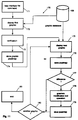
- step 141 the production controller automatically recognises each cell in turn of the storyboard 103.
- each group there are five cells within each group, each group corresponding to a single screen display and an interfacing event. This in turn corresponds to a single key depression of the user at an interactivity point in operation of the system when produced.
- step 142 On recognition of each cell in turn, an action command is automatically generated where appropriate in step 142 to direct output of the contents of that cell using an individually addressable media record. Some cells do not have any code generated as they may be left blank, for example a comment cell.
- step 143 the code is written to the interface file. As indicated by the decision step 144, steps 141 to 143 are repeated for each cell and finally in step 145 a signal is outputted to indicate that all cells have been automatically processed. Screen commands and interactivity point commands are generated either manually or automatically according to flags of the master document.
- step 161 the production system reads interface file commands in turn and in step 162 displays a screen with text retrieved from the text file 106.
- the text is displayed in a frame or box.
- Various tools may be used as decided by the decision step 163 to edit the text in step 164. Such tools may allow resizing or repositioning of the text.
- the text box is automatically displayed with a default size selected according to the items to be displayed on the same screen and to the result of any word-wrapping carried out.
- steps are repeated for each screen display.
- An important aspect of the method 60 is that it is carried out on a step-by-step basis. There is one screen display for each step. This is facilitated by the structure of the storyboard, and therefore of the interface file.
- step 171 the interface file commands are read in turn and in step 172 a partial screen with the graphic pixelmap for the first cell group is retrieved from the graphics database and is displayed. There is then operator interaction for verification of the displayed graphic in step 173. This is verified (with or without editing) and a pixelmap of this (first) graphic is generated, and stored on the graphics database 108 in step 174.
- step 175. This step involves visual verification of the graphic.
- the production system automatically compares the pixelmap for this graphic with the first one.
- the pixelmap to be stored may be modified according to the comparison by a modification tool in step 178.
- the system automatically draws a frame around pixels included in this pixelmap but not in the first pixelmap. This frame is preferably regular in shape.
- the difference pixelmap determined in step 178 is then stored together with the video controller scaling control signals in the interface file command in step 179.
- this step also involves modification of the relevant interface file command as appropriate.
- steps 175 to 179 are repeated for each subsequent screen display, subject to the decision step 177.
- the comparison step 176 is carried out with reference to the previous graphic. In some instances the graphic will not change from one screen display to the next and there will be no need to store any pixelmap - a simple modification to the interface file command sufficing.
- the training system which is produced comprises the interface file, the text file, the graphics database, a system control program, auxiliary programs, and simulation programs. These may then be loaded and run on a target computer, preferably of the multi-media type.
- the system control program is written to direct system operation with reference to the interface file and other programs as described with reference to Figs. 1 to 5.
- the graphics database may be more generally referred to as a visual database, as it may include video control records for video playback.
- the text file may be more generally referred to as a set of data records, each record relating to text data or to an audio data. More generally, all of these records may be referred to as media records, each being individually addressable and associated with an interface file command.
- the master document may contain all of the media data, including text, graphics, video and audio data, in which case a graphics database would not be required.
- the interface file provides for production emulation to enable verification and then forms a central part of the produced system.
- the interface file command forms a core part of both the production method and the system and provides similar underlying technical features.
- the video RAM of the target computer need not be completely refreshed between screen displays. This is particulary important for training systems where there are a large number of screen displays, each one generated by user depression of an individual key on the keyboard.
- the production method provides for highly automated production of a training system, however, there is still a large degree of flexibility. This arises primarily by use of the interface file whereby individual cells can be addressed for modification as required while at the same time the cellular structure provides for automatic verification and final production where this is required.
Landscapes
- Engineering & Computer Science (AREA)
- Theoretical Computer Science (AREA)
- General Physics & Mathematics (AREA)
- Software Systems (AREA)
- Business, Economics & Management (AREA)
- Physics & Mathematics (AREA)
- Educational Administration (AREA)
- Educational Technology (AREA)
- Entrepreneurship & Innovation (AREA)
- Human Computer Interaction (AREA)
- Computer Hardware Design (AREA)
- General Engineering & Computer Science (AREA)
- Management, Administration, Business Operations System, And Electronic Commerce (AREA)
- Electrically Operated Instructional Devices (AREA)
- Processing Or Creating Images (AREA)
- Debugging And Monitoring (AREA)
- Rehabilitation Tools (AREA)
- Cable Transmission Systems, Equalization Of Radio And Reduction Of Echo (AREA)
- Steroid Compounds (AREA)
- Buildings Adapted To Withstand Abnormal External Influences (AREA)
- Manipulator (AREA)
Applications Claiming Priority (2)
| Application Number | Priority Date | Filing Date | Title |
|---|---|---|---|
| IE940460 | 1994-06-07 | ||
| IE940460 | 1994-06-07 |
Publications (3)
| Publication Number | Publication Date |
|---|---|
| EP0690426A2 true EP0690426A2 (fr) | 1996-01-03 |
| EP0690426A3 EP0690426A3 (fr) | 1997-03-05 |
| EP0690426B1 EP0690426B1 (fr) | 1999-08-11 |
Family
ID=11040421
Family Applications (1)
| Application Number | Title | Priority Date | Filing Date |
|---|---|---|---|
| EP95650017A Expired - Lifetime EP0690426B1 (fr) | 1994-06-07 | 1995-06-07 | Système d'entraínement à l'emploi de l'ordinateur |
Country Status (10)
| Country | Link |
|---|---|
| US (1) | US6308042B1 (fr) |
| EP (1) | EP0690426B1 (fr) |
| AT (1) | ATE183326T1 (fr) |
| AU (1) | AU695912B2 (fr) |
| CA (1) | CA2151102C (fr) |
| DE (1) | DE69511337T2 (fr) |
| DK (1) | DK0690426T3 (fr) |
| ES (1) | ES2137476T3 (fr) |
| GR (1) | GR3031819T3 (fr) |
| IE (1) | IES950413A2 (fr) |
Cited By (9)
| Publication number | Priority date | Publication date | Assignee | Title |
|---|---|---|---|---|
| EP1213694A1 (fr) * | 2000-11-30 | 2002-06-12 | Cbt (Technology) Limited | Système et méthode de cours par ordinateurs |
| US6705869B2 (en) | 2000-06-02 | 2004-03-16 | Darren Schwartz | Method and system for interactive communication skill training |
| RU2271040C1 (ru) * | 2004-06-09 | 2006-02-27 | Федеральное государственное унитарное предприятие "Российская самолетостроительная корпорация "МиГ" | Интерактивная автоматизированная система обучения |
| WO2009083004A3 (fr) * | 2007-12-28 | 2009-10-29 | Peter Krumhauer | Professeur pour l'enseignement électronique (e-teaching) pour promouvoir l'apprentissage de matières complexes |
| US8429028B2 (en) | 1999-11-17 | 2013-04-23 | Adrea, LLC | Electronic book having electronic commerce features of recommending products and providing samples |
| EP1282850B1 (fr) * | 2000-05-02 | 2013-07-10 | Vincent J. Macri | Systeme de traitement de commande interactive, personnelle et idiosyncratique d'images et de dispositifs |
| CN105912193A (zh) * | 2016-04-01 | 2016-08-31 | 罗辉明 | 在平台界面引导教学的方法及系统、录制装置、引导装置 |
| US9569231B2 (en) | 2009-02-09 | 2017-02-14 | Kryon Systems Ltd. | Device, system, and method for providing interactive guidance with execution of operations |
| US9703462B2 (en) | 2009-08-24 | 2017-07-11 | Kryon Systems Ltd. | Display-independent recognition of graphical user interface control |
Families Citing this family (33)
| Publication number | Priority date | Publication date | Assignee | Title |
|---|---|---|---|---|
| US7509270B1 (en) | 1992-12-09 | 2009-03-24 | Discovery Communications, Inc. | Electronic Book having electronic commerce features |
| US8073695B1 (en) | 1992-12-09 | 2011-12-06 | Adrea, LLC | Electronic book with voice emulation features |
| US7865567B1 (en) | 1993-12-02 | 2011-01-04 | Discovery Patent Holdings, Llc | Virtual on-demand electronic book |
| US9053640B1 (en) | 1993-12-02 | 2015-06-09 | Adrea, LLC | Interactive electronic book |
| US7861166B1 (en) | 1993-12-02 | 2010-12-28 | Discovery Patent Holding, Llc | Resizing document pages to fit available hardware screens |
| US8095949B1 (en) | 1993-12-02 | 2012-01-10 | Adrea, LLC | Electronic book with restricted access features |
| US6099317A (en) * | 1998-10-16 | 2000-08-08 | Mississippi State University | Device that interacts with target applications |
| US6941262B1 (en) * | 1999-11-01 | 2005-09-06 | Kurzweil Cyberart Technologies, Inc. | Poet assistant's graphical user interface (GUI) |
| EP1344202A1 (fr) * | 2000-11-13 | 2003-09-17 | Element K Online LLC | Procede et systeme pour l'evaluation de la performance de l'utilisateur |
| AU784372C (en) | 2000-11-30 | 2006-09-14 | Skillsoft Ireland Limited | Tracking of computer based training courses |
| US20030035646A1 (en) * | 2001-08-20 | 2003-02-20 | Vat 19, Llc | Digital video device having a verification code thereon and method of generating a verification code |
| US20040110118A1 (en) * | 2001-11-13 | 2004-06-10 | Clark Harry Kennedy | Method and system for assessment of user performance |
| US6687485B2 (en) | 2002-05-21 | 2004-02-03 | Thinksmark Performance Systems Llc | System and method for providing help/training content for a web-based application |
| KR20050027093A (ko) * | 2002-05-24 | 2005-03-17 | 에스엠티엠 테크놀러지스 엘엘씨 | 숙련 기반 테스트 및 트레이닝을 위한 방법 및 시스템 |
| US20040046792A1 (en) * | 2002-09-09 | 2004-03-11 | Knowledge Impact, Inc. | Application training simulation system and methods |
| US20040086833A1 (en) * | 2002-10-31 | 2004-05-06 | Daniel Goldberg | System and method for authoring cognitive learning course |
| US7024154B1 (en) | 2002-12-18 | 2006-04-04 | Itt Manufacturing Enterprises, Inc. | Training tracking system and method of use |
| JP2004294493A (ja) * | 2003-03-25 | 2004-10-21 | Fujitsu Ltd | 学習プログラム及び記録媒体 |
| US7882434B2 (en) * | 2003-06-27 | 2011-02-01 | Benjamin Slotznick | User prompting when potentially mistaken actions occur during user interaction with content on a display screen |
| US7260498B2 (en) * | 2005-06-17 | 2007-08-21 | Dade Behring Inc. | Context-specific electronic performance support |
| US20070143275A1 (en) * | 2005-12-21 | 2007-06-21 | International Business Machines Corporation | Work-context search strings for work-embedded e-learning |
| US10013268B2 (en) * | 2006-08-29 | 2018-07-03 | Prometric Inc. | Performance-based testing system and method employing emulation and virtualization |
| US20100205529A1 (en) * | 2009-02-09 | 2010-08-12 | Emma Noya Butin | Device, system, and method for creating interactive guidance with execution of operations |
| US8275797B2 (en) * | 2009-04-22 | 2012-09-25 | Bank Of America Corporation | Academy for the knowledge management system |
| US9098313B2 (en) | 2009-08-24 | 2015-08-04 | Kryon Systems Ltd. | Recording display-independent computerized guidance |
| US9405558B2 (en) * | 2009-08-24 | 2016-08-02 | Kryon Systems Ltd. | Display-independent computerized guidance |
| US9589253B2 (en) * | 2010-06-15 | 2017-03-07 | Microsoft Technology Licensing, Llc | Workflow authoring environment and runtime |
| US8990726B2 (en) | 2011-09-12 | 2015-03-24 | Microsoft Technology Licensing, Llc | Text box clearing selector |
| US9588595B2 (en) | 2011-09-12 | 2017-03-07 | Microsoft Technology Licensing, Llc | Password reveal selector |
| EP2881898A1 (fr) * | 2013-12-09 | 2015-06-10 | Accenture Global Services Limited | Plate-forme d'interactivité d'assistant virtuel |
| US20170287349A1 (en) * | 2016-03-31 | 2017-10-05 | Cae Inc. | Method and system for updating a simulation plan for training personnel on system maintenance |
| US11568506B2 (en) | 2020-07-14 | 2023-01-31 | Skyllful Inc. | System of and method for facilitating on-device training and creating, updating, and disseminating micro-learning simulations |
| CN112085654B (zh) * | 2020-08-10 | 2024-06-14 | 国网上海市电力公司 | 一种可配置式模拟屏识别系统 |
Citations (7)
| Publication number | Priority date | Publication date | Assignee | Title |
|---|---|---|---|---|
| GB2113887A (en) | 1982-01-15 | 1983-08-10 | Cubic Corp | Interactive simulator system |
| EP0096627A2 (fr) | 1982-06-02 | 1983-12-21 | Digital Equipment Corporation | Système d'affichage interactif d'informations avec un ordinateur |
| GB2175470A (en) | 1985-05-09 | 1986-11-26 | Visage Inc | Synchronizing video sources |
| EP0352908A2 (fr) | 1988-07-27 | 1990-01-31 | Hewlett-Packard Company | Système ou méthode de traitement d'information fournissant à un utilisateur des instructions pour plusieurs applications d'un ordinateur |
| EP0498106A2 (fr) | 1991-02-08 | 1992-08-12 | Adobe Systems Inc. | Procédé d'attribution d'éléments d'images aux cellules d'une trame en demi-teintes |
| WO1992020059A2 (fr) | 1991-05-03 | 1992-11-12 | Matsushita Electric Industrial Co., Ltd. | Systeme de commande de demonstration |
| EP0518554A2 (fr) | 1991-06-05 | 1992-12-16 | Adobe Systems, Inc. | Méthode de substitution de polices et d'affichage de caractères |
Family Cites Families (25)
| Publication number | Priority date | Publication date | Assignee | Title |
|---|---|---|---|---|
| US4295831A (en) * | 1979-04-16 | 1981-10-20 | Matt Frederick C | Computer programming training device |
| US4622013A (en) * | 1984-05-21 | 1986-11-11 | Interactive Research Corporation | Interactive software training system |
| US4652240A (en) * | 1984-11-13 | 1987-03-24 | Wackym Phillip A | Interactive training system |
| US4715818A (en) * | 1984-12-04 | 1987-12-29 | Ronald Lewis Shapiro | Computer training system |
| US4701130A (en) * | 1985-01-11 | 1987-10-20 | Access Learning Technology Corporation | Software training system |
| GB2175471A (en) | 1985-05-09 | 1986-11-26 | Visage Inc | Synchronizing video sources |
| US4772206A (en) * | 1986-03-10 | 1988-09-20 | International Business Machines Corporation | Multi-mode teaching simulator |
| US4893256A (en) * | 1986-04-04 | 1990-01-09 | International Business Machines Corporation | Interactive video composition and presentation systems |
| US4877404A (en) * | 1988-01-04 | 1989-10-31 | Warren-Forthought, Inc. | Graphical interactive software system |
| US5117496A (en) * | 1988-05-23 | 1992-05-26 | Hewlett-Packard Company | Method for recording and replaying mouse commands by recording the commands and the identities of elements affected by the commands |
| US5317688A (en) * | 1988-07-27 | 1994-05-31 | Hewlett-Packard Company | Software agent used to provide instruction to a user for a plurality of computer applications |
| US5252951A (en) * | 1989-04-28 | 1993-10-12 | International Business Machines Corporation | Graphical user interface with gesture recognition in a multiapplication environment |
| US5247651A (en) * | 1990-04-17 | 1993-09-21 | At&T Bell Laboratories | Interactive computer program specification and simulation system |
| US5311422A (en) * | 1990-06-28 | 1994-05-10 | The United States Of America As Represented By The Administrator Of The National Aeronautics And Space Administration | General purpose architecture for intelligent computer-aided training |
| US5199068A (en) * | 1991-01-22 | 1993-03-30 | Professional Achievement Systems, Inc. | Computer-based training system with student verification |
| CA2064508A1 (fr) * | 1991-04-26 | 1992-10-27 | John D. Gerlach, Jr. | Methodes et appareil pour systeme de mediatisation et de presentation multimedia |
| US5574843A (en) * | 1991-04-26 | 1996-11-12 | Escom Ag | Methods and apparatus providing for a presentation system for multimedia applications |
| US5261037A (en) * | 1991-06-14 | 1993-11-09 | Expert Edge Corporation | Generation and simulation of knowledge bases |
| US5326270A (en) * | 1991-08-29 | 1994-07-05 | Introspect Technologies, Inc. | System and method for assessing an individual's task-processing style |
| US5388993A (en) * | 1992-07-15 | 1995-02-14 | International Business Machines Corporation | Method of and system for demonstrating a computer program |
| US5440345A (en) * | 1992-07-17 | 1995-08-08 | Kabushiki Kaisha Toshiba | High efficient encoding/decoding system |
| US5442746A (en) * | 1992-08-28 | 1995-08-15 | Hughes Aircraft Company | Procedural user interface |
| US5432940A (en) * | 1992-11-02 | 1995-07-11 | Borland International, Inc. | System and methods for improved computer-based training |
| US5694173A (en) * | 1993-12-29 | 1997-12-02 | Kabushiki Kaisha Toshiba | Video data arranging method and video data encoding/decoding apparatus |
| US5616033A (en) * | 1994-08-03 | 1997-04-01 | Kerwin; Patrick A. | Speed learning system computer based training |
-
1995
- 1995-06-06 CA CA002151102A patent/CA2151102C/fr not_active Expired - Lifetime
- 1995-06-06 AU AU20504/95A patent/AU695912B2/en not_active Expired
- 1995-06-07 AT AT95650017T patent/ATE183326T1/de active
- 1995-06-07 ES ES95650017T patent/ES2137476T3/es not_active Expired - Lifetime
- 1995-06-07 DE DE69511337T patent/DE69511337T2/de not_active Expired - Lifetime
- 1995-06-07 DK DK95650017T patent/DK0690426T3/da active
- 1995-06-07 IE IE950413A patent/IES950413A2/xx not_active IP Right Cessation
- 1995-06-07 EP EP95650017A patent/EP0690426B1/fr not_active Expired - Lifetime
-
1998
- 1998-01-08 US US09/004,275 patent/US6308042B1/en not_active Expired - Lifetime
-
1999
- 1999-11-10 GR GR990402912T patent/GR3031819T3/el unknown
Patent Citations (7)
| Publication number | Priority date | Publication date | Assignee | Title |
|---|---|---|---|---|
| GB2113887A (en) | 1982-01-15 | 1983-08-10 | Cubic Corp | Interactive simulator system |
| EP0096627A2 (fr) | 1982-06-02 | 1983-12-21 | Digital Equipment Corporation | Système d'affichage interactif d'informations avec un ordinateur |
| GB2175470A (en) | 1985-05-09 | 1986-11-26 | Visage Inc | Synchronizing video sources |
| EP0352908A2 (fr) | 1988-07-27 | 1990-01-31 | Hewlett-Packard Company | Système ou méthode de traitement d'information fournissant à un utilisateur des instructions pour plusieurs applications d'un ordinateur |
| EP0498106A2 (fr) | 1991-02-08 | 1992-08-12 | Adobe Systems Inc. | Procédé d'attribution d'éléments d'images aux cellules d'une trame en demi-teintes |
| WO1992020059A2 (fr) | 1991-05-03 | 1992-11-12 | Matsushita Electric Industrial Co., Ltd. | Systeme de commande de demonstration |
| EP0518554A2 (fr) | 1991-06-05 | 1992-12-16 | Adobe Systems, Inc. | Méthode de substitution de polices et d'affichage de caractères |
Cited By (10)
| Publication number | Priority date | Publication date | Assignee | Title |
|---|---|---|---|---|
| US8429028B2 (en) | 1999-11-17 | 2013-04-23 | Adrea, LLC | Electronic book having electronic commerce features of recommending products and providing samples |
| EP1282850B1 (fr) * | 2000-05-02 | 2013-07-10 | Vincent J. Macri | Systeme de traitement de commande interactive, personnelle et idiosyncratique d'images et de dispositifs |
| US6705869B2 (en) | 2000-06-02 | 2004-03-16 | Darren Schwartz | Method and system for interactive communication skill training |
| EP1213694A1 (fr) * | 2000-11-30 | 2002-06-12 | Cbt (Technology) Limited | Système et méthode de cours par ordinateurs |
| RU2271040C1 (ru) * | 2004-06-09 | 2006-02-27 | Федеральное государственное унитарное предприятие "Российская самолетостроительная корпорация "МиГ" | Интерактивная автоматизированная система обучения |
| WO2009083004A3 (fr) * | 2007-12-28 | 2009-10-29 | Peter Krumhauer | Professeur pour l'enseignement électronique (e-teaching) pour promouvoir l'apprentissage de matières complexes |
| US9569231B2 (en) | 2009-02-09 | 2017-02-14 | Kryon Systems Ltd. | Device, system, and method for providing interactive guidance with execution of operations |
| US9703462B2 (en) | 2009-08-24 | 2017-07-11 | Kryon Systems Ltd. | Display-independent recognition of graphical user interface control |
| CN105912193A (zh) * | 2016-04-01 | 2016-08-31 | 罗辉明 | 在平台界面引导教学的方法及系统、录制装置、引导装置 |
| CN105912193B (zh) * | 2016-04-01 | 2017-11-28 | 罗辉明 | 在平台界面引导教学的方法及系统、录制装置、引导装置 |
Also Published As
| Publication number | Publication date |
|---|---|
| ATE183326T1 (de) | 1999-08-15 |
| GR3031819T3 (en) | 2000-02-29 |
| CA2151102A1 (fr) | 1995-12-08 |
| US6308042B1 (en) | 2001-10-23 |
| AU695912B2 (en) | 1998-08-27 |
| AU2050495A (en) | 1995-12-14 |
| DE69511337D1 (de) | 1999-09-16 |
| DK0690426T3 (da) | 2000-03-06 |
| EP0690426B1 (fr) | 1999-08-11 |
| DE69511337T2 (de) | 2000-02-24 |
| CA2151102C (fr) | 2004-07-20 |
| EP0690426A3 (fr) | 1997-03-05 |
| IES65606B2 (en) | 1995-11-01 |
| ES2137476T3 (es) | 1999-12-16 |
| IES950413A2 (en) | 1995-11-01 |
Similar Documents
| Publication | Publication Date | Title |
|---|---|---|
| EP0690426B1 (fr) | Système d'entraínement à l'emploi de l'ordinateur | |
| US4864516A (en) | Method for implementing an on-line presentation in an information processing system | |
| EP0322333B1 (fr) | Méthode pour fournir un affichage d'apprentissage dynamique | |
| US5745738A (en) | Method and engine for automating the creation of simulations for demonstrating use of software | |
| US4893256A (en) | Interactive video composition and presentation systems | |
| JP2511642B2 (ja) | デ―タ処理システム及び該デ―タ処理システムにおいてデ―タ処理システム・ユ―ザ入力のシ―ケンスを開始する方法 | |
| US6020886A (en) | Method and apparatus for generating animated help demonstrations | |
| US5388993A (en) | Method of and system for demonstrating a computer program | |
| WO1999008175A2 (fr) | Systeme informatique a acces universel | |
| US9658684B2 (en) | Method and system for automatically captioning actions in a recorded electronic demonstration | |
| EP1986175A2 (fr) | Procédé, interface et système pour obtenir une entrée d'utilisateur | |
| US6289312B1 (en) | Speech interface for computer application programs | |
| US20040051727A1 (en) | Display control method, information display device and medium | |
| CA1323702C (fr) | Logiciel fournissant des instructions a un utilisateur de systeme informatique a applications multiples | |
| US7904290B2 (en) | Method and apparatus for enhanced translation in an application simulation development environment | |
| Franklin et al. | Macromedia Flash MX 2004 ActionScript | |
| CN118200465A (zh) | 示教方法、示教视频的录制方法、示教系统和存储介质 | |
| Moss | Discoverable Computer Interfaces to Teach Users Efficient Controls | |
| JP2001249607A (ja) | マルチメディア学習教材における学習内容提示方法 | |
| Bailey et al. | Authorware Professional | |
| Mao | Courseware Authoring and Delivering System for Chinese Language Instruction. Final Report. | |
| Crowley | The following paper was originally presented at the | |
| JPS6270943A (ja) | スクリ−ン対話型プログラムのテスト方式 | |
| IE940464A1 (en) | A method of producing an interface display control system | |
| IES61157B2 (en) | A method of producing an Interface Display Control System |
Legal Events
| Date | Code | Title | Description |
|---|---|---|---|
| PUAI | Public reference made under article 153(3) epc to a published international application that has entered the european phase |
Free format text: ORIGINAL CODE: 0009012 |
|
| AK | Designated contracting states |
Kind code of ref document: A2 Designated state(s): AT BE CH DE DK ES FR GB GR IE IT LI NL PT SE |
|
| K1C1 | Correction of patent application (title page) published |
Effective date: 19960103 |
|
| PUAL | Search report despatched |
Free format text: ORIGINAL CODE: 0009013 |
|
| AK | Designated contracting states |
Kind code of ref document: A3 Designated state(s): AT BE CH DE DK ES FR GB GR IE IT LI NL PT SE |
|
| 17P | Request for examination filed |
Effective date: 19970904 |
|
| GRAG | Despatch of communication of intention to grant |
Free format text: ORIGINAL CODE: EPIDOS AGRA |
|
| 17Q | First examination report despatched |
Effective date: 19981204 |
|
| GRAG | Despatch of communication of intention to grant |
Free format text: ORIGINAL CODE: EPIDOS AGRA |
|
| GRAH | Despatch of communication of intention to grant a patent |
Free format text: ORIGINAL CODE: EPIDOS IGRA |
|
| GRAH | Despatch of communication of intention to grant a patent |
Free format text: ORIGINAL CODE: EPIDOS IGRA |
|
| GRAA | (expected) grant |
Free format text: ORIGINAL CODE: 0009210 |
|
| AK | Designated contracting states |
Kind code of ref document: B1 Designated state(s): AT BE CH DE DK ES FR GB GR IE IT LI NL PT SE |
|
| REF | Corresponds to: |
Ref document number: 183326 Country of ref document: AT Date of ref document: 19990815 Kind code of ref document: T |
|
| REG | Reference to a national code |
Ref country code: CH Ref legal event code: EP |
|
| REF | Corresponds to: |
Ref document number: 69511337 Country of ref document: DE Date of ref document: 19990916 |
|
| REG | Reference to a national code |
Ref country code: IE Ref legal event code: FG4D |
|
| ITF | It: translation for a ep patent filed | ||
| REG | Reference to a national code |
Ref country code: CH Ref legal event code: NV Representative=s name: HUG INTERLIZENZ AG |
|
| ET | Fr: translation filed | ||
| REG | Reference to a national code |
Ref country code: ES Ref legal event code: FG2A Ref document number: 2137476 Country of ref document: ES Kind code of ref document: T3 |
|
| REG | Reference to a national code |
Ref country code: PT Ref legal event code: SC4A Free format text: AVAILABILITY OF NATIONAL TRANSLATION Effective date: 19991111 |
|
| REG | Reference to a national code |
Ref country code: DK Ref legal event code: T3 |
|
| PLBE | No opposition filed within time limit |
Free format text: ORIGINAL CODE: 0009261 |
|
| STAA | Information on the status of an ep patent application or granted ep patent |
Free format text: STATUS: NO OPPOSITION FILED WITHIN TIME LIMIT |
|
| 26N | No opposition filed | ||
| REG | Reference to a national code |
Ref country code: GB Ref legal event code: IF02 |
|
| REG | Reference to a national code |
Ref country code: CH Ref legal event code: PUE Owner name: SKILLSOFT IRELAND LIMITED Free format text: CBT (TECHNOLOGY) LIMITED#STEPHEN COURT, ST STEPHENS GREEN#DUBLIN 2 (IE) -TRANSFER TO- SKILLSOFT IRELAND LIMITED#BELFIELD OFFICE PARK, CLONSKEAGH#DUBLIN 4 (IE) Ref country code: CH Ref legal event code: NV Representative=s name: ISLER & PEDRAZZINI AG |
|
| REG | Reference to a national code |
Ref country code: NL Ref legal event code: SD Effective date: 20110712 |
|
| REG | Reference to a national code |
Ref country code: GB Ref legal event code: 732E Free format text: REGISTERED BETWEEN 20110811 AND 20110817 |
|
| REG | Reference to a national code |
Ref country code: FR Ref legal event code: TP Owner name: SKILLSOFT IRELAND LIMITED, IE Effective date: 20110907 |
|
| REG | Reference to a national code |
Ref country code: PT Ref legal event code: PC4A Owner name: SKILLSOFT IRELAND LIMITED, IE Effective date: 20110808 |
|
| REG | Reference to a national code |
Ref country code: ES Ref legal event code: PC2A Owner name: SKILLSOFT IRELAND LIMITED Effective date: 20111104 |
|
| REG | Reference to a national code |
Ref country code: DE Ref legal event code: R082 Ref document number: 69511337 Country of ref document: DE Representative=s name: MITSCHERLICH & PARTNER, DE |
|
| REG | Reference to a national code |
Ref country code: DE Ref legal event code: R082 Ref document number: 69511337 Country of ref document: DE Representative=s name: MITSCHERLICH, PATENT- UND RECHTSANWAELTE PARTM, DE Effective date: 20120113 Ref country code: DE Ref legal event code: R082 Ref document number: 69511337 Country of ref document: DE Representative=s name: MITSCHERLICH, PATENT- UND RECHTSANWAELTE, PART, DE Effective date: 20120113 Ref country code: DE Ref legal event code: R081 Ref document number: 69511337 Country of ref document: DE Owner name: SKILLSOFT IRELAND LIMITED, IE Free format text: FORMER OWNER: CBT (TECHNOLOGY) LTD., DUBLIN, IE Effective date: 20120113 |
|
| REG | Reference to a national code |
Ref country code: AT Ref legal event code: PC Ref document number: 183326 Country of ref document: AT Kind code of ref document: T Owner name: SKILLSOFT IRELAND LIMITED, IE Effective date: 20120418 |
|
| PGFP | Annual fee paid to national office [announced via postgrant information from national office to epo] |
Ref country code: IE Payment date: 20140307 Year of fee payment: 20 |
|
| PGFP | Annual fee paid to national office [announced via postgrant information from national office to epo] |
Ref country code: GR Payment date: 20140311 Year of fee payment: 20 |
|
| PGFP | Annual fee paid to national office [announced via postgrant information from national office to epo] |
Ref country code: PT Payment date: 20140307 Year of fee payment: 20 |
|
| PGFP | Annual fee paid to national office [announced via postgrant information from national office to epo] |
Ref country code: GB Payment date: 20140401 Year of fee payment: 20 Ref country code: BE Payment date: 20140331 Year of fee payment: 20 |
|
| PGFP | Annual fee paid to national office [announced via postgrant information from national office to epo] |
Ref country code: ES Payment date: 20140416 Year of fee payment: 20 Ref country code: FR Payment date: 20140327 Year of fee payment: 20 Ref country code: SE Payment date: 20140624 Year of fee payment: 20 Ref country code: DE Payment date: 20140404 Year of fee payment: 20 Ref country code: AT Payment date: 20140425 Year of fee payment: 20 Ref country code: CH Payment date: 20140610 Year of fee payment: 20 Ref country code: IT Payment date: 20140327 Year of fee payment: 20 |
|
| PGFP | Annual fee paid to national office [announced via postgrant information from national office to epo] |
Ref country code: DK Payment date: 20140625 Year of fee payment: 20 |
|
| PGFP | Annual fee paid to national office [announced via postgrant information from national office to epo] |
Ref country code: NL Payment date: 20140627 Year of fee payment: 20 |
|
| REG | Reference to a national code |
Ref country code: DE Ref legal event code: R071 Ref document number: 69511337 Country of ref document: DE |
|
| REG | Reference to a national code |
Ref country code: DK Ref legal event code: EUP Effective date: 20150607 |
|
| REG | Reference to a national code |
Ref country code: CH Ref legal event code: PL |
|
| REG | Reference to a national code |
Ref country code: NL Ref legal event code: V4 Effective date: 20150607 Ref country code: PT Ref legal event code: MM4A Free format text: MAXIMUM VALIDITY LIMIT REACHED Effective date: 20150607 |
|
| REG | Reference to a national code |
Ref country code: GB Ref legal event code: PE20 Expiry date: 20150606 |
|
| REG | Reference to a national code |
Ref country code: AT Ref legal event code: MK07 Ref document number: 183326 Country of ref document: AT Kind code of ref document: T Effective date: 20150607 |
|
| REG | Reference to a national code |
Ref country code: IE Ref legal event code: MK9A |
|
| PG25 | Lapsed in a contracting state [announced via postgrant information from national office to epo] |
Ref country code: GB Free format text: LAPSE BECAUSE OF EXPIRATION OF PROTECTION Effective date: 20150606 Ref country code: PT Free format text: LAPSE BECAUSE OF EXPIRATION OF PROTECTION Effective date: 20150617 |
|
| REG | Reference to a national code |
Ref country code: SE Ref legal event code: EUG |
|
| REG | Reference to a national code |
Ref country code: GR Ref legal event code: MA Ref document number: 990402912 Country of ref document: GR Effective date: 20150608 |
|
| REG | Reference to a national code |
Ref country code: ES Ref legal event code: FD2A Effective date: 20150925 |
|
| PG25 | Lapsed in a contracting state [announced via postgrant information from national office to epo] |
Ref country code: IE Free format text: LAPSE BECAUSE OF EXPIRATION OF PROTECTION Effective date: 20150607 Ref country code: ES Free format text: LAPSE BECAUSE OF EXPIRATION OF PROTECTION Effective date: 20150608 |