EP0698844A2 - Tunnelikon - Google Patents
Tunnelikon Download PDFInfo
- Publication number
- EP0698844A2 EP0698844A2 EP95112398A EP95112398A EP0698844A2 EP 0698844 A2 EP0698844 A2 EP 0698844A2 EP 95112398 A EP95112398 A EP 95112398A EP 95112398 A EP95112398 A EP 95112398A EP 0698844 A2 EP0698844 A2 EP 0698844A2
- Authority
- EP
- European Patent Office
- Prior art keywords
- icon
- user
- computer
- tunnel
- data file
- Prior art date
- Legal status (The legal status is an assumption and is not a legal conclusion. Google has not performed a legal analysis and makes no representation as to the accuracy of the status listed.)
- Granted
Links
Images


Classifications
-
- G—PHYSICS
- G06—COMPUTING OR CALCULATING; COUNTING
- G06F—ELECTRIC DIGITAL DATA PROCESSING
- G06F3/00—Input arrangements for transferring data to be processed into a form capable of being handled by the computer; Output arrangements for transferring data from processing unit to output unit, e.g. interface arrangements
- G06F3/01—Input arrangements or combined input and output arrangements for interaction between user and computer
- G06F3/048—Interaction techniques based on graphical user interfaces [GUI]
- G06F3/0484—Interaction techniques based on graphical user interfaces [GUI] for the control of specific functions or operations, e.g. selecting or manipulating an object, an image or a displayed text element, setting a parameter value or selecting a range
- G06F3/0486—Drag-and-drop
Definitions
- This invention relates to an improved graphical user interface to allow a user to input operational commands to a computer and manipulate the position of images on a display screen. More particularly, it relates to an improved graphical user interface in which an icon representing an object is dragged through an icon representing a process in order to cause the computer to execute the process function on the object.
- Graphical user interfaces which allow a user to manipulate the position of icons on a computer display screen in order to input conventional commands to the system, are well known in the art.
- IBM OS/2 Workplace Shell Desktop Motif provides such icon manipulation.
- a user can delete a document by dragging the document icon across the screen and dropping it on a shredder icon displayed on the screen.
- a user using a drag and drop manipulation, moves an icon representing an object onto an icon representing the process.
- the graphical user interface program removes the object icon from the display and a new icon with changed contents and/or attributes in accordance with the function performed by the process represented by the process icon.
- process capable icons in use today are somewhat limited in the scope or complexity of the process which can be called for. That is, the process icon activates a process that always performs the same function or alternatively, employs a pop-up menu or other means for the user to specify additional process commands (e.g., process direction). Then, too, with the process-capable icons in use today, the dragged object is dropped in the receptive area of the process capable icon in order to invoke the process represented by the icon. If the process results in an output object, then the user must reacquire the object to drag it to another location and in any case must abandon the object while it is being processed.
- additional process commands e.g., process direction
- An object of this invention is the provision of a process icon that provides the user both with a greater degree of process options that may be invoked while at the same time providing a high degree of intuitive feedback to the user in invoking the process.
- this invention contemplates the provision of a process icon based on a tunnel concept in which the icon has an input and an output portal through which an object is dragged in order to invoke the process.
- the direction of the process invoked e.g., encrypt to decrypt or decrypt to encrypt
- the tunnel icon has a single input portal and a single output portal. Tunnel icons with single input and multiple outputs and multiple inputs and multiple inputs are also disclosed.
- the single input multiple output tunnel icon can be used to invoke one or more alternative or concurrent processes on the input object. For example, in mailing a memorandum to a mailing list or converting bidirectionally between decimal hexidecimal and octal numbers.
- a multiple input multiple output tunnel icon can be used to logically link objects in a joining and/or forking process; that is, the tunnel icon would not invoke the process until all inputs were individually dragged to their respective input portals. Each input can be held at an entrance portal until all are present.
- a process capable tunnel icon would have its portal visibly denoted.
- a visual indication of a "closed" portal can infer to the user that the portal is not usable (for whatever reason), thus saving the user from attempting a process which is not accessible.
- the portals can stretch to encompass a dragged object or alternatively the dragged object can shrink to fit the portal.
- Additional visual help for the user could include translucent tunnel icons and/or expansion of the icon to allow better visualization of the dragged object as it passes through the tunnel icon. This would be especially useful in multi-process or multi-path process capable tunnel icons.
- the input object can be transmuted into the output object, so that the transmutation denotes the completion of the process signified by the process capable tunnel icon.
- the process capable tunnel icon provides a visual indication to the user that a receptive zone for invoking the process signified by the icon is reached.
- several methods are disclosed herein to prevent inadvertent processing of a dragged object.
- a process capable tunnel icon where a process is invoked to an object dragged into one of the icon's portals, has a hazard in that an unwary user may inadvertently modify an object being dragged across an electronic desktop shown on the display screen, particularly if the process capable tunnel icon is invisible or poorly visible due to clutter on the electronic desktop.
- a feedback force is applied to the user (e.g., a user mass ball) to stop or inhibit further movement of the object on the screen.
- the user e.g., a user mass ball
- the user may exert more force to overcome the barrier, in which case the mouse/pointer moves through the icon with no processing of the object or the user responds with an appropriate action to indicate that processing is to take place.
- FIG. 1 illustrates a typical hardware configuration of a workstation, having a central processing unit 10, such as a conventional microprocessor, and a number of other units interconnected via a system bus 12.
- a central processing unit 10 such as a conventional microprocessor
- FIG. 1 illustrates a typical hardware configuration of a workstation, having a central processing unit 10, such as a conventional microprocessor, and a number of other units interconnected via a system bus 12.
- the workstation shown in Figure 1 includes a Random Access Memory (RAM) 14, Read Only Memory (ROM) 16, an I/O adapter 18 for connecting peripheral devices such as disk units and tape drives 20 to the bus, a user interface adapter 22 for connecting a keyboard 24, a mouse 26, a speaker 28, a microphone 32, and/or other user interface devices such as a touch screen device (not shown) to the bus, a communication adapter 34 for connecting the workstation to a data processing network and a display adapter 36 for connecting the bus to a display device 38.
- RAM Random Access Memory
- ROM Read Only Memory
- I/O adapter 18 for connecting peripheral devices such as disk units and tape drives 20 to the bus
- a user interface adapter 22 for connecting a keyboard 24, a mouse 26, a speaker 28, a microphone 32, and/or other user interface devices such as a touch screen device (not shown) to the bus
- a communication adapter 34 for connecting the workstation to a data processing network
- a display adapter 36 for connecting the bus to a display device 38.
- the subject invention allows a user to invoke an operation by simply dragging a file icon to a tunnel icon representative of an operation and dragging the file icon through the tunnel icon. This action will invoke an operation that transforms the original file associated with the file icon into a converted file associated with a new icon representative of the converted file.
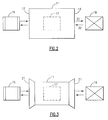
- FIG. 2 illustrates an embodiment of a single-input single-output (SISO) tunnel icon 11.
- This tunnel icon has portals 13 on either end.
- An icon 15 representing a file to be transformed is dragged through a portal 13 and dropped via a mouse or placed there by an audible command (e.g., "process icon”) from the user, where it enters a wait state indicated by the dashed box 17. While in this wait state, the icon preferably changes its size and/or coloring, to visually feed back to the user that an operation is pending.
- This wait state could also be denoted by an audible cue from the computer.
- arrival at the receptive area of the process capable tunnel icon can be indicated by a visual cue such as, but not limited to, a change in color or pattern of the entry portal of the process capable tunnel icon and/or the entire tunnel icon itself.
- the process capable tunnel icon symbolizes completion of processing by either changing the appearance of the processed icon and/or by moving the icon (indicated at 19) to an output portal on the process capable tunnel icon or indicating process completion in some other suitable way.
- the user can, if appropriate, drag the processed file icon away from the process capable tunnel icon.
- the user can select the process to proceed without delay. However, a delay allows the user to have second thoughts and drag the object from the jaws of the process about to activate.
- This OK-to-process may consist of one or more mouse clicks, a keyboard input, or a verbal OK to a computer with a capability of accepting voice activated inputs.
- icon 15 is processed and the transformed file is denoted by icon 19. If this processing takes a measurable amount of time, icon 15 may change in size and/or color again, to indicate that the processing is indeed taking place. Additionally, the beginning of this processing can also be denoted by another audible cue from the computer.
- Process flow arrows 31 and 32 indicate the flow of this transformation. This flow may be left-to-right 31, right-to-left 32, or bidirectional 31/32. If bidirectional, the process denoted by the tunnel icon is reversible, i.e., the new item denoted by icon 19 can be retransformed back into the old item denoted by icon 15.
- Figure 3 shows the addition of funnels 21 on the tunnel icon 11. These funnels act to guide a user in dragging an icon into a tunnel icon for processing.
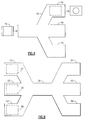
- Figure 4 shows a single-input multiple-output tunnel icon 40.
- the icon 15 representing a file to be processed is dragged through the tunnel icon 40 to one of a plurality of outputs 41, 42, 43, etc.
- the icon preferably then enters a wait state as part of the confirmation process. Once a confirmation has been received, the icon is processed. Otherwise the icon is kicked back out of the tunnel if confirmation is not received within the confirmation period. Alternately, the entrant icon could be processed into all outputs 41, 42, 43, etc., as in the case of output to mailing lists.
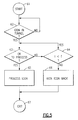
- Figure 5 shows a flow chart of the processing activity associated with Figures 2-4.
- a wait state begins, block 64. If the time t that icon 15 is within the tunnel icon is less than a timeout parameter T, and an OK-to-process command is received (block 63), then the icon is processed in step 65 and the algorithm is exited. However, if the icon 15 is waiting for longer than the timeout parameter T and no OK-to-process command is received, then the icon is moved out of the tunnel icon, block 66. During this wait period, the user could always drag the target icon out of the tunnel icon to cancel processing.
- Figure 6 shows a multiple-input multiple-output tunnel icon 50.
- Figure 6 is a visualization of the forking and joining process used in queueing theory.
- the icons 15 to be processed are dragged to the entrance portals 51, 52 and 53. Once all icons 15 have been dragged to their respective entrances, they enter a wait state, indicated here by the dashed boxes 57, 58 and 59, but in practice may have their coloration and/or size changed as desired to indicate their states. Then the group of items represented by the icons at the entrance portals are processed once an OK-to-process is received. The results of this processing exit from the outlet portals 54, 55 and 56.
- Figure 4 is the case where the number of entrance portals equals one. If the number of entrance and exit portals both equal one, then that is Figure 2.
- Figure 6 One variant of Figure 6 is where there are multiple-inputs and a single-output, i.e., a MISO process capable tunnel icon.
- FIG. 7 shows a flowchart applicable to Figure 6.
- a wait state is entered, step 73. This wait state continues until either an OK-to-process is received in step 73 or the wait state times out in step 74. If the OK-to-process is received in time, then the items denoted by the icons at the entrance portals 51, 52 and 53 are processed and exit the MIMO tunnel icon 50 at the exit portals 54, 55 and 56. However, if the wait state times out without any permission to process any icons, then the icons are kicked out of the MIMO tunnel 50 without processing.
Landscapes
- Engineering & Computer Science (AREA)
- General Engineering & Computer Science (AREA)
- Theoretical Computer Science (AREA)
- Human Computer Interaction (AREA)
- Physics & Mathematics (AREA)
- General Physics & Mathematics (AREA)
- User Interface Of Digital Computer (AREA)
- Digital Computer Display Output (AREA)
Applications Claiming Priority (2)
| Application Number | Priority Date | Filing Date | Title |
|---|---|---|---|
| US296199 | 1994-08-25 | ||
| US08/296,199 US5561758A (en) | 1994-08-25 | 1994-08-25 | Tunnel icon |
Publications (3)
| Publication Number | Publication Date |
|---|---|
| EP0698844A2 true EP0698844A2 (de) | 1996-02-28 |
| EP0698844A3 EP0698844A3 (de) | 1998-11-18 |
| EP0698844B1 EP0698844B1 (de) | 2002-10-23 |
Family
ID=23141023
Family Applications (1)
| Application Number | Title | Priority Date | Filing Date |
|---|---|---|---|
| EP95112398A Expired - Lifetime EP0698844B1 (de) | 1994-08-25 | 1995-08-07 | Tunnelikon |
Country Status (5)
| Country | Link |
|---|---|
| US (1) | US5561758A (de) |
| EP (1) | EP0698844B1 (de) |
| JP (1) | JP3230643B2 (de) |
| KR (1) | KR0160213B1 (de) |
| DE (1) | DE69528622T2 (de) |
Cited By (4)
| Publication number | Priority date | Publication date | Assignee | Title |
|---|---|---|---|---|
| WO1999061990A1 (en) * | 1998-05-26 | 1999-12-02 | Axis Ab | A method of handling electronic devices installed in networks |
| US6825859B1 (en) | 2000-11-13 | 2004-11-30 | Corel Corporation | System and method for processing content changes of on-screen items |
| EP1667041A3 (de) * | 2004-11-30 | 2008-03-05 | Oculus Info Inc. | System und Verfahren für interaktive visuelle Darstellung von Informationsinhalten und Beziehungen mittels Layout und Gesten |
| EP2328102A1 (de) | 2004-11-30 | 2011-06-01 | Oculus Info Inc. | System und Verfahren für interaktive visuelle Darstellung von Informationsinhalten und Beziehungen mittels Layout und Gesten |
Families Citing this family (17)
| Publication number | Priority date | Publication date | Assignee | Title |
|---|---|---|---|---|
| US5821933A (en) * | 1995-09-14 | 1998-10-13 | International Business Machines Corporation | Visual access to restricted functions represented on a graphical user interface |
| US5943678A (en) * | 1996-12-03 | 1999-08-24 | International Business Machines Corporation | Temporal displacement icon in a graphical user interface |
| US5884078A (en) | 1997-01-31 | 1999-03-16 | Sun Microsystems, Inc. | System, method and article of manufacture for creating an object oriented component having multiple bidirectional ports for use in association with a java application or applet |
| US5790855A (en) * | 1997-01-31 | 1998-08-04 | Sun Microsystems, Inc. | System, method and article of manufacture for type checking appropriateness of port connection and variable type matching in connection with multiport object-oriented components |
| US6496870B1 (en) | 1997-01-31 | 2002-12-17 | Sun Microsystems, Inc. | System, method and article of manufacture for collaboration with an application |
| US6097391A (en) * | 1997-03-31 | 2000-08-01 | Menai Corporation | Method and apparatus for graphically manipulating objects |
| US6208985B1 (en) | 1997-07-09 | 2001-03-27 | Caseventure Llc | Data refinery: a direct manipulation user interface for data querying with integrated qualitative and quantitative graphical representations of query construction and query result presentation |
| KR100320297B1 (ko) | 1998-11-04 | 2002-04-22 | 오길록 | 신체 아이콘을 이용한 가상 공간 탐색 인터페이스 방법 |
| US6392675B1 (en) | 1999-02-24 | 2002-05-21 | International Business Machines Corporation | Variable speed cursor movement |
| US8095879B2 (en) | 2002-12-10 | 2012-01-10 | Neonode Inc. | User interface for mobile handheld computer unit |
| KR20040005505A (ko) * | 2002-07-10 | 2004-01-16 | 삼성전자주식회사 | 컴퓨터시스템 및 그 부팅제어방법 |
| US7614007B2 (en) * | 2004-01-16 | 2009-11-03 | International Business Machines Corporation | Executing multiple file management operations |
| WO2008083388A2 (en) * | 2006-12-29 | 2008-07-10 | Ecirkit | Social networking website interface |
| US8769443B2 (en) * | 2010-02-11 | 2014-07-01 | Apple Inc. | Touch inputs interacting with user interface items |
| US10048854B2 (en) * | 2011-01-31 | 2018-08-14 | Oracle International Corporation | Drag and drop interaction between components of a web application |
| KR101902948B1 (ko) * | 2012-12-27 | 2018-10-01 | 후아웨이 테크놀러지 컴퍼니 리미티드 | 정보 공유 방법 및 장치 |
| KR20140115731A (ko) * | 2013-03-22 | 2014-10-01 | 삼성전자주식회사 | 휴대 단말기의 오브젝트 변환 방법 및 그 장치 |
Family Cites Families (9)
| Publication number | Priority date | Publication date | Assignee | Title |
|---|---|---|---|---|
| US5060135A (en) * | 1988-09-16 | 1991-10-22 | Wang Laboratories, Inc. | Apparatus for manipulating documents in a data processing system utilizing reduced images of sheets of information which are movable |
| US5313575A (en) * | 1990-06-13 | 1994-05-17 | Hewlett-Packard Company | Processing method for an iconic programming system |
| CA2068486C (en) * | 1991-08-30 | 1998-09-15 | Stephen S. Fleming | System and graphical method for creating an object |
| WO1993015455A1 (en) * | 1992-01-24 | 1993-08-05 | Interactive Media Corporation | System for performing function on second portal upon activation of related first portal |
| JPH0689307A (ja) * | 1992-05-04 | 1994-03-29 | Internatl Business Mach Corp <Ibm> | データベース内の情報を表示する装置および方法 |
| US5900874A (en) * | 1992-05-11 | 1999-05-04 | International Business Machines Corporation | Icon transformation system |
| US5428734A (en) * | 1992-12-22 | 1995-06-27 | Ibm Corporation | Method and apparatus for enhancing drag and drop manipulation of objects in a graphical user interface |
| US5379366A (en) * | 1993-01-29 | 1995-01-03 | Noyes; Dallas B. | Method for representation of knowledge in a computer as a network database system |
| US5577125A (en) * | 1993-06-14 | 1996-11-19 | International Business Machines Corporation | Graphical manipulation of encryption |
-
1994
- 1994-08-25 US US08/296,199 patent/US5561758A/en not_active Expired - Lifetime
-
1995
- 1995-07-31 JP JP19500895A patent/JP3230643B2/ja not_active Expired - Fee Related
- 1995-08-07 DE DE69528622T patent/DE69528622T2/de not_active Expired - Fee Related
- 1995-08-07 EP EP95112398A patent/EP0698844B1/de not_active Expired - Lifetime
- 1995-08-24 KR KR1019950026305A patent/KR0160213B1/ko not_active Expired - Fee Related
Cited By (6)
| Publication number | Priority date | Publication date | Assignee | Title |
|---|---|---|---|---|
| WO1999061990A1 (en) * | 1998-05-26 | 1999-12-02 | Axis Ab | A method of handling electronic devices installed in networks |
| US6825859B1 (en) | 2000-11-13 | 2004-11-30 | Corel Corporation | System and method for processing content changes of on-screen items |
| EP1667041A3 (de) * | 2004-11-30 | 2008-03-05 | Oculus Info Inc. | System und Verfahren für interaktive visuelle Darstellung von Informationsinhalten und Beziehungen mittels Layout und Gesten |
| EP2328102A1 (de) | 2004-11-30 | 2011-06-01 | Oculus Info Inc. | System und Verfahren für interaktive visuelle Darstellung von Informationsinhalten und Beziehungen mittels Layout und Gesten |
| US8296666B2 (en) | 2004-11-30 | 2012-10-23 | Oculus Info. Inc. | System and method for interactive visual representation of information content and relationships using layout and gestures |
| US9177049B2 (en) | 2004-11-30 | 2015-11-03 | Uncharted Software Inc. | System and method for interactive visual representation of information content using assertions |
Also Published As
| Publication number | Publication date |
|---|---|
| KR0160213B1 (ko) | 1998-12-15 |
| US5561758A (en) | 1996-10-01 |
| JP3230643B2 (ja) | 2001-11-19 |
| DE69528622D1 (de) | 2002-11-28 |
| EP0698844B1 (de) | 2002-10-23 |
| EP0698844A3 (de) | 1998-11-18 |
| JPH0876962A (ja) | 1996-03-22 |
| DE69528622T2 (de) | 2003-06-12 |
Similar Documents
| Publication | Publication Date | Title |
|---|---|---|
| US5561758A (en) | Tunnel icon | |
| CA1315894C (en) | Method for accessing selected windows in a multi-tasking system | |
| US5436637A (en) | Graphical user interface system and methods for improved user feedback | |
| US6005570A (en) | Graphical user interface system and methods for improved user feedback | |
| US5835091A (en) | Manipulating and displaying a plurality of views in a graphical user interface | |
| JP2675987B2 (ja) | データの処理方法及び処理システム | |
| US7865845B2 (en) | Chaining objects in a pointer drag path | |
| US5384910A (en) | Method and apparatus for facilitating operator reconfiguration of a graphical user interface in a data processing system | |
| USRE39610E1 (en) | Systems and methods for replacing open windows in a graphical user interface | |
| US5745718A (en) | Folder bar widget | |
| CA2051180C (en) | Application independent (open) hypermedia enablement services | |
| JP3816540B2 (ja) | 動的にユーザ・パネルを生成する方法 | |
| EP1402337B1 (de) | Lenkung der aufmerksamkeit des benutzers auf bestimmte icons, denen sich ein zeiger nähert, in interaktiven benutzerschnittstellen | |
| EP0703563A2 (de) | Verfahren und Einrichtung zur Anzeige überlappender graphischer Objekte auf einem Computermonitor | |
| US5812804A (en) | Display apparatus for tossing windows | |
| EP0657800A1 (de) | Verfahren und System zur Anzeigemanipulation von mehreren Anwenderprogrammen in einem Datenverarbeitungssystem | |
| US5708786A (en) | Data processing device having event in non-windows desktop environment affecting window in desktop environment | |
| JPH08255066A (ja) | スタート・メニュー付タスクバー | |
| WO2002025420A1 (en) | Method, system and computer program for managing views at a computer display | |
| US6339440B1 (en) | Method and apparatus for positioning a cursor | |
| US5664190A (en) | System and method for enabling an event driven interface to a procedural program | |
| EP0717343A1 (de) | Kontextempfindliches Menüsystem/Menüverhalten | |
| Monk | Noddy’s guide to consistency | |
| Spindler et al. | A graphical tactile screen-explorer | |
| JPH0981348A (ja) | 情報処理装置及びそのウィンドウ制御方法 |
Legal Events
| Date | Code | Title | Description |
|---|---|---|---|
| PUAI | Public reference made under article 153(3) epc to a published international application that has entered the european phase |
Free format text: ORIGINAL CODE: 0009012 |
|
| AK | Designated contracting states |
Kind code of ref document: A2 Designated state(s): DE FR GB |
|
| 17P | Request for examination filed |
Effective date: 19960626 |
|
| PUAL | Search report despatched |
Free format text: ORIGINAL CODE: 0009013 |
|
| AK | Designated contracting states |
Kind code of ref document: A3 Designated state(s): DE FR GB |
|
| 17Q | First examination report despatched |
Effective date: 20010629 |
|
| GRAG | Despatch of communication of intention to grant |
Free format text: ORIGINAL CODE: EPIDOS AGRA |
|
| GRAG | Despatch of communication of intention to grant |
Free format text: ORIGINAL CODE: EPIDOS AGRA |
|
| GRAH | Despatch of communication of intention to grant a patent |
Free format text: ORIGINAL CODE: EPIDOS IGRA |
|
| GRAG | Despatch of communication of intention to grant |
Free format text: ORIGINAL CODE: EPIDOS AGRA |
|
| GRAH | Despatch of communication of intention to grant a patent |
Free format text: ORIGINAL CODE: EPIDOS IGRA |
|
| GRAH | Despatch of communication of intention to grant a patent |
Free format text: ORIGINAL CODE: EPIDOS IGRA |
|
| GRAA | (expected) grant |
Free format text: ORIGINAL CODE: 0009210 |
|
| AK | Designated contracting states |
Kind code of ref document: B1 Designated state(s): DE FR GB |
|
| PG25 | Lapsed in a contracting state [announced via postgrant information from national office to epo] |
Ref country code: FR Free format text: LAPSE BECAUSE OF FAILURE TO SUBMIT A TRANSLATION OF THE DESCRIPTION OR TO PAY THE FEE WITHIN THE PRESCRIBED TIME-LIMIT Effective date: 20021023 |
|
| REG | Reference to a national code |
Ref country code: GB Ref legal event code: FG4D |
|
| REF | Corresponds to: |
Ref document number: 69528622 Country of ref document: DE Date of ref document: 20021128 |
|
| PGFP | Annual fee paid to national office [announced via postgrant information from national office to epo] |
Ref country code: GB Payment date: 20030804 Year of fee payment: 9 |
|
| PGFP | Annual fee paid to national office [announced via postgrant information from national office to epo] |
Ref country code: DE Payment date: 20030820 Year of fee payment: 9 |
|
| EN | Fr: translation not filed | ||
| PLBE | No opposition filed within time limit |
Free format text: ORIGINAL CODE: 0009261 |
|
| STAA | Information on the status of an ep patent application or granted ep patent |
Free format text: STATUS: NO OPPOSITION FILED WITHIN TIME LIMIT |
|
| 26N | No opposition filed |
Effective date: 20030724 |
|
| PG25 | Lapsed in a contracting state [announced via postgrant information from national office to epo] |
Ref country code: GB Free format text: LAPSE BECAUSE OF NON-PAYMENT OF DUE FEES Effective date: 20040807 |
|
| PG25 | Lapsed in a contracting state [announced via postgrant information from national office to epo] |
Ref country code: DE Free format text: LAPSE BECAUSE OF NON-PAYMENT OF DUE FEES Effective date: 20050301 |
|
| GBPC | Gb: european patent ceased through non-payment of renewal fee |
Effective date: 20040807 |