EP0838342A2 - Système d'impression avec sélection de support d'impression - Google Patents
Système d'impression avec sélection de support d'impression Download PDFInfo
- Publication number
- EP0838342A2 EP0838342A2 EP97308392A EP97308392A EP0838342A2 EP 0838342 A2 EP0838342 A2 EP 0838342A2 EP 97308392 A EP97308392 A EP 97308392A EP 97308392 A EP97308392 A EP 97308392A EP 0838342 A2 EP0838342 A2 EP 0838342A2
- Authority
- EP
- European Patent Office
- Prior art keywords
- printing
- printer
- sheet
- form sheet
- data
- Prior art date
- Legal status (The legal status is an assumption and is not a legal conclusion. Google has not performed a legal analysis and makes no representation as to the accuracy of the status listed.)
- Granted
Links
Images



Classifications
-
- B—PERFORMING OPERATIONS; TRANSPORTING
- B41—PRINTING; LINING MACHINES; TYPEWRITERS; STAMPS
- B41J—TYPEWRITERS; SELECTIVE PRINTING MECHANISMS, i.e. MECHANISMS PRINTING OTHERWISE THAN FROM A FORME; CORRECTION OF TYPOGRAPHICAL ERRORS
- B41J11/00—Devices or arrangements of selective printing mechanisms, e.g. ink-jet printers or thermal printers, for supporting or handling copy material in sheet or web form
- B41J11/48—Apparatus for condensed record, tally strip, or like work using two or more papers, or sets of papers, e.g. devices for switching over from handling of copy material in sheet form to handling of copy material in continuous form and vice versa or point-of-sale printers comprising means for printing on continuous copy material, e.g. journal for tills, and on single sheets, e.g. cheques or receipts
-
- Y—GENERAL TAGGING OF NEW TECHNOLOGICAL DEVELOPMENTS; GENERAL TAGGING OF CROSS-SECTIONAL TECHNOLOGIES SPANNING OVER SEVERAL SECTIONS OF THE IPC; TECHNICAL SUBJECTS COVERED BY FORMER USPC CROSS-REFERENCE ART COLLECTIONS [XRACs] AND DIGESTS
- Y10—TECHNICAL SUBJECTS COVERED BY FORMER USPC
- Y10S—TECHNICAL SUBJECTS COVERED BY FORMER USPC CROSS-REFERENCE ART COLLECTIONS [XRACs] AND DIGESTS
- Y10S707/00—Data processing: database and file management or data structures
- Y10S707/99941—Database schema or data structure
- Y10S707/99943—Generating database or data structure, e.g. via user interface
-
- Y—GENERAL TAGGING OF NEW TECHNOLOGICAL DEVELOPMENTS; GENERAL TAGGING OF CROSS-SECTIONAL TECHNOLOGIES SPANNING OVER SEVERAL SECTIONS OF THE IPC; TECHNICAL SUBJECTS COVERED BY FORMER USPC CROSS-REFERENCE ART COLLECTIONS [XRACs] AND DIGESTS
- Y10—TECHNICAL SUBJECTS COVERED BY FORMER USPC
- Y10S—TECHNICAL SUBJECTS COVERED BY FORMER USPC CROSS-REFERENCE ART COLLECTIONS [XRACs] AND DIGESTS
- Y10S715/00—Data processing: presentation processing of document, operator interface processing, and screen saver display processing
- Y10S715/961—Operator interface with visual structure or function dictated by intended use
Definitions
- This invention relates to a printing system of the type in which plural types of printing media, e.g., form sheets, are set in a printer, and in printing, a desired printing medium is selected from among these printing media.
- plural types of printing media e.g., form sheets
- a sole prior technique to check the types of printing media, e.g., sheets of paper, set in the printer, more exactly the sheet paths, is that a user actually checks the sheets set in the printer by the eye.
- a known technique to select a printing medium to be used for printing from among plural types of printing media set in the printer is to designate a medium or sheet path having the selected printing medium set therein by the host computer coupled with the printer.
- the printing medium selecting technique requires the user to check the types of sheets set in the sheet paths of the printer in advance.
- the technique every time the printing medium used for printing is selected, the user must change the printer setup values to the values tailored to the selected printing medium.
- the setup value changing work is troublesome for the user. Particularly, in a computer environment where a plurality of users use a single printer in share on a network, the problem is more serious since a place where the printer is located is remote from users or the form sheet for one user is different from for another user.
- an object of the present invention is to provide a printing system using plural types of printing media in which it is easy to check the types of printing media set in the printer, to change a type of printing media set in the printer to another, and to change the printer setup values, which are set for every printing medium, to other ones.
- a printing system having a printer to which plural types of printing media may be set, comprising:
- the types of printing media e.g., form sheets
- the types of printing media e.g., form sheets
- the user sees those types of the displayed form sheets and selects his desired form sheet from those form sheets and sends a message of the selection of the desired form sheet to the printer. Therefore, the user can select his desired form sheet without directly checking the form sheet in the printer.
- the medium or form sheet data contains the information of sheet size, sheet path, form sheet being selected or not, and the like. It is noted that the names of form sheets are visually presented or displayed. This feature makes it easy for the user to select his desired form sheet. Additionally, in the printing system, the form sheet being currently selected is displayed. This feature also assists the user in selecting. his desired form sheet.
- the medium or form sheet data contains printer setup values. Therefore, when a form sheet is chosen, the printer setup values of the chosen form sheet are automatically transferred from the information storing means, e.g., a memory, to the printer and set in the printer. This feature eliminates such a troublesome work by the user that every time the form sheet is selected, the user inputs the printer setup values to the printer.
- the information storing means e.g., a memory
- the form sheet data contains size data of the form sheets. Therefore, the printer checks whether or not the size indicated by the size data of the selected form sheet is coincident with the size of an actual form sheet. With this function of the printer, even if an incorrect form sheet is set in the printer, it never happens that the printer erroneously prints on the incorrect form sheet. Besides, if any of the size of the size data, the size of an actual form sheet, and the sheet size contained in print data is incorrect, the system control of the printing system judges that the sheet size is incorrect.
- a printer is connected to at least one host computer in a manner that the printer and the computer bidirectionally communicate with each other.
- the printer includes the information storing means, e.g., a memory, while the host computer includes the information visual presenting means, e.g., a display means, and the medium select means, e.g., a form sheet select means.
- the printer also includes the form sheet select means. Therefore, the user can check and select a desired form sheet by use of the host computer, and, if necessary, can select the desired form sheet on the control panel of the printer.
- a single printer 1 is coupled with a plurality of host computers 3 by a communication network 5 so that those computers are accessible to the printer.
- the printer 1 and the host computer 3 communicate with each other bidirectionally.
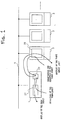
- the printer 1 includes a plurality of sheet paths. Examples of these paths are a front manual insertion tray 11, a rear manual insertion tray 13, a first cut sheet feeder (CSF) bin 15, a second CSF bin 17, a front continuous form tractor 19, and a rear continuous form tractor 21.
- the sheet paths can receive printing media, e.g., form sheets, tailored thereto, respectively.
- a necessary printing medium e.g., form sheet, may be selected from among those printing media.
- the printer 1 includes an information storing means 23, e.g., a memory (or a memory area), called a "form sheet memory”. Data (to be given later) on various types of form sheets, which may be set in the sheet paths of the printer 1 are registered in the form sheet memory 23.
- an information storing means 23 e.g., a memory (or a memory area), called a "form sheet memory”. Data (to be given later) on various types of form sheets, which may be set in the sheet paths of the printer 1 are registered in the form sheet memory 23.
- Each host computer 3 has the following functions:
- the printer 1 has the following functions:
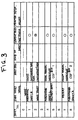
- Fig. 3 shows the contents of the form sheet memory 23.
- a maximum of eight (8) kinds of form sheet data may be registered in the form sheet memory 23.
- the form sheet data contains form sheet number, form sheet name, form sheet path, form sheet size, kind of form sheet, current selection status, and printer setup values.
- "form sheet number” and “form sheet name” indicate the number and name assigned to the form sheet by the user, respectively.
- "Form sheet path” indicate the CSF feeder, manual insertion tray or continuous form tractor in which form sheets are set (or may be set), as shown in Fig. 2. In a case where different form sheets are each selectively set in the same sheet path, one sheet path is assigned to those different form sheets.
- “Kind of form sheet” discriminately indicates regular sheet, cardboard, envelope, postcard, and the like.
- no mark indicates that no sheet is set in the sheet path specified by no mark.
- the marks of single and double circles indicate that form sheets are set in the sheet paths specified by these marks.
- the single circle mark indicates that a type of form sheet is set to be used for printing in the printer.
- Print setup value indicates information necessary for correctly printing the related form sheet, for example, sheet feeding position, head-to-platen gap width, and the like.
- the form sheet number "0" indicates that no form sheet data is registered. When it is selected, the printer performs a printing operation as the conventional printer not having the form sheet memory 23 does.
- Fig. 4 shows a program configuration of each host computer in the printing system.
- a printer checker 31 sends a form sheet data request to the printer 1, receives form sheet data read out of the form sheet memory 23 from the printer 1, and loads the received one into a register 33.
- the printer checker 31 may be automatically executed at the time of starting up the host computer 3, proper periodical times, and the time of calling a printer driver 37.
- a printer customizer 35 is a program used for registering form sheet data, selecting a form sheet, and performing a printing process.
- the same program reads the form sheet data from the register 33 and displays the list of form sheet data in a graphical user interface (GUI) on the monitor screen 25.
- the displayed form sheet data list contains, as shown in Fig. 3, all the items, for example, form sheet number, form sheet name, form sheet path, kind of form sheet, current selection status, and print setup values.
- the user may enter new form sheet data that he desires to register, by use of an input device 29.
- the printer customizer 35 sends the form sheet data entered by the user to the printer 1, and instructs the register 33 to register it into the form sheet memory 23. Thereafter, the printer customizer 35 calls the printer checker 31 and instructs the printer checker to receive the contents of the form sheet memory 23 which contains the form sheet data registered anew therein, and displays the received one in the GUI in the format as shown in Fig. 3.
- the printer customizer 35 reads out form sheet data from the register 33, and displays the form sheet data list on the GUI.
- the displayed list format contains the items useful in selecting a form sheet, such as sheet number, sheet name, sheet path, and current selection status, as shown in Fig. 5.
- the user sees the list and determines a form sheet to be used for printing, and inputs the resultant into his host computer.
- the printer customizer 35 sends to the printer 1 an instruction to select the form sheet selected by the user, and thereafter calls the printer checker 31 and instructs it to receive the contents of the form sheet memory 23 which underwent the sheet data selection, and displays the resultant on the GUI as shown in Fig. 5.
- the printer customizer 35 calls the printer driver 37 and sends print data to the printer driver 37 and causes the driver to process the print data.
- the printer driver 37 has substantially the same functions as of a general print driver.
- the printer driver 37 carries out a necessary preprocess on the print data to convert the print data into the form of print commands in a given printer control language.
- the print commands are sent to the printer 1.
- the form sheet data request derived from the printer checker 31, and the new form sheet data registering instruction and the form select instruction, both being derived from the printer customizer 35, are also sent to the printer 1 in the format of print commands described in printer control language.
- Fig. 6 shows in block form a function configuration of the printer 1.
- a print command interpreter section 41 interprets data of the print command format, which is received from the host computer 3.
- the print command format contains the print data, and additionally the form sheet data request derived from the printer checker 31, and the new form sheet data registering instruction and the form select instruction, both being derived from the printer customizer 35.
- a data request portion 47 calls a data readout portion 51, and the data readout portion 51 reads out all form sheet data from the form sheet memory 23 and sends the readout one to the host computer 3.
- a form sheet data registering portion 43 registers the new form sheet data contained in it into the form sheet memory 23.
- a sheet selecting portion 45 replaces the contents of the "current selection status" in the form sheet memory with a status of the instructed form sheet being selected (indicated by a double circle mark).
- the control panel 27 includes, for example, indication lamps, buttons and the like indicated by reference numeral 61, a liquid crystal display (LCD) 63, path indication lamps 65, and a sheet select button 67 for selecting the form sheet.
- the indication lamps, buttons and the like have been included in the general printer.
- the path indication lamps 65 indicate those sheet paths used in this printer (front continuous form tractor 19, rear continuous form tractor 21, CSF bins 15 and 17).
- the control panel 27 acquires the number of the form sheet that is currently selected and read out of the form sheet memory 23, and displays it on the LCD 63, and drives a path indication lamp 65 associated with the sheet path in which the selected form sheet is set.
- the contents of the "current selection status" in the form sheet memory 23 are rewritten so that the form sheets set in the sheet path now being selected are sequentially switched in the order of the sheet number.
- the number displayed on the LCD 63 is also changed one to another in a sequential order and the path indication lamp 65 is also changed to the other.
- a label containing the form number, form name and sheet path as shown in Fig. 8 may be pasted on a location near the control panel 27. The label provides information useful when the user seeks his desired form sheet by use of the sheet number.
- a print processor portion 49 in the print command interpreter section 41 interprets the print data to generate a print image, and transfers the print image to print controller portion 57. Further, the print processor portion 49 sends a sheet size specified by the print data and other control data necessary for sheet feeding to a sheet feed controller portion 53.
- the sheet feed controller portion 53 recognizes the sheet path of a form sheet currently selected while referring to the form sheet memory 23, and controls a sheet feed mechanism 55 which picks up the form sheet from the sheet path and transports the form sheet in accordance with a print setup value.
- the sheet feed mechanism 55 picks up a form sheet from one of the sheet paths 11 to 21, transports it to a printing mechanism of the printer, and discharges it out of the printer.
- the sheet feed mechanism 55 has functions to select a sheet path in accordance with a sheet path selecting instruction derived from the sheet feed controller portion 53, and to automatically detect the size of a form sheet set in the selected sheet path and send the result of the size detection to the sheet feed controller portion 53.
- the sheet feed controller portion 53 temporarily stops the remaining portion of the printer, and causes the control panel 27 to display an error message. (Examples of the error are: "the selected form sheet is not yet set", and "the sheet size of the selected form sheet is improper".)
- the print controller portion 57 drives a print mechanism 59 to print a print image on the form sheet.
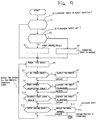
- Fig. 9 shows a flow of a process carried out in the sheet feed controller portion 53.
- the print controller portion 57 checks whether or not a form sheet (desired form sheet) selected in the form sheet memory 23 is actually selectable in the sheet feed mechanism 55 (viz., a sheet path of the desired form sheet is ready for feeding the sheet) (S1). If the desired sheet is selectable, the sheet is picked up from the sheet path and a sheet feeding process is executed (S5). If it is not selectable, the print controller checks whether or not the desired sheet is set in the sheet path of the printer 1 (viz., the sheet path for the desired sheet is registered in the form sheet memory (23) (S2).
- a sheet path status of the sheet feed mechanism 55 is changed so that the desired sheet is selectable (S3), and then the sheet is picked up from the sheet path and a sheet feeding is carried out (S5). If it is not set, a message that the sheet is not set is displayed on the control panel 27 (additionally, it may be returned to the computer). Further, the printer control instructs the user to properly set the form sheet data in the sheet path and register it in the memory or to select the form sheet that has been set. In response to this, the user executes the instruction received (S4). Then, the sheet feeding of the desired sheet is carried out (S5).
- the sheet feed controller portion 53 monitors the occurrence of various errors, such as a no paper error, a paper change incompletion error, an incorrect sheet width error, and a paper jamming error (S6, S8, S10, S12).
- a no paper error occurs when no sheet is present in the sheet path.
- the paper change incomplete error occurs when the paper or the form sheet is not yet changed.
- the incorrect sheet width error occurs when the sheet size in the form sheet memory, the sheet size designated by the print data, and the size of an actual sheet detected by the sheet feed mechanism 55 are not coincident.
- an error message is displayed on the control panel 27 (additionally, it may be returned to the host computer). After the error is removed by the user (S7, S9, S11, S13), the execution of the sheet feeding is continued.
- the user can know the name of a form sheet set in a sheet path, and the sheet path per se located remotely from the printer, and select a desired form sheet from among those set in the sheet paths in accordance with the sheet name by use of his computer.
- a sheet setup value of the printer is automatically sent to the printer. Therefore, every time the user selects his desired form sheet, he does not need to enter a related setup value to the computer.
- a form sheet not set is selected, or an incorrect form sheet is set, a related error message is visually presented to the user. Therefore, the user can easily know his erroneous operation from the error message.
- the present invention may be embodied in various modes other than the above-mentioned one.
- the invention is applicable to a case where the host computer is directly coupled with the printer in one-to-one fashion.
- the form sheet memory is incorporated into the printer, it may be incorporated into the host computer or another device, such as a server.
- the printing system may be modified such that the printer accepts through its control panel the entering of instructions to register form sheet data, to display the data list, and to select the form sheet, while the computer rejects the entering of those instructions.
- the system construction is simple. In a case where the computer and the printer are connected in one-to-one fashion, and the printer ifs located near the computer, use of such a modification will create no problem.
Landscapes
- Accessory Devices And Overall Control Thereof (AREA)
- Record Information Processing For Printing (AREA)
Applications Claiming Priority (3)
| Application Number | Priority Date | Filing Date | Title |
|---|---|---|---|
| JP27930296 | 1996-10-22 | ||
| JP279302/96 | 1996-10-22 | ||
| JP27930296A JP3250718B2 (ja) | 1996-10-22 | 1996-10-22 | プリントシステム |
Publications (3)
| Publication Number | Publication Date |
|---|---|
| EP0838342A2 true EP0838342A2 (fr) | 1998-04-29 |
| EP0838342A3 EP0838342A3 (fr) | 1999-02-10 |
| EP0838342B1 EP0838342B1 (fr) | 2003-05-28 |
Family
ID=17609281
Family Applications (1)
| Application Number | Title | Priority Date | Filing Date |
|---|---|---|---|
| EP97308392A Expired - Lifetime EP0838342B1 (fr) | 1996-10-22 | 1997-10-22 | Système d'impression avec sélection de support d'impression |
Country Status (4)
| Country | Link |
|---|---|
| US (1) | US6024505A (fr) |
| EP (1) | EP0838342B1 (fr) |
| JP (1) | JP3250718B2 (fr) |
| DE (1) | DE69722347T2 (fr) |
Cited By (4)
| Publication number | Priority date | Publication date | Assignee | Title |
|---|---|---|---|---|
| US6741262B1 (en) | 2000-05-12 | 2004-05-25 | Electronics For Imaging, Inc. | Expert color management settings method and interface |
| EP1321297A4 (fr) * | 2000-09-27 | 2004-10-27 | Seiko Epson Corp | Impression sur la couche face avant d'un support d'enregistrement de donnees |
| EP1403081A3 (fr) * | 2002-09-24 | 2006-04-12 | Dainippon Screen Mfg. Co., Ltd. | Système d'impression, dispositif de commande et méthode d'affichage |
| EP1857921A2 (fr) | 2006-05-12 | 2007-11-21 | Ricoh Company, Ltd. | Gestion des informations de feuilles d'enregistrement |
Families Citing this family (32)
| Publication number | Priority date | Publication date | Assignee | Title |
|---|---|---|---|---|
| JP3413094B2 (ja) * | 1997-07-30 | 2003-06-03 | キヤノン株式会社 | 印刷システムおよびデータ処理方法および印刷制御装置および印刷制御方法およびコンピュータが読み取り可能なプログラムを格納した記憶媒体 |
| JPH11254780A (ja) * | 1998-03-10 | 1999-09-21 | Olympus Optical Co Ltd | 印刷装置及び撮像装置並びに撮像機能付き印刷システム |
| JP2000242597A (ja) * | 1999-02-18 | 2000-09-08 | Canon Inc | デバイス装置に対する出力設定を行う情報処理装置、情報処理方法及びプログラムを格納した記憶媒体 |
| US6809833B1 (en) * | 1999-03-01 | 2004-10-26 | Adobe Systems Incorporated | Late binding of device settings in a host raster image processor |
| JP2001191618A (ja) * | 2000-01-06 | 2001-07-17 | Fujitsu Ltd | 印刷装置 |
| JP2002086831A (ja) * | 2000-09-08 | 2002-03-26 | Fujitsu Ltd | 印刷システム |
| EP1211594A3 (fr) * | 2000-11-30 | 2006-05-24 | Canon Kabushiki Kaisha | Dispositif et méthode de commande d'interface utilisateur |
| JP4508461B2 (ja) * | 2001-04-18 | 2010-07-21 | キヤノン株式会社 | 印刷装置、情報処理装置、制御方法、及びプログラム |
| US7218976B2 (en) * | 2001-04-27 | 2007-05-15 | Canon Kabushiki Kaisha | User interface control apparatus and method |
| EP1397252A4 (fr) * | 2001-05-25 | 2005-12-21 | Manyworlds Inc | Procede et systeme de publication et de gestion de medias imprimes personnalises |
| US20020180736A1 (en) * | 2001-05-31 | 2002-12-05 | Millmore Martin John | Data entry control system |
| JP2003072195A (ja) * | 2001-08-30 | 2003-03-12 | Seiko Epson Corp | 印刷システム、印刷システム本体、受注サーバ、受注システム、及び、受注方法 |
| US7375838B2 (en) * | 2003-11-17 | 2008-05-20 | Manyworlds Inc. | Method and system for customized print publication and management |
| US7526458B2 (en) | 2003-11-28 | 2009-04-28 | Manyworlds, Inc. | Adaptive recommendations systems |
| US20090018918A1 (en) * | 2004-11-04 | 2009-01-15 | Manyworlds Inc. | Influence-based Social Network Advertising |
| US7526464B2 (en) * | 2003-11-28 | 2009-04-28 | Manyworlds, Inc. | Adaptive fuzzy network system and method |
| US8600920B2 (en) * | 2003-11-28 | 2013-12-03 | World Assets Consulting Ag, Llc | Affinity propagation in adaptive network-based systems |
| US8566263B2 (en) * | 2003-11-28 | 2013-10-22 | World Assets Consulting Ag, Llc | Adaptive computer-based personalities |
| USRE45770E1 (en) | 2003-11-28 | 2015-10-20 | World Assets Consulting Ag, Llc | Adaptive recommendation explanations |
| US7539652B2 (en) | 2003-11-28 | 2009-05-26 | Manyworlds, Inc. | Adaptive self-modifying and recombinant systems |
| US7606772B2 (en) | 2003-11-28 | 2009-10-20 | Manyworlds, Inc. | Adaptive social computing methods |
| US7526459B2 (en) | 2003-11-28 | 2009-04-28 | Manyworlds, Inc. | Adaptive social and process network systems |
| US12093983B2 (en) | 2003-11-28 | 2024-09-17 | World Assets Consulting Ag, Llc | Adaptive and recursive system and method |
| JP3897022B2 (ja) * | 2004-01-06 | 2007-03-22 | 村田機械株式会社 | 手差し機能付き記録装置 |
| JP2006044079A (ja) * | 2004-08-05 | 2006-02-16 | Canon Inc | 画像処理装置の制御方法、画像処理装置、および画像処理装置の制御プログラム |
| JP2006159471A (ja) * | 2004-12-03 | 2006-06-22 | Konica Minolta Business Technologies Inc | 画像形成装置、画像形成システム及び画像形成方法 |
| JP4581937B2 (ja) * | 2005-09-21 | 2010-11-17 | 富士ゼロックス株式会社 | プリンタドライバおよびフォームデータ指定方法 |
| US20070091380A1 (en) * | 2005-10-20 | 2007-04-26 | Lexmark International, Inc. | Automatic generation of a quick dial reference sheet |
| JP2007216478A (ja) * | 2006-02-15 | 2007-08-30 | Canon Inc | 記録装置、及び記録方法 |
| JP4730203B2 (ja) * | 2006-05-23 | 2011-07-20 | ブラザー工業株式会社 | ラベル作成装置 |
| JP5016851B2 (ja) * | 2006-06-02 | 2012-09-05 | キヤノン株式会社 | 印刷装置、印刷方法、及びプログラム |
| JP2008033646A (ja) * | 2006-07-28 | 2008-02-14 | Canon Inc | 帳票生成装置及び帳票生成方法 |
Family Cites Families (28)
| Publication number | Priority date | Publication date | Assignee | Title |
|---|---|---|---|---|
| JPS62128327A (ja) * | 1985-11-29 | 1987-06-10 | Sharp Corp | 文書データ処理装置 |
| US4899136A (en) * | 1986-04-28 | 1990-02-06 | Xerox Corporation | Data processor having a user interface display with metaphoric objects |
| JPH01101171A (ja) * | 1987-10-09 | 1989-04-19 | Internatl Business Mach Corp <Ibm> | 連続紙・カット紙供給装置 |
| US5079723A (en) * | 1988-03-04 | 1992-01-07 | Xerox Corporation | Touch dialogue user interface for reproduction machines |
| US4846597A (en) * | 1988-03-25 | 1989-07-11 | Advanced Matrix Technology, Inc. | Line printer panel and control system |
| US5075874A (en) * | 1989-04-10 | 1991-12-24 | Eastman Kodak Company | Communications interface for computer output printer |
| JPH0390377A (ja) * | 1989-09-01 | 1991-04-16 | Ricoh Co Ltd | テストプリントのモード選択装置 |
| JP3350940B2 (ja) * | 1990-11-14 | 2002-11-25 | セイコーエプソン株式会社 | 印刷装置 |
| US5584590A (en) * | 1990-11-14 | 1996-12-17 | Seiko Epson Corporation | Printer and method for controlling the same |
| EP0486031B1 (fr) * | 1990-11-14 | 1997-05-07 | Seiko Epson Corporation | Imprimante et procédé pour contrÔler celle-ci |
| JP3159223B2 (ja) * | 1992-05-14 | 2001-04-23 | セイコーエプソン株式会社 | 記録装置、及びその動作環境設定方法 |
| DE69313175T2 (de) * | 1992-05-22 | 1998-01-22 | Seiko Epson Corp | Drucker und Verfahren zur Steuerung desselben |
| JPH06271105A (ja) * | 1993-03-17 | 1994-09-27 | Ricoh Co Ltd | 画像形成装置および画像形成方法 |
| JPH06274294A (ja) * | 1993-03-19 | 1994-09-30 | Canon Inc | 情報処理方法およびその装置 |
| JPH06328817A (ja) * | 1993-05-25 | 1994-11-29 | Kanebo Ltd | 印刷用紙管理装置 |
| JPH071768A (ja) * | 1993-06-16 | 1995-01-06 | Canon Inc | 印字装置 |
| SG66232A1 (en) * | 1993-11-08 | 1999-07-20 | Seiko Epson Corp | Printing apparatus control method therefor and data processing apparatus using the printing apparatus |
| JP3111442B2 (ja) * | 1993-12-14 | 2000-11-20 | ブラザー工業株式会社 | 文書処理装置 |
| JP3448947B2 (ja) * | 1994-04-11 | 2003-09-22 | 株式会社日立製作所 | リモート印刷システムおよびそのリモート印刷方法 |
| JPH07288621A (ja) * | 1994-04-20 | 1995-10-31 | Canon Inc | サーバーシステム |
| JPH08104039A (ja) * | 1994-08-12 | 1996-04-23 | Canon Inc | 記録装置 |
| JP3390276B2 (ja) * | 1994-11-16 | 2003-03-24 | 株式会社リコー | 画像形成装置 |
| JP3323683B2 (ja) * | 1994-12-28 | 2002-09-09 | キヤノン株式会社 | プリンタドライバおよび印刷設定装置および印刷設定方法 |
| US5639171A (en) * | 1995-02-02 | 1997-06-17 | Pitney Bowes Inc. | Media length sensing for increased throughput efficiency of electronic printers |
| US5699494A (en) * | 1995-02-24 | 1997-12-16 | Lexmark International, Inc. | Remote replication of printer operator panel |
| JPH08244318A (ja) * | 1995-03-15 | 1996-09-24 | Fuji Xerox Co Ltd | 印刷装置 |
| JPH08258364A (ja) * | 1995-03-22 | 1996-10-08 | Nec Software Ltd | カット紙ページプリンタシステム |
| US5483889A (en) * | 1995-05-19 | 1996-01-16 | Hewlett-Packard Company | Automatic media size detector |
-
1996
- 1996-10-22 JP JP27930296A patent/JP3250718B2/ja not_active Expired - Lifetime
-
1997
- 1997-10-10 US US08/948,784 patent/US6024505A/en not_active Expired - Lifetime
- 1997-10-22 EP EP97308392A patent/EP0838342B1/fr not_active Expired - Lifetime
- 1997-10-22 DE DE69722347T patent/DE69722347T2/de not_active Expired - Lifetime
Cited By (5)
| Publication number | Priority date | Publication date | Assignee | Title |
|---|---|---|---|---|
| US6741262B1 (en) | 2000-05-12 | 2004-05-25 | Electronics For Imaging, Inc. | Expert color management settings method and interface |
| EP1321297A4 (fr) * | 2000-09-27 | 2004-10-27 | Seiko Epson Corp | Impression sur la couche face avant d'un support d'enregistrement de donnees |
| EP1403081A3 (fr) * | 2002-09-24 | 2006-04-12 | Dainippon Screen Mfg. Co., Ltd. | Système d'impression, dispositif de commande et méthode d'affichage |
| EP1857921A2 (fr) | 2006-05-12 | 2007-11-21 | Ricoh Company, Ltd. | Gestion des informations de feuilles d'enregistrement |
| EP1857921A3 (fr) * | 2006-05-12 | 2010-06-09 | Ricoh Company, Ltd. | Gestion des informations de feuilles d'enregistrement |
Also Published As
| Publication number | Publication date |
|---|---|
| DE69722347D1 (de) | 2003-07-03 |
| EP0838342A3 (fr) | 1999-02-10 |
| JP3250718B2 (ja) | 2002-01-28 |
| EP0838342B1 (fr) | 2003-05-28 |
| JPH10124277A (ja) | 1998-05-15 |
| DE69722347T2 (de) | 2004-04-01 |
| US6024505A (en) | 2000-02-15 |
Similar Documents
| Publication | Publication Date | Title |
|---|---|---|
| US6024505A (en) | Printing system | |
| US7158244B2 (en) | Print queue managing method and printer | |
| US6049391A (en) | System for printing with ordered stock | |
| US7185289B1 (en) | Device and method for changing languages on a display | |
| US6828990B2 (en) | System for processing tabbed pages in the document | |
| EP0943987A1 (fr) | Présentation d'état d'imprimante dans un systéme de traitement d'information | |
| US20090009805A1 (en) | Printing system and method of controlling a printing system | |
| EP1473661A1 (fr) | Un système d'impression et méthode d'utilisation correspondante | |
| US6894793B1 (en) | User interface for an information processing system, with job monitoring | |
| US7495783B2 (en) | Image forming apparatus and image forming method | |
| JP5074665B2 (ja) | 1つのプリンタでは対応できないページを含むプリントジョブの調整並行プリンティング | |
| US6856413B1 (en) | User interface for an information-processing system | |
| US8670161B2 (en) | Driver that presents context sensitive information about device features | |
| US6594545B1 (en) | Data processing apparatus, image recording apparatus, method of controlling data processing apparatus, method of controlling image recording apparatus and storage medium | |
| US7108435B2 (en) | Printing control apparatus and method, and printing system | |
| JP5007696B2 (ja) | プリンタの分散印刷方法および分散印刷システム、ならびに仮想プリンタドライバ | |
| EP1244054B1 (fr) | Méthode pour gérer une queue d'impression et imprimante | |
| JP4557642B2 (ja) | 印刷装置および印刷システム | |
| JPH04338049A (ja) | 出力装置 | |
| US20030123080A1 (en) | Image forming device and method for controling the same | |
| JPH11284792A (ja) | 文書データ管理機能を有した画像形成装置 | |
| EP1571544B1 (fr) | Impression coordonée et simultanée des tâches d'impressions contenant des pages incompatibles avec une seule imprimante | |
| JP2004334285A (ja) | プリンタドライバ | |
| JPH03114767A (ja) | 印刷システム | |
| JPH061035A (ja) | プリンタ |
Legal Events
| Date | Code | Title | Description |
|---|---|---|---|
| PUAI | Public reference made under article 153(3) epc to a published international application that has entered the european phase |
Free format text: ORIGINAL CODE: 0009012 |
|
| 17P | Request for examination filed |
Effective date: 19971112 |
|
| AK | Designated contracting states |
Kind code of ref document: A2 Designated state(s): DE FR GB |
|
| PUAL | Search report despatched |
Free format text: ORIGINAL CODE: 0009013 |
|
| AK | Designated contracting states |
Kind code of ref document: A3 Designated state(s): AT BE CH DE DK ES FI FR GB GR IE IT LI LU MC NL PT SE |
|
| AKX | Designation fees paid |
Free format text: DE FR GB |
|
| 17Q | First examination report despatched |
Effective date: 20010709 |
|
| GRAH | Despatch of communication of intention to grant a patent |
Free format text: ORIGINAL CODE: EPIDOS IGRA |
|
| GRAH | Despatch of communication of intention to grant a patent |
Free format text: ORIGINAL CODE: EPIDOS IGRA |
|
| GRAA | (expected) grant |
Free format text: ORIGINAL CODE: 0009210 |
|
| AK | Designated contracting states |
Designated state(s): DE FR GB |
|
| REG | Reference to a national code |
Ref country code: GB Ref legal event code: FG4D |
|
| REF | Corresponds to: |
Ref document number: 69722347 Country of ref document: DE Date of ref document: 20030703 Kind code of ref document: P |
|
| PLBQ | Unpublished change to opponent data |
Free format text: ORIGINAL CODE: EPIDOS OPPO |
|
| PLBI | Opposition filed |
Free format text: ORIGINAL CODE: 0009260 |
|
| ET | Fr: translation filed | ||
| PLAX | Notice of opposition and request to file observation + time limit sent |
Free format text: ORIGINAL CODE: EPIDOSNOBS2 |
|
| 26 | Opposition filed |
Opponent name: UWE SPANDERN Effective date: 20040301 |
|
| PLAX | Notice of opposition and request to file observation + time limit sent |
Free format text: ORIGINAL CODE: EPIDOSNOBS2 |
|
| PLBB | Reply of patent proprietor to notice(s) of opposition received |
Free format text: ORIGINAL CODE: EPIDOSNOBS3 |
|
| PLAB | Opposition data, opponent's data or that of the opponent's representative modified |
Free format text: ORIGINAL CODE: 0009299OPPO |
|
| PLAB | Opposition data, opponent's data or that of the opponent's representative modified |
Free format text: ORIGINAL CODE: 0009299OPPO |
|
| R26 | Opposition filed (corrected) |
Opponent name: UWE SPANDERN Effective date: 20040301 |
|
| PLBI | Opposition filed |
Free format text: ORIGINAL CODE: 0009260 |
|
| 26 | Opposition filed |
Opponent name: SPANDERN, UWE Effective date: 20040301 |
|
| PLAB | Opposition data, opponent's data or that of the opponent's representative modified |
Free format text: ORIGINAL CODE: 0009299OPPO |
|
| PLAB | Opposition data, opponent's data or that of the opponent's representative modified |
Free format text: ORIGINAL CODE: 0009299OPPO |
|
| R26 | Opposition filed (corrected) |
Opponent name: SPANDERN, UWE Effective date: 20040301 |
|
| R26 | Opposition filed (corrected) |
Opponent name: SPANDERN, UWE Effective date: 20040301 |
|
| PLBP | Opposition withdrawn |
Free format text: ORIGINAL CODE: 0009264 |
|
| PLBD | Termination of opposition procedure: decision despatched |
Free format text: ORIGINAL CODE: EPIDOSNOPC1 |
|
| PLBM | Termination of opposition procedure: date of legal effect published |
Free format text: ORIGINAL CODE: 0009276 |
|
| STAA | Information on the status of an ep patent application or granted ep patent |
Free format text: STATUS: OPPOSITION PROCEDURE CLOSED |
|
| 27C | Opposition proceedings terminated |
Effective date: 20110925 |
|
| REG | Reference to a national code |
Ref country code: FR Ref legal event code: PLFP Year of fee payment: 19 |
|
| PGFP | Annual fee paid to national office [announced via postgrant information from national office to epo] |
Ref country code: FR Payment date: 20150908 Year of fee payment: 19 |
|
| PGFP | Annual fee paid to national office [announced via postgrant information from national office to epo] |
Ref country code: GB Payment date: 20151021 Year of fee payment: 19 Ref country code: DE Payment date: 20151013 Year of fee payment: 19 |
|
| REG | Reference to a national code |
Ref country code: DE Ref legal event code: R119 Ref document number: 69722347 Country of ref document: DE |
|
| GBPC | Gb: european patent ceased through non-payment of renewal fee |
Effective date: 20161022 |
|
| REG | Reference to a national code |
Ref country code: FR Ref legal event code: ST Effective date: 20170630 |
|
| PG25 | Lapsed in a contracting state [announced via postgrant information from national office to epo] |
Ref country code: GB Free format text: LAPSE BECAUSE OF NON-PAYMENT OF DUE FEES Effective date: 20161022 Ref country code: FR Free format text: LAPSE BECAUSE OF NON-PAYMENT OF DUE FEES Effective date: 20161102 Ref country code: DE Free format text: LAPSE BECAUSE OF NON-PAYMENT OF DUE FEES Effective date: 20170503 |