EP0841609A2 - Zusammensetzung von Palletten auf einer Rechneranzeigevorrichtung - Google Patents
Zusammensetzung von Palletten auf einer Rechneranzeigevorrichtung Download PDFInfo
- Publication number
- EP0841609A2 EP0841609A2 EP97308100A EP97308100A EP0841609A2 EP 0841609 A2 EP0841609 A2 EP 0841609A2 EP 97308100 A EP97308100 A EP 97308100A EP 97308100 A EP97308100 A EP 97308100A EP 0841609 A2 EP0841609 A2 EP 0841609A2
- Authority
- EP
- European Patent Office
- Prior art keywords
- window
- content
- composite
- palette
- command
- Prior art date
- Legal status (The legal status is an assumption and is not a legal conclusion. Google has not performed a legal analysis and makes no representation as to the accuracy of the status listed.)
- Withdrawn
Links
Images










Classifications
-
- G—PHYSICS
- G06—COMPUTING OR CALCULATING; COUNTING
- G06F—ELECTRIC DIGITAL DATA PROCESSING
- G06F3/00—Input arrangements for transferring data to be processed into a form capable of being handled by the computer; Output arrangements for transferring data from processing unit to output unit, e.g. interface arrangements
- G06F3/01—Input arrangements or combined input and output arrangements for interaction between user and computer
- G06F3/048—Interaction techniques based on graphical user interfaces [GUI]
- G06F3/0481—Interaction techniques based on graphical user interfaces [GUI] based on specific properties of the displayed interaction object or a metaphor-based environment, e.g. interaction with desktop elements like windows or icons, or assisted by a cursor's changing behaviour or appearance
Definitions
- the invention relates to combining palettes on a computer display, such as the palettes disclosed in commonly-owned U.S. Patent No. 5,546,528, entitled “Method of Displaying Multiple Sets of Information in the Same Area of a Computer Screen.”
- a document is typically displayed in a rectangular region of a computer display screen called a document window.
- a spreadsheet user arranges numbers and titles in a spreadsheet document that acts like a two-dimensional table.
- a word-processing user edits a document that mimics a sheet of paper.
- An image software user works on a document that may look like a photograph.
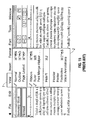
- Pull-down menus such as the one shown in Fig. 15, are typically lists of commands that can be hidden and activated or pulled down with a pointing or cursor control device, such as a mouse or trackball, or a keyboard command.
- a click on command word "View” in the menu at the top of the screen will cause the pull-down menu 2 to appear.
- These single-word commands take up very little of the screen because the pull-down menu, in its collapsed state, has a very compact form, such as a single command word.
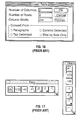
- Dialog boxes such as the one shown in Fig. 16, are interface elements that are typically composed of rectangular regions that appear outside of the document window. While a dialog box is active, action within the document is usually halted while the user is requested to select one or more of a number of options identified within the dialog box. The dialog box is then dismissed and disappears, and the document is updated based upon the selection which the user made from the dialog box.
- Floating palettes are typically rectangular regions that "float" above or near the document window or even inside it and contain commands or tools that are used in an interactive fashion.
- floating palettes are "non-modal". This means that, unlike dialog boxes, actions occurring within the document are not halted while the palettes are accessed by the user. Accordingly, floating palettes are most useful for holding tools and commands that a user needs to access interactively at the same time with the document itself.
- Adobe PhotoshopTM for example, floating palettes are used to select colors, document layers or tools, among other things.
- Some programs allow the user to switch the floating palettes from visible to invisible when specific menu commands are chosen.
- Other programs allow a user to selectively orient the palettes either vertically or horizontally on the computer display, as shown in Fig. 17.
- the invention features a computer-implemented graphical user interface method, which includes receiving a dock command to combine a first window and a distinct second window, each window having its own content and its own decoration and being an independent user interface object.
- the first window is docked to the second window in response to the command to form a single composite window having its own content and its own decoration.
- the content of the composite window includes at least a substantial portion of the content of the first window and a substantial portion of the content of the second window.
- the invention features a computer-implemented graphical user interface method, which includes receiving a command to detach the contents of a selected plurality of docked windows from a composite window.
- the contents of the selected windows are displayed in a new composite window, and the remaining content of the original composite window is displayed in the original composite window.
- the invention features a computer program residing on a computer-readable medium, which includes instructions for causing the computer system to receive a dock command to combine a first window and a distinct second window, each window having its own content and its own decoration and being an independent user interface object.
- the first window is docked to the second window in response to the command to form a single composite window having its own content and its own decoration, the content of the composite window including at least a substantial portion of the content of the first window and a substantial portion of the content of the second window.
- the invention features a computer program residing on a computer-readable medium comprising instructions for causing the computer system to receive a command to detach the contents of a selected plurality of docked windows from a composite window.
- the contents of the selected windows are displayed in a new composite window and the remaining content of the original composite window is displayed in the original composite window.
- Implementations of the invention may include one or more of the following features.
- the content of the composite window includes all of the content of the first window and all of the content of the second window.
- the content of each of the first and second windows includes a selection indicator and a control area, the control area having user selectable options specific to the respective window.
- a detach command is received to detach the content of the first window from the composite window, and the first window content is displayed in a new first window and the remaining content is displayed in the composite window, whereby two separate windows are displayed on the computer display.
- a second dock command is received to combine a third window with the composite window, and the third window is docked with the composite window to add at least a substantial portion of the content of the third window to the content of the composite window.
- a detach command is received to detach the content of a selected one of the first, second or third window from the composite window, and the content of the selected window is displayed in a new window and the remaining content of the composite window is displayed in the composite window.
- the first window is a user interface tool palette and the second window is a user interface tool palette.
- the composite window includes a first pane containing the first window content and a second pane containing the second window content.
- a stack command is received to stack a third window having its own content and decoration with the second pane of the composite window, wherein the second window content and the third window content forms a stacked group of contents, and wherein each of the second and third window contents includes a selection indicator. The selection indicators of each of the second and third windows are displayed.
- a select command is received to activate one of the selection indicators, and the content of the window associated with the active selection indicator is displayed and the content of the other window is hidden.
- a detach command is received to detach the stacked group of contents from the composite window, and the stacked group of contents is displayed in a new composite window and the remaining content of the original composite window is displayed in the original composite window.
- a collapse command is received to collapse a selected one of the first and second panes in the composite window, wherein the content of each the first and second windows includes a selection indicator. The selection indicator is displayed and the remaining content of the selected first or second pane is hidden.
- the various received commands can be provided to a computer in a number of different ways; for example, mouse gestures, keyboard strokes, and a graphical user interface can be used to communicate the commands to the computer system.
- Palettes in a graphical user interface can be manipulated in a number of ways by the user to conserve screen space on a computer display.
- Multiple palettes can be combined in a docked manner such that a essential portion of the information of each of the palettes are displayed and duplicative information hidden.
- palettes can be combined in a stacked (or tabbed) manner, in which the active control area of only one palette is shown and selection indicators of the other palettes are displayed to allow the user to selectively activate the hidden palettes.
- Palettes can also be combined using both the docking and stacking techniques to provide further flexibility to the user. Once combined, the palettes can be collapsed to further conserve screen space.
- the group can be manipulated (e.g., moved, resized, or closed) as if the group was one palette.
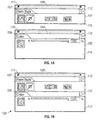
- Figs. 1A and 1B illustrate the docking of two palettes to form a combined palette.
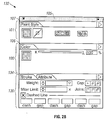
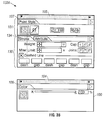
- Figs. 2A and 2B illustrate the docking of a palette between two other docked palettes.
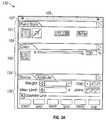
- Figs. 3A and 3B illustrate the undocking of three docked palettes.
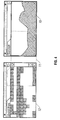
- Figs. 4, 5, and 6 illustrate the combining of palettes in a stacked or tabbed fashion.
- Figs. 7A and 7B illustrate the undocking of a stacked group from a combined palette.
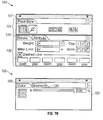
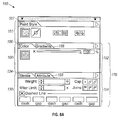
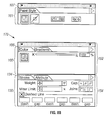
- Figs. 8A and 8B illustrate the undocking of a docked group from a combined palette.
- Figs. 9A and 9B illustrate the collapsing of a stacked group of palettes in a combined group of docked palettes.
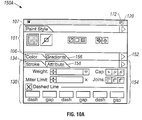
- Figs. 10A and 10B illustrate the expansion of a collapsed stacked group of palettes in a combined palette.
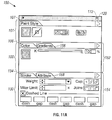
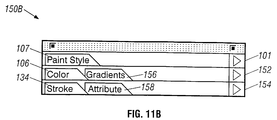
- Figs. 11A and 11B illustrate the collapsing of all palettes in a combined palette.
- Figs. 12A and 12B illustrate the expansion of a stacked group of palettes in a totally collapsed combined palette.
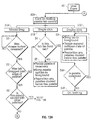
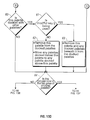
- Figs. 13A-13C is a flow diagram of a method for combining and docking palettes.
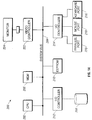
- Fig. 14 is a block diagram of a computer system suitable for practicing the present invention.
- Fig. 15 illustrates the use of pull-down menus in a computer program.
- Fig. 16 illustrates a typical dialog box in a computer program.
- Fig. 17 illustrates the use of floating palettes in a computer program.
- a software program allows palettes in a graphical user interface to be manipulated in a number of ways by the user to conserve screen space on a computer display.
- multiple palettes can be docked to each other to form a combined or composite palette, in which the palettes are arranged vertically.
- the combined palette allows the user to manipulate (e.g., move, resize, zoom, and collapse) the group of palettes as if they were one palette.
- palettes can be combined in a stacked (or tabbed) manner, in which the active control area of only one palette is shown and the control tabs of the other palettes are displayed to allow the user to selectively activate the hidden palettes.
- Palettes can also be combined using both the docking and stacking techniques to provide further flexibility to the user. Once combined, the palettes can be collapsed to further conserve screen space.
- FIG. 1A two palettes 100 and 101 are displayed in a computer program graphical user interface.
- the "Paint Style” and “Color” palettes 100 and 101 are examples of two different control palettes used in the program.
- Each palette 100, 101 includes its own content and decoration.
- the decoration includes a title bar 104, 105.
- a "Close” control button 110, 111 is selectable by a user with a cursor to close the palette.
- a hidden palette may be re-activated by choosing an appropriate menu command.
- the floating "Color” and "Paint Style” palettes 100 and 101 also can be moved anywhere on the computer screen, and they can be overlapped.
- each of the palettes 100 and 101 include "Color” and "Paint Style” control tabs 106 and 107, respectively as well as control areas 114 and 115.
- the control area 114, 115 of each palette 100, 101 includes various buttons and user options selectable by the user to perform different functions.
- the content of each palette 100, 101 also has a palette menu button 112, 113 selectable by the user to bring up more palette-related user options.
- the user moves the "Color” palette 100 by selecting the "Color” control tab 106 with the cursor and dragging the palette 100 to the "dock area" of "Paint Style” palette 101.
- the dock area is defined as any region of a palette outside the control tab region. Alternatively, the dock area can be defined as any other portion of the palette.
- the combined or composite window appears to have its own content and decoration.
- the content of the composite window 122 includes the two panes of the palettes 100 and 101, and the decoration includes the title bar 105.
- the user can also dock one palette between two other palettes.
- the "Paint Style" palette 101 is initially docked with a "Stroke” palette 130 in a combined palette 131.
- the "Color” palette 100 is docked between the "Paint Style” palette 101 and the "Stroke” palette 130 to create a combined palette 132, which includes three rows of control tabs 107, 106, and 134, as shown in Fig. 2B.
- any one of the palettes in the combined palette 132 can be resized vertically.
- the "Color" palette 100 includes a resize control button 133 which is selected and dragged by the user to resize the palette 100 vertically. If the palette 100 is resized, then the "Stroke" palette below it must be repositioned (i.e., moved down by the amount of the resize operation).
- resizing of each palette in the horizontal direction is restricted, with movement allowed only vertically. Once a palette is undocked, the horizontal resizing restriction is removed.
- a group of palettes have been docked to each other, they can be "undocked” by the user. Undocking a palette appears as if a portion of the content of the combined or composite palette is detached and moved to a new palette.
- three palettes 101, 100, and 130 are docked in the combined palette 132.
- the user selects the control tab of the palette to be removed and drags the palette away from the combined palette 132.
- the user first selects the "Color” control tab 106 with the cursor, then drags the cursor away from the area of the combined palette 132, and next releases the mouse button once the cursor has been positioned outside the combined palette region.
- the undocked "Color” palette 100 again appears as a full palette with the title bar 104.
- the modified combined palette 132A includes only the "Paint Style” and “Stroke” palettes.
- the "Stroke” palette 130 automatically is repositioned to attach to the bottom of the "Paint Style” palette 101 once the "Color” palette 100 is undocked.
- the palettes can also be combined in a "stacked" or “tabbed” fashion.
- two separate palettes the "Scratch” palette 10 (which contains control area 31) and the "Swatches” palette 12 (which contains control area 35), are shown.
- the "Scratch” palette 10 is selected and dragged to the left so that the cursor overlaps the control tab 34 of the "Swatches” palette 12.
- the palettes 10 and 12 are stacked in a combined palette 40, as shown in Fig. 5.
- the control tabs 30 and 34 form a tab group in the control tab area 37 of the combined palette 40.
- the "Scratch” and “Swatches” palettes 10 and 12 move as one and occupy the same physical screen space as a combined palette 40.
- the combined palette 40 in Fig. 5 shows the "Scratch” palette 10 selected and visible, and the "Swatches” palette 12 being hidden behind it with only its control tab 34 visible.
- the combined palette 40 in Fig. 6 shows the "Scratch” palette 10 hidden with only its control tab 36 visible and the "Swatches" palette 12 is selected and fully visible.
- the palette control tabs of each of the two unified palettes assume one of two states: active, as shown by “Scratch” tab 30 in Fig. 5 and “Swatches” tab 32 in Fig. 6; or inactive, as shown by “Swatches” tab 34 in Fig. 5 and “Scratch” tab 36 in Fig. 6. Only the active palette is displayed, not the inactive one. Clicking on an inactive palette control tab, which always remains displayed, makes that palette the active one, and makes the formerly active palette inactive. By clicking on tab 34 in screen area 40 in Fig.
- the inactive "Swatches" palette 12 will replace the active and visible “Scratch” palette 10 as the palette in view, as shown in screen area 40 in Fig. 6.
- the tab controls of both palettes always remain accessible, but the control area of the inactive palette, remains inaccessible to the user until the user selects the control tab of the hidden palette.
- palettes can be stacked, one behind the other, by this technique.
- the only requirement is that the tabs of the hidden palettes always be visible so an inactive palette can be identified and retrieved.
- Stacked palettes may easily be separated or "unstacked" by the same technique as used for stacking them, as illustrated in Fig. 4. Clicking on the title control tab 34 in Fig. 5 of the inactive "Swatches" palette and dragging it outside of the combined screen area 40 will unstack the hidden "Swatches" palette 12 and place "Swatches” palette 12 in an area of the screen where it can be viewed.
- palettes can be combined by a program using both the docking and stacking mechanisms.
- the combined palette 131 includes the "Paint Style" palette 107 docked to a group 140 of stacked palettes consisting of the "Stroke” palette 130 and an "Attribute” palette which is hidden behind the "Stroke” palette 130 with only its "Attribute” control tab 158 visible.
- Both the "Stroke” control tab 130 and the “Attribute” control tab 158 are displayed in the control tab area of the stacked group 140. As discussed above, the user can select which of the "Stroke” palette 130 or the “Attribute” palette is active in the stacked group 140 by clicking one of the control tabs 130 and 142.
- the user has greater flexibility to manage how the screen space of a computer display is utilized. The user can thus choose to dock the most often used palettes and to stack other, less often used palettes with palettes in the docked group.
- a stacked group of palettes can be undocked from a combined palette.
- the combined palette 150 includes the "Paint Style" palette docked to a first stacked group 152 of palettes and a second stacked group 154 of palettes.
- the first stacked group 152 consists of the "Color” palette 100 (which is active) and a “Gradient” palette (which is inactive).
- the second stacked group 154 consists of the "Stroke" palette (which is active) and the "Attribute” palette (which is inactive).
- the user selects the "Color” or “Gradient” control tab 106 or 156 while holding down a modifier key (e.g., a "Ctrl” key) and dragging the selected stacked group outside the area of the combined palette 150.
- a modifier key e.g., a "Ctrl” key
- a combined palette 160 containing the "Paint Style,” “Stroke,” and “Attribute” palettes
- a combined palette 152 containing the stacked "Color” and "Gradient” palettes.
- a sub-group of docked palettes can also be undocked from a combined palette.
- the user selects the "Color” control tab 106 using the cursor while pressing another modifier key (e.g., an "Alt” key).
- another modifier key e.g., an "Alt” key.
- a stacked group of palettes can also be "collapsed” so that only the control tabs of the stacked group are shown.
- the combined palette 150 contains a stacked group 152 of palettes consisting of the "Color” palette 100 and the "Gradient" palette hidden behind the "Color” palette.
- the stacked group of palette can be collapsed such that only the "Color” and "Gradient” control tabs in the stacked group 152 are displayed in the combined palette 150A, as shown in Fig. 9B.
- the docking order of the palettes in the combined palette 150A remains unchanged.
- the collapsed stacked group 150A can be expanded (or uncollapsed) by clicking the "Zoom" control button 172 of the combined palette 150. Once clicked, the stacked group 152 expands again to show the active "Color” palette 100 in the stacked group 152.
- Figs. 11A and 11B by clicking the "Zoom" control button 172 of the combined palette 150 when none of the stacked palettes in the combined palette 150 are collapsed, the user causes all the palettes in the combined palette 150 to be collapsed. In the total collapsed state, only the control tabs of the palettes of the combined palette 150B are shown.
- a collapsed combined palette is expanded by clicking the control tab of the palette to be expanded.
- a click on the "Color” control tab 106 expands the stacked group 152 of the "Color” and “Gradient” palettes in the combined palette 150C. If, however, the "Zoom" control button 172 is clicked instead, then all the palettes of the combined palette 150B are expanded.
- Figs. 13A-13C the flow of a programmed method for docking, stacking, collapsing, and resizing palettes is shown.
- the program receives a user event at step 49 and proceeds down one of four separate paths depending on the received event.
- the received events include clicking a palette control tab, clicking a "Close” control button, clicking a "Zoom” control button, or a resizing command.
- step 50A If the program detects at step 50A that the palette control tab has been clicked, then one of three sub-paths is chosen based on whether the mouse is dragged (51A), the mouse is single clicked (51B), or the mouse is double clicked (51C). If the mouse is dragged, the program determines at step 52 if the mouse button has been released. If true, a second determination is made at step 53 as to whether the control tab has been dragged past the edge (that is, outside the area) of the combined palette.
- step 51B determines at step 54 whether the selected palette control tab is the front tab in a group of stacked palettes. The tab is "in front of" other tabs when it belongs to an active palette which is stacked with an inactive palette. If the tab is determined to be not in front of another tab, the selected palette is made active (that is, the control tab and control area of the palette are made visible) at step 55, and the other tab is made inactive. In step 55, any necessary vertical resizing is performed by the user and the palettes docked below the selected palette are repositioned.
- step 54A determines if the tab belongs to a collapsed palette. If the palette is not collapsed, then nothing is done at step 54B. However, if the palette is collapsed, then the single-click operation is treated as equivalent to a double-click operation and the program next proceeds to step 69, described below.
- step 56 determines at step 56 if the selected palette is stacked or tabbed with other palettes in a stacked group. If so, at step 57, a determination is made whether a first modifier key (e.g., the "Ctrl" key) was pressed in the drag operation. If the first modifier key was not pressed, then only the selected palette out of the stacked group is undocked at step 58, leaving the other palette or palettes in the stacked group unmoved. In step 58, the moved palette is highlighted. Moreover, if the selected palette was an active palette in the stacked group, then another palette in the stacked group in the combined palette is made active and the palettes docked below are repositioned if necessary.
- a first modifier key e.g., the "Ctrl" key
- step 57 If the first modifier key is detected as being pressed at step 57, then the entire stacked group is separated or undocked at step 59. Further, in step 59, after separation, the selected palette is highlighted and brought to the foreground (that is, the palette is made active) if originally inactive, and the remaining palettes of the combined palette are repositioned.
- the program determines at step 60 if the palette is docked with other palettes. If so, the program next determines at step 61 if a second modifier key (e.g., the "Alt" key) is pressed while the selected control tab is being dragged. If the second modifier key is not pressed, then only the selected palette is undocked at step 62. Further, in step 62, the other palettes, if any, underneath the undocked palette are repositioned to dock to the palette above them in the combined palette. If the second modifier key is detected as being pressed at step 61, then the selected palette along with the palettes, if any, underneath the selected palette are undocked at step 63.
- a second modifier key e.g., the "Alt" key
- step 60 the program next determines at step 64 if the selected tab has been dragged to overlay part of the control tab of another palette (the "overlaid palette"). If so, the selected palette, or group of palettes (if stacked group or docked group is moved), are stacked with the overlaid palette at step 65. Thus, if a stacked group is to be stacked to the overlaid palette, then the control tab of the overlaid palette is displayed with the control tabs of the other palettes in the original stacked group, with only the overlaid palette active in the newly stacked group. If a docked group is to be stacked to the overlaid palette, then the selected palette is stacked with the overlaid palette and the other docked palettes underneath are positioned under the overlaid palette.
- the program next determines at step 66 if the selected control tab is in the dock area of a another palette (the "docking palette"). If so, the selected palette or palettes are docked to the bottom of the docking palette at step 67. All palettes originally underneath the docking palette before the docking operation are repositioned to dock to the selected palette or last of the selected group of palettes. If the selected control tab is not detected to be in the dock area of another tab at step 66, then no docking operation is needed and the palette or palettes are moved the distance that the tab was dragged at step 68.
- the selected control tab is not detected to be in the dock area of another tab at step 66, then no docking operation is needed and the palette or palettes are moved the distance that the tab was dragged at step 68.
- step 51C the received event is a double-click of a control tab
- the selected control tab is brought to the foreground at step 69.
- the palette associated with the control tab is expanded or collapsed depending on its original state. Once the palette has been expanded or collapsed, all palettes docked below the expanded or collapsed palette are repositioned.
- a palette can be hidden from view by clicking its "Close” control button ("hide command”). Once hidden, the palette can be reactivated by choosing an appropriate menu command which designates the hidden palette ("show command"). If the received event is detected at step 50B as being either the hide or show command, then it is determined at step 70 whether the selected palette is docked with other palettes. If not, then the palette is hidden or activated at step 74. If the selected palette is docked with other palettes in a combined palette, then the entire combined palette is hidden or activated at step 72.
- a combined palette can also be collapsed or expanded as desired. If the received event is detected at step 50C as being the clicking of the "Zoom" control button of a palette, then the program determines at step 75 if the palette is docked with other palettes. If not, then the "Zoom" state of the palette is toggled from the collapsed state to the expanded state or vice versa.
- the program determines at step 77 if all the palettes in the combined palette have the same "Zoom” state. If not, then all the palettes in the combined palette are expanded at step 78. If all the palettes have the same "Zoom” state, however, the "Zoom" state of all the palettes are toggled (from collapsed to expanded state or vice versa).
- a palette can also be resized vertically by dragging the "Resize" control button of a palette (the "resize command"). If the received event is detected as being the resize command at step 50D, then the palette is resized vertically at step 80. Next, the program determines at step 81 if the resized palette is docked with other palettes. If not, then nothing further is done at step 82. However, if the palette is docked with other palettes, then all palettes docked below the resized palette are repositioned.
- a program according to the invention may be implemented in digital electronic circuitry or in computer hardware, firmware, software, or in combinations of them, such as in a computer system 200.
- the computer system 200 includes a central processing unit (CPU) 202 such as a personal computer microprocessor connected to a internal system bus 204.
- the storage media in the computer system 200 include a main memory 206 (which can be implemented with dynamic random access memory devices), a hard disk drive 208 for mass storage, and an electrically erasable programmable read only memory (EEPROM) 210.
- the main memory 206 and EEPROM 210 are connected to the bus 204, and the hard disk drive 208 is coupled to the bus 204 through a hard disk drive controller 212.
- Apparatus of the invention may be implemented in a computer program product tangibly embodied in a machine-readable storage device (such as the hard disk drive 208, main memory 206, or EEPROM 210) for execution by the CPU 202.
- Suitable processors include, by way of example, both general and special purpose microprocessors.
- a processor will receive instructions and data from the read-only memory 210 and/or the main memory 206.
- Storage devices suitable for tangibly embodying computer program instructions include all forms of non-volatile memory, including by way of example semiconductor memory devices, such as EPROM, EEPROM, and flash memory devices; magnetic disks such as the internal hard disk drive 208 and removable disks; magneto-optical disks; and CD-ROM disks. Any of the foregoing may be supplemented by, or incorporated in, specially-designed ASICs (application-specific integrated circuits).
- the computer system 200 further includes an input/output (I/O) controller 214 connected to the bus 204 and which provides a keyboard interface 216 (for connection to an external keyboard), a mouse interface 218 (for connection to an external mouse or other pointer device), and a parallel port interface 220 (for connection to a printer).
- I/O input/output
- the bus 204 is connected to a video controller 222 which couples to a computer monitor 224. Data associated with an image for display on the computer monitor 224 (such as the palettes) are provided over the system bus 204 by application programs to the video controller 222.
- palettes can be docked to each other on their sides rather than in a top-to-bottom manner.
- the palettes can be somewhat different from each other in width, and the smaller palette would expand from side to side to equal the width of the larger palette, or the larger one shrink to conform to the smaller, taking into account any size limitations imposed upon one or more palettes by the underlying program.
Landscapes
- Engineering & Computer Science (AREA)
- General Engineering & Computer Science (AREA)
- Theoretical Computer Science (AREA)
- Human Computer Interaction (AREA)
- Physics & Mathematics (AREA)
- General Physics & Mathematics (AREA)
- User Interface Of Digital Computer (AREA)
- Digital Computer Display Output (AREA)
- Processing Or Creating Images (AREA)
- Controls And Circuits For Display Device (AREA)
Applications Claiming Priority (2)
| Application Number | Priority Date | Filing Date | Title |
|---|---|---|---|
| US744407 | 1996-11-07 | ||
| US08/744,407 US5870091A (en) | 1996-11-07 | 1996-11-07 | Combining palettes on a computer display |
Publications (2)
| Publication Number | Publication Date |
|---|---|
| EP0841609A2 true EP0841609A2 (de) | 1998-05-13 |
| EP0841609A3 EP0841609A3 (de) | 1999-11-17 |
Family
ID=24992604
Family Applications (1)
| Application Number | Title | Priority Date | Filing Date |
|---|---|---|---|
| EP97308100A Withdrawn EP0841609A3 (de) | 1996-11-07 | 1997-10-13 | Zusammensetzung von Palletten auf einer Rechneranzeigevorrichtung |
Country Status (4)
| Country | Link |
|---|---|
| US (1) | US5870091A (de) |
| EP (1) | EP0841609A3 (de) |
| JP (1) | JPH10240488A (de) |
| CA (1) | CA2220310A1 (de) |
Cited By (7)
| Publication number | Priority date | Publication date | Assignee | Title |
|---|---|---|---|---|
| WO1999010799A1 (en) * | 1997-08-22 | 1999-03-04 | Natrificial Llc | Method and apparatus for simultaneously resizing and relocating windows within a graphical display |
| WO2006092464A1 (en) * | 2005-03-03 | 2006-09-08 | Nokia Corporation | User interface component |
| WO2006044085A3 (en) * | 2004-10-18 | 2007-05-18 | Siemens Medical Solutions | A user interface display system |
| WO2007073987A3 (de) * | 2005-12-21 | 2008-01-17 | Bosch Gmbh Robert | Bedienvorrichtung für ein elektronisches gerät, insbesondere eine fahrerinformationsvorrichtung |
| EP1859364A4 (de) * | 2005-04-01 | 2008-12-17 | Microsoft Corp | Verwaltung einer graphischen benutzerschnittstelle |
| JP2009080710A (ja) * | 2007-09-27 | 2009-04-16 | Hitachi High-Technologies Corp | データ処理装置の表示方法 |
| DE102007061993B4 (de) * | 2006-12-29 | 2009-08-06 | Lg Electronics Inc. | Mobiles Endgerät mit einer Anzeigeeinheit sowie Anzeigeverfahren für ein mobiles Endgerät |
Families Citing this family (70)
| Publication number | Priority date | Publication date | Assignee | Title |
|---|---|---|---|---|
| US6401134B1 (en) * | 1997-07-25 | 2002-06-04 | Sun Microsystems, Inc. | Detachable java applets |
| US9292111B2 (en) * | 1998-01-26 | 2016-03-22 | Apple Inc. | Gesturing with a multipoint sensing device |
| US7614008B2 (en) | 2004-07-30 | 2009-11-03 | Apple Inc. | Operation of a computer with touch screen interface |
| US20060033724A1 (en) * | 2004-07-30 | 2006-02-16 | Apple Computer, Inc. | Virtual input device placement on a touch screen user interface |
| US8479122B2 (en) | 2004-07-30 | 2013-07-02 | Apple Inc. | Gestures for touch sensitive input devices |
| US9239673B2 (en) | 1998-01-26 | 2016-01-19 | Apple Inc. | Gesturing with a multipoint sensing device |
| GB2348520B (en) * | 1999-03-31 | 2003-11-12 | Ibm | Assisting user selection of graphical user interface elements |
| US6870550B1 (en) * | 1999-04-26 | 2005-03-22 | Adobe Systems Incorporated | Digital Painting |
| US6765592B1 (en) * | 1999-04-30 | 2004-07-20 | Microsoft Corporation | Undockable sub-windows |
| US7373592B2 (en) * | 1999-07-30 | 2008-05-13 | Microsoft Corporation | Modeless child windows for application programs |
| US6380951B1 (en) | 1999-10-01 | 2002-04-30 | Global Graphics Software Limited | Prepress workflow method and program |
| US6483524B1 (en) | 1999-10-01 | 2002-11-19 | Global Graphics Software Limited | Prepress workflow method using raster image processor |
| US6624908B1 (en) | 1999-10-01 | 2003-09-23 | Global Graphics Software Limited | Method for arranging a prepress workflow |
| US6563510B1 (en) * | 2000-03-30 | 2003-05-13 | Behr Process Corporation | Paint color matching and coordinating system |
| US7493568B2 (en) * | 2001-01-26 | 2009-02-17 | Microsoft Corporation | System and method for browsing properties of an electronic document |
| US9256356B2 (en) * | 2001-03-29 | 2016-02-09 | International Business Machines Corporation | Method and system for providing feedback for docking a content pane in a host window |
| US6771292B2 (en) * | 2001-03-29 | 2004-08-03 | International Business Machines Corporation | Method and system for providing feedback concerning a content pane to be docked in a host window |
| JP3601470B2 (ja) * | 2001-05-07 | 2004-12-15 | ヤマハ株式会社 | 画面移行タブスイッチ制御装置及びプログラム |
| US7478338B2 (en) * | 2001-07-12 | 2009-01-13 | Autodesk, Inc. | Palette-based graphical user interface |
| US6944829B2 (en) * | 2001-09-25 | 2005-09-13 | Wind River Systems, Inc. | Configurable user-interface component management system |
| US6857105B1 (en) | 2002-02-19 | 2005-02-15 | Adobe Systems Incorporated | Method and apparatus for expanding and contracting graphical function displays |
| US20080040675A1 (en) * | 2002-04-30 | 2008-02-14 | Aol Llc | Instant messaging interface having a tear-off element |
| US7421661B1 (en) | 2002-04-30 | 2008-09-02 | Aol Llc | Instant messaging interface having an informational tool tip |
| CA2385224C (en) * | 2002-05-07 | 2012-10-02 | Corel Corporation | Dockable drop-down dialogs |
| US6970169B1 (en) | 2002-09-24 | 2005-11-29 | Adobe Systems Incorporated | Digitally synthesizing seamless texture having random variations |
| US7181698B2 (en) * | 2002-12-16 | 2007-02-20 | Sap Ag | Detachable tabs presenting accessed objects in a multi-tab interface |
| EP1477894A3 (de) * | 2003-05-16 | 2006-10-25 | Sap Ag | System, Verfahren, Computerprogrammprodukt und Herstellungsartikel zur Manipulierung einer graphischen Benutzerschnittstelle |
| US7567256B2 (en) * | 2004-03-31 | 2009-07-28 | Harris Corporation | Method and apparatus for analyzing digital video using multi-format display |
| US8046712B2 (en) * | 2004-06-29 | 2011-10-25 | Acd Systems International Inc. | Management of multiple window panels with a graphical user interface |
| US8381135B2 (en) | 2004-07-30 | 2013-02-19 | Apple Inc. | Proximity detector in handheld device |
| US7426697B2 (en) * | 2005-01-18 | 2008-09-16 | Microsoft Corporation | Multi-application tabbing system |
| USD550234S1 (en) * | 2005-11-15 | 2007-09-04 | Microsoft Corporation | Portion of a display screen |
| US20070186183A1 (en) * | 2006-02-06 | 2007-08-09 | International Business Machines Corporation | User interface for presenting a palette of items |
| USD560680S1 (en) * | 2006-05-23 | 2008-01-29 | Microsoft Corporation | Icon for a portion of a display screen |
| US8549429B2 (en) * | 2007-01-25 | 2013-10-01 | Sharp Kabushiki Kaisha | Multi-window management apparatus and program, storage medium and information processing apparatus |
| JP2008305115A (ja) * | 2007-06-07 | 2008-12-18 | Kyocera Mita Corp | 操作装置、画像形成装置、及び操作画面の表示方法 |
| US9395866B2 (en) * | 2007-07-20 | 2016-07-19 | Adobe Systems Incorporated | Method and apparatus for summoning a palette |
| US20090132939A1 (en) * | 2007-11-19 | 2009-05-21 | International Business Machines Corporation | Method and apparatus for a floating island for user navigation in an interactive environment |
| US9563877B2 (en) * | 2008-03-11 | 2017-02-07 | Microsoft Technology Licensing, Llc | Customizable controls provided by a messaging application for performing selected actions |
| USD593125S1 (en) * | 2008-10-24 | 2009-05-26 | Microsoft Corporation | Icon for a display screen |
| KR20120016060A (ko) * | 2009-03-20 | 2012-02-22 | 구글 인코포레이티드 | 입력 방식 편집기 컴퓨팅 디바이스와의 상호작용 |
| US9529517B2 (en) * | 2009-10-13 | 2016-12-27 | Google Inc. | Movable information panels |
| JP4942832B2 (ja) | 2010-03-31 | 2012-05-30 | シャープ株式会社 | 画像表示装置、画像形成装置、画像表示方法、コンピュータプログラム及び記録媒体 |
| US8502856B2 (en) | 2010-04-07 | 2013-08-06 | Apple Inc. | In conference display adjustments |
| WO2012034245A1 (de) | 2010-09-15 | 2012-03-22 | Ferag Ag | Grafische benutzerschnittstelle |
| CH703725A1 (de) * | 2010-09-15 | 2012-03-15 | Ferag Ag | Grafische benutzerschnittstelle. |
| US8782513B2 (en) * | 2011-01-24 | 2014-07-15 | Apple Inc. | Device, method, and graphical user interface for navigating through an electronic document |
| JP5516473B2 (ja) * | 2011-03-24 | 2014-06-11 | コニカミノルタ株式会社 | 画像形成装置、表示方法および表示プログラム |
| KR101850821B1 (ko) * | 2011-09-15 | 2018-04-20 | 엘지전자 주식회사 | 이동 단말기 및 이동 단말기의 메시지 표시 방법 |
| US20140040789A1 (en) * | 2012-05-08 | 2014-02-06 | Adobe Systems Incorporated | Tool configuration history in a user interface |
| US9052795B2 (en) * | 2012-09-11 | 2015-06-09 | Google Technology Holdings LLC | Displaying side-tabbed panels for an application operating on a computing device |
| JP6025482B2 (ja) * | 2012-09-28 | 2016-11-16 | 富士ゼロックス株式会社 | 表示制御装置、画像表示装置、およびプログラム |
| TWI483174B (zh) * | 2012-12-12 | 2015-05-01 | Acer Inc | 網頁的群組管理方法 |
| US10761673B2 (en) * | 2013-03-12 | 2020-09-01 | Oracle International Corporation | Managing display of detachable windows in a GUI computing environment |
| US10545657B2 (en) | 2013-09-03 | 2020-01-28 | Apple Inc. | User interface for manipulating user interface objects |
| US12287962B2 (en) | 2013-09-03 | 2025-04-29 | Apple Inc. | User interface for manipulating user interface objects |
| WO2015183366A1 (en) | 2014-05-30 | 2015-12-03 | Apple, Inc. | Continuity |
| US10073590B2 (en) | 2014-09-02 | 2018-09-11 | Apple Inc. | Reduced size user interface |
| CN112199000B (zh) | 2014-09-02 | 2024-07-02 | 苹果公司 | 多维对象重排 |
| CN106293314B (zh) * | 2015-05-30 | 2020-07-14 | 腾讯科技(深圳)有限公司 | 一种显示控制方法、装置及终端 |
| US10558344B2 (en) * | 2015-06-01 | 2020-02-11 | Apple Inc. | Linking multiple windows in a user interface display |
| US10637986B2 (en) | 2016-06-10 | 2020-04-28 | Apple Inc. | Displaying and updating a set of application views |
| DK201670595A1 (en) | 2016-06-11 | 2018-01-22 | Apple Inc | Configuring context-specific user interfaces |
| US12242707B2 (en) | 2017-05-15 | 2025-03-04 | Apple Inc. | Displaying and moving application views on a display of an electronic device |
| US12511021B2 (en) | 2020-09-14 | 2025-12-30 | Apple Inc. | Device management user interface |
| US11822761B2 (en) | 2021-05-15 | 2023-11-21 | Apple Inc. | Shared-content session user interfaces |
| US11907605B2 (en) | 2021-05-15 | 2024-02-20 | Apple Inc. | Shared-content session user interfaces |
| US12449961B2 (en) | 2021-05-18 | 2025-10-21 | Apple Inc. | Adaptive video conference user interfaces |
| US12405631B2 (en) | 2022-06-05 | 2025-09-02 | Apple Inc. | Displaying application views |
| US12578837B2 (en) | 2022-09-23 | 2026-03-17 | Apple Inc. | User interfaces for managing sharing of content in three-dimensional environments |
Family Cites Families (11)
| Publication number | Priority date | Publication date | Assignee | Title |
|---|---|---|---|---|
| JP2785941B2 (ja) * | 1988-08-25 | 1998-08-13 | 富士通株式会社 | ウインドウ情報分割・統合処理方式 |
| US5367623A (en) * | 1990-09-25 | 1994-11-22 | Sharp Kabushiki Kaisha | Information processing apparatus capable of opening two or more windows on screen, one window containing a page and other windows containing supplemental information |
| US5412776A (en) * | 1992-12-23 | 1995-05-02 | International Business Machines Corporation | Method of generating a hierarchical window list in a graphical user interface |
| US5596700A (en) * | 1993-02-17 | 1997-01-21 | International Business Machines Corporation | System for annotating software windows |
| EP0695448B1 (de) * | 1993-04-20 | 2001-11-07 | Apple Computer, Inc. | Interaktive anwenderschnittstelle |
| US5572649A (en) * | 1993-11-12 | 1996-11-05 | Intel Corporation | Process for dynamically switching between a single top level window and multiple top level windows |
| US5546528A (en) * | 1994-06-23 | 1996-08-13 | Adobe Systems Incorporated | Method of displaying multiple sets of information in the same area of a computer screen |
| US5694561A (en) * | 1994-12-12 | 1997-12-02 | Microsoft Corporation | Method and system for grouping and manipulating windows |
| US5644739A (en) * | 1995-01-27 | 1997-07-01 | Microsoft Corporation | Method and system for adding buttons to a toolbar |
| US5644737A (en) * | 1995-06-06 | 1997-07-01 | Microsoft Corporation | Method and system for stacking toolbars in a computer display |
| US5712995A (en) * | 1995-09-20 | 1998-01-27 | Galileo Frames, Inc. | Non-overlapping tiling apparatus and method for multiple window displays |
-
1996
- 1996-11-07 US US08/744,407 patent/US5870091A/en not_active Expired - Lifetime
-
1997
- 1997-10-13 EP EP97308100A patent/EP0841609A3/de not_active Withdrawn
- 1997-11-05 CA CA002220310A patent/CA2220310A1/en not_active Abandoned
- 1997-11-07 JP JP30584297A patent/JPH10240488A/ja not_active Withdrawn
Cited By (11)
| Publication number | Priority date | Publication date | Assignee | Title |
|---|---|---|---|---|
| WO1999010799A1 (en) * | 1997-08-22 | 1999-03-04 | Natrificial Llc | Method and apparatus for simultaneously resizing and relocating windows within a graphical display |
| US6166736A (en) * | 1997-08-22 | 2000-12-26 | Natrificial Llc | Method and apparatus for simultaneously resizing and relocating windows within a graphical display |
| WO2006044085A3 (en) * | 2004-10-18 | 2007-05-18 | Siemens Medical Solutions | A user interface display system |
| WO2006092464A1 (en) * | 2005-03-03 | 2006-09-08 | Nokia Corporation | User interface component |
| US8281252B2 (en) | 2005-03-03 | 2012-10-02 | Nokia Corporation | User interface component |
| EP1859364A4 (de) * | 2005-04-01 | 2008-12-17 | Microsoft Corp | Verwaltung einer graphischen benutzerschnittstelle |
| WO2007073987A3 (de) * | 2005-12-21 | 2008-01-17 | Bosch Gmbh Robert | Bedienvorrichtung für ein elektronisches gerät, insbesondere eine fahrerinformationsvorrichtung |
| EP1966678B1 (de) * | 2005-12-21 | 2019-04-17 | Robert Bosch Gmbh | Bedienvorrichtung für ein elektronisches gerät, insbesondere eine fahrerinformationsvorrichtung |
| DE102007061993B4 (de) * | 2006-12-29 | 2009-08-06 | Lg Electronics Inc. | Mobiles Endgerät mit einer Anzeigeeinheit sowie Anzeigeverfahren für ein mobiles Endgerät |
| US7705833B2 (en) | 2006-12-29 | 2010-04-27 | Lg Electronics Inc. | Display device and method of mobile terminal |
| JP2009080710A (ja) * | 2007-09-27 | 2009-04-16 | Hitachi High-Technologies Corp | データ処理装置の表示方法 |
Also Published As
| Publication number | Publication date |
|---|---|
| US5870091A (en) | 1999-02-09 |
| CA2220310A1 (en) | 1998-05-07 |
| EP0841609A3 (de) | 1999-11-17 |
| JPH10240488A (ja) | 1998-09-11 |
Similar Documents
| Publication | Publication Date | Title |
|---|---|---|
| US5870091A (en) | Combining palettes on a computer display | |
| US5546528A (en) | Method of displaying multiple sets of information in the same area of a computer screen | |
| EP0835484B1 (de) | Verfahren und vorrichtung zum stapeln von toolbar-objekten auf einem rechnerbildschirm | |
| US5808610A (en) | Method and system of docking panels | |
| US6057836A (en) | System and method for resizing and rearranging a composite toolbar by direct manipulation | |
| US5528259A (en) | Method and system for multi-dimensional scrolling of displayed data collections in a data processing system | |
| JP5184832B2 (ja) | 情報処理装置及びその制御方法、コンピュータプログラム | |
| US5664128A (en) | Object storage apparatus for use with data sets in computer applications | |
| EP1325405B1 (de) | Bedienelement für kombinierte menüs und listen in einem grafischen benutzerschnittstelle | |
| US5986657A (en) | Method and apparatus for incorporating expandable and collapsible options in a graphical user interface | |
| US6008809A (en) | Apparatus and method for viewing multiple windows within a dynamic window | |
| US9170731B2 (en) | Insertion point bungee space tool | |
| US7644372B2 (en) | Area frequency radial menus | |
| US6806892B1 (en) | Layer viewport for enhanced viewing in layered drawings | |
| US6970749B1 (en) | Grouped palette stashing | |
| US8136045B2 (en) | Multiple menus for use with a graphical user interface | |
| US6348935B1 (en) | Programmable tree viewer graphical user interface with integrated control panel | |
| US6040833A (en) | Method and system for display manipulation of multiple applications in a data processing system | |
| US20050223334A1 (en) | Affinity group window management system and method | |
| US5999177A (en) | Method and system for controlling content on a display screen in a computer system | |
| JP2003529818A (ja) | グラフィックユーザインタフェース | |
| GB2310989A (en) | Graphical user interface | |
| EP0344082B1 (de) | Verfahren zum Zugang zu den visuell verborgenen Daten in einem Mehrprozessbetriebssystem | |
| US9360994B2 (en) | Partial-height panes as a method for optimizing palette layout and screen real estate usage | |
| JPH04295924A (ja) | 折りたたみページ形式を備えたグラフィカルコンピュータユーザインタフェースにおけるデータ表示方法 |
Legal Events
| Date | Code | Title | Description |
|---|---|---|---|
| PUAI | Public reference made under article 153(3) epc to a published international application that has entered the european phase |
Free format text: ORIGINAL CODE: 0009012 |
|
| AK | Designated contracting states |
Kind code of ref document: A2 Designated state(s): DE FR GB |
|
| AX | Request for extension of the european patent |
Free format text: AL;LT;LV;RO;SI |
|
| PUAL | Search report despatched |
Free format text: ORIGINAL CODE: 0009013 |
|
| AK | Designated contracting states |
Kind code of ref document: A3 Designated state(s): AT BE CH DE DK ES FI FR GB GR IE IT LI LU MC NL PT SE |
|
| AX | Request for extension of the european patent |
Free format text: AL;LT;LV;RO;SI |
|
| 17P | Request for examination filed |
Effective date: 20000502 |
|
| AKX | Designation fees paid |
Free format text: DE FR GB |
|
| STAA | Information on the status of an ep patent application or granted ep patent |
Free format text: STATUS: THE APPLICATION IS DEEMED TO BE WITHDRAWN |
|
| 18D | Application deemed to be withdrawn |
Effective date: 20020503 |