EP0841623A2 - Verfahren und System zur Verarbeitung einer Zeichenkette - Google Patents
Verfahren und System zur Verarbeitung einer Zeichenkette Download PDFInfo
- Publication number
- EP0841623A2 EP0841623A2 EP97308676A EP97308676A EP0841623A2 EP 0841623 A2 EP0841623 A2 EP 0841623A2 EP 97308676 A EP97308676 A EP 97308676A EP 97308676 A EP97308676 A EP 97308676A EP 0841623 A2 EP0841623 A2 EP 0841623A2
- Authority
- EP
- European Patent Office
- Prior art keywords
- string
- characters
- processed
- cursor
- character
- Prior art date
- Legal status (The legal status is an assumption and is not a legal conclusion. Google has not performed a legal analysis and makes no representation as to the accuracy of the status listed.)
- Withdrawn
Links
Images



Classifications
-
- G—PHYSICS
- G06—COMPUTING OR CALCULATING; COUNTING
- G06F—ELECTRIC DIGITAL DATA PROCESSING
- G06F40/00—Handling natural language data
- G06F40/10—Text processing
Definitions
- the present invention relates to strings of characters obtained by a document reader, and is particularly directed to a method of processing such strings of alphanumeric characters and presenting the processed strings of characters on a display screen of a monitor to enable an operator to edit the strings of characters.
- a number of ways to edit strings of characters appearing on a display screen of a monitor are known.
- a string of characters may need to be edited to make a correction to the string of characters.
- One way to edit an incorrect string of characters is to re-type the entire string of characters. However, this may be tedious, especially if the string of characters to be corrected is relatively long and needs only a minor correction.
- Another way to edit an incorrect string of characters is to position a cursor appearing on the display screen and then press a combination of the backspace, delete, and insert keys on a keyboard. However, this may cause confusion for an operator who is unfamiliar with the use of the backspace, delete, and insert keys on a keyboard. For example, there may be confusion as to which character will be deleted when the cursor is positioned between two characters and the delete key is pressed.
- a system for processing an original string of characters obtained by a document reader and display the processed string of characters to enable editing of the original comprising a display unit; and a processing unit, characterized in that the processing unit includes means for inserting an editable space between adjacent characters of the original string to produce the processed string.
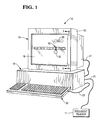
- a system 10 embodying the present invention includes a document reader 11 and a monitor 12 enclosed in a monitor housing 13, as shown in Figs. 1 and 2.
- the system 10 further includes a processing unit 18 which is electrically connected through a cable 27 to the monitor 12 and through a cable 21 to the document reader 11.
- a keyboard 22 is electrically connected through cable 23 to the processing unit 18.
- the monitor 12 has a display screen 14 and a touch-sensitive screen 16 overlying the display screen 14, as shown in Fig. 2.
- the touch-sensitive screen 16 may be of the type which uses capacitive current to provide an output signal indicative of the location at which the touch-sensitive screen 16 is being touched.
- An image of a cursor 30 and an image of a target area 32 which is separate from the cursor 30 are displayed on the display screen 14, as shown in Fig. 1, together with a processed string of characters 8..
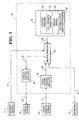
- the touch-sensitive screen 16 provides output signals on line 17 (shown only in Fig. 3) to the processing unit 18.
- the processing unit 18 receives input signals from the document reader 11, the keyboard 22, and the touch-sensitive screen 16 and provides output signals to the display screen 14 in response to the input signals. More specifically, the processing unit 18 includes touch-screen control circuitry 40 which receives input signals on line 17 from the touch-sensitive screen 16 and provides output signals on line 42 in response thereto. The touch-screen control circuitry 40 continually monitors the touch-sensitive screen 16 for sensing any touching or "dragging" event which occurs on the touch-sensitive screen 16.
- the processing unit 18 further includes a microcomputer 24 and a memory 50 which communicates via signals on line 28 with the microcomputer 24. Suitable microcomputers and memories are readily available in the marketplace. Their structure and operation are well known and, therefore, will not be described.
- the microcomputer 24 receives input signals on cable 21 from the document reader 11.
- the input signals from the document reader 11 comprise strings of alphanumeric characters. The characters in each string of characters are aligned next to each other.
- the microcomputer 24 processes the input signals from the document reader 11 in accordance with the present invention. More specifically, the microcomputer 24 processes the input signals from the document reader 11 to create modified strings of characters in accordance with instructions of a main control program 52 and an editable space insertion program 58, both of which are stored in the memory 50.
- a flowchart depicts operation of the program 58 to create modified strings of characters in accordance with the present invention.
- the microcomputer 24 obtains an original string of characters from the document reader 11.
- the program 58 then proceeds to step 104 in which a single editable space (reference 31 in Fig.5) is inserted between each pair of characters in the original string of characters obtained in step 102.
- a single editable space 31 is inserted between each pair of characters, a modified string 8 of characters is created.
- the modified string of characters containing the inserted spaces is displayed on the display screen 14, as shown in step 106.
- the microcomputer 24 also receives input signals on cable 23 from the keyboard 22 and input signals on line 42 from the touch-screen control circuitry 40, and processes these input signals in accordance with instructions of the main control program 52 stored in the memory 50.
- the microcomputer 24 processes its input signals and generates output signals in accordance with instructions of a co-ordinate translator 54 stored in the memory 50.
- the microcomputer 24 then provides the output signals on line 25 to display control circuitry 26 in accordance with instructions of a display driver 56 stored in the memory 50.
- the display control circuitry 26 provides output signals on line 27 to the display screen 14 to be displayed.
- the structure and operation of the display control circuitry 26 are well known and, therefore, will not be described.
- the touch-screen system is calibrated and the parameters are selected such that the display co-ordinates of the cursor are offset from the location at which the touch-screen is being touched.
- the touch-screen control circuitry 40 linearly transforms internal co-ordinates into display co-ordinates in a manner which enables the cursor 30 and the target area 32 to be separate from each other on the display screen 14, as explained in more detail hereinbelow.
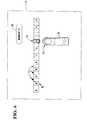
- the image of the cursor 30 appearing on the display screen 14 of the monitor 12 is movable along an image of a text string 8 which also appears on the display screen 14.
- the text string 8 lies along a horizontally extending linear axis on the display screen 14.
- the numeral "3" is being selected by the cursor 30.
- An image of the target area 32 also appears on the display screen 14.
- the target area 32 is located below the cursor 30 on the display screen 14.
- the cursor 30 and the target area 32 are separate from each other.
- the target area 32 is movable in opposite directions (as shown with arrows 33 and 35 in Fig. 5) along a linear axis on the display screen 14 which is parallel to the linear axis of the text string 31.
- an image of a "REMOVE" key 36 appears in the vicinity of the upper right corner of the display screen 14.
- the image of the REMOVE key 36 includes the particular character which the cursor 30 is presently selecting. Since the cursor 30 shown in Fig. 5 is selecting the numeral "3", the image of the REMOVE key 36 includes the numeral "3".
- a finger 38 (Fig. 6) of a user is placed on the surface of the touch-sensitive screen 16 in the vicinity of the target area 32.
- the finger 38 generally covers the entire target area 32.
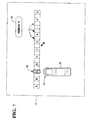
- the finger 38 is moved across the touch-sensitive screen 16 to another location on the touch-sensitive screen 16 such as shown in Fig. 7.
- the finger 38 remains in contact with the surface of the touch-sensitive screen 16 during movement of the finger 38 from the position shown in Fig. 6 to the position shown in Fig. 7.
- the target area 32 is "dragged" from its initial position shown in Fig. 6 to the position shown in Fig. 7.
- the cursor 30 located above the target area 32 is dragged from its position shown in Fig. 6 to the position shown in Fig. 7.
- the letter "C” is being selected by the cursor 30. Since the cursor 30 shown in Fig. 7 is selecting the alphabetic character "C", the image of the REMOVE key 36 includes the alphabetic character "C".
- a flowchart depicts operation of the cursor 30 just described hereinabove.
- the user's finger 38 is applied to the target area 32.
- the finger 38 is then moved to another position to drag the target area 32 from the position in Fig. 6 to the position shown in Fig. 7, as shown in step 202 of Fig. 8.
- the cursor 30 is dragged from the position in Fig. 6 to the position in Fig. 7, as shown in step 204 of Fig. 8.
- the user's finger 38 is then removed from the target area 32 as shown in step 206 in Fig. 8.
- a number of advantages result by moving the cursor 30 as described hereinabove.
- One advantage is that the desired target selection is not obscured by the finger 38 of user when the cursor 30 arrives at the location of the desired target location.
- Another advantage is that the cursor 30 is positioned quickly and accurately on the desired target selection when the cursor 30 arrives at the location of the desired target selection.
- a flowchart depicts operation of the editable space insertion program 58 stored in the memory 50 to manage the number of editable spaces in the modified string of characters when either a new character is added or an existing character is deleted.
- step 300 a determination is made as to whether the cursor 30 is on a target alphanumeric character (including commas, periods, decimal points, etc.). If the determination in step 300 is affirmative, the program proceeds to step 302 in which a determination is made as to whether the image of the REMOVE key 36 on the display screen 14 is touched.
- step 302 the program proceeds to step 304 in which the target alphanumeric character is deleted.
- step 306 the editable space immediately to the left of the just deleted target character is also deleted.
- the cursor 30 is then placed on the editable space which is immediately to the right of the just deleted target character as shown in step 308.
- the program then returns to the start.
- step 302 the program proceeds to step 310 in which a determination is made as to whether an alphanumeric character key on the keyboard 22 is pressed. If the determination in step 310 is negative, the program returns to the start. Otherwise, the program proceeds to step 312 to replace the target character with the newly pressed alphanumeric character before returning to the start.
- step 300 determines whether the program is negative. If the determination in step 300 is negative, the program proceeds to step 316 in which a determination is made as to whether the cursor 30 is on a target editable space 31. If the determination in step 316 is negative, the program ends. Otherwise, the program proceeds to step 318 in which a determination is made as to whether the insert key on the keyboard 22 is pressed. If the determination in step 318 is affirmative, the program returns to the start. If the determination in step 318 is negative, the program proceeds to step 324.
- step 324 a determination is made as to whether an alphanumeric key on the keyboard 22 is pressed. If the determination in step 324 is negative, the program returns to the start. Otherwise, the program proceeds to step 326 in which the just pressed alphanumeric character is inserted into the target editable space 31. An editable space is then inserted to the left of the newly inserted character, as shown in step 328. Another editable space is inserted to the right of the newly inserted character, as shown in step 330. Also, as shown in step 332, the cursor 30 is set on the newly inserted character of step 326 before the program returns to the start.
- a number of advantages result by providing an editable space between adjacent alphanumeric characters, as described hereinabove.
- One advantage is that a user can easily edit a string of alphanumeric characters without having to re-type the entire string of characters.
- Another advantage is that a user unfamiliar with the use of the backspace, delete, and insert keys on a keyboard is less likely to be confused as to which alphanumeric character will be deleted when the cursor 30 is positioned between two adjacent characters.
Landscapes
- Engineering & Computer Science (AREA)
- Theoretical Computer Science (AREA)
- Audiology, Speech & Language Pathology (AREA)
- Health & Medical Sciences (AREA)
- Computational Linguistics (AREA)
- General Health & Medical Sciences (AREA)
- Physics & Mathematics (AREA)
- General Engineering & Computer Science (AREA)
- General Physics & Mathematics (AREA)
- Artificial Intelligence (AREA)
- Document Processing Apparatus (AREA)
- User Interface Of Digital Computer (AREA)
- Digital Computer Display Output (AREA)
Applications Claiming Priority (2)
| Application Number | Priority Date | Filing Date | Title |
|---|---|---|---|
| GB9623047 | 1996-11-06 | ||
| GBGB9623047.9A GB9623047D0 (en) | 1996-11-06 | 1996-11-06 | Method and system for processing a string of characters and presenting the processed string of characters on a display screen |
Publications (2)
| Publication Number | Publication Date |
|---|---|
| EP0841623A2 true EP0841623A2 (de) | 1998-05-13 |
| EP0841623A3 EP0841623A3 (de) | 1999-07-21 |
Family
ID=10802490
Family Applications (1)
| Application Number | Title | Priority Date | Filing Date |
|---|---|---|---|
| EP97308676A Withdrawn EP0841623A3 (de) | 1996-11-06 | 1997-10-30 | Verfahren und System zur Verarbeitung einer Zeichenkette |
Country Status (4)
| Country | Link |
|---|---|
| EP (1) | EP0841623A3 (de) |
| JP (1) | JPH10240485A (de) |
| GB (1) | GB9623047D0 (de) |
| ZA (1) | ZA979783B (de) |
Cited By (1)
| Publication number | Priority date | Publication date | Assignee | Title |
|---|---|---|---|---|
| US20190205752A1 (en) * | 2017-12-29 | 2019-07-04 | Bull Sas | Method for training a neural network for recognition of a character sequence and associated recognition method |
Family Cites Families (3)
| Publication number | Priority date | Publication date | Assignee | Title |
|---|---|---|---|---|
| US5237158A (en) * | 1989-10-10 | 1993-08-17 | Unisys Corporation | Image-based document processing system providing for priority document shipment |
| JPH07105185A (ja) * | 1993-10-01 | 1995-04-21 | Matsushita Electric Ind Co Ltd | 文書作成装置 |
| JPH07244702A (ja) * | 1994-03-07 | 1995-09-19 | Glory Ltd | 小切手処理装置 |
-
1996
- 1996-11-06 GB GBGB9623047.9A patent/GB9623047D0/en active Pending
-
1997
- 1997-10-30 ZA ZA9709783A patent/ZA979783B/xx unknown
- 1997-10-30 EP EP97308676A patent/EP0841623A3/de not_active Withdrawn
- 1997-11-05 JP JP30241097A patent/JPH10240485A/ja active Pending
Cited By (2)
| Publication number | Priority date | Publication date | Assignee | Title |
|---|---|---|---|---|
| US20190205752A1 (en) * | 2017-12-29 | 2019-07-04 | Bull Sas | Method for training a neural network for recognition of a character sequence and associated recognition method |
| US11748979B2 (en) * | 2017-12-29 | 2023-09-05 | Bull Sas | Method for training a neural network for recognition of a character sequence and associated recognition method |
Also Published As
| Publication number | Publication date |
|---|---|
| GB9623047D0 (en) | 1997-01-08 |
| JPH10240485A (ja) | 1998-09-11 |
| EP0841623A3 (de) | 1999-07-21 |
| ZA979783B (en) | 1999-07-30 |
Similar Documents
| Publication | Publication Date | Title |
|---|---|---|
| JP4742132B2 (ja) | 入力装置、画像処理プログラムおよびコンピュータ読み取り可能な記録媒体 | |
| EP0795811A1 (de) | Anzeigevorrichtung und Verfahren zum Verschieben eines Cursors auf einem Bildschirm | |
| US5502461A (en) | Hand written character input system/allowing change of size of character writing frames | |
| US5956021A (en) | Method and device for inputting information for a portable information processing device that uses a touch screen | |
| KR101429278B1 (ko) | 문자 삭제 기능을 제공하기 위한 장치 및 방법 | |
| EP0203314B1 (de) | Messungsspezifizierung auf einer Seite durch Zeigung | |
| JPH0651908A (ja) | タッチパネル式入力装置を備えた情報処理装置 | |
| US5999159A (en) | Apparatus and method for displaying document on display | |
| KR101447886B1 (ko) | 터치 스크린 디스플레이를 통해 컨텐츠를 선택하는 방법 및 장치 | |
| US6069618A (en) | Data processing device and method for processing data | |
| EP0841623A2 (de) | Verfahren und System zur Verarbeitung einer Zeichenkette | |
| JPH0744308A (ja) | ワードプロセッサ | |
| JP3526479B2 (ja) | オンライン手書き文字入力方法及び装置 | |
| JP2738851B2 (ja) | 複数カーソルによる入力データ処理表示方法 | |
| KR920002255B1 (ko) | 수기식 키이보오드 없는 엔트리 컴퓨터 시스템 | |
| JP3091543B2 (ja) | 文書処理装置 | |
| JP3200249B2 (ja) | 文書処理装置 | |
| JP3763864B2 (ja) | ポインティングデバイスによるカーソルの移動方法 | |
| JPH07295978A (ja) | データファイル処理装置における undo 処理方式 | |
| JPH07287711A (ja) | 文書作成装置及びその画面入力方法 | |
| JP3200250B2 (ja) | 文書処理装置 | |
| JPH0831097B2 (ja) | 文書入力処理装置 | |
| JPH1185733A (ja) | 文書編集装置及びその文書編集方法並びに記録媒体 | |
| JP2834882B2 (ja) | 文書作成装置 | |
| JP2771669B2 (ja) | 罫線編集装置 |
Legal Events
| Date | Code | Title | Description |
|---|---|---|---|
| PUAI | Public reference made under article 153(3) epc to a published international application that has entered the european phase |
Free format text: ORIGINAL CODE: 0009012 |
|
| AK | Designated contracting states |
Kind code of ref document: A2 Designated state(s): AT BE CH DE DK ES FI FR GB GR IE IT LI LU MC NL PT SE |
|
| AX | Request for extension of the european patent |
Free format text: AL;LT;LV;RO;SI |
|
| PUAL | Search report despatched |
Free format text: ORIGINAL CODE: 0009013 |
|
| AK | Designated contracting states |
Kind code of ref document: A3 Designated state(s): AT BE CH DE DK ES FI FR GB GR IE IT LI LU MC NL PT SE |
|
| AX | Request for extension of the european patent |
Free format text: AL;LT;LV;RO;SI |
|
| AKX | Designation fees paid | ||
| REG | Reference to a national code |
Ref country code: DE Ref legal event code: 8566 |
|
| STAA | Information on the status of an ep patent application or granted ep patent |
Free format text: STATUS: THE APPLICATION IS DEEMED TO BE WITHDRAWN |
|
| 18D | Application deemed to be withdrawn |
Effective date: 20000122 |