EP0883053A2 - Système d'entrée de commandes par menu - Google Patents
Système d'entrée de commandes par menu Download PDFInfo
- Publication number
- EP0883053A2 EP0883053A2 EP98201782A EP98201782A EP0883053A2 EP 0883053 A2 EP0883053 A2 EP 0883053A2 EP 98201782 A EP98201782 A EP 98201782A EP 98201782 A EP98201782 A EP 98201782A EP 0883053 A2 EP0883053 A2 EP 0883053A2
- Authority
- EP
- European Patent Office
- Prior art keywords
- submenu
- menu
- selection
- command
- control unit
- Prior art date
- Legal status (The legal status is an assumption and is not a legal conclusion. Google has not performed a legal analysis and makes no representation as to the accuracy of the status listed.)
- Ceased
Links
Images
Classifications
-
- G—PHYSICS
- G06—COMPUTING OR CALCULATING; COUNTING
- G06F—ELECTRIC DIGITAL DATA PROCESSING
- G06F3/00—Input arrangements for transferring data to be processed into a form capable of being handled by the computer; Output arrangements for transferring data from processing unit to output unit, e.g. interface arrangements
- G06F3/01—Input arrangements or combined input and output arrangements for interaction between user and computer
- G06F3/048—Interaction techniques based on graphical user interfaces [GUI]
- G06F3/0487—Interaction techniques based on graphical user interfaces [GUI] using specific features provided by the input device, e.g. functions controlled by the rotation of a mouse with dual sensing arrangements, or of the nature of the input device, e.g. tap gestures based on pressure sensed by a digitiser
- G06F3/0489—Interaction techniques based on graphical user interfaces [GUI] using specific features provided by the input device, e.g. functions controlled by the rotation of a mouse with dual sensing arrangements, or of the nature of the input device, e.g. tap gestures based on pressure sensed by a digitiser using dedicated keyboard keys or combinations thereof
-
- G—PHYSICS
- G06—COMPUTING OR CALCULATING; COUNTING
- G06F—ELECTRIC DIGITAL DATA PROCESSING
- G06F3/00—Input arrangements for transferring data to be processed into a form capable of being handled by the computer; Output arrangements for transferring data from processing unit to output unit, e.g. interface arrangements
- G06F3/01—Input arrangements or combined input and output arrangements for interaction between user and computer
- G06F3/048—Interaction techniques based on graphical user interfaces [GUI]
- G06F3/0481—Interaction techniques based on graphical user interfaces [GUI] based on specific properties of the displayed interaction object or a metaphor-based environment, e.g. interaction with desktop elements like windows or icons, or assisted by a cursor's changing behaviour or appearance
- G06F3/0482—Interaction with lists of selectable items, e.g. menus
-
- Y—GENERAL TAGGING OF NEW TECHNOLOGICAL DEVELOPMENTS; GENERAL TAGGING OF CROSS-SECTIONAL TECHNOLOGIES SPANNING OVER SEVERAL SECTIONS OF THE IPC; TECHNICAL SUBJECTS COVERED BY FORMER USPC CROSS-REFERENCE ART COLLECTIONS [XRACs] AND DIGESTS
- Y10—TECHNICAL SUBJECTS COVERED BY FORMER USPC
- Y10S—TECHNICAL SUBJECTS COVERED BY FORMER USPC CROSS-REFERENCE ART COLLECTIONS [XRACs] AND DIGESTS
- Y10S345/00—Computer graphics processing and selective visual display systems
- Y10S345/902—Menu display
Definitions
- Such menu navigation is intended for operation on a "staff Computer ", which is usually a system processor, a screen, a Keyboard, one or more floppy drives, a hard drive and optionally includes a printer.
- this computer system also belongs a mouse as an input device.
- the object of the invention is to provide a system for menu-guided command input create which is simple and easy for an inexperienced user is operable.
- the menu-guided command input is opened the operation of only 3 buttons is limited. Still it is system according to the invention very well to the flexible hierarchical structure of a Menus adapted. Its operation is easy to learn and ergonomically favorable because it is tailored for intuitive handling. The user will be able to offset to operate the system via the 3 buttons without looking away from the To take display unit. In fact, any menu structure can can be operated intuitively.
- the selection can be made in a manner known per se using the selection buttons can also be controlled by the duration of the actuation of the relevant selection key. So can in the predetermined order of the display on the display unit to the immediately adjacent menu, submenu or command if the duration of pressing the associated selection key within a third period of time, and there can be an automatic, rapid progression in the order mentioned when the duration of the operation of the associated Option key is within a fourth period. Preferably the third or fourth time period coincide with the first or second time period.
- the execution key spatially arranged between the selection buttons so that all three buttons from Users with three adjacent fingers of one hand can be operated.
- This Key arrangement makes repeated searching of the keys during operation dispensable and thus facilitates intuitive operation and concentration of the The user looks at the display unit. Furthermore, visiting the buttons be facilitated in that at least one of them can be identified identically is trained. Finding the buttons is thus possible without eye contact.
- Ease of use in terms of improved ergonomics can also be achieved in that the control unit is adjacent to the display unit, preferably in the position of use immediately below it.
- the system according to the invention is electronic for a large number of devices Sighal processing can be used for menu-guided command input.
- a preferred one Field of application is the operation of radio equipment, especially for the Use in motor vehicles.
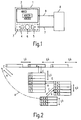
- reference number 1 is an exemplary device control panel reproduced schematically, in its - in the use position - the upper part a display unit 2 and an operating unit 3 arranged in its lower part are.
- the control unit 3 comprises a first selection key 4 and a second selection key 5 and an execution button 6.
- the control unit 3 is connected via a line 7 to a Control unit 8 connected, which also via a further line 9 with the Display unit 2 is connected.
- Each submenu contains commands and / or further submenus, and from the menu or submenu can by a user a submenu or a command to execute or others Selection can be selected.
- the menus, submenus and commands are provided by the Control unit in the form of a data signal via the further line 9 of the Display unit 2 fed and shown there symbolically.
- the representation and the The control unit 3 executes the menus, submenus or commands controlled, namely by the selection buttons 4,5 and the execution button 6. Zur Transmission of appropriate command signals from the control unit 3 to the Control unit 8 serves line 7.
- Fig. 2 shows roughly schematically an example of a menu structure, as shown by the 1 can be edited.
- a section of is shown an exemplary menu, the three submenus 1., 2. and 3. includes.
- the outline of the submenu 2 which is drawn more strongly, indicates that this Submenu has been selected by pressing selection buttons 4, 5.
- the selection buttons 4 or 5 are pressed until - starting from an initial situation - submenu 2. is selected.
- This selection is preferably made on the Display unit 2 optically highlighted, as in Fig. 1 by a frame was hinted at.
- the first selection button 4 that of all three buttons the control unit 3 is located furthest to the left, can be selected from the currently selected Submenu for the previous submenu in the order shown, here the submenu 1.
- the second selection button 5 located on the right in the control unit 3, came from the selected submenu 2. proceeded to the following submenu 3. this can be selected.
- the submenu 2 is to be presented in more detail Submenu determined.
- the display unit 2 the sub-menu determined in this way with all its further sub-menus 2.1 to 2.7 shown.
- the first further submenu 2.1 is preferably selected at the same time, so that this is preferably optically highlighted on the display unit 2.
- the second selection button 5 By pressing the second selection button 5, the second further sub-menu can now be opened 2.2. can be selected. Further actuations of the second selection key 5 lead to Select the other submenus 2.3 to 2.7 one after the other. This is also through an arrow marking "l / r" arranged vertically here is indicated.
- the further submenu 2.4 is selected.
- Termination leads to the menu structure either in the higher-level submenu or menu, or optionally without Intermediate levels to the starting point of the entire menu or all existing ones Menus.
- this means that such an abort as arrow "A” symbolizes, for example from command 2.4.4.1 to submenu 2.4.4. is returned.
- Another triggering of an abort then leads to Submenu 2.4, a third termination to submenu 2.1.
- Control unit 8 can also be designed so that by one-time abort from a any point of the menu structure basically immediately to the starting point of all existing menus is returned. A termination designed in this way, in FIG. 2 with symbolized by a dash-dotted line, would have the same goal in the menu structure like the abort shown next to submenu 1.
- the keys 4, 5, 6 are preferably operated by index, middle or ring fingers and are shaped accordingly. With index and ring fingers are over the Selection buttons 4,5 the menu items, submenu items and thus for example Parameters and parameter values selected. Over the middle finger is through the Execution key 6 either a selection or a depending on the duration of the operation Saving a value, a parameter, a menu item or a command made, or a submenu or a menu without is canceled Selection (i.e. determination) or saving of the last displayed value or Exit command or without changing a parameter. For example, for an entry the execution key 6 pressed for more than half a second held while the execution key 6 is shorter than half for an abort Second is pressed.
Landscapes
- Engineering & Computer Science (AREA)
- General Engineering & Computer Science (AREA)
- Theoretical Computer Science (AREA)
- Human Computer Interaction (AREA)
- Physics & Mathematics (AREA)
- General Physics & Mathematics (AREA)
- User Interface Of Digital Computer (AREA)
- Input From Keyboards Or The Like (AREA)
- Accommodation For Nursing Or Treatment Tables (AREA)
- Mechanical Control Devices (AREA)
Applications Claiming Priority (2)
| Application Number | Priority Date | Filing Date | Title |
|---|---|---|---|
| DE19723815 | 1997-06-06 | ||
| DE19723815A DE19723815A1 (de) | 1997-06-06 | 1997-06-06 | System zur menügeführten Befehlseingabe |
Publications (2)
| Publication Number | Publication Date |
|---|---|
| EP0883053A2 true EP0883053A2 (fr) | 1998-12-09 |
| EP0883053A3 EP0883053A3 (fr) | 1999-09-08 |
Family
ID=7831633
Family Applications (1)
| Application Number | Title | Priority Date | Filing Date |
|---|---|---|---|
| EP98201782A Ceased EP0883053A3 (fr) | 1997-06-06 | 1998-05-28 | Système d'entrée de commandes par menu |
Country Status (4)
| Country | Link |
|---|---|
| US (1) | US6104399A (fr) |
| EP (1) | EP0883053A3 (fr) |
| JP (1) | JPH1115582A (fr) |
| DE (1) | DE19723815A1 (fr) |
Cited By (3)
| Publication number | Priority date | Publication date | Assignee | Title |
|---|---|---|---|---|
| WO2002006939A3 (fr) * | 2000-07-18 | 2002-04-18 | Marc Christopher Schmidt | Interface utilisateur |
| EP1118930A3 (fr) * | 2000-01-19 | 2002-07-17 | Siemens Aktiengesellschaft | Manipulation d'une seule main d'un ordinateur de poche |
| WO2005073837A1 (fr) * | 2004-02-02 | 2005-08-11 | Koninklijke Philips Electronics N.V. | Navigation dans un menu organise hierarchiquement |
Families Citing this family (40)
| Publication number | Priority date | Publication date | Assignee | Title |
|---|---|---|---|---|
| DE19842286C1 (de) * | 1998-09-16 | 1999-11-18 | Mannesmann Vdo Ag | Vorrichtung und Verfahren zum Anzeigen von Piktogrammen |
| DE19943580C1 (de) * | 1999-09-13 | 2000-12-14 | Bayerische Motoren Werke Ag | Vorrichtung zur Steuerung einer Bildschirmanzeige |
| NO20004375L (no) * | 1999-12-06 | 2001-06-07 | Ziad Badarneh | System og fremgangsmåte for fremvisning og assistering av manipuleringsbevegelser ved betjening av en manöverinnretning foret funksjonsutstyr |
| US6664991B1 (en) * | 2000-01-06 | 2003-12-16 | Microsoft Corporation | Method and apparatus for providing context menus on a pen-based device |
| GB0019459D0 (en) * | 2000-07-28 | 2000-09-27 | Symbian Ltd | Computing device with improved user interface for applications |
| JP2002104090A (ja) * | 2000-09-29 | 2002-04-09 | Clarion Co Ltd | 車載機器及びその制御方法 |
| AU2002226886A1 (en) * | 2000-11-09 | 2002-05-21 | Change Tools, Inc. | A user definable interface system, method and computer program product |
| US7895530B2 (en) * | 2000-11-09 | 2011-02-22 | Change Tools, Inc. | User definable interface system, method, support tools, and computer program product |
| ES2270935T3 (es) * | 2000-11-14 | 2007-04-16 | Volkswagen Aktiengesellschaft | Dispositivo de visualizacion con al menos un elemento de mando multifuncion. |
| DE10110900A1 (de) * | 2000-11-14 | 2002-05-23 | Volkswagen Ag | Anzeigevorrichtung mit wenigstens einem Multifunktions-Bedienelement |
| KR20020047475A (ko) * | 2000-12-13 | 2002-06-22 | 윤종용 | 이동 버튼을 이용하여 화면상의 항목 이동을 제어하는장치 및 방법 |
| US7454714B2 (en) * | 2001-03-30 | 2008-11-18 | Aol Llc, A Delaware Limited Liability Company | Visually distinguishing menu items |
| JP3858756B2 (ja) * | 2002-05-16 | 2006-12-20 | 株式会社デンソー | 車載機器制御装置 |
| DE10252688A1 (de) * | 2002-11-13 | 2004-06-03 | Caa Ag | Fahrzeugrechner-System und Verfahren zur Auswahl und Aktivierung von Auswahlmenüs |
| DE10360660A1 (de) * | 2003-12-23 | 2005-07-21 | Daimlerchrysler Ag | Bediensystem für ein Kraftfahrzeug |
| DE10360657A1 (de) * | 2003-12-23 | 2005-07-21 | Daimlerchrysler Ag | Bediensystem für ein Kraftfahrzeug |
| ATE425487T1 (de) * | 2004-09-15 | 2009-03-15 | Harman Becker Automotive Sys | Multimedia system für fahrzeugen und methode um ein multimedia system für fahrzeugen zu bedienen |
| US20060246955A1 (en) * | 2005-05-02 | 2006-11-02 | Mikko Nirhamo | Mobile communication device and method therefor |
| US20070008305A1 (en) * | 2005-06-28 | 2007-01-11 | Visteon Global Technologies, Inc. | Multiple function radio bezel interface |
| US20080204412A1 (en) * | 2007-02-22 | 2008-08-28 | Peter On | User interface navigation mechanism and method of using the same |
| US20080294274A1 (en) * | 2007-05-22 | 2008-11-27 | Honeywell International Inc. | Special purpose controller interface with breadcrumb navigation support |
| US20080295030A1 (en) | 2007-05-22 | 2008-11-27 | Honeywell International Inc. | User interface for special purpose controller |
| US20080290183A1 (en) * | 2007-05-22 | 2008-11-27 | Honeywell International Inc. | Special purpose controller interface with instruction area |
| US7845576B2 (en) * | 2007-06-28 | 2010-12-07 | Honeywell International Inc. | Thermostat with fixed segment display having both fixed segment icons and a variable text display capacity |
| US7954726B2 (en) * | 2007-06-28 | 2011-06-07 | Honeywell International Inc. | Thermostat with utility messaging |
| US8091794B2 (en) * | 2007-06-28 | 2012-01-10 | Honeywell International Inc. | Thermostat with usage history |
| DE102007061625B4 (de) * | 2007-12-18 | 2024-08-01 | Volkswagen Ag | Bediensystem für ein Kraftfahrzeug mit variabler Funktionsvielfalt |
| DE102008032447B4 (de) * | 2008-07-10 | 2014-03-20 | Rational Ag | Anzeigeverfahren für ein Gargerät |
| US20100251184A1 (en) | 2009-03-25 | 2010-09-30 | Honeywell International Inc. | Approach for advanced user navigation |
| US8185245B2 (en) * | 2010-01-22 | 2012-05-22 | Honeywell International Inc. | HVAC control with utility time of day pricing support |
| US8326466B2 (en) * | 2010-01-22 | 2012-12-04 | Honeywell International Inc. | HVAC control with utility time of day pricing support |
| US8538586B2 (en) * | 2010-01-22 | 2013-09-17 | Honeywell International Inc. | HVAC control with utility time of day pricing support |
| US8204628B2 (en) * | 2010-03-24 | 2012-06-19 | Honeywell International Inc. | Setpoint recovery with utility time of day pricing |
| KR101336655B1 (ko) * | 2010-12-27 | 2013-12-04 | 교세라 도큐멘트 솔루션즈 가부시키가이샤 | 화상 형성 장치 및 화상 형성 장치의 제어 방법 |
| US20120185802A1 (en) * | 2011-01-18 | 2012-07-19 | Yisia Young Suk Lee | Method and apparatus for retrieving and displaying information |
| US10852025B2 (en) | 2013-04-30 | 2020-12-01 | Ademco Inc. | HVAC controller with fixed segment display having fixed segment icons and animation |
| US10649418B2 (en) | 2013-12-11 | 2020-05-12 | Ademco Inc. | Building automation controller with configurable audio/visual cues |
| US10572130B2 (en) * | 2015-05-08 | 2020-02-25 | General Electric Company | Systems and methods for controlling power generation plant operations via a human-machine interface |
| US9962014B2 (en) | 2016-04-01 | 2018-05-08 | Zero Zone, Inc. | Holder for a refrigerated case |
| US10488062B2 (en) | 2016-07-22 | 2019-11-26 | Ademco Inc. | Geofence plus schedule for a building controller |
Family Cites Families (14)
| Publication number | Priority date | Publication date | Assignee | Title |
|---|---|---|---|---|
| DE3836555A1 (de) * | 1988-10-27 | 1990-05-10 | Bayerische Motoren Werke Ag | Multifunktions-bedieneinrichtung |
| FI87871C (fi) * | 1990-06-26 | 1995-05-16 | Nokia Mobile Phones Ltd | Anordning foer soekning av menyer i en telefonanordning |
| US5204947A (en) * | 1990-10-31 | 1993-04-20 | International Business Machines Corporation | Application independent (open) hypermedia enablement services |
| US5425140A (en) * | 1992-03-20 | 1995-06-13 | International Business Machines Corporation | Method and apparatus for providing conditional cascading in a computer system graphical user interface |
| US5363481A (en) * | 1992-06-22 | 1994-11-08 | Tektronix, Inc. | Auto selecting scrolling device |
| CA2271555C (fr) * | 1992-12-09 | 2003-11-11 | Discovery Communications, Inc. | Commande a distance pour systeme de television cable |
| JPH0778120A (ja) * | 1993-07-29 | 1995-03-20 | Xerox Corp | 手持ち演算装置及び手持ち演算装置における入力信号処理方法 |
| US5627531A (en) * | 1994-09-30 | 1997-05-06 | Ohmeda Inc. | Multi-function menu selection device |
| US5689667A (en) * | 1995-06-06 | 1997-11-18 | Silicon Graphics, Inc. | Methods and system of controlling menus with radial and linear portions |
| EP0757327A3 (fr) * | 1995-07-31 | 1998-04-15 | Key Tronic Corporation | Boítier de souris |
| US5877746A (en) * | 1995-11-16 | 1999-03-02 | Apple Computer, Inc. | User interface for all-in-one integrated office system |
| DE29611274U1 (de) * | 1996-06-27 | 1996-09-26 | Siemens AG, 80333 München | Schalteinrichtung für Fernsprechapparate |
| US5784583A (en) * | 1996-09-09 | 1998-07-21 | International Business Machine Corp. | Intuitive technique for building graphical menus |
| GB2319691B (en) * | 1996-11-22 | 2001-05-23 | Nokia Mobile Phones Ltd | User interface for a radio telephone |
-
1997
- 1997-06-06 DE DE19723815A patent/DE19723815A1/de not_active Withdrawn
-
1998
- 1998-05-28 EP EP98201782A patent/EP0883053A3/fr not_active Ceased
- 1998-06-03 US US09/090,103 patent/US6104399A/en not_active Expired - Lifetime
- 1998-06-04 JP JP15583498A patent/JPH1115582A/ja active Pending
Cited By (4)
| Publication number | Priority date | Publication date | Assignee | Title |
|---|---|---|---|---|
| EP1118930A3 (fr) * | 2000-01-19 | 2002-07-17 | Siemens Aktiengesellschaft | Manipulation d'une seule main d'un ordinateur de poche |
| US6714220B2 (en) | 2000-01-19 | 2004-03-30 | Siemens Aktiengesellschaft | Interactive input with limit-value monitoring and on-line help for a palmtop device |
| WO2002006939A3 (fr) * | 2000-07-18 | 2002-04-18 | Marc Christopher Schmidt | Interface utilisateur |
| WO2005073837A1 (fr) * | 2004-02-02 | 2005-08-11 | Koninklijke Philips Electronics N.V. | Navigation dans un menu organise hierarchiquement |
Also Published As
| Publication number | Publication date |
|---|---|
| JPH1115582A (ja) | 1999-01-22 |
| EP0883053A3 (fr) | 1999-09-08 |
| DE19723815A1 (de) | 1998-12-10 |
| US6104399A (en) | 2000-08-15 |
Similar Documents
| Publication | Publication Date | Title |
|---|---|---|
| EP0883053A2 (fr) | Système d'entrée de commandes par menu | |
| DE19843421B4 (de) | Vorrichtung zur Auswahl von Punkten einer aus Menüs und/oder Untermenüs und/oder Funktionen und/oder Funktionswerten bestehenden Menüstruktur | |
| DE69032645T2 (de) | Datenverarbeitungssystem mit auf Gesten basierenden Eingabedaten | |
| EP0701926B1 (fr) | Dispositif de commande multifonctions | |
| DE602004013116T2 (de) | Haptische tastengesteuerte Dateneingabe | |
| DE3245610C3 (de) | Ein/Ausgabeeinheit für eine numerische Steuerung | |
| DE69719477T2 (de) | Vorrichtung und Verfahren zur Eingabe von Buchstaben | |
| DE102007013979A1 (de) | Modulare Tastatur für ein elektronisches Gerät und Verfahren zum Betreiben derselben | |
| DE20101768U1 (de) | Anzeige- und Bedienvorrichtung, insbesondere Touch Panel | |
| EP3282352B1 (fr) | Procédé et dispositif de commande permettant la commande d'un dispositif | |
| DE69306277T2 (de) | Eingangsgerät | |
| DE10205641A1 (de) | Multifunktions-Bedieneinrichtung | |
| DE4306467B4 (de) | Steuerungseinrichtung, insbesondere für eine Werkzeugmaschine | |
| EP0858016B1 (fr) | Dispositif de contrôle numérique avec interface de travail utilisant des fenêtres | |
| DE69706294T2 (de) | Tastatur | |
| DE102008015273A1 (de) | Eingeben von Informationen unter Verwendung einer Scroll-Taste | |
| EP0972618A2 (fr) | Machine de coupe pour matériaux en feuilles empilées | |
| EP2310935B1 (fr) | Procédé pour agrandir une zone de représentation sur un dispositif de représentation | |
| DE69414800T2 (de) | Vorrichtung zur Informationsaufbereitung für ein Autonavigationsystem | |
| DE19959218A1 (de) | Bedienereinheit für Banknotenbearbeitungsmaschinen | |
| DE102008017832B4 (de) | Eingabevorrichtung zur Ansteuerung von Elementen grafischer Benutzerschnittstellen | |
| DE3208136C2 (fr) | ||
| DE10126466C2 (de) | Fahrzeug-Rechnersystem und Verfahren zur Eingabe einer Zeichenkette | |
| DE19740528C2 (de) | Verfahren zum Steuern der Softkey-Funktionen eines Telefongerätes | |
| WO2011103938A1 (fr) | Appareil de terrain relevant de la technique d'automatisation des processus, et procédé d'édition de texte et/ou de numération, et dispositif présentant une unité d'affichage et une unité de commande |
Legal Events
| Date | Code | Title | Description |
|---|---|---|---|
| PUAI | Public reference made under article 153(3) epc to a published international application that has entered the european phase |
Free format text: ORIGINAL CODE: 0009012 |
|
| AK | Designated contracting states |
Kind code of ref document: A2 Designated state(s): DE FR GB IT |
|
| AX | Request for extension of the european patent |
Free format text: AL;LT;LV;MK;RO;SI |
|
| PUAL | Search report despatched |
Free format text: ORIGINAL CODE: 0009013 |
|
| AK | Designated contracting states |
Kind code of ref document: A3 Designated state(s): AT BE CH CY DE DK ES FI FR GB GR IE IT LI LU MC NL PT SE |
|
| AX | Request for extension of the european patent |
Free format text: AL;LT;LV;MK;RO;SI |
|
| RIC1 | Information provided on ipc code assigned before grant |
Free format text: 6G 06F 3/023 A, 6G 06F 3/033 B, 6B 60R 16/02 B |
|
| RAP3 | Party data changed (applicant data changed or rights of an application transferred) |
Owner name: KONINKLIJKE PHILIPS ELECTRONICS N.V. Owner name: PHILIPS CORPORATE INTELLECTUAL PROPERTY GMBH |
|
| 17P | Request for examination filed |
Effective date: 20000308 |
|
| AKX | Designation fees paid |
Free format text: DE FR GB IT |
|
| 17Q | First examination report despatched |
Effective date: 20020527 |
|
| RAP1 | Party data changed (applicant data changed or rights of an application transferred) |
Owner name: KONINKLIJKE PHILIPS ELECTRONICS N.V. Owner name: PHILIPS CORPORATE INTELLECTUAL PROPERTY GMBH |
|
| RAP1 | Party data changed (applicant data changed or rights of an application transferred) |
Owner name: KONINKLIJKE PHILIPS ELECTRONICS N.V. Owner name: PHILIPS INTELLECTUAL PROPERTY & STANDARDS GMBH |
|
| STAA | Information on the status of an ep patent application or granted ep patent |
Free format text: STATUS: THE APPLICATION HAS BEEN REFUSED |
|
| 18R | Application refused |
Effective date: 20040928 |