EP0917148A2 - Ein Gerät zum Schneiden von einem Bewegtbild mit einem davon abhängigen Information, ein Schnittverfahren und Aufzeichnungsmedium zur Ein Ein Gerät zum Schneiden von einem Bewegtbild mit davon abhängige Information, ein Schnittverfahren und Aufzeichnungsmedium zur Speicherung von Prozeduren für dieses Verfahren - Google Patents
Ein Gerät zum Schneiden von einem Bewegtbild mit einem davon abhängigen Information, ein Schnittverfahren und Aufzeichnungsmedium zur Ein Ein Gerät zum Schneiden von einem Bewegtbild mit davon abhängige Information, ein Schnittverfahren und Aufzeichnungsmedium zur Speicherung von Prozeduren für dieses Verfahren Download PDFInfo
- Publication number
- EP0917148A2 EP0917148A2 EP98121135A EP98121135A EP0917148A2 EP 0917148 A2 EP0917148 A2 EP 0917148A2 EP 98121135 A EP98121135 A EP 98121135A EP 98121135 A EP98121135 A EP 98121135A EP 0917148 A2 EP0917148 A2 EP 0917148A2
- Authority
- EP
- European Patent Office
- Prior art keywords
- information
- related information
- moving picture
- editing
- representative still
- Prior art date
- Legal status (The legal status is an assumption and is not a legal conclusion. Google has not performed a legal analysis and makes no representation as to the accuracy of the status listed.)
- Withdrawn
Links
Images












Classifications
-
- G—PHYSICS
- G11—INFORMATION STORAGE
- G11B—INFORMATION STORAGE BASED ON RELATIVE MOVEMENT BETWEEN RECORD CARRIER AND TRANSDUCER
- G11B27/00—Editing; Indexing; Addressing; Timing or synchronising; Monitoring; Measuring tape travel
- G11B27/02—Editing, e.g. varying the order of information signals recorded on, or reproduced from, record carriers
- G11B27/031—Electronic editing of digitised analogue information signals, e.g. audio or video signals
- G11B27/034—Electronic editing of digitised analogue information signals, e.g. audio or video signals on discs
-
- G—PHYSICS
- G11—INFORMATION STORAGE
- G11B—INFORMATION STORAGE BASED ON RELATIVE MOVEMENT BETWEEN RECORD CARRIER AND TRANSDUCER
- G11B27/00—Editing; Indexing; Addressing; Timing or synchronising; Monitoring; Measuring tape travel
- G11B27/10—Indexing; Addressing; Timing or synchronising; Measuring tape travel
- G11B27/11—Indexing; Addressing; Timing or synchronising; Measuring tape travel by using information not detectable on the record carrier
-
- G—PHYSICS
- G11—INFORMATION STORAGE
- G11B—INFORMATION STORAGE BASED ON RELATIVE MOVEMENT BETWEEN RECORD CARRIER AND TRANSDUCER
- G11B27/00—Editing; Indexing; Addressing; Timing or synchronising; Monitoring; Measuring tape travel
- G11B27/10—Indexing; Addressing; Timing or synchronising; Measuring tape travel
- G11B27/19—Indexing; Addressing; Timing or synchronising; Measuring tape travel by using information detectable on the record carrier
- G11B27/28—Indexing; Addressing; Timing or synchronising; Measuring tape travel by using information detectable on the record carrier by using information signals recorded by the same method as the main recording
-
- G—PHYSICS
- G11—INFORMATION STORAGE
- G11B—INFORMATION STORAGE BASED ON RELATIVE MOVEMENT BETWEEN RECORD CARRIER AND TRANSDUCER
- G11B27/00—Editing; Indexing; Addressing; Timing or synchronising; Monitoring; Measuring tape travel
- G11B27/10—Indexing; Addressing; Timing or synchronising; Measuring tape travel
- G11B27/34—Indicating arrangements
Definitions
- the present invention relates to a moving picture editing apparatus for use in production of such a moving picture program as television broadcasting program or video program.
- Fig. 2 shows a block diagram of a nonlinear moving picture editing apparatus.
- the illustrated apparatus includes a scene change point detector 201, a magnetic memory device 202, a monitor 203, a frame buffer 204, a main memory 205, an input device 206, a video tape recorder (VTR) 207, a video interface 208, a picture compressor 209, an audio interface 210, a central processing unit (CPU) 211, a bus 212 and a picture size reducer 214.
- a scene change point detector 201 a magnetic memory device 202, a monitor 203, a frame buffer 204, a main memory 205, an input device 206, a video tape recorder (VTR) 207, a video interface 208, a picture compressor 209, an audio interface 210, a central processing unit (CPU) 211, a bus 212 and a picture size reducer 214.
- the scene change point detector 201, magnetic memory device 202, monitor 203, frame buffer 204, main memory 205, input device 206, VTR 207, audio interface 210, picture compressor 209 and picture size reducer 214 are connected to the CPU 211 through the bus 212.
- the VTR 207 is connected to the video interface 208 and audio interface 210.
- the CPU 211 performs data transfer with the respective constituent elements connected thereto via the bus 212, the constituent elements being controlled by an access signal received from the CPU 211.
- An instruction to the CPU 211 is carried out by an operator with use of the input device 206 such as a mouse or keyboard.
- the VTR 207 reproduces a series of moving picture information containing plurality of scenes, sends moving picture in the reproduced information to the video interface 208, and also sends an audio signal in the reproduced information to the audio interface 210.
- the audio interface 210 converts the received audio signal to a digital signal and sends the digital signal to the magnetic memory device 202.
- the magnetic memory device 202 stores therein the received audio information.
- the video interface 208 converts the received moving picture information to information having a format processable by the moving picture editing apparatus, and sends the converted information to the scene change point detector 201, magnetic memory device 202, main memory 205, picture compressor 209 and picture size reducer 214.
- the picture compressor 209 compresses digital data of the reproduced moving pictures, e.g., based on a moving picture experts group (MPEG) or motion joint photographic experts group (motion JPEG) system.
- MPEG moving picture experts group
- motion JPEG motion JPEG
- the magnetic memory device 202 stores therein the received video information.
- the scene change point detector 201 analyzes the received moving pictures on a frame basis and detects a scene change point and a cut change point on the basis of a degree of change in a color distribution between frames.
- the picture size reducer 214 generates a reduced moving picture (M-icon) by thinning out data of each frame into video or moving picture data of 80 ⁇ 60 pixels on the basis of an analysis result of the scene change point detector 201.
- the generated M-icon is sent to the magnetic memory device 202 and stored therein.
- Moving picture analysis information (including frame numbers for scene change points or cut change points) indicative of a relationship between the M-icon and the detection result of the scene change point detector 201 is also sent to the magnetic memory 202 and saved therein.
- the monitor 203 displays the moving pictures stored in the magnetic memory device 202 on the basis of analysis information thereof to offer a graphical user interface (GUI) to the operator.
- the frame buffer 204 stores therein pictures to be displayed on the monitor 203.
- the main memory 205 stores therein various sorts of control programs for the CPU 211.
- the magnetic memory device 202 may be replaced by another recording medium such as a magneto-optical memory or a remote file connected through a network.
- the mouse used as the input device 206 may be replaced by a track ball or another pointing device.
- a communication device 215 may be a Ether Net, an inter-face, asynchronous transfer mode (ATM) interface, a modem, a facsimile machine, a telephone or another communication terminal which can perform information transfer between an external communication network and the nonlinear editing apparatus.
- ATM synchronous transfer mode
- the operator sequentially edits the reduced moving picture (M-icon) on which the scene analysis information obtained at the scene change point detector 201 is reflected, and constructs them into a tree structure.
- M-icon reduced moving picture
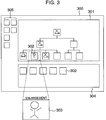
- Fig. 3 shows an example of the editing display screen displayed on the monitor 203.
- reference numeral 301 denotes a hierarchical structure (a tree structure) area
- numeral 302 denotes an M-icon
- 303 denotes a schematic enlargement of the M-icon
- 304 denotes a source material area
- 305 denotes a group of various function buttons. Editing is carried out by constructing M-icons into such a hierarchical structure as shown in the hierarchical structure area 301 of an editing screen 300.
- M-icons for example M-icon 302
- M-icons of a lowest layer are cuts which are composed a plurality of frame images
- M-icons of a upper layer of said lowest layer are scenes which are composed a plurality of cuts
- a M-icon of a uppermost layer are moving pictures which are composed a plurality of scenes.
- an M-icon is in upper layer represents a combination of M-icons in a lower layer belonging to the upper layer, which corresponds to a chapter or section in a story.
- An M-icon in the uppermost layer represents the story.
- the source material area 304 is an area in which the M-icons 302 prepared by the picture size reducer 214 based on an analysis result of the scene change point detector 201 are arranged.
- the operator selects ones of the icons to be edited and constructs them into a hierarchical structure in the hierarchical structure area 301.
- the various function buttons 305 are operating buttons for various sorts of editing operations on the editing screen 300.
- Such an apparatus as mentioned above can lighten operator's burden.
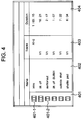
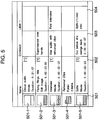
- Figs. 4 and 5 show related video linked information such as source material names, types and lengths of source material media, and comments.
- Reference numeral 401 denotes a column for indication of different sorts of source material icons
- reference symbol 401-1 and 401-2 denote source icons
- numeral 402 denotes a column for indication of names of the source materials
- 403 denotes a column for indication of a distinction between video and audio
- 404 denotes a column for indication of time durations of the materials
- 501 denotes a column for indication of typical source material icons
- 502 denotes a column for indication of title names, types and durations of the typical source icons
- 503 denotes a column for indication of comments of the materials for their editing
- 504 denotes a column for indication of labels of the source materials.
- the source icons column 401 shows the source icon 401-1 and source icon 401-2 indicative of source material types.
- the source icon 401-1 indicates that the source material is a broadcasting program
- the source icon 401-2 indicates that the source material is a scene.
- Other source icons include an icon indicative of one cut or clip.
- the source material name column 402 shows names of the source materials given in the source icons column 401 at the left side of the column 402.
- the video/audio distinction column 403 indicates "A1-2" when the source material is of an audio type, and indicates "V1" when the source material is of a video type.
- the material duration column 404 given at the right side of the column 403 indicates time lengths or durations of the source materials.
- the typical material icon column 501 shows therein an audio source icon 501-1, a still image source icon 501-2, a moving image source icon 501-3 accompanied by audio information, a folder icon 501-4, and a moving image source icon 501-5 not accompanied by audio information.
- the name/type/duration column 502 given at the right side of the column 501 indicates names, types, time lengths, etc. of the source materials given in the typical material icon column 501.
- the column 502 at the right side of the audio source icon 501-1 shows "name", "moving image” and “time duration” of the source material in question
- the column 502 at the right side of the still image source icon 501-2 shows "name", "still image” and "time duration” of the source material in question.
- the column 502 a the right side of the moving image source icon 501-3 accompanied by audio information indicates or at the right side of the moving image source icon 501-5 not accompanied by audio information shows "name", "moving image” and "time duration" of the associated source materials.
- the column 502 at the right side of the folder icon 501-4 shows "folder name”, “folder” and "number of source materials in the folder”.
- the comment column 503 describes editing states of the associated source materials or simple information necessary for the associated source materials
- the source material label column 504 describes label names of the source materials.
- Nonlinear editing apparatus examples include "Media Suite Pro 1.0 User's Guide” by Avid Technology, Inc.,1994, pages 92, 93, 123 and 125 and in “Adobe Premiere 4.2 User Guide” by Adobe Systems Incorporated, 1997, pages 50 and 55.
- information accompanied by video information is limited only to the time length of a video source material or producer's comment and can be controlled only so as to give uniform information to respective video source materials. For this reason, the prior art apparatus cannot cope with such various types of video-accompanied information a plurality of layers that are different degrees of abstraction.
- tape based editing (the linear editing apparatus) has been so far conducted in a broadcasting station in such a manner that a video producer keeps these information in different places in the form of a memo note or pad about data collection, editing and broadcasting memo or in the form of a word processor floppy disk.
- video information per se has been stored in video tape. In this way, information has been stored in different media depending on the type of the information. Therefore information management has had to be separately carried out and thus relations and correlations between the information have had been ambiguous with time passage, leading eventually to scatter and loss of the information. The same situation has been occurred in the conventional linear editing system.
- an apparatus for editing moving picture having related information thereof comprises input means for inputting said moving picture and said related information, said moving picture comprising a plurality of scenes, each scene comprising a plurality of cuts and each cut comprising a plurality of frame images; detecting means for detecting change points of said moving picture and dividing said moving picture into said scenes and cuts; selecting means for extracting a still image representing each of said scenes and cuts; a memory for storing said related information and the representative still images of said scenes and cuts; means for designating said representative still images of said scenes and cuts to edit said moving picture; means for determining a hierarchical structure, said hierarchical structure comprising a plurality of layers in accordance with said scenes and cuts; means for displaying said hierarchical structure and said related information; and a controller for controlling said memory and said display means so that said related information in relation to said representative still images to be displayed is displayed with said representative still images.
- the above object is attained by providing a method for integratedly managing a moving picture and additive information under control of a computer, which comprises the steps of displaying selected typical ones of frame images of the moving picture on a display device in the form of a hierarchical structure, and displaying additive information associated with the moving picture on the display device in the form of representation of degrees of abstraction different according to the layers of the hierarchical structure, as associated with the displayed typical frame images.
- a computer program product which includes a recording medium in which a procedure in the above integrated information management method is recorded in the form of a format readable by the computer.
- the typical frame images of the moving picture are related to the respective additive information associated with the images
- the additive information is displayed on the screen of the display device as associated with the frame images, and also displayed in the form of representation of different degrees of abstraction different according to the layers of the frame images associated with the additive information in the hierarchical structure of the moving picture. Therefore, the moving picture and additive information can be all managed one-dimensionally on the screen, and thus can support the editing operation of the moving picture so as to match editor's thinking pattern.
- Fig. 8 is a diagram for explaining degrees of abstraction for video associated information.
- the producer first of all, looks over these on-hand data in a general way, and plans to introduce video data 817 of "mountain's four seasons” sequentially from spring to winter and to compose the video data 817 into four volumes of "spring" video data 813, "summer” video data 814, “autumn” video data 815 and “winter” video data 816.
- the concept of dividing the "mountain's four seasons” video data 817 into the four volumes of the "spring” video data 813, "summer” video data 814, “autumn” video data 815 and “winter” video data 816 is more concrete than (lower in abstraction than) the concept of the "mountain's four season” video data 817.
- the producer further thinks of dividing the "snow thaw” video data 810 into two data of the video data 801 of "icicles thaw in soft sunlight and its melt water falls in drops” and the video data 802 of "the river flows as swelled by melted snow”; and also dividing the "budding" video data 803 into two data of the video data 804 of "animals awake from hibernation and start to move” and the video data 805 of "a bird sings”.
- the concept of the video data 801 of "icicles thaw in soft sunlight and its melt water falls in drops” is higher in concreteness (lower in abstraction) than the concept of the "snow thaw” video data 810.
- the major object of the aforementioned program to "introduce mountain's four seasons” is also one of pieces of important video associated information, which information has a level equivalent to the "mountain's four seasons” video data 817.
- Programs include a narration, which is also one of important pieces of video associated information.
- the producer thinks of inserting a narration A of "in spring warm sunlight," for the video data 801 of “icicles thaw in soft sunlight and its melt water falls in drops" and of inserting a narration B of "trees and plants in a field." for the video data 803 of “trees and plants in a field shoot out buds”.
- the narration A is related to the video data 801 of "icicles thaw in soft sunlight and its melt water falls in drops”
- the narration B is related to the video data 803 of "trees and plants in a field shoot out buds”.
- the narration information is considered to be information closely associated with the video and having the highest concreteness (lowest abstraction).
- information associated with the person such as the portrait right or profile is also one of pieces of video associated information.
- person information is information applied only to part of the source material, but there is a possibility that such information may reach a massive amount of information depending on the time length and type of the video information. This means that, if it is tried to describe and manage information in such a manner as in Figs. 4 and 5, then this soon becomes impossible because of a screen space problem.
- the aforementioned video associated information column can describe surficial information such as the name and time length of a source material, but it has been difficult to describe information as associated with a flow of video information such as a film script. It has also been impossible to describe information applied only to part of a source material, such as profile information on a person who appears in only part of the source material.
- a system for integratedly managing a moving picture and related information provides means for solving the above problem.
- Fig. 11 is a diagrammatic view for explaining how video and audio information are stored in a magnetic memory device 202.
- Fig. 2 is a block diagram of an arrangement of a moving picture editing apparatus which has the same arrangement as already explained in connection with the prior art.
- an instruction from the input device 206 causes a video signal to be issued from video tape already loaded in the VTR 207, so that a frame unit of moving picture is sent from the VTR 207 through the video interface 208 and bus 212 to the scene change point detector 201.
- the above-mentioned video interface is one of the input means.
- the scene change point detector 201 digitizes the received moving picture, and analyzes color distribution information between images thereof to detect a scene change point and a cut change point.
- a frame number for the scene change point and a cut change point generated by the scene change point detector 201 is stored in the magnetic memory device 202 as moving picture analysis information (scene/cut change point information).
- an M-icon is stored in the magnetic memory device 202.
- This M-icon which is a miniature image (for example, of 80 ⁇ 60 pixels) reduced in size by the picture size reducer 214 according to the size of a GUI environment to be displayed, can be operated in the present editing apparatus.
- the CPU 211 requires a processing time for decoding the moving pictures.
- the miniature image (M-icon) is previously stored as a high-speed display image as in the foregoing embodiment, the need for the decoding time can be eliminated, the processing time can be shortened, and the contents of the image can be quickly confirmed.
- the above-mentioned audio interface is also one of the input means.
- the moving picture is encoded by the picture compressor 209 with use of an image compression technique and stored in the magnetic memory device 202.
- This moving picture (compressed moving picture) is used, for example, when it is desired to see a final edited result in detail.
- an audio output signal of the VTR 207 is digitized through the audio interface 210 and stored in the magnetic memory device 202.
- the operator instructs reading of an M-icon registered in the magnetic memory device 202 with use of such an input device 206 as a mouse or a keyboard.
- This causes the CPU 211 to read out scene/cut analysis information on the corresponding moving picture from the magnetic memory device 202, and on the basis of the information, to read out only the first frame of each scene or each cut from the M-icon and display it on the monitor 203.
- the displayed M-icon is to be operated by the present editing apparatus.
- Fig. 1 is an example of an editing display screen using the aforementioned M-icon.
- Reference numerals in Fig. 1 includes, in addition to reference numerals already explained in the display screen of Fig. 3, information existence display zones 306, 306-1, 306-2 and 306-3, a cut or scene M-icon 311, an M-icon 312 of a plurality of cuts or scenes, an M-icon 313 of the entire story, an information button 321, an appearance person detecting button 322, a scanner icon 331, a FAX icon 332, a TEL icon 333 and a portrait right icon 341.
- Fig. 3 the operator organizes the M-icons 302 into such a hierarchical structure as shown in a hierarchical structure display window 301 to thereby make a story.
- the editing method and system for editing a moving picture by using the editing display screen as shown in Fig. 3 are disclosed, for example, in the specification of co-pending patent application Serial No. 08/826,975 filed on April 9, 1997. The disclosures of this co-pending application are incorporated herein by reference.
- This hierarchical structure editing system has not only an advantage that the operator can visually grasp the video structure easily and can be easily make a story, but also another advantage that this editing system can present an environment optimum for efficient management of video related information having a plurality of layers that are different degrees of abstraction. Explanation will be directed to how to manage information, e.g., in the 3 specific editing examples already explained in connection with Fig. 8.
- Fig. 10 is another example of the editing display screen, in which 1001 to 1005, 1011 to 1013, 1021, 1022 and 1031 denote M-icons and the other reference numerals are the same as those in Fig. 1.
- the M-icons 1001 to 1005 indicates video data per se.
- the M-icon 1001 indicates the video data 801 of "icicles thaw in soft sunlight and its melt water falls in drops”
- the M-icon 1002 indicates the video data 802 of "the river flows as swelled by melted snow”
- the M-icon 1003 indicates the video data 803 of "trees and plants in a field shoot out buds”
- the M-icon 1004 indicates the video data 804 of "animals awake from hibernation and start to move”
- the M-icon 1005 indicates the video data 805 of "a bird sings”.
- Other M-icons not illustrated in the lowermost layer of the hierarchical structure are also similar to the above. Information having lowest one of degrees of abstraction is made to be related to such M-icons in the lowermost layer.
- the explanation information of "icicles thaw in soft sunlight and its melt water falls in drops” is related to the M-icon 1001
- the explanation information of "the river flows as swelled by melted snow” is related to the M-icon 1002.
- the M-icons 1001 and 1002 are coupled to form the M-icon 1011.
- the M-icon 1011 shows one scene consisting of the video data 801 of "icicles thaw in soft sunlight and its melt water falls in drops" and the video data 802 of "the river flows as swelled by melted snow".
- the M-icon 1011 is made to be related to the aforementioned "snow thaw” explanation information.
- the M-icon 1012 is made to be related to the "budding" explanation information
- the M-icon 1013 is to be related to the "awaken from hibernation" explanation information.
- the M-icons 1011, 1012 and 1013 are coupled to form the M-icon 1021.
- This M-icon 1021 shows one "spring" scene consisting of the three scene parts of "snow thaw", "budding” and "awaken from hibernation".
- the M-icon 1021 is made to be related to the "spring” explanation information.
- the M-icon 1022 is made to be related to the "summer" explanation information.
- the M-icon 1031 in the uppermost layer shows the entire program.
- the M-icon 1031 is made to be related to the "mountain's four seasons" explanation information or such object information as "to introduce mountain's four seasons”.
- narration information of "in spring warm sunlight," is made to be related to the M-icon 1001 in the lowermost layer while narration information of "trees and plants in a field shoot out buds" is to be related to an M-icon 1003, video and narration information can be managed completely in a 1:1 relation.
- BGM background music
- Such more global information as a broadcasting schedule for the final edited program is related to the M-icon 1031 in the uppermost layer.
- Fig. 29 shows a simple example of the hierarchical structure, in which reference numerals 1051 and 1052 denote M-icons in a lower layer of the hierarchical structure, and numeral 1050 denotes an M-icon in an upper layer of the hierarchical structure.
- the M-icons 1051 and 1052 are combined, the M-icon 1050 is formed.
- Fig. 30 is a flowchart for explaining the operation of an exemplary data structure of memory areas of the main memory 205 for storing video related information and icon information as associated therewith.
- reference numeral 900 denotes icon information of the M-icon 1050
- numerals 901 and 902 denote video related information of the M-icon 1051
- 903 denotes icon information of the M-icon 1051
- 904 and 905 denote video related information of the M-icon 1051
- 906 denotes icon information of the M-icon 1052
- 907 and 908 denote video related information of the M-icon 1052.
- the icon information 900 of the M-icon 1050 located in the upper layer of the hierarchical structure contains an M-icon number (or the address of the M-icon, such as "1" for the icon information 900, "2" for the icon information 901, "3" for the icon information 902 for convenience of explanation), a layer level value (1, 2,... from the bottom layer), an address for the miniature moving picture image, and address of the icon information of the M-icon in the layer lower by one level and located at the left most position, an address of the icon information of the M-icon located in the same layer and at the right side by one, and an address of the first video related information.
- M-icon number or the address of the M-icon, such as "1" for the icon information 900, "2" for the icon information 901, "3" for the icon information 902 for convenience of explanation
- a layer level value (1, 2,... from the bottom layer
- an address for the miniature moving picture image and address of the icon information of the M-icon in the layer lower
- the icon information 903 of the icon 1051 located in a layer lower than the M-icon 1050 and at the leftmost position is associated by the address stored in the icon information 900 of the M-icon 1050.
- Contained in the icon information 903 are, in addition to "M-icon number", “layer level value”, “address of miniature moving picture display image”, “address of M-icon in the same layer and at the right side by one” and “address of the first video related information", such information as "file name of miniature moving picture image” and " cut start/end points" as the M-icon information of the lowermost layer.
- the video related information 904, 905, 907 and 908 associated with the icon information 903 and 906 are also similar to the video related information 901 and 902, and thus explanation thereof is omitted.
- M-icon 1060 there is an M-icon 1060 (with icon information 909) in the layer higher than the layer of the M-icon 1050. If there is also an M-icon 1061 (with icon information 910) (not shown) in the same layer, then its M-icon number stored in the icon information 900 is also recorded in the icon information 909 as an address, and the M-icon number of the icon information 910 is stored as the address of the icon information of the M-icon located in the same layer as the icon information 900 and at the right side by one therefrom.
- the hierarchical structure of the M-icons forming the moving picture and video related information are stored as associated with each other in the form of the hierarchical structure.
- the "contents" column in the icon information of the video related information stores actual information as character data, or when the video related information is present in another file in such a data format as audio or video, contains address information indicative of the presence location of the file. Further, when the video related information is present in a file of an external information system, the "contents" column of the video related information contains a code or uniform resource locator (URL) for access to the file of the information system.
- URL uniform resource locator
- the information management method of the present invention based on the linked information to the hierarchical structure enables sophisticated information management according to the degree of abstraction in information.
- a "script" icon and “caption” icon are displayed in an edit associated information zone 306-1 of an M-icon 311 indicative of a cut or scene in a lower layer; a "music" icon, a "player” icon or an “author” icon indicative of a music title, player name or copyright of a BGM is displayed (not illustrated in Fig. 1) in an edit associated information zone 306-2 of an M-icon 312 indicative of a plurality of continuous cuts or scenes in the middle layer; and an "origin” icon indicative of a linked broadcast history is displayed (not illustrated in Fig. 1) in an edit associated information zone 306-3 of an M-icon 313 placed in the uppermost layer and indicative of a story.
- video associated information which relates to the miniature moving picture itself and does not depend on the video data combination or the edited result, can be related even in the source material area 304.
- the prior art moving picture editing apparatus can perform only uniform management over information having various different degrees of abstraction depending on different video source materials.
- the management method of the present embodiment based on the aforementioned linking to the hierarchical structure can realize sophisticated information management depending on the information abstraction.
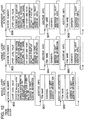
- Information for display of such "film script”, “caption”, “music”, “player”, “copyright”, “origin”, “full” and “digest” icons as explained above on the display screen are stored in such memory areas as shown in the example of the related information boxes 801, 802, etc. in Fig. 12. These icon information are automatically generated by the computer according to the contents of the related information.
- Information for display of the "full” and “digest” icons are management information at the time of outputting or editing specific contents in the related information of the M-icon image.
- management information include, as other information, information for selective allocation to Japanese or English narration.
- Media for telling the operator the portrait right information include notepad, facsimile and telephone.
- the mouse is clicked on the information button 321.
- This causes appearance of such an information window as shown in Fig. 6 for input and display of various types of information on the scene on the monitor 203.
- Fig. 6 In Fig.
- reference numeral 600 denotes an information window associated with the rights
- numeral 601 denotes a check box for activating a portrait right icon
- 602 denotes an information column
- 603-1, 603-2 and 603-3 denote tag buttons for switching from the current information window to another information window associated with another information-genre
- 604 denotes a check box for giving an emphasized indication of the expiration date
- 605 denotes a reference button for referring to another linked multimedia information medium
- 606 denotes an OK button for validating the input result
- 607 denotes a cancel button for invalidating the input result.
- the information window is used to display a list of information items and its information contents. The operator writes the contents of the notepad in the information column 602 at the side of the portrait right item with use of such an input device 206 as a keyboard.
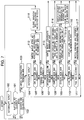
- Fig. 7 When the above is viewed from the apparatus side, its flowchart is as shown in Fig. 7.
- the CPU 211 When an interrupt input is generated (step 100) from the input device 206 (see Fig. 2) such as a mouse, the CPU 211 first checks whether or not the interrupt input results from a depression of the information button 321 (see Fig. 1) (step 101). If so as a result of the check, then the CPU checks whether or not the M-icon 302 was already selected prior to the generation of the interrupt (step 102). When determining that the M-icon 302 was already selected as a result of the check, the CPU causes the information window 600 (see Fig. 6) to be displayed on the monitor 203 (step 103).
- the CPU 211 waits for an input of an interrupt from such an input device 206 as a mouse or a keyboard(step 104).
- Generation of the interrupt causes the CPU 211 to execute associated processing operations depending on the type of the interrupt (steps 105 to 111 ⁇ steps 112 to 119).
- the CPU 211 writes its input contents in the main memory 205 (step 113).
- the CPU 211 reads out indication on/off information of the portrait right icon 341 from the main memory 205 (in which the indication on/off information is previously stored) and switches it to gain write it in the main memory 205 (step 114).
- the CPU 211 switches the information genre of the information window 600 to the associated one for its display (step 117).
- the CPU 211 reads out the indication on/off information of the portrait right icon 341 from the main memory 205.
- the CPU reads out highlight indication on/off information of the portrait right icon 341 from the main memory 205 (in which the highlight indication on/off information is previously stored), switches it to write it again in the main memory 205 (step 119).
- the CPU 211 checks the presence or absence of these link contents. The presence of the link contents causes the CPU to display it on the monitor 203 (step 116).
- the CPU 211 reads out all information written in the main memory 205 after the information window 600 is opened and until then from the main memory, and again stores it in the main memory 205 as related information of the M-icon 302 (step 112). And the CPU closes the information window 600 and releases the select state of the M-icon 302 to return it to the initial state (step 118).
- the CPU discards all information written in the main memory 205 after the information window 600 is opened and until then, closes the information window 600, and releases the select state of the M-icon 302 to return it to the initial state (step 118).
- buttons 625, 626 and 627 have substantially the same functions as the buttons 605, 606 and 607 in Fig. 6 respectively.
- the other linking method when portrait information is given in the form of a notepad is to use a scanner.
- the operator use the scanner to input image data on the notepad into a computer. This causes the input image data to be displayed as the scanner icon 331 in the source material area 304 of Fig. 1.
- the operator drugs the scanner icon 331 and drops it in the M-icon 302 with use of the mouse.
- the computer applies a character recognition technique to the dropped image data to automatically judge that the data is a description on the portrait right, and inputs it in the portrait right item. In this manner, the portrait right information is linked to the M-icon 302.
- the information is similarly indicated in the source material area as the FAX icon 332.
- the operator drags the FAX icon and drops it in the M-icon 302, this causes the data to be input to the portrait right item.
- the input voice data is indicated in the source material area 304 as the TEL icon 333, followed by such operations as mentioned above.
- multimedia icons such as the scanner icon 331, FAX icon 332 and TEL icon 333 as typical ones in Fig. 1, it will be obvious that another input method may be employed.
- the multimedia icons may be displayed in an area other than the source material area 304 or in another opened window, and one type of icons, e.g., a plurality of scanner icons may be employed.
- the screen may be switched by a screen scrolling function or page changing function.
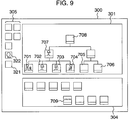
- Fig. 9 is a view for explaining a case where it is desired to link identical portrait right information to a series of a plurality of scenes.
- Reference numerals 701 to 706 denote M-icons indicative of cuts or scenes respectively
- numeral 707 denotes an M-icon indicative of a collection of the M-icons 701 to 704
- 708 denotes an M-icon indicative of a collection of all the M-icons 701 to 706 on the screen.
- the above procedure is when it is desired to link the portrait right information to the specific M-icon 302.
- the operator first selects the M-icon 708 in the uppermost layer indicative of the entire story, and clicks on the appearance person detecting button 322.
- the M-icon to be selected is not limited only to one in the uppermost layer.
- the M-icon in its upper layer e.g., the M-icon 707 may be selected. That is, video data belonging to the M-icon 708, i.e., video data of the M-icons 701 to 706 are displayed in the form of a list spaced at suitable intervals.
- the operator searches the icons for one where the person A appears and issues a instruction indicating that the icon has the person A with use of mouse's click. And for starting the detection, the operator clicks on the appearance person detecting button 322.
- the editing apparatus extracts features of the instructed person A, e.g., skin color, hair color, height, etc. therefrom, and detect, on the basis of the extracted features, the person A from the videos of the M-icons 701 to 706.
- This function of detecting videos including the specific target person can use such a technique as disclosed in, e.g., JP-A-6-223179 or JP-A-9-179880.
- This technique is based on the image recognition technique similarly to the aforementioned scene change point detecting method. Completion of the detecting operation causes the icon indicative of an abstract of the obtained detected information, that is, the M-icon 709 having the person A detected therefrom to be created and displayed.
- the M-icon 709 When the M-icon 709 is selected with the mouse click and such information as, for example, portrait right information is linked thereto by the aforementioned keyboard input method or by a drag & drop method; the information is automatically distributed to all the M-icons 701 and 704 containing the person A and thus the linking is finished at a time.
- This function enables various types of linking, for example, linking of product manufacturer's information of routine voice often used in a commercial message such as a product catch phrase (detected by the voice recognition technique) broadcasted together with its video in a commercial message to the detected scenes, or linking of sea information of specific effect sound such as sound of sea waves detected by the voice recognition technique to the detected scenes.
- the video analyzed information obtained by the video analysis technique is effectively utilized to realize more flexible linking of the video information to video associated information.
- the M-icon 302 linked to the portrait right information has an information zone 306 in a lower part of its miniature moving picture, in which a small portrait right icon 341 is displayed.
- the portrait right information indicates that the portrait right information is linked to the scene.
- This icon may use, in addition to character, symbol, illustration, picture, etc., as a matter of course.
- the button In the scene having video expiration date information attached thereto, when the date is already expired or comes close thereto, it is indicated by the button using a featured color or frame. This is highly effective to avoid the scene having the due expiration date from its erroneous use. In this way, by emphasizing it by changing the color, more detailed information can be given to the display. This can also be realized by changing the size or using a decorated frame.
- the operator clicks the mouse on the information button 321 (see Fig. 1) under a condition that the M-icon 302 is already selected with use of the icon.
- This causes appearance of such an information window 600 as shown in Fig. 6.
- the information window 600 is divided into a plurality of subwindows for different genres such as shoot associated information, rights associated information, video related information and edit associated information. Change-over between the subwindows is carried out by selecting one of the tag buttons 603-1 to 603-3.
- the turning ON of OFF of the indication of the aforementioned portrait right icon 341 is carried out by checking or not checking the check box 601.
- the reference button 605 next to the information column 602 is displayed.
- image data input by the facsimile machine or scanner is displayed on the monitor 203.
- information as facsimile number, etc. of the sender.
- voice information obtained from a telephone is also similarly reproduced by clicking on the reference button 605.
- the present invention is equipped with an easy calling method from the information window to each multimedia information.
- this reference button can also be used when the operator enters its front page address in the person profile item 608 to refer to the front page.
- the operator When the operator wants to search for a group of the linked information pieces, it can be realized in such a manner as will be explained below.
- the operator first selects an M-icon in the uppermost layer of the hierarchical structure located higher than a layer containing an icon for which he wants to search in the display screen of Fig. 1. If necessary, a plurality of the uppermost layer M-icons may be selected. Under this condition, when the operator clicks on a search button 323 in a group of various kinds of function buttons 305, a window for entrance of searching conditions appears.
- the searching conditions include such a key word condition as, e.g., name or date, and such a quantitative condition of a feature extracted based on an application of the above image recognition technique as, e.g., a woman or women with brownish hair. Or when such information as camera work information is already linked, a condition of zooming-in video can be used as the searching condition.
- the search in this case corresponds to a reverse of the calling of the multimedia information from the video information by the reference button 605 (see Fig. 6). That is, bi-directional calling method is realized.
- Video associated information are divided into many types of genres. For the purpose of managing such information, it is general to dividing such information into similar groups. However, such information grouping varies from information user to information user or from production site to production site. For example, in a certain production site, a producer wishes to collect rights associated information as one group for easy seeing of them as a list, because he considers the rights associated information to be important from the business viewpoint. In another production site, a producer may want to collect only use expiration date information on necessary videos as one group since all the rights associated information are not necessary. Further, even the types per se of necessary information may vary from user to user or from production site to production site. Furthermore, video associated information are not always present equally for all source videos. For example, portrait rights will not be present for all video materials and some video materials have no portrait rights. In this way, video associated information is, in other words, a small amount and wide range of types of information.
- Fig. 5 there are 3 types of typical information columns, that is, the name column 502, comment column 503 and label column 504.
- the name column is used for entry and display of the names or type of source materials or folder, time lengths of the source materials or the number of source materials in the folder. This types of information are always present for any source materials. As will be seen from Fig. 5, such information are written in all the rows of the name column, and thus there is no needless space from the viewpoint of GUI space. However, when attention is directed to the comment column next to the name column, the rows of the comment column for the audio source icon 501-1 and folder icon 501-4 are blanked. Similarly, some rows of the label column are also blanked. These blanks are a needless part of the GUI space.
- the present invention can eliminate the need for previously preparing a pair of information item and column as in the prior art system, and can take such a form as to enter any format (such as a list or sentence) of information in a general information column and then to paste a tag button of an information item corresponding to the input information.
- a necessary GUI space is allocated to a necessary location and any unnecessary GUI space for non-existing information is not provided.
- necessary information is arranged to be displayed quickly by means of a sort button, which facilitates confirmation of the information. Even when a plurality of information pieces of an identical type are present for an identical source material, an information item tag can be pasted a plurality of times for the respective information pieces, thus enabling easy and flexible handling of information.
- an enter button to be explained later is used so as to be able to enter the information as it is into the moving picture editing apparatus. Accordingly, it becomes unnecessary to conduct troublesome operating steps as in the prior art. Further, since the operator can examine the contents of the entered information, he can perform information input or addition as if he proofread a text. In addition, since modification of already added information is realized in such one action as drag & paste a new information item tag on it, the handling procedure can be simplified.
- the need for previously dividing and inputting information as in the fixed format system can be eliminated, and thus it becomes possible to add the information roughly as the first step at the current stage and to later allocate it.
- the preparation of the information items in a hierarchical structure is because, when related information is not suitably or closely applied to one of the prepared information items, an information item tag in a layer higher than the layer containing the information items and containing the concept of the related information can be used, enabling flexible and quick handling thereof.
- the tree-structured arrangement of the information item tags has an additional advantage that a desired tag button can be easily searched.
- Addition of a information type only requires addition of its information item tag. Even the hierarchical structure of the information item tags can also be set. Accordingly the present invention can flexibly cope with any application of the moving picture editing site in use.
- Steps until an information window is called are substantially the same as those in the fixed format system.
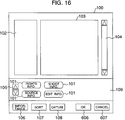
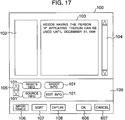
- the called window is as shown in Figs. 16 to 21.
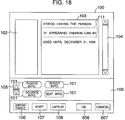
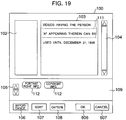
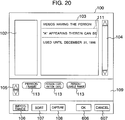
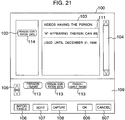
- FIGs. 16 to 21 These drawings show views for explaining how to input and display a free format type of video associated information on the information window.
- reference numeral 100 denotes an information window
- numeral 101 denotes information item tags for various types of video associated information
- 102 denotes a tag pasting area for pasting of an information item tag
- 103 denotes an information column for entry of any format
- 104 denotes a scroll bar for setting of an indication range of the information column
- 105 denotes a change-over button for switching of an information item tag to be displayed
- 106 denotes an importance setting button for setting an information importance or weight
- 107 denotes a sort button for instructing the rearrangement of the information indicated in the information column
- 108 denotes an input button for instructing an input of contents of text file
- 606 denotes an OK button
- the operator first enters transmitted information with use of such an input device 206 as a keyboard.
- the operator enters "videos having the person A appearing therein can be used until December 31, 1998". This causes appearance of such a display screen as shown in Fig. 17.
- the operator next enters a return at the head and tail of a character string which he wants to use as information in the entered sentence with use of the input device 206 to extract the character string from the entire sentence.
- the operator enters a return at the head and tail of the character string of "December 31, 1998”. This causes appearance of such a screen as shown in Fig. 18.
- Fig. 18 As will be seen from Fig.
- extraction statement lines 111 are indicated at upper and lower sides of the extracted character string for clearly showing that the character string was extracted.
- the operator selects a corresponding information item tag from a group of tag buttons of the information item tags 101.
- These information item tags are stored in the form of such a hierarchical structure as shown in Fig. 22.
- Fig. 22 shows an example of the hierarchical structure of the information item tags in the present invention.
- the operator switches to an information item tag to be displayed, by clicking the mouse on the change-over button 105 to move between the layers.
- the operator drags the information item tag 113 of "portrait/name" into the tag pasting area 102 at a position at the direct left side of the above extracted character string. This, as shown in Fig. 21, causes appearance of a copy 114 of the dragged information item tag 113 at the left side of the desired character string.
- the display range is scrolled by operating the scroll bar 104 with use of the mouse. Even when it is impossible to display the tag buttons 101, 112 and 113 in the tag button area 109 at a time, the display range can be scrolled by operating a scroll bar (not shown).
- the hierarchical structure of Fig. 22 shows an example of necessary video associated information and partly omits parts required for the explanation therein.
- the sort button 107 is used to change the display order of already added information. Operator's click on the sort button 107 to issue an instruction to arrange the information in an order of importance, this causes the information to be displayed as arranged from the upper side of the screen to the lower side thereof according to the information importance. Operator's instruction to arrange and display rights-associated information alone causes only rights-associated information to be found from the added information and displayed. This is a means for effectively finding important and/or specific information.
- the operator has entered the first sentence of "videos having the person A appearing therein can be used until December 31, 1998" from the keyboard in the above example.
- the operator drags the information item tag and drops it into an area outside the tag pasting area 102.
- Attributes such as the number of information item tags and item contents and the hierarchical structure can be arbitrarily set on the moving picture editing apparatus by a user on the production spot.
- the first stage there may be considered various types of sorting methods. For example, it is considered that it is desired not to finely divide the sentence of "videos having the person A appearing therein can be used until December 31, 1998" but to link it as a single piece of information, or that it is desired to roughly add information as a first step and later to finely add it. In such a case, it is also possible to regard the entire sentence as a single extraction and to temporarily add the information item tag 101 as an information item tag in the layer higher than the layer of the information item tag 113 to it.
- the present invention is used, further when it is desired to provide an idle tag button not belonging to any information items as an information item tag (not shown) to roughly add information to it as a first step and later to finely add thereto because of a difficulty of its information sorting.
- the target information item tag buttons have been dragged and dropped.
- WWW world wide web
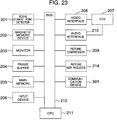
- Fig. 23 is a block diagram of an arrangement of the moving picture editing apparatus in accordance with an embodiment of the present invention, which corresponds to the arrangement of Fig. 2 but is added by the communication device 215.
- the apparatus is connected to another computer or network line through the communication device 215 to input internet information into the apparatus.
- Usable as the communication device 215 is an Ether Net interface allowing information transfer between another computer or external network and the moving picture editing apparatus, an asynchronous transfer mode (ATM) interface, a modem, a facsimile machine, a telephone set or another communication terminal.
- ATM asynchronous transfer mode
- reference numeral 610 denotes a www page information tag
- numeral 611 denotes a www page reference button
- 612 denotes an address setting window
- 613 denotes an address list column
- 614 denotes a selected address column
- 615 denotes a confirmation button
- 616 denotes an OK button
- 617 denotes a cancel button
- 618 denotes a scroll bar
- 619 denotes a mouse cursor.
- the www page information tag 610 is pasted at the dropped position. If there is no information description in the information column 103 at a right side of the pasted www page information tag 610, then the address setting window 612 appears to inquire its address as shown in Fig. 25.
- the address list column 613 displays a list of addresses referred to in the past. When there is one of the www page addresses being currently referred to in the list, the operator select it with the mouse. In this example, the operator selects "http://www.taro.or.jp" as its target address.
- the number of addresses displayable in the address list column 613 at a time is 6 in the example of Fig. 27. However, when 7 or more addresses are recorded in the past and the operator cannot see all in the address list column 613, the operator can operate the scroll bar 618 to select target one of the addresses. This causes the selected address to appear in the selected address column 614 (see Fig. 26).
- the operator If the operator fails to find the target address of the www page in the address list column 613, the operator enters the target address in the selected address column 614 with use of the keyboard as the input device 206 (see Fig. 27). In this example, the operator enters "http://www.taro.or.jp".
- the apparatus starts to access the address shown in the selected address column 614 through the communication device 215 and to display obtained information with the help of an external application program designed for www page.
- an external application program designed for www page.
- the external application is, for example, an Netscape Navigator developed by Netscape Communications Corporation, or an Internet Explorer developed by Microsoft Corporation. Selection of such external application programs can be freely done by switching between the settings of the moving picture editing apparatus.
- the operator enters the www page address of "http://www.taro.or.jp" in the information window 100 as www page information.
- the description of the www page address is set as an address.
- the operator first selects a desired M-icon (such as the M-icon 302) in the hierarchical structure area 301 on the editing screen 300 of Fig. 1 and clicks on the information button 321.
- This causes the CPU to display the information window 100 (see Fig. 24) on the monitor 203 (step 901) and to proceed to a step 902.
- the CPU waits for an interrupt input from the mouse or keyboard as the input device 206.
- the CPU proceeds to a step 903 (step 902).
- the CPU is branched depending on whether or not the mouse was clicked on the OK button 606.
- a click on the OK button causes the CPU to go to a step 904, while no click on the OK button causes the CPU to go to a step 905.
- the CPU validates the set contents and then closes the information window 100 (end of processing).
- the CPU judges which of the information item tags 100, 112 and 113 was dragged by the mouse.
- the CPU regards the interrupt input generated at this time as invalid and returns to the step 902 to waits for a next interrupt input.
- the CPU proceeds to a step 906 (step 905).
- next step 906 the CPU judges whether or not any of the information item tags 100, 112 and 113 was dragged into the tag pasting area 102, and the CPU is put in a loop condition until the CPU determines that the any of the information item tags 100, 112 and 113 was dropped.
- the CPU goes out of the loop and proceeds to a next step 907 (step 906).
- the CPU judges whether or not the dropped position of the information item tag is within the tag pasting area 102.
- the CPU regards the interrupt input at this time as invalid and returns to the step 902 to wait of a next interrupt input.
- step 908 the CPU displays the information item tag dropped within the tag pasting area 102 in the step 907 as pasted within the tag pasting area 102, and goes to a step 909.
- the CPU judges whether or not the information item tag pasted within the tag pasting area 102 is the www page information tag 610. If the information item tag is not the www page information tag 610, then the CPU returns to the step 902 to wait for a next interrupt input.
- the CPU proceeds to a step 910 (step 909).
- the CPU judges whether or not some information is already described in the information column 103 at a position corresponding to the www page information tag 610 pasted within the tag pasting area 102. If some information is described, then the CPU proceeds to a step 911. If not, then the CPU proceeds to a step 912 (step 910).
- the CPU stores its description contents and returns to the step 902 to wait for a next interrupt input.
- the CPU goes to the step 912 (step 911).
- the CPU displays the address setting window 612 on the monitor 203 and goes to a step 913 in Fig. 28 (step 912).
- step 913 the CPU waits for an interrupt input from such an input device 206 as the mouse or keyboard.
- Generation of an interrupt input causes the CPU to proceed to a step 914 (step 913).
- step 914 the CPU judges whether or not an address was selected from the address list column 613 by the mouse. When an address was selected, the CPU goes to a step 915. When an address was not selected, the CPU goes to a step 916 (step 914).
- step 915 the CPU displays the selected address in the selected address column 614 and returns to the step 913 (step 915).
- step 916 the CPU judges whether or not the address was input directly from the keyboard into the selected address column 614.
- step 917 When determining that the address was input directly into the selected address column 614, the CPU proceeds to a step 917. When determining that no address is input to the selected address column 614, the CPU proceeds to a step 918 (step 916). In the step 918, the CPU judges whether or not the mouse was clicked on the confirmation button 615. When determining that the mouse was clicked on the confirmation button 615, the CPU goes to a step 919. When determining that the mouse was not clicked on the confirmation button 615, the CPU goes to a step 921. In the step 919, the CPU judges whether or not an address is indicated in the selected address column 614. When an address is indicated in the selected address column 614, the CPU goes to a step 920. If not, then the CPU returns to the step 913 (step 919). In the step 920, the CPU starts an external application program to access the address shown in the selected address column 614 and to display an obtained www page on the monitor (step 920).
- step 921 the CPU judges whether or not the mouse was clicked on the OK button 616. Determination of a click on the OK button 616 causes the CPU to go to a step 922. Determination of no click on the OK button 616 causes the CPU to proceed to a step 925 (step 921).
- step 922 as in the step 919, the CPU judges whether or not an address is shown in the selected address column 614. When an address is given in the selected address column 614, the CPU proceeds to a step 923. If not, then the CPU returns to the step 913 (step 922). In the step 923, the CPU stores the indication contents of the selected address column 614 as an www page address and proceeds to a step 924 (step 923).
- the CPU judges whether or not the mouse was clicked on the cancel button 617.
- the CPU proceeds to a step 924.
- the CPU returns to the step 913 (step 921).
- the CPU closes the address setting window 612 and returns to the step 902 in Fig. 30.
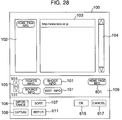
- the information window 100 is as shown in Fig. 28.
- the www page information of "http://www.taro.or.jp" is associated with (e.g., linked to) the M-icon 302 in Fig. 1.
- the operator first clicks the mouse on the pasted www page information tag 610.
- This causes the www page information tag 610 to be put in its selected state, which is clearly shown by a red frame, indicating that the tag is selected.
- the CPU starts to access the set address and display obtained www page information under the external application program.
- Termination of the display is carried out by terminating the external application program.
- a click of the mouse on the OK button 606 causes the CPU to validate the information linked on the information window 100, store the M-icon 302 in the hierarchical structure of Fig. 1 and the linked information, and close the information window 100.
- the www page information was linked to the M-icons 302, 308 and 307 respectively.
- the operator wishes to again see the linked information, he selects the M-icon linked to the desired information with use of the mouse to issue an instruction to display it on the information window 100 in the similar way to the above, the information linked to the selected M-icon is displayed as shown in Fig. 28.
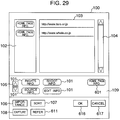
- Fig. 29 Under such a condition that the M-icon 307 located in the layer higher than the layer of the M-icon 302 or 308 is selected with the mouse, when the operator issues an instruction to display the information window 100, all information contained in the layers lower than the layer of the M-icon 307 in the hierarchical structure are combined and displayed in the form of a list on the information window 100 (refer to Fig. 29).
- the method of Fig. 29 is valid when it is unclear to which the target information is linked. Even in the case of Fig. 29, a method for referring to a www page is the same as in the case of Fig. 28.
- video related information can be finely managed in a centralized manner and loss of the related information can be avoided. Further, the formation of video information in a hierarchical structure enables fine information management according to the degree of abstraction of the video related information. Furthermore, the operator can quickly grasp related information associated with a target video source material during the editing operation and thus can easily confirm the detailed information. In addition, since its operating means is implemented with a simple interface, even an unexperienced user can operate the apparatus.
- a method for accessing information of a www page format from the moving picture editing apparatus through the internet based on the structure of video information and linking the www page format information to the video information according to the structure of the video information is provided.
Landscapes
- Engineering & Computer Science (AREA)
- Multimedia (AREA)
- Television Signal Processing For Recording (AREA)
- Management Or Editing Of Information On Record Carriers (AREA)
Applications Claiming Priority (6)
| Application Number | Priority Date | Filing Date | Title |
|---|---|---|---|
| JP30893697 | 1997-11-11 | ||
| JP30893697 | 1997-11-11 | ||
| JP308936/97 | 1997-11-11 | ||
| JP09197598A JP3613543B2 (ja) | 1997-11-11 | 1998-04-03 | 動画像編集装置 |
| JP9197598 | 1998-04-03 | ||
| JP91975/98 | 1998-04-03 |
Publications (2)
| Publication Number | Publication Date |
|---|---|
| EP0917148A2 true EP0917148A2 (de) | 1999-05-19 |
| EP0917148A3 EP0917148A3 (de) | 2002-10-23 |
Family
ID=26433402
Family Applications (1)
| Application Number | Title | Priority Date | Filing Date |
|---|---|---|---|
| EP98121135A Withdrawn EP0917148A3 (de) | 1997-11-11 | 1998-11-10 | Ein Gerät zum Schneiden von einem Bewegtbild mit einem davon abhängigen Information, ein Schnittverfahren und Aufzeichnungsmedium zur Ein Ein Gerät zum Schneiden von einem Bewegtbild mit davon abhängige Information, ein Schnittverfahren und Aufzeichnungsmedium zur Speicherung von Prozeduren für dieses Verfahren |
Country Status (3)
| Country | Link |
|---|---|
| US (1) | US6526215B2 (de) |
| EP (1) | EP0917148A3 (de) |
| JP (1) | JP3613543B2 (de) |
Cited By (8)
| Publication number | Priority date | Publication date | Assignee | Title |
|---|---|---|---|---|
| GB2341969A (en) * | 1998-09-17 | 2000-03-29 | Sony Corp | Editing system and method |
| GB2361090A (en) * | 2000-04-05 | 2001-10-10 | Sony Uk Ltd | Generating sample images to assist video editing |
| FR2838906A1 (fr) * | 2002-04-19 | 2003-10-24 | Avivias | Systeme de navigation pour acceder a des documents audiovisuels enrichis |
| EP1333666A4 (de) * | 2000-11-10 | 2005-11-02 | Sony Corp | Vorrichtungen zum erzeugen von zusätzlichen daten, videoprogrammdaten undzur editierung von videoprogrammen |
| US7073128B2 (en) | 2000-01-31 | 2006-07-04 | Canon Kabushiki Kaisha | Video browser data magnifier |
| US7552388B2 (en) | 2000-04-27 | 2009-06-23 | Sony Corporation | Information providing device, information providing method, and program storage medium |
| US7702219B2 (en) | 2000-04-05 | 2010-04-20 | Sony United Kingdom Limited | Audio and/or video generation apparatus and method of generating audio and/or video signals |
| EP2577964A4 (de) * | 2010-05-28 | 2015-06-03 | Avaya Inc | Systeme, verfahren und medien zur identifikation und auswahl von datenbildern in einem videostream |
Families Citing this family (68)
| Publication number | Priority date | Publication date | Assignee | Title |
|---|---|---|---|---|
| US6360234B2 (en) | 1997-08-14 | 2002-03-19 | Virage, Inc. | Video cataloger system with synchronized encoders |
| US6833865B1 (en) * | 1998-09-01 | 2004-12-21 | Virage, Inc. | Embedded metadata engines in digital capture devices |
| US6748421B1 (en) * | 1998-12-23 | 2004-06-08 | Canon Kabushiki Kaisha | Method and system for conveying video messages |
| US7134074B2 (en) * | 1998-12-25 | 2006-11-07 | Matsushita Electric Industrial Co., Ltd. | Data processing method and storage medium, and program for causing computer to execute the data processing method |
| DE60025406T2 (de) * | 1999-03-02 | 2006-09-21 | Hitachi Denshi K.K. | Laufbilderinformationsanzeigeverfahren und -gerät |
| US6647535B1 (en) * | 1999-03-18 | 2003-11-11 | Xerox Corporation | Methods and systems for real-time storyboarding with a web page and graphical user interface for automatic video parsing and browsing |
| JP4227241B2 (ja) * | 1999-04-13 | 2009-02-18 | キヤノン株式会社 | 画像処理装置及び方法 |
| US6677961B1 (en) * | 1999-09-24 | 2004-01-13 | Lg Electronics, Inc. | Method and apparatus for identifying a predetermined number of representative data pieces from within a selected data segment |
| JP3414683B2 (ja) * | 1999-11-16 | 2003-06-09 | 株式会社国際電気通信基礎技術研究所 | 対象物の表面動き測定方法および装置、ならびに当該方法を実現するようコンピュータを動作させるためのプログラムを記憶したコンピュータ読取可能な記録媒体 |
| US6993245B1 (en) | 1999-11-18 | 2006-01-31 | Vulcan Patents Llc | Iterative, maximally probable, batch-mode commercial detection for audiovisual content |
| US7262778B1 (en) | 2000-02-11 | 2007-08-28 | Sony Corporation | Automatic color adjustment of a template design |
| US7136528B2 (en) * | 2000-02-11 | 2006-11-14 | Sony Corporation | System and method for editing digital images |
| US6993719B1 (en) | 2000-02-11 | 2006-01-31 | Sony Corporation | System and method for animated character photo-editing interface and cross-platform education icon |
| US7661116B2 (en) | 2000-02-25 | 2010-02-09 | Vulcan Patents Llc | Auction for targeted content |
| US8910199B2 (en) | 2000-02-25 | 2014-12-09 | Interval Licensing Llc | Targeted television content display |
| AU2001249994A1 (en) * | 2000-02-25 | 2001-09-03 | Interval Research Corporation | Method and system for selecting advertisements |
| GB2359917B (en) * | 2000-02-29 | 2003-10-15 | Sony Uk Ltd | Media editing |
| KR100512138B1 (ko) * | 2000-03-08 | 2005-09-02 | 엘지전자 주식회사 | 합성 키프레임을 이용한 비디오 브라우징 시스템 |
| US8171509B1 (en) | 2000-04-07 | 2012-05-01 | Virage, Inc. | System and method for applying a database to video multimedia |
| US7222163B1 (en) * | 2000-04-07 | 2007-05-22 | Virage, Inc. | System and method for hosting of video content over a network |
| US7260564B1 (en) * | 2000-04-07 | 2007-08-21 | Virage, Inc. | Network video guide and spidering |
| US7962948B1 (en) | 2000-04-07 | 2011-06-14 | Virage, Inc. | Video-enabled community building |
| CA2372554A1 (en) | 2000-04-10 | 2001-10-18 | Sony Corporation | Asset management system and asset management method |
| JP2002091990A (ja) * | 2000-07-13 | 2002-03-29 | Sony Corp | オンデマンド画像配信サーバ、画像資源データベース、クライアント端末、及び検索結果表示方法 |
| AUPQ921600A0 (en) * | 2000-08-04 | 2000-08-31 | Canon Kabushiki Kaisha | Automatic person meta-data labeller |
| KR100694238B1 (ko) * | 2000-09-28 | 2007-03-14 | 가부시키가이샤 리코 | 구조편집방법, 영상구조편집방법, 오브젝트의 내용구조관리방법, 오브젝트의 내용구조표시방법, 컨텐츠관리방법 및 기록매체 |
| US20020180803A1 (en) * | 2001-03-29 | 2002-12-05 | Smartdisk Corporation | Systems, methods and computer program products for managing multimedia content |
| JP4188568B2 (ja) * | 2001-02-06 | 2008-11-26 | パイオニア株式会社 | 情報再生装置及び情報編集方法 |
| KR100411342B1 (ko) * | 2001-05-22 | 2003-12-18 | 엘지전자 주식회사 | 비디오 텍스트 합성 키프레임 생성방법 |
| JP2003060831A (ja) * | 2001-06-07 | 2003-02-28 | Canon Inc | 画像入力制御方法、情報処理装置、記憶媒体、及びプログラム |
| JP2003110988A (ja) * | 2001-09-27 | 2003-04-11 | Sony Corp | デジタル放送受信機及びバックアップ方法 |
| JP3780252B2 (ja) * | 2001-12-25 | 2006-05-31 | キヤノン株式会社 | 記録再生装置および記録再生方法 |
| JP3760467B2 (ja) * | 2002-04-09 | 2006-03-29 | ソニー株式会社 | コンテンツ再生装置および方法、記録媒体、並びにプログラム |
| US20030222915A1 (en) * | 2002-05-30 | 2003-12-04 | International Business Machines Corporation | Data processor controlled display system with drag and drop movement of displayed items from source to destination screen positions and interactive modification of dragged items during the movement |
| US7778438B2 (en) * | 2002-09-30 | 2010-08-17 | Myport Technologies, Inc. | Method for multi-media recognition, data conversion, creation of metatags, storage and search retrieval |
| US10721066B2 (en) | 2002-09-30 | 2020-07-21 | Myport Ip, Inc. | Method for voice assistant, location tagging, multi-media capture, transmission, speech to text conversion, photo/video image/object recognition, creation of searchable metatags/contextual tags, storage and search retrieval |
| US6996251B2 (en) | 2002-09-30 | 2006-02-07 | Myport Technologies, Inc. | Forensic communication apparatus and method |
| JP4005470B2 (ja) * | 2002-10-09 | 2007-11-07 | オリンパス株式会社 | 情報処理装置及び情報処理プログラム |
| JP2004134985A (ja) * | 2002-10-09 | 2004-04-30 | Olympus Corp | データ編集装置及びデータ編集プログラム |
| JP4228662B2 (ja) * | 2002-11-19 | 2009-02-25 | 日本電気株式会社 | 映像閲覧システムおよび方法 |
| US7596758B2 (en) * | 2003-04-03 | 2009-09-29 | International Business Machines Corporation | Method of appending a group of files to files on a clipboard of a desktop |
| US20060098941A1 (en) * | 2003-04-04 | 2006-05-11 | Sony Corporation 7-35 Kitashinagawa | Video editor and editing method, recording medium, and program |
| US20040223737A1 (en) * | 2003-05-07 | 2004-11-11 | Johnson Carolyn Rae | User created video bookmarks |
| WO2005029041A2 (en) * | 2003-09-19 | 2005-03-31 | Applera Corporation | High density sequence detection methods and apparatus |
| US7340678B2 (en) * | 2004-02-12 | 2008-03-04 | Fuji Xerox Co., Ltd. | Systems and methods for creating an interactive 3D visualization of indexed media |
| US7882436B2 (en) * | 2004-03-10 | 2011-02-01 | Trevor Burke Technology Limited | Distribution of video data |
| US7509238B1 (en) * | 2004-06-25 | 2009-03-24 | H2Tr0Nics, Inc. | Computer program for water treatment data management |
| JP4123209B2 (ja) | 2004-09-07 | 2008-07-23 | ソニー株式会社 | 映像素材の管理装置及び方法,記録媒体並びにプログラム |
| JP4438994B2 (ja) * | 2004-09-30 | 2010-03-24 | ソニー株式会社 | 動画像データの編集装置および動画像データの編集方法 |
| JP2006148731A (ja) * | 2004-11-24 | 2006-06-08 | Sony Corp | 記録装置および方法、再生装置および方法、プログラム、並びに記録媒体 |
| GB2421135A (en) * | 2004-12-09 | 2006-06-14 | Sony Uk Ltd | User resizable video display of catalogue entries |
| WO2006127596A2 (en) * | 2005-05-20 | 2006-11-30 | Hillcrest Laboratories, Inc. | Dynamic hyperlinking approach |
| JP4906274B2 (ja) * | 2005-05-20 | 2012-03-28 | 日本放送協会 | メタデータ統合装置及びメタデータ統合プログラム |
| JP4852967B2 (ja) * | 2005-06-03 | 2012-01-11 | ソニー株式会社 | コンテンツ管理システム,管理サーバ,管理情報加工装置,およびコンピュータプログラム |
| USD620950S1 (en) | 2005-08-05 | 2010-08-03 | Google Inc. | Display screen of a communications terminal with teardrop-shaped marker icon |
| US7697820B2 (en) * | 2005-10-13 | 2010-04-13 | International Business Machines Corporation | Digital video recording device ticker playback system and method |
| US8701005B2 (en) | 2006-04-26 | 2014-04-15 | At&T Intellectual Property I, Lp | Methods, systems, and computer program products for managing video information |
| EP1933242A1 (de) * | 2006-12-11 | 2008-06-18 | Sitecore A/S | Verfahren zum Sichern der Konformität von Internetinhalten |
| JP4375442B2 (ja) * | 2007-06-04 | 2009-12-02 | ソニー株式会社 | 画像管理装置、画像管理方法および画像管理プログラム |
| JP2009004999A (ja) * | 2007-06-20 | 2009-01-08 | Panasonic Corp | 映像データ管理装置 |
| US20090193034A1 (en) * | 2008-01-24 | 2009-07-30 | Disney Enterprises, Inc. | Multi-axis, hierarchical browser for accessing and viewing digital assets |
| JP5451411B2 (ja) | 2010-01-14 | 2014-03-26 | キヤノン株式会社 | 情報処理装置、情報処理装置の制御方法、プログラム |
| JP5586970B2 (ja) * | 2010-01-25 | 2014-09-10 | キヤノン株式会社 | 情報処理装置および制御方法およびプログラム |
| US20110206351A1 (en) * | 2010-02-25 | 2011-08-25 | Tal Givoli | Video processing system and a method for editing a video asset |
| US8655881B2 (en) * | 2010-09-16 | 2014-02-18 | Alcatel Lucent | Method and apparatus for automatically tagging content |
| TW201539218A (zh) * | 2014-02-17 | 2015-10-16 | Microsoft Technology Licensing Llc | 與外部內容項目之間的編碼的關聯性 |
| US20170300752A1 (en) * | 2016-04-18 | 2017-10-19 | Yen4Ken, Inc. | Method and system for summarizing multimedia content |
| CN113487629B (zh) * | 2021-07-07 | 2023-04-07 | 电子科技大学 | 一种基于结构化场景和文本描述的图像属性编辑方法 |
Family Cites Families (16)
| Publication number | Priority date | Publication date | Assignee | Title |
|---|---|---|---|---|
| US5442744A (en) * | 1992-04-03 | 1995-08-15 | Sun Microsystems, Inc. | Methods and apparatus for displaying and editing multimedia information |
| JPH0778804B2 (ja) | 1992-05-28 | 1995-08-23 | 日本アイ・ビー・エム株式会社 | シーン情報入力システムおよび方法 |
| JP3332166B2 (ja) * | 1992-09-30 | 2002-10-07 | 株式会社日立製作所 | 動画像の検索装置 |
| US6195497B1 (en) * | 1993-10-25 | 2001-02-27 | Hitachi, Ltd. | Associated image retrieving apparatus and method |
| JP3337798B2 (ja) * | 1993-12-24 | 2002-10-21 | キヤノン株式会社 | 画像データ及び音声データを処理する装置、データ処理装置並びにデータ処理方法 |
| US6118925A (en) | 1995-11-14 | 2000-09-12 | Hitachi Denshi Kabushiki Kaisha | Method of and system for confirming program materials to be broadcasted and then broadcasting the program materials, and recording medium having recorded therein a procedure for implementing the method |
| EP1072983A3 (de) | 1996-04-12 | 2003-11-12 | Avid Technology, Inc. | Multimediasystem mit verbesserten Datenverwaltungsmechanismen |
| US5956453A (en) * | 1996-04-12 | 1999-09-21 | Hitachi Denshi Kabushiki Kaisha | Method of editing moving image and apparatus of editing the same |
| US6154601A (en) * | 1996-04-12 | 2000-11-28 | Hitachi Denshi Kabushiki Kaisha | Method for editing image information with aid of computer and editing system |
| JP3377677B2 (ja) * | 1996-05-30 | 2003-02-17 | 日本電信電話株式会社 | 映像編集装置 |
| US6173317B1 (en) * | 1997-03-14 | 2001-01-09 | Microsoft Corporation | Streaming and displaying a video stream with synchronized annotations over a computer network |
| JP3419645B2 (ja) * | 1997-03-14 | 2003-06-23 | 株式会社日立国際電気 | 動画像編集方法 |
| JPH10301938A (ja) * | 1997-04-22 | 1998-11-13 | Canon Inc | 画像処理装置およびその方法、画像処理システム、記憶媒体 |
| JPH11175442A (ja) * | 1997-12-11 | 1999-07-02 | Fuji Xerox Co Ltd | データ中継装置、情報端末装置、データ中継プログラムを記録したコンピュータ読み取り可能な記録媒体及び情報閲覧プログラムを記録したコンピュータ読み取り可能な記録媒体 |
| US5956026A (en) * | 1997-12-19 | 1999-09-21 | Sharp Laboratories Of America, Inc. | Method for hierarchical summarization and browsing of digital video |
| JPH11213174A (ja) * | 1998-01-28 | 1999-08-06 | Hitachi Denshi Ltd | 動画像編集方法 |
-
1998
- 1998-04-03 JP JP09197598A patent/JP3613543B2/ja not_active Expired - Fee Related
- 1998-11-10 US US09/188,692 patent/US6526215B2/en not_active Expired - Lifetime
- 1998-11-10 EP EP98121135A patent/EP0917148A3/de not_active Withdrawn
Cited By (19)
| Publication number | Priority date | Publication date | Assignee | Title |
|---|---|---|---|---|
| DE19944746B4 (de) * | 1998-09-17 | 2011-03-03 | Sony Corp. | Editierungssystem und Editierungsverfahren |
| GB2341969B (en) * | 1998-09-17 | 2002-11-20 | Sony Corp | Editing system and editing method |
| GB2341969A (en) * | 1998-09-17 | 2000-03-29 | Sony Corp | Editing system and method |
| US6744968B1 (en) | 1998-09-17 | 2004-06-01 | Sony Corporation | Method and system for processing clips |
| US7073128B2 (en) | 2000-01-31 | 2006-07-04 | Canon Kabushiki Kaisha | Video browser data magnifier |
| US7702219B2 (en) | 2000-04-05 | 2010-04-20 | Sony United Kingdom Limited | Audio and/or video generation apparatus and method of generating audio and/or video signals |
| US9311962B2 (en) | 2000-04-05 | 2016-04-12 | Sony United Kingdom Limited | Audio and/or video generation apparatus and method of generating audio and/or video signals |
| US8214858B2 (en) | 2000-04-05 | 2012-07-03 | Sony United Kingdom Limited | Audio and/or video generation apparatus and method of generating audio and/or video signals |
| GB2361090A (en) * | 2000-04-05 | 2001-10-10 | Sony Uk Ltd | Generating sample images to assist video editing |
| US8209611B2 (en) | 2000-04-27 | 2012-06-26 | Sony Corporation | Data-providing apparatus, data-providing method and program-sorting medium |
| US7552388B2 (en) | 2000-04-27 | 2009-06-23 | Sony Corporation | Information providing device, information providing method, and program storage medium |
| US9449644B2 (en) | 2000-04-27 | 2016-09-20 | Sony Corporation | Data-providing apparatus, data-providing method and program-sorting medium |
| US9466331B2 (en) | 2000-04-27 | 2016-10-11 | Sony Corporation | Data-providing apparatus, data-providing method and program-sorting medium |
| US10692534B2 (en) | 2000-04-27 | 2020-06-23 | Sony Corporation | Data-providing apparatus, data-providing method and program-sorting medium |
| US7949680B2 (en) | 2000-11-10 | 2011-05-24 | Sony Corporation | Program ancillary data producing device, picture program editing device and picture program producing device |
| US8046388B2 (en) | 2000-11-10 | 2011-10-25 | Sony Corporation | Program additional data creating device, video program editing device, and video program data creating device |
| EP1333666A4 (de) * | 2000-11-10 | 2005-11-02 | Sony Corp | Vorrichtungen zum erzeugen von zusätzlichen daten, videoprogrammdaten undzur editierung von videoprogrammen |
| FR2838906A1 (fr) * | 2002-04-19 | 2003-10-24 | Avivias | Systeme de navigation pour acceder a des documents audiovisuels enrichis |
| EP2577964A4 (de) * | 2010-05-28 | 2015-06-03 | Avaya Inc | Systeme, verfahren und medien zur identifikation und auswahl von datenbildern in einem videostream |
Also Published As
| Publication number | Publication date |
|---|---|
| US20020131760A1 (en) | 2002-09-19 |
| EP0917148A3 (de) | 2002-10-23 |
| US6526215B2 (en) | 2003-02-25 |
| JP3613543B2 (ja) | 2005-01-26 |
| JPH11205736A (ja) | 1999-07-30 |
Similar Documents
| Publication | Publication Date | Title |
|---|---|---|
| US6526215B2 (en) | Apparatus for editing moving picture having a related information thereof, a method of the same and recording medium for storing procedures in the same method | |
| US6571054B1 (en) | Method for creating and utilizing electronic image book and recording medium having recorded therein a program for implementing the method | |
| JP3185505B2 (ja) | 会議録作成支援装置 | |
| US8739040B2 (en) | Multimedia visualization and integration environment | |
| US7765574B1 (en) | Automated segmentation and information extraction of broadcast news via finite state presentation model | |
| Merlino et al. | Broadcast news navigation using story segmentation | |
| US7506262B2 (en) | User interface for creating viewing and temporally positioning annotations for media content | |
| US6845485B1 (en) | Method and apparatus for indicating story-line changes by mining closed-caption-text | |
| US7111009B1 (en) | Interactive playlist generation using annotations | |
| US7120861B1 (en) | Document processing system | |
| US7886228B2 (en) | Method and apparatus for storytelling with digital photographs | |
| US7181757B1 (en) | Video summary description scheme and method and system of video summary description data generation for efficient overview and browsing | |
| US6650826B1 (en) | Editing apparatus and method, and image material selection apparatus and method | |
| US7454763B2 (en) | System and method for linking page content with a video media file and displaying the links | |
| US7610546B1 (en) | Document processing apparatus having capability of controlling video data | |
| KR100493674B1 (ko) | 멀티미디어 데이터 검색 및 브라우징 시스템 | |
| US20020040360A1 (en) | Data management system, data management method, and program | |
| CN100485721C (zh) | 生成视频概要描述数据的方法、系统及浏览该数据的设备 | |
| JP2004228779A (ja) | 情報処理装置 | |
| WO2000016221A1 (en) | Interactive playlist generation using annotations | |
| JP2002057981A (ja) | データストリームにアクセスするインタフェース、データストリームへのアクセス用検索の形成方法、データストリームアクセス方法及びノートからビデオにアクセスするためのデバイス | |
| TWI457768B (zh) | 內容產生裝置、提供網頁服務以整合贊助媒體與使用者產生內容之系統、以及電腦實施方法 | |
| JP2001028722A (ja) | 動画像管理装置及び動画像管理システム | |
| JP2006155384A (ja) | 映像コメント入力・表示方法及び装置及びプログラム及びプログラムを格納した記憶媒体 | |
| JP3574606B2 (ja) | 映像の階層的管理方法および階層的管理装置並びに階層的管理プログラムを記録した記録媒体 |
Legal Events
| Date | Code | Title | Description |
|---|---|---|---|
| PUAI | Public reference made under article 153(3) epc to a published international application that has entered the european phase |
Free format text: ORIGINAL CODE: 0009012 |
|
| 17P | Request for examination filed |
Effective date: 19981110 |
|
| AK | Designated contracting states |
Kind code of ref document: A2 Designated state(s): AT BE CH CY DE DK ES FI FR GB GR IE IT LI LU MC NL PT SE |
|
| AX | Request for extension of the european patent |
Free format text: AL;LT;LV;MK;RO;SI |
|
| PUAL | Search report despatched |
Free format text: ORIGINAL CODE: 0009013 |
|
| AK | Designated contracting states |
Kind code of ref document: A3 Designated state(s): AT BE CH CY DE DK ES FI FR GB GR IE IT LI LU MC NL PT SE |
|
| AX | Request for extension of the european patent |
Free format text: AL;LT;LV;MK;RO;SI |
|
| RIC1 | Information provided on ipc code assigned before grant |
Free format text: 7G 11B 27/034 A, 7G 11B 27/34 B, 7G 06F 17/30 B, 7G 06F 3/033 B, 7G 11B 27/11 B, 7G 11B 27/28 B |
|
| AKX | Designation fees paid |
Designated state(s): DE FR GB |
|
| 17Q | First examination report despatched |
Effective date: 20030620 |
|
| STAA | Information on the status of an ep patent application or granted ep patent |
Free format text: STATUS: THE APPLICATION IS DEEMED TO BE WITHDRAWN |
|
| 18D | Application deemed to be withdrawn |
Effective date: 20050614 |