EP0932108A2 - Maintien de l'historique de l'état d'un document - Google Patents
Maintien de l'historique de l'état d'un document Download PDFInfo
- Publication number
- EP0932108A2 EP0932108A2 EP99300387A EP99300387A EP0932108A2 EP 0932108 A2 EP0932108 A2 EP 0932108A2 EP 99300387 A EP99300387 A EP 99300387A EP 99300387 A EP99300387 A EP 99300387A EP 0932108 A2 EP0932108 A2 EP 0932108A2
- Authority
- EP
- European Patent Office
- Prior art keywords
- document
- state
- history
- user
- states
- Prior art date
- Legal status (The legal status is an assumption and is not a legal conclusion. Google has not performed a legal analysis and makes no representation as to the accuracy of the status listed.)
- Withdrawn
Links
Images


Classifications
-
- G—PHYSICS
- G06—COMPUTING OR CALCULATING; COUNTING
- G06F—ELECTRIC DIGITAL DATA PROCESSING
- G06F40/00—Handling natural language data
- G06F40/10—Text processing
- G06F40/166—Editing, e.g. inserting or deleting
-
- Y—GENERAL TAGGING OF NEW TECHNOLOGICAL DEVELOPMENTS; GENERAL TAGGING OF CROSS-SECTIONAL TECHNOLOGIES SPANNING OVER SEVERAL SECTIONS OF THE IPC; TECHNICAL SUBJECTS COVERED BY FORMER USPC CROSS-REFERENCE ART COLLECTIONS [XRACs] AND DIGESTS
- Y10—TECHNICAL SUBJECTS COVERED BY FORMER USPC
- Y10S—TECHNICAL SUBJECTS COVERED BY FORMER USPC CROSS-REFERENCE ART COLLECTIONS [XRACs] AND DIGESTS
- Y10S707/00—Data processing: database and file management or data structures
- Y10S707/99941—Database schema or data structure
- Y10S707/99942—Manipulating data structure, e.g. compression, compaction, compilation
Definitions
- the present invention relates to electronic systems operable under program control to create and edit electronic documents.
- a conventional feature of computer program applications that create and edit documents is an undo command.
- Applications written for the Microsoft® Windows 95 operating system often use Ctrl-Z as a keyboard shortcut for the undo command.
- One mechanism for implementing undo in applications is based on a command object that knows how to do, undo, and redo an operation. This is described, for example, in Gamma et al., Design Patterns, Addison-Wesley Publishing Co., ⁇ 1995, pages 233 to 242. Multiple undo may then be implemented by keeping a command history. Gamma notes on page 239 that such an implementation has a strong potential for error accumulation and recommends using the "memento" pattern as part of the command object.
- Some applications provide a user with a list of the most recent actions and allow the user to select one of the actions, thereby undoing the selected action and all actions above it (that is, all more recent actions) in the list.
- a related feature available in some applications allows a user to save a document that is being edited and later revert to the saved version, thereby discarding intervening changes to the document.
- the invention provides methods and apparatus embodying techniques for performing operations on documents having states.
- the techniques include performing operations to maintain in a memory a state history of a document for storing document states: and, whenever an interesting operation has occurred, automatically capture the state of the document as it exists after the operation and adding the captured state to the state history.
- the techniques include operations to maintain a first history of interesting operations and a second history of all operations requested by a user, the second history but not the first history including operations global to the state of the application.
- the techniques include operations to receive from the user a sequence of commands to change the document; change the document state in response to each command; add the changed document state to a state history maintained in a computer-readable memory device each time the document state is changed; for each document state added to the state history, add a corresponding entry to a history list displayed to the user on a computer-controlled display device operated as part of a graphical user interface; and, in response to a user action stepping backward to an item in the history list, update the document to have the corresponding document state saved in the state history.
- the techniques include operations to keep a history list; go back to a previous state in the history list; select a future state from the history list, being a state created after the previous state, as a source of data for an operation; and perform the operation with the future data on the previous state.
- the techniques include operations to keep a history of document states created by a user; enable the user to discard any of the history; and enable the user to step backward and forward through the history and thereby to alter the state of the document to be any of the document states in the history.
- the techniques include operations to keep a history of document states created automatically whenever a user command to the application changes the state of a document; enable the user to discard any user-selected set of the document states in the history; and enable the user to designate any one of the document states in the history and thereby install the designated state as the current state of the document.
- the techniques include operations to create and modify a document; identify for a user on a display device a set of states that the document has been in by operation of the application; and enable the user to designate any arbitrary one of the identified states.
- a state history supports a quick and efficient multiple undo operation, particularly in the context of an application like a image editing application whose operations often act on an entire document. It enables a user to access prior states of a document randomly. It enables a prior state of a document to be turned into its own document. It provides a way to implement multiple undo efficiently while avoiding operation sequence dependencies.
- a large history of commands on a document may be navigated quickly and without increasing time cost for navigating over many commands. It somewhat simplifies treating multiple contiguous user commands -- such as multiple commands moving the same object in an image -- as a single command for undo purposes. Where revisions to one document may be made using data from another document, the invention provides a multiple undo feature without risk of inter-document dependencies.
- a user may edit a document starting from an earlier-captured document state without losing later-captured states. For example, using a digital painting application, a user may apply a series of filters to an image, then go back to the original image state, and then selectively paint in the effects of those filters using a history paintbrush tool.
- Use of a smooth-moving control interface element allows a user easily to scan through a document's history while viewing the history states as they are selected by the control, creating a movie-like presentation of at least a portion of the document creation and editing process.
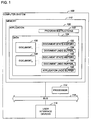
- a conventional programmable computer system 100 has at least a processor component 114 capable of executing computer program instructions, a memory component 112 for storing programs and data, and a user interface device or devices 116 by which a person -- a user -- may interact with programs running on the system 100. These and other components are connected to interact with each other by one or more buses 118.
- the memory component will generally include a volatile random access memory (RAM), a non-volatile read-only memory (ROM), and one or more large disk drives.
- RAM volatile random access memory
- ROM non-volatile read-only memory
- the system may run one or more programs.
- Application 120 is a computer program designed for a particular task, and, as is typical, it acts on a central depository called a document, whose content a user creates and edits. Some applications, as illustrated, may allow a user to have more than one document, such as documents 130 and 140, open at a time, and allow the user to select one or the other of them as the active document that is
- a document is typically displayed in a rectangular region of the display screen called a document window.
- a spreadsheet application displays a spreadsheet document designed to look and act like a 2-dimensional table.
- a word-processing application displays a document designed to look like a sheet of paper.
- An image processing application displays a document designed to look like a photograph or a drawing.
- application 120 is illustrated as having program instructions 122 that may be executed to operated on data 124.
- Application 120 is programmed to implement a state history feature, and so associates with each open document 130 and 140 a corresponding state history 132 and 142 and a corresponding undo buffer 134 and 144, respectively.
- the application also has an undo buffer 126 for the application itself.
- the application undo buffer is the only undo buffer and the commands stored there include a reference to the relevant document, if any. If the application undo buffer contains a command to undo, then all of the document undo buffers should be empty, to maintain intuitive operation of the undo-redo feature.
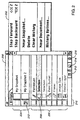
- an application implementing a history list provides, as part of a graphical user interface, a floating history palette 200 that a user may show or hide with menu commands or other user interface commands. Pertinent aspects of the operation of the application will now be described in terms of the information made available on the history palette 200 and the operations a user may perform using the history palette.
- the application When a document is opened or newly created, the application generates a snapshot of the document and updates the snapshot or upper region 204 of the palette with a thumbnail image representing the snapshot and the name of the snapshot, which the user may edit.
- the lower portion 206 of the palette is initialized with an item named "Open” or "New", for the initial document state, so that the user will be able to step backward from his or her first state-changing operation. (This may be viewed as characterizing opening and creating a document as "interesting" operations, as described below.)
- the history palette 200 is associated with a particular document. If the user has two documents 130 and 140 (FIG. 1) open, each will have a separate history palette, and the history palette shown when one of the documents is active will reflect the state history 132 or 142, respectively, of the corresponding document 130 or 140.
- Viewing parameters such as a viewing magnification, which affect how the application displays the document but do not affect the actual document data, may be considered interesting in a particular implementation.
- a viewing parameter that applies to all views of a document may well be treated as interesting and considered part of the state of the document; whereas if the document can be viewed in multiple open windows with a viewing parameter that can be set differently for each view, the parameter would more naturally not be considered interesting or part of the document state.
- the state of the document is recorded in the state history after the user makes a change to the document that changes the state of the document.
- the application may -- implicitly or expressly -- categorize commands into those that change the document state (the "interesting" ones) and those that do not.
- some commands such as successive, consecutive commands moving a single object, may be interesting only in the aggregate, when they have been collapsed into a single move-object command.
- some commands are global, such as a change to a palette or to preferences, in that they change the state of the application, and are not made to a particular document.
- Each item has an icon and a brief textual description of corresponding command.
- the icon shows the tool used to perform the command or, for menu and dialog commands, it is a menu or dialog icon.
- Both the upper portion 204 and the lower portion 206 are specific to the current document and will change when a different document is made active.
- the user may grab a small control 208 on the left side of the palette and drag it up and down to cause states of the document to be displayed, according to the position of the control. Doing so causes the current state -- the one being displayed as a result of the dragging action -- to be highlighted and those after it to be dimmed. In FIG. 2, the state corresponding to the second history list item, "Selection", is highlighted, and those following it are dimmed. Other user interface gestures, such as clicking on an item, will have the same effect. If the user then begins to alter the document, all items in the history list 206 below the selected item will be deleted. (An alternative and more powerful mode of operation -- non-linear history mode -- will be described later.)
- buttons 210 may be selected to establish the corresponding state -- whether a state in the state history or a snapshot -- as the state that will be used as a source state by history-based tools. Such a selection is recorded on the palette with an icon to mark the selected state. As illustrated, a history paintbrush icon is used to indicate that the corresponding state will be used when a history paintbrush tool is used on the active document. If no more than one state may be selected as a source for history-based tools, the buttons 210 will behave like radio buttons, in that selecting one state will deselect any other selected state. As will be described, both earlier and later document states (that is, both items above and below the current state item in the history list) may be selected as a history source.
- the history paintbrush tool may be selected from a tool palette like any of the other tools that the user may select to perform operations on a document.
- the history paintbrush operates to paint on a target document input from the source.
- the input may be pixel data, blending modes, clipping paths, or any other data that is part of the source document state.
- the semantics of the tool may -- but need not -- require the source to be a state (present, past, or future) of the target document; alternatively, the semantics may permit a tool to use as a source a state derived from a document entirely independent from the target document.
- the history palette 200 may also be used as a source for a drag and drop command.
- the source state (the document state corresponding to the drag item) will be applied to the targeted document.
- the semantics of applying a state to a document are application specific, and may depend on the nature of the source state. (For example, it may be a complete document state, such as is found in the state history, or it may be a partial state, such as is captured when a snapshot is taken of a single layer of an image document.)
- to apply a complete document state appends the source state to the history list and installs it as the current state of the target document. If the source is a partial state such as an image layer, it could be added as a layer to the target document. Alternatively, even a complete source image document could be flattened to a single layer and added to the target document.
- the history palette also has a pop-up menu 202. This menu provides commands to step forward through a history list, to step backward through a history list, to create a new snapshot, to delete a history or snapshot item, to clear the history list 206 (and corresponding state history); to create a new document from a saved document state, and to set options for the history features.
- step forward and step backward commands enable the user to walk backward and forward through the current history list 206, as was described earlier in reference to control 208.
- a user may create a snapshot of any point in the document's history either by using the new-snapshot command in the pop-up menu 202 or by using the command button 214 in the palette. For example, a user may select a history state by moving control 208 to the corresponding list item and then selecting snapshot button 214, which will bring up a dialog window for the user to name the snapshot and optionally set snapshot control options. In particular, the user may choose to snapshot a full document from the state, a composition of all the layers of the document state, or the current layer as it exists in the selected document state. An item for the newly created snapshot will be appended to the upper list 204 of the palette.
- non-linear history mode deleting an item from the history list 206 does not cause the items below the deleted item to be deleted. Because the later document states are complete in themselves, earlier ones may be deleted with no adverse effect. Also, in non-linear history mode, a user may step backward to an earlier document state, begin working from there, and not cause the later document states to be deleted. Rather, the new document states are added to the end of the history list, which as a result will show two branches of state history.
- Operation of the history palette records some, but not all, changes made by a user. Changes that are local to the document will be recorded, while changes that are global to the application will not be recorded. A global change, like changing a setting for a tool, will not cause a document state to be saved in a state history or an item to be added to the history list, because the document state has not been changed and therefore any previously captured state is still the state of the document. On the other hand, a local change, like creating or modifying a document path, layer, or channel, will cause a document state to be saved and an item to be added to the history list.
- FIG. 3 and FIG. 4 are intended to explain the operation and use of the state history feature so that they may be readily understood, and so details of implementation and optimization are omitted.
- a practical implementation of the pertinent command dispatch and processing functions would be expected to combine and reorganize the illustrated steps and implement them in accordance with well-understood software engineering techniques.
- the operation of an implementation of the state history feature may be seen to begin when a user enters a command (step 302).
- a command is a request made by the user to the application, through a graphical user interface, for example, to change the state of the application or the state of the active document.
- the application performs the corresponding action (step 304, which will be elaborated in reference to FIG. 4). If the action is one categorized as not affecting the state of a document (the no branch of decision step 306), the state history and history list are unaffected.
- step 308 if the action of the command was performed with the document in the state of the temporally most recent entry in the history list, which corresponds to the temporally most recent state in the state history, the state of the document after the action is stored in the state history and the history list on the history palette is updated (the yes branch of step 308, and steps 312, 314, and 320).
- step 308 if non-linear history mode is in effect, nothing is discarded from the history list or the state history merely because an interesting command has been entered (the yes branch of step 310).
- the history list items below the current state item and the corresponding states in the state history are discarded, other than any item selected as a source for history-based tools, such as the history paintbrush (see description of buttons 210, above).
- the top (earliest) item from the history list -- excluding any item selected as a source for history-based tools -- is discarded, along with its corresponding document state in the state history, before the new document state is stored (the no branch of step 312 and step 318).
- step 30 aspects of the perform action step (step 30, FIG. 3) pertinent to an implementation of a state history feature will not be described.
- the command is stored in an undo buffer associated with the active document, such as buffers 134 and 144 of FIG. 1 (the yes branch of decision step 410 and step 412).
- the command is an undo or a redo
- the undo or redo operation of the command in the undo buffer is executed (step 412).
- the history-related commands and in particular changes to the history list and the state history, can be subject to the conventional undo and redo (step 412).
- The provides an advantageous and elegant user interface that allows, for example, a user to toggle between two document states previously selected from anywhere in the state history with a single repeated keystroke.
- step 4128 the command is performed (step 418) and operation continues (step 420) with decision step 306 (FIG. 3). Otherwise, the command is one that uses the history list (the yes branch of decision step 416), and the processing of it will now be described.
- the command navigates the history list -- for example, a step-backward command, step-forward command, or list item selection command -- the document state corresponding to selected item is installed as the current state of the active document (steps 430 and 432).
- the history-based commands that may be implemented in a painting application include the history paintbrush, which paints from the source state onto the active document; a fill-from-history command that performs a fill operation on the active document with input from the source state; and an eraser that erases the active document to the source state.
- the source state may be either earlier or later than the current state, enabling a user to paint from either the future or the past.
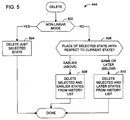
- the behavior depends on whether the operating mode is linear history mode or non-linear history mode and where in the history list the selected item falls (step 444). As shown in FIG. 5, in nonlinear history mode, only the selected item and its document state are deleted (the yes branch of decision step 502 and step 504). Otherwise, the position of the selected item with respect to the current state of the document is considered (step 506). If the selected item is below (was created later than) the current state or the same as the current state, both the selected item and its state, and any later items (below the selected item in the history list) and their states are also deleted (step 510).
- step 508 If the selected item is above (was created earlier than) the current state, both the selected item and its state, and any earlier items (above the selected item in the history list) and their states are also deleted (step 508). Where a range of states is deleted (steps 508 and 510), a special check is made not to delete any item selected as a source for history-based tools.
- the initial state of the new document is copied from the document state in the state history corresponding to the selected history list item (step 448).
- a clear history command may also be implemented, with which a user may delete all non-snapshot states other than the current state and any history paintbrush source state.
- a state history feature is particularly advantageous in an image manipulation application, such as the Photoshop® program available from Adobe Systems Incorporated of San Jose, California.
- each document is, as is typical, a single-page image that is generally viewed as a whole by the user in the process of creation and editing.
- This application has many powerful painting and selection tools, supports multiple layers, each with multiple channels, special effects filters, and lighting effects.
- the state history feature with its non-linear operating mode is particularly advantageous, in that it permits a user to step backward and forward through a set of states, picking up effects from a future state and applying them to a past state to create a new branch of development of an image.
- the invention may be implemented in digital electronic circuitry, or in computer hardware, firmware, software, or in combinations of them.
- Apparatus of the invention may be implemented in a computer program product tangibly embodied in a machine-readable storage device for execution by a programmable processor; and method steps of the invention may be performed by a programmable processor executing a program of instructions to perform functions of the invention by operating on input data and generating output.
- the invention may advantageously be implemented in one or more computer programs that are executable on a programmable system including at least one programmable processor coupled to receive data and instructions from, and to transmit data and instructions to, a data storage system, at least one input device, and at least one output device.
- Each computer program may be implemented in a high-level procedural or object-oriented programming language, or in assembly or machine language if desired; and in any case, the language may be a compiled or interpreted language.
- Suitable processors include, by way of example, both general and special purpose microprocessors. Generally, a processor will receive instructions and data from a read-only memory and/or a random access memory.
- Storage devices suitable for tangibly embodying computer program instructions and data include all forms of nonvolatile memory, including by way of example semiconductor memory devices, such as EPROM, EEPROM, and flash memory devices; magnetic disks such as internal hard disks and removable disks; magneto-optical disks; and CD-ROM disks. Any of the foregoing may be supplemented by, or incorporated in, specially-designed ASICs (application-specific integrated circuits).
Landscapes
- Engineering & Computer Science (AREA)
- Theoretical Computer Science (AREA)
- Health & Medical Sciences (AREA)
- Artificial Intelligence (AREA)
- Audiology, Speech & Language Pathology (AREA)
- Computational Linguistics (AREA)
- General Health & Medical Sciences (AREA)
- Physics & Mathematics (AREA)
- General Engineering & Computer Science (AREA)
- General Physics & Mathematics (AREA)
- User Interface Of Digital Computer (AREA)
- Document Processing Apparatus (AREA)
Applications Claiming Priority (2)
| Application Number | Priority Date | Filing Date | Title |
|---|---|---|---|
| US10801 | 1998-01-22 | ||
| US09/010,801 US7062497B2 (en) | 1998-01-22 | 1998-01-22 | Maintaining document state history |
Publications (2)
| Publication Number | Publication Date |
|---|---|
| EP0932108A2 true EP0932108A2 (fr) | 1999-07-28 |
| EP0932108A3 EP0932108A3 (fr) | 2001-05-30 |
Family
ID=21747499
Family Applications (1)
| Application Number | Title | Priority Date | Filing Date |
|---|---|---|---|
| EP99300387A Withdrawn EP0932108A3 (fr) | 1998-01-22 | 1999-01-20 | Maintien de l'historique de l'état d'un document |
Country Status (4)
| Country | Link |
|---|---|
| US (1) | US7062497B2 (fr) |
| EP (1) | EP0932108A3 (fr) |
| JP (1) | JP4829390B2 (fr) |
| CA (1) | CA2259805A1 (fr) |
Cited By (11)
| Publication number | Priority date | Publication date | Assignee | Title |
|---|---|---|---|---|
| WO2003005258A3 (fr) * | 2001-07-05 | 2003-10-23 | Koninkl Philips Electronics Nv | Procede de fourniture d'une information de compte-rendu et procede et dispositif de transcription de dictees |
| EP1435560A2 (fr) * | 2002-12-12 | 2004-07-07 | Samsung Electronics Co., Ltd. | Procédé et appareil de generation des données de préférence d'utilisateur concernant le couleur d'image et procédé et appareil de conversion de préférence de couleur d'image |
| EP1681634A1 (fr) * | 2004-12-17 | 2006-07-19 | Microsoft Corporation | Procédé et système de suivi des modifications dans un document |
| US8015501B2 (en) | 2003-08-18 | 2011-09-06 | Sap Aktiengesellschaft | Accessing previously viewed windows |
| US20140032502A1 (en) * | 2008-05-12 | 2014-01-30 | Adobe Systems Incorporated | History-based archive management |
| US8768885B2 (en) | 2008-05-12 | 2014-07-01 | Adobe Systems Incorporated | Shared edit access of electronic content |
| US8849869B2 (en) | 2008-05-12 | 2014-09-30 | Adobe Systems Incorporated | System and method for editing an item list in electronic content |
| US8996621B2 (en) | 2008-05-12 | 2015-03-31 | Adobe Systems Incorporated | Asynchronous comment updates |
| US9176943B2 (en) | 2008-05-12 | 2015-11-03 | Adobe Systems Incorporated | Comment presentation in electronic documents |
| US9418054B2 (en) | 2008-05-12 | 2016-08-16 | Adobe Systems Incorporated | Document comment management |
| CN107992378A (zh) * | 2017-10-30 | 2018-05-04 | 维沃移动通信有限公司 | 一种文件处理方法及移动终端 |
Families Citing this family (110)
| Publication number | Priority date | Publication date | Assignee | Title |
|---|---|---|---|---|
| US6523134B2 (en) * | 1998-09-18 | 2003-02-18 | International Business Machines Corporation | Selective undo |
| US6668271B1 (en) * | 1999-05-19 | 2003-12-23 | Richo Company, Ltd. | System for distributing, installing and running web applications (agents) |
| DE60039405D1 (de) * | 1999-12-14 | 2008-08-21 | Matsushita Electric Industrial Co Ltd | Navigationssystem |
| WO2001093081A2 (fr) * | 2000-06-02 | 2001-12-06 | First To File, Inc. | Procede informatique pour la protection de la propriete intellectuelle |
| US20040158587A1 (en) * | 2000-11-27 | 2004-08-12 | First To File, Inc | Computer implemented method for controlling document edits |
| US20020093528A1 (en) * | 2000-11-27 | 2002-07-18 | First To File, Inc. | User interface for managing intellectual property |
| US7216289B2 (en) * | 2001-03-16 | 2007-05-08 | Microsoft Corporation | Method and apparatus for synchronizing multiple versions of digital data |
| US20020188638A1 (en) * | 2001-06-08 | 2002-12-12 | Walter Hamscher | Document negotiation |
| KR100447398B1 (ko) * | 2002-03-22 | 2004-09-04 | 엘지전자 주식회사 | 지역적 실행취소 편집방법 |
| US20030187968A1 (en) * | 2002-03-28 | 2003-10-02 | Gateway, Inc. | Layer menus and multiple page displays for web GUI |
| US7823060B2 (en) * | 2002-06-07 | 2010-10-26 | Microsoft Corporation | Undo/redo architecture across multiple files |
| US20040009813A1 (en) * | 2002-07-08 | 2004-01-15 | Wind Bradley Patrick | Dynamic interaction and feedback system |
| US7206961B1 (en) * | 2002-09-30 | 2007-04-17 | Emc Corporation | Preserving snapshots during disk-based restore |
| US7546541B2 (en) * | 2002-12-10 | 2009-06-09 | International Business Machines Corporation | Method and apparatus for iterative refinement of generated user-interface markup |
| US7663605B2 (en) * | 2003-01-08 | 2010-02-16 | Autodesk, Inc. | Biomechanical user interface elements for pen-based computers |
| US20050015728A1 (en) * | 2003-07-17 | 2005-01-20 | International Business Machines Corporation | Method, system, and program product for customizing a user interface |
| US7634149B2 (en) * | 2003-09-29 | 2009-12-15 | Autodesk, Inc. | Method for dynamically updating a planar topology |
| US7623128B2 (en) * | 2003-09-29 | 2009-11-24 | Autodesk, Inc. | Interactive constraint-based alignment objects |
| US7617077B2 (en) * | 2003-09-29 | 2009-11-10 | Autodesk, Inc. | Method and apparatus for automatically discovering hierarchical relationships in planar topologies |
| US20050091016A1 (en) * | 2003-09-29 | 2005-04-28 | Autodesk, Inc. | Surface smoothing techniques |
| US7523396B2 (en) * | 2003-09-29 | 2009-04-21 | Autodesk, Inc. | Surface construction audit trail and manipulation |
| US8648854B2 (en) * | 2003-09-29 | 2014-02-11 | Autodesk, Inc. | Interactive method for designing parcels |
| US7561990B2 (en) * | 2003-09-29 | 2009-07-14 | Autodesk, Inc. | Interactive triangulated irregular network (TIN) surfaces design |
| US20050262435A1 (en) * | 2003-10-30 | 2005-11-24 | Avaya Technology Corp. | Automatic detection and dialing of phone numbers on computer documents |
| US7081093B2 (en) * | 2003-12-05 | 2006-07-25 | Vermon | Array transducer for 3D tilting probes |
| US20080109751A1 (en) * | 2003-12-31 | 2008-05-08 | Alias Systems Corp. | Layer editor system for a pen-based computer |
| US7475061B2 (en) * | 2004-01-15 | 2009-01-06 | Microsoft Corporation | Image-based document indexing and retrieval |
| JP2005301492A (ja) * | 2004-04-08 | 2005-10-27 | Olympus Corp | 画像履歴処理プログラム、画像履歴処理方法、画像履歴処理装置及び記録媒体 |
| US20050234838A1 (en) * | 2004-04-14 | 2005-10-20 | Manousos Nicholas H | Method and apparatus for providing in place editing within static documents |
| US8250034B2 (en) * | 2004-04-14 | 2012-08-21 | Verisign, Inc. | Method and apparatus to provide visual editing |
| US7739306B2 (en) * | 2004-04-14 | 2010-06-15 | Verisign, Inc. | Method and apparatus for creating, assembling, and organizing compound media objects |
| US8261196B2 (en) * | 2004-08-04 | 2012-09-04 | International Business Machines Corporation | Method for displaying usage metrics as part of search results |
| US7493303B2 (en) * | 2004-08-04 | 2009-02-17 | International Business Machines Corporation | Method for remotely searching a local user index |
| US7421421B2 (en) * | 2004-08-04 | 2008-09-02 | International Business Machines Corporation | Method for providing multi-variable dynamic search results visualizations |
| US7496563B2 (en) * | 2004-08-04 | 2009-02-24 | International Business Machines Corporation | Method for locating documents a user has previously accessed |
| US7634461B2 (en) * | 2004-08-04 | 2009-12-15 | International Business Machines Corporation | System and method for enhancing keyword relevance by user's interest on the search result documents |
| US7831601B2 (en) * | 2004-08-04 | 2010-11-09 | International Business Machines Corporation | Method for automatically searching for documents related to calendar and email entries |
| US7395260B2 (en) * | 2004-08-04 | 2008-07-01 | International Business Machines Corporation | Method for providing graphical representations of search results in multiple related histograms |
| US7729538B2 (en) * | 2004-08-26 | 2010-06-01 | Microsoft Corporation | Spatial recognition and grouping of text and graphics |
| US7574048B2 (en) * | 2004-09-03 | 2009-08-11 | Microsoft Corporation | Freeform digital ink annotation recognition |
| GB2418280A (en) * | 2004-09-18 | 2006-03-22 | Hewlett Packard Development Co | Document creation system |
| US20060072166A1 (en) * | 2004-09-24 | 2006-04-06 | Nikon Corporation | Image processing device, method and program |
| US20080046809A1 (en) * | 2004-11-12 | 2008-02-21 | Justsystems Corporation | Data Processing Device and Data Processing Method |
| US20060129539A1 (en) * | 2004-12-09 | 2006-06-15 | Masashi Nakatomi | Information processing device and method thereof |
| US7570816B2 (en) * | 2005-03-31 | 2009-08-04 | Microsoft Corporation | Systems and methods for detecting text |
| KR100678216B1 (ko) * | 2005-04-28 | 2007-02-02 | 삼성전자주식회사 | 휴대단말기의 이미지상태 전환방법 |
| US7526129B2 (en) * | 2005-06-23 | 2009-04-28 | Microsoft Corporation | Lifting ink annotations from paper |
| US20070088729A1 (en) * | 2005-10-14 | 2007-04-19 | International Business Machines Corporation | Flexible history manager for manipulating data and user actions |
| EP1873721A1 (fr) * | 2006-06-26 | 2008-01-02 | Fo2PIX Limited | Système et procédé générant un document imagé avec des étapes d'édition en forme d'arbre |
| US20080009325A1 (en) * | 2006-07-10 | 2008-01-10 | Research In Motion Limited | Menu interface for mobile communications device |
| US8103971B2 (en) * | 2006-12-29 | 2012-01-24 | Sap Ag | System and method for notifying actions |
| US7900142B2 (en) * | 2007-01-15 | 2011-03-01 | Microsoft Corporation | Selective undo of editing operations performed on data objects |
| US8205150B2 (en) * | 2007-01-22 | 2012-06-19 | Cfph, Llc | Document changes |
| US8555160B2 (en) * | 2007-03-27 | 2013-10-08 | Canon Kabushiki Kaisha | Apparatus and methods for creating and/or editing color-image processing files |
| US20080250314A1 (en) * | 2007-04-03 | 2008-10-09 | Erik Larsen | Visual command history |
| JP5100191B2 (ja) * | 2007-04-13 | 2012-12-19 | キヤノン株式会社 | 情報処理装置及び情報処理方法 |
| JP2008269281A (ja) * | 2007-04-20 | 2008-11-06 | Meidensha Corp | ソフトウェア開発支援システム、開発支援方法およびプログラム |
| PL3088384T3 (pl) * | 2007-05-15 | 2019-06-28 | Merial, Inc. | Związki aryloazol-2-ilo-cyjanoetyloaminowe, sposób ich wytwarzania oraz sposób ich stosowania |
| US8234591B1 (en) * | 2007-05-21 | 2012-07-31 | Adobe Systems Incorporated | Undo and redo using thumbnails generated from a specific area of the image |
| JP4893478B2 (ja) * | 2007-05-31 | 2012-03-07 | ブラザー工業株式会社 | 画像表示装置 |
| KR100983481B1 (ko) * | 2007-07-06 | 2010-09-27 | 엔에이치엔(주) | 복수의 편집 어플리케이션에 의해 편집되는 화상 데이터에 대한 정보를 공유하는 방법 및 시스템 |
| US20090063184A1 (en) * | 2007-08-30 | 2009-03-05 | Siemens Hearing Instruments Inc. | Method For Automatic Project File Reconstruction and Batch Processor |
| US8255799B2 (en) * | 2008-02-29 | 2012-08-28 | Autodesk, Inc. | Dynamic action recorder |
| US20090327973A1 (en) * | 2008-04-29 | 2009-12-31 | International Business Machines Corporation | Preserving a complete history of a set of application actions when non-linear interactions are permitted |
| US7974948B2 (en) * | 2008-05-05 | 2011-07-05 | Microsoft Corporation | Automatically capturing and maintaining versions of documents |
| JP5111319B2 (ja) * | 2008-09-30 | 2013-01-09 | 京セラドキュメントソリューションズ株式会社 | 入力表示装置、電子機器及び入力表示プログラム |
| JP2009032394A (ja) * | 2008-10-06 | 2009-02-12 | Yamaha Corp | オーディオデータ記録再生装置 |
| US9898173B2 (en) * | 2008-10-07 | 2018-02-20 | Adobe Systems Incorporated | User selection history |
| US9355469B2 (en) * | 2009-01-09 | 2016-05-31 | Adobe Systems Incorporated | Mode-based graphical editing |
| US8418061B2 (en) * | 2009-04-20 | 2013-04-09 | Autodesk, Inc. | Dynamic macro creation using history of operations |
| US8701008B2 (en) * | 2009-06-18 | 2014-04-15 | Cyberlink Corp. | Systems and methods for sharing multimedia editing projects |
| US9672646B2 (en) | 2009-08-28 | 2017-06-06 | Adobe Systems Incorporated | System and method for image editing using visual rewind operation |
| WO2011042249A1 (fr) * | 2009-10-08 | 2011-04-14 | International Business Machines Corporation | Procédé et système permettant de synchroniser des changements entre un code de développement de produit et une documentation associée |
| CA2684540A1 (fr) * | 2009-11-05 | 2011-05-05 | Ibm Canada Limited - Ibm Canada Limitee | Navigation a travers des interactions historiques stockees, associees a une vue multiutilisateur |
| US8365075B2 (en) * | 2009-11-19 | 2013-01-29 | International Business Machines Corporation | Recording events in a virtual world |
| US8539347B2 (en) * | 2010-03-05 | 2013-09-17 | Xerox Corporation | Time sequencing of editing steps in a two-dimensional digital document |
| US9448986B2 (en) * | 2010-04-06 | 2016-09-20 | Xerox Corporation | Method and system for processing documents through document history encapsulation |
| US8677253B2 (en) * | 2010-05-25 | 2014-03-18 | International Business Machines Corporation | Replicating recorded actions across computer systems in a collaborative environment |
| US20120246565A1 (en) * | 2011-03-24 | 2012-09-27 | Konica Minolta Laboratory U.S.A., Inc. | Graphical user interface for displaying thumbnail images with filtering and editing functions |
| US9710124B2 (en) * | 2011-03-31 | 2017-07-18 | Hewlett-Packard Development Company, L.P. | Augmenting user interface elements based on timing information |
| US8533593B2 (en) * | 2011-04-19 | 2013-09-10 | Autodesk, Inc | Hierarchical display and navigation of document revision histories |
| US8533594B2 (en) * | 2011-04-19 | 2013-09-10 | Autodesk, Inc. | Hierarchical display and navigation of document revision histories |
| US8533595B2 (en) * | 2011-04-19 | 2013-09-10 | Autodesk, Inc | Hierarchical display and navigation of document revision histories |
| US8874525B2 (en) | 2011-04-19 | 2014-10-28 | Autodesk, Inc. | Hierarchical display and navigation of document revision histories |
| US11611595B2 (en) | 2011-05-06 | 2023-03-21 | David H. Sitrick | Systems and methodologies providing collaboration among a plurality of computing appliances, utilizing a plurality of areas of memory to store user input as associated with an associated computing appliance providing the input |
| US10402485B2 (en) | 2011-05-06 | 2019-09-03 | David H. Sitrick | Systems and methodologies providing controlled collaboration among a plurality of users |
| US8676546B2 (en) | 2011-07-07 | 2014-03-18 | Autodesk, Inc. | Grading method utilizing flow grade solution |
| US9020783B2 (en) * | 2011-07-07 | 2015-04-28 | Autodesk, Inc. | Direct manipulation of composite terrain objects with intuitive user interaction |
| US9196085B2 (en) | 2011-07-07 | 2015-11-24 | Autodesk, Inc. | Interactively shaping terrain through composable operations |
| US20130185252A1 (en) * | 2012-01-17 | 2013-07-18 | Jeffrey J. Palmucci | Document Revision Manager |
| US8924399B1 (en) * | 2012-04-30 | 2014-12-30 | Intuit Inc. | Flexible page-viewing within a browser tab |
| US20140040789A1 (en) * | 2012-05-08 | 2014-02-06 | Adobe Systems Incorporated | Tool configuration history in a user interface |
| US9285971B2 (en) * | 2012-06-20 | 2016-03-15 | Google Inc. | Compartmentalized image editing system |
| JP5747883B2 (ja) * | 2012-09-13 | 2015-07-15 | コニカミノルタ株式会社 | 操作制御方法及び操作制御プログラム並びに操作制御装置 |
| US20140082464A1 (en) * | 2012-09-14 | 2014-03-20 | David H Sitrick | Multi-User Event Processing Systems And Methodologies |
| US9372833B2 (en) | 2012-09-14 | 2016-06-21 | David H. Sitrick | Systems and methodologies for document processing and interacting with a user, providing storing of events representative of document edits relative to a document; selection of a selected set of document edits; generating presentation data responsive to said selected set of documents edits and the stored events; and providing a display presentation responsive to the presentation data |
| US20140123076A1 (en) * | 2012-11-01 | 2014-05-01 | Microsoft Corporation | Navigating among edit instances of content |
| US9019295B1 (en) * | 2013-03-14 | 2015-04-28 | Camtagger LLC | Personalized tagging of media on mobile devices |
| JP5827640B2 (ja) * | 2013-03-22 | 2015-12-02 | 富士フイルム株式会社 | 画像表示方法および装置並びにプログラム |
| US9530233B2 (en) * | 2013-10-10 | 2016-12-27 | Adobe Systems Incorporated | Action records associated with editable content objects |
| US10475026B2 (en) * | 2014-05-16 | 2019-11-12 | International Business Machines Corporation | Secure management of transactions using a smart/virtual card |
| WO2015196038A1 (fr) | 2014-06-20 | 2015-12-23 | Google Inc. | Outils d'édition sélective utilisant l'édition d'image |
| US10261756B2 (en) * | 2015-06-01 | 2019-04-16 | Brigham Young University | Method for preventing reference invalidation when reversing operations in synchronous collaborative applications |
| US20170285930A1 (en) * | 2016-04-01 | 2017-10-05 | Microsoft Technology Licensing, Llc. | Document content replay |
| US10552408B2 (en) * | 2016-11-02 | 2020-02-04 | Oracle International Corporation | Automatic linearizability checking of operations on concurrent data structures |
| US10649861B1 (en) * | 2017-08-02 | 2020-05-12 | EMC IP Holding Company LLC | Operational recovery of serverless applications in a cloud-based compute services platform |
| US10860433B1 (en) | 2017-10-24 | 2020-12-08 | EMC IP Holding Company LLC | Directional consistency in capture and recovery of cloud-native applications |
| US11314601B1 (en) | 2017-10-24 | 2022-04-26 | EMC IP Holding Company LLC | Automated capture and recovery of applications in a function-as-a-service environment |
| JP7200008B2 (ja) * | 2019-02-28 | 2023-01-06 | キヤノン株式会社 | 電子機器およびその制御方法およびプログラム |
| CN112001984B (zh) * | 2020-06-30 | 2024-10-18 | 深圳点猫科技有限公司 | 一种基于地形编辑器的快照式历史记录操作方法及装置 |
Family Cites Families (25)
| Publication number | Priority date | Publication date | Assignee | Title |
|---|---|---|---|---|
| US4827447A (en) * | 1986-06-13 | 1989-05-02 | International Business Machines Corporation | Method for selectively returning to the beginning or the previous revision point in document edition |
| US5263136A (en) * | 1991-04-30 | 1993-11-16 | Optigraphics Corporation | System for managing tiled images using multiple resolutions |
| JP2993528B2 (ja) * | 1991-05-18 | 1999-12-20 | 富士通株式会社 | テキスト管理・復元方式 |
| JP2613326B2 (ja) * | 1991-07-15 | 1997-05-28 | 財団法人ニューメディア開発協会 | 情報処理装置の履歴内容提示方法、及びその装置 |
| US5754174A (en) * | 1992-08-27 | 1998-05-19 | Starfish Software, Inc. | User interface with individually configurable panel interfaces for use in a computer system |
| JPH08505968A (ja) * | 1992-12-23 | 1996-06-25 | タリジェント インコーポレイテッド | コンピュータ・システムでダイアログ・ボックスを実行する方法 |
| US5551055A (en) * | 1992-12-23 | 1996-08-27 | Taligent, Inc. | System for providing locale dependent user interface for presenting control graphic which has different contents or same contents displayed in a predetermined order |
| US5459865A (en) * | 1993-04-05 | 1995-10-17 | Taligent Inc. | Runtime loader |
| US5659747A (en) * | 1993-04-22 | 1997-08-19 | Microsoft Corporation | Multiple level undo/redo mechanism |
| US5537529A (en) * | 1993-04-22 | 1996-07-16 | Apple Computer, Inc. | Apparatus and method for creating versions of computer models and creating communications incorporating created versions therefrom |
| US5544302A (en) * | 1993-06-03 | 1996-08-06 | Taligent, Inc. | Object-oriented framework for creating and using container objects with built-in properties |
| JPH07295978A (ja) * | 1994-04-22 | 1995-11-10 | Sanyo Electric Co Ltd | データファイル処理装置における undo 処理方式 |
| US5801687A (en) * | 1994-09-30 | 1998-09-01 | Apple Computer, Inc. | Authoring tool comprising nested state machines for use in a computer system |
| US5701137A (en) * | 1995-05-24 | 1997-12-23 | Microsoft Corporation | Method for separating a hierarchical tree control into one or more hierarchical child tree controls in a graphical user interface |
| US6018342A (en) * | 1995-07-03 | 2000-01-25 | Sun Microsystems, Inc. | Automatically generated content-based history mechanism |
| US5877765A (en) * | 1995-09-11 | 1999-03-02 | Microsoft Corporation | Method and system for displaying internet shortcut icons on the desktop |
| US5757372A (en) * | 1996-01-16 | 1998-05-26 | Krause; Kai | Multiple nonlinear undo buttons |
| JP3279201B2 (ja) * | 1996-05-17 | 2002-04-30 | 富士ゼロックス株式会社 | 情報処理装置 |
| US6012083A (en) * | 1996-09-24 | 2000-01-04 | Ricoh Company Ltd. | Method and apparatus for document processing using agents to process transactions created based on document content |
| US5890181A (en) * | 1996-11-14 | 1999-03-30 | Kurzwell Applied Intelligence, Inc. | System and method for remotely grouping contents of an action history stack |
| US6002402A (en) * | 1997-04-09 | 1999-12-14 | Symantec Corporation | System and method for producing a drag-and-drop object from a popup menu item |
| US5990906A (en) * | 1997-06-25 | 1999-11-23 | National Instruments Corporation | Undo feature for a graphical programming system |
| US6008807A (en) * | 1997-07-14 | 1999-12-28 | Microsoft Corporation | Method and system for controlling the display of objects in a slide show presentation |
| US6185591B1 (en) * | 1997-07-29 | 2001-02-06 | International Business Machines Corp. | Text edit system with enhanced undo user interface |
| US6310630B1 (en) * | 1997-12-12 | 2001-10-30 | International Business Machines Corporation | Data processing system and method for internet browser history generation |
-
1998
- 1998-01-22 US US09/010,801 patent/US7062497B2/en not_active Expired - Lifetime
-
1999
- 1999-01-20 EP EP99300387A patent/EP0932108A3/fr not_active Withdrawn
- 1999-01-21 CA CA002259805A patent/CA2259805A1/fr not_active Abandoned
- 1999-01-22 JP JP01473499A patent/JP4829390B2/ja not_active Expired - Lifetime
Cited By (16)
| Publication number | Priority date | Publication date | Assignee | Title |
|---|---|---|---|---|
| WO2003005258A3 (fr) * | 2001-07-05 | 2003-10-23 | Koninkl Philips Electronics Nv | Procede de fourniture d'une information de compte-rendu et procede et dispositif de transcription de dictees |
| CN1320499C (zh) * | 2001-07-05 | 2007-06-06 | 皇家菲利浦电子有限公司 | 用来转录口述和检测人工动作的装置 |
| EP1435560A2 (fr) * | 2002-12-12 | 2004-07-07 | Samsung Electronics Co., Ltd. | Procédé et appareil de generation des données de préférence d'utilisateur concernant le couleur d'image et procédé et appareil de conversion de préférence de couleur d'image |
| US7606412B2 (en) | 2002-12-12 | 2009-10-20 | Samsung Electronics Co., Ltd. | Method and apparatus for generating user preference data regarding color characteristic of image and method and apparatus for converting image color preference using the method and apparatus |
| US8015501B2 (en) | 2003-08-18 | 2011-09-06 | Sap Aktiengesellschaft | Accessing previously viewed windows |
| EP1681634A1 (fr) * | 2004-12-17 | 2006-07-19 | Microsoft Corporation | Procédé et système de suivi des modifications dans un document |
| US7788237B2 (en) | 2004-12-17 | 2010-08-31 | Microsoft Corporation | Method and system for tracking changes in a document |
| US8768885B2 (en) | 2008-05-12 | 2014-07-01 | Adobe Systems Incorporated | Shared edit access of electronic content |
| US20140032502A1 (en) * | 2008-05-12 | 2014-01-30 | Adobe Systems Incorporated | History-based archive management |
| US8849869B2 (en) | 2008-05-12 | 2014-09-30 | Adobe Systems Incorporated | System and method for editing an item list in electronic content |
| US8996621B2 (en) | 2008-05-12 | 2015-03-31 | Adobe Systems Incorporated | Asynchronous comment updates |
| US9176943B2 (en) | 2008-05-12 | 2015-11-03 | Adobe Systems Incorporated | Comment presentation in electronic documents |
| US9418054B2 (en) | 2008-05-12 | 2016-08-16 | Adobe Systems Incorporated | Document comment management |
| US10055392B2 (en) * | 2008-05-12 | 2018-08-21 | Adobe Systems Incorporated | History-based archive management |
| CN107992378A (zh) * | 2017-10-30 | 2018-05-04 | 维沃移动通信有限公司 | 一种文件处理方法及移动终端 |
| CN107992378B (zh) * | 2017-10-30 | 2019-07-26 | 维沃移动通信有限公司 | 一种文件处理方法及移动终端 |
Also Published As
| Publication number | Publication date |
|---|---|
| US20010049704A1 (en) | 2001-12-06 |
| EP0932108A3 (fr) | 2001-05-30 |
| CA2259805A1 (fr) | 1999-07-22 |
| US7062497B2 (en) | 2006-06-13 |
| JPH11272660A (ja) | 1999-10-08 |
| JP4829390B2 (ja) | 2011-12-07 |
Similar Documents
| Publication | Publication Date | Title |
|---|---|---|
| US7062497B2 (en) | Maintaining document state history | |
| AU2006235850B2 (en) | Reviewing editing operations | |
| CA2512155C (fr) | Interface utilisateur amelioree pour l'affichage de commandes de fonctionnalites logicielles selectionnables pertinentes a un objet selectionne | |
| US6411311B1 (en) | User interface for transferring items between displayed windows | |
| CA2512102C (fr) | Interface utilisateur amelioree pour l'affichage de commandes de fonctionnalites logicielles contextuelles selectionnables pour un objet selectionne | |
| US8707209B2 (en) | Save preview representation of files being created | |
| US9092119B2 (en) | Real time preview | |
| US7755644B1 (en) | Revealing clipped portion of image object | |
| US8214793B1 (en) | Automatic restoration of tool configuration while navigating layers of a composition | |
| US8499249B2 (en) | Computerized action tool for managing print parameters, queuing actions and archiving actions for a document output management system | |
| US20150205775A1 (en) | Managing Documents and Document Workspaces | |
| JP3443255B2 (ja) | 電子文書管理装置および方法 | |
| JPH0685145B2 (ja) | 複数の選択されたオブジェクトの位置表示方法 | |
| US9208138B2 (en) | Range adjustment for text editing | |
| US20070061716A1 (en) | Text editing method and apparatus | |
| US20120236192A1 (en) | Image display apparatus and image display method | |
| JPH09258971A (ja) | アイコンプログラミング装置 | |
| US7046846B2 (en) | Document analysis system and method | |
| US6922807B1 (en) | Object editing apparatus and method, and recording medium storing computer-readable program | |
| US20070094619A1 (en) | Cursor management method and program for the same | |
| JPH11265246A (ja) | マルチウィンドウ表示装置、マルチウィンドウ表示方法およびマルチウィンドウ表示プログラムを記憶した媒体 | |
| JP7180137B2 (ja) | 情報処理装置及びプログラム | |
| JPH0628145A (ja) | アイコン処理方法 | |
| JP2004318915A (ja) | 電子文書処理装置および方法 | |
| JP4961875B2 (ja) | 文書管理装置、文書管理方法およびプログラム |
Legal Events
| Date | Code | Title | Description |
|---|---|---|---|
| PUAI | Public reference made under article 153(3) epc to a published international application that has entered the european phase |
Free format text: ORIGINAL CODE: 0009012 |
|
| AK | Designated contracting states |
Kind code of ref document: A2 Designated state(s): AT BE CH CY DE DK ES FI FR GB GR IE IT LI LU MC NL PT SE |
|
| AX | Request for extension of the european patent |
Free format text: AL;LT;LV;MK;RO;SI |
|
| PUAL | Search report despatched |
Free format text: ORIGINAL CODE: 0009013 |
|
| AK | Designated contracting states |
Kind code of ref document: A3 Designated state(s): AT BE CH CY DE DK ES FI FR GB GR IE IT LI LU MC NL PT SE |
|
| AX | Request for extension of the european patent |
Free format text: AL;LT;LV;MK;RO;SI |
|
| RIC1 | Information provided on ipc code assigned before grant |
Free format text: 7G 06F 17/24 A, 7G 06F 17/21 B |
|
| AKX | Designation fees paid | ||
| REG | Reference to a national code |
Ref country code: DE Ref legal event code: 8566 |
|
| STAA | Information on the status of an ep patent application or granted ep patent |
Free format text: STATUS: THE APPLICATION IS DEEMED TO BE WITHDRAWN |
|
| 18D | Application deemed to be withdrawn |
Effective date: 20011201 |