EP0938700B1 - Vorrichtung zur darstellung von vortragsunterlagen - Google Patents
Vorrichtung zur darstellung von vortragsunterlagen Download PDFInfo
- Publication number
- EP0938700B1 EP0938700B1 EP97949922A EP97949922A EP0938700B1 EP 0938700 B1 EP0938700 B1 EP 0938700B1 EP 97949922 A EP97949922 A EP 97949922A EP 97949922 A EP97949922 A EP 97949922A EP 0938700 B1 EP0938700 B1 EP 0938700B1
- Authority
- EP
- European Patent Office
- Prior art keywords
- input
- computer
- input unit
- display
- papers
- Prior art date
- Legal status (The legal status is an assumption and is not a legal conclusion. Google has not performed a legal analysis and makes no representation as to the accuracy of the status listed.)
- Expired - Lifetime
Links
Images
Classifications
-
- G—PHYSICS
- G06—COMPUTING OR CALCULATING; COUNTING
- G06F—ELECTRIC DIGITAL DATA PROCESSING
- G06F3/00—Input arrangements for transferring data to be processed into a form capable of being handled by the computer; Output arrangements for transferring data from processing unit to output unit, e.g. interface arrangements
- G06F3/01—Input arrangements or combined input and output arrangements for interaction between user and computer
- G06F3/03—Arrangements for converting the position or the displacement of a member into a coded form
- G06F3/033—Pointing devices displaced or positioned by the user, e.g. mice, trackballs, pens or joysticks; Accessories therefor
Definitions
- the invention relates to a device for displaying Lecture notes according to the preamble of claim 1.
- Electronic displays are now also known which are placed on an overhead projector can, the image shown on the display by the Projector is projected onto the screen.
- the display is connected to a computer, so that the respective Representation based on data stored in the computer the display is generated.
- This arrangement offers the advantage that computer programs for making the representations can be used and in particular processes on the Computer monitor can be projected at the same time. Consequently Such a display not only offers the possibility to project static images, but also in the manner of a Films dynamic moving images.
- Projection devices are now also on the market (so-called multi-media projectors) available that are able to work independently of an overhead projector Images taken using a computer in the form of data are transmitted, generated and projected. Also these devices will gladly be used in lectures to present the Lecture notes used.
- devices have recently been offered in the trade (so-called "message pads"), which have a sensitive surface have on which with the help of a special pen Input of graphics, for example sketches or handwritten notes, is possible in a computer system.
- a special pen Input of graphics for example sketches or handwritten notes
- Such a device includes various functions, for example one Notebook, a calendar, an address or Telephone register, other set up in the computer Databases, etc.
- Via special fields on the sensitive Area of the device can also control commands for the Handheld device or in communication with the handheld device standing computer are triggered.
- EP 691 606 A1 is a portable one Information processing facility known in is able to create a hand-drawn drawing in real time to project.
- the image to be projected is on a transmassive liquid crystal display shown in a base unit is arranged, which with a Light source is shone through.
- the light happens Lentils and is placed on the back of a writing tablet more lenses and a mirror plate on a canvas projected.
- the writing tablet allows the viewer out a direction opposite to the projection direction to view the image to be projected so that while Image observed, coordinates through the writing tablet function can start and change if necessary.
- US 4,730,186 A discloses a display system in the form of a flat screen integrated graphic input. This makes it possible to get a cut out of one edit another image displayed on the screen and then edit this section to reinsert there.
- the object of the invention is based on the above State of the art to propose a more flexible device by means of the presentation documents on a visible surface can be represented, the editing and Storage in a computer with the appropriate Advantages and at the same time a label or Painting of the lecture documents during the lecture is easily possible by the lecturer.
- an input surface e.g. B. a capacitive or resistive working writing tablet present that a data entry allowed by graphic marking, means for Immediate transfer of the entered data from Computer system to the respective representation means available are. In this way, an interactive intervention takes place the image to be displayed is possible.
- a main aspect of the invention is that Display unit is a so-called multimedia projector and / or a projection display to rest on a known one Overhead projector and / or a large screen is used, that display means behind the input surface of the input unit, e.g. B. a liquid crystal display are arranged on which at least the image provided by the means of representation partially viewed when entering the input area and as Template can be used. Changes made on Writing tablets are made immediately by the computer the display means and also the display means passed on. For this, the input area should at least be Part be made transparent.
- Display means come e.g. B. an LCD display in question. The starting point is often one on the computer on the Means of display and the means of representation be prepared illustration. This figure replaces the Previously known slide on which the lecturer then can make additional comments, which in turn can be displayed immediately. The lecturer can This means that inputs can be seen immediately on the input surface.
- the complete, on the visible surface is also shown on the display means. This gives the lecturer a good overview.
- connection of the input unit to the Computer system implemented wirelessly. Comes into question here for example an infrared interface or the like wireless connections.
- the input surface is preferably used as a touch or proximity-sensitive surface formed on the with the help a corresponding pen the graphic Marking is done.
- On the input surface of the input unit can thus be sketched and as with previously known foils be written with the appropriate notes or Sketches are instantly converted into image data that are about the means of representation are depicted.
- Enter control commands on the input means are the input options for one File call or form feed within a file.
- This Command can be used, for example, for changing from a static one Image (comparable to a film change with conventional Lecture technique) can be used.
- Appropriate start or Stop commands for the playback of dynamically moving images are also an advantage.
- a text recognition for handwritten entries provided. That way you can handwritten notes not only in the form of image data, but also saved and processed as text become.
- the input unit equipped with additional functions, for example one Appointment planner, a translator, a notebook function, a database function etc. All are possible previously known for the "Message Pad” mentioned above Functions or future additional functions for such systems are introduced.
- Means are preferably also provided, by means of which various separately prepared images, so to speak can be displayed superimposed. This will simulates the function previously used when superimposing of transparencies and various at Lectures to illustrate the topics was helpful.
- the various components of the system according to the invention can be in different device units, but also combined can be provided.
- the Computer can be integrated directly into a projector.
- the input unit in combination with the computer which is very handy these days Notebooks or leptops are to be provided. That is, before an already existing in a Leptop z.
- Liquid crystal display becomes at least partially transparent input unit arranged with input surface, see above that the screen is also the task of the display means behind the input unit. In this case would be a preferred wireless interface between computers and display or playback device possible.
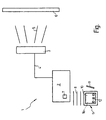
- the device 1 comprises a computer 2, which contains the usual additional components such as hard disk, monitor, Keyboard etc. He can also go with him if necessary so-called multimedia components or other devices, for example, a scanner.
- a computer 2 which contains the usual additional components such as hard disk, monitor, Keyboard etc. He can also go with him if necessary so-called multimedia components or other devices, for example, a scanner.
- Computer 2 is connected to one of its interfaces Projector 3 connected to him via line 4 transferred image data into a real image and how indicated by radial lines 5 on a canvas 6 projected.
- the projector 3 can also be a electronic display to hang up on a Overhead projector or a large monitor, etc. provided become.
- the computer 2 is located via an infrared interface 7 indicated by wavy lines 8, with a Input unit 9 in connection.
- the input unit 9 comprises a transparent input surface 10, for example as touch-sensitive surface can be formed. Behind a display means 9a is arranged on the input surface 10 which also shows the image created with the projector becomes.
- the input surface 10 is so in the display means 9a assigned that the coordinate system of the display means with that of the input surface matches, so that a Point of contact on the input surface with the underlying pixel coincides exactly.
- a pin 11 can now not shown Device user 1 graphic markings, for example handwritten notes or sketches on which Input surface 10, based on the illustration on the Means of display.
- control panels 12 on the input surface 10 are used for Entry and execution of control commands, similar to known CAD systems. Instead of the control panels 12 could buttons or other input means, for example a Trackball or the like for operating the input unit 9 be provided.
- the lecturer who gives his lecture using the Device 1 wants to keep his documents prepared in the memory of the computer 2 or on one of the Store computer-readable data medium. He can do this Documents later on the input unit 9 during his Call the lecture so that the corresponding representations can be projected onto the screen 6 via the projector 3.
- the lecturer can add additional information via the input surface 10 Remarks, sketches or the like easily by hand apply as graphic markings that immediately in the projected image. Via the control panels 12 or other controls not shown in the Input unit 9, the lecturer can at the same time Sequence of processing the prepared documents Taxes. For example, it can be based on a previously jump back picture shown, or one Start and stop dynamic image flow. He can too display multiple images one on top of the other.
- the input unit 9 can be any other desired Include functions. Such functions are for example a diary, an address register, other databases, a so-called translator for different languages, etc.
Landscapes
- Engineering & Computer Science (AREA)
- General Engineering & Computer Science (AREA)
- Theoretical Computer Science (AREA)
- Human Computer Interaction (AREA)
- Physics & Mathematics (AREA)
- General Physics & Mathematics (AREA)
- Controls And Circuits For Display Device (AREA)
- Position Input By Displaying (AREA)
Description
ein schematisches Blockdiagramm, aus dem der Aufbau einer erfindungsgemäßen Vorrichtung hervorgeht.
- 1
- Vorrichtung
- 2
- Computer
- 3
- Projektor
- 4
- Leitung
- 5
- Strahlen
- 6
- Leinwand
- 7
- Infrarotschnittstelle
- 8
- Wellenlinie
- 9
- Eingabeeinheit
- 9a
- Anzeigemittel
- 10
- Eingabe fläche
- 11
- Stift
- 12
- Bedienfeld
Claims (8)
- Vorrichtung zur Darstellung von Vortragsunterlagen in Seminaren, Kongressen, Vorlesungen oder dergleichen auf einer Sichtfläche, mit einem Rechner zur Verarbeitung, Speicherung und Weitergabe von Daten zur Darstellung der Unterlagen, mit Mittel zur Darstellung der unterlagen auf der Grundlage der vom Rechner weitergegebenen Daten und mit einer Eingabeeinheit mit Eingabefläche, die eine Dateneingabe durch graphische Markierung für die interaktive Eingriffnahme auf die vom Rechner weitergegebenen Daten zur Darstellung der Unterlagen auf der Sichtfläche erlaubt, dadurch gekennzeichnet, daß die Darstellungsmittel (3) einen Multimediaprojektor und/oder ein Projektionsdisplay zur Auflage auf einen Overheadprojektor und/oder einen Großbildschirm jeweils in separater Baueinheit umfassen, daß hinter der Eingabefläche (10) der Eingabeeinheit (9) Anzeigemittel (9a) zur wenigstens teilweisen Abbildung der durch die Darstellungsmittel (3) auf der Sichtfläche (6) dargestellten Vortragsunterlagen vorhanden sind, und daß der Rechner (2) unmittelbar die an der Eingabeeinheit (9) eingegebenen Daten an die Darstellungsmittel (3) und gleichermaßen an die Anzeigemittel (9a) hinter der Eingabefläche (10) weitergibt.
- Vorrichtung nach einem der vorgenannten Ansprüche, dadurch gekennzeichnet, daß eine drahtlose Verbindung zwischen der Eingabeeinheit (9) und dem Computer (2) vorhanden ist.
- Vorrichtung nach einem der vorgenannten Ansprüche, dadurch gekennzeichnet, daß die Eingabefläche (10) eine berührungs-oder näherungsempfindliche Fläche ist, mittels der mit einem Stift (11) aufgetragene graphische Markierungen in digitale Bilddaten umsetzbar sind.
- Vorrichtung nach einem der vorgenannten Ansprüche, dadurch gekennzeichnet, daß Mittel zur Eingabe von Steuerbefehlen über die Eingabeeinheit (9) vorhanden sind.
- Vorrichtung nach Anspruch 4, dadurch gekennzeichnet, daß die Steuerbefehle einen Dateiaufruf oder einen Seitenvorschub, die Auswahl graphischer Gestaltungselemente, eine Farbauswahl und/oder eine Strichbreite beinhalten.
- Vorrichtung nach einem der vorgenannten Ansprüche, dadurch gekennzeichnet, daß Mittel zur Texterkennung für handschriftliche Eingaben vorhanden sind.
- Vorrichtung nach einem der vorgenannten Ansprüche, dadurch gekennzeichnet daß die Eingabeeinheit (9) Zusatzfunktionen beinhaltet.
- Vorrichtung nach einem der vorgenannten Ansprüche, dadurch gekennzeichnet, daß die Eingabeeinheit (9) und die Anzeigemittel den Bildschirm des Rechners bilden.
Applications Claiming Priority (3)
| Application Number | Priority Date | Filing Date | Title |
|---|---|---|---|
| DE19647122 | 1996-11-14 | ||
| DE19647122A DE19647122A1 (de) | 1996-11-14 | 1996-11-14 | Elektronische Folie |
| PCT/DE1997/002667 WO1998021646A1 (de) | 1996-11-14 | 1997-11-14 | Vorrichtung zur darstellung von vortragsunterlagen |
Publications (2)
| Publication Number | Publication Date |
|---|---|
| EP0938700A1 EP0938700A1 (de) | 1999-09-01 |
| EP0938700B1 true EP0938700B1 (de) | 2000-12-20 |
Family
ID=7811693
Family Applications (1)
| Application Number | Title | Priority Date | Filing Date |
|---|---|---|---|
| EP97949922A Expired - Lifetime EP0938700B1 (de) | 1996-11-14 | 1997-11-14 | Vorrichtung zur darstellung von vortragsunterlagen |
Country Status (3)
| Country | Link |
|---|---|
| EP (1) | EP0938700B1 (de) |
| DE (2) | DE19647122A1 (de) |
| WO (1) | WO1998021646A1 (de) |
Families Citing this family (1)
| Publication number | Priority date | Publication date | Assignee | Title |
|---|---|---|---|---|
| DE10055583B4 (de) * | 1999-12-09 | 2014-06-18 | Heidelberger Druckmaschinen Ag | Verfahren zur Planung und Ablaufsteuerung von Produktionsabläufen |
Family Cites Families (9)
| Publication number | Priority date | Publication date | Assignee | Title |
|---|---|---|---|---|
| KR930009159B1 (ko) * | 1984-04-20 | 1993-09-23 | 가부시기가이샤 히다찌세이사꾸쇼 | 입력일체화 평면 디스플레이시스템 |
| US4846694A (en) * | 1988-06-20 | 1989-07-11 | Image Storage/Retrieval Systems, Inc. | Computer controlled, overhead projector display |
| JP3059228B2 (ja) * | 1991-02-28 | 2000-07-04 | 株式会社日立製作所 | 情報処理装置 |
| JPH0695796A (ja) * | 1992-09-14 | 1994-04-08 | Mutoh Ind Ltd | ペン入出力装置 |
| DK0692128T3 (da) * | 1993-04-02 | 1997-12-29 | Pinewood Ass Ltd | Informationsvisningsapparat |
| US5428417A (en) * | 1993-08-02 | 1995-06-27 | Lichtenstein; Bernard | Visual lecture aid |
| JP3453428B2 (ja) * | 1994-07-07 | 2003-10-06 | キヤノン株式会社 | 情報処理装置及びその制御方法 |
| GB2291722A (en) * | 1994-07-15 | 1996-01-31 | Ibm | Cordless coupling for peripheral devices. |
| DE19508320A1 (de) * | 1995-03-09 | 1996-09-12 | Jan Nieberle | Entwicklung eines neuen Eingabegerätes für Personal-Computer |
-
1996
- 1996-11-14 DE DE19647122A patent/DE19647122A1/de not_active Withdrawn
-
1997
- 1997-11-14 EP EP97949922A patent/EP0938700B1/de not_active Expired - Lifetime
- 1997-11-14 WO PCT/DE1997/002667 patent/WO1998021646A1/de not_active Ceased
- 1997-11-14 DE DE59702794T patent/DE59702794D1/de not_active Expired - Fee Related
Also Published As
| Publication number | Publication date |
|---|---|
| DE59702794D1 (de) | 2001-01-25 |
| DE19647122A1 (de) | 1998-05-28 |
| EP0938700A1 (de) | 1999-09-01 |
| WO1998021646A1 (de) | 1998-05-22 |
Similar Documents
| Publication | Publication Date | Title |
|---|---|---|
| DE69606643T2 (de) | Elektronisches präsentationssystem mit tragbaren speichermedien | |
| DE69430967T2 (de) | Interaktives Kopiersystem | |
| US10455193B2 (en) | Portable presentation system and methods for use therewith | |
| DE60012971T2 (de) | System, verfahren und benutzerschnittstelle zum aktiven lesen eines elektronischen dokuments | |
| DE69528885T2 (de) | Software-notizen | |
| DE69317153T2 (de) | Elektronische Schreibtafel | |
| DE3881331T2 (de) | Flexible Fensterverwaltung auf einer Rechneranzeige. | |
| DE69130773T2 (de) | Elektronische anzeige und datenverarbeitungsvorrichtung | |
| US5897648A (en) | Apparatus and method for editing electronic documents | |
| US20030208534A1 (en) | Enhanced productivity electronic meeting system | |
| DE3854269T2 (de) | Verfahren und Vorrichtung zum Verarbeiten handgeschriebener graphischer Eingaben in einer mit einem Schreibstift gesteuerten Datenverarbeitungseinrichtung. | |
| EP2017756A1 (de) | Verfahren zur Anzeige und/oder Bearbeitung bzw. Verarbeitung von Bilddaten medizinischen oder medizintechnischen Ursprungs mit Gestenerkennung | |
| US20070044028A1 (en) | Virtual flip chart method and apparatus | |
| DE10217302A1 (de) | Internet-Bildprojektor | |
| US20110161821A1 (en) | Method, system and apparatus for managing and interacting with multimedia presentations | |
| EP1891808B1 (de) | Verfahren und vorrichtung für eine virtuelle flip-chart | |
| DE69421326T2 (de) | Verfahren und Gerät zum Steuern der Darstellungen von Objekten auf einer Benutzerschnittstelle eines Datenverarbeitungssystems | |
| DE10320121A1 (de) | Schreibtafelverfahren und -vorrichtung | |
| Lanir et al. | Observing presenters' use of visual aids to inform the design of classroom presentation software | |
| DE10320268B4 (de) | Vorrichtung und Verfahren zum Auffinden und Darstellen von Informationen | |
| DE102016204692A1 (de) | Steuerung der Mehrfachauswahl auf berührungsempfindlichen Flächen | |
| EP0938700B1 (de) | Vorrichtung zur darstellung von vortragsunterlagen | |
| DE60015967T2 (de) | System und verfahren zur änderung der drehlage von anzeigedaten | |
| DE68927327T2 (de) | Vorrichtung für belegkommentierung und manipulierung unter verwendung von bildern einer fensterquelle | |
| WO2010054779A1 (de) | Kooperationsfenster/wand |
Legal Events
| Date | Code | Title | Description |
|---|---|---|---|
| PUAI | Public reference made under article 153(3) epc to a published international application that has entered the european phase |
Free format text: ORIGINAL CODE: 0009012 |
|
| 17P | Request for examination filed |
Effective date: 19990507 |
|
| AK | Designated contracting states |
Kind code of ref document: A1 Designated state(s): DE FR GB IT |
|
| GRAG | Despatch of communication of intention to grant |
Free format text: ORIGINAL CODE: EPIDOS AGRA |
|
| 17Q | First examination report despatched |
Effective date: 20000330 |
|
| GRAG | Despatch of communication of intention to grant |
Free format text: ORIGINAL CODE: EPIDOS AGRA |
|
| GRAH | Despatch of communication of intention to grant a patent |
Free format text: ORIGINAL CODE: EPIDOS IGRA |
|
| GRAH | Despatch of communication of intention to grant a patent |
Free format text: ORIGINAL CODE: EPIDOS IGRA |
|
| GRAA | (expected) grant |
Free format text: ORIGINAL CODE: 0009210 |
|
| AK | Designated contracting states |
Kind code of ref document: B1 Designated state(s): DE FR GB IT |
|
| GBT | Gb: translation of ep patent filed (gb section 77(6)(a)/1977) |
Effective date: 20001220 |
|
| REF | Corresponds to: |
Ref document number: 59702794 Country of ref document: DE Date of ref document: 20010125 |
|
| ITF | It: translation for a ep patent filed | ||
| ET | Fr: translation filed | ||
| RAP2 | Party data changed (patent owner data changed or rights of a patent transferred) |
Owner name: REVENTO GMBH |
|
| RIN2 | Information on inventor provided after grant (corrected) |
Free format text: REVENTO GMBH |
|
| REG | Reference to a national code |
Ref country code: GB Ref legal event code: 732E |
|
| PLBE | No opposition filed within time limit |
Free format text: ORIGINAL CODE: 0009261 |
|
| STAA | Information on the status of an ep patent application or granted ep patent |
Free format text: STATUS: NO OPPOSITION FILED WITHIN TIME LIMIT |
|
| 26N | No opposition filed | ||
| REG | Reference to a national code |
Ref country code: FR Ref legal event code: TP |
|
| REG | Reference to a national code |
Ref country code: GB Ref legal event code: IF02 |
|
| GBPC | Gb: european patent ceased through non-payment of renewal fee | ||
| REG | Reference to a national code |
Ref country code: GB Ref legal event code: 728V |
|
| REG | Reference to a national code |
Ref country code: GB Ref legal event code: 732E |
|
| REG | Reference to a national code |
Ref country code: GB Ref legal event code: 728Y |
|
| PGFP | Annual fee paid to national office [announced via postgrant information from national office to epo] |
Ref country code: FR Payment date: 20041118 Year of fee payment: 8 |
|
| PGFP | Annual fee paid to national office [announced via postgrant information from national office to epo] |
Ref country code: GB Payment date: 20041206 Year of fee payment: 8 |
|
| PGFP | Annual fee paid to national office [announced via postgrant information from national office to epo] |
Ref country code: DE Payment date: 20050531 Year of fee payment: 8 |
|
| PG25 | Lapsed in a contracting state [announced via postgrant information from national office to epo] |
Ref country code: IT Free format text: LAPSE BECAUSE OF NON-PAYMENT OF DUE FEES;WARNING: LAPSES OF ITALIAN PATENTS WITH EFFECTIVE DATE BEFORE 2007 MAY HAVE OCCURRED AT ANY TIME BEFORE 2007. THE CORRECT EFFECTIVE DATE MAY BE DIFFERENT FROM THE ONE RECORDED. Effective date: 20051114 Ref country code: GB Free format text: LAPSE BECAUSE OF NON-PAYMENT OF DUE FEES Effective date: 20051114 |
|
| PG25 | Lapsed in a contracting state [announced via postgrant information from national office to epo] |
Ref country code: DE Free format text: LAPSE BECAUSE OF NON-PAYMENT OF DUE FEES Effective date: 20060601 |
|
| GBPC | Gb: european patent ceased through non-payment of renewal fee |
Effective date: 20051114 |
|
| PG25 | Lapsed in a contracting state [announced via postgrant information from national office to epo] |
Ref country code: FR Free format text: LAPSE BECAUSE OF NON-PAYMENT OF DUE FEES Effective date: 20060731 |
|
| REG | Reference to a national code |
Ref country code: FR Ref legal event code: ST Effective date: 20060731 |