EP1054352A2 - Digitales Malen - Google Patents
Digitales Malen Download PDFInfo
- Publication number
- EP1054352A2 EP1054352A2 EP00303455A EP00303455A EP1054352A2 EP 1054352 A2 EP1054352 A2 EP 1054352A2 EP 00303455 A EP00303455 A EP 00303455A EP 00303455 A EP00303455 A EP 00303455A EP 1054352 A2 EP1054352 A2 EP 1054352A2
- Authority
- EP
- European Patent Office
- Prior art keywords
- canvas
- brush
- area
- user
- colors
- Prior art date
- Legal status (The legal status is an assumption and is not a legal conclusion. Google has not performed a legal analysis and makes no representation as to the accuracy of the status listed.)
- Withdrawn
Links
Images



Classifications
-
- G—PHYSICS
- G06—COMPUTING OR CALCULATING; COUNTING
- G06T—IMAGE DATA PROCESSING OR GENERATION, IN GENERAL
- G06T11/00—Two-dimensional [2D] image generation
- G06T11/10—Texturing; Colouring; Generation of textures or colours
Definitions
- Some painting programs allow an existing digital image to be rendered in a selected style.
- Adobe Photoshop 5.0 offers filters that apply artistic styles, such as simulated watercolor, pastel, dry brush, or fresco, to a digital image.
- Photoshop and other programs such as Xaos Tools' Paint Alchemy, also enable the application of brush styles in rendering an image. These filters and effects apply algorithms uniformly (possibly with some randomness) to all parts of the image.
- Fractal Design's Painter 5.0 allows a user to apply realistic-looking brush strokes to a digital canvas. The strokes are applied in much the same way that a painter would brush paint on a canvas. The, user may create almost any painting that he is capable of drawing. To create a good painting, the user must have artistic ability.
- fluid brush strokes may be automatically applied to an entire image in a selected painting style.
- a grayscale image may be converted into a pen-and-ink style line drawing by allowing interactive modification of image tone (lightness, darkness) and a line stroke direction field.
- realistic watercolor brush marks may be applied to a digital image automatically based on an initial painting condition specified by a user.
- parametric surfaces may be rendered in pen and ink based on a three-dimensional model of objects to be rendered.
- the invention features a method that includes enabling a user to identify an area of a digital canvas, determining color gradients based on a corresponding area on a reference, and applying brush strokes in the area of the digital canvas, the brush strokes having trajectories based on the color gradients.
- the invention features enabling a user to indicate an area of a digital canvas by performing an action using a user interface device, and applying multiple brush strokes in the area of the digital canvas in response to performance of the action, the brush strokes being based on color information contained in a corresponding area of a reference.
- Implementations of the invention may include one or more of the following features.
- Reference colors may be determined based on a corresponding area on a reference, and the brush strokes may have colors based on the reference colors.
- the reference colors and color gradients may be based on a blurred version of the corresponding area of the reference.
- the brush strokes may be applied selectively based on color differences between the area of the canvas and the corresponding area of the reference.
- the user may specify a style (e.g., an historical painting style) for the brush strokes.
- the brush strokes may be applied only when the application of strokes would produce a smaller color difference between the area of the canvas and the corresponding area of the reference.
- the brush stroke may be oriented generally in a direction of an edge identified by the gradient.
- the user may identify an area on a digital canvas and a palette of colors based on a corresponding area on a reference.
- the brush stroke may have colors based on the palette.
- the size and/or an opacity of paint applied by brush strokes may depend on pressure applied in a pressure sensitive pointing device.
- the user may specify different brush stroke styles for different regions of the canvas.
- the brush stroke may be stopped when both the stroke exceeds a minimum length and a continuing stroke would increase the difference between the canvas and the reference.
- the reference may have a different size and/or shape from the canvas and areas of the reference may be mapped to areas of the canvas based on user choices.
- a user is able to interactively create a digital image having a hand-painted appearance.
- a digitized photograph may be used to create a digital painting quickly.
- the user retains a high degree of artistic control over the painting process.
- the resulting digital painting is fluid, non-uniform, and individualized.
- the brush strokes are applied intelligently and automatically. A useful balance is struck between manual painting and automatic brush stroke generation.
- the user thus has a significant degree of control over each portion of the image while not being required to create each brush stroke individually.
- the combination of multiple brush strokes with intelligent placement of each stroke enables use of the image to create a digital painting quickly.
- the user may control styles within different portions of the digital painting and at the same time take advantage of algorithms that automate the generation and placement of brush strokes.
- the preexisting image guides the application of brush strokes. Multiple brush strokes may be applied at one time. For each path of the motion of the cursor, the program can lay down large numbers of brush strokes.
- Both grayscale and color digital images may be processed. A variety of painting styles may be used.
- a user can interactively create a custom digital painting that resembles a painterly version of an original digital image.
- digital image we mean a collection of digital information that may be cast into a visual image.
- painterly we mean that the digital painting gives the impression of having been created by brush strokes applied to a surface.
- the user creates the painting using a reference 10, a canvas 12, and an art brush tool 14, all of which could be implemented as additional features of a painting program such as Adobe Photoshop.
- the reference is stored data that represents an original digital image selected by the user.
- the reference could be any digital image that can be imported into the paint program being used, for example, a photograph, artwork, a document, or a web page.
- the reference could be obtained from a digital camera, digital video, a scanner, a fax, or other source.
- Adobe Photoshop the selection of a reference is enabled using the history feature.
- the reference is not changed.
- the user could change reference images in later stages of painting. For example, after getting to a certain point in painting, he could replace the reference image with the canvas in its present state and then do further work on the canvas relative to that newly stored reference.
- the reference could be a different size and/or shape from the canvas. Then areas of the reference could be mapped to areas of the canvas by a simple linear scaling operation. Alternatively, the user could choose to suppress the scaling and instead indicate a point on the canvas that is to correspond to a given point (e.g., the upper right corner) on the reference.
- the user paints on a displayed canvas 16 that represents the stored digital canvas 12.
- the canvas 12 is updated as the user works so that it always represents the current state of the digital painting that is being created.
- the user paints by clicking or dragging a cursor 24 representing the art brush tool 14.
- the art brush tool may be thought of as software that implements the features of an art brush.
- the art brush could be included, for example, in the tool palette of Adobe Photoshop.
- the user Before starting to paint, the user also chooses an initial canvas separately from his choice of a reference.
- the initial canvas typically is filled with a white background but the canvas could have any fill or begin with any image, including the reference.
- the initial canvas is a copy of the reference, the user has the impression of painting on the referance. Nevertheless, the reference, which is maintained separately from the canvas, does not change.
- the reference may be displayed in a subdued color palette beneath the canvas brush strokes. The reference becomes less and less visible as it is covered by new brush strokes.
- the user can begin a new session by opening a reference (either a reference that had been previously used or a different one) and the partially painted canvas for additional painting.
- a reference either a reference that had been previously used or a different one
- the canvas must be open and displayed during painting.
- the reference may, but need not, be displayed at the same time in a separate window 26. Even when the reference is not being displayed, it continues to be maintained in its original form.
- the art brush applies paint to the canvas as brush strokes that make the canvas look like a painterly version of the reference.
- the user may apply brush strokes to previously unpainted parts of the canvas or to previously painted parts of the canvas.
- the user need not paint each brush stroke separately. Rather, the user's role is to make choices about the style and characteristics of brush strokes and to indicate, by clicking and dragging the art brush, the places and the sequence in which multiple of brush strokes that reflect both his choices and the characteristics of the reference are automatically laid down.
- brush strokes may or may nor be painted in the vicinity of each art brush position based on conditions discussed later.
- an-options palette 50 (figure 2) that is provided by the art brush tool software.
- the options palette like options palettes for other features of Adobe Photoshop, lets the artist control behavioral aspects of the art brush.
- the top line of the palette contains a blending mode control 52 and an opacity control 54.
- Blending mode 52 controls aspects of the paint applied to the canvas.
- the blending mode choices include normal, lighter, darker, hue, saturation, color, luminance, and other options that work in the same way as similar options available for Photoshop's regular paint brush tool. Any mode other than normal modifies how paint is applied to the canvas.
- Opacity 54 controls the opacity or transparency of the applied paint. A number less than 100% causes paint to be applied translucently, somewhat like a wash of watercolor.
- Style 56 controls the shape of the strokes applied by the art brush.
- the strokes include tight short, tight medium, tight long, loose medium, loose long, dab, tight curl, loose curl, and so on.
- Tight strokes (of various lengths) are aligned rather tightly with edges of objects that are identified in the reference. Loose strokes follow the edges less faithfully and give the painting a more abstract look.
- Dab strokes are dabs of paint; a stroke consists of one dab.
- the tightness or looseness of the curls can be selected, as well, as their average length, by choosing an appropriate one of the available styles.
- the user may, for example, cause brush strokes on a flower basket to be rendered with a broad brush (impressionist) style and the brush strokes for the flowers to be rendered with a shorter brush (expressionist or pointillist) style.
- available styles may mimic the impressions of historical styles.
- the system provides an interface by which the user can create custom styles, either based on existing styles or from scratch.
- Fidelity 58 controls the art brush's selection of color that is based on the reference in the vicinity of the cursor location and is used in the brush strokes applied to the canvas. With fidelity set to a value less than 100%, art brush adds random variation to the color it uses to paint. The smaller the fidelity value, the more randomness. The randomness helps to give the painting a more hand-painted look.
- the third row of the palette includes a size control 60 and a tolerance control 62.
- Size 60 controls how much paint is applied in a brush stroke. As seen in figure 3, when the cursor is clicked or dragged, the art brush applies paint in brush strokes within, for example, a circle 100 centered on the cursor position 102 and with a radius equal to the value of the size parameter. Larger values of size allow a user to apply lots of paint easily over a larger area. Smaller size values let the user apply paint more specifically. If size is zero, only one stroke will be painted, beginning at the cursor position.
- Tolerance 62 controls whether and how often the art brush applies paint brush strokes. With a large tolerance, the canvas and the reference must mismatch in the vicinity of the cursor by a large amount (as explained below) before paint will be applied. Smaller tolerance will cause paint to be applied more often. A zero tolerance will force the arc brush to paint even when the canvas and reference match closely.
- the bottom line in the options palette has two stylus option check boxes, size 64 and opacity 66.
- these options (if set) let the user control brush size or painting opacity, or both, using stylus pressure. If the size box is checked, then pressing harder with the stylus causes the paint strokes to become wider. If the opacity box is checked, then pressing harder with the stylus causes the paint to become more opaque. Both controls may be checked simultaneously. If neither control is "checked", then stylus pressure on the digital tablet has no effect on the application of paint.
- Pressure could control also other aspects, including the fidelity, size, or tolerance values in the options palette.
- the ability to change brush sizes allows a user to create a rough version on the canvas using a large brush, then to use smaller brushes on already painted areas to add detail to the painting.
- positions within the cursor vicinity are candidates for addition of new brush strokes.
- the art brush tills the circle with a set of grid points 104 that are randomly placed with the average distance between pairs of points roughly equal to the radius of the brush.
- Each grid point represents a site for painting a possible new brush stroke. Whether the stroke should be painted depends on how closely the canvas matches the reference at that point.
- the art brush blurs pixels of the reference that are located within roughly the art brush's radius of each of the grid points.
- a standard Gaussian blurring is used.
- the blurred reference pixels are compared with the corresponding set of pixels in the canvas. If the average color difference between the sets of pixels exceeds the tolerance value set in the options palette, then a stroke is started at the grid point. otherwise not.
- Other image characteristics such as shape-sensitive measures of image distance, may also be used for matching purposes.
- the color difference is measured as a Euclidean distance in the color space of the canvas and reference. For example, if a canvas pixel has color components c1, m1, y1, k1 and its corresponding blurred reference pixel has components c2, m2, y2, k2, the Euclidean distance is the square root of the sum (c1- c2)*(c1-c2)+(m1-m2)*(m1-m2)+(y1-y2)*(y1-y2)+(k1-k2)*(k1-k2) .
- the Euclidian distances are added for all pixels within roughly (depending on the painting style) one brush radius of the starting grid point of the candidate brush stroke and the sum is divided by the total number of pixels times the square root of the number of channels in the images (two in this case).
- the resulting number ranges between zero and one. The number is zero if all pairs of pixels match identically and is one if all pairs are maximally different. If the number between zero and one is greater than or equal to the tolerance value, the stroke is painted, otherwise not.
- color closeness can be measured in a different color space from that used to represent the canvas or reference.
- hue and/or luminance (brightness) without comparing saturation, for example.
- each brush stroke has a trajectory that follows along a color gradient contour in the blurred reference.
- the gradient contours 110, 112, 114, 116 are obtained by generating a black and white version of the blurred reference using standard techniques.
- the gradient contours essentially provide information about edges between differently colored areas in the reference. Contours of equal brightness within the black and white version are found. From the equal brightness contour at which a brush stroke begins, the stroke 120 is extended in either one of the two possible directions 122 (chosen randomly) along the contour and for some styles continues along the contour much as a cow might walk at a constant elevation along the side of a hill. In other styles, the directions of strokes, though depending on the contour, may not follow it directly, as explained below.
- a brush stroke is made up of one or more partially overlapping dabs of paint.
- the geometry of each dab is specified by a currently selected brush tip.
- the brush tip may be rotated or oriented to be parallel to a tangent to the stroke trajectory. That is, the brush tip may be rotated appropriately to the left or right as the trajectory bends left or right. Brush tip rotation is optional, wider control of the current style.
- Brush strokes have minimum and maximum stroke lengths that are determined by the selected painting style. Once the stroke exceeds the minimum length, it may be stopped before reaching the maximum length if continuing the stroke would make the canvas differ more from the blurred reference.
- a stroke is started when a significant color difference between the canvas and the blurred reference is found at a particular grid point. Paint a dab of paint, using the color of the blurred reference at that point, will make the canvas match the reference more closely, in general. Additional dabs of this same color along the gradient will usually also wake the canvas match the reference more closely along that portion of the gradient. But at some point, painting may make the canvas match less well it more paint were applied. The art brush will stop painting at that point, as long as the minimum stroke length criteria is satisfied.
- the stroke will be stopped also based on the maximum length criteria, independent of color matching.
- the color of each brush stroke is based on the color of the blurred reference in the vicinity of the candidate grid point in the area of mismatch.
- the brush color may be based on an interpolation between the color of the blurred reference and the color of the canvas in the area of mismatch.
- Brush color may be constant for a given brush stroke or may vary along the stroke. The color along the stroke could be based on an interpolation between the color of the blurred reference in the original area of mismatch and the varying, existing colors of the canvas along the stroke's trajectory.
- the brush size could be reset automatically to guide a novice user. For example, the brush size could be reduced each time the user again paints in a previously painted region of the canvas. A sequence of values of other brush parameters could also be stored. Each time the user clicks the art brush or stops dragging the cursor, the next values in the parameter sequences replace the prior ones with respect to the next painting step.
- Example, of brush styles are illustrated by the pseudo-code set forth below. All of the illustrated styles are built on a base_style. The three tight styles differ in their mininum and maximum stroke lengths. The loose styles also differ in their stroke length. The loose styles exhibit a non-zero brush_inertia chat operates as would a cow that cannot turn too tightly to follow the contour of a hillside and so drifts off the correct contour as suggested by stroke 124 in figure 3. The result is a more abstract painting.
- the dabs are short strokes (zero length) that are spaced more closely to one another within the circle defined by the size control value.
- the curly styles don't follow the contour; they curl away from it with a curliness that decreases along the strokes as suggested by stroke 126 in figure 3, under control of the two curliness values.
- Parameters that define a style could include brush size, shape, length, and coverage area, spacing, smoothness, curvature, translucency, texture, paint thickness, and rendering mode (e.g., transparent, opaque).
- Different regions of a painting may be associated with different respective painting styles.
- the associations of painting styles with regions may be defined manually by the user during the course of painting by choices made before dragging or clicking operations. Alternatively, the associations may be set in advance by having the user identify regions of interest and associated styles and then either allowing the user to paint the regions with the selected styles or automatically applying the selected styles to all parts of the selected regions. Multiple regions of the reference may be selected by a selection brush tool.
- the user may construct a mask with the normal painting tools.
- a mask assigns a number between 0 and 1 to a subset of pixels of the canvas.
- a selected paint style is applied to all pixels in the mask.
- the mask's pixel values control the value of the mask's associated style control.
- the 0 value simply specifies the minimum valid numerical value of the mask's style control.
- a value of 1 specifies the maximum control value.
- Intermediate mask values correspond to intermediate control values.
- the user associates a specific numerical control (e.g., opacity or fidelity) in the style palette with the mask.
- the average value of the mask in the area of the stroke or part of the stroke determines the value of the associated control in the style palette to be used by that stroke, or by that part of the stroke.
- the user could choose a style (e.g., by 'dipping' the brush into the style icon or by selecting a style icon or menu item and then painting). Multiple styles could be applied by painting onto the image. If more than one style is applied to a given pixel, an interpolated style may be used in which each parameter value that makes up the style is an average of the parameters from each style. A default style is provided for any region in which the user has not chosen another style. When averaging (interpolating) styles, any associated masks could be used to control the weighted averaging of the style values.
- determination of styles for different regions may be done automatically by a segmentation algorithm that divides the image into distinct regions, measures image characteristics in each region, and selects styles based on the measurements.
- the image characteristics that may be measured for this purpose include first-order measures such as the average color of pixels in the region, the standard deviation of colors of pixels in the region, or higher moments of the colors.
- chrominance or luminance jitter can be added to brush strokes in proportion to the standard deviation of colors in the region, thus allowing the brush strokes to intelligently reflect the color distribution in the image.
- the measures could include second-order statistics which quantify, for a color at pixel location r, the probability of having some other color at a location displaced by some amount dr. Texture measures can be derived from combinations of the statistics. These texture measures can be used to set the brush texture or brush jitter, for example.
- Region associations and masks would be saved each time the canvas is saved.
- the application of paint to the canvas may also take account of predefined color palettes.
- the actual color palette of the reference or of a portion of the reference in the vicinity of the grid point may be constructed by evaluating pixels. Then the colors of the painted pixels of the brush stroke may be constrained to those in the color palette or to combinations of those colors, so that added paint strokes do not use palettes that conflict with the palettes of the reference.
- the brush strokes could also be constrained on the basis of a palette defined by or selected by the user. For example, an image could be rendered in warm (tending toward reds and yellows) tones by choosing a 'warm' palette. Or it could be rendered using a pre-stored palette of a famous artist. For example, a Rembrandt palette would have browns, ochres, and few bright colors.
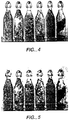
- Figure 4 is a photograph of bottle.
- Figure 5 is a digital painting created from the photograph.
- Figure 6 is a photograph of a water scene.
- Figures 7 and 8 are expressionist and pointillist digital paintings that were created from figure 6.
Landscapes
- Physics & Mathematics (AREA)
- General Physics & Mathematics (AREA)
- Engineering & Computer Science (AREA)
- Theoretical Computer Science (AREA)
- Processing Or Creating Images (AREA)
- Color Image Communication Systems (AREA)
- Image Processing (AREA)
Applications Claiming Priority (2)
| Application Number | Priority Date | Filing Date | Title |
|---|---|---|---|
| US299294 | 1999-04-26 | ||
| US09/299,294 US6870550B1 (en) | 1999-04-26 | 1999-04-26 | Digital Painting |
Publications (2)
| Publication Number | Publication Date |
|---|---|
| EP1054352A2 true EP1054352A2 (de) | 2000-11-22 |
| EP1054352A3 EP1054352A3 (de) | 2002-09-11 |
Family
ID=23154178
Family Applications (1)
| Application Number | Title | Priority Date | Filing Date |
|---|---|---|---|
| EP00303455A Withdrawn EP1054352A3 (de) | 1999-04-26 | 2000-04-25 | Digitales Malen |
Country Status (4)
| Country | Link |
|---|---|
| US (2) | US6870550B1 (de) |
| EP (1) | EP1054352A3 (de) |
| JP (1) | JP4717981B2 (de) |
| CA (1) | CA2306652A1 (de) |
Cited By (2)
| Publication number | Priority date | Publication date | Assignee | Title |
|---|---|---|---|---|
| FR2933219A1 (fr) * | 2008-06-27 | 2010-01-01 | Studio Broceliande | Procede de simulation dynamique des aspects de l'aquarelle par synthese de fichiers video a partir de donnees geometriques 3d d'une sequence d'animation |
| US11158091B2 (en) | 2016-09-07 | 2021-10-26 | Trustees Of Tufts College | Methods and systems for human imperceptible computerized color transfer |
Families Citing this family (50)
| Publication number | Priority date | Publication date | Assignee | Title |
|---|---|---|---|---|
| US7391422B1 (en) | 1999-12-22 | 2008-06-24 | Adobe Systems Incorporated | Method and apparatus for painting groups of objects |
| WO2002101654A1 (fr) * | 2001-06-07 | 2002-12-19 | Sec Corporation | Programme pour la formation automatique d'image et support de donnees dans lequel ledit programme est range |
| US7123269B1 (en) * | 2002-06-21 | 2006-10-17 | Adobe Systems Incorporated | Modifying vector objects |
| US7339597B1 (en) | 2002-06-21 | 2008-03-04 | Adobe Systems Incorporated | Creating and manipulating related vector objects in an image |
| US8239749B2 (en) * | 2004-06-25 | 2012-08-07 | Apple Inc. | Procedurally expressing graphic objects for web pages |
| US20060114268A1 (en) * | 2004-12-01 | 2006-06-01 | Benjamin Marxen | Composite works of art that incorporate video images within a painting and methods for creating such works |
| US7500189B2 (en) * | 2005-03-14 | 2009-03-03 | Microsoft Corporation | Method and system for generating colors using constrained color properties |
| US7663638B2 (en) * | 2005-11-23 | 2010-02-16 | Autodesk, Inc. | Stroked fill |
| WO2007090103A2 (en) * | 2006-01-27 | 2007-08-09 | Auryn Inc. | Identification of occlusions in stroke-based rendering |
| US7774722B2 (en) * | 2006-01-31 | 2010-08-10 | Microsoft Corporation | Creation and manipulation of canvases based on ink strokes |
| JP2009526335A (ja) * | 2006-02-10 | 2009-07-16 | ニック ソフトウエア インク | デジタル画像の自己適応ブラシ |
| US8018470B2 (en) * | 2006-03-28 | 2011-09-13 | Microsoft Corporation | Vector based object property variations |
| US20070268304A1 (en) * | 2006-05-22 | 2007-11-22 | Microsoft Corporation | Gradient Brush and Stroke |
| US7714866B2 (en) * | 2006-07-19 | 2010-05-11 | Autodesk, Inc. | Rendering a simulated vector marker stroke |
| US20080024519A1 (en) * | 2006-07-25 | 2008-01-31 | Alberto Blanco | System and method for producing paintings |
| US20080117333A1 (en) * | 2006-11-17 | 2008-05-22 | Disney Enterprises, Inc. | Method, System And Computer Program Product For Video Insertion |
| KR100967701B1 (ko) * | 2007-02-26 | 2010-07-07 | 한국외국어대학교 연구산학협력단 | 3차원 유화 데이터의 복원 |
| US7777745B2 (en) * | 2007-04-27 | 2010-08-17 | Autodesk, Inc. | Edge effect |
| US8719718B2 (en) * | 2007-05-09 | 2014-05-06 | Erik M. Erikson | Digital paper-enabled products and methods relating to same |
| US20090259567A1 (en) * | 2008-04-11 | 2009-10-15 | Kimberly Watts | System and Apparatus for Creating Customized Artwork at Point-of-Purchase |
| US8229211B2 (en) * | 2008-07-29 | 2012-07-24 | Apple Inc. | Differential image enhancement |
| JP5028373B2 (ja) * | 2008-09-29 | 2012-09-19 | 京セラドキュメントソリューションズ株式会社 | 画像処理装置、画像処理方法及び画像処理プログラム |
| US9483138B2 (en) * | 2009-07-10 | 2016-11-01 | Adobe Systems Incorporated | Natural media painting using a realistic brush and tablet stylus gestures |
| US8462173B2 (en) | 2009-09-30 | 2013-06-11 | Adobe Systems Incorporated | System and method for simulation of paint deposition using a pickup and reservoir model |
| US8810596B2 (en) | 2009-11-11 | 2014-08-19 | Apple Inc. | Cursor for application of image adjustments |
| JP4930607B2 (ja) * | 2010-02-04 | 2012-05-16 | カシオ計算機株式会社 | 画像処理装置、及び、画像処理プログラム |
| US20110276891A1 (en) * | 2010-05-06 | 2011-11-10 | Marc Ecko | Virtual art environment |
| US8379047B1 (en) * | 2010-05-28 | 2013-02-19 | Adobe Systems Incorporated | System and method for creating stroke-level effects in bristle brush simulations using per-bristle opacity |
| JP5408037B2 (ja) * | 2010-05-28 | 2014-02-05 | カシオ計算機株式会社 | 画像処理装置及び方法、並びにプログラム |
| US9305398B2 (en) * | 2010-10-08 | 2016-04-05 | City University Of Hong Kong | Methods for creating and displaying two and three dimensional images on a digital canvas |
| US8582878B1 (en) * | 2010-11-03 | 2013-11-12 | Csr Technology Inc. | Purple fringing automatic detection and correction |
| WO2012093856A2 (en) * | 2011-01-04 | 2012-07-12 | Samsung Electronics Co., Ltd. | Method and apparatus for creating a live artistic sketch of an image |
| CN102737369A (zh) * | 2011-03-31 | 2012-10-17 | 卡西欧计算机株式会社 | 图像处理装置及图像处理方法 |
| US9013485B2 (en) | 2011-06-30 | 2015-04-21 | Adobe Systems Incorporated | Systems and methods for synthesizing high fidelity stroke data for lower dimension input strokes |
| US8811687B2 (en) | 2011-08-22 | 2014-08-19 | International Business Machines Corporation | Natural media in digital representations |
| US8922548B2 (en) * | 2012-01-20 | 2014-12-30 | Sso Venture Partners, Llc | System and method of pointillist painting design |
| US8789490B2 (en) | 2012-01-20 | 2014-07-29 | Sso Venture Partners, Llc | System and method of pointillist painting |
| GB2510333A (en) | 2013-01-30 | 2014-08-06 | Ibm | Emulating pressure sensitivity on multi-touch devices |
| US9569857B2 (en) * | 2013-09-05 | 2017-02-14 | ReallyColor, LLC | Conversion of digital images into digital line drawings |
| US20150243183A1 (en) * | 2014-02-26 | 2015-08-27 | Rivkah Singh | Method of creating a visual artistic composition |
| WO2016023100A1 (en) * | 2014-08-11 | 2016-02-18 | Corel Corporation | Methods and systems for generating graphical content through physical system modelling |
| US10008011B1 (en) * | 2014-11-26 | 2018-06-26 | John Balestrieri | Methods for creating a simulated watercolor-painted image from a source image |
| US9857888B2 (en) | 2015-03-17 | 2018-01-02 | Behr Process Corporation | Paint your place application for optimizing digital painting of an image |
| TWI585715B (zh) * | 2015-12-23 | 2017-06-01 | 粉迷科技股份有限公司 | 融入背景圖形的電腦圖案邊緣處理方法與電腦裝置 |
| JP6778877B2 (ja) * | 2015-12-25 | 2020-11-04 | パナソニックIpマネジメント株式会社 | メイクパーツ作成装置、メイクパーツ利用装置、メイクパーツ作成方法、メイクパーツ利用方法、メイクパーツ作成プログラム、およびメイクパーツ利用プログラム |
| US10643491B2 (en) | 2017-03-14 | 2020-05-05 | Matthew CHELEL | Process, system and method for step-by-step painting of an image on a transparent surface |
| US11335037B2 (en) * | 2020-02-04 | 2022-05-17 | Adobe Inc. | Smart painting tools |
| EP4029579A1 (de) * | 2021-01-18 | 2022-07-20 | Société BIC | Erzeugung von druckvorlagentutorials |
| US20220392123A1 (en) * | 2021-06-06 | 2022-12-08 | Apple Inc. | Image composition with multiple blend modes |
| US12541891B2 (en) * | 2022-06-23 | 2026-02-03 | Adobe Inc. | Generating chain pull painting styles in digital applications |
Family Cites Families (37)
| Publication number | Priority date | Publication date | Assignee | Title |
|---|---|---|---|---|
| US4956872A (en) * | 1986-10-31 | 1990-09-11 | Canon Kabushiki Kaisha | Image processing apparatus capable of random mosaic and/or oil-painting-like processing |
| US5182548A (en) * | 1990-01-10 | 1993-01-26 | Silicon Graphics, Inc. | Method and apparatus for painting on a computer |
| JPH06505817A (ja) * | 1990-11-30 | 1994-06-30 | ケンブリッジ アニメーション システムズ リミテッド | 画像合成及び処理 |
| US5347620A (en) * | 1991-09-05 | 1994-09-13 | Zimmer Mark A | System and method for digital rendering of images and printed articulation |
| US5325477A (en) * | 1991-12-02 | 1994-06-28 | Xerox Corporation | Method and apparatus for generating and displaying freeform strokes |
| USH1506H (en) * | 1991-12-11 | 1995-12-05 | Xerox Corporation | Graphical user interface for editing a palette of colors |
| JP3150762B2 (ja) * | 1992-06-08 | 2001-03-26 | 株式会社リコー | グラディエントベクトルの抽出方式及び文字認識用特徴抽出方式 |
| US5420607A (en) * | 1992-09-02 | 1995-05-30 | Miller; Robert F. | Electronic paintbrush and color palette |
| US5500925A (en) * | 1992-12-01 | 1996-03-19 | Xaos Tools | Dynamic image processing using particle systems |
| US5909220A (en) * | 1993-05-10 | 1999-06-01 | Sandow; Robin | Interactive computerized image coloring systems and methods for processing combinations of color with automated subroutines and color standardization for diverse color systems |
| US5621868A (en) * | 1994-04-15 | 1997-04-15 | Sony Corporation | Generating imitation custom artwork by simulating brush strokes and enhancing edges |
| US5513991A (en) * | 1994-12-02 | 1996-05-07 | Vamp, Inc. | Method of simulating personal individual art instruction |
| KR0134701B1 (ko) * | 1994-12-23 | 1998-05-15 | 양승택 | 화상처리를 이용한 점묘화풍 화상 생성장치 및 그 방법 |
| US5847712A (en) * | 1995-01-03 | 1998-12-08 | University Of Washington | Method and system for generating graphic illustrations according to a stroke texture and a tone |
| JPH08202850A (ja) * | 1995-01-26 | 1996-08-09 | Sony Corp | 紙の繊維構造データ作成方法、紙の繊維構造データ作成装置、紙の繊維構造データ、にじみ描画方法及びにじみ描画装置 |
| US5940081A (en) * | 1995-01-27 | 1999-08-17 | Sony Corporation | Method and apparatus for forming a font and the font produced method and apparatus for drawing a blurred figure |
| GB9518530D0 (en) * | 1995-09-11 | 1995-11-08 | Informatix Inc | Image processing |
| US5852673A (en) | 1996-03-27 | 1998-12-22 | Chroma Graphics, Inc. | Method for general image manipulation and composition |
| US5767857A (en) * | 1996-08-30 | 1998-06-16 | Pacific Data Images, Inc. | Method, apparatus, and software product for generating outlines for raster-based rendered images |
| GB2317090B (en) * | 1996-09-06 | 2001-04-04 | Quantel Ltd | An electronic graphic system |
| US5870091A (en) * | 1996-11-07 | 1999-02-09 | Adobe Systems Incorporated | Combining palettes on a computer display |
| US6262745B1 (en) | 1997-01-15 | 2001-07-17 | Adobe Systems Incorporated | Digital halftoning using prioritized textures |
| US7062500B1 (en) * | 1997-02-25 | 2006-06-13 | Intertrust Technologies Corp. | Techniques for defining, using and manipulating rights management data structures |
| US5999190A (en) * | 1997-04-04 | 1999-12-07 | Avid Technology, Inc. | Computer imaging using graphics components |
| GB2325834B (en) * | 1997-05-30 | 2002-03-27 | Quantel Ltd | An electronic graphic system |
| US6329990B1 (en) * | 1997-07-15 | 2001-12-11 | Silverbrook Research Pty Ltd | Brush stroke palette feedback method for automatic digital “painting” effects |
| US5835086A (en) * | 1997-11-26 | 1998-11-10 | Microsoft Corporation | Method and apparatus for digital painting |
| JP3895492B2 (ja) * | 1998-03-13 | 2007-03-22 | 株式会社リコー | 画像処理装置、画像処理方法およびその方法をコンピュータに実行させるプログラムを記録したコンピュータ読み取り可能な記録媒体 |
| US6304677B1 (en) * | 1998-04-07 | 2001-10-16 | Adobe Systems Incorporated | Smoothing and fitting point sequences |
| US6067094A (en) * | 1998-04-07 | 2000-05-23 | Adobe Systems Incorporated | Brushstroke envelopes |
| US6011536A (en) * | 1998-04-17 | 2000-01-04 | New York University | Method and system for generating an image having a hand-painted appearance |
| US6239803B1 (en) * | 1999-04-14 | 2001-05-29 | Stanley W. Driskell | Method to achieve least effort selection from an item list of arbitrary length |
| US6337925B1 (en) * | 2000-05-08 | 2002-01-08 | Adobe Systems Incorporated | Method for determining a border in a complex scene with applications to image masking |
| US6456297B1 (en) * | 2000-05-10 | 2002-09-24 | Adobe Systems Incorporated | Multipole brushing |
| DE10042010C2 (de) * | 2000-08-26 | 2002-08-22 | Bosch Gmbh Robert | Vorrichtung zur Abgasbehandlung |
| US6298489B1 (en) * | 2001-01-12 | 2001-10-09 | Barbara Cox | Cutting glove assembly |
| US6628295B2 (en) * | 2001-01-31 | 2003-09-30 | Adobe Systems Incorporated | Modifying a stylistic property of a vector-based path |
-
1999
- 1999-04-26 US US09/299,294 patent/US6870550B1/en not_active Expired - Lifetime
-
2000
- 2000-04-25 CA CA002306652A patent/CA2306652A1/en not_active Abandoned
- 2000-04-25 EP EP00303455A patent/EP1054352A3/de not_active Withdrawn
- 2000-04-26 JP JP2000125221A patent/JP4717981B2/ja not_active Expired - Lifetime
-
2004
- 2004-08-03 US US10/910,013 patent/US7817159B2/en not_active Expired - Fee Related
Cited By (3)
| Publication number | Priority date | Publication date | Assignee | Title |
|---|---|---|---|---|
| FR2933219A1 (fr) * | 2008-06-27 | 2010-01-01 | Studio Broceliande | Procede de simulation dynamique des aspects de l'aquarelle par synthese de fichiers video a partir de donnees geometriques 3d d'une sequence d'animation |
| US11158091B2 (en) | 2016-09-07 | 2021-10-26 | Trustees Of Tufts College | Methods and systems for human imperceptible computerized color transfer |
| US11615559B2 (en) | 2016-09-07 | 2023-03-28 | Trustees Of Tufts College | Methods and systems for human imperceptible computerized color transfer |
Also Published As
| Publication number | Publication date |
|---|---|
| US6870550B1 (en) | 2005-03-22 |
| US7817159B2 (en) | 2010-10-19 |
| JP4717981B2 (ja) | 2011-07-06 |
| JP2000357239A (ja) | 2000-12-26 |
| CA2306652A1 (en) | 2000-10-26 |
| US20050001854A1 (en) | 2005-01-06 |
| EP1054352A3 (de) | 2002-09-11 |
Similar Documents
| Publication | Publication Date | Title |
|---|---|---|
| US6870550B1 (en) | Digital Painting | |
| Gooch et al. | Artistic vision: painterly rendering using computer vision techniques | |
| CN107229905B (zh) | 嘴唇渲染颜色的方法、装置及电子设备 | |
| US6011536A (en) | Method and system for generating an image having a hand-painted appearance | |
| Deussen et al. | Feedback-guided stroke placement for a painting machine | |
| Lindemeier et al. | Image stylization with a painting machine using semantic hints | |
| US20080101691A1 (en) | Transparency And/Or Color Processing | |
| US20070216684A1 (en) | Multiple brush components | |
| TW200416622A (en) | Method and system for enhancing portrait images that are processed in a batch mode | |
| US7123269B1 (en) | Modifying vector objects | |
| Yang et al. | Realization of Seurat’s pointillism via non-photorealistic rendering | |
| CN110610504A (zh) | 基于骨架与色调的铅笔画生成方法及装置 | |
| US20020118209A1 (en) | Computer program product for introducing painting effects into a digitized photographic image | |
| CN104392433B (zh) | 基于图像的数字油画画布的自动生成方法 | |
| US20040130554A1 (en) | Application of visual effects to a region of interest within an image | |
| JPH0296880A (ja) | 画像処理方法 | |
| Lindemeier et al. | Painterly rendering using limited paint color palettes | |
| Seo et al. | Color juxtaposition for pointillism based on an artistic color model and a statistical analysis | |
| KR100904892B1 (ko) | 회화적 렌더링 장치 및 그 방법 | |
| CN117980154A (zh) | 用于显示光投影图像的系统、用于产生光图像并将光图像投影到对象上的方法、处理数字图像的方法 | |
| Chi | A natural image pointillism with controlled ellipse dots | |
| US9959663B2 (en) | System and method for generating procedural textures on an object | |
| Jang et al. | Stippling technique based on color analysis | |
| Sparavigna et al. | Non-photorealistic image processing: an Impressionist rendering | |
| Seo et al. | Artistic image generation for emerging multimedia services by impressionist manner |
Legal Events
| Date | Code | Title | Description |
|---|---|---|---|
| PUAI | Public reference made under article 153(3) epc to a published international application that has entered the european phase |
Free format text: ORIGINAL CODE: 0009012 |
|
| AK | Designated contracting states |
Kind code of ref document: A2 Designated state(s): AT BE CH CY DE DK ES FI FR GB GR IE IT LI LU MC NL PT SE |
|
| AX | Request for extension of the european patent |
Free format text: AL;LT;LV;MK;RO;SI |
|
| PUAL | Search report despatched |
Free format text: ORIGINAL CODE: 0009013 |
|
| AK | Designated contracting states |
Kind code of ref document: A3 Designated state(s): AT BE CH CY DE DK ES FI FR GB GR IE IT LI LU MC NL PT SE |
|
| AX | Request for extension of the european patent |
Free format text: AL;LT;LV;MK;RO;SI |
|
| STAA | Information on the status of an ep patent application or granted ep patent |
Free format text: STATUS: THE APPLICATION IS DEEMED TO BE WITHDRAWN |
|
| 18D | Application deemed to be withdrawn |
Effective date: 20021101 |