EP1221651A2 - Gerät-Umgebungs-Konfigurationssystem, Gerät-Umgebungs-Konfigurationsverfahren und Datenspeichermedium dafür - Google Patents
Gerät-Umgebungs-Konfigurationssystem, Gerät-Umgebungs-Konfigurationsverfahren und Datenspeichermedium dafür Download PDFInfo
- Publication number
- EP1221651A2 EP1221651A2 EP01130280A EP01130280A EP1221651A2 EP 1221651 A2 EP1221651 A2 EP 1221651A2 EP 01130280 A EP01130280 A EP 01130280A EP 01130280 A EP01130280 A EP 01130280A EP 1221651 A2 EP1221651 A2 EP 1221651A2
- Authority
- EP
- European Patent Office
- Prior art keywords
- profile
- devices
- information
- device profile
- specific
- Prior art date
- Legal status (The legal status is an assumption and is not a legal conclusion. Google has not performed a legal analysis and makes no representation as to the accuracy of the status listed.)
- Withdrawn
Links
Images









Classifications
-
- G—PHYSICS
- G06—COMPUTING OR CALCULATING; COUNTING
- G06F—ELECTRIC DIGITAL DATA PROCESSING
- G06F9/00—Arrangements for program control, e.g. control units
- G06F9/06—Arrangements for program control, e.g. control units using stored programs, i.e. using an internal store of processing equipment to receive or retain programs
-
- G—PHYSICS
- G06—COMPUTING OR CALCULATING; COUNTING
- G06F—ELECTRIC DIGITAL DATA PROCESSING
- G06F9/00—Arrangements for program control, e.g. control units
- G06F9/06—Arrangements for program control, e.g. control units using stored programs, i.e. using an internal store of processing equipment to receive or retain programs
- G06F9/44—Arrangements for executing specific programs
- G06F9/4401—Bootstrapping
- G06F9/4411—Configuring for operating with peripheral devices; Loading of device drivers
Definitions
- the present invention relates generally to a DEC (Device Environment Configuration) system, a DEC method, and a data storage medium carrying computer program means for implementing the method.
- DEC Device Environment Configuration
- a multifunction POS (point-of-sale) system can be assembled without the user being aware of the makes and models of devices in the POS system configuration by using a standard Application Program Interface (API) to develop an application providing the POS system functions.
- OPOS OPOS
- OPOS OPOS for Retail POS
- An OPOS standard object uses OLE (Object Linking and Embedding) control supported by the Windows (R) OS used on the host devices of the POS system to provide application developers with a set of API functions that make application development easier.
- OPOS-DEC settings information about all of the devices in the POS terminal system and settings for all of the devices
- This registry is a database for centrally managing all settings related to computer operation, including all device driver settings and application settings.
- Device information including a device identifier and various settings stored in the registry as part of the OPOS device environment configuration settings (OPOS-DEC settings) is referred to below as the device information or the device profile.
- the OPOS-DEC settings include device information for each device in the system configuration.
- the registry editor only provides simple basic functions. This makes editing the OPOS-DEC settings for each device in the POS terminal system and saving the settings to the registry a cumbersome, time-consuming task. More specifically, it is difficult to edit and save the OPOS-DEC settings while also considering the configuration of all other devices in the POS terminal system. Yet further, it is difficult to determine and confirm the appropriateness of the edited OPOS-DEC settings so that the appropriate settings can be saved in the registry. It is also difficult to edit and save the OPOS-DEC settings with consideration for how the different devices in the POS terminal system are connected to each other.
- the registry is a central database of system configuration information managed by directly by the OS, making it difficult for someone without sufficient knowledge to edit the registry. Furthermore, inappropriately changing registry content could also render the OS, applications, or devices unusable or interfere with normal operation. Inadvertently changing data other than the OPOS-DEC settings could also cause problems with the system.
- This invention is therefore directed to a solution for these problems, and an object of this invention is to provide a DEC system having means for displaying device profiles included in the system configuration data managed by the OS based on how the devices in the system are connected and means for writing device settings appropriate to how a device is connected in a device profile of the system configuration data.
- the inventors realized that the POS system developer can easily understand how devices in the POS terminal system are connected by displaying a device tree organized by, for example, device class and connection port based on the OPOS-DEC settings stored in the registry. They showed that a detailed profile for a selected device can be displayed through a simple operation by using an object properties function.
- OPOS-DEC settings can be easily edited by, for example, using a set-up wizard to add all required settings to the device profiles of the devices in the POS terminal system; batch adding information for all devices in a POS terminal system integrating a host computer with peripheral devices; changing device information using a drag-and-drop function to simply move all device information for the device connected to the port where dragging starts so that the device is reconnected to the port where the device information is dropped; and changing or deleting information for a specified device and the information for all devices connected to the specified device based on how the specified device is connected.
- a DEC system achieving the above objects has a device information setting means for displaying, based on the connection status of one or more devices in the system, device profiles from the system configuration information managed by the system OS in desired display groups and means for writing a device profile for a particular device to the system configuration information (i.e., the registry) so that the profile is appropriate to the device connection status.
- a device information setting means for displaying, based on the connection status of one or more devices in the system, device profiles from the system configuration information managed by the system OS in desired display groups and means for writing a device profile for a particular device to the system configuration information (i.e., the registry) so that the profile is appropriate to the device connection status.
- the method according to the present invention can be provided as a computer-executable program, and the program can be recorded on and distributed as data storage medium such as a Compact Disc (CD), a floppy disc, a hard disc, a magneto-optical disc, a Digital Versatile Disc, a magnetic tape, or a semiconductor memory.
- data storage medium such as a Compact Disc (CD), a floppy disc, a hard disc, a magneto-optical disc, a Digital Versatile Disc, a magnetic tape, or a semiconductor memory.
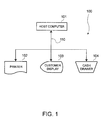
- Fig. 1 shows the configuration of a typical POS terminal system 100.
- This POS terminal system 100 comprises a host computer 101, printer 102, customer display 103, and cash drawer 104.
- the host computer 101 stores a software application providing various functions of the POS terminal system 100.
- the host computer 101 is connected by a communication bus 110 to the printer 102 for printing receipts and a transaction journal, for example, the customer display 103 for displaying purchase information, and the cash drawer 104 for holding money and checks.
- Various communication protocols can be used on the communication bus 110, including serial, parallel, and network (such as IEEE (Institute of Electrical and Electronic Engineers) 802).
- Fig. 2 is a block diagram of a host computer 101.
- the host computer 101 has an interface 201 for connecting to the communication bus 110, a disk drive 202 for reading software and information from a CD (Compact Disc) or other medium, a CPU 203, RAM 204 for storing the program run by the CPU 203 and used as working memory by the CPU 203, a hard disk 205 storing the program and data used by the CPU 203, a monitor 206 or other type of display device for presenting messages and information for the user, a floppy disk drive 207 for reading software and other information from a floppy disk, a keyboard and mouse or other type of input device 208 enabling user input to the system, and a bus 210 connecting these various components.
- a disk drive 202 for reading software and information from a CD (Compact Disc) or other medium
- a CPU 203 for reading software and information from a CD (Compact Disc) or other medium
- RAM 204 for storing the program run by the CPU
- Fig. 3 illustrates the role of OPOS in a POS terminal system.
- Fig. 3 (a) shows where OPOS is positioned
- Fig. 3 (b) is a flow chart of system development for a POS terminal system.
- OPOS is located between the OS and the application controlling the devices in the POS terminal system, and provides a standardized interface for connecting the host computer (PC) and peripheral devices based on defined specifications.
- PC host computer
- OPOS has two layers, the control object (CO) and service object (SO) layers.
- the control object layer contains objects provided for each device class, such as printers and displays, and controls the device-application interface.
- the service object layer contains service objects provided for each device, such as for each printer model. The service objects control device operation by way of the OS.
- the OS also manages the registry where the OPOS-DEC settings used by OPOS are stored.
- the application controls a particular device using methods and properties, and receives feedback about the result from the controlled device using events and properties.
- OPOS converts process requests from the application to commands supported by the device and sends the commands to the addressed device, and receives the device status indicating the process result from the device.
- step S301 building a POS terminal system involves four major tasks.
- This computer is referred to as the "developer station”. More specifically, this involves installing the control object and service object, and creating an OPOS-DEC settings layer in the registry; the device class is then saved in this layer.
- the OPOS-DEC settings are then edited to match the devices used in the POS terminal system, and saved in the registry of the developer station (step S302). More specifically, a device profile is registered below the previously registered device class.
- a software application providing the desired functions of the POS terminal system is then developed on the developer station (step S303).
- the last step is to reproduce the application environment and application developed on the developer station on the host computers of the plural POS terminal systems of the POS system (these host computers are referred to below as client PCs) (step S304), thus completing the POS system.
- a DEC system enabling the task shown as step S302 in the construction of a POS terminal system to be completed more efficiently, that is, the task of editing the OPOS-DEC settings to match the devices used in the POS terminal system and saving these settings in the registry, is described below according to the present invention.
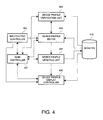
- Fig. 4 is a function block diagram of this DEC system. The various functions are described below. As shown in Fig. 4 this DEC system has a main controller 401, input device 402, device profile editor 403, device profile verification unit 404, device profile updating unit 405, and device profile display controller 406.
- the input device 402 inputs the device profiles for setting the OPOS-DEC settings in the registry 410 to match the connections of the devices in the POS terminal system.
- the device profiles are input using a keyboard, mouse, or other input device not shown in the figures.
- the device profile editor 403 relates the data input by the input device 402 to a device profile, if any, previously stored in the OPOS-DEC settings in the registry 410, and thus edits individual device profiles in the OPOS DEC.
- the device profile verification unit 404 determines whether the device profile edited by the device profile editor 403 is appropriate based on the OPOS-DEC settings in the registry 410. If the profile is not appropriate, a warning is passed to the display controller 406 and displayed, and the device profile editor 403 is instructed to re-edit the edited device settings until the data is appropriate.
- the device profile updating unit 405 Based on the device profile edited by the device profile editor 403, the device profile updating unit 405 then updates the OPOS-DEC settings in the registry 410.
- the display controller 406 presents a device tree organized by device class or port based on the OPOS-DEC settings in the registry 410, and, using the property function, displays device profiles, including detailed information about a device and various settings.
- the display controller 406 can also display a map of device connections (hydra connection).
- a hydra connection is a method for connecting plural devices to a single port.
- the main controller 401 controls and arbitrates operation of the input device 402, device profile editor 403, device profile verification unit 404, device profile updating unit 405, and display controller 406.
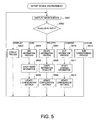
- the first step is to display the main screen for configuring the device environment (step S501), and then detect what input was received (step S502).
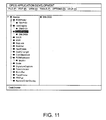
- step S502 If the input is to display a device profile (step S502 returns "DISPLAY"), the OPOS-DEC settings in the registry 410 are displayed according to the input data (step S503), and the procedure loops back to step S501 to display the main screen and wait for the next input. If the input was to display the device profiles organized by device class, for example, the devices are displayed grouped by the device class, such as printers and displays, as shown in Fig. 11.
- step S502 If the input is to add device information (step S502 returns "ADD"), the device information input via the input device is related to the previously registered OPOS-DEC settings in the registry 410 so that the settings for the particular device can be edited (step S504), the settings are then verified for applicability (step S505), a process for adding the edited data to the OPOS-DEC settings in the registry 410 is run (step S506), and the procedure loops back to step S501 to display the main screen and wait for the next input.
- step S502 If the input is to delete device information (step S502 returns "DELETE"), the device information input from the input device is related to the previously registered OPOS-DEC settings in the registry 410 and edited (step S507), then verified (step S508), and a process for deleting the information from the OPOS-DEC settings in the registry 410 is then run (step S509). Next, the procedure loops back to step S501 to display the main screen and wait for the next input.
- step S502 If the input is to change device information (step S502 returns "CHANGE"), the device information input from the input device is related to the previously registered OPOS-DEC settings in the registry 410 and edited (step S510), then verified (step S511), and a process for changing the OPOS-DEC settings in the registry 410 based on the changed data is run (step S512). Next, the procedure loops back to step S501 to display the main screen and wait for the next input.
- step S502 If the input is for an operation other than to edit device information as described above (step S502 returns "OTHER"), the corresponding process is run (step S513), and the procedure then loops back to step S501 to display the main screen and wait for the next input.
- a verification process As shown in Fig. 13 (a).
- a screen such as shown in Fig. 13 (b) is displayed.
- the user can choose to use an auto-correct function to automatically change the setting to a valid setting.
- the user can also deselect the verification process so that this process is not run.
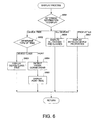
- Fig. 6 is a flow chart of the display process shown as step S503 in Fig. 5.
- the first step (S601) is to determine whether to display device connections, a list of all devices, or a device profile (device details and settings). If displaying device connections is selected (S601 returns "DEVICE TREE"), what type of tree to display is determined (S602).
- a device class tree display is selected (S602 returns "DEVICE CLASS"), that is, if the user selects Device Class View from the view menu of the main screen, the connected devices are displayed grouped by device class (S603). More specifically, the tree groups printers together, groups display devices together, and so forth.
- a typical device class tree is shown in Fig. 11. Device classes for which device information cannot be set (such as devices that are not provided but belong to an OPOS standard device class) can be indicated by changing the color or shade used to display those device classes.
- the order of the device class display can be switched between a standard view arranging the device classes in a predetermined sequence (such as from highest to lowest importance to POS system configuration), and an alphabetic sequence by device class name.
- the desired display sequence can be specified using a menu selection (standard order, order by name), for example.
- Fig. 14 (a) shows devices displayed in a standard order, and (b) shows the devices arranged by name. Note that Fig. 11 and Fig. 14 show the trees in expanded form, but the tree is collapsed when the device class tree or port tree is first displayed.
- connection port tree view S602 returns "PORT"
- Port Connection View from the view menu of the main screen
- the ports are searched to detect the hydra connection map from the device information (S604).
- a hydra connection is a method of connecting plural devices to a single port, and can take two forms: pass-through connection or Y connection.
- Fig. 12 (b) shows the physical arrangement of pass-through and Y connections.
- Fig. 12 (a) shows a typical display of the devices organized by connection port. The hydra connection of devices to serial interface ports COM1 and COM2 can be easily visually confirmed.
- a dialog box showing the settings of the selected device is displayed in a tab format using the object property function (S607).
- An example of the device property dialog box is shown in Fig. 15. This example shows the properties for the customer display device DM-D101.
- Fig. 7 is a flow chart of the routine for adding information (S504 in Fig. 5) as part of the DEC process.
- This add routine is run when selected from the edit menu of the main screen or from the right-click menu of a device class or device.
- the first step is determining what device information to add (S701).
- Add New Device is selected from the edit menu of the main screen (S701 returns "ADD DEVICE PROFILE"
- device information is added using a wizard.
- a device class selection screen is presented (S702)
- S703 a device selection screen is presented (S703)
- a device communication parameter configuration screen is presented (S704) to prompt the user for information.
- a device profile is then added based on the information input to the displayed screens.
- a wizard is a method of prompting the user for information while also offering guidance concerning what operations to perform.
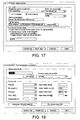
- Fig. 16 shows a typical device class selection dialog box
- Fig. 17 shows a device selection dialog box
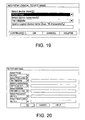
- Fig. 18 shows a device communication parameter dialog box.
- the user selects, for example, the "printer" device class, selects the printer model, and then inputs the printer-specific communication parameters to add device information.
- the wizard can also provide a device function test called "Check Health” (such as test print if the device is a printer) and set up device-specific parameters (such as set the paper size if the device is a printer) as shown in Fig. 18.
- Check Health a device function test
- device-specific parameters such as set the paper size if the device is a printer
- a device can also be added without using a wizard. If a device class tree is displayed in the main screen and the user selects adding a device by right-clicking on the device class of the device to add, the device class selection screen is skipped so that the user can start from the device selection dialog box. For example, if "printer" is selected as the device class from the main screen and the user then right clicks to add a device, adding device information can start from the device selection screen for printers.
- connection port tree is displayed in the main screen, the user selects the port to which the device is connected, and then right clicks to add a device, the device class selection screen must be displayed but the default settings for the selected port can be shown in the device selection screen. For example, if a USB port is selected in the main screen as the port to which a device will be connected, and "add device" is selected by right clicking on the port, "USB" is indicated as the default port in the device selection screen.
- a dialog box for adding a logical device name is displayed. This dialog box prompts the user for device name input, and then adds the name to the selected device (S705).
- Fig. 19 shows a typical dialog box for adding a device name.
- a screen for batch registering all devices connected to the POS PC is displayed. This screen prompts the user to input the configuration, and then adds the device information based on the user-defined settings (S706).
- a typical dialog box for batch registering plural devices is shown in Fig. 20.
- Fig. 8 is a flow chart of the delete routine (S507 in Fig. 5) in the DEC process.
- the delete routine is run by selecting Delete from the edit menu of the main screen after first selecting the device to delete, or right clicking on the device and selecting Delete from the pop-up menu.
- the first step in this routine is to determine if the selected device is a hydra connected device based on the connection profile of the selected device (S801). If the device is a hydra connected device (S801 returns Yes, whether the device is a parent or child is detected (S802). If it is a parent device (S802 returns Yes, the user is asked whether to delete all connected devices including the child devices (S803).
- the device information for the selected device is deleted (S807). If the selected device is not hydra connected (S801 returns No, the device information for the selected device is deleted (S807).
- Fig. 21 shows a typical screen for deleting a device that is not hydra connected
- Fig. 22 shows a screen for deleting a hydra connected device.
- plural devices can be selected and all selected devices can then be deleted.
- a parent device can be selected to delete both the parent and all children connected thereto.
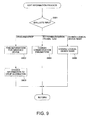
- Fig. 9 is a flow chart of the routine for changing (editing) device information shown as step S510 of the DEC process in Fig. 5.
- the first step is to evaluate the input for changing the registered device information (S901). If device port information is changed by drag-and-drop editing (S901 returns "DRAG-AND-DROP"), the device information for all devices connected to the port where dragging started is found (S902). The device information for all devices found connected to that port is then changed according to the port where the object is dropped (S903).
- Fig. 23 shows an example of changing port information by dragging a device from one port and dropping it on another.
- Fig. 23 (a) shows the connections before the port is changed, and
- Fig. 23 (b) shows the devices connected to each port after the device is dropped on a different port to change the connection.
- the selected device is a child, it is possible to move just the child, and if a device that can be a child is moved to a port to which a device that can be a parent is connected, then the child device can be hydra connected to the parent.
- logical device name of the selected device is to be changed (S901 returns "CHANGE LOGICAL DEVICE NAME") by selecting Rename LDN from the edit menu of the main screen or right clicking on the selected device, a dialog box for changing the logical device name is displayed (substantially the same as the screen shown in Fig. 17). The user can then input the desired name (S905) to change the logical device name of the selected device.
- Fig. 10 is a flow chart for handling processes other than those described above within the DEC process.
- the first step is to evaluate the input (S1001). If confirming the communication settings is indicated (S1001 returns "CONFIRM") as a result of selecting Check Health Interactive from the tools menu of the main screen, for example, a routine to check for illegal port connections, illegal communication settings, and whether communication is possible using the communication settings is run (S1002). It is also possible to prevent illegal port connections when a device is added to a specific port or a device is changed to a different connection port by confirming the connection settings, such as whether a hydra connection is used. Devices can also be connected without any such confirmation. Connection to illegal ports can also be prevented by defining the ports that can be used.
- the input is a version compatibility setting (S1001 returns "VERSION COMPATIBILITY") as a result of selecting Version Compatibility from the options menu of the main screen, for example, settings are made to absorb differences in operation resulting from different versions of the application controlling various OPOS functions (S1003). For example, if the application was written for an older version of OPOS but can still be used under a newer version of OPOS with changed or new functions, settings can be made to operate according to the old version.
- the USB number automatically assigned when a device is connected to a USB port is detected to relate the device and the USB number (S1006). Note that this function can also be applied to other communication protocols.
- the trace function can be toggled on and off for saving OPOS method and property values to a specific file (S1007).
- the device information display step corresponds primarily to steps S501 and S503; the input step to step S502; the device profile editing step to steps S504, S507, and S510; the device profile verification step to steps S505, S508, and S511; and the device profile update step to steps S506, S509, and S512.
- the add device information step corresponds primarily to step S504; the delete device information step to step S507; and the change device information step to step S510.
- a general purpose, practical DEC method can be achieved by incorporating the program functions of the DEC system described above into a computer.
- the present invention is not limited to the OPOS devices and can be applied to all other devices for using a computer.
- How devices in a POS terminal system are interconnected can be visually understood by the POS system developer by displaying a device tree organized by device class, connection port, or other category based on the OPOS-DEC settings stored in the registry. Detailed information about a selected device can also be displayed by a simple operation using the property function.
- OPOS-DEC settings can be easily edited by, for example, using a set-up wizard to add all required settings to the device profiles of the devices in the POS terminal system; batch adding information for all devices in a POS terminal system integrating a host computer with peripheral devices; changing device information using a drag-and-drop function to simply move all device information for a device connected to the port where dragging starts to the port where the device information is dropped; and changing or deleting information for a specified device and the information for all devices connected to the specified device based on how the specified device is connected.
- OPOS-DEC settings can also be edited according to how the devices of the POS terminal system are connected to each other.
Landscapes
- Engineering & Computer Science (AREA)
- Software Systems (AREA)
- Theoretical Computer Science (AREA)
- Physics & Mathematics (AREA)
- General Engineering & Computer Science (AREA)
- General Physics & Mathematics (AREA)
- Computer Security & Cryptography (AREA)
- User Interface Of Digital Computer (AREA)
- Stored Programmes (AREA)
- Computer And Data Communications (AREA)
Applications Claiming Priority (2)
| Application Number | Priority Date | Filing Date | Title |
|---|---|---|---|
| JP2001001858 | 2001-01-09 | ||
| JP2001001858A JP4453203B2 (ja) | 2001-01-09 | 2001-01-09 | デバイス環境設定システム、デバイス環境設定処理方法及び情報記録媒体 |
Publications (2)
| Publication Number | Publication Date |
|---|---|
| EP1221651A2 true EP1221651A2 (de) | 2002-07-10 |
| EP1221651A3 EP1221651A3 (de) | 2003-12-03 |
Family
ID=18870446
Family Applications (1)
| Application Number | Title | Priority Date | Filing Date |
|---|---|---|---|
| EP01130280A Withdrawn EP1221651A3 (de) | 2001-01-09 | 2001-12-20 | Gerät-Umgebungs-Konfigurationssystem, Gerät-Umgebungs-Konfigurationsverfahren und Datenspeichermedium dafür |
Country Status (6)
| Country | Link |
|---|---|
| US (1) | US7251724B2 (de) |
| EP (1) | EP1221651A3 (de) |
| JP (1) | JP4453203B2 (de) |
| KR (1) | KR100610987B1 (de) |
| CN (1) | CN1269022C (de) |
| HK (1) | HK1048870B (de) |
Cited By (1)
| Publication number | Priority date | Publication date | Assignee | Title |
|---|---|---|---|---|
| US7136939B2 (en) | 2002-10-18 | 2006-11-14 | Hitachi, Ltd. | Storage device and method of setting configuration information of same |
Families Citing this family (22)
| Publication number | Priority date | Publication date | Assignee | Title |
|---|---|---|---|---|
| JP3761155B2 (ja) * | 2001-03-26 | 2006-03-29 | 富士通テン株式会社 | データ演算装置およびそれを用いる電子制御機器の調整方法 |
| JP4007452B2 (ja) * | 2003-10-10 | 2007-11-14 | 株式会社Access | ブラウザを利用して機器情報を表示するシステム、およびプログラム |
| US7707499B2 (en) * | 2004-05-03 | 2010-04-27 | At&T Intellectual Property, I.L.P. | Methods, systems, and storage mediums for optimizing a device |
| US20050261969A1 (en) * | 2004-05-10 | 2005-11-24 | International Business Machines Corporation | Layered architecture for POS (point-of sale) systems |
| JP2006011668A (ja) * | 2004-06-23 | 2006-01-12 | Ricoh Co Ltd | 機器管理システム、機器管理ユーティリティプログラム及び記録媒体 |
| JP4385900B2 (ja) | 2004-09-10 | 2009-12-16 | セイコーエプソン株式会社 | 通信設定プログラム、起動プログラム、通信設定方法およびアプリケーションの起動方法 |
| JP4899336B2 (ja) | 2004-09-28 | 2012-03-21 | セイコーエプソン株式会社 | 複合デバイス管理装置及び方法 |
| JP4967266B2 (ja) | 2005-07-14 | 2012-07-04 | セイコーエプソン株式会社 | デバイス制御システム、及びデバイス制御処理方法 |
| US20070050751A1 (en) * | 2005-08-31 | 2007-03-01 | Microsoft Corporation | Automatic interoperation with legacy POS service and control objects |
| JP4882498B2 (ja) * | 2006-05-10 | 2012-02-22 | 日本電気株式会社 | 運用管理装置および運用管理方法ならびにプログラム |
| US20080025234A1 (en) * | 2006-07-26 | 2008-01-31 | Qi Zhu | System and method of managing a computer network using hierarchical layer information |
| US8145810B2 (en) * | 2007-12-07 | 2012-03-27 | Psion Teklogix Inc. | System and method for managing communication ports on a computer device |
| US8154753B2 (en) * | 2008-10-29 | 2012-04-10 | Thx, Ltd. | Method and system for providing access to image system services |
| US8843837B2 (en) * | 2009-01-06 | 2014-09-23 | Mckesson Financial Holdings | Graphical configuration and management of interfaces |
| KR101283716B1 (ko) * | 2011-10-18 | 2013-07-08 | 엘에스산전 주식회사 | 이더캣 기반의 네트워크 시스템 및 이의 운용방법 |
| US9311117B2 (en) * | 2012-12-10 | 2016-04-12 | Unisys Corporation | System and method of capacity management |
| US20140289130A1 (en) * | 2013-03-25 | 2014-09-25 | iAXEPT Ltd | Secure remotely configurable point of sale terminal |
| WO2015047127A1 (en) * | 2013-09-27 | 2015-04-02 | Emc Corporation | Flexible licensing architecture |
| CN104182258B (zh) * | 2014-08-25 | 2018-05-04 | 福建升腾资讯有限公司 | 一种pos终端升级装置及其升级方法 |
| US9928697B2 (en) * | 2015-03-31 | 2018-03-27 | Toshiba Global Commerce Solutions Holdings Corporation | Configuring point-of-sale (POS) applications based on a priority level in order to communicate with peripheral devices in a POS system |
| US10462020B2 (en) * | 2017-02-16 | 2019-10-29 | Cisco Technology, Inc. | Network device user interface |
| KR101989340B1 (ko) * | 2018-11-01 | 2019-06-17 | 비티에스테크놀로지스(주) | Can 통신의 데이터 링크 계층 시험 방법 및 시스템 |
Family Cites Families (12)
| Publication number | Priority date | Publication date | Assignee | Title |
|---|---|---|---|---|
| US4974151A (en) * | 1985-02-21 | 1990-11-27 | International Business Machines Corporation | Configuration capability for devices in an open system having the capability of adding or changing devices by user commands |
| US5319770A (en) * | 1989-10-03 | 1994-06-07 | International Business Machines Corporation | Data processing method and apparatus for verifying adapter description file choices |
| JPH05324532A (ja) | 1992-05-22 | 1993-12-07 | Matsushita Electric Ind Co Ltd | バス接続用周辺機器接続情報管理装置 |
| EP0584909A1 (de) * | 1992-08-26 | 1994-03-02 | Sun Microsystems, Inc. | Selbstkonfigurierendes Einrichtungssystem |
| US5546595A (en) * | 1993-12-21 | 1996-08-13 | Taligent, Inc. | Object-oriented system using objects representing hardware devices, physical connectors and connections between the physical connectors for configuring a computer |
| US5748980A (en) * | 1994-05-27 | 1998-05-05 | Microsoft Corporation | System for configuring a computer system |
| US5668992A (en) * | 1994-08-01 | 1997-09-16 | International Business Machines Corporation | Self-configuring computer system |
| US6304885B1 (en) * | 1996-05-01 | 2001-10-16 | The United States Of America As Represented By The Secretary Of The Navy | Digital data retrieving, organizing and display system |
| US5999730A (en) * | 1997-10-27 | 1999-12-07 | Phoenix Technologies Limited | Generation of firmware code using a graphic representation |
| US6237092B1 (en) * | 1998-05-05 | 2001-05-22 | International Business Machines Corp. | Client-server system with central application management allowing an administrator to configure user and group contexts during application configuration without relaunching the application |
| US6567860B1 (en) * | 1998-10-30 | 2003-05-20 | Computer Associates Think, Inc. | Method and apparatus for new device driver installation by an operating system |
| US6724409B1 (en) * | 2000-11-16 | 2004-04-20 | Hewlett-Packard Development Company L.P. | Tree-based graphical user interface for creating and editing machine control sequences |
-
2001
- 2001-01-09 JP JP2001001858A patent/JP4453203B2/ja not_active Expired - Fee Related
- 2001-12-20 EP EP01130280A patent/EP1221651A3/de not_active Withdrawn
- 2001-12-26 US US10/034,192 patent/US7251724B2/en not_active Expired - Lifetime
-
2002
- 2002-01-08 KR KR1020020000934A patent/KR100610987B1/ko not_active Expired - Fee Related
- 2002-01-08 CN CNB021015171A patent/CN1269022C/zh not_active Expired - Fee Related
-
2003
- 2003-02-14 HK HK03101086.0A patent/HK1048870B/zh not_active IP Right Cessation
Cited By (3)
| Publication number | Priority date | Publication date | Assignee | Title |
|---|---|---|---|---|
| US7136939B2 (en) | 2002-10-18 | 2006-11-14 | Hitachi, Ltd. | Storage device and method of setting configuration information of same |
| US7562160B2 (en) | 2002-10-18 | 2009-07-14 | Hitachi, Ltd. | Storage device and method of setting configuration information of same |
| US7877520B2 (en) | 2002-10-18 | 2011-01-25 | Hitachi, Ltd. | Storage device and method of setting configuration information of same |
Also Published As
| Publication number | Publication date |
|---|---|
| HK1048870A1 (en) | 2003-04-17 |
| KR100610987B1 (ko) | 2006-08-10 |
| US20020095310A1 (en) | 2002-07-18 |
| EP1221651A3 (de) | 2003-12-03 |
| JP4453203B2 (ja) | 2010-04-21 |
| KR20020060089A (ko) | 2002-07-16 |
| CN1367429A (zh) | 2002-09-04 |
| US7251724B2 (en) | 2007-07-31 |
| CN1269022C (zh) | 2006-08-09 |
| JP2002207690A (ja) | 2002-07-26 |
| HK1048870B (zh) | 2007-03-16 |
Similar Documents
| Publication | Publication Date | Title |
|---|---|---|
| EP1221651A2 (de) | Gerät-Umgebungs-Konfigurationssystem, Gerät-Umgebungs-Konfigurationsverfahren und Datenspeichermedium dafür | |
| JP5084314B2 (ja) | 情報処理装置、情報処理方法、情報処理プログラム、及び情報処理プログラムを記録する記録媒体 | |
| JP3057019B2 (ja) | 部品選定装置及びcad機能を備えた部品選定システム | |
| JP6761441B2 (ja) | ソフトウェアアプリケーションプログラミングインタフェース(api)を用いた自動テスト機能のユーザによる制御 | |
| US20050060653A1 (en) | Object operation apparatus, object operation method and object operation program | |
| KR20000070089A (ko) | 소프트웨어 갱신 매니저 | |
| US20110231424A1 (en) | Method and system for automated file aggregation on a storage device | |
| JP2025063284A (ja) | 情報処理装置と、その処理方法及びプログラム | |
| US7028173B2 (en) | Device environment configuration systems, device environment configuration methods, and data storage media therefor | |
| JP7476524B2 (ja) | 情報処理装置の情報処理方法、情報処理装置及びプログラム | |
| JP4810009B2 (ja) | データ処理装置、方法およびプログラム | |
| US7930708B2 (en) | Device control system, device control method, and device control program | |
| JP5510502B2 (ja) | 情報処理装置、情報処理方法、情報処理プログラム、及び情報処理プログラムを記録する記録媒体 | |
| US9418071B2 (en) | Method and system for automatically initiating a file aggregation process between communicatively coupled devices | |
| JP6705993B2 (ja) | 情報処理装置、情報処理装置の制御方法、及びプログラム | |
| JP7715977B2 (ja) | 情報処理装置、情報処理システム、その制御方法およびプログラム | |
| JP7381900B2 (ja) | 情報処理システムと、その制御方法及びプログラム | |
| JP3969926B2 (ja) | 帳票作成装置、帳票作成方法、および記憶媒体 | |
| JP7807668B2 (ja) | 情報処理システム、情報処理システムの制御方法、及びプログラム | |
| JP5251288B2 (ja) | 文書管理装置、データ操作方法、データ操作プログラム、及びデータ操作プログラムを記録した記録媒体 | |
| JP2019008391A (ja) | 情報処理装置、情報処理システム、その制御方法及びプログラム | |
| TW202526601A (zh) | 電子裝置及其文件提供方法 | |
| JP2021015645A (ja) | 情報処理装置と、その処理方法及びプログラム | |
| JP2005208748A (ja) | 制御装置、制御方法及びプログラム |
Legal Events
| Date | Code | Title | Description |
|---|---|---|---|
| PUAI | Public reference made under article 153(3) epc to a published international application that has entered the european phase |
Free format text: ORIGINAL CODE: 0009012 |
|
| AK | Designated contracting states |
Kind code of ref document: A2 Designated state(s): AT BE CH CY DE DK ES FI FR GB GR IE IT LI LU MC NL PT SE TR |
|
| AX | Request for extension of the european patent |
Free format text: AL;LT;LV;MK;RO;SI |
|
| PUAL | Search report despatched |
Free format text: ORIGINAL CODE: 0009013 |
|
| AK | Designated contracting states |
Kind code of ref document: A3 Designated state(s): AT BE CH CY DE DK ES FI FR GB GR IE IT LI LU MC NL PT SE TR |
|
| AX | Request for extension of the european patent |
Extension state: AL LT LV MK RO SI |
|
| 17P | Request for examination filed |
Effective date: 20040429 |
|
| AKX | Designation fees paid |
Designated state(s): AT BE CH CY DE DK ES FI FR GB GR IE IT LI LU MC NL PT SE TR |
|
| 17Q | First examination report despatched |
Effective date: 20071221 |
|
| STAA | Information on the status of an ep patent application or granted ep patent |
Free format text: STATUS: THE APPLICATION IS DEEMED TO BE WITHDRAWN |
|
| 18D | Application deemed to be withdrawn |
Effective date: 20150520 |