EP1262984A2 - Dateispeicherungsgerät mit Anzeigefunktion für Dateilisten - Google Patents
Dateispeicherungsgerät mit Anzeigefunktion für Dateilisten Download PDFInfo
- Publication number
- EP1262984A2 EP1262984A2 EP02251358A EP02251358A EP1262984A2 EP 1262984 A2 EP1262984 A2 EP 1262984A2 EP 02251358 A EP02251358 A EP 02251358A EP 02251358 A EP02251358 A EP 02251358A EP 1262984 A2 EP1262984 A2 EP 1262984A2
- Authority
- EP
- European Patent Office
- Prior art keywords
- list
- display
- files
- sub
- button
- Prior art date
- Legal status (The legal status is an assumption and is not a legal conclusion. Google has not performed a legal analysis and makes no representation as to the accuracy of the status listed.)
- Ceased
Links
Images



Classifications
-
- G—PHYSICS
- G11—INFORMATION STORAGE
- G11B—INFORMATION STORAGE BASED ON RELATIVE MOVEMENT BETWEEN RECORD CARRIER AND TRANSDUCER
- G11B27/00—Editing; Indexing; Addressing; Timing or synchronising; Monitoring; Measuring tape travel
- G11B27/10—Indexing; Addressing; Timing or synchronising; Measuring tape travel
-
- G—PHYSICS
- G11—INFORMATION STORAGE
- G11B—INFORMATION STORAGE BASED ON RELATIVE MOVEMENT BETWEEN RECORD CARRIER AND TRANSDUCER
- G11B20/00—Signal processing not specific to the method of recording or reproducing; Circuits therefor
- G11B20/10—Digital recording or reproducing
-
- G—PHYSICS
- G11—INFORMATION STORAGE
- G11B—INFORMATION STORAGE BASED ON RELATIVE MOVEMENT BETWEEN RECORD CARRIER AND TRANSDUCER
- G11B27/00—Editing; Indexing; Addressing; Timing or synchronising; Monitoring; Measuring tape travel
- G11B27/10—Indexing; Addressing; Timing or synchronising; Measuring tape travel
- G11B27/102—Programmed access in sequence to addressed parts of tracks of operating record carriers
- G11B27/105—Programmed access in sequence to addressed parts of tracks of operating record carriers of operating discs
-
- G—PHYSICS
- G11—INFORMATION STORAGE
- G11B—INFORMATION STORAGE BASED ON RELATIVE MOVEMENT BETWEEN RECORD CARRIER AND TRANSDUCER
- G11B27/00—Editing; Indexing; Addressing; Timing or synchronising; Monitoring; Measuring tape travel
- G11B27/10—Indexing; Addressing; Timing or synchronising; Measuring tape travel
- G11B27/11—Indexing; Addressing; Timing or synchronising; Measuring tape travel by using information not detectable on the record carrier
-
- G—PHYSICS
- G11—INFORMATION STORAGE
- G11B—INFORMATION STORAGE BASED ON RELATIVE MOVEMENT BETWEEN RECORD CARRIER AND TRANSDUCER
- G11B27/00—Editing; Indexing; Addressing; Timing or synchronising; Monitoring; Measuring tape travel
- G11B27/10—Indexing; Addressing; Timing or synchronising; Measuring tape travel
- G11B27/34—Indicating arrangements
-
- G—PHYSICS
- G11—INFORMATION STORAGE
- G11B—INFORMATION STORAGE BASED ON RELATIVE MOVEMENT BETWEEN RECORD CARRIER AND TRANSDUCER
- G11B33/00—Constructional parts, details or accessories not provided for in the other groups of this subclass
- G11B33/10—Indicating arrangements; Warning arrangements
-
- G—PHYSICS
- G11—INFORMATION STORAGE
- G11B—INFORMATION STORAGE BASED ON RELATIVE MOVEMENT BETWEEN RECORD CARRIER AND TRANSDUCER
- G11B2220/00—Record carriers by type
- G11B2220/20—Disc-shaped record carriers
- G11B2220/25—Disc-shaped record carriers characterised in that the disc is based on a specific recording technology
- G11B2220/2537—Optical discs
- G11B2220/2545—CDs
-
- G—PHYSICS
- G11—INFORMATION STORAGE
- G11B—INFORMATION STORAGE BASED ON RELATIVE MOVEMENT BETWEEN RECORD CARRIER AND TRANSDUCER
- G11B2220/00—Record carriers by type
- G11B2220/20—Disc-shaped record carriers
- G11B2220/25—Disc-shaped record carriers characterised in that the disc is based on a specific recording technology
- G11B2220/2537—Optical discs
- G11B2220/2562—DVDs [digital versatile discs]; Digital video discs; MMCDs; HDCDs
-
- G—PHYSICS
- G11—INFORMATION STORAGE
- G11B—INFORMATION STORAGE BASED ON RELATIVE MOVEMENT BETWEEN RECORD CARRIER AND TRANSDUCER
- G11B2220/00—Record carriers by type
- G11B2220/60—Solid state media
- G11B2220/65—Solid state media wherein solid state memory is used for storing indexing information or metadata
Definitions
- the present invention relates to a file storing apparatus including a display, user input means, data reading means for reading data from a data storage medium and control means, the control means being configured for causing the data reading means to read a file list, comprising all of the content files, e.g. audio and video files and potentially excluding control data files, stored in a data storage medium, from the data storage medium and to display said list on the display.
- a file list comprising all of the content files, e.g. audio and video files and potentially excluding control data files, stored in a data storage medium, from the data storage medium and to display said list on the display.
- the recording capacity of recording media has increased dramatically in recent years.
- An example of a vast-capacity recording medium is the DCD, created by Dataplay, Inc., which currently has a recording capacity of about 500MB of data on a disk slightly larger than a US 25 cent coin and having a much greater storage capacity than CDs (Compact Discs) and a DVDs (Digital Video Discs).
- the above-mentioned recording medium has the capacity to store about 10 hours of music, or 100 to 150 songs, as digital data.
- a DCD player for reproducing a music file recorded on a DCD has been developed. A user can reproduce music after selecting the music files he/she wants to reproduce using the DCD player.
- a file list display apparatus having the function of searching the file list at high-speed, including the function of checking the files by skipping one-by-one, has been introduced.
- a conventional file list display apparatus adapted to devices such as a MP3 players has a FF (forward fast) button and a REW (rewind) button on a control panel for skipping the files, respectively, forwards and backwards.
- the FF button or the REW button for a predetermined time, for example 2 seconds, the entire file list is scrolled forwards or backwards. Then, the user checks the scrolling list of files to find a desired file.
- the user has to press the button for more than 2 seconds for the conventional high-speed search function, thus the status of a pressed key is sometimes wrongly recognized and consequently a function other than the desired function is performed.
- the scroll speed of the file list is too fast, thus the user might not be able to spot the song that he/she wants to listen to.
- the user has no other way to stop the scroll except by assuming the position of the file that he/she wants to reproduce is currently displayed. That is, the user performs a random scroll stopping process to search out the desired file. Then, after stopping the scroll at an approximate position by using the high-speed search function, the user has to search the desired file by stepping through the files one-by-one forwards and backwards.
- control means is configured for causing the display to display said list as a set of non-overlapping sub-lists, no sub-list being larger than the display capacity of the display.
- control means is responsive to the user input means to operate the apparatus in a first mode, in which said list is scrolled file-by-file across the display, and in a second mode, in which said list is displayed as a sequence of said sub-lists.
- user input means includes a mode button for selecting between said first and second modes.
- a memory is provided in the apparatus and the control means is operable to store said list in said memory. More preferably, the control means is configured to read said sub-lists from said memory for display.
- Said sub-lists may comprise respective unbroken sequences of files in said list or respective broken sequences of files.
- the present invention is applied to a Digital Convergence Disk (DCD) player for reproducing music files recorded on a DCD.
- DCD Digital Convergence Disk
- the present invention is more generally applicable to devices using high-capacity storage media.
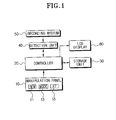
- a file list display apparatus has a control panel 10 for the input of a display command, a detection unit 40 for detecting an entire list of files recorded in a recording medium 50, a storage unit 30 for storing the detected list, a liquid crystal display (LCD) 60 for displaying the file list, and a controller 20 for controlling the detection unit 40, the storage unit 30 and the LCD 60.
- a control panel 10 for the input of a display command
- a detection unit 40 for detecting an entire list of files recorded in a recording medium 50
- a storage unit 30 for storing the detected list
- a liquid crystal display (LCD) 60 for displaying the file list
- a controller 20 for controlling the detection unit 40, the storage unit 30 and the LCD 60.
- the recording medium 50 has a sector for storing only a list of recorded files.
- the detection unit 40 detects the entire file list recorded in the recording medium 50 by reading the data recorded in the sector for storing the list in the recording medium 50.
- the entire list detected by the detection unit 40 is stored in the storage unit 30 consisting of a memory such as a RAM. Detection by the detection unit 40 and storing by the storage unit 30 is controlled by the controller 20.
- the LCD 60 displays a sub-list consisting of some part of the entire file list recorded in the recording medium 50.
- the controller 20 creates the sub-list by grouping the files successively listed in the entire list stored in the storage unit 30 by a predetermined number, for example ten.
- the created sub-list is transmitted to the sub-list having names of the ten files.
- a plurality of control buttons 11, 13, 15 are disposed on the control panel 10.
- the control buttons include a FF (Forward Fast) button 15, a REW (Rewind or Fast-Rewind) button 11, and a MODE button 13.
- the FF button 15 is a button for inputting a forward scroll command, in other words, the command to provoke a forward sequential display of the files in the entire list until released.
- the REW button 11 is a button for inputting a backward scroll command, in other words, the command to provoke a backward sequential display of the files in the entire list until released.
- the MODE button 13 is a button for inputting a command to change the mode of file list display operation, in other words, the command is to change the function of the FF button 15 and the REW button 11.
- the forward display command to provoke a forward sequential display the sub-lists is generated.
- the backward display command to provoke a backward sequential display the sub-lists is generated.
- a display mode according to the commands input by the key buttons 11, 15 is changed from a sequential one-by-one display of each file to a sequential sub-list (e.g., by 10s) display of the files.
- the FF button 15 functions as a button for inputting the forward display command to provoke a forward sequential display of the sub-lists and the REW button 11 functions as a button for inputting the backward display command to provoke a backward sequential display of the sub-lists.
- a display mode according to the commands input by the key buttons 11, 15 is changed from a sequential one-by-one display of each file to a sequential sub-list (e.g., by 10s) display of the files, and when pressed a second time, back to a sequential one-by-one display of each file.
- the detection unit 40 reads the entire file list recorded in the recording medium 50 (S10).
- the entire list read by the detection unit 40 is stored into the storage unit 30 by the controller 20 (S20). If, when the entire list is stored into the storage unit 30 as described above, the user presses the control buttons 11, 13, 15 disposed on the control panel 10, the file list display operation corresponding to the pressed button(s) is performed.
- the controller 20 judges that the forward or the backward scroll command is input and transmits the next file or the previous file for display on LCD 60 (S50). Thus, whenever the forward or the backward scroll command is input, the displayed files are updated to display the next file in forwards or backwards sequential order.
- the controller 20 When the forward or backward display command is input as described above, the controller 20 creates a sub-list having the names of the next or previous ten files with respect to the currently displayed list from the files in the entire file list using the entire file list stored in the storage unit 30 (S60), as will be further described with respect to Figures 3 to 5. The controller 20 then transmits the created sub-list to the LCD 60, and accordingly, the sub-list is displayed on the LCD 60 (S70).
- the controller 20 creates the sub-list having the next ten files or the previous ten files with respect to the sub-list being displayed from the files of the entire list stored in the storage unit 30 (S60).
- the created sub-list is displayed on LCD 60.
- the sub-list creating step (S60) and the created sub-list displaying step (S70) are repeated whenever the display command is input.
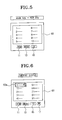
- Figures 3 through 5 show a concrete example of a sub-list displayed on the LCD 60 by the above file list display operation.
- the currently displayed list on the LCD 60 corresponds to the names of the 11 th to 20 th files, as shown in Figure 3, if the user presses the MODE button 13 and the FF button 15 together, then a sub-list having the names of the 21 st file to 30 th files is displayed on the LCD 60 as shown in Figure 4.
- a sub-list having the names of the first to tenth files is displayed on the LCD 60 as shown in Figure 5. Therefore, the user can check the sub-list having the names of the ten preceding files before the currently displayed ten files, or the names of ten files listed after the currently displayed ten files by pressing the MODE button 13 together with the FF button 15 or the REW button 11.
- the files in the currently displayed list are scrolled across the LCD 60.
- the 12 th to the 21 st files are displayed.
- the 20 th file is the last file of the currently displayed files.
- the 10 th to 19 th files are displayed.
- the 10 th file is the first file of the currently displayed files. Accordingly, the user can scroll through the files one-by-one using the REW button 11 and the FF button 15.
- Figure 6 shows another example of the present invention. Another configuration of the sub-list is shown in Figure 6.
- the example of the sub-list created by grouping the successively listed files in the entire list has been described.
- the example of the currently displayed sub-list has the first, the 11 th , the 21 st files, etc., in other words, the files are all the first files of the files grouped into ten from the entire list of 100 files.
- the 100 files stored on the recording medium 50 are grouped into groups, or folders, of ten files per group.
- the user can select the method for displaying the sub-list according to the method selected from two methods shown in Figure 3 and Figure 6.
- the user can select a more convenient method for him/herself by disposing a separate key button (such as a menu button, not shown) for selecting the display method on the control panel 10, or by disposing an input button (not shown) that allows the user to freely input the display method.
- the user can select the type of the files recorded in the displayed sub-list. For example, the user can set up to display a song of a certain singer whom the user selected, or can set to successively display from recently reproduced files. In this case, there should be separate means for inputting a condition in regard to the files that the user desires.
- encoded MP3 files include separate ID3 tags for song title, artist, album, genre, etc.
- the user can freely determine the number of the files displayed one time of the sub-list. For example, when the user selects the number of the files in the sub-list as six, the controller 20 creates the sub-list having the names of the six files and successively displays the sub-list having the names of six files on the LCD 60.
- a cursor 60a for selecting any file in the sub-list currently displayed is displayed on the LCD 60.
- the cursor functions to select a file that the user uses. For example, as shown in Figure 6, when the user presses a play button (not shown) in the status that the first file is selected, then the song recorded in the first file is played.
- a cursor button 17 is disposed on the control panel 10. Whenever the cursor button 17 is pressed, the position of the cursor is moved to the next file.
- the examples that when the MODE button 13 is pressed together with the FF button 15 or the REW button 11, then the display command is input, and when the FF button 15 or the REW button 11 is solely pressed, then the scroll command is input have been described in the above preferred embodiments of the present invention.
- the activated status and the inactivated status of the MODE button 13 can be set up to be shifted whenever the MODE button 13 is pressed. Accordingly, the user does not have to press the MODE button 13 all the time to update the sub-list.
- the display command input and the scroll command input can be easily changed by just pressing the MODE button 13 one time.
- the display command or the skip command can be input by using a scroll bar in GUI (Graphic User Interface) circumstance.
- GUI Graphic User Interface
- the displayed sub-list can be changed by allowing the scroll bar for indicating the position of the currently displayed sub-list of the entire list to be displayed at one part of the LCD 60, and by allowing the user to freely move the scroll bar.
- the scroll bar can be displayed on the LCD 60 when the MODE button 13 is pressed and activated.
- the example that the entire list of the files recorded into the recording medium 50 is read by the detection unit 40, and the read entire list is stored into the storage unit 30 has been described in the preferred embodiments of the present invention. Yet, when the display command or the skip command is input without disposing the storage unit 30, the sub-list can be created after reading the entire list of the files recorded in the recording medium 50.
- the sub-list having a predetermined number of files in the entire list of the files recorded in the vast-capacity recording medium can be successively displayed.
- the possibility of wrong manipulation becomes less and the user can use the apparatus conveniently, compared to the conventional file list display apparatus, which has a high-speed search function manipulated by pressing the skip button for 2 to 3 seconds. Therefore, the user can easily refer the list of a number of files, and a special file also can be easily searched.
Landscapes
- Engineering & Computer Science (AREA)
- Signal Processing (AREA)
- Information Retrieval, Db Structures And Fs Structures Therefor (AREA)
- User Interface Of Digital Computer (AREA)
- Indexing, Searching, Synchronizing, And The Amount Of Synchronization Travel Of Record Carriers (AREA)
Applications Claiming Priority (2)
| Application Number | Priority Date | Filing Date | Title |
|---|---|---|---|
| KR10-2001-0030284A KR100412483B1 (ko) | 2001-05-31 | 2001-05-31 | 서브리스트의 순차적 표시가 가능한 파일리스트 표시장치 |
| KR2001030284 | 2001-05-31 |
Publications (2)
| Publication Number | Publication Date |
|---|---|
| EP1262984A2 true EP1262984A2 (de) | 2002-12-04 |
| EP1262984A3 EP1262984A3 (de) | 2004-06-02 |
Family
ID=19710208
Family Applications (1)
| Application Number | Title | Priority Date | Filing Date |
|---|---|---|---|
| EP02251358A Ceased EP1262984A3 (de) | 2001-05-31 | 2002-02-27 | Dateispeicherungsgerät mit Anzeigefunktion für Dateilisten |
Country Status (4)
| Country | Link |
|---|---|
| US (1) | US7386809B2 (de) |
| EP (1) | EP1262984A3 (de) |
| KR (1) | KR100412483B1 (de) |
| CN (1) | CN1223930C (de) |
Cited By (2)
| Publication number | Priority date | Publication date | Assignee | Title |
|---|---|---|---|---|
| EP1724779A1 (de) * | 2005-05-18 | 2006-11-22 | Siemens Aktiengesellschaft | Vorrichtung zum Anzeigen eines Datenträger-Inhaltsverzeichnisses eines Datenträgers |
| EP1814046A3 (de) * | 2006-01-25 | 2008-12-24 | Océ-Technologies B.V. | System und Verfahren zur Bereitstellung einer Anzeigefunktion für Dateilisten und einer Funktion zur Erzeugung von Dateinamen |
Families Citing this family (15)
| Publication number | Priority date | Publication date | Assignee | Title |
|---|---|---|---|---|
| US7956272B2 (en) * | 2002-07-30 | 2011-06-07 | Apple Inc. | Management of files in a personal communication device |
| US7166791B2 (en) | 2002-07-30 | 2007-01-23 | Apple Computer, Inc. | Graphical user interface and methods of use thereof in a multimedia player |
| WO2004068798A2 (en) * | 2003-01-31 | 2004-08-12 | Koninklijke Philips Electronics N.V. | Method and bridging device for priortizing transfer of data streams |
| JP4347289B2 (ja) * | 2005-11-14 | 2009-10-21 | シャープ株式会社 | 情報処理装置、プログラムおよび記録媒体 |
| US20070136268A1 (en) * | 2005-12-09 | 2007-06-14 | Microsoft Corporation | Just in time loading list |
| KR100985617B1 (ko) * | 2008-05-20 | 2010-10-05 | 주식회사 팬택 | 캐싱을 이용한 drm 파일 제공 방법 및 시스템 |
| CN101639731A (zh) * | 2008-08-01 | 2010-02-03 | 鸿富锦精密工业(深圳)有限公司 | 媒体文件快速查找的电子相框及其方法 |
| US8060471B2 (en) * | 2008-12-11 | 2011-11-15 | Inventec Besta Co., Ltd. | Updating display system of display list and method thereof |
| US20130097555A1 (en) * | 2011-10-13 | 2013-04-18 | Microsoft Corporation | Dynamic content preview cycling model for answers with transitions |
| CN103165149B (zh) * | 2011-12-09 | 2017-05-24 | 上海博泰悦臻电子设备制造有限公司 | 一种车载端及车载端音乐播放方法 |
| EP2632119A1 (de) * | 2012-02-27 | 2013-08-28 | Doro AB | Lineare Benutzerschnittstelle mit Zwei-Modus-Zugang |
| US9633080B2 (en) | 2013-05-28 | 2017-04-25 | Microsoft Technology Licensing, Llc | Hierarchical entity information for search |
| CN103324458A (zh) * | 2013-06-27 | 2013-09-25 | 宇龙计算机通信科技(深圳)有限公司 | 一种信息显示方法及移动终端 |
| TW201618720A (zh) * | 2014-11-20 | 2016-06-01 | 創心醫電股份有限公司 | 採集臟器聲的方法及其系統與臟器聲錄音器 |
| CN105183460B (zh) * | 2015-08-14 | 2018-09-14 | 魅族科技(中国)有限公司 | 一种列表展示方法及终端 |
Family Cites Families (15)
| Publication number | Priority date | Publication date | Assignee | Title |
|---|---|---|---|---|
| JP3500741B2 (ja) | 1994-03-01 | 2004-02-23 | ソニー株式会社 | テレビ放送の選局方法及び選局装置 |
| US5627980A (en) * | 1995-03-20 | 1997-05-06 | Xerox Corporation | Elision based presentation of ordered data |
| US5886690A (en) * | 1996-10-31 | 1999-03-23 | Uniden America Corporation | Program schedule user interface |
| US20060020894A1 (en) * | 1996-12-06 | 2006-01-26 | Nikon Corporation | Information processing apparatus |
| US5739451A (en) * | 1996-12-27 | 1998-04-14 | Franklin Electronic Publishers, Incorporated | Hand held electronic music encyclopedia with text and note structure search |
| US6072508A (en) | 1997-03-14 | 2000-06-06 | S3 Incorporated | Method and apparatus for shortening display list instructions |
| KR100353159B1 (ko) * | 1999-03-03 | 2002-09-18 | 주식회사 노바일렉트로닉 | Mp3 파일 재생용 시스템 및 그 구동방법 |
| US6757906B1 (en) * | 1999-03-30 | 2004-06-29 | Tivo, Inc. | Television viewer interface system |
| AU4193600A (en) | 1999-04-07 | 2000-10-23 | Srs Labs, Inc | Electronic cassette apparatus and method |
| US6239803B1 (en) * | 1999-04-14 | 2001-05-29 | Stanley W. Driskell | Method to achieve least effort selection from an item list of arbitrary length |
| US6691282B1 (en) | 1999-06-22 | 2004-02-10 | Nortel Networks Limited | Method and apparatus for displaying and navigating containment hierarchies |
| JP4314688B2 (ja) * | 1999-09-09 | 2009-08-19 | ソニー株式会社 | データ記録再生装置及び方法 |
| KR100353512B1 (ko) * | 1999-12-22 | 2002-09-19 | 주식회사 현대오토넷 | 엠피쓰리용 컴팩트 디스크 재생장치 |
| US6496802B1 (en) * | 2000-01-07 | 2002-12-17 | Mp3.Com, Inc. | System and method for providing access to electronic works |
| US6750886B1 (en) * | 2000-01-26 | 2004-06-15 | Donald B. Bergstedt | Method and software for displaying information on a display area of a screen of an electronic device |
-
2001
- 2001-05-31 KR KR10-2001-0030284A patent/KR100412483B1/ko not_active Expired - Fee Related
-
2002
- 2002-01-18 US US10/050,158 patent/US7386809B2/en not_active Expired - Fee Related
- 2002-02-27 EP EP02251358A patent/EP1262984A3/de not_active Ceased
- 2002-03-26 CN CNB021079943A patent/CN1223930C/zh not_active Expired - Fee Related
Cited By (2)
| Publication number | Priority date | Publication date | Assignee | Title |
|---|---|---|---|---|
| EP1724779A1 (de) * | 2005-05-18 | 2006-11-22 | Siemens Aktiengesellschaft | Vorrichtung zum Anzeigen eines Datenträger-Inhaltsverzeichnisses eines Datenträgers |
| EP1814046A3 (de) * | 2006-01-25 | 2008-12-24 | Océ-Technologies B.V. | System und Verfahren zur Bereitstellung einer Anzeigefunktion für Dateilisten und einer Funktion zur Erzeugung von Dateinamen |
Also Published As
| Publication number | Publication date |
|---|---|
| KR100412483B1 (ko) | 2003-12-31 |
| CN1223930C (zh) | 2005-10-19 |
| US7386809B2 (en) | 2008-06-10 |
| US20020180716A1 (en) | 2002-12-05 |
| EP1262984A3 (de) | 2004-06-02 |
| KR20020091526A (ko) | 2002-12-06 |
| CN1389783A (zh) | 2003-01-08 |
Similar Documents
| Publication | Publication Date | Title |
|---|---|---|
| US10423381B2 (en) | Playback apparatus, playback method, and playback program | |
| EP1262984A2 (de) | Dateispeicherungsgerät mit Anzeigefunktion für Dateilisten | |
| US6646966B2 (en) | Automatic storage medium identifying method and device, automatic music CD identifying method and device, storage medium playback method and device, and storage medium as music CD | |
| US9939989B2 (en) | User interface for displaying and playing multimedia contents, apparatus comprising the same, and control method thereof | |
| US8762843B2 (en) | System and method for modifying media content playback based on limited input | |
| US10642447B2 (en) | Reproduction device and display control method | |
| US8694139B2 (en) | Information processing apparatus, information processing method, information processing system, and information processing program | |
| KR20040010050A (ko) | 광디스크 재생방법 | |
| JP3847098B2 (ja) | オーディオ情報表示装置 | |
| JP2008071118A (ja) | インタフェース装置、楽曲再生装置、インタフェースプログラム、及びインタフェース方法 | |
| JP5036716B2 (ja) | 個人用通信デバイスにおけるファイルの管理 | |
| JP3559945B2 (ja) | ディスク再生装置 | |
| KR100812014B1 (ko) | 다중 미디어 플레이 기능을 가지는 오디오 시스템 및 그방법 | |
| JP3122225B2 (ja) | デジタルオーディオ装置 | |
| JP3023998B2 (ja) | ディスクプレーヤ装置 | |
| JP2003281861A (ja) | 圧縮オーディオ再生機器 | |
| JP3936379B1 (ja) | 仮想ディスクチェンジャ機能付き音声再生装置。 | |
| US7532559B2 (en) | Audio player | |
| JPH11176136A (ja) | 情報記録装置および情報記録方法 | |
| JP2007310985A (ja) | 情報検索装置および情報検索方法 | |
| JP2007172761A (ja) | オーディオ再生装置及びイントロスキャン再生方法 | |
| JP2000173154A (ja) | 記録媒体再生装置 | |
| JP2007095137A (ja) | オーディオ再生装置及び方法 |
Legal Events
| Date | Code | Title | Description |
|---|---|---|---|
| PUAI | Public reference made under article 153(3) epc to a published international application that has entered the european phase |
Free format text: ORIGINAL CODE: 0009012 |
|
| AK | Designated contracting states |
Kind code of ref document: A2 Designated state(s): AT BE CH CY DE DK ES FI FR GB GR IE IT LI LU MC NL PT SE TR |
|
| AX | Request for extension of the european patent |
Free format text: AL;LT;LV;MK;RO;SI |
|
| PUAL | Search report despatched |
Free format text: ORIGINAL CODE: 0009013 |
|
| AK | Designated contracting states |
Kind code of ref document: A3 Designated state(s): AT BE CH CY DE DK ES FI FR GB GR IE IT LI LU MC NL PT SE TR |
|
| AX | Request for extension of the european patent |
Extension state: AL LT LV MK RO SI |
|
| 17P | Request for examination filed |
Effective date: 20040701 |
|
| RAP1 | Party data changed (applicant data changed or rights of an application transferred) |
Owner name: SAMSUNG ELECTRONICS CO., LTD. |
|
| AKX | Designation fees paid |
Designated state(s): DE FR GB IT |
|
| 17Q | First examination report despatched |
Effective date: 20050210 |
|
| 17Q | First examination report despatched |
Effective date: 20050210 |
|
| RAP1 | Party data changed (applicant data changed or rights of an application transferred) |
Owner name: SAMSUNG ELECTRONICS CO., LTD. |
|
| APBK | Appeal reference recorded |
Free format text: ORIGINAL CODE: EPIDOSNREFNE |
|
| APBN | Date of receipt of notice of appeal recorded |
Free format text: ORIGINAL CODE: EPIDOSNNOA2E |
|
| APBR | Date of receipt of statement of grounds of appeal recorded |
Free format text: ORIGINAL CODE: EPIDOSNNOA3E |
|
| APAF | Appeal reference modified |
Free format text: ORIGINAL CODE: EPIDOSCREFNE |
|
| APAF | Appeal reference modified |
Free format text: ORIGINAL CODE: EPIDOSCREFNE |
|
| APBT | Appeal procedure closed |
Free format text: ORIGINAL CODE: EPIDOSNNOA9E |
|
| STAA | Information on the status of an ep patent application or granted ep patent |
Free format text: STATUS: THE APPLICATION HAS BEEN REFUSED |
|
| 18R | Application refused |
Effective date: 20170125 |