EP1286530A2 - Aufzeichnung von audioermöglichender Software und Bildern auf einem Wechselspeichermedium - Google Patents
Aufzeichnung von audioermöglichender Software und Bildern auf einem Wechselspeichermedium Download PDFInfo
- Publication number
- EP1286530A2 EP1286530A2 EP02077486A EP02077486A EP1286530A2 EP 1286530 A2 EP1286530 A2 EP 1286530A2 EP 02077486 A EP02077486 A EP 02077486A EP 02077486 A EP02077486 A EP 02077486A EP 1286530 A2 EP1286530 A2 EP 1286530A2
- Authority
- EP
- European Patent Office
- Prior art keywords
- audio
- images
- enabling software
- storage medium
- removable storage
- Prior art date
- Legal status (The legal status is an assumption and is not a legal conclusion. Google has not performed a legal analysis and makes no representation as to the accuracy of the status listed.)
- Withdrawn
Links
Images




Classifications
-
- H—ELECTRICITY
- H04—ELECTRIC COMMUNICATION TECHNIQUE
- H04N—PICTORIAL COMMUNICATION, e.g. TELEVISION
- H04N1/00—Scanning, transmission or reproduction of documents or the like, e.g. facsimile transmission; Details thereof
- H04N1/32—Circuits or arrangements for control or supervision between transmitter and receiver or between image input and image output device, e.g. between a still-image camera and its memory or between a still-image camera and a printer device
- H04N1/32101—Display, printing, storage or transmission of additional information, e.g. ID code, date and time or title
- H04N1/32128—Display, printing, storage or transmission of additional information, e.g. ID code, date and time or title attached to the image data, e.g. file header, transmitted message header, information on the same page or in the same computer file as the image
-
- G—PHYSICS
- G11—INFORMATION STORAGE
- G11B—INFORMATION STORAGE BASED ON RELATIVE MOVEMENT BETWEEN RECORD CARRIER AND TRANSDUCER
- G11B27/00—Editing; Indexing; Addressing; Timing or synchronising; Monitoring; Measuring tape travel
- G11B27/02—Editing, e.g. varying the order of information signals recorded on, or reproduced from, record carriers
- G11B27/031—Electronic editing of digitised analogue information signals, e.g. audio or video signals
- G11B27/034—Electronic editing of digitised analogue information signals, e.g. audio or video signals on discs
-
- G—PHYSICS
- G11—INFORMATION STORAGE
- G11B—INFORMATION STORAGE BASED ON RELATIVE MOVEMENT BETWEEN RECORD CARRIER AND TRANSDUCER
- G11B27/00—Editing; Indexing; Addressing; Timing or synchronising; Monitoring; Measuring tape travel
- G11B27/10—Indexing; Addressing; Timing or synchronising; Measuring tape travel
- G11B27/102—Programmed access in sequence to addressed parts of tracks of operating record carriers
- G11B27/105—Programmed access in sequence to addressed parts of tracks of operating record carriers of operating discs
-
- G—PHYSICS
- G11—INFORMATION STORAGE
- G11B—INFORMATION STORAGE BASED ON RELATIVE MOVEMENT BETWEEN RECORD CARRIER AND TRANSDUCER
- G11B27/00—Editing; Indexing; Addressing; Timing or synchronising; Monitoring; Measuring tape travel
- G11B27/10—Indexing; Addressing; Timing or synchronising; Measuring tape travel
- G11B27/34—Indicating arrangements
-
- H—ELECTRICITY
- H04—ELECTRIC COMMUNICATION TECHNIQUE
- H04N—PICTORIAL COMMUNICATION, e.g. TELEVISION
- H04N1/00—Scanning, transmission or reproduction of documents or the like, e.g. facsimile transmission; Details thereof
- H04N1/21—Intermediate information storage
- H04N1/2104—Intermediate information storage for one or a few pictures
- H04N1/2158—Intermediate information storage for one or a few pictures using a detachable storage unit
-
- G—PHYSICS
- G11—INFORMATION STORAGE
- G11B—INFORMATION STORAGE BASED ON RELATIVE MOVEMENT BETWEEN RECORD CARRIER AND TRANSDUCER
- G11B2220/00—Record carriers by type
- G11B2220/20—Disc-shaped record carriers
-
- G—PHYSICS
- G11—INFORMATION STORAGE
- G11B—INFORMATION STORAGE BASED ON RELATIVE MOVEMENT BETWEEN RECORD CARRIER AND TRANSDUCER
- G11B2220/00—Record carriers by type
- G11B2220/20—Disc-shaped record carriers
- G11B2220/21—Disc-shaped record carriers characterised in that the disc is of read-only, rewritable, or recordable type
- G11B2220/215—Recordable discs
- G11B2220/218—Write-once discs
-
- G—PHYSICS
- G11—INFORMATION STORAGE
- G11B—INFORMATION STORAGE BASED ON RELATIVE MOVEMENT BETWEEN RECORD CARRIER AND TRANSDUCER
- G11B2220/00—Record carriers by type
- G11B2220/20—Disc-shaped record carriers
- G11B2220/25—Disc-shaped record carriers characterised in that the disc is based on a specific recording technology
- G11B2220/2508—Magnetic discs
- G11B2220/2512—Floppy disks
-
- G—PHYSICS
- G11—INFORMATION STORAGE
- G11B—INFORMATION STORAGE BASED ON RELATIVE MOVEMENT BETWEEN RECORD CARRIER AND TRANSDUCER
- G11B2220/00—Record carriers by type
- G11B2220/20—Disc-shaped record carriers
- G11B2220/25—Disc-shaped record carriers characterised in that the disc is based on a specific recording technology
- G11B2220/2537—Optical discs
- G11B2220/2545—CDs
-
- H—ELECTRICITY
- H04—ELECTRIC COMMUNICATION TECHNIQUE
- H04N—PICTORIAL COMMUNICATION, e.g. TELEVISION
- H04N2201/00—Indexing scheme relating to scanning, transmission or reproduction of documents or the like, and to details thereof
- H04N2201/32—Circuits or arrangements for control or supervision between transmitter and receiver or between image input and image output device, e.g. between a still-image camera and its memory or between a still-image camera and a printer device
- H04N2201/3201—Display, printing, storage or transmission of additional information, e.g. ID code, date and time or title
- H04N2201/3225—Display, printing, storage or transmission of additional information, e.g. ID code, date and time or title of data relating to an image, a page or a document
-
- H—ELECTRICITY
- H04—ELECTRIC COMMUNICATION TECHNIQUE
- H04N—PICTORIAL COMMUNICATION, e.g. TELEVISION
- H04N2201/00—Indexing scheme relating to scanning, transmission or reproduction of documents or the like, and to details thereof
- H04N2201/32—Circuits or arrangements for control or supervision between transmitter and receiver or between image input and image output device, e.g. between a still-image camera and its memory or between a still-image camera and a printer device
- H04N2201/3201—Display, printing, storage or transmission of additional information, e.g. ID code, date and time or title
- H04N2201/3261—Display, printing, storage or transmission of additional information, e.g. ID code, date and time or title of multimedia information, e.g. a sound signal
- H04N2201/3264—Display, printing, storage or transmission of additional information, e.g. ID code, date and time or title of multimedia information, e.g. a sound signal of sound signals
-
- H—ELECTRICITY
- H04—ELECTRIC COMMUNICATION TECHNIQUE
- H04N—PICTORIAL COMMUNICATION, e.g. TELEVISION
- H04N2201/00—Indexing scheme relating to scanning, transmission or reproduction of documents or the like, and to details thereof
- H04N2201/32—Circuits or arrangements for control or supervision between transmitter and receiver or between image input and image output device, e.g. between a still-image camera and its memory or between a still-image camera and a printer device
- H04N2201/3201—Display, printing, storage or transmission of additional information, e.g. ID code, date and time or title
- H04N2201/3274—Storage or retrieval of prestored additional information
- H04N2201/3277—The additional information being stored in the same storage device as the image data
Definitions
- This invention relates to recording audio enabling software and images on a removable storage medium.
- Digital colored images can be produced by electronic still cameras.
- Analog signals signals from an image sensor are converted into digital signals, processed, and combined with "metadata" (such as the date the picture was taken and camera settings) in a digital file.
- Metadata such as the date the picture was taken and camera settings
- There are many storage devices on which these digital images can be stored including floppy magnetic discs, magnetic hard disc drives, optical discs including write-once discs, digital tape, and Flash EPROM cards.
- Some digital cameras, such as the Kodak DC265 camera allow audio to be recorded along with the digital images.
- the audio is stored as "metadata" within the digital image file.
- These images may later be downloaded to a host computer, viewed, and printed using a local printer, such as a color inkjet printer.
- the audio files may be played back as the images are reviewed on the camera's LCD display, or may be played as the images are later viewed on the user's desktop or portable computer.
- a photographic film is scanned, digitized and converted to a digital file corresponding to each film image.
- the Kodak PhotoCDTM system is an example of one such arrangement for scanning, digitizing, and providing a digital file for each image.
- a user will have a service that will scan and digitize images to provide a digital file.
- These files are provided on a removable storage media, such as a Kodak PhotoCD disc.
- a user may also purchase software programs (application software) which operates on these image files. These applications permit the customer to access, view, modify, and/or print the image files as desired.
- Adobe PhotoshopTM is an example of software that can operate on digital image files to drive a printer for producing output images.
- the applications that operate on the images to produce prints are provided separately, rather than on the same PhotoCD disc that stores a customer's film images.
- Another object of this invention is to provide a simple method for a user to record audio information that is associated with images on a removable storage medium.
- Another object is to provide an arrangement that makes it possible for a new computer user to simply and easily view their personal digital images provided on a recordable optical disc using their computer, record associated audio information onto the optical disc or a second optical disc, and then enable others to view the digital images while listening to the associated audio information.
- An advantage of the present invention is to provide an effective way of recording audio information associated with digital image files
- Another advantage of this invention is to provide a simple method for a user to record audio information that is associated with images on a removable storage medium, by providing enabling software on a removable storage medium containing digital image files.
- Another advantage of this invention is to provide a recordable optical disc with digital images and enabling software that allows the user to record audio information back onto the same recordable optical disc.
- FIG. 1 illustrates a system which can be used for scanning a color film, storing a color adjusted scanned image on a storage medium and also storing audio recording and printing enabling software on the same medium.
- a photographic original such as a film negative or a slide 10 is scanned by a scanning device 12.
- the scanning device 12 produces a colored digital image having a number of pixels, for example 3072 columns by 2048 rows of red, green, and blue pixel values.
- Scanners that can be used in accordance with the invention are well known in the art, as described in commonly assigned US-A-5,218,455, US-A-5,461,492, US-A-5,555,042, and US-A-5,565,912, the disclosures of which are incorporated herein by reference.
- digital image signals can be provided from a digital camera 6, as described in commonly assigned US-A-5,828,406 and US-A-5,477,264, the disclosures of which are incorporated herein by reference.
- the digital image signals from the scanner 12 or digital camera 6 are provided to a computer workstation 14. These digital image signals are color adjusted and temporarily stored or passed directly to a CD recorder 16 by the operation of the workstation 14.
- the CD recorder 16 causes the color adjusted digital image data 22 to be recorded on a write-once compact disc 18, along with software 20 to enable audio recording and image printing.
- a hybrid compact disc may be used. Such a hybrid disc is described in US-A-5,595,389, the disclosure of which is incorporated herein by reference.
- the enabling software 20 is prepressed at the time the disc is manufactured, and the digital images 22 are written to the disc as the film is scanned.
- the enabling software 20 enables the user to subsequently record audio information 24 to any image on the disc 18.
- FIG. 2 illustrates a system which can be used for viewing and printing the digital images 22 from compact disc 18, and for recording and playing audio information 24, using the enabling software 20 contained on compact disc 18.
- the print enabling software can utilize the methods described in US-A-6,208,770 to Gilman and others, the disclosure of which is incorporated herein by reference.
- the images 22 and enabling software 20 can be stored on a floppy magnetic disc medium 60. This floppy disc 60 is inserted into a floppy disc drive 46.
- the images 22 and enabling software 20 can also be provided on a removable memory card 32 such as a Flash EPROM memory card, that can be inserted into memory card reader 48.
- a computer processing unit (CPU) 50 will be understood to use the enabling software 20 in accordance with the present invention that will be described in more detail in FIGS. 3-6.
- This enabling software 20 can be downloaded from the compact disc 18, floppy disc 60, or removable memory card 32 and installed on a hard drive 56.
- the CPU 50 is directly coupled to a display monitor 52 and a keyboard 54.
- a mouse 55 permits the user to readily communicate with the CPU 50.
- the CPU 50 is in direct communication with a local printer 58 that can produce a hard copy print.
- the CPU 50 is also in direct communications with a sound board 70 that receives an audio input signal from a microphone 72 and provides audio output signals to one or more speakers 74.
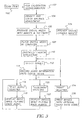
- FIG. 3 depicts a block diagram of a process in accordance with the present invention.
- the film is scanned by film scanner 12 in FIG. 1.
- a film calibration transformation is performed.
- the scanned colored digital images stored on the media in block 106 are provided in a proper image data metric as described in commonly assigned US-A-5,609,978 and US-A-5,432,906, the disclosures of which are incorporated herein by reference.
- the film scanner 12 In order to provide the proper image data metric, the film scanner 12 must be calibrated for the particular film.
- This film calibration transformation 102 is implemented in workstation 14 to convert a properly exposed digital film image to the proper image data metric.
- the image is further density and color balance adjusted in block 104 to correct for these conditions, as well as for any other conditions due to non-ideal film manufacturing or keeping problems.
- Automatic algorithms that provide this correction are well known in the art, and are accomplished in a conventional Kodak PhotoCD system. See, for example, commonly assigned US-A-4,969,204, US-A-5,505,230, and US-A-5,227,789, the disclosures of which are incorporated herein by reference.
- other image processing functions can also be performed, such as image sharpening and compression.
- the color adjusted digital file is then stored to the digital media (for example, the optical disc 18 in FIG. 1) in block 106 along with enabling software 20.
- the enabling software 20 includes an application program that allows users to view the images and to record associated audio information for one or more images back onto the digital media.
- digital images can alternatively be provided from a digital camera in block 105.
- Blocks 100 through 106 are normally performed by a service provider, such as a photofinisher. The photofinisher scans a customer's film strip 10 and provides the optical disc 18, along with the developed film strip 10 and possibly hard copy prints, to the customer.
- the customer places the optical disc 18 into the CD-R drive 44 of their computer 40, which is typically a home desktop computer.
- the removable storage medium is inserted into the proper reader 46, or 48 in computer 40, shown in FIG. 2.
- the enabling software 20 may be automatically installed and launched, as will be described in more detail below with reference to FIG. 4.
- the software application is launched so that the color adjusted digital images on the compact disc 18 are accessible by the software for immediate viewing, printing, audio recording, and audio playback. If the enabling software 20 has not been installed on the computer 40, the software installer is launched.
- FIG. 4 will now be discussed in detail.
- the computer 40 launches the program to evaluate the computer hard drive 56.
- This evaluation (block 230) consists of searching the computer operating system for the existence of registry keys which indicate the location of the audio enabling software and confirming the location on the hard drive 56.
- a determination is made (block 240) of the existence of the audio enabling software. If the audio enabling software does not exist in hard drive 56, an installation program (block 250) will be initiated and it will install the audio enabling software. If the audio enabling software exists on the hard drive 56, or has just been installed (block 250), the audio enabling software is directly initiated (block 260).
- the audio enabling software enables the CPU 50 to perform the subsequent blocks (blocks 112 through 126) in FIG. 3.
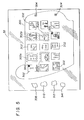
- a user interface screen 300 (shown in FIG. 5) is displayed on the display screen 52 showing a two-dimensional array of thumbnail images 302 obtained from the optical disc 18.
- the thumbnail images 302 preferably have a lower resolution than the full size images stored on optical disc 18.
- the user selects a single image, or alternatively selects multiple images (for example, four images) by pressing either a control key (not shown) on the keyboard 54 while clicking the mouse 55 on any number of thumbnail images 302.
- FIG. 5 shows that four thumbnail images 302a, 302b, 302c, and 302d (which are outlined) have been selected.
- arrow controls 304 on the right portion of the "preview picture screen" 300 enable the user to scroll through the larger number of thumbnail images 302 to view a group of the thumbnail images 302 (for example, 15 thumbnail images) at a time.
- the user can choose to record audio for the selected image or images 302 by selecting a "record audio" icon 312.
- the CPU 50 then instructs the sound board 70 to record audio from the microphone 72.
- the audio may be recorded onto the optical disc 18 in the outer recording tracks 24 used for recording audio information using an appropriate audio file format, such as the well known RIFF/WAVE (.WAV) format.
- the digital image plus the recorded sound can alternatively be recorded on a separate disc, such as a separate CD-R disc or a separate floppy disk.
- the audio is recorded along with header information identifying the image or images with which the audio is associated.
- the images can be identified using an image number, image name, complete image pathname on the optical disc 18, or the like.
- the user can repeat blocks 112 and 114 to record audio information for additional images.
- the images for which audio has been recorded are identified using a recorded audio icon 320.
- the user interface screen 300 also includes a "play audio" icon 314.
- the CPU 50 instructs the CD-R drive 44 to provide the appropriate high resolution image data from the digital image files 22 stored on optical disc 18 and to also provide the appropriate audio information file from the audio information 24 stored on optical disc 18 (block 118).
- the CPU displays a full size image of the user selected image on the display monitor 52, and provides the corresponding audio file to the sound board 70 which plays back the recorded audio using speakers 74.
- the user interface screen 300 also includes a "slide show" icon 310.
- the CPU 50 instructs the CD-R drive 44 to sequentially provide the appropriate high resolution image data from all of the digital image files 22 stored on optical disc 18 (or alternatively from a user-selected subset of the digital image files) and to simultaneously provide any corresponding audio information files from the audio information 24 stored on optical disc 18 as each image is displayed (block 122).
- the images are each displayed for at least a minimum period of time, if there is no corresponding audio recording or only a short audio recording. If there is a longer audio recording for a particular image, that image is displayed until the end of the audio recording.
- the user selected a plurality of images for a particular audio recording in block 112
- those images are automatically displayed in sequence as the audio is played back. For example, if four images were selected and the audio recording is 40 seconds long, each image is displayed for ten seconds.
- the CPU displays the full size images on the display monitor 52 and provides the audio files to the sound board 70 which plays back the recorded audio using speakers 74.
- the user interface screen 300 also includes a "print” icon 308.
- the user can print all of the selected images on the local printer 58 (block 126), which can be, for example, a color ink jet printer.
- This brings up a "print function display screen” 400 shown in FIG. 6.
- the user then chooses a type of layout.
- the user can choose one of several predefined "layout" icons 402 on the periphery of the "print function display screen" 400 which determines how many pictures appear on each page by selecting, for example, 1, 2, or 4 images to be printed per page. Alternatively, the user can select a custom layout 403.
- the custom layout 403 allows the user to specify the number of columns and rows of images, the horizontal and vertical spacing between images, and the top margin and left margin of the printed page.
- the images to be printed appear in a print preview area 422 on the "print function display screen" 400.
- the user has selected 4 images per page, and the preview area 422 displays four of the selected images, in image windows 420a, 420b, 420c, and 420d.
- This data code which can be a two-dimensional bar code, provides an encoding of the audio information, recorded in block 114, in a machine readable format that can be read, for example, by a two-dimensional barcode scanner.
- the sound data code can be printed using an ink jet printer manufactured by the Seiko Epson Company of Japan.
- the sound data code can be scanned and played by existing equipment, such as the Olympus ScanTalk device.
- icon 404 is selected, the data code is shown below each image in the print layout. In FIG. 6, the user has selected 4 images per page and has selected the audio data code option. Therefore, the preview area 422 displays four of the selected images, in image windows 420a, 420b, 420c, and 420d as well as the audio data code areas 424a, 424b, 424c, and 424d.
- the user then chooses the number of sets of images to print, for example, three copies of each laid out page, by typing in the number of desired sets in a print copies field 408 on the left portion of the "print function display screen" 400 by using the up and down arrow keys on the right portion of icon 410. After making these selections, the user can press a "print now" icon 410 and walk away from the host computer 14. Each of the selected images will be printed automatically on the local printer 58, without further user interaction.
- the program prepares the printed layout by calculating the image size which enables the selected number of images to fit on a page.
- the image data is automatically interpolated or decimated to provide the proper image data to fill the page with the selected number of images.
- the program also calculates the required area needed to allow the audio data code area to be sufficient in size so that it can be read by the reading device.
- the audio enabling software may be used with a personal digital assistant (PDA); image enabled cellular telephone, or portable digital image viewer.
- PDA personal digital assistant
- the audio enabling software may be used with a digital device connected to or incorporated in a television display, such as a cable or satellite set top box.
- music or other types of audio may be provided from various sources such as audio compact discs or digital audio files provided via the Internet, for example, MP3 files downloaded from a website specified by the audio enabling software.
- the audio enabling software may include the ability to modify or manipulate the pitch or other characteristics of the audio files to be recorded.
- the recorded audio information produced using the audio enabling software can be transferred, along with the digital image files, to other devices, such as other computers, set top boxes, PDAs, and so forth, via using a communications channel such as the Internet.
- a computer program product can include one or more storage medium, for example; magnetic storage media such as magnetic disk (such as a floppy disk) or magnetic tape; optical storage media such as optical disk, optical tape, or machine readable bar code; solid-state electronic storage devices such as random access memory (RAM), or read-only memory (ROM); or any other physical device or media employed to store a computer program having instructions for practicing a method according to the present invention.
- magnetic storage media such as magnetic disk (such as a floppy disk) or magnetic tape
- optical storage media such as optical disk, optical tape, or machine readable bar code
- solid-state electronic storage devices such as random access memory (RAM), or read-only memory (ROM); or any other physical device or media employed to store a computer program having instructions for practicing a method according to the present invention.
- the method wherein the enabling software further enables the plurality of digital files to be automatically viewed in a sequence as the single audio recording is played.
Landscapes
- Engineering & Computer Science (AREA)
- Multimedia (AREA)
- Signal Processing (AREA)
- General Engineering & Computer Science (AREA)
- Television Signal Processing For Recording (AREA)
- Signal Processing For Digital Recording And Reproducing (AREA)
- Information Retrieval, Db Structures And Fs Structures Therefor (AREA)
Applications Claiming Priority (2)
| Application Number | Priority Date | Filing Date | Title |
|---|---|---|---|
| US09/898,813 US7133597B2 (en) | 2001-07-05 | 2001-07-05 | Recording audio enabling software and images on a removable storage medium |
| US898813 | 2001-07-05 |
Publications (2)
| Publication Number | Publication Date |
|---|---|
| EP1286530A2 true EP1286530A2 (de) | 2003-02-26 |
| EP1286530A3 EP1286530A3 (de) | 2004-11-03 |
Family
ID=25410067
Family Applications (1)
| Application Number | Title | Priority Date | Filing Date |
|---|---|---|---|
| EP02077486A Withdrawn EP1286530A3 (de) | 2001-07-05 | 2002-06-24 | Aufzeichnung von audioermöglichender Software und Bildern auf einem Wechselspeichermedium |
Country Status (3)
| Country | Link |
|---|---|
| US (1) | US7133597B2 (de) |
| EP (1) | EP1286530A3 (de) |
| JP (1) | JP2003078871A (de) |
Cited By (3)
| Publication number | Priority date | Publication date | Assignee | Title |
|---|---|---|---|---|
| WO2005001835A1 (en) * | 2003-06-12 | 2005-01-06 | Eastman Kodak Company | System for authoring a multimedia enabled disc |
| GB2382918B (en) * | 2001-11-09 | 2006-05-10 | Polidea Srl | A system for downloading and recording digital images |
| EP1580996A4 (de) * | 2002-11-20 | 2006-08-02 | Konica Minolta Photo Imaging | Programm mit kopierfunktion und das programm aufzeichnendesinformationsaufzeichnungsmedium |
Families Citing this family (14)
| Publication number | Priority date | Publication date | Assignee | Title |
|---|---|---|---|---|
| FR2830714B1 (fr) * | 2001-10-04 | 2004-01-16 | Eastman Kodak Co | Procede automatique d'enrichissement d'image numerique |
| US7929185B2 (en) * | 2002-03-25 | 2011-04-19 | Transpacific Systems, Llc | System and method for switching screens from overview and preview |
| US20040227976A1 (en) * | 2003-05-15 | 2004-11-18 | Vladimir Pavlov | Masks in image processing |
| JP2005292964A (ja) * | 2004-03-31 | 2005-10-20 | Brother Ind Ltd | 印刷データ編集装置及び印刷データ編集プログラム |
| US7427018B2 (en) * | 2005-05-06 | 2008-09-23 | Berkun Kenneth A | Systems and methods for generating, reading and transferring identifiers |
| US7775428B2 (en) * | 2005-05-06 | 2010-08-17 | Berkun Kenneth A | Systems and methods for generating, reading and transferring identifiers |
| US8078618B2 (en) * | 2006-01-30 | 2011-12-13 | Eastman Kodak Company | Automatic multimode system for organizing and retrieving content data files |
| KR100726258B1 (ko) * | 2006-02-14 | 2007-06-08 | 삼성전자주식회사 | 휴대단말의 사진파일 및 음성파일을 이용한 영상물 제작방법 |
| US20070273897A1 (en) * | 2006-05-26 | 2007-11-29 | Lite-On Technology Corporation | Print systems and methods |
| WO2008118419A1 (en) * | 2007-03-23 | 2008-10-02 | Ltt, Ltd | Method and apparatus for reading a printed indicia with a limited field of view sensor |
| US8226007B2 (en) | 2007-03-23 | 2012-07-24 | Ltt, Ltd | Method and apparatus for using a limited capacity portable data carrier |
| US8662396B2 (en) * | 2007-03-23 | 2014-03-04 | Labels That Talk, Ltd | Method for reproducing and using a bar code symbol |
| US8194102B2 (en) * | 2008-10-06 | 2012-06-05 | Microsoft Corporation | Rendering annotations for images |
| JP5366676B2 (ja) * | 2009-06-22 | 2013-12-11 | キヤノン株式会社 | 撮像装置及びその制御方法とプログラム、記憶媒体 |
Citations (1)
| Publication number | Priority date | Publication date | Assignee | Title |
|---|---|---|---|---|
| US6211974B1 (en) * | 1994-07-29 | 2001-04-03 | Fuji Photo Film Co., Ltd. | Laboratory system, method of controlling operation thereof, playback apparatus and method, film image management method, image data copying system and method of copying image data |
Family Cites Families (24)
| Publication number | Priority date | Publication date | Assignee | Title |
|---|---|---|---|---|
| US5050230A (en) | 1989-11-29 | 1991-09-17 | Eastman Kodak Company | Hybrid residual-based hierarchical storage and display method for high resolution digital images in a multiuse environment |
| US4969204A (en) | 1989-11-29 | 1990-11-06 | Eastman Kodak Company | Hybrid residual-based hierarchical storage and display method for high resolution digital images in a multiuse environment |
| US5218455A (en) | 1990-09-14 | 1993-06-08 | Eastman Kodak Company | Multiresolution digital imagery photofinishing system |
| US5432906A (en) | 1990-09-28 | 1995-07-11 | Eastman Kodak Company | Color image processing system for preparing a composite image transformation module for performing a plurality of selected image transformations |
| US5227789A (en) | 1991-09-30 | 1993-07-13 | Eastman Kodak Company | Modified huffman encode/decode system with simplified decoding for imaging systems |
| CA2081762C (en) | 1991-12-05 | 2002-08-13 | Henry D. Hendrix | Method and apparatus to improve a video signal |
| US5359374A (en) | 1992-12-14 | 1994-10-25 | Talking Frames Corp. | Talking picture frames |
| US5365686A (en) | 1992-12-29 | 1994-11-22 | Scott James G | Picture holder with a recorder/playback integrated circuit |
| US5595389A (en) * | 1993-12-30 | 1997-01-21 | Eastman Kodak Company | Method and apparatus for producing "personalized" video games using CD discs |
| US5565912A (en) | 1994-02-16 | 1996-10-15 | Eastman Kodak Company | Film positioning system using dual perforation sensors |
| US5461492A (en) | 1994-02-16 | 1995-10-24 | Eastman Kodak Company | Film scanner with in-line dual scanning gates |
| US5477264A (en) | 1994-03-29 | 1995-12-19 | Eastman Kodak Company | Electronic imaging system using a removable software-enhanced storage device |
| US5574519A (en) | 1994-05-03 | 1996-11-12 | Eastman Kodak Company | Talking photoalbum |
| US5530501A (en) | 1994-06-29 | 1996-06-25 | Eastman Kodak Company | Photographic camera with data recording on film |
| US5555042A (en) | 1994-10-06 | 1996-09-10 | Eastman Kodak Company | Apparatus for automatically feeding slides into a film scanner |
| US5828406A (en) | 1994-12-30 | 1998-10-27 | Eastman Kodak Company | Electronic camera having a processor for mapping image pixel signals into color display pixels |
| US5609978A (en) | 1995-06-06 | 1997-03-11 | Eastman Kodak Company | Method for producing an electronic image from a photographic element |
| US6084582A (en) | 1997-07-02 | 2000-07-04 | Microsoft Corporation | Method and apparatus for recording a voice narration to accompany a slide show |
| JP4078691B2 (ja) * | 1997-09-19 | 2008-04-23 | ソニー株式会社 | 記録再生制御システム、記録再生制御方法および記録再生制御装置 |
| US5996893A (en) | 1997-10-28 | 1999-12-07 | Eastman Kodak Company | Method and apparatus for visually identifying an area on a photograph or image where digital data is stored |
| US6208770B1 (en) * | 1998-09-18 | 2001-03-27 | Eastman Kodak Company | Digital colored corrected prints produced from colored film |
| EP1028583A1 (de) | 1999-02-12 | 2000-08-16 | Hewlett-Packard Company | Digitale Kamera mit Tonaufzeichnung |
| US6839059B1 (en) * | 2000-08-31 | 2005-01-04 | Interactive Video Technologies, Inc. | System and method for manipulation and interaction of time-based mixed media formats |
| US6990293B2 (en) * | 2001-03-15 | 2006-01-24 | Ron Hu | Picture changer with recording and playback capability |
-
2001
- 2001-07-05 US US09/898,813 patent/US7133597B2/en not_active Expired - Fee Related
-
2002
- 2002-06-11 JP JP2002169436A patent/JP2003078871A/ja active Pending
- 2002-06-24 EP EP02077486A patent/EP1286530A3/de not_active Withdrawn
Patent Citations (1)
| Publication number | Priority date | Publication date | Assignee | Title |
|---|---|---|---|---|
| US6211974B1 (en) * | 1994-07-29 | 2001-04-03 | Fuji Photo Film Co., Ltd. | Laboratory system, method of controlling operation thereof, playback apparatus and method, film image management method, image data copying system and method of copying image data |
Cited By (3)
| Publication number | Priority date | Publication date | Assignee | Title |
|---|---|---|---|---|
| GB2382918B (en) * | 2001-11-09 | 2006-05-10 | Polidea Srl | A system for downloading and recording digital images |
| EP1580996A4 (de) * | 2002-11-20 | 2006-08-02 | Konica Minolta Photo Imaging | Programm mit kopierfunktion und das programm aufzeichnendesinformationsaufzeichnungsmedium |
| WO2005001835A1 (en) * | 2003-06-12 | 2005-01-06 | Eastman Kodak Company | System for authoring a multimedia enabled disc |
Also Published As
| Publication number | Publication date |
|---|---|
| JP2003078871A (ja) | 2003-03-14 |
| US20030012557A1 (en) | 2003-01-16 |
| EP1286530A3 (de) | 2004-11-03 |
| US7133597B2 (en) | 2006-11-07 |
Similar Documents
| Publication | Publication Date | Title |
|---|---|---|
| JP4673461B2 (ja) | カラーフィルムから形成されたデジタルカラー補正プリント | |
| US7133597B2 (en) | Recording audio enabling software and images on a removable storage medium | |
| US6243171B1 (en) | Laboratory system, method of controlling operation thereof, playback apparatus and method, film image management method, image data copying system and method of copying image data | |
| US8698903B2 (en) | Customizing digital image transfer | |
| US7376290B2 (en) | Method and system for providing a photo album to a user of a digital imaging device | |
| US6894803B1 (en) | Filing system and reproduction apparatus | |
| US20050185949A1 (en) | Recording medium and program | |
| US6192184B1 (en) | Picture print generating method and system, and recording medium | |
| CN1067545A (zh) | 数字化图象重放装置和用于重放数字化图象的方法 | |
| US6801327B1 (en) | Filing system and method, and apparatus and method for reproducing image data | |
| JP3915032B2 (ja) | 写真プリント選択注文方法、システム、及び装置 | |
| JP4560430B2 (ja) | 画像形成装置、画像印刷システム、プログラムおよび画像合成出力方法 | |
| JPH11146308A (ja) | 画像情報記録装置および画像プリントシステム | |
| US20050001851A1 (en) | Apparatus and method for processing annotated images | |
| JP2009507419A (ja) | ボーダー・プリントを形成するためのシステムおよび方法 | |
| US20040062523A1 (en) | Recording media editing apparatus | |
| JP2005341206A (ja) | 画像再生装置の制御方法 | |
| JP3593202B2 (ja) | ファイリング・システムおよび方法 | |
| WO2005020562A1 (en) | Displaying multiple versions of a digital image | |
| JP2004242232A (ja) | 記録媒体及び画像記録装置並びに画像記録方法 | |
| JP4492561B2 (ja) | 画像記録システム | |
| JP4418727B2 (ja) | 再生装置及びその制御方法 | |
| JP2004120682A (ja) | ラボシステム | |
| JP2005010565A (ja) | プリント注文票及びプリント注文方法 | |
| JP2004362303A (ja) | 再生情報ファイル生成プログラム及び記録媒体並びにプリント注文方法 |
Legal Events
| Date | Code | Title | Description |
|---|---|---|---|
| PUAI | Public reference made under article 153(3) epc to a published international application that has entered the european phase |
Free format text: ORIGINAL CODE: 0009012 |
|
| AK | Designated contracting states |
Kind code of ref document: A2 Designated state(s): AT BE CH CY DE DK ES FI FR GB GR IE IT LI LU MC NL PT SE TR Designated state(s): AT BE CH CY DE DK ES FI FR GB GR IE IT LI LU MC NL PT SE TR |
|
| AX | Request for extension of the european patent |
Extension state: AL LT LV MK RO SI |
|
| PUAL | Search report despatched |
Free format text: ORIGINAL CODE: 0009013 |
|
| AK | Designated contracting states |
Kind code of ref document: A3 Designated state(s): AT BE CH CY DE DK ES FI FR GB GR IE IT LI LU MC NL PT SE TR |
|
| AX | Request for extension of the european patent |
Extension state: AL LT LV MK RO SI |
|
| 17P | Request for examination filed |
Effective date: 20050413 |
|
| AKX | Designation fees paid |
Designated state(s): DE FR GB |
|
| 17Q | First examination report despatched |
Effective date: 20060301 |
|
| STAA | Information on the status of an ep patent application or granted ep patent |
Free format text: STATUS: THE APPLICATION IS DEEMED TO BE WITHDRAWN |
|
| 18D | Application deemed to be withdrawn |
Effective date: 20120814 |