EP1318449A2 - Verfahren um Informationen über Geräte zu erfassen, Server sowie durch Rechner lesbares Speichermedium - Google Patents
Verfahren um Informationen über Geräte zu erfassen, Server sowie durch Rechner lesbares Speichermedium Download PDFInfo
- Publication number
- EP1318449A2 EP1318449A2 EP02258277A EP02258277A EP1318449A2 EP 1318449 A2 EP1318449 A2 EP 1318449A2 EP 02258277 A EP02258277 A EP 02258277A EP 02258277 A EP02258277 A EP 02258277A EP 1318449 A2 EP1318449 A2 EP 1318449A2
- Authority
- EP
- European Patent Office
- Prior art keywords
- client terminal
- information
- server
- program
- data transfer
- Prior art date
- Legal status (The legal status is an assumption and is not a legal conclusion. Google has not performed a legal analysis and makes no representation as to the accuracy of the status listed.)
- Ceased
Links
Images



Classifications
-
- G—PHYSICS
- G06—COMPUTING OR CALCULATING; COUNTING
- G06F—ELECTRIC DIGITAL DATA PROCESSING
- G06F3/00—Input arrangements for transferring data to be processed into a form capable of being handled by the computer; Output arrangements for transferring data from processing unit to output unit, e.g. interface arrangements
- G06F3/12—Digital output to print unit, e.g. line printer, chain printer
- G06F3/1201—Dedicated interfaces to print systems
- G06F3/1202—Dedicated interfaces to print systems specifically adapted to achieve a particular effect
- G06F3/1203—Improving or facilitating administration, e.g. print management
- G06F3/1204—Improving or facilitating administration, e.g. print management resulting in reduced user or operator actions, e.g. presetting, automatic actions, using hardware token storing data
-
- G—PHYSICS
- G06—COMPUTING OR CALCULATING; COUNTING
- G06F—ELECTRIC DIGITAL DATA PROCESSING
- G06F3/00—Input arrangements for transferring data to be processed into a form capable of being handled by the computer; Output arrangements for transferring data from processing unit to output unit, e.g. interface arrangements
- G06F3/12—Digital output to print unit, e.g. line printer, chain printer
- G06F3/1201—Dedicated interfaces to print systems
- G06F3/1223—Dedicated interfaces to print systems specifically adapted to use a particular technique
- G06F3/1224—Client or server resources management
- G06F3/1225—Software update, e.g. print driver, modules, plug-ins, fonts
-
- G—PHYSICS
- G06—COMPUTING OR CALCULATING; COUNTING
- G06F—ELECTRIC DIGITAL DATA PROCESSING
- G06F3/00—Input arrangements for transferring data to be processed into a form capable of being handled by the computer; Output arrangements for transferring data from processing unit to output unit, e.g. interface arrangements
- G06F3/12—Digital output to print unit, e.g. line printer, chain printer
- G06F3/1201—Dedicated interfaces to print systems
- G06F3/1223—Dedicated interfaces to print systems specifically adapted to use a particular technique
- G06F3/1229—Printer resources management or printer maintenance, e.g. device status, power levels
- G06F3/1231—Device related settings, e.g. IP address, Name, Identification
-
- G—PHYSICS
- G06—COMPUTING OR CALCULATING; COUNTING
- G06F—ELECTRIC DIGITAL DATA PROCESSING
- G06F3/00—Input arrangements for transferring data to be processed into a form capable of being handled by the computer; Output arrangements for transferring data from processing unit to output unit, e.g. interface arrangements
- G06F3/12—Digital output to print unit, e.g. line printer, chain printer
- G06F3/1201—Dedicated interfaces to print systems
- G06F3/1278—Dedicated interfaces to print systems specifically adapted to adopt a particular infrastructure
- G06F3/1285—Remote printer device, e.g. being remote from client or server
- G06F3/1286—Remote printer device, e.g. being remote from client or server via local network
Definitions
- the present invention generally relates to device information acquiring methods, server apparatuses and computer-readable storage media, and more particularly to a device information acquiring method for enabling a user to acquire, via a network, device information which is related to a device used by the user, a server apparatus for sending device information requested by the user via a network, and a computer-readable storage medium which stores a program for causing a computer to enable device information to be acquired by such a device information acquiring method.
- various devices such as printers, display units and scanners are connected to one or a plurality of computers via a network such as a local area network (LAN).
- a network such as a local area network (LAN).
- the computer In order for a computer in the computer system to use the device connected to the network, the computer must be installed with a driver software for driving the device. For example, a printer driven for driving a desired printer must be installed in the computer in order for this computer to use the desired printer.
- Each device can be identified by a model name or identification number of the device.
- the computer is not yet installed with the printer driver for driving the desired printer, for example, the user must acquire the printer driver based on the model name or identification number of the desired printer.
- the printer driver for driving the desired printer is already installed in the computer but the user wishes to update the printer driver to a most updated version, for example, the user must acquire printer driver updating information based on the model name or identification number of the desired printer.
- the model name or identification number of the device a device driver for driving the device, and device driver updating information for-updating the device driver of the device will be referred to as "device information”.
- the printer driver is recorded on a CD-ROM or the like, and is provided by a printer vendor together with the printer.
- the printer driver is preinstalled within an operating system (OS) such as WINDOWS (registered trademark) which is used by the personal computer.
- OS operating system
- WINDOWS registered trademark
- the printer vendor often provides a Web site for accepting requests from the users to download a most recent version of the printer driver for various printer models.
- LANs are often set up in offices, and a plurality of printers and a plurality of computers are connected to such a LAN, so that each computer may use one or more printers connected to the LAN, as long as the printer driver therefor is installed in the computer.
- the plurality of printers connected to the LAN are not identical in most cases, and different printer models are connected to the LAN. But if the computer is not installed with the printer driver for the desired printer which is to be used, the user must acquire the printer driver for the desired printer.
- the user even after the user identifies the printer models usable by the user's computer and also identifies the printer vendor who provides the identified printer models, the user must then carry out the troublesome, time-consuming and often difficult task of selecting the correct printer driver or the correct printer driver updating information on the Web site of the identified printer vendor.
- On the Web site of the identified printer vendor a large number of printer models and corresponding printer drivers are listed. But since the printer driver differs for each operating system (OS) with which the printer driver is to operate, a plurality of kinds of printer drivers are listed, one for each operating system (OS), even for the same printer model.
- OS operating system
- a large number of printer driver updating information is listed for each printer driver, including each kind of printer driver, from the oldest to the most recent version. Therefore, a large burden is put on the user to select the correct printer driver or the correct printer driver updating information from the extremely large amount of information provided on the Web site of the printer vendor.
- a network communication environment setting system is proposed in a Japanese Laid-Open Patent Application No.2001-117834.
- the proposed system acquires client information related to a computer (client) which is connected to a network, and searches for printers which are usable by the client.
- a specific printer is selected from the usable printers, and printer information of the specific printer is acquired so as to install a printer driver for the specific printer in the client, in order to facilitate the setting of a communication environment for the client.
- the proposed system only vaguely describes the acquiring of the client information and the installing of the printer driver, and does not describe specific means or details of the client information acquisition and the printer driver installment.
- the prior art does not provide concrete means for easily acquiring the printer driver and the printer driver updating information from a Web site of a printer vendor.
- Another and more specific object of the present invention is to provide a device information acquiring method, a server apparatuses and a computer program, which enables a user easy access to device information which is required to use a desired device of the user.
- Still another object of the present invention is to provide a device information acquiring method for acquiring device information related to devices from a Web site provided by a server apparatus via one or a plurality of networks, comprising the steps of (a) checking an environment of a client terminal from which the Web site is accessed, including at least one device usable by the client terminal, and sending environment information indicative of the environment to the server apparatus, (b) downloading device information of said at least one device, from the server apparatus to the client terminal, by a server execution program executed by the server apparatus, based on the environment information received from the client terminal, and (c) installing the downloaded device information in the client terminal.
- the device information acquiring method of the present invention it is possible to enable a user easy access to the device information which is required to use a desired device of the user connected to the client terminal.
- a further object of the present invention is to provide a server apparatus which manages device information related to devices used by client terminals and providing the device information requested from the client terminals via one or a plurality of networks, comprising a storage unit storing device information including most recent versions of data transfer programs and device drivers, and downloading means for downloading the device information of at least one device usable by an arbitrary client terminal and stored in said storage unit, from the server apparatus to the arbitrary client terminal, by a server execution program executed by the server apparatus, based on environment information indicative of an environment of the arbitrary client terminal received from the arbitrary client terminal and including information with respect to said at least one device, so that the arbitrary client terminal installs the downloaded device information therein.
- the server apparatus of the present invention it is possible to enable a user easy access to the device information which is required to use a desired device of the user connected to the client terminal.
- Another object of the present invention is to provide a computer-readable storage medium which stores a program for causing a server computer to manage device information related to devices used by client terminals and provide the device information requested from the client terminals via one or a plurality of networks, where said program comprises a managing procedure causing the server computer to manage information including most recent versions of data transfer programs and device drivers in a storage unit, and a downloading procedure causing the server computer to download the device information of at least one device usable by an arbitrary client terminal and stored in the storage unit, from the server computer to the arbitrary client terminal, by a server execution program executed by the server computer, based on environment information indicative of an environment of the arbitrary client terminal received from the arbitrary client terminal and including information with respect to said at least one device, so that the arbitrary client terminal installs the downloaded device information therein.
- the computer-readable storage medium of the present invention it is possible to enable a user easy access to the device information which is required to use a desired device of the user connected to the client terminal.
- Still another object of the present invention is to provide a device information acquiring method to be implemented on a computer, comprising downloading a client execution program from a server to a client terminal in response to a request from the client terminal; displaying at the client terminal a first list of devices usable by the client terminal by the client execution program; sending environment information of selected devices selected from the first list, where the environment information includes software information including software version information and operating system information of the client terminal to the server; sending a second list of optimum software for the selected devices from the server for display at the client terminal, based on a software database of a plurality of device models; downloading from the server selected optimum software information selected from the second list; and installing the downloaded optimum software information in the client terminal by the client execution program.
- the device information acquiring method of the present invention it is possible to enable a user easy access to the device information which is required to use a desired device of the user connected to the client terminal.
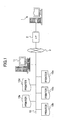
- FIG. 1 is a diagram showing the general structure of a network system to which embodiments of a device information acquiring method according to the present invention, a server apparatus.according to the present invention and a computer-readable storage medium according to the present invention may be applied.
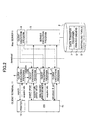
- FIG. 2 is a functional block diagram showing an important part of the network system shown in FIG. 1.
- a Web server 1 which forms an embodiment of the server apparatus according to the present invention, is connected to a network 3 such as the Internet via a predetermined communication interface 2.
- the Web server 1 manages a Web site of a device vendor A.
- the network 3 may be formed by one or a plurality of networks, including cable networks and/or wireless networks.
- a LAN 12 is connected to the network 3.
- a client terminal 11, and a plurality of devices such as printers 13a through 13e are connected to the LAN 12.
- the printers 13a through 13c are three different printer models provided by the device vendor A, the printer 13d is a printer model provided by a device vendor B, and the printer 13e is a printer model provided by a device vendor C.
- the client terminal 11 is formed by a known general purpose computer such as a personal computer, and includes an input device such as a keyboard and a mouse and a display unit. It is assumed for the sake of convenience that the printers 13a, 13b, 13c, 13d and 13e respectively have printer model names "a”, "b", “c", "d” and "e”.
- a server execution program 5 is provided in the Web server 1 and-operates in the Web server 1.
- a storage unit 9 such as a hard disk drive is provided in or connected to the Web server 1, and stores a client execution program 4 which is sent to the client terminal 11 when requested.
- the storage unit 9 may be formed by first, second and third storages for respectively storing printer drivers 6, data transfer programs 7 and installing tools 8 which will be described later.
- the storage unit 9 forms a software database of a plurality of device models of the printers.
- CGI Common Gateway Interface
- ASP Active Server Pages
- Java Servlet and the like may be used as the server execution program 5.
- client execution program 4 needs to be executed in the client terminal 11 after being downloaded.
- an Active X Control, a Java Applet and the like may be used as the client execution program 4.
- the Java Servlet is used as the server execution program 5
- the Java Applet is used as the client execution program 4.
- the client terminal 11 prints information on a selected printer 13 (one of the printers 13a through 13e) which is connected to the LAN 12, by the following process. That is, when a print instruction is issued by an application program which operates in the client terminal 11 which functions as a host unit with respect to the printer 13, a printer driver for driving the printer 13 creates print data.
- This printer driver operates with an operating system (OS) 41 of the client terminal 11.
- the printer driver transfers the created print data to the printer 13 having a specified address, so that the print data is printed on the printer 13.
- OS operating system
- the storage unit 9 of the Web server 1 stores most recent versions of the printer drivers 6 for driving printers which have various model names and identification numbers (or serial numbers) and are provided by and supported by the device vendor A.
- the printer drivers 6 are registered in a downloadable manner, for each printer model or identification number, and for each operating system (OS) used in the client terminals.
- the storage unit 9 also stores the data transfer programs 7 for determining the ports for use in connecting the client terminals and the printers and enabling a data transfer between the client terminal and the printer, and the installing tools 8 for use in installing the printer drivers 6 in the client terminals.
- the storage unit 9 may also store, similarly to the printer drivers 6, printer driver updating information for use in updating the installed printer driver in the client terminal to a most recent version.
- the storage unit 9 may store device drivers other than the printer drivers 6, for driving devices other than printers, such as display units and scanners.
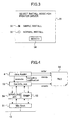
- FIG. 3 is a diagram showing the page 31 of the Web site displayed on the client terminal 11 of the network system.
- the displayed page 31 includes a button 32 for selecting a simple install mode, a button 33 for selecting a normal install mode, and a select button 34 for executing the selection made by the button 32 or 33 and advancing to a next page of the Web site.
- the buttons 32 through 34 may be selected by a known method using the keyboard or mouse of the client terminal 11.
- the user searches the desired printer driver manually in the conventional manner by advancing to a page of the Web site for downloading the desired printer driver. More particularly, the user searches for the most recent version of the printer driver for driving the printer 13a or 13b or 13c provided by the device vendor A, which printer driver is adapted for the operating system (OS) 41 used by the client terminal 11.
- OS operating system
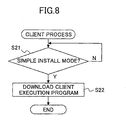
- FIG. 8 is a flow chart for explaining a client process of the network system.
- FIG. 4 is a functional block diagram showing a relationship of the client execution program 4 and the operating system (OS) 41 at the client terminal 11 of the network system on a network level of a hierarchical structure
- FIG. 5 is a flow chart for explaining the simple install process of the network system.
- OS operating system
- a step S21 decides whether or not the simple install mode is selected on the page 31 shown in FIG. 3.
- the process advances to a step S22 when the decision result in the step S21 becomes YES.
- the step S22 downloads the client execution program 4 from the Web server 1 into the client terminal 11.
- This step S22 realizes a client execution program sending means.
- the client execution program 4 is downloaded into the client terminal 11 from the Web server 1, the downloaded client execution program 4 makes the following exchanges with the server execution program 5 of the Web server 1, the operating system (OS) 41 which operates in the client terminal 11, and the selected printer 13 connected to the LAN 12.
- OS operating system
- FIG. 4 shows a case where the client execution program 4 is the Java Applet, and the operating system (OS) 41 is the Windows Operating System.
- OS operating system
- Windows Sockets 51 for making network communication is provided at a lowermost layer.
- Simple Network Management Protocol (SNMP) 52 and a spooling Application Program Interface (API) 54 are provided at an upper layer relative to the Windows Sockets 51.
- EXE file (Get Info. exe) 53 which is a Windows application program, is provided at an upper layer relative to the SNMP 52.
- the client execution program (Java Applet) 4 is provided at an upper layer relative to the EXE file 53.
- the EXE file 53 is downloaded together with the client execution program 4.
- the Java Applet operates on any operating system (OS) as is well known. But for this reason, the Java Applet cannot carry out a process peculiar to a certain operating system (OS) such as Windows operating system (OS), and the Java Applet can only carry out processes which are common to, like greatest common measure of, the various operating systems (OSs).
- OS operating system
- OSs Windows operating system
- the spooling API 54 provides an interface between the operating system (OS) 41 which is the Windows operating system (OS) and the EXE file 53 which is the Windows application.
- OS operating system
- OS 41 of the client terminal 11 is other than the Windows operating system (OS)
- a certain application peculiar to the operating system (OS) may be used, by providing an interface by the client execution program 4 which is the Java Applet, so that the certain application can carry out a process peculiar to the operating system (OS), as described hereunder.
- Steps S1 and S2 shown in FIG. 5 carry out an environment information acquiring process by the client execution program 4 to search for the printers 13 existing in the environment of the client terminal 11, via the EXE file 53, and to acquire the environment information of each of the searched printers 13.
- the environment information includes the device model (name), the identification number, the network address and the like of each printer 13.
- the network address may be an Internet Protocol (IP) address.
- IP Internet Protocol
- the SNMP 52 shown in FIG. 4 is used as a search tool.
- the client execution program 4 uses the SNMP 52 via the EXE file 53, and broadcasts a specific Management Information Base (MIB) object to the LAN 12.
- MIB Management Information Base
- the client execution program 4 uses the SNMP 52 via the EXE file 53 to inquire the environment information of each printer 13 connected to the LAN 12, and to acquire the environment information of each printer 13 existing in the environment of the client terminal 11.
- the environment information of the printers 13a through 13e are acquired by the environment information acquiring process.
- a step S3 carries out a file creating process.
- the client execution program 4 lists up the acquired environment information in a file format, via the EXE file 53.
- a file 55 shown in FIG. 4 is created by the file creating process.
- the Java Applet can only carry out processes which are common to, like greatest common measure of, the various operating systems (OSs).
- the EXE file 53 which is a Windows application is used so that the client execution program 4 which is a Java Applet causes the EXE file 53 to carry out a process peculiar to (or unique to) the Windows operating system (OS).
- OS Windows operating system
- the environment information acquiring process of the steps S1 and S2 acquires the environment information by using the SNMP 52 via the EXE file 53.
- the client execution program 4 which is the Java Applet
- the environment information cannot be read in a simple manner unless the environment information is in the file format. Accordingly, the file creating process of the step S3 lists up the acquired environment information in the file 55 via the EXE file 53.
- the client execution program 4 can read the environment information from the file 55 for use in subsequent processes, and can delete the file 55 when the file 55 is no longer required.
- the environment information listed in the file 55 not only includes the environment information of the printers provided by the device vendor A, but also the environment information of the printers provided by the device vendors B and C.
- the environment information of the printers provided by the device vendor A and listed in the file 55 includes the environment information of the printers 13a through 13c in this particular case.
- the client execution program 4 accesses a predetermined Uniform Resource Locators (URL) of the Web server 1, and downloads a predetermined Comma Separated value (CSV) file 61 shown in FIG. 6 to the client terminal 11, in a step S4 shown in FIG. 5.
- URL Uniform Resource Locators
- CSV Comma Separated value
- FIG. 6 is a diagram showing the CSV file 61 used in the process of the network system.
- the CSV file 61 lists the environment information (for example, model information such as the model name) of the printers provided by the device vendor A which are supported by the printer driver provided by the device vendor A.
- the client execution program 4 collates the environment information (for example, model name) listed in the file 55 and the environment information (for example, model name) listed in the CSV file 61, and searches from the CSV file 61 and outputs to the file 55 only the printer model which is listed in the file 55 and is supported by the device vendor A.
- a collating process is carried out by the step S5.
- the step S2 may use as the MIB object a private MIB object which takes into consideration only the printers provided by the device vendor A. In this case, it is possible to omit the processes of the steps S4 and S5 by detecting the existence of the printer which supports the private MIB object, so that only the printers 13 presently supported by the device vendor A are directly detected.
- the client execution program 4 displays a list of the printers 13a and 13b which are searched by the step S5 and listed in the file 55, on the display unit of the client terminal 11 in the form of a page 71 as shown in FIG. 7.
- FIG. 7 is a diagram showing the display on the client terminal 11 of the network system.
- the step S6 carries out an information display process.
- the displayed page 71 indicates the model name-and the network address (IP address) of the printers 13a and 13b which are listed in the file 55 by the step S5.
- IP address network address
- the button 72 is selected when downloading the printer driver for driving the printer 13a, and the button 73 is selected when downloading the printer driver for driving the printer 13b, to the client terminal 11.
- a select button 74 is for executing the selection made by the button 72 or 73 and advancing to a next page of the Web site.
- the buttons 72 through 74 may be selected by a known method using the keyboard or mouse of the client terminal 11.
- the client execution program 4 decides whether or not a selection is made on the page 71 shown in FIG. 7. If the decision result in the step S7 is YES, the client execution program 4 stores the environment information of the selected printer in a step S8. In this particular case, the buttons 72 and 74 are selected in this order, and the environment information of the printer 13a is stored in the step 58.
- the steps S7 and S8 carry out a environment information selecting process.
- the client execution program 4 judges the names of the printer driver and the data transfer program which are suited for the printer 13a, from the environment information of the printer 13a selected by the user.
- the judging method employed by the step S9 is not limited to a particular method.
- the names of the printer driver and the data transfer program may be inferred from the model name of the printer 13a or, a relating table may be downloaded from the Web server 1 and looked up from the relating table.
- the client execution program 4 searches within the client terminal 11 to check the existence of predetermined data transfer programs, and to decide whether or not the printer driver and the data transfer program the names of which are judged in the step S9 exist in the operating system (OS) 41 or the like.
- OS operating system
- the process of the step S10 may be carried out by the client execution program 4 to check the registry using the spooling API via the EXE file 53.
- the process advances to a step S11.
- the EXE file 53 sets in the file 55 an internal flag which indicates that the printer driver and the data transfer program are to be downloaded, and the process advances to a step S12.
- the process advances to the step S12.
- version information of the printer driver and the data transfer program is acquired and the EXE file 53 additionally writes the acquired version information in the file 55.
- the step S12 carries out a version information acquiring process. When this version information acquiring process is completed, the EXE file 53 notifies the completion of the version information acquiring process to the client execution program 4, and the series of processes described above end.
- the client execution program 4 acquires recorded information by referring to the file 55 in response to the completion notification regarding the version information acquiring process.
- the client execution program 4 deletes the file 55 which is no longer required, and sends the recorded information which is read from the file 55 to the Web server 1.
- the step S13 carries out an environment information returning process and a file deleting process.
- information related to the type, language and the like of the operating system (OS) 41 may be sent to the Web server 1, so as to absorb the dependency of the printer driver on the operating system (OS) 41.
- a program dependent on the language used by the operating system (OS) 41 may be automatically acquired from the Web server 1.
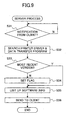
- FIG. 9 is a flow chart for explaining a server process of the network system.
- the Web server 1 decides whether or not a notification is received from the client terminal 11.
- the step S31 carries out an environment information receiving process and a version information receiving process. If the decision result in the step S31 is YES, a step S32 searches the printer drivers 6 and the data transfer programs 7 registered in the storage unit 9 shown in FIG. 2.
- the step S32 carries out a software judging process.
- a step S33 decides whether or not the versions of the printer driver and the data transfer program existing in the client terminal 11 are most recent versions, based on the search made in the step S32. If the version of at least one of the printer driver of the printer 13a and the data transfer program installed in the client terminal 11 is not the most recent version and the decision result in the step S33 is NO, a step S34 sets a flag which indicates that the printer driver and/or the data transfer program need to be updated.
- the user himself must search on the Web site and judge whether or not the version of the printer driver for driving the user's printer requires updating to the most recent version.
- the Web server 1 will do the necessary searching and judging for the user.
- the necessary searching and judging may be carried out by the client execution program 4 of the client terminal 11, instead of being carried out by the Web server 1.
- the necessary searching and judging may be carried out with ease particularly when the client terminal 11 is a relatively high-performance computer.
- the process shown in FIG. 9 advances to a step S35 after the step S34 or, if the decision result in the step S33 is YES.
- the server execution program 5 lists up more detailed software information, such as the program name and the version (or version number), with respect to the most recent version of the data transfer program 7 and the printer driver 6 required for the printer 13a, by searching the registered information in the storage unit 9.
- the software information includes the URL indicating a storage location for the data transfer program 7 and the printer driver 6 in the Web server 1.
- a client execution program 4 of a new module is sent to the client terminal 11 together with the detailed software information that is listed up.
- the step S36 carries out a software information sending process.
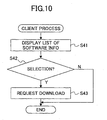
- FIG. 10 is a flow chart for explaining a client process of the network system.
- the client process shown in FIG. 10 is carried out in response to the client execution program 4 of the new module which is received from the Web server 1 together with the detailed software information due to the software information sending process carried out by the step S36 shown in FIG. 9.
- the client terminal 11 displays on the display unit thereof a list of the software information related to the data transfer program 7 and the printer driver 6 received from the Web server 1, depending on the client execution program 4 of the new module received from the Web server 1.
- the step S41 carries out a software information displaying process.
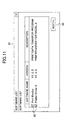
- FIG. 11 is a diagram showing a page 81 which is displayed by the software information displaying process of the step S41 on the display unit of the client terminal 11 in the network system.
- FIG. 11 shows a case where the software name, version, and description are displayed on the page 81 with respect to the data transfer program 7 and the printer driver 6.
- a button 82 is displayed with respect to each software name, so that the final downloading of the data transfer program 7 and the printer driver 6 may be decided by the user, by selecting the appropriate button or buttons 82.
- the selection made by the button or buttons 82 is executed when the user selects a select button 83.
- the buttons 82 through 83 may be selected by a known method using the keyboard or mouse of the client terminal 11. Of course, it is not essential to enable the user to make the decision regarding the final downloading of the data transfer program 7 and the printer driver 6, and the buttons 82 may be omitted.
- step S42 shown in FIG. 10 the client execution program 4 decides whether or not the select button 83 on the page 81 is selected. If the decision result in the step S42 is YES, the client execution program 4 requests to the Web server 1 the downloading of the data transfer program 7, the printer driver 6 and the like by specifying the URL. The process ends if the decision result in the step S42 is NO or after the step S43.
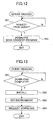
- FIG. 12 is a flow chart for explaining a server process of the network system.
- the server process shown in FIG. 12 is carried out in response to the download request from the client terminal 11 made by the step S43 shown in FIG. 10.
- the Web server 1 decides whether or not the download request is received from the client terminal 11. If the decision result in the step S51 is YES, the Web server 1 refers to the.URL specified within the download request, and downloads the data transfer program 7 in a step S52.
- the information registered at the Web site may be compressed, and in this case, an expansion software may be additionally downloaded to the client terminal 11 from the Web server 1 after the downloading of the data transfer program 7 is completed.
- the installing tool 8 is also downloaded to the client terminal 11 from the Web server 1, so that the client terminal 11 may install the downloaded data transfer program 7 using the installing tool 8.
- the step S51 carries out a download request receiving process, and the step S52 carries out a download executing process.
- FIG. 13 is a flow chart for explaining a client process of the network system.
- the client process shown in FIG. 13 is carried out in response to the downloading of the data transfer program 7 made by the download executing process of the step S52 shown in FIG. 12.
- the client terminals 11 decides whether or not the downloading of the data transfer program 7 is completed. If the decision result in the step 561 is YES, the client terminal 11 starts the downloaded installing tool 8 and installs the downloaded data transfer program 7. Hence, the step S61 carries out a download receiving process, and the step S62 carries out an installing process.
- the client terminal 11 After the data transfer program 7 is installed by the step S62, the client terminal 11 sets an environment for enabling output of the network address of the printer 13a in a step S63, so as to output print data to the printer 13a via the LAN 12. Hence, the step S63 carries out an environment setting process. In the Windows operating system (OS) environment, the output port is created by this step S63. Then, the client terminal 11 requests downloading of the printer driver 6 with respect to the Web server 1 in a step S64. In response to this download request, the Web server 1 sends the printer driver 6 to the client terminal 11, and the client terminal 11 installs the downloaded printer driver 6 using the installing tool 8. The process of the client terminal 11 ends after the step S64.
- OS Windows operating system
- the server process in this case is similar to that shown in FIG. 12.
- the Web server 1 decides whether or not the download request is received from the client terminal 11, similarly to the step S51. If the decision result is YES, the Web server 1 refers to the URL specified within the download request, and downloads the printer driver 6, similarly to the step S52. Further, the installing tool 8 is also downloaded to the client terminal 11 from the Web server 1, so that the client terminal 11 may install the downloaded printer driver 6 using the installing tool 8. Therefore, the downloaded printer driver 6 is installed into the client terminal 11 using the downloaded installing tool 8, by relating the printer driver 6 to the port which is already set as described above for outputting the print data.
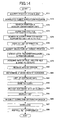
- FIG. 14 is a flow chart for explaining the series of processes carried out by the Web server 1 and the client terminal 11 in the network system.
- the Web server 1 accepts this request in a step S71, and downloads the client execution program 4 to the client terminal 11 in a step S72.
- the step S71 carries out the request accepting process
- the step S72 carries out the client execution program sending process.
- the client terminal 11 which receives the client execution program 4 searches for the printers 13 existing in the environment of the client terminal 11, acquires the environment information and creates a file of the device information in a step S73.
- the acquired environment information is listed up in a file format.
- the step S73 carries out the environment information acquiring process and the file creating process.
- the CSV file 61 is downloaded to the client terminal 11 in a step S74.
- the file 55 and the CSV file 61 are collated, and only the printer name of the , printer supported by the device vendor A are searched and output in a step S75.
- the step S75 carries out the collating process.
- a list of the searched printers 13 listed in the file 55 is displayed on the display unit of the client terminal 11 in a step S76.
- the step S76 carries out the environment information displaying process.'
- the selection of the target printer 13 for which the printer driver is to be downloaded is accepted in a step S77.
- the step S77 carries out the environment information selecting process, the environment information returning process and the environment information receiving process.
- a search is made within the client terminal 11 to determine the existence of a predetermined data transfer program and a printer driver having a printer driver name which is suited for the target printer 13, in a step S78.
- the predetermined data transfer program and the printer driver exist in the client terminal 11
- version information of the predetermined data transfer program and the printer driver is acquired and output to the file 55 in the step S78.
- the step S78 carries out the version information acquiring process.
- the client execution program 4 refers to the file 55 which is created in the above described manner to acquire the recorded information, deletes the file 55 which becomes unnecessary, and sends the information read from the file 55 to the Web server 1, in a step S79.
- the step S79 carries out the file deleting process, the environment information returning process, the version information returning process and the file deleting process.
- the Web server 1 receives the information set from the client terminal 11, in a step S80.
- the Web server 1 searches the printer drivers 6 and the data transfer programs 7 registered in the storage unit 9, to determine whether the versions of the printer driver and the data transfer program existing in the client terminal 11 are the most recent versions, in a step S81.
- the step S80 carries out the environment information receiving process and the version information receiving process.
- the step S81 carries out the software judging process.
- the Web server 1 searches within the storage unit 9 to find the most recent versions of the printer driver and the data transfer program required for the target printer 13, and lists up detailed software information thereof in a step S82.
- the Web server 1 sends the detailed software information to the client terminal 11, in a step S83.
- the step S83 carries out the software information sending process.
- the client terminal 11 receives the detailed software information from the Web server 1 in a step S84, and displays the received information related to the data transfer program and the printer driver on the display unit of the client terminal 11 in a step S85.
- the page 81 shown in FIG. 11 is displayed by the step S85.
- the step S84 carries out the software information receiving process
- the step S85 carries out the software information displaying process.
- the client terminal 11 specifies the URL and makes a download request to the Web server 1 requesting the downloading of the data transfer program, the printer driver and the like in a step S86.
- the Web server 1 receives the request from the client terminal 11, and downloads the data transfer program 7, the printer driver 6 and the installing tool 8 which are read from the storage unit 9 to the client terminal 11 in a step S87.
- the client terminal 11 installs and sets the environment of the data transfer-program 7 and the printer driver 6 using the installing tool 8 in a step S88, and the process ends.
- the list displayed by the step S76 may be deleted after the recorded information of the file 55 is sent to the Web server 1.
- the list displayed by the step S85 may be deleted after the downloading of the step S87, before the process shown in FIG. 14 ends, such as after the step S88, for example.
- the client execution program 4 may be deleted before the process shown in FIG. 14 ends, such as after the step S88, for example.
- FIG. 15 is a time chart for explaining the basic operation of the present invention.
- FIG. 15 shows the basic operation of the present invention in terms of the operating system (OS) 41 of the client terminal 11, the client execution program 4 downloaded from the Web server 1, and the server execution program 5 of the Web server 1.
- OS operating system
- FIG. 15 those steps which are essentially the same as the corresponding steps in FIG. 14 are designated by the same reference numerals, and a description thereof will be omitted.
- the recorded information of the file 55 includes the environment information of the selected printer 13, including software information related to the client terminal 11, such as the software version and the operating system (OS) 41 of the client terminal 11.
- the steps S80 through S82 determine a list of optimum device information for the selected printer 13, including the software version and the operating system (OS) 41 used by the client terminal 11.
- the step S88 installs the optimum device information (printer driver 6 and the data transfer program 7) for the selected printer 13 and for the software version and the operating system (OS) 41 used by the client terminal 11.
- the client execution program 4 sends a complete status indicating a completion of the installing of the optimum device information in the client terminal 11, from the client terminal 11 to the server execution program 5 of the Web server 1, in a step S91.
- the server execution program 5 of the Web server 1 creates a completion page which indicates completion of the installing of the optimum device information in the client terminal 11, in a step S92.
- This completion page is sent by the server execution program 5 to the operating system (OS) 41, that is, from the Web server 1 to the client terminal 11, in a step S93.
- OS operating system
- the above described process of the client terminal 11 is carried out by the client execution program 4 which is formed by . a plurality of modules.
- the client execution program 4 which is formed by a single module.
- the printing system employed by the printers 13 is not limited to a particular printing system, and may be selected from the electrophotography printing system, ink-jet printing system, sublimation type thermal transfer printing system, silver halide diffusion transfer printing system, direct thermal printing system, melting type thermal transfer printing system and the like.
- the devices connected to the LAN 12 shown in FIG. 1 are not limited to the printers 13, and may be other devices such as display units and scanners.
- the data transfer program and the device driver do not exist in the client terminal, the data transfer program and the device driver can be newly installed in the client terminal in a manner similar to updating versions of the data transfer program and the driver.
Landscapes
- Engineering & Computer Science (AREA)
- Theoretical Computer Science (AREA)
- Human Computer Interaction (AREA)
- Physics & Mathematics (AREA)
- General Engineering & Computer Science (AREA)
- General Physics & Mathematics (AREA)
- Information Transfer Between Computers (AREA)
- Stored Programmes (AREA)
- Computer And Data Communications (AREA)
- Accessory Devices And Overall Control Thereof (AREA)
Applications Claiming Priority (2)
| Application Number | Priority Date | Filing Date | Title |
|---|---|---|---|
| JP2001370882 | 2001-12-05 | ||
| JP2001370882A JP2003173246A (ja) | 2001-12-05 | 2001-12-05 | デバイス情報収集方法、プログラム、サーバ装置及び記憶媒体 |
Publications (2)
| Publication Number | Publication Date |
|---|---|
| EP1318449A2 true EP1318449A2 (de) | 2003-06-11 |
| EP1318449A3 EP1318449A3 (de) | 2005-07-13 |
Family
ID=19180036
Family Applications (1)
| Application Number | Title | Priority Date | Filing Date |
|---|---|---|---|
| EP02258277A Ceased EP1318449A3 (de) | 2001-12-05 | 2002-11-29 | Verfahren um Informationen über Geräte zu erfassen, Server sowie durch Rechner lesbares Speichermedium |
Country Status (4)
| Country | Link |
|---|---|
| US (1) | US7305456B2 (de) |
| EP (1) | EP1318449A3 (de) |
| JP (1) | JP2003173246A (de) |
| CN (1) | CN100421091C (de) |
Cited By (2)
| Publication number | Priority date | Publication date | Assignee | Title |
|---|---|---|---|---|
| CN102307362A (zh) * | 2011-09-06 | 2012-01-04 | 北京傲天动联技术有限公司 | 用于实现功能配置的终端设备和控制设备及其网络系统 |
| CN103345454A (zh) * | 2013-07-05 | 2013-10-09 | 上海斐讯数据通信技术有限公司 | 一种移动终端的外设连接方法 |
Families Citing this family (43)
| Publication number | Priority date | Publication date | Assignee | Title |
|---|---|---|---|---|
| JP2004118828A (ja) * | 2002-09-03 | 2004-04-15 | Ricoh Co Ltd | 画像処理装置 |
| US7532343B2 (en) * | 2002-12-24 | 2009-05-12 | Kyocera Mita Corporation | Image forming apparatus and document administration system |
| US20040215706A1 (en) * | 2003-03-31 | 2004-10-28 | Lavender Scott D. | System and method for updating software and version control in a production printer |
| US7773248B2 (en) * | 2003-09-30 | 2010-08-10 | Brother Kogyo Kabushiki Kaisha | Device information management system |
| JP4419519B2 (ja) * | 2003-10-31 | 2010-02-24 | セイコーエプソン株式会社 | プリンタドライバプログラム |
| JP2005157880A (ja) * | 2003-11-27 | 2005-06-16 | Canon Inc | 情報処理装置、情報処理方法、その記録媒体及びプログラム |
| JP4574344B2 (ja) * | 2004-01-20 | 2010-11-04 | キヤノン株式会社 | 情報処理装置及び方法 |
| JP2005242981A (ja) * | 2004-01-28 | 2005-09-08 | Seiko Epson Corp | サービス提供システム、アプリケーション管理システム、サービス提供装置、サービス提供プログラム、アプリケーション管理プログラムおよび記憶媒体、並びにサービス提供方法およびアプリケーション管理方法 |
| US7949733B2 (en) | 2004-02-02 | 2011-05-24 | Fuji Xerox Co., Ltd. | Driver management method, driver management apparatus, and driver management program |
| JP2005228093A (ja) * | 2004-02-13 | 2005-08-25 | Fuji Xerox Co Ltd | ドライバ管理方法および装置並びにプログラム |
| US20050179922A1 (en) * | 2004-02-12 | 2005-08-18 | Foster Ward S. | Methods and apparatus for providing printer drivers to a user |
| JP2005301513A (ja) * | 2004-04-08 | 2005-10-27 | Fujitsu Ltd | プログラム内蔵デバイス |
| US8400645B2 (en) * | 2004-04-16 | 2013-03-19 | Marvell International Technology Ltd. | Printer with selectable capabilities |
| JP2005338940A (ja) * | 2004-05-24 | 2005-12-08 | Canon Inc | インストール方法、情報処理装置、及びデバイスドライバ |
| JP4863450B2 (ja) * | 2005-03-29 | 2012-01-25 | キヤノン株式会社 | デバイスドライバプログラムをカスタマイズするための情報処理装置及びデバイスドライバプログラムのカスタマイズ方法 |
| JP4708858B2 (ja) * | 2005-05-17 | 2011-06-22 | キヤノン株式会社 | 情報処理装置及びデバイス選択方法 |
| JP4818652B2 (ja) * | 2005-07-22 | 2011-11-16 | 株式会社沖データ | 端末管理システム |
| US20070046967A1 (en) * | 2005-08-31 | 2007-03-01 | Konica Minolta Systems Laboratory, Inc. | Printer clients management system |
| JP2007129323A (ja) * | 2005-11-01 | 2007-05-24 | Toshiba Corp | 通信装置、通信システム |
| US8239857B2 (en) * | 2005-12-08 | 2012-08-07 | Canon Kabushiki Kaisha | Information processing apparatus and method of installing application program |
| KR100746026B1 (ko) * | 2006-01-04 | 2007-08-06 | 삼성전자주식회사 | 소프트웨어 설치 장치 및 방법 |
| US8645948B2 (en) * | 2006-12-12 | 2014-02-04 | Qualcomm Incorporated | Apparatus and methods for client-driven server-side installation |
| US8332819B2 (en) * | 2007-05-03 | 2012-12-11 | Siemens Industry, Inc. | Diagnostic and trouble-shooting methods in a wireless control and sensor network |
| US20090064196A1 (en) * | 2007-08-31 | 2009-03-05 | Microsoft Corporation | Model based device driver code generation |
| KR101476691B1 (ko) * | 2008-04-23 | 2014-12-29 | 삼성전자주식회사 | 디바이스 구동장치 및 구동방법 |
| JP2010102541A (ja) * | 2008-10-24 | 2010-05-06 | Seiko Epson Corp | ドライバ更新システム、印刷制御装置、ドライバ更新方法、およびドライバアップデートプログラム |
| CN102843400A (zh) * | 2011-06-23 | 2012-12-26 | 珠海市君天电子科技有限公司 | 文件下载的方法及系统 |
| JP5893298B2 (ja) * | 2011-08-31 | 2016-03-23 | キヤノン株式会社 | 情報処理装置及びその制御方法、並びにプログラム |
| CN103593200B (zh) * | 2012-08-13 | 2017-12-08 | 腾讯科技(深圳)有限公司 | 获取应用程序的方法和装置 |
| CN103677899B (zh) * | 2013-11-15 | 2017-08-01 | 小米科技有限责任公司 | 安装应用程序的方法及设备 |
| CN104750504A (zh) * | 2013-12-26 | 2015-07-01 | 贝壳网际(北京)安全技术有限公司 | 驱动信息的提供方法和装置 |
| JP6355370B2 (ja) * | 2014-03-13 | 2018-07-11 | キヤノン株式会社 | 自動設置システム及び方法、情報処理装置、画像形成装置、プログラム |
| WO2016035801A1 (ja) * | 2014-09-01 | 2016-03-10 | 株式会社リコー | システム、情報処理方法および記憶媒体 |
| JP6191634B2 (ja) * | 2015-02-24 | 2017-09-06 | コニカミノルタ株式会社 | プリンタドライバプログラム、印刷システム、サーバ、サーバプログラム、クライアント端末、クライアントプログラム |
| JP2016177445A (ja) * | 2015-03-19 | 2016-10-06 | 株式会社リコー | 情報処理装置、プログラムおよび情報処理システム |
| JP6459814B2 (ja) * | 2015-07-17 | 2019-01-30 | スター精密株式会社 | プリンタの設定状態更新システム |
| WO2017051636A1 (ja) * | 2015-09-24 | 2017-03-30 | 京セラドキュメントソリューションズ株式会社 | ドライバーインストールシステム |
| CN109298890A (zh) * | 2017-07-25 | 2019-02-01 | 西安中兴新软件有限责任公司 | 一种配置ndis设备的方法及装置 |
| JP7056310B2 (ja) | 2018-03-28 | 2022-04-19 | ブラザー工業株式会社 | アプリケーションプログラムのセットアップ方法およびダウンロードサーバ |
| JP7119738B2 (ja) | 2018-08-09 | 2022-08-17 | ブラザー工業株式会社 | アプリケーションプログラムおよびセットアップシステム |
| JP2020166699A (ja) * | 2019-03-29 | 2020-10-08 | キヤノン株式会社 | 情報処理方法、情報処理装置、情報処理システムおよびプログラム |
| CN111600939B (zh) * | 2020-04-30 | 2023-10-10 | 长桥科技香港公司 | 数据透传方法及设备 |
| CN115903642B (zh) * | 2022-12-01 | 2025-12-09 | 深圳市汇川技术股份有限公司 | Plc程序处理方法、装置及服务器 |
Citations (3)
| Publication number | Priority date | Publication date | Assignee | Title |
|---|---|---|---|---|
| US5580177A (en) | 1994-03-29 | 1996-12-03 | Hewlett-Packard Company | Printer/client network with centrally updated printer drivers and printer status monitoring |
| JPH10301884A (ja) * | 1997-04-23 | 1998-11-13 | Seiko Epson Corp | コンピュータシステムの周辺機器 |
| WO2000033232A2 (en) * | 1998-11-30 | 2000-06-08 | Telefonaktiebolaget Lm Ericsson (Publ) | Improvements in host computer access to peripheral device drivers |
Family Cites Families (61)
| Publication number | Priority date | Publication date | Assignee | Title |
|---|---|---|---|---|
| JP2506115B2 (ja) * | 1987-07-11 | 1996-06-12 | 株式会社豊田自動織機製作所 | シャ−切断性の良い高強度・耐摩耗性アルミニウム合金とその製造法 |
| JPH0833862B2 (ja) * | 1989-10-23 | 1996-03-29 | インターナシヨナル・ビジネス・マシーンズ・コーポレーシヨン | オブジエクト指向コンピユータ・システム |
| US5815722A (en) * | 1992-11-18 | 1998-09-29 | Canon Information Systems, Inc. | In an interactive network board, a method and apparatus for remotely downloading and executing files in a memory |
| JPH08106377A (ja) * | 1994-10-07 | 1996-04-23 | Hitachi Ltd | プログラム登録方法 |
| US6161218A (en) * | 1996-01-16 | 2000-12-12 | Sun Microsystems Inc. | Software patch architecture |
| US6049671A (en) * | 1996-04-18 | 2000-04-11 | Microsoft Corporation | Method for identifying and obtaining computer software from a network computer |
| JP3478519B2 (ja) * | 1996-06-28 | 2003-12-15 | 株式会社リコー | プリンタ装置 |
| US5901286A (en) | 1996-11-15 | 1999-05-04 | Canon Information Systems, Inc. | Method and apparatus for communicating with a network peripheral |
| US6347398B1 (en) * | 1996-12-12 | 2002-02-12 | Microsoft Corporation | Automatic software downloading from a computer network |
| US6253228B1 (en) * | 1997-03-31 | 2001-06-26 | Apple Computer, Inc. | Method and apparatus for updating and synchronizing information between a client and a server |
| US6567793B1 (en) * | 1997-12-22 | 2003-05-20 | Christian Bielefeldt Hicks | Remote authorization for unlocking electronic data system and method |
| US6094679A (en) * | 1998-01-16 | 2000-07-25 | Microsoft Corporation | Distribution of software in a computer network environment |
| JP4006807B2 (ja) | 1998-01-19 | 2007-11-14 | ブラザー工業株式会社 | ネットワークシステム、及び端末装置 |
| US6243774B1 (en) * | 1998-06-30 | 2001-06-05 | International Business Machines Corporation | Apparatus program product and method of managing computer resources supporting concurrent maintenance operations |
| US6825941B1 (en) * | 1998-09-21 | 2004-11-30 | Microsoft Corporation | Modular and extensible printer device driver and text based method for characterizing printer devices for use therewith |
| US6378127B1 (en) * | 1998-09-21 | 2002-04-23 | Microsoft Corporation | Software installation and validation using custom actions |
| US6424424B1 (en) * | 1999-01-19 | 2002-07-23 | Hewlett-Packard Company | Method and apparatus for automatic installation of shared printers over a network |
| US20040015947A1 (en) * | 1999-02-17 | 2004-01-22 | Qing Gong | Client to client distribution through a network |
| US6594690B2 (en) * | 1999-02-24 | 2003-07-15 | Hewlett-Packard Development Company, L.P. | Network peripheral device driver installer |
| JP4809968B2 (ja) * | 1999-04-09 | 2011-11-09 | キヤノン株式会社 | 情報処理装置、情報処理方法、及びコンピュータ読み取り可能な記録媒体 |
| US6571389B1 (en) * | 1999-04-27 | 2003-05-27 | International Business Machines Corporation | System and method for improving the manageability and usability of a Java environment |
| JP3551830B2 (ja) * | 1999-04-28 | 2004-08-11 | 日本電気株式会社 | サーバプログラム実行システム |
| US6675382B1 (en) * | 1999-06-14 | 2004-01-06 | Sun Microsystems, Inc. | Software packaging and distribution system |
| US6628415B2 (en) * | 1999-07-20 | 2003-09-30 | Canon Kabushiki Kaisha | Remote plug-and-play for home printer via cable network |
| US6718364B2 (en) * | 1999-08-10 | 2004-04-06 | Sun Microsystems, Inc. | Method and apparatus for expedited file downloads in an applet environment |
| JP3831154B2 (ja) * | 1999-08-13 | 2006-10-11 | 株式会社東芝 | プログラム多重化拡大方法 |
| JP2001075785A (ja) * | 1999-09-09 | 2001-03-23 | Nec Corp | データ更新システム |
| US7203946B2 (en) * | 1999-10-11 | 2007-04-10 | Hewlett-Packard Development Company, L.P. | System and method for intercepting, instrumenting and characterizing usage of an application programming interface |
| JP2001117834A (ja) | 1999-10-19 | 2001-04-27 | Fuji Xerox Co Ltd | ネットワーク通信環境設定システム、ネットワーク通信環境設定方法、及び、ネットワーク通信環境設定プログラムを記録したコンピュータ読取可能な記録媒体 |
| JP2001154951A (ja) * | 1999-11-25 | 2001-06-08 | Toshiba Tec Corp | プログラム起動装置 |
| US6789111B1 (en) * | 1999-12-09 | 2004-09-07 | Microsoft Corporation | Automatic detection and installation of client peripheral devices by a server |
| US6681392B1 (en) * | 1999-12-15 | 2004-01-20 | Lexmark International, Inc. | Method and apparatus for remote peripheral software installation |
| US6564215B1 (en) * | 1999-12-16 | 2003-05-13 | International Business Machines Corporation | Update support in database content management |
| US6854009B1 (en) * | 1999-12-22 | 2005-02-08 | Tacit Networks, Inc. | Networked computer system |
| JP2001249828A (ja) * | 1999-12-28 | 2001-09-14 | Toshiba Lsi System Support Kk | 情報処理装置、不具合解析プログラムを格納したコンピュータ読み取り可能な記憶媒体、不具合解析方法、及びアプリケーションプログラム開発支援システム |
| US6904449B1 (en) * | 2000-01-14 | 2005-06-07 | Accenture Llp | System and method for an application provider framework |
| US6983315B1 (en) * | 2000-01-18 | 2006-01-03 | Wrq, Inc. | Applet embedded cross-platform caching |
| US6845396B1 (en) * | 2000-02-25 | 2005-01-18 | Navic Systems, Inc. | Method and system for content deployment and activation |
| US6915337B1 (en) * | 2000-03-07 | 2005-07-05 | Ricoh Co. Ltd. | Method and system for updating the device driver of a business office appliance |
| US6665709B1 (en) * | 2000-03-27 | 2003-12-16 | Securit-E-Doc, Inc. | Method, apparatus, and system for secure data transport |
| US20020032754A1 (en) * | 2000-04-05 | 2002-03-14 | Gary Logston | Method and apparatus for profiling in a distributed application environment |
| US6807559B1 (en) * | 2000-04-06 | 2004-10-19 | Attachmate Corporation | System and method for applet management |
| EP1292892A4 (de) * | 2000-04-14 | 2006-11-15 | Goahead Software Inc | System und verfahren zum aufrüsten von vernetzten einrichtungen |
| JP3852269B2 (ja) * | 2000-05-29 | 2006-11-29 | セイコーエプソン株式会社 | ネットワーク上に存在するコンテンツを自動収集するシステム |
| US6754811B1 (en) * | 2000-06-16 | 2004-06-22 | International Business Machines Corporation | Operating system device centric agent |
| US6814510B1 (en) * | 2000-08-02 | 2004-11-09 | Xerox Corporation | Method and apparatus for automatic update of a printer driver configuration and status |
| US7051080B1 (en) * | 2000-08-04 | 2006-05-23 | Oracle International Corporation | Techniques for navigating in mobile applications |
| US20030154266A1 (en) * | 2000-09-01 | 2003-08-14 | Mark Bobick | Server system and method for discovering digital assets in enterprise information systems |
| US7610331B1 (en) * | 2000-09-13 | 2009-10-27 | Lightsurf Technologies, Inc. | System and method for dynamic uploading and execution of applications and drivers between devices |
| US6813670B1 (en) * | 2000-09-26 | 2004-11-02 | Microsoft Corporation | Automatic server-side plug-and-play without user intervention |
| US20020069263A1 (en) * | 2000-10-13 | 2002-06-06 | Mark Sears | Wireless java technology |
| US6910128B1 (en) * | 2000-11-21 | 2005-06-21 | International Business Machines Corporation | Method and computer program product for processing signed applets |
| KR100520058B1 (ko) * | 2000-12-13 | 2005-10-11 | 삼성전자주식회사 | 디바이스드라이버 업그레이드 시스템 및 디바이스드라이버업그레이드 방법 |
| US7574481B2 (en) * | 2000-12-20 | 2009-08-11 | Microsoft Corporation | Method and system for enabling offline detection of software updates |
| US7392307B2 (en) * | 2001-02-14 | 2008-06-24 | Ricoh Co., Ltd. | Method and system of remote diagnostic, control and information collection using a shared resource |
| US6920506B2 (en) * | 2001-06-28 | 2005-07-19 | Canon Information Systems, Inc. | Discovery and management of network printers |
| US7290030B2 (en) * | 2001-07-13 | 2007-10-30 | Rockwell Automation Technologies, Inc. | Internet object based interface for industrial controller |
| US20030030664A1 (en) * | 2001-08-13 | 2003-02-13 | Parry Travis J. | Customizable control panel software |
| US7725554B2 (en) * | 2001-09-28 | 2010-05-25 | Quanta Computer, Inc. | Network object delivery system for personal computing device |
| US7430736B2 (en) * | 2001-10-03 | 2008-09-30 | Toshiba Tec Kabushiki Kaisha | Download and installation of software from a network printer |
| US6993643B2 (en) * | 2001-12-03 | 2006-01-31 | International Business Machines Corporation | Method and system of dynamic video driver selection on a bootable CD via symbolic links |
-
2001
- 2001-12-05 JP JP2001370882A patent/JP2003173246A/ja active Pending
-
2002
- 2002-11-29 EP EP02258277A patent/EP1318449A3/de not_active Ceased
- 2002-12-03 US US10/308,141 patent/US7305456B2/en active Active
- 2002-12-05 CN CNB021606536A patent/CN100421091C/zh not_active Expired - Fee Related
Patent Citations (3)
| Publication number | Priority date | Publication date | Assignee | Title |
|---|---|---|---|---|
| US5580177A (en) | 1994-03-29 | 1996-12-03 | Hewlett-Packard Company | Printer/client network with centrally updated printer drivers and printer status monitoring |
| JPH10301884A (ja) * | 1997-04-23 | 1998-11-13 | Seiko Epson Corp | コンピュータシステムの周辺機器 |
| WO2000033232A2 (en) * | 1998-11-30 | 2000-06-08 | Telefonaktiebolaget Lm Ericsson (Publ) | Improvements in host computer access to peripheral device drivers |
Cited By (4)
| Publication number | Priority date | Publication date | Assignee | Title |
|---|---|---|---|---|
| CN102307362A (zh) * | 2011-09-06 | 2012-01-04 | 北京傲天动联技术有限公司 | 用于实现功能配置的终端设备和控制设备及其网络系统 |
| CN102307362B (zh) * | 2011-09-06 | 2015-06-17 | 北京傲天动联技术股份有限公司 | 用于实现功能配置的终端设备和控制设备及其网络系统 |
| CN103345454A (zh) * | 2013-07-05 | 2013-10-09 | 上海斐讯数据通信技术有限公司 | 一种移动终端的外设连接方法 |
| CN103345454B (zh) * | 2013-07-05 | 2018-04-06 | 上海斐讯数据通信技术有限公司 | 一种移动终端的外设连接方法 |
Also Published As
| Publication number | Publication date |
|---|---|
| US7305456B2 (en) | 2007-12-04 |
| JP2003173246A (ja) | 2003-06-20 |
| US20030131072A1 (en) | 2003-07-10 |
| EP1318449A3 (de) | 2005-07-13 |
| CN1424657A (zh) | 2003-06-18 |
| CN100421091C (zh) | 2008-09-24 |
Similar Documents
| Publication | Publication Date | Title |
|---|---|---|
| US7305456B2 (en) | Device information acquiring method, server apparatus and computer-readable storage medium | |
| JP3984895B2 (ja) | 情報処理装置およびサーバ装置およびドライバ更新方法およびコンピュータが読み取り可能な記憶媒体およびプログラム | |
| JP3946275B2 (ja) | リモートインストールシステムおよび方法 | |
| US8185887B2 (en) | System and method for printer driver distribution with searchable map database | |
| KR100703916B1 (ko) | 워크스테이션 상에서 프린터 인스턴스의 웹 기반 생성 | |
| KR101310218B1 (ko) | 화상형성장치의 파일 통합 설치 방법 및 파일 통합 설치가 가능한 화상형성장치 | |
| JP2009193163A (ja) | 画像形成システム、管理装置、通信制御装置、画像形成方法、及び画像形成プログラム | |
| US7640576B2 (en) | Print system, apparatus, and method for performing printing based on document information stored in document server | |
| JP2006244321A (ja) | 画像形成装置、サーバー及びクライアント | |
| JP4641530B2 (ja) | 情報処理装置、ドライバ処理方法、プログラム | |
| US8422040B2 (en) | Image forming system and method, management apparatus, and recording medium | |
| JP5025116B2 (ja) | 情報処理装置及びその制御方法ならびにプログラム | |
| US8332494B2 (en) | Device management system, servers, method for managing device, and computer readable medium | |
| JP2000181718A (ja) | ファ―ムウエアアップグレ―ド方法及びシステム | |
| JP2004078282A (ja) | プリンタ機器情報設定方法、画像印刷装置及びプログラム | |
| JP2007086969A (ja) | 印刷装置 | |
| JP2006190320A (ja) | ネットワーク上のデバイスの使用を支援するシステム | |
| HK1052397A (en) | Device information acquiring method, server apparatus and computer-readable storage medium | |
| JP2004151888A (ja) | 端末装置の制御方法 | |
| JP3828137B2 (ja) | リモートインストールシステムに適用されるホスト計算機 | |
| JP3862463B2 (ja) | 情報処理装置およびネットワークシステムおよび印刷装置およびネットワークシステムのデバイス情報登録方法およびコンピュータが読み取り可能な記憶媒体 | |
| JP2005197969A (ja) | 情報処理装置、デバイス設定情報管理方法およびデバイス設定情報管理プログラム | |
| JP2001282659A (ja) | サーバ装置、クライアント端末装置、ネットワークシステム、ネットワークシステムにおけるデバイス端末表示方法、デバイス端末検索方法及び記憶媒体 | |
| JP2000293466A (ja) | 情報処理装置並びに情報処理装置の共有資源表示方法およびコンピュータが読み出し可能なプログラムを格納した記憶媒体 | |
| JP2002287939A (ja) | 画像出力装置 |
Legal Events
| Date | Code | Title | Description |
|---|---|---|---|
| PUAI | Public reference made under article 153(3) epc to a published international application that has entered the european phase |
Free format text: ORIGINAL CODE: 0009012 |
|
| 17P | Request for examination filed |
Effective date: 20021129 |
|
| AK | Designated contracting states |
Designated state(s): AT BE BG CH CY CZ DE DK EE ES FI FR GB GR IE IT LI LU MC NL PT SE SK TR |
|
| AX | Request for extension of the european patent |
Extension state: AL LT LV MK RO SI |
|
| PUAL | Search report despatched |
Free format text: ORIGINAL CODE: 0009013 |
|
| AK | Designated contracting states |
Kind code of ref document: A3 Designated state(s): AT BE BG CH CY CZ DE DK EE ES FI FR GB GR IE IT LI LU MC NL PT SE SK TR |
|
| AX | Request for extension of the european patent |
Extension state: AL LT LV MK RO SI |
|
| AKX | Designation fees paid |
Designated state(s): DE FR GB |
|
| 17Q | First examination report despatched |
Effective date: 20110201 |
|
| REG | Reference to a national code |
Ref country code: HK Ref legal event code: WD Ref document number: 1052397 Country of ref document: HK |
|
| STAA | Information on the status of an ep patent application or granted ep patent |
Free format text: STATUS: THE APPLICATION HAS BEEN REFUSED |
|
| 18R | Application refused |
Effective date: 20170308 |