EP1329802A2 - Druckertreiber - Google Patents
Druckertreiber Download PDFInfo
- Publication number
- EP1329802A2 EP1329802A2 EP03250221A EP03250221A EP1329802A2 EP 1329802 A2 EP1329802 A2 EP 1329802A2 EP 03250221 A EP03250221 A EP 03250221A EP 03250221 A EP03250221 A EP 03250221A EP 1329802 A2 EP1329802 A2 EP 1329802A2
- Authority
- EP
- European Patent Office
- Prior art keywords
- data
- original
- printer
- command
- image
- Prior art date
- Legal status (The legal status is an assumption and is not a legal conclusion. Google has not performed a legal analysis and makes no representation as to the accuracy of the status listed.)
- Withdrawn
Links
Images



Classifications
-
- G—PHYSICS
- G06—COMPUTING OR CALCULATING; COUNTING
- G06F—ELECTRIC DIGITAL DATA PROCESSING
- G06F3/00—Input arrangements for transferring data to be processed into a form capable of being handled by the computer; Output arrangements for transferring data from processing unit to output unit, e.g. interface arrangements
- G06F3/12—Digital output to print unit, e.g. line printer, chain printer
- G06F3/1201—Dedicated interfaces to print systems
- G06F3/1202—Dedicated interfaces to print systems specifically adapted to achieve a particular effect
- G06F3/1218—Reducing or saving of used resources, e.g. avoiding waste of consumables or improving usage of hardware resources
- G06F3/1219—Reducing or saving of used resources, e.g. avoiding waste of consumables or improving usage of hardware resources with regard to consumables, e.g. ink, toner, paper
-
- G—PHYSICS
- G06—COMPUTING OR CALCULATING; COUNTING
- G06F—ELECTRIC DIGITAL DATA PROCESSING
- G06F3/00—Input arrangements for transferring data to be processed into a form capable of being handled by the computer; Output arrangements for transferring data from processing unit to output unit, e.g. interface arrangements
- G06F3/12—Digital output to print unit, e.g. line printer, chain printer
- G06F3/1201—Dedicated interfaces to print systems
- G06F3/1223—Dedicated interfaces to print systems specifically adapted to use a particular technique
- G06F3/1237—Print job management
- G06F3/125—Page layout or assigning input pages onto output media, e.g. imposition
-
- G—PHYSICS
- G06—COMPUTING OR CALCULATING; COUNTING
- G06F—ELECTRIC DIGITAL DATA PROCESSING
- G06F3/00—Input arrangements for transferring data to be processed into a form capable of being handled by the computer; Output arrangements for transferring data from processing unit to output unit, e.g. interface arrangements
- G06F3/12—Digital output to print unit, e.g. line printer, chain printer
- G06F3/1201—Dedicated interfaces to print systems
- G06F3/1223—Dedicated interfaces to print systems specifically adapted to use a particular technique
- G06F3/1237—Print job management
- G06F3/126—Job scheduling, e.g. queuing, determine appropriate device
- G06F3/1264—Job scheduling, e.g. queuing, determine appropriate device by assigning post-processing resources
-
- G—PHYSICS
- G06—COMPUTING OR CALCULATING; COUNTING
- G06F—ELECTRIC DIGITAL DATA PROCESSING
- G06F3/00—Input arrangements for transferring data to be processed into a form capable of being handled by the computer; Output arrangements for transferring data from processing unit to output unit, e.g. interface arrangements
- G06F3/12—Digital output to print unit, e.g. line printer, chain printer
- G06F3/1201—Dedicated interfaces to print systems
- G06F3/1278—Dedicated interfaces to print systems specifically adapted to adopt a particular infrastructure
- G06F3/1284—Local printer device
-
- G—PHYSICS
- G06—COMPUTING OR CALCULATING; COUNTING
- G06F—ELECTRIC DIGITAL DATA PROCESSING
- G06F3/00—Input arrangements for transferring data to be processed into a form capable of being handled by the computer; Output arrangements for transferring data from processing unit to output unit, e.g. interface arrangements
- G06F3/12—Digital output to print unit, e.g. line printer, chain printer
- G06F3/1201—Dedicated interfaces to print systems
- G06F3/1202—Dedicated interfaces to print systems specifically adapted to achieve a particular effect
- G06F3/1203—Improving or facilitating administration, e.g. print management
- G06F3/1204—Improving or facilitating administration, e.g. print management resulting in reduced user or operator actions, e.g. presetting, automatic actions, using hardware token storing data
-
- G—PHYSICS
- G06—COMPUTING OR CALCULATING; COUNTING
- G06F—ELECTRIC DIGITAL DATA PROCESSING
- G06F3/00—Input arrangements for transferring data to be processed into a form capable of being handled by the computer; Output arrangements for transferring data from processing unit to output unit, e.g. interface arrangements
- G06F3/12—Digital output to print unit, e.g. line printer, chain printer
- G06F3/1201—Dedicated interfaces to print systems
- G06F3/1202—Dedicated interfaces to print systems specifically adapted to achieve a particular effect
- G06F3/1203—Improving or facilitating administration, e.g. print management
- G06F3/1205—Improving or facilitating administration, e.g. print management resulting in increased flexibility in print job configuration, e.g. job settings, print requirements, job tickets
-
- G—PHYSICS
- G06—COMPUTING OR CALCULATING; COUNTING
- G06F—ELECTRIC DIGITAL DATA PROCESSING
- G06F3/00—Input arrangements for transferring data to be processed into a form capable of being handled by the computer; Output arrangements for transferring data from processing unit to output unit, e.g. interface arrangements
- G06F3/12—Digital output to print unit, e.g. line printer, chain printer
- G06F3/1201—Dedicated interfaces to print systems
- G06F3/1223—Dedicated interfaces to print systems specifically adapted to use a particular technique
- G06F3/1237—Print job management
- G06F3/125—Page layout or assigning input pages onto output media, e.g. imposition
- G06F3/1251—Page layout or assigning input pages onto output media, e.g. imposition for continuous media, e.g. web media, rolls
Definitions
- the present invention relates to a printer driver, particularly to a printer driver for performing duplex printing.
- duplex printing is performed using a dot-matrix printer.
- the dot-matrix printer comprises a plurality of pins for striking against a ribbon to print on a plurality of pressure-sensitive papers that are set in the dot-matrix printer.
- the first sheet of a two-page form is given to a customer as an original receipt, and the retailer keeps and files the second sheet as a journal copy. Since the colors of the first and second sheets of the two-page form generally differ, the original and the copy are easily distinguished.
- a thermal printer is superior in printing speed, noise reduction and reliability compared with the dot-matrix printer. Also, the thermal printer does not require an ink ribbon. Further, setting of papers is easy in the thermal printer. Thus, the thermal printer is easy to use for the user.
- the thermal printer does not employ a printing method of striking, the thermal printer cannot perform duplex printing using the two-page form.
- Two sheets may be adjacently arrayed in width direction thereof and set in the thermal printer to use one sheet as an original and another sheet as the copy. In this case, however, the amount of printing is doubled and the size of the printer is increased to allow adjacently arraying two sheets. As a result, the thermal printers have not previously been employed for transactions for which the preparation of copies is required.
- An object of the present invention is to provide a printer driver that enables duplex printing without using two-page forms.
- a printer driver for use with a host computer, the printer driver comprising:
- the coupling means may couple an original data concerning a product price with a message data indicating that a printed sheet is a copy.
- a predetermined message for clearly distinguishing an original and a copy can be easily added to the original data without altering the printer or an application installed in the host computer. It is preferable that the coupling means selectively couple the original data with the message data. This enables coupling of the data to be performed when required, and coupling of the data to be skipped when not required. That is, copies can be generated as needed.
- the printer driver may further comprise:
- an original image is printed based on the original data, and duplicate printing is performed based on the coupled data when the coupled data is output to the printer. Since the coupled data is obtained by adding the message data to the original data, a message image corresponding to the message data is printed in addition to the original data when duplicate printing is performed. In case where the coupled data is stored in the memory, the coupled data need not be printed for each transaction, and can collectively be printed, as needed, as journal data.
- the printer driver further comprises:
- the paper-cutting operation can be set up for each page and for each document in printing of the original and the copy.
- a paper is completely cut between pages or documents.
- the partial-cut operation is selected, only a predetermined portion of the paper between the pages or documents is cut.
- Different paper cutting operations may be employed for the original and the copy. This enables the original and the copy to be easily and clearly distinguished.
- a printer driver 50 shown in Fig. 3 is a printing control program installed in a host computer 10 shown in Fig. 1, and is executed by the host computer 10.
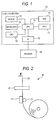
- the host computer 10 comprises a CPU 11, a mouse 12, a keyboard 13, a CRT 14, an interface 15, a RAM 16, and a hard disk 17.
- the host computer 10 is connected to a printer 20 via the interface 15.
- the printer 20 comprises a thermal head 21, a platen 23, and an auto cutter 26.
- the printer 20 performs raster printing on a continuous recording sheet 22.
- the platen 23 is rotated by a paper feed mechanism (not shown), and conveys the continuous recording sheet 22 in a longitudinal direction A.
- the continuous recording sheet 22 is conveyed in the longitudinal direction A and a dot line of the thermal head 21 is heated in synchronization with the rotation of the platen 23 to print a desired image.
- the auto cutter 26 selectively performs full cutting or partial cutting of the continuous recording sheet 22.
- a paper feed mechanism (not shown) conveys the paper forward and rearward to adjust a printing start position for the thermal head 21 and a paper cut position for the auto cutter 26.
- an operating system (OS) 30, an application 31, a graphic device interface (GDI) 32 and a universal printer driver 33 are previously installed in the host computer 10, and Windows by MicroSoft Corp. maybe employed as the operating system 30.
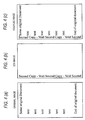
- the application 31 prepares original data for an original image shown in Fig. 4(a).
- the original image may be a purchased product's name and price.
- the GDI 32 is a module that controls a graphics drawing related process for preparing graphics based on original data produced by the application 31.
- the printer driver 50 installed in the host computer 10 is stored in the hard disk 17 (Fig. 1), and is loaded into the RAM 16 as needed. Various buffers and variables that will be described later are also prepared in the RAM 16.
- the printer driver 50 comprises a communication module 51 for communicating with the universal printer driver 33, SCV image data 52 that is data related to a "Second Copy-Void" (SCV) message image shown in Fig. 4(b), a buffer algorithm 53 and an image coupling engine 54.
- the buffer algorithm 53 is used to store a storage location of an original image data, which will be described later.
- the image coupling engine 54 couples the SCV image data 52 with the original image data to obtain coupled image data.
- the message image "Second Copy-Void" (SCV image) is added to the original image shown in Fig. 4(a) to obtain the coupled image shown in Fig. 4(c).
- the SCV image data 52 is image data corresponding to the SCV image, and comprises multiple Y-Rel commands and raster data commands that correspond to the individual dot lines as shown in Fig. 9.
- a Y-Rel command is used when dots to be printed are not present along a corresponding dot line, i.e., it is used for an empty dot line, and for instructing paper scrolling.
- a data representing the number of contiguous empty dot lines (hereinafter referred to as a "Y-Rel command count”) is added to the Y-Rel command.
- the raster data command is a command used when dots to be printed are present along a corresponding dot line, i.e., it is used for a dot line to be printed, and for designating corresponding dot data.
- the length of each raster data command differs, and is determined in accordance with the position of the rightmost print dot on a corresponding dot line.
- a property option is prepared for the printer driver 50.
- the user can instruct the use of various setups on a custom property setting screen 60 that is displayed on the CRT 14 of the host computer 10.
- the custom property setting screen 60 is divided into an original option group 61 for setting printer functions during an original receipt printing, and a copy option group 62 for setting printer functions during a journal copy printing.
- An original receipt may be given to a customer, and a journal copy may be kept as a sales record by the retailer.
- Each group 61 or 62 includes a page end option 61A or 62A for setting printer functions for each page, and a document end option 61B or 62B for setting printer functions for each document.
- Setup data concerning a custom option are transmitted as custom operating data to the printer driver 50 and are employed for the printing performed by the printer 20.
- the original receipt to be printed for each customer is referred to as a document.
- Each document may include one or more pages that may have either a fixed length or a variable length.
- normal transaction information may be printed on the first page and discount information may be printed on the second page. This enables the user to separate the second page from the first and use the second page as a discount voucher for a future purchase.
- the SCV image may be selectively printed in addition to the original image.
- Table 1 shows setup entries, choices corresponding to the individual entries, and definitions thereof.
- a paper alignment at a time of paper cutting is set. As shown in Fig. 2, since the auto cutter 26 is located at a paper conveying direction downstream side with respect to the thermal head 21, the paper is cut in the middle of the printed portion if the paper cutting is performed immediately after the printing is completed. In case where "yes" is set for the cutting position alignment, the paper cutting is performed after all of a printed portion is moved along the paper conveying direction A beyond the auto cutter 26. This prevents the paper from being cut in the middle of the printed portion.
- an operation for cutting the paper at a page end or at a document end is selected. According to this operation, "full cutting” for completely cutting the paper, “partial cutting” for partially cutting the paper, or “no cutting” for not cutting the paper can be selected.
- the reverse paper feeding operation whether reverse paper feeding is required after the paper cutting can be selected. In case where printing is started immediately after the paper cutting, a margin is generated at the distal end of the paper. In case where the paper is rewound and an adjustment is made for the next printing start position, generation of an extra space can be prevented.
- the copy output option and the SCV image option can be set.
- "print”, “save” or “print + save” can be selected.
- the journal copy printing is begun immediately after the original receipt is printed.
- the journal copy is not printed immediately after the original receipt is printed, and image data for the journal copy is stored in a journal file.
- the journal file is stored for a predetermined period of time, such as one day, one week or a period of time required for the continuous recording sheet 22 to be exhausted.
- the data for the journal copy can be collectively printed when required by the user, such as when the total sales are calculated for one day.
- "print + save" following the printing of the original receipt, the image data for the journal copy are stored in the journal file and printing of the journal copy is performed.
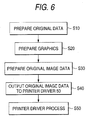
- FIG. 6 is a flowchart for a processing performed for generating the original receipt and the journal copy.
- the application 31 prepares original data representing transaction information (S10). This data corresponds to the original image in Fig. 4(a). Then, the GDI 32 generates graphics data based on the original data (S20) . In this example, text is also handled as graphics. The graphics are converted into a specific printer language by the universal printer driver 33 (S30) to generate the original image data. Together with other commands, the obtained original image data are sequentially output to the printer driver 50 as a data flow (S40), and the printer driver process is begun (S50). As shown in Fig. 9, the original image data that are prepared during this processing includes multiple Y-Rel commands and raster data commands, like the SCV image data.
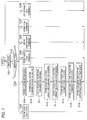
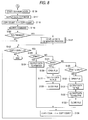
- the printer driver process at S50 will now be described with reference to flowcharts shown in Figs. 7 and 8.
- the printer driver process is begun when data for use by the printer driver 50 are entered by the universal printer driver 33.
- the input data includes data representing the number of copies to be printed, the custom option data that are set on the screen shown in Fig. 5, the original image data, and various other command data. Since identification data representing the message type of the input data are added at the head of the data, the printer driver 50 can identify the message type by referring to the identification data.
- the number of copies to be printed represents the total number of the original receipt and the journal copy that are to be printed. The user can set an arbitrary value for the number of copies to be printed. Generally, one original receipt and one journal copy are printed as a single set. Thus, "2" may be provided as the default number of copies to be printed.
- the printer driver 50 identifies the message type of the input data by examining the identification data (S102), and consonant with the message type that is identified, one of the processes at S103 to S109 is performed.
- Table 2 shows the correlation between the identification data and the message type. identification data message type 0 number of copies to be printed 1 custom option data 2 page start command 3 Y-Rel command or raster data command 4 page end command 5 document end command
- data from the universal printer driver 33 are entered in a predetermined order.
- This embodiment assumes that data are entered in a predetermined order.
- the set count data representing the number of copies to be printed is entered (S101 and S102: “01")
- the set count data are stored as a predetermined variable in the RAM 16 (S103) and the process then returns to S101.
- the custom option data are stored at a predetermined location in the RAM 16 (S104), and a static raster command is stored in the original buffer (S110).
- the static raster command which is inevitably required for printing, includes a command for changing the printer to the raster printing mode.
- the custom option data are converted into printer commands and are sequentially stored in the original buffer.
- the page start command representing the head of a page is entered (S101 and S102: “2") and is stored in the original buffer (S105), and the process is returned to S101.
- the Y-Rel commands and the raster data commands included in the original image data are sequentially entered.
- the Y-Rel command is stored in the original buffer (S107).
- the raster data command is stored in the original buffer (S106) and the process is returned to S101.
- the processes at S105 to S108 are repeated, and when the document end command representing the end of a document is entered (S101 and S102: "5"), the process advances to S109 (Fig. 8) and communication with the printer 20 is initiated. Thereafter, the data stored in the original buffer are output to the printer 20 (S117), and the original receipt is printed. At this time, together with the original image data, the page end cutting operation command and the document end cutting operation command for the original receipt are also output to the printer 20.
- the printer 20 can perform the cutting operation in accordance with the setup entered by the user.
- the number of copies to be printed is updated by decrementing by one the value representing the number of copies to be printed, which is stored in the RAM 16 as a predetermined variable (S118).
- the commands for the original copy that are stored in the RAM 16 at S114 to S116 are stored in the original buffer and are replaced by the commands for the original receipt stored in the original buffer, i.e., the reverse paper command, the page end cutting operation command and the document end cutting operation command.
- a check is performed to determine whether "SCV", for the SCV image option is selected. If “SCV” is selected (YES at S120), the coupled image data generation process is performed (S121) and the process is advanced to S122. During the coupled image data generation process, the coupled image data are generated, based on the original image data and the SCV image data, and are stored in the coupled image buffer. If “no SCV” is selected (NO at S120), the process is advanced to S122, and when the number of copies to be printed > 0 (YES at S122), program control is advanced to S123.
- a check is performed to determine whether "printing" is selected for the copy output option. If "printing" is selected (YES at S123), all the commands stored in the original buffer or the coupled image buffer (hereinafter referred to as a "buffer") are output to the printer 20 (S124). At this time, together with the image data command, the page end cutting operation and the document end cutting operation command for the journal copy are also output to the printer 20. Thus, the printer 20 prints the journal copy and executes the cutting operation in accordance with the setup entered by the user. The process is thereafter advanced to S134.
- journal file is opened (S126), and the data stored in the buffer are stored in the journal file (S127). Thereafter, the journal file is closed (S128) and the process is advanced to S134.
- journal file is opened (S130), and the data in the buffer are stored in the journal file (S131). The contents of the journal file are then output to the printer 20 (S132) and the journal copy is printed. Thereafter, the journal file is closed (S133) and the process advances to S134. At S134, the number of copies to be printed is updated by decrementing this value by one and the process is returned to S122. Then, when the number of copies to be printed ⁇ 0 (NO at S122), the process is terminated.
- the printer immediately after printing of the receipt, the printer either can print the journal copy or can temporarily store it in the file and print it as needed. Therefore, duplicate printing is available without using two-page forms. Further, since a predetermined message can be inserted into the journal copy as needed, the journal copy and the original receipt can be easily identified. In addition, since the cutting operation at the page end or at the document end can be independently selected for the original receipt and for the journal copy, a different cutting operation can be employed, such as full cutting at the document end of the original receipt or partial cutting at the document end of the journal copy.
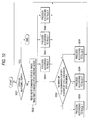
- the coupled image data generation processing at S121 will now be described with reference to Fig. 9 and a flowchart shown in Fig. 10.
- the original image data are coupled with the SCV image data, and the obtained image data are stored in the coupled image buffer.
- the SCV image data are stored in advance in the SCV buffer and the original image data are stored in the original buffer at S104.
- the first command for the original image data is sequentially coupled with the first command for the SCV image data.
- rules 1 to 6 are employed in accordance with the combination of the commands that are to be coupled. The individual rules will now be described.
- the first command for the SCV image data is a Y-Rel command
- the first command for the original image data to be coupled with it is a raster data command.
- rule 3 is employed to couple the Y-Rel command in the SCV image data with the raster data command in the original image data.
- the raster data command in the original image data is output to the coupled image buffer and is deleted from the original buffer.
- the number of Y-Rel commands in the SCV image data is updated by decrementing it by one.
- the program is designed so that when the number of Y-Rel commands reaches zero, the Y-Rel command is automatically deleted.
- rule 4 is employed for their coupling.
- the raster data command in the SCV image data is output to the coupled image buffer and is deleted from the SCV buffer. Then, the number of Y-Rel commands added to the Y-Rel command of the original image data is updated by decrementing it by one.
- Rule 5 is employed when coupling raster data commands. According to rule 5, two raster data commands are OR-coupled and the result is output to the coupled image buffer, while the raster data commands that are coupled are deleted from the SCV buffer and the original buffer.
- rule 1 To couple the Y-Rel commands, rule 1, rule 2 or rule 6 is employed pursuant to the number of Y-Rel commands. That is, when the number of Y-Rel commands for the SCV image data is smaller than the number of Y-Rel commands for the original image data, rule 1 is employed. When the number of Y-Rel commands for the original image data is smaller, rule 2 is employed. And when the number of Y-Rel commands is the same for both sets of data, rule 6 is employed.
- the Y-Rel command for the SCV image data is output to the coupled image buffer and is deleted from the SCV buffer. Then, the value obtained by subtracting the number of Y-Rel commands for the SCV image data from the number of Y-Rel commands for the original image data is employed as the updated number of Y-Rel commands for the original image data.
- the Y-Rel command for the original image data is output to the journal buffer and is deleted from the original buffer. Then, the value obtained by subtracting the number of Y-Rel commands for the original image data from the number of Y-Rel commands for the SCV image data is employed as the updated number of Y-Rel commands for the SCV image data.
- a Y-Rel command for the SCV image data in the coupled image buffer is output and is deleted from the SCV buffer. This Y-Rel command is also deleted from the original buffer.
- the coupled image data generation processing is actually performed as shown in the flowchart of Fig. 10.
- a check is performed to determine whether the original buffer (S201) is empty.
- the commands for the SCV image data and for the original image data are read (S202). If the commands for the SCV image data and the original image data are respectively a Y-Rel command and a raster command, at S204 the process according to rule 3 is performed, while if the commands are respectively a raster data command and a Y-Rel command, at S205 the process according to rule 4 is performed.
- rule 5 is applied for processing performed at S206.
- printer driver is not limited as herein described, and within the scope of the claims of the invention, can be variously modified or improved. Further, the printer that may be used is not limited to the thermal printer as herein described. Another printer, such as a dot-matrix printer, may be employed instead.
- the message image is not limited to "Second Copy - Void". Another message can be employed and the size and the position of the message can also be determined arbitrarily. Since the raster data commands are OR-coupled, even when the original image and the message image are partially overlapped, the coupling of data can be performed with no problem.
- the present invention is not limited to these forms.
- the number of copies is not limited to two, and only one, or a number equal to or greater than three, may be prepared.
- the coupling means of the printer driver adds the message data to the original data, no change is required for the application installed in the host computer or the printer. Further, since the coupled data is prepared by combining predetermined message data with the original data, an original image based on the original data and a coupled image based on the coupled data can be correctly and easily identified.
- the coupled data are output to the printer with the original data to print a copy.
- duplicate printing can be performed without using two-page forms. Therefore, duplicate printing is available with a printer, such as a thermal printer, that does not accept two-page forms.
- a printer such as a thermal printer
- an original image that is based on the original image data can be correctly and easily identified.
- the coupled data can be stored in the memory, the coupled data can be printed as needed, rather than being printed at the time of each transaction.
- the printer driver of the third aspect since the paper cutting operation for the original printing and copy printing can be selected for each page and for each document, an arbitrary cutting operation desired by the user can be designated. Therefore, when copy printing is to be performed after the original printing is completed, and when full cutting at the document end is selected for the original printing and partial cutting at the document end is selected for the copy printing, the user can more easily identify an original sheet and a copy.
Landscapes
- Engineering & Computer Science (AREA)
- Theoretical Computer Science (AREA)
- Human Computer Interaction (AREA)
- Physics & Mathematics (AREA)
- General Engineering & Computer Science (AREA)
- General Physics & Mathematics (AREA)
- Record Information Processing For Printing (AREA)
- Facsimiles In General (AREA)
- Accessory Devices And Overall Control Thereof (AREA)
Applications Claiming Priority (2)
| Application Number | Priority Date | Filing Date | Title |
|---|---|---|---|
| JP2002011687 | 2002-01-21 | ||
| JP2002011687A JP3961302B2 (ja) | 2002-01-21 | 2002-01-21 | プリンタドライバおよびプリンタドライバのデータ処理方法 |
Publications (2)
| Publication Number | Publication Date |
|---|---|
| EP1329802A2 true EP1329802A2 (de) | 2003-07-23 |
| EP1329802A3 EP1329802A3 (de) | 2004-07-28 |
Family
ID=19191694
Family Applications (1)
| Application Number | Title | Priority Date | Filing Date |
|---|---|---|---|
| EP03250221A Withdrawn EP1329802A3 (de) | 2002-01-21 | 2003-01-14 | Druckertreiber |
Country Status (3)
| Country | Link |
|---|---|
| US (1) | US20030147092A1 (de) |
| EP (1) | EP1329802A3 (de) |
| JP (1) | JP3961302B2 (de) |
Cited By (1)
| Publication number | Priority date | Publication date | Assignee | Title |
|---|---|---|---|---|
| EP1973033A3 (de) * | 2007-03-22 | 2010-12-01 | Brother Kogyo Kabushiki Kaisha | Drucksteuerungsvorrichtung und computerlesbares Aufzeichnungsmedium mit darauf gespeichertem Drucksteuerungsprogramm |
Families Citing this family (3)
| Publication number | Priority date | Publication date | Assignee | Title |
|---|---|---|---|---|
| JP5617386B2 (ja) * | 2010-07-05 | 2014-11-05 | ブラザー工業株式会社 | 制御装置、画像処理システム、及びプログラム |
| CN107436741A (zh) * | 2017-07-26 | 2017-12-05 | 珠海浩盛标签打印机有限公司 | 热敏打印机及其打印数据备份方法 |
| JP7722150B2 (ja) * | 2021-11-25 | 2025-08-13 | ブラザー工業株式会社 | プログラムおよび印刷システム |
Family Cites Families (16)
| Publication number | Priority date | Publication date | Assignee | Title |
|---|---|---|---|---|
| JPH04151973A (ja) * | 1990-10-15 | 1992-05-25 | Canon Inc | 画像記録装置 |
| SG66232A1 (en) * | 1993-11-08 | 1999-07-20 | Seiko Epson Corp | Printing apparatus control method therefor and data processing apparatus using the printing apparatus |
| JPH08115414A (ja) * | 1994-09-29 | 1996-05-07 | Xerox Corp | 差込み/注釈付け/背丁付け能力を有する印刷機械 |
| US5644682A (en) * | 1994-12-21 | 1997-07-01 | Joseph Weinberger | Method and system for incorporating indicia into a document generated by a computer application |
| US6587217B1 (en) * | 1997-09-15 | 2003-07-01 | International Business Machines Corporation | Method for organizing files in a library in a network printing system |
| JPH11316668A (ja) * | 1998-02-27 | 1999-11-16 | Canon Inc | 情報処理装置および情報処理方法および印刷制御装置および印刷制御装置のフォ―ムデ―タ処理方法およびコンピュ―タが読み出し可能なプリンタドライバプログラムおよび印刷制御プログラムを格納した記憶媒体 |
| US6373585B1 (en) * | 1998-08-26 | 2002-04-16 | International Business Machines Corporation | Load balancing for processing a queue of print jobs |
| EP1044819A3 (de) * | 1999-04-14 | 2001-06-27 | Star Micronics Co., Ltd. | Schneidevorrichtung und Drucker |
| JP2001358870A (ja) * | 2000-06-09 | 2001-12-26 | Konica Corp | 画像形成装置 |
| CN1198734C (zh) * | 2000-08-04 | 2005-04-27 | 精工爱普生株式会社 | 打印机驱动器以及打印控制方法 |
| JP4612781B2 (ja) * | 2000-08-11 | 2011-01-12 | キヤノン株式会社 | 印刷装置および印刷装置の制御方法およびプログラム |
| US6347896B1 (en) * | 2000-10-25 | 2002-02-19 | Xac Automation Corporation | Cutting mode switching module in a printer |
| AU2001288079A1 (en) * | 2000-11-02 | 2002-05-15 | Fujiyama Co., Ltd. | Distribution system of digital image content and reproducing method and medium recording its reproduction program |
| US6961936B2 (en) * | 2001-09-20 | 2005-11-01 | Hewlett-Packard Development Company, L.P. | Apparatus and method for controlling stored jobs |
| US7171468B2 (en) * | 2001-11-10 | 2007-01-30 | Kabushiki Kaisha Toshiba | System and method for accessing a document management repository |
| US7283264B2 (en) * | 2001-11-20 | 2007-10-16 | Hewlett-Packard Development Company, L.P. | Method and system for distributing print job |
-
2002
- 2002-01-21 JP JP2002011687A patent/JP3961302B2/ja not_active Expired - Fee Related
-
2003
- 2003-01-10 US US10/339,355 patent/US20030147092A1/en not_active Abandoned
- 2003-01-14 EP EP03250221A patent/EP1329802A3/de not_active Withdrawn
Cited By (1)
| Publication number | Priority date | Publication date | Assignee | Title |
|---|---|---|---|---|
| EP1973033A3 (de) * | 2007-03-22 | 2010-12-01 | Brother Kogyo Kabushiki Kaisha | Drucksteuerungsvorrichtung und computerlesbares Aufzeichnungsmedium mit darauf gespeichertem Drucksteuerungsprogramm |
Also Published As
| Publication number | Publication date |
|---|---|
| US20030147092A1 (en) | 2003-08-07 |
| JP2003216389A (ja) | 2003-07-31 |
| JP3961302B2 (ja) | 2007-08-22 |
| EP1329802A3 (de) | 2004-07-28 |
Similar Documents
| Publication | Publication Date | Title |
|---|---|---|
| US7054021B2 (en) | System and method for printing multiple print jobs in a single action | |
| US8497999B2 (en) | Information processing apparatus and method for displaying a preview image | |
| EP1223043B1 (de) | Druckernatrieb, drucksteuerungsverfahren und informationsaufzeichnungsmedium | |
| US20060023240A1 (en) | Program, information processor and preview method | |
| US20030007818A1 (en) | Print control apparatus, printing method, and print control program | |
| US8988702B2 (en) | Printing apparatus and printing method | |
| US20030189718A1 (en) | Information processing apparatus, control method for information processing apparatus, control program, and print system | |
| US20070061161A1 (en) | Print system | |
| EP1862317A2 (de) | Thermodrucker und Steuerungsverfahren dafür | |
| US20060001686A1 (en) | Data processing apparatus, control method therefor, and program | |
| US8467086B2 (en) | Method of controlling scaled-down printing for host device and the hose device using the method | |
| US10402134B2 (en) | Print control device, print control method, and recording medium having print control program recorded thereon | |
| US6671066B1 (en) | Computer program product intended for processing print data, and apparatus and method for processing print data | |
| JPH10147028A (ja) | 印刷装置における印字制御方法及び印刷装置 | |
| US20030147092A1 (en) | Printer driver | |
| US7142327B2 (en) | Information processing apparatus and print processing method | |
| US8587804B2 (en) | Printing device and control method for a printing device | |
| US7961341B2 (en) | Print system, print data supplying device, and method for supplying print data to printer | |
| US8553271B2 (en) | Printing device and control method for a printing device for distributing print data | |
| JP4803954B2 (ja) | データ処理装置、画像形成装置および画像形成システム | |
| US7118297B2 (en) | Print option setting method and system for image forming devices | |
| US8599443B2 (en) | Image forming apparatus with N-in-one printing | |
| JP2003251892A (ja) | プリンタ及び印刷システム | |
| JP3601664B2 (ja) | 印刷装置、印刷システム及び印刷方法 | |
| Chen | Looking sharp in black & white. |
Legal Events
| Date | Code | Title | Description |
|---|---|---|---|
| PUAI | Public reference made under article 153(3) epc to a published international application that has entered the european phase |
Free format text: ORIGINAL CODE: 0009012 |
|
| AK | Designated contracting states |
Designated state(s): AT BE BG CH CY CZ DE DK EE ES FI FR GB GR HU IE IT LI LU MC NL PT SE SI SK TR |
|
| AX | Request for extension of the european patent |
Extension state: AL LT LV MK RO |
|
| PUAL | Search report despatched |
Free format text: ORIGINAL CODE: 0009013 |
|
| AK | Designated contracting states |
Kind code of ref document: A3 Designated state(s): AT BE BG CH CY CZ DE DK EE ES FI FR GB GR HU IE IT LI LU MC NL PT SE SI SK TR |
|
| AX | Request for extension of the european patent |
Extension state: AL LT LV MK RO |
|
| 17P | Request for examination filed |
Effective date: 20050117 |
|
| AKX | Designation fees paid |
Designated state(s): DE FR GB |
|
| 17Q | First examination report despatched |
Effective date: 20090130 |
|
| STAA | Information on the status of an ep patent application or granted ep patent |
Free format text: STATUS: THE APPLICATION IS DEEMED TO BE WITHDRAWN |
|
| 18D | Application deemed to be withdrawn |
Effective date: 20090610 |