EP1359498A2 - Sélection des objets dans une liste - Google Patents
Sélection des objets dans une liste Download PDFInfo
- Publication number
- EP1359498A2 EP1359498A2 EP03251484A EP03251484A EP1359498A2 EP 1359498 A2 EP1359498 A2 EP 1359498A2 EP 03251484 A EP03251484 A EP 03251484A EP 03251484 A EP03251484 A EP 03251484A EP 1359498 A2 EP1359498 A2 EP 1359498A2
- Authority
- EP
- European Patent Office
- Prior art keywords
- menu
- item
- list
- eye diagram
- selection
- Prior art date
- Legal status (The legal status is an assumption and is not a legal conclusion. Google has not performed a legal analysis and makes no representation as to the accuracy of the status listed.)
- Withdrawn
Links
Images


Classifications
-
- G—PHYSICS
- G06—COMPUTING OR CALCULATING; COUNTING
- G06F—ELECTRIC DIGITAL DATA PROCESSING
- G06F3/00—Input arrangements for transferring data to be processed into a form capable of being handled by the computer; Output arrangements for transferring data from processing unit to output unit, e.g. interface arrangements
- G06F3/01—Input arrangements or combined input and output arrangements for interaction between user and computer
- G06F3/048—Interaction techniques based on graphical user interfaces [GUI]
- G06F3/0481—Interaction techniques based on graphical user interfaces [GUI] based on specific properties of the displayed interaction object or a metaphor-based environment, e.g. interaction with desktop elements like windows or icons, or assisted by a cursor's changing behaviour or appearance
- G06F3/0482—Interaction with lists of selectable items, e.g. menus
Definitions
- the present invention relates to a method of selecting the next item in an ordered list of items and to menu apparatus.
- the subject matter of the present application pertains to user interaction with software during the selection of an item from a menu, as for example, during actions taken to control the behavior of an apparatus operated through interaction with a computer system.
- the selection technique to be described arose during the development of a particular apparatus for the measurement of eye diagrams; although it is certainly not limited to eye diagram measurement.
- a tangible implementation of the measurement technique of that apparatus has complexity beyond what is easily summarized and is capable of performing additional functions.
- a preferred implementation of the measurement technique is the subject matter of a US Patent Application entitled METHOD AND APPARATUS FOR PERFORMING EYE DIAGRAM MEASUREMENTS bearing S/N 10/020,673 which was filed on 29 October 2001 by Richard A. Nygaard, Jr. and assigned to Agilent Technologies, Inc. Because the subject matter of that application is thus of interest to that of the present application (and is incorporated by reference) in yet other US applications that we intend to also incorporate herein by reference, and for the sake of brevity, "METHOD AND APPARATUS FOR PERFORMING EYE DIAGRAM MEASUREMENTS" is hereby expressly incorporated herein by reference.
- the first of these is a certain collection of issues concerning economy of action and ease of use while selecting items from a menu to control the behavior of some system, (possibly, but not necessarily, a measurement system) and which could be solely software, purely an apparatus, or some combination thereof.
- the menu is created by the execution of software or firmware by a processor, which could be a separate computer or perhaps an embedded system within an apparatus. It is also possible that the apparatus is a peripheral attached to a separate computer.
- the second thread is the particular example of such a menu item selection scheme found in the eye diagram analyzer of the incorporated Applications. To fully appreciate the example the reader needs to know a little bit about how an operator would like to use that piece of equipment.
- Drop-down menus displayed on a computer screen and actuated by a combination of screen pointer icon movements (e.g., according to corresponding motion with a mouse) and accompanying mouse clicks (appropriate pressing of a switch on the mouse) are commonplace.
- the existence of the menu is indicated by some legend (perhaps in a box), which might be the name of the menu, or, the name of a most recently selected item contained within the menu.
- the ususal operation is for an operator to position the screen pointer icon (sometimes called a mouse sprite) over the legend and then perform a click. The entire menu then appears.
- the menu is a list of choices, and if there are more items in the menu than will fit in the space allocated for displaying the list, a scroll bar also appears and allows other portions of the complete list to become a selected subset that is the portion that is displayed. Thus, the entire list can still be accessed, even if it is just a portion at a time via scrolling.
- positioning the screen pointer icon over an item in the displayed list of the menu typically causes that item to be highlighted as a potential selection. Clicking an item actually selects it, whereupon the selected choice is put into effect, and the menu might then close itself automatically.
- GUIs Graphical User Interfaces
- the operator's underlying purpose in all this is to cycle through all or some of the possible menu choices (make trial selections) with the aim of determining if one or more of them "makes a difference" in the affected result.
- the operator does not particularly care about the order in which the choices are tried; he just wants to find out which selections "make a difference," if any. He may, however, have an opinion or educated guess about where in the list of menu choices would be a good choice to begin the trial selections, so as to save some time and effort.
- Eye diagrams are a conventional format for representing parametric information about signals, and especially digital signals. We shall refer to an item of test equipment or a measurement circuit arrangement that creates an eye diagram according to the method of the incorporated Application as an Eye Diagram Analyzer, or EDA for short. Modern eye diagram analyzers are apt to have a menu driven user interface of the sort described above. And before we proceed it will be useful to very briefly describe what they do and how one eye diagram analyzer of interest does it.
- a modern eye diagram for a digital signal is not so much a trace formed continuously in the time domain, as it is an "eye" shape composed of closely spaced points (displayed dots, or illuminated pixels) representing many (probably at least thousands, easily millions, and perhaps orders of magnitude more) individual measurement samples taken upon separate instances of a signal occurring on a channel of interest. Each measurement sample contributes to a displayed dot.
- an infinite persistence continuous time domain trace were cut apart into lengths corresponding to one, five or ten clock times, and then stacked on top of each other.
- portions of the eye shape only appear continuous because the dots are rather dense, owing to the large amount of data that is sampled.
- the vertical axis is voltage
- the horizontal axis represents the differences in time (i.e.,various offsets) between some reference event and the locations for the measurement samples.
- the time axis will generally have enough length to depict one complete eye-shape (cycle of a SUT signal) centered about the reference, with sometimes perhaps several additional eyes (cycles) before and after. In general, the number of cycles shown depends upon how the measurement is set up, and could be a large number.
- the reference event is the expected point in time when the value of an applied data signal would be captured by some receiving circuit in an SUT (System Under Test), and is derived from an application of the SUT's clock to the Eye Diagram Analyzer.
- an eye diagram represents various combinations of circumstances that occurred in the data signal being characterized.
- the eye diagram trace itself is not a single time domain waveform (think: 'single valued function'), but is instead a merging of many such instances; it can present multiple voltage (Y axis) values for a given time value (X axis).
- the upper left-hand region of an eye might represent the combination of an adequate logical one at an adequately early time relative to the SUT's clock signal, and an eye diagram whose traces pass robustly through that region indicates to us that a signal of interest is achieving a proper voltage at a proper time.
- the EDA can alter the displayed composite eye diagram in a useful way to indicate which portions thereof are associated with a selected channel (i.e., "highlighting" a channel).
- a selected channel i.e., "highlighting" a channel.
- What is taught herein provides a menu having that list allows one to select one of those channels, and then another and another, etc., while the selection is used to alter the composite eye diagram such that one can tell (through the highlighting) what parts of it are due to the selected channel.
- the Excel97 application from Microsoft also has what we may term a streamlined technique for expressing choice.
- the basic screen for that application includes, in the bottom horizontal margin around the central work area, a scroll bar on the right and a collection of tabs for "sheets" on the left.
- a "sheet” is what is displayed in the central work area; which one it is can be changed by clicking on the associated tab.
- the scroll bar on the right pans the visible portion of a selected sheet within the work area, and is of adjustable size. (That is, the division of the bottom horizontal margin between tabs and scroll bar is adjustable.)
- the number of "sheets" can be increased to become considerable; to much more than there is space for displaying the associated tabs, even with a scroll bar of reduced size.
- the present invention seeks to provide an improved menu system.
- menu apparatus as specified in claim 6.
- an eye diagram analyzer can assign a plurality of SUT data signals to be members of a labeled group of channels for an eye diagram analyzer. There may be a plurality of such groups. It is also known that the measured data within a group can be merged into a composite eye diagram presentation in various different modes. Furthermore, when a composite eye diagram is being displayed, the operator may select a channel from among the group, and then have the pixels associated with that channel be displayed in an altered manner that allows them to be distinguished from all others, so that he can determine if the behavior of that channel contributes to a condition in the eye diagram that is of interest. The selection of a channel in the group thus produces an affected result.
- the menu from which channels may be selected includes at least one next selection icon (menu button) in a fixed location, and which when clicked on, automatically selects the next item in the list within that menu.
- the mouse can be positioned just once, and then clicked as often as needed without further motion, allowing the operator to continuously observe, without interruption, what effect, if any, is produced in the affected result (which may be, but are not necessarily, alterations in a composite eye diagram).
- Traversing i.e., automatic selection of an adjacent entry in the list that comprises the choices of the menu
- Traversing might be one step at a time (one step per click), or if the click is extended (switch on the mouse remains closed beyond a certain length of time), be automatically repeated at some convenient rate, say, once per second.
- the rate of automatic traversal can be adjustable.
- the traverse of the list can include "wrapping," where the next selected item after reaching one end of the list is the item at the other end of the list, whereupon the traverse continues from that point.
- the name or descriptive legend for the selected menu entry is displayed in a location associated with the menu, so that when something interesting is noted and the traverse ended, it is not necessary to open the menu to discover which selection caused the condition of interest.
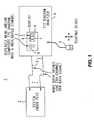
- FIG. 1 wherein is depicted a simplified block diagram 1 of an example hardware environment wherein automatic sequential selection and implementation of items in an arbitrarily ordered list of menu items is useful.
- data signals within a System Under Test (SUT) 2 are coupled by a plurality of probe connections 3 to a respectively associated plurality of channels within an Eye Diagram Analyzer (EDA) 4.
- the EDA has a display 5 upon which are visible various menus 6 and other Graphical User Interface (GUI) elements 6 in order that within a window 7 various displayed results 8 may be presented.
- GUI Graphical User Interface
- the displayed results that are most of interest are composite eye diagrams having a highlighted channel that has been selected during a process of discovery to learn which data signal(s) is(are) operating defectively.
- the EDA 4 is equipped with a pointing device 9, of which there are several possible varieties, and which in this example happens to be a mouse.
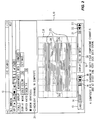
- FIG. 2 is a somewhat detailed depiction of a window (5, 10) containing various menus and results for a composite eye diagram measurement.
- a window (5, 10) containing various menus and results for a composite eye diagram measurement.
- the example is very similar to one that is described in more detail in the application "COMPOSITE EYE DIAGRAMS", and those who may be curious about all the ancillary matters we won't mention can refer to that disclosure.
- it is a composite eye diagram. That means that it is the “merging” or “overlaying” of several (and perhaps a great many) individual “component” eye diagrams.
- the "trace” that is the visible substance of the composite eye diagram 25 is depicted in the drawing as parallel lines. In reality, is it actually formed by (usually) adjacent pixels of particular (i.e., a combination of assigned and computed) colors and intensities. We can't, of course, get away with that in a Patent, so we depict it as shown.
- the eye diagram 25 is a composite, since selected legend 20 in menu 19 is " ⁇ All 64 bits>".
- Menu Expansion control (button) 16 will expose a drop down menu beneath legend 14 to reveal what other labeled groups may have been defined and are selectable in place of Group 1 as the source for the displayed composite eye diagram. We shall touch on the other menu controls 17 and 18 at a later time.
- eye diagram 25 is pretty ugly, even for a composite of sixty-four separate signals. In particular it has, among other warts, a horizontal region 26 and transition regions 27 and 28 that the operator deems indicative of some serious defects in data signal behavior. The problem at hand is discover which data signal(s) is(are) to blame.
- One of the ideas behind being able to highlight the portion of an eye diagram associated with a particular data signal (channel) is to aid in discovering defective data signals.
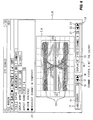
- a highlighted channel has its pixels displayed as a superimposed component eye diagram, but in a visually distinct manner, such as blinking, increased intensity or changed color.
- a mouse pointer (or screen pointer) icon 29 has been positioned (by operator motion of mouse 9) over or sufficiently proximate Menu Expansion button 21, which button was then "clicked” in conventional fashion to produce an opened drop-down (or perhaps pop-up) menu 31.
- Menu 31 is a list of menu items including the already selected ⁇ All 64 bits> legend (menu list item 30). Beneath that are, in some arbitrary order related to how they were defined, other menu items in the list 31. In this menu list 31 those other menu items are the various combinations of the bit numbering scheme, the probe pod and signal input therein used for a bit, and the channel assignment given to that combination.
- the composite eye diagram 25 changes to show a highlighted channel eleven. See Figure 6, and note the cross hatched region 33. Note also that box 24 is now checked; the operator would do that now or would have already done that some time previously. (Note that, in honor of box 24 being checked, menu 19 now identifies itself as "Highlight” instead of "Display”.)
- What Previous Item Selection button 22 does is traverse the list of menu items in the other (upward) direction. Once a traverse is begun, in either direction, when the end of the list is reached (excluding the " ⁇ All ... bits>" pro forma entry), the next item in the traverse is the item at the other end of the list. That is, the traverse wraps, but skips the pro forma entry " ⁇ All ... bits>".
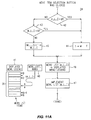
- FIG 11A is a simplified flowchart 38 describing a particular way in which the automatic (next) sequential selection and implementation for a menu can be accomplished.
- a list of menu items 39 which corresponds to list 31 of Figures 3 and 4.
- the variable Menu_List_Index 40 (abbreviated M_L_I) is a pointer whose value determines which menu item in the list 39 is the selected item.
- M_L_I a qualifier 42 determines if the value of M_L_I is zero.
- M_L_I a default value of one, which is at the start of the range that we will automatically and sequentially select from.
- the operator could, of course, already set M_L_I to some value 0 ⁇ K ⁇ N using the regular conventional methods for menu item selection.
- M_L_I is non-zero, then a qualifier 43 determines if its value is N. If it is, then it is time to wrap around to the other end of the list, by a transition to step 44, where its value will be set to one.
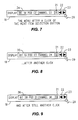
- step 46 displays the associated menu item as the selected choice (see items 32, 34, 35, and 36 in Fig's 5, 7, 8 and 9, respectively).
- the notation "MENU LIST [M_L_I]” in step 46 is a subscript notation that means "the menu list item pointed at by the value of M_L_I.
- the selected menu item which is "MENU LIST [M_L_I]"
- implementation means "highlight the selected channel”. In some other system "implementation" might mean something else.
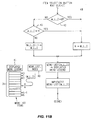
- Figure 11B is a flowchart 48 similar to that of Figure 11A, except that it is for the Previous Item Selection button 22. The differences are minor, involving the direction in which the Menu_List_Index 40 is adjusted for wrapping, and direction in which it is stepped (it is decremented instead of incremented).
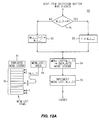
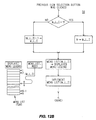
- Figures 12A-B are similar to Figures 11A-B, except that they do not involve the notion of a pro forma menu entry that is to be excluded from the automatic sequential traverse of the list of menu items.
- the flowchart 49 of Figure 12A for a Next Item Selection begins with a qualifier 51 that detects the need to wrap around (value of M_L_I has already reached N).
- the range of values for M_L_I has been set at 1 ⁇ M_L_I ⁇ N. (It could just as easily have remained 0 ⁇ M_L_I ⁇ N).
- step 53 assigns M_L_I the value at the other end of the range, else step 52 steps the value of M_L_I by one.
- steps 54 and 55 operate as do steps 46 and 47 (of Figure 11A).
- the flowchart 56 of Figure 12B is similar, but is set up to traverse the list of menu items in the other direction.
- the menu whose list of items are to be the automatically and sequentially selected choices includes a place to specify a shell command line that can be written using a parameter that will be substituted by the automatically selected menu list item.
- the notion of "implementation" is now defined to be executing the command line after substitution for the parameter by the next selected menu item. Now the effective implementation can be user specified to be anything that the shell can do.
- the contents of a file system directory is a list of files that can often be thought of as a list of choices for an associated operation. It could be used for, say, selective operation upon the files in a directory by making the command line contain the desired command.
- An implicit or explicit parameter substitution mechanism (auch as already known to shell programmers) arranges that the command operates on the file names selected from within the directory listing appearing within the menu. So, consider a menu that includes a place to specify a directory name. The content of the specified directory produces a list of file names that is the list of menu choices. The menu also supplies a place to specify the command and its options (the UNIX shell commands lp, 11, head, etc., are useful examples).
- next Item and Previous Item Selection buttons (17 & 18, 22 & 23) could also be implemented by taking note of which of a plurality of mouse buttons was clicked.
- Item Selection button visible on the menu (say, having a double-headed arrow)
- screen pointer icon 29 points to that solitary button, whether the selection is "Next" or "Previous” depends on which mouse button is clicked. This further assists the operator in that now the mouse can remain absolutely still during a two direction selection process.
Landscapes
- Engineering & Computer Science (AREA)
- General Engineering & Computer Science (AREA)
- Theoretical Computer Science (AREA)
- Human Computer Interaction (AREA)
- Physics & Mathematics (AREA)
- General Physics & Mathematics (AREA)
- Digital Computer Display Output (AREA)
- User Interface Of Digital Computer (AREA)
- Eye Examination Apparatus (AREA)
Applications Claiming Priority (2)
| Application Number | Priority Date | Filing Date | Title |
|---|---|---|---|
| US120565 | 1987-11-13 | ||
| US10/120,565 US20030193525A1 (en) | 2002-04-11 | 2002-04-11 | Expedited selection of items from a list within a drop down menu of an eye diagram analyzer |
Publications (2)
| Publication Number | Publication Date |
|---|---|
| EP1359498A2 true EP1359498A2 (fr) | 2003-11-05 |
| EP1359498A3 EP1359498A3 (fr) | 2006-02-08 |
Family
ID=28790113
Family Applications (1)
| Application Number | Title | Priority Date | Filing Date |
|---|---|---|---|
| EP03251484A Withdrawn EP1359498A3 (fr) | 2002-04-11 | 2003-03-12 | Sélection des objets dans une liste |
Country Status (3)
| Country | Link |
|---|---|
| US (1) | US20030193525A1 (fr) |
| EP (1) | EP1359498A3 (fr) |
| CA (1) | CA2413773A1 (fr) |
Cited By (2)
| Publication number | Priority date | Publication date | Assignee | Title |
|---|---|---|---|---|
| US8451291B2 (en) | 2006-08-23 | 2013-05-28 | Samsung Electronics Co., Ltd | Method for displaying information in mobile terminal |
| US9891806B2 (en) | 2014-05-08 | 2018-02-13 | Dspace Digital Signal Processing And Control Engineering Gmbh | Assignment rotator |
Families Citing this family (25)
| Publication number | Priority date | Publication date | Assignee | Title |
|---|---|---|---|---|
| US6804633B2 (en) * | 2003-01-31 | 2004-10-12 | Agilent Technologies, Inc. | Fast eye diagram analyzer uses nearest neighbor transverse to quickly discover basic eye diagrams |
| US7158123B2 (en) * | 2003-01-31 | 2007-01-02 | Xerox Corporation | Secondary touch contextual sub-menu navigation for touch screen interface |
| US8015501B2 (en) * | 2003-08-18 | 2011-09-06 | Sap Aktiengesellschaft | Accessing previously viewed windows |
| US7557818B1 (en) * | 2004-10-06 | 2009-07-07 | Apple Inc. | Viewing digital images using a floating controller |
| US8564544B2 (en) | 2006-09-06 | 2013-10-22 | Apple Inc. | Touch screen device, method, and graphical user interface for customizing display of content category icons |
| US8689132B2 (en) * | 2007-01-07 | 2014-04-01 | Apple Inc. | Portable electronic device, method, and graphical user interface for displaying electronic documents and lists |
| US20080192071A1 (en) * | 2007-02-12 | 2008-08-14 | Tektronix, Inc. | Automatic Formation of Groups of Channels |
| US8775953B2 (en) | 2007-12-05 | 2014-07-08 | Apple Inc. | Collage display of image projects |
| EP2485054B1 (fr) * | 2009-09-28 | 2019-08-21 | Hitachi High-Technologies Corporation | Dispositif d'analyses automatiques, procédé d'affichage d'informations et système d'affichage d'informations associé |
| US9176645B1 (en) * | 2011-06-29 | 2015-11-03 | Amazon Technologies, Inc. | Manipulating collections of items in a user interface |
| CN103635915B (zh) * | 2012-02-28 | 2017-12-15 | 松下知识产权经营株式会社 | 控制信息显示装置、控制信息显示方法、以及控制信息显示系统 |
| JP6895222B2 (ja) * | 2016-02-25 | 2021-06-30 | 富士通株式会社 | 選択支援プログラム、装置、及び方法 |
| US10283082B1 (en) | 2016-10-29 | 2019-05-07 | Dvir Gassner | Differential opacity position indicator |
| US12587657B2 (en) | 2018-02-20 | 2026-03-24 | Arlo Technologies, Inc. | Transcoding in security camera applications |
| US10805613B2 (en) * | 2018-02-20 | 2020-10-13 | Netgear, Inc. | Systems and methods for optimization and testing of wireless devices |
| US12293583B2 (en) | 2018-02-20 | 2025-05-06 | Arlo Technologies, Inc. | Notification priority sequencing for video security |
| US11102492B2 (en) | 2018-02-20 | 2021-08-24 | Arlo Technologies, Inc. | Multi-sensor motion detection |
| US10742998B2 (en) | 2018-02-20 | 2020-08-11 | Netgear, Inc. | Transmission rate control of data communications in a wireless camera system |
| US11064208B2 (en) | 2018-02-20 | 2021-07-13 | Arlo Technologies, Inc. | Transcoding in security camera applications |
| US11076161B2 (en) | 2018-02-20 | 2021-07-27 | Arlo Technologies, Inc. | Notification priority sequencing for video security |
| US11272189B2 (en) | 2018-02-20 | 2022-03-08 | Netgear, Inc. | Adaptive encoding in security camera applications |
| US11756390B2 (en) | 2018-02-20 | 2023-09-12 | Arlo Technologies, Inc. | Notification priority sequencing for video security |
| US11558626B2 (en) | 2018-02-20 | 2023-01-17 | Netgear, Inc. | Battery efficient wireless network connection and registration for a low-power device |
| US11487401B2 (en) * | 2020-03-31 | 2022-11-01 | Keysight Technologies, Inc. | System and method for selectively displaying waveforms using graphical user interface |
| US11287953B1 (en) * | 2021-01-13 | 2022-03-29 | Sap Se | One-click sequential identifier for user interface |
Family Cites Families (7)
| Publication number | Priority date | Publication date | Assignee | Title |
|---|---|---|---|---|
| US5425140A (en) * | 1992-03-20 | 1995-06-13 | International Business Machines Corporation | Method and apparatus for providing conditional cascading in a computer system graphical user interface |
| US5539870A (en) * | 1992-10-05 | 1996-07-23 | International Business Machines Corporation | Computerized system and process for interactively managing a distributed database system |
| US5694549A (en) * | 1994-03-03 | 1997-12-02 | Telescan, Inc. | Multi-provider on-line communications system |
| US5917730A (en) * | 1995-08-17 | 1999-06-29 | Gse Process Solutions, Inc. | Computer implemented object oriented visualization system and method |
| US6151010A (en) * | 1996-05-24 | 2000-11-21 | Lecroy, S.A. | Digital oscilloscope display and method therefor |
| US6493868B1 (en) * | 1998-11-02 | 2002-12-10 | Texas Instruments Incorporated | Integrated development tool |
| US6917373B2 (en) * | 2000-12-28 | 2005-07-12 | Microsoft Corporation | Context sensitive labels for an electronic device |
-
2002
- 2002-04-11 US US10/120,565 patent/US20030193525A1/en not_active Abandoned
- 2002-12-09 CA CA002413773A patent/CA2413773A1/fr not_active Abandoned
-
2003
- 2003-03-12 EP EP03251484A patent/EP1359498A3/fr not_active Withdrawn
Cited By (2)
| Publication number | Priority date | Publication date | Assignee | Title |
|---|---|---|---|---|
| US8451291B2 (en) | 2006-08-23 | 2013-05-28 | Samsung Electronics Co., Ltd | Method for displaying information in mobile terminal |
| US9891806B2 (en) | 2014-05-08 | 2018-02-13 | Dspace Digital Signal Processing And Control Engineering Gmbh | Assignment rotator |
Also Published As
| Publication number | Publication date |
|---|---|
| CA2413773A1 (fr) | 2003-10-11 |
| US20030193525A1 (en) | 2003-10-16 |
| EP1359498A3 (fr) | 2006-02-08 |
Similar Documents
| Publication | Publication Date | Title |
|---|---|---|
| EP1359498A2 (fr) | Sélection des objets dans une liste | |
| US6246408B1 (en) | Graphical system and method for invoking measurements in a signal measurement system | |
| US8995510B2 (en) | Apparatus and method for analyzing a signal under test | |
| US6559868B2 (en) | Graphically relating a magnified view to a simultaneously displayed main view in a signal measurement system | |
| EP1996952B1 (fr) | Programme d'analyse de signal numerique et appareil d'affichage de forme d'onde | |
| US6745140B2 (en) | Electronic test system with test results view filter | |
| US7184906B2 (en) | Systems and methods for performing multi-source measurements | |
| JPH11248753A (ja) | 信号測定システムにおける自動測定の同時呼び出しのためのシステム及び方法 | |
| US20030079162A1 (en) | Test executive system with progress window | |
| US6407756B1 (en) | Graphical user interface for a logic analyzer which allows simplified clock selection | |
| JP2004004050A (ja) | 試験実行システムを供給する製品および試験実行システムを動作させる方法 | |
| EP1755025A2 (fr) | Déclencheur analyseur logique de chute et de traînée | |
| US6907365B2 (en) | Context sensitive toolbar | |
| US6532001B1 (en) | Mouse control for scrolling switch options through screen icon for the switch | |
| US6668235B2 (en) | Identification of channels and associated signal information contributing to a portion of a composite eye diagram | |
| EP1528703A2 (fr) | Outils de mesure avec alignement forcé pour des diagrammes de l'oeil composites | |
| US11687213B1 (en) | Object oriented graphical user interface for a test and measurement instrument | |
| US20050188325A1 (en) | Highlighting panning window interface | |
| US20200225840A1 (en) | Measurement apparatus and method for analyzing a measurement signal | |
| JP5083597B2 (ja) | 半導体試験装置 | |
| US9329967B2 (en) | Methods and systems for aiding the analysis of a signal | |
| JPH0623796B2 (ja) | ロジック・アナライザ |
Legal Events
| Date | Code | Title | Description |
|---|---|---|---|
| PUAI | Public reference made under article 153(3) epc to a published international application that has entered the european phase |
Free format text: ORIGINAL CODE: 0009012 |
|
| AK | Designated contracting states |
Kind code of ref document: A2 Designated state(s): AT BE BG CH CY CZ DE DK EE ES FI FR GB GR HU IE IT LI LU MC NL PT RO SE SI SK TR |
|
| AX | Request for extension of the european patent |
Extension state: AL LT LV MK |
|
| PUAL | Search report despatched |
Free format text: ORIGINAL CODE: 0009013 |
|
| RIC1 | Information provided on ipc code assigned before grant |
Ipc: G01R 13/02 20060101ALI20051212BHEP Ipc: G06F 3/033 20060101AFI20030830BHEP |
|
| AK | Designated contracting states |
Kind code of ref document: A3 Designated state(s): AT BE BG CH CY CZ DE DK EE ES FI FR GB GR HU IE IT LI LU MC NL PT RO SE SI SK TR |
|
| AX | Request for extension of the european patent |
Extension state: AL LT LV MK |
|
| AKX | Designation fees paid | ||
| REG | Reference to a national code |
Ref country code: DE Ref legal event code: 8566 |
|
| RAP1 | Party data changed (applicant data changed or rights of an application transferred) |
Owner name: AGILENT TECHNOLOGIES, INC. |
|
| STAA | Information on the status of an ep patent application or granted ep patent |
Free format text: STATUS: THE APPLICATION IS DEEMED TO BE WITHDRAWN |
|
| 18D | Application deemed to be withdrawn |
Effective date: 20061003 |