EP1376360A2 - Système de sauvegarde automatique - Google Patents
Système de sauvegarde automatique Download PDFInfo
- Publication number
- EP1376360A2 EP1376360A2 EP03253920A EP03253920A EP1376360A2 EP 1376360 A2 EP1376360 A2 EP 1376360A2 EP 03253920 A EP03253920 A EP 03253920A EP 03253920 A EP03253920 A EP 03253920A EP 1376360 A2 EP1376360 A2 EP 1376360A2
- Authority
- EP
- European Patent Office
- Prior art keywords
- image data
- data
- information equipment
- information
- processing apparatus
- Prior art date
- Legal status (The legal status is an assumption and is not a legal conclusion. Google has not performed a legal analysis and makes no representation as to the accuracy of the status listed.)
- Withdrawn
Links
Images

















Classifications
-
- G—PHYSICS
- G06—COMPUTING OR CALCULATING; COUNTING
- G06F—ELECTRIC DIGITAL DATA PROCESSING
- G06F11/00—Error detection; Error correction; Monitoring
- G06F11/07—Responding to the occurrence of a fault, e.g. fault tolerance
- G06F11/14—Error detection or correction of the data by redundancy in operations
- G06F11/1446—Point-in-time backing up or restoration of persistent data
- G06F11/1458—Management of the backup or restore process
- G06F11/1464—Management of the backup or restore process for networked environments
-
- G—PHYSICS
- G06—COMPUTING OR CALCULATING; COUNTING
- G06F—ELECTRIC DIGITAL DATA PROCESSING
- G06F11/00—Error detection; Error correction; Monitoring
- G06F11/07—Responding to the occurrence of a fault, e.g. fault tolerance
- G06F11/14—Error detection or correction of the data by redundancy in operations
Definitions
- the present invention relates to an information processing apparatus designed to transmit and receive data in any of various forms such as backup data, image data or text data, and to information equipment, an information processing system, an automatic backup method, a data transmission and reception method, an automatic backup program, a data transmission and reception program, and a record medium having these programs recorded thereon.
- This image transfer method is designed to copy the image displayed by a first program to a predetermined temporary storage area, extract the copy from the temporary storage area and transfer it to a second program.
- data is transferred between different programs within the same system using the clipboard.
- the first program informs the second program that it will transfer image data via the clipboard and then copies image data to the clipboard, after which the second program starts monitoring the clipboard after receipt of the notice and extracts image data from the clipboard when it confirms that image data has been copied to the clipboard.
- this image transfer method is also designed to allow image data transfer to other different information equipment via a network system by attaching the extracted data to email.
- both the first program which is a transmitting program and the second program which is a receiving program must support image data transfer processings using the clipboard. Therefore, data transfer using the clipboard cannot be carried out with conventional functions alone unless such a new function is added.
- manipulated data is classified into two types in the present specification. That is, data is grouped under two categories; data such as image data and text data (hereinafter basic data) which is similarly manipulatable in different systems and data which is significantly meaningful for an extremely small number of programs but meaningless for other programs (hereinafter application data).
- basic data data
- application data data which is significantly meaningful for an extremely small number of programs but meaningless for other programs
- the present invention was conceived in view of the above circumstances. It is therefore the object of the invention to provide an information processing apparatus designed to correctly and quickly transmit and receive data in any of various forms such as backup data, image data or text data in accordance with arbitrary settings, and to provide an information equipment, an information processing system, an automatic backup method, a data transmission and reception method, an automatic backup program, a data transmission and reception program, and a record medium having these programs recorded thereon.
- the present invention provides an information processing apparatus capable of exchanging data with other information equipment, the apparatus comprising detection means for detecting whether connection is established with the other information equipment, decision means for deciding the start of automatic backup, reception means for receiving backup data from the other information equipment, and storage means for storing backup data received from the other information equipment when the detection means detect connection with the other information equipment.
- detection means monitor whether connection is established with other information equipment such as PDA. And, when detection means detect that the PC, which is the information processing apparatus, and the PDA are connected and when the automatic backup time, determined by decision means, comes, reception means receive backup data from the PDA and backup data is stored on a storage device which is storage means.
- the information processing apparatus may be configured such that automatic backup is not conducted when connection with other information equipment is not detected by detection means. This prevents useless automatic backup operation.
- storage means may delete backup data in excess of the maximum storable amount of data. This prevents backup data from increasing unlimitedly.
- the information processing apparatus may further comprise confirmation means for confirming whether backup data stored on storage means is to be transmitted to the other information equipment and transmission means for transmitting stored backup data to and restoring it on the information equipment when data is to be transmitted as a result of confirmation.
- transmission means transmit backup data stored on the storage device to and restore it on the PDA. This allows damaged data to be restored by transmitting backup data from the PC even if PDA data is damaged.
- confirmation means may select an arbitrary piece of backup data from among a plurality of pieces of backup data as backup data to be transmitted to the PDA. That is, since the latest data stored through automatic backup is not always correctly and automatically stored data, selection of a correctly and automatically stored piece of backup data from among a plurality of pieces of backup data allows correct restoration of data on the PDA.
- confirmation means may display the update date and time of each piece of data within backup data. Such display of update date and time of each piece of backup data stored on the storage device allows easy search for data to be restored.
- confirmation means may display each piece of data within backup data. Such display of each piece of data within backup data stored on the storage device allows easy search for data to be restored by checking it against update date and time.
- decision means may start automatic backup prior to transmission of data stored on storage means when confirmation means confirm that data stored on storage means is to be transmitted. For example, there is a case during data restoration in which the data to be restored is not the target data or the data to be restored is already damaged. Such problems can be resolved by storing PDA data onto the PC at that point in time prior to data restoration.
- setting means may further be provided which set time intervals for starting next automatic backup different from those for automatic backup if reception performed by reception means is interrupted. For example, time intervals sufficiently shorter than automatic backup time intervals are specified. This allows automatic backup to be restarted at the earliest possible timing in the event of automatic backup interruption and eliminates problems such as continuous interruption of automatic backup.
- arbitrary decision means may further be provided which are capable of arbitrarily deciding the start of backup aside from automatic backup. For instance, there is a case in which one wishes to store unchanged data at that point in time irrespectively of automatic backup as when one wishes to make substantial changes to data on the PDA. In such a case, use of arbitrary decision means makes it possible to execute the processings to be performed by automatic backup at an arbitrary timing, irrespectively of storage performed by the last automatic backup.
- data backed up by arbitrary decision means may remain undeleted even if the maximum storable amount of data in the storage means is exceeded.
- backup of data by arbitrary decision means is simply an advancement of automatic backup
- data backed up by arbitrary decision means is made immune to automatic data deletion even if the stored data count in the data storage area of the PC's storage device exceeds the predetermined count. This ensures that data backed up by arbitrary decision means remains stored on a semipermanent basis unless it is deleted by the user's intention.
- display means may further be provided which, when detection means do not detect connection with other information equipment, show that automatic backup cannot be performed. Provision of such display means reliably informs the user that automatic backup cannot be carried out.
- instruction means may further be provided which, when detection means detect connection with other information equipment, instruct that information equipment be initialized. This ensures reliable initialization of information equipment prior to restoration.
- an automatic backup start ON/OFF function may also be provided. This allows automatic backup to be arbitrarily turned ON or OFF.
- the information processing apparatus may be provided with detection means, decision means, reception means, storage means and transmission means, while the information equipment may be an information processing system in which all processing functions other than restoration are halted during restoration of received backup data. This ensures that restoration is reliably carried out and prevents failed restoration as a result of malfunction.
- the present invention provides an automatic backup method in an information processing apparatus capable of exchanging data with other information equipment, the method comprising the steps of detecting whether connection is established with the other information equipment, deciding the start of automatic backup, receiving backup data from the other information equipment when automatic backup starts, and storing received backup data on storage means.
- connection is established with other information equipment such as PDA is monitored, and when connection between the PC, which is the information processing apparatus, and the PDA is detected, backup data is received from the PDA when the automatic backup time comes, after which backup data is stored on a storage device which is storage means.
- addition of the processings for monitoring connection status with the PDA and time intervals from the last backup time allows automatic backup of PDA data onto the PC which is not always connected.
- the automatic backup method of the present invention can be realized as a computer-readable automatic backup program designed to implement this method. That is, the automatic backup program of the present invention is a computer-readable automatic backup program in an information processing apparatus capable of exchanging data with other information equipment, the program comprising the steps of detecting whether connection is established with the other information equipment, deciding the start of automatic backup, receiving backup data from the other information equipment when automatic backup starts, and storing received backup data on storage means. Note also that this automatic backup program can be provided as a computer-readable record medium having this program recorded thereon.
- the present invention provides an information processing apparatus which is different from the above information processing apparatus of the invention and which is capable of transmitting image data to other information equipment, the apparatus comprising image data extraction means for extracting image data from the display screen, and transmission means for converting extracted image data into a format manipulatable by the other information equipment and transmitting data to the other information equipment.
- image data extraction means extract image data displayed on the display screen.
- Transmission means convert image data thus extracted into a format manipulatable by other information equipment such as JPEG (Joint Photographic Experts Group) or DIB (Device Independent Bitmap) and transmit data to other information equipment. This allows other information equipment to manipulate (i.e., work with) extracted image data.
- JPEG Joint Photographic Experts Group
- DIB Device Independent Bitmap
- the present invention provides an information processing apparatus capable of transmitting image data to other information equipment, comprising selection means for selecting a piece of image data from among a plurality of pieces of image data displayed on the display screen, image data extraction means for extracting the selected piece of image data, and transmission means for converting extracted image data into a format manipulatable by the other information equipment and transmitting data to the other information equipment.
- the image data extraction means select an arbitrary window screen from the multi-window screen displayed on the display window.
- Transmission means convert window screen image data thus extracted into a format manipulatable by other information equipment such as JPEG or DIB and transmit data to other information equipment. This allows other information equipment to manipulate (i.e., work with) extracted image data.
- an information processing apparatus of the present invention is an information processing apparatus capable of transmitting image data to other information equipment, the apparatus comprising area specification means for specifying a display screen area from which image data is to be extracted, image data extraction means for extracting the specified area of image data, and transmission means for converting extracted image data into a format manipulatable by the other information equipment and transmitting data to the other information equipment.
- area specification means specify a display screen area from which image data is to be extracted.
- means specify an appropriate area for the display screen size of the information equipment to which data is to be transmitted.
- the user may directly enter a desired area or select an area from among a plurality of available options.
- Data extraction means extract the thus specified area of image data.
- Transmission means convert image data thus extracted into a format manipulatable by other information equipment such as JPEG or DIB and transmit data to other information equipment. This allows other information equipment to manipulate (i.e., work with) extracted image data.
- area specification method by area specification means in which area specification is conducted by specifying start to end positions for extraction of image data displayed on the display screen. For instance, a rectangular area is specified by combining pressing and releasing of the mouse button. Moreover, a rectangular area with a fixed height and width having its starting point at an arbitrary position may be specified as another area specification method by moving the cursor with the mouse or other method and specifying that arbitrary position on the image data.
- detection means may be provided which detect whether connection is established with other information equipment. And, when detection means detect that no connection is established with other information equipment, image data extraction by image data extraction means is stopped, and image data transmission to other information equipment by transmission means is withheld. This prevents useless image data transmission.
- image data storage means for storing image data and detection means for detecting whether connection is established with other information equipment may be provided. And, when detection means detect that no connection is established with other information equipment, image data extracted by image data extraction means is stored on image data storage means.
- memory medium such as HDD (hard disk drive), EEPROM or flash memory can be used as image data storage means. Then, when detection means detect that connection is established with other information equipment, image data stored on image data storage means is read, converted into a format manipulatable by other information equipment such as JPEG or DIB and transmitted. This prevents useless image data transmission and allows immediate image data transmission when it becomes possible to transmit data.
- image data storage means for storing image data and detection means for detecting whether connection is established with other information equipment may be provided. And, when detection means detect that no connection is established with other information equipment, image data extracted by image data extraction means is converted into a format manipulatable by other information equipment such as JPEG or DIB and stored on image data storage means such as HDD, EEPROM or flash memory. Then, when detection means detect that connection is established with other information equipment, image data stored on image data storage means, for example, in JPEG format is read and transmitted to other information equipment by transmission means. This prevents useless image data transmission and allows immediate image data transmission when it becomes possible to transmit data.
- display means may be provided which show whether connection is established with other information equipment. For example, an icon indicating whether connection is established is displayed in an area called the task tray on screen. This shows the user at a glance whether connection is established with other information equipment.
- confirmation means may be provided which confirm whether image data is to be transmitted to other information equipment.
- confirmation means there are two possible confirmation timings by confirmation means.
- the first case is that in which, if detection means detect that connection is established with other information equipment, confirmation means asks the user whether to transmit image data. And, if the user chooses to transmit data in response to this confirmation, image data stored in advance on image data storage means is read, converted into a format manipulatable by other information equipment such as JPEG or DIB and transmitted by transmission means. Or, if the user chooses to transmit data in response to this confirmation, image data, converted in advance into a format manipulatable by other information equipment such as JPEG or DIB and stored on image data storage means, is read and transmitted as is to other information equipment by transmission means.
- the second case is that in which, if no connection is established with other information equipment when a transmission request is made, confirmation means confirm whether image data is to be transmitted after establishment of connection. And, if the user chooses to transmit data in response to this confirmation after establishment of connection, image data extracted by image data extraction means is stored on image data storage means. Then, when detection means detect that connection is established with other information equipment, image data stored on image data storage means is read, converted into a format manipulatable by other information equipment such as JPEG or DIB and transmitted by transmission means. Or, if the user chooses to transmit data in response to this confirmation after establishment of connection, image data extracted by image data extraction means is converted into a format manipulatable by other information equipment such as JPEG or DIB and stored on image data storage means. Then, when the detection means detect that connection is established with other information equipment, image data stored on the image data storage means is read and transmitted as is to other information equipment by transmission means.
- display means may be provided which show that there is untransmitted image data stored on image data storage means. For instance, an icon indicating whether there is untransmitted image data is displayed in an area called the task tray on screen. This shows the user at a glance that there is untransmitted image data stored on image data storage means.
- attachment means may be provided which attach extra information to image data extracted by image data extraction means. Date, index title and arbitrarily attached index information is among information attached by attachment means. In this case, extra information may be attached when image data is transmitted by transmission means or when image data is stored on image data storaqe means. Transmission of image data after attachment of these pieces of information allows easy search for target image data from numerous pieces of image data on the information equipment to which image data will be transmitted.
- condition addition means which add image data extraction conditions to image data extracted by image data extraction means
- storage location specification means which specify a location for storing image data
- storage format specification means which specify a format for storing image data.
- data showing added conditions, specified storage location and specified storage format may be added to image data when image data is transmitted by transmission means or when image data is stored on image data storage means. Transmission of image data after addition of these pieces of information allows more flexible manipulation of image data on the information equipment to which image data will be transmitted.
- storage format specification means which specify a storage format for image data extracted by image data extraction means and compression ratio setting means which set a compression ratio if the specified storage format is compressible may be provided.
- transmission means transmit image data extracted at the set compression ratio and data indicating the specified storage format to other information equipment.
- image data storage means store image data extracted at the set compression ratio and data indicating the specified storage format.
- transmission means may be a record medium, and image data may be transmitted by passing this record medium from the information processing apparatus to other information equipment. That is, data exchange between the information processing apparatus such as PC and other information equipment such as PDA may be accomplished, for example, by exchanging data over a physical cable connecting them or through wireless signal transfer; in addition to these, data exchange can also be accomplished by passing nonvolatile memory commonly usable for both PC and PDA such as CF (Compact Flash) memory card.
- CF Compact Flash
- the present invention provides other information equipment capable of receiving image data transmitted from an information processing apparatus after conversion into a manipulatable format, the equipment comprising reception means for receiving the image data, storage means for storing image data received by the reception means, detection means for detecting that image data has been received by the reception means, and display means for displaying image data detected by the detection means.
- detection means when image data is received by reception means and received data stored on storage means, detection means detect that image data has been received, and this detection acts as a trigger, displaying received data on display means. This ensures that the user is informed on other information equipment which has received image data that image data reception is complete and allows immediate confirmation of the received image data contents.
- detection means may detect image data reception based on change in the number of files stored in storage means.
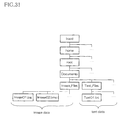
- storage means need only store image data received by reception means in a specified folder. Further, storage means may store image data received by reception means in the folder specified by file format. This facilitates image data file management and limits the number of files stored in each folder.
- the present invention provides another information processing system which is different from the above information processing system of the invention and which is comprised of an information processing apparatus and other information equipment capable of receiving image data transmitted from an information processing apparatus after conversion into a manipulatable format, the other information equipment comprising instruction means for instructing the information processing apparatus to receive the image data, the information processing apparatus comprising transmission means for transmitting the image data to the other information equipment based on instruction from the instruction means.
- other information equipment such as PDA can make a request for image data transmission to information processing apparatus such as PC.
- the present invention provides a data transmission method for transmitting image data from an information processing apparatus to other information equipment, the method comprising the steps of extracting image data from the display screen in response to a transmission request, converting extracted image data into a format manipulatable by other information equipment, and transmitting the converted image data.
- image data displayed on the display screen is extracted by user transmission request.
- image data thus extracted is converted into a format manipulatable by other information equipment such as JPEG or DIB and transmitted to other information equipment. This allows other information equipment to manipulate (i.e., work with) extracted image data.
- the present invention provides a data transmission method for transmitting image data from an information processing apparatus to other information equipment, the method comprising the steps of selecting a piece of image data from among a plurality of pieces of image data displayed on the display screen in response to a transmission request, extracting the selected piece of image data, converting the extracted image data into a format manipulatable by other information equipment, and transmitting the converted image data.
- an arbitrary window screen is selected from the multi-window screen displayed on the display window by user transmission request.
- window screen image data thus extracted is converted into a format manipulatable by other information equipment such as JPEG or DIB and transmitted to other information equipment. This allows other information equipment to manipulate (i.e., work with) extracted image data.
- the present invention provides a data transmission method for transmitting image data from an information processing apparatus to other information equipment, the method comprising the steps of specifying a display screen area from which image data is to be extracted in response to a transmission request, extracting the specified area of image data, converting extracted image data into a format manipulatable by other information equipment, and transmitting converted image data.
- a display screen area from which image data is to be extracted is specified in response to a transmission request. For example, an appropriate area is specified for the display screen size of the information equipment to which data is to be transmitted. In this case, the user may directly enter a desired area or select an area from among a plurality of available options. And, the area of image data thus specified is extracted, converted into a format manipulatable by other information equipment such as JPEG or DIB and transmitted to other information equipment. This allows other information equipment to manipulate (i.e., work with) extracted image data.
- the present invention provides a data transmission method for transmitting image data from an information processing apparatus to other information equipment, the method comprising the steps of specifying a display screen area from which image data is to be extracted, extracting the specified area of image data and converting it into a format manipulatable by other information equipment, storing converted image data on image data storage means, and reading image data stored on image data storage means and transmitting the image data to other information equipment in response to a transmission request.
- a display screen area from which image data is to be extracted is specified. For example, an appropriate area is specified for the display screen size of the information equipment to which data is to be transmitted.
- the user may directly enter a desired area or select an area from among a plurality of available options.
- the area of image data thus specified is extracted, converted into a format manipulatable by other information equipment such as JPEG or DIB and stored on image data storage means.
- image data stored on image data storage means is read and transmitted as is to other information equipment by user transmission request. This allows other information equipment to manipulate (i.e., work with) extracted image data.
- the present invention provides a data transmission method for transmitting image data from an information processing apparatus to other information equipment, the method comprising the steps of extracting image data from the display screen and converting it into a format manipulatable by the other information equipment in response to a transmission request, detecting whether connection is established with the other information equipment, storing the converted image data on image data storage means when no connection is established with other information equipment, and reading the image data stored on image data storage means and transmitting the image data to other information equipment when establishment of connection with other information equipment is detected.
- image data is extracted from the display screen and converted into a format manipulatable by other information equipment such as JPEG or DIB in response to a transmission request. And, image data converted into JPEG or DIB is stored on the image data storage means when no connection is established with other information equipment. Then, when establishment of connection with other information equipment is detected, image data stored on image data storage means is read and transmitted as is to other information equipment by transmission means. This prevents useless image data transmission and allows immediate image data transmission when it becomes possible to transmit data.
- other information equipment such as JPEG or DIB
- the present invention provides a data transmission method for transmitting image data from an information processing apparatus to other information equipment, the method comprising the steps of extracting image data from the display screen and converting it into a format manipulatable by the other information equipment in response to a transmission request, detecting whether connection is established with the other information equipment, storing the converted image data on image data storage means when no connection is established with other information equipment, confirming whether to transmit image data when establishment of connection with other information equipment is detected, and reading the image data stored on image data storage means and transmitting the image data to other information equipment if image data is to be transmitted as a result of confirmation.
- image data is extracted from the display screen and converted into a format manipulatable by other information equipment such as JPEG or DIB in response to a transmission request. And, converted image data is stored on image data storage means when no connection is established with other information equipment. Then, when establishment of connection with other information equipment is detected, the user is asked whether to transmit image data. As a result, if the user chooses to transmit data, image data stored on image data storage means is read and transmitted as is to other information equipment. Thus, asking the user in advance whether to transmit image data prevents useless transmission not based on the user's intention and allows immediate image data transmission when it becomes possible to transmit data.
- other information equipment such as JPEG or DIB
- the present invention provides a data transmission method for transmitting image data from an information processing apparatus to other information equipment, the method comprising the steps of extracting image data from the display screen and converting it into a format manipulatable by the other information equipment in response to a transmission request, detecting whether connection is established with the other information equipment, confirming whether to store the converted image data on the image data storage means when no connection is established with other information equipment, storing the converted image data on image data storage means if, as a result of confirmation, data is to be stored, and reading the image data stored on image data storage means and transmitting the image data to other information equipment when establishment of connection with other information equipment is detected.
- image data is extracted from the display screen and converted into a format manipulatable by other information equipment such as JPEG or DIB in response to a transmission request.
- other information equipment such as JPEG or DIB
- connection is established with other information equipment is detected, and then whether to store converted image data on image data storage means is confirmed when no connection is established with other information equipment. If the user chooses to transmit data in response to this confirmation, converted image data is stored on image data storage means.
- image data stored on image data storage means is read and transmitted as is to other information equipment.
- the present invention allows the data transmission method to be realized as a computer-readable data transmission program designed to implement this method. Moreover, this data transmission program can be provided as a computer-readable record medium having this program recorded thereon.
- the present invention provides a data reception method for other information equipment to receive image data transmitted from an information processing apparatus after conversion into a manipulatable format, the method comprising the steps of receiving image data, storing received image data in a specified folder, detecting image data reception based on change in the number of files stored in the folder, and displaying detected image data.
- received image data is stored in the specified folder and image data reception detected, and this detection acts as a trigger, displaying received image data on display means. This ensures that the user is informed on other information equipment which has received image data that image data reception is complete and allows immediate confirmation of the received image data contents.
- the present invention allows the data reception method to be realized as a computer-readable data reception program designed to implement this method. Additionally, this data reception program can be provided as a computer-readable record medium which has recorded this program.
- the present invention provides another information processing apparatus which is different from the above information processing apparatus of the invention and which is capable of transmitting text data to other information equipment, the another information processing apparatus comprising text data extraction means for extracting text data from display screen's on-screen data, text data storage means for storing extracted text data, and transmission means for extracting text data by the text data extraction means through selection of the display screen's on-screen data, storing the text data on the text data storage means and transmitting the text data to the other information equipment.
- text data extraction means extract text data from the display screen's on-screen data. In this case, only the entire area displayed on the display screen or the entire area scrollable by the scroll bar or other method may be extracted. Text data thus extracted is stored on text data storage means. Transmission means transmit text data thus extracted and stored on text data storage means to other information equipment. This allows other information equipment to handle extracted text data.
- the present invention provides an information processing apparatus capable of transmitting text data to other information equipment, the apparatus comprising area specification means for specifying an on-screen data area from which text data is to be extracted, text data extraction means for extracting the specified area of text data from on-screen data, text data storage means for storing extracted text data, and transmission means for extracting text data from the specified area by the text data extraction means through specification of an area within the on-screen data by the area specification means, storing the text data on the text data storage means and transmitting the text data to the other information equipment.
- area specification means for specifying an on-screen data area from which text data is to be extracted
- text data extraction means for extracting the specified area of text data from on-screen data
- text data storage means for storing extracted text data
- transmission means for extracting text data from the specified area by the text data extraction means through specification of an area within the on-screen data by the area specification means, storing the text data on the text data storage means and transmitting the text data to the other information equipment.
- area specification means specify an on-screen data area from which text data is to be extracted. For example, an appropriate area is specified for the display screen size of the information equipment to which data is to be transmitted. In this case, the user may directly enter a desired area or select an area from among a plurality of available options.
- Text data whose area is thus specified is extracted by text data extraction means and stored on text data storage means.
- the transmission means transmit text data thus stored on text data storage means to other information equipment. This allows other information equipment to manipulate extracted text data.
- text data extracted by text data extraction means is extracted along with Hypertext data if Hypertext data is included in on-screen data.
- text data extraction means extract text data using the clipboard and store it on text data storage means.
- Copying of text data to the clipboard is often realized by pressing the Ctrl and C keys simultaneously as long as a Windows (registered trademark of Microsoft; hereafter the same) program is used. For this reason, it becomes possible for text data extraction means for copying selected text data to the clipboard by bringing about the same condition as this key operation internally in the form of a program. Then, text data need only be extracted from the clipboard and stored on text data storage means.
- area specification method means in which area specification is conducted by specifying start to end positions for extraction of on-screen data displayed on the display screen. For instance, a rectangular area is specified by combining pressing and releasing of the mouse button. Moreover, a rectangular area with fixed height and width having its starting point at an arbitrary position may be specified as another area specification method by moving the cursor with the mouse or other method and specifying that arbitrary position on the image data.
- detection means may be provided which detect whether connection is established with other information equipment. And, when detection means detect that no connection is established with other information equipment, text data extracted by text data extraction method is stored on text data storage means.
- memory medium such as HDD, EEPROM or flash memory can be used as text data storage means. Then, when detection means detect that connection is established with other information equipment, text data stored on text data storage means is read and transmitted to other information equipment by transmission means. This prevents useless text data transmission and allows immediate text data transmission when it becomes possible to transmit data.
- attachment means may be provided which attach extra information to text data extracted by text data extraction means.
- Date, index title and arbitrarily attached index information is among information attached by attachment means.
- extra information may be attached when text data is transmitted by transmission means or when text data is stored on text data storage means. Transmission of text data after attachment of these pieces of information allows easy search for target text data from numerous pieces of text data on the information equipment to which text data will be transmitted.
- means may be provided such as condition addition means which add text data extraction conditions to text data extracted by text data extraction means and storage location specification means which specify a location for storing text data.
- condition addition means which add text data extraction conditions to text data extracted by text data extraction means
- storage location specification means which specify a location for storing text data.
- data showing added conditions and specified storage location may be added to text data when text data is transmitted by transmission means or when text data is stored on text data storage means. Transmission of text data after addition of these pieces of information allows more flexible manipulation of text data on the information equipment to which image data will be transmitted.
- transmission means may be a record medium, and text data may be transmitted by passing this record medium from the information processing apparatus to other information equipment. That is, data exchange between the information processing apparatus such as PC and other information equipment such as PDA can be accomplished, for example, by a physical cable connecting them or by conveying wireless signal; in addition to these, data exchange can also be accomplished by passing nonvolatile memory commonly usable for both the PC and PDA such as CF memory card.
- the present invention provides information equipment which is different from the above information equipment of the invention and which is capable of receiving text data from an information processing apparatus, the information equipment comprising reception means for receiving the text data, storage means for storing text data received by the reception means, detection means for detecting text data reception by the reception means, and display means for displaying text data detected by the detection means.
- detection means detect text data reception, and this detection acts as a trigger, displaying received text data on display means. This ensures that the user is informed on other information equipment which has received text data that text data reception is complete and allows immediate confirmation of the received text data contents.
- detection means may detect whether text data has been received based on change in the number of files stored in storage means. This ensures reliable detection of text data reception.
- the present invention provides an information processing system which is different from the above information processing system of the invention and which is comprised of an information processing apparatus and other information equipment capable of receiving text data from this information processing apparatus, the other information equipment comprising instruction means for instructing the information processing apparatus to receive the text data, the information processing apparatus comprising transmission means for transmitting the text data to the other information equipment based on instruction from the instruction means.
- other information equipment such as PDA can request the information processing apparatus such as PC to transmit text data.
- the present invention provides a data transmission method which is different from the above data transmission method of the invention and for transmitting text data from an information processing apparatus to other information equipment, the method comprising the steps of extracting text data from the display screen's on-screen data, storing extracted text data on text data storage means, and transmitting text data stored on text data storage means to other information equipment.
- text data is extracted from the display screen's on-screen data by user transmission request.
- text data is stored on text data storage means and transmitted to other information equipment. This allows other information equipment to manipulate extracted text data.
- the present invention provides a data transmission method for transmitting text data from an information processing apparatus to other information equipment, the method comprising the steps of specifying an on-screen data area from which text data is to be extracted, extracting the specified area of text data from on-screen data, storing extracted text data on text data storage means, and transmitting text data stored on text data storage means to other information equipment.
- an on-screen data area from which text data is to be extracted from the display screen is specified in response to a transmission request. For example, an appropriate area is specified for the display screen size of the information equipment to which data is to be transmitted. In this case, the user may directly enter a desired area or select an area from among a plurality of available options. And, the area of text data thus specified is extracted, stored on text data storage means and transmitted to other information equipment. This allows other information equipment to manipulate extracted text data.
- the present invention allows the data transmission method to be realized as a computer-readable data transmission program designed to implement this method. Additionally, this data transmission program can be provided as a computer-readable record medium having this program recorded thereon.
- the present invention provides a data reception method which is different from the above data reception method of the invention and for other information equipment to receive text data from an information processing apparatus, the method comprising the steps of receiving transmitted text data, storing received text data in a specified folder, detecting text data reception based on change in the number of files stored in the folder, and displaying the detected text data.
- received text data is stored in the specified folder and text data reception is detected, and this detection acts as a trigger, displaying received text data on display means. This ensures that the user is informed on other information equipment which has received text data that text data reception is complete and allows immediate confirmation of the received text data contents.
- the present invention allows the data reception method to be realized as a computer-readable data reception program designed to implement this method. Additionally, this data reception program can be provided as a computer-readable record medium recording this program.
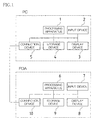
- Fig. 1 illustrates a functional block diagram schematically showing an information processing system in which a PC which is an information processing apparatus and a PDA which is other information equipment according to embodiment 1 of the present invention are connected such that they can exchange data with each other.
- PDA data is backed up to the PC.
- the PC is comprised of a processing device 1 which performs processings according to user operations and determines backup timing, an input device 2 such as keyboard or mouse which accepts user operations, a display device 3 which presents information such as images and sounds to the user, a storage device 4 which stores various data such as images and sounds and data backed up from the PDA and a connection device 5 which establishes connection with other information equipment such as PDA via a connection medium such as the Internet or USB cable.
- a processing device 1 which performs processings according to user operations and determines backup timing
- an input device 2 such as keyboard or mouse which accepts user operations
- a display device 3 which presents information such as images and sounds to the user
- a storage device 4 which stores various data such as images and sounds and data backed up from the PDA
- a connection device 5 which establishes connection with other information equipment such as PDA via a connection medium such as the Internet or USB cable.
- the PDA shown in Fig. 1 is comprised of a processing apparatus 6 which performs requested processings according to user operations, an input device 7 which accepts user operations, a display device 8 which presents information such as images and sounds to the user, a storage device 9 which stores information received from other PCs and PDAs and internally temporarily converted data and a connection device 10 which establishes connection with other PCs and PDAs.
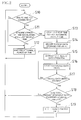
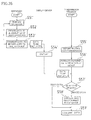
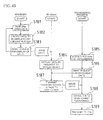
- Step S10 the program first checks whether the PDA is connected. As a result, if the PDA is not connected (if No is answered in Step S10), the operation proceeds to Step S12 where no processings are performed for a predetermined amount of time and the operation returns to Step S10 after this time period elapses where a confirmation is made again as to whether the PDA is connected.
- Step S10 a confirmation is made next as to whether a specified period of time has elapsed since the last automatic backup time (Step S11).
- This specified period of time refers to the time intervals for automatic backup specified in advance by the user.
- Step S11 When the specified period of time has not elapsed (if No is answered in Step S11), the processing remains in a standby state where no processings are performed for a predetermined amount of time (Step S12) and then the operation returns to Steps S10 and S11 where confirmations are made as to whether the PDA is connected and whether the specified period of time has elapsed.
- Step S11 when the specified period of time has elapsed (when Yes is answered in Step S11), the current time is stored on the storage device 4 of the PC as the last backup time (Step S13) first.
- Step S13 an area is secured on the storage device 4 of the PC for backing up data stored on the storage device 9 of the PDA (Step S14).
- Step S15 data is extracted from the storage device 9 of the PDA via the connection devices 10 and 5 (Step S15). And, extracted data is stored in the area previously secured within the storage device 4 (Step S16). Backup is complete when extraction of all data from the storage device 9 of the PDA and storage of such data on the storage device 4 are terminated (until Yes is answered in Step S17).
- the amount of stored data and the user-specified maximum backup amount are compared to determine whether the amount of stored data exceeds the maximum backup amount (Step S18) .
- the amount of stored data exceeds the maximum backup amount (when Yes is answered in Step S18)
- the oldest stored data is deleted (Step S19).
- no processings are performed.
- Steps S10 and S11 where confirmations are resumed as to whether the PDA is connected and whether the specified period of time has elapsed.
- the automatic backup flow is as discussed above.
- Restoration starts by user instruction obtained via the input device 2 of the PC or the input device 7 of the PDA. Pressing of a specific key on the PC, pressing of a button on the display device 3 using a pointing device such as the mouse, pressing of a specific key on the PDA and pressing of a button on the display device 3 of the PDA are among various possible input methods.
- Step S21 When restoration starts by any of these methods, a confirmation is made first as to whether the PDA is connected (Step S21). As a result, if the PDA is not connected (if No is answered in Step S21), restoration is terminated without performing any processing since restoration is not possible.
- Step S22 when the PDA is connected (when Yes is answered in Step S21), the user specifies (selects) the data to be restored next (Step S22).
- the reason for this is that it is necessary to have the user specify the data to be truly restored from among a plurality of pieces of backup data stored automatically on the storage device 4 of the PC. That is, there is a possibility that the latest stored data may not always be correctly and automatically backed-up data. For this reason, the storage device 4 of the PC is designed to be able to always store a plurality of pieces of data. This allows selection of a desired piece of data from among the most recent pieces of data and its restoration.
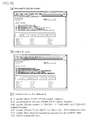
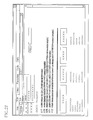
- a screen as shown in Fig. 5 is, for example, displayed on the display device 3 in which the update date is displayed for each piece of backup data, at the time of backup data selection during restoration of automatically backed-up data. This allows easy search for data to be restored based on the update date. Further, selection of list items under this condition provides more detailed information on backup data contents, if that file is displayed using other program such as Windows standard or dedicated viewer, further facilitating search for backup data to be restored.
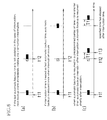
- Fig. 6 illustrates a drawing showing the timing relationship when automatic backup is interrupted.
- automatic backup time is updated from t11 to t12 if start of automatic backup itself is regarded as automatic backup in itself. This results in the interruption being regarded as execution of automatic backup once at time t12, thus causing automatic backup to be skipped once in reality. Therefore, another interruption of automatic backup will result in automatic backup being skipped at an increasingly rapid pace.
- automatic backup associated with the present invention can be interrupted by the user's intention; however, automatic backup is interrupted similarly if interruption occurs irrespectively of the user's intention as when the PDA is detached from the cradle for some reason.
- Fig. 7 shows the processing procedure for this case.
- Step S31 a confirmation is made as to whether the PDA is connected (Step S31). As a result, if the PDA is not connected (if No is answered in Step S31), restoration is terminated without performing any further processings.
- Step S31 when the PDA is connected (when Yes is answered in Step S31), the time when data is to be restored is stored as the last automatic backup time (Step S32), and an area is secured on the storage device 4 of the PC for storing backup data (Step S33). Then, data is extracted from the storage device 9 of the PDA one piece at a time and stored on the storage device 4 of the PC, which is performed for all the data stored on the PDA (Steps S34, S35 and S36).
- Step S36 when storage of all the data is complete (when Yes is answered in Step S36), the user selects the data to be restored (Step S37), as a result of which the PC extracts the selected backup data from the data storage area according to the selection and transmits it to the PDA for storage on the storage device 9 (Step S38). This ensures restoration of the target data.
- data can also be stored at the user-specified arbitrary time using the same method as automatic backup. That is, it is only necessary to obtain a user instruction via the input device 2 or 7 as when automatic backup starts. This allows the same processings as automatic backup to be performed at the user-specified arbitrary timing and irrespectively of the last automatic backup.
- stored data is not automatically deleted even when there is already the maximum storable amount of data in the data storage area within the storage device 4 of the PC.
- the user is asked in advance whether to automatically delete stored data within the data storage area when automatic backup is started at a user timing.
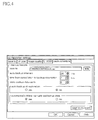
- This inquiry is made available, for example, by providing an inquiry screen for asking whether to automatically delete data at the bottom of the screen shown in Fig. 4 and allowing the user to select whether to automatically delete data.
- “No" that stored data is not subject to automatic deletion. This allows data not subject to automatic deletion to remain stored on a semipermanent basis unless deleted by the user's intention.
- connection it is necessary to confirm whether connection is established when whether to start automatic backup is decided. Similarly, confirmation is also needed when backup or restoration is performed at a user-specified timing. Note, however, that in this case confirmation need not always be made after the user specifies start of PC or restoration. When no connection is established, it is only necessary to ensure that the user cannot specify start of backup or restoration and that the user can instantly find out that it is impossible to do so, thus making obvious the current status of connection between the PC and the PDA and preventing needless operations by the user.
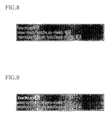
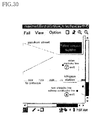
- a backup item is selectable from the menu and character strings in the menu are displayed in a usual manner. If the PC and the PDA are not connected, this backup item is made unselectable from the menu and character strings in the menu are displayed in an unusual manner, for example, in lighter color, as shown in Fig. 9. In Fig. 9, the color of the characters "Backup" is lighter.
- start of backup cannot be specified and making a difference between different pieces of displayed data related to user operations.
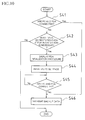
- Fig. 10 illustrates this processing flow.
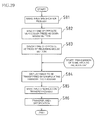
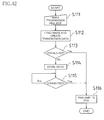
- Step S41 the program running on the PC first examines the status of connection between the PC and the PDA (Step S41). As a result, when the PDA is connected (when Yes is answered in Step S41), backup data is transmitted immediately from the PC to the PDA (Step S46). On the other hand, if the PDA is not connected (if No is answered in Step S41), a confirmation is made as to whether to perform restoration even by completely initializing the PDA (Step S42). The reason for this is that since it is impossible to automatically distinguish between simple non-connection and PDA anomaly, a selection by the user's instruction is needed.
- Step S42 restoration is interrupted in the case of simple non-connection.
- the PDA initialization procedure is displayed on screen (Step S43).
- connection-related settings of the PC's program are reset to their statuses immediately after PDA initialization (Step S44).
- Step S45 a monitoring mode is entered in which connection between the PC and the PDA is monitored (Step S45).
- the PC transmits backup data to the PDA (Step S46). This allows restoration to be performed even when the PC and the PDA are unable to communicate with each other.
- the system on the PDA must run at least to such an extent that it can communicate with the PC. That is, the data required for the system to run is replaced while the system is running. In this case, since replacement of files used by the system running on the PDA during restoration prevents the system from running properly, it is preferable to activate only the minimum functionality to the extent possible during restoration.
- a screen as shown in Fig. 11 is made available such that the user can select whether to perform automatic backup. This allows the user to specify whether to perform automatic backup.
- the information processing apparatus is realized by the program designed to ensure proper functioning of the processings for automatically backing up data of other information equipment and restoring backed-up data.
- the subject matter of the present invention may be this program itself or a computer-readable record medium which has stored this program.
- this record medium may be a program medium itself including memory needed for the processing apparatus (microcomputer) 1 shown in Fig. 1 to perform processings such as ROM or a program medium which becomes readable by insertion of a record medium into a program reading device provided as an external storage device not shown.
- the storage device 4 serves as a program medium.
- the stored program may be accessed by the microcomputer for execution or read and loaded into a program storage area not shown of the microcomputer for execution. This program to be loaded must be stored in advance on the device's main body.
- the program medium is a record medium separable from the main body and may be a tape-based medium such as magnetic or cassette tape, magnetic disk such as FD (flexible disk) or HD (harddisk), optical disk-based medium such as CD-ROM, MO, MD or DVD, card-based medium such as IC card (including memory card), optical card or a medium which holds programs in a stationary manner such as masked ROM, EPROM, EEPROM or flash ROM.
- a tape-based medium such as magnetic or cassette tape
- magnetic disk such as FD (flexible disk) or HD (harddisk)
- optical disk-based medium such as CD-ROM, MO, MD or DVD
- card-based medium such as IC card (including memory card), optical card or a medium which holds programs in a stationary manner such as masked ROM, EPROM, EEPROM or flash ROM.
- the program medium may be a medium which holds programs in a mobile manner as that in which programs are downloaded from a communications network.
- a program when a program is downloaded from a communications network, that program to be downloaded may be stored in advance on the device's main body or installed from a separate record medium.
- the contents of storage on the record medium are not limited to programs and may be data.
- the program may be the processings themselves performed by the processing device 1 shown in Fig. 1, a program which can be or has been loaded by accessing communications network including the Internet or a program which is to be transmitted. Further, the program may be the result of the processings performed by the information processing apparatus based on the loaded program, that is, final outcome. Or, the program may be the result of the processings performed by the information processing apparatus at the time of transmission, that is, final outcome. Note that these are not limited to programs and may be data.
- Fig. 1 shows an embodiment of information equipment to realize the data transmission and reception method associated with the present invention and illustrates a functional block diagram schematically showing a system configuration for transmitting data from a PC which is an information processing apparatus to a PDA which is other information equipment associated with the present invention.
- the PC is comprised of the processing device 1 which performs processings such as converting data to be handled into a human-understandable form and updating data, the input device 2 such as keyboard or mouse which accepts user operations, the display device 3 which presents information such as images and sounds to the user, the storage device 4 which stores data temporarily converted into information such as data to be handled, images and sounds and the connection device 5 which establishes connection with equipment such as other PCs and PDAs via a connection medium such as USB cable and the Internet.
- the processing device 1 which performs processings such as converting data to be handled into a human-understandable form and updating data
- the input device 2 such as keyboard or mouse which accepts user operations
- the display device 3 which presents information such as images and sounds to the user
- the storage device 4 which stores data temporarily converted into information such as data to be handled
- images and sounds and the connection device 5 which establishes connection with equipment such as other PCs and PDAs via a connection medium such as USB cable and the Internet.
- the PDA is comprised of the processing apparatus 6 which performs requested processings according to user operations, the input device 7 which accepts user operations, the display device 8 which presents information such as images and sounds to the user, the storage device 9 which stores information received from other PCs and PDAs and internally temporarily converted data and the connection device 10 which establishes connection with other PCs and PDAs.
- image data is, for example, considered as basic data to be extracted.
- image data is, for example, considered as basic data to be extracted.
- CRT Cathode Ray Tube
- individual programs to extract image data by making inquiries to the system software about image information.
- the clipboard when the user wishes to extract only text information as basic data, the clipboard is used. Copying of text data to the clipboard is often realized by pressing the Ctrl and C keys simultaneously as long as a Windows (registered trademark of Microsoft; hereafter the same) program is used. This is based on the philosophy that different operations needed in different programs result in difficulty of use. Using this arrangement allows extraction of text data from application data managed independently by individual programs via the clipboard, thus allowing transmission of basic data to information equipment such as PDA which runs on a different system.
- Windows registered trademark of Microsoft
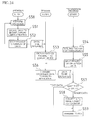
- a processing example is described as a specific example, by referring to the flowchart shown in Fig. 34, in which data, which will be viewed on the PDA is created on a Windows-equipped PC from Hypertext containing information such as drawings, text and links indicating references to other documents.
- the processing device 1 interprets and executes the Hypertext viewing program (hereafter browser) read from the storage device 4 or obtained from other equipment via the connection device 5.
- Hypertext viewing program hereafter browser
- the area to be displayed that is, the area from which data is to be extracted is specified by manipulating the input device 2 such as the scroll bar or mouse.
- Hypertext stored on the storage device 4 or Hypertext obtained from other equipment through the connection device 5 via a connection network such as the Internet is processed into a human-viewable form (Step S51).
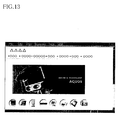
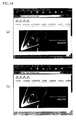
- This processed data is passed to Windows once (Step S52) and displayed on the display device 3 in the form as shown in Fig. 13 (Step S53).
- Windows is capable of displaying a plurality of windows on screen as shown in Fig. 14. In this case, it is necessary to first select a window containing data to be extracted. This selection can be made, for example, by clicking on a title bar 11 of a background window W1 and bringing the window W1 to foreground to make it an active window.
- the area from which data is to be extracted is not limited to a single screen which is actually displayed on the display device 3 and may include those areas not displayed on this screen. That is, this is a case in which only part of the data is extracted and displayed due to restrictions such as the size of the display device 3 despite the fact that the data is originally one page and therefore one screen is comprised of the entire data. In this case, not only displayed on-screen data but also data which would otherwise be displayed can be extracted as on-screen data.
- This operation may be, for example, an operation such as pressing of a keyboard key, pressing of a button indicating start of transmission with a pointing device such as the mouse or any other operation.
- the transmission program requests Windows to obtain one page of on-screen data (substantially one page of the on-screen data) which is currently displayed (Step S55).
- the transmission program determines the type of obtained data (Step S57) and when the obtained data is image data, the operation proceeds from Step S57 to Step S58, where the program converts it into an image format (e.g., JPEG, DIB) suitable for storage on the PDA and transmits it to the PDA (Step S59).
- the program converts it into an image format (e.g., JPEG, DIB) suitable for storage on the PDA and transmits it to the PDA (Step S59).
- the obtained data is text data containing only character information
- the operation proceeds from Step S57 to Step S59 where the program transmits data as is without converting the image format.
- the PC it is possible for the PC to produce a tone indicating completion of transmission.
- the PDA performs processings according to processings predetermined on the PDA such as storing the received data on the storage device 9 or displaying it on the display device 8 without storing it.
- Execution of such a series of processings makes it possible to convert application data manipulated by the sender's program into basic data and transmit it to the PDA without performing any special processing on the sender's program and also display Hypertext even on a PDA not supporting Hypertext as long as the PDA can display images.
- Step S51' user instructions are obtained from input device 1 in Step S51' by the same means as in the earlier Step S50.
- Step S52' data to be displayed is created by the same means as in the earlier Step S51.
- Step S54' Although Windows is requested to transmit data in the earlier Step S52, the display device 3 is instructed to directly display data in this Step S53'. The display device 3 displays data according to this instruction (Step S54').
- Step S55' If the transmission program receives an instruction under this condition to transmit data to the PDA by the same means as in the earlier Step S54 (Step S55'), the transmission program obtains on-screen data from the display device 3 according to this instruction (Step S56') and determines the type of obtained on-screen data (Step S57'). As a result, if the obtained on-screen data is image data, the operation proceeds to Step S58' where the program converts the data into a PDA-manipulatable image format (e.g., JPEG, DIB) and transmits it to the PDA (Step S59' ). On the other hand, if the obtained data is text data containing only character information, the operation proceeds from Step S57' to Step S59' where the program transmits data as is without converting the image format.
- a PDA-manipulatable image format e.g., JPEG, DIB
- data to be transmitted can be classified into the following three types including the one screen of data.
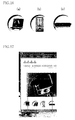
- the first type is (a) the entire screen as shown in Fig. 15, the second type (b) only the window displayed by the program displaying Hypertext as shown in Fig. 13 and the third type (c) a specific area of the screen as shown in Fig. 16.
- Figs. 36 and 37 show the user operation procedures respectively when areas (a) and (b) are transmitted.
- Step S61 the user displays the data to be transferred to and displayed on the PDA on the PC's display screen first (Step S61) and then performs "Transmission Start” operations such as pressing a specific key or clicking on a specific button with the mouse.
- This series of operations initiates data transfer to the PDA (Steps S62 and S63). That is, the entire screen of data is transferred by entire screen transfer request in the case of (a) while single screen of data is transferred by single screen transfer request in the case of (b).
- the user displays the data to be transferred to and displayed on the PDA on the PC's display screen first (Step S71). Then, the user makes a transmission request for area specification (Step S72). In response to the request, the transfer program enters a wait state in which it waits for area specification. With the program under this condition, the user specifies a rectangular area by combining pressing and releasing of the mouse button (Steps S73 and S74). And, the program starts transfer to the PDA immediately when rectangular area specification is complete (Step S75).
- Step S81 the user makes a request for area specification.
- Step S82 and S83 the user specifies a rectangular area by combining pressing and releasing of the mouse button as in Steps S73 and S74 (Steps S82 and S83).
- Step S84 the user displays the data to be transferred by operating the transfer program.
- Step S86 the area of data specified in Steps S82 and S83 is transferred to the PDA (Step S86).
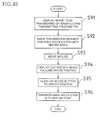
- the user operation procedure for displaying restrictions associated with display capability of the display device 8 of the PDA on the display device 3 of the PC is described by referring to the flowchart shown in Fig. 40 when the display device 8 of the PDA is comprised of an LCD (Liquid Crystal Display) having a display capability of 240 pixels across and 320 pixels down.
- LCD Liquid Crystal Display
- the user displays the data to be transferred on the display device 3 of the PC by operating the transfer program (Step S91).
- the user makes a transmission request for area specification with restrictions (Step S92).
- the transfer program displays LCD restrictions of the PDA display device 8 on the display device 3 of the PC (Step S94) according to the mouse movement as a result of succeeding user operations (Step S93).
- the user specifies an area by clicking on the upper left corner of the area (Step S95). Since this results in the restriction or the area of 240 pixels across and 320 pixels down being displayed, the specified area data with restrictions is transferred to the PDA when the user makes a transmission request for area specification (Step S96).
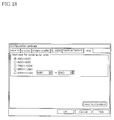
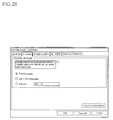
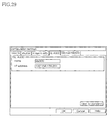
- Fig. 18 illustrates a rectangular area setting screen.
- four specifiable rectangular areas (480x640, 600x800, 768x1024, 960x1280 pixels) are made available in advance, and in addition to these, a setting field for the user to specify an arbitrary area is also provided. This allows the user to select a desired area of data to be transferred to the PDA.
- the first processing is that in which no processings are performed even if a transmission request is made as long as transmission is not possible.
- the second processing is that in which data to be transmitted is stored temporarily on the PC at the time of transmission request if transmission is not possible and data is transmitted immediately to the PDA when transmission becomes possible as a result of establishment of connection with the PDA.
- the third processing is that in which data to be transmitted is stored temporarily on the PC at the time of transmission request if transmission is not possible and a confirmation is made as to whether to transmit data before transmission to the PDA.
- the fourth processing is that in which a confirmation is made as to whether to transmit current data when transmission becomes possible if transmission is not possible and, only when data is to be transmitted, data to be transmitted is stored temporarily on the PC and data is transmitted immediately to the PDA when transmission becomes possible as a result of establishment of connection with the PDA.
- These first to fourth processings are focused on individual transmission data and do not prevent acquisition of other data while certain data is manipulated according to any of these processings.
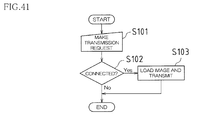
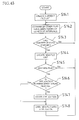
- Step S102 a confirmation is made as to whether connection is established with the PDA (Step S102) when a transmission request is made (Step S101).
- Step S101 a transmission request is made
- Step S102 a confirmation is made as to whether connection is established with the PDA (Step S102) when a transmission request is made (Step S101).
- Step S101 a transmission request is made
- Step S102 a confirmation is made as to whether connection is established with the PDA
- Step S101 a transmission request is made
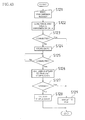
- transmission data is created by loading the image according to the individual methods discussed earlier and converting it into an image format suitable for storage on the PDA (Step S112) when a transmission request is made (Step S111). Note, however, that if the data is text data containing only character information, transmission data is created as is without converting the image format. Then, a confirmation is made as to whether connection is established (Step S113) and created data is transmitted to the PDA (Step S116) when connection is established (when Yes is answered in Step S113).
- Step S113 if no connection is established (if No is answered in Step S113), created data is stored once on the storage device 4 of the PC (Step S114). Then, the status of connection with the PDA is monitored (Step S115), and when connection between the PC and the PDA is confirmed (when Yes is answered in Step S115), stored data is transmitted to the PDA (Step S116).
- transmission data is created by loading the image according to the individual methods discussed earlier and converting it into an image format suitable for storage on the PDA (Step S122) in response to a transmission request (Step S121), regardless of whether connection is established. Note, however, that if the data is text data containing only character information, transmission data is created as is without converting the image format. Then, a confirmation is made as to whether connection is established (Step S123) and created data is transmitted to the PDA (Step S129) when connection is established (when Yes is answered in Step S123).
- Step S123 converted data is stored once on the storage device 4 of the PC (Step S124). Then, the status of connection with the PDA is monitored (Step S125), and when connection between the PC and the PDA is confirmed (when Yes is answered in Step S125), the user is asked whether to transmit stored data to the PDA (Step S126). This question is displayed on the display device 3.
- the processing device 1 interprets the question according to the operation performed. As a result of interpretation, when data is to be transmitted (when Yes is answered in Step S127), the stored data is transmitted to the PDA (Step 129). On the other hand, if data is not to be transmitted (if No is answered in Step S127), stored data is discarded (Step 128) and the processing is terminated without transmitting data to the PDA.
- transmission data is created by loading the image according to the individual methods discussed earlier and converted into an image format suitable for storage on the PDA (Step S132) when a transmission request is made (Step S131), regardless of whether connection is established. Note, however, that if the loaded image is text data containing only character information, transmission data is created as is without converting the image format. Then, a confirmation is made as to whether connection is established (Step S133) and created data is transmitted to the PDA (Step S139) when connection is established (when Yes is answered in Step S133).
- Step S134 the user is asked whether to store the obtained data once before transmission to the PDA when connection is established later between the PC and the PDA. This question is displayed on the display device 3 (Step S135).
- the processing device 1 interprets the question according to the operation performed. As a result of interpretation, if the obtained data is not to be transmitted (if No is answered in Step S135), the data is discarded (Step 138).
- Step S135 when data is to be transmitted (when Yes is answered in Step S135), converted data is stored once on the storage device 4 of the PC (Step 136). Then, the status of connection with the PDA is monitored (Step S137), and when connection between the PC and the PDA is confirmed (when Yes is answered in Step S137), the stored data is transmitted to the PDA (Step S139).
- the obtained data is converted into an image format suitable for storage on the PDA and stored on the storage device 4 if it is image data in the second or fourth processing
- the obtained data may be stored as is on the storage device 4 and the data, read from the storage device 4, may be converted into an image format suitable for storage on the PDA before transmission to the PDA after establishment of connection between the PC and the PDA and transmitted.
- Fig. 19(a) indicates connection while Fig. 19(b) non-connection.
- Fig. 19(c) indicates connection while Fig. 19(b) non-connection.
- a Windows-equipped PC for example, it is possible to confirm the connection status and presence/absence of untransmitted data by displaying the graphical images as shown in Figs. 19(a) to 19(c) in the area called the task tray.
- additional information can be embedded into text and image data depending on the format.
- information can be embedded into an area called the application marker segment.
- the same functionality can be realized by making available separate data and indicating that the data constitutes additional information for text or image data.
- text data is stored as a file
- it is possible to realize the same functionality as the JPEG's application marker segment by making available a separate text file and writing in this file both text file names to be associated and additional information.
- Hypertext is displayed in the first or fourth processing, it is possible to not only display the data transmitted from the PC but also access that data by embedding information (e.g., URL) including where the transmitted data originates as shown in Fig. 20 as additional information if means are available on the PDA which display Hypertext.
- embedding information e.g., URL
- Fig. 21 shows an example of results of transmission of such additional information conducted a plurality of times.
- each line of the table shown in Fig. 21 corresponds to one JPEG file.
- each JPEG file includes the Web page address (URL) referenced when displaying each image in the application marker segment as additional information.
- URL Web page address
- the PDA selects a processing to be performed on the data transmitted to the PDA. That is, the PDA performs a processing according to the processing predetermined on the PDA such as storing the received data on the storage device 9 or displaying it on the display device 8 without storing it. Moreover, even when data is stored on the storage device 9, the PDA also determines on which storage medium the data is to be stored if the storage device 9 is comprised of a plurality of storage media. Further, the PDA determines in which format the data is to be stored on the storage device 9.
- a screen as shown in Fig. 22 is displayed on the display device 3 of the PC and two options are provided to the user for "Save to" at the bottom of the screen.
- Data is stored as a file within the PDA's file system called the main memory in one of the options while data is stored as a file within the SD (Secure Digital) card's file system in another option. This selection is made, for example, prior to creation of data to be transferred.
- SD Secure Digital
- a screen as shown in Fig. 23 is displayed on the display device 3 of the PC and two options or JPEG and BMP are provided to the user for "Storage Format" at the top of the screen.
- Figs. 24(a) and 24(b) show examples of obtained image data respectively when the image size is increased (when the slider is moved to the right in the figure) and reduced (when the slider is moved to the left in the figure).
- the image quality in Fig. 24(b) is slightly lower than that in Fig. (a).
- the data creation date is embedded into the file system's file name.
- the PC's window title is embedded.
- the user-entered data is embedded. Such embedding facilitates search for the target data from among a large number of data.
- a plurality of options are provided to the user by displaying a screen as shown in Fig. 22 on the display device 3.
- the first method of embedding information serving as index is the case in which "Auto Save File (Date Type)" under "Save Under” in Fig. 22 is checked; in this case, the transfer program automatically creates file names of image files to be stored in the file system from transferred data creation dates.
- the second method of embedding information serving as index is the case in which "Auto Save File (Serial Number Type) " under "Save Under” in Fig. 22 is checked; in this case, the transfer program automatically creates file names of text or image files to be stored in the file system in the order in which transferred data was created.
- the third method of embedding information serving as index is the case in which "Auto Save File (Window Title Type)" under "Save Under” in Fig. 22 is checked; in this case, file names of text data or image files to be stored in the file system are created from titles of windows handled by Windows.
- the fourth method of embedding information serving as index is the case in which "New File Name Every Time” under "Save Under” in Fig. 22 is checked; in this case, the user is asked a file name under which data is stored in the file system after data to be transferred is created and file name is created according to that file name.
- the fifth method of embedding information serving as index is the case in which "Others" under "Save Under” in Fig. 22 is checked; in this case, the user specifies a fixed character string + automatically assigned serial number digits as desired and the transfer program automatically creates file names for the file system based on these settings.
- image data has been covered as data to be transmitted from the PC to the PDA.
- data other than images is also among basic data transmitted from the PC to the PDA. More specifically, such data is text data as discussed above.
- Text data is the easiest to handle of all data, whose area is often specifiable through mouse dragging and other operations. This is probably due to reasons such as a system component called the control, available as standard with Windows, offers such a feature or this is a natural consequence in consideration of the user interface and ease of use.
- WM_COPY a message called WM_COPY is issued during extraction of selected text data.
- This message is designed to request a processing for copying the selected text data to a shared memory mechanism called the clipboard.
- This message can be issued from one arbitrary program to another. Use of this message allows extraction of text data selected by other programs.
- This operation of copying text data to the clipboard is generally often performed by pressing the same key, regardless of which program is used.
- pressing the C key while pressing and holding the Ctrl key corresponds to this operation.
- Fig. 28 shows an example of image capture setting screen for extracting image data under the various conditions from the display device 3 of the PC while Fig. 29 an example of IP address setting screen for information equipment with which connection is to be established.
- the PDA functions as a file server for the PC and files are written to the PDA's file system for data transmission from the PC to the PDA.
- the case in which a transmitted file is displayed on the display device 8 of the PDA under this condition is described.
- Step S141 a list of files in directories to which files may be written is created on the PDA (Step S141). Under this condition, addition of files is monitored at constant time intervals (Step S142).
- Step S143 Through monitoring, change in the number of files is confirmed (Step S143). As a result, if the number of files remains unchanged (if No is answered in Step S135) , the operation returns to Step S142, under the assumption that there are no new files, where addition of files is monitored at constant time intervals.
- Step S143 when the number of files has changed (when Yes is answered in Step S143), a new file list is created for use during next monitoring, under the assumption that there may be new files added from the PC (Step S144). Additionally, the previous file list prepared in advance is compared with the current files to confirm whether any new files have been added (Step S145).
- Step S145 As a result of confirmation of the file lists, if no new files have been added (if No is answered in Step S145), the operation returns to Step S142 where addition of files is monitored again at constant time intervals.
- Step S145 when a new file has been added (when Yes is answered in Step S145), a confirmation is made as to whether the application which opens that file is currently running (Step S146), and if it is not running, the application which opens that file is activated (Step S147) and the file is opened by passing the file name of the added file to the application (Step S148), thus displaying the data transmitted from the PC on the PDA.
- Step S146 when the application which opens that file is found to be already running as a result of judgment in Step S146, the file is opened by passing the file name of the added file to the existing application rather than activating an application afresh (Step S148), thus displaying the data transmitted from the PC on the PDA.
- Monitoring itself runs independently of other applications. For this reason, monitoring is executed again without waiting for the application for displaying the data transmitted from the PC to be exited.
- Execution of such a processing allows the PDA, which has received the data created by the PC, to inform the user that data reception is complete and examine the contents of received data.
- the PDA which has received data from the PC stores that data on the storage device 9 of the PDA as necessary. These pieces of stored data make it difficult to find the target one as their number increases. For this reason, files are generally managed using folders.
- folders structured, for example, as shown in Fig. 31 are made available, and when data to be stored is image data, it is stored in a folder named Image Files while when data to be stored is text data, it is stored in a folder called Text Files.
- folders may be changed, for example, according to data transmission dates as in 2002.06.03 and 2002.06.04. Realization of such means allows limitation of the number of files stored in one folder, thus resolving the problems, that is, difficulty involved in finding the target file and long processing time required for file list creation.
- a trigger for extracting data from the display device 3 of the PC need not be a user operation obtained from the input device 2 of the PC.
- data may be extracted from the display device 3 of the PC as a result of an operation of the input device 7 of the PDA.
- Pressing the cradle button or touching a button on the display device 8 with the tablet are among specific operations in this case.
- the processing in this case is described below. Note, however, that we assume that the PDA is connected to the PC as a file server.
- the PDA functions as a file server, and an instruction from the PDA is given in the form of a file existing on the storage device 8 of the PDA (hereafter instruction file). Whether any instruction is given by the user on the PDA is recognized by monitoring such an instruction file.
- instruction file a file existing on the storage device 8 of the PDA
- Step S161 If we assume that the user instructs the input device 7 of the PDA to transmit data from the display device 3 of the PC to the PDA (Step S161), the PDA confirms whether the instruction file already exists (Step S162). As a result, if no instruction file exists, the PDA creates a file (Step S163). On the other hand, when a file exists, the PDA updates the instruction file's time stamp (Step S164). The PDA executes the processing each time the user gives an instruction for transmission.
- the PC monitors an instruction file on the PDA and performs processings . It is impossible for the PC to predict when an instruction file is created on the PDA and when it is deleted. For this reason, the PC performs processings which allow it to function properly, regardless of when an instruction file is created and deleted. Additionally, there is a possibility that files may not be writable when two different systems are connected and run. To revolve this problem, the processings are designed to be completed on the PC by simply loading files. Moreover, the equivalent processing can be performed, for example, by monitoring the change in file contents in addition to file time stamp as a way of monitoring the file state on the PDA. Note, however, that a case, in which file time stamp is monitored to inform the PC of issuance of transmission request on the PDA, is described here as a simple example.
- the transmission program running on the PC confirms whether an instruction file exists on the PDA first (Step S151) if it can recognize the PDA as a file server.
- the confirmation at this point in time is simply designed to examine the PDA state and select monitoring and does not initiate transmission regardless of the state of the instruction file.
- Step S151 if an instruction file does not exist (if No is answered in Step S151) , the operation proceeds to a monitoring A while when an instruction file exists (when Yes is answered in Step S151), the operation proceeds to a monitoring B.
- the monitoring A is described first.
- Step S152 This monitoring A is performed at constant time intervals (Step S152), and only a confirmation as to whether an instruction file exists is made at this time (Step S153).
- Step S153 As a result, when existence of an instruction file is confirmed (when Yes is answered in Step S153), since this file signals start of transmission, the new time stamp of the instruction file is stored first (Step S154) and then on-screen data is transmitted from the PC (Step S155).
- Step S154 On the other hand, if existence of an instruction file cannot be confirmed in Step S153, the operation returns to Step S152 where a confirmation is made at constant time intervals as to whether an instruction file exists. When its existence is confirmed, the operation proceeds from the monitoring A to the monitoring B which will be explained next.
- the item monitored in the monitoring B is the instruction file's time stamp rather than existence of the file. That is, change in the instruction file's time stamp is assumed to be a transmission request from the user in the monitoring B.
- the current time stamp of the instruction file is stored immediately after the processing enters the monitoring B (Steps S154 and S155). And, after a predetermined period of time elapses (Step S157), monitoring of the instruction file is performed.
- Step S158 a confirmation is made as to whether an instruction file exists (Step S158).
- existence of an instruction file cannot be confirmed (if No is answered in Step S158)
- time stamps cannot be compared
- the operation returns to Step S152 where it switches from the monitoring B to the monitoring A.
- the transmission program running on the PC has confirmed that an instruction file had been created on the PDA and deleted later. That is, if an instruction file is created from this point onward, this indicates that the user has made a transmission request on the PDA.
- Step S158 when existence of an instruction file is confirmed in the monitoring B (when Yes is answered in Step S158), the instruction file's time stamp is obtained and compared with the stored time stamp (Step S159). As a result, if the time stamp remains unchanged (if No is answered in Step S159), since this indicates that the user has not made any transmission request, the operation returns to Step S157 where monitoring of an instruction file is performed again after a predetermined period of time elapses.
- Step S159 when the time stamp has changed (when Yes is answered in Step S159), since this indicates that the user has made a transmission request, the operation returns to Step S154 where the instruction file's time stamp is stored first and then on-screen data is transmitted from the PC (Step S156).
- Repetition of the monitorings A and B discussed above allows a transmission start request to be conveyed from the input device 7 of the PDA to the PC without using file write on the PDA.
- Fig. 32 illustrates an explanatory diagram showing the PC and PDA state changes when a transmission request is conveyed from the PDA to the PC using the monitorings A and B.
- S151 to S159 under "PC state" in the figure correspond to the steps in Fig. 46.
- a detailed description is given below by referring to this explanatory diagram.
- the monitoring A is performed after a predetermined period of time (St3). After a predetermined period of time elapses, a confirmation is made as to whether an instruction file exists on the PDA (St4). Since no instruction file exists in this stage, a predetermined period of time is waited again. We assume that a transmission request is issued on the PDA during this predetermined period of time (St5). Since a transmission request is issued, the PDA confirms whether an instruction file exists. In this case, since no instruction file exists, an instruction file is created at this point in time (St6).
- the PC's transmission program confirms again whether an instruction file exists after a predetermined period of wait time (St7). Since an instruction file exists at this time, the program stores a time stamp T1 of the instruction file (St8). Then, the program extracts on-screen data from the display device 3 of the PC and transmits it to the PDA (St9). Additionally, since existence of an instruction file has been confirmed, the operation proceeds to the monitoring B where the program waits a predetermined period of time (St10).
- the PC confirms again whether an instruction file exists after a predetermined period of wait time (St15) using the monitoring B. In this case, since an instruction file exists, the PC next confirms the time stamp of the instruction file (St16).
- the PC's transmission program confirms that a transmission request has been issued on the PDA. That is, the time stamp of the instruction file is stored first (St17). Next, transmission is performed based on the transmission request (St18). Then, the monitoring B is performed after a predetermined period of time (St19).
- a predetermined period of time is waited first (St22). Then, a confirmation is made as to whether an instruction file exists (St23). Since no instruction file exists, a predetermined period of time is waited.
- a transmission request is issued on the PDA at this time (St24). In this case, since no instruction file exists on the PDA, an instruction file is created (St25).
- a confirmation is made as to whether an instruction file exists (St26).
- the PC's transmission program confirms that a transmission request has been made and first stores the time stamp of the instruction file (St27) and performs transmission (St28).
- data exchange between the PC and the PDA is accomplished by a physical cable connecting them, however, in addition to this, data exchange between the PC and the PDA can be accomplished by conveying signals in a wireless manner. Further, data exchange can also be accomplished by passing a nonvolatile memory commonly usable for both the PC and PDA such as CF memory card.
- Fig. 33 illustrates an example of device configuration when CF memory card is used as transmission means.
- the data to be transmitted to the PDA is, for example, stored in the file system of a memory card 20 as a file rather than transmitting it over a cable or wirelessly.
- a memory card 20 by its insertion into the PDA results in data transmission from the PC to the PDA.
- Manipulation of data transmitted in the form of a file stored in the memory card 20 on the PDA allows transmission of the PC's on-screen data to the PDA.
- Fig. 48 illustrates the processing flow at that time.
- the PC extracts on-screen data and converts it into a data format manipulatable by the PDA (Step S171) when a request is issued for on-screen data transmission to the PDA.
- the data created here is stored on the memory card 20 (Step S172). Storage of this data as a file in the file system provided on the memory card 20 is among possible storage methods.
- the memory card 20 storing on-screen data is taken out of the PC (Step S173) and fitted into the PDA (Step S174). And, the data is extracted from the memory card 20 fitted into the PDA and displayed through user operations (Step S175).
- Such processings allow data transmission from the PC to the PDA using the memory card 20 as a medium.
- conversion here refers to making data usable by the PDA. For example, when data displayed on the PC is already a file in JPEG format and when it is to be transmitted to the PDA also in JPEG format, there is a case in which the actual data to be transmitted is completely the same file as that manipulated on the PC. Even in this case, however, since data is made usable by the PDA, the word “conversion” is used here in "converting data on the PC into data manipulatable by the PDA.” Moreover, since a file used in Word, for example, is actually displayed by combining various types of data, data displayed in the form of text data is included in that data.
- the information processing system discussed above is realized by a program designed to make data exchange between the information processing apparatus and other information equipment functional.
- the subject matter of the present invention may be this program itself or a computer-readable record medium which has stored this program.
- this record medium may be a program medium itself including memory needed for the processing device (microcomputer) 1 shown in Fig. 1 to perform processings such as ROM or a program medium which becomes readable by insertion of a record medium into a program reading device provided as an external storage device not shown.
- the storage device 4 serves as a program medium.
- the stored program may be accessed by the microcomputer for execution or read and loaded into a program storage area not shown of the microcomputer for execution. This program to be loaded must be stored in advance on the device's main body.
- the program medium is a record medium separable from the main body and may be a tape-based medium such as magnetic or cassette tape, magnetic disk such as FD (flexible disk) or HD (hard disk), optical disk-based medium such as CD-ROM, MO, MD or DVD, card-based medium such as IC card (including memory card), optical card or a medium which holds programs in a stationary manner such as masked ROM, EPROM, EEPROM or flash ROM.
- a tape-based medium such as magnetic or cassette tape
- magnetic disk such as FD (flexible disk) or HD (hard disk)
- optical disk-based medium such as CD-ROM, MO, MD or DVD
- card-based medium such as IC card (including memory card), optical card or a medium which holds programs in a stationary manner such as masked ROM, EPROM, EEPROM or flash ROM.
- the program medium may be a medium which holds programs in a mobile manner as that in which programs are downloaded from a communications network.
- a program when a program is downloaded from a communications network, that program to be downloaded may be stored in advance on the device's main body or installed from a separate record medium.
- the contents of storage on the record medium are not limited to programs and may be data.
- the program may be the processings themselves performed by the processing device 1 shown in Fig. 1, a program which can be or has been loaded by accessing communications network including the Internet or a program which is to be transmitted. Further, the program may be the result of the processings performed by the information equipment based on the loaded program, that is, final outcome. Or, the program may be the result of the processings performed by the information equipment at the time of transmission, that is, final outcome. Note that these are not limited to programs and may be data.
- the user can be informed of data reception and immediately confirm the received data contents on other information equipment which has received data.
- This embodiment 3 differs only partially from the embodiment 2 in PC and PDA operational steps. For this reason, the same configurations as in embodiment 2 are used for the PC and the PDA, and the description of these configurations is omitted. Consequently, in this embodiment 3, the configurations different from those of embodiment 2 are described.
- the PC is comprised of the processing device 1, the input device 2, the display device 3, the storage device 4 and the connection device 5, as shown in Fig. 1.
- the PDA is comprised of the processing apparatus 6, the input device 7, the display device 8, the storage device 9 and the connection device 10, as shown in Fig. 1.
- FIG. 49 a processing example is described as a specific example, by referring to the flowchart shown in Fig. 49, in which data, which will be viewed on the PDA, is created on a Windows-equipped PC from Hypertext containing information such as drawings, text and links indicating references to other documents.
- the processing device 1 interprets and executes the browser read from the storage device 4 or obtained from other equipment via the connection device 5.
- the area to be displayed that is, the area from which data is to be extracted is specified by manipulating the input device 2 such as the scroll bar or mouse.
- Hypertext stored on the storage device 4 or Hypertext obtained from other equipment through the connection device 5 via a connection network such as the Internet is processed into a human-viewable form (Step S182).
- This processed data is passed to Windows once (Step S183) and displayed on the display device 3 in the form as shown in Fig. 13 (Step S184).
- the transmission program requests that Windows obtain one page of on-screen data (substantially one page of the on-screen data) which is currently displayed (Step S186).
- the transmission program converts the obtained data into an image format (e.g., JPEG, DIB) suitable for storage on the PDA (Step S188) and transmits it to the PDA (Step S189).
- an image format e.g., JPEG, DIB
- the PC it is possible for the PC to produce a tone indicating completion of transmission.
- the PDA performs processings according to processings predetermined on the PDA such as storing the received data on the storage device 9 or displaying it on the display device 8 without storing it.
- Execution of such a series of processings makes it possible to convert application data manipulated by the sender's program into basic data and transmit it to the PDA without performing any special processing on the sender' s program and also display Hypertext even on a PDA not supporting Hypertext as long as the PDA can display images.
- Step S181' user instructions are obtained from input device 1 in Step S181' by the same means as in the earlier Step S181.
- Step S182' data to be displayed is created by the same means as in the earlier Step S182.
- Step S183 Although Windows is requested to transmit data in the earlier Step S183, the display device 3 is instructed to directly display data in this Step S183'.
- the display device 3 displays data according to this instruction (Step S184').
- the transmission program receives an instruction under this condition to transmit data to the PDA by the same means as in the earlier Step S185 (Step S185')
- the transmission program obtains on-screen data from the display device 3 according to this instruction (Step S186').
- the obtained data is converted into an image format (e.g., JPEG, DIB) manipulatable by the PDA as in the earlier Step S188 and transmitted to the PDA (Step S188').
- image format e.g., JPEG, DIB
- the user can be informed of data reception and immediately confirm the received data contents on other information equipment which has received data.
Landscapes
- Engineering & Computer Science (AREA)
- Theoretical Computer Science (AREA)
- Quality & Reliability (AREA)
- Physics & Mathematics (AREA)
- General Engineering & Computer Science (AREA)
- General Physics & Mathematics (AREA)
- Information Retrieval, Db Structures And Fs Structures Therefor (AREA)
- Information Transfer Between Computers (AREA)
- Facsimiles In General (AREA)
Priority Applications (1)
| Application Number | Priority Date | Filing Date | Title |
|---|---|---|---|
| EP06006083.7A EP1674998A3 (fr) | 2002-06-21 | 2003-06-20 | Appareil de traitement d'informations, équipement d'information, système de traitement d'informations, procédé de sauvegarde automatique, procédé de transmission et de réception de données, programme de sauvegarde automatique, programme de transmission et de réception de données et support d'enregistrement sur lequel sont enregistrés les programmes |
Applications Claiming Priority (6)
| Application Number | Priority Date | Filing Date | Title |
|---|---|---|---|
| JP2002181389 | 2002-06-21 | ||
| JP2002181387A JP2004029919A (ja) | 2002-06-21 | 2002-06-21 | 情報機器、情報処理装置、情報処理システム、データ送受信方法、データ送受信プログラム及びデータ送受信プログラムを記録した記録媒体 |
| JP2002181389A JP2004070377A (ja) | 2002-06-21 | 2002-06-21 | 他の情報機器のバックアップ・リストアを行う情報処理装置、情報処理システム、自動バックアップ方法、自動バックアップ処理プログラム及び自動バックアップ処理プログラムを記録した記録媒体 |
| JP2002181388A JP2004072128A (ja) | 2002-06-21 | 2002-06-21 | 情報機器、情報処理装置、情報処理システム、データ送受信方法、データ送受信プログラム及びデータ送受信プログラムを記録した記録媒体 |
| JP2002181388 | 2002-06-21 | ||
| JP2002181387 | 2002-06-21 |
Related Child Applications (1)
| Application Number | Title | Priority Date | Filing Date |
|---|---|---|---|
| EP06006083.7A Division EP1674998A3 (fr) | 2002-06-21 | 2003-06-20 | Appareil de traitement d'informations, équipement d'information, système de traitement d'informations, procédé de sauvegarde automatique, procédé de transmission et de réception de données, programme de sauvegarde automatique, programme de transmission et de réception de données et support d'enregistrement sur lequel sont enregistrés les programmes |
Publications (2)
| Publication Number | Publication Date |
|---|---|
| EP1376360A2 true EP1376360A2 (fr) | 2004-01-02 |
| EP1376360A3 EP1376360A3 (fr) | 2004-01-07 |
Family
ID=29718635
Family Applications (2)
| Application Number | Title | Priority Date | Filing Date |
|---|---|---|---|
| EP03253920A Withdrawn EP1376360A3 (fr) | 2002-06-21 | 2003-06-20 | Système de sauvegarde automatique |
| EP06006083.7A Withdrawn EP1674998A3 (fr) | 2002-06-21 | 2003-06-20 | Appareil de traitement d'informations, équipement d'information, système de traitement d'informations, procédé de sauvegarde automatique, procédé de transmission et de réception de données, programme de sauvegarde automatique, programme de transmission et de réception de données et support d'enregistrement sur lequel sont enregistrés les programmes |
Family Applications After (1)
| Application Number | Title | Priority Date | Filing Date |
|---|---|---|---|
| EP06006083.7A Withdrawn EP1674998A3 (fr) | 2002-06-21 | 2003-06-20 | Appareil de traitement d'informations, équipement d'information, système de traitement d'informations, procédé de sauvegarde automatique, procédé de transmission et de réception de données, programme de sauvegarde automatique, programme de transmission et de réception de données et support d'enregistrement sur lequel sont enregistrés les programmes |
Country Status (3)
| Country | Link |
|---|---|
| US (2) | US20030236933A1 (fr) |
| EP (2) | EP1376360A3 (fr) |
| CN (1) | CN100468360C (fr) |
Cited By (3)
| Publication number | Priority date | Publication date | Assignee | Title |
|---|---|---|---|---|
| FR2914078A1 (fr) * | 2007-03-23 | 2008-09-26 | Cooper Invest S A | Unite multisevices (ums), permettant la fourniture de services distants (i) inattaquable par les tiers distants, (ii) non-intrusive, et (iii) independante de la configuration du systeme hote. |
| US7804618B2 (en) | 2004-07-15 | 2010-09-28 | Canon Kabushiki Kaisha | Image forming apparatus having removable external memory and its control method |
| EP2607903A2 (fr) * | 2011-12-23 | 2013-06-26 | Hach Company | Surveillance de particules avec enregistrement de données securisé |
Families Citing this family (62)
| Publication number | Priority date | Publication date | Assignee | Title |
|---|---|---|---|---|
| US8620286B2 (en) * | 2004-02-27 | 2013-12-31 | Synchronoss Technologies, Inc. | Method and system for promoting and transferring licensed content and applications |
| US6671757B1 (en) | 2000-01-26 | 2003-12-30 | Fusionone, Inc. | Data transfer and synchronization system |
| US8615566B1 (en) | 2001-03-23 | 2013-12-24 | Synchronoss Technologies, Inc. | Apparatus and method for operational support of remote network systems |
| EP1376360A3 (fr) * | 2002-06-21 | 2004-01-07 | Sharp Kabushiki Kaisha | Système de sauvegarde automatique |
| US20040039575A1 (en) * | 2002-07-16 | 2004-02-26 | Nextway Co., Ltd. | Host processing device using external storage medium |
| US9314691B2 (en) | 2002-12-10 | 2016-04-19 | Sony Computer Entertainment America Llc | System and method for compressing video frames or portions thereof based on feedback information from a client device |
| US9077991B2 (en) | 2002-12-10 | 2015-07-07 | Sony Computer Entertainment America Llc | System and method for utilizing forward error correction with video compression |
| US9192859B2 (en) | 2002-12-10 | 2015-11-24 | Sony Computer Entertainment America Llc | System and method for compressing video based on latency measurements and other feedback |
| US8964830B2 (en) | 2002-12-10 | 2015-02-24 | Ol2, Inc. | System and method for multi-stream video compression using multiple encoding formats |
| US9061207B2 (en) | 2002-12-10 | 2015-06-23 | Sony Computer Entertainment America Llc | Temporary decoder apparatus and method |
| US9138644B2 (en) | 2002-12-10 | 2015-09-22 | Sony Computer Entertainment America Llc | System and method for accelerated machine switching |
| US9678967B2 (en) | 2003-05-22 | 2017-06-13 | Callahan Cellular L.L.C. | Information source agent systems and methods for distributed data storage and management using content signatures |
| DE602004026311D1 (de) * | 2003-07-14 | 2010-05-12 | Moore Comp Consultants Inc | In der hand gehaltenes gerät, das unter verwendung eines drahtlosen netzwerks mit einem mail-server und unter verwendung einer lokalen streckensynchronisation mit einem pc verbindbar ist |
| WO2005010715A2 (fr) | 2003-07-21 | 2005-02-03 | Fusionone, Inc. | Systeme de gestion de messages de dispositifs |
| KR100657065B1 (ko) * | 2004-01-29 | 2006-12-13 | 삼성전자주식회사 | 휴대단말기의 캐릭터 처리 장치 및 방법 |
| JP2008500750A (ja) | 2004-05-12 | 2008-01-10 | フュージョンワン インコーポレイテッド | 高度な連絡先識別システム |
| US9542076B1 (en) | 2004-05-12 | 2017-01-10 | Synchronoss Technologies, Inc. | System for and method of updating a personal profile |
| DE102004056173A1 (de) * | 2004-11-20 | 2006-06-22 | Zf Friedrichshafen Ag | Vorrichtung und Verfahren zur Echtzeit-Datenübertragung |
| US7877543B2 (en) * | 2004-12-03 | 2011-01-25 | Hewlett-Packard Development Company, L.P. | System and method for writing data and a time value to an addressable unit of a removable storage medium |
| TW200620081A (en) * | 2004-12-10 | 2006-06-16 | Farstone Technology Inc | Method using peripheral storage equipment to back up/recover data in computer hard disk |
| US7568123B2 (en) * | 2004-12-15 | 2009-07-28 | International Business Machines Corporation | Apparatus, system, and method for backing up vital product data |
| JP4142024B2 (ja) * | 2005-03-07 | 2008-08-27 | セイコーエプソン株式会社 | 表示システム及びデータ転送方法をコンピュータに実行させるためのプログラム |
| US7657579B2 (en) * | 2005-04-14 | 2010-02-02 | Emc Corporation | Traversing data in a repeatable manner |
| US20080065663A1 (en) * | 2005-04-14 | 2008-03-13 | Emc Corporation | Reestablishing process context |
| US20080065637A1 (en) * | 2005-04-14 | 2008-03-13 | Emc Corporation | Locating last processed data |
| JP5025101B2 (ja) * | 2005-06-28 | 2012-09-12 | 株式会社リコー | 画像形成装置、プログラム、記録媒体、画像形成装置の制御方法、画像形成システム及び画像形成システムの運用方法 |
| JP2007011583A (ja) * | 2005-06-29 | 2007-01-18 | Toshiba Corp | 情報処理装置および同装置の動作制御方法 |
| TW200732923A (en) * | 2006-02-24 | 2007-09-01 | Mitac Int Corp | System and method of automatic data backup |
| US8195805B2 (en) * | 2006-02-28 | 2012-06-05 | Harris Corporation | Device configuration and data extraction using a portable transaction format |
| JP4897520B2 (ja) | 2006-03-20 | 2012-03-14 | 株式会社リコー | 情報配信システム |
| FR2902551B1 (fr) * | 2006-06-16 | 2008-10-10 | Oberthur Card Syst Sa | Dispositif de memorisation amovible et appareil electronique aptes a etre connectes l'un a l'autre et procede de sauvegarde de donnees d'environnement |
| KR100834622B1 (ko) * | 2006-06-26 | 2008-06-02 | 삼성전자주식회사 | 가상의 메신저 서비스를 제공하는 방법 및 이를 위한시스템 |
| JP4845724B2 (ja) | 2006-12-28 | 2011-12-28 | 株式会社日立製作所 | バックアップ機能を備えたストレージシステム |
| US7953925B2 (en) * | 2006-12-29 | 2011-05-31 | Teradata Us, Inc. | Transparent data temperature sensitive cluster duplication |
| US8850140B2 (en) * | 2007-01-07 | 2014-09-30 | Apple Inc. | Data backup for mobile device |
| US8631088B2 (en) * | 2007-01-07 | 2014-01-14 | Apple Inc. | Prioritized data synchronization with host device |
| US10083184B2 (en) | 2007-01-07 | 2018-09-25 | Apple Inc. | Widget synchronization in accordance with synchronization preferences |
| EP2115611A4 (fr) | 2007-01-26 | 2010-02-03 | Fusionone Inc | Système pour et procédé de sauvegarde de contenu pour une utilisation sur un dispositif mobile |
| US7860887B2 (en) | 2007-02-20 | 2010-12-28 | The Invention Science Fund I, Llc | Cross-media storage coordination |
| US9008116B2 (en) * | 2007-02-20 | 2015-04-14 | The Invention Science Fund I, Llc | Cross-media communication coordination |
| CN101324857B (zh) * | 2007-06-11 | 2011-04-06 | 英华达(上海)科技有限公司 | 备份还原数据的方法 |
| TW200924531A (en) * | 2007-11-28 | 2009-06-01 | Chih-Chen Wu | Camera phone and its real time addressing image transmission method |
| JP4982347B2 (ja) * | 2007-12-11 | 2012-07-25 | 株式会社東芝 | 画像情報の更新を検出するプログラム、方法および画像処理装置 |
| KR101315040B1 (ko) * | 2008-08-08 | 2013-10-14 | 삼성테크윈 주식회사 | 영상제공장치, 영상출력장치, 영상전송 시스템 및 이를 이용한 영상전송방법 |
| US20100138782A1 (en) * | 2008-11-30 | 2010-06-03 | Nokia Corporation | Item and view specific options |
| US8943428B2 (en) | 2010-11-01 | 2015-01-27 | Synchronoss Technologies, Inc. | System for and method of field mapping |
| US20120144067A1 (en) * | 2010-12-01 | 2012-06-07 | Xerox Corporation | Method for adding provenance metadata to files downloaded from a web-based source |
| US9411687B2 (en) | 2011-06-03 | 2016-08-09 | Apple Inc. | Methods and apparatus for interface in multi-phase restore |
| US8868859B2 (en) | 2011-06-03 | 2014-10-21 | Apple Inc. | Methods and apparatus for multi-source restore |
| US8819471B2 (en) * | 2011-06-03 | 2014-08-26 | Apple Inc. | Methods and apparatus for power state based backup |
| US9465696B2 (en) | 2011-06-03 | 2016-10-11 | Apple Inc. | Methods and apparatus for multi-phase multi-source backup |
| TW201310247A (zh) * | 2011-08-17 | 2013-03-01 | Magic Control Technology Corp | 媒體分享裝置 |
| US8959604B2 (en) | 2011-11-25 | 2015-02-17 | Synchronoss Technologies, Inc. | System and method of verifying a number of a mobile terminal |
| JP6036021B2 (ja) * | 2012-08-31 | 2016-11-30 | カシオ計算機株式会社 | ファイル処理装置、ファイル処理方法及びプログラム |
| CN102914964B (zh) * | 2012-09-07 | 2015-05-13 | 三一重工股份有限公司 | 工程机械及其控制器、主机和数据备份系统 |
| KR101659113B1 (ko) * | 2012-10-09 | 2016-09-23 | 엘에스산전 주식회사 | 전력시스템을 위한 클라우드 서비스 제공 시스템 |
| US9542423B2 (en) | 2012-12-31 | 2017-01-10 | Apple Inc. | Backup user interface |
| JP2015158727A (ja) * | 2014-02-21 | 2015-09-03 | 東芝テック株式会社 | 閲覧端末、及び閲覧端末のプログラム |
| CN104484245B (zh) * | 2014-12-31 | 2018-11-06 | 上海芯歌智能科技有限公司 | 基于电子装置输入设备的信息备份方法及输入设备 |
| CN104503870A (zh) * | 2015-01-19 | 2015-04-08 | 联想(北京)有限公司 | 电子设备和数据处理方法 |
| JP6503884B2 (ja) * | 2015-05-22 | 2019-04-24 | 富士ゼロックス株式会社 | データ管理システム、情報管理装置、及びプログラム |
| US12182164B2 (en) * | 2021-07-30 | 2024-12-31 | International Business Machines Corporation | Context-based saving of data |
Family Cites Families (14)
| Publication number | Priority date | Publication date | Assignee | Title |
|---|---|---|---|---|
| CN1078365C (zh) * | 1993-11-20 | 2002-01-23 | 英业达股份有限公司 | 电子图书拷贝装置 |
| US5884323A (en) * | 1995-10-13 | 1999-03-16 | 3Com Corporation | Extendible method and apparatus for synchronizing files on two different computer systems |
| US5974238A (en) * | 1996-08-07 | 1999-10-26 | Compaq Computer Corporation | Automatic data synchronization between a handheld and a host computer using pseudo cache including tags and logical data elements |
| US6034621A (en) * | 1997-11-18 | 2000-03-07 | Lucent Technologies, Inc. | Wireless remote synchronization of data between PC and PDA |
| JP3968614B2 (ja) * | 1998-08-06 | 2007-08-29 | カシオ計算機株式会社 | 情報転送装置及び情報転送プログラムを記録した記録媒体 |
| JP3280330B2 (ja) * | 1998-12-16 | 2002-05-13 | インターナショナル・ビジネス・マシーンズ・コーポレーション | 通信方法、クライアント端末、サーバ、通信システム、通信を制御するためのソフトウエア・プロダクトを格納した記録媒体 |
| US6538673B1 (en) * | 1999-08-23 | 2003-03-25 | Divine Technology Ventures | Method for extracting digests, reformatting, and automatic monitoring of structured online documents based on visual programming of document tree navigation and transformation |
| CN1121641C (zh) * | 1999-10-25 | 2003-09-17 | 威盛电子股份有限公司 | 可自动备份cmos ram的方法与主机板系统 |
| US6549941B1 (en) * | 1999-11-22 | 2003-04-15 | Alexa Internet | Software system and methods for resubmitting form data to related web sites |
| US6748403B1 (en) * | 2000-01-13 | 2004-06-08 | Palmsource, Inc. | Method and apparatus for preserving changes to data |
| US6694336B1 (en) * | 2000-01-25 | 2004-02-17 | Fusionone, Inc. | Data transfer and synchronization system |
| US7194557B1 (en) * | 2004-11-08 | 2007-03-20 | Palmsource, Inc. | Data exchange between a handheld device and another computer system using an exchange manager via synchronization |
| JP2002041404A (ja) * | 2000-07-24 | 2002-02-08 | Canon Inc | 情報提供システム及び装置とその方法 |
| EP1376360A3 (fr) * | 2002-06-21 | 2004-01-07 | Sharp Kabushiki Kaisha | Système de sauvegarde automatique |
-
2003
- 2003-06-20 EP EP03253920A patent/EP1376360A3/fr not_active Withdrawn
- 2003-06-20 EP EP06006083.7A patent/EP1674998A3/fr not_active Withdrawn
- 2003-06-20 US US10/465,689 patent/US20030236933A1/en not_active Abandoned
- 2003-06-23 CN CNB031492851A patent/CN100468360C/zh not_active Expired - Fee Related
-
2007
- 2007-01-22 US US11/625,771 patent/US20070156925A1/en not_active Abandoned
Non-Patent Citations (1)
| Title |
|---|
| No Search * |
Cited By (4)
| Publication number | Priority date | Publication date | Assignee | Title |
|---|---|---|---|---|
| US7804618B2 (en) | 2004-07-15 | 2010-09-28 | Canon Kabushiki Kaisha | Image forming apparatus having removable external memory and its control method |
| FR2914078A1 (fr) * | 2007-03-23 | 2008-09-26 | Cooper Invest S A | Unite multisevices (ums), permettant la fourniture de services distants (i) inattaquable par les tiers distants, (ii) non-intrusive, et (iii) independante de la configuration du systeme hote. |
| WO2008132352A3 (fr) * | 2007-03-23 | 2009-02-19 | Cooper Invest S A | Unité multiservices (ums) permettant la fourniture de services distants (i) inattaquable par les tiers distants, (ii) non intrusive, et (iii) indépendante de la configuration du système hôte |
| EP2607903A2 (fr) * | 2011-12-23 | 2013-06-26 | Hach Company | Surveillance de particules avec enregistrement de données securisé |
Also Published As
| Publication number | Publication date |
|---|---|
| CN100468360C (zh) | 2009-03-11 |
| CN1469251A (zh) | 2004-01-21 |
| EP1674998A3 (fr) | 2013-05-22 |
| US20070156925A1 (en) | 2007-07-05 |
| US20030236933A1 (en) | 2003-12-25 |
| EP1674998A2 (fr) | 2006-06-28 |
| EP1376360A3 (fr) | 2004-01-07 |
Similar Documents
| Publication | Publication Date | Title |
|---|---|---|
| EP1376360A2 (fr) | Système de sauvegarde automatique | |
| JP4453738B2 (ja) | ファイル転送方法、装置、およびプログラム | |
| US8996992B2 (en) | Image forming apparatus and information processing apparatus | |
| US7353241B2 (en) | Method, medium and system for recovering data using a timeline-based computing environment | |
| US8370403B2 (en) | File management apparatus and its control method | |
| US7509355B2 (en) | Method for transferring and indexing data from old media to new media | |
| US6519612B1 (en) | Internet storage manipulation and navigation system | |
| JP4717299B2 (ja) | 画像管理装置、画像管理装置の制御方法、及びコンピュータプログラム | |
| US10585850B2 (en) | Automatic real-time file management method and apparatus | |
| US20010015762A1 (en) | Image photographing system having data mangement function, data management device and medium | |
| US11422676B2 (en) | Display of a plurality of files from multiple devices | |
| EP1932088B1 (fr) | Fonction de corbeille | |
| JP2004029919A (ja) | 情報機器、情報処理装置、情報処理システム、データ送受信方法、データ送受信プログラム及びデータ送受信プログラムを記録した記録媒体 | |
| JP7013797B2 (ja) | 情報処理装置及びプログラム | |
| JP3967640B2 (ja) | 電子付箋処理方法、電子付箋システム及び電子付箋プログラム | |
| KR20100118478A (ko) | 사용자 조작 정보 전달을 위한 통신방법 및 이를 적용한 전자장치 | |
| JP2004072128A (ja) | 情報機器、情報処理装置、情報処理システム、データ送受信方法、データ送受信プログラム及びデータ送受信プログラムを記録した記録媒体 | |
| JP4834339B2 (ja) | データ共有方法、クライアント装置、及びサーバ装置 | |
| JP2004070377A (ja) | 他の情報機器のバックアップ・リストアを行う情報処理装置、情報処理システム、自動バックアップ方法、自動バックアップ処理プログラム及び自動バックアップ処理プログラムを記録した記録媒体 | |
| JP7192206B2 (ja) | 情報処理装置及びプログラム | |
| JP7135300B2 (ja) | 情報処理装置及びプログラム | |
| JP7218500B2 (ja) | 情報処理装置及び情報処理プログラム | |
| JP7119340B2 (ja) | 情報処理装置及びプログラム | |
| JP2008167276A (ja) | 画像データバックアップ制御システム |
Legal Events
| Date | Code | Title | Description |
|---|---|---|---|
| PUAI | Public reference made under article 153(3) epc to a published international application that has entered the european phase |
Free format text: ORIGINAL CODE: 0009012 |
|
| PUAL | Search report despatched |
Free format text: ORIGINAL CODE: 0009013 |
|
| AK | Designated contracting states |
Kind code of ref document: A2 Designated state(s): AT BE BG CH CY CZ DE DK EE ES FI FR GB GR HU IE IT LI LU MC NL PT RO SE SI SK TR |
|
| AX | Request for extension of the european patent |
Extension state: AL LT LV MK |
|
| AK | Designated contracting states |
Kind code of ref document: A3 Designated state(s): AT BE BG CH CY CZ DE DK EE ES FI FR GB GR HU IE IT LI LU MC NL PT RO SE SI SK TR |
|
| AX | Request for extension of the european patent |
Extension state: AL LT LV MK |
|
| 17P | Request for examination filed |
Effective date: 20040305 |
|
| AKX | Designation fees paid |
Designated state(s): AT BE BG CH CY CZ DE DK EE ES FI FR GB GR HU IE IT LI LU MC NL PT RO SE SI SK TR |
|
| RIN1 | Information on inventor provided before grant (corrected) |
Inventor name: HANEDA, ISAMU Inventor name: UNO, HIROSHI Inventor name: SHIGETA, DAISUKE |
|
| STAA | Information on the status of an ep patent application or granted ep patent |
Free format text: STATUS: THE APPLICATION IS DEEMED TO BE WITHDRAWN |
|
| 18D | Application deemed to be withdrawn |
Effective date: 20150106 |